Author: Princewill Ude

  • #Apple Ordered to Pay $532.9 Million after losing Lawsuit over wireless Messaging

    #Apple Ordered to Pay $532.9 Million after losing Lawsuit over wireless Messaging

       #Apple has been Told to pay $532.9 Million for Breaching Gaming-Related   Patents     Infringement
     
     
    A Federal Jury in Texas has ordered Apple to pay out just under $532.9 million in a patent infringement case brought by Smartflash LLC regarding technology that the company said iTunes used without permission. Apple had attempted to argue that the patents were invalid. The court ruled in Smartflash’s favor, but chose not to award the entire $852 million the software maker was seeking.
    The patents in question were related to “data storage and managing access through payment systems,” according to Bloomberg. Several game developers who took advantage of the tech settled out of court last year, leaving Apple to stand against Smartflash alone.  
    Apple said that it saw no reason to pay royalties on the price of a phone when the dispute was over a single feature. As representing lawyer Eric Albritton put it, “People do not buy cell phones for the sole purpose of using apps.”

     
     
    Smartflash originally asked for $852 million in damages, saying that it has a percentage of sales of App;e products that access iTunes. The company doesn’t sell anything itself and makes money only by licensing the seven patents it holds.
      
    Smartflash isn’t just going after Apple, though. now that this case has concluded, the company is reportedly planning to go after Korean smartphone manufacturer Samsung. The company owns only seven patents, the licensing fees for which constitute its only income.

     
  • The Launching of Grand Theft Heists for GTA

    The Launching of Grand Theft Heists for GTA

    Grand Theft Auto Online Heists is coming March 10

    The Launching of Grand Theft Heists for GTA Online is scheduled for March 10th. Heists will bring a brand new four-player cooperative gameplay experience to GTA Online, giving players the chance to team up to pull off a string of intense, multi-part raids and robberies across Los Santos and Blaine County. Over the next couple of weeks, we will have more information about the launch of Heists and about other new features that we will release with it.

    Please stay tuned for lots more information in the weeks ahead and for now, check out some new screens showing action from Heists.

    #We are happy to bring Grand Theft to you

  • Sketching on your iPad made easy by Forge

    Sketching on your iPad made easy by Forge

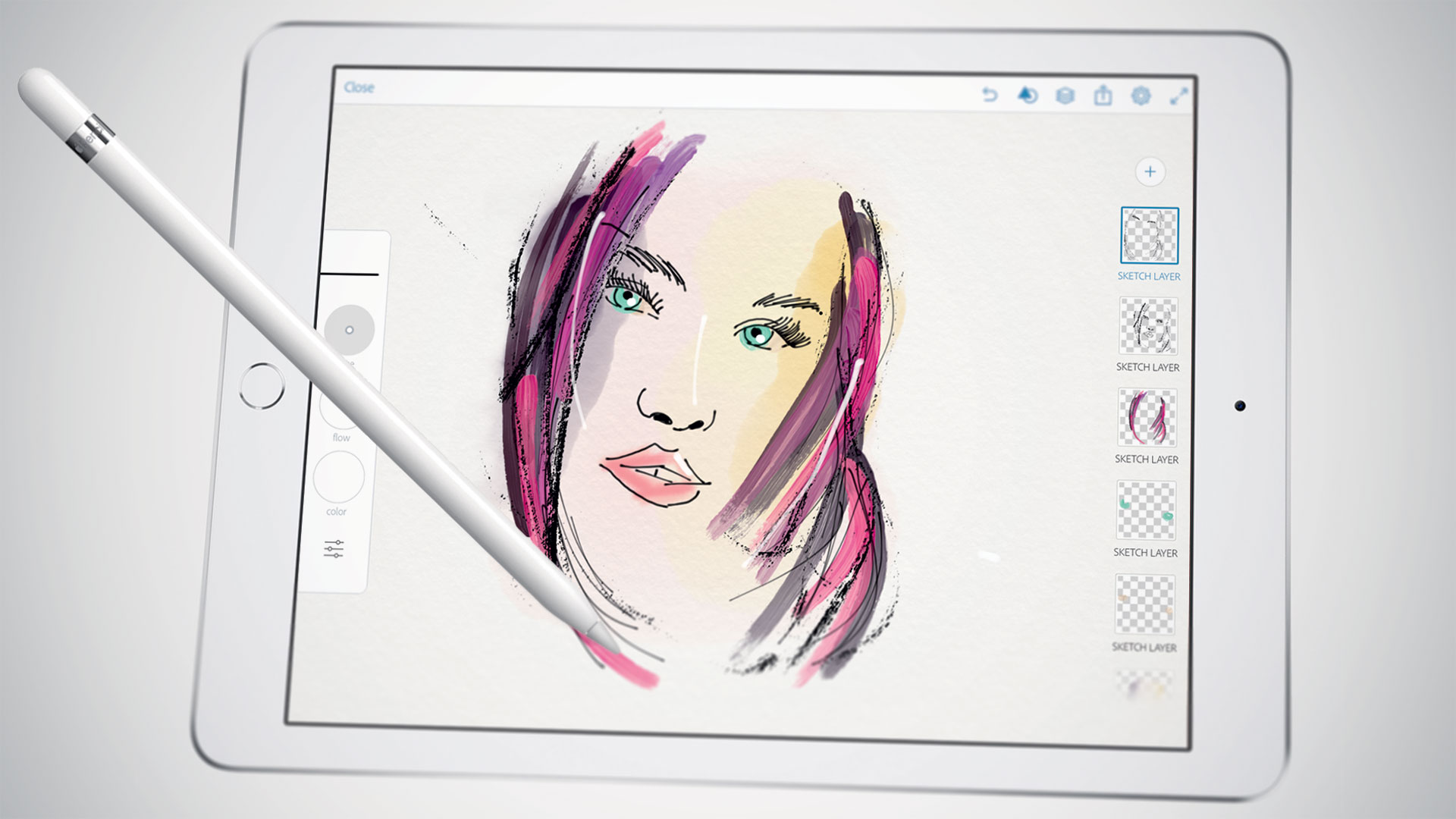
    iPad is a great tool for sketching out ideas on the go, and Forge is a digital work space for visual thinking or is an app that makes sketching process a little easier by working less like a drawing app and more like a brainstorming tool.

    Forge puts more of a concentration on brainstorming than drawing. You can save multiple drafts of drawings so you can iterate on ideas quickly and then see all those drawings on a big project board. That said, it still comes packed with a ton of adjustable brush sizes and color palettes. The app’s also free to check out, then $3.99 if you end up needing more projects.

  • Turn on Smart Life with the latest Samsung Galaxy S6 – Samsung Galaxy S6 Specs

    Turn on Smart Life with the latest Samsung Galaxy S6 – Samsung Galaxy S6 Specs

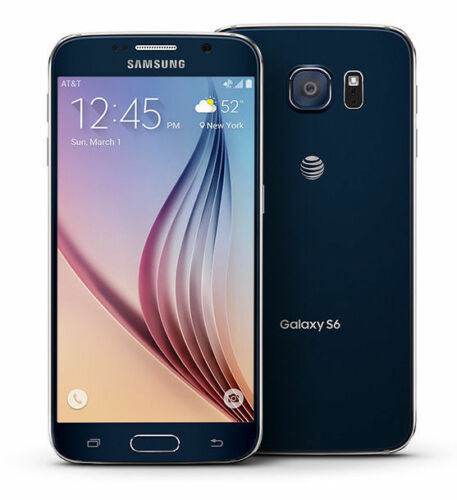
    From the front, the S6 looks a lot like the Note Edge — though this time both sides of the screen feature Samsung’s unique curve. And that dark gray metal backside looks pretty nice and is a huge step above anything that Samsung’s produced to this point. Goodbye, fake leather. We can’t say we’ll miss you. Expect to see an end to all these teases when Samsung officially unveils the Galaxy S6 on March 1st. T-Mobile’s website says there’ll be much more to share on that date.

    Preliminary Specifications

    NETWORK
    Technology: GSM / HSPA / LTE

    LAUNCH
    Announced: Exp. announcement 2015, March 1

    Status
    Exp. release 2015, Q1

    BODY
    Dimensions: 143.3 x 70.8 x 6.9 mm (5.64 x 2.79 x 0.27 in)
    SIM: Nano-SIM
    – Fingerprint sensor (PayPal certified)
    – Samsung Pay (Visa, MasterCard, AMEX certified)
    – IP67 certified – dust and water resistant
    – Water resistant up to 1 meter and 30 minutes

    DISPLAY
    Type: Super AMOLED capacitive touchscreen, 16M colors
    Size: 5.0 inches (~67.9% screen-to-body ratio)
    Resolution: 1440 x 2560 pixels (~587 ppi pixel density)
    Multitouch: Yes
    Protection: Corning Gorilla Glass 4
    – TouchWiz UI

    PLATFORM
    OS: Android OS, v5.0 (Lollipop)
    Chipset: Exynos 7420
    CPU: Quad-core 1.3 GHz Cortex-A53 & Quad-core 1.9 GHz Cortex-A57
    GPU: Mali-T760

    MEMORY
    Card slot: microSD, up to 128 GB
    Internal: 32 GB, 3 GB RAM

    CAMERA
    Primary: 20 MP, 4992 х 3744 pixels, optical image stabilization, phase detection autofocus, LED flash
    Features: Geo-tagging, touch focus, face detection, HDR, panorama
    Video: 2160p@30fps, 1080p@60fps, 720p@120fps, HDR, dual-video rec.
    Secondary: 5 MP, 1080p@30fps, dual video call

    SOUND

    Alert types: Vibration; MP3, WAV ringtones
    Loudspeaker: Yes
    3.5mm jack: Yes

    COMMS

    WLAN: Wi-Fi 802.11 a/b/g/n/ac, dual-band, Wi-Fi Direct, hotspot
    Bluetooth: v4.0, A2DP, LE, apt-X
    GPS: Yes, with A-GPS, GLONASS, Beidou
    NFC: Yes
    Infrared port: Yes
    Radio: No
    USB: microUSB v3.0 (MHL 3 TV-out), USB Host

    FEATURES

    Sensors: Accelerometer, gyro, proximity, compass, barometer, gesture, heart rate
    Messaging: SMS(threaded view), MMS, Email, Push Mail, IM
    Browser: HTML5
    Java: Yes, via Java MIDP emulator
    – Wireless charging (Qi-enabled) – market dependent
    – ANT+ support
    – S-Voice natural language commands and dictation
    – Smart stay, Smart pause, Smart scroll
    – Air gestures
    – Dropbox (50 GB cloud storage)
    – Active noise cancellation with dedicated mic
    – MP4/DivX/XviD/WMV/H.264 player
    – MP3/WAV/WMA/eAAC+/FLAC player
    – Photo/video editor
    – Document viewer

    BATTERY
    Li-Ion battery: Stand-by
    Talk time

    MISC
    Colors: Charcoal Black, Copper Gold, Electric Blue, Shimmery White

  • Feeling Intimidated by your ipad?  We found a way for you to own and control it

    Feeling Intimidated by your ipad? We found a way for you to own and control it

    Do you sometimes get afraid of your iPad device, or you feel like your iPad is in control of how you should use it? Here is a chance to take charge over your device by using the following steps.

    these lesson is to teach the user of an iPAD few of the advanced features of the iPad, such as how to organize your iPad, how to launch apps without hunting for the app icon and skipping the keyboard altogether by using voice dictation. If you are still learning the basics, be sure to visit the iPad 101 class before taking on these tips.

    iPad Control Center – Quick & Convenient Access to Common Settings on Your iPad

    Center gives you quick, convenient access to several settings on your iPad. You’ll find controls for audio, wireless options, do not disturb (DND), rotation lock and brightness, as well as handy buttons for the timer, camera and AirDrop. You’ll also find AirPlay if you have AirPlay capable devices such as Apple TV. You can call up Control Center at any time, even when the iPad is locked.

    You activate Control Center by swiping up from beneath the bottom of the screen. Place your finger below the display on the bezel or frame around the screen. Then flick up. The image above shows the entire Control Center. Let’s divide it into three sections, look more closely at each of those sections and address the controls you’re likely to use most often.

    In the left section we see playback or transport controls to play and pause content, such as a song or video. Below that you’ll find the title of the item being played or the name of the app that’s generating the sound. This part of the control center gives you a quick way to pause playback or lower volume. This is especially handy when content is “mysteriously” playing and you’re confused about the source of the noise.

    In the middle section we find three network (wireless) buttons as well as DND and screen rotation lock. These buttons are toggles. A tap turns each one on or off. When the button is white, the function is active. (Wi-Fi and Bluetooth show as active in the diagram above). Tap Airplane mode to disable all wireless connections: Wi-Fi, Bluetooth, cellular and GPS. You can use this option to comply with directions from flight attendants when aboard an aircraft. You can also use this feature to extend battery life, since each of these “radios” draw power. Just remember to turn Airplane mode off when your aircraft lands or when you need to be connected again. When Airplane mode is active, you’ll see a tiny airplane icon in the upper left corner in the status bar of your iPad.

    The crescent moon is DND (Do Not Disturb). DND silences alerts, notifications, phone calls and FaceTime calls. This feature is useful when you’re in a meeting or public performance or if you keep your device on your bed stand at night. Once again, remember to deactivate DND when you no longer need it. When DND is active, you’ll see a tiny crescent moon icon in the upper right corner in the status bar of your iPad. Lock rotation prevents your iPad screen from switching between landscape and portrait modes. So when you want your iPad to keep the same screen orientation, activate lock rotation. AirDrop and Airplay require deeper explanations. I’ll deal with those in a later article.

    On the top right right you see a slider to set screen brightness. This brightness control saves you a trip to Settings. Below you get instant access to two apps, the alarm/stopwatch/timer app and the camera app. When you need to set or measure a timed event, you can do it quickly right here. You’ll find a world clock under the timer app too. These are the same four tools found in the Clock app. The Camera button immediately activates the Camera app on your iPad. Need to snap a photo or capture a video in a hurry while your iPad or iPhone is locked? Do it from here. You may miss a great shot if you take time to swipe to unlock, enter your passcode and start the Camera app.

    To put the Control Center away without making a selection, tap the handle or touch the screen anywhere but the Control Center.

  • Sony Xperia Z3 – Cons, Pros and Why You Should Own One

    Sony Xperia Z3 – Cons, Pros and Why You Should Own One

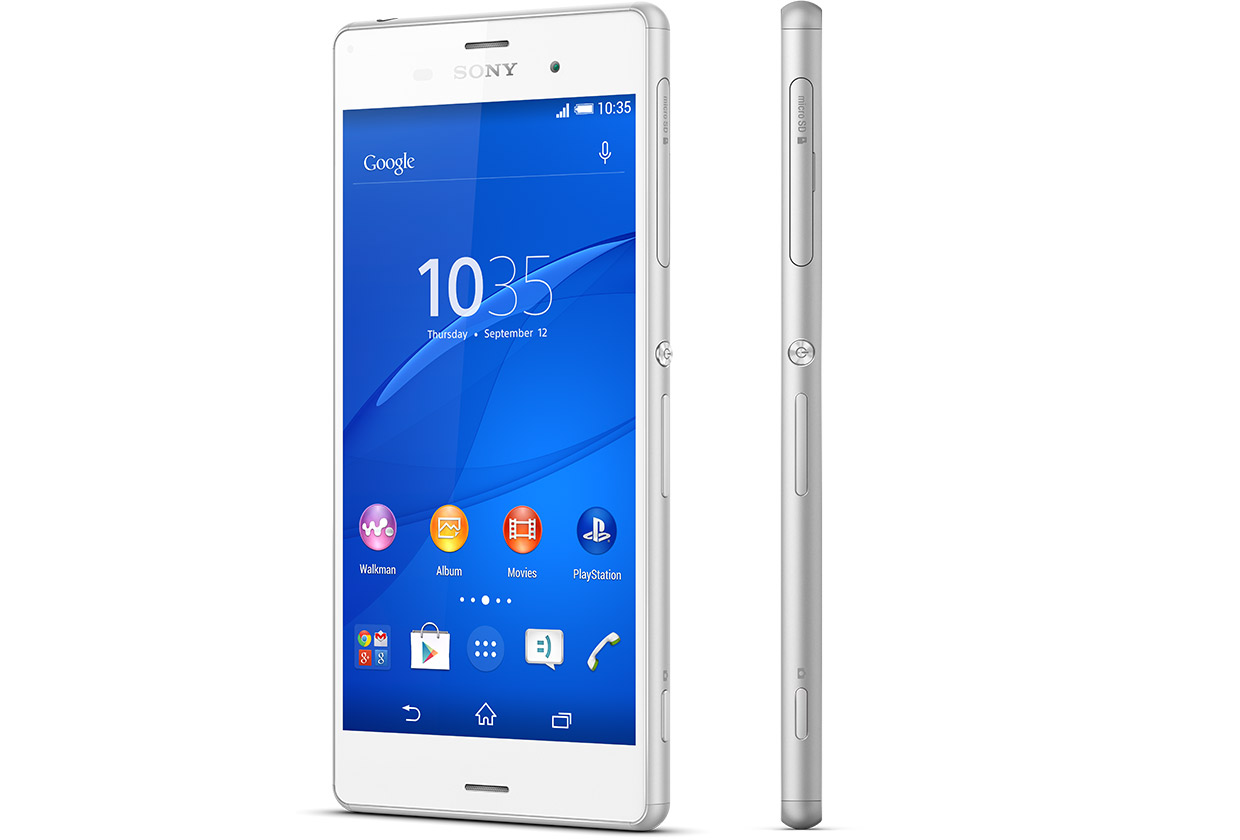
    Sony is set to make a difference in our in world today by bringing about the newest smartphone Xperia Z3.

    The high competitions between reputable phone companies had driven Sony into researching and coming up with the latest Sony Xperia Z3, that has the latest premium design and highest waterproof rating capacity. the Xperia Z3 is the premium smartphone that does more by making life more easy and comfortable.

    A premium smartphone

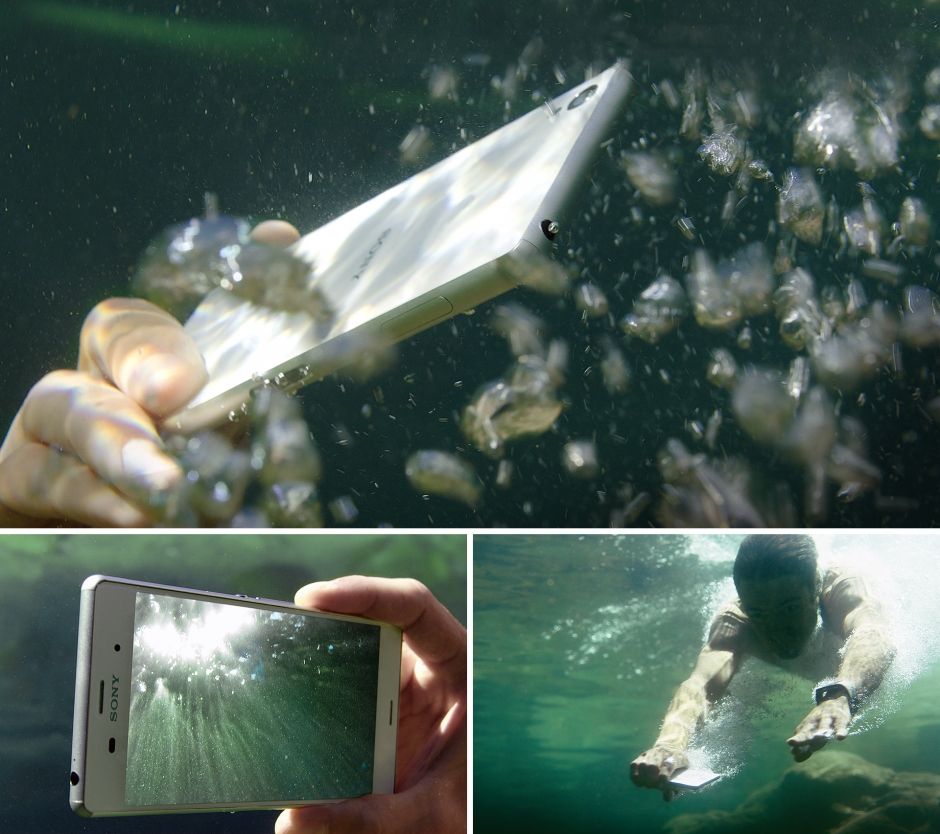
    This phone has been designed to withstand water for over 30 mins. Today you dive into pool on a hot sunny day, running when it’s raining, taking pictures in a downpour or underwater or wipe your phone when an unexpected spill occur, without considering to drop your phone or with the fear that it’s going to get damaged.


     In compliance with IP65 and IP68, the Xperia Z3 is protected against the ingress of dust and is waterproof. Provided that all ports and covers are firmly closed, the phone is (i) dust tight and (ii) protected against low-pressure jets of water from all practicable directions in compliance with IP65; and/or (iii) can be kept under 1.5 m of fresh water for up to 30 minutes in compliance with IP68. 

    Use the Xperia Z3 in the rain or in the pool

    Do you want to make great pictures and videos even better?

    You can unleash your creativity with our widest ever choice of unique Xperia camera apps. It’s our best smartphone camera yet, to make sure your memories are as vibrant as real life.

    PS4 Remote Play

    Xperia Z3 is the only phone with a PS4 game. The Xperia Z3 matches the latest gaming with the best Sony technologies. With a super-bright display and digital noise-cancelling technology, immersing yourself in your game has never been easier.


    Products Highlight


    • GSM / 4G LTE Capable
    • 20.7MP 1/2.3″ Exmor RS Camera Sensor
    • 25mm Sony G Lens + BIONZ Processor
    • 2.5 GHz Quad-Core Snapdragon 801 Chipset


    Additional Features


    • Performance battery life offering up to 2-days of regular usage
    • HighAdreno 330 GPU
    • Display Technology: TRILUMINOS Display for Mobile, Live Color LED, X-Realty for mobile, IPS display
    • Display Construction: Durable tempered glass
    • Sensors: Accelerometer, ambient light sensor, barometer, game rotation vector, geomagnetic rotation vector, gyroscope, magnetometer, step counter, step detector, significant motion detector, proximity
    • Playback/Record Supported Format: 3GPP, MP4, AVI
    • Compatible with the Sony Game Control Mount and wearable tech watches

    Sony Xperia Z3 can be purchased from Amazon or any retail store near you. To see more details or purchase this item, click here.