Tag: Alexa

  • Amazon Echo Show 8: Users will be Charged for Digital Photo Frame

    Amazon Echo Show 8: Users will be Charged for Digital Photo Frame

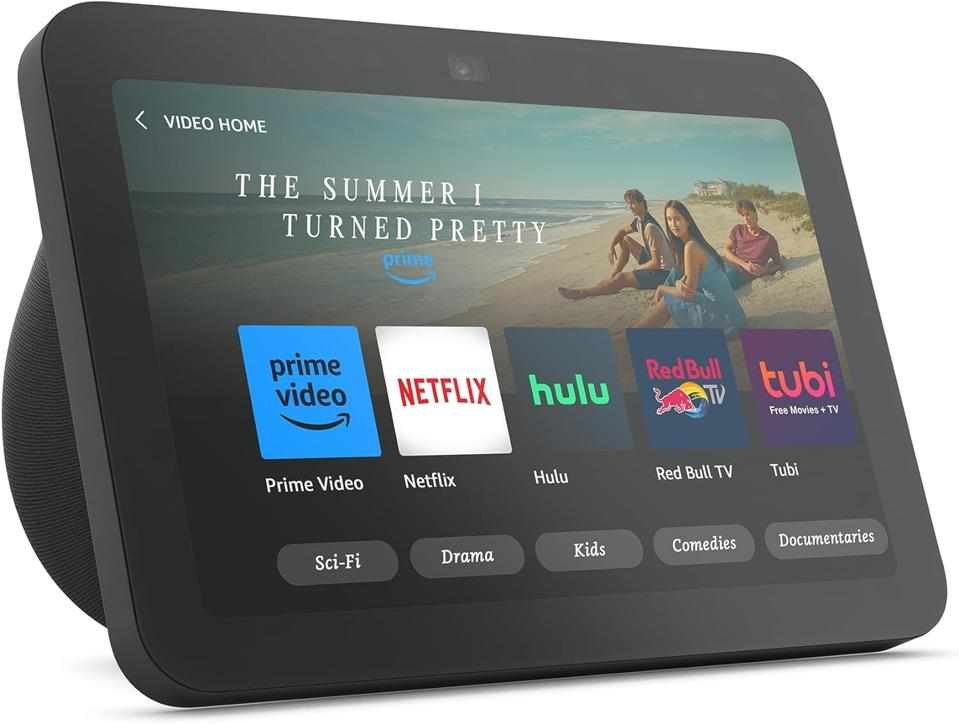
    Over the years, Amazon has introduced a range of smart speakers and Alexa-enabled devices. Among the top favorite Alexa devices is the Amazon Echo Show 8. For those unfamiliar with Alexa products, the Echo Show series includes smart displays integrated with Alexa’s capabilities. Despite being Amazon’s second smallest smart display, the Echo Show 8 boasts an impressive eight-inch touchscreen, and unlike the Echo Show 10 and 15, it is compact and very portable.

    What is the Amazon Echo Show 8 used for?

    The Echo Show 8 has quite a lot of uses; from live streaming videos to playing music, checking weather updates, connecting to home security cameras and other smart home devices, and even making video calls. The third generation of the Echo Show 8 which is yet to hit the market (possibly late October 2023) will be sold for $150. A slight increase from its predecessor—the Amazon Echo Show 8(2021 version), which was initially sold for $129.99.

    Amazon Echo Show 8 Subscription

    Amazon is introducing a new feature for its Echo Show 8. However, this added functionality comes at an extra cost. The Echo Show 8 Photos Edition, unveiled at the recent fall hardware event, carries a $10 premium over the standard model.

    This premium allows you to set your photos as the “primary home screen content.” Priced at $159.99, the Show 8 Photos Edition boasts all the same features as the third-gen Echo Show 8. The additional $10 grants you a complimentary six-month subscription to Amazon’s latest service, PhotosPlus, enabling the enhanced photo mode. PhotosPlus introduces Photo Mode, which prioritizes personal memories and images shared by your loved ones on the Echo Show 8 Photos Edition’s home screen.

    The New Echo Show 8 Features (third generation)

    It also boasts a 30-second slideshow rotation for a more impactful display around your home, along with 25 GB of storage for photos and videos from Amazon Photos. Prime members receive unlimited photo storage and an additional 5 GB for videos. Despite sharing the same hardware, the standard Show 8 does not support the new Photo Mode, which is exclusive to the Echo Show 8 Photos Edition.

    A persistent critique of Echo Show devices has been the absence of a dedicated photo frame feature, especially in comparison to Google’s Nest Hub devices, which excel in this regard. Currently, activating photo frame mode on Echo Show displays lasts only three hours before reverting to a rotating display often featuring ads and promotions, unless you navigate menus to disable it. The third-gen Echo Show 8 is available in two variants: standard and Photos Edition.

    Subscription

    Photo Mode revolutionizes the display on existing Show screens, ensuring photos take center stage indefinitely, Ramirez assures. The user interface foregrounds your photos, while information like weather and time recedes into the background.

    Subscribing to a digital photo frame service isn’t a novel concept; certain frames require payment for uploads or offer supplementary features at a cost. For instance, the Skylight Calendar offers a digital calendar with an optional $39 annual fee for a photo frame feature. They also provide a Skylight Frame with no upload fee but offer additional features like cloud backup and albums for $39 per year.

    Beyond the initial six months, maintaining Photo Mode requires a monthly fee of $1.99. Although cancellation is an option at any time, discontinuing the subscription reverts your Echo Show 8 Photos Edition to its standard configuration.

    Likewise, the popular Aura Frame comes without a fee and is $10 cheaper than Amazon’s new photo-centric Show. However, it lacks other smart display features such as Alexa voice assistance, smart home controls, and streaming capabilities.
  • Lower Your Alexa Ranks In “Light Speed”

    Lower Your Alexa Ranks In “Light Speed”

    Oh yeah folks wanna rank high in alexa to attract advitizers isn’t it? If that’s what you really want then read on to discover how to lower your alexa rank 1. Claiming your Blog and Installing Alexa Toolbar
    Claiming your blog from Alexa is the first thing you need to do. To claim your blog – you need to copy the code they will provide for you and paste it in
    your blog’s HTML.
    After doing this – Alexa can now certify you as the owner of the blog.
    Installing the Alexa toolbar will help Alexa monitor visits to your site and reduce your ranking by the number of visitors who visit your blog with Alexa toolbar installed on their web browsers.
    This is what Alexa have to say about how they rank sites worldwide –
    “The traffic rank is based on three months of aggregated historical traffic data from millions of Alexa Toolbar users and data obtained from other, diverse traffic data sources, and is a combined measure of page views and users (reach)”
    So basically, by just installing the Alexa toolbar – you’ll be getting ranking credit anytime you visit your blog or anytime Alexa toolbar-enabled visitors pay your blog a visit.
    Doing this will help Alexa to easily track your blog and update it traffic stat and rank data simultaneously. 2. Guestpost Frequently
    Writing guestpost is one strategic way to drastically reduce your Alexa ranking. Alexa firmly looks at the number of backlinks that are linking back to your blog and how authentic they are.
    The more backlinks you have linking back to your blog will automatically determine how popular your blog is and how highly placed it is on search engines.
    So, the more quality backlinks you garner to your site – the more your Alexa ranking will reduce. Guestposting is the ultimate and easiest way to build quality backlinks to your blog.
    The more frequent you guestpost on top niche blogs – the more free backlinks you get back to your blog, and the more people start coming to your blog –the more interactive and alive it becomes, which in turn will reduce your Alexa ranking. 3. Write Content Regularly
    Frequent update of any blog will make it more interactive. Sine you’re guestposting regularly now, people will start coming to your site from your guestposts on those blogs you guestposted for.
    Which is why you need to have fresh content at all times; because – visitors tends to drop off any blog that is hardly updated with fresh content from their list of blogs –to-visit.
    The more updated your blog is, the better traffic and quality backlinks you garner to your blog from search engines. And since the traffic we’re talking about here is ‘human visitors’, it will increase firstly:
    Your blogs’ traffic – when they keep coming to read your blogs’ frequently-updated content and secondly it will increase:
    Backlinks- When they share your unique posts with friends and on different social platforms, making your blogs’ Alexa rank to lower than drastically.

    4. Share on Social Media platforms

    The sub-heading has said it all. Sharing your blog posts on social platforms like Facebook, Twitter, Pinterest, StumbleUpon, LinkedIn and Google+ will increase your traffic, especially when your post goes viral on any of the social platforms just listed. Blog post going viral will increase your backlinks and bring a lot of people to your blog – making your Alexa rank to lower down. 5. Comment on Other Blogs
    Blog commenting is a wonderful backlinking strategy you can use to reduce your Alexa ranking to it lowest form. Commenting on top blogs will bring traffic from that blog to yours and backlinks as well. What you’ll do is – look for high ranking blogs in your niche (like 20 of them) and devote your time commenting on them. Unique comments are what you should always drop at the respective blogs.
    Don’t go dropping “Hi”, “I love step 2” or “Good post! – keep it up”;  – drop something that makes sense, something that will warrant people to click and come to your blog; something very informative and that corresponds with the post title you’re commenting on at that particular time. Finding dofollow blogs to comment on is a plus one for your blog; since, instead of
    just contributing your informative comments on the dofollow blog – They will also publish your blog’s recent post along side your comment.
    Doing blog commenting frequently will help decrease your Alexa rank for good. 6. Increase your Traffic
    The more traffic you generate for your blog; the more your Alexa ranking will reduce. Traffic is the most important thing Alexa uses in determining how to rank any specific site.
    Keeping your traffic at an increasing frequency will drop your blog ranking significantly; while leaving your traffic to drop will increase your blog ranking drastically. Copied from 3ptechies