Here’s some good news for owners of LG’s G3 smartphone: Your phone will be among the first to get an update to Android 5.0 Lollipop. Assuming you live in Poland, anyway.
According to the company, it will roll out an update to Lollipop to G3 users in Poland this week, and release the update “[in] other key markets in the near future.” LG didn’t specify what it means by “near future,” however, so it could conceivably take anywhere from a few days to a few months for it to make it onto LG phones here in the US. The story behind the story: Fragmentation may not be the fatal flaw that some expected it to be with Android—it’s a non-issue for many people most of the time, and it’s arguably one of Android’s strengths in that it’s resulted in a wide variety of hardware and software options. But updates are one area where fragmentation still becomes an issue. Ironically, enthusiasts who bought Google Nexus devices because of the promise of speedy Android updates are watching third-party phones land Lollipop first.
The Lollipop waiting game continues
And so we wait. Despite the limited release of LG’s upcoming Lollipop update, though, there are some signs that we’ll start to see some updates soon. On Friday, Motorola published–then pulled —release notes for its Android Lollipop update for the second-generation Moto X. This seems to suggest that Motorola is close to having an update, but you’ll have to wait at least a little longer.
But if you’re feeling daring—and have a compatible Nexus device, the Sony Experia Z, or the Samsung Galaxy S3—the folks at XDA Developers have cobbled together a jury-rigged build of Lollipop for you to try. It’s a potentially buggy build, though, and installing unofficial builds can be a challenge, so it isn’t for the faint of heart.
Google is telling developers to step on it if they want their apps ready for a November 3 release of Android Lollipop.
It’s the first specific date we’ve heard, which means the newest flavor of Android will start hitting the street in less than two weeks. The Nexus 9 preorders start shipping on that same date as well. Though as is often the case with preorders, they may show up on some people’s doorsteps early.
Google wants developers to finish tinkering and get their apps ready to go in the Play Store.
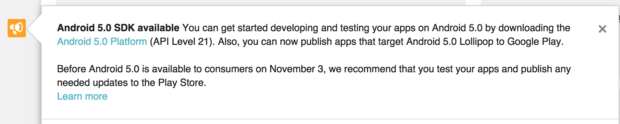
With Lollipop so close, Google is gently nagging programmers in the Google Play Developer Console (pictured) to grab the latest release of Android and get cracking. They can already upload apps and schedule them for release when Lollipop goes live.
This isn’t a guarantee that your device will get Lollipop on November 3, but at least we know when the rollout will start. Expect Nexus devices to get it first, with others manufacturers planning to follow suit. Manufacturers like HTC have promised some phones (like the One M8 and M7) will get an update within 90 days of the official release—this would be the date to start the clock. Software updates often have to be tested by carriers before they’re released, too.
Why this matters: It’s one thing to get Android 5.0 Lollipop out the door, it’s quite another to get the rest of the ecosystem ready. Lollipop is a significant rewrite of how Android looks and performs, so it will be rather funky if third-party apps look like they don’t belong.
Google is nudging developers to update their apps so the transition to Lollipop is a smooth one, which won’t happen if all of a sudden Android owners can’t get their favorite apps to work properly.
Yes, you heard right! Google has decided to put an end to the speculations of a new Android OS and officially pulled the curtain on its new OS version Android 5.0 Lollipop. Two days ago, the company announced the release of a new Android version 5.0 Lollipop on their official blog – An OS designed to “work on all your devices and to be customized for you the way you see fit.”
Android 5.0 Lollipop featured image. Credit to Google official blogspot
Android has a face only an engineer could love. At least, that’s the reputation it has earned over the past few years. Google’s mobile OS is a hotbed of mobile innovation and new technologies, but its interface doesn’t have the friendly consumer-centric design of iOS or Windows Phone. With Android 5.0 Lollipop, Google aims to overhaul this shortcoming, while baking-in a handful of nifty new features.
Google stated that “Lollipop is designed to be flexible, to work on all your devices and to be customized for you the way you see fit.” That may be true to some extent but the plastic surgery is incomplete. While iOS7 is easily identifiable by its flat bright colors and lightweight fonts, and Windows Phone carries on with Live Tiles, the Lollipop interface has no single recongnizable trait. Yes, it’s flatter and brighter, but what isn’t these days? Worse, the redesign seems pushed out the door too early. Scratch beneath the surface, and you’ll find built-in apps and menus that haven’t been udpated to the new look. There’s a lot to like in Google’s name-branded OS release, but this sweet treat isn’t quite ready to be unwrapped.
New Cosmetic Look
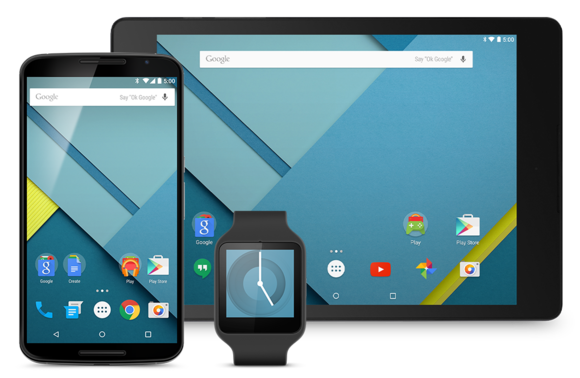
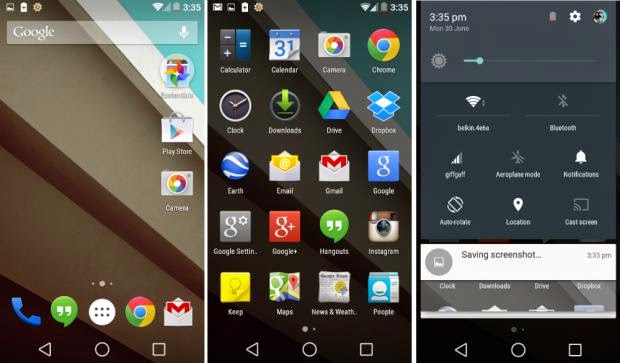
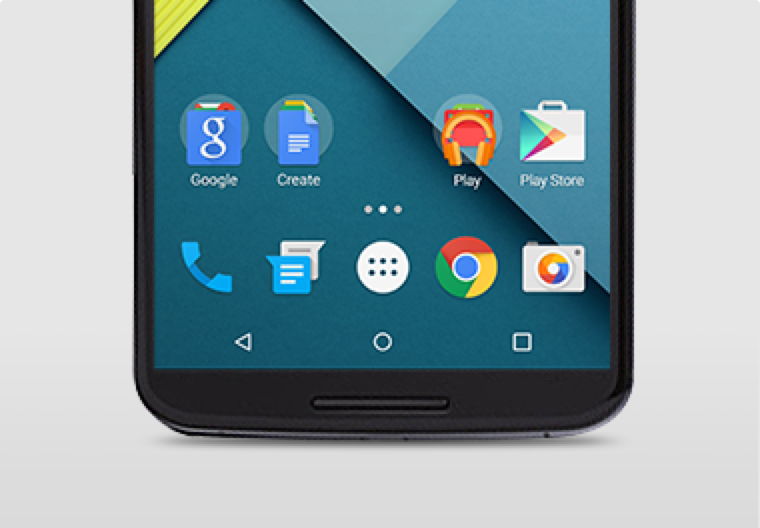
Android 5.0 Lollipop has a new vibrant look, otherwise called Material Design. Google has finally ditched the traditional look of the Android soft keys at the bottom of the screen and has adopted something rather more stylish.
New Soft Keys. Image by Knowyourmobile
New Google Now Launcher. Image by Android
The “Home” symbol is now a circle, while the multitasking menu is a square. The back button is a reversed arrow that looks like it has been lifted from a 1980’s tape player or VCR unit. It’s quite a drastic change and does take some getting used to, especially if you’ve been using Android since day one.
The new OS is also bundled with a new launcher. A clean, simple, customizable home screen that comes with the power of Google Now: traffic alerts, weather, and much more, just a swipe away.
Extensive Battery Life Saver
Android L brings with it Project Volta, Google’s attempt at giving developers more visibility on what aspects of their apps are draining the most juice. While it’s early days here, the majority of the apps we tested had not been configured to make use of Volta, it’s a solid move by the Big G, as it gives you a more accurate indication of how long your phone is going to last and what apps are sucking up most power.
Another nice touch is that when you’re charging your phone, you’re told how long it will take for the battery to be fully topped up. While we’ve perhaps not spent enough time with Android Lollipop to get a complete picture, it did seem to give our Nexus 5 more stamina than KitKat.
Finally, we have Battery Saver mode. How this works is simple, although the service isn’t anything particularly new – plenty of OEMs already build similar features into their hardware. The idea here is to conserve battery life, so when your battery hits a certain percentage, you can set the Battery Saver mode to kick in and throttle the performance of the phone to ensure that juice lasts a little bit longer.
Newly Improved Notification & Lock Screen
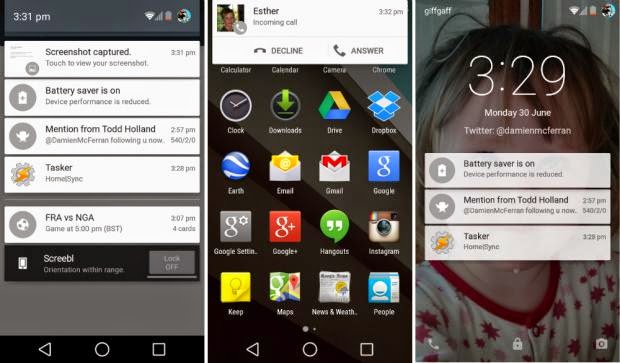
This is perhaps the biggest area of change in Android Lollipop. Notifications have undergone a complete overhaul, and now look a lot like Google Now’s card-based system. Notifications are displayed directly on the lock screen, and tapping a card allows you to unlock the device and jump straight to that area. You can even expand cards to see more details, such as a list of emails, with the phone still in its locked state (If you don’t like the idea of people being able to snoop on your personal messages then you can enable a feature which locks away the detailed info).
Newly improved notification and lock screen. image by Knowyourmobile
It’s a very clever move by Google, and one that brings you even closer to the content you need on your handset. Even if you have a security lock in place, the fact that you can tap the notification you wish to see, unlock the phone and then leap straight into the relevant information makes the whole process seem a lot smoother. You can also swipe away and dismiss notifications without actually unlocking your device.
When the phone is unlocked, notifications can be displayed by sliding a finger down from the top of the screen. Rather than showing the data in a slide-down panel, as was the case in previous versions of Android, a series of cards flow over the top of your current view, which can be seen behind the cards at all times. This “flowing” cascade of cards is set to be one of Android L’s most striking visual changes. As before though, the slide-down notifications panel has two stages: your finger swipe shows notifications, while a second swipe pulls down the quick settings menu.
While Google is giving notifications a face-lift, it’s also making them less obtrusive. If your phone is unlocked and you’re involved in another activity, such as browsing emails or playing a game, the call details appear at the top of the display. You can accept or reject the call without having to pause what you’re currently doing. Another welcome addition is the Do Not Disturb function, which you can quickly enable to stop you being bugged by your phone.
However, Lock-screen widgets have been removed entirely, so if you’re a fan of browsing your emails without unlocking your phone, then you might be disappointed.
Lollipop is Pretty Good & Tasty
From its list of features, Lollipop sounds tasty, and Android 5.0 is certainly a step in the right direction. Its interface is bright and inviting and the newly added secondary features like “People” app and a new Dialer application should help make stock Android even more consumer friendly. You also have top-level access to Google+ and Google Now, so there’s no excuse not to take advantage of Google’s most hottest features.
A lot of popular phones will get upgraded to Lollipop in the next couple months, though Google has recently launched Nexus 6, Nexus 9 and Nexus Player, all powered by Lollipop. Hopefully by the time Lollipop makes its way to your device, Google will have tied up some the loose ends—adopting the new design in all of its core apps and consolidating the myriad of new settings. Or, it can continue to torture us like it did with Kitkat by making only incremental changes to the entire Android package with each release, spacing out core app updates by months.


You must be logged in to post a comment.