Tag: mozilla

  • Mozilla Ends Marketing & Further Development of Firefox OS for Smartphone

    Mozilla Ends Marketing & Further Development of Firefox OS for Smartphone

    The buzz is real! Mozilla is putting an end to the development of Firefox OS for smartphone. 

    Following rumours and tweets in the social media, Techcrunch has published a post that confirms that Firefox OS will no longer be developed for smartphones. This unwillingness of Mozilla to continue their quest for mobile phone democracy which let you have an open, web-based framework that anyone could work with, instead of closed platforms and apps was triggered due to the team’s inability to deliver “best user experience possible”, the statement reads.

    “We are proud of the benefits Firefox OS added to the Web platform and will continue to experiment with the user experience across connected devices. We will build everything we do as a genuine open source project, focused on user experience first and build tools to enable the ecosystem to grow.

    Firefox OS proved the flexibility of the Web, scaling from low-end smartphones all the way up to HD TVs. However, we weren’t able to offer the best user experience possible and so we will stop offering Firefox OS smartphones through carrier channels.

    We’ll share more on our work and new experiments across connected devices soon.”

    Although the mobile OS was massively use in some part of Africa and South America, mostly because of its price, the brand was unable to maintain their stand in the smartphone market with other cheaper alternatives emerging from every corners of the world.

    However, Mozilla has maintained that they are still willing to “experiment” with the software on smart devices — they just won’t be the kind of devices that make phone calls.

     

  • How to Stop New Versions of Mozilla Firefox from Hanging and Lagging

    How to Stop New Versions of Mozilla Firefox from Hanging and Lagging

    COMMENT: If you find your Firefox very disappointing and even considering a change, EwtNet is offering you something that might keep you longer on the Mozilla internet browser.

    Is your Firefox lagging, hanging or extremely slow to start?

    Are you currently thinking of quitting Firefox for good? Here is something that might help you change your mind.

    Statistics by W3school shows that Mozilla Firefox has only an average of 28.2% overall desktop users in 2013 while Google Chrome in the same year had an overall average of 52.6% desktop users. Comparing the browsers stats in 2010 Mozilla Firefox comes up with an upper hand with 46.4% of overall desktop users, while Google Chrome can only boast of 15.9%. Meaning that Firefox has lost 18.2 of it’s users to Google Chrome and other browsers since 2010.

    If you are the next Mozilla faithful who is planning to Jump ship due to the slow response of your browser, resetting Firefox might change everything.

    The reset feature fixes many issues by restoring Firefox to its factory default state while saving your essential information like bookmarks and open tabs. All of your Firefox settings and personal information are stored in a profile folder. The reset feature works by creating a new profile folder for you while saving your important data.

    Resetting Firefox will remove your Extensions and themes, website-specific preferences, search engines, download history, DOM storage, security settings, download actions, plugin settings, toolbar customizations, user styles and social features.

    How to Reset Firefox to It’s Default State

    Resetting Firefox can be done through the Troubleshooting information page.

    1. Click the menu button New Fx Menu and then click help Help-29 .
    2. From the Help menu choose Troubleshooting Information.
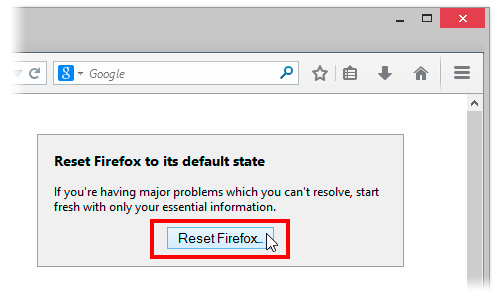
    3. Click the Reset Firefox button in the upper-right corner of the Troubleshooting Information page.Reset 29 Lin
    4. To continue, click Reset Firefox in the confirmation window that opens.
    5. Firefox will close and be reset. When it’s done, a window will list the information that was imported. Click Finish and Firefox will open.

    Another way of accessing the Troubleshooting Information page  is by entering about:support in your address bar. Hit enter to bring up the troubleshooting information page. Follow step 3-5 above to reset your browser.

    What if Resetting Does Not Work

    If after resetting your browser you still find Firefox lazying about, you might consider doing any of the following:

    • Start Firefox in safe mode to see if there are any changes.
    • Disable all plugins and extensions  one-by-one to see if any took up a lot of memory usage. Firefox memory usage sometimes can reach over 400 Mb
    • If your browser often lag while watching YouTube videos, try installing a freeware program called Firemin which apparently stops memory leaks when used to launch Firefox.
    If none of this worked, the ultimate solution is to wipe Firefox clean from your computer and installing a fresh copy of the application.

    Note: It is essential to print these steps or view them in another browser.

    1. Download the latest Desktop version of Firefox from http://www.mozilla.org and save the setup file to your computer.
    2. After the download finishes, close all Firefox windows (click Exit from the Firefox or File menu).
    3. Delete the Firefox installation folder, which is located in one of these locations, by default:

    Windows:

     
    C:Program FilesMozilla Firefox 
    C:Program Files (x86)Mozilla Firefox

    Mac:

    Delete Firefox from the Applications folder.

    Linux:

    If you installed Firefox with the distro-based package manager, you should use the same way to uninstall it – see

    Install Firefox on Linux

    . If you downloaded and installed the binary package from the

    Firefox download page

    , simply remove the folder firefox in your home directory.
    1. Now, go ahead and reinstall Firefox:
    2. – Double-click the downloaded installation file and go through the steps of the installation wizard.

    – Once the wizard is finished, choose to directly open Firefox after clicking the Finish button

    If you have a lot of Bookmarks you wish to preserve, there is nothing to fear. You can Export Firefox bookmarks to an HTML file to back up or transfer bookmarks and restore them whenever you want to.

  • Mozilla Firefox 23 Proved Flawless as IE Woes Continue

    Mozilla Firefox 23 Proved Flawless as IE Woes Continue

    In  a browser reliability test, the recent versions of Google’s Chrome and Mozilla’s Firefox are measurably less prone to crashes and errors than Microsoft’s Internet Explorer 10, a new analysis by applications testing firm Sauce Labs has found.

    If this looks like another stick to beat Microsoft’s browser with, it is worth pointing out that the firm’s study of around 55 million tests run using the Selenium platform found that all browsers showed extremely low levels of errors, in the order of 0.12 percent or lower for the “worst” performer, Apple’s Safari 6.

    On the same scale, Opera 12 scored 0.08 percent, IE10 at 0.05 percent, Chrome 27 under 0.02 percent, with Firefox was so low it effectively achieved a remarkable zero, that is to say no errors at all. IE lagged its main rivals but at levels that were already extremely low.

    As interesting as the reliability figures was the level of improvement shown by these recent versions, some only months or even weeks old.



    Internet Explorer 6 (released in 2001 with XP) and 7 (2007) had previously been the worst performers on 0.3 percent each, behind Firefox on Opera 10 (2009) and Firefox 7 (2011) and IE8 (2009) on just under 0.25 percent. It is remarkable that all of these are still used by small percentages of global browser users, but they are also aging software vulnerable to issues more serious than how often they might crash.

    “Half of the browser versions we analyzed had error rates lower than 0.07 percent. That’s pretty low, and suggests that browsers are getting more reliable as more versions come out,” said Luren Nguyen of Sauce Labs.

    Despite lagging slightly, IE had also shown major improvement over time.

    “Microsoft has really been pushing their new version of Internet Explorer as the most modern and high-performing version of IE. You’ve may have seen their nostalgia-tinged IE 10 commercial. The data we have on browser error rates suggests that their claims may have quite a bit of merit,” she said.

    The absolute level of errors in these tests is an imperfect way to measure browser reliability some might argue (can the errors be proved to be the browser’s fault and not the testing suite’s?), but the comparative measurement won’t be coincidence. Errors, which usually result in a crash of some kind, are caused by bugs in the browser code.

    Do error rates really matter? Only when they occur, which seems to be rarely these days.Credit: pcword.com

  • How to Enable/Disable JavaScript in Mozilla Firefox

    How to Enable/Disable JavaScript in Mozilla Firefox

    The introduction of mozilla firefox 23 has seen the option to disable or enable javascript removed from the primary user interface. Alex Limi earlier explained the reason behind this decision, citing user protection as their major reason.

    Most sites these days that aren’t just displaying content will fail in interesting& mysterious ways if you don’t have JavaScript enabled. For the general population, Firefox will appear broken.-Alex Limi

    A Back Door


    Well, the good news is that firefox actually left us a
    back door: the option was not entirely removed from the browser, it was hidden from the primary user interface as part of an effort to simplify the Firefox options set and to protect users from unintentionally damaging their Firefox browser.

    Show me the Way

    You can enable or disable your javascript in mozilla firefox by either using the about:config interface or through the use of add-ons.

    Using about:config Interface

    • Enter about:config in your address bar
    • Click “I’ll be careful, I promise”
    • In the search bar just at the top of the page, search for “javascript.enabled” (without quotes).
    • Right click on the result named “javascript.enabled” and click “Toggle”. 

    JavaScript is now disabled for your browser, to re-enable javascript, simply repeat the above steps.

    Using Add-ons

    The No-Script add-on will help you manage javascript setting for each page you visit or you can download the QuickJava add-on to quickly (one click for all) enable or disable javascript in your browser.

  • Mozilla released Firefox 16.0.1

    Mozilla released Firefox 16.0.1

    Mozilla released Firefox 16.0.1 on Thursday in order to fix a publicly disclosed vulnerability and three other security flaws identified after the release of Firefox 16.

    Mozilla pulled down Firefox 16 from its website on Wednesday, one day after its release, because of a vulnerability that potentially allowed malicious Web pages to read the URLs of other websites accessed by visiting users. Such behavior should normally be prohibited by the browser’s security mechanisms.
    The issue was publicly disclosed by security researcher Gareth Heyes on Wednesday. Heyes published proof-of-concept code that, when loaded from an arbitrary Web page, could determine the user name of a user logged into Twitter.
    Mozilla determined that the issue found by Heyes only affects Firefox 16.0 and addressed it in Firefox 16.0.1.
    However, the new version of Firefox also fixes a separate vulnerability discovered by a Mozilla security researcher that can result in a similar behavior. In Firefox 15 and earlier versions this second security issue can also potentially lead to arbitrary code execution.
    In addition, Firefox 16.0.1 fixes two memory corruption bugs in the browser engine that can result in crashes and can potentially be exploited to execute arbitrary code. One of these bugs only affects the Android version of Firefox when running inside custom Android firmware like CyanogenMod.
    Thunderbird 16.0.1 and SeaMonkey 2.13.1 were also released on Thursday in order to address the same vulnerabilities that were patched in the desktop version of Firefox.

  • Mozilla pulls new Firefox version over security concerns

    Mozilla pulls new Firefox version over security concerns

    Less than a day after Mozilla released Firefox version 16 to the public, the browser had to be pulled from the Web over security concerns.

    hacker

    “Mozilla is aware of a security vulnerability in the current release version of Firefox,” Michael Coates, Mozilla’s director of security assurance, explained in a blog. “We are actively working on a fix and plan to ship updates [Thursday]. Firefox version 15 is unaffected.”
    According to Coates, the vulnerability could allow a malicious website to capture a person’s Web history, which could be subsequently used for mischief.

    “At this time we have no indication that this vulnerability is currently being exploited in the wild,” Coates wrote.
    Coates did not note when Mozilla became aware of the new vulnerability, or how it was discovered. Notes from a Mozilla meeting yesterday, however, show that the company was aware of it by 11 a.m. PT Wednesday, when it told developers that a “chemspill” — Mozilla’s term for an emergency update — was necessary.

    In a precautionary move, download versions of Firefox 16 have been removed from Mozilla’s installer page. Mozilla expects an updated version of Firefox that addresses the security vulnerability to be available Thursday.
    While Mozilla has taken down Firefox 16 from its website, the security-challenged version of the browser is still available on the Internet. For example, Yahoo is flogging Firefox 16 at its website and through ads in Google search results.
    If you have Firefox 16 on your computer, it will automatically be updated with the new version when it’s available. If you’re feeling squeamish about having Firefox 16 on your machine, Mozilla recommends that you downgrade your Firefox version to the 15.0.1 release of the software.
    While the version of Firefox 16 released Tuesday missed one vulnerability, it addressed a number of others including memory corruption and memory safety hazards, a buffer overflow bug and a spoofing and script-injection flaw.
    Update: Mozilla released Firefox 16.0.1 on Thursday, which fixes these security flaws. Read the report on this new version of Firefox.

  • Mozilla Puts the Brakes on Thunderbird

    Mozilla Puts the Brakes on Thunderbird

    Mozilla may be best-known for its popular Firefox browser, but some 20 million users around the globe also know it for Thunderbird, its free and open source desktop email client.
    Just a month after the release of the latest version 13 of Thunderbird, however, a leaked email on Friday apparently forced Mozilla to admit that it’s putting the brakes on internal Thunderbird development.


    “Once again we’ve been asking the question: is Thunderbird a likely source of innovation and of leadership in today’s Internet life? Or is Thunderbird already pretty much what its users want and mostly needs some on-going maintenance?” wrote Mitchell Baker, chair of the Mozilla Foundation, in a blog post on Friday.
    Mozilla’s conclusion, it turns out, is that “ongoing stability is the most important thing, and that continued innovation in Thunderbird is not a priority for Mozilla’s product efforts,” Baker added.
    Accordingly, it has developed a plan that “provides both stability for Thunderbird’s current state and allows the Thunderbird community to innovate if it chooses,” she explained.
    Two Thunderbird Tracks
    Specifically, Mozilla will continue to provide security maintenance updates through an Extended Support Release (ESR) process similar to what it has for Firefox targeting large organizations that use the software.
    There is already a Thunderbird ESR version, and the next release of that software is due in November. “It will inherit the then-current Thunderbird feature-set,” Mozilla explains in an article on the MozillaWiki. “This release will be updated every six weeks, for the duration of the ESR cycle to ensure the best possible security and stability for organizations.”
    The non-ESR version of Thunderbird, meanwhile, will be released with the same feature set as Thunderbird ESR and will be updated every six weeks for security and stability. Unlike Thunderbird ESR, however, this version could evolve over time feature-wise if members of the community choose to work on it.
    Baker’s sentiments were largely echoed in a follow-up blog post on Sunday by Thunderbird Managing Director Jb Piacentino, who noted that Mozilla is increasingly shifting its focus towards Web and mobile projects such as FirefoxOS.
    A Final Plan in September
    Indeed, as Web-based email services skyrocket in popularity, it’s not entirely surprising to see Mozilla make this move.
    Still, as a longtime user of Thunderbird, I can’t help but feel a little sad. I hope that some passionate fans out there will pick up the project and keep it vibrant, but Baker doesn’t sound entirely confident that that will happen.
    Who knows? Maybe we’ll even see Ubuntu Linux maker Canonical step in, as at least one observer has suggested.
    In any case, Mozilla is interested in any feedback, particularly from potential developers interested in picking the project up. It aims to share a final plan of action in early September, Piacentino says. I’ll let you know if I hear any significant news before that.