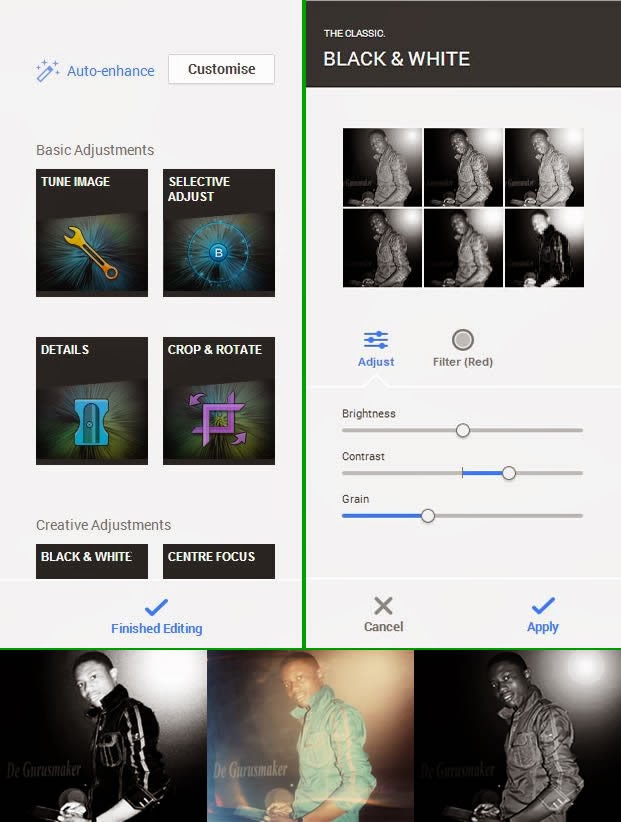
Some of us here have been enjoying the photo editing feature on Google+ since its introduction in November, 2013 but I believe a great number of you are yet to know about this feature and how to use it.
As one of it’s techniques to land you on Google+, Google has integrated an amazing photo editing tool into Google+. Though a number of you has sworn enmity with Google+ but in this case, hatred doesn’t matter: This tool will make you use Google+.
Google+ photo editing tool allows its users to crop, enhance or customize photos they have uploaded through their Google+ account, Blogger platform, Android OS or any of Google’s services that involves photos. Google+ creates an automatic album for all the photos you shared on various Google platforms. Any changes you apply on a photo will reflect on it regardless of where it’s being used or was uploaded.
To edit a photo
Login to your Google+ account.
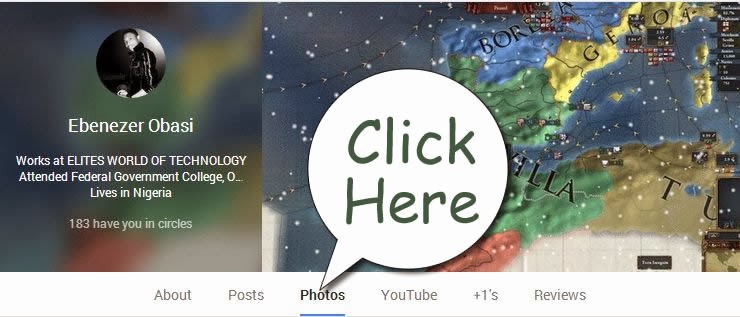
Goto your photos page.
Click on the photo you want to edit
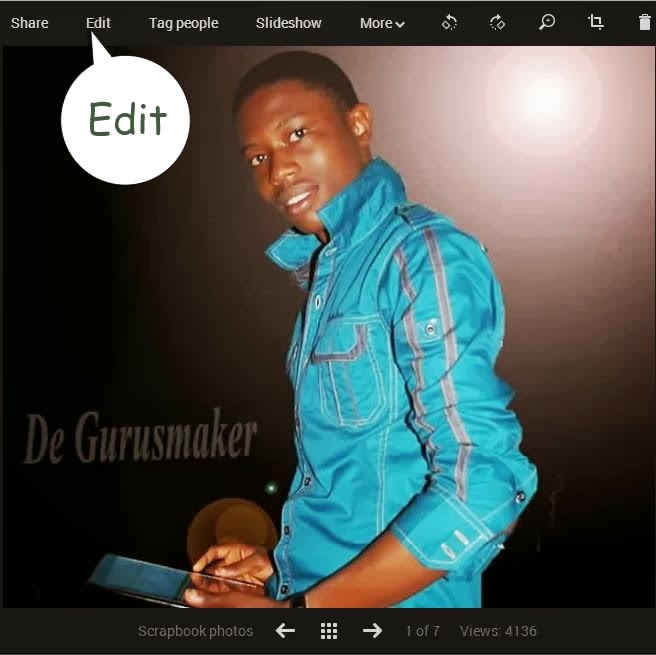
This will open a light-box, click on edit inside the light-box.
Clicking edit will bring photo editing tools to the right hand-side of the screen. For the first timers, I would advice you play around with the tool until you are able to master it’s functions.
When you are done editing, hit the finished editing link to apply your changes.
Google’s Hangout feature is once again giving Google+ users a chance to get closer to the stars, this time with a Olympic twist. The New York Times-sponsored series started on Wednesday with basketball stars Carmelo Anthony of the New York Knicks, and Chris Paul of the Los Angeles Clippers. Both are members of the 2012 USA Basketball team. The hangouts will run through next Tuesday.
Google Hangouts have been a favorite stop of politicians, celebrities, and friends.President Obama used the feature to connect with voters back in January, and musical artists the Black Eyed Peas participated in a hangout last October to chat with fans shortly before they took the stage at a concert in New York City. But with the Olympics coming up in short order, it makes sense for these hangouts to feature some of America’s top athletes, doesn’t it? That said, the list of athletes participating is heavy in the marathoner department, with three runners. Friday’s chat featured Shalane Flanagan, a long distance runner planning to participate in the Olympic Marathon. Monday’s Olympic Games Hangout will also feature another runner, male marathoner Ryan Hall, who is expected to contend for a medal in London. His Google Plus hangout begins at 2 p.m. ET. Hall will be followed by brothers Bob Bryan and Mike Bryan, the second ranked men’s doubles team in the world and widely expected to earn a medal in the Olympic tennis tournament. Their chat occurs at 5 p.m. ET Monday.
The Hangout series ends on Tuesday at 6 p.m. ET, with yet another marathoner, Kara Goucher. All chats occur from The New York Times’Google+ page. If you would like to ask a question, either comment on the post announcing the Hangout or post the question to your own Google+ wall with the hashtag #London2012Hangout. Those with the best questions will get the chance to ask them live of the athletes during the event, the paper says.
Google+ is the most recent player in the social networking field. When it first came, we reckoned it was just another attempt by Google to counter Facebook’s increasing dominance, and that it will fail like other projects from Google in the past such as Google Buzz, Orkut etc. But now, it seems that it is obviously here to stay. Google+ is a lot more than just a social networking website. The +1 button isn’t just another Like button, as you will see later in this post. Google+ is a site where you can show your interests, have connections, and build an identity. It’s a friend of webmasters, who can achieve a lot more by using this simple social site. In a way, Google is trying to provide a coherent experience to the users by introducing all their products such as Google Search, GMail, Google News, etc. And Google+ could be the glue that holds everything together to provide an uninterrupted and ‘seamless Google experience’ to the users. In this post, we will talk about how important Google+ is, and why should you use the +1 button, and how it all helps webmasters. Starting out with Google Plus First of all, you need to have a presence on Google+ for it to be of any use to you. Read our post on how to join Google+. A public profile on Google Plus is very important. You can also create a separate Google+ page or your blog or brand, just like a Facebook Page. Google+ then gives you many features. Here is a video by Google’s Developer Programs Tech Lead, Maile Ohye, who summarizes the concepts explained in this post.
Intimacy; Create Circles, follow people, and Hang out! Google introduced this great feature of Circles. Circles can come in real handy if you want to do targeted marketing. You can share your updates with any of your circles, and the people in the remaining circles won’t get those updates. This way, you can only share your personal updates with your family circle, and brand related updates to its respective circle. Also, you can set up more circles and target a specific audience, such as only men, or only women etc.
At Google+, you can follow anyone, just like Twitter. It doesn’t need confirmation. So if you would like to get updates from your favorite brand, you can simply follow them. On the other hand, if you don’t want someone to follow you, you can simply block them out!
Another great feature that inspired change in Facebook is the Hangouts feature. With this, up to ten people can start a conference video call and talk to each other. Google+ Interaction Google+ Interaction allows you to edit any of your posts at any time, kinda like a blog post. You can also edit your comments. Unlike a blog post, however, which is always pushed down as new posts arrive, your posts on Google+ will remain on the top depending on their popularity and the comments on them. The +1 Button The +1 Button is more than just a Like button you normally find on Facebook. With it, you can build your reputation. It helps you to publicly recommend and share content you find useful. Unlike the Like button on Facebook which is limited to Facebook itself, the +1 information for a content is available throughout the web on search results, ads and sites. Hence, it isn’t just confined to Google+, but it extends over to all Google products. Also, you can track and manage all your +1s, so that you can revoke them at any time if you don’t like them anymore.
The advantage of the +1 button is, you can +1 a post directly from search results. And if any of the people you know have +1’d a post, you will see it right below the search results. That way, if you +1 something, you’re indirectly recommending it to your followers.
With the +1 button, you can also get great metrics from Google Analytics and Google Webmaster Tools. The +1s data on your Webmaster Tools will help you better understand your audience by seeing what gender or age group +1’d your posts the most etc. You can also see the +1s for particular pages on your website, and the +1s that were gives for certain pages from other sites on the web.All this shows how you are building your reputation. +1 Search Integration We already talked about how you can +1 a search result right from the SERPs. But there is one thing you need to know. While searching for your results, Google takes your +1 history into account. For example, if I search for ‘earning methods’ and +1 our sister blog smartearningmethods.com, the next time I search for ‘earning methods’, SmartEarningMethods will come up in the top spots. Also, if any of my friends has +1’d another blog, that will come up too. Hence, getting +1s on your posts could prove very useful to you, since Google returns tailored results for each individual.
In search results, Google might also show who the author of a content is. This is where a profile comes in useful. If you have a profile linked to that content, Google might shows that as well, which increases your chances of getting followers.
Google+ can project your brand far beyond your own reach. Users who +1 your content are actually recommending your content to their own followers, who in turn might +1 the content, and so on. Hence, a network builds up with your content at its center. Facebook also has a somewhat similar feature, but the reason Google+ is ahead in this area is, Facebook’s shares are limited to Facebook only, where as the +1 button shows up on search results and is accessible throughout the web.
That was some basic information about Google+ and the +1 button you need to know. Google+ indeed is a a great new opportunity for you to grow your brand’s reach.