Author: Ebenezer Obasi

  • New Google ‘Feature’ now Allows you to Bookmark Image Searches for Future Reference

    New Google ‘Feature’ now Allows you to Bookmark Image Searches for Future Reference

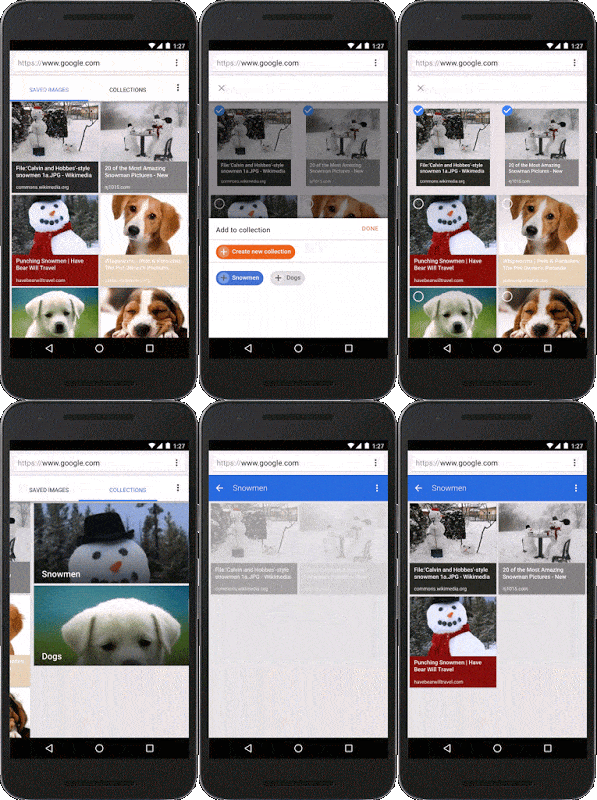
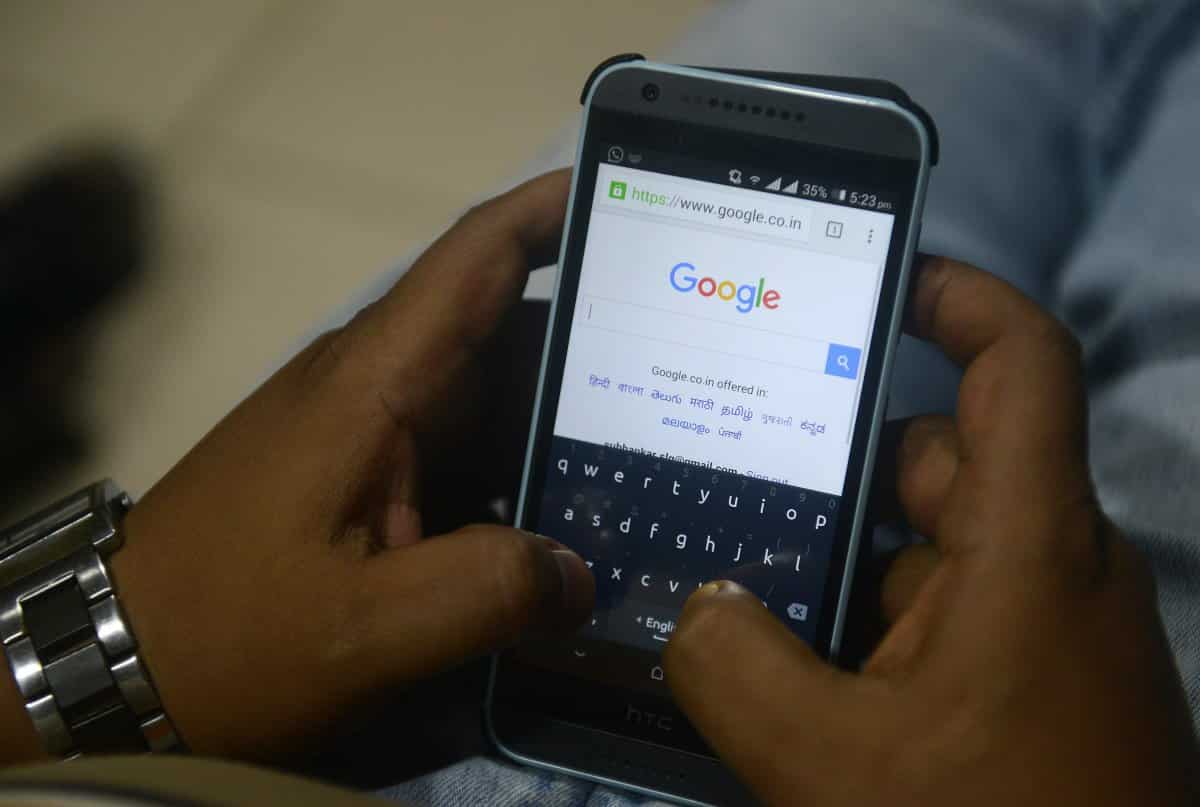
    Normally, the images you looked up on Google’s image search page usually disappears the moment you close your browser/tab. However, Google has introduced a new feature that will let you bookmark an item and add it to a collection for easy future access when next you visit the page or better still, search it directly from your mobile browser.

    The feature was announced on Google Inside Search blog yesterday, and this is how it works.

    haircuts+imagesgroups
    Let’s say you’re searching for “bob hairstyles” on Google and an image catches your eye. Simply select it and tap the star. Next time you’re at the stylist, you can easily access the picture without having to dig around or do another search.

    To star an image simply search for whatever phrase you want, pick the images you like and tap the star icon to save them. You can also organize these saved images into folders, thereby eliminating the need to run the search again later. The new feature is already available to mobile users in the US running both Android and iOS.

  • The US Government finally put an End to Phone Records Collection Program

    The US Government finally put an End to Phone Records Collection Program

    Yesterday marked the end of NSA’s program to collect bulk phone records in the United States. Advocates all over the world questioned the The US government fairness about surveillance technology and started pushing for privacy since former NSA contractor Edward Snowden exposed the program to journalists 2 years ago.

    The masses gained the government attention earlier this year with Congress passing the USA Freedom Act. But in light of the terror attacks that rocked Paris earlier this month, many hawkish lawmakers have attempted to hold off on shutting it down.

    Reports reaching us says that the Office of the Director of National Intelligence announced on Sunday that the program shut down as scheduled.

    As the program finally came to its ultimate doom, privacy advocates took a victory lap on Monday. Here are those hot takes.

    Senator Ron Wyden of Oregon wrote:

    “This program’s very existence was concealed from the American public for over a decade.  Across two administrations, senior officials from US intelligence agencies and the Justice Department repeatedly made false and misleading statements that concealed the truth about what they were doing.  These officials relied on a secret body of law to justify the mass surveillance of the American people. Fortunately, in America sooner or later the truth always comes out.  When Americans found out about this secret, unconstitutional surveillance two years ago, they were rightfully outraged.  And they made their voices heard.  The result was historic reform legislation that required the government to shut this program down.”

    Senator Mike Lee said:

    “Today both the safety and Constitutional rights of American citizens are more secure thanks to the USA Freedom Act. Not only did the USA Freedom Act strengthen the Fourth Amendment rights of all Americans by ending the bulk collection of personal data, but it also better ensured national security by closing a loophole that prevented the government from tracking foreign terrorists once they entered the United States.”

    Members of the House of Representatives also reiterated their support of the law. Bob Goodlatte, John Conyers, Jim Sensenbrenner and Jerrold Nadler issued the following statement:

    “The implementation of the USA Freedom Act represents government at its best: it is the product of a robust public debate and intense bipartisan negotiations dedicated to finding a way to protect our Constitutional rights while enhancing the safety of our country. The bipartisan law ends the bulk collection of telephone metadata once and for all, enhances civil liberties protections, increases transparency for both American businesses and the government, and provides national security officials targeted tools to keep America safe.”

    The implementation of the Freedom Act highlights that in a government marked by gridlock, there have been many major policy decisions that impact the tech industry from Washington this year. After little happened for the industry last year, 2015 brought significant reforms to the government surveillance and made net neutrality the law of the land.

  • How to Display your Favorite Websites on your Windows 10 Start Menu

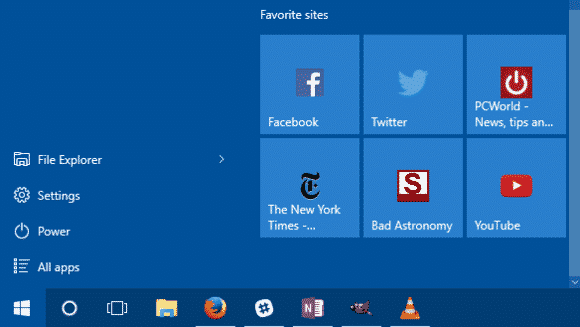
    How to Display your Favorite Websites on your Windows 10 Start Menu

    How organized is your Windows 10 start menu? Do you have everything you frequently use on the start menu? What about your favorites site? Windows 10 offers tons of choices for desktop programs, and apps from the Windows Store can be useful too. But there are still probably a few key webpages you turn to every day instead of a desktop program or modern UI app.

    Wouldn’t it be nice to have those lovely websites available to you on the Windows 10 Start menu? Here’s how to do that.

    The Edge way

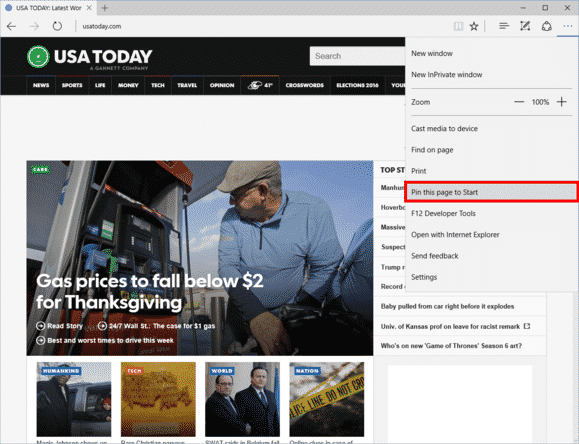
    Microsoft Edge in Windows 10 has pin-to-Start functionality built-in.
    Microsoft Edge in Windows 10 has pin-to-Start functionality built-in.

    Open Microsoft Edge and then navigate to the page you want to add. In the upper right-hand corner, click the three horizontal dots, and then from the drop down menu select Pin this page to Start. A pop-up window will appear asking you to confirm. Click Yes and you’ll find the site at the bottom of the live tile section in your Start menu.

    The downside? This method is that links will only open in Edge. Fortunately, there’s a way around that. If you want links to open in your default browser instead of Edge, you have to use a little bit of trickery, but nothing too complicated.

    The non-Edge way

    Open Internet Explorer and navigate to the webpage you want to add to Start. For our purposes, let’s say it’s Facebook.

    Once you’re on Facebook, right-click in an open space on the site and select Create shortcut from the context menu. IE will then show a pop-up window asking if you want to create a desktop shortcut. Click Yes.

    To do the same thing in Chrome and Firefox, go to the address bar and click-and-drag the icon to the left of “http,” and drop it on the desktop. The icon will either be a green lock, a rectangular piece of paper, or a globe.

    Pro Tip: In my experience, you’ll generally get better looking icons using Internet Explorer for this step.

    Next, right-click the desktop icon you just created and select Copy.

    Add to Start

    Now type “run” into the Cortana/search box. The top choice should be the Run desktop app.

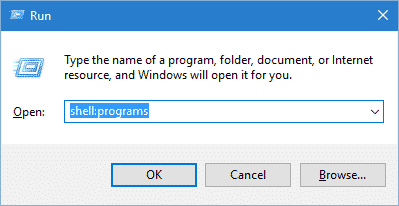
    Once Run opens, type inshell:programs, click OK, and an Explorer window will open.run-100629777-orig

    Now just right-click in the main part of that window (be careful not to accidentally open a folder) and selectPaste.

    Your website is now in Start but it’s buried in the “All apps” list. To remedy this, just clickStart > All apps and scroll down to the listing in the alphabetical list. Since we’re doing Facebook we’ll look under “F”.

    Once you find it, just click-and-drag it onto the live tiles (right) side of the Start menu and you’re done.

    After you’ve added your webpages to Start, feel free to delete your shortcuts from the desktop.

    If you’d like to take this a step further and add an entire section of websites to Start, check out our earlier tutorial on customizing the Windows 10 Start menu. This will teach you how to group tiles together.

    The catch with websites using the non-Edge method is you can’t remove them from Start through the right-click context menu. Instead, you have to type shell:programs into Run and then delete the shortcuts in the Explorer window that opens.

  • Sweden Government Unwilling to Place Ban on The Pirate Bay

    Sweden Government Unwilling to Place Ban on The Pirate Bay

    After one month of intense debate, a Swedish court has ruled that it cannot force ISPs to block their customers’ access to file-sharing site The Pirate Bay. Reports reaching us says that TheLocal.se and safeguards citizens’ access to the site, despite it being used to distribute copyrighted material.

    Pirate Bay for the past 10 years has been home for countless pirated copies of music, videos, games and softwares. Hence, triggering Universal Music, Sony Music, Warner Music, Nordisk Film and the Swedish Film Industry to try and force ISP Bredbandsbolaget into blocking the service, as it has been in many other European countries. In the UK, for example, none of the major national ISPs allow access to the page following court orders.

    However, the action was unsuccessful, at least at District Court level.

    The court found that Bredbandsbolaget couldn’t be held responsible for the copyright infringement of its customers’ actions while using the service as it doesn’t constitute a crime under Swedish law, according to the report. As such, it’s also not liable for any of the fines.

    While it could still be overturned by a higher authority appeals court, the group representing the copyright holders will have to pay the ISPs legal costs thus far, which is more than $150,000 according to TorrentFreak.

    As a UK citizen – and therefore subject to the court-ordered bans in place here – it’s nice to see an ISP’s resistance to copyright holder demands be upheld by the court, whether or not it holds in the longer term, or other countries follow suit, remains to be seen.

    SOURCE: The Local

    MORE COVERAGE: TorrentFreak

  • Students – The Real Winners of New Age Technology Trend

    Students – The Real Winners of New Age Technology Trend

    Impatience characterizes the technology sector’s approach to education. Disruption is taking place in all other sectors of society — so, why not education? I know too well, whether at Pearson or in the classroom, the challenges and frustration of developing and using digital tools that improve outcomes for students.

    But I’m optimistic. We are on the verge of a tide of smarter innovation that, if allowed to spread, will turbocharge the learning experience for students. Here are four areas worth watching:

    1. Using technology to learn from learners

    Every great digital product constantly evolves by learning from its users, adding capabilities, and improving its performance. If it’s true for your Facebook feed, then why not education?

    The potential is there, as the OECD’s recent report on Students, Computers and Learning(OECD) incidentally showed how clickstream and tracking navigation in digital readers can be used to see how students process online text and arrive at the answer in different ways.

    In practice, companies like Renaissance Learning can point to the small margins of usage (4.7 minutes) of its reading program, separating the top performing and lagging students.

    Akin to how Amazon “knows what you want before you buy it,” edtech companies are also starting to build algorithms that can make learning more personal. For instance, based on behaviors of successful students, we can begin to predict whether a learner is on track or at risk.

    This allows teachers to intervene and provide assistance when a student most needs help before they fall behind. It also allows education content creators to tweak learning material – such as the length of a video or article – based on how a student interacts with it and progresses in subsequent activities.

    Learning products should continually evolve to benefit learners and learning. Developers should make sure the best ideas from learning science, education practice, teacher feedback, and learning analytics inform those changes. The constant iteration, investment and learning baked into Teach to One provides a great example of what young companies should be emulating.

    When I look at the growing Education Innovation Clusters or the useful tips on better ed-tech pilots provided by Digital Promise, I’m excited to see the idea of continuous improvement and learning being baked into the development and effective use of digital learning products.

    2. Using technology to adapt to how students feel

    Adaptive learning technologies today address what a student knows and can do. Programs such as Knewton alter what lessons are offered based on how individual students do in solving problems and where they may have gaps in knowledge.

    However, a large body of research shows that how a student feels – frustrated, bored or confused – influences how much learning takes place. Can technology adapt to this to increase learning? DARPA thinks so–and is willing to invest in great ideas to get at what they call Full Spectrum Learning.

    We are already seeing some examples of this in lab settings. Researchers have tracked student emotions while using Crystal Island–a game-based learning environment– and used that research to predict how students will react in other learning situations  The London Knowledge Lab is exploring the creation of a tool which will allow the feedback to be adjusted based on a student’s emotional state. These efforts align with a larger body of research into how tools, such as intelligent tutors, which are aware and can adapt to student’s emotions (or “affect”) can better serve students and contribute to improved student outcomes.

    3. Building invisible assessments that are less intrusive

    Teach. Stop. Test. Teach. Stop. Test.

     It’s disruptive for teachers; it’s annoying for parents; and it’s not fair on students. We are finally seeing examples of a move away from this approach to assessment.

    Teachers can now use the enormous amounts of data gathered in rich environments, such as games and virtual reality, to understand student progress and where to go next, in a way that’s personalized for each student.

    Take SimCityEdu: Pollution Challenge – developed by GlassLab Games – where students learn how city-planning is impacted by environmental issues. As they play the game, the system is capturing their actions – such as the sequence of what they do or requests for help – and interprets patterns in data to assess how well the player understands important concepts. This helps teachers better evaluate how a student solves problems, rather than just the final product of their work.

    In time, learning games like this should decrease reliance on stop-and-test exams and provide more real-time and actionable information to teachers.

    4.  Keeping pace with technology in the classroom

    As we shift from print to digital educational tools, the volume of tools available to teachers has increased dramatically. Some tools – often apps – are rooted in research, pedagogy, and continuous improvement. Others are no more than junk food in a student’s educational diet. How is a teacher or parent to tell the difference?

  • How to Track your Windows 10 PC, Tablet or Phone Location

    How to Track your Windows 10 PC, Tablet or Phone Location

    Exactly this time last year, a Lagos based Nigerian Mr. Tunde Makhinde was able to track the location of arm robbers who invaded his property with his stolen iPad.  Still last year, an amazing iPhone app, Find my iphone, was used to track down a stolen iPad and the man who allegedly took it from underneath a family’s Christmas tree in the US. The victim on the ‘Find my iPhone’ app that sends out a signal to the device.Using his computer, the victim was then able to locate the iPad on a map, and alerted police to its whereabouts – just a few houses away.

    This is something that is almost synonymous with Apple devices. However, this time, Microsoft is taking over the spotlight with their new ‘Find My Device’ feature introduced in November Windows 10 update. The new Microsoft invention is not just for tablets or phones. Any Windows 10 device can take advantage of the new feature, including desktops and laptops.

    Although the current version of ‘find my device’ may not take your breath away or have your tablet make a sound, lock itself, erase data, or anything like that when stolen – it’s still a great feature to keep tabs of your device’s location and capture its thief – if needed.

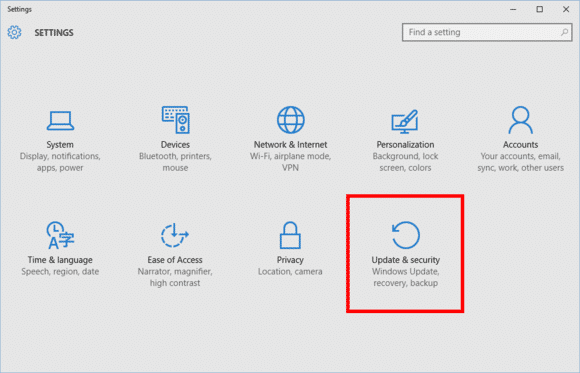
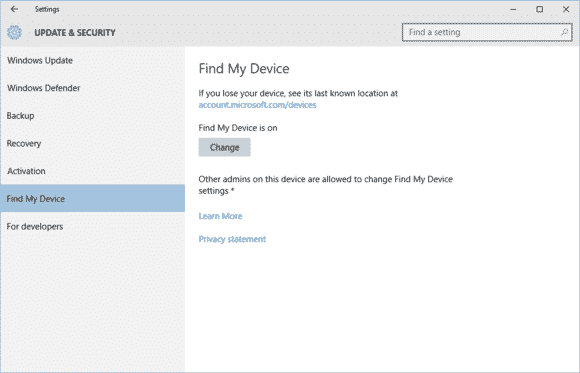
    Find My Device is buried under Settings > Update & Security.
    Find My Device is buried under Settings > Update & Security.

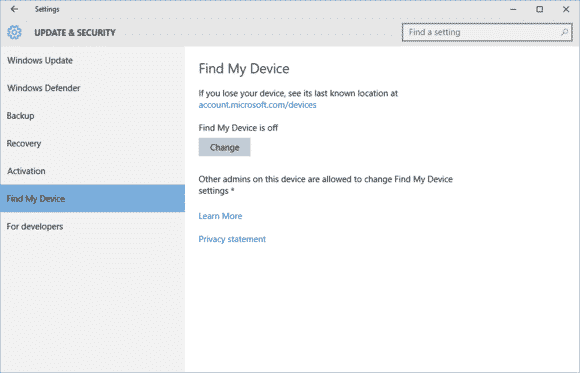
    To active this feature go to Start > Update & Security > Find My Device.

    findmydevice2-100629921-large

    On this screen you’ll see a big Change button under the heading “Find My Device is off.”

    Turn this slider to On and you’re done.
    Turn this slider to On and you’re done.

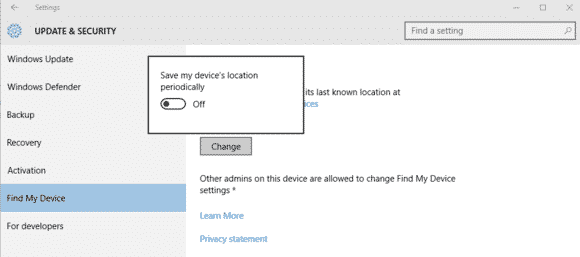
    Once you click Change you’ll see a pop-up panel that says “Save my device’s location periodically.” Turn the slider to On and you’re done.

    Find My Device is now on.
    Find My Device is now on.

    You should now see that the Find My Device screen has changed to “Find My Device is on” as seen above.

    To make sure everything is working, login to account.microsoft.com/devices with your Microsoft account and you should see the name of your PC listed under “Your devices.”

    If you don’t know the name of your device, right-click on the Start button and selectSystem. In the Control Panel window that opens you’ll see it under “Computer name.”

  • Microsoft’s Virtual Assistant, Cortana now Available for iOS

    Microsoft’s Virtual Assistant, Cortana now Available for iOS

    Looking back at my experience with Windows 10, the newly introduced Microsoft’s virtual assistant that goes by the name Cortana, was one thing I wished I had on my Macbook. Wishes are not horses, they said – but I have some good news – and some bad news too.

    The good news is that Microsoft has just release a beta version of Cortana for IOS. The bad news is that only 2000 user can try it – for now.

    According to tech blog Warenotice, Microsoft is currently distributing the Cortana for iOS beta to the first round of beta testers—presumably to those who applied for the beta program earlier this month. Warenotice received an invitation to test the app, and published a few screenshots of Cortana running on an iPhone.

    The story behind the story: Microsoft has worked hard to bring many of its apps to other platforms like iOS and Android. It’s all part of the”cloud first, mobile first” ethos the company instituted under CEO Satya Nadella. However, as our Jared Newman pointed out, the iOS version won’t be as full-featured as the Windows and Android versions, largely because of the more closed nature of the iOS universe. The iOS version of Cortana won’t have a hands-free mode, for example, so it isn’t a true replacement for Siri.

    Only 2000 testers allowed

    Unfortunately, not everyone will be able to try the Cortana for iOS beta. Microsoft is using Apple’s TestFlight beta testing system—the one Apple-sanctioned method for distributing public betas on iOS—and it has some limitations. Most notably, TestFlight allows developers to distribute a beta app to only 2000 testers, and as Warenotice points out, app beta periods can run for up to 60 days. In addition, the beta program is only open to users in the US and China.

    So if you aren’t one of the lucky few to get in the beta program, you’ll have to wait until the final release of Cortana for iOS to give it a try.

  • US spy court appoints lawyers to panel of advisers

    US spy court appoints lawyers to panel of advisers

    Under the USA Freedom Act, the panel is to advise the judge on privacy and technical matters

    A secret U.S. spy court has appointed a five-member panel of advisers as part of the reform of the surveillance of the National Security Agency.

    The presiding judges of the Foreign Intelligence Surveillance Court and the Foreign Intelligence Surveillance Court of Review have jointly designated five persons to be eligible to serve as an amicus curiae, or friend of the court, according to a notice on the FISC website.

    The appointments have been made under the USA Freedom Act, the reform legislation that was signed into law on June 2 by President Barack Obama.

    The panel consist of four lawyers and a professor of law, and does not include technology experts, although the USA Freedom Act provides for a panel of experts at the FISA court to provide guidance on matters of privacy and civil liberties, communications technology, and other technical or legal matters.

    The persons appointed to the panel are Jonathan G. Cedarbaum, a partner in the law firm of WilmerHale, criminal defense lawyer John D. Cline, Laura Donohue, a professor of law at Georgetown Law, Amy Jeffress, a partner in the the law firm of Arnold & Porter, andMarc Zwillinger, a privacy and data security lawyer.

    The reform of the NSA was taken up after revelations in 2013 by its former contractor, Edward Snowden, about widespread surveillance by the agency in the country and abroad, including its collection of bulk phone records of Americans.

    Obama promised in January 2014 significant reform of NSA surveillance, and called on Congress to authorize the “establishment of  a panel of advocates from outside government to provide an independent voice in significant cases” before the FISA court, to ensure that the court hears a broader range of privacy perspectives.

    Under the USA Freedom Act, the amicus curiae is expected to provide to the court, as appropriate, legal arguments to promote the protection of individual privacy and civil liberties, information related to intelligence collection or communications technology, and legal arguments or information regarding any other area relevant to the issue presented to the court.

    Another key part of the reform – the bulk collection by the NSA of phone metadata records of Americans- is set to end by the close of this month. The USA Freedom Act places curbs on the bulk collection program by leaving the phone records database in the hands of telecom operators, while allowing only a targeted search of the data by the NSA for investigations.

    In September, the FISC court appointed a lawyer Preston Burton as amicus curiae in connection with a specific application by the government to retain already acquired  phone records beyond Nov. 28 for use for technical and litigation purposes.

  • Top 10 messaging apps for your Android Wear watch

    Top 10 messaging apps for your Android Wear watch

    Google has certainly beefed up the feature set of Hangouts on Android Wear since launch, but just because Hangouts is the default messaging client on most Android phones doesn’t mean it’s your only option for messaging from your wrist.

    There are plenty of great messaging apps with their own Android Wear modules. Let’s check out the best ones.

    Coffee

    Coffee is an interesting app because it’s an SMS client designed exclusively for Wear. The phone side is only used for configuring settings, adding quick responses, and organizing your contacts. Messages that come in on your phone are displayed on the watch with cool quick-reply features. The watch app includes dozens of pre-configured quick-reply snippets, but you don’t have to scroll through them all. They’re split up into categories, and similar statements are grouped together so you can build a reply in a few taps. There’s also voice input, of course. All the same messaging options are available if you want to send a new message from the watch—just open Coffee and select a contact.

    Coffee (free)

    Skype

    You won’t (thankfully) be doing video calls on your watch any time soon, but the Skype app has support for messaging on Android Wear. You’ll need to be logged into the Skype app on your phone and have it running in the background, but you can reply to all your messages from the watch. Replies are handled by voice, canned responses, or by drawing an emoji.

    Skype (free)

    WhatsApp Messenger

    WhatsApp is one of the most popular messaging services in the world, as evidenced by the more than 1 billion installs it has on the Play Store. WhatsApp was fast to add Wear support after Google’s wearable platform launched last year. Messages show up in full on the watch, and you can reply by voice. There’s no dedicated wearable app to select contacts or conversations, so all your messages have to be initiated by voice.

    WhatsApp Messenger (free)

    WearResponses

    Unlike most other messaging apps for your wrist, WearResponses doesn’t try to take over for your main messaging app. Instead, it grafts new capabilities onto the existing SMS reply functionality. Android Wear still doesn’t have customized canned replies for SMS, and that’s what WearResponses provides. You simply add your desired text to the app, and when messages arrive on the watch via WearResponses, they’ll have your custom text as quick reply options. It’s best to turn off Wear notifications for your default SMS app so you don’t get duplicates. The free version limits you to three custom responses, but the $2.99 paid version is unlimited.

    WearResponses (free / $2.99)

    Wear Messenger

    The tiny screen on your watch is not very conducive to typing, but Wear Messenger makes the experience not terrible, which is probably the best you can hope for. This app has a full wearable app that can be launched at any time to see all the active conversations and type out new replies with one of several keyboard options. You have to enable the keyboard in the phone settings app—the best one is FlickKey You tap or swipe each block of letters to get the ones you want. It’s not fast, but it’s feasible to shoot off short messages entirely from the watch. Wear Messenger also has full notification text and voice replies. It will cost you a little under $2.

    Wear Messenger ($1.62)

    Facebook Messenger

    Despite the sorry state of the main Facebook app, the Messenger client is actually quite well-supported. Facebook Messenger notifications on your Android Wear watch have full text previews, as well as the ability to respond by voice or by drawing an emoji. Want something more immediate? Next to the reply button is one that just sends a thumbs up emoji.

    Facebook Messenger (free)

    Telegram

    Telegram is a lot like WhatsApp in that it serves as a data-based replacement for SMS, but it’s free, open source, and end-to-end encrypted. It was also quick to add support for Android Wear, which entails expanded notification text and the option to reply via voice or by drawing an emoji. There’s no standalone Telegram app in the Wear launcher, though.

    Telegram (free)

    Messages for Android Wear

    You want a full QWERTY keyboard on your watch? That’s what you get with Messages for Android Wear. It’s not as insane as it sounds, and this app has a ton of functionality for sending and reading your SMS. When messages arrive, you can view not only the current one, but the entire conversation via the wearable app. If you reply, there’s a voice option or a scrolling keyboard with text prediction. It’s possible to tap out a few words when speaking to the watch or using your phone isn’t an option. A $1.49 upgrade adds canned responses, a custom signature, and more.

    Messages for Android Wear (free)

    Evolve SMS

    EvolveSMS is a full-featured SMS app for your phone, but it also has a great Android Wear client. It’s available in the app list and shows you all active conversations. Replies are handled only by voice—no fancy (or awkward) keyboards here. EvolveSMS also supports expanded message text on the watch when new messages arrive, and instant voice replies. The app is free, but if you want features like backup and themes, it’s $3 via in-app purchases.

    Evolve SMS (free)

    Google Messenger

    Hangouts has SMS support, but Google also (for some reason) has a dedicated SMS app. I’m willing to forgive the overlap, though, because Google Messenger is fantastic. It doesn’t have a full Wear app in the launcher, but notifications on the watch have an expanded conversation view and the ability to reply by voice or with a quick response. It even has MMS image preview. Like all other Google apps, Messenger is free.

    Google Messenger (free)

  • Google Invests In Mobvoi, Its Android Wear Partner In China

    Google Invests In Mobvoi, Its Android Wear Partner In China

    Google’s services are not available in China, but that isn’t stopping it from making a significant investment in a company based on Chinese soil. The U.S. search giant is backing Mobvoi, a three-year-old company specializing in mobile voice technology.

    The duo already have business ties. Mobvoi is the company that Google picked to bring Android Wear, its operating system for wearables, to China, so this deal takes things up to the next level.

    The size of the investment, which is a Series C round for Mobvoi, has not been disclosed, but Mobvoi co-founder Yuanyuan Li confirmed that Google has become a minority shareholder. The deal, she said, takes the company to $75 million in investment to date. Since Mobvoi previously raised $10 million Series B and $1.6 million Series A rounds, Google’s investment is just shy of $65 million.


    Update: Mobvoi has clarified to TechCrunch that it raised previously unannounced funding rounds so the amount invested by Google is lower than the $60-65 million that we originally reported. The company declined to disclose the value of those unannounced rounds or Google’s investment when we asked directly.

    Beyond the Android Wear deal, the two companies have plenty in common. Beijing-based Mobvoi was started by ex-Googlers — CEO Zhifei Li and CTO Mike Lei are both former research scientists with Google U.S. — and Li said the company’s DNA is heavily influenced by the tech giant.

    “We used the Google model from day one,” she told TechCrunch in an interview. “We wanted to have same culture and team values. The co-operation [on bringing Android Wear to China] went really well… and [Google] showed interest and decided to make an investment.”

    On the business and product side, Mobvoi is very Googley, too.

    The company is probably best known for Chumenwenwen, a mobile voice search service very much in the style of Siri or Google Now. The service is akin to a virtual butler, allowing users to perform a range of tasks — including search, checking weather, buying items, and more — just using their voice. Li said the company has struck deals with over 100 content partners to give users access to various services via Chumenwenwen.

    Mobvoi used its natural language technology to build out its own smartwatch software, too. Ticwear is a ROM that pairs with Android Wear to make the Google-run operating system — which is kneecapped in China thanks to the government’s blockage of Google services — work in mainland China.

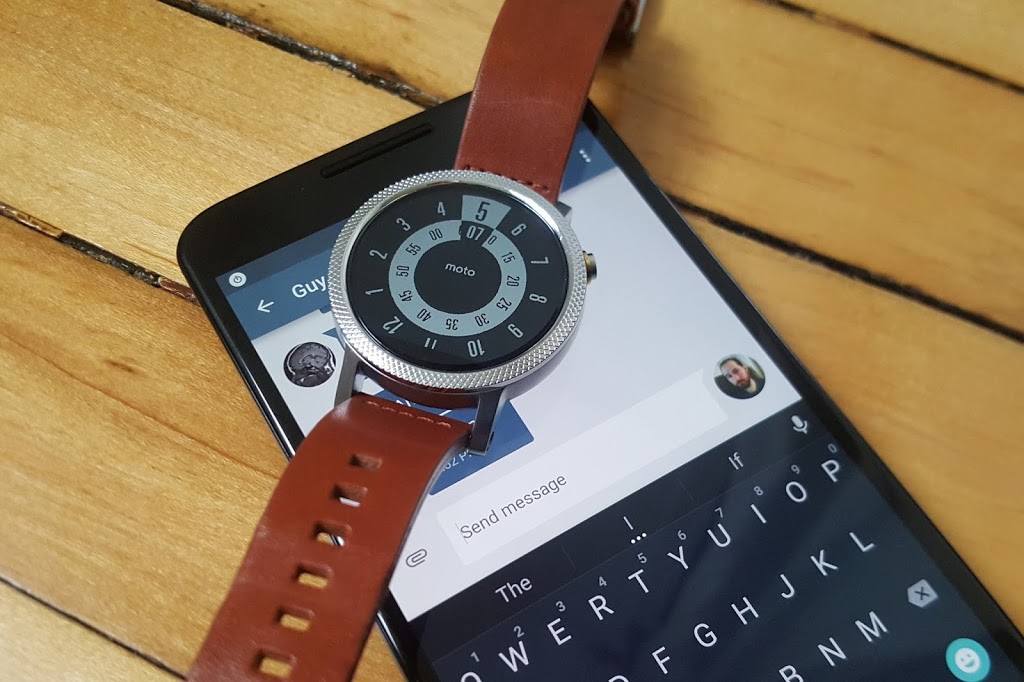
    Beyond developing smartwatch software, which works on selected watches like the Moto 360, Mobvoi went a step further and developed its own hardware: the Ticwatch. Li said the company has sold 30,000 units of the smartwatch, which is priced between $160-$190 in China, but it remains focused on software development.

    “Our goal isn’t to be a watch manufacturer, [but] we’re happy to see early adopters buying our product,” she said.

    Mobvoi said it will use its new financing to hire talent from across the world and continue refine its software services — Ticwear is updated every two weeks, much like Xiaomi’s approach to its MIUI Android software — while it is plans to dip its toes into robotics and it is also working on its own in-car software. That latter product is, again, much like a Chinafied version of Apple’s CarPlay or Android Auto from Google.

    Given the many business/tech similarities between both companies and reports that the U.S. firm is looking to open up its services in China — and in particular the Google Play Store — is today’s investment a sign that Google has found the company in China to rebuild its business there?

    Perhaps there’s even the possibility of a full Google buyout in the future?

    Not so, according to Li.

    “We value this partnership a lot, and respect Google as an investor, [but it is] still a minority investor and we will focus on what we believe in and in our products,” she told TechCrunch. “We’re not changing what we’ve planned, but there are definitely more opportunities [that will open up].”

    Google, for its part, said it has “nothing to announce at this time” when we asked about potential plans to expand the scope of its partnership with Mobvoi and reopen the Google Play Store in China.

    The company may be coy on its China plans, but today’s news is undoubted evidence that those plans do exist in some form. Google Inc and its Google Capital VC arm have made investments in China in the past — including a $5 million stake in music and video site Xuneli way back in 2007 — but this deal with Mobvoi is certainly its most strategic to date, and it sets off thoughts about what the search giant has up its sleeve.

    Note: This post has been updated to correct the name of the Mobvoi spokesperson. Apologies for any confusion.

  • New SAP Tool Aims To Fuse Content and Community With eCommerce

    New SAP Tool Aims To Fuse Content and Community With eCommerce

    It’s often said that content is king, but in a typical marketing department you have a hodgepodge of content. That could include carefully-crafted web copy, blog entries and FAQs along with user-generated ratings and reviews. For many companies, at least some of this content is spread out across the site without any real connection between the product pages and the content that supports it.

    SAP has a theory that spreading all of this content asunder makes it rather difficult for consumers to make informed decisions about their purchases — and this goes for any type of sale, whether a consumer device like a camera or something more complex like an enterprise technology purchase.

    That’s why the company came out with a new product today at the Hyybris customer conference, called SAP Jam Communities, Edition for SAP Hybris Commerce. The lack of poetry in the name notwithstanding, this product is designed to help companies create a more coherent link between all of the content related to the product and the product itself.


    Just to parse that title for you for those who aren’t familiar with SAP, Jam is the company’s community product, created several years ago to facilitate employee communication. Hybris is an ecommerce product SAP bought in 2013. Bringing the two technologies together, SAP is hoping to create sites and apps that help consumers when they need it most with an appropriate level of content, whether from the company or community.

    To achieve that, the company says the tool was built with what it called “an API-first” approach. In practice this means, that every component of the service is containerized, delivered as a micro-service and pluggable into any web page or app. This should allow customers to build a customized ecommerce experience that can adjust the appropriate amount of content, depending on the product’s complexity.

    For example, if the product involves a fairly easy buying decision like a $10 external battery for your cell phone, then simple ratings and reviews will probably suffice, but as the buying decision gets more complex, it requires a more detailed content from various sources to walk the buyer through the purchase process — like say a car or a wind turbine

    The eventual goal of any ecommerce tool is to get the visitor to buy something without leaving, and to that end, each page includes whatever content the system designers might deem necessary for a particular product, and a Buy button. In the case of a more complex product, buyers might see a button for contacting a sales person, distributor or dealer, who can provide more information and begin to push the sale further along.

    SAP is hoping that this approach has advantages over traditional content marketing and ecommerce strategies where it has been difficult to measure the ROI of the content part of the process. That’s because the content has sometimes lacked a coherent connection to the buying experience itself, often left on a disconnected landing page.

    By including more of the content within the sales process instead of in a separate place, the company believes it should make it easier to measure the effectiveness of your content against actual sales, giving companies easier access to data that had previously been much more difficult to tease out.

    SAP officials hinted that this could be the first of a series of enterprise-community products. eCommerce was a natural fit, especially since the company owns Hybris, but building the product using micro services was an intentional strategy to make the product transfer more easily to other scenarios in the future.

  • Why growing businesses MUST embrace SMS Text Marketing – Especially in 2015

    Why growing businesses MUST embrace SMS Text Marketing – Especially in 2015

    The shift from PC to Mobile is now in full swing. With “65% of all mobile phones sold being smartphones”, according to the June 2014 Ericsson Mobility Report, no longer is Mobile the future of communications, but rather the ‘present’, and the means by which information is consumed is now becoming more and more mobile.

    This change in consumer behavior is attributed to smartphone penetration, which is around 30% now worldwide and continues to widen as mobile broadband connectivity continues to gain strength. In “Q1 of 2014 alone, there were 120 million subscriptions (mobile broadband) added and by 2019 we expect that 80% of the mobile subscriptions will actually be mobile broadband,” according to Rima Qureshi, Chief Strategy Officer of Ericsson.

    This development results in an unprecedented use of mobile instant messaging (MIM), with actual number of messages expected this year to reach “50 billion messages per day on the MIM services and about 20 billion messages a day via text messaging (SMS)” according to Paul Lee, Deloitte TMT Head of Research. Tools like Webcilo Phone Number Generator are now flooding the internet, making it possible for SMS marketers to reach more mobile audience through text messaging.

    However, despite the burgeoning volumes of messages carried over instant messaging on mobile phones (MIM) “we expect globally SMS to generate more than $100 billion in 2014, equivalent to approximately 50 times the total revenues from all MIM services, according to the 2014 Deloitte TMT Predictions.”

    This disparity in revenue levels is largely due to the higher cost of sending SMS as opposed to the almost ‘free-to-use’ instant messaging apps that sprouted in the market in recent years. But, what does this information tell us?

    The decline of SMS usage among consumers is attributed to the availability of instant messaging, which is relatively free to use. And it is replacing two-way conversations, i.e. email and voice calls, only because of this cost implication.

    Despite this decline in number of outbound SMS text messages, people still continue to use it for more important, time-sensitive messaging because of its high open-rate. As the messaging platform, standard among all phones across the globe (whether basic or smartphone), SMS messaging gets through on any type of phone device, regardless of country, time zone, carrier connection, and does not require exclusive subscription as in the case of MIMs where one cannot send an instant message to another unless both of them use the same service, i.e. WeChat to WeChat, iMessage to iMessage, etc.

    This makes the mobile phone a perfect spot for marketers to reach their existing and potential customers. As casual conversations take the MIM, people will have more room for consuming push notifications and promotional information on their SMS inbox. And with ethical implementation, the email’s loss could be SMS text marketing’s gain.

  • Use Nigerian Glo Recharge Card in Benin Republic, Ghana and Ivory Coast

    Use Nigerian Glo Recharge Card in Benin Republic, Ghana and Ivory Coast

    This service has been discontinued, you can see more details here.

    If you are a Nigerian studying or residing in any west African country where Glo coverage is available, you can now recharge a Nigerian Glo card in your Glo sim in that country.

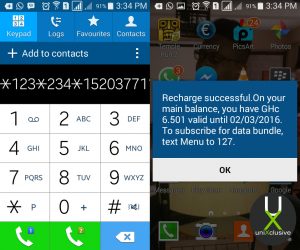
    To recharge a Nigerian Glo card on your Ghana line simply dial: *123*234*Recharge Code#

    Example: *123*234*152037711266634#

    As seen on uniXclusive.

  • Why Smart Businesses should embrace uniXclusive Discount Card Partnership Program

    Why Smart Businesses should embrace uniXclusive Discount Card Partnership Program

    Let’s take your attention on the same-sex marriage legalized in the US away a little bit and bring it to a smarter move that can take your business to a new all-time high.

    uniXclusive has introduced a student discount card that allows students to acquire goods and services at a cheaper rate (less than what normal people would pay) from top brands/companies enrolled into partnership with uniXclusive – which is where your business steps in.

    Just in case you are wondering what uniXclusive is in the last 5 seconds? It is a social network tailored towards connecting students in higher institution across Africa and abroad. Students on uniXclusive can connect with other students, chat, share moments, etc., indeed, technology has no limit.

    How does this affect your Business?

    The student discount card is a must-have discount and lifestyle card for students across Africa. Thousands of African students will use the card daily for attractive and exclusive discounts with their favourite brands.

    Top brands/companies partnered with uniXclusive discount card program receive unrivalled brand exposure and access to the student market via various channels, both on and off- line, allowing them to grow their customer base within the 7 million strong students demographic.

    Brand/Companies enrolled into the discount card partnership program stands to gain:

    • Access and exposure to thousands of uniXclusive cardholders.
    • Association with uniXclusive so students know you have their best interests at heart.
    • Exposure to student unions throughout the country.
    • Opportunities to feature in e-correspondence.
    • Opportunities to run flash-sales or competitions to the student market.
    • Data capture opportunities.
    • Exposure across social channels reaching in excess of 15K students.
    • Exposure on uniXclusive.com with a link to your website.

    uniXclusive welcomes partner applications from any national or international brand looking to target the student market through their dynamic and powerful web portal.

    Getting Started

    If you interested in partnering with uniXclusive, you can download the form here. After filling the form, scan and submit it to admin[at]uniXclusive.com

  • Tim Cook, Facebook, Google and Tech Giants throw their Support for Same-Sex Marriage

    Tim Cook, Facebook, Google and Tech Giants throw their Support for Same-Sex Marriage

    When the Supreme Court issued its historic ruling on Friday legalizing same-sex marriage across the U.S., many of the biggest technology companies embraced the decision with characteristic flair through social media, on their sites, and with tools that others could use to show their support as well.

    Companies like Google, Microsoft, Motorola Mobility, Uber and Airbnb, their chief executives, and their venture capitalist funders all took to Twitter to post celebratory tweets about the ruling, often accompanied by the hashtags #LoveWins or #Pride, plus GIFs. Companies also changed the colors of their profile pictures on Twitter to those of a rainbow, conjuring the symbol of lesbian, gay, bisexual or transgender pride.


    Twitter, which called Friday “a monumental day for equal rights,” released two new rainbow emojis, of a flag and a heart, that users could post by tweeting the aforementioned hashtags.

    Google, in a tweet, said it was proud to celebrate marriage equality. The company included a GIF of a green Android robot waving a rainbow flag.

    Given the likely impact of the Supreme Court’s ruling, and rising support among the public, same-sex marriage has become a safer issue for technology companies to support. Liberal social values in the parts of California where many tech companies are based made their reactions not much of a surprise.

    And yet the ruling comes at a time of heightened sensitivity around issues of diversity in the tech industry. Whether it’s leveraged this way or not, the Supreme Court ruling offers a convenient opportunity for companies to cast their brands in the light of openness and acceptance.

    Some executives expressed wholehearted support for the ruling. Tim Cook, the openly gay CEO of Apple, said the day marked “a victory for equality, perseverance and love.”

    Mark Zuckerberg, CEO at Facebook, said the ruling represented another step toward achieving the founding promise of the U.S. that all people are created equal.

    Josh Elman, a venture capitalist at Greylock Partners in Silicon Valley, offered this observation: “Rainbow flags going up. Confederate flags coming down. Feeling the arc of progress and humanity in how we respect each other,” referring to growing opposition to the flag associated with racism in the South.

    Meanwhile, some technology companies offered tools or features meant to celebrate marriage equality. Facebook released a filter that people could use to overlay a rainbow on their profile picture. The tool appears to have been developed for Pride events around the country this weekend; the Supreme Court ruling hastened its arrival. It can be accessed at www.facebook.com/celebratepride.

    Google, for its part, added a banner to the top of its search results page showing people holding hands and a rainbow heart. The banner only appeared for certain searches like “marriage equality” or “gay marriage.” The banner did not appear for a search for just “marriage.”

    Snapchat got in on the action, too. The photo-sharing app created a themed Live Story around the ruling, called “Marriage Equality,” which let users post photos and videos to a feed that everyone else could see. Part of the feed contained a video showing people celebrating outside the Supreme Court.

    Interest in the ruling, at least initially, appeared to be higher in the U.S. than in other countries. Google searches around gay marriage were concentrated primarily in the U.S. and Canada, according to a Google Trends report.

    But the Snapchat feed was made available to users globally, as was the Facebook rainbow filter.

  • How to turn your old phone into a basic PC with less than $25

    How to turn your old phone into a basic PC with less than $25

    Your old smartphone has a greater destiny than your junk drawer. Believe it or not, you can turn it into, say, a mini-PC or media streamer. Assuming it packs both USB On The Go support (OTG) and a Mobile High-Definition Link (MHL) compatible port, there’s a ton of additional functionality lurking under that its hood. Heck, you can even use a smartphone with a broken screen for this.

    Without further ado, here’s how to transform your old smartphone into the brains of an Android-powered PC.

    It starts with MHL ports and USB OTG support

    Many smartphones from companies like Google, Samsung, LG, HTC, and Sony—among others—ship with MHL ports and have built-in compatibility for USB OTG as well.

    The MHL port essentially adds HDMI output capabilities (with 1080p and 7.1-channel digital multi-channel audio support) and remote control functionality to the phone’s micro-USB port—the port you most likely use to charge the phone. USB OTG support gives mobile devices the ability to connect to and work with many different USB peripherals, like storage devices and input devices. Combine the two, and a mobile device with MHL and USB OTG support is capable of connecting to a discrete external display and peripherals like a keyboard or mouse.

    A multi-function cradle with OTG MHL support is the key to turning your phone into a PC. Here’s the $25 VicTsing OTG MHL to HDMI multi-function cradle we tested.

    You can see where we’re headed here.

    A number of companies have released proprietary “docks” for their mobile devices that leverage both MHL and USB OTG, but they tend to be expensive and work only with one particular device. Some third-party manufacturers have also released near-universal multi-function docks, however, that can be had for only a few bucks.

    We purchased a VicTsing OTG MHL to HDMI multi-function cradle for only $25. It works with a wide range of devices and offers dual USB ports, a couple of flash card readers, HDMI and audio output, and a charger. By connecting this simple dock to a display and a keyboard and mouse, it can essentially transform a smartphone into a basic Android-powered PC. Throw some Office-style apps on the phone and you’re ready for some actual productivity.

    Making the connections

    The VicTsing cradle’s port selection.

    Using a dock with USB OTB and MHL support is very simple and straightforward. Though we only tested it with a couple of Samsung phones (a Galaxy Note 3 and Galaxy S4) and an HTC phone (an HTC One X), the process and behavior should be similar with compatible devices.

    MARCO CHIAPPETTA

    The dock has an HDMI output that gets connected to a secondary screen. (A HDMI-to-DVI conversion cable can work if you have a spare monitor laying around). In our tests, both a cheap 1080p monitor and a Toshiba HDTV connected perfectly. The dock also requires power, which comes by way of a standard micro-USB charger; you can connect the included USB cable to a USB port on a TV or monitor, or simply use your phone’s charging cord.

    A keyboard and mouse can simply be plugged into the full-sized USB ports. You could use wireless keyboards and mice as well, as long as they use standard USB HID (human interface device) drivers. Multimedia keys and other custom keys on fancier keyboards won’t work.

    Once the physical connections are made, ensure the display is configured to use the correct input and simply slide the phone onto the dock, inserting the dock’s male connecter into the phone’s MHL/micro-USB port. When the smartphone is fully connected to the dock, its screen will go dark and output will be sent to the secondary display. Boom! Your old smartphone is now essentially an Android PC. It really is that simple!

    On the Samsung smartphones, everything we tried automatically rotated into landscape mode, which made it ideal for multi-media playback or working on office documents.

    Getting around

    Smartphones with USB OTG and MHL support will typically auto-rotate most content into landscape mode when connected to a secondary display.

    Navigating through the various menus on Android can be somewhat clunky when using a keyboard and mouse, but it’s fairly intuitive once you start poking around. Right-clicks act as a back button, while left-clicking behaves like a tap of the touchscreen. Many in-application icons and menus—even the mouse cursor itself—appear oversized on a big screen, but they function as expected.

    We wouldn’t trade an actual PC for a smartphone and USB OTG / MHL dock, but for a relatively small investment (especially if you’ve already got the monitor and input devices on hand) you can easily get some work done on one of these setups.

  • Job Vacancy: Telecom Business Operation Leader, IBM, Ghana

    Job Vacancy: Telecom Business Operation Leader, IBM, Ghana

    Are you a Bachelor’s Degree holder in IT or related courses with at least 5 years experience in Project Executive experience working multiple commercial outsourced accounts? Here is finally an opportunity to work put your abilities into work.

    IBM is looking to add to their number of employees in Ghana and you could be the just the right fit!

    The vacancy is open to qualified candidates residing in Ghana. Read on to find more about this job position.

    Job description

    • This role constructs partnerships between clients, team IBM, vendors, and subcontractor organizations and manages the implementation of these partnerships to address business opportunities for the IBM Corporation.
    • Have equally balanced skills in five key general management areas of client relationship management, consultative selling, financial / business management, portfolio / program management and team / people management. Be the primary focal point and owner for all activities on a large complex contract.
    • Accountable for meeting revenue, profit, and growth objectives and for improving overall customer satisfaction targets. Responsible to build and maintain strong client relationships at all levels with the objective of being a trusted business partner.
    • Proactively work with client to identify their business objectives, priorities and directions, critical success factors and applies this knowledge to establish and implement an Account Strategy.
    • They translate customer requirements into formal agreements, establishing specific solutions, and leading the efforts that culminate in client acceptance of the results.They have overall responsibility for their contractual cost, schedule, and contractual deliverables. They manage IBM resources and coordinates client resources to deliver services and solutions to support the client organization.
    • They are recognized for business acumen by the customer set they support. The employee leads a functional/business unit.

    Key Responsibilities

    • Has successfully managed a Telecom Business Operations/Billing operations team for a commercial outsourced customer
    • Sole customer interface to their TBO or Applications Operations group
    • Manage TBO Team and their skills building
    • Manage TBO Costs Quarter to Quarter both from capex and Open perspective
    • Issue and Risk management of a TBO operations
    • Service Level management of a TBO operations
    • Outage management of a TBO operations
    • Establish and execute a TBO governance structure
    • Interface to customers Application Development team

    Skills:

    Environment:
    Business unit, country, or international professional mastery related to operations, strategies, and objectives in leading edge or critical situations.

    Communication/Negotiation:
    Teamwork at highest levels. Plan and conduct complex negotiations reaching lasting agreements and commitments.

    Problem Solving:
    Anticipate, create and define innovative and visionary concepts in strategic environment.

    Contribution/Leadership:
    Develops and implements product, market, business, or technology strategies with executive review. Has vision of overall strategies. Contributes to policy making. Recognized as an expert and leader by members of a field, related functions, and multi -country organizations. Leads business unit, country, or international teams, conducts special projects, or manages functions or strategic departments.

    Impact on Business/Scope:
    Accountable for business unit, major country, or international projects or programs. Responsible for committing multiple resources and achieving customer satisfaction, cost, expense, revenue and other business measurements of critical importance. Responsible for quality output/value add for highly visible products, services and future business development.

    Required

    Bachelor’s Degree

    • At least 5 years experience in Project Executive experience working multiple commercial outsourced accounts
    • English: Fluent

    Preferred

    At least 10 years experience in Project Executive experience working multiple commercial outsourced accounts

    All qualified applicants will receive consideration for employment without regard to race, color, religion, gender, gender identity or expression, national origin, genetics, disability, age, or veteran status. To apply kindly visit https://jobs3.netmedia1.com/cp/faces/job_summary?job_id=SO_DEL-0706903

  • New Apple Betas Bring More Diversity To Emoji

    New Apple Betas Bring More Diversity To Emoji

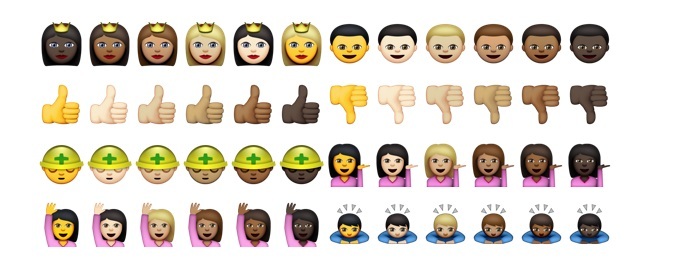
    Apple is adding more diverse emoji options to both iOS and OS X, new developer preview builds reveal. These includes various skin color options for emojis featuring people, faces, hands and other exposed skin, as well as new country flags that add to the rather limited original set.

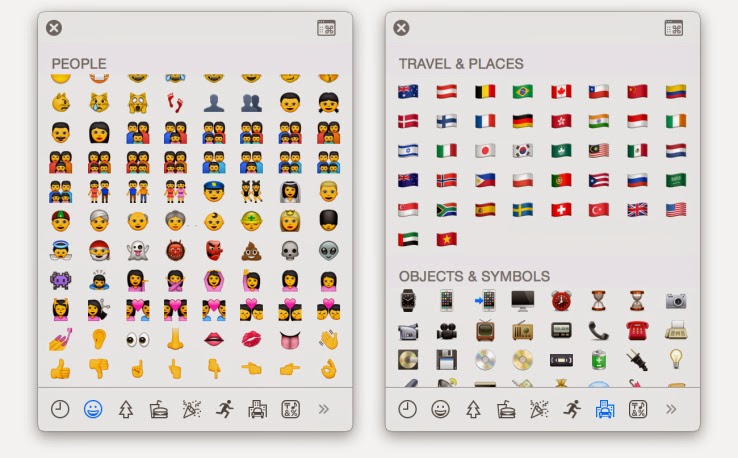
    The new skin tone options are available as alternates when a user clicks (or taps) and holds on any of the face, hand or people emoji, offering a further six skin color selections for any given enjoy in the People section where it’s applicable (meaning not the space invader, ghost, poo, skull or mask emojis, for instance).

    The additional flag set adds 32 to the total collection, including a range of new countries that go beyond a few European, Asian and North American choices. These are offered on their own in the Travel & Places section of the emoji keyboard on iOS, or special character palette in OS X.

    Apple had introduced the extended emoji support in code for previous releases, as reported by 9to5Mac back when the last preview build was made available, but the latest builds make them available to any users with access to the pre-launch software.

    More diversity for Apple emoji has been anticipated since March of last year, when MTV Act emailed Apple CEO Tim Cook and received an email from Apple’s head of PR Katie Cotton, who said that the company would be working with the Unicode Consortium to make more diversity a part of the standard Apple uses from that organization for its visual messaging icons. Unicode published a draft technical report regarding using modifiers to introduce more diversity in emoji last year, co-edited by Google’s Mark Davis and Apple’s Peter Edberg, and this looks like the result of the efforts proposed therein.

    .@kylesethgray @stroughtonsmith pic.twitter.com/UthzD4t8tM
    — Zachary Waldowski (@zwaldowski) February 23, 2015

    In addition to the diversity changes, Apple has also switched up some of the gadgetry imaging, including offering an iPhone 6 for the smartphone image, and an Apple Watch instead of a more traditional timepiece.

  • Video: An iPhone Working With An Android Wear Watch, No Jailbreak Required

    Video: An iPhone Working With An Android Wear Watch, No Jailbreak Required

    Have an iPhone, but want to use an Android Wear watch? Too bad! Google and Apple are focusing their smartwatch efforts on their own platforms for now, with all signs pointing to them avoiding cross-platform friendliness for as long as possible.

    Fortunately, the world has talented modders who can make things right. Here’s a video of the world’s first iPhone-to-Android-Wear connection, no jailbreak required.

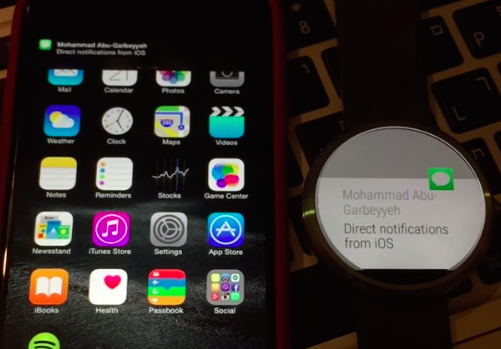
    MohammadAG, the prolific developer behind many an Android mod, has managed to get notifications to send from iOS to a Moto 360.

    The crazy part? Though MohammadAG’s iPhone is jailbroken (note the bouncing message icon on his phone — that’s a jailbreak trick), no jailbreaking is required to make this work.

    Instead, MohammadAG says the mod relies on the same ANCS protocol that the Pebble watch uses, which has been built into the iPhone since the release of iOS 7. A custom APK runs on the watch, listening for notifications. This solution limits iOS-to-Android-Wear compatibility to just basic notification support — but it’s a start, right?

    Alas, MohammadAG has yet to release the watch app to the public, so this is a one-off thing for now.

  • How to Borrow Credit from Ghana Service Providers & Payback Later – Spend Wisely!

    How to Borrow Credit from Ghana Service Providers & Payback Later – Spend Wisely!

    Often, you have heard people tell you, ‘talk is cheap’, and you begin to wonder just how much you have spent on voice calls in the last decade. Here in Ghana, talking and just talking is part of our day to day affairs. Every now and then, we have been cut short in the middle of having a conversation on the phone. You can’t complain, you simply find the nearest kiosk, purchase a credit and continue talking from where you left off.

    What if your car broke down in the middle of no-where? Your airtime balance is reading GH¢0.0, you have used your last Pesewas to say farewell to the girl you dropped off? This is where you need to borrow airtime.

    The ‘borrow credit’ service in Ghana allows you to take a small loan (in form of airtime) from your network providers and pay back later. With this service, you are guaranteed to never be stranded again as long as you have your cell phone and network coverage in your location.

    Borrow Credit from Ghana Service Providers

    Even though this offer seems irresistible, the down side is that most network providers like MTN and Vodafone takes back their loan instantly on your next recharge – with Airtel and Tigo, you will need to dial a number to pay back your loan.

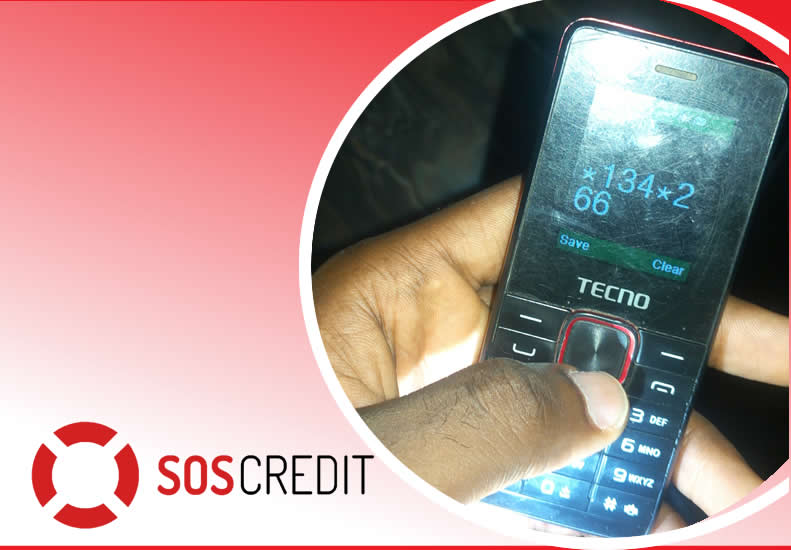
    Vodafone SOS Credit

    Get credit when you need it the most through Vodafone Ghana SOS Credit. Borrow credit when you have less than GHc 1 and pay back the next time you top up. You must be a Vodafone Ghana user for more than 15 days before you can access this service.

    It’s simple! Just dial *505# to borrow credit. You can borrow GHc 2, GHc 5, GHc 10 and GHc 15. A service charge of 10% of the requested credit is charged as commission.

    MTN Xtra Time

    Borrow MTN Airtime Credit and Pay Later

    MTN Xtra Time is a service that allows MTN customers to borrow and use an overdraft amount based on the their spend and the no. of years on MTN. To borrow more talk time on MTN Ghana, dial *506# and select your option.  

    Glo Borrow Credit

    To borrow credit on the Glo Ghana network, simply dial *5321# and select Borrow Credit. Select the amount you want to borrow and send.

    Airtel Borrow Me

    Dial  *130#. A service fee will also be charged on the amount you borrow. You can track your usage of the borrowed credits by dialing *130*10#.  

    Borrow Credit from TIGO

    Dial *188# or call 188 and follow the voice prompt to receive airtime to pay later upon recharge. Remember you need to pay for your previous loan before requesting a new one!