Search results for: “label/wordpress”

  • Top 45+ Most Downloaded WordPress Plugins in 2013

    Top 45+ Most Downloaded WordPress Plugins in 2013

    As 2013 travels down the history book EWT analysts take a look at the top 45 most downloaded WordPress plugins in the past 12 months.

    Plugins are the fundamental ingredients that constitute a flowering website – If you are running your website on a WordPress self hosted platform you will understand what I mean by that term. Whether you are managing a cooperate/business or personal/commercial blog, we all help ourselves with one plugin or the other.

    Statistics has shown that more plugins was added to the WordPress data base in 2013 than in the preceding years. Likewise, more bloggers and webmasters (esp. in Africa & Asia) uses the WordPress self hosted platform making it the most popular CMS across the globe.

    The stats are quite incredible. Aren’t they? “What plugins did they use?” remains a question we need to tackle in the following section.

    45. The Events Calendar —Download

    Helps you create and mange events easily on your WordPress self hosted platform.  

    44. Share Buttons by AddToAny —Download

     A social sharing service provided by AddToAny that adds social sharing functionality to your website.  

    43. UpdraftPlus – WordPress Backup and Restoration —Download

    This Plugin helps you perform a complete backup or restoration of your self hosted WordPress site into a cloud service such as: Dropbox, Amazon S3, Google Drive, Rackspace, FTP, SFTP, email, DreamObjects, etc.
    42. WP e-Commerce —Download

     Convert your self hosted WordPress site into an e-Commerce site with this free plugin. Customers can buy products, services and digital downloads from your website.

    41. Regenerate Thumbnails —Download

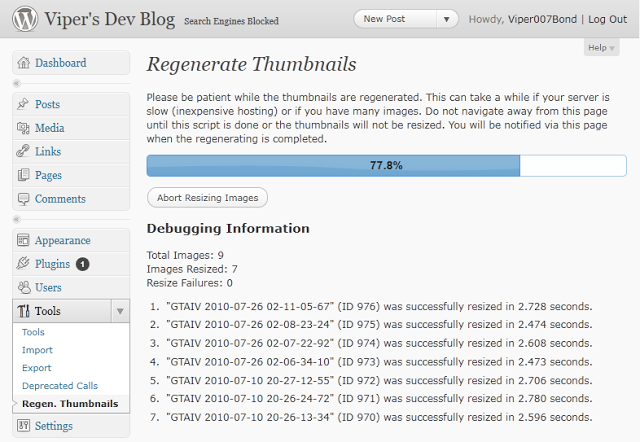
    Regenerate Thumbnails allows you to regenerate the thumbnails for your image attachments. This is very handy if you’ve changed any of your thumbnail dimensions (via Settings -> Media) after previously uploading images or have changed to a theme with different featured post image dimensions.
    40. Google Analytics for WordPress —Download

    Easily track and monitor your WordPress site stats using info provided by Google Analytics.

    39. Really Simple CAPTCHA —Download

    A dependent captcha module that can be called up by other plugins. Note: This plugin does not function on it’s own.

    38. Theme My Login —Download

    This plugin themes the WordPress login, registration and forgot password pages according to your current theme. It creates a page to use in place of wp-login.php, using a page template from your theme. Also includes a widget for sidebar login.

    37. Disable Comments —Download

    This plugin allows administrators to globally disable comments on any post type (posts, pages, attachments, etc.) so that these settings cannot be overridden for individual posts. It also removes all comment-related fields from edit and quick-edit screens. On multisite installations, it can be used to disable comments on the entire network.

    36. BuddyPress —Download

    Just stay where you are, you can have it all – BuddyPress adds a social networking functionality to WordPress site. Users can create profiles, post messages, make connection, create and interact in groups. In the part 1 and part 2 of ‘How to Create a Social Network with WordPress’ we covered the basics of setting up this plugin.

    35. WP-Statistics —Download

     Track visitors and visit statistics of your WordPress site.

    34. Advanced Custom Fields —Download

    Advanced Custom Fields is the perfect solution for any wordpress website which needs more flexible data like other Content Management Systems.
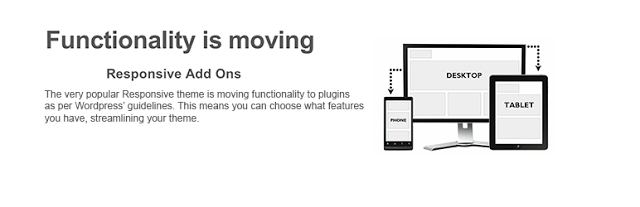
    33. Responsive Add Ons —Download

    In compliance with the recent WordPress theme guidelines, this plugin ensures that themes functionality is limited to design, layout and structure and that anything that falls outside of this is developed as a plugin.
    32. ShareThis: Share Buttons and Social Analytics —Download

    Adds the ShareThis share buttons to your website. Also allows you to monitor how often people share your contents.

    31. Yet Another Related Posts Plugin (YARPP) —Download

    Yet Another Related Posts Plugin (YARPP) displays pages, posts, and custom post types related to the current entry, introducing your readers to other relevant content on your site.

    30. Fast Secure Contact Form —Download

    Easily create and add forms to WordPress. Fields are easy to add, remove, and re-order. The contact form will let the user send emails to a site’s admin, and also send a meeting request to talk over phone or video.

    29. WP Multibyte Patch —Download

    Multibyte functionality enhancement for the WordPress Japanese package. 日本語の説明を読む

    28. WP-PageNavi —Download

    Replace ‘older’ and ‘newer’ links with numeric page navigation system.

    27. Comprehensive Google Map Plugin —Download

    A simple and intuitive, yet elegant and fully documented Google map plugin that installs as a widget and a short code.

    26. Wordfence Security —Download

    Wordfence Security is a free enterprise class security plugin that includes a firewall, virus scanning, real-time traffic with geolocation.

    25. Breadcrumb NavXT —Download

    This plugin generates locational breadcrumb trails for your WordPress powered blog or website. These breadcrumb trails are highly customizable to suit the needs of just about any website running WordPress.  

    24. Quick Cache (Speed Without Compromise) —Download

    Speed your website loading with this easy-to-use cache plugin.
    23. MailPoet Newsletters (formerly Wysija) —Download

    Send newsletters, post notifications or autoresponders easily from your WordPress site. 

    22. W3 Total Cache —Download

    Similar to Quick Access, W3 Total Cache plugin improve your site speed and delivers your contents faster.

    21. Meta Slider —Download

    Meta Slider is a flexible, easy to use slideshow administration plugin that lets you choose between 4 jQuery sliders.

    20. Broken Link Checker —Download

    This plugin will check your posts, comments and other content for broken links and missing images, and notify you if any are found.

    19. bbPress —Download

     A free plugin that will install forum functionality into your WordPress site.

    18. Better WP Security —Download

    This plugin helps you secure your WordPress site.

    17. Facebook

    Add Facebook social plugins and the ability to publish new posts to a Facebook Timeline or Facebook Page. Official Facebook plugin. 

    16. WP Super Cache —Download

    This plugin generates static html files from your dynamic WordPress blog. After a html file is generated your webserver will serve that file instead of processing the comparatively heavier and more expensive WordPress PHP scripts.

    15. Google Analyticator —Download

    Adds the necessary JavaScript code to enable Google Analytics in your WordPress Site.

    14. Contact Form —Download

    An easy to use plugin that let you implement contact form to any page or post in your blog.

    13. Captcha —Download

    This plugin allows you to implement super security captcha form into web forms.  

    12. BackWPup Free – WordPress Backup Plugin —Download

    Schedule complete automatic cloud backups of your WordPress site.  

    11. TinyMCE Advanced —Download

     Beef up the WordPress TinyMCE content editor with a plethora of advanced options. 

    10. Ultimate TinyMCE —Download

    Adds advance editing functions to the WordPress WYSIWYG editor.

    9. WooCommerce – excelling eCommerce —Download

    Convert your WordPress site into an online store with this simple plugin.

    8. NextGEN Gallery —Download

     Create decent galleries with this free plugin.

    7. WPtouch Mobile Plugin —Download

    Want to create a mobile site on WordPress? Here is your chance. WPtouch Mobile is a free plugin that helps you setup a mobile site on WordPress with 1,2,3 touches.

    6. Akismet —Download

    A war has long be declared between spammers and webmasters. This plugin helps you fight spam on your comment section.

    5. WordPress Importer —Download

    Import posts, pages, comments, custom fields, categories, tags and more from a WordPress export file. 

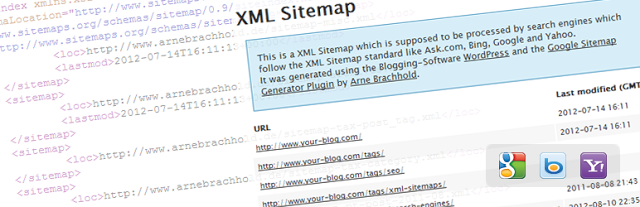
    4. Google XML Sitemaps —Download

     This plugin will generate a special XML sitemap which will help search engines such as Google, Bing, Yandex, etc crawl your site faster and more effectively.
    3. Jetpack by WordPress.com —Download

    Supercharge your WordPress site with powerful features such as: Email subscription, CSS editor, Hovercard popups, etc previously only available to WordPress.com users.

    2. All in One SEO Pack —Download

    No SEO knowledge is required – All in One SEO Pack is a WordPress SEO plugin to automatically optimize your WordPress blog for Search Engines such as Google. Even as a total novice, you can use custom titles, custom url, advanced canonical URLs, fine tune page navigational Links on your blog posts. This plugin also helps you avoid duplicate articles submitted to you as a guest post.

    1. Contact Form 7 —Download

     Let your customers, clients or readers contact you from your WordPress site. Contact Form 7 is an Ajax contact form with easy to use interface. Can easily be embedded into any page.

    +1 WordPress SEO by Yoast —Download

    Sitting at the top of our list is ‘WordPress SEO by Yoast’ plugin. This plugin helps you improve your WordPress SEO: Write better content and have a fully optimized WordPress site. Though the functions are a bit similar to that of All in One SEO Pack, the premium supports offers more.


  • Cloudup has been Acquired by Automatic

    Cloudup has been Acquired by Automatic

    Automatic, the renown owners of WordPress.com have taken a great step to improve blogging on WordPress.com by acquiring Cloudup.

    Cloudup is a fast, dead-simple way to share and view files on any platform (Without The Folders). In today’s world of email, social networks, SMS, chat applications and cloud services, there are plenty of ways to share share a file, folder, photo or video. And as intelligent devices and cloud computing infrastructure proliferate, and processing power and capacity improve, we expect file transfer and sharing to be speedy — and simple. Everything is about “real time” and accessibility these days (not that we’re complaining, but thanks to Twitter). Yet, file-sharing still isn’t quite there. Even with all the options — whether it be the Skypes, Facebooks, Google Drives, WeTransfers and YouSendIts of the world or the Dropboxes, etc. — We’ve still got one eye out for a better way. (Here’s xkcd putting a fine point on it.) The file sharing service to end all file sharing services.

    Dropbox has gotten the closest, gobbling up a ton of mindshare as a result, but its layout and presentation is more storage service than a simple sharing tool. In other words, you may store your photos there, but it’s probably not where you’ll go if you want to show them off. On the June 21st, 2013, CloudUp became the latest to join a younger group of services that are pushing the conversation forward when it comes to speed and simplicity — and nibbling at the heels of the incumbents.

    What’s cool about CloudUp (and distinguishes it from most apps out there) is that it focuses on converting the design of file transfer from one that makes it clear that “THIS PRODUCT IS JUST A UTILITY” to one that’s elegant and minimalist, Jony Ive-style. But the minimalism isn’t there for the sake of itself (sorry hipsters), it’s meant to bring more of the focus to consumption — to make the content the focus, not the app itself.


    Today, Cloudtop announced on their official blog that they have been acquired by Automatic (the owners of WordPress.com).

    “Today we are extremely excited to announce that Automattic, the brilliant company behind WordPress.com, has acquired Cloudup.”

    This is followed up by a blog post confirming the story on WordPress.com Blog.

    “Today we’re delighted to announce we’re acquiring Cloudup, a company that’s as fanatical about these core experiences as we are. Cloudup‘s built some fantastic technology that we can’t wait for you to try out.”

    Not only will this new service improve the quality of bloggers on WordPress.com, Automatic is set to spread their tentacles accross other services owned by the company. This means that you can as well use this service in your self-hosted wordpress blog (WordPress.org) as long as you are using the jetpack plugin.

    Credits:techcrunch ImageCredit:Cloudtop

  • EWT Quick Guides to Arvixe Hosting

    EWT Quick Guides to Arvixe Hosting

    Recently recognized as the 10th fastest growing company in the IT sector by Inc. Magazine, Arvixe has gradually made its name in the web development world.

    Notably, the Arvixe Web Hosting Company has been the most recommended hosts, offering reliable but affordable hosting plan for Oxwall and WordPress hosting. It is therefore no surprise at the number of contacts I receive everyday asking for guides on how to setup their Arvixe hosting account.

    Some Unique Features of Arvixe

    Arvixe is largely popular with WordPress users partly because it fully adheres to all WordPress hosting system requirements (basically the same story with every other cms out there). Also the compatibility issues with Joomla 3.0 has been fixed as it is now fully compatible with Joomla 3.0!

    The prices are quite affordable, here at EWT we have rounded up a few coupon codes that will enable you to purchase cheap hosting services from Arvixe (as low as $0.01 for the first month and 20% discount for every purchase) you may check it out at the Arvixe coupon page.

    Less I forget, it is unlimited data transfer, 99% uptime, unlimited disk space, 1 free domain name for life, you know them right? Without wasting much time lets go down to the main business:

    Getting Started

    The moment you click here should take you to the Arvixe landing page. Kindly follow the steps below to setup your hosting account.

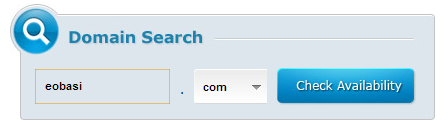
    • Domain Search: On the top-right hand side of your screen, you will see a box label ‘Domain Search’. This is where you look up domain names. Kindly type a domain name (e.g. www.yourwebsitereg) into the box and select a TLD (e.g. .com, .net, .org etc) from the dropdown just beside the input box.
      Now click on the ‘Check Availability’ button. Please Note that the same method is applicable for both new domain registration and domain name transfer. The next page contains a list of TLD available for registration in regards to your search. If a domain name is available for registration, a Register button is placed just under it, you can simply click on this button to register the domain name. A Not Avail button is used to denote that a TLD is neither available for new registration or for domain transfer.
    • Domain Transfer: A Transfer button is placed below a TLD to signify that the domain name is not available for new registration but can be transferred to the Arvixe hosting account. You can also use this option if you are trying to transfer your domain name from a different domain name provider to Arvixe (Remember that Arvixe allows you to register 1 free domain name for life), so it’s quite a tempting offer for everyone.

    • Now when you are done by selecting the options that fits your motives, you can proceed to the billing center by clicking on the next button at the top-right of the screen.
    • Fill the required information on the billing form and click the next button.
    • Select your hosting plan, eg. Personal Class, Personal Class Pro etc.
    • From the drop down option choose a your model of payment e.g. 2years, 1year or payment on a monthly basis. Then click on Add to Cart to continue.
    • The next page that comes up is where you select the services your opting for. You can choose whether you want to register a new domain name, transfer a domain name to Arvixe or simply point your domain name to Arvixe hosting. To do that, simply select the radio button corresponding to what you want to do and fill in your login details. Check the auto renew box if you want your account to be automatically renewed after expiration. Finally, click on next.
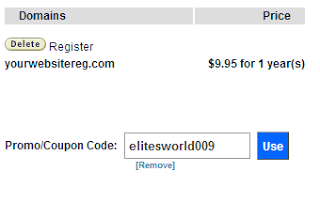
    • Using Coupons: The coupon codes one way or the other minimize the cost of transaction for your hosting account. (Here at EWT we generate lots of coupon codes that offers you up to 20% discount for every purchase you make on Arvixe. You may check out this page for free Arvixe coupon codes). To use Promo/Coupon Code, paste your coupon code in the box at the top-right hand side of the screen and click use Note that to use a coupon code, you need to do this before the above step (before clicking next in the previous step).

    Some Problems you are Likely to Encounter while Signing Up

    “Good things” they said, “don’t come so easy”, as a young man I don’t think I’d totally agree with that saying but creating an Arvixe account doesn’t come on a silver platter. You are bound to get stuck on the way and that is why I’m writing this step to step guide.

    You are a Fraud

    If you have just completed the above step and receive a welcome message telling you that your account is a fraud. Well, don’t panic over this, as Arvixe tends to dislodge any registration from some countries outside the US. In this state your account status should be showing ‘Unverified’, all you have to do is to verify your account.

    How to Verify your Arvixe Account

    In Arvixe, you can verify your account regardless if you have purchased a plan already or not. This to ensures that there is no interruption of service most especially if you have already set up your website after receiving your Hosting Account Information via e-mail.

    Arvixe Verification Process

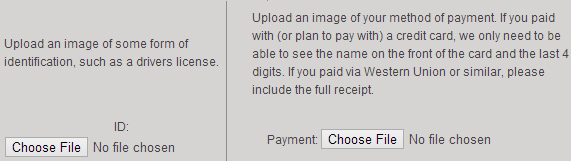
    There are two types of verification. The first one is Manual. Manual verification requires a customer to submit a scanned copy of one valid ID and a proof of payment.

    Manual Verification For credit card payments, a scanned copy of the front side of the card showing the name and the last four-digits are required. The rest should be masked for security (recommended) If you paid using other payment methods such as PayPal, Skrill, or Google Checkout, you may chat with the billing support to ask the required documents for verification. They can help you verify your account quickly. Alternatively, you can verify your account over the phone. Phone verification is the easiest way to validate an account. The procedure is automated. You  just need to provide a working phone number then Arvixe will call it. A unique verification code will be provided at the same time. Key-in the code within the allowed time to complete the verification.

    Phone Verification To verify your account through the phone, go to Arvixe Verification page. This link will be provided to you via email after creating a billing account. If the code is correct, the automated voice prompt will confirm the account activation then ends the call immediately. If not, you can initiate phone verification again and a new code will be provided. The same phone number can be used. The code will appear in the top portion of the Arvixe Verification webpage so keep an eye on the page when you received the call. ‘That account is already verified.’ will show once verification is completed. Refresh the page to see the confirmation. Credit:starrguide.com

    If you are signing up from Nigeria, just give them a scan copy of your Voter’s Card/National ID/Driving Licence and a scan copy of your Visa card. That should be all.

    If you are transfering to Arvixe, the whole process should take less than 48hours to complete. New registrars can proceed to their cpanel (your cpanel details will be mailed to you) and initiate the awesome!

    Thanks for reading and Happy Sharing! Remember to contact the arvixe support should you ecounter any problem (those guys are ever ready to help out), if you have any question, contribution or suggestion feel free to use the comment box below, Nice to have you in our blog today 🙂

  • Embed Facebook Posts into your Blog Post

    Embed Facebook Posts into your Blog Post

    Facebook has been improving over the recent years, from the introduction of Video Recording On Instagram to the amazing Recommendations Bar for Bloggers making facebook the leading social network in this present world.   We do not intend to keep our loyal blog readers on the dark, so we try as much as possible to keep our loyal blog readers updated with developments of this magnitude.

    Why do I need to Embed Facebook Post to my Blog Post?

    First of all, I think that’s a question you need to ask yourself, considering the fact that you issued this search on google :-), but if you are reading this tip because you find it interesting, here are a few answer that was put together by me.

    Embedded Posts are a way to put public posts – by a Page or a person on Facebook – into the content of your web site or web page.

    The embedded post will show any media attached to it, as well as the number of likes, shares, and comments that the post has. Embedding posts will let people using your web site see the same rich information that is shown on Facebook.com, and they will enable people to follow or like content authors or Pages directly from the embed.

    What Platforms are Supported?

    Are you really that inquisitive? Well, it’s good news for all, because the facebook embeddable post does work on every platform (All platforms include wordpress, blogger, oxwall, joomla, even your simple html site).

    Special note:
    You need to add the following code to any place in your <body> section

    <div id=”fb-root”></div>
    <script>(function(d, s, id) {
    var js, fjs = d.getElementsByTagName(s)[0];
    if (d.getElementById(id)) return;
    js = d.createElement(s); js.id = id;
    js.src = “//connect.facebook.net/en_US/all.js#xfbml=1&appId=401349173297461”;
    fjs.parentNode.insertBefore(js, fjs);
    }(document, ‘script’, ‘facebook-jssdk’));</script>

    If you are using a site built with either dreamweaver, blogger or oxwall.

    Embedding your Facebook Post into your Blog Post!

    There are two ways of doing this, but each method depends on where your source post is located on facebook.

    Embedding Code from a Facebook Post

    This method is applicable, if you are embedding a post from your profile newsfeed or in the case of embedding photos and items.
    To embed a post, first check if the post is public by hovering over the audience selector (you’ll see a globe icon). Only public posts from Facebook Pages and profiles can be embedded.
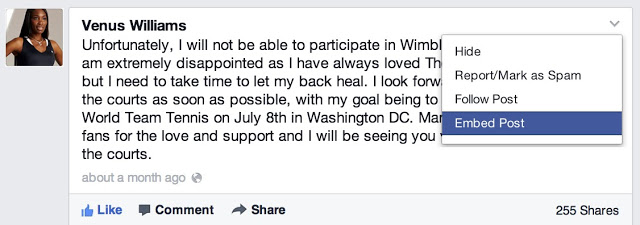
    If the post is public, click on the icon that appears in the top right corner of the post on Facebook:

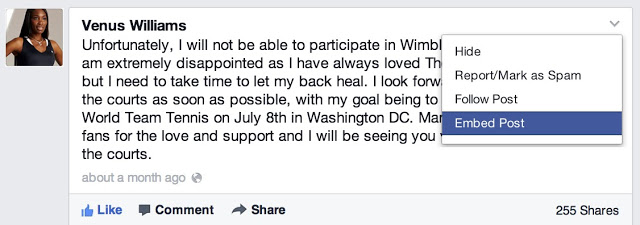
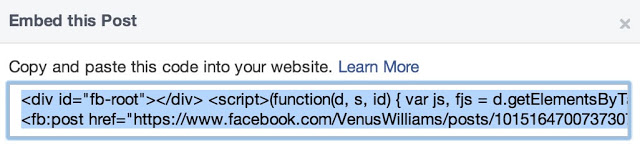
    Choose ‘Embed Post’ from the drop down menu that appears. You will see a dialog appear with the code to embed your post in it:

    Copy and paste this code into your web page in the place where you want it to appear.

    Embedding Code from a Facebook Page

    Assuming you have a Facebook page and you would like to share a content from your page to your blog readers,  here is the way to go:
    Simply, goto your page and grab the URL of the Facebook post you want to embed. For photos, you can easily get the URL by clicking on them. But for other media, it is a bit complicated, at least for newbies. To get a post’s URL, simply click on its timestam

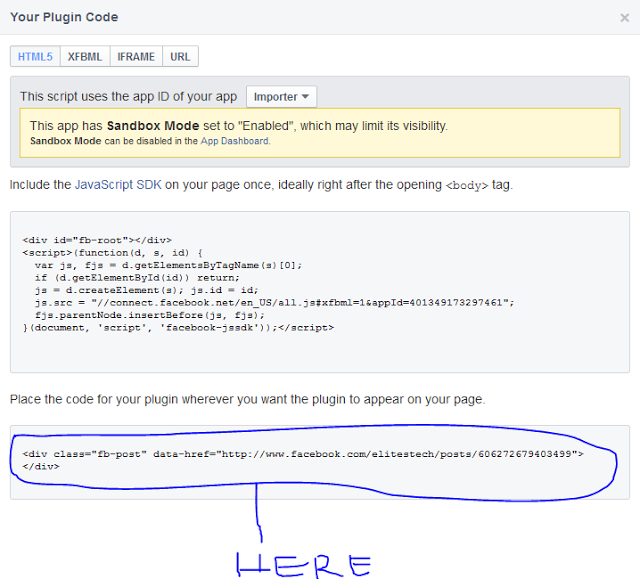
    Copy the link on your address bar and go to Facebook Configurator. Paste your URL in the field provided. Once your story loads in the tool, click on Get Code. You will get two codes similiar to the image below

    Simply copy the second code and paste it where you want it to appear…..

    Looking for Demo?
    Here is a post I published some months ago, try it out and see how it goes   Remember to ask your questions here and also share your testimonies with others with the aid of our comment sections.