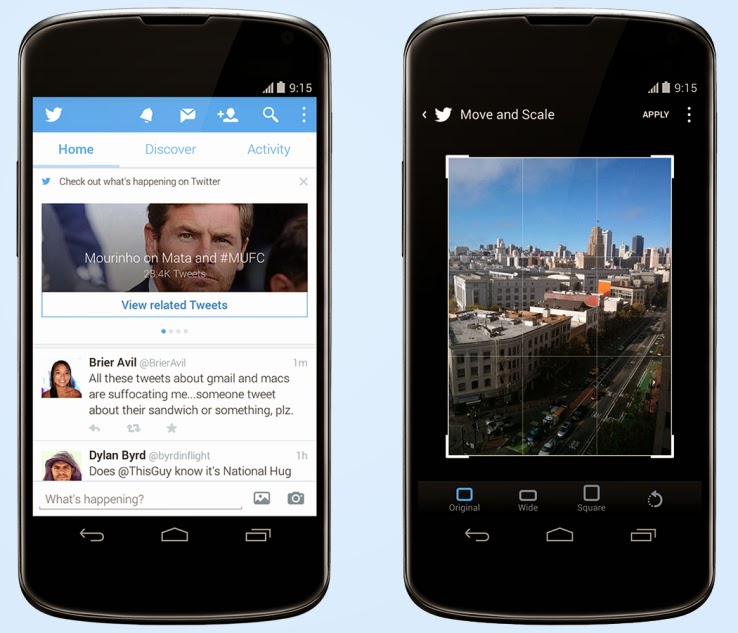
A post on Techcrunch has reported that Twitter has just released an update to its Android client (coming soon to iOS) that brings new photo editing tools to the service, which are likely meant to make it easier to share photos direct and keep people out of competitive apps like Instagram. The second change adds a significant element of event discovery and real-time trend monitoring to user timelines. The event surfacing is the more interesting element, since it marks a considerable attempt by Twitter to meddle with the straightforward chronological nature of that part of its service (besides promoted content). In case a user doesn’t have any new tweets to load when you manually update it, it now brings up recommended posts from people you don’t follow, as well as trending topics and suggestions about new people to follow. In the U.S. only, it surfaces event updates for things unfolding on TV, in sports and on the news.
Each content update features a link to click through for more tweets centered on that conversation. It’s an extension of some of the other work Twitter has been doing around surfacing events and breaking news, including the Eventparrot experiment and a feature that was tested back in August to highlight nearby events via proximity-based alerts.
A couple of things to flag about this change: It only happens when there’s no other new content for a user to view, and when they express a desire for more content, which is very clever; and it represents a way for Twitter to secure its place as the source of live, real-time information about things unfolding on the ground, a reputation that Facebook clearly covets.
Others are already capitalizing on Twitter’s ability to identify and follow events as they unfold, including Banjo, but Twitter adding this as a native feature in its mobile clients could change the nature of the service at a basic level. Should it roll out globally, and expand its scope, mobile users could be using Twitter a lot more for things like local discovery than they had been previously.
Every one of us are connected through some On-line medium in this ERA Advanced Internet world. The introduction of smartphones, mobile computing, advance internet facilities such as Google Glass, internet browsers, etc., has made it incredibly easy and efficient to communicate with one another when it all boils down to social networking.
With every positive technology comes a negative view of that specific technology: Almost all of us are worried about one particular thing called online privacy when it comes to social networking. As a matter of fact, there has been a lot of negative witnesses on this type of issues, with Facebook being the latest suspect.
Recently, Facebookintroduced trending topics to its website, with Twitter and Google+ pushing more and more sophisticated technologies to keep up with people’s expectation, we still see some loopholes like users profiles being viewed without one’s knowledge and all that!
Imagine, if there is a technology which can pretty much reduce the risk of being revealed online about our conversation overall? Thinking as how possible it is. Yes! It is possible and more specifically, it is going to be welcomed by Many social media giants in the near future. Below, we take a look at some technology that will be integrated with social networking in the nearest future.
Temporary Social Messages
The next step of Social Media is about the technology called temporary social messages. It is obvious that the name of the technology itself will explain the benefit of it. As an Individual, we will be worried about our online conversations over various social media online. The worry about “not completely privatized” will always make us insecure. The benefit of temporarily messages will reduce the insecurity to a minimum level, but then there are hurdles like sexting, response from industry role models like Facebook and Twitter will make a huge difference to welcome such technology completely. As we mentioned above, the hurdles like Sexting is one of major Challenges to overcome for the complete adoption of this technology. As there may not be a proof to show up if and when the sexting cases happen through Social Media through Temporary Social Media. Nonetheless, this innovation will surely open up a wide arm in other Areas which will be welcomed by certain industries and make the use of it to the utmost level. Imagine, Industries like Banks and healthcare make the use of this innovation! The process level of policies, and basic formalities will be taken care in the speedy way.
Consequently, Common will be beneficial with the help of this technology and the Quick processes of the Industries. Not just that, Due to its nature of Temporary/ limited existing, this innovation will keep up the confidential things of Industries “secure and private”.
One such Model has already been used by one of the companies called SkyBees to communicate as it has customers all around the world. They maintain a Temporary Database server to carry this service.
At the end of the day, it is also Significant to check as How well this innovation could guarantee the Temporary nature of the messages/conversations technically.
It may look a simple technology, but then the benefits out of this for an Individual and Industries are Limitless and very much appreciative.
This post was made possible, courtesy to Basheer Ahmed, senior editor, MSys Technologies.
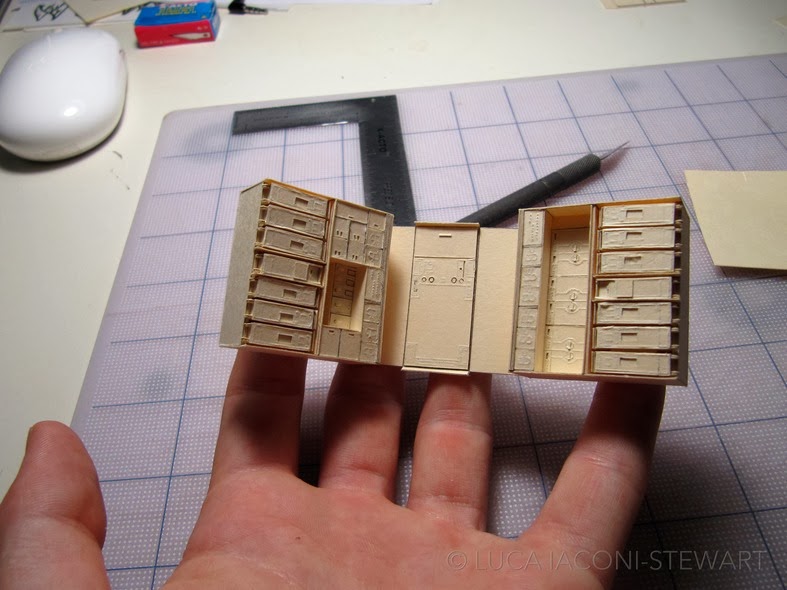
Mashable – At first glance, Luca Iaconi-Stewart’s impossibly detailed model of a Boeing 777 plane looks like it could be carved from wood. But if you look closer, you’ll find that it’s made of a material likely sitting in your office’s file cabinets.
The San Francisco-based designer’s 1:60-scale reproduction is made entirely from manila folders, a project Iaconi-Stewart had planned since 2008.
Throughout the painstaking building process, the designer updated his YouTube account with videos showing the plane’s progress. This time-lapse from March 2013 shows Iaconi-Stewart carefully assembling the model’s “cabin.”
Below is a picture collection from Luca Iaconi-Stewart’s Flickr page of inside the completed reproduction. Click on any of the images below to view in gallery mode. You might also check out the designer’s Flickr page for a closer look.
IDG NEWS SERVICE – In 2006, Mitchell Frost, then a 19-year-old college student at the University of Akron, used the school’s computer network to control the botnets he had created. Authorities say between August 2006 and March 2007, Frost launched a series of denial of service (DDOS) attacks against several conservative websites, including Billoreilly.com, Anncoulter.com and Rudy Giuliani’s campaign site, Joinrudy2008.com. He is accused of taking down the O’Reilly site five times, as well as disrupting the University of Akron’s network during a DDOS attack Frost allegedly launched on a gaming server hosted by the university.
Frost’s dorm room at the university was raided in March 2007. What followed, according to Frost, was a long, complicated legal battle that ultimately lead to him spending over two years behind bars and owing thousands of dollars in legal and restitution fees for his crimes. Frost was released from prison in 2012 and is now serving probation.
Frost took the time to talk to CSO about his experience and delves into the reasons why he did it, his thoughts on the punishment he received and his plans for the future.
Tell us about your background. How did you become so knowledgeable about computers and when did hacking become something that interested you?
I started on computers around a young age and I have always had a mind that wants to keep exploring and learning. Hacking didn’t start overnight, it all started by networking really. First I wanted to be able to have music without paying for it, so I joined some chat rooms on IRC (Internet Relay Chat). IRC is not used much, it’s typically used only by smaller groups of hackers and gamers. When I was younger I would spend many hours in a row on the computer, and when I woke up or had free time, just continue on with what I was working on. You build skills and make connections with others and keep moving up until you have background in hacking. Let’s just say I built my way up over the years 2000-2007.
What inspired you to do the kind of hacking you did in 2006 and 2007 to those conservative websites? What were you hoping to accomplish by hacking those particular sites? How did you choose your targets and why?
In 2006, I was young and, even at that age, I could see there was a lot of corruption and media propaganda going on in newspapers and on television. At that time, I had a rather large and complicated botnet. With the botnet, I was able to use the compromised computers for almost anything; key strokes, DDOS, servers, passwords, pranks. I had several botnets over the years from a few to thousands and didn’t do a whole lot of DDOS on servers because I had no need to.
I decided that I had to do something about what I was seeing in the world around me, so I knocked a couple of websites offline at the time thinking it will prevent the hate and conflict and fear mongering from being seen by people.
When it became clear you were going to face punishment for the attacks, did you think it would mean jail time?
They raided me in March of 2007 right after spring break. They took some computer stuff and took my roommate’s stuff and had three agencies do the raid (FBI, Secret Service, Homeland Security) all with guns pointed right at my head. They brought me into a room and said “if you help yourself now it will be easier at sentencing.” I didn’t answer any questions. They released me and didn’t say much. I was scared shitless after that. I didn’t know what to do. I remember now going to a class after the raid to take a math test and was shaking so bad.
About one day later, they expelled me from the school, even though I was not charged with anything yet. I moved back home and then contacted the Federal Public Defenders office in Cleveland and was assigned a lawyer. He said cases like mine take time and to stay out of trouble and he would get back to me.
I moved back home and got a job working as a carpet-cleaning technician. From 2007 and on, I tried to live a normal life but had that fear that something was coming. I ended up meeting my wife. We fell in love and she got pregnant in December of 2009.
Around May of 2010, my lawyer said I randomly received a judge and that it didn’t look good because of her previous sentencing history. I was hoping for maybe a small amount of time or probation, considering I did not get arrested at the time of the raid in March 2007 and had not yet. I was living in fear for almost 4 years, not going to friends or out to parties and all that.
The judge ended up giving me 30 months and tried to place me under arrest right at the sentencing hearing. When she did this, it took the prosecutor and my lawyer to walk up to the bench and say I am not a flight risk with a newborn on the way and I knew about these potential charges for three years, so why couldn’t I self-report? She finally agreed to let me self-report so I can tie up some things with my family before my time.
There was some debate after your sentencing about whether or not the penalty was too harsh. Do you think it was too extreme?
Way too extreme. Who was the victim? Yes, a couple of people had their servers down for a small period of time, but the jacked-up estimates of the damages were over inflated. Example: they said it took $10,000 for them to press one button on one switch to get access back to the network. The reasoning for the sentence has to do with amount of money lost, etc. Bill O’Reilly said he needed to spend $300,000 to upgrade his systems. My lawyer did not fight or really look into their claims of money loss.
I think they should of come to some plea with me within a year of the initial raid so I could of dealt with this problem and moved on with my life. Maybe do 3-4 months in some low-security prison and some intensive probation would have been the same. Now it will end up costing me about 10 years of my life—2006 started it and by the time I’m off probation it will be 2016. All for taking some servers offline. You tell me: is that fair?
What has this experience taught you?
The experience is not over yet and is far from. I have learned to keep to myself when I see something unjust or unfair or unbalanced all I can do is stay clear of it and talk to people I know or influence and explain my point of view without any damages, physical or monetary.
Last year, there was a lot of sadness and discussion around the suicide of Reddit co-founder Aaron Schwartz. As you know, Schwartz was facing a trial after being arrested on allegations of breaching a computer network to download millions of pages of documents kept at MIT. Many feel he was being too harshly prosecuted for the crime and it drove him to suicide. What are your thoughts on that, having faced a sentence yourself?
I am very familar with Aaron Schwartz. Did you know he chose to take his case to trial because he was not guilty? He was murdered and it was made to look like a suicide. Who would ignore a plea deal with no jail time, wait for trial and then commit suicide? All he did was download some stuff from the MIT library—most of it was like 30 years old. He was prosecuted because of his ties to a grassroots movement for Internet freedom.
What’s next for you? What are you plans for the future?
I am rebuilding my life the best I can for having limited resources. I was released Election Day 2012. I was stuck living in a halfway house in the slums of Toledo, Ohio. Then I had to go up the chain of the BOP and the halfway house to get released to home detention. That took about 2.5 months.
I started probation on March 8, 2013. I work at a small store in a town where my wife’s parents let us live in a rental, so we pay them what we can. I pretty much cannot go to school because I owe so much to U of Akron and I have $50,000 in fines and restitution. They take a percentage of my pay each check to give to Bill O’Reilly. I guess when you’re worth $50 million, why not ruin some guy’s life and future and suck every check he makes?
I guess my life is not going anywhere until I am off probation. I would like to be a wireless network security consultant, or a real news reporter for the independent media. I will continue to try and make my son and wife’s life the best I can for the position I am in.
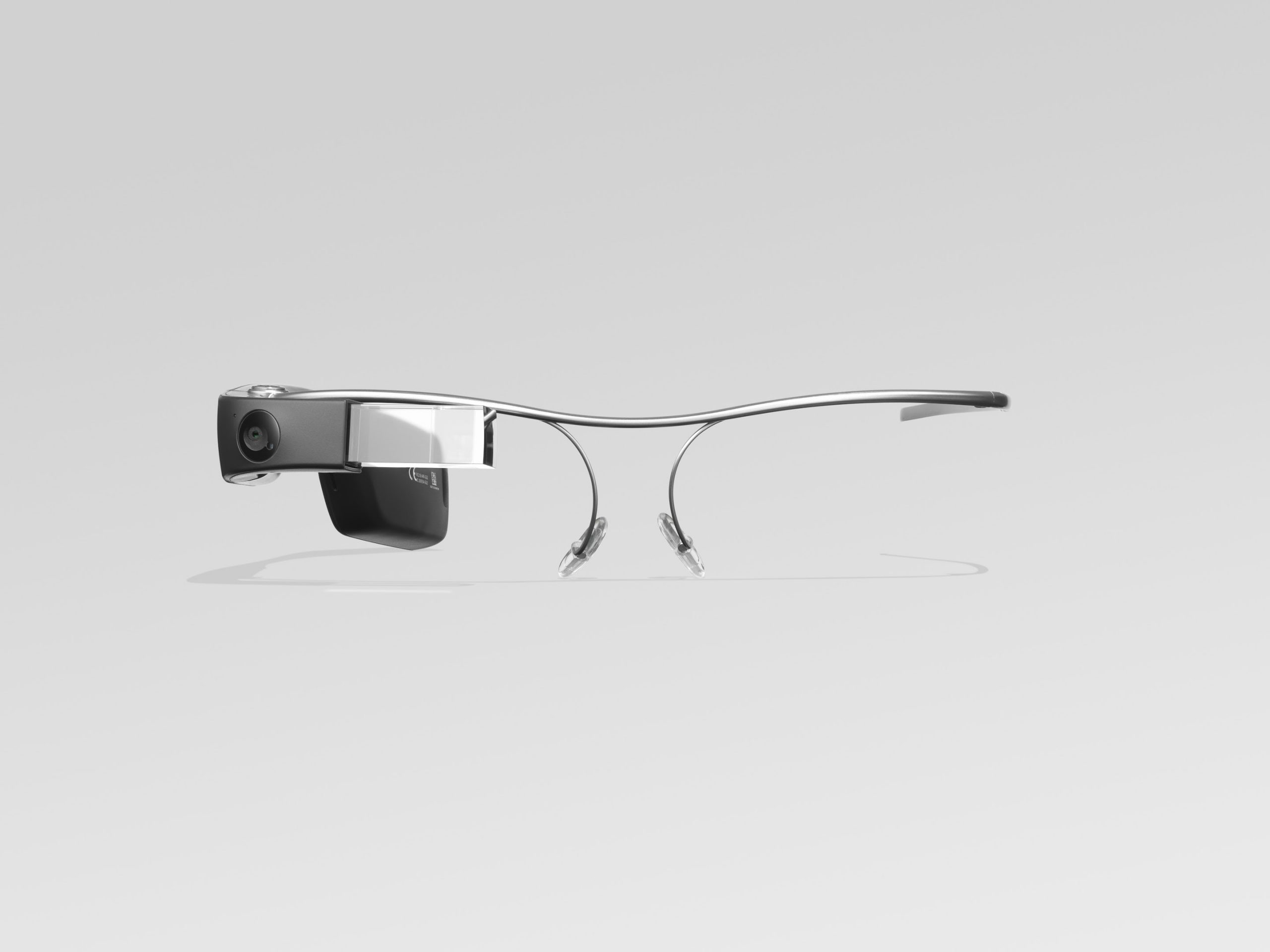
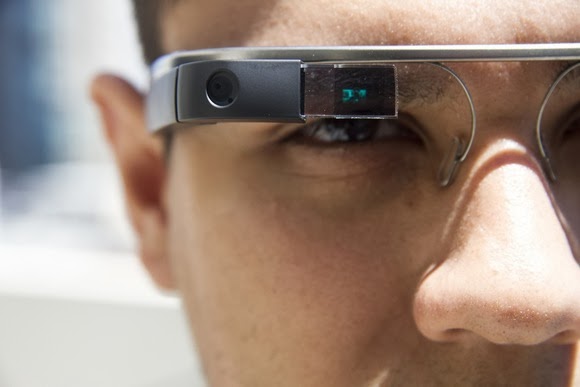
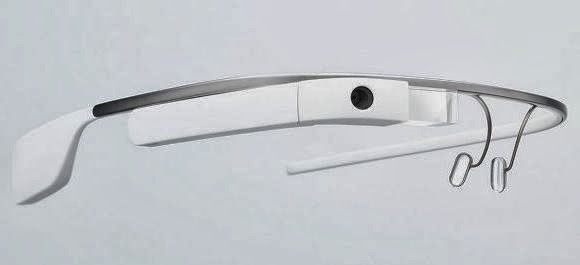
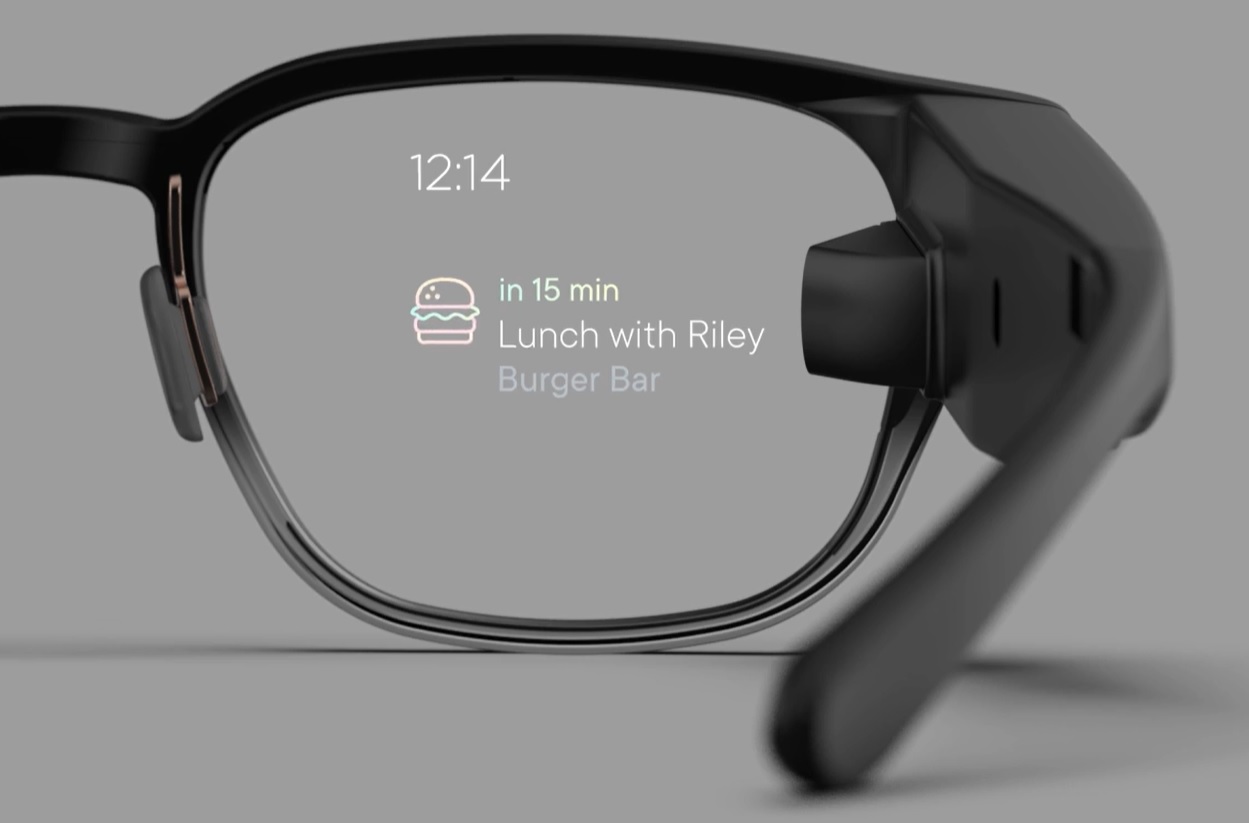
Glass, Google’s head-mounted, Internet-connected device, won’t be available commercially until sometime in 2014. Even so, there are thousands of Glass “Explorers,” or early adopters, already using the high-tech eyewear on the job. Many are discovering that, in addition to being a geeked-out plaything, Glass can in fact solve everyday business problems, help people be more productive, enhance workflows and deliver other real-world benefits.
Here’s a look at some of the practical and innovative ways Explorers are using the $1,500 prototype device in their work – from automotive repair to sports reporting.
1. Live, Remote Sales Training
Josh Cohen is CEO of TownSpot, an online video network startup. The company has no actual offices, Cohen says, with team members scattered around the country. The virtual organization structure makes it challenging to train the sales team—a problem Google Glass is helping to solve, according to Cohen.
For example, on a recent sales call to a new customer in Los Angeles, with the customer’s permission, Cohen streamed video of his view in real-time via Google Glass to an Atlanta co-worker. Cohen’s colleague could see the customer’s reactions and hear how he delivered the sales pitch, he says, adding that this type of easily set up, live and remote training “could never have been done before.”
Often, salespeople are trained by accompanying the sales leader or CEO on customer calls, Cohen notes. This usually requires flying the sales person to another location, among other costs. Glass lets Cohen virtually take multiple people on sales calls with him wherever he goes, thereby reducing travel and other training expenses.
2. Hands-free sports reporting
Andrew Abramson, the Miami Dolphins beat reporter for The Palm Beach Post, uses Glass on the job. He was interested in the device mainly for its video and photo capabilities.
”Video has become a huge part of sports reporting,” Abramson says. “While the traditional TV reporters still enter locker rooms with their bulky cameras, other reporters are often uncomfortably holding up their cell phones and shooting their own clips.”
Meanwhile, Abramson finds it much easier to wear a video camera on his face. “With Google Glass, I can shoot photos and videos simply by pressing a button or using voice commands,” he says. “I can instantly upload photos and videos to the Web without using my hands.”
Abramson has received “an overwhelmingly positive response” from Dolphins fans who follow his reports, and about half of the Dolphins’ players have tried on his pair. Reaction varies, he says, from ridicule to amazement to “Where do I get my pair?”
3. Sharing conference sessions
”Literally every day, there are different start-up related conferences and events,” Cohen says. He can’t make it to them all, but with Google Glass—and the permission of conference organizers—Cohen and his team divide and conquer.
Recording the events in real time “is easier and less obtrusive than using a video camera,” he says, and it gives employees the convenience of watching a conference or event on their own time.
4. Taking notes
Evernote, the popular note-taking Web service and application, is among the few official Google Glass apps currently available—and Shazafar Khaja, integration architect for The Kroger Company, says Evernote is the most useful app thus far for Glass.
”Before I go to meetings, I email myself the minutes from previous meetings and action items. I have all of this accessible to me in the meeting at the flick of a finger, with Glass,” he says. “I’ve also started to record (with everyone’s permission) parts of brainstorming sessions where we have ideas flying around. This enables me to be involved without having to fiddle with a phone or camera.”
Khaja admits he could do all of the above using traditional methods, “but with Glass, I’m less distracted and more focused on what’s going on.”
5. Fixing cars
Glass Explorer Will Elias says Glass has helped him with the complexity of fixing vehicles. “With cars changing so quickly, and everything computerized, I was able to work on a vehicle with the assistance of an ASE-certified mechanic,” Elias says. “He watched what I was doing (through a Glass video chat) and guided me on how to fix the vehicle correctly.”
6. Showcasing your company
Google Glass is an ideal way to show off a company’s customer service experience, notes Hilary Topper, CEO of HJMT Public Relations: “Imagine walking in and videotaping, with a first-person perspective, the way someone would be treated if they entered your restaurant, spa or bank.”
Topper’s firm used Glass to make a reality video to both showcase the firm and show off Glass. The video, Glasslandia, has received more than 50 million social media impressions,” she says.
7. Staying up to date while out and about
Matt McGee is editor-in-chief of Marketing Land and also runs the popular Glass Almanac blog. “With Glass I can get RSS feeds, Tweets, emails and so forth sent right to me while I’m out and about,” he says. “It’s great at conferences, for example, to be able to consume this kind of information while walking the halls or expo floors. It keeps me in the know.”
McGee admits that he could get these updates on his iPhone – but consuming that kind of information at a conference means stopping, find an out-of-the-way spot and reading. With Glass, on the other hand, he can keep walking and see headlines and tweets as they come to him. “I can even speak a reply,” he says. “And it’s all done hands-free with my head up, so I don’t have to worry about walking into someone.”
8. Troubleshooting a website from a distance
Cohen says the capability to share visual information immediately can help solve tech issues. If he encounters a bug or other technical glitch on his company’s website, the Los Angeles-based Cohen can say, “OK, Glass, take a picture,” and share a photo of his computer screen with his two Web developers in Virginia. The real-time sharing lets his Web developers understand the issue better and react immediately, Cohen says. The downsides of Google Glass at work
The built-in battery is notorious among Explorers for its short life, especially when video is involved. “With moderate use, the battery will only have to be charged once or twice a day, allowing you to use GPS, text messaging and occasional photos,” Abramson says. “But if you’re recording or watching video, the battery will die in less than an hour.”
Cohen bemoans the inability to bulk delete multiple cards. (Glass displays information, such as text messages, as individual cards.) Cohen can receive as many as 600 business emails per day, and not being able to tell Glass, “wipe all email cards from today,” means that Cohen can’t access any other information on his Glass without scrolling all those emails.
But the biggest limitation is the lack of Google Glass apps, most of which are limited in their features, McGee notes. Twitter won’t take a Tweet received on Glass and send it via email, he says, nor can headlines received over RSS get sent in an email. Meanwhile, the new, unofficial WordPress app seems to be geared toward photoblogging. “I’d like a WordPress app that would let me speak a headline, speak some text and then send that to my WordPress install,” MeGee says. The future of Google Glass on the job
Though Glass already helps workers in a variety of occupations, the technology could be of particular importance to specialized fields.
For example, Glass could be used to improve an airline’s baggage handling process, says Stephen Fluin, chief strategy and innovation officer for MentorMate. Most bag lines have one person scanning bags, to verify their destination and other information, and another physically moving bags. Smaller lines use one person to both tasks, picking up and putting down a scanner repeatedly. Using technology such as Glass, Fluin says, a single baggage handler could scan bags with both hands free to move the bags.
Glass Explorer Chuck Webster says third-party apps from developers in industries such as healthcare, education, security and system repair will really make Glass valuable to workers. He points to the advantage of surgeons using Glass to confer with experts during surgery, adding that early responders could also wear Glass to receive “just-in-time clinical decision support.”
Webster says Glass will likely shine when integrated with current workflow management, business process management and adaptive case management technologies. “We’re going to see some very interesting mashups between Glass and business process management software,” he says. That’s why Webster refers to Glass not as a smartphone on your face but, rather, “workflow on your face.”
This weekend AdDuplex, an advertising platform for Windows applications, announced that according to its tracked data, Windows Phone Update 3 is now installed on 15 percent of Windows Phone 8 handsets.
Microsoft tore the wrapping off of Update 3 — also known as GDR3 — in October, detailing to the media what it would include, and providing notes on its delivery schedule. Developers could get their hands on the code sooner, but the average user, as TechCrunch wrote at the time, would “get the updates between the Fall, and the early parts of 2014. Carrier considerations, testing, and the like will determine when precisely your handset gets the bump.”
To see a mere 15 percent of the Windows Phone 8 pool of handsets have the update as January comes to a close is slightly disappointing. We could, perhaps, see a surge of firmware updates come in the next few months, but it’s safe to say now that the pace of upgrade from firmware announcement to installation on a plurality of devices is a long cycle in the Windows Phone world.
I had no benchmark in mind of how far along Update 3 should have been at any given moment, but I do think that it is reasonable to say that 15 percent after a quarter is a slower uptake pace than we might have hoped for given that the software is free for consumers.
Carriers, presumably, are the sticking point. If Microsoft wants to more quickly move its new code to extant Windows Phone consumers, it will need new strategy. Unless, like with Android, Microsoft is content with fragmentation that will see its user base stratified across versions, hampering developers and not maximizing the strength of its own user experience.
Kicked to the above is the fact that Windows Phone 8.1 is on the way — likely in April. If carriers don’t get out-of-the-way, some users may end up moving to 8.1 before Update 3 trickles down to their handsets.
Top Image Credit: Flickr | Article was originally posted on TechCrunch
TechCrunch – Google will buy London-based artificial intelligence company DeepMind. The deal wasconfirmed to Re/code by Google. Re/code reports that the acquisition price was $400 million, but we’ve heard from a source that it was more. We’ve emailed Google and DeepMind for comment.
DeepMind was founded by neuroscientist Demis Hassabis, a former child prodigy in chess, Skype and Kazaa developer Jaan Tallin, and researcher Shane Legg.
This is the latest move by Google to fill out its roster of artificial intelligence experts, and the acquisition was reportedly led by Google CEO Larry Page. In December 2012, Google hired inventor, entrepreneur, author, and futurist Ray Kurzweil as a director of engineering focused on machine learning and language processing. Kurzweil has said that he wants to build a search engine so advanced that it could act like a “cybernetic friend.”
Google’s hiring of Deepmind will help it compete against other major tech companies as they all try to gain business advantages by focusing on deep learning. For example, Facebook recently hired NYU professor Yann LeCunn to lead its new artificial intelligence lab, IBM’s Watson supercomputer is now working on deep learning, and Yahoo recently acquired photo analysis startup LookFlow to lead its new deep learning group.
DeepMind’s site currently only has a landing page, which says that it is “a cutting edge artificial intelligence company” to build general-purpose learning algorithms for simulations, e-commerce, and games.
In 2012, Carnegie Mellon professor Larry Wasserman wrote that the “startup is trying to build a system that thinks. This was the original dream of AI. As Shane [Legg] explained to me, there has been huge progress in both neuroscience and ML and their goal is to bring these things together. I thought it sounded crazy until he told me the list of famous billionaires who have invested in the company.”
Deepmind was started about three years ago, according to LinkedIn profiles. Re/code reports that Founders Fund and Horizons Ventures are both major investors in the startup.
Earlier today I published an infographics on things you can do with your smartphone but I didn’t mention the possibility of checking the status of your television/electronics remote control battery with your smartphone.
Of course, in the modern technology it is no longer a question of ‘what you can do’ with your smartphone, it is now a question of ‘what you can’t do ‘ with your smartphone.
The latest discovery has revealed that you can check the power status of your TV set or home theater remote control with your smartphone. This is possible because most standard remote controls send signals to your home theater gear using a beam of infrared light, which a sensor on your hardware picks up. The beam of course is invisible to the human eyes, however, never neglect the power of your smartphone’s Camera! If your remote control start behaving in a funny way, you can easily use your phone to check if your remote batteries need refreshments.
Checking your Battery Power Status
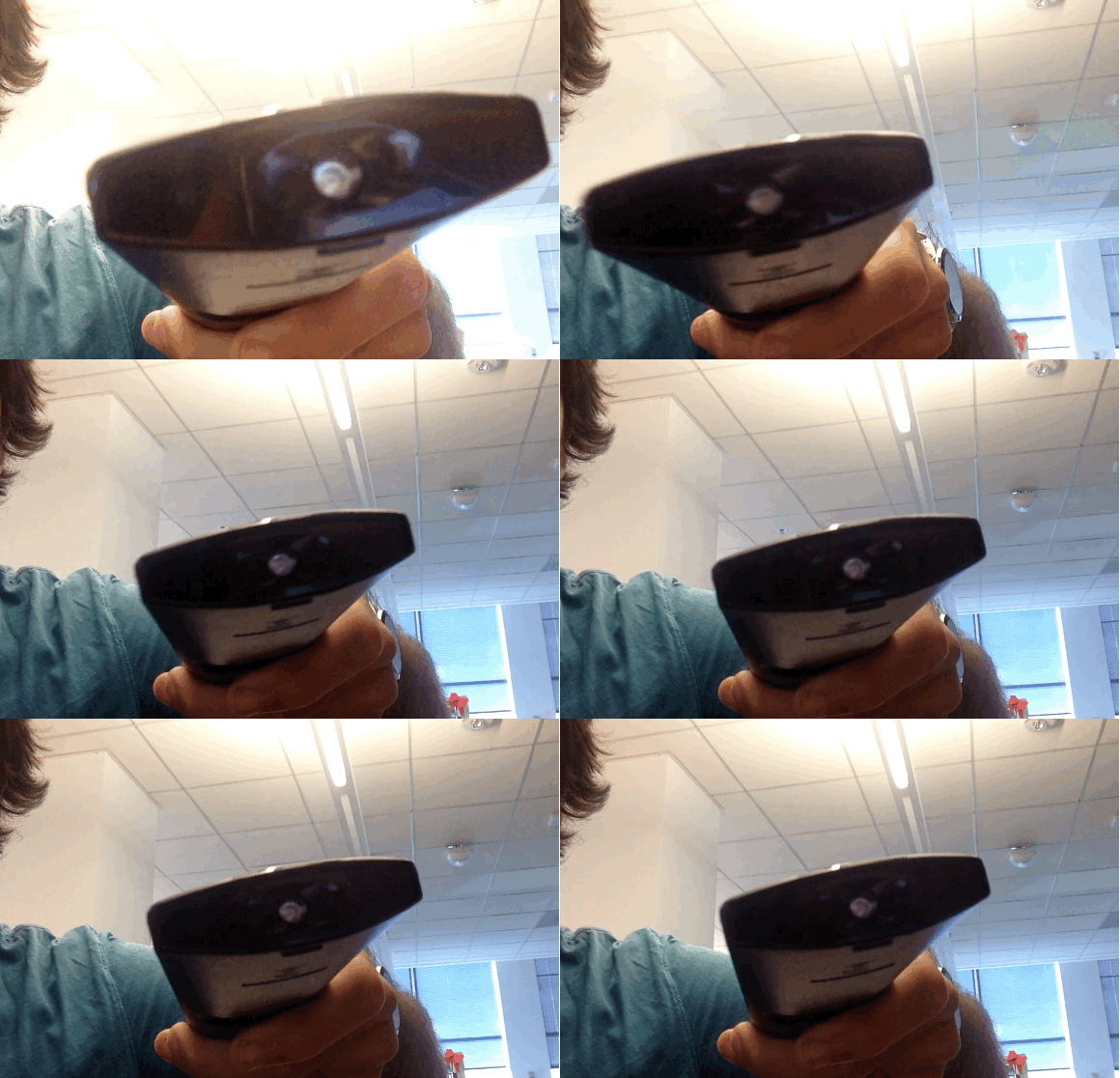
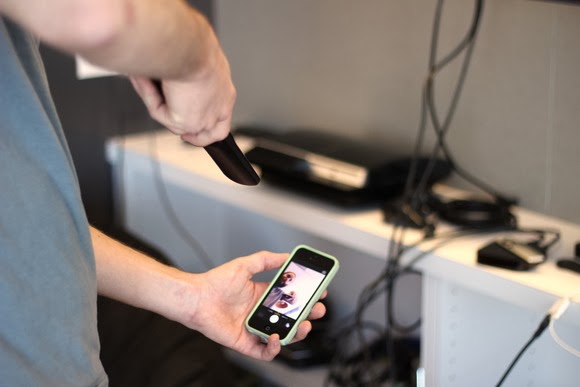
To check your battery status, simply wake your smartphone and launch the Camera application. Next, switch to the front-facing camera, point the remote at the camera, and press any button on the remote.
If the remote is working properly, you should see a flicker of light come from the IR blaster as viewed through your phone’s screen that looks something that this:
If you don’t see the flicker from the IR blaster, or perhaps just a very, very dim flicker, you probably need to change the remote’s batteries. (And if new batteries don’t help, you probably need to replace your remote. Sorry.)
Of course, this trick isn’t limited to your smartphone’s camera; many digital cameras can see infrared light, despite having filters to tune it out. So if all you have at your disposal is your laptop’s built-in webcam, you may have everything you need.
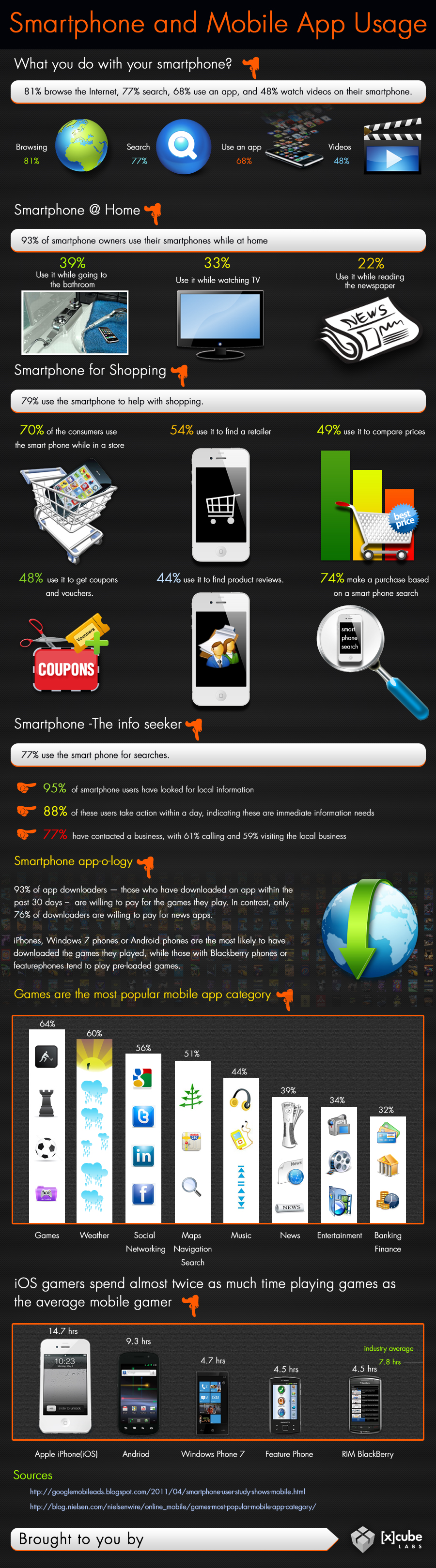
The modern generation is very reliant on technology and computing to perform daily activities. This is to be expected as there is a sense of urgency associated with our present dispensation. However, smartphones usage is not dominated by business, finance, health or other categories you might expect. The leading category is the gaming category. Every now and then, someone has their face buried in their smartphone, no doubt, playing some of the most terrifying Android horror games in darkness. Indeed, smart devices are made, so we can become dull.
Smartphones And Mobile App Usage – Infographic
Smart phones has come to stay, the use of applications are evolving, companies can choose to adapt or suffer the fate of Nimbuzz. Just how far can mobile computing go? The answer will depend on what you make of it.
What really makes these devices functional and so useful is the fact that several apps can be downloaded on them. These mobile apps are available through different app stores depending on the operating system of your mobile computer.
Some examples of these apps stores are Apple store, Google Play Store, Windows marketplace etc. Below is an infographics by Xcubelabs that will show us, how people use their smartphone on daily basis.
Smartphone And Mobile App Usage Infographic [Image credit: Xcubeslabs ]
Embed this Infographic on your site
<a href="https://ewtnet.com/technology/infographics-smart-phone" title="Smartphone And Mobile App Usage - Infographic"<img src="https://ewtnet.com/wp-content/uploads/2019/02/smartphone-and-Mobile-app-usage.jpg" alt="Smartphone And Mobile App Usage Infographic" title="Smartphone And Mobile App Usage - Infographic" width="100%" height="auto" /></a><br /><a href="https://ewtnet.com/technology/infographics-smart-phone">Smartphone And Mobile App Usage - Infographic</a><br>
Smartphones play a lot of roles in your day-to-day life affair. I think most people simply prefer to relax to play a couple of games at the end of a hectic day. So going back to my initial question; I think smartphones has indeed made us smarter.
Feel free to argue, though. The comment section is open to everyone.
So far, a number of Android internet browsers and file managers has been developed. While some of them are completely ads-free, easy-to-use and fast, quite a number of them contain detracting advertisement banners, data consuming and extremely slow when opening internet pages.
Recently, we listed five applications that will help you monitor your data usage on your Android smartphone. While monitoring your data usage it is also necessary you consider the speed of your internet browsers as this will affect your bandwidth usage. In this post we are listing 10 Android internet browsers and file managers that will sky rocket your surfing experience.
Base on popularity measure and our analyst experience; topping our list is, Dolphin Browser: It is the fastest Android browser out there which has had a total downloads of 1,090,050 so far.
Another very famous and popular browser which is suitable for the Android operating system is the Opera Mini Browser. It has been developed by Opera Software USA and has had a total of 938,098 downloads till date. The third fastest browser on this list of the fastest browsers for Android Smartphones is Astro file manager/browser which has been developed by Metago and has 358,155 downloads to its credit.
Chrome browser is yet another very fast browser for Android browser which is followed by Firefox browser developed by Mozilla. UC Browser for Android is also one of the fastest Android browsers out there and is developed by USWeb inc.
Maxthon Android web browser developed by Maxthon LTD is a very fast browser for Android and next in the line is Boat browser which is developed by Boat browser.
Ninesky browser is another browser for Android which is one of the fastest and this is followed by Baidu browser which has been developed by Baidu Inc
If your first reaction to Google Glass is, “That’s amazing and also horrifying!”, you’re not alone. Wearable Internet is certainly the future, and probably the nail in the coffin of social grace.
We’ve noticed that holding a conversation and even walking around in public can be tough while wearing Glass. That’s why we’re offering this warning about Glassholes: People whose DoucheFactor™ is off the charts thanks to the distracted, creepy behavior associated with wearing a voice-activated face camera.
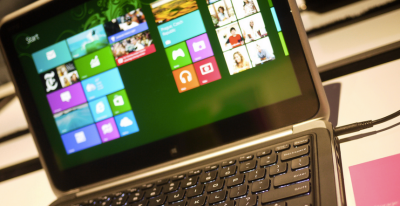
Yesterday Paul Thurrottenumerated a number of tweaks that will appear in the upcoming Windows 8.1 update. Screenshots from WZor confirm a few of Paul’s earlier notes on upcoming changes to Windows 8.x that are worth discussing.
The gist is that Microsoft wants to unify the desktop and Metro environments, especially in the context of apps. The better the apps work between the two, the more people might use applications from the Windows Store. This is tacit admission that people love the desktop environment that they have used for decades, and have been slow to switch over to the Metro environment.
So, if people love the desktop and you want them to use more Metro apps, you bring the Metro apps to their desktops. Paul previously reported that you would be able to run Metro apps on the desktop, but WZor screenshots show it in action. Surprise? No.
There is more: “I can confirm one new feature: Metro apps will now include a close box, similar to that seen on desktop applications, which can be clicked with a mouse so that the app closes completely.” Thank god. Getting rid of Metro apps when you are done with them has been a constant Windows 8.x headache.
The divide between the “new” in Windows 8.x (the Metro side of the fence) and the “old” (the Windows 7 bits of Windows 8.x) is being blurred. That’s probably good, given that the old is popular and Microsoft wants the new to become more so.
We’ll see more before Build, given the current pace of leaks. It seems that Microsoft wants to patch the weaker parts of Windows 8.x while keeping its main thrust in place. You can’t have mobile Windows without the Metro interface, and you need an app store as well. But you can heal the cracks on traditional PCs, I suppose.
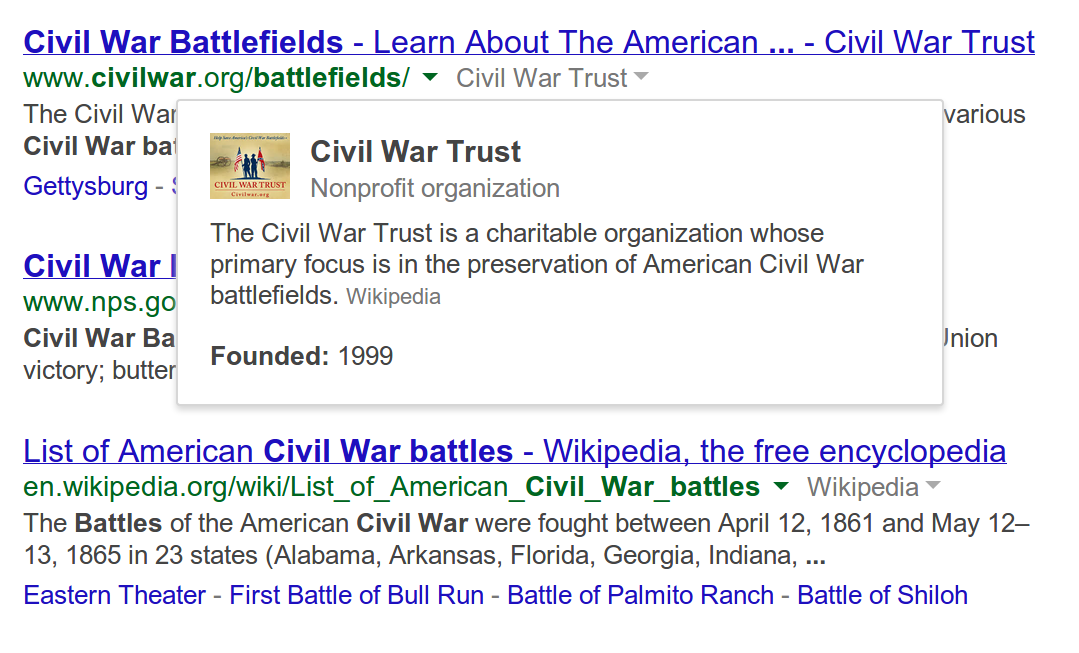
Google’s Knowledge graph is gradually developing into a very handy tool for Google search results. The company has announced that the tool, henceforth, will form an integral part of its search results. In a blog post on its official Search Blog, Google gave a brief explanation on how you’re now able to learn more about the topics you’re searching for by clicking names that appear next to a given link in your search results.
These additional, informational widgets are only appearing in desktop searches at present.
In the provided example, a search for “Civil War battles” may be tagged with another small link, which, when clicked reveals a drop-down box summarizing that page’s topic. In the picture shown (see above), an extra link titled “Civil War Trust” pops up a box that offers a one-sentence explanation about the nonprofit being referenced, including the date of its founding.
These new links are small and gray, so as not to impact the search experience. They appear beneath the larger blue link, and next to the actual site URL (green link).
The extra information will only be provided for sites that are “widely recognized as notable online,” says Google, which means that it’s not likely that you’ll see some random person’s blog on page 10 of Google’s search results getting the same treatment.
The additional information is powered by Google’s Knowledge Graph, a semantic search effort the company first introduced back in 2012 as a way to make Google Search smarter by infusing it with an understanding of the people, places, and things in its search index.
Since that time, the Knowledge Graph has gone on to touch nearly every aspect of Google’s search, including Google Trends, its mobile card-style interface, searches involving statistics, and much more, in addition to also providing at-a-glance information to the right and sometimes top of Google’s Search results.
Like some of the Knowledge Graph enhancements that have come before it, the new informational pop-ups could impact click-throughs on the pages returned in the search results. For instance, if the searcher was only looking for a brief explanation or fact-check, the pop-up could suffice. But Google purports this extra info is instead designed as a way to help you choose the right result from its list of blue links, not avoid them.
Yesterday Paul Thurrottenumerated a number of tweaks that will appear in the upcoming Windows 8.1 update. Screenshots from WZor confirm a few of Paul’s earlier notes on upcoming changes to Windows 8.x that are worth discussing.
The gist is that Microsoft wants to unify the desktop and Metro environments, especially in the context of apps. The better the apps work between the two, the more people might use applications from the Windows Store. This is tacit admission that people love the desktop environment that they have used for decades, and have been slow to switch over to the Metro environment.
So, if people love the desktop and you want them to use more Metro apps, you bring the Metro apps to their desktops. Paul previously reported that you would be able to run Metro apps on the desktop, but WZor screenshots show it in action. Surprise? No.
There is more: “I can confirm one new feature: Metro apps will now include a close box, similar to that seen on desktop applications, which can be clicked with a mouse so that the app closes completely.” Thank god. Getting rid of Metro apps when you are done with them has been a constant Windows 8.x headache.
The divide between the “new” in Windows 8.x (the Metro side of the fence) and the “old” (the Windows 7 bits of Windows 8.x) is being blurred. That’s probably good, given that the old is popular and Microsoft wants the new to become more so.
We’ll see more before Build, given the current pace of leaks. It seems that Microsoft wants to patch the weaker parts of Windows 8.x while keeping its main thrust in place. You can’t have mobile Windows without the Metro interface, and you need an app store as well. But you can heal the cracks on traditional PCs, I suppose.
IDG NEWS SERVICE – Amazon has approached several major media conglomerates to discuss adding live cable TV channels to its Prime Instant Video service, according to a report in The Wall Street Journal on Monday.
The idea is still at a very early stage, and it might not go ahead, the newspaper said, without disclosing its source. Amazon is one of several companies that already offers on-demand movies and TV shows, but live TV would put it squarely in competition with existing cable and satellite TV providers.
Some of those providers already offer live TV over the Internet, but only as an extension of an existing pay TV subscription.
After news, music and video rentals, live TV is seen by many as the next big area that will be disrupted by the Internet. Amazon’s moves could be part of industrywide posturing in preparation for that.
The report came on the same day Verizon Communications, a major broadband Internet provider, said it is buying OnCue, a cloud TV service developed by Intel.
Sony recently said it would begin offering live television through a video service to be delivered through Sony PlayStation and connected TVs later this year, although offered no other details.
Over-the-air broadcasters are also moving toward the Internet. But in a twist on services offered in other countries, some local TV stations require a cable or satellite TV subscription in order to access live streaming programming over the Internet, despite it being broadcast free of charge over local airwaves.
One company that is attempting to break up this model, Aereo, has found itself targeted by lawsuits. Aereo receives and relays local TV broadcasts to subscribers over the Internet without the approval of the broadcasters. Aereo says it doesn’t need their approval, but TV stations disagree. That battle is heading to the U.S. Supreme Court.
The Wall Street Journal report noted the difficulty Amazon might face in getting access to content, especially if media conglomerates want to avoid upsetting major cable and satellite providers.
For all of the different brands familiar to consumers, today’s pay TV market is dominated by a handful of large companies that own many of the channels.
General Electric, for example, owns the NBC and Telemundo over-the-air networks, cable channels including CNBC, NBC Sports Network, USA Network and SyFy, cable TV and Internet operator Comcast, and a third of online streaming service Hulu.
The recent versions of Google Chrome will let you synchronize your Google account with Chrome so that you don’t have to login again to each Google products (e.g. Google Drive, Gmail, Blogger, Google Play, etc) website you visit. This will also mean that anybody who has access to your Google Chrome browser can easily explore your email and other Google products without your consent.
How do you ensure that no intruder can have access to your Google account without you logging off? If you share a PC at home, other family members can start searching the web as you by simply opening Chrome.
Luckily, Chrome’s multiple profile support can help, providing an easy-peasy way for multiple people to use the same browser without worrying about intruders or having to constantly sign in and out of Google profiles.
How to Add a New User
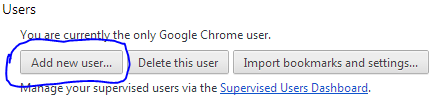
First off, open Google Chrome’s menu—the icon with three horizontal lines in the upper right-hand corner—and open the Settings option. Towards the bottom you’ll see a “Users” section >> Simply click on Add new user.
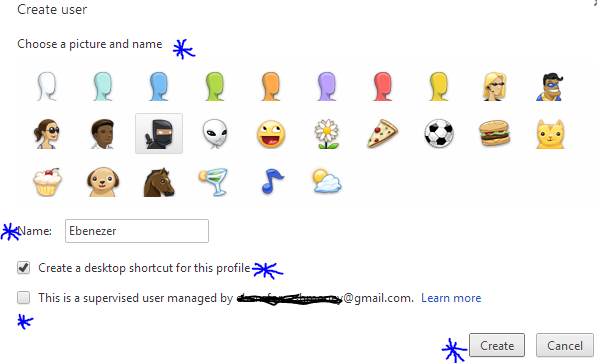
A pop up window will appear with a bunch of user icons and new user account configuration. Choose an icon and name for your profile, you will have to decide whether you want to create a desktop shortcut icon for the profile, and then tap the “Create” button. Viz.. In a few seconds, a new window will open with the new user profile.
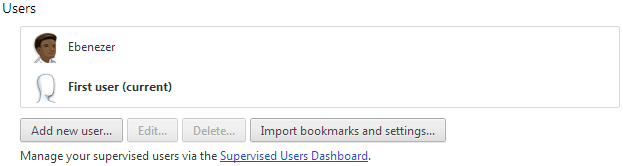
Notice that the first time you create a new user profile, Chrome will actually create two profiles: One called “Default Profile” for the person who is currently signed in to Chrome, and one for the new profile that you just created.
So the first time you add a new user, you are actually creating two profiles. To change the name of the default profile to something more user friendly, go back to the Chrome settings tab. Highlight the default profile in the “Users” section and the click the “Edit…” button to change the name.
That’s pretty much it. Just follow the same process as many times as you need to create a user profile for each member of your household.
Create User Profiles for Kids
If your kid is less than 16 years old. You need to be weary of what he/she does on the internet. The most reliable, easy and cheap way to achieve that is with Google Chrome. The browser allows you to supervise a particular profile. You can block the profile from visiting certain websites, view website histories by that user profile, delete and add bookmark.
To be able to monitor your kid internet activities, you will need to create a special kind of profile called a supervised user, a beta-grade profile type Google added to Chrome earlier in January.
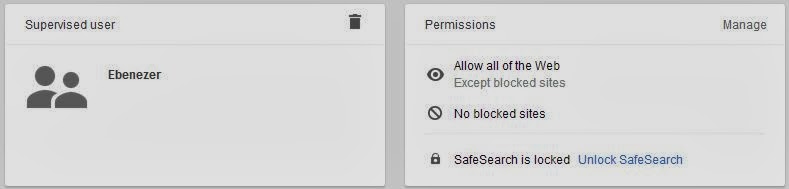
To make a supervised user, simply click the checkbox next to “This is a supervised user managed by [email address].” Parents of supervised users can block specific websites, check out the websites they’ve visited, and lock kids into Google’s “Safe search.” If you block a website that your child thinks they should be allowed to view, they can even send you a request to unblock it, and you can manage settings for your supervised users via the dashboard at chrome.com/manage.
You need to be weary of the fact that user profiles are not password protected, however, so Chrome’s supervised users feature is far from fool proof. You will still have to keep an eye on your child’s surfing habits to make sure they are using their profile and not switching over to yours, or—if you’re really worried—create separate user accounts as the operating system level .
How to Switch between Profiles
To switch between users, just click the user icon that appears in the upper left corner of the browser window. The other created users will appear in a drop down menu. Select the one you want to switch to and a new window will open for that user profile. If that’s too much trouble, you can also use the customized desktop shortcuts Chrome offers to make when creating a profile to open the browser as a particular user.
IDG News Service – Some of the most futuristic features envisioned in networked cars will depend on 5G mobile technology that probably won’t be available in full until 2020, according to Ericsson’s chief technology officer.
There’s a bright future for cellular in cars, according to Ulf Ewaldsson, who is the mobile gear vendor’s senior vice president and chief technology officer and head of Group Function Technology. He spoke with IDG News Service following a big automotive push by Ericsson at International CES earlier this month. Among other things, the company showed off its CVC (Connected Vehicle Cloud), designed to deliver applications in a car for information, entertainment, making service appointments and other needs. Ericsson announced partnerships with both a carrier (AT&T) and a carmaker (Volvo).
But more advanced networked-car visions, up to and including self-driving cars, will rely on capabilities that Ericsson sees coming in the as-yet-undefined 5G technology that will augment today’s 4G networks, Ewaldsson said. Ericsson and others are already talking about what to include in 5G, but Ericsson has said it expects commercial deployments of the future specification starting in 2020.
Connected to a 5G network, cars could warn drivers of an impending collision or even be guided through traffic automatically with no driver behind the wheel, Ewaldsson said.Demonstrations at CES showed off both of those types of capabilities. But making those kinds of services work would require guaranteed performance all the way from the cloud that runs the service to the car, and back again.
”The networks that we have today have nowhere near that quality-of-service guarantee,” Ewaldsson said. Instead, 4G systems treat all data as “best-effort” traffic. Even though 4G radios, at their best, have a latency of just 20 milliseconds (a big improvement from 35 milliseconds on 3G), the critical thing is being able to predict and control those delays for each application, he said.
”A car is a good example of something that will have very different demands on different bitstreams,” Ewaldsson said. For example, a child watching a movie in the back seat may be getting that video stream over the same cellular network that’s responsible for real-time warnings and vehicle commands. Future networks will have to be able to tell the difference between them and prioritize one application over another, he said. “Maybe we don’t want to do this right now. Maybe we want to do this six microseconds later.”
In addition to prioritizing packets and using low-latency radios, 5G networks should be able to communicate the service levels for different traffic types to the clouds that will run the applications, Ewaldsson said. That calls for software-defined networking, an emerging set of technologies that shifts control away from traditional routers and switches and into software running on various platforms.
If all this work makes smarter cars sound like an impossible dream, Ewaldsson did say some elements of 5G would be implemented sooner than others. In addition, there is a parallel development track in the industry pursuing the same results without network assistance, he said, though he thinks everything disconnected eventually will hook up to the network.
Ewaldsson defended the lengthy process of completing global telecommunications standards.
”That model has been very successful. It has globalized technology faster than the super-competitive model, if you compare it to the IT industry,” he said. The alternative can create “redundant” innovation by competing companies that each try to make their approach dominant through their weight in the market, he said.
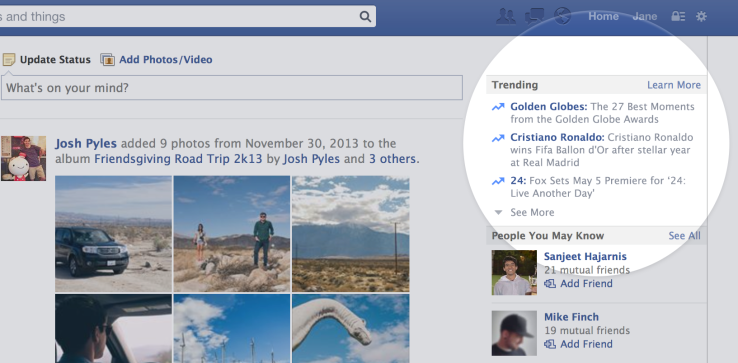
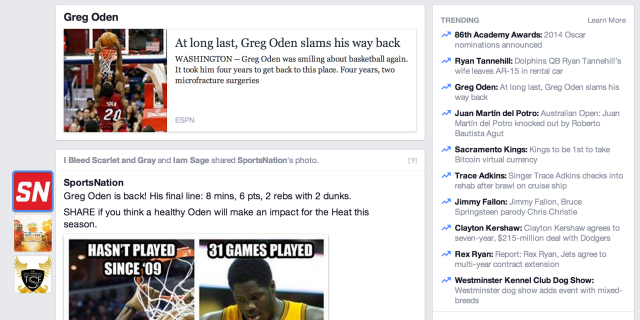
Following tests of Twitter-style Trending Topics on the web and mobile in August, Facebook today officially launches a redesigned “Trending” section on its web homepage’s sidebar in the US, UK, Canada, India and Australia. The richer design shows personalized lists of the most mentioned words and phrases of the moment with short explanations of why each is blowing up. A click-through leads to a Page of mentions by friends, Pages, and public posts by anyone who lets people “Follow” them.
If Facebook users find the Trending section atop the right sidebar of their homepage useful, it could encourage public sharing, drive return visits, and most importantly — make Facebook better known as a news source for current events. The social network has been in a heated battle with Twitter for that distinction over the past few years.
“Trending” will roll out to all users in the specified countries over the next few weeks, and Facebook continues to test a mobile version.
Comparing Facebook And Twitter’s Take On Trends
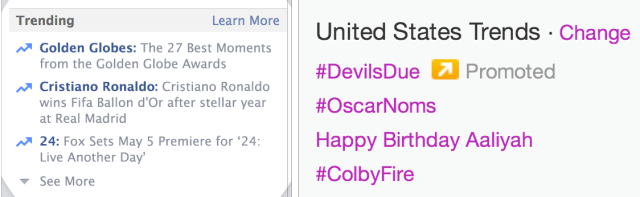
The explanations make Facebook’s “Trending” section a bit busier than Twitter’s simple list, but could also make it more immediately accessible. Sometimes it’s tough to tell what a Twitter Trending Topic means or why its popular, such as today’s “#SuperDraft”, which refers to the Major League Soccer player draft. That leads to clumsy digging through the hashtag’s tweets, or a web search for the term.
Facebook’s version of Trending doesn’t just list “24″, it explains that “Fox Sets May 5 Premiere for ’24: Live Another Day’”. While you might know Cristiano Ronaldo is a famous soccer player, if he trends on Facebook, it’ll tell you why, such as “Cristiano Ronaldo wins Fifa Ballon d’Or after stellar year at Real Madrid”.
Facebook Trending (Left) vs Twitter Trending Topics (Right)
Facebook tells me “The description next to the topic is actually a headline that provides context around the topic and what is causing it to trend. We have rules in place that work to select concise, accurate, informative headlines.”
Facebook is also taking advantage of its wealth of structured data about what people Like and who they’re close to so it can inform its Trends. Facebook tells me “Topics are personalized based on things you’re interested in and what is trending across Facebook overall.”
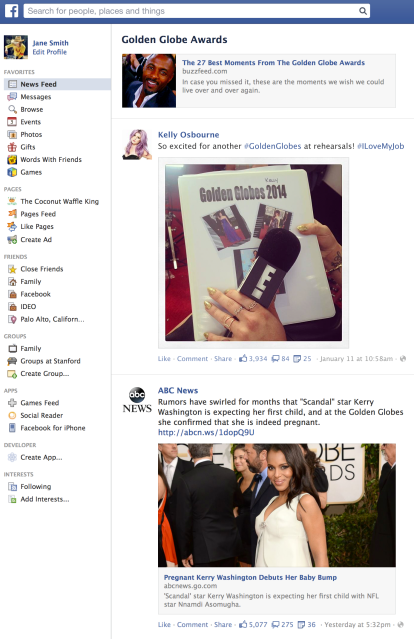
Once you click though, though, Facebook’s Trending pages (seen above) look a lot more basic than Twitter’s. Facebook shows a feed of links and posts by Pages, celebrities, and public updates from users who have turned on the “Follow” feature to let non-friends read their public posts. But they all look a bit the same. Twitter’s Trending pages have more style, intelligently highlighting compiled sets of photos and people you should follow as well as posts mentioning the topic.
And since Twitter has been long-known as a place for current, and since most content on Twitter is public and therefore eligible, Twitter’s Trending Topics pages may be deeper and move faster alongside breaking news.
The fact is that most people don’t post publicly on Facebook and don’t have “Follow” turned on, so what appears in Facebook’s Trends isn’t actually what’s popular with people.
Overall, Facebook’s Trends seem a bit more immediately helpful and personally relevant, but Twitter’s pages will likely feature much richer content that actually reflects the thoughts of the common man, not just celebrities and news outlets.
[Update: Hands-On With Facebook Trending]
I just got access to Trending and here are my initial thoughts. While the Trend descriptions are very useful, I sure didn’t see much personalization in the Trends I was shown. I’m not that into sports, Like/follow almost no teams or athletes, and never share sports links. Yet two of the three immediately visible Trends on my home page were athlete scandals.
After expanding the list to the full ten Trends, I got three more sports stories I wasn’t much interested in, though it did show a few about musicians which I found more interesting.
My fears that Trends would be dominated by news outlets and celebrity posts rather than true public opinion were confirmed. After scrolling through several reams of each other the 10 trends, I found most of the pages were overrun with news sites sharing the same links or copy-cat takes on current events. I only saw one post by a friend the whole time.
When there were public posts by normal users, they felt somewhat out-of-place or irrelevant. Facebook’s “Share” button for status updates is much less used than Twitter’s retweet button, so great content from people with small audiences doesn’t get bubbled up. Instead, the public user posts in Facebook Trends seem like scattershot.
Without a strict adherence to reverse-chronological order, Facebook Trends seem more like an overview of current events from 10,000ft, rather than up-to-the-minute commentary. That’s a dig at Facebook if you’re judging it by Twitter’s terms, but really the two takes on Trending may end up serving different purposes.
Facebook Trending aggregates the headlines of the day, while Twitter Trending Topics check the pulse of the moment. Both have their uses.
This is obviously a very early version, and Facebook has plenty to improve on. But no matter what it fixes in the product, Trends won’t be truly great unless it can get more users posting publicly.
Stoking The Public Conversation
…And that’s what Facebook is desperately trying to do. Mark Zuckerberg has been tearing pages straight out of Twitter’s playbook over the past year with the launch of hashtags, verified profiles, and embeddable posts. It’s also testing Twitter-style reverse chronological display of News Feed posts, and is giving marketers and partners more access to its firehose. Plus it recently acquired public sports data filter SportStream.
All these efforts are designed to make Facebook a place people come to discuss what’s happening in the world right now — not just share what they did yesterday with friends. Facebook has seen Twitter gobble up enormous amounts of engagement during TV premieres, award shows, sport matches, and world news events. It wants more of that discussion happening within it’s where it can analyze the data to improve its feed and show ads.
In an interview at Stanford on Tuesday, Zuckerberg said one of Facebook’s big goals after reaching one billion users is creating a unified model of understanding the world that’s powered by artificial intelligence. That effort can only reach its full potential if it knows what the world is thinking about the biggest events of the day. “Trending” is both one of the first by-products of this quest, and a way to lure the public discussion into its walled garden.
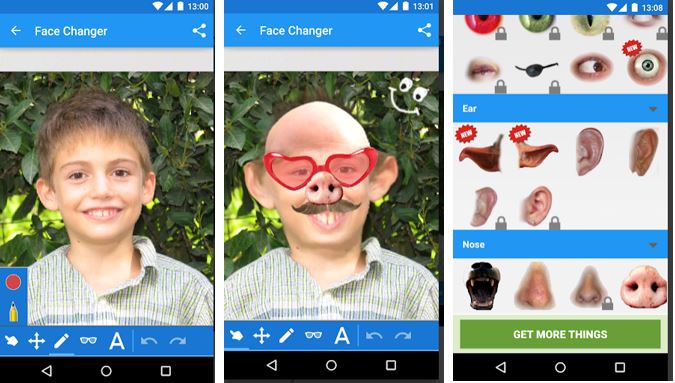
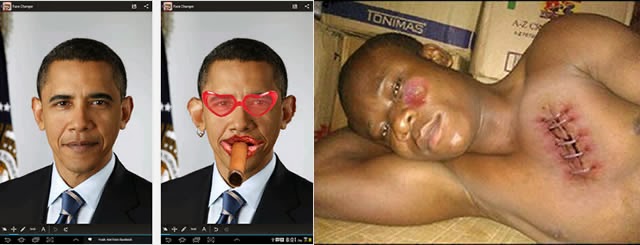
Recently, a friend tagged me in picture where he was brutally injured. “What happened?” was my first question as I wondered what might have inflicted such injury and bruises on him. The answer didn’t wait for too long: He honestly told me it was a costume he made with Face Changer on his Android device.
It doesn’t matter whether you forgot to apply the necessary make-ups before taking a photo, this app will help you apply make-ups or add items you never had to your photos.
Publisher Description
CNET: If you are searching for a great time killer and funny photo app, this one is for you. This app promises many laughs as you twist and edit your friends’ faces. Face changer lets you easily change faces in photos. Use it to change your face, friends or change face in any image you find on the internet. It’s easy to create funny pictures and caricatures, and easy to share them.
File Info
– Release Date: October 24, 2013 – Size: 6 MB – Version: 5.8 – App Requirement: Android 2.2 and up – Age Rating: 13+
For information on how to use Android Face Changer on PC or Mac click here, otherwise, click on the download button below to initiate your download.DOWNLOAD ANDROID FACE CHANGER
Techcrunch – Yesterday’s Nest acquisition was unique in the respect that out of its four board members, one of them, Bill Maris, was a partner at the corporate VC arm of the acquirer’s parent company, Google Ventures.
The other, Randy Komisar, was a partner at a Silicon Valley venture firm helmed by John Doerr, who was on the board of the acquirer, Google. The last two board spots were filled by the Nest co-founders, Tony Fadell and Matt Rogers. Holy conflict of interest Batman! What a completely awkward situation for both Maris and Doerr. As an investor you want to maximize returns, but as a part of Google, would you want to keep the price down for your parent company?
Google has been the acquirer of a Google Ventures funded company four times since the VC firm launched in 2009: Makani Power, Milk and Bufferbox. Nest will be the fourth if you count Bufferbox, which was so small that Google Ventures didn’t even know it was in M&A talks because it was grandfathered in as a personal Kevin Rose investment. Nest is one of its biggest, if not the biggest, Google Ventures Google exit to date. https://www.youtube.com/embed/gZYEjaJDpKM?feature=player_embeddedIn every case above, Google Ventures partners have recused themselves from M&A discussions, due to obvious conflicts of interest, and that was especially acute in the Nest because of the size of the deal (A whole Snapchat!). Maris took himself out of the game and left Kleiner Perkins’ Randy Komisar to negotiate for the investor’s side when talks got serious over a month ago. KPCB held the majority share in Nest, and saw an over 20x return in this deal. Back at Kleiner, head John Doerr also excused himself from talking to Komisar about the talks, because of his board conflict (note: Kleiner owns no Google shares). Komisar was a lonely puppy for a while.
According to Fadell, Google had been interested in nabbing Nest as far back as Google Venture’s investment in 2011, but the discussions were never serious until this winter. We at TechCrunch had heard Apple was also trying to feather its nest with Nest around a month ago, whether “serious” or not.
For what it’s worth, Fadell told Fortune’s Dan Primack yesterday that he couldn’t discuss whether or not he had discussed an Apple buy, which likely means that he had, even if informally. I mean, he’s the father of the iPod. He’s not going to chat up his former colleagues?
But when it came time to sign away the company, Google was simply a better fit from a data standpoint. “Excitement from Sergey and Larry delivered a little extra confidence,” said one person familiar with the matter, citing that the deal was of the eBay “Buy It Now” sort instead of an all-out bidding war.
Google Ventures is now completing two to three new investments per week and will have a brand-spanking-new $300 million fund as of this month, so Google acquisitions of portfolio companies are just going to keep on happening. And the partners are trying their best to keep the mindset of a Sand Hill Road firm instead of one that resembles traditional corporate VCs like Intel Capital. “We get paid when we maximize returns,” one person said.
But there’s the question of how much revenue Google sees from a large Google Ventures return. Let’s say hypothetically that this deal returned a few hundred million for Google Ventures (if Google got 12.5% that would mean a ~$400M return minus carry). One could argue if Google as the parent company gets meaningful profit from Google Ventures, then Google bought Nest for less because it also sees returns on the deal, ~$3 billion instead of $3.2 billion, again hypothetically.
And unlike a Sand Hill VC, Google Ventures does advertise “Google access” as a portfolio company perk. According to a well-informed source, a Google Ventures investment will not make or break a potential acquisition, but yeah it might help – like making the original intro that eventually led to the Nest buy: “Google is a part of our DNA, I think that’s attractive.”




















 The gist is that Microsoft wants to unify the desktop and Metro environments, especially in the context of apps. The better the apps work between the two, the more people might use applications from the Windows Store. This is tacit admission that people love the desktop environment that they have used for decades, and have been slow to switch over to the Metro environment.




You must be logged in to post a comment.