Tag: twitter

  • Elon Musk says all Twitter X Users will Pay a Monthly Subscription Fee

    Elon Musk says all Twitter X Users will Pay a Monthly Subscription Fee

    Elon Musk has proposed a potential shift in the business model of X, formerly known as Twitter. A Move that will potentially sound the death knell of one of the world’s most-used platforms.

    During a live-streamed discussion with Israeli Prime Minister Benjamin Netanyahu, Musk hinted at the implementation of a nominal monthly fee for utilizing the X platform. He emphasized that this alteration was imperative in addressing the prevalent issue of bots on the network.

    Why Musk is Charging Every User for X

    Musk elucidated, “It’s the only way I can think of to combat vast armies of bots. Because a bot costs a fraction of a penny. Call it a tenth of a penny. But even if it has to pay a few dollars or something, the effective cost of bots is very high.” Going further to state that bot creators would need to set up new payment methods for each subsequent bot. Adding an additional deterrent. While Musk refrained from specifying the exact subscription fee, he characterized it as a modest sum.

    In the course of the conversation, Elon Musk divulged updated statistics for X. Disclosing a user base of 550 million individuals who collectively generate between 100 to 200 million posts daily. It is however unclear if these numbers include automated accounts. Both legitimate and spammy bots.

    These metrics, however, do not permit a direct comparison with Twitter’s user base prior to Musk’s stewardship. Twitter employed a specific metric known as the “average monetizable daily active user” (mDAU). This older metric suggested users potentially monetizable through ad views, with Q1 2022 figures showing 229 million mDAUs. Musk refrained from providing additional details regarding the proposed charges or the timeline for their implementation.

    The broader discussion between Musk and Netanyahu centered on artificial intelligence technology. And its regulatory framework, with a brief foray into the issue of hate speech on the X platform. Musk asserted his stance against antisemitism and any form of content that fuels animosity and discord. However, Musk recently engaged in a dispute involving the threat of a defamation lawsuit against the Anti-Defamation League. Which had accused both Elon Musk and X of exhibiting antisemitic tendencies.

    Elon Musk Should Rethink His X Monetization Strategies

    Following the acquisition of Twitter in October 2022, Elon Musk wasted no time in enacting a series of substantial alterations. The first order of business was the renaming of the platform as “X.” Shortly thereafter, in March, Musk did away with the traditional blue verification badges, bringing in the Twitter Blue subscription program.

    Since last year, the company has been encouraging users to subscribe to its premium service X Premium. Which is priced at $8 per month or $84 annually. This subscription offers a range of features including post editing. There’s reduced ad exposure, enhanced search and conversation rankings, extended post lengths, and more.

    These sweeping changes form the basis of Musk’s overarching plan to steer the platform toward profitability. In a candid admission in July, he acknowledged the financial hurdles facing the company. “We’re still negative cash flow, due to a 50% drop in advertising revenue plus a heavy debt load. Need to reach positive cash flow before we have the luxury of anything else.

    Afterward, the Starlink CEO launched an initiative to extend the creator monetization program. Now, a share of the advertising revenue generated from ads displayed in response to creators’ posts is allocated to eligible individuals. The company has affirmed that this measure is part of its broader endeavor to empower users to better monetize their presence on the platform.

    Eligibility extends to subscribers of Twitter Blue, as well as verified organizations. Creators with over 5 million monthly tweet impressions for the past three months are included. Together with those who successfully pass the human review for Creator Monetization Standards.

    Twitter X Memorabilia Auction

    Elon Musk recently announced an online auction of X(Twitter)-related memorabilia. At a price point of $25, which is to be held next month. This move, while strategically directed at fighting bots, introduces a paywall that impinges on the platform’s original purpose of serving as an open space for all.

    Nevertheless, this strategy is in line with Musk’s vision of generating revenue directly from the user base. It’s undeniable that the introduction of a paywall will have reverberations across social media. Users disinclined to pay for platform access may move to other X alternative apps/competitors.
  • Threads: Meta Unveils It’s Joining The Fray With Twitter

    Threads: Meta Unveils It’s Joining The Fray With Twitter

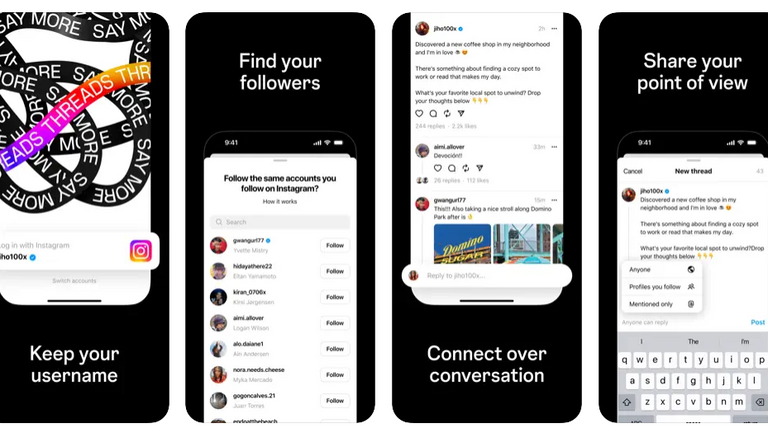
    Meta, the parent company of Instagram, the same organization that owns Facebook, is gearing up to launch its new app called Threads, which is set to rival Twitter. The app, available for pre-order on the Apple App Store, will be linked to Instagram. Ahead of its official launch, Threads seeks to provide a space for text-based conversations and community discussions. Threads will allow users to follow and connect with their favorite creators and engage with others who share similar interests. The app’s interface resembles Twitter, offering features such as reposting, liking, and the ability to control who can reply to posts.

    Screenshots of Threads reveal a dashboard that bears a striking resemblance to Twitter, intensifying the rivalry between Meta’s CEO Mark Zuckerberg, and Twitter’s owner Elon Musk. Meta’s entry into the market comes at a time when users are seeking alternatives to Twitter. Particularly after Elon Musk took over the platform and implemented significant changes that made it more challenging to access.

    Instagram Threads, Bluesky, Truth Social, and Other Competitors

    In one of their ongoing battles, Zuckerberg and Musk even agreed to a physical fight recently. Although the seriousness of their intentions remains uncertain. Musk took another swipe at Zuckerberg, sarcastically praising the sanity of Twitter in response to a tweet about the Instagram Threads. This exchange comes as Twitter announced that its popular user dashboard, TweetDeck, will be placed behind a paywall in 30 days. As part of Musk’s efforts to promote Twitter Blue, the platform’s subscription service. Musk has also limited the number of tweets users can see, citing data scraping concerns.

    Meta’s Threads, on the other hand, is expected to offer free access with no restrictions on post visibility. Meta is joining other platforms like BlueSky and Mastodon in the competition to replace Twitter. While Musk has received praise for his commitment to free speech, he has also alienated some users. Zuckerberg hopes to attract dissatisfied Twitter users and create a genuine alternative. In recent years, apps like Donald Trump’s Truth Social and Mastodon have emerged as Twitter-like platforms. Bluesky and Mastodon experienced increased traffic following Musk’s tweet restrictions. However, Threads has the potential to be the most formidable competitor Twitter has faced thus far.

    Meta executives revealed during a company meeting that Instagram Threads would integrate with ActivityPub. The decentralized social media protocol used by Mastodon. This announcement sparked speculation about a potential showdown between Mark Zuckerberg and Elon Musk. An in-house executive expressed the desire for a platform that is sanely run.

    The launch of Instagram Threads, Meta’s Twitter competitor, is expected on July 6th. According to listings on the App Store and Google Play Store.

  • Bezos, Others Reacts To Queen Elizabeth II Demise

    Bezos, Others Reacts To Queen Elizabeth II Demise

    The death of 96 year old British monarch, Queen Elizabeth II has sparked several rumours and debates both on and off the media. While the Queen who was head of United Kingdom for 70 years and 214 days received adulation during her reign for being generous and benevolent, emerging stories suggests she was anything but kind.

    Elizabeth II, the eldest daughter to King George VI who died in his sleep became successor to the King. She was thousands of miles away on a holiday trip in Kenya with her husband Prince Philip when she got news of his death. Upon her return, she took over rulership after her coronation at Westminster Abbey in central London on June 2, 1953.

    Queen Elizabeth II coronation
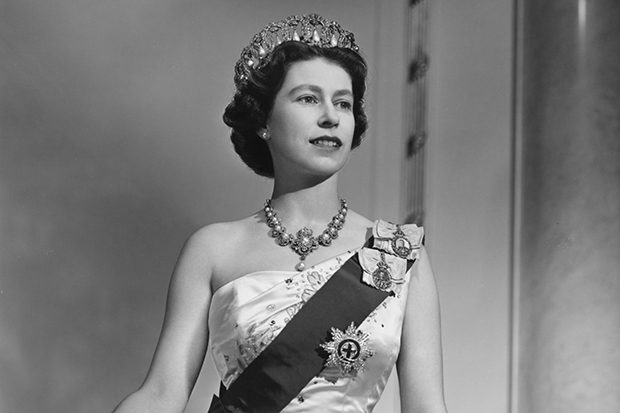
    Queen Elizabeth II poses for a portrait at home in Buckingham Palace in December 1958 in London, England. (Photo by Donald McKague/Michael Ochs)

    Many tech industry leaders have taken to social media to express their condolences at the Queen’s passing. Among the business leaders who shared their sentiments includes Bill Gates, Jeff Bezos, Bob Iger, Sundar Pichai, etc.

    Microsoft cofounder Bill Gates tweeted “I feel honored to have met HM Queen Elizabeth, and I am very sad to hear of her passing.”  

    There is nothing more noble than to devote your life to the service of others,” Apple’s CEO Tim Cook tweeted

    “The world has lost an extraordinary person, Queen Elizabeth,” Disney CEO Bob Iger also tweeted.

    The founder and executive chairman of Amazon, Jeff Bezos equally shared his condolences “I can think of no one who better personified duty,” Bezos said. “My deepest condolences to all the Brits mourning her passing today.”

    Jeff Bezos And Professor Uju Anya Spar Over Queen Elizabeth II

    On September 8, 2022, it was a battle of wills on Twitter space when a tweet by Uju Anya sparked an uproar. Nigerian-born professor of Applied Linguistics, anti-racist and feminist, Uju Anya poured gasoline over the Queen’s grave and ignited it.

    Uju Anya, igerian professor who reacted to Queen Elizabeth II death
    Uju Anya Credit: Daily Post

    In a now deleted tweet which claimed to have “violated the Twitter rules,” Uju Anya expressed antipathy towards the Queen. The self-acclaimed, anti-racist Nigerian professor said “I heard the chief monarch of a thieving raping genocidal empire is finally dying. May her pain be excruciating.”

    This controversial tweet has provoked an outrage across Twitter and other social media platforms. It was a savagely cruel thing to say to a dead person, especially one beloved by all. Regardless, Anya maintained her stance with a follow up tweet amid cheers and verbal onslaughts.

    “If anyone expects me to express anything but disdain for the monarch who supervised a government that sponsored the genocide that massacred and displaced half my family and the consequences of which those alive today are still trying to overcome, you can keep wishing upon a star,” Uju Anya tweeted.

    Reacting to the initial tweet, Bezos tweeted “This is someone supposedly working to make the world better? I don’t think so. Wow,”

    The institution where Uju Anya works expressed displeasure toward the offensive message following the stir Uju’s tweet caused. “We do not condone the offensive and objectionable messages posted by Uju Anya today on her personal social media account,”

    Carnegie University opposed the tweet but sang that, freedom of expression is one of their unswerving beliefs. “Free expression is core to the mission of higher education, however, the views she shared absolutely do not represent the values of the institution nor the standards of discourse we seek to foster.”

    Why Did Uju Anya Make That Tweet About The Queen?

    The alleged role of the British empire in supplying the Nigerian government with arms and ammunition during the Nigerian Civil War between 1967 and 1970. Over a million people, mostly from the southeast region were killed during the war.

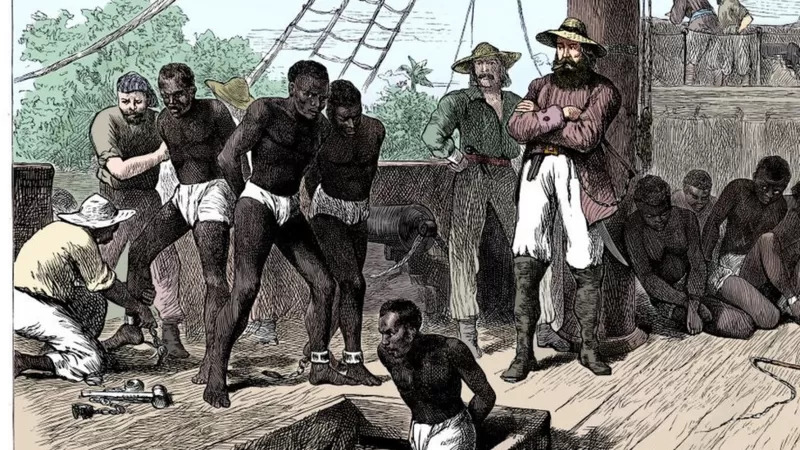
    Following Uju’s tweet, several Nigerians have made similar tweets on the negative effects of British colonialism in Nigeria and Africa. The British takeover, slavery, stolen artifacts, rape, hunger, the Igbo landing, etc.

    Quuen Elizabeth II demise spark controversy among igbos
    How the Igbo people showed strength and unity in the face of persecution in ancient times Source: BBC Igbo

    Yet another subject of resentment towards the Queen is her crown, adorned with the jewels stolen from Britain’s many colonies. Neither Queen Elizabeth II nor any member of the Royal Family ever apologised for the British imperial crimes committed in the past.

    Africans still mourn the loss of what the British colonial masters took from them. Among them is Muthoni Mathenge, a Kenyan woman in her 90s who was tortured with an ax by British soldiers in 1952 for protecting her husband and resisting the British control. Muthoni recounted how she and several others were forced to bury their fellow comrades who were killed by the British.

    Muthoni Mathenege asks Queen Elizabeth II to compensate her.
    Muthoni Mathenge with a photo of her husband credit: The Star

    It might be hard to dispel these rumours, as so many Africans are reminiscing the subjugation of the British government. It is however important to note that Queen Elizabeth II cannot be held solely accountable for all the barbarousness of Britain over the years.

    In many cases, the decisions made by the British government did not come directly from her. However, as the Monarch, everyone’s resentment, rage and hatred was targeted towards her.

    The Queen never found it politically beneficial to apologise for the wrongs of the British government, hence, she never did.

  • Instagram now bigger than Twitter with 300 Million Users

    Instagram now bigger than Twitter with 300 Million Users

    Instagram has reached over 300 million active users, a tremendous milestone for the company. Across the abundance of users, there are roughly about 70 million photos shared each day, accompanied by 2.5 billion “likes.”

    Since March, the active user count for Instagram has grown over 100 million. Quite fast and quite good indeed. This also makes Instagram now more popular than Twitter; only amassing to 284 million active users a month, it’s market cap being around $23 million. Why this detail? Because Instagram was acquired by Facebook back in April 2012 for only $1 billion.

    More than 70% of Instagram’s users are outside of the U.S., and across the network the users have shared over 30 billion photos.

    “We’re seeing a lot of people coming in the fashion world, a lot of people coming in, in the youthful teens world, and a lot of people internationally as well,” 

    CEO Kevin Systrom said in an interview with CNBC. Can Instagram keep up with this change of pace? “That’s the big challenge for me and my team going forward,” he said. One way Mr. Systrom aims to do so is to make it easier than ever for people to find new content they would love and more and more people to follow to keep updated with said-content. “There are photos pouring in from everywhere in the world. If you’re interested in really eclectic topics, I guarantee you there are accounts that are related to that. So we need to make sure to connect you with the content that matters most to you.

    There is more to the announcements by Instagram than just the 300 million user marker. To help combat spam on their app, they are rolling out a verification badge to be displayed on the profiles of celebrities, athletes, brands and other user types, to help ensure the majority of users know they’re connecting with the real person behind the account. Instagram also said it was planning to remove all “spammy” accounts from the service to improve the app for everyone.

    The removal of spam is required whilst Instagram ramps up in popularity and usage. Mr. Systrom said that Instagram doesn’t aim to compete with tech companies in their advertising platform (which is another major reason for the removal of the spam), but to compete against print and television ads – something you don’t really hear in the comparison of online ad competitors.
    We are selling brand advertising that shifts perceptions, for instance like Chobani,” said Systrom.

    Chobani did a really wonderful yogurt campaign on Instagram to shift perceptions away from the fact that they were just yogurt. And they had a 7 point incremental lift on shifting that perception through a brand advertisement on Instagram. That’s the type of thing you typically see in a magazine or on TV. If you look at those markets, they are very, very large. And I think that’s what we’re going after. So you can see where we’re headed.

    Though Instagram has outnumbered Twitter in active users, they still have a long while to catch up to the company in revenue terms; which was $365 million in the last quarter. “I think it’s hard to compare Twitter and Instagram,” he said. “Twitter has a more mature business. They’re public. We’ve just started monetizing. We have a lot to prove before we’re, you know, worth many billions of dollars,

    When asked if he felt like he wasted billions on the Facebook acquisition, Kevin Systrom denied, saying he doesn’t think of it that way, and that he has Facebook to thank for the intense growth of the company.

    sources:
    CNBC
    Google News
    blog.theadvocate.com (image)

    What do you think of the good news Instagram has released? Leave a comment below.

  • TwitPic Data Barely Surviving as they Hash out Twitter’s Terms

    TwitPic Data Barely Surviving as they Hash out Twitter’s Terms

    It’s been over a month since Twitter came after Twitpic  over the service trademark, threatening to remove the service’s access to Twitter’s API. Today, CEO Noah Everett has announced that they have reached an agreement with Twitter that will let them stay alive – but a mare survival.

    And in a somewhat happy turn of events, Twitpic has announced that it has reached an agreement with Twitter to keep Twitpic photos and links alive, giving Twitter control over the domain and the full photo archive.

    However, the agreement also states that Twitpic will no longer be taking any new photos or data and will exist in a read-only mode. Apps on the App Store and Google Play have been removed, but users will still be able to log in, delete content or the account itself, and export and/or download data.

    This comes after a “roller coaster ride” of the past few months. In September, Twitpic founder and CEO Noah Everett announced that the service would shut down after Twitter came after the service over the Twitpic trademark, threatening to remove the service’s access to Twitter’s API.

    “This came as a shock to us since Twitpic has been around since early 2008, and our trademark application has been in the USPTO since 2009,” Everett wrote in a blog post.

    Shortly thereafter, rumors circulated that Twitpic might be bought in order to save the service and the data that lives on it, until Everett once again admitted defeat and announced that he had given up on finding acquirers.
    It’s with a heavy heart that I announce again that Twitpic will be shutting down on October 25th. We worked through a handful of potential acquirers and exhausted all potential options. We were almost certain we had found a new home for Twitpic (hence our previous tweet), but agreeable terms could not be met.

    According to the blog post from today, which you can read below, it seems Everett won’t be staying on at Twitter or Twitpic.

    Today marks the end of a difficult battle for Twitpic, whether it’s a happy or sad ending.

    First off I want to say thank you to everyone who has used Twitpic over the years and for your patience with us over the last couple of months. As you know it’s been quite the roller coaster ride.
    We weren’t able to find a way to keep Twitpic independent. However, I’m happy to announce that we have reached an agreement with Twitter to give them the Twitpic domain and photo archive, thus keeping the photos and links alive for the time being. Twitter shares our goal of protecting our users and this data. Also, since Twitpic’s user base consists of Twitter users, it makes sense to keep this data with Twitter.
    What this means for Twitpic users:

    • Twitpic will no longer be taking on new photos or data (the site will be in a read-only mode)
    • The iOS and Android apps have been removed from the app stores and will no longer be supported
    • You will still be able to login to your profile to delete content or delete your account on Twitpic.com
    • You can still export and download your data / photo archive on Twitpic.com

    This will be my (@noaheverett) final chapter with Twitpic, and again I want to say thank you for allowing me to be a part of your photo sharing memories for nearly seven years. It has been an honor.

  • Queen Elizabeth II takes to an iPad to send her first Tweet

    Queen Elizabeth II takes to an iPad to send her first Tweet

    Think about your first tweet. Mine was sent from a desktop, but I’m sure plenty of people sent their first tweet from a smartphone.

    But before you can ever send a tweet, you have to sign up for an account. And, of course, you have to type out an actual message. Only then can you press that little blue Tweet button and begin your Twitter journey.

    The Queen, however, does things a bit differently.

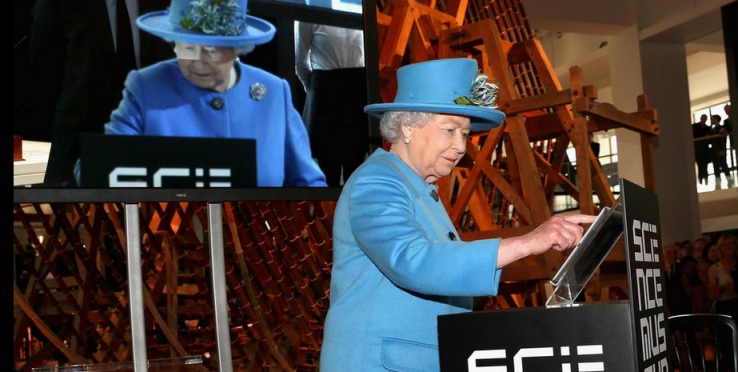
    In her first tweet, she promoted the opening of the Information Age exhibition at the Science Museum, signing the tweet with her official signature: Elizabeth R. The R stands for Regina, which is the Latin for Queen.

    The tweet was sent from the British Monarchy’s official account, which has over 750,000 followers. At the time of writing, the tweet has more than 20,000 retweets and almost as many favorites.

    It is a pleasure to open the Information Age exhibition today at the @ScienceMuseum and I hope people will enjoy visiting. Elizabeth R.
    — BritishMonarchy (@BritishMonarchy) October 24, 2014

    There was some controversy over whether or not the Queen actually typed out the tweet herself, as videos of the occasion only show her strolling up to an iPad on a lectern, removing a glove, and pressing a single button. However, pictures taken before show her typing on an iPad. Still, TweetDeck shows that the tweet was sent from an iPhone, as you can see in the picture below.

    The British Monarchy told the Verge that this discrepancy was due to “processology” (whatever that means), and insisting that the tweet was sent personally by the Queen. They even tweeted about it.

    Personally, I don’t mind if the Queen has someone else type out her 140-character knowledge bombs. After all, Ashton Kutcher can’t even handle the pressure and he leads no empires.

    SOURCE: Twitter, Engadget via TechCrunch. [Image credit: @BritishMonarchy] MORE COVERAGE: Time Magazine

  • French Twitter Users can now ‘Tweet’ Money to One Another Free

    French Twitter Users can now ‘Tweet’ Money to One Another Free

    French Twitter users will be able to send money to one another with a tweet from later this week—but the payment service isn’t run by Twitter.

    S-Money, a subsidiary of France’s second largest banking group, BPCE, plans to extend its existing mobile payment service to French Twitter users with a payment card, regardless of who they bank with.

    The service will be available this week, a BPCE spokesman said Monday, though he refused to discuss details ahead of a news conference scheduled on Tuesday.

    However, in a statement about the service published early September, Jean-Yves Forel, CEO of Groupe BPCE said that this S-Money initiative can open up a whole new range of payment possibilities on social networks.

    However, a Twitter spokeswoman was quick to emphasize on Monday that this is not an official partnership between Twitter and the banking group. There are currently no plans to launch the service in other countries, as at this time it’s solely a French initiative, she added.

    Free payments via tweets

    As to how the service would work exactly, details are still scarce. French Twitter users will be able to send money with a simple Tweet and free of charge, without having to enter the beneficiary’s bank details, S-Money said on its site.

    S-Money already offers electronic wallet apps for Android and iOS devices. The apps allow users who have linked their bank accounts to the service to send money for free to friends and family who also signed up for the S-Money service.

    With that service, users’ personal banking information is stored on a secure server and never on a phone. All transactions are encrypted and require the entry of a PIN. If a phone is stolen or lost, accounts can be blocked with a phone call.

    S-Money’s Twitter service will be launched at a time banks are struggling to keep up with technology companies who increasingly tap into the online payments market.

    Twitter trying to move into payments

    Twitter itself started testing a “buy’ button for users in the U.S., offering them a way to buy products directly form their timelines. After tapping the button, users will get additional product details and be prompted to enter shipping and payment information. Once that’s entered and confirmed, order information is sent to the merchant for delivery.

    Meanwhile, Facebook is also testing a service which lets U.S. users buy retail items directly from their feeds or from a company page. The social network is also reportedly gearing up to enable mobile payments within its Messenger app.

    Whether the services will take off remains to be seen. One hurdle might be the reluctance of users to share their financial details with Facebook or Twitter out of privacy concerns. As people are already used to sharing their payment details with banks, the banking sector could have advantage as a social media payments provider.

  • How to Create an Eye-Catching Header Photo for the New Twitter Profile

    How to Create an Eye-Catching Header Photo for the New Twitter Profile

    Are you promoting your brand on Twitter?

    Freaking out about creating a good-looking header photo for your Twitter profile?

    You’ve probably noticed that striking visual piece in the Twitter profile layout — a full-screen-width banner image, known as a “Header Photo.”

    On Tuesday, April 8, 2014, Twitter blessed it’s users with a new profile layout that includes a full-width header photo.

    But you may have noticed that not every header photo is a home run …

    Following the release of twitter new profile layout “New You” last month, I have compiled a few image recommendations to help you create a header photo that looks professional, makes a great first impression, and markets your brand’s best assets — without violating the Twitter Image Terms.

    What’s new about the “new you”?

    Background image -out, cover image -in, summarize the new twitter profile look. The new web profile lets you use a larger profile photo, customize your header, show off your best Tweets and more. Other features included to the new look are:

    • Best Tweets: Tweets that have received more engagement will appear slightly larger, so your best content is easy to find.
    • Pinned Tweet: Pin one of your Tweets to the top of your page, so it’s easy for your followers to see what you’re all about.
    • Filtered Tweets: Now you can choose which timeline to view when checking out other profiles. Select from these options: Tweets, Tweets with photos/videos, or Tweets and replies.

    Feeling Un-Cosy? 5 Steps to Setup a Branded Twitter Profile

    If you are an existing twitter user, you may find your old profile header photo a little bit un-cosy after migrating to the new look. With the background image feature gone from the profile area, the massive space occupied by the header photo becomes your next billboard.

    In this article I’m going to show you how to make the most of this massive space in five steps.

    1. Abide by Twitter Image Policy

    Twitter reserves the right to suspend/terminate your account if you don’t comply to the rules. One of this rules states that “You may not use obscene or pornographic images in either your profile photo, header photo, or user background”.  Having that at the back of your mind, let’s proceed to the next step.

    2. Map out the exact dimensions and shape

    The Twitter header photo is not a common image size, and the rectangular composition includes a cut-out for your profile image in the lower left corner.
    This means the best-looking header photos tend to be images that are designed to take advantage of the header photo’s exact size and shape.

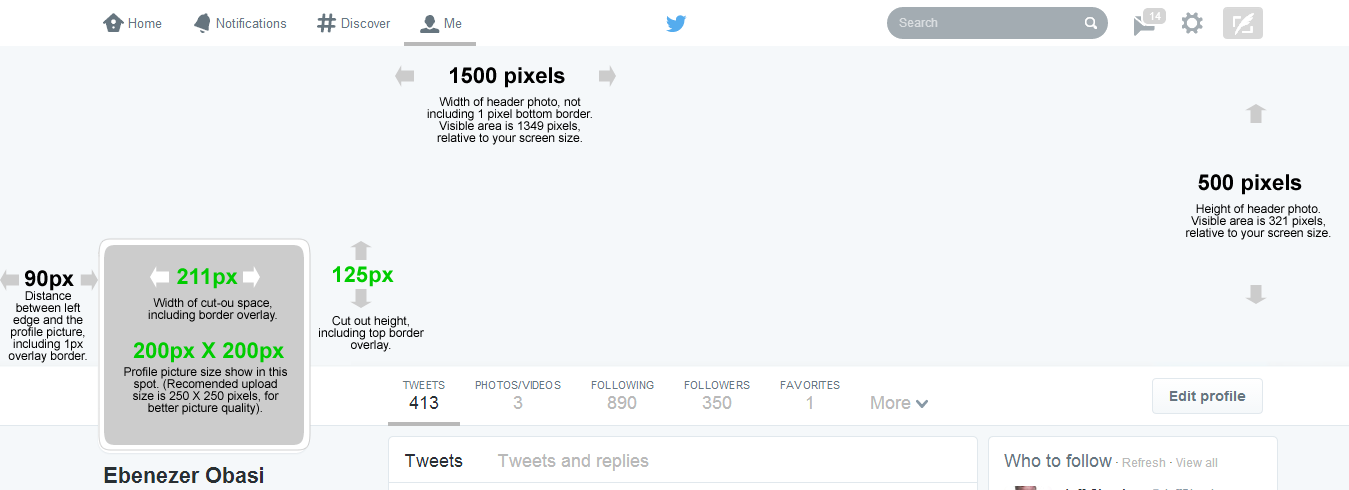
    Shape and dimension of Header area. Click to view full image

    Detailed measurements:

    • Official recommended size for Twitter header photo is: 1500 pixels wide by 500 pixels tall.
    • Profile image cut-out: 211 pixels wide by 125 pixels tall, spaced 90 pixels from the left edge of the header photo.
    • Profile image size: 200 x 200 pixels, with a recommended image upload size of 250 x 250 pixels. (Note: Larger images can be cropped).

    Important tips:

    • If you upload an image smaller than 1500 x 500, it will be stretched to fit. This will make your image quality appear slightly grainy or distorted. The best practice is to upload an image that’s sized to Twitter’s dimensions.
    • Screenshot measurements reveal that only 321 pixels are visible from a 500-pixel image upload. The top edge appears to be covered by the Twitter header bar. A test with a 321-pixel tall image became distorted when uploaded, so do upload a 500-pixel tall image even though only the bottom 321 pixels will be visible.

    3. Don’t hide content behind your profile picture.

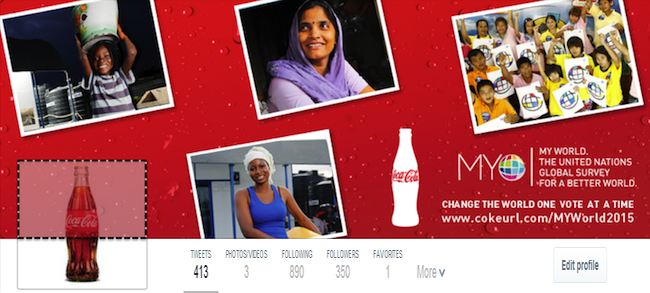
    Even though you are granted a massive 1500 pixels by 500 pixels to design a Header Photo doesn’t mean that you have all of that to work with. Because of the way that Profile Image are placed on Twitter profiles, there’s a section of your Header Photo that won’t appear unless you click on it.
    Note the area highlighted with dotted lines in the image below: That’s the part of the Header Photo that isn’t immediately visible to your Twitter followers.
    The dotted area is not visible unless the viewer clicks on the Header Photo
    Unless you are hiding a Christmas tree behind your profile image, it is generally recommended to keep the space clear.

    4. Decide contents to include in your header photo

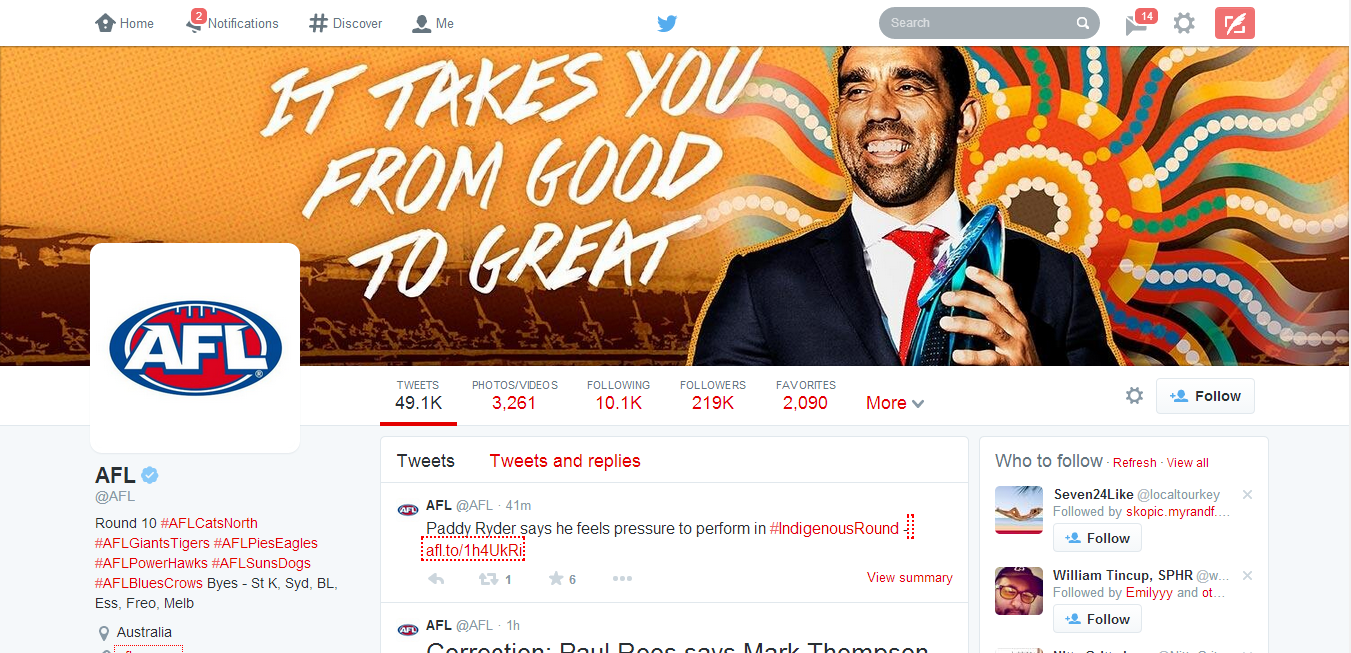
    Outside abusive and pornographic contents, Twitter currently does not have any rule limiting users on what kind of contents to display on their profile header image. However, it is the best practice to include only text/image that describe or relates to you.
    Use high-quality photographs that are in focus, have balanced color and good lighting, or use photo editing software to optimize your images. You can design an image collage or use one big, beautiful photograph — just keep the cover photo shape in mind when setting up your composition.
    Australian Football League Twitter profile. Notice the powerful text on the Header Photo
    Your company logo should appear somewhere, usually in your profile image, in which case it is not needed as an extra graphic in your cover photo. If you plan to include text, consider its placement when selecting images.
    Here are a few image content ideas suitable for brands:
    • Candid photos of customers enjoying your products (be sure to get permission to use their likeness)
    • Your most popular products
    • Icons of awards won
    • Employees in action
    • Company founders
    • Store interior or exterior
    • Branded vector graphic
    You might also consider the following type of text to grab your audience attention:
    • Company tagline or short phrase that explains what your business does
    • An impactful word that embodies your brand
    • Inspiring quote
    • Names of people in your photo
    • Photographer credits
    • Image copyrights

    5. Upload your profile header header photo

    Now is the easy part. Uploading your profile header photo is as simple as ever.
    1. Log in to your Twitter account.
    2. Go to your profile by clicking on “Me” on the twitter main menus.
    3. Just below the header photo area, click on Edit Profile button.
    4. Click on the Camera Icon on Header Photo space and click Upload from the drop down menu
    5. Reposition and scale your header photo by dragging the image and scale bar below it. When done, click Apply.
    6. Finally, save your changes and you are good to go!
    Awesome! If you think you did a great job, inspire others by posting your Twitter profile links on the comment section. GoodLuck!
  • Exciting Keyboard Shortcuts that will Make you a Twitter Ninja

    Exciting Keyboard Shortcuts that will Make you a Twitter Ninja

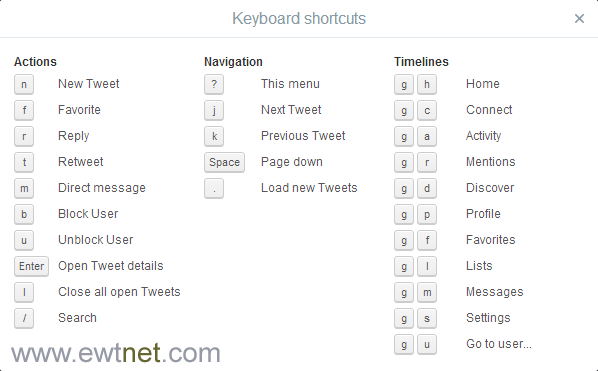
    Out of over 500 million Twitter users, only 30% can boast of knowing their way around Twitter main website without clicking. Though the new Twitter interface is pretty much like the old one, using keyboard shortcuts could prove useful when you want to perform a quick task.  

      If you use the main Twitter website, we can help you out with some seriously useful keyboard shortcuts. Whether it’s navigational tricks or keyboard actions, these handy shortcuts will save you tons of time.

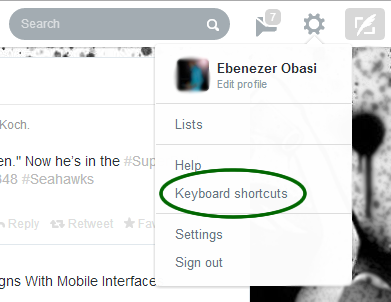
    To view the complete list of keyboard shortcuts from your Twitter account at any time. Click on the Gear Icon on the menu bar and select Keyboard shortcuts.

    Image
  • Twitter Rolls Out New Web Design That Aligns With Mobile Interfaces

    Twitter Rolls Out New Web Design That Aligns With Mobile Interfaces

    Twitter is rolling out a new design on the web today that eliminates the pop-up compose window and brings its look more in line with its mobile apps.

    We’ve been seeing Twitter test versions of this design for some time now, but this particular one appears to be the test bucket that got the best reaction from users.

    It looks, in some ways, a lot like the old version of Twitter — with a profile box and other information presented to the left of the main timeline. One of the biggest changes, of course, is that there is now an inline compose box on the left side, allowing you to pound out tweets without having to deal with the pop-up compose box. The pop up is still accessible via the ‘new tweet’ button in the upper right corner and the keyboard shortcut.

    Placing a compose box right in the left column should make the interface feel a bit lighter weight, inviting people to tweet out a bit more than placing it ‘under’ the compose button. I’d guess that this was aimed at converting lurkers to tweeters.

    If some of you are looking at this design and thinking ‘hmm, this is how mine has looked for weeks’, then congratulations, you’re in one of Twitter’s test buckets. The company experiments heavily, giving 1% of its users a tweaked or refreshed design and testing how they interact with it before rolling out changes on a wider scale. We’ve been getting reports of this particular design — or one with some of its elements — for a few weeks now.

    The alignment of Twitter’s web edition with its mobile versions for iOS and Android certainly makes sense. A large recent release saw major changes in both design and functionality. The web version has lagged a bit behind those releases in the interim, but now feels much more at home.

    Image Credit: John Verive. This post was first seen on Techcrunch.

  • Owner of Twitter’s Shortest Handle @N Looses his Account  in an Extortion Scheme

    Owner of Twitter’s Shortest Handle @N Looses his Account in an Extortion Scheme

    TechCrunch – Yesterday Naoki Hiroshima, an Echofon developer, posted an article about how he lost his extremely short Twitter handle @N in an extortion scheme. Hackers compromised his GoDaddy account with social engineering (calling and lying to an account rep), gaining access to his email on a personal domain.

    They said that they gained access via a similar call to PayPal, who the hacker claimed gave them the last 4 digits of Hiroshima’s credit card. They then used that CC info to convince GoDaddy that they were the owner of the domain, and reset his login information.

    They used that data to leverage Hiroshima into giving them — under duress — his low-character-count Twitter user name @N. This, it turns out, was the point of the entire affair from the beginning.

    PayPal has since investigated and claims that it never gave out Hiroshima’s credit card number or any other personal information — though it does acknowledge there was an attempt to get the info. So, that leaves a question about whether the hacker was lying about where it got Hiroshima’s card numbers — but it doesn’t change the fact that the hack happened.

    And it leaves an even bigger question. The hack is pretty well documented and it appears evident that the end result was fairly straightforward extortion. So why hasn’t Twitter simply given Hiroshima his @N username back?

    Twitter, for its part, will only tell us that it is still investigating the matter.

    We spoke to Hiroshima about the ordeal, and exactly how it went down. He notes that it’s highly improbable for the hacker to have gained access to his account without credit card numbers somehow, and that they claim it was via PayPal. He also says that he feels he did everything normally expected to prevent this kind of thing, but that the methods used by the hackers side-stepped any additional efforts he might have taken like two-factor authentication.

    “[Two factor authentication] can’t prevent this from happening again,” says Hiroshima. “GoDaddy allowed the guy to reset everything over the phone. As long as a company only uses the last 4 digits of a [credit card] to verify [identity], this will keep happening. They should ask multiple questions.”

    GoDaddy has said that it is investigating but has not responded to a request for further comment.

    The vector for the attack, in the end, was the weakest link in many security procedures: people. A well documented attack on Wired writer Mat Honan last year was predicated with relatively similar tactics. The target of Honan’s attack was also a low-character Twitter account.

    The question about what can be done to improve security in these matters is a long-running one. There have been some changes like two-factor authentication being offered by more vendors — but sloppy procedures like allowing account resets with credit-card numbers (especially partial ones!) remain commonplace.

    And the fact is that many of these ‘hacks’ don’t take any special technical knowledge. They just require a methodical and bold operator that is willing to pick up the phone and follow a script.

    Hiroshima also notes that many of these systems are designed to make it easy to change things by phone, but nearly impossible to revert them afterwards.

    “They should design the system so that reverting should be easier than changing,” Hiroshima says. “That the attacker changed something was something that can happen, the problem is, i couldn’t revert the change. If someone updated something and someone else said “no” immediately after, what’s the chance of the latter guy is the attacker?”

    As far as why Hiroshima’s Twitter account hasn’t simply been ‘given back’ to him — the answer likely lies in the fact that he felt so threatened by the hacker’s access to his accounts that he ‘gave’ the account over willingly. Had he held out and waited for them to cause more damage or take over the account by main force or another feat of customer service manipulation — it would have been a much simpler matter. It would have been stolen and could be returned.

    Now, because the account was ‘transferred’, it’s a much murkier affair and Twitter will likely have to do a more due diligence before it takes any action. So Hiroshima will probably get @N back, but it will take a bit.

    It’s worth noting that Twitter appears to have banned the @N account at the time of this writing, so the gears are turning.

    Image Credit: Manuelxk | Article source: Techcrunch

  • Twitter Introduce Photo Editing Tool and Trending Events to its Mobile

    Twitter Introduce Photo Editing Tool and Trending Events to its Mobile

    The future of internet and social networking is looking brighter as Twitter joins Google+ in photo editing technology.

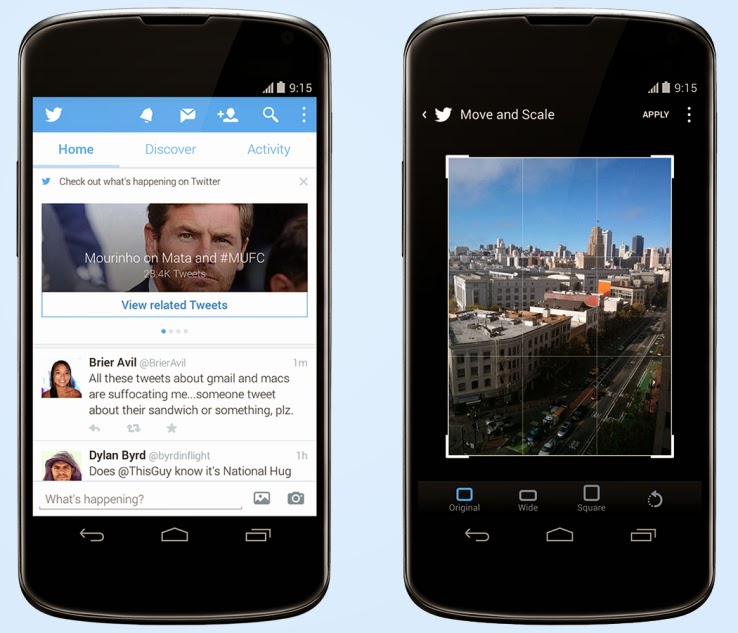
    A post on Techcrunch has reported that Twitter has just released an update to its Android client (coming soon to iOS) that brings new photo editing tools to the service, which are likely meant to make it easier to share photos direct and keep people out of competitive apps like Instagram. The second change adds a significant element of event discovery and real-time trend monitoring to user timelines.
    The event surfacing is the more interesting element, since it marks a considerable attempt by Twitter to meddle with the straightforward chronological nature of that part of its service (besides promoted content). In case a user doesn’t have any new tweets to load when you manually update it, it now brings up recommended posts from people you don’t follow, as well as trending topics and suggestions about new people to follow. In the U.S. only, it surfaces event updates for things unfolding on TV, in sports and on the news.

    Each content update features a link to click through for more tweets centered on that conversation. It’s an extension of some of the other work Twitter has been doing around surfacing events and breaking news, including the Eventparrot experiment and a feature that was tested back in August to highlight nearby events via proximity-based alerts.

    A couple of things to flag about this change: It only happens when there’s no other new content for a user to view, and when they express a desire for more content, which is very clever; and it represents a way for Twitter to secure its place as the source of live, real-time information about things unfolding on the ground, a reputation that Facebook clearly covets.

    Others are already capitalizing on Twitter’s ability to identify and follow events as they unfold, including Banjo, but Twitter adding this as a native feature in its mobile clients could change the nature of the service at a basic level. Should it roll out globally, and expand its scope, mobile users could be using Twitter a lot more for things like local discovery than they had been previously.

  • How to turn off inline images using Twitter’s mobile app

    How to turn off inline images using Twitter’s mobile app

    For those of you who feel like ripping of twitter’s head, well, here are some Tech Hive solution that may help cool things down.

    For some Twitter power users, the day of reckoning has come: On Tuesday, Twitter updated its mobile app and website to show inline previews of photos and videos in tweets instead of requiring you to click a link or expand the tweet. And lo, Twitter erupted with anger and, well, the obligatory snark.

    If you view tweets using the Twitter website, you’re pretty much stuck with the inline image previews: As of this writing, there’s no way to turn them off through Twitter.com. But you do have a couple options at your disposal.

    Just say no. No no no. Turning off Image
    Previews in Twitter’s mobile app is just a swipe away.

    Disable inline images in Twitter’s mobile app

    If you use Twitter’s official client app for iOS and Android, you can easily turn off the inline image previews. iOS, it’s represented by a toggle switch; on Android, it’s a checkbox).

    Open the app, tap Me in the toolbar, then tap the gear icon. Tap it, then tap Settings from the menu that appears. Scroll down to Image Previews, and tap the toggle to turn it off (on

    Once you do this, you should no longer see the inline image previews in Twitter’s app from the Home tab. Unfortunately, this setting only applies to the mobile app—if you go to Twitter’s website, you’ll still get the image previews in your timeline.

    Use a third-party client

    Countless Twitter clients exist for just about every major platform out there—Mac OS X, Windows, iOS, Android, Windows Phone—and they usually don’t show large inline image previews (though some may show small thumbnails). Do a search on your operating system’s app store for Twitter apps to get an idea of what’s out there.

    Take a look at TweetDeck and Hootsuite for OS X and Windows. We also like Tweetbot, a fun, easy-to-use app for Mac OS X ($20) and iOS ($5).

    If Twitter’s inline content still grinds you gears—even if you can’t see it—maybe it’s time to jump ship to another social network. We hear Google+ has some very nice features…

  • Twitter Users Discontent with the New Twitter’s photo previews

    Twitter Users Discontent with the New Twitter’s photo previews

    Change they said, is difficult to accept and twitter users are no exception to this true saying: An extract from Tech Hive has confirmed that Some Twitter users are complaining about a change that puts photo previews front and center in their streams, and offering advice to others on how to turn it off.

    Apparently some users like viewing photos on Twitter but don’t want image previews appearing automatically in their stream, which is what happens with a change to the service rolled out Tuesday.

    “I was perfectly happy with that one extra step of ‘show picture’ for the ability to see a picture that I want to see,” one user wrote on Twitter’s developer forum.

    “I do not necessarily want to see every picture that every person I follow posts, right on my timeline,” the person wrote.

    Another Twitter user wondered if he had “ticked something somewhere” without realizing it.

    “Wow, Twitter is suddenly unscannable. What is this crap in the feed and how do I turn if off?” asked another.

    The update means users no longer have to click a link to view the photos, so scrolling through Twitter can now mean scrolling past a lot of photos. It’s been activated on the desktop version of Twitter and is included with an update for the iOS and Android apps. It only works with images posted on Twitter itself, or videos posted on Twitter’s Vine service, however.

    Twitter is apparently keen for users to see a lot more images in their Twitter streams. Photography is a key service for social networks, and Google updated its photo features on Google+ Tuesday as well.

    Showing photos in Twitter without needing to click on them can have unintended consequences, though. A search for “twitter photo previews” on Twitter Tuesday revealed at least one explicit pornographic image.

    Some users provided advice on how to disable the feature, posting screenshots of how to turn it off within the Twitter app on mobile devices. The image previews can’t be disabled on the desktop, however. (Here’s an advice on turning off online images in the mobile version of Twitter.)

    It’s not uncommon for users to complain about changes to online services, as Facebook, Yahoo and others know too well.

    One user suggested this is a fight Twitter can’t win. “Y’all complained when Twitter wasn’t visual. Today, y’all are complaining it has photos in your stream?”

  • Twitter flop gave third-party apps unauthorized access to private messages

    Twitter flop gave third-party apps unauthorized access to private messages

    Users who signed into third-party Web or mobile applications using their Twitter accounts might have given those applications access to their Twitter private “direct” messages without knowing it, according to Cesar Cerrudo, the chief technology officer of security consultancy firm IOActive.
    The issue is the result of a flaw in Twitter’s API (application programming interface) that led to users not being properly informed about what permissions an application will have on their accounts once granted access. Cerrudo described the problem and explained how he discovered it in a blog post published Tuesday.
    Applications that allow users to log in with their Twitter accounts have to be registered with Twitter at https://dev.twitter.com/apps. During registration, their developers have to declare the level of access the applications will have on people’s accounts: “read only,” “read and write” or “read, write and access to direct messages.”

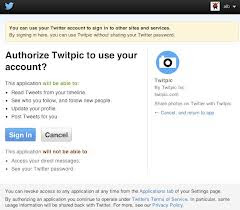
    When users attempt to log into such an application for the first time using their Twitter accounts, they get redirected to an authorization page on Twitter’s website that lists the permissions requested by the particular application.
    Cerrudo said that he discovered the issue while he was testing an application developed by a friend that had a “read, write and access to direct messages” permission declared with Twitter.
    When he first signed into the application with his Twitter account, he was redirected to an authorization page that informed him that the application would be able to read tweets from his timeline, see which users he follows, follow new users on his behalf, update his profile information and post tweets on his behalf, he said. The page clearly noted that the application would not be able to access direct messages or the account’s password.
    “After viewing the displayed web page, I trusted that Twitter would not give the application access to my password and direct messages,” he wrote on the blog. “I felt that my account was safe, so I signed in and played with the application.”
    The researcher noticed that the application had functionality to access and display direct messages, but the feature didn’t appear to be working. This made sense because he hadn’t been asked to grant that permission.
    However, after signing in and out of the application and Twitter a few times, his direct messages started appearing in the application. When checking the list of applications authorized to interact with his Twitter account (Settings > Apps) he noticed that the application did in fact have the read, write, and access direct messages permissions.
    “I realized that this was a huge security hole,” Cerrudo said.
    The researcher confirmed Tuesday that he successfully reproduced the behavior several times by revoking access to the app and going through the authorization process again without being warned that the app would be able to read his private messages. The issue was reported to Twitter on Jan. 16 and was addressed in less than 24 hours, he said.
    “They said the issue occurred due to complex code and incorrect assumptions and validations,” Cerrudo said in the blog post.
    However, Twitter’s fix does not seem to apply retroactively. After Twitter fixed the issue, the app Cerrudo was testing that already had access to his account continued to display direct messages despite never receiving authorization from him to do so, he said.
    Twitter users should check if any of the apps they authorized in the past also gained access to their direct messages without their knowledge, Cerrudo said. This can be done by reviewing their permissions on the Twitter Settings > Apps
    page.
    Cerrudo decided to make this issue public because it can have serious implications and because Twitter did not issue a public advisory or announcement about it. The company should maintain a dedicated page where it can inform users about security issues, he said.
    Twitter did not immediately respond to a request for comment.

  • How to Avoid Facebook and Twitter Disasters

    How to Avoid Facebook and Twitter Disasters

    Who knew your boss could see so much of your Facebook page–including the pics from your wild weekend? Oversharing can lead to underemployment. Take some practical steps to control what others see about you. The power of social networks like Facebook and Twitter comes from their ability to quickly share information about your life with other people. But along with that ability comes the risk of sharing sensitive information with the wrong people, and that risk increases as your network grows well beyond your core circle of friends.
    Using Twitter and Facebook effectively takes more than discretion; you should know how to tweak the settings for these services so that you have full control over who sees what on your Facebook page or on Twitter. In the two stories linked below, and in others to come, we’ll cover both sides of the coin: how to use the tools at your disposal to keep your profiles in check, and how to handle the etiquette side of the equation, as well.

    The garden-variety freshman may not have much to worry about, but it’s a different story if you–as many people are increasingly doing–are using Facebook and Twitter not for updates about your meals, pets, and drinking binges, but for professional purposes. So we’ve outlined here a handful of common disastrous scenarios in which one (or both) of these social networks was misused, as well as the best way to prevent or remedy the problem.
    But in the end you’ll find that the fundamental lesson is invariably the same, and that’s to remember the golden rule of all social networks: Never forget that the whole world is watching.
    Now go on to:

  • Don’t Tell the Boss: You Tweet from Work Like a Maniac

    Don’t Tell the Boss: You Tweet from Work Like a Maniac

    A new study by network security firm Palo Alto Networksshows “explosive” growth in the use of social networks in the workplace, with a 300 percent increase in social media activity in the latter half of 2011 compared with the same period of 2010.
    Twitter usage, in particular, showed a dramatic increase in popularity at work, growing by more than 700 percent year over year.
    Employees are flocking to other social sites as well. Since October 2010, bandwidth consumption for social media postings, Facebook apps, and other social plug-ins jumped significantly. When measured as a percentage of total social networking bandwidth, usage rose from 5 percent in October 2010 to 25 percent in December 2011, the study shows.
    Browser-based file sharing is way up as well. File sharing sites appeared on the networks of 92 percent of participating organizations in the survey.

    Security Risk

    The ability of browser-based, file-sharing apps to evade detection means that they often operate undetected on corporate networks, a situation that represents a security risk for businesses, the study says.
    The Palo Alto Networks Application Usage and Risk Report analyzed application traffic from more than 1,600 businesses between April 2011 and November 2011.

  • Avoid Twitter Disasters

    Avoid Twitter Disasters

    As a social networking tool, Twitter is even more open than Facebook–which is all the more reason to employ what safeguards you can on its network.   Avoiding Facebook and Twitter Disasters

    Take some practical steps to control what others see about you on Facebook and Twitter. The use, and uses, of Twitter seems to grow daily. Its role as a source of news on Iranduring that country’s current unrest has been widely reported, for example. For most people, however, Twitter is simply a convenient social networking tool, but as such, it is even more open than Facebook–which is all the more reason to employ what safeguards you can on its network. (Note: This article doesn’t cover such issues as the growing problem of spam on Twitter or reports of its use in phishing-like attacks.)
    At the end of this article, we’ll also offer a brief guide to Twitter commands.

    Twitter Never Forgets

    The disaster:Nelson knows everyone who follows his Twitter feed and didn’t think much about trashing a coworker on the service. Months later, long after he’d forgotten about it, the coworker began to follow his tweets–and, with a little digging, found Nelson’s insult, creating an awkward office environment.
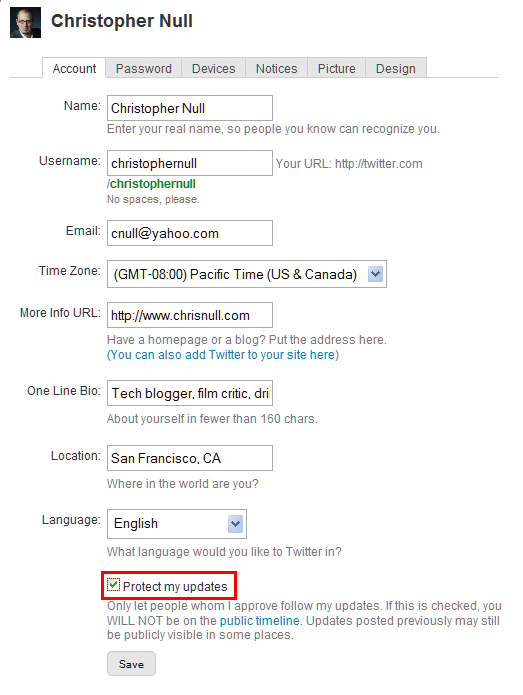
    On Twitter, check the ‘Protect my updates’ box (highlighted above) to prevent your future tweets from being seen by anyone not approved as a follower. (Old tweets will still be accessible.) The solution:Unlike Facebook, Twitter has no mechanism for ap­­proving who follows you on the service, and anyone can read your full tweeting history. That is, unless you protect your updates: Click Settings and check the Protect my updatesbox. Your tweets now won’t be visible to anyone not approved as a follower. However, anything you’ve al­­ready sent out will stick around, especially on third-party Twitter interfaces.

    Locking Out the Twitter Twits

    The disaster:Vicky regularly tweets (nastily) about a former friend, and naturally doesn’t want that person to follow her on Twitter. How does she keep that person out before it becomes an issue?
    Illustration by Mick Wiggins The solution:First, your account must be marked as ‘Protected’, as described in the preceding item. Then, assuming you know the person’s user name, simply block that user on Twitter. This op­­tion is on the profile page, in the ‘Ac­­tions’ section. It removes you from their Following list and prevents your updates from showing up on their page and from adding you to their Following list again. But your current friends can still copy and paste your tweets, or save them through screen captures.
    The real lesson: It’s probably best not to bash anybody on Twitter if you’re afraid they’ll find out about it.

    Linking Twitter With Facebook Can Be Trouble

    The disaster:Dan thought he was being a good Web citizen and killing two birds with one stone by linking his Twitter account to his Facebook profile (visit apps.facebook.com/twitterto set it up for yourself–but finish reading this item first). The idea is sound enough: Update your Twitter status, and your Facebook status updates along with it, automatically. However, a Facebook connection isn’t always a good idea. If you’re live–tweeting, say, a sports event or a conference, you might post 20 tweets or more in an hour. That may fly on the rapid-fire Twitter, but on Facebook it’s over the line since it clogs up your friends’ news feeds.
    The solution: In Dan’s case, a Twitter/Facebook link may not be appropriate, and he may be better off simply unlinking the two networks.
    The best way to unlink is to browse to Facebook, click the Applications button on the bottom-left corner, and then select Applications. Find Twitter on this page and click the X to delete the app from your Facebook profile. (If you use a third-party application like TweetDeck to access Twitter, you’ll have to unlink your profile through that app.)

    Be Careful What You Link To

    The disaster:In one of his daily tweets, David linked to an article expressing a strong view on a controversial issue. Before he knew it, David was being bombarded with tweets rebutting the article. David found many of these statements to be factually lacking, but still felt compelled to counter them in tweets of his own. Hours passed. Soon the afternoon was lost, and David was left frustrated by the challenge of making cogent arguments in 140 characters or less (Twitter’s limit).
    The solution:David didn’t want to ‘Protect’ his tweets because he believed that the openness and public nature of the service are central to the Twitter concept. David should have considered that this openness means people he knows nothing about can see his tweets and the things he links to.
    Second, when it became clear that David had become involved in a protracted debate with another Twitter user who wasn’t making much sense, he should have blocked that user by going to the person’s profile and clicking Block next to the person’s user name. Problem solved. Afternoon saved.

    The Story of ‘Cisco Fatty’

    The disaster: Unlike the hypothetical examples in this story, this one is true (see ciscofatty.com). Connor was offered a job at Cisco, the big networking company. While weighing her op­­tions, she idly tweeted to her followers that she now had to decide whether the “fatty paycheck” she’d draw from Cisco would justify her “hating the work.” Problem is, a Cisco employee saw the tweet and called her out on it, prompting an outpouring of scorn from the Twitter community, as well as a lot of embarrassment for poor Connor.
    The solution: Connor obviously should have protected her Twitter account via the ‘Protect my updates’ check box, as described in “Twitter Never Forgets,” above.
    But here’s the larger lesson: Many people keep tabs on Twitter using filtered keywords, especially company names–and the use of the term “Cisco” in her tweet was what killed Connor’s job prospects. A better ap­­proach would have been to leave the company anonymous, or–better yet–not to tweet about her job offer at all.

    Twitter Commands Reference Guide

    Here’s a guide on how to use and understand Twitter’s special commands.
    @username The basic building block of conversations, for public replies to a tweet by the user noted after the @ sign.
    D username For a “Direct message” to only the user in question. “DM” also works.
    RT @username For “Re-Tweet,” or a tweet you want to rebroadcast. Prefaced with the original twitterer’s user name.
    The following commands ask Twitter for information or tell it how to behave:
    ON username or OFF usernameTurns mobile phone notifications on or off for a single user. STOP and QUIT will cut off all Twitter SMS messages for all users. Only cell phone notifications are affected.
    FOLLOW username and LEAVE usernameTo see-or stop seeing-the tweets of a user. Twitter displays a drop-down message saying it has carried out your command. However, to truly take them off your list, go to their Twitter profile and click Remove next to ‘You follow username’.
    WHOIS username Pops up a brief amount of information about the user.
    GET username Retrieves a particular user’s most recent tweet.
    STATS Tells you how many followers you have and how many are following you.

  • Twitter Back Up After Pre-Olympics Crash

    Twitter Back Up After Pre-Olympics Crash

    Twitter is up-and running for most users after the micro-blogging site was shut down for more than 90 minutes earlier today.
    The Twitter shutdown affected users around the world.

    Twitter Image

    Apica, a web performance monitoring company, said twitter crashed at approximately 11:23 a.m. EDT, returned momentarily around 12:04 p.m, and then crashed again at about 12:15 p.m.
    The site was back online for most users around 1:30 p.m., though Apica noted that some “users along both coasts continue to experience problems connecting.”

    As of 2:45 p.m.. Twitter had not disclosed the cause of the outage on its Status Page.
    The company, though, did acknowledge that some users are still affected by the outage. “Our engineers are currently working to resolve the issue,” it said.

    Twitter did not respond to a request for comment ont he outage.
    Once the site was back online, twitter users were quick to express their frustration with the outage.
    “Twitter, do not crash again, please,” wrote @missbanshee. @OwenJones84 tweeted: “Where were you in the Great Twitter Crash of 2012.”
    And @john_mcguirk joked: “Twitter could have warned me about this outage before I made that sandwich I was so looking forward to tweeting about.”
    The crash came a day before the opening ceremonies at the Summer Olympics in London, which is expected to be a prime subject on social networks in the coming days.
    In fact, twitter has created a special page to aggregate tweets from Olympic athletes, coaches and their families, along with sports reporters and announcers.
    The Twitter.com/#Olympics page went live today.
    For more enterprise computing news, visit Computerworld. Story copyright © 2011 Computerworld Inc. All rights reserved.

  • How to Connect your Twitter With your Gtalk, 2go, IM, Gmail

    How to Connect your Twitter With your Gtalk, 2go, IM, Gmail

    Twitter can be boring at time if you have a lots of  followers. I want to save you the stress of visiting your twitter to read and update tweets. I’m going to show you a proving way to update and read your tweets using your Instant Messenger or even your gmail account

    How does it work?

    The tweet.IM service sits between your Jabber or Google@Talk instant messaging account and your Twitter account and passes messages to and from, in both directions. As a result, you can create Twitter messages in your instant messaging application and send them direct to Twitter, without having to enter your Twitter account. You can also elect to receive tweets from users that you follow, directly in your instant messenger.

    HOW TO UPDATE YOUR TWITTER USING GTALK, GMAIL

    •  Visit www.twitter.com and sign in to your twitter account. Now, when you are Logged in, Go to www.tweet.im/ and click on the Sign in with twitter button.
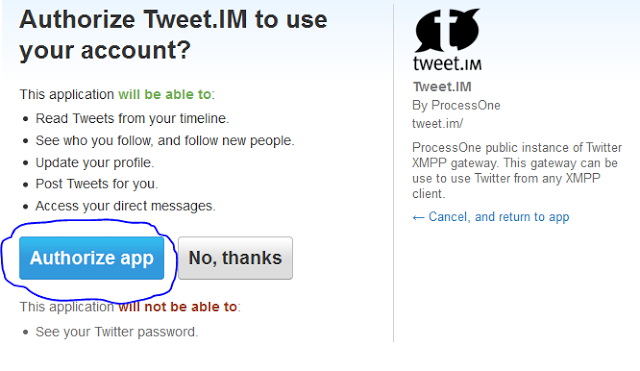
    • Click on Authorise App.
    •   Select Google Talk & put your E-mail address, then click ‘Register’
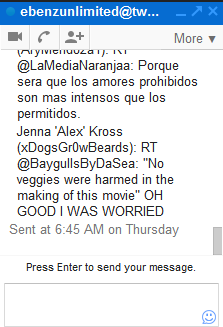
    • Login to your gmail account and you will find a box like this: This is your twitter updates   HOW TO CONNECT YOUR TWITTER ACCOUNT TO YOUR 2GO ACCOUNT
      • Open your 2go and go to Settings , click on Gateway and select Gtalk then activate using you gmail logins all in lower case.
      • Now go to your friend lists and you will see a request from Twitter, click and accept request and add Twiiter as a friend. That’s All.