The European Union has given TikTok a tight deadline to submit a thorough risk assessment for its newly launched Lite app in France and Spain. This comes amidst growing concerns about the potential impact of the app on children and users’ mental well-being, as announced by the European Commission. This is not the first time TikTok has faced scrutiny from the European Union. Neither is it the first time a country threatened TikTok with a ban.
TikTok’s latest product, the rewards-focused TikTok Lite app, hit the markets in both countries this month, allowing users aged 18 and above to earn points for rewards like vouchers or gift cards.
The Commission stated that TikTok, owned by China’s ByteDance, should have conducted this risk assessment before the app’s launch and now requires additional details. This inquiry primarily revolves around the potential effects of the new app, particularly concerning the possibility of promoting addictive behavior, according to the Commission’s statement.
This request for information was made under the Digital Services Act (DSA), a recently enacted legislation imposing strict regulations on 22 major online platforms globally, including TikTok. It’s important to note that this demand is just the first step in the process and does not imply immediate punitive action against TikTok. Any further action would depend on the adequacy of TikTok’s response to the EU’s inquiries.
TikTok has assured compliance with the Commission’s directive. A TikTok spokesperson stated that the company had already been in direct contact with the commission regarding this product and would respond to the request for information.
In February, Brussels initiated a formal investigation under the DSA into TikTok’s alleged breaches of its obligations to protect minors online, particularly focusing on the company’s efforts to mitigate the negative impacts of social media on young users.
The Commission has previously requested information from TikTok on various concerns, including the potential risks associated with artificial intelligence ahead of the upcoming EU elections.
Recall that the U.S. House of Representatives provided TikTok’s Chinese owner, ByteDance, approximately six months to sell off its U.S. assets or confront a nationwide ban. This action was due to concerns regarding national security. The bill passed with bipartisan support, represents a broader trend of addressing security risks posed by various technologies, including TikTok.
However, there were a lot of divergent opinions, particularly among younger demographics who utilize the platform for political expression. Uncertainty looms over TikTok’s future across the globe, with questions surrounding the feasibility of divesting its assets within the stipulated timeframe given by the U.S. government and the potential enforcement challenges of a ban.
Australia, Estonia, the UK, EU institutions, France, the Netherlands, Belgium, Denmark, the United States, Canada, New Zealand, Taiwan, Pakistan, and Afghanistan have all taken measures to ensure the TikTok ban due to security concerns. Several other countries, including India, Norway, and Nepal, have either banned TikTok or are considering bans due to concerns about national security and data privacy.
Like Twitter, Facebook (and now, Telegram), the use of usernames makes it easier to find and locate users on the website. However, finding or adding users by username isn’t something very common among mobile messaging apps. WhatsApp allows you to add a username or moreorless, a nickname but people can neither find nor add you with this username – something privacy lovers will appreciate.
Telegram on it’s own right is taking a different path. Since last year the company made it possible for you to add friends by username – without necessarily knowing their phone numbers – on their mobile app.
The advantage of a username is that you can share your contact details for Telegram without revealing your phone number, thus safeguarding some level of privacy. A lot of users has been asking us how to add a username to the app. So, here is a step to step guide:
Add Username on Telegram
Tap the menu button on your Android screen.
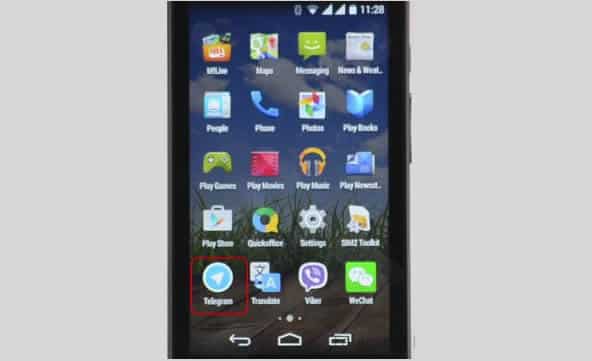
Launch Telegram application.
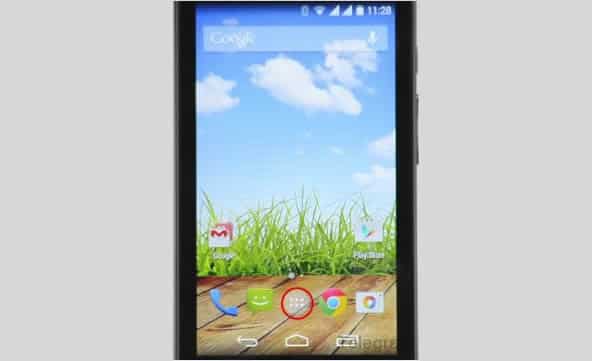
Tap the Apps button on your Android screen. Locate and launch the Telegram application.
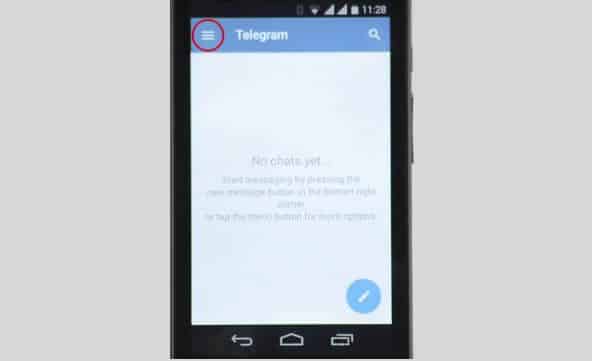
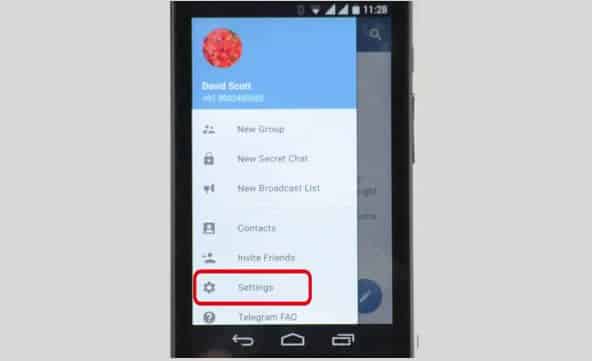
Tap the menu icon on Telegram
Navigate to Settings
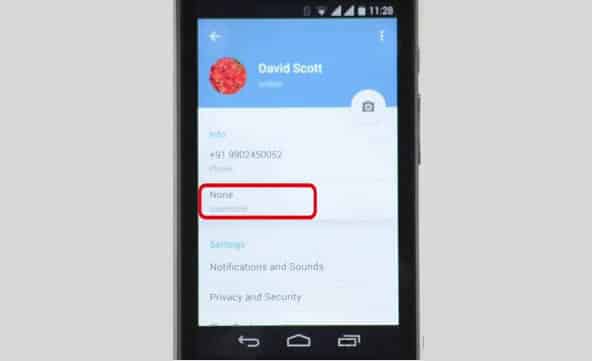
On the Telegram app tap the menu icon (represented with three horizontal lines) and open Settings. Among other options on settings, you will find Username which is set to ‘None‘ by default.
Username is set to ‘None’ by default.
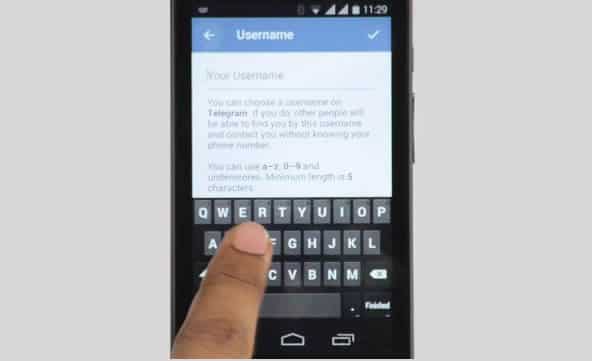
Tap on Username.
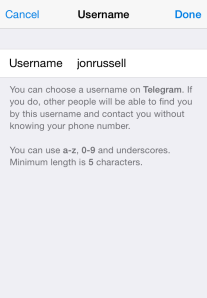
Tapping on the Username option will open a page where you can enter or modify your username. Simply enter your desired username on the text input box.
Usernames must be a minimum of five characters — so you can’t make up for losing out on a one-letter Twitter handle here — and can contain letters, numbers and underscores.
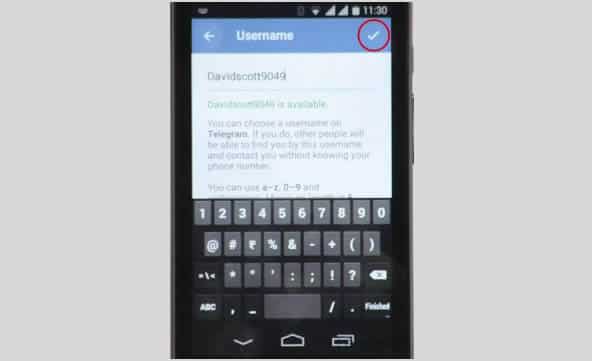
Save your username.
Save your new username by tapping ‘Good’ sign at the top-right side of your screen.
You are also free to change your alias, so long as the new one is not already taken.
One way of shamelessly making anything you make – especially online – seem like the greatest thing ever is testimonials. Not just in the actual section of a webpage or area dedicated for them, but choosing the best ones to put in the body of text meant to describe your “thing.” Google knows this and seems to think doing so on the Play Store can lead to many of things like unfair advantages, false advertising, etc. So, how do they fix this? By banning the user of testimonials in app descriptions n the Play Store, of course.
“Please do not include user testimonials in your app description. They tend to be dubious and are frequently utilized to include references to popular search terms and competitor apps in violation of the policies outlined here. Let your users speak for themselves via Play’s comment review system,” reads an update to the “Spam, & Placement in the store” section of Google’s developer guidelines.
Basically, Google is preventing app developers from inflating their position on the search results and lists of Google Play as to attain a fair advantage for every developer, in addition to other methods one could use such as repetitive use of keywords in an attempt to boost the presence of the app, using completely unrelated keywords to draw unsuspecting people to your application, and many more.
“To help ensure the best experience for Android users, Google Play policies prohibit the publication of spam. Please do not publish unwanted, deceptive, repetitive, or irrelevant content on Google Play. Not only will it lower your app’s rating and cause negative reviews, it can result in your app being suspended or your developer account being terminated,” reads Google’s guidelines.
Hopefully, this small change to the policy allows more people to get only high quality applications for their device. Believe it or not, there is a lot of scrap-apps (scrapps) on the Google Play store, and most of them are the ones including testimonials in their descriptions.
Speaking of Play Store apps, did you know about the EWT app? Get all of our post and latest tech news no matter where you’re at! Download it here to your device!
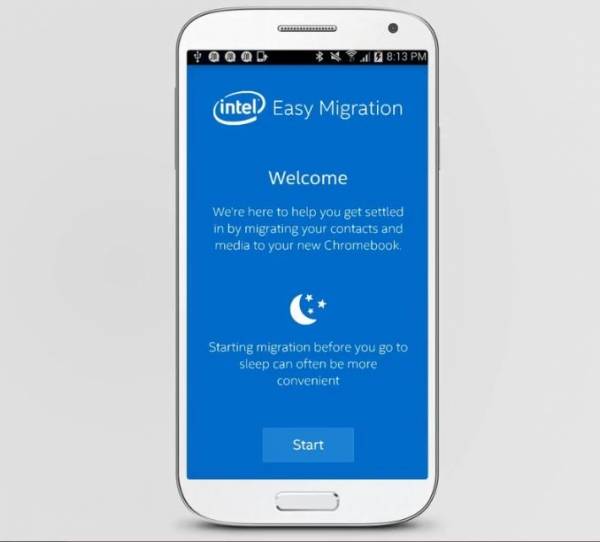
Over the past 18 months, Intel has been striking on the Chromebook market as the said market grows as more and more content is placed and trusted to the cloud. The company, that makes many CPU chips and graphics, wants to help customers switching to a Chromebook device to have a much easier time with their switch.
With their app, conveniently named Intel Easy Migration, users can easily migrate files from their mobile devices or PCs to Intel-powered Chromebooks. The app can move all sorts of files like photos, videos, and audio to even contacts and more. The Intel Easy Migration app let’s the customer move any of said files from their mobile Apple iOS or Google Android device to their Chromebook or even files from their Intel-powered Windows computers.
According to Intel officials, the customer can use the Quick Migration function to have all of their files sent over to the targeted destination, or manually select the files they want to have migrated. The user can also pause the migration whenever they wish to. The app is available in the Google Play and Apple App Store online stores, or can be downloaded for Microsoft Windows systems. Through the software, users can migrate their local and Hotmail contacts to Google Contacts, and their photos and videos to Google+ Photos. The app will also show how much space on their Google Drive is being used during the migration.
The new app by Intel comes shortly after the popularity for the Chromebook grew, the trend continuing through 2014. In July, analysts with NPD Group found that during the first half of the year, Chromebook sales in the U.S. commercial channel jumped 250 percent from the same period in 2013 and accounted for 35 percent of the notebook sales in the channel.
“Building on last year’s surprising strength, Chrome’s unit strength ahead of this year’s education buying season shows how it has become a legitimate third platform alongside Windows and Mac OS X and iOS,” Stephen Baker, vice president of industry analysis at NPD, said in a statement at the time.
Analysts also look at the Chromebook as a key reason – alongside Microsoft cancelling Windows XP support – for the decline of global PC sales this year. Intel has been aggressive in pursuing the Chromebook market as part of its larger efforts to gain inroads in the mobile device space against ARM and its manufacturing partners and to extend the reach of its chip portfolio into as many computing devices as possible. That includes supporting a broad range of operating systems, including Windows, Android and Chrome.
The Telegram Messaging App, the security-focused messaging app, now lets you add friends without necessarily knowing their phone number (see the step-by-step guide on how to add a username in Telegram). An update to the iOS and Android apps today has introduced the option to register a a username, although all users must still bind their account to a phone number.
The advantage of a username is that you can share your contact details for Telegram without revealing your phone number, thus safeguarding some level of privacy.
Usernames must be a minimum of five characters — so you can’t make up for losing out on a one-letter Twitter handle here — and can contain letters, numbers and underscores.
You are also free to change your alias, so long as the new one is not already taken.
That’s not quite all from this Telegram update. The company has also taken a leaf out of Snapchat’s book with a new feature that lets users ‘Tap and Hold to View’ photos, video and voice messages that are sent with a self-destructing timer. Prior to this update, Telegram users had to tap on media to load it.
Importantly, Telegram has now amended said self-destructing timer for media so that it only begins once the content has been opened. That means that photos, videos, etc do not self-destruct before being read.
Founded by the brothers behind Russian social network VK, Telegram launched in October 2013 with a promise to make mobile messaging more secure. The service gained some serious momentum after Facebook agree to buy WhatsApp, when it clocked 8 million downloads in a matter of days, primarily from users concerned with Facebook’s approach to user data.
Earlier this year, Telegram revealed that it has 35 million monthly active users, 15 million of whom use it daily. Co-founder Pavel Durov confirmed to TechCrunch that, as of March 2014, more than 18 billion messages were received by users of the service per month.
Those stats are far smaller than WhatsApp — which has over half a billion monthly users — and others, but they are impressive for such a new entrant in the messaging space.
Launcher 8 (fake wp8) is a Android application that turns your boring, dull Android home UI into a fluid, mock-up UI of that of a Windows 8 phone! Developed by the QiHang Team, this application has been downloaded over 5 million+ times, and really turns your Android into something else! Now, I (Jake) of EWT will go into detail of my review and thoughts of the app!
Installation
The installation process is very easy, smooth, and simple. Just download from the Google Play Store, install, and press your home button and set Launcher 8 as your main action for “Home.” Wa-la! There’s no hacking, modding, or rooting needed to install this application. Installation is very simple, great work there.
New UI & Logics
The app’s added new ui and logics is very helpful and astonishing! After installation, you instantly have the power of an Android phone with the look and options of a Windows phone. There are many themes users have made that you can effortlessly download and install, or you can customize yourself! You can add/edit/remove tiles, re-size, and even use special “widget” tiles that are included in the app. You can bind your installed applications to tiles, change individual tile background colors, names, and more. This application truly gives you control over everything! It also is programmed to work with certain apps, such as SMS, Phone, and Facebook – showing the number of new notifications, missed calls, and new SMS messages. It’s very convenient! The app also has a setting for a customizable lockscreen, which completely overrides the default Android lock screen – you can add custom backgrounds, change the layout, etc to it and add a password. The only problem with the lockscreen in this app is if you had a lock screen set up on the default Android UI before this installation, applications like “Camera” and such will not work correctly, and pressing your Home button will try and take you to the original Android lock screen rather than the Launcher 8 lock screen. You can, however, fix this by simply going to System Settings -> Security -> Passwords and turning off any locks, pins, etc. You can set your lockscreen pin for Launcher 8 in the Launcher 8 settings.
Effect on Battery
One of the main, if not the only, downside to this application is the power consumption. You’ll be loosing more and more phone battery life every 2 to 3 minutes even if you’re in idle mode. However, the QiHang team brags that their Pro version is more power efficient. This application really does take a toll on your battery life, my Android has been on the charger more then often since the install.
Final Thoughts
I believe this is a great Android application for those who want the power of Android/Google products but the look and feel of a Windows product. It has great potential, and I believe it would be even more widely popular if the free version was less battery-consuming. It could use some literary work (the grammar for settings are poor), and some of the ads are a bit mis-placed and annoying, but all around it’s pretty amazing and I’m sure to never uninstall it!
Final Rating
Price When Rated:
$2.58Free
Our Rating: 4.5
Requires Android:
2.0 and up
Content Rating:
Low Maturity This is a great app, and does everything that it says in it’s description. However, there is room for improvement and the battery drainage is what really kills it from being 5 stars.
Pros:
Complete customization; Easy to customize to your liking
Downloadable themes; For those living in the fast lane
Beautiful and fluid; Includes smart widgets and is beautiful with live tiles
Free with minimal ads, and many options and settings to configure
Cons:
Drains the battery of your device VERY fastly
Lockscreen issues occur if you have the default Android lockscreen already set up
Can be a bit laggy once you first boot up your Android
It’s 2014, and you know what that means—time to get off the couch that you’ve been glued to for the past week and start eating food with an expiration date.
I’m certainly sure that one of your new year’s resolutions as always is to lose weight, avoid junks and live a healthy life. Statistics has shown that only less than 27% of US residents manage to keep up to this resolutions past six months. According to a Bodybuilding.com survey, two-thirds of adults in the U.S. have made a resolution to get fit, and a whopping 73 percent of those people gave up before they reached their goal. Though the odds may be against you, but you can succeed—with the help of your smartphone.
In a bid to help you stay healthy in 2014 we have shortlisted five smartphone nutrition apps that will help you track progress, even when it seems like nothing is happening; and they motivate you to keep going with incentives such as achievements and friendly social competition. Whether you want to eat healthier, lose weight, or just learn about nutrition, these five apps will help you stay on track.
Food nutrition labels can be difficult to decipher, but it’s important to know what you’re putting in your body. That’s where Fooducate, a free app for Android and iOS, comes in. Fooducate—yes, that’s a mash-up of “food” and “educate”—is a food look-up service that helps you find and understand nutrition information in real life.
You can look up foods on Fooducate by product name or barcode number (the app has a convenient, built-in barcode scanner) and find the food’s nutrition info and Fooducate “grade.” The grade is based on a variety of factors, including the sugar, salt, and saturated fat content; whether it’s a good source of vitamins, minerals, or other essential nutrients; and whether it contains preservatives or artificial ingredients. Although it’s a bit simplistic, the grade is an easy way for busy people to quickly assess the nutritional value of the food.
Fooducate also has a health tracker for logging food, water, exercise, notes, and weight; daily health and nutrition tips; and the ability to set weight goals. If you want more functionality, such as carb-control, nutrient-tracking, and information about which foods are genetically modified, Fooducate also has a Pro version for $15 per year.
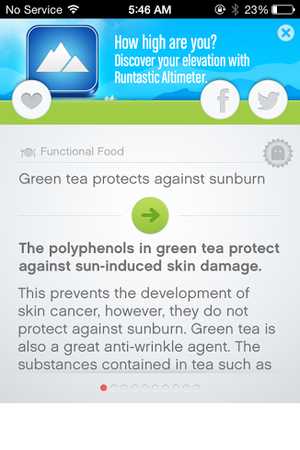
Test your knowledge and learn some new facts with Nutrition Quiz, a free iOS app by fitness app developer Runtastic. Nutrition Quiz offers short quizzes about health, fitness, and nutrition. Each quiz consists of 10 general questions (Fact or myth: Women’s noses can smell better?) chosen randomly from a database of over 600. The questions fall into eight categories, ranging from Functional Foods to Sugar & Spices. Quizzes are scored on timing and accuracy, and if you sign into your Runtastic account you can compare your score against friends and other users. After each question, the app offers an explanation of the correct answer. You can favorite any facts that you find interesting, and share them on Facebook or Twitter. The app’s browse feature lets you look through the question/fact bank at your leisure. The first 64 questions across three categories are free, but you’ll need to unlock the $2 Pro version of the app to access the rest of the database.
Starting a diet is easy; staying on a diet is another story. Free for Android and iOS, My Diet Coach can help you stay motivated and on track with its personal cheerleader approach to dieting. My Diet Coach is more about keeping you motivated than worrying about the nitty-gritty details of your actual diet and exercise plan. The app lets you set up automated text reminders to help keep you on track, such as “take my healthy snacks with me before I leave for work,” or “don’t eat five chocolate bars before bed.” The app also has a section for adding motivational photos (of yourself or of anything that inspires you to lose weight), a tips section for combating emotional eating and diet slip-ups, and daily challenges (such as drinking eight glasses of water) to help you stay healthy. This app is a little cheesy, but don’t knock the power of little nudges throughout the day. My Diet Coach’s reminders will make you think twice about eating that extra cookie, and will help you remember to stop at the health food store on the way home from work. The free version of My Diet Coach has all the motivational tools, but if you want more functionality—such as the ability to log and track food and exercise—you can upgrade to the Pro version of the app for $4.
Fooducate is a useful app if you need a quick snapshot of a food’s general nutritional value, but ShopWell takes food look-up one step further. ShopWell is a free app that rates foods based on your personal profile, taking into account lifestyle choices, dietary needs, and allergies. ShopWell asks you to first fill out a comprehensive nutrition profile, including which nutrients, minerals, and vitamins are important in your diet, as well as which nutritional pitfalls (such as artificial sweeteners or refined grains) you want to avoid. The app also asks which foods you’re allergic to or cannot otherwise tolerate. Then, the app takes this information and rates foods based on your information. ShopWell gives each food a score from 1 to 100 (100 is the highest), and tells you whether the food is a strong match, a medium match, or a weak match for your profile. You can click on the score to find out why the food is a strong/medium/weak match—for example, Bridgford Beef Jerky is a weak match for me because it has lots of added sugar. ShopWell also shows nutrition information and ingredients for each food, as well as suggestions that are similar but “better” for you based on your ShopWell profile. ShopWell is an excellent app for tracking specific aspects of your diet, such as nutrients or sugar intake, which is great for diabetics. The app lacks a built-in calorie-counter, but it does have some nifty extra features such as lists (add favorite foods to lists for future reference), popular foods (find foods that are popular with people who have similar profiles to yours), and missions and achievements to keep you motivated.
If you’re not sure where to start with your diet plan, Nutrino is the app for you. This free iOS app is like a personal nutritionist in your pocket. Nutrino is a food recommendation app that creates a custom, personalized daily menu for you based on your profile, preferences, and goals. Like ShopWell, Nutrino needs some personal information to create your custom meal plan. The initial profile setup includes answering basic questions (gender, age, height, weight, general activity level) and setting goals such as target weight and diet intensity. Nutrino also asks how large you like each meal to be, how you like to prepare each meal, and whether you have any special restrictions, such as gluten-free or vegetarian. Taking into account your profile, preferences, and nutritional goals, Nutrino creates a daily meal plan for you. The meal plans includes nutritional information, recipes, and a grocery list with all the necessary ingredients. If you don’t like a dish Nutrino has picked for you, just tap it and tap Change Dish to find a similarly healthy replacement . Swipe up to scroll through your meal plan, and swipe down to see a summary of your day, including protein, carb, fiber, and fat intake, as well as daily calories. Swipe to the left to see future days’ plans. In one sense, Nutrino is more difficult to use than other diet apps, since its success banks on your ability to follow its meal plan to a T. On the other hand, if you’re willing to put in the legwork and you want an app that will do everything for you (including counting calories), Nutrino is worth a look.
The rise of mobile-payment apps is due in part to the rise of consumer demand for payment options on mobile phones. This is the main reason behind the increase in using mobile payment options worldwide. In the US alone more than 50% have accepted making payments through mobile phones for services and products. Consumers today are more sensitive and aware about the worth of money. They are ready to make investments on energy and time in order to find the right service or product. However, consumers prefer institutions for providing mobile payment means through wallets and apps in order to gain the confidence and trust in mobile payment security.
At least 60% of consumers have accepted that they will become more willing to accept mobile payment apps if certain financial institutions offered them the right resources. Mobile payment apps have increased worldwide because the majority of payment resources are realizing the importance of smartphones and features that are being made. They also understand how consumers are becoming comfortable with the entire process of mobile payments today more than ever before.
With the mass use of tablets and smartphones, the entire world is reaching the phase where everything will become mobile. We are moving away from card based and fixed point transactions and opting for mobile resources. Mobile payments examine and analyze the mobile payment state and how they will match up with the card readers. Credit card companies, traditional banks, card processors and similar institutions are seeing mobile payments as a tough competition and threat.
The majority of brands are switching to the mobile payment mode. For example, Starbucks is switching its debit and credit card processing system to Square. Another recent development is that mobile payments are becoming a part of the huge mobile commerce market and it is bound to explode soon.
Android phone users are engaging and using mobile payment apps and the trend has grown to 8%, a 35% increase from last year. Mobile wallet and payment solutions are at the peak of its development. Consumers are using it to make basic payments, from bill payments and account management to moving money. They are also using their phones to make payments of services and goods of limited value, including the purchasing of movie tickets or getting coffee.
Success and rise in mobile payment apps completely depends on the changing trend in consumer behavior and their shifting reliance and dependence on the use of mobile payment apps and wallets.
Flaws in Apple’s App Store have made the updates to well over 100 apps completely unusable, creating headaches for both developers and users over the holiday. Apps affected become unusable and crash immediately upon setup, according to reports. Apple has not acknowledged the issue, but it is believed to have something to do with updates the company made to its app-updating mechanism. Some developers have reported that users are now able to successfully update apps, so it appears that the issue is being fixed. Here’s what you need to know about Apple’s App Store mess. Who’s affected? At least 100 apps updated between July 3rd and July 5th are believed to have been affected. Three major apps–Instapaper, Angry Birds Space HD, and Angry Birds Space Free–reported issues, along with a host of others. Apps downloaded between July 3rd and July 5th are not necessarily affected–apps are only affected if the developer submitted, and had approved, an app during that period. What happens? The issue affects both iOS and Mac apps. With iOS apps, the screen will fade to black and crash immediately upon startup, returning you to the homescreen. With Mac apps, an error message will appear, stating that “[App] is damaged and can’t be opened. Delete [App] and download it again from the app store.” If you are upgrading apps through iTunes, iTunes may pop up error 8324 or 8326 while attempting to update your device’s apps. What should you do? If you have a corrupted app on your device, you must delete it and reinstall it to fix the issue. If your app contains data that may be lost in the event of app deletion, you can follow these instructions from the developer of iPad app Goodreader to save your data. Fair warning: these instructions are a bit intensive and require backing up your device. The issue appears to be getting fixed, though Apple has yet to confirm this publicly. Therefore, it’s recommended that users with affected apps wait a couple of days before reinstalling said apps.
Nokia, the one of most popular and trusted mobile company. Nokia made wide range of mobile phones for every kind of user either the user is rich or belongs to middle class. Here recently Nokia launch Nokia 5800, a Symbian OS v9.4 based mobile phone with TFT resistive touchscreen. Nokia 5800 is a fully loaded features n work over both Wi-Fi and 3G connections. Nokia 5800 has an amazing feature of TV-Out, which makes it different from other segments by Nokia. Here are the 10 best applications from my personal view which I think makes its performance excellent from good. These apps are about your social network, Business, Security, Entertainment and as well as for students.
1.Nimbuzz
Nimbuzz is application for free calls and messaging using your different social media. You can use your Yahoo!, Windows Live/MSN, AIM, ICQ, Google Talk, Facebook, MySpace, Hyves and SIP (VoIP) accounts at a same time and can customize contacts list and tabs. In new version some changes, New chat style layout, Recent Calls tab, Real time call rates for cheap international calls with Nimbuzz Out, New profile style. Download
2.MazeLock
MazeLock is the one of best security app for your phone from strangers. Just install and watch carefully the default unlock pattern. It is an innovative way to unlock your touch screen phone just set your own unlock pattern by connecting some of the nine white dots together. When you try to unlock your phone, you need to draw the same pattern exactly as you set. Download
3.Moneycontrol-Markets on Mobile
Worried about your investments in market and enable to know information, here is the solution for you while using Nokia 5800.This application is powered by moneycontrol.com, India’s no.1 financial and business portal trusted by millions. Use the application to get real-time stock quotes, Indian and Global market Indices, manage and keep track of your investment portfolio, watch Live TV and get in-depth coverage & analysis of financial markets, economy and business. Download
4.AroundMe
Stranger in a new area and want to find restaurants, banks, ATM, gas stations, and other local services while using Nokia 5800, here is the best app for you which not even tells you about places around you, also tells the maps, directions, routes, street view and read reviews about your destination. Download
5.Mundu TV
Mundu TV is Television on your mobile. Mundu TV provides a rich TV viewing experience with network independence, subscription with unlimited usage. Now everyone with an Internet access will watch their favorite channels live. You can access Mundu TV over a GPRS , 3G or WiFi connection. Download
6. Kaspersky Mobile Security
Kaspersky Mobile Security is the one of the best security app for Nokia mobile phones. Now don’t worry about your phone to lost or stolen with the Anti-Theft Locate. In case your device lost or stolen GPS Find will help you to locate your device. This app keeps your mobile life truly private you can hide or un-hide your contacts and communications history to others. Download
7.Opera Mobile Web Browser
Opera Mobile Web Browser is one of the most popular and using web browser for mobile not even in Nokia it is used on all platforms, Android, Java and iPhones. It is fast, smooth, safe and makes surfing the Web on a mobile device like never before. In latest version the interface looks better with your device and gives Opera Mobile a sleek, modern appearance. Opera Mobile Web Browser comes ultimate when your device connected with WiFi or wireless broadband connection. Download
8.AccuWeather.com WRT Widget
With this application you’ll have access to the current conditions and severe weather risk for the next 6 hours, rain and snow totals for the next 5 days, temperature and sky conditions for the next 15 hours, 10 days and nights of forecasts, daytime high wind speed and or satellite map centered on your location with 5 levels of zoom. Download
9.Dictionary & Translation Pro
Dictionary & Translation Pro is an extremely simple app to use and all you really have to do is touch once to access a thesaurus, dictionary, and translation service all in one. You can get information for a variety of different languages including Arabic, French, Spanish, German, Hindu, Italian, and many others. There are over a million words that are located in the dictionary portion. You can simple Dictionary, and Translator with use of left and right buttons. Download
10.Wikipedia Reader
Wikipedia Reader is an amazing app to read about every topic to related every field. Wikipedia Reader Widget for Symbian is a Web Runtime application that allows reading Wikipedia pages in a format appropriate for small screens. Wikipedia reader have bookmarks, history, collapsible sections and beta support for reading in all languages. It is a very useful app for students. Download
Android is one of the most popular mobile operating system in the world by Google’s mobile operating system which has been growing exponentially since its launch in late 2008. Android is an open source mobile operating system and have number of useful apps which potentially increase the functionality of the device. Sometimes it becomes so hard to find such a useful apps. Here,I am going to share best Android Apps from my point of view, which you must have on your Android phone.
Real Player
RealPlayer has made its way to Android and can be a great thing. Real Player is a media player app for your Android Phone, plays Music , Videos , Show Photos. Real player also offers you to create your Playlists to arrange your songs according to your choice. You can sort your music according to the albums, play recently added music to the library. Real Player is not just a music player it also acts as photo editing app for photos you can zoom, crop, Slide show, Rotete and more from the same app. Download
Photoshop Express
The Photoshop Express is one of the most popular photo editing app by Adobe. Photoshop Exprees allows you portable image editing option like crop, rotate, adjust color, and add special effects. Access all your photos form your mobile and quickly share with family and friends. PhotoShop Express contains the amazing effects, Soft Focus, and Sharpen, Borders and more in just a touch. Photoshop Express lets you access your entire online photo and video library directly from your Photoshop.com account. It is just like having thousands of photos and videos right in your pocket. Download
Bubble Buster
Bubble Buster is a gaming app for your Android device. Bubble Buster is an entertaining app,helps one to pass your time for hours, where a challenging strategy to be implemented to advance to the levels. The distinct colored bubbles will keep coming from top of the screen, and the player should aim at the bubbles and tap to shoot with another similar colored bubble to clear the down pouring bubbles which clear the screen and also overflow. Bubble Buster has numerous levels, and once you finish with the present level, you will be able to notice an indicator for next level which can be downloaded. Download
Tube Mate
Tube Mate lets Android Device users to Search Videos, Related Videos, Favorites and store them to SD card.Tube Mate is a Youtube video browser and download tool. Tube Mate lets you to download High Quality and High Definition videos to SD Card. TubeMate for Android features 480×270 for general devices. Download
Skype
Now make Video Calls, Instant Messaging with one application from your Android Device. Skype has been developed in close conjunction with Google to enjoy IM and keep contact books up to date by syncing Skype contacts with the handset’s address book. When you first fire it up, you have the option of adding all your Skype contacts to your main address book and works over WiFi and 3G. Download
eBuddy Messenger
eBuddy Messenger is almost all in one Instant Messenger App. It is works very quick with MSN, Yahoo, AIM, Google Talk, MySpace, and Hyves for instant Messenging. You can sort contacts by names, groups, or accounts and add a slew of alert bells and whistles and the feature offers page tabs for your buddy list, your open chats, and your accounts. eBuddy has a visually humorous, light exterior that comes complete with a little “eBuddy” buddy logo. Download
Yahoo! Messenger
Yahoo is the one the populer social network and it possesses most of the ingredients necessary to make a great IM experience. With Yahoo Messenger for Android, stay in touch with your IM friends. Always know when you get a new message or friend request. Access your friends’ status and update your own availability. Check out your friends and add new ones. Chat with your Yahoo! Messenger and MSN/Windows Live friends. Send camera and gallery photos and express yourself with emoticons and receive pix from your IM friends.
Tic Tac Toe is the gaming app for Android Device. Tic Tac Toe is the game is to get, horizontal, vertical or the diagonal cells marked with the same symbol. You can play TicTacToe against the mobile or your friends(1 Player or 2 Player) into 3×3 or 6×6 level mode with excellent graphics . Download
Anti-Virus Free
Now protect you mobile from virus with Anti-Virus Free from AVG-Mobilation. Anti-Virus Free protect Android Phone from Viruses , ,malware & exploits in real-time. It’s easy-to-use virus protection, as well as a real-time scanner, backup assistant, phone locator, task killer, app locker and local device wipe. With Real Time Scanner, keeps you protected no meter how you download your apps or games or data via Bluetooth. Download
Google Maps
>Google Maps for Android offers one of the best experiences you can get. Google Maps tells you how to get where you want to go by car, public transport, good old-fashioned shoe leather, and now, by bike. Voice-guided navigation takes you turn by turn, and voice search keeps your typing fingers fresh. Google Places feature is now integrated with Twitter, allowing users to share their opinion and other information about a specific location. Download
Windows 7 is latest operating system from Microsoft and also without any doubt, a very successful operating system yet. It has many amazing features and have a big improvement with built application like Media player , Games , Internet Explorer and some other menu items. But here I would like to share with you some of the best must have applications for Windows 7 without which it is just like incomplete for the purpose for which it is designed.
1.Mozilla Firefox
Mozilla Firefox is one of the most famous and used web browser application at the time and thousands of the people’s are using it as their default browser. Firefox have a lot of extensions which makes your internet accessing easy and better. The latest version of Firefox now available Mozilla Firefox 4.0 with a new look as compare to its old versions. In latest Firefox have features include tabbed browsing, spell checking, incremental find, live bookmarking, a download manager,private browsing, and more. Download
2. AVG Anti-Virus 2011 Free Edition
AVG anti-virus is a most popular antivirus in market and also have a good response by users. It protects your computer from many kinds of viruses. It is a total security which can make the scans are faster, it does install more quickly, and some tweaks to the interface have made it easier to use. The big improvement in this edition is Link Scanner, E-Mail scanner , an Update Manager Anti-Rootkit and PC Analyzer to provide more protection and better performance of your pc. Download
3. VLC Media Player
VLC is a free and open source cross-platform multimedia player and framework that plays most multimedia files and completes all your needs. You can play DVDs, VCD’s, Audio CD’s, web streams, TV cards and much more. It is a Simple, Powerful and Fast media player which Plays most codecs with no codec packs needed and all there for totally free. Download
4. CCleaner
CCleaner is the most easy tool for cleaning your Windows PC. It protects your privacy online and makes your computer faster and more secure. It is very Easy to use and a small, fast download. CCleaner removes Temporary files, history, cookies, Auto complete from history, index.DAT, Recycle Bin, Recent Documents, Temporary files and Log files from your PC and an advanced features to remove unused and old registry entries. In other words we can say it works as a sweeper for Internet Explorer , Mozilla Firefox, Google Chrome, Opera, Safari and Windows. Download
5. Internet Download Manager
Internet Download Manager is used to download any thing from any site. It shows on-screen download links, which makes your internet surfing easy and fast. You can make your downloading file Pause and Resume. You can also add a new URL to download manually. Download
6. Winamp
Winamp is also another media player used widely after Windows Media Player. It is a free media player that plays mp3 and other audio files, syncs your iPod, subscribes to Podcasts and more. It have amazing in-built loaded equalizer setting which makes a good quality of sound for listeners. You can also download more skins and visualization effects and able to customize them. Download
7.Microsoft Security Essentials
Microsoft Security Essentials provides real-time protection for your home or small business PC that guards against viruses, spyware, and other malicious software. Microsoft Secure Essentials is a free and download from Microsoft that is simple to install, easy to use, and is automatically updated to protect your PC with the latest technology. It runs quietly and efficiently in the background so that you are free to use your Windows-based PC the way you want without any interruptions or long computer wait times. Download
8.CDBurnerXP
is a free application to burn CDs and DVDs, including Blu-Ray and HD-DVDs. Though it includes XP in name but works like a charm in Windows 7. It includes the feature to create and burn all kinds of discs,audio-CDs with or without gaps between tracks,ISO files,bootable discs. It also provide the option for data verification after burning process. Not even this, it has multi-language interface and also available different operating systems such as Windows 2000/XP/2003 Server/Vista/2008/Win7 (x86 / x64). Download
9.Digsby
Digsby is multi messenger which lets you to make instant messaging easy with various social network sites. It is an e-mail notification and social networking tool that lets you chat with all your friends on AIM, Facebook, MSN, Yahoo, ICQ, Google Talk, and Jabber. You can manage you buddy list in simple way.You can Customize digsby with application skins to give it a personal look and feel and also manage your Hotmail, Gmail, Yahoo Mail, AOL/AIM Mail, IMAP, and POP accounts right from it. Download
10. Photo Scape
If you have low system configuration and can’t run Photoshop then here is an alternative for it. Photo Scape is a great free photo editing software application which supports RAW, as well as all other major image formats from JPEG and PNG to animated GIF’s. It comes with rebuilt templates for users to create photo collages, fumetti, and Web comics, and has a standard set of red-eye removal, light/shadow, and contrast-editing features. You can also batch edit images, combine them, and print them out one at a time or several at once. All this for free and with a small use of memory . Download








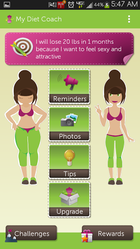 Starting a diet is easy; staying on a diet is another story. Free for Android and iOS, My Diet Coach can help you stay motivated and on track with its personal cheerleader approach to dieting. My Diet Coach is more about keeping you motivated than worrying about the nitty-gritty details of your actual diet and exercise plan. The app lets you set up automated text reminders to help keep you on track, such as “take my healthy snacks with me before I leave for work,” or “don’t eat five chocolate bars before bed.” The app also has a section for adding motivational photos (of yourself or of anything that inspires you to lose weight), a tips section for combating emotional eating and diet slip-ups, and daily challenges (such as drinking eight glasses of water) to help you stay healthy. This app is a little cheesy, but don’t knock the power of little nudges throughout the day. My Diet Coach’s reminders will make you think twice about eating that extra cookie, and will help you remember to stop at the health food store on the way home from work. The free version of My Diet Coach has all the motivational tools, but if you want more functionality—such as the ability to log and track food and exercise—you can upgrade to the Pro version of the app for $4.
 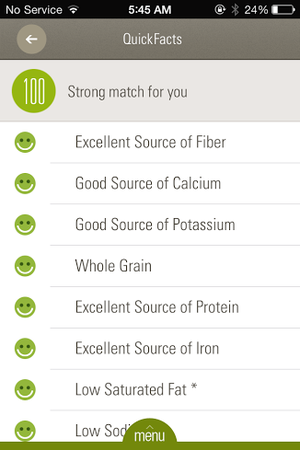 Fooducate is a useful app if you need a quick snapshot of a food’s general nutritional value, but ShopWell takes food look-up one step further. ShopWell is a free app that rates foods based on your personal profile, taking into account lifestyle choices, dietary needs, and allergies. ShopWell asks you to first fill out a comprehensive nutrition profile, including which nutrients, minerals, and vitamins are important in your diet, as well as which nutritional pitfalls (such as artificial sweeteners or refined grains) you want to avoid. The app also asks which foods you’re allergic to or cannot otherwise tolerate. Then, the app takes this information and rates foods based on your information. ShopWell gives each food a score from 1 to 100 (100 is the highest), and tells you whether the food is a strong match, a medium match, or a weak match for your profile. You can click on the score to find out why the food is a strong/medium/weak match—for example, Bridgford Beef Jerky is a weak match for me because it has lots of added sugar. ShopWell also shows nutrition information and ingredients for each food, as well as suggestions that are similar but “better” for you based on your ShopWell profile. ShopWell is an excellent app for tracking specific aspects of your diet, such as nutrients or sugar intake, which is great for diabetics. The app lacks a built-in calorie-counter, but it does have some nifty extra features such as lists (add favorite foods to lists for future reference), popular foods (find foods that are popular with people who have similar profiles to yours), and missions and achievements to keep you motivated.
 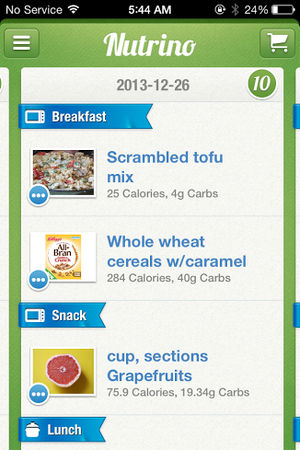 If you’re not sure where to start with your diet plan, Nutrino is the app for you. This free iOS app is like a personal nutritionist in your pocket. Nutrino is a food recommendation app that creates a custom, personalized daily menu for you based on your profile, preferences, and goals. Like ShopWell, Nutrino needs some personal information to create your custom meal plan. The initial profile setup includes answering basic questions (gender, age, height, weight, general activity level) and setting goals such as target weight and diet intensity. Nutrino also asks how large you like each meal to be, how you like to prepare each meal, and whether you have any special restrictions, such as gluten-free or vegetarian. Taking into account your profile, preferences, and nutritional goals, Nutrino creates a daily meal plan for you. The meal plans includes nutritional information, recipes, and a grocery list with all the necessary ingredients. If you don’t like a dish Nutrino has picked for you, just tap it and tap Change Dish to find a similarly healthy replacement . Swipe up to scroll through your meal plan, and swipe down to see a summary of your day, including protein, carb, fiber, and fat intake, as well as daily calories. Swipe to the left to see future days’ plans. In one sense, Nutrino is more difficult to use than other diet apps, since its success banks on your ability to follow its meal plan to a T. On the other hand, if you’re willing to put in the legwork and you want an app that will do everything for you (including counting calories), Nutrino is worth a look.
 At least 60% of consumers have accepted that they will become more willing to accept mobile payment apps if certain financial institutions offered them the right resources. Mobile payment apps have increased worldwide because the majority of payment resources are realizing the importance of

 What should you do?
 Nokia, the one of most popular and trusted mobile company. Nokia made wide range of



You must be logged in to post a comment.