Tag: data recovery

  • Recover Lost Partition with EaseUS Data Recovery Tool

    Recover Lost Partition with EaseUS Data Recovery Tool

    “Recover lost partition” isn’t exactly the latest catchphrase these days. We’re living in times where data loss and system disasters are about as rare as a unicorn sighting.

    This positive trend (or not so positive for companies in the business of data recovery) can be attributed to the widespread availability of multiple cloud storage solutions for both PC and mobile users.

    Although creating backups remains the most reliable method to prevent data loss, the use of data recovery software becomes invaluable for retrieving files that were not backed up to the cloud.

    Moreover, for more severe situations such as damaged systems or HDD partitions, tools like EaseUS Data Recovery Wizard offer effective recovery solutions.

      EaseUS Data Recovery Tool Capabilities
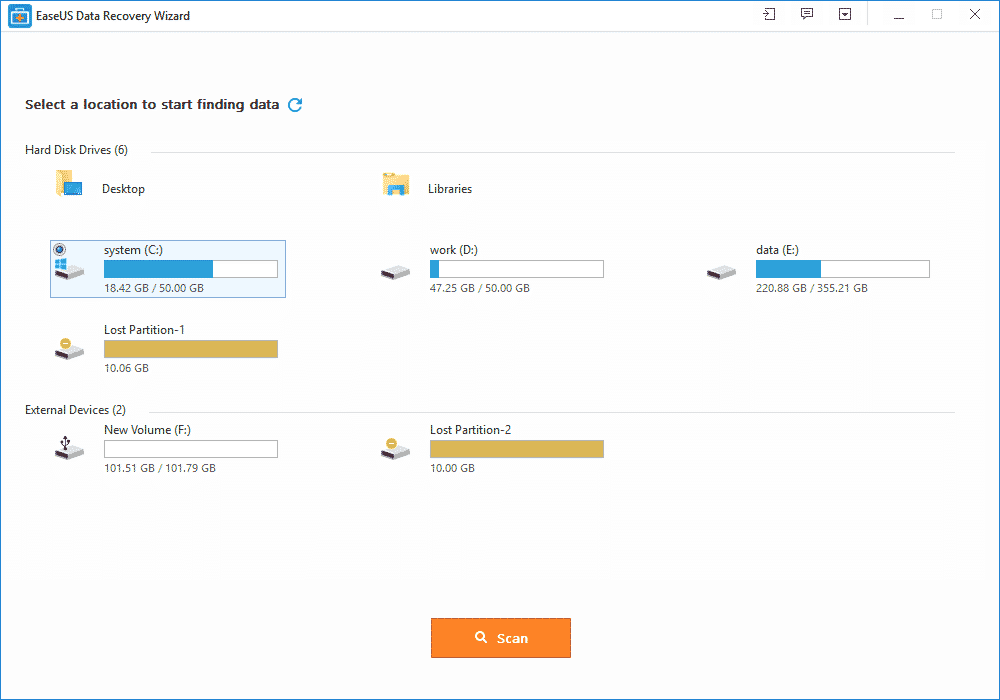
    Lost Partition Recovery

    Now a days, the problems that we have while saving our data in our devices is that it might get a virus and all of our data is lost. So, many of the software kings worked on creating a better and easy recovery software. In the software world, data recovery is a system or software by which you can easily get you deleted, or you can also filter your corrupted data.

    The data is mostly retained by recovering the devices that have info or your precious data in it. The devices are hard drives, SD cards, Magnetic tapes, CDs, DVDs, and many others. It was introduced because most of the time the operating system failed which causes lots of problem to the user. Also, malfunction of a storage device also leads to some other work in this field.

    By going through all the problems that humans face to recover their deleted data, we have thought it wise to introduced EaseUS: an App that’s used to get your deleted files again from your SD card, Hard disk, and other devices.

    EaseUS Data Recovery Wizard is a free data recovery software that helps you get your accidentally deleted files from Windows PC, Mac OS X machines and Mobile devices. It can recover lost partitions in just a few clicks.

    Most commonly used feature of this software is the one used in androids and IOS. With the advancement of technology, we prefer to use mobile phones much more than other devices. That’s why the software is installed on mobile phones frequently.

    Why is EaseUS Data Recovery Software unique?

    Because it has an SD card recovery function which makes the life of its user very simple and easy. Another important feature of EaseUS is that it can be used for all kind of platforms. Also, it supports major file formats. You can use this software free or also by paying for it. In other words, it works on a Freemium model.

    Steps to Recover Lost Partition with EaseUS Data Recovery Tool

    1. First of all, you’d need to buy or download the software from their official URL. Without it, you cannot get your information back. If you have any doubt about it, you can go for a free trial and check it right there.
    2. This software takes care of your security. People are usually very sensitive about their data or information saved in the various devices. So next step is to use the license code that’s sent to your email.
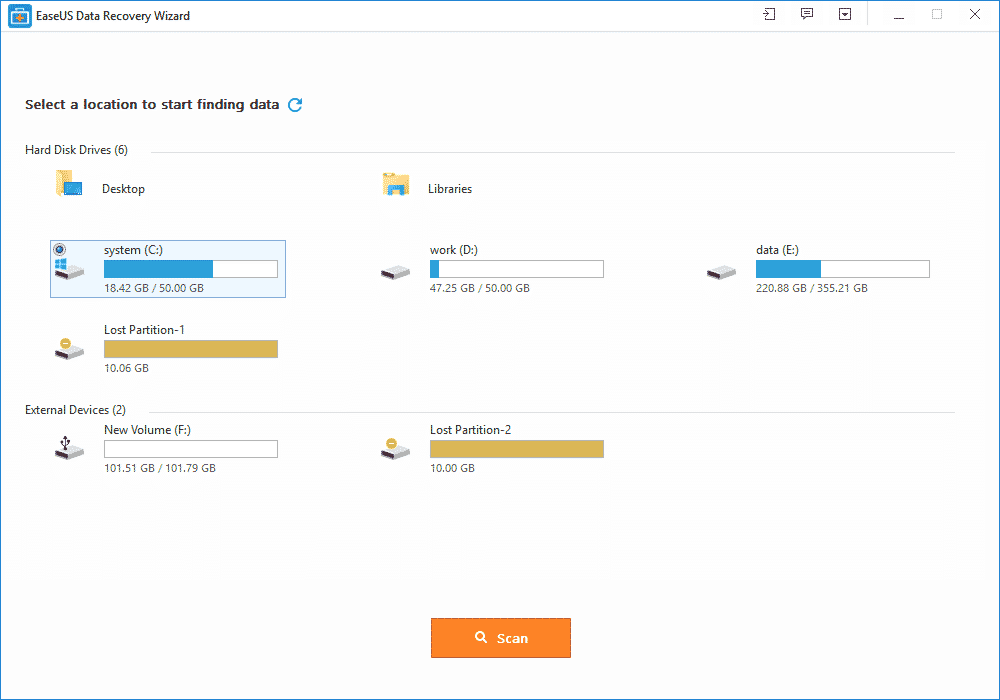
    3. The important part is to know how this software will work. For getting your results, you need to connect the device you are thinking of recovering to your PC.
    4. Check the files which you want to recover and then click on the recover button. This is the unique part because you need to choose carefully which files you want to recover because there are some cases where people recover viruses by mistake too. Make a new folder for the recovered files.
    5. For partition recovery, you’d need use the advanced option and allow the software to run comprehensively. Once completed, you can go from the preview, and then choose the files you’d like to recover. That’s all.

    Wrap Up:

    That’s all that’s needed to recover your lost files, damaged partition and/or accidentally deleted files with EaseUS Data Recovery suite.  Still need a help with getting back your deleted files? Please do let us know about it in comments.
  • Data Recovery Software: Top 3 Features of EaseUS & How to Use on PC

    Data Recovery Software: Top 3 Features of EaseUS & How to Use on PC

    Latest Data Recovery software from EaseUS

    EaseUS data recovery software is an industry-leading tool to get back lost document and files. It comes with different versions, depending on your specific needs. Here are the top 3 features of EaseUS data recovery wizard free.

    EaseUS Data Recovery Software Is Free to Use

    Price is always a major concern when shopping for computer software. However, with EaseUS Data Recovery Wizard, you have the luxury of keeping your data safe and secure, and that too without making your pocket any lighter.

    The free version provides you with all the necessary features. Be it hard drive recovery, recycle bin recovery, RAW recovery, or recovery of data from external memory sources, EaseUS is a very reliable option.

    Although there are paid versions of the data recovery software too that comes with additional features such as improved technical support and greater allowed volume of recoverable data, etc., but most users find the free data recovery software to be more than sufficient for their basic requirements.

    It Is Plain & Simple to Use EaseUS Data Recovery Tool

    EaseUS Data Recovery Tool was designed in such a way to provide its users with a simple and intuitive data recovery experience. This is apparent from the fact that using the data involves only a few straightforward steps.

    First, you simply needs download the software. The second step is to launch it. After this, run the scan, either the quick scan or the deep scan. The next step is to identify the intended file from the search results.

    Finally, select and click on the recover button to recover the file you have selected. And that’s it, the lost or corrupted data or file will be safely back on your computer.

    EaseUS Is Compatible with All Operating Systems

    Be it a Windows computer or a Mac, EaseUS Data Recovery Software works seamlessly. It supports both desktops and laptop devices. This is particularly good, because laptops are more prone to data loss and corruption, unlike desktop computers.

    Also, you can recover files from external storage devices such as SD cards, external hard drives, USB and pen drives, and digital cameras, to name a few.

    How to Recover Lost Files With Easeus Data Recovery Wizard Free

    Recently faced with the loss of files on one of my external hard drives, I tried a data recovery and here is how to use the free version of EaseUS Data Recovery Wizard.

    EaseUs Software Installation

    EaseUS software installation tips

    The software is available free of charge in its trial version. Be careful, however, this version does not recovery data more than 500MB (up to 2GB if you’re friends) and you have to go through the credit card box to buy the software.

    For my part, I had to recover data from my external hard drive on which I emptied an entire file by mistake and I knew that what I had to recover weighed less than 500MB. Once the software is installed, we can get down to business.

    Preparation for recovery

    EaseUS software tutorial

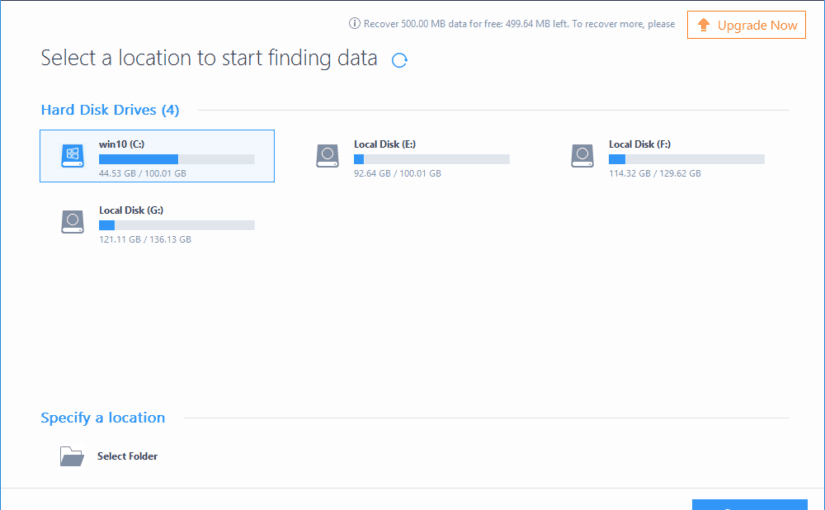
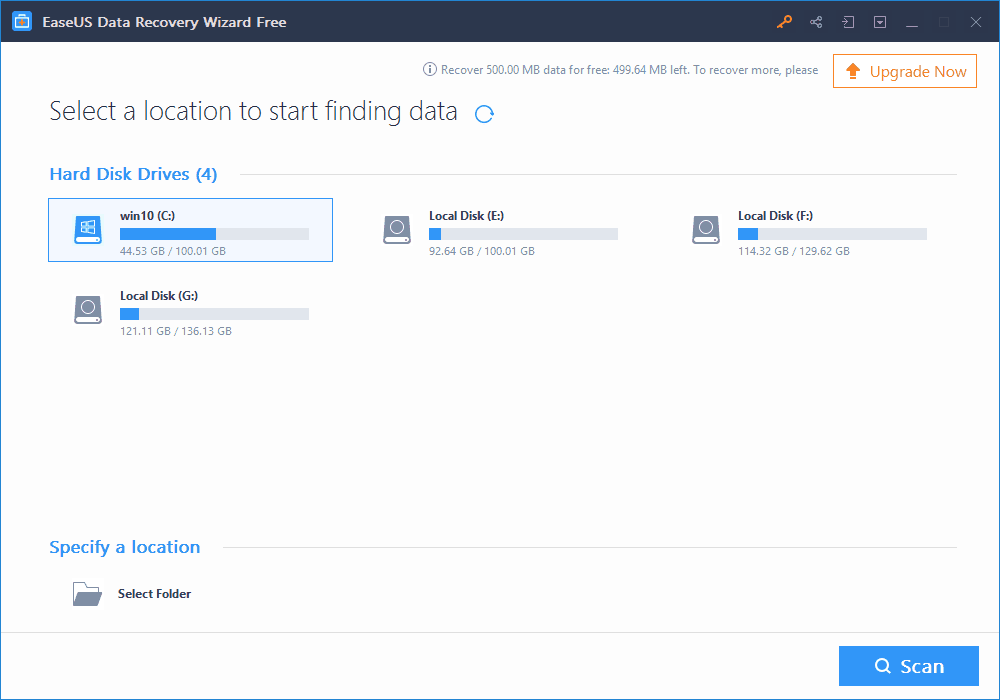
    Before recovering your data, first, scan your hard drive to determine which files can be recovered. To do this, simply select your device (internal/external hard drive, USB key, memory card …):

    But be aware that if you have emptied a folder by mistake, you can also select the folder in question to scan only it. This will not save you time, as the time is the same whether you are scanning the entire disk or just a folder.

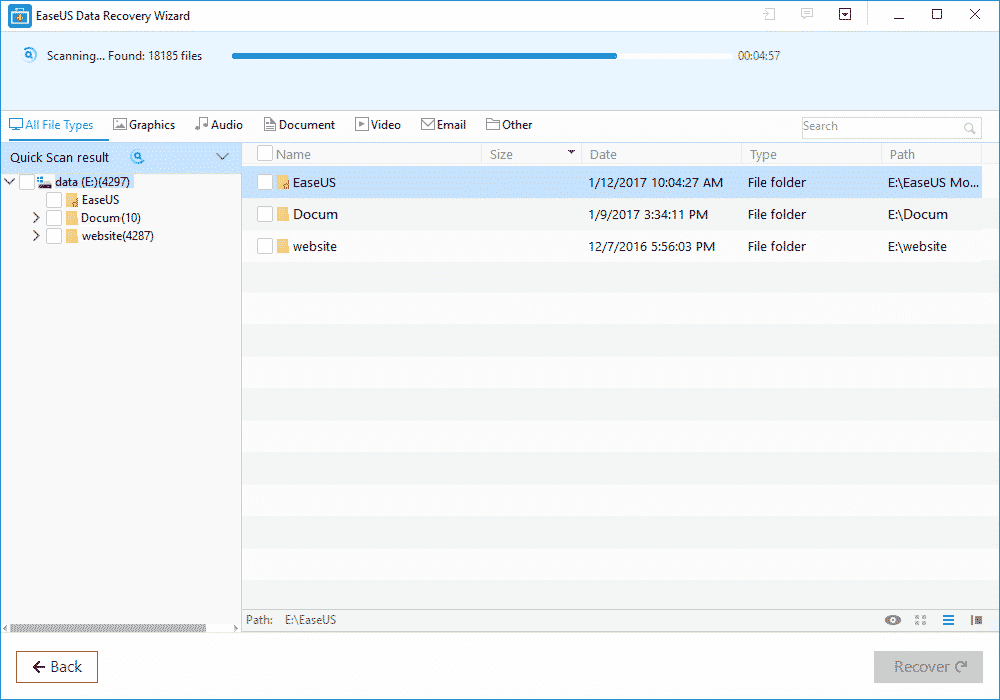
    And then click Analyze at the bottom of the window. The scan starts and may take some time depending on the number of detected files and the size of your hard drive:

    From my test, EaseUS Data Recovery tool used about 2h30 approximately, throughout the duration of data analysis:

    This is the longest part of the process and the only thing to do is to take the trouble and wait … Once the analysis was completed, I was able to proceed to the attempt to recover my data.

    Using EaseUS Data Recovery Tool

    recover lost data with EaseUs app

    To recover your data, once the deep scan is complete, you can browse the tree to the left to search for your files.

    The banner at the top will help you sort quickly and quickly identify where the most common file types are. Personally, I knew exactly where my files were located, so I only had to navigate to them and select them from the list:

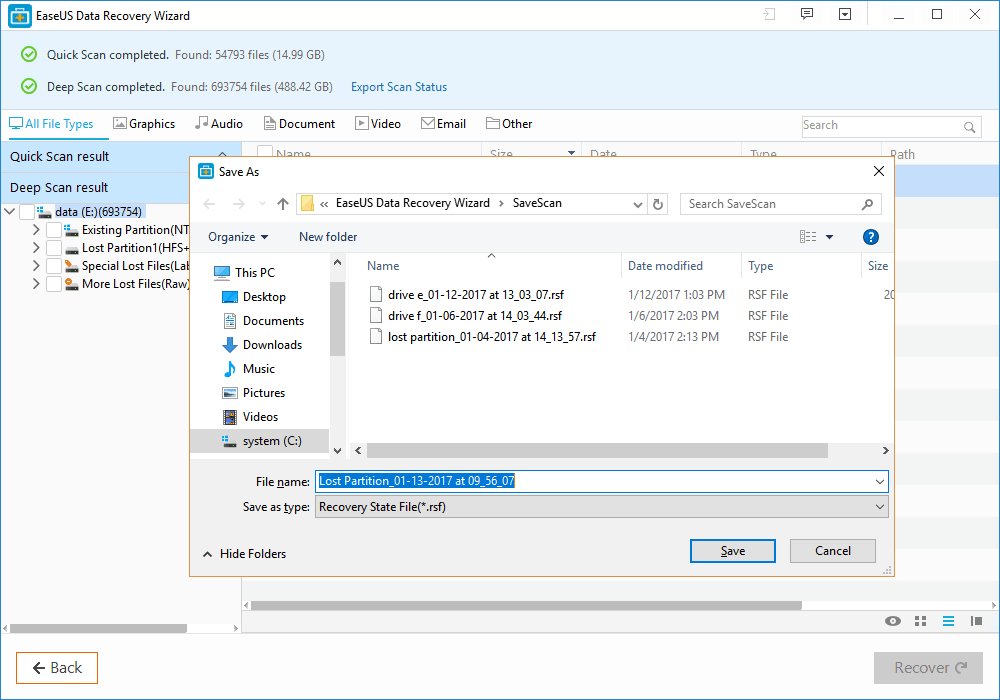
    Do not ask me why, but there are many other files that seem to be in the folder when in fact there never was … Probably data previously written on this sector of the hard drive and have been crushed by others since! Once your files are selected, click Recover at the bottom right of the screen. The software asks you where you want to save them:

    Once you have validated, you will only have to go and retrieve your valuable data at the location you have indicated.

    For my part, I was able to recover my 2 files on which I spent a full evening to work on and I ended up very happy for the rest of the day!

  • EaseUS Free Data Recovery Wizard Lets you get back lost files

    EaseUS Free Data Recovery Wizard Lets you get back lost files

    The concept of data recovery is fairly old among internet users. But having a reputable software that really works in getting back deleted files  has been the biggest quest of Pc users.

    This is why we deemed it necessary to introduce one of these free data recovery app that really works when it comes to the business of getting lost files back.

    Whether you want to restore the data from a laptop, USB stick, memory card and/or any digital device, EaseUS data recovery app will captivate your attention by recovering all the lost data.

    EaseUS data recovery app review

    Features of EaseUS Free Data Recovery Wizard

    • It is free to download and use (limited only by functions).
    • It can restore any lost or formatted data from the device.
    • The best feature is recycle bin recovery. It can regain the deleted data also whether it is a video, album or any other file.
    • Ability to recover files with both rapid and deep scan mode.
    • Quick scan allows recently deleted files to be detected quickly while deep scan can help recover somewhat older files.
    • Ability to recover every kind of fille type and extension in record time like photos, videos, compressed files, pdfs and more.
    • Ease of recovery from server units, personal computers, office computers, hard drive etc.
    • Filter option to wade through the required files of a certain type.
    • This app is easy to use and recovers the data securely free by using the deep scan mode.
    • It is a virus free app and runs on all type of servers.
    • Its recovering speed is faster and provides you with a basic feature of “Quick scan mode” along with the “Deep scan mode”.
    • All types of files, images, videos, emails, audios or documents can be easily retrieved by EaseUS.
    • This free data recovery software supports all kinds of language such as traditional or simplified Chinese, French, German, Turkish, Korean, English, Arabic, Russian and many more.
    • Lifetime technical support and upgrade support.

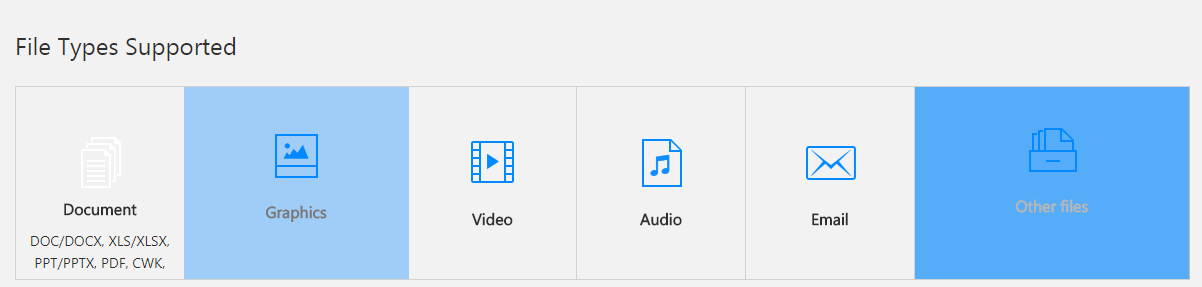
    File type Supported:

    type of files recoverable by EaseUS data recovery software

    EaseUS comes with a versatile option of file support and mainly supports all kinds of files.

    • It assists all types of documents such as DOC, PPT, PDF, XLS, HTML/HTM, EPS, etc.
    • For the video recovering it easily recovers the FLV, MP4, MP4V, MPEG, AVI etc.
    • All forms of JPG, JPEG, PNG, BMP, GIF, PSD, WMF, RAW etc. can be revived.
    • Audios like MP3, MP4A, M4V, MPG, FLV, VQF etc. are supported on this application.
    • The emails can be restored back into the device even from Outlook and supports the PST, DBX, EMLX, etc.
    • It also supports the archive files such as ZIP,ISO, HTML SITX etc.

    How to recover lost files with EaseUS data recovery Wizard?

    The free data recovery software goes with the 3 easy steps of recovering the data back into your device or card.

    All you have to do is to install this application from the EaseUS website. After the installation is complete, step one is to launch the app. The second step is to scan. Scan the data that you want to recover.

    You can also filter or search the data for the rapid scanning of the data you want. After the scanning is complete, the third and final step is to recover. This might take some minutes. After this the required data that you want is recovered back on your device.

    EaseUS memory card data recovery:

    A memory card is the brain of a camera, a mobile phone or even a laptop which can contain thousands of important photographs, videos or even files.

    IF you’ve accidentally formatted your memory card, using EaseUS, the free data recovery software, you can easily get it back in no time.

    Supporting every type of memory card from the SD card, memory sticks, compact flash card, and digital card to the multimedia card and so on. It also has support for every kind of memory card manufacturer like Samsung, Toshiba, Transcend, Sony etc.

    To avoid data loss and restore data, EaseUS is a perfect solution from a college student to a photographer and everyone in between.

    Steps for recovering a memory card through EaseUS:

    • Launch EaseUS, the data recovery software for free and select the type of files you want to recover and click next.
    • Choose a directly for your scan; for disk recovery, after adding it to the computer through port or connector, choose the directly it is in.
    • After the files have been recovered, just simply choose the files you want to recover and click on the “recover” button to get them back.

    EaseUS Pro packages:

    EaseUS comes up with a free and two pro packages. The free package includes the recovery of the data up to 2GB and supports all file types. There is no free upgrade or technical support feature available in this package.

    While the two Pro and Pro+WinPE packages that costs 69.95$ and 99.90$ respectively, comes with numerous features. Both the packages allow you an unlimited data recovery option along with the free lifetime upgrade and free technical support.

    The pro packages are single license. The Pro+WinPE comes with an extra feature of “Bootable media for emergency” i.e. it restores the data even when system breaks down.

    At the end of the day, while some people may think their data is gone forever, data recovery software like EaseUS can easily help get it back in no time.