Tag: smart phone

  • Awale, Backgammon and 1 other Game Technology has transformed

    Awale, Backgammon and 1 other Game Technology has transformed

    From time memorial, man has indulged himself into seeking out ways to improve his living standard. The application of this science into practical purposes is what is termed ‘technology’.

    The constant evolution of technology has affected every part of human existence: information is more accessible, we enjoy good roads, better & healthy living. We can also admit that the introduction of some technology has shortened our existence on earth; with the worldwide life expectancy age just lying above 70 years, life is indeed very short.

    Games such as Awale are not only there for our entertainment, it also improve family and friendship bonding. These days, we have school and work commitments which make it increasingly difficult to enjoy the thrills that gaming brings. That is where online gaming platforms steps in, providing online gaming platforms where you can play countless games online, with the added benefit of betting.

    My business here today is to discuss 3 important games, with historic background that technology has presented us in a platter of gold – playable in your mobile devices at your convenience.

    Awale

    Awale also known as Ókwè, Alancho, Ayoayo, Oware or Ise, has its root in Africa and played worldwide. A common name in English is Awari but one of the earliest Western scholars to study the game, R.S. Rattray, used the name Wari.

    fogo-sao-filipe-jeu-awale-62

    The game is considered the national game of the Ashanti kingdom in Ghana; it is also played traditionally in Nigeria, especially in the Igbo-speaking tribes. Known to encourage family bonding, Awale is one on the most social two-player abstract.

    Today, Awale can be downloaded and played on your computer and mobile devices. You can find Awale on the Google Playstore or download it on the Apple store.

    Backgammon

    Backgammon is one of the oldest board games known to man. It goes down to the ages when human bones were used for dice and Emperor Nero and Claudius making a fortune through gambling.

    cigar-backgammon-board


    Just before technology stepped in, the church and government banished backgammon because of the gambling aspect of it. However, some Good Samaritan in the 1920s introduced doubling to rekindle interest in the game.

    In recent years, backgammon has been studied with great interest by computer scientists. Owing to this research, backgammon software has been developed that is capable of beating world-class human players (see TD-Gammon for an example). More developers are also pushing out backgammon games you can play both on your Android and iOS devices.

    You can find backgammon games you can play for free on Android here and here, for iOS.

    Chess

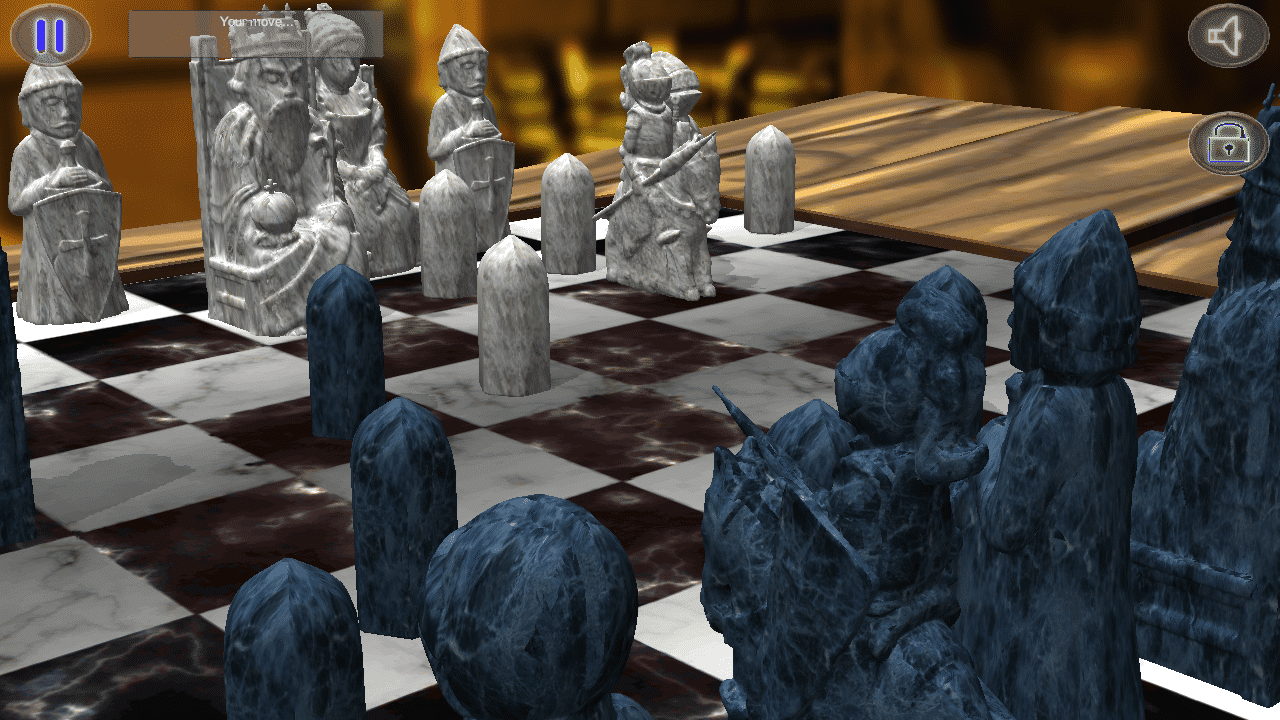
    The Chess game needs no introduction. The game has been around ever since the 6th AD. It’s thought to have originated from India with its modern version (Romantic Era of Chess) characterized by swashbuckling attacks, clever combinations, brash piece sacrifices and dynamic games. Winning was secondary to winning with style.

    acient-chess

    According to a survey in 2012, “chess players now make up one of the largest communities in the world: 605 million adults play chess regularly”. Chess is played at least once a year by 12% British people, 15% Americans, 23% Germans, 43% Russians, and 70% Indian people.

    What’s more? Technology has ensured that the new era of chess can be taking anywhere with you. Thousands of chess games have been developed for both PC and mobile. Even the famous Microsoft Windows 7 Ultimate edition comes with the Chess game as one of the pre-packaged system application.

    Owing to the modern trend of mobile technology, mobile application developers has delivered by making countless Chess games you can download both on the Android store and Apple store.

  • Turn on Smart Life with the latest Samsung Galaxy S6 – Samsung Galaxy S6 Specs

    Turn on Smart Life with the latest Samsung Galaxy S6 – Samsung Galaxy S6 Specs

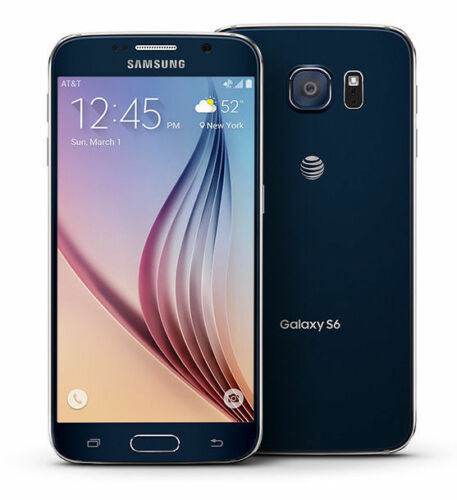
    From the front, the S6 looks a lot like the Note Edge — though this time both sides of the screen feature Samsung’s unique curve. And that dark gray metal backside looks pretty nice and is a huge step above anything that Samsung’s produced to this point. Goodbye, fake leather. We can’t say we’ll miss you. Expect to see an end to all these teases when Samsung officially unveils the Galaxy S6 on March 1st. T-Mobile’s website says there’ll be much more to share on that date.

    Preliminary Specifications

    NETWORK
    Technology: GSM / HSPA / LTE

    LAUNCH
    Announced: Exp. announcement 2015, March 1

    Status
    Exp. release 2015, Q1

    BODY
    Dimensions: 143.3 x 70.8 x 6.9 mm (5.64 x 2.79 x 0.27 in)
    SIM: Nano-SIM
    – Fingerprint sensor (PayPal certified)
    – Samsung Pay (Visa, MasterCard, AMEX certified)
    – IP67 certified – dust and water resistant
    – Water resistant up to 1 meter and 30 minutes

    DISPLAY
    Type: Super AMOLED capacitive touchscreen, 16M colors
    Size: 5.0 inches (~67.9% screen-to-body ratio)
    Resolution: 1440 x 2560 pixels (~587 ppi pixel density)
    Multitouch: Yes
    Protection: Corning Gorilla Glass 4
    – TouchWiz UI

    PLATFORM
    OS: Android OS, v5.0 (Lollipop)
    Chipset: Exynos 7420
    CPU: Quad-core 1.3 GHz Cortex-A53 & Quad-core 1.9 GHz Cortex-A57
    GPU: Mali-T760

    MEMORY
    Card slot: microSD, up to 128 GB
    Internal: 32 GB, 3 GB RAM

    CAMERA
    Primary: 20 MP, 4992 х 3744 pixels, optical image stabilization, phase detection autofocus, LED flash
    Features: Geo-tagging, touch focus, face detection, HDR, panorama
    Video: 2160p@30fps, 1080p@60fps, 720p@120fps, HDR, dual-video rec.
    Secondary: 5 MP, 1080p@30fps, dual video call

    SOUND

    Alert types: Vibration; MP3, WAV ringtones
    Loudspeaker: Yes
    3.5mm jack: Yes

    COMMS

    WLAN: Wi-Fi 802.11 a/b/g/n/ac, dual-band, Wi-Fi Direct, hotspot
    Bluetooth: v4.0, A2DP, LE, apt-X
    GPS: Yes, with A-GPS, GLONASS, Beidou
    NFC: Yes
    Infrared port: Yes
    Radio: No
    USB: microUSB v3.0 (MHL 3 TV-out), USB Host

    FEATURES

    Sensors: Accelerometer, gyro, proximity, compass, barometer, gesture, heart rate
    Messaging: SMS(threaded view), MMS, Email, Push Mail, IM
    Browser: HTML5
    Java: Yes, via Java MIDP emulator
    – Wireless charging (Qi-enabled) – market dependent
    – ANT+ support
    – S-Voice natural language commands and dictation
    – Smart stay, Smart pause, Smart scroll
    – Air gestures
    – Dropbox (50 GB cloud storage)
    – Active noise cancellation with dedicated mic
    – MP4/DivX/XviD/WMV/H.264 player
    – MP3/WAV/WMA/eAAC+/FLAC player
    – Photo/video editor
    – Document viewer

    BATTERY
    Li-Ion battery: Stand-by
    Talk time

    MISC
    Colors: Charcoal Black, Copper Gold, Electric Blue, Shimmery White

  • How to Configure Wi-Fi Hotspot on Samsung, Xiaomi, Infinix Smartphones & Android Devices

    How to Configure Wi-Fi Hotspot on Samsung, Xiaomi, Infinix Smartphones & Android Devices

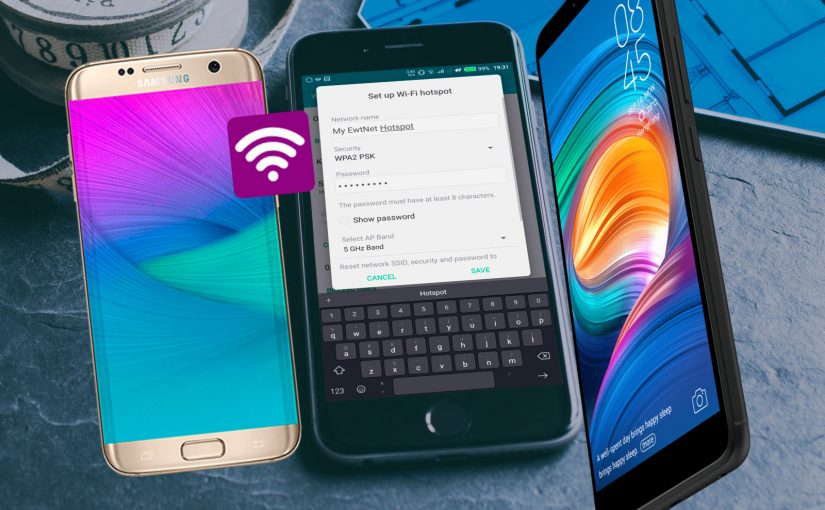
    If you don’t have a home internet access, your best bet is to use your Android smartphone to distribute your cellular Internet connection to your other devices. Using our guidelines provided in video, picture gallery and text format you can learn how to configure Wi-Fi hotspot in an Android smartphone.

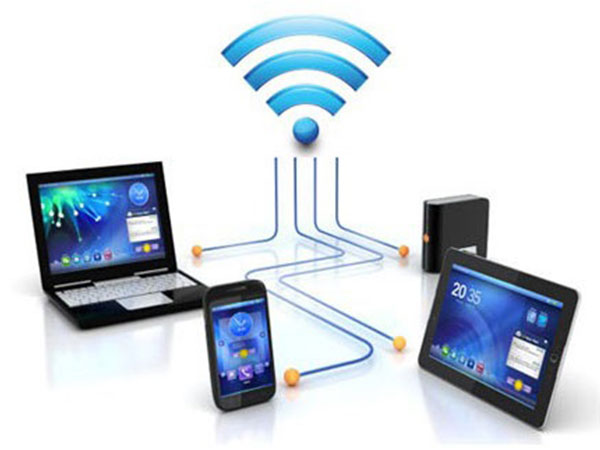
    WiFi hotspot enables users with WiFi supported devices to tether internet connection across other devices. Although, there are few security concerns using Wi-Fi but with the right techniques and common-sense you can learn how to configure Wi-Fi hotspot and share internet from your Samsung, Tecno and Infinix smartphone to your PC or other mobile devices.

    Further Reading: How to boost WIFI connections on Your Laptop

    Why Android?

    Browsers Usage in Nigeria
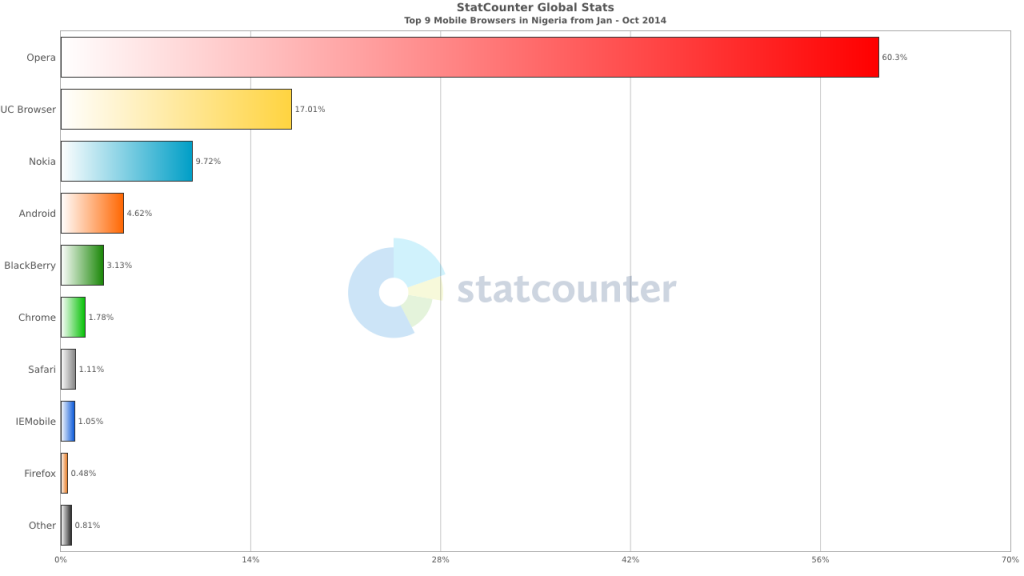
    Top 9 Mobile Browsers in Nigeria (Jan – Oct 2014)

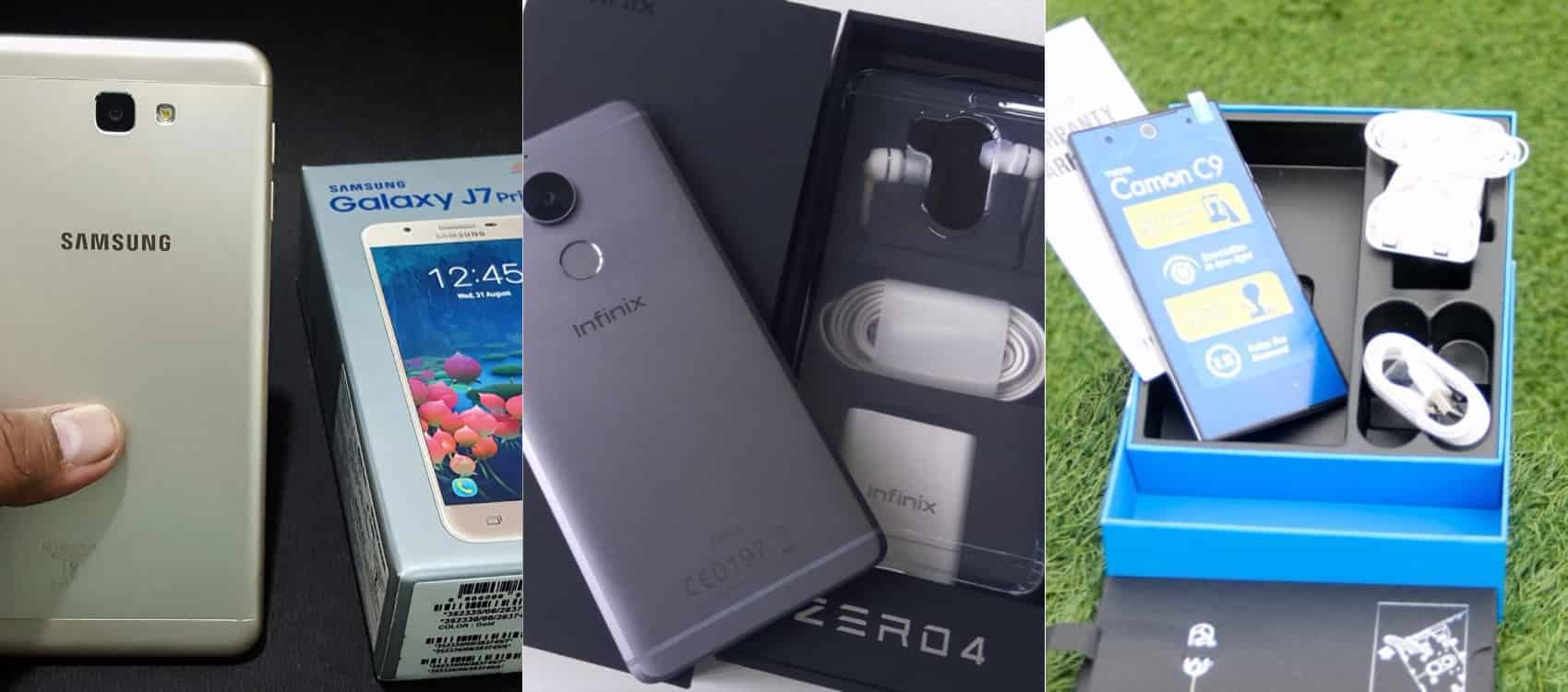
    Smartphone usage statistics from Jan-Oct 2014 shows that Android OS is winning the smartphone war in Nigeria. Infinix, Tecno and Samsung smartphones are at the very top of the food chain in Android smartphone usage among Nigerians.

    How to use and Configure Wi-Fi Hotspot in Samsung, Tecno & Infinix Smartphones

    Since most internet users [in Nigeria] access the internet from the mobile data, it makes sense for Android users to get acquainted with the inbuilt portable hotspot facility that comes pre-installed in most Android devices.

    Further Reading: 6 Premium Android phones or tablets you can purchase for  ₦9,999+ 

    Formats

    Be it on Huawei Y6 Prime 2019, Samsung Galaxy S10+, Infinix Zero 5 or any Android smartphone out there, these guide is ready to get you started with portable hotspot on your device.

    Click on any of the formats listed above to access this tutorial in that format.

    How to use and configure Wi-fi on Samsung, Teno, Infinix and other Android smart phone?

    Configure Wi-fi hotspot on Samsung Smartphone
    Configure Wi-Fi hotspot on Samsung Galaxy S8

    Time needed: 2 minutes

    Follow this step to step guide to learn how to configure Wi-Fi Hotspot on your Samsung, Tecno, Infinix and any other Android smartphone.

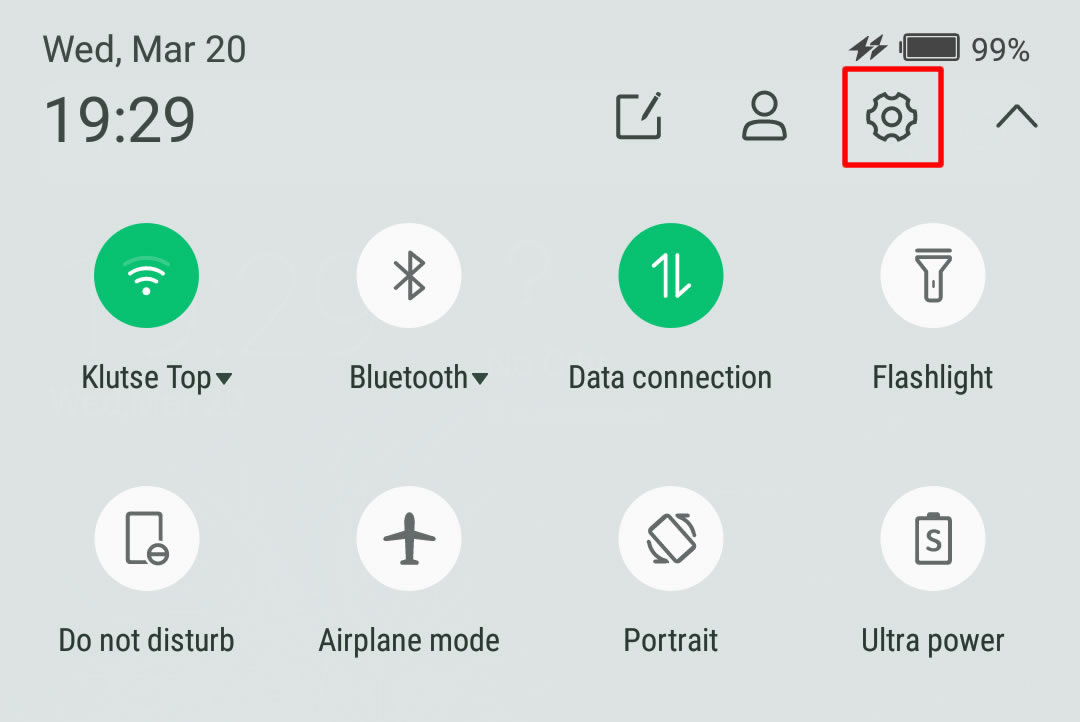
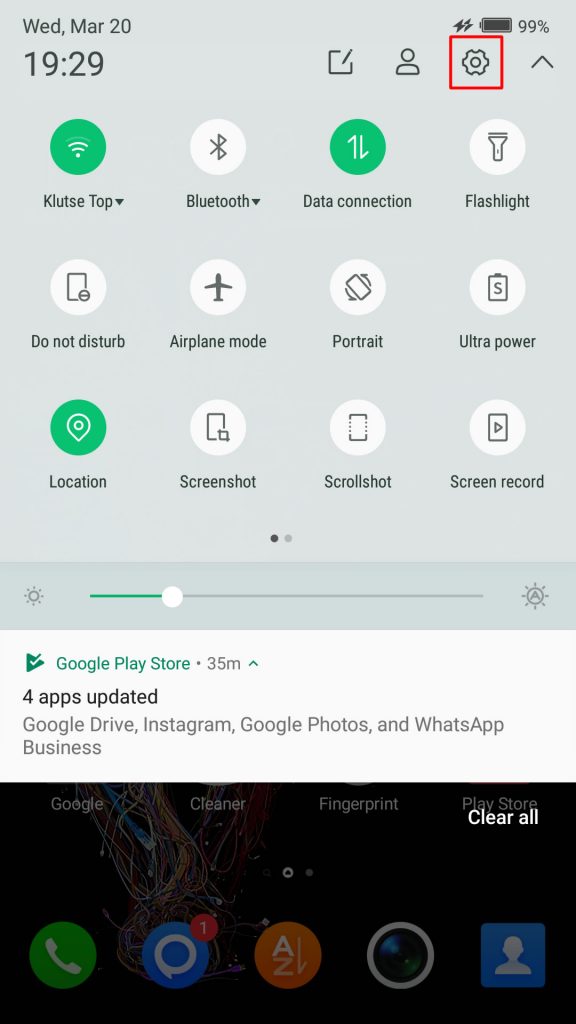
    1. Go to your Android phone’s settings

      From the Home screen, tap the Application screens icon > Find and tap Settings.

      On newer versions of Android, you can simply pull down Android control panel and click on the gear icon.

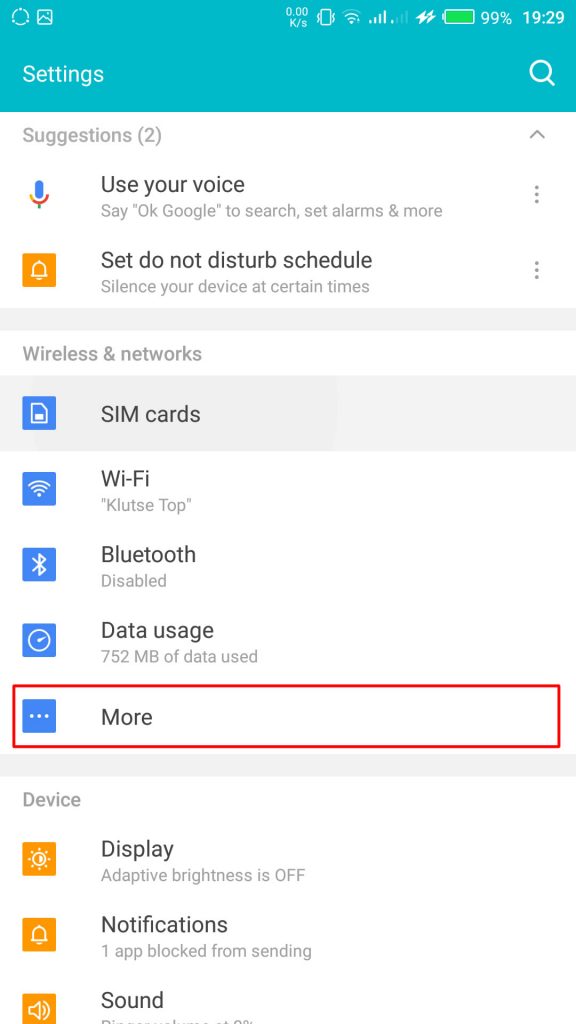
    2. Wireless & networks settings

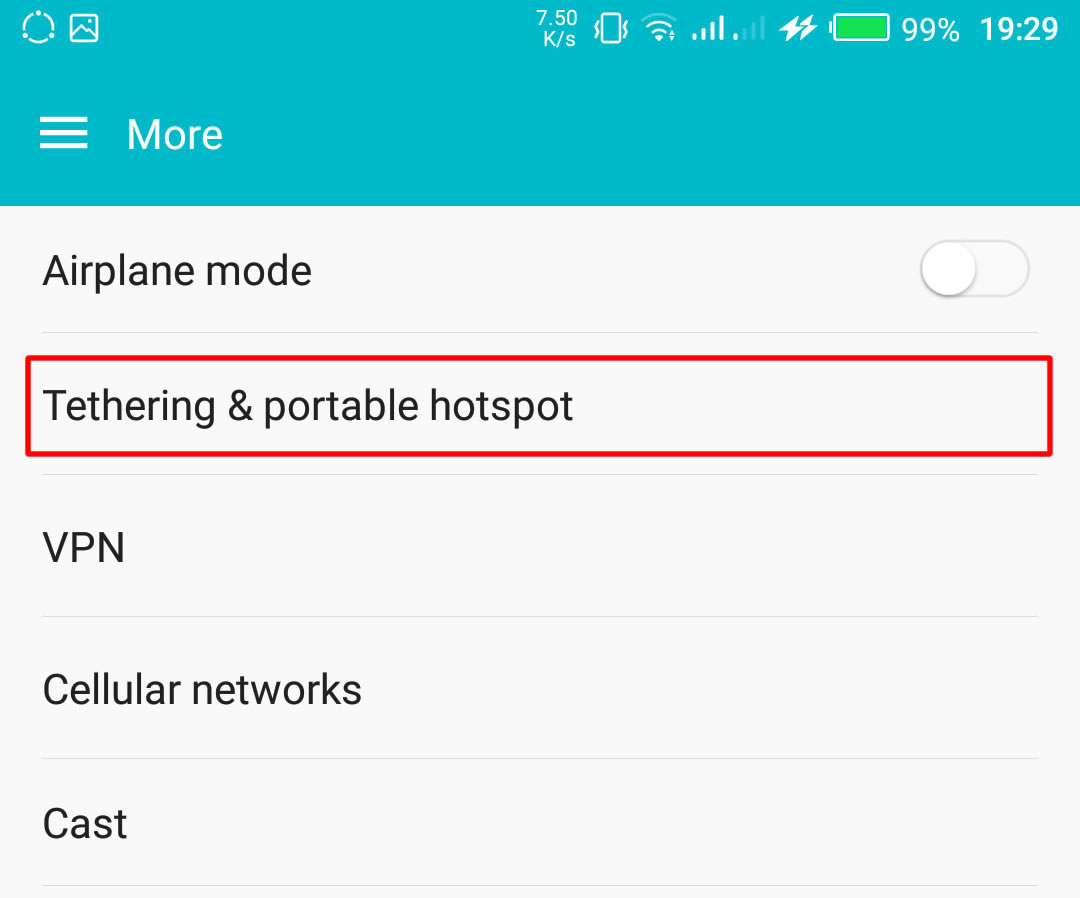
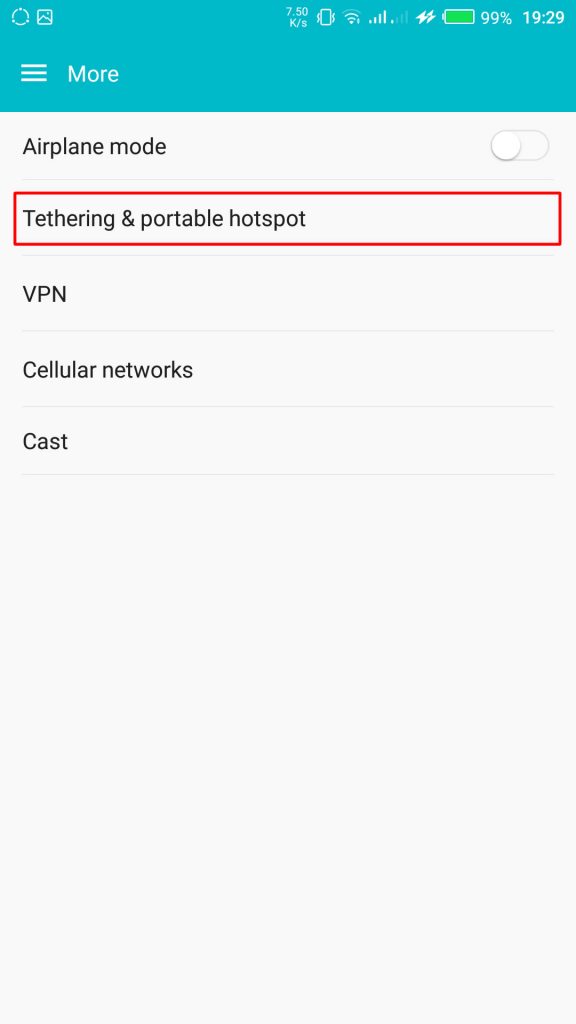
      From your Settings screen, locate Wireless & Networks block and tap Tethering & Portable Hotspot. If you can’t find Tethering & portable hotspot on your settings home screen, tap More > Tethering and portable hotspot.

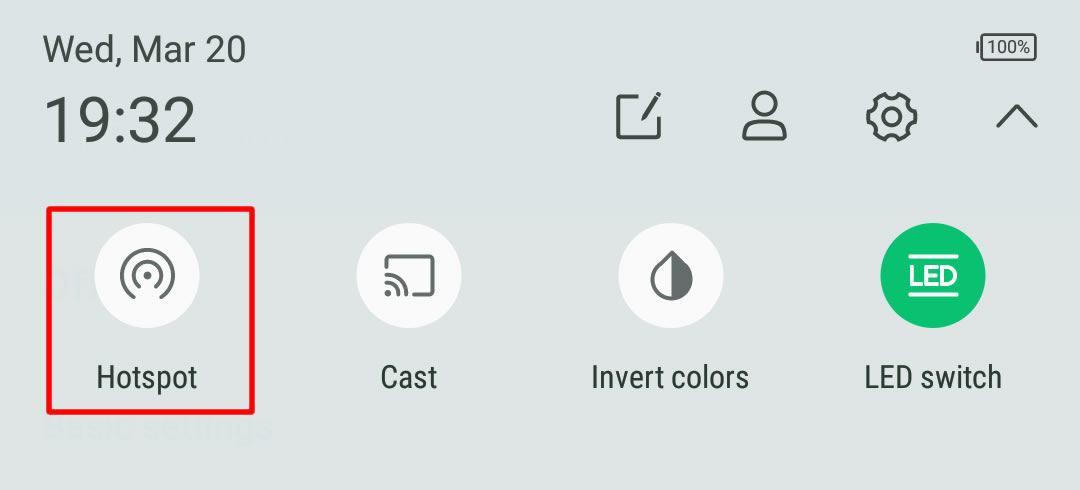
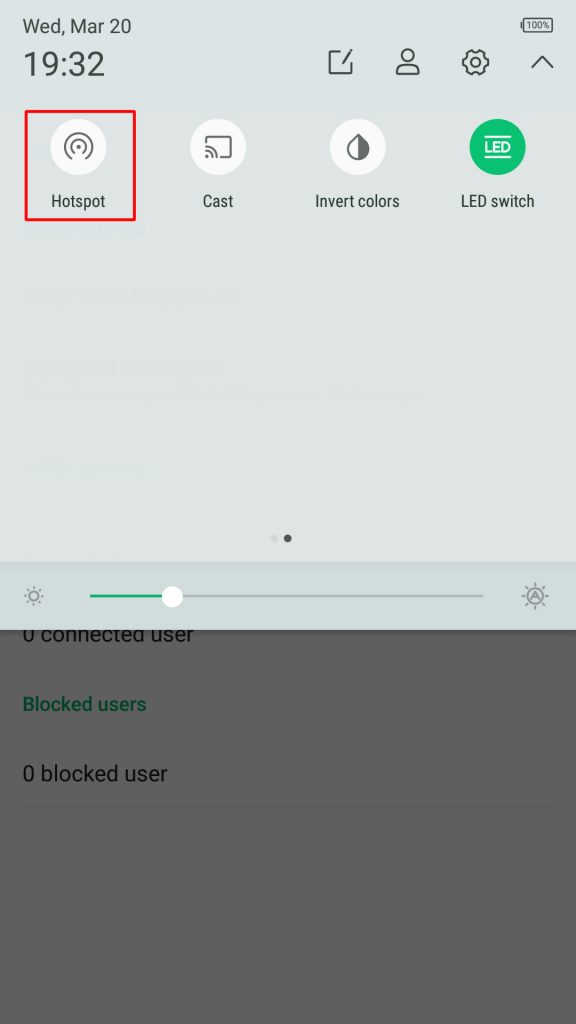
      On some version of Android, you can hold the upper screen of your Infinix smartphone or Tecno smartphone and scroll down. Turn “On” hotspot from the menu. You will see a notification requesting you to touch to configure hotspot, just touch the notification.Wireless & networks settings

    3. Configure Wi-Fi Hotspot

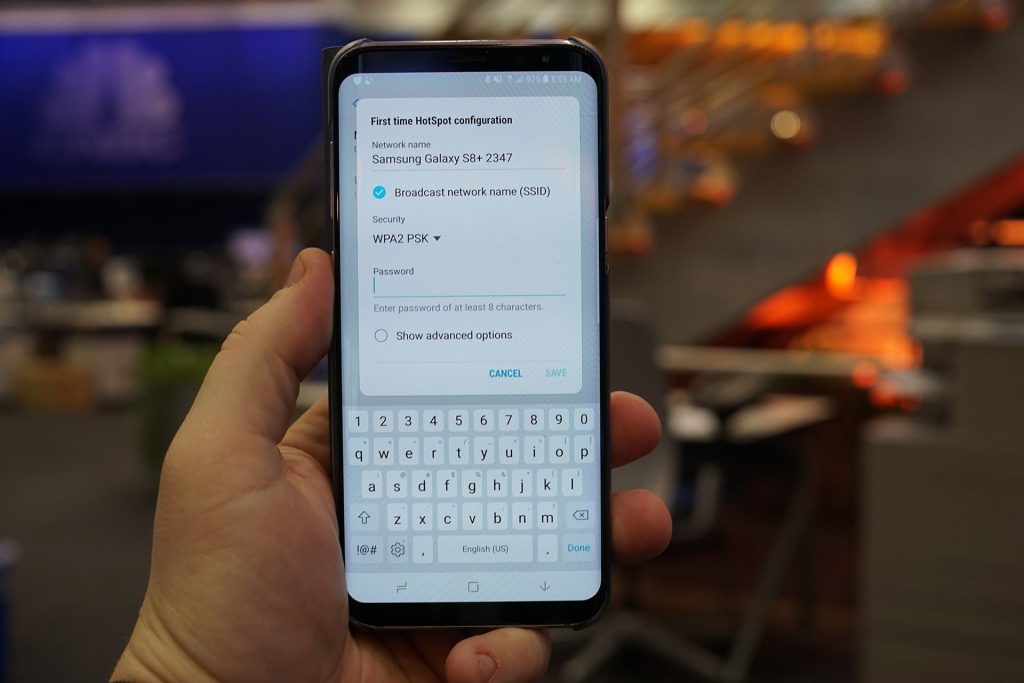
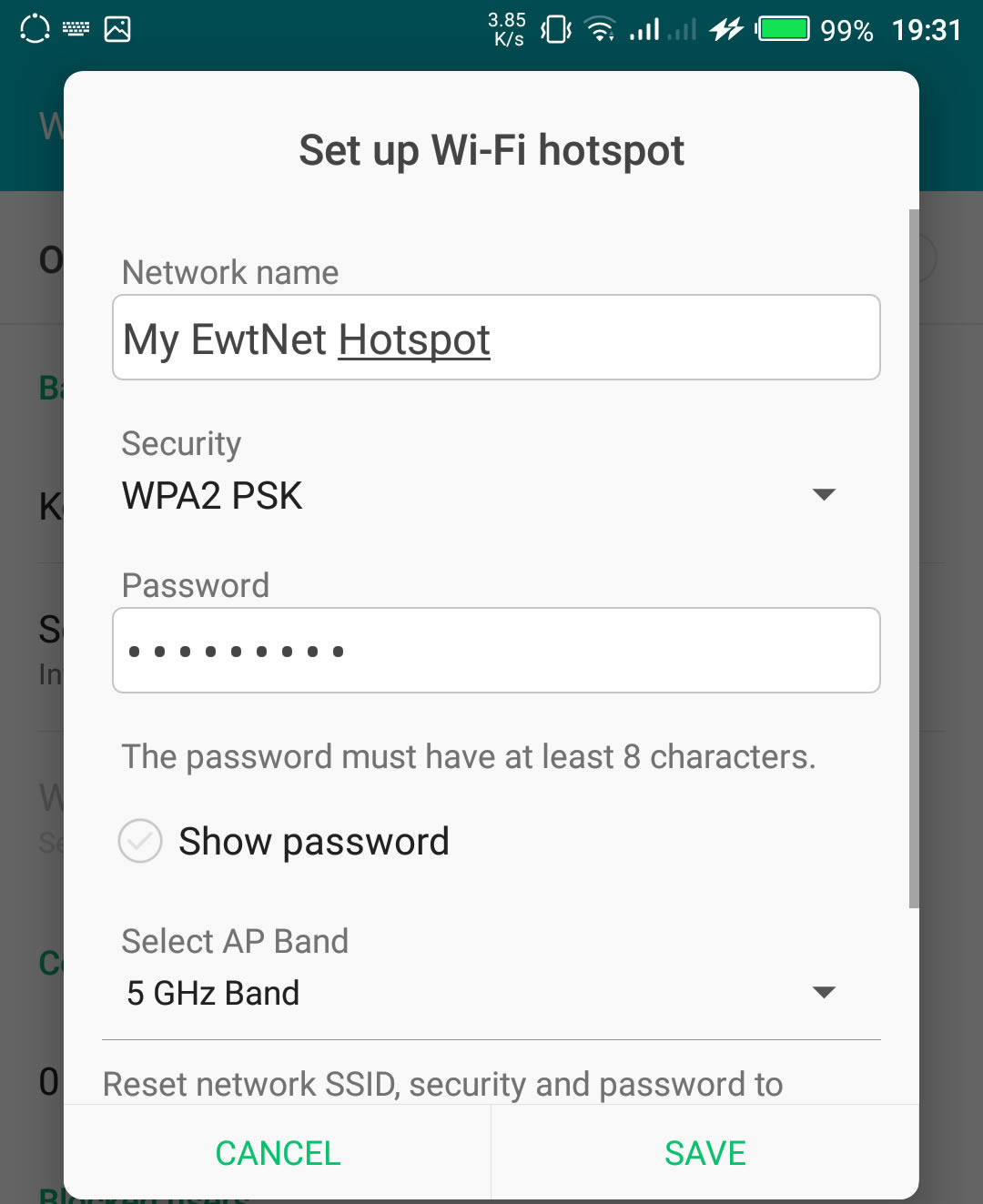
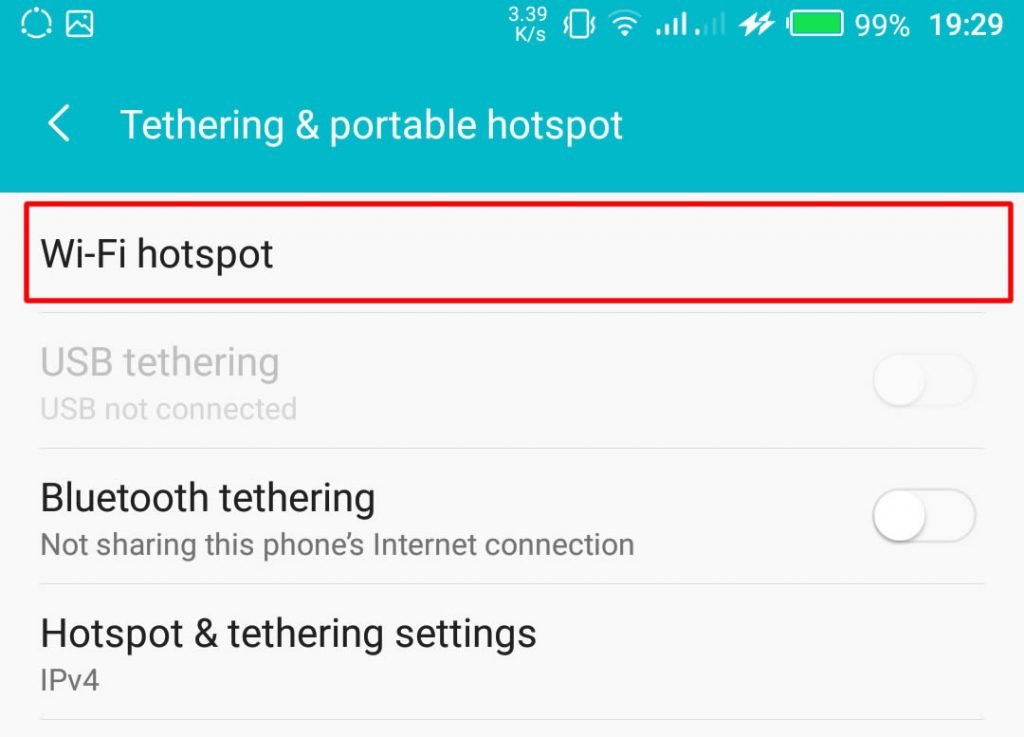
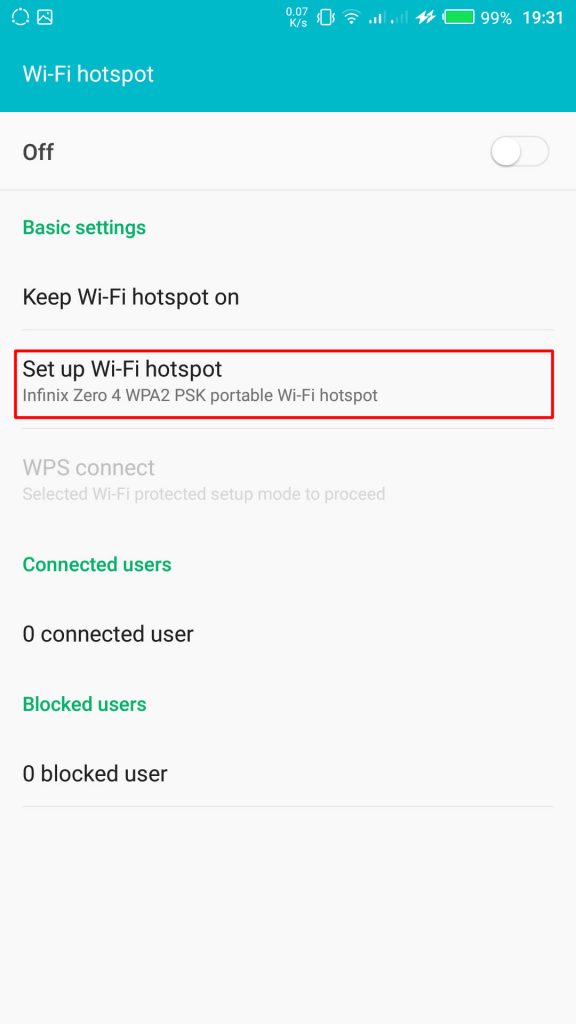
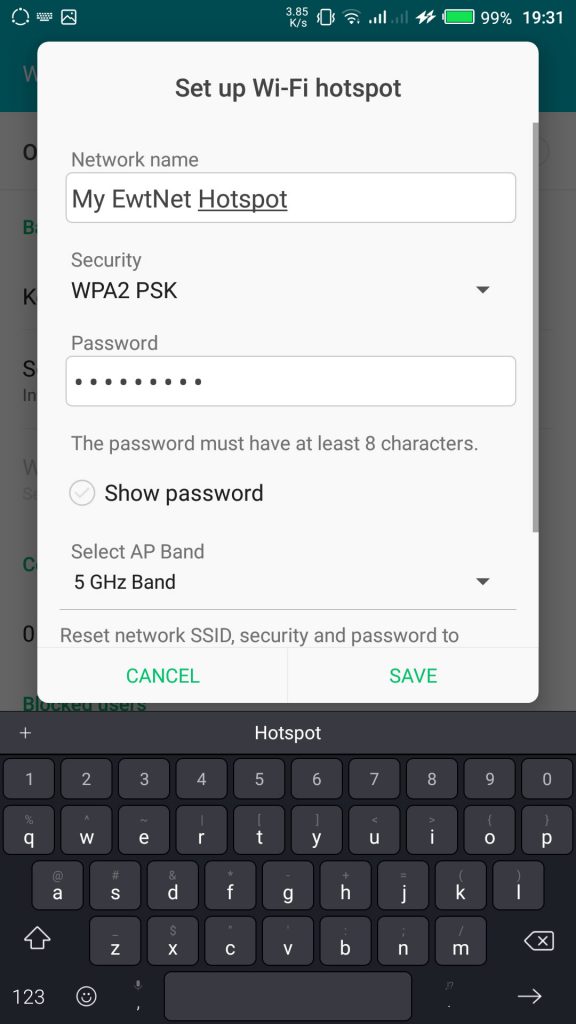
      From the Tethering & portable hotspot screen, tap Wi-Fi hotspot and select Set up Wi-Fi hotspot. Here you can set your WIFI’s SSID and security.
      SSID Wi-Fi Hotspot Setting on Infinix Smartphones

    The SSID or Network Name is the name of your Wi-Fi connection. Change the name to any name of your choice, the default name is usually “AndroidAp”

    You can change the security option, to any of your choice, such as, “Open” which allows any WI-fi enabled device to connect to your smartphone without requesting for a password. While WPA PSK and WPA2 PSK allows you to put your preferred password.

    Using Portable Wi-Fi hotspot on Android Smartphones

    Once you’re done, subscribe to an Internet plan for your smartphone, turn on your mobile data and hotspot. If you are in Qatar, Vodafone offers some of the most flexible data plans in Qatar. Glo Ghana data and Glo Nigeria data are more prominent in Ghana and Nigeria respectively.

    Turn on Wi-Fi Hotspot on Infinix Smartphones

    Your WIFI hotspot is now functional and can be used on basically every Android device that support WiFi connection including, Honor 8X, Infinix Diamond, Tecno Camon 11 Pro, Xiaomi Redmi Go, Tecno phantom and on any PC that has a WiFi adapter.

    Turn on your Infinix WLAN hotspot and your laptop WLAN and search for available networks and connect. That’s all you need to configure your WLAN Hotspot and start using your Infinix smartphone to power your laptops and smartphones WLAN, up to multiple devices simultaneously

    Make sure you are applying this common-sense Wi-Fi tips to protect your devices against Wi-Fi ‘virus’ and other malicious attacks. After you’re done, all you have to do is turn off the hotspot.

    Data plans for PC Users

    If you going to use your mobile data on your PC be ready to re-adjust your monthly data budget. Luckily, network providers in Nigeria and Ghana has improved their data offers in recent years.

    What are the best mobile data plans in Nigeria?

    In the last few years, network providers in Nigeria have undertaken a revolution in upgrading their data plans. Glo has upgraded. MTN has upgraded. And Airtel was last to arrive at the party – all featuring data plans with a bandwidth of 12GB – 48GB at giveaway prices.

    I’m in Ghana, are there affordable data plans?

    Glo Mobile Ghana offers the most affordable data in Ghana. Indeed, the tech giant has launched various revolutionary data bundles, including Glo Unlimited Data 24/7 Pack, for instance, which gives you unlimited data and voice call for a whole month.

    How do I subscribe to Vodafone Qatar internet package?

    Here is a list of Vodafone Qatar internet pack activation and deactivation codes. We have selected all the offers in place and grouped them into daily, weekly and monthly plans.

    This picture walk-through guides you on how you can set up Wi-Fi hotspot on your Android smartphone using infinix example.

    Click on the images to expand and use the arrow keys to browse.

    The same techniques will work on all Android devices. Using your mobile data on PC is obviously going to be more costly than Internet to the home bills, you may consider this data subscription plans to make an informed decision.

    Video Guide on How to Use and Configure Wi-Fi Hotspot on Android Smartphones

    The video demonstration is recorded on Infinix Zero 4 smartphone, but the same procedure is used to configure Wi-Fi hotspot on any Android device.

  • Sony Xperia Z2 – Review, Spec & Images

    Sony Xperia Z2 – Review, Spec & Images

    Sony’s smartphones rarely get the credit they deserve in the U.S. market. With the exception of a few, the company’s smartphones are usually limited to unlocked and online sales only, which doesn’t help them gain consumer mindshare. It’s unfortunate, as Sony has crafted some impressive phones, and it’s latest flagship, the Xperia Z2, is no different.

    At $700, the AT&T and T-Mobile-only smartphone is going to be a non-starter for some people. Still, the Xperia Z2 is just as good as any other top-tier smartphone today, featuring a solid camera and great design, imbued with Sony’s unique style.

    Sony Xperia Z2 key specifications

    • 5.2-inch display with a resolution of 1080 x 1920 pixels
    • Quad-core 2.3 GHz Krait 400 processor
    • 3GB RAM
    • 16GB of internal storage, expandable up to 128GB via microSD card
    • 20.7 MP rear camera
    • Shatter proof glass
    • Android OS, v4.4.2 (KitKat)
    • Non-removable Li-Ion 3200 mAh battery
    • 2G, 3G, 4G, Wi-Fi, Bluetooth 4.0, Wi-Fi hotspot
    • Micro SIM support

    A solid performer

    Just about every aspect of the Z2’s design has been changed for the better.

    The Xperia Z2 has “flagship” written all over it. Shipping with a 5.2-inch 1080p HD Triluminos display, 2.3GHz quad-core Qualcomm Snapdragon 801 processor, 3GB of RAM, and a 20.7 megapixel camera, it seems as though the smartphone will still be a viable option well into the next year.

    Rounding out the specs, the Z2 comes with the usual suspects: Wi-Fi, aGPS, NFC, Bluetooth 4.0, and a large, 3,200 mAh (embedded) battery to keep you powered up.

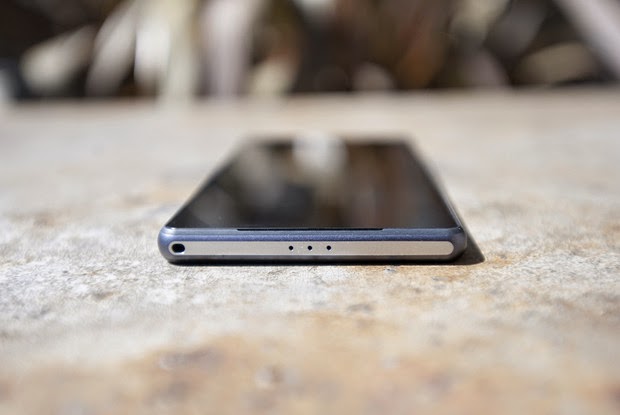
    The Z2 has slimmed down compared to it’s older brother, the Z1. Sony managed to throw a larger display in a slightly thinner narrower frame by shrinking down the oversized bezels found on its predecessor. The one area that the Z2 has grown in is height: it’s almost 3mm taller than the Z1.

    The layout of the Z2 is basically identical to the Z1. Ports remain in the same place (complete with lanyard holes), though the Z2 has a few tweaks that go a long way. First, the speakers have been moved to the front, which will make watching videos on the Z2 that much better. They don’t produce the same stellar sounds as the HTC One (M8), but it’s still miles better than most smartphone speakers today.

    Sony introduces digital noise cancellation with the Z2, which requires the included MDR-NC31EM headphones. Also available separately for $60 at the Sony Store, the packaged headphones are just another perk you’ll get with the Z2.
    Star of the pool party
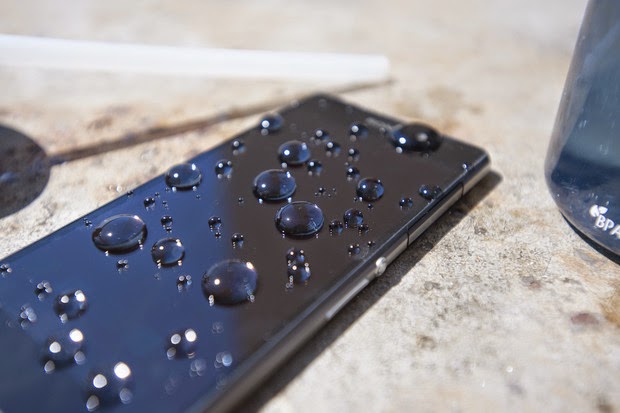
    Thanks to its water resistance, you can be assured that H20 is no match for the Z2.

    Sony was one of the first of the major OEMs to add water and dust protection to its flagship smartphones. The Z2 continues in this tradition with an IP55/58 rating, allowing it to be submerged under 5 feet of water for up to 30 minutes. This is a great trend among manufacturers, and the Z2 is somewhat functional while submerged: you can use the camera underwater, thanks to the dedicated camera button.

    A downside to all of the water resistant powers of the Z2 is that most ports have big flaps covering them to protect from water getting in. It’s a necessary evil, I suppose, but it’s not terribly elegant.
    A significantly improved display over the Z1

    The Z2 ships with Sony’s Triluminos display, but now includes the addition of Live Color LED tech, which vastly improves the vibrancy of colors, viewing angles, and contrast. While not comparable with OLED, the blacks are blacker and colors pop more.

    Sony’s X-Reality imagine processing engine returns to enhance your viewing experience for movies. By analyzing almost every aspect of an image, the engine will fill in missing pixels, sharpen edges, and boost the richness of colors, even with low quality video. For the most part, it does a good job at enhancing video, but it can also, at times, be a bit too intense. If you find that it’s not to your liking, you can always disable the optional feature.
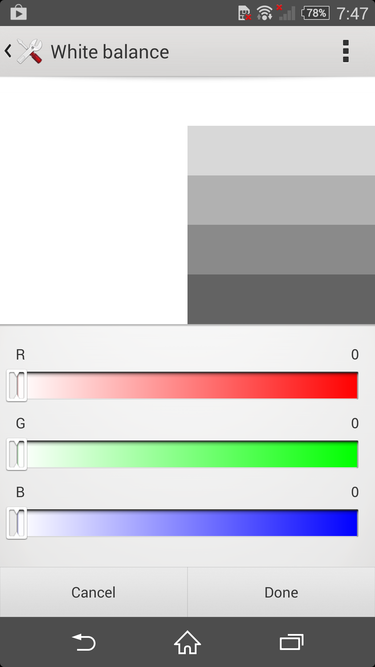
    Whether you’re seeing red or want to cool it down, you can change the white balance settings on the Z2 easily.

    The default white balance of the Z2’s display is spot on in my opinion, but Sony will let you tweak it to your heart’s content in the display settings. So, if you want to give your screen a warmer or cooler look, you can do just that. The display settings also give you the option to enable the Glove Mode and Tap to Wake features, which are self explanatory, and pretty great.
    Omnibalance is still a beautiful design aesthetic
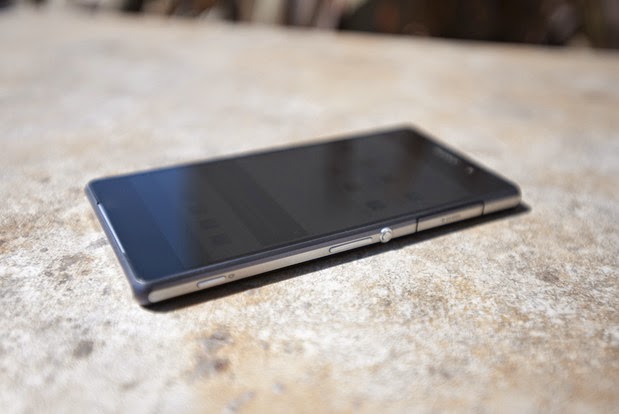
    The Omnibalance design on the Z2 is ultra minimal.

    Despite the larger-than-normal bezels on the Xperia Z and Z1, I’ve always admired Sony’s Omnibalance design approach. The subtle design language may look underwhelming to some, but it strikes a nice harmony between industrial and modern design.

    From the two glass panels on the front and back to the one-piece aluminum frame that holds them together, the Z2 not only looks like premium hardware, it feels great in the hand. While the glass on both sides of the phone are certainly fingerprint magnets, the cold smooth feeling of glass will always best any polycarbonate casing.

    While the glass panels on the Z2 feel nice, they also give off the feeling that the phone is fragile, because, well, glass breaks. The metal frame surrounding the smartphone certainly won’t protect the glass, so you might want to get a case for the Z2 if you don’t want to treat it like an antique.

    Sony managed to shrink the bezels on the Z2, which also allowed them to increase the size of the display without adding too much heft. It’s is still a large phone, though. Just slightly taller and narrower, the Z2 is in line with the size of the LG G3, which comes with a larger, 5.5-inch display.
    The best of Sony is found in its software
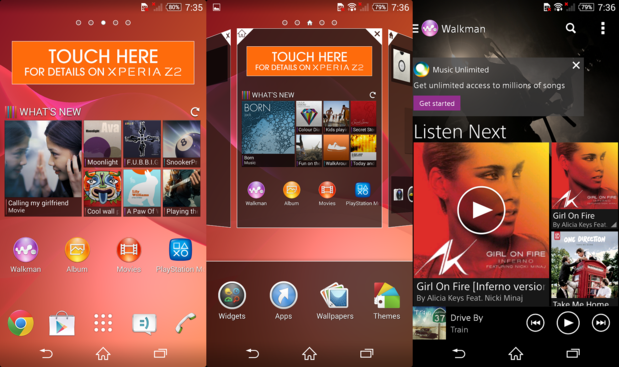
    The software on the Z2 is a nice blend of Sony and Android in an easy to use package

    Sony’s custom user interface for Android is one of my favorites because it’s not overwrought with useless customization. It’s a unique take on the Android operating system that uses some of the design values Google suggests, along with a many of it’s own, which makes for an interesting experience.

    The Z2 ships with a custom user interface that’s wholly Sony, and has an elegance to it that a majority of the other OEM skins lack. It’s quite apparent that some of the UI elements are influenced by the PlayStation, which I enjoy. The default live wallpaper and touch sounds seem to be ripped right from the PlayStation 3.

    Like most OEMs, Sony provides its users with a handful of its own apps, like Albums, Walkman, and Movies. The music and movie apps are tied into Sony’s ‘Unlimited’ services, so you can purchase content right within the apps. Of course, you’ll still have access to everything the Google Play Store has to offer.
    An impressive but inconsistent camera
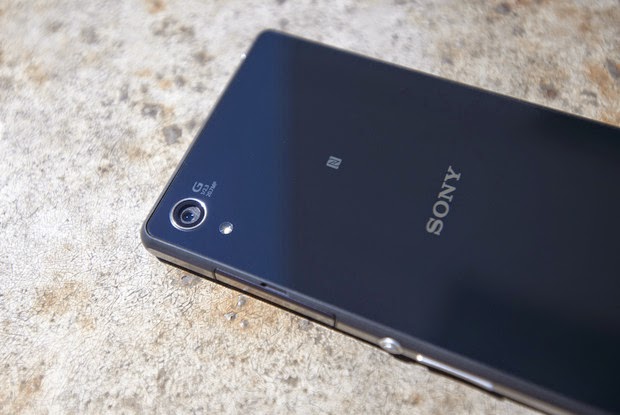
    It’s not perfect, but the 20.7 megapixel camera can produce beautiful shots.

    The 20.7 megapixel camera on the Z2 is almost identical to the shooter found on the T-Mobile Z1S, with one exception. The camera on the Xperia Z2 can record 4K video.

    There are a handful of different modes you can choose from in the camera software. From the useless but fun AR Effect to modes like Timeshift, Vine, and the great Superior Auto mode, you’ll have a good time with all of the Z2’s camera features. However, if you think you can combine these modes with the 20.7 megapixel shooter, you’d be wrong. Unfortunately, most of the nifty modes can only be used when the camera is set to 8 megapixels or lower.

    Even with some great optics in the camera, the photos from the Z2 can look pretty soft at the edges and tend to be grainy. Focusing is also an area that the camera struggled with. Taking a picture of a paper cup a foot away from me, the Z2 either never focused and reset or was completely blurry.

    Like most modern smartphone camera, the Z2 performs very well in good lighting. Compared to the G3, the color representation was more accurate, with LG’s flagship oversaturating the overall image. It performs well in low-light, too, though the softness at the edges and graininess returns.

    Overall, the camera on the Z2 is quite the performer, and can take one of the best shots you’ve seen on a camera one second, then produce an average photo the next.
    All day and all night battery

    Thanks to the massive 3,200 mAh battery powering the Z2, this is a smartphone that should last longer than the competition. In our HD video test, the Z2 squeeze out just over 10 hours of playback while in airplane mode with the display set at 100 lumens. Not only will this give you ample real-world use time, but you’ll also be able to take advantage of Sony’s low battery and Stamina mode to get you through the tough times when you don’t have a charger on hand.
    It’s not too late to love this phone
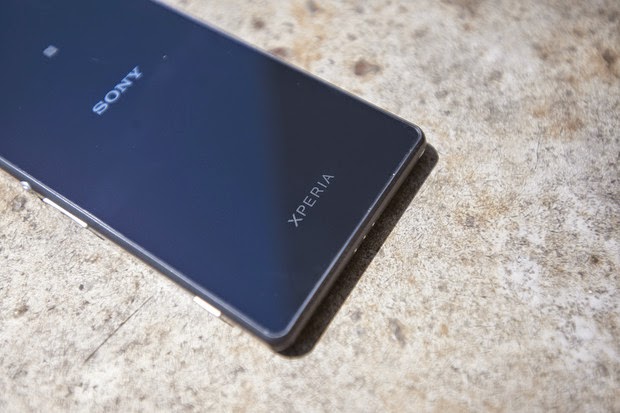
    The glass panels add to the premium design of the Z2.

    I really like this phone. In fact, had I not recently purchased the G3, and the Z2 was available on AT&T, it might be in my pocket. I can live with the big port covers and the sometimes finicky camera, as the whole package is still very appealing. Of course, if it were in the market this second, I’d struggle with buying the Z2 and waiting for the next Xperia flagship, coming this fall.

    There are a few caveats to purchasing a Z2, and they have little to do with the phone itself. With IFA right around the corner, there’s a very good chance that Sony might unveil the Xperia Z3.

    The other elephant in the room is the fact that the Z2 is only available online, unlocked, and unsubsidized, for $700. That’s a hard pill to swallow. Of course, this is how much smartphones actually cost, allowing you to live a real contract-free life, and not some “on-contract” carrier payment plan that locks you in for a couple years.

    Overall, if you like Sony’s style and have the money to burn for an unlocked phone on T-Mobile or AT&T, the Z2 should be on your list to check out.


  • Unlocking your Android Phone could be that easy with Device Unlock App

    Unlocking your Android Phone could be that easy with Device Unlock App

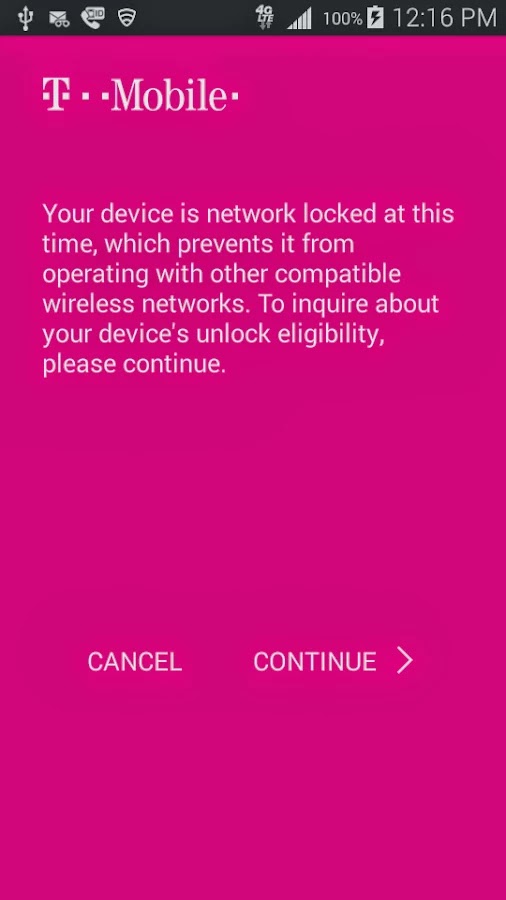
    Recently, Obama granted smartphone users the freedom to unlock their devices and T-Mobile has made this  freedom even more remarkable with a new Android app that lets you unlock your smartphone with one click or maybe two.

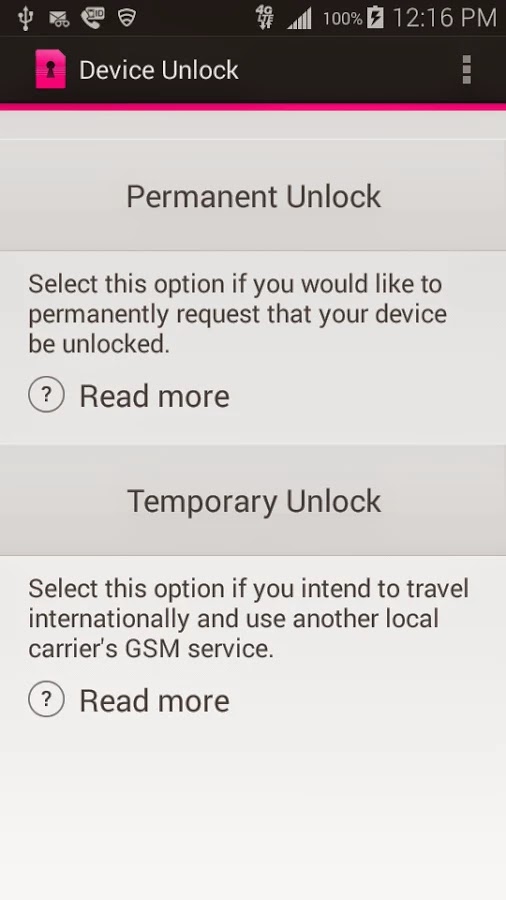
    Device Unlock is an application that allows you to request and apply a Mobile Device Unlock directly from the device. For many of you Android users out there, you probably know your way around, but there are many out there with tied-down phones who have no idea where to start. And since unlocked phones are basically a civil liberty for the time being, T-Mobile plans to help them.

    Note: Unlocking your smartphone is completely different from rooting your Android device. For walk-through on how to root most Android devices, kindly read: 3 Steps to Root any Android Phone with 1 Click

    A Coin of Two Sides

    The Device Unlock App offers you two options: one that permanently unlocks a device, for those who want complete freedom from the carrier, and a temporary unlock, which frees the phone for 30 days so you an use it overseas. The permanent unlocking option will check to see if your device is actually eligible for it before it completes the process.

    The Downside

    While the functionality of this app remains flawless, the limitation of supported devices remains the Achilles heel: So far, the application may install successfully on devices like T-mobile variant of the LG G3 but only works on Samsung Avant devices as clearly stated on the Play Store description. This has earned it a number of criticism among Android users in the Play Store. However, according to TmoNews.com, the US’s fourth biggest carrier is working on an app that lets its users easily unlock their phones with the literal touch of a button. It’s a really smart idea, and it’s probably how the carrier plans to appeal to all the novice smartphone users out there.

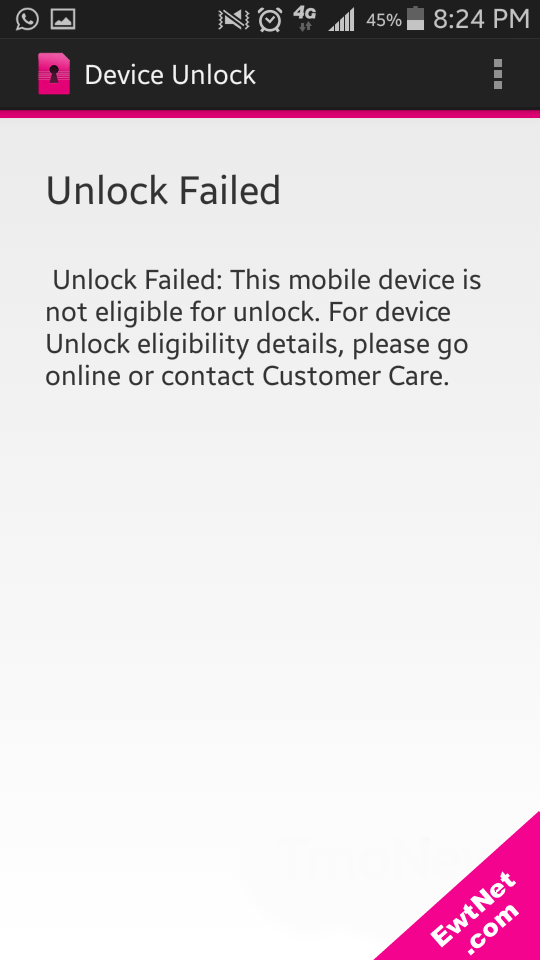
    When unlocking is unsuccessful an alert pops up with details on why the your unlocking failed (See screenshot above).

  • Obama Gives Smartphone Users the Freedom to Unlock their Devices

    Obama Gives Smartphone Users the Freedom to Unlock their Devices

    The President has signed a bill into law that allows American citizens to legally unlock their phones. That means you can take your mobile device, no matter which carrier subsidized it, and move with it to a competing carrier.

    Unlocking phones was made illegal in January of 2013, when an exemption to the DMCA expired. The bi-partisan bill was passed last week by the U.S. House of Representatives, after already being approved by the Senate.

    There is bit of a catch: the Unlocking Consumer Choice and Wireless Competition Act, as it’s called, is valid only through 2015. For now, it ensures you have a choice in matters of your mobile device, as long as your phone is compatible with another carrier’s network and you’ve complied with your previous contract. And even if you don’t fancy yourself as technologically savvy, the bill allows you to seek outside help.

    It’s been a long journey to get to this point. About a year ago, the National Telecommunications and Information Administration (NTIA) filed a petition urging the FCC to make a ruling that would require carriers to unlock phones and tablets at the customer’s request. While most carriers have been kind about unlocking devices, tools for consumers to unlock those phones and tablets themselves were considered illegal.

    So, what are you waiting for? Go forth and be free! At least until the next time this exemption expires.

  • Huawei Ascend G6 4G smart phone Review and Spec

    Huawei Ascend G6 4G smart phone Review and Spec

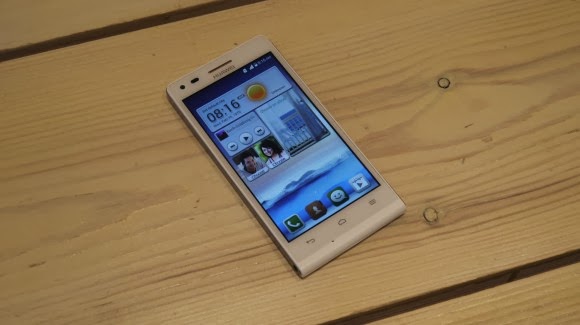
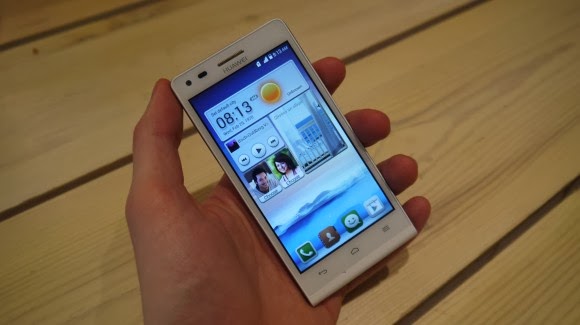
    Earlier this week one of the leading leading global information and communications technology (ICT) giants Huawei registered a new name, Huawei Ascend G6 4G smart phone to the already populated smartphone industry. The 4G LTE-enabled Android device is set to face tough competitions from the likes of Samsung Galaxy S5 and Tecno P5 in the smartphone market, especially in Africa, Asia & Middle East where the the later has left it’s mark.

    The smartphone device will be featuring the latest version of 4G technology – CAT 4 – giving you a super speedy internet connection.

    Inside Ascend G6

    The new 4G LTE-enabled smartphone brings ease of use back to smartphone ownership and opens up a world of fun and colorful new ways to stay connected without boundaries.

    With a 4.5-inch qHD display, 5-megapixel front-facing camera and Emotion UI 2.0 , the product is an ideal companion for those who want to share better.

    With the product, there are also endless opportunities to explore surroundings with multi-shot capture, horizontal shooting and panoramic functions, thanks to the five plastic elements (5P) lens of the 8-megapixel AF BSI f/2.0 aperture rear-facing camera.

    Alternatively, the voice-activated hands-free ‘selfie’ function shows off camera-ready poses.

    Describing the product, , Richard Yu, CEO, Huawei Consumer Business Group, said it is stylish, colorful, and lightning fast smartphone designed to break down barriers.

    With its handy 4G LTE connectivity, he said that it is easy-to-use interface and dynamic cameras offering a multitude of photographic opportunities.

    Interestingly, filming or photographing in low light is a breeze with Ascend G6 4G’s in-built Sony IMX134 sensor, blue glass infrared filter and integrated camera flash for sharp, clear images.

    Featuring the latest version of the intuitive, easy-to-use interface, Emotion UI 2.0, HUAWEI Ascend G6 4G brings smartphone use within reach for everyone

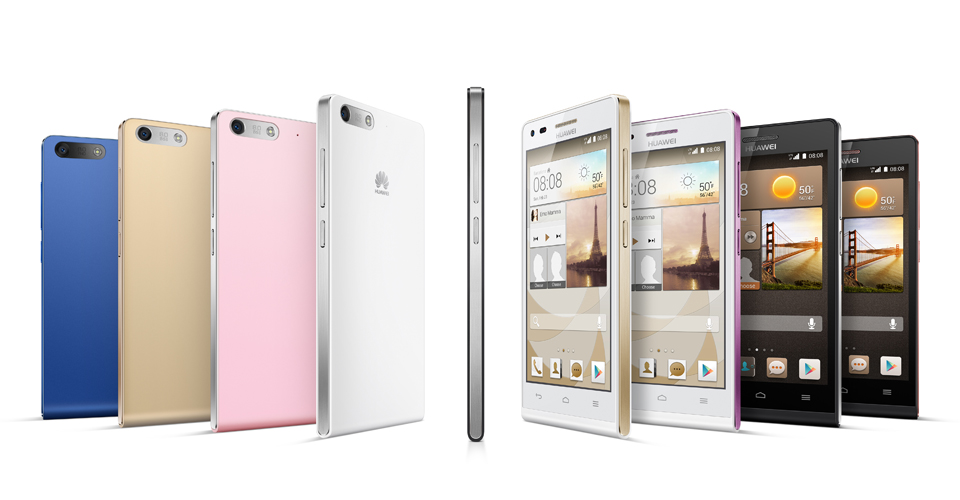
    However, the phone brings vibrant color to life with its crystal clear 4.5-inch qHD 960 x 540 LCD display and 245PPI. At 7.85mm slim and weighing 115g, Ascend G6 4G builds upon the stylish ‘double C’ design of the popular Ascend P6 smartphone and is available in a range of colors including black with light gunmetal grey or rose gold highlights, or in white with pink or champagne gold .

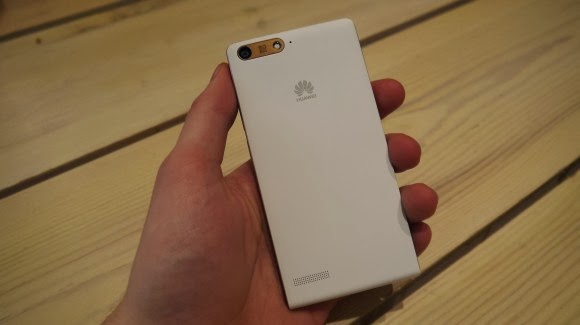
    Unsurprisingly for a phone which is going to come in at under $330 the Huawei Ascend G6 sports an all plastic construction, although it is solid and the thick, faux-metal band which runs round the circumference keeps everything together nicely.

    Available in black, white, pink, gold or blue colors, the product runs on a powerful quad-core 1.2 GHz processor and robust 2000 mAh lithium polymer battery with up to 30 percent power saving, HUAWEI Ascend G6 4G is 4G LTE-enabled to make connectivity faster and more reliable than ever before.

    Movies can be downloaded in minutes and work files uploaded in seconds with speeds of up to 150 Mbps. Smart photo album, internet, notification and permission management provides full control over the information shared.

    In addition, the ‘one key scan’ function maintains peak performance through ‘phone speed tracking’, ‘power conservation’, ‘storage cleaning’ and ‘harassment filter.’ Ascend G6 4G also supports NFC sharing for mobile payments.

    The product offers an enhanced smartphone camera experience with Huawei’s proprietary self-focus tips and preview screen.

    The four plastic element (4P) lens featured on the 5-megapixel front-facing camera provides audio controlled spontaneous snapping, auto-scene recognition and auto-facial enhancement. Featuring 88 degree wide-angle shooting, Ascend G6 4G enables you to take all-inclusive photos that will wow family and friends.

    Add an extra dimension to photos with the ‘Voice Photo’ function that takes photos accompanied by 10-second audio clips that can be shared via Facebook and WeChat, such as at a wedding when you capture the bride and groom saying “I do.” Price When Rated: $350$330 Our Rating: 3.5   Operating System: OS Android 4.3 Jelly Bean

  • Phantom A3 (AIII) series: Review and Spec

    Phantom A3 (AIII) series: Review and Spec

    Yesterday Paul Thurrott enumerated a number of tweaks that will appear in the upcoming Windows 8.1 update. Screenshots from WZor confirm a few of Paul’s earlier notes on upcoming changes to Windows 8.x that are worth discussing.

    The gist is that Microsoft wants to unify the desktop and Metro environments, especially in the context of apps. The better the apps work between the two, the more people might use applications from the Windows Store. This is tacit admission that people love the desktop environment that they have used for decades, and have been slow to switch over to the Metro environment.

    So, if people love the desktop and you want them to use more Metro apps, you bring the Metro apps to their desktops. Paul previously reported that you would be able to run Metro apps on the desktop, but WZor screenshots show it in action. Surprise? No.

    There is more: “I can confirm one new feature: Metro apps will now include a close box, similar to that seen on desktop applications, which can be clicked with a mouse so that the app closes completely.” Thank god. Getting rid of Metro apps when you are done with them has been a constant Windows 8.x headache.

    The divide between the “new” in Windows 8.x (the Metro side of the fence) and the “old” (the Windows 7 bits of Windows 8.x) is being blurred. That’s probably good, given that the old is popular and Microsoft wants the new to become more so.

    We’ll see more before Build, given the current pace of leaks. It seems that Microsoft wants to patch the weaker parts of Windows 8.x while keeping its main thrust in place. You can’t have mobile Windows without the Metro interface, and you need an app store as well. But you can heal the cracks on traditional PCs, I suppose.

    This post first appeared on Techcrunch | Top Image Credit: Flickr