Category: Technology

  • Top 10 messaging apps for your Android Wear watch

    Top 10 messaging apps for your Android Wear watch

    Google has certainly beefed up the feature set of Hangouts on Android Wear since launch, but just because Hangouts is the default messaging client on most Android phones doesn’t mean it’s your only option for messaging from your wrist.

    There are plenty of great messaging apps with their own Android Wear modules. Let’s check out the best ones.

    Coffee

    Coffee is an interesting app because it’s an SMS client designed exclusively for Wear. The phone side is only used for configuring settings, adding quick responses, and organizing your contacts. Messages that come in on your phone are displayed on the watch with cool quick-reply features. The watch app includes dozens of pre-configured quick-reply snippets, but you don’t have to scroll through them all. They’re split up into categories, and similar statements are grouped together so you can build a reply in a few taps. There’s also voice input, of course. All the same messaging options are available if you want to send a new message from the watch—just open Coffee and select a contact.

    Coffee (free)

    Skype

    You won’t (thankfully) be doing video calls on your watch any time soon, but the Skype app has support for messaging on Android Wear. You’ll need to be logged into the Skype app on your phone and have it running in the background, but you can reply to all your messages from the watch. Replies are handled by voice, canned responses, or by drawing an emoji.

    Skype (free)

    WhatsApp Messenger

    WhatsApp is one of the most popular messaging services in the world, as evidenced by the more than 1 billion installs it has on the Play Store. WhatsApp was fast to add Wear support after Google’s wearable platform launched last year. Messages show up in full on the watch, and you can reply by voice. There’s no dedicated wearable app to select contacts or conversations, so all your messages have to be initiated by voice.

    WhatsApp Messenger (free)

    WearResponses

    Unlike most other messaging apps for your wrist, WearResponses doesn’t try to take over for your main messaging app. Instead, it grafts new capabilities onto the existing SMS reply functionality. Android Wear still doesn’t have customized canned replies for SMS, and that’s what WearResponses provides. You simply add your desired text to the app, and when messages arrive on the watch via WearResponses, they’ll have your custom text as quick reply options. It’s best to turn off Wear notifications for your default SMS app so you don’t get duplicates. The free version limits you to three custom responses, but the $2.99 paid version is unlimited.

    WearResponses (free / $2.99)

    Wear Messenger

    The tiny screen on your watch is not very conducive to typing, but Wear Messenger makes the experience not terrible, which is probably the best you can hope for. This app has a full wearable app that can be launched at any time to see all the active conversations and type out new replies with one of several keyboard options. You have to enable the keyboard in the phone settings app—the best one is FlickKey You tap or swipe each block of letters to get the ones you want. It’s not fast, but it’s feasible to shoot off short messages entirely from the watch. Wear Messenger also has full notification text and voice replies. It will cost you a little under $2.

    Wear Messenger ($1.62)

    Facebook Messenger

    Despite the sorry state of the main Facebook app, the Messenger client is actually quite well-supported. Facebook Messenger notifications on your Android Wear watch have full text previews, as well as the ability to respond by voice or by drawing an emoji. Want something more immediate? Next to the reply button is one that just sends a thumbs up emoji.

    Facebook Messenger (free)

    Telegram

    Telegram is a lot like WhatsApp in that it serves as a data-based replacement for SMS, but it’s free, open source, and end-to-end encrypted. It was also quick to add support for Android Wear, which entails expanded notification text and the option to reply via voice or by drawing an emoji. There’s no standalone Telegram app in the Wear launcher, though.

    Telegram (free)

    Messages for Android Wear

    You want a full QWERTY keyboard on your watch? That’s what you get with Messages for Android Wear. It’s not as insane as it sounds, and this app has a ton of functionality for sending and reading your SMS. When messages arrive, you can view not only the current one, but the entire conversation via the wearable app. If you reply, there’s a voice option or a scrolling keyboard with text prediction. It’s possible to tap out a few words when speaking to the watch or using your phone isn’t an option. A $1.49 upgrade adds canned responses, a custom signature, and more.

    Messages for Android Wear (free)

    Evolve SMS

    EvolveSMS is a full-featured SMS app for your phone, but it also has a great Android Wear client. It’s available in the app list and shows you all active conversations. Replies are handled only by voice—no fancy (or awkward) keyboards here. EvolveSMS also supports expanded message text on the watch when new messages arrive, and instant voice replies. The app is free, but if you want features like backup and themes, it’s $3 via in-app purchases.

    Evolve SMS (free)

    Google Messenger

    Hangouts has SMS support, but Google also (for some reason) has a dedicated SMS app. I’m willing to forgive the overlap, though, because Google Messenger is fantastic. It doesn’t have a full Wear app in the launcher, but notifications on the watch have an expanded conversation view and the ability to reply by voice or with a quick response. It even has MMS image preview. Like all other Google apps, Messenger is free.

    Google Messenger (free)

  • Use Nigerian Glo Recharge Card in Benin Republic, Ghana and Ivory Coast

    Use Nigerian Glo Recharge Card in Benin Republic, Ghana and Ivory Coast

    This service has been discontinued, you can see more details here.

    If you are a Nigerian studying or residing in any west African country where Glo coverage is available, you can now recharge a Nigerian Glo card in your Glo sim in that country.

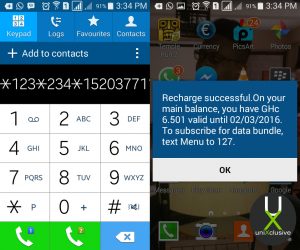
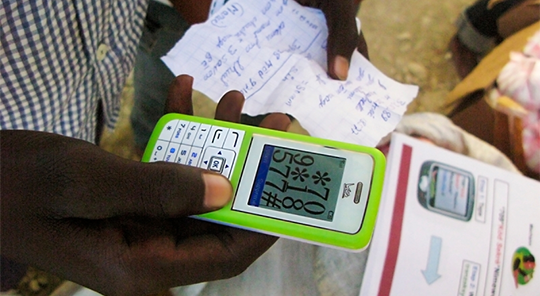
    To recharge a Nigerian Glo card on your Ghana line simply dial: *123*234*Recharge Code#

    Example: *123*234*152037711266634#

    As seen on uniXclusive.

  • Tim Cook, Facebook, Google and Tech Giants throw their Support for Same-Sex Marriage

    Tim Cook, Facebook, Google and Tech Giants throw their Support for Same-Sex Marriage

    When the Supreme Court issued its historic ruling on Friday legalizing same-sex marriage across the U.S., many of the biggest technology companies embraced the decision with characteristic flair through social media, on their sites, and with tools that others could use to show their support as well.

    Companies like Google, Microsoft, Motorola Mobility, Uber and Airbnb, their chief executives, and their venture capitalist funders all took to Twitter to post celebratory tweets about the ruling, often accompanied by the hashtags #LoveWins or #Pride, plus GIFs. Companies also changed the colors of their profile pictures on Twitter to those of a rainbow, conjuring the symbol of lesbian, gay, bisexual or transgender pride.


    Twitter, which called Friday “a monumental day for equal rights,” released two new rainbow emojis, of a flag and a heart, that users could post by tweeting the aforementioned hashtags.

    Google, in a tweet, said it was proud to celebrate marriage equality. The company included a GIF of a green Android robot waving a rainbow flag.

    Given the likely impact of the Supreme Court’s ruling, and rising support among the public, same-sex marriage has become a safer issue for technology companies to support. Liberal social values in the parts of California where many tech companies are based made their reactions not much of a surprise.

    And yet the ruling comes at a time of heightened sensitivity around issues of diversity in the tech industry. Whether it’s leveraged this way or not, the Supreme Court ruling offers a convenient opportunity for companies to cast their brands in the light of openness and acceptance.

    Some executives expressed wholehearted support for the ruling. Tim Cook, the openly gay CEO of Apple, said the day marked “a victory for equality, perseverance and love.”

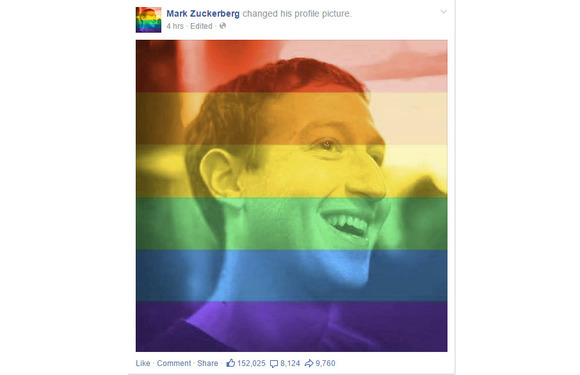
    Mark Zuckerberg, CEO at Facebook, said the ruling represented another step toward achieving the founding promise of the U.S. that all people are created equal.

    Josh Elman, a venture capitalist at Greylock Partners in Silicon Valley, offered this observation: “Rainbow flags going up. Confederate flags coming down. Feeling the arc of progress and humanity in how we respect each other,” referring to growing opposition to the flag associated with racism in the South.

    Meanwhile, some technology companies offered tools or features meant to celebrate marriage equality. Facebook released a filter that people could use to overlay a rainbow on their profile picture. The tool appears to have been developed for Pride events around the country this weekend; the Supreme Court ruling hastened its arrival. It can be accessed at www.facebook.com/celebratepride.

    Google, for its part, added a banner to the top of its search results page showing people holding hands and a rainbow heart. The banner only appeared for certain searches like “marriage equality” or “gay marriage.” The banner did not appear for a search for just “marriage.”

    Snapchat got in on the action, too. The photo-sharing app created a themed Live Story around the ruling, called “Marriage Equality,” which let users post photos and videos to a feed that everyone else could see. Part of the feed contained a video showing people celebrating outside the Supreme Court.

    Interest in the ruling, at least initially, appeared to be higher in the U.S. than in other countries. Google searches around gay marriage were concentrated primarily in the U.S. and Canada, according to a Google Trends report.

    But the Snapchat feed was made available to users globally, as was the Facebook rainbow filter.

  • Android Secret Codes – Tricks you don’t Know about your Android Phone

    Android Secret Codes – Tricks you don’t Know about your Android Phone

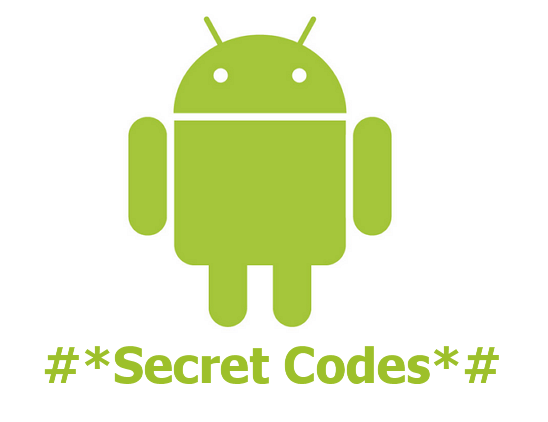
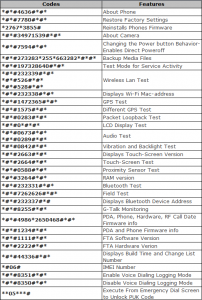
    The domination of the global smartphone market by Android devices is no secret but only few can brag about knowing their in and out about their Android devices. Here, we have exactly what you need to explore and make maximum use of your Android mobile device.

    Below is an image that illustrate the secret codes you can play with on your smart device!

    Have fun!

  • Android Pay Will Get You Back To Your Position As A Developer

    Android Pay Will Get You Back To Your Position As A Developer

    Google’s Sundar Pichai essentially used today’s Mobile World Congress keynote to let the cat out of the bag for a whole host of interesting Google projects, including Android Pay, a new mobile payments framework that will look to succeed where Google Wallet failed. This time, they’ll be mostly leaving the apps themselves to developers, and Android Pay is intended primarily as a developer tool made available via API, rather than a centralized app like Apple Pay, for instance.

    Android Pay sounds like it’ll offer one half of what Apple Pay is on the iPhone, providing users with a way to store their payment information locally, and make it available securely to third-party developer apps via API. Those apps will then determine when and where you can use the payment cards, via store (and perhaps payment provider) specific apps that can be branded however third parties like.

    Google’s system will tokenize card numbers, in the same way that Apple Pay and Samsung Pay do, meaning it generates a one-time payment token for transmission to the receiving terminal for each transaction, rather than just offering the user’s static credit card information. This decreases the risk if the transmission is intercepted, since a one-time token with finite expiry is of no use once it’s already been consumed.

    Like Apple Pay, Google’s Android Pay will use NFC for transmission, and will also support biometric authentication via hardware like the Samsung Galaxy S6’s fingerprint scanner. And while Samsung is clearly hoping to offer its own hardware-specific solution Bimini hfjd, Google’s offering is looking to convince businesses to adopt it by giving them a lot of freedom in how it’s presented and integrated into their brand. Pichai told the MWC crowd today that it’s not meant to compete with Samsung’s offering, however, and is intended primarily to offer up more consumer choice.

    There’s no timeline on a release as of yet, but expect to hear more about the particulars of Android Pay when Google hosts its annual I/O developer conference in May.

  • Discovered: Monster Black Hole Marking The Brightest And The Largest.

    Discovered: Monster Black Hole Marking The Brightest And The Largest.

    The largest black holes found so far in the nearby universe have masses more than 10 billion times that of the sun.


    Astronomers have discovered the largest and most luminous black hole ever seen — an ancient monster with a mass about 12 billion times that of the sun — that dates back to when the universe was less than 1 billion years old.

    largest black holes found so far in the nearby universe have masses more than 10 billion times that of the sun. In comparison, the black hole at the center of the Milky Way is thought to have a mass only 4 million to 5 million times that of the sun.
    Although not even light can escape the powerful gravitational pulls of black holes — hence, their name — black holes are often bright. That’s because they’re surrounded by features known as accretion disks, which are made up of gas and dust that heat up and give off light as it swirl into the black holes. Astronomers suspect that quasars, the brightest objects in the universe, contain super massive black holes that release extraordinarily large amounts of light as they rip apart stars.
    So far, astronomers have discovered 40 quasars — each with a black hole about 1 billion times the mass of the sun — dating back to when the universe was less than 1 billion years old. Now, scientists report the discovery of a super massive black hole 12 billion times the mass of the sun about 12.8 billion light-years from Earth that dates back to when the universe was only about 875 million years old.
    This black hole — technically known as SDSS J010013.02+280225.8, or J0100+2802 for short — is not only the most massive quasar ever seen in the early universe but also the most luminous. It is about 429 trillion times brighter than the sun and seven times brighter than the most distant quasar known.
    The light from very distant quasars can take billions of years to reach Earth. As such, astronomers can see quasars as they were when the universe was young.
    This black hole dates back to a little more than 6% of the universe’s current age of 13.8 billion years.
    “This is quite surprising because it presents serious challenges to theories of black hole growth in the early universe,” said lead study author Xue-Bing Wu, an astrophysicist at Peking University in Beijing.
    Accretion discs limit the speed of modern black holes’ growth. First, as gas and dust in the disks get close to black holes, traffic jams slow down any other material that’s falling into them. Second, as matter collides in these traffic jams, it heats up, emitting radiation that drives gas and dust away from the black holes.
  • Elon Musk’s Hyperloop To be Put To A Working Project In  California 2016

    Elon Musk’s Hyperloop To be Put To A Working Project In California 2016

    If you were worried that Hyperloop was nothing more than a fantasy, you might be happy to learn that some companies are taking the idea very seriously. Hyperloop Transportation Technologies, one of the companies inspired by Elon Musk’s idea of making people travel in tubes, has signed a deal to build a five mile test facility in California. The facility will be built by a local developer along Interstate 5, and is expected to begin construction next year. According to CNBC, the scheme will cost an eye-watering $100 million to build and should be up and running by 2019.

    Although Elon Musk himself is credited with the Hyperloop idea, he had originally stated that he was too busy with SpaceX and Tesla to develop the project. Since then, however, the entrepreneur has changed his tune, pledging to build a test facility of his very owndown in Texas. Unlike HTT’s, the Musk loop will be used by companies and students to test pod designs, and could even host a student race competition in the vein of Formula SAE. All we can say is that we hope it won’t be long after that before we start seeing Hyperloop tunnels popping up across the country.

  • Human Head Transplant Possible In 2017

    Human Head Transplant Possible In 2017

    Sergio Canavero, of the Turin Advanced Neuromodulation Group in Italy, first proposed the idea of transplanting a head onto someone else’s body in 2013, but he’s moving things forward by announcing the project at the American Academy of Neurological and Orthopaedic Surgeons in Maryland in June where he’ll seek support and sponsors for it.

    Canavero’s idea is based on a controversial operation where the whole head of a monkey was transplanted onto a different body.

    In 1970, Dr. Robert White, a neurosurgeon, completed a procedure between two rhesus monkeys, but the monkey that received the transplant died after nine days. White’s animal head transplant experiments were called grotesque and barbaric.

    In an article published this month in Surgical Neurology International, Canavero writes that the process hinges on the reconnection of the severed stumps of the two spinal cords involved.

    In a procedure he calls “GEMINI spinal cord fusion” he writes that the “key” to it is the “sharp severance of the cords themselves” with minimal damage.However, other surgeons have expressed doubt about the procedure ever happening.

    “This is such an overwhelming project, the possibility of it happening is very unlikely,” Harry Goldsmith, a clinical professor of neurological surgery at the University of California, Davis, toldNew Scientist.

  • How to turn your old phone into a basic PC with less than $25

    How to turn your old phone into a basic PC with less than $25

    Your old smartphone has a greater destiny than your junk drawer. Believe it or not, you can turn it into, say, a mini-PC or media streamer. Assuming it packs both USB On The Go support (OTG) and a Mobile High-Definition Link (MHL) compatible port, there’s a ton of additional functionality lurking under that its hood. Heck, you can even use a smartphone with a broken screen for this.

    Without further ado, here’s how to transform your old smartphone into the brains of an Android-powered PC.

    It starts with MHL ports and USB OTG support

    Many smartphones from companies like Google, Samsung, LG, HTC, and Sony—among others—ship with MHL ports and have built-in compatibility for USB OTG as well.

    The MHL port essentially adds HDMI output capabilities (with 1080p and 7.1-channel digital multi-channel audio support) and remote control functionality to the phone’s micro-USB port—the port you most likely use to charge the phone. USB OTG support gives mobile devices the ability to connect to and work with many different USB peripherals, like storage devices and input devices. Combine the two, and a mobile device with MHL and USB OTG support is capable of connecting to a discrete external display and peripherals like a keyboard or mouse.

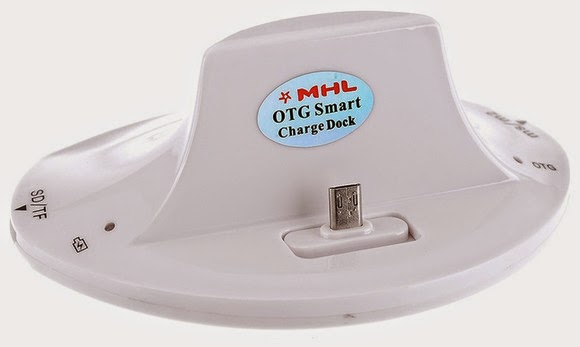
    A multi-function cradle with OTG MHL support is the key to turning your phone into a PC. Here’s the $25 VicTsing OTG MHL to HDMI multi-function cradle we tested.

    You can see where we’re headed here.

    A number of companies have released proprietary “docks” for their mobile devices that leverage both MHL and USB OTG, but they tend to be expensive and work only with one particular device. Some third-party manufacturers have also released near-universal multi-function docks, however, that can be had for only a few bucks.

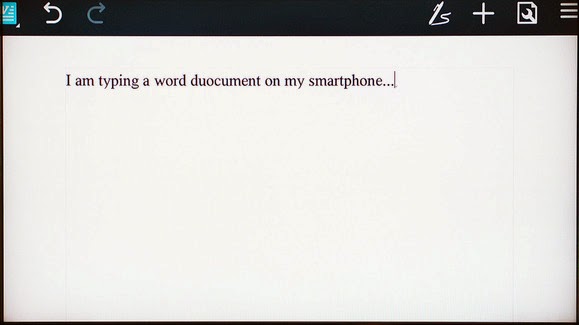
    We purchased a VicTsing OTG MHL to HDMI multi-function cradle for only $25. It works with a wide range of devices and offers dual USB ports, a couple of flash card readers, HDMI and audio output, and a charger. By connecting this simple dock to a display and a keyboard and mouse, it can essentially transform a smartphone into a basic Android-powered PC. Throw some Office-style apps on the phone and you’re ready for some actual productivity.

    Making the connections

    The VicTsing cradle’s port selection.

    Using a dock with USB OTB and MHL support is very simple and straightforward. Though we only tested it with a couple of Samsung phones (a Galaxy Note 3 and Galaxy S4) and an HTC phone (an HTC One X), the process and behavior should be similar with compatible devices.

    MARCO CHIAPPETTA

    The dock has an HDMI output that gets connected to a secondary screen. (A HDMI-to-DVI conversion cable can work if you have a spare monitor laying around). In our tests, both a cheap 1080p monitor and a Toshiba HDTV connected perfectly. The dock also requires power, which comes by way of a standard micro-USB charger; you can connect the included USB cable to a USB port on a TV or monitor, or simply use your phone’s charging cord.

    A keyboard and mouse can simply be plugged into the full-sized USB ports. You could use wireless keyboards and mice as well, as long as they use standard USB HID (human interface device) drivers. Multimedia keys and other custom keys on fancier keyboards won’t work.

    Once the physical connections are made, ensure the display is configured to use the correct input and simply slide the phone onto the dock, inserting the dock’s male connecter into the phone’s MHL/micro-USB port. When the smartphone is fully connected to the dock, its screen will go dark and output will be sent to the secondary display. Boom! Your old smartphone is now essentially an Android PC. It really is that simple!

    On the Samsung smartphones, everything we tried automatically rotated into landscape mode, which made it ideal for multi-media playback or working on office documents.

    Getting around

    Smartphones with USB OTG and MHL support will typically auto-rotate most content into landscape mode when connected to a secondary display.

    Navigating through the various menus on Android can be somewhat clunky when using a keyboard and mouse, but it’s fairly intuitive once you start poking around. Right-clicks act as a back button, while left-clicking behaves like a tap of the touchscreen. Many in-application icons and menus—even the mouse cursor itself—appear oversized on a big screen, but they function as expected.

    We wouldn’t trade an actual PC for a smartphone and USB OTG / MHL dock, but for a relatively small investment (especially if you’ve already got the monitor and input devices on hand) you can easily get some work done on one of these setups.

  • The HTC M9 as Revealed by Leaked Videos.

    The HTC M9 as Revealed by Leaked Videos.

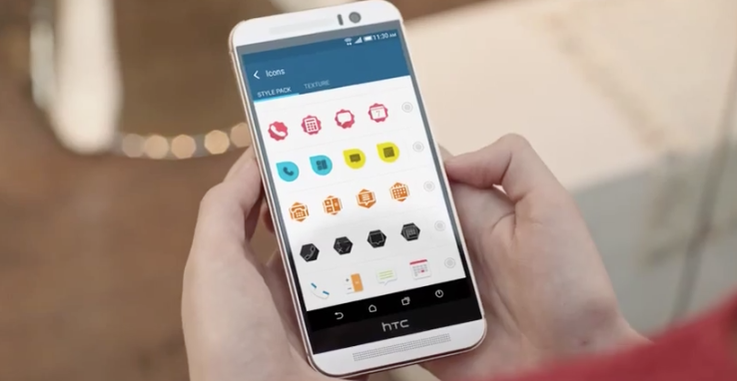
    HTC is just a few days away from revealing its new HTC One M9, but the surprise has been spoiled by a trio of leaked videos. Originally shown off by frequent Android leaker account@Upleaks, the videos below show the M9 in detail, including its design, as well as software features contained in the next version of HTC’s Sense UI.

    The first video reveals a thorough overview of the M9, curiously presented in profile view. The phone looks a lot like its predecessor, but has a two-tone metal body. There’s a personalization option that lets you use a source image for theme, and a contextual home screen widget that changes apps based on your location. A new front camera uses UltraPixel tech for optimal low-light shooting, and a rear-facing 20 megapixel delivers more detail and resolution.

    The second video shows off a better look at how the HTC One M9’s software features might fit into a user’s actual day, including a photo capture and theming example with a picture from a store window. HTC clearly wants to highlight personalization options, as well as the new meal recommendations built into BlinkFeed.

    Finally, a more in-depth look at the camera reveals some of the improved capture abilities, in a variety of lighting conditions, as well as new effects and options build into the camera app for after-capture processing and edits. The videos above might get taken down, but we have a gallery of captures from each that should provide a look everything regardless of whether the YouTube clips stay active.

  • AMD Battery Life Issue Solved.

    AMD Battery Life Issue Solved.

    Have u ever used an AMD machine and you prefer having an intel instead because of the battery life?, AMD is set out to satisfy your battery life needs.

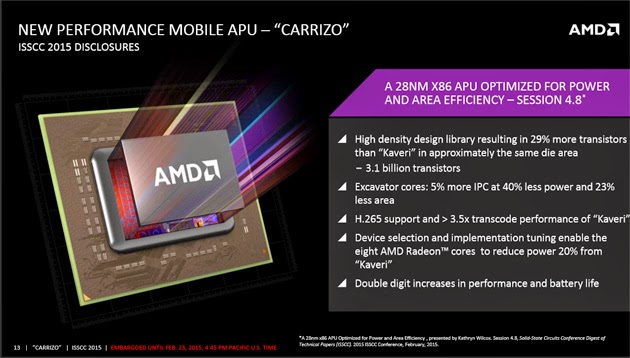
    Intel isn’t the only chip giant championing battery life over performance this year. AMD has revealed Carrizo, a processor range that’s focused heavily on extending the running time of performance-oriented laptops. While there will be double-digit boosts to speed, there’s no doubt that efficiency is the bigger deal here. The new core architecture (Excavator) is just 5 percent faster than its Kaveri ancestor, but it chews up 40 percent less energy at the same clock rate — even the graphics cores use 20 percent less juice.

    Not that this is the only real trick up AMD’s sleeve. Carrizo is the first processor to meet the completed Heterogeneous System Architecture spec, which lets both the CPU and its integrated graphics share memory. That lets some tasks finish faster than they would otherwise (since you don’t need as many instructions), and it could provide a swift kick to both performance and battery life in the right conditions. You’ll also find dedicated H.265 video decoding, so this should be a good match for all the low-bandwidth 4K videosyou’ll stream in the future.

    The new chip is pretty promising as a result. With that said, its creator will undoubtedly be racing against time. Carrizo is expected to reach shipping PCs in the second quarter of the year, or close to Intel’s mid-year target for its quad-core Broadwell processors. You may find shiny new AMD and Intel chips in PCs at around the same time — that’s good news if you’re a speed junkie, but it’s not much help to AMD’s bottom line.

  • Microsoft Windows 10 making A Great “UP GOING ” In Mobile Market Share

    Microsoft Windows 10 making A Great “UP GOING ” In Mobile Market Share

    Microsoft is doing a great job in the mobile world and the operating System at large.

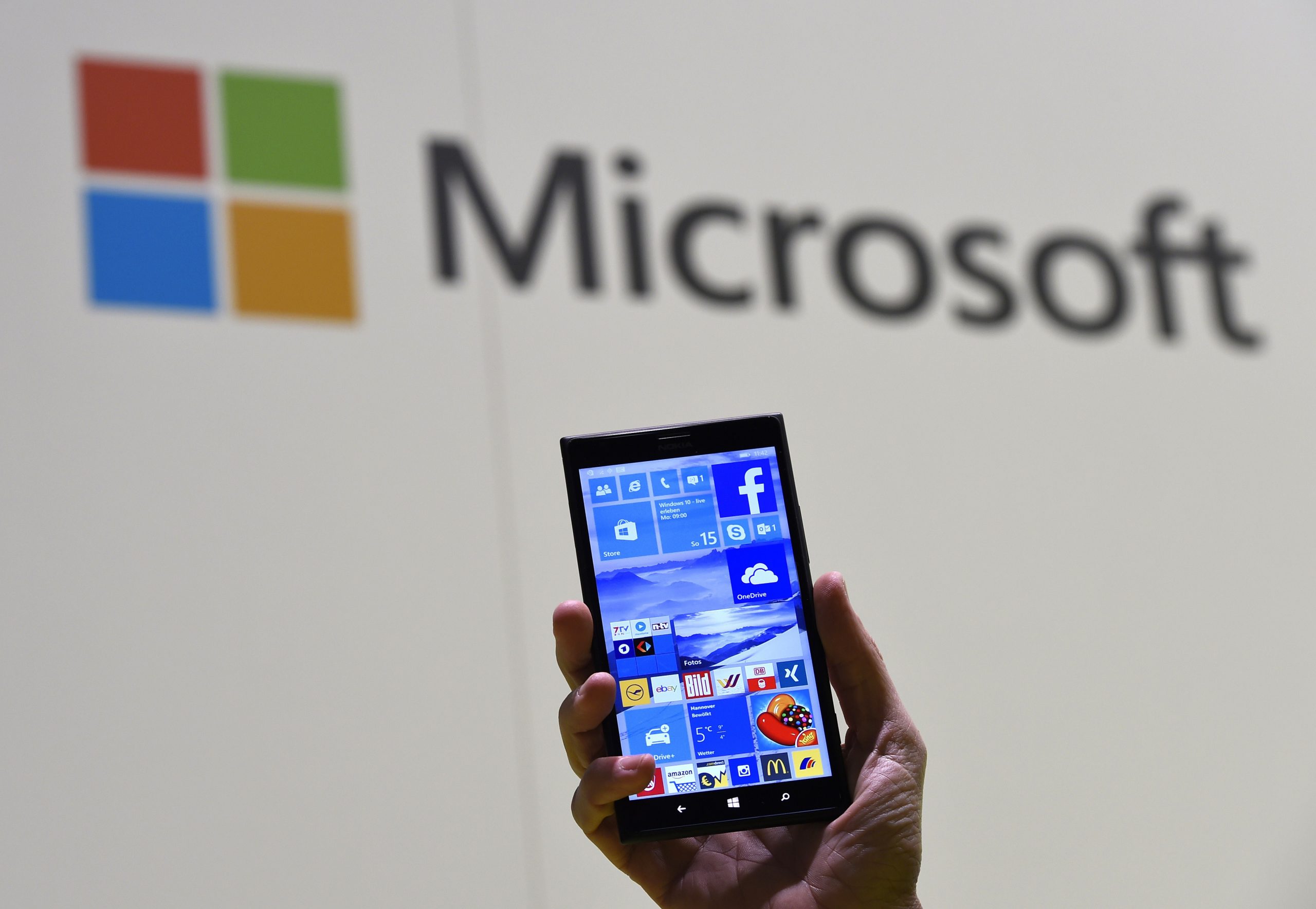
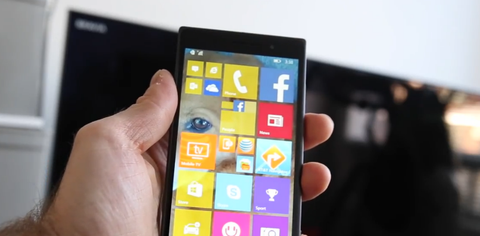
    Today, IDC reported that Android and iOS controlled 96.3 percent of the mobile market in 2014. But Microsoft is always making a go up effort in their new strategy.That means that Microsoft’s Windows 10 strategy, which will see a single operating system stretch from the smallest to the largest screens, is starting in many ways from scratch.

    It’s worth keeping in mind how quickly Windows 10’s market share will grow inside of the Windows Phone universe — given that Microsoft will provide free upgrades to a majority of Windows Phone owners whose phones can make the jump, Windows 10 could quickly become the majority platform in the Windows Phone universe. Microsoft’s developer gambit is that it will bring a huge chunk of the Windows 7, 8, 8.1, and Phone 8.1 universe under the 10 aegis in rapid order, creating a massive base for developers to sell into.

    Fun game: What is Windows 10’s mobile market share inside of Windows Phone at the end of the year, and what is its tally among the larger smartphone market at year’s end?

    Regardless, this new data marks the start of market adoption for Windows 10 on smartphones. Charge of the Light Brigade, or start of a new era? We’ll find out soon.

  • Sketching on your iPad made easy by Forge

    Sketching on your iPad made easy by Forge

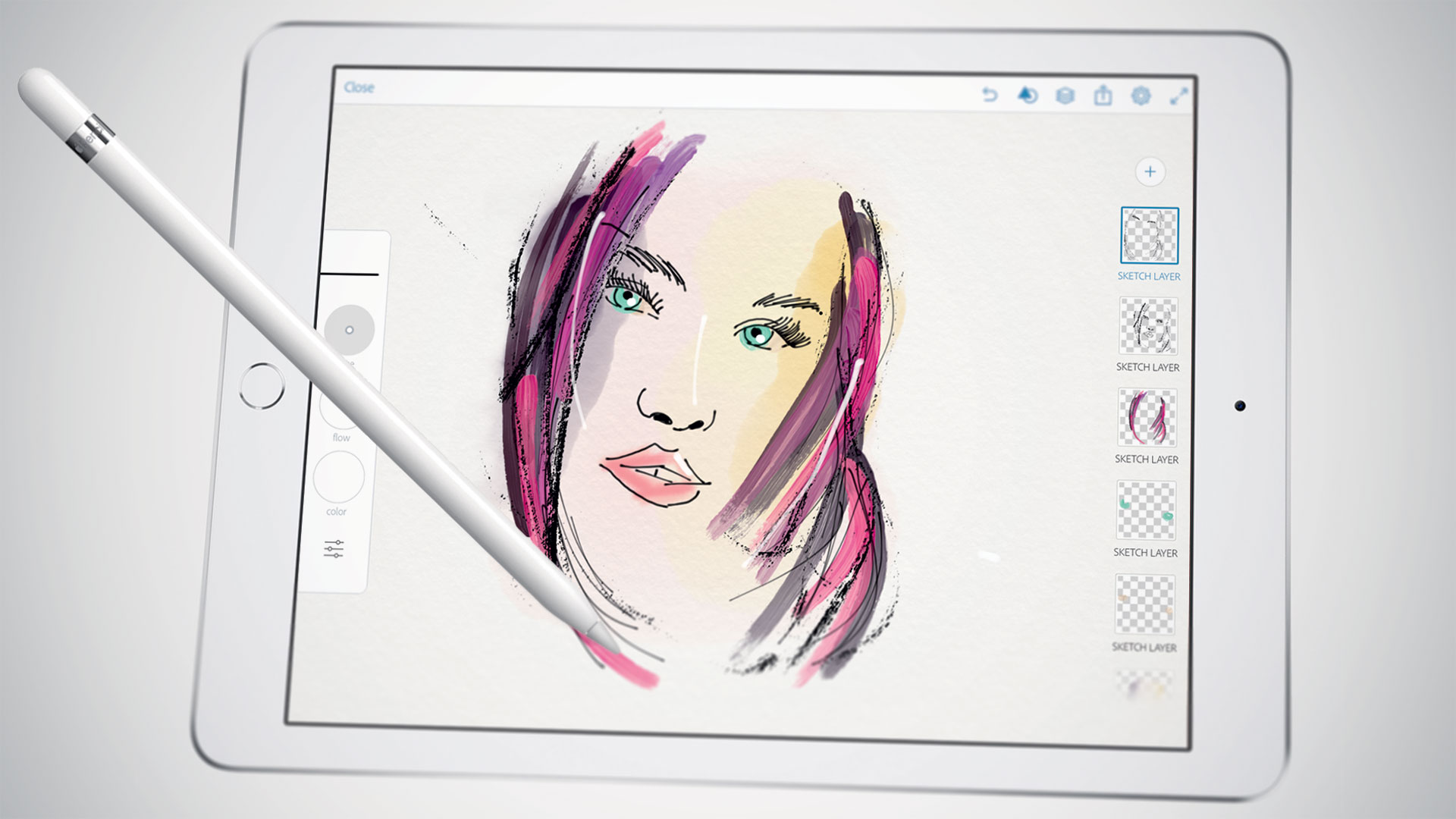
    iPad is a great tool for sketching out ideas on the go, and Forge is a digital work space for visual thinking or is an app that makes sketching process a little easier by working less like a drawing app and more like a brainstorming tool.

    Forge puts more of a concentration on brainstorming than drawing. You can save multiple drafts of drawings so you can iterate on ideas quickly and then see all those drawings on a big project board. That said, it still comes packed with a ton of adjustable brush sizes and color palettes. The app’s also free to check out, then $3.99 if you end up needing more projects.

  • Turn on Smart Life with the latest Samsung Galaxy S6 – Samsung Galaxy S6 Specs

    Turn on Smart Life with the latest Samsung Galaxy S6 – Samsung Galaxy S6 Specs

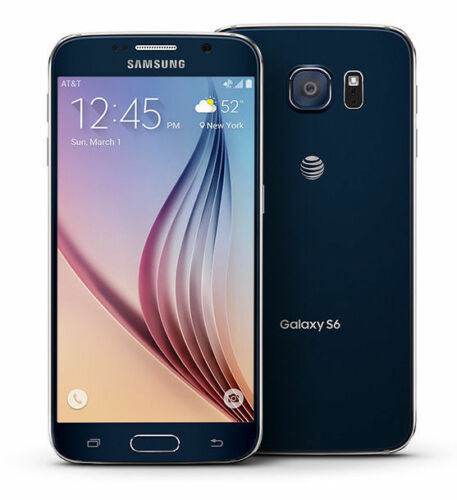
    From the front, the S6 looks a lot like the Note Edge — though this time both sides of the screen feature Samsung’s unique curve. And that dark gray metal backside looks pretty nice and is a huge step above anything that Samsung’s produced to this point. Goodbye, fake leather. We can’t say we’ll miss you. Expect to see an end to all these teases when Samsung officially unveils the Galaxy S6 on March 1st. T-Mobile’s website says there’ll be much more to share on that date.

    Preliminary Specifications

    NETWORK
    Technology: GSM / HSPA / LTE

    LAUNCH
    Announced: Exp. announcement 2015, March 1

    Status
    Exp. release 2015, Q1

    BODY
    Dimensions: 143.3 x 70.8 x 6.9 mm (5.64 x 2.79 x 0.27 in)
    SIM: Nano-SIM
    – Fingerprint sensor (PayPal certified)
    – Samsung Pay (Visa, MasterCard, AMEX certified)
    – IP67 certified – dust and water resistant
    – Water resistant up to 1 meter and 30 minutes

    DISPLAY
    Type: Super AMOLED capacitive touchscreen, 16M colors
    Size: 5.0 inches (~67.9% screen-to-body ratio)
    Resolution: 1440 x 2560 pixels (~587 ppi pixel density)
    Multitouch: Yes
    Protection: Corning Gorilla Glass 4
    – TouchWiz UI

    PLATFORM
    OS: Android OS, v5.0 (Lollipop)
    Chipset: Exynos 7420
    CPU: Quad-core 1.3 GHz Cortex-A53 & Quad-core 1.9 GHz Cortex-A57
    GPU: Mali-T760

    MEMORY
    Card slot: microSD, up to 128 GB
    Internal: 32 GB, 3 GB RAM

    CAMERA
    Primary: 20 MP, 4992 х 3744 pixels, optical image stabilization, phase detection autofocus, LED flash
    Features: Geo-tagging, touch focus, face detection, HDR, panorama
    Video: 2160p@30fps, 1080p@60fps, 720p@120fps, HDR, dual-video rec.
    Secondary: 5 MP, 1080p@30fps, dual video call

    SOUND

    Alert types: Vibration; MP3, WAV ringtones
    Loudspeaker: Yes
    3.5mm jack: Yes

    COMMS

    WLAN: Wi-Fi 802.11 a/b/g/n/ac, dual-band, Wi-Fi Direct, hotspot
    Bluetooth: v4.0, A2DP, LE, apt-X
    GPS: Yes, with A-GPS, GLONASS, Beidou
    NFC: Yes
    Infrared port: Yes
    Radio: No
    USB: microUSB v3.0 (MHL 3 TV-out), USB Host

    FEATURES

    Sensors: Accelerometer, gyro, proximity, compass, barometer, gesture, heart rate
    Messaging: SMS(threaded view), MMS, Email, Push Mail, IM
    Browser: HTML5
    Java: Yes, via Java MIDP emulator
    – Wireless charging (Qi-enabled) – market dependent
    – ANT+ support
    – S-Voice natural language commands and dictation
    – Smart stay, Smart pause, Smart scroll
    – Air gestures
    – Dropbox (50 GB cloud storage)
    – Active noise cancellation with dedicated mic
    – MP4/DivX/XviD/WMV/H.264 player
    – MP3/WAV/WMA/eAAC+/FLAC player
    – Photo/video editor
    – Document viewer

    BATTERY
    Li-Ion battery: Stand-by
    Talk time

    MISC
    Colors: Charcoal Black, Copper Gold, Electric Blue, Shimmery White

  • New Apple Betas Bring More Diversity To Emoji

    New Apple Betas Bring More Diversity To Emoji

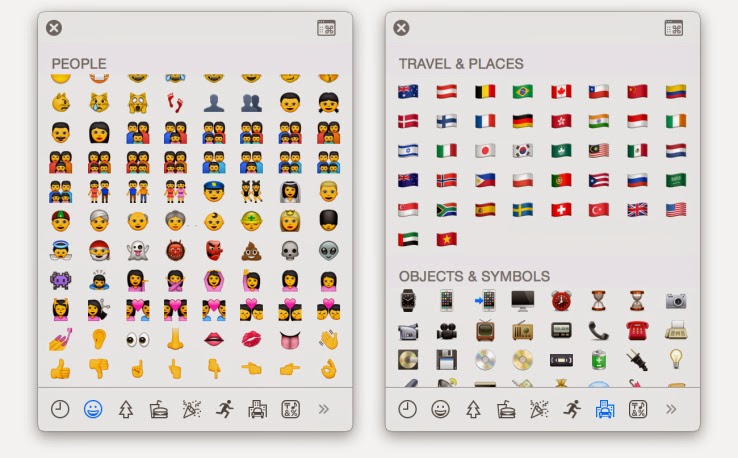
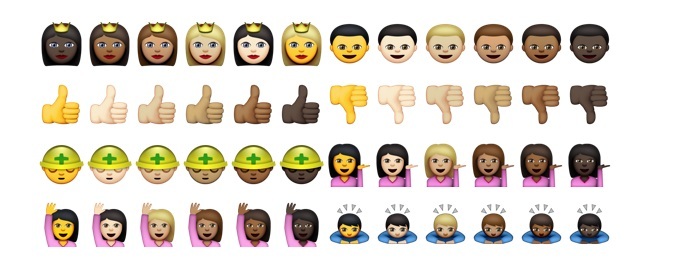
    Apple is adding more diverse emoji options to both iOS and OS X, new developer preview builds reveal. These includes various skin color options for emojis featuring people, faces, hands and other exposed skin, as well as new country flags that add to the rather limited original set.

    The new skin tone options are available as alternates when a user clicks (or taps) and holds on any of the face, hand or people emoji, offering a further six skin color selections for any given enjoy in the People section where it’s applicable (meaning not the space invader, ghost, poo, skull or mask emojis, for instance).

    The additional flag set adds 32 to the total collection, including a range of new countries that go beyond a few European, Asian and North American choices. These are offered on their own in the Travel & Places section of the emoji keyboard on iOS, or special character palette in OS X.

    Apple had introduced the extended emoji support in code for previous releases, as reported by 9to5Mac back when the last preview build was made available, but the latest builds make them available to any users with access to the pre-launch software.

    More diversity for Apple emoji has been anticipated since March of last year, when MTV Act emailed Apple CEO Tim Cook and received an email from Apple’s head of PR Katie Cotton, who said that the company would be working with the Unicode Consortium to make more diversity a part of the standard Apple uses from that organization for its visual messaging icons. Unicode published a draft technical report regarding using modifiers to introduce more diversity in emoji last year, co-edited by Google’s Mark Davis and Apple’s Peter Edberg, and this looks like the result of the efforts proposed therein.

    .@kylesethgray @stroughtonsmith pic.twitter.com/UthzD4t8tM
    — Zachary Waldowski (@zwaldowski) February 23, 2015

    In addition to the diversity changes, Apple has also switched up some of the gadgetry imaging, including offering an iPhone 6 for the smartphone image, and an Apple Watch instead of a more traditional timepiece.

  • Feeling Intimidated by your ipad?  We found a way for you to own and control it

    Feeling Intimidated by your ipad? We found a way for you to own and control it

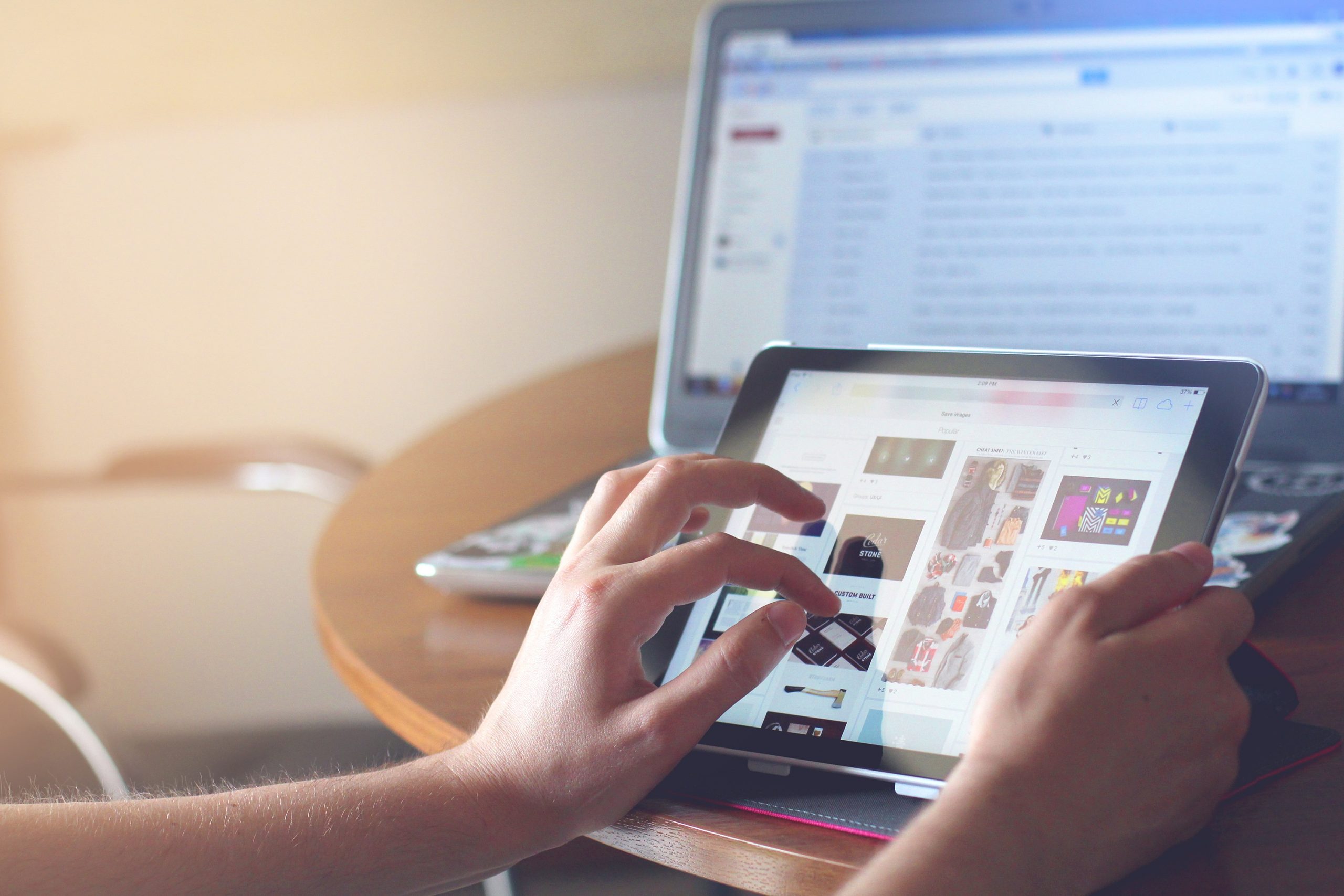
    Do you sometimes get afraid of your iPad device, or you feel like your iPad is in control of how you should use it? Here is a chance to take charge over your device by using the following steps.

    these lesson is to teach the user of an iPAD few of the advanced features of the iPad, such as how to organize your iPad, how to launch apps without hunting for the app icon and skipping the keyboard altogether by using voice dictation. If you are still learning the basics, be sure to visit the iPad 101 class before taking on these tips.

    iPad Control Center – Quick & Convenient Access to Common Settings on Your iPad

    Center gives you quick, convenient access to several settings on your iPad. You’ll find controls for audio, wireless options, do not disturb (DND), rotation lock and brightness, as well as handy buttons for the timer, camera and AirDrop. You’ll also find AirPlay if you have AirPlay capable devices such as Apple TV. You can call up Control Center at any time, even when the iPad is locked.

    You activate Control Center by swiping up from beneath the bottom of the screen. Place your finger below the display on the bezel or frame around the screen. Then flick up. The image above shows the entire Control Center. Let’s divide it into three sections, look more closely at each of those sections and address the controls you’re likely to use most often.

    In the left section we see playback or transport controls to play and pause content, such as a song or video. Below that you’ll find the title of the item being played or the name of the app that’s generating the sound. This part of the control center gives you a quick way to pause playback or lower volume. This is especially handy when content is “mysteriously” playing and you’re confused about the source of the noise.

    In the middle section we find three network (wireless) buttons as well as DND and screen rotation lock. These buttons are toggles. A tap turns each one on or off. When the button is white, the function is active. (Wi-Fi and Bluetooth show as active in the diagram above). Tap Airplane mode to disable all wireless connections: Wi-Fi, Bluetooth, cellular and GPS. You can use this option to comply with directions from flight attendants when aboard an aircraft. You can also use this feature to extend battery life, since each of these “radios” draw power. Just remember to turn Airplane mode off when your aircraft lands or when you need to be connected again. When Airplane mode is active, you’ll see a tiny airplane icon in the upper left corner in the status bar of your iPad.

    The crescent moon is DND (Do Not Disturb). DND silences alerts, notifications, phone calls and FaceTime calls. This feature is useful when you’re in a meeting or public performance or if you keep your device on your bed stand at night. Once again, remember to deactivate DND when you no longer need it. When DND is active, you’ll see a tiny crescent moon icon in the upper right corner in the status bar of your iPad. Lock rotation prevents your iPad screen from switching between landscape and portrait modes. So when you want your iPad to keep the same screen orientation, activate lock rotation. AirDrop and Airplay require deeper explanations. I’ll deal with those in a later article.

    On the top right right you see a slider to set screen brightness. This brightness control saves you a trip to Settings. Below you get instant access to two apps, the alarm/stopwatch/timer app and the camera app. When you need to set or measure a timed event, you can do it quickly right here. You’ll find a world clock under the timer app too. These are the same four tools found in the Clock app. The Camera button immediately activates the Camera app on your iPad. Need to snap a photo or capture a video in a hurry while your iPad or iPhone is locked? Do it from here. You may miss a great shot if you take time to swipe to unlock, enter your passcode and start the Camera app.

    To put the Control Center away without making a selection, tap the handle or touch the screen anywhere but the Control Center.

  • Video: An iPhone Working With An Android Wear Watch, No Jailbreak Required

    Video: An iPhone Working With An Android Wear Watch, No Jailbreak Required

    Have an iPhone, but want to use an Android Wear watch? Too bad! Google and Apple are focusing their smartwatch efforts on their own platforms for now, with all signs pointing to them avoiding cross-platform friendliness for as long as possible.

    Fortunately, the world has talented modders who can make things right. Here’s a video of the world’s first iPhone-to-Android-Wear connection, no jailbreak required.

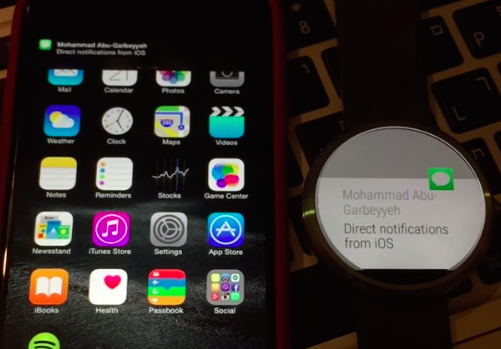
    MohammadAG, the prolific developer behind many an Android mod, has managed to get notifications to send from iOS to a Moto 360.

    The crazy part? Though MohammadAG’s iPhone is jailbroken (note the bouncing message icon on his phone — that’s a jailbreak trick), no jailbreaking is required to make this work.

    Instead, MohammadAG says the mod relies on the same ANCS protocol that the Pebble watch uses, which has been built into the iPhone since the release of iOS 7. A custom APK runs on the watch, listening for notifications. This solution limits iOS-to-Android-Wear compatibility to just basic notification support — but it’s a start, right?

    Alas, MohammadAG has yet to release the watch app to the public, so this is a one-off thing for now.

  • How to Borrow Credit from Ghana Service Providers & Payback Later – Spend Wisely!

    How to Borrow Credit from Ghana Service Providers & Payback Later – Spend Wisely!

    Often, you have heard people tell you, ‘talk is cheap’, and you begin to wonder just how much you have spent on voice calls in the last decade. Here in Ghana, talking and just talking is part of our day to day affairs. Every now and then, we have been cut short in the middle of having a conversation on the phone. You can’t complain, you simply find the nearest kiosk, purchase a credit and continue talking from where you left off.

    What if your car broke down in the middle of no-where? Your airtime balance is reading GH¢0.0, you have used your last Pesewas to say farewell to the girl you dropped off? This is where you need to borrow airtime.

    The ‘borrow credit’ service in Ghana allows you to take a small loan (in form of airtime) from your network providers and pay back later. With this service, you are guaranteed to never be stranded again as long as you have your cell phone and network coverage in your location.

    Borrow Credit from Ghana Service Providers

    Even though this offer seems irresistible, the down side is that most network providers like MTN and Vodafone takes back their loan instantly on your next recharge – with Airtel and Tigo, you will need to dial a number to pay back your loan.

    Vodafone SOS Credit

    Get credit when you need it the most through Vodafone Ghana SOS Credit. Borrow credit when you have less than GHc 1 and pay back the next time you top up. You must be a Vodafone Ghana user for more than 15 days before you can access this service.
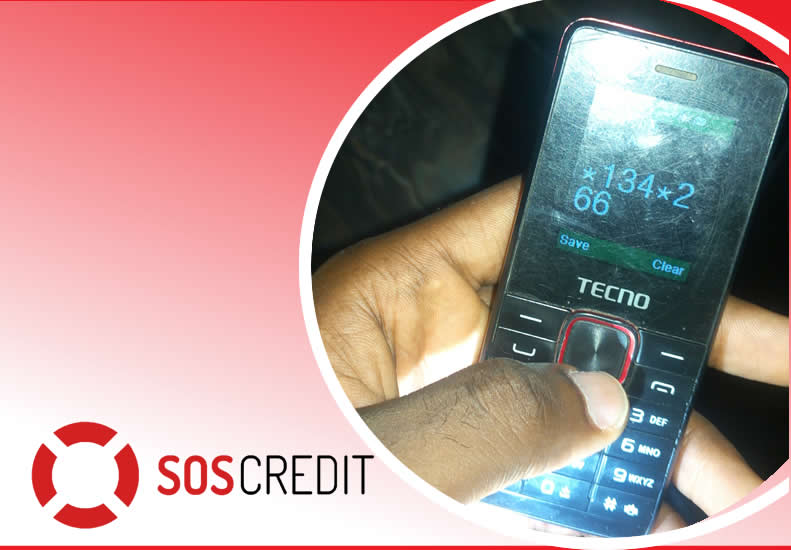
    It’s simple! Just dial *505# to borrow credit. You can borrow GHc 2, GHc 5, GHc 10 and GHc 15. A service charge of 10% of the requested credit is charged as commission.

    MTN Xtra Time

    Borrow MTN Airtime Credit and Pay Later

    MTN Xtra Time is a service that allows MTN customers to borrow and use an overdraft amount based on the their spend and the no. of years on MTN. To borrow more talk time on MTN Ghana, dial *506# and select your option.  

    Glo Borrow Credit

    To borrow credit on the Glo Ghana network, simply dial *5321# and select Borrow Credit. Select the amount you want to borrow and send.

    Airtel Borrow Me

    Dial  *130#. A service fee will also be charged on the amount you borrow. You can track your usage of the borrowed credits by dialing *130*10#.  

    Borrow Credit from TIGO

    Dial *188# or call 188 and follow the voice prompt to receive airtime to pay later upon recharge. Remember you need to pay for your previous loan before requesting a new one!

  • Honey Moon Technology For Crazy Lovers

    Honey Moon Technology For Crazy Lovers

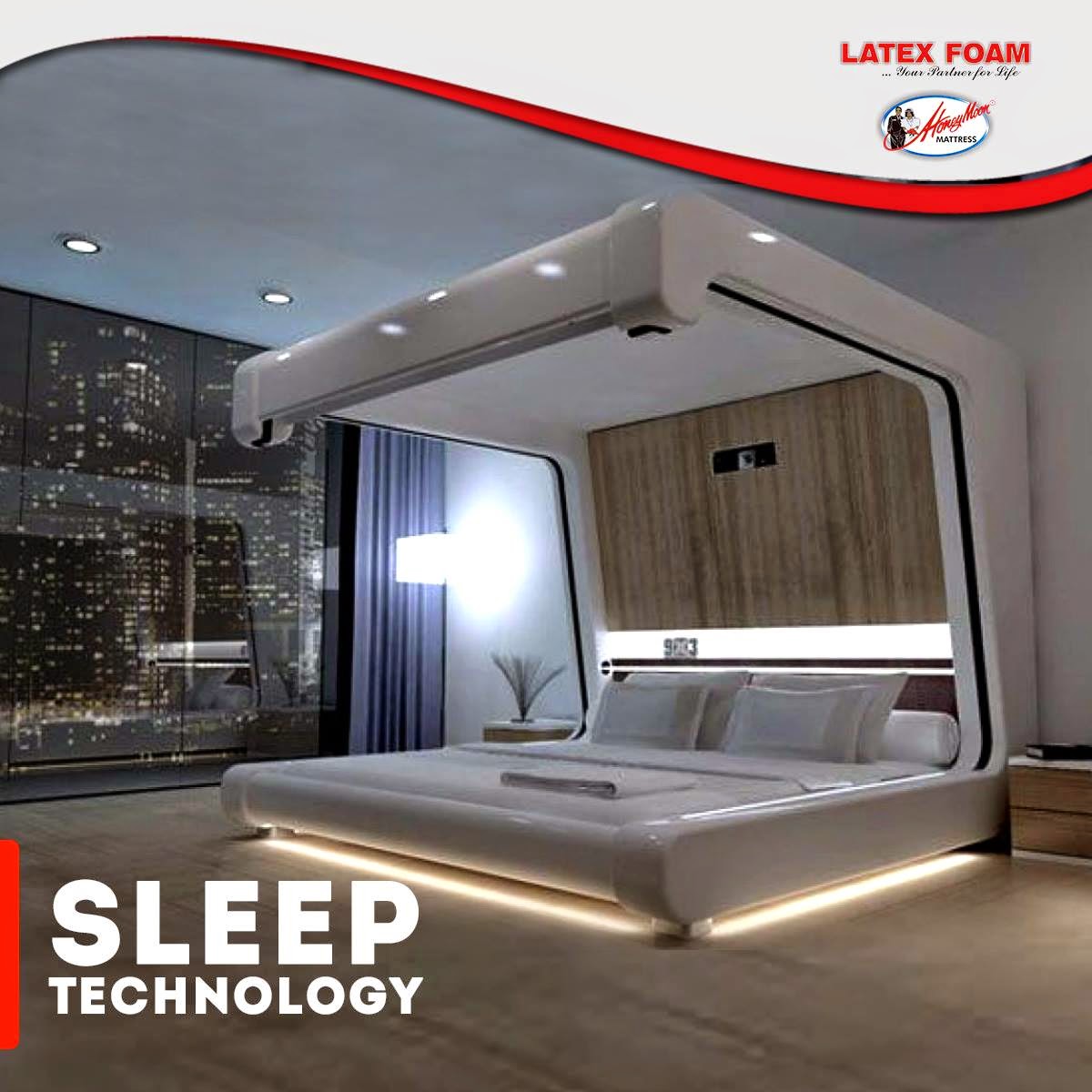
    If your dream is to make your honeymoon lovemaking so romantic and memorial, or you have this crazy idea of making love on a star ship then here you really can fulfill that desire.

    The Somnus Neu by Yoo-Pod Llc offers a number of high-tech gizmos, including a full audio-visual system and an internet connection, but these aren’t what make the bed romantic. It’s the mechanized curtains and drop-down screen that completely enclose the mattress and the LED lighting above, under and around the bed that provide you with total privacy and mood lighting so you and your partner can feel totally in sync with one another.

  • Sony Xperia Z3 – Cons, Pros and Why You Should Own One

    Sony Xperia Z3 – Cons, Pros and Why You Should Own One

    Sony is set to make a difference in our in world today by bringing about the newest smartphone Xperia Z3.

    The high competitions between reputable phone companies had driven Sony into researching and coming up with the latest Sony Xperia Z3, that has the latest premium design and highest waterproof rating capacity. the Xperia Z3 is the premium smartphone that does more by making life more easy and comfortable.

    A premium smartphone

    This phone has been designed to withstand water for over 30 mins. Today you dive into pool on a hot sunny day, running when it’s raining, taking pictures in a downpour or underwater or wipe your phone when an unexpected spill occur, without considering to drop your phone or with the fear that it’s going to get damaged.


     In compliance with IP65 and IP68, the Xperia Z3 is protected against the ingress of dust and is waterproof. Provided that all ports and covers are firmly closed, the phone is (i) dust tight and (ii) protected against low-pressure jets of water from all practicable directions in compliance with IP65; and/or (iii) can be kept under 1.5 m of fresh water for up to 30 minutes in compliance with IP68. 

    Use the Xperia Z3 in the rain or in the pool

    Do you want to make great pictures and videos even better?

    You can unleash your creativity with our widest ever choice of unique Xperia camera apps. It’s our best smartphone camera yet, to make sure your memories are as vibrant as real life.

    PS4 Remote Play

    Xperia Z3 is the only phone with a PS4 game. The Xperia Z3 matches the latest gaming with the best Sony technologies. With a super-bright display and digital noise-cancelling technology, immersing yourself in your game has never been easier.


    Products Highlight


    • GSM / 4G LTE Capable
    • 20.7MP 1/2.3″ Exmor RS Camera Sensor
    • 25mm Sony G Lens + BIONZ Processor
    • 2.5 GHz Quad-Core Snapdragon 801 Chipset


    Additional Features


    • Performance battery life offering up to 2-days of regular usage
    • HighAdreno 330 GPU
    • Display Technology: TRILUMINOS Display for Mobile, Live Color LED, X-Realty for mobile, IPS display
    • Display Construction: Durable tempered glass
    • Sensors: Accelerometer, ambient light sensor, barometer, game rotation vector, geomagnetic rotation vector, gyroscope, magnetometer, step counter, step detector, significant motion detector, proximity
    • Playback/Record Supported Format: 3GPP, MP4, AVI
    • Compatible with the Sony Game Control Mount and wearable tech watches

    Sony Xperia Z3 can be purchased from Amazon or any retail store near you. To see more details or purchase this item, click here.