Tag: Microsoft

  • Skype To Shutdown After Two Decades

    Skype To Shutdown After Two Decades

    Microsoft has confirmed it will be shutting down Skype, the once-dominant internet-based phone and video service, in May.

    In an announcement on X, the company assured users they would soon be able to access Microsoft Teams’ free tier using their Skype login credentials.

    Skype’s closure comes 14 years after Microsoft acquired the platform for $8.5 billion in cash—its largest-ever purchase at the time. Since then, the tech giant has integrated Skype into various products, including Office and the now-defunct Windows Phone.

    “Skype shaped modern communications and created countless meaningful moments, and we honor being part of its journey,” said Jeff Teper, Microsoft’s president of collaborative apps and platforms, in a blog post.

    He added, “We’re excited about the new opportunities that Teams brings and remain committed to helping you stay connected in new and meaningful ways.”

    A Changing Communications Landscape

    Once the go-to platform for online calls, Skype’s influence has waned in recent years, despite a brief resurgence during the pandemic. The rise of competing services—including Zoom, Google Meet, and Cisco Webex—has further pushed Skype into the background. Meanwhile, Apple’s FaceTime and Meta’s WhatsApp have cemented their places as key players in the video calling space.

    At the same time, Microsoft has been shifting its focus to Teams, which offers many of Skype’s features along with additional business-oriented tools.

    A Legacy of Innovation

    Skype launched in 2003 in Estonia and quickly attracted users as a free alternative to costly international phone calls. The service’s rapid growth led eBay to acquire it for $2.6 billion in 2005. However, the partnership was short-lived, and eBay sold a majority stake in Skype to an investor group for $1.9 billion in 2009.

    Microsoft’s 2011 acquisition marked a significant investment in the future of digital communication. However, the company has struggled to maintain Skype’s relevance in an increasingly crowded market. With Microsoft now prioritizing Teams, Skype’s shutdown marks the end of an era for a platform that once revolutionized the way people connected across the globe.

  • Google Layoff Employees: More Job Cuts for Tech Workers

    Google Layoff Employees: More Job Cuts for Tech Workers

    The labor market, which has been consistently saturated with employees is clearly showing indications of slowing down, as certain companies are starting the new year by reducing their workforce. On Tuesday, Google revealed plans to lay off hundreds of employees in its advertising sales team, signaling ongoing workforce reductions at the Alphabet-owned company.

    Google is joining the bandwagon of tech companies turning to artificial intelligence software and automation to streamline operations rather than human labor. While discussions and questions about why Google is laying off employees are yet to settle, other companies have also declared plans to lay off staff this year.

    The roles receiving this harsh blow at Google include the Assistant team, the augmented reality hardware division within the devices and services product area(hardware teams overseeing Pixel, Nest, and Fitbit), and the central engineering team. The company attributes these layoffs to its efforts to enhance efficiency, realign resources with its major product priorities, and bring about improvement across the board.

    A spokesperson for Google explained, “We’re responsibly investing in our company’s biggest priorities and the significant opportunities ahead. To best position us for these opportunities, throughout the second half of 2023, a number of our teams made changes to become more efficient and work better, and to align their resources to their biggest product priorities. Some teams are continuing to make these kinds of organizational changes, which include some role eliminations globally. We’re continuing to support any impacted employees as they look for new roles here at Google and beyond.”

    Shares of Google’s parent company, Alphabet, experienced a 0.9% decline in intraday trading following reports of the layoffs. Google confirmed that the restructuring will result in the elimination of hundreds of roles. This workforce reduction follows Google’s previous major layoff in early 2023, where approximately 12,000 employees, constituting about 6% of its workforce, were let go.

    Several companies, such as Amazon, Twitch, Duolingo, Discord, Macy’s, Citigroup, BlackRock, etc have recently revealed plans to reduce their workforce. Some of these companies, which are currently implementing job cuts, had previously carried out more extensive layoffs over the past year or so. Since then, both inflation and expectations for a recession have decreased, contrary to the predictions made by most economists as recently as the middle of last year.

    In October of the previous year, the continued downturn in aviation revenues caused by the impact of the pandemic led Rolls-Royce to lay off 6% of its employees. Concurrently, Microsoft’s professional social media platform, LinkedIn, undertook workforce reductions, laying off 668 employees across engineering, product development, talent acquisition, and finance departments. This move followed a prior reduction of 716 staff in May of the same year, which was accompanied by the closure of its job application operations in China.

    How do Layoffs Impact Employees?

    Experiencing a layoff can bring about severe financial hardships for those affected. The abrupt termination of employment translates to the loss of a steady income, employee benefits, and various job-related perks. Despite the provision of severance packages, many individuals may find it difficult to meet their financial obligations, particularly if they are responsible for supporting a family or contend with high living expenses. The resulting stress, stemming from the inability to cover bills and provide for loved ones, can significantly impact the mental and emotional well-being of those who have been laid off.

    Google Layoff Employees: How do Layoffs Impact Employees?

    The turmoil triggered by layoffs and the subsequent career transitions can deeply affect the mental health of individuals. Confronting uncertainties, financial constraints, and the pressure of re-entering a competitive job market can elevate levels of stress, and anxiety, and even contribute to feelings of depression. Furthermore, the loss of a familiar work environment, daily routine, and a sense of purpose can compound these challenges, fostering a sense of helplessness and diminishing self-esteem.

  • Sam Altman Returns as CEO Amid Board Restructuring

    Sam Altman Returns as CEO Amid Board Restructuring

    OpenAI, the creator of ChatGPT, has finalized an agreement for the return of Sam Altman as CEO just days after firing him from the board, concluding intense deliberations regarding the future of the startup at the forefront of the artificial intelligence surge.

    As part of the resolution, the company has committed to restructuring the board of directors that had previously ousted Altman. Bret Taylor, formerly co-CEO of Salesforce, has been appointed as chair, and Larry Summers, former U.S. Treasury Secretary, joins the board.

    Altman expressed his anticipation for returning to OpenAI in a post on X. Following Altman’s abrupt dismissal on Friday, the original board provided limited explanation, citing his lack of transparency and the necessity to safeguard OpenAI’s mission of developing AI for the benefit of humanity.

    The reinstatement of Altman signals a potential new phase for the nonprofit startup, which has long grappled with internal concerns about the risks of AI and its potential commercialization.

    Is Sam Altman joining Microsoft?

    The reshuffling on Tuesday appears to favor Altman and the financial supporter Microsoft (MSFT.O), which is globally deploying OpenAI’s technology for business clients. Microsoft CEO Satya Nadella welcomed the changes in a statement on X, stating, “We believe this is a first essential step on a path to more stable, well-informed, and effective governance.”

    Quora CEO Adam D’Angelo will continue on the new “initial board” as outlined by OpenAI. It remains unclear if non-equity-holding directors will retain their seats. Or if investors, including the 49% owner of Microsoft, will secure their first appointments. Reports suggest that some investors are exploring legal options due to the recent events that jeopardized OpenAI’s future, previously estimated to have a valuation exceeding $80 billion.

    Susannah Streeter, head of money and markets at Hargreaves Lansdown, commented on the clarity in OpenAI’s path following the recent tumult. Noting that Altman’s leadership will significantly influence the company’s direction under the new board.

    Recall that Altman’s departure triggered turmoil at OpenAI, leading to President Greg Brockman’s resignation in protest. Altman’s return was initially expected, but the board surprised by appointing Emmett Shear as interim CEO on Sunday.

    In a post on X, Shear detailed the intense efforts undertaken to restore stability and ultimately bring back Altman. Stressing the commitment to all stakeholders. Altman’s reinstatement was facilitated in part by Microsoft. During his absence, Microsoft offered him the opportunity to lead a new research team. Alongside Brockman and other colleagues leaving OpenAI.

    By Monday, a significant portion of OpenAI’s 700-plus staff had threatened to join Microsoft unless the board resigned and Altman was reinstated. Leveraging Microsoft’s substantial computing power, a key asset for OpenAI’s technology. Co-founder and President Brockman celebrated the resolution with a staff selfie late Tuesday night. Triumphing over the Thanksgiving holiday deadline and expressing confidence in returning stronger and more unified.

  • Flutterwave and Microsoft Collaborates To Streamline Payments

    Flutterwave and Microsoft Collaborates To Streamline Payments

    Flutterwave, one of Africa’s leading fintech corporations entered into a progressive partnership with technology giant Microsoft. A five-year agreement aimed to reconstruct payment services across the countries in the second-largest continent and beyond. By leveraging Microsoft Azure’s products, Flutterwave will create a new payment infrastructure that facilitates seamless and secure transactions for Africans and international companies, including Uber, Netflix, and Microsoft.

    The collaboration between Flutterwave and Microsoft is a significant milestone for both parties. According to Mike Gaal, the General Manager of Microsoft Corporation, this partnership aligns with Microsoft Azure’s support for Flutterwave’s core operations. Gaal equally emphasizes Microsoft’s mission to empower individuals and organizations worldwide; noting that working with Flutterwave is a step closer to realizing that mission in Africa.

    Olugbenga Agboola, CEO of Flutterwave, expresses gratitude for Microsoft’s support. And recognizes the critical role that Microsoft Azure plays in managing high-volume payment processing. Agboola highlights the strength, credibility, and scalability of Azure; indicating that the collaboration with Microsoft is the logical next step for Flutterwave.

    Gurbhej Dhillon, Flutterwave’s Chief Technology Officer, also hinted at the developer leverage provided by Microsoft’s platform. This would also empower Flutterwave to improve its client services and grow its platform effectively. Looking ahead, Dhillon is excited about the possibilities of building with Azure OpenAI Service.

    The partnership announcement by Flutterwave highlights the company’s dedication to delivering consistently high-quality services to its customers. Microsoft is transitioning key products such as Flutterwave for Business, Send by Flutterwave, Flutterwave Store, and Flutterwave for Fintech Platform onto Azure’s cloud platform.

    How The Flutterwave and Microsoft Partnership is Beneficial

    Flutterwave can maximize some of the services and capabilities offered by Azure to enhance its payment services. With its secure and reliable cloud infrastructure, Azure provides virtual machines and container services. This includes Azure Kubernetes Service for deploying and managing backend services, databases, and APIs. Azure’s auto-scaling capabilities ensure that resources are dynamically allocated based on demand. This would enable Flutterwave to handle high transaction volumes during busy times efficiently.

    Various data storage options, including Azure Blob Storage and Azure Cosmos DB, are available for storing transaction records and accessing data with low latency. Azure prioritizes security and compliance; it provides encryption, access management, and network security features. So as to protect sensitive customer data and ensure adherence to industry regulations like PCI DSS.

    The platform’s analytics and machine learning services, such as Azure Machine Learning, Azure Data Lake Analytics, and Azure Databricks, enable valuable insights. In addition to predictive modeling for fraud detection and customer behavior analysis. Integration with external systems and third-party services is also made seamless through Azure Logic Apps, Azure Service Bus, and Azure API Management.

    Disaster recovery and business continuity are ensured. Through Azure’s global presence and built-in features like Azure Site Recovery for replication and failover. Microsoft Azure equally provides specialized services like Azure Payment HSM for secure key management. As well as Azure Bot Service for creating payment-related chatbots, and Azure Cognitive Services for fraud detection and risk assessment.

  • Edge browser extensions accidentally leaked

    Edge browser extensions accidentally leaked

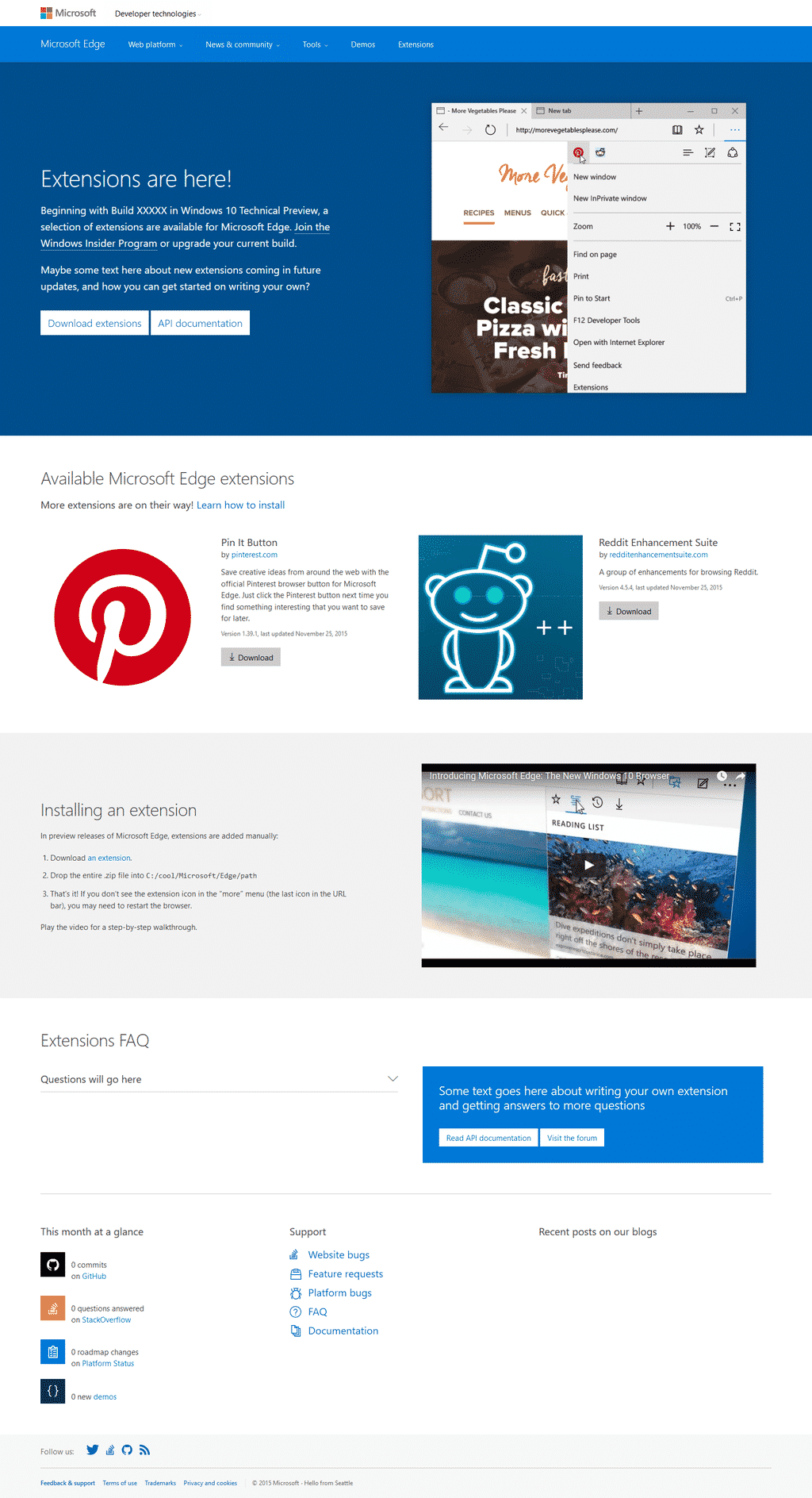
    Microsoft’s Edge browser, which came out alongside their Windows 10 update, is quite the browser. Fast, fluid, responsive; but despite its usefulness, it has falling points by being limited to Windows, and by foremost not having any extension support. The company had announced, in response, that extension support would be provided before the end of the year, only to go on and say they’d delay it until next year.

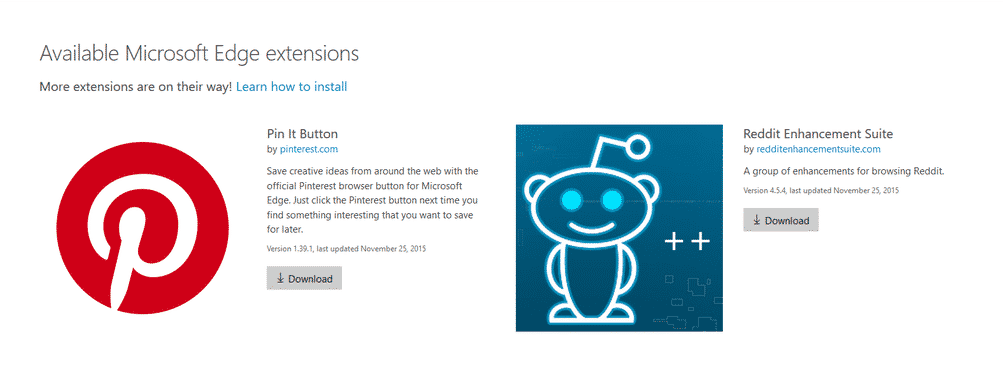
    However, all has seemed to change. Twitter user WalkingCat said Microsoft had accidentally made two extensions for Edge available for a short while. The page to access said extensions now leads to a simple error message.

    edge microsoft extensions
    Credit @WalkingCat

    According to the post and images, the first two extensions were Pinterest’s “Pin it” button, and the Reddit Enhancement Suite. However, nothing has been stated nor confirmed from Microsoft. This, along with the intention of bringing third-party extension support next year makes this evidence rather fuzzy. However, if the former is not true, then it shows a positively wonderful amount of progress for the young Edge browser.

    edge microsoft
    Credit @WalkingCat

  • How to Track your Windows 10 PC, Tablet or Phone Location

    How to Track your Windows 10 PC, Tablet or Phone Location

    Exactly this time last year, a Lagos based Nigerian Mr. Tunde Makhinde was able to track the location of arm robbers who invaded his property with his stolen iPad.  Still last year, an amazing iPhone app, Find my iphone, was used to track down a stolen iPad and the man who allegedly took it from underneath a family’s Christmas tree in the US. The victim on the ‘Find my iPhone’ app that sends out a signal to the device.Using his computer, the victim was then able to locate the iPad on a map, and alerted police to its whereabouts – just a few houses away.

    This is something that is almost synonymous with Apple devices. However, this time, Microsoft is taking over the spotlight with their new ‘Find My Device’ feature introduced in November Windows 10 update. The new Microsoft invention is not just for tablets or phones. Any Windows 10 device can take advantage of the new feature, including desktops and laptops.

    Although the current version of ‘find my device’ may not take your breath away or have your tablet make a sound, lock itself, erase data, or anything like that when stolen – it’s still a great feature to keep tabs of your device’s location and capture its thief – if needed.

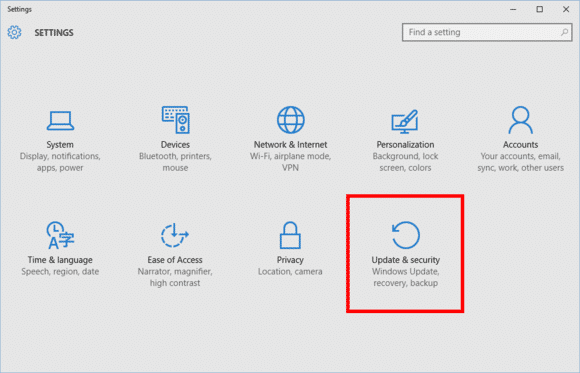
    Find My Device is buried under Settings > Update & Security.
    Find My Device is buried under Settings > Update & Security.

    To active this feature go to Start > Update & Security > Find My Device.

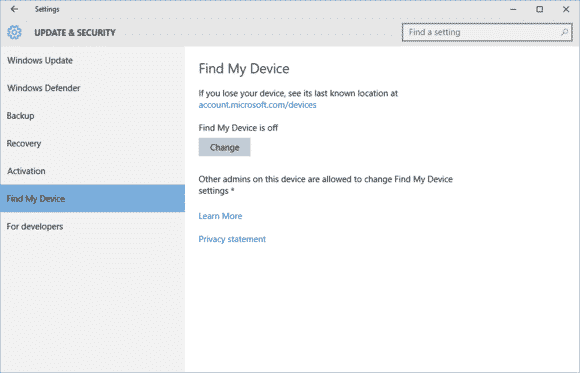
    findmydevice2-100629921-large

    On this screen you’ll see a big Change button under the heading “Find My Device is off.”

    Turn this slider to On and you’re done.
    Turn this slider to On and you’re done.

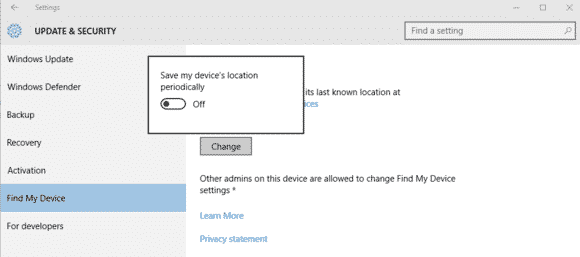
    Once you click Change you’ll see a pop-up panel that says “Save my device’s location periodically.” Turn the slider to On and you’re done.

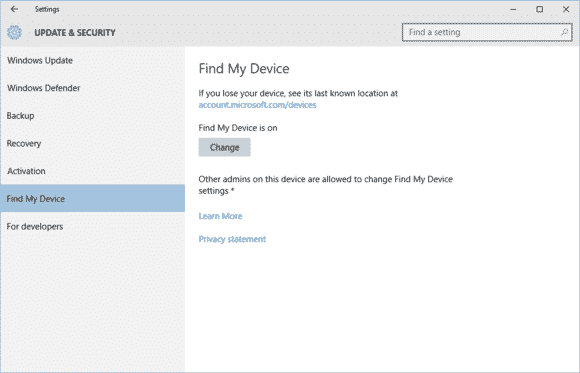
    Find My Device is now on.
    Find My Device is now on.

    You should now see that the Find My Device screen has changed to “Find My Device is on” as seen above.

    To make sure everything is working, login to account.microsoft.com/devices with your Microsoft account and you should see the name of your PC listed under “Your devices.”

    If you don’t know the name of your device, right-click on the Start button and selectSystem. In the Control Panel window that opens you’ll see it under “Computer name.”

  • Microsoft’s Virtual Assistant, Cortana now Available for iOS

    Microsoft’s Virtual Assistant, Cortana now Available for iOS

    Looking back at my experience with Windows 10, the newly introduced Microsoft’s virtual assistant that goes by the name Cortana, was one thing I wished I had on my Macbook. Wishes are not horses, they said – but I have some good news – and some bad news too.

    The good news is that Microsoft has just release a beta version of Cortana for IOS. The bad news is that only 2000 user can try it – for now.

    According to tech blog Warenotice, Microsoft is currently distributing the Cortana for iOS beta to the first round of beta testers—presumably to those who applied for the beta program earlier this month. Warenotice received an invitation to test the app, and published a few screenshots of Cortana running on an iPhone.

    The story behind the story: Microsoft has worked hard to bring many of its apps to other platforms like iOS and Android. It’s all part of the”cloud first, mobile first” ethos the company instituted under CEO Satya Nadella. However, as our Jared Newman pointed out, the iOS version won’t be as full-featured as the Windows and Android versions, largely because of the more closed nature of the iOS universe. The iOS version of Cortana won’t have a hands-free mode, for example, so it isn’t a true replacement for Siri.

    Only 2000 testers allowed

    Unfortunately, not everyone will be able to try the Cortana for iOS beta. Microsoft is using Apple’s TestFlight beta testing system—the one Apple-sanctioned method for distributing public betas on iOS—and it has some limitations. Most notably, TestFlight allows developers to distribute a beta app to only 2000 testers, and as Warenotice points out, app beta periods can run for up to 60 days. In addition, the beta program is only open to users in the US and China.

    So if you aren’t one of the lucky few to get in the beta program, you’ll have to wait until the final release of Cortana for iOS to give it a try.

  • Steam Machines: slower at gaming than Windows PC

    Steam Machines: slower at gaming than Windows PC

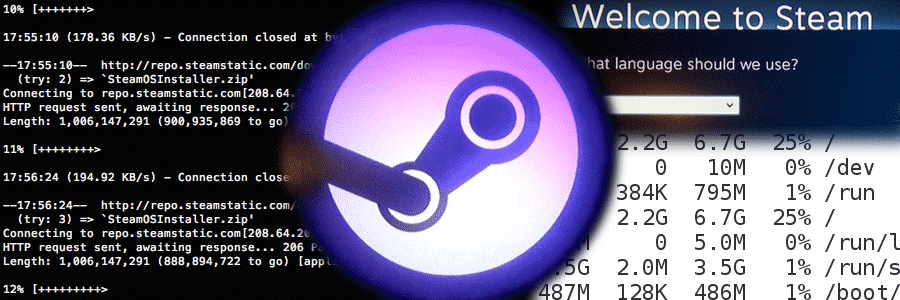
    Ars Technica ran benchmarks on November 13th of the Steam Machine, against Windows 10. The result was pretty much the fresh operating system processing gaming much faster than the machine meant for a couch-convenient PC gaming experience. The two systems are relatively close when it comes to the mechanics for gaming, but the Steam Machine was found to lag way behind the new Microsoft operating system when it came to real gameplay. You could end up losing frames and detail of graphics depending on which game you’re playing on the SteamOS versus Windows 10, according to the tests.

    The tests were run with a playable, modest setup: a dual-core 3GHz Pentium with an old GeForce GTX 660; which could pose a problem when handling more major and demanding games.

    The SteamOS’ foundation is based on Linux, which is an operating system not well fitted with custom video cards/specialized gaming cards unlike Windows and Mac Pro systems. The implementations of the software is simply keeping the hardware from excelling to its true potential, and that could change with a little bit of refinement and fine-tuning from Valve.

    Until that time comes, we’ll stick with sitting at our computer desks for our PC experience.

  • My [condensed] experience with Windows 10 so far…

    My [condensed] experience with Windows 10 so far…

    On November 11th, 2015, “TH 2” was released for Windows 10 users to download and install. Basically, TH 2 (using the abbreviation for the Windows 10 nickname ‘Threshold‘) is the first big update for the still in-development OS. The update came with an abundance of things, for both the personal user, and DEFINITELY for enterprise users. So, given this I figured it would be appropriate to share a condensed rambling of my experience with Windows 10 so far.

    Using their Media Creation Tool, I downloaded and installed the first release version of Windows 10 onto my then Windows 8.1 HP laptop, excited to see all of the new features it boasted. I grabbed it sometime near the ending of July or beginning of August. After the semi-painful several hours it took to download and install, I was ready to become a user! Here I am now in November, and at the moment, I feel…slightly impressed.

    Don’t let my words fool you to think I dislike the operating system – trust me when I say Windows 10 is definitely one of my favorites of the Windows Family! I was also very excited for its free download release and was super excited to setup my personalization, settings, and Start Menu. However, after having plenty of time to be more than acquaintances with the OS (and with the TH 2 update), I’ve began to realize that, at the moment, my personal experience with Windows 10 Home has fallen a bit short of my own expectations.

    Since I like to discuss negatives (well, these or more less “personal opinions” rather than “cons”) and then the positives, I will do just that; and since I’ve had a good deal to experience with the system, I’ll try my best to condense the experience report.

    1 – Start Menu & Taskbar
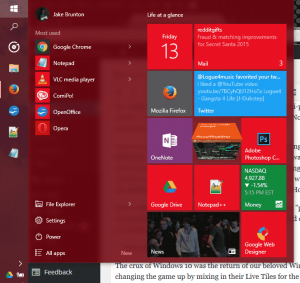
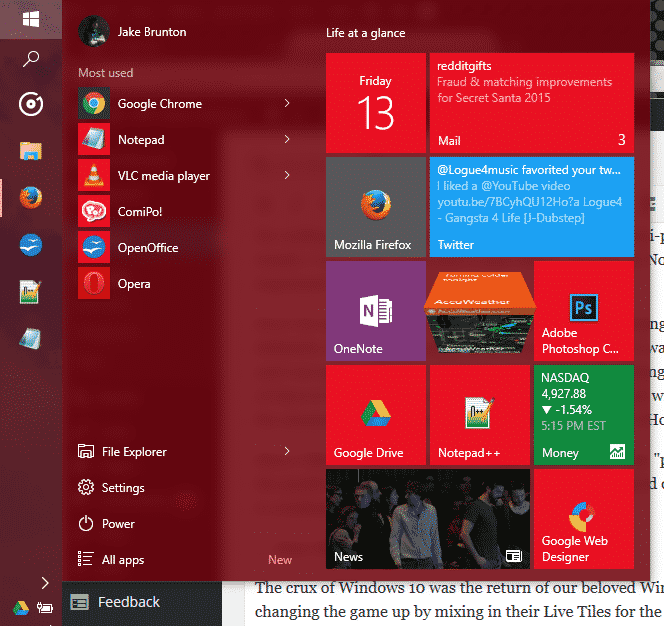
    EWTWIN10_1The crux of Windows 10 was the return of our beloved Windows Start Menu. However, Microsoft was changing the game up by mixing in their Live Tiles for the Windows Store Apps to be placed in up to 3 columns on the right side of menu. It was all great, and worked quite well. Design options are well fitted, and since TH 2, the context menus for changing up your Live Tiles are grand. But on the technical side, I find myself feeling slightly encumbered by the Start Menu.  Simply put, it has its glitches and little bugs, but the one that caught me the most is that amount of time it takes for my machine to open this awesome and modern menu up. About 0.90 seconds approximately. As for the taskbar, it still has that pesky universal problem of sometimes keeping hovered icons focused on even without your mouse hovered over it.

    2 – Windows Store Apps
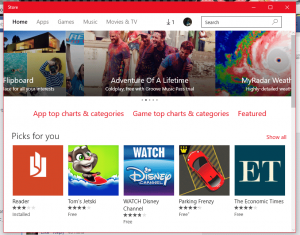
    EWTWIN10_2This is pretty much my other problem with my Windows 10 experience so far. The Windows Store offers a bunch of apps, no doubt; unfortunately only a good handful of them here and there and designed nicely and work with the system and its available APIs and standards. But the recurring problem I have here is one I’ve had since standard Windows 8. A lot of the time, apps from the app store like to either 1)close themselves immediately (and not just close, but end their own program and task(s)) and/or 2)be unresponsive (especially when communicating with servers).

    3 – Windows Search
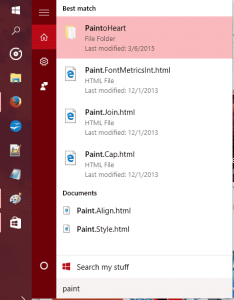
    EWTWIN10_3The new search has Cortana so you can search (and now even Send Text Messages!) with your voice. It’s all great and good. However, Cortana still stands for some good improvements, and the actual search stands for some major improvements.

    So, out of everything, those three points are the ones that have caused the most hindrance on my experience as a whole. There are other little things I come across sometimes that takes some small jabs to that ‘hype’ I had for Windows 10 as a whole, but they’re easy to look over.

    On the flip side, I still love Windows 10 so far, and love the TH 2 update. It is my favorite Windows OS to date, and it DOES have so much goodies with it. The whole Start Menu and Live Tiles, despite their usual buginess, are great altogether! And while I don’t use the feature, Cortana and the voice commands are very convenient for quick search, note taking, emailing, events, and even calling/sending texts. Faster boot times are something that is great, along with improved programs performance, virtual desktops, an activity center, and tablet mode – Windows 10 is definitely a budding operating system.

    The improved performance has helped me boost my productivity, though I will not lie when I say that the discovery of Flow Free and a third-party reddit app has held me accountable to some good procrastination. So, at the moment I recommend upgrading to Windows 10 if you have 8.1/8/7 if you want to try it out while the update is still free. If you end up disliking it, they give you a one-month use on their rollback tool to switch back onto your old OS.


    Make sure to follow EWT Net for more news and blog posts related to Microsoft, and Windows 10!
  • Microsoft Windows 10 making A Great “UP GOING ” In Mobile Market Share

    Microsoft Windows 10 making A Great “UP GOING ” In Mobile Market Share

    Microsoft is doing a great job in the mobile world and the operating System at large.

    Today, IDC reported that Android and iOS controlled 96.3 percent of the mobile market in 2014. But Microsoft is always making a go up effort in their new strategy.That means that Microsoft’s Windows 10 strategy, which will see a single operating system stretch from the smallest to the largest screens, is starting in many ways from scratch.

    It’s worth keeping in mind how quickly Windows 10’s market share will grow inside of the Windows Phone universe — given that Microsoft will provide free upgrades to a majority of Windows Phone owners whose phones can make the jump, Windows 10 could quickly become the majority platform in the Windows Phone universe. Microsoft’s developer gambit is that it will bring a huge chunk of the Windows 7, 8, 8.1, and Phone 8.1 universe under the 10 aegis in rapid order, creating a massive base for developers to sell into.

    Fun game: What is Windows 10’s mobile market share inside of Windows Phone at the end of the year, and what is its tally among the larger smartphone market at year’s end?

    Regardless, this new data marks the start of market adoption for Windows 10 on smartphones. Charge of the Light Brigade, or start of a new era? We’ll find out soon.

  • PlayStation Network, Xbox LIVE offline due to Attacks

    PlayStation Network, Xbox LIVE offline due to Attacks

    The two most popular gaming networks, PSN and Xbox Live, have been offline most of Christmas day due to a DDoS (distributed denial of service) attack. A group named the Lizard Squad has taken credit for the attack. This is the same group that credited themselves for an attack on the PlayStation network and MMO games World of Warcraft and League of Legends back in August.

    Both service status pages for the Xbox and PSN state (at the time of this writ) that they’re offline. This definitely caps off a rough Holiday for Sony, who recently had their Sony Pictures subsidiary get attacked and sourced as one of the biggest tech topics over the past week and a half. During which, a group of hackers named the Guardians of Peace (GOP) threatened a 9/11 style attack on theaters that would show the leaked Sony Pictures movie “The Interview.”

    Sony had decided to pull the film when the U.S. government determined that North Korea had been behind the hack, but recently decided to put the film on services like Google Play and show it in cinemas in the U.S. on Christmas day. The film can be purchased on other services like YouTube and, on Xbox Live.

    We’re aware that some users are having issues logging into PSN – engineers are investigating
    — PlayStation (@PlayStation) December 25, 2014

  • Microsoft Spots New Vulnerability in Microsoft Office – Your PC may be at Risk

    Microsoft Spots New Vulnerability in Microsoft Office – Your PC may be at Risk

    Heads up! In what feels like a throwback to the late 90s/early 2000’s, Microsoft has discovered one helluva bug in Microsoft Office. Executed properly, the bug could be exploited to take over your entire system running just about any version of Windows.

    You can find Microsoft’s full disclosure on the bug here, but here’s the bulk of what you should know:

    • This bug is being exploited in the wild, though Microsoft only knows of “limited, targeted attacks” so far
    • It affects Windows Vista, Windows Server 2008, Windows 7, Windows 8, Windows Server 2012, and Windows RT. XP isn’t mentioned as Microsoft no longer supports it — but yeah, it’s probably affected too.
    • If executed properly, the exploit gives the attacker the same permissions on your system as whatever type of user you’re currently logged in as. If you’re an admin, that means full admin rights — code execution, app installs, etc.
    • If you have Window’s User Account Control feature enabled, it’ll throw up a prompt asking if the file is okay to execute. If you aren’t 100% sure that the file is legit, avoid doing so.
    • The bug is part of PowerPoint’s OLE system, which lets you embed things like spreadsheets into a presentation. It’s supposed to be fairly well sandboxed; alas, it looks like someone found a gap.
    • Microsoft says that hacked presentations e-mailed to users and hacked presentations sitting on the web are potentially dangerous. The short version: avoid all but the most-trusted PowerPoint presentations right now.

    So just how gnarly is this bug? Says Microsoft (emphasis ours):

    An attacker who successfully exploited this vulnerability could gain the same user rights as the current user. If the current user is logged on with administrative user rights, an attacker who successfully exploited this vulnerability could take complete control of an affected system. An attacker could then install programs; view, change, or delete data; or create new accounts with full user rights.

    But should you panic?

    Nah. Do a few things things, and you should be safe:
    1) Play it smart about what presentations you open
    2) If you’re on a build of Windows that has User Account Control as an option, enable it (it should be on by default, in most cases.) This won’t fix the bug outright, but it’ll throw up a big permissions prompt that’ll remind you not to open mystery files.
    3) Check out this advisory page from Microsoft, which offers up a temporary patch until Microsoft finalizes a security update.

  • Lenovo G505, HP 255 and 5 budget laptops for Nigerian college students—we picked the best

    Lenovo G505, HP 255 and 5 budget laptops for Nigerian college students—we picked the best

    Going to  college in Nigeria could be financially cumbersome towards the end of each semester—especially when it is imperative to get a new laptop and you didn’t manage your finance during the semester.

    Your bank account is nearly tapped out, and you still need to buy text books, handouts and lay in enough ramen noodles to last through the winter.

    Yeah, we’ve all been there. Fortunately, Moore’s Law is still in play, so today’s budget notebook is yesterday’s workhorse. Pretty much any modern laptop can handle the gamut of productivity chores—word processing, number crunching, email, and the like—but all of the machines in this roundup can also tackle media editing and encoding sessions, and deliver respectable entertainment experiences.

    To strike the best balance between performance and affordability, I gathered the top five laptops I could find for ₦60,000 or less. Benchmark busters they’re not, but they aren’t budget busters, either.

    Also Read: Infinix Diamond, Ankara Q2 and 6 ‘Premium’ Affordable Android Phones/Tablets you can buy for ₦9,999+

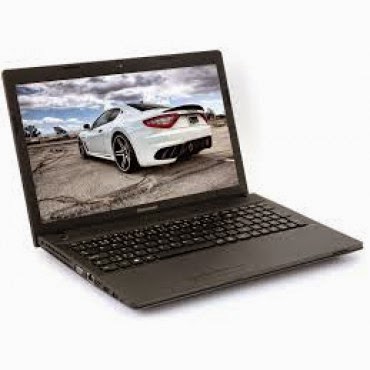
    Lenovo G505 (₦58,000) — Buy Online

    Working on an environment that demands great sound system? Lenovo G505 offers you the best option. Thanks to its stereo speakers with Dolby® Advanced Audio™ v2, graphics card options up to the speedy AMD Radeon 8570M VRAM, and optical disk drive options up to a Blu-ray Disc™ combo, the G505 offers stunning, stutter-free visuals and immersive sound for a fuller, more satisfying home entertainment experience.

    The AMD E1-2100 APU Processor powered laptop comes with a Windows 8 operating system and a RAM of 2GB. The pre-installed Bitdefender Anti‎‐Virus Plus gives maximum security to the user for 1 year and can be renewed afterward.

    Key Specifications:

    • Windows 8 OS
    • 4GB DDR3 RAM
    • 1TB (1,000GB) Hard Drive
    • AMD E1-2100 APU Processor
    • 15.6-Inch, HD Display
    • Inbuilt Wireless Adapter
    • AMD Radeon Graphics
    • DVD RW Optical Drive

    The actual price for Lenovo G505 is currently ₦86,400 but can be bought online for ₦58,000 (discount rate). See product page for full specification and purchase.

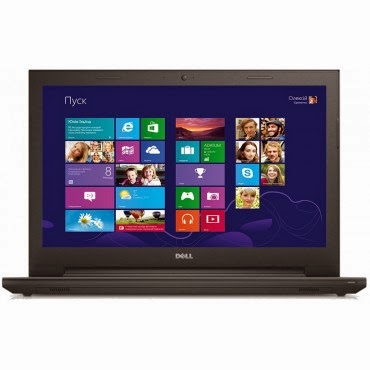
    Dell Inspiron 3541  (₦59,990) — Buy Online

    Dell Inspiron 3541 is a well packaged Windows 8.1 laptop with an AMD E1-6010 Dual Core Processor, Free Dell Sleeve, Microsoft Office 365 Personal, 8GB Flash Drive and 2 years free call service with Skype.

    The device is suitable for gaming and performing high resolution display tasks, boasting of 15.6-Inch (1366×768) HD display unit and AMD R2 dedicated graphics card.

    Key Specifications:

    • Windows 8.1 OS
    • 2GB DDR3 RAM
    • 500GB Hard Drive
    • AMD E1-6010 Dual Core Processor
    • 15.6-Inch (1366×768) HD
    • DVD RW Optical Drive
    • Inbuilt Wireless Adapter

    You can purchase or see complete features and specification of Dell Inspiron 3541 on the product page.

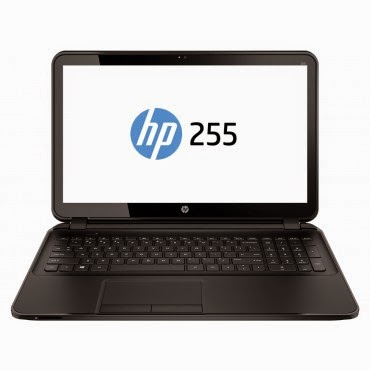
    HP 255 G2 (₦58,600) — Buy Online

    HP 255 is a multi-tasks Windows 8 laptop powered by a 1 GHz, AMD E1-2100 Dual Core Processor and 2 GB RAM, certainly not the fastest PC on this list but the 15.6 Inch, HD display unit will make up for its shortcoming.

    The laptop has a 500 GB storage space, DVD RW Optical Drive and yes, it has an inbuilt wireless adapter.
    Key Specifications

    • Windows 8.1 OS
    • 2GB RAM
    • 500GB Hard Drive
    • AMD Dual-Core E1-2100 APU with Radeon HD 8210 Graphics (1 GHz, 1 MB cache)
    • 15.6-Inch (1366×768) HD
    • Intel HD Graphics
    • DVD RW Optical Drive
    • Inbuilt Wireless Adapter

    The actual amount for this device is ₦75,000 but can be purchased online for just ₦58,600. See pricing and full specifications.

    Also Read: Sony & Samsung Tablets Dominate the Top 5 Most Expensive Android Tablets in Nigeria

    Acer Aspire E1-510 (₦53,500) — Buy Online

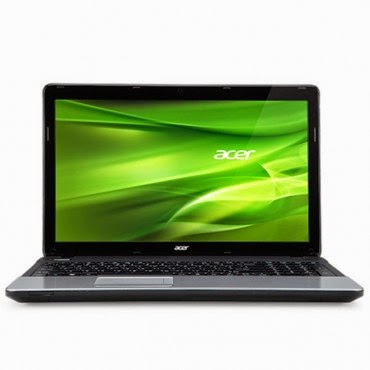
    When it comes to producing quality PCs, Acer is second to no one. Acer Aspire E1-510 carries the same DNA, featuring a durable plastic case and a 4-cell Li-Ion with extended life capacity—if you are in an area where electricity is an issue, you might want to stick with this product.
    The practical yet stylish notebook is loaded with powerful and useful features like multimedia tools and convenient connectivity features‎‎.‎‎ This is a stylish notebook which comes with 15.6 inch, HD LED Backlit display‎‎,‎‎ powered by Intel Pentium processor with Linux OS to provide a faster and user friendly experience‎‎.‎‎ It has Intel HD Graphics that deliver ultimate graphics needed for gaming‎‎,‎‎ 500GB Hard disk drive also provides ample space for storage‎‎,‎‎ HDMI and USB 3.0 ports for faster data transfer.‎‎
    Key Specifications
    • Linux OS (Windows 8.1 & 7 OS Compatible)
    • 4GB DDR3 RAM
    • 500GB Hard Drive
    • Intel Celeron Processor
    • 15.6 Inch, Active Matrix TFT Color LCD
    • 4-cell Li-Ion Battery
    • DVD RW Optical Drive
    • Inbuilt Wireless Adapter
    The researcher friendly laptop is on sale for ₦53,500 online and ₦71,500 in most shops offline. See full product specifications and pricing.

    Acer V5-123 Mini Laptop (₦49,900) — Buy Online

    If you think the products listed above are a little above your budget and you don’t mind sacrificing the option of listening to another Davido’s single, you can bite the bullet and go with an Acer mini laptop without a CD Drive.
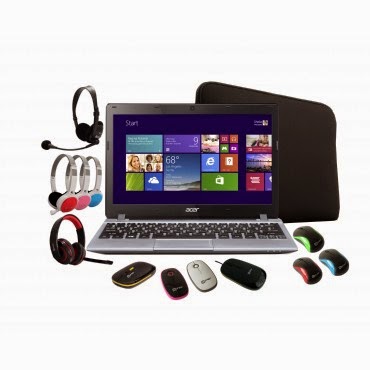
    The Aspire V5 Series puts inspiring performance in a thin and light form. A choice of elegant views adds to the charm. Breathe life into your entertainment and enjoy hands-on control with Acer Aspire V5-123. Its built-in speakers sweeten the deal with splendid sound. The laptop features;11.6-Inch WXGA HD, AMD Radeon trade; HD display with 2GB RAM and a 500GB hard drive which provides enough space for you to store your files, data, photos, and music. You can connect to the world wherever you are with your laptop, the WiFi enables you to browse and surf the web, you can also transfer data to other devices via bluetooth. This laptop comes with a free mouse, bag and headset.
    Key Specifications:
    • Windows 8.1 OS
    • 2GB RAM
    • 500GB Hard Drive
    • 11.6-Inch WXGA HD Display
    • Intel HD Graphics
    • Inbuilt WiFi 802.11 bgn Adapter
    Although Acer Aspire V5-123 has no CD Drive, you can still connect a CD Drive via the USB port. Saving over ₦10,000 compared to other products listed above. Purchase or see more about this product on its product page.
  • New Microsoft adapter lets Xbox One’s Kinect play nice with PCs

    New Microsoft adapter lets Xbox One’s Kinect play nice with PCs

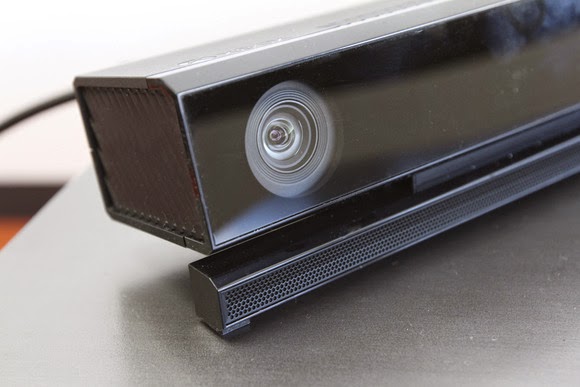
    Xbox One owners can attach their Kinect motion sensors to Windows PCs and tablets thanks to a new adapter introduced by Microsoft.

    The new $49.99 adapter is specific to Kinect sensors built for Xbox One, and it plugs into the USB 3.0 port of Windows 8 PCs. Microsoft already sold a separate $199.99 Kinect for Windows v2 motion sensor, which plugs directly into PCs without the need for an adapter.

    There will be no difference in the performance of the Kinect sensors, Microsoft said.

    Kinect sensors can recognize movement and gestures, which then allows users to participate in games. It can do much more for PCs than a simple webcam-style monitor. Kinect sensors, for example, can work with Windows applications like Microsoft’s 3D Builder, which allows the scanning of 3D objects.

    Software developers are working on various PC applications that take advantage of Kinect sensors, which are also used in engineering, design, and healthcare applications.

    To further fuel developer interest, Microsoft on Wednesday also released the Kinect SDK 2.0, which is available for download. It is an update from the June preview and has more than 200 updates and improvements.

    With SDK 2.0, “developers can commercially deploy Kinect apps in the Windows Store for the first time,” Microsoft said.

  • Windows 10 Beta Hits 1 Million Users in Two Weeks

    Windows 10 Beta Hits 1 Million Users in Two Weeks

    Microsoft announced this morning that it crossed the 1 million tester mark for the technical preview of its Windows 10 operating system. I had expected a higher number would opt for the new code, given how extensively the media (guilty) covered the rollout of the nascent operating system.

    According to the company, more than 200,000 “pieces of user-initiated feedback” have reached its ears. The breakdown of builds that are run virtually and natively is about one-third and two-thirds, respectively, according to Microsoft.

    Microsoft has a long way to go with Windows 10, but with 1 million current registrants and several beta cycles yet to go, things seem to be off to a decent start. You will have to vet the strength of the million figure yourself.

    I’ve been using Windows 10 as a daily driver at home for a few days now, with a docked Surface Pro 3 hooked up to a 24-inch external screen, and an external mouse and keyboard. It’s a decent operating system in firm need of debugging, and the unshackling of its Metro alter-ego. But all things told, I am roughly as happy with it in desktop mode as I was Windows 7. And like with Windows 7, in Windows 10 I don’t use the Start Menu much. If you haven’t gone hands-on with the code, it’s worth a spin.

    How long until 2 million people are using Windows 10?

    Originally posted on Techcrunch, all rights reserved.

  • Windows 9 will be free to Windows 8 users; Microsoft Indonesian president says

    Windows 9 will be free to Windows 8 users; Microsoft Indonesian president says

    Yes, you’ve heard right. According to a recent article from an Indonesia news website “Detik.com,” the Windows Indonesian president Andreas Diantoro said, rather confirmed, that Windows 9 will be available for free to users of Windows 8(8.1). According to Andreas, the “update will be automatic” for Windows 8 systems. Whether this update will occur also for Windows 7/Vista users is yet to be announced nor confirmed.

    While this can surely be just rumors, we might get the 101% confirmation when Microsoft unveils its new OS at an event at San Francisco tomorrow (September 30th, 2014). This all comes ahead of an announced “preview edition” of Windows 9 which is expected to come round October of this year.

    Why would Microsoft make their new OS free?
    Well, some should take in account of how much negative feedback that was received to Windows 8, their OS that released two years ago; reason of the hate to it happened to be that Windows 8 removed the traditional start menu popup, and gave everyone a “Retro Start Menu” in its place. Not only that, but it is an OS solely aimed at mobile systems, and I think it’s safe to say that the design may have been a wrong choice, given the stop coming to the production/support of Windows 8 and Windows 7.8 phones.

    Anyways, with the hate, their blunder of the Xbox One reveal, and more; Microsoft is letting fan and/or user loyalty slip away and they do this even more by not standing for support of free OS support. Apple’s updates to OS X’s are always free to owners of previous versions, however with Microsoft’s “Windows,” the case hasn’t been the same. No one got a free update from Windows 7 right to Windows 8, or from any other versions that preceded it. Some believe that giving Windows 8/8.1 a free update to Windows 9 or “Threshold” (official name still unknown) will be an incentive of Microsoft saying something like “sorry we’ve screwed you over recently.” This could also be them contributing to being more free on OS’; this can definitely gain them some big media points, along with their names eventually hitting all game systems thanks to their acquisition of Mojang: the creators of Minecraft.

    So, all-in-all it’s only right to give some incentive back to their users that stayed with them even through the muck of the buggy, unattractive to most; Windows 8.
    What are your thoughts on the announcement of the free upgrade? Let us know in the comments below.

    Sources:
    PC World – Microsoft Indonesia president; Windows 9 will be free to Windows 8 users
    PC Gamer – Windows 9 will be free to windows 8 users, according to report By Jake Brunton, 2014.

  • Microsoft And Dell Sign Patent Royalty Agreement For Google’s OS

    Microsoft And Dell Sign Patent Royalty Agreement For Google’s OS

    Today Dell and Microsoft announced that they have signed an agreement relating to intellectual property, which will see the two companies “license each company’s applicable” patents regarding Android and Chrome OS devices, as well as Xbox consoles.

    So Dell will pay Microsoft dollars when it ships devices running Google’s operating systems. The companies mention Xbox consoles because Dell, it turns out, has some IP with surface area to the device. Dell likely got a discount on its royalty payments as a result.

    The Android and Chrome OS portion of the agreement are not surprising, other than that they indicate that Microsoft can turn the largest of OEMs into its paying customers, and that it undercuts Google’s mobile platform hegemony and attempt to break into the traditional PC market. How so? Increasing the unit cost of using Android and Chrome OS adds a nip of cost to each unit, making them less profitable for their manufacturer, or more expensive to the consumer. Neither is much of a good option.

    And Microsoft directly cashes further into Google’s success, which is one of the more ironical pieces of the technology world at the moment.

    This post was originally posted on Techcrunch | Image by Flicker user Alex Schwenke under CC BY 2.0 Licence (Images has been cropped)

  • Microsoft deal delivers ‘free’ 100GB of OneDrive storage

    Microsoft deal delivers ‘free’ 100GB of OneDrive storage

    If you’re the type of person who can never have too much cloud storage, Microsoft just added a nice deal: 100GB of OneDrive storage as a Bing Reward offer.

    Normally, amassing the credits needed to redeem a Bing Reward takes some time and effort. But with just a little bit of work, you’ll probably earn this one almost immediately.

    If you prefer to use Bing as your search engine, or don’t mind switching back and forth between Bing and Google, Microsoft’s Bing Rewards is a worthwhile loyalty program. Each time you visit Bing, Microsoft records the visit. Over time, users are awarded “credits” for their visits as well as visiting a dashboard to pick up additional tasks or for referring friends to the service.

    Microsoft is offering a free 200-credit bonus to friends you invite to Bing Rewards.

    Now Microsoft is offering 100GB of OneDrive (nee SkyDrive) storage for one year for 100 credits. (Microsoft officials have said previously that any unused storage will vanish after the year expires, but Microsoft won’t delete any files.)

    Through the end of February, Microsoft is also offering a free 200-credit bonus to friends you invite to Bing Rewards. And if they complete Silver-level status (which basically means they need to click through a “tour” or two), you’ll get 200 credits as well. It’s a bit spammy, so you’re more likely to convince your friends to participate if you pitch it as a “scratch my back, and I’ll scratch yours” deal.

    Microsoft already hands out 7GB of free OneDrive cloud storage to new users who sign up for the service. As part of it rebranding SkyDrive to OneDrive marketing effort, Microsoft also handed out an additional 3GB if you simply turned on the camera-backup feature on your smartphone (iOS, Android, or Windows Phone). Referring a friend to OneDrive will earn you another 500MB, up to a maximum of 5GB.

    The additional OneDrive storage deal might not be the best offer you can get. Microsoft offers a 5-percent discount at the Microsoft Store for just 50 credits, for example, and other deals include $5 gift cards at Amazon or Starbucks for 525 credits.

    If you prefer Google’s search engine, you’ll probably want to stick with it. But if you’re willing to check out Bing, Microsoft will reward you with tangible benefits.

  • Microsoft pleads with customers to ditch Windows XP and Office 2003

    Microsoft pleads with customers to ditch Windows XP and Office 2003

    Microsoft has again painted a grim picture for customers who remain on Windows XP and Office 2003 after it ends support for the old OS and suite in early April, but it’s unclear if the company is succeeding in its campaign to convince holdouts to upgrade.

    In a blog post on Wednesday, Microsoft reiterated that consumers and businesses that stick with the products past the April 8 deadline will face severe security risks and be unable to take advantage of technical advances.

    “Computers currently running Windows XP and Office 2003 won’t stop working on April 9, but over time security and performance will be affected,” reads the post.

    Specifically, Windows XP PCs won’t be able to run many “newer” applications or work with new hardware due to unsupported drivers. Additionally, PCs running the OS will become easy prey to malware, because Microsoft won’t release new security updates and bug fixes for it, nor offer support services and technical content updates. Office 2003, on the other hand, can’t provide modern mobility and cloud capabilities, according to Microsoft.

    Unsurprisingly the solution the company offers is for customers to adopt Windows 8.1 and Office 365, while acknowledging that in most instances PCs running Windows XP lack the hardware specs to run the new OS. “The majority of PCs running Windows XP are not capable of upgrading to Windows 8.1 due to the age of the hardware,” the post reads.

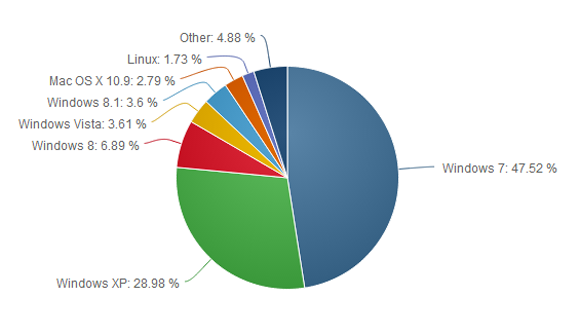
    Windows XP remains quite popular despite its age—it was first released in 2001. According to the latest figures from NetApplications, Windows XP has an almost 30 percent share of the desktop OS market, second only to Windows 7 which has about 47 percent. By contrast, Windows 8, which started shipping in October 2012, and its 8.1 update, released a year later, have a combined share of about 10.6 percent.

    Windows 8 and its update have drawn criticism for their touch-optimized interface and a series of disruptive bugs. Microsoft is promising another update for the spring that will make the OS friendlier for mouse-and-keyboard users, but the impression in the marketplace is that Microsoft has struggled to get Windows 8 right. The most pessimistic critics have likened Windows 8 to the disastrous Windows Vista, released in 2007 and generally panned.

    Office 2003 is also still heavily used. According to the results of a Forrester Research survey released in October, Office 2003 was in use in 28 percent of businesses polled, behind Office 2007 (51 percent) and Office 2010 (85 percent). The latest version of Office—called Office 2013 when sold via traditional perpetual license and Office 365 when sold via an annual subscription—was at the time used in 22 percent of companies polled, and with a slower adoption than Office 2010 at a comparable stage of release, according to Forrester.

  • Windows XP gained market share in January (or did it?)

    Windows XP gained market share in January (or did it?)

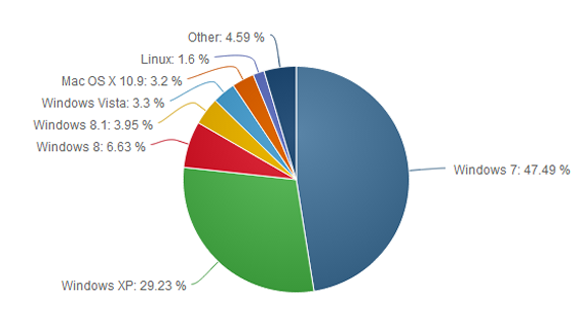
    Microsoft is almost ready to put Windows XP out to pasture, but the popular operating system refuses to die. The latest worldwide numbers from Net Applications show Windows XP market share actually grew by 0.25 percentage points in January, compared to the month previous.

    This is the first time Windows XP has gained in market share based on Net Applications’ freely available data, which reaches back to 2009.

    We’ve dropped a line to Net Applications to see if the company has any explanation about why Windows XP might have bounced back in January, and we’ll update this story accordingly.

    With the deadline for Windows XP’s end of life looming in April, it’s tempting to see the old system’s apparent resurgence as an embarrassment for Microsoft as Windows 8 stumbles in the market place. But could there be another, less sinister reason for the bounce?

    In December 2013, the browser usage numbers from Net Applications showed Windows XP with a 28.98 market share. But check out the next pie chart…

    The surge may not be real

    First, if you look at the top of Net Applications’ report for January 2014 it says, “This report contains preview data that has NOT been reviewed by Quality Assurance.” So there’s that.Also, StatCounter, a a competing metrics service, registered a 0.64 percent decline for Windows XP during the same time. So who should we believe?

    Perhaps neither. There are problems with how Net Applications and StatCounter measure market share. Both companies rely on browser hits to determine OS popularity, so the companies are really counting the number of Windows XP, Vista, 7, 8, and 8.1 computers that go online during a given month.

    That method may be generally accurate since today’s PCs (including Windows XP machines) are essentially web browsing machines. But when you’re looking at modest gains for a particular flavor of Windows, relying on browser data may not be perfectly trustworthy.

    One month later, Windows XP shows a modest surge, possibly explained by people digging out old machines from closets to work on them before the XPocalypse.

    But what if it’s true?

    Assuming Net Applications is spot on, it’s also easy to see why a bunch of Windows XP machines might suddenly go online. As I wrote above, Windows XP’s end of life is just around the corner on April 8. When that happens, Microsoft will cease delivering security patches for the system.

    So enterprises and small businesses may be yanking old Windows XP machines out of closets, warehouses, and backrooms as they take stock of company hardware and any data stored on antiquated computers.

    Factor in curious home users wondering if they can upgrade their machine to Windows 8 or install a Linux variant on their aging hardware, and it’s easy to see where the modest uptick came from.

    That’s all speculation mind you, but it makes a certain amount of sense.

    The XP problem

    Nevertheless, it’s undeniable that Windows XP still has a massive install base, second only to Windows 7. It’s likely there will still be a huge user base for Windows XP later in 2014, and tech companies are preparing to support the system in a limited fashion after April.

    To help out Windows XP users who refuse to quit, Google will support Chrome for Windows XP until April 2015. And Microsoft says Windows XP’s anti-malware engine will continue to get updates until July 14, 2015. But security software can only detect malware attacks, and won’t permanently fix any critical flaws after April 8—and there will be flaws in Windows XP, bet on it.

    If you do plan on sticking with the aging OS, we’ve just published a primer on what you should do to remain as safe as possible with Windows XP. But if you’re able to quit the system, you should do so very soon.

    Sourced from PC World. View from original source.