Author: Ebenezer Obasi

  • new LG Internet TV Will Let You Surf The Internet & Watch Movies Simultaneously

    new LG Internet TV Will Let You Surf The Internet & Watch Movies Simultaneously

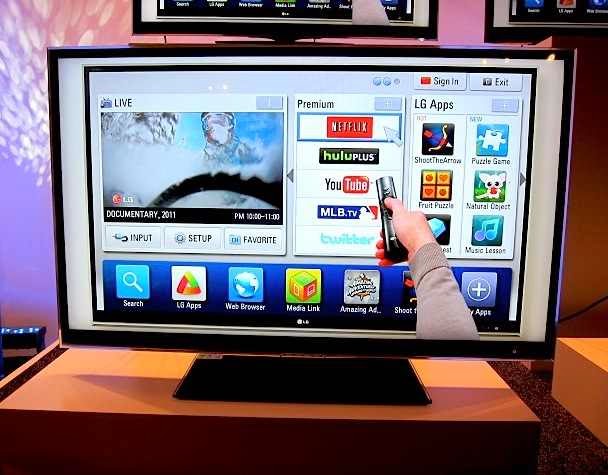
    LG Electronics recently launched an internet television tagged WebOS Smart+TV. The TV has the unique ability to connect users with the wealth of knowledge available on the internet. Yet it grants access to the full potential of the smart TV.

    The first time the user turns on the webOS-enabled LG Smart TV, an animated character named BeanBird appears onscreen to help get connected and walk the use through the setup process.

    All the viewer has to do is shake the Magic Remote or press the OK button to receive further advice from the winged virtual facilitator. webOS can instantly recognize when and what kind of external device has been plugged into the TV and brings up a pop-up menu listing all relevant options for the user to choosefrom.

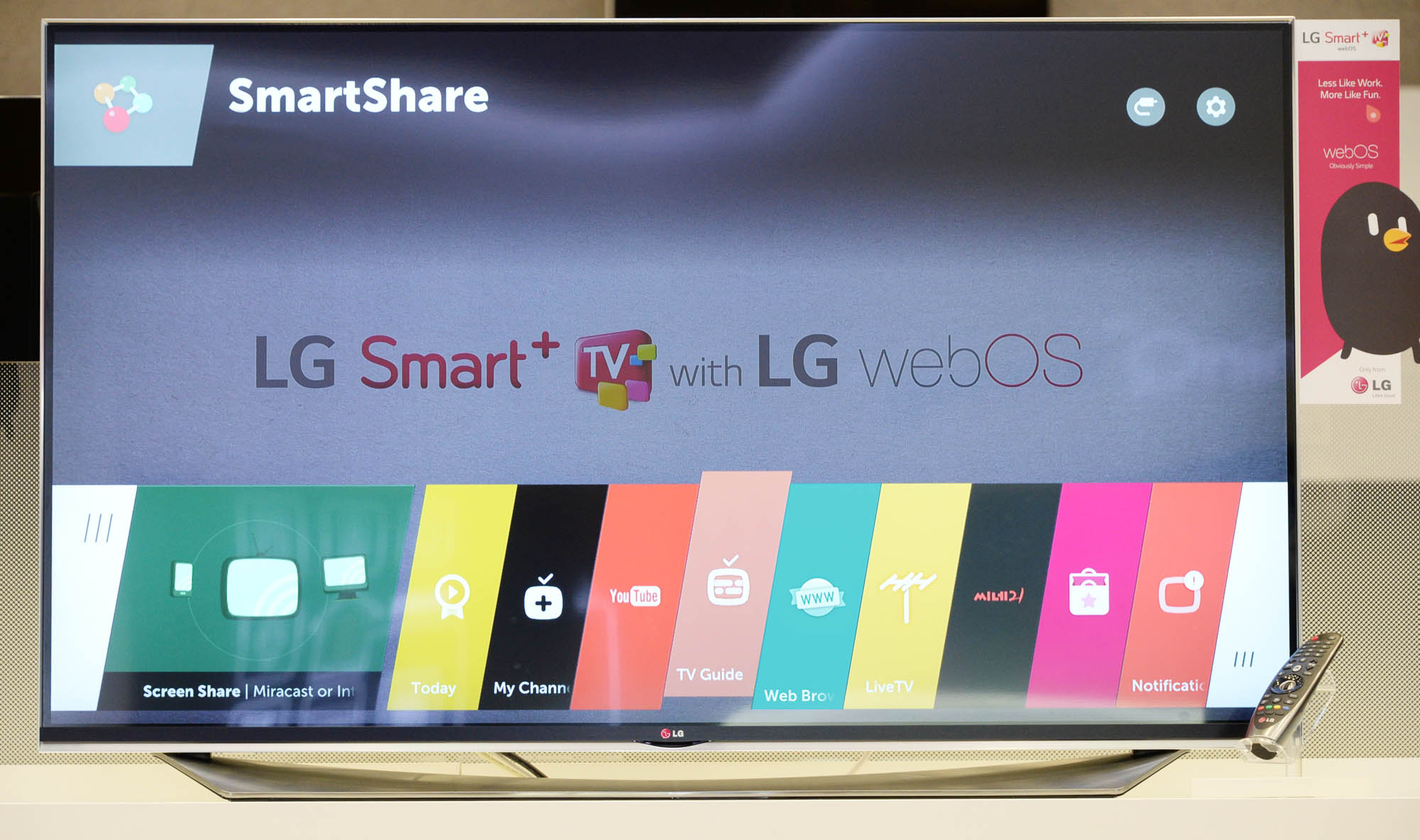
    The new Launcher, a left-to-right scrollable menu that runs along the lower portion of the screen is one of the most distinctive features of webOS.

    The Launcher makes it possible to switch between broadcast TV, smart TV content and media stored on external devices without having to return to the Home screen. It allows the viewer to simultaneously watch a show, play a game or browse the internet while searching or downloading other content.

    Live Menu, which can be opened while viewing the TV, keeps the search, recommendation and channel options within easy reach. LG’s webOS also offers access to the LG Store’s comprehensive collection of apps.

    The LG Store lets users browse the most-viewed and most-downloaded items available from across the Smart TV platform, including broadcast TV programs and the latest games.

    The logically organized categories, which include 3D content, games and movies, employ thumbnail images for fast and convenient selection of content.

    Originally posted on Vanguard

  • Breaking News: Google+ Website Down For 10 Minutes

    Breaking News: Google+ Website Down For 10 Minutes

    Google’s social networking platform Google+ went down today at 8:45 am GMT + 1.

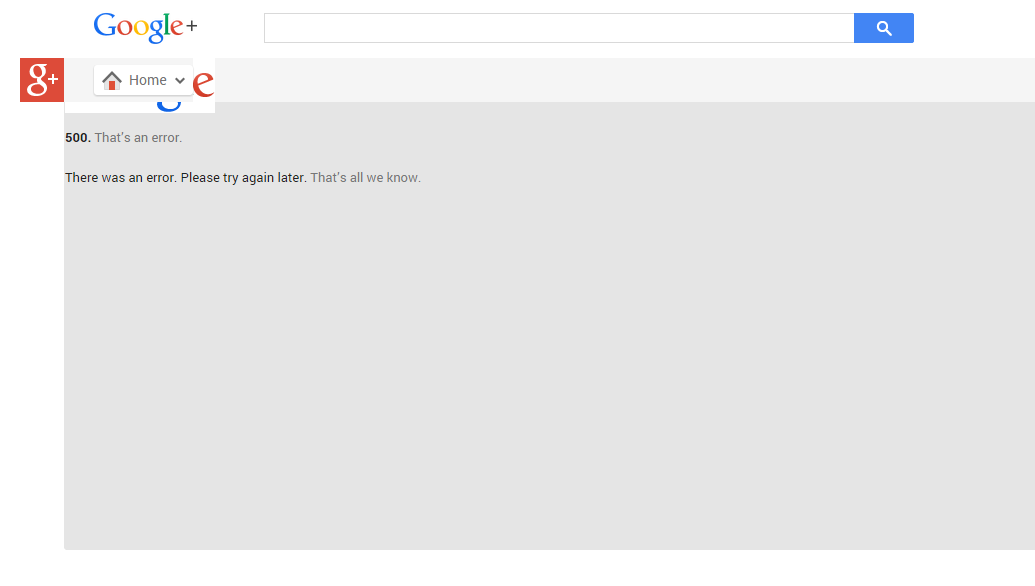
    Visiting Google+ plus.google.com will land you in a page that reads:

    500. That’s an error.
    There was an error. Please try again later. That’s all we know.

     The site came back up 10 minutes later. We were unable to reach Google to know the cause of the error page on Wednesday.

  • Job Vacancy: Public Relations Manager for Huawei Technologies

    Job Vacancy: Public Relations Manager for Huawei Technologies

    Leading global ICT solutions provider Huawei is currently looking to fill the vacant position of a PR manager in its Nigerian branch in Lagos.

    Huawei Technologies Co. Ltd. is a Chinese multinational networking and telecommunications equipment and services company headquartered in Shenzhen, Guangdong. Their Nigerian office located in Lagos has set sight on a new PR manager for the local branch.

    The application is open for qualified applicant within the country. See job requirement below:

    Job description

    Executing the PR plans and programs of the corporate marketing unit, as agreed and set out by management making optimum use of the PR agency.
    Planning and directing all PR efforts, leveraging internal and external events, initiatives and activities including Media activities
    Ensuring targeted and effective dissemination of relevant press releases and activities of the Huawei Nigeria

    Ensuring high and basic level visibility for all Media activities and initiatives
    Management of PR element of all events & exhibitions in order to ensure recognition of a broader audience and to generate publicity (Press interviews, media visits)
    Ensuring zero or minimal negative media mentions for Huawei Nigeria
    Supervision and editing of the writing of media releases and press materials
    Deployment of PR support for all initiatives emanating from relevant business units

    Resource
    Implementing the work programs and plans of the Corporate Communications unit in line with agreed upon policies and processes
    Management of inter-functional relations to ensure synergy across the various divisions within the Brands and Communication department and with other departments

    Sponsorship
    Creative interpretation of all marketing and sponsorship briefs
    Leveraging sponsored propertied and events to ensure sponsorship objectives are achieved

    Media
    Maintaining strong professional and interpersonal relationships with key ICT, Brands, Sports, Entertainment and other journalists with a view to maintaining a core loyalty group of journalists. Identifying and leveraging new technologies, as well as creatively adapting traditional communication mediums to continually improve and enhance company public image.
    Interfacing with mid and top level media managers and editors with a view to maintaining excellent top level leverageable relationships.

    Desired Skills and Experience

    Technical Skills

    • Degree educated with previous PR and communications experience of 3-5yrs in a professional services environment
    • Excellent writing and editing skills
    • Demonstrable experience of advising and influencing senior stakeholders
    • PC literate with a good working knowledge of MS Office 2010
    • Good working knowledge of Nigeria Media

    Personal skills / attributes

    • Excellent communication skills, both written and verbal
    • Trustworthy with sensitive and confidential information
    • Able to quickly establish good working relationships and promote best practice across all offices and at all levels
    • Highly motivated, flexible, enthusiastic, innovative and creative with required determination to achieve results.
    • A successful team player, can demonstrate initiative and the ability to be proactive, whilst also being able to follow instructions and support the PR & Communications Director as appropriate
    • Highly organised in order to successfully manage and prioritise a varied and demanding workload
    • Excellent attention to detail with a methodical approach to work and a strong focus on accuracy, with an understanding of the need for documentation and well-defined procedures
    • Polite and confident in manner and ability to exercise tact and diplomacy in an organisational setting
    • Shows resilience to overcome obstacles to deliver what is required
    • Carries out all responsibilities in a way which supports the Company’s values and promotes its equal opportunities and diversity principles
    • Ability to be an ambassador for Huawei, being professional in outlook and attitude

    Application is via LinkedIn. Click here to apply.

    Help a friend to get this job position by sharing this post on social media. Click the social media buttons below.

  • OnePlus $299 Smartphone Will be on Sale for One Hour on October 27

    OnePlus $299 Smartphone Will be on Sale for One Hour on October 27

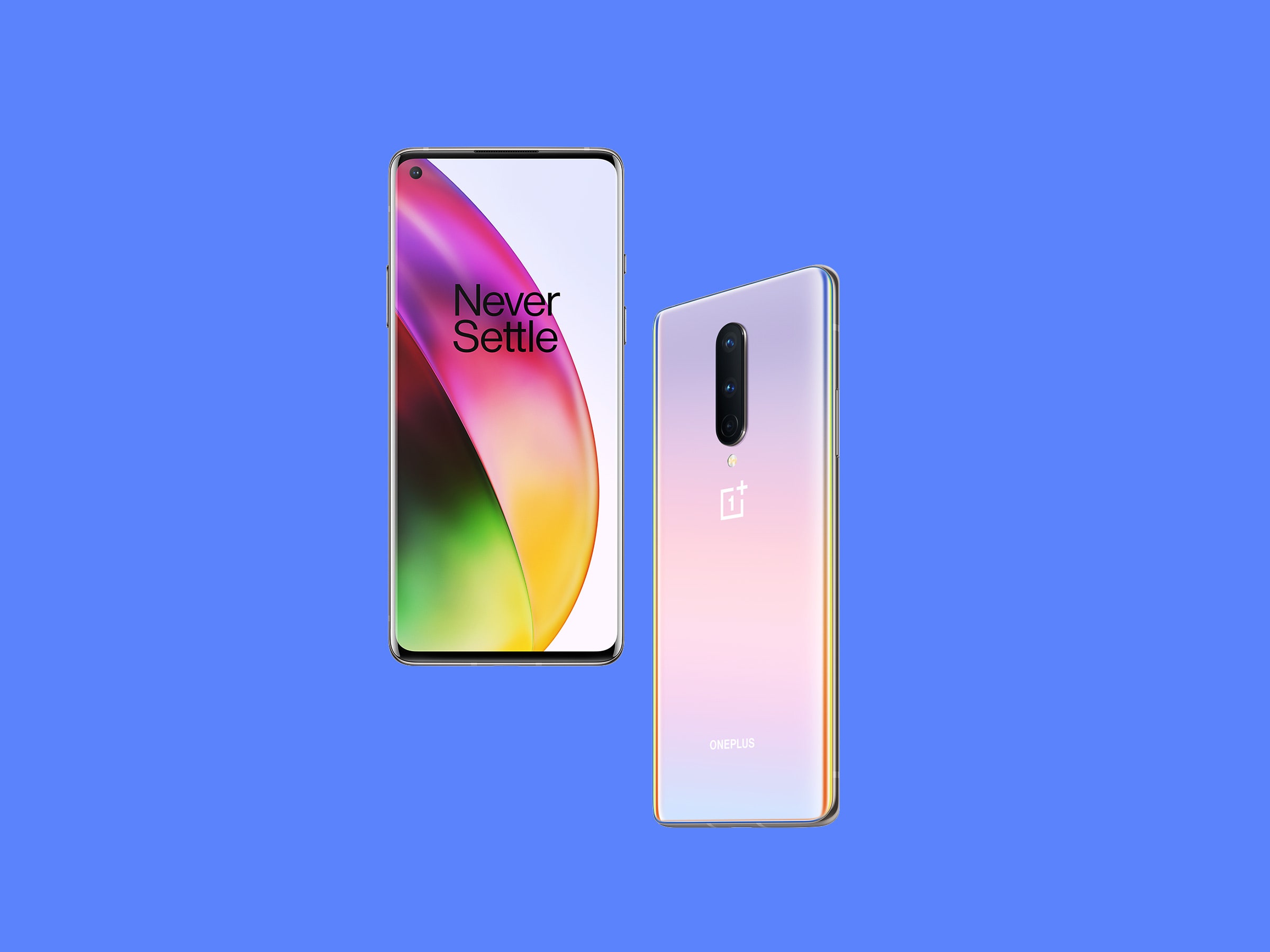
    If you’ve been in the market for OnePlus One, the hugely impressive $299 Android smartphone that is available by invite only — thus far — then your luck is in. The startup has announced that it will make its first smartphone available to all members of the public, but for a one hour window only.

    The impressive device will be available to buy for an hour on October 27, starting from 15:00 GMT — that’s 08:00 PST, or 11:00 EST. The company is allowing would-be customers to pre-order their phone from today, so there’s no need to stand still until then. Those who pre-order now but manage to grab an invite before October 27 can skip the queue and order their device right away, so there’s no danger of being stuck waiting.

    OnePlus says the new public sale window will not replace its invitation system altogether, but — having suffered delays in the past — this step is evidence of greater confidence in its ability to reach larger numbers of people with its devices.

    The company has been preparing itself for its sale hour, and it revealed that it sent out 50,000 invites during the first half of this month. “This was our way of testing our servers to make sure we are well-prepared for dealing with a large volume of orders,” OnePlus said.

    That’s a hugely important point given the issues that other smartphone upstarts have run into from selling large numbers of devices over a short space of time online. Demand for Xiaomi’s devices crashed Flipkart’s website in India back in July, although the Chinese company has generally experienced few issues with its web-only sales model.

    Either way, OnePlus’s one hour window is a far better move than its last major strategy, in which it caused controversy for a sexist contest to sell The One.

  • Getting Started With Apple Pay? See How it Works

    Getting Started With Apple Pay? See How it Works

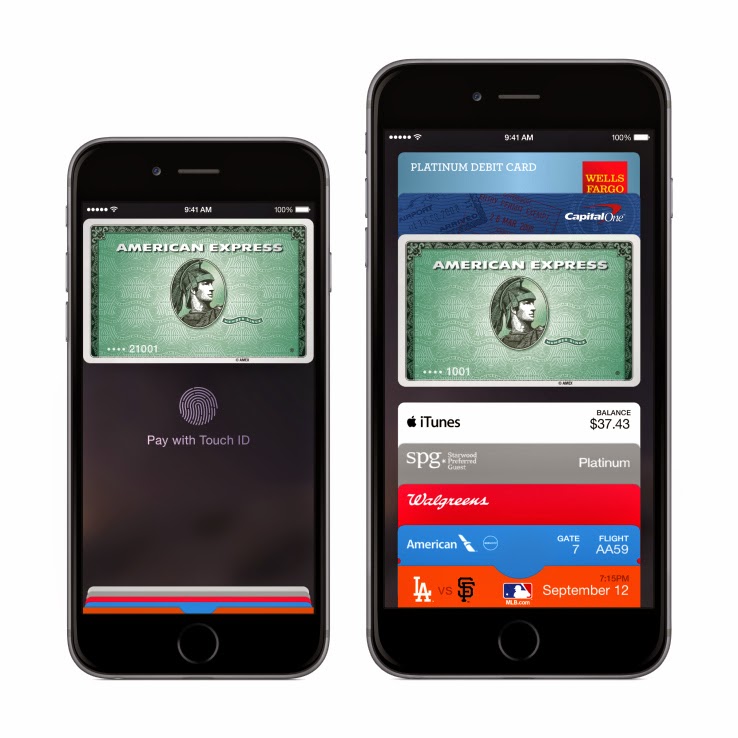
    Apple Pay is now available for anyone to use, provided they’ve got all the prerequisites, both for physical stores and for online transactions.

    But you can’t just walk up to your local brick-and-mortar store and wave your iPhone and walk out with whatever you want – that would be theft. Instead, you’ll need the following to be in place to have a happy Apple Pay experience.

    1. Hardware: iPhone 6 or 6 Plus for retail; iPad Air 2 or mini 3, or iPhone 6 or 6 Plus for in-app transactions
    2. Software: iOS 8.1 (which just because available earlier today)
    3. Touch ID set up on your device with at least one stored fingerprint
    4. A credit or debit card from one of Apple’s launch payment partners
    5. An iCloud account

    After you’ve got all that in place, you can opt to either use the cards you’ve already got on file in iTunes to pay, or add a new one. Adding a new one is as easy as snapping a pic of your plastic, and then manually entering the security code around back. You can also manually enter all the information, if you’d rather not use the camera. If the card is compatible, it will verify and make it available for purchases. If it isn’t, call your bank and ask them to get with the program.

    If you’re using a card already on file, you’ll just need to enter the security code found on the back to authorize its use, and then agree to the Apple Pay terms of service. Once that’s complete, you’re ready to roll.

    Apple Pay in stores should be available at participating launch retailers, which include Aéropostale, American Eagle Outfitters, Babies”R”Us, BJ’s Wholesale Club, Bloomingdale’s, Champs Sports, Chevron and Texaco retail stores including ExtraMile, Disney Store, Duane Reade, Footaction, Foot Locker, House of Hoops by Foot Locker, Kids Foot Locker, Lady Foot Locker, Macy’s, McDonald’s, Nike, Office Depot, Panera Bread, Petco, RadioShack, RUN by Foot Locker, SIX:02, Sports Authority, SUBWAY, Toys”R”Us, Unleashed by Petco, Walgreens, Wegmans and Whole Foods Market.

    Online, apps are already rolling out that also support Apple Pay, so check your updates column, or stay tuned to the “Featured” page, where Apple will be surfacing many of them. You can authenticate the purchases using your fingerprint, so long as you’ve registered it with Touch ID, or using your passcode if that doesn’t work for some reason. Apple Pay is secure thanks to the system it uses to store and transmit payment information, which doesn’t actually share any credit card details over NFC with the merchant, and it works with your existing cards, including rewards programs, etc.

    We’ll have a first-hand account of how Apple Pay works in the real world shortly, but early reports from Twitter seem to indicate things are working smoothly with the newly launched

    Originally posted on TechCrunch

  • Top 10 Job Openings This Week From Mashable

    Top 10 Job Openings This Week From Mashable

    Are you looking for a new Job or a chance to port to a greener pasture? EwtNet is keeping tabs on various tech companies looking to fill their vacant positions.

    IMAGE: FLICKR, JOSH HALLETT

    If you have been reading EwtNet lately, you will notice a lot of changes in our website layout, especially the new Jobs column at the right sidebar. This is to primarily help you find new job opening in major tech firms.

    We are also keeping eyes on various social media for newly posted job opening by tech companies. Here will be looking at the top ten job ads posted on Mashable this week.

    Position: Manager, Marketing Analytics
    Company: Invaluable
    Location: Boston, Massachusetts

    Invaluable is looking to add a key player to a growing, data-driven marketing team that will help answer complex analytical questions to help shape the marketing acquisition strategy and customer data landscape. The Manager, Marketing Analytics will be instrumental in solving complex marketing business issues using statistical analysis and reporting data across multiple segments and acquisition channels. This position will serve as a pivotal contributor connecting insights from data to other parts of the business.

    Position: Product Manager
    Company: Radius
    Location: San Francisco, California

    Radius is a fast-growing, venture-backed startup in the heart of San Francisco. We’re developing breakthrough technologies that make it easier for all companies – large and small, established and pioneering – to understand and do business with each other. Your job, as a product manager, is to help our team identify the right problems, ask the right questions, and arrive at the right solutions.

    Position: Payments Risk Manager
    Company: Zoosk Inc.
    Location: San Francisco, California

    Zoosk is seeking an experienced payments professional to manage chargeback and refund management and response for our online payments. This role will report to the CFO/COO and is highly cross-functional and will need to develop and manage effective working relationships with external payment providers, as well as Product Management, Engineering, and User Operations.

    Position: Marketing Director
    Company: Honest Buildings
    Location: New York, New York

    Honest Buildings is looking for a self-starter with a strong background in B2B digital marketing to help grow our business. In this role, you will be the business owner – the lead on marketing – responsible for generating qualified leads to drive new business, build awareness, and analyze performance.

    Position: Associate, Email Marketing
    Company: Lincoln Center for the Performing Arts, Inc.
    Location: New York, New York

    Lincoln Center’s Marketing team is looking for an enthusiastic and self-motivated E-mail Marketing Associate. You will make an immediate impact on our marketing efforts by supporting the loyalty marketing team in the planning, production, execution, and reporting of our e-mail marketing campaigns for all performance series, types of memberships, educational programs, and brands at Lincoln Center for the Performing Arts.

    Position: Director of Marketing Optimization
    Company: Innate
    Location: Washington, D.C.

    Established interactive marketing agency is seeking a Director of Marketing Optimization. This position is responsible for implementing growth strategies and achieving revenue targets for a large portfolio of strategic partners in a major multinational brand. This position will maximize revenue through a number of strategic digital initiatives, including analysis reporting, online optimization, digital marketing, website and sales analytics, and content management. The ideal candidate is a highly skilled problem solver and expert communicator who can both dive in to data at a granular level and be able to discuss them with clients in a clear and understandable manner. The Director operates with considerable independence while managing a growing team of analysts and content specialists.

    Position: Publicist
    Company: WebDAM, a Shutterstock company
    Location: San Mateo, California

    WebDAM, a Shutterstock company, is seeking a results-driven and self motivated professional to join our talented Marketing team. By building and maintaining strong media relationships, this individual will be a key player in ensuring that our brand reach continues to grow. We are looking for a candidate who will be instrumental in the development and execution of successful media and public relations strategy.

    Position: Online Media Strategist
    Company: Tenthwave Digital
    Location: New York, New York

    Tenthwave (www.tenthwave.com) is looking for an Online Media Strategist to help support and expand our growing online media team in New York City. The ideal candidate is driven by a passion for technology, search marketing (SEO/SEM), and media buying on social media platforms like Facebook and Twitter. He/she should enjoy working in a creative environment and interacting with team members across various job functions. Candidate must display a high degree of self-motivation with 2-3 years first-hand experience at an interactive agency or in managing the online presence of a large brand.

    Company: Univision Communications Inc.
    Position: Social Media Analyst
    Location: New York, New York

    The Enterprise Social Media team is responsible for accelerating social media efforts across Univisions media properties including Broadcast TV, Cable TV, Interactive (Online, Mobile), Local Television, Radio, and emerging digital platforms. The team is tasked with expanding Univisions social media capabilities and leading the strategy and integration of social in all enterprise priority properties, including daily/weekly news, entertainment, and sports programming, tent-pole award shows, major news events, and other corporate initiatives.

    Position: SEO Specialist
    Company: ThomasNet
    Location: New York, New York

    Join the award winning ThomasNet® Results Powered Marketing (RPM) team! The RPM services team is seeking a results driven and energetic SEO expert to join us. In this fast-paced agency-style role, you will serve as an SEO Analyst and organic traffic generation expert for manufacturing businesses both large and small. Through our partnership with Hubspot®, tracking with Google Analytics and Raven Tools, and your analytical skills, you can achieve all the goals set before you.

    Check out more career opportunities on the EwtNet Job Section.
  • Handy Tips to Watch the Partial Solar Eclipse on Thursday

    Handy Tips to Watch the Partial Solar Eclipse on Thursday

    Millions of people across North America could have a chance to observe a partial solar eclipse next week, weather permitting.

    Although the Oct. 23 partial solar eclipse may not be as spectacular as a total eclipse, it is still a beautiful and interesting event to witness. The sight of the moon gradually moving across the face of the sun fills most people with awe.

    The best views of the eclipse will be in the north, in Alaska and the Canadian arctic, but everyone in North America should see some of it, except in the extreme northeast of the continent. In eastern North America, the eclipse will only be visible near or at sunset, so a low western horizon is essential. Venus is very close to the eclipsed sun, but you will probably need to block the sun from view to spot it.

    In some ways, a partial eclipse is the most dangerous to observe. People naturally want to look at it, and this defeats our normal reflex to look away from the sun.

    Warning: Never look directly at the sun through binoculars, a telescope or with your unaided eye. Serious eye damage and even blindness can result. Scientists and experienced skywatchers use special filters and glasses to safely observe the sun.

    The safest way to view a solar eclipse is by using a pinhole in a piece of cardboard to project the sun. This is particularly effective with an eclipse near sunset, like this one. Punch a hole a couple of millimeters in diameter in the middle of a piece of cardboard, and tape it against a west-facing window. This will project a perfect image of the eclipsed sun on a wall opposite.

    Do not use binoculars or telescopes to view the sun unless you have a properly designed solar filter, such as the full aperture solar filters available for all telescopes at any store selling astronomical gear. Do not improvise with home-brew solutions, as permanent eye damage is likely to occur.

    This article originally published at Space.com here

  • Spotify Launches New Subscription Plan, Starting At $14.99 Per Month For Two Members

    Spotify Launches New Subscription Plan, Starting At $14.99 Per Month For Two Members

    A much requested feature — and playing catch-up with competitors, such as Rdio — Spotify is introducing a family plan to reduce the cost of several family members subscribing to the music streaming service.

    The ‘Spotify Family’ plan lets users buy premium subscriptions for up to four additional family members at 50 per cent off, or $4.99 for each additional account. So, for example, a family of five would pay $29.99 through the new family plan rather than the $50.

    Like stand-alone Spotify Premium accounts, under the family plan each member can create and manage their own descrete playlists/music library and get personalized song recommendations. In addition, all of the other Premium features apply, such as the ability to cache playlists for offline listening, multi-device/mobile support, and ad-free listening.

    “This is one of the most asked for features from our audience,” says Ken Parks, Chief Content Officer at Spotify, in a statement. “With today’s announcement we’re making it easier than ever for the whole family to experience Spotify Premium on their phones, at home and on the go.”

    However, while the move and reduced pricing will be welcomed by families who are already hooked on Spotify or want to add additional household accounts, it also speaks to one of the challenges facing the company. As Josh Constine notes, the big problem for Spotify is that its on-demand streaming competitors aren’t in the music business. Apple uses music software to sell iPhones and MacBooks. Google Music is designed to lock people into its ad-filled ecosystem. Amazon bundles music in for “free” with a $99 a year Prime subscription that gets you to buy more physical goods.

    In other words, all three of Spotify’s deep-pocketed competitors could drive down the price of music streaming further because they make money elsewhere. If music streaming services weren’t already a commodity, it’s not inconceivable to imagine on-demand streaming becoming something we eventually expect to come for free with a phone or mobile OS, regardless of any attempts to differentiate via a better user experience or broader music catalogue.

    Posted via TechCrunch

  • New Generation of Mac Mini’s RAM cannot be upgraded

    New Generation of Mac Mini’s RAM cannot be upgraded

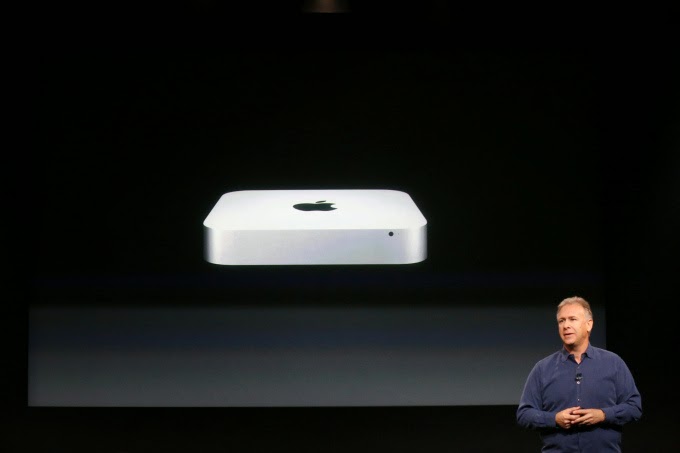
    After encouraging customers to upgrade their Mac Mini RAM in 2012, Apple has decided it’s time customers lives with what they are offered.

    Apple excited its users when they announced their newest Mac Mini some few weeks ago. However, Brian Stucki, who runs a Mac Mini hosting farm in Las Vegas has taken to twitter to announced that the new Mac Mini’s RAM is soldered to the board.

    He also notes that the latest generation Mac Mini now has tamper proof screws, making things that are user serviceable that much more difficult to get to:

    Confirmed: RAM in the new Mac mini is not user accessible. Hard drive can be replaced/upgraded, though not keeping warranty.
    — Brian Stucki (@brianstucki) October 17, 2014

    If people didn’t like to hear the confirmation of soldered RAM, wait until they see the foot of the Mac mini with tamper-proof screws.
    — Brian Stucki (@brianstucki) October 18, 2014

    An Apple support page found here seems to confirm the soldered-on RAM:

    The memory for Mac mini (Late 2014) computers isn’t user accessible and is integrated into the main logic board. You can configure your computer’s memory at the time of purchase.

    This is completely a contrast to the same page for the 2012 Mac Mini, which tells you exactly what sort of RAM to buy.

  • You can Now Pre-order your iPad Air 2 And Mini 3 Online, Starting from Today

    You can Now Pre-order your iPad Air 2 And Mini 3 Online, Starting from Today

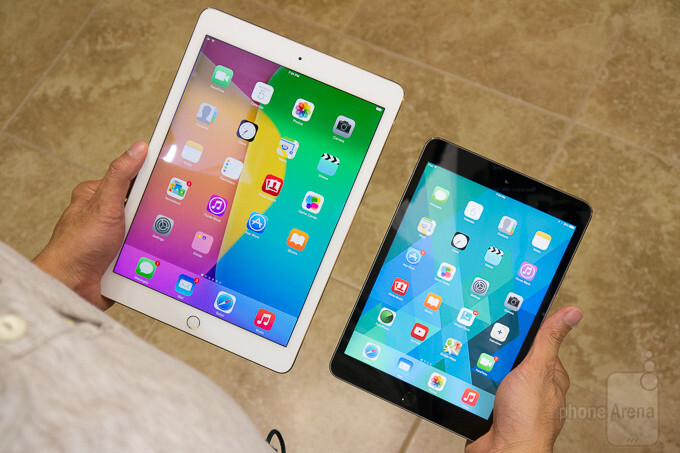
    Apple revealed new iPad models on Thursday, and they all go on sale starting today via Apple’s online store. Today is just the beginning of pre-sales, with iPads officially shipping to pre-order customers and arriving in stores sometime “late next week,” according to Apple.

    Pricing for the new iPad mini, which is essentially the same as the existing model with Touch ID added and a new gold color option, starts at $399, while the iPad Air 2, with its full external and internal overhaul, begins at $499. Configuration options include 16, 64 and 128GB options, with both Wi-Fi only and LTE-capable models of each.

    Delivery time for the new iPads is listed as October 23, which partly helps explain why the date wasn’t set in stone on stage. Apple seems to want to get these out the door as soon as possible, instead of staging a defined, singular street date, so they could be shipping them in batches as soon as they come off the line.

    Our own initial impressions of the new iPads found that the iPad Air 2 is a marked upgrade even from last year’s version, but as for the iPad mini 3, unless you have a burning desire for Touch ID or you’re upgrading from a first-gen Mini, it might be worth holding off on a purchase.

  • Android 5.0 Lollipop Review: Yet another OS Android Developers will Love

    Android 5.0 Lollipop Review: Yet another OS Android Developers will Love

    Yes, you heard right! Google has decided to put an end to the speculations of a new Android OS and officially pulled the curtain on its new OS version Android 5.0 Lollipop. 

    Two days ago, the company announced the release of a new Android version 5.0 Lollipop on their official blog – An OS designed to “work on all your devices and to be customized for you the way you see fit.”

    Android 5.0 Lollipop featured image. Credit to Google official blogspot
    Android 5.0 Lollipop featured image. Credit to Google official blogspot

    Android has a face only an engineer could love. At least, that’s the reputation it has earned over the past few years. Google’s mobile OS is a hotbed of mobile innovation and new technologies, but its interface doesn’t have the friendly consumer-centric design of iOS or Windows Phone. With Android 5.0 Lollipop, Google aims to overhaul this shortcoming, while baking-in a handful of nifty new features.


    Google stated that “Lollipop is designed to be flexible, to work on all your devices and to be customized for you the way you see fit.” That may be true to some extent but the plastic surgery is incomplete. While iOS7 is easily identifiable by its flat bright colors and lightweight fonts, and Windows Phone carries on with Live Tiles, the Lollipop interface has no single recongnizable trait. Yes, it’s flatter and brighter, but what isn’t these days? Worse, the redesign seems pushed out the door too early. Scratch beneath the surface, and you’ll find built-in apps and menus that haven’t been udpated to the new look. There’s a lot to like in Google’s name-branded OS release, but this sweet treat isn’t quite ready to be unwrapped.

    New Cosmetic Look

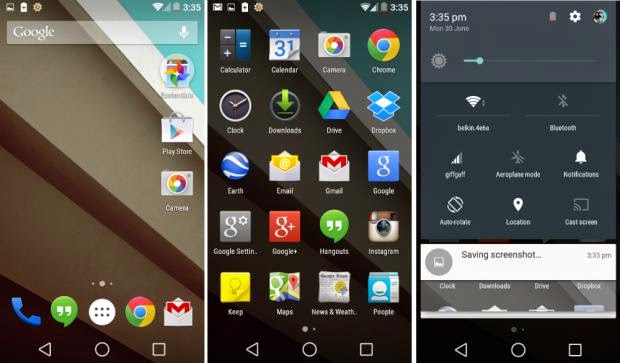
    Android 5.0 Lollipop has a new vibrant look, otherwise called Material Design. Google has finally ditched the traditional look of the Android soft keys at the bottom of the screen and has adopted something rather more stylish.

    New Soft Keys. Image by Knowyourmobile
    New Google Now Launcher. Image by Android

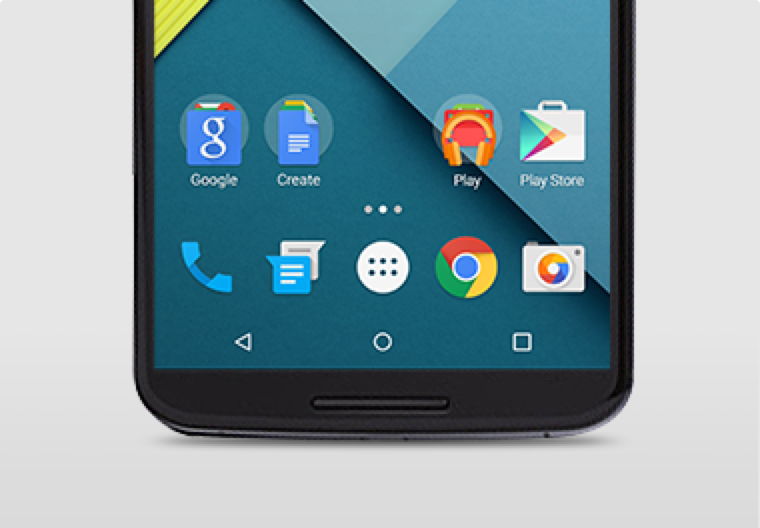
    The “Home” symbol is now a circle, while the multitasking menu is a square. The back button is a reversed arrow that looks like it has been lifted from a 1980’s tape player or VCR unit. It’s quite a drastic change and does take some getting used to, especially if you’ve been using Android since day one.

    The new OS is also bundled with a new launcher. A clean, simple, customizable home screen that comes with the power of Google Now: traffic alerts, weather, and much more, just a swipe away.

    Extensive Battery Life Saver

    Android L brings with it Project Volta, Google’s attempt at giving developers more visibility on what aspects of their apps are draining the most juice. While it’s early days here, the majority of the apps we tested had not been configured to make use of Volta, it’s a solid move by the Big G, as it gives you a more accurate indication of how long your phone is going to last and what apps are sucking up most power.
    Another nice touch is that when you’re charging your phone, you’re told how long it will take for the battery to be fully topped up. While we’ve perhaps not spent enough time with Android Lollipop to get a complete picture, it did seem to give our Nexus 5 more stamina than KitKat.
    Finally, we have Battery Saver mode. How this works is simple, although the service isn’t anything particularly new – plenty of OEMs already build similar features into their hardware. The idea here is to conserve battery life, so when your battery hits a certain percentage, you can set the Battery Saver mode to kick in and throttle the performance of the phone to ensure that juice lasts a little bit longer.

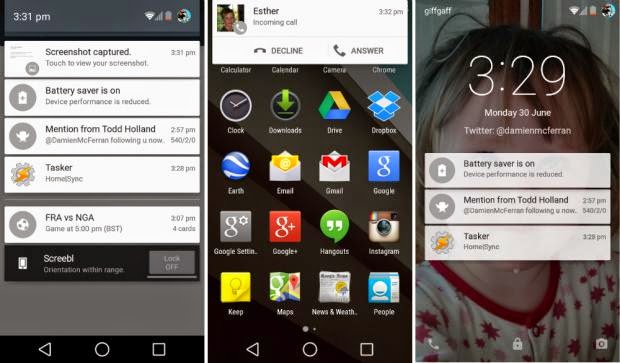
    Newly Improved Notification & Lock Screen

    This is perhaps the biggest area of change in Android Lollipop. Notifications have undergone a complete overhaul, and now look a lot like Google Now’s card-based system. Notifications are displayed directly on the lock screen, and tapping a card allows you to unlock the device and jump straight to that area. You can even expand cards to see more details, such as a list of emails, with the phone still in its locked state (If you don’t like the idea of people being able to snoop on your personal messages then you can enable a feature which locks away the detailed info).
    Newly improved notification and lock screen. image by Knowyourmobile
    It’s a very clever move by Google, and one that brings you even closer to the content you need on your handset. Even if you have a security lock in place, the fact that you can tap the notification you wish to see, unlock the phone and then leap straight into the relevant information makes the whole process seem a lot smoother. You can also swipe away and dismiss notifications without actually unlocking your device.
    When the phone is unlocked, notifications can be displayed by sliding a finger down from the top of the screen. Rather than showing the data in a slide-down panel, as was the case in previous versions of Android, a series of cards flow over the top of your current view, which can be seen behind the cards at all times. This “flowing” cascade of cards is set to be one of Android L’s most striking visual changes. As before though, the slide-down notifications panel has two stages: your finger swipe shows notifications, while a second swipe pulls down the quick settings menu.
    While Google is giving notifications a face-lift, it’s also making them less obtrusive. If your phone is unlocked and you’re involved in another activity, such as browsing emails or playing a game, the call details appear at the top of the display. You can accept or reject the call without having to pause what you’re currently doing. Another welcome addition is the Do Not Disturb function, which you can quickly enable to stop you being bugged by your phone.
    However, Lock-screen widgets have been removed entirely, so if you’re a fan of browsing your emails without unlocking your phone, then you might be disappointed.

    Lollipop is Pretty Good & Tasty

    From its list of features, Lollipop sounds tasty, and Android 5.0 is certainly a step in the right direction. Its interface is bright and inviting and the newly added secondary features like “People” app and a new Dialer application should help make stock Android even more consumer friendly. You also have top-level access to Google+ and Google Now, so there’s no excuse not to take advantage of Google’s most hottest features.
    A lot of popular phones will get upgraded to Lollipop in the next couple months, though Google has recently launched Nexus 6, Nexus 9 and Nexus Player, all powered by Lollipop. Hopefully by the time Lollipop makes its way to your device, Google will have tied up some the loose ends—adopting the new design in all of its core apps and consolidating the myriad of new settings. Or, it can continue to torture us like it did with Kitkat by making only incremental changes to the entire Android package with each release, spacing out core app updates by months.
  • How to Configure Wi-Fi Hotspot on Samsung, Xiaomi, Infinix Smartphones & Android Devices

    How to Configure Wi-Fi Hotspot on Samsung, Xiaomi, Infinix Smartphones & Android Devices

    If you don’t have a home internet access, your best bet is to use your Android smartphone to distribute your cellular Internet connection to your other devices. Using our guidelines provided in video, picture gallery and text format you can learn how to configure Wi-Fi hotspot in an Android smartphone.

    WiFi hotspot enables users with WiFi supported devices to tether internet connection across other devices. Although, there are few security concerns using Wi-Fi but with the right techniques and common-sense you can learn how to configure Wi-Fi hotspot and share internet from your Samsung, Tecno and Infinix smartphone to your PC or other mobile devices.

    Further Reading: How to boost WIFI connections on Your Laptop

    Why Android?

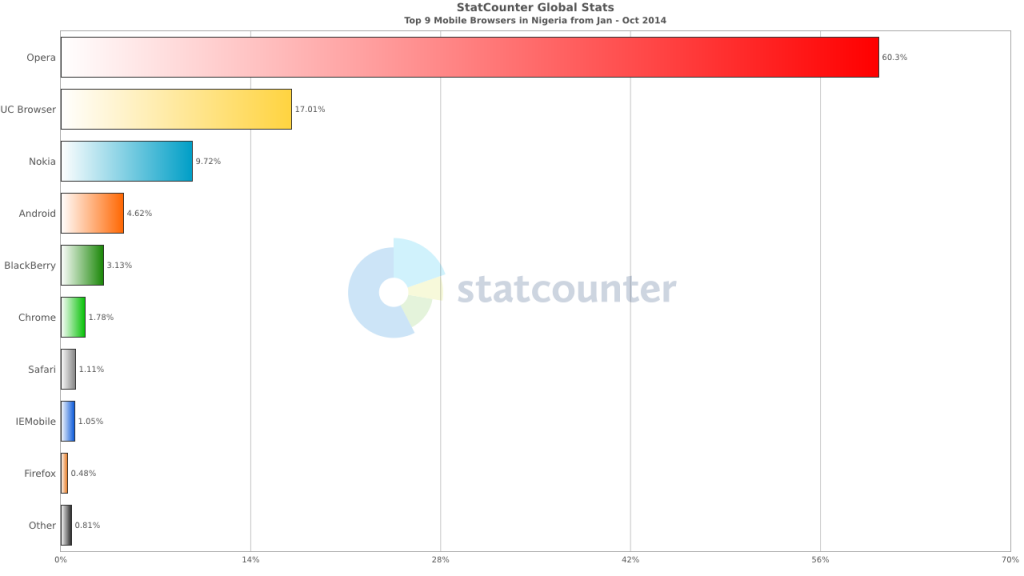
    Browsers Usage in Nigeria
    Top 9 Mobile Browsers in Nigeria (Jan – Oct 2014)

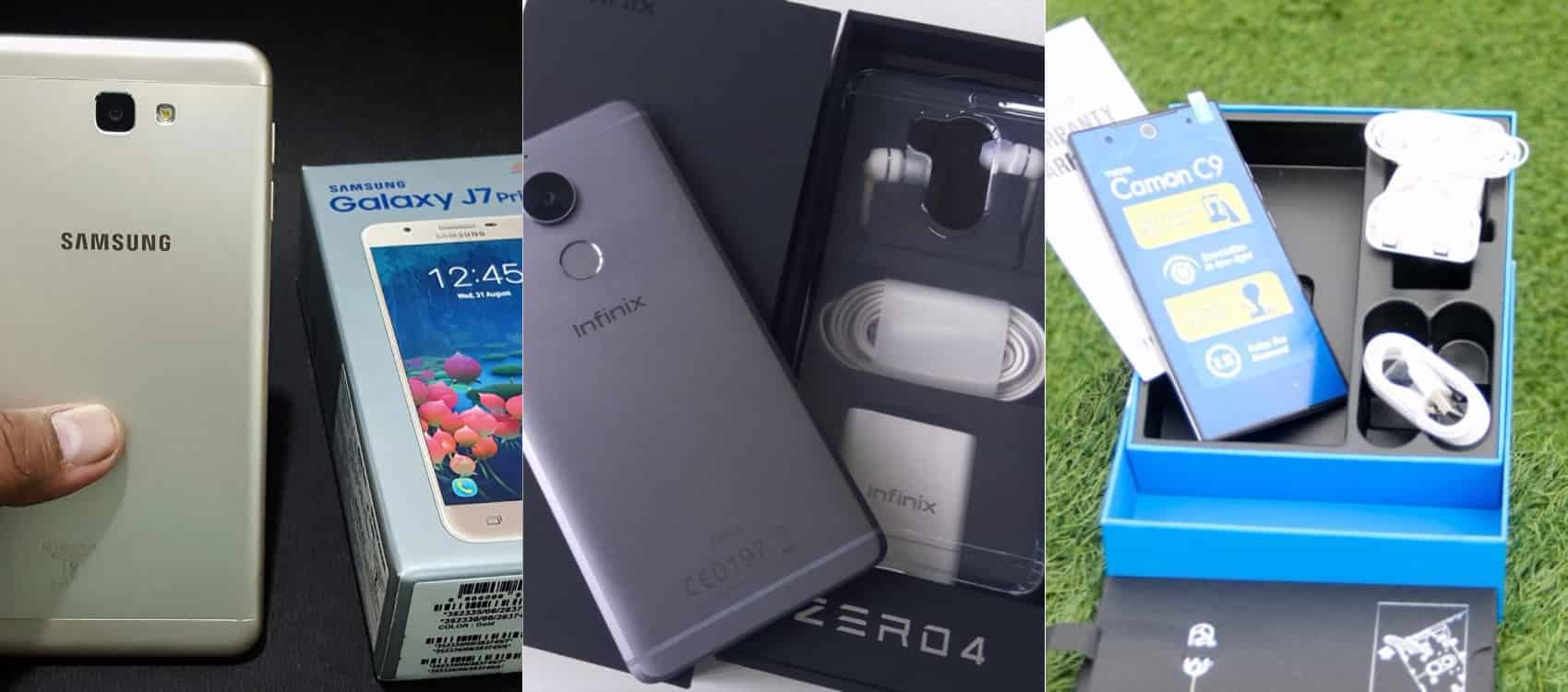
    Smartphone usage statistics from Jan-Oct 2014 shows that Android OS is winning the smartphone war in Nigeria. Infinix, Tecno and Samsung smartphones are at the very top of the food chain in Android smartphone usage among Nigerians.

    How to use and Configure Wi-Fi Hotspot in Samsung, Tecno & Infinix Smartphones

    Since most internet users [in Nigeria] access the internet from the mobile data, it makes sense for Android users to get acquainted with the inbuilt portable hotspot facility that comes pre-installed in most Android devices.

    Further Reading: 6 Premium Android phones or tablets you can purchase for  ₦9,999+ 

    Formats

    Be it on Huawei Y6 Prime 2019, Samsung Galaxy S10+, Infinix Zero 5 or any Android smartphone out there, these guide is ready to get you started with portable hotspot on your device.

    Click on any of the formats listed above to access this tutorial in that format.

    How to use and configure Wi-fi on Samsung, Teno, Infinix and other Android smart phone?

    Configure Wi-fi hotspot on Samsung Smartphone
    Configure Wi-Fi hotspot on Samsung Galaxy S8

    Time needed: 2 minutes

    Follow this step to step guide to learn how to configure Wi-Fi Hotspot on your Samsung, Tecno, Infinix and any other Android smartphone.

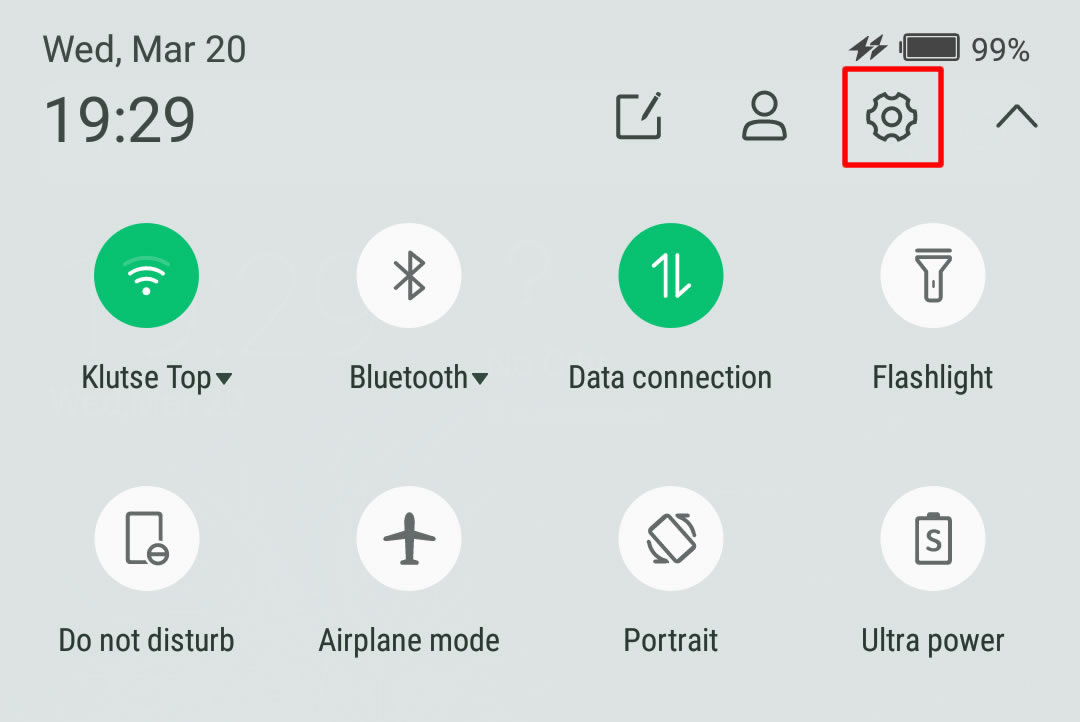
    1. Go to your Android phone’s settings

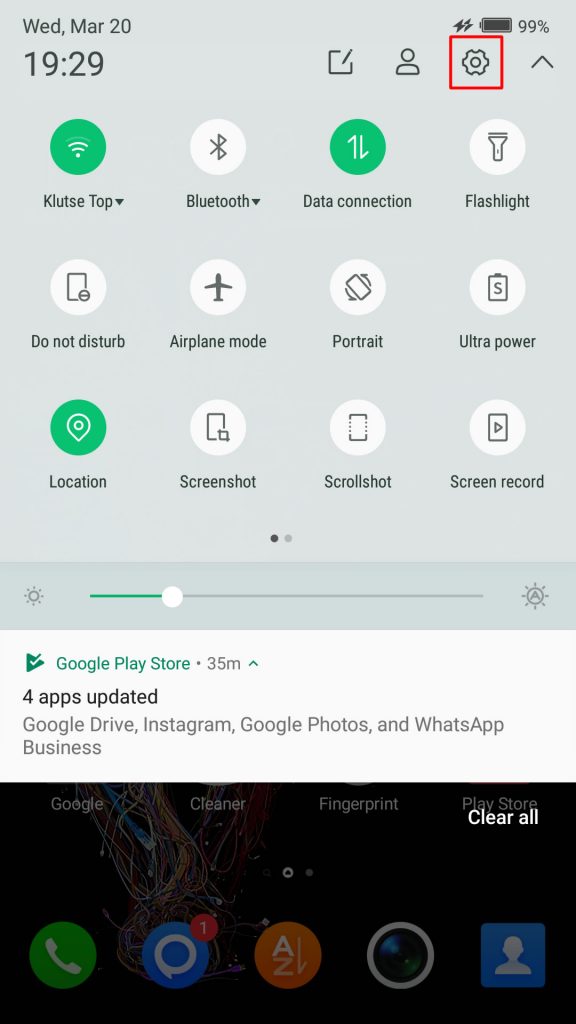
      From the Home screen, tap the Application screens icon > Find and tap Settings.

      On newer versions of Android, you can simply pull down Android control panel and click on the gear icon.

    2. Wireless & networks settings

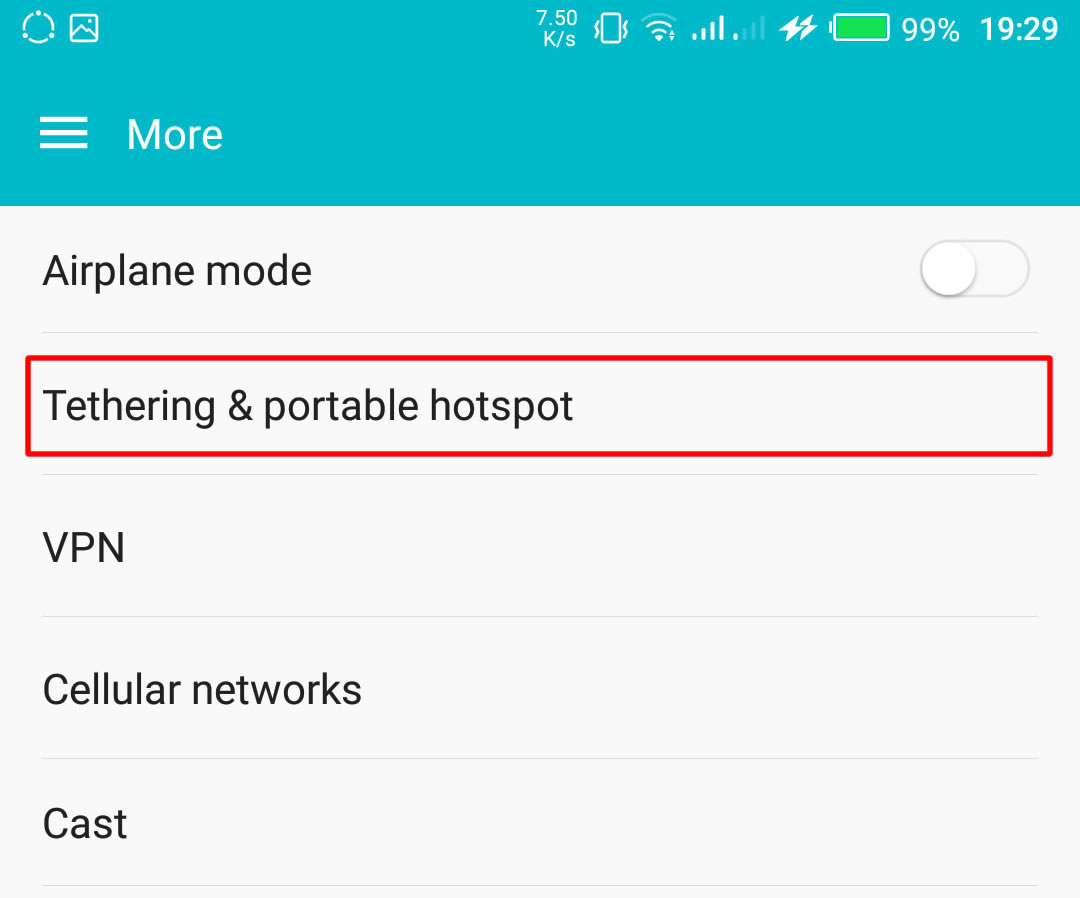
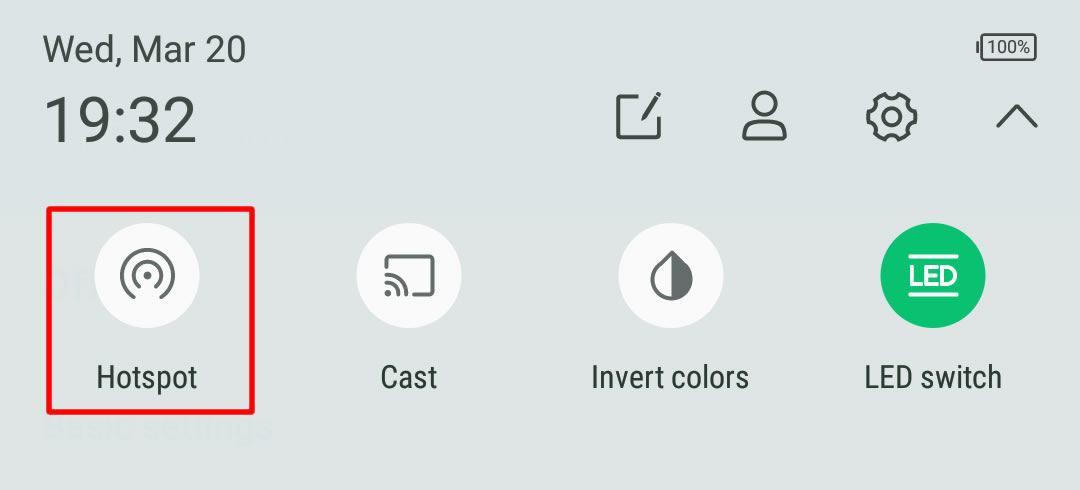
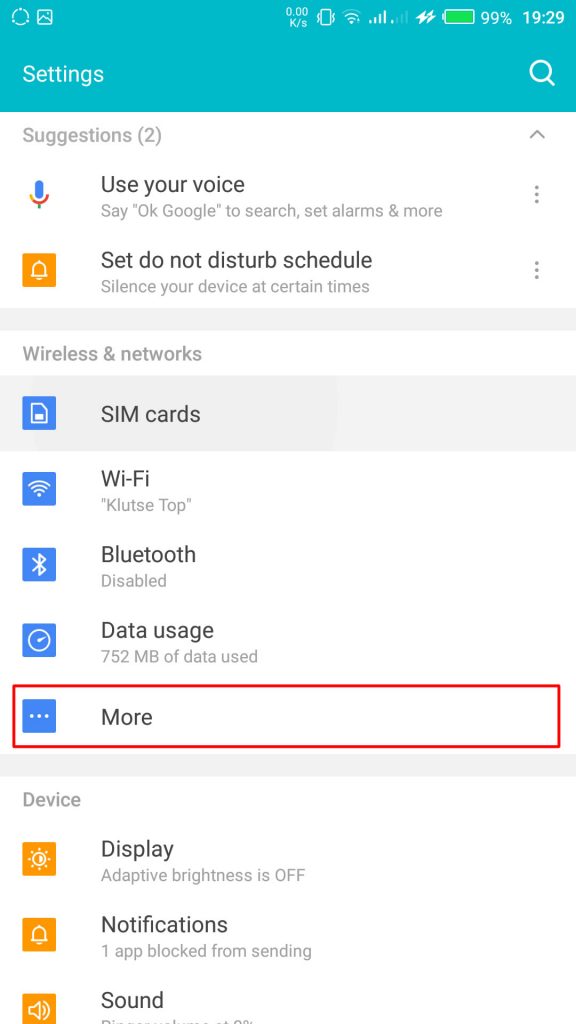
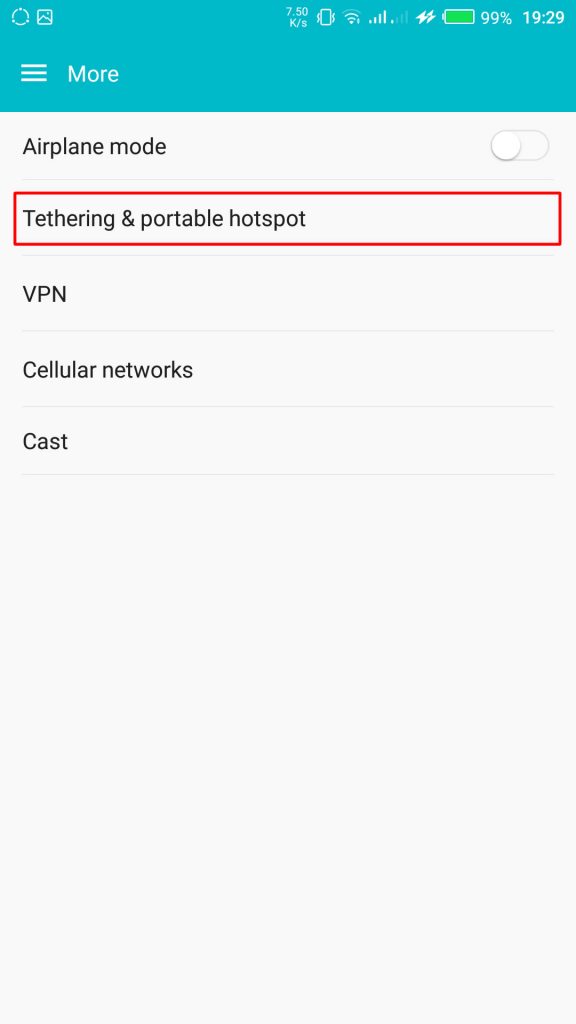
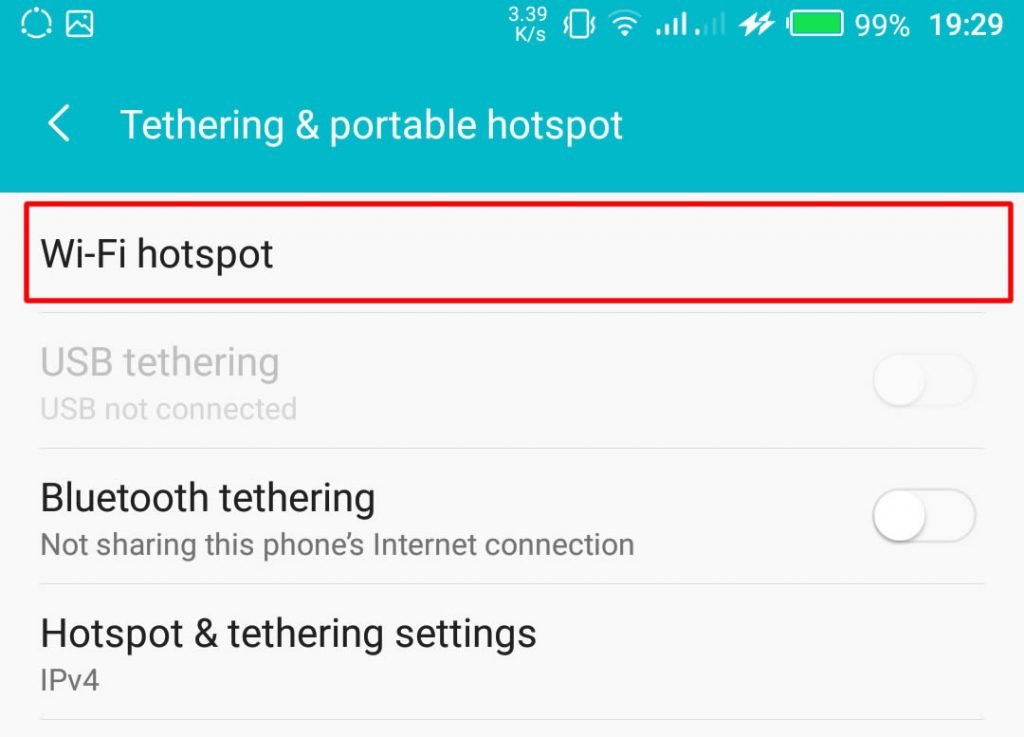
      From your Settings screen, locate Wireless & Networks block and tap Tethering & Portable Hotspot. If you can’t find Tethering & portable hotspot on your settings home screen, tap More > Tethering and portable hotspot.

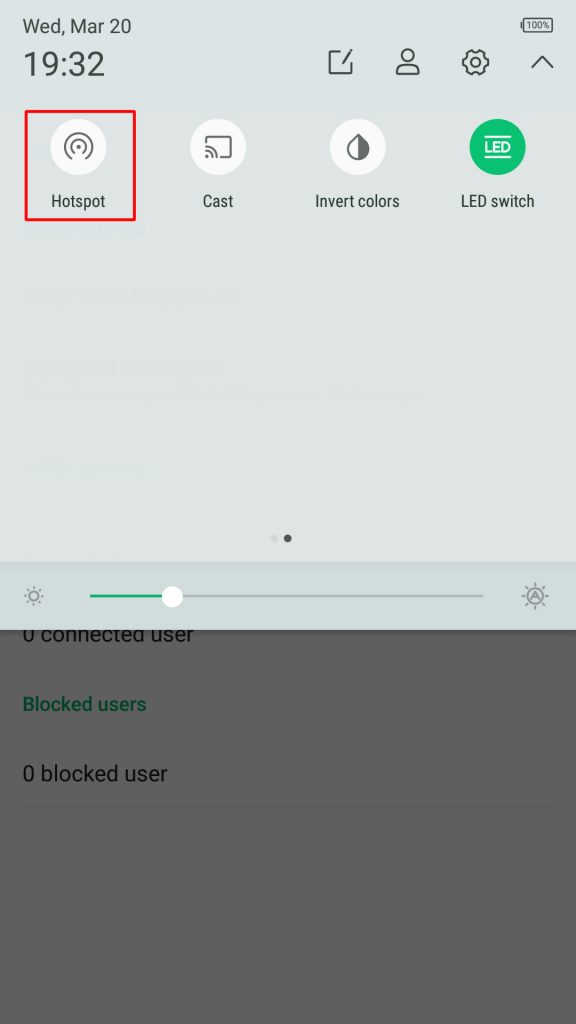
      On some version of Android, you can hold the upper screen of your Infinix smartphone or Tecno smartphone and scroll down. Turn “On” hotspot from the menu. You will see a notification requesting you to touch to configure hotspot, just touch the notification.Wireless & networks settings

    3. Configure Wi-Fi Hotspot

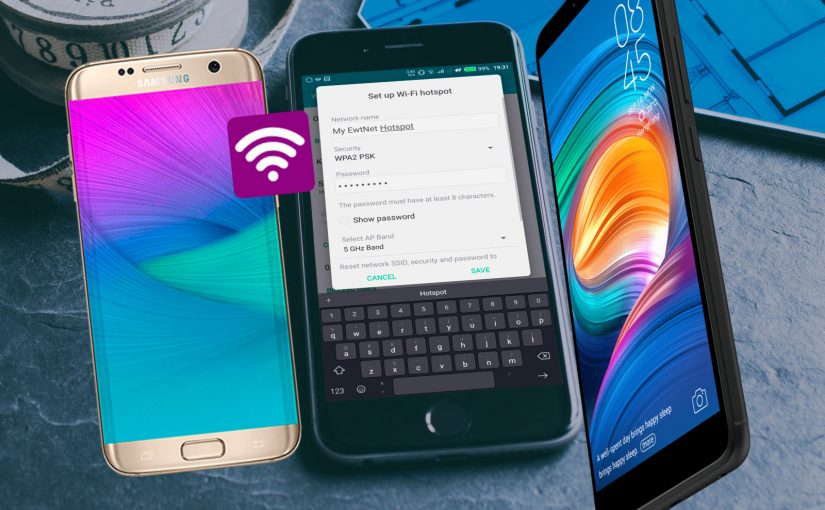
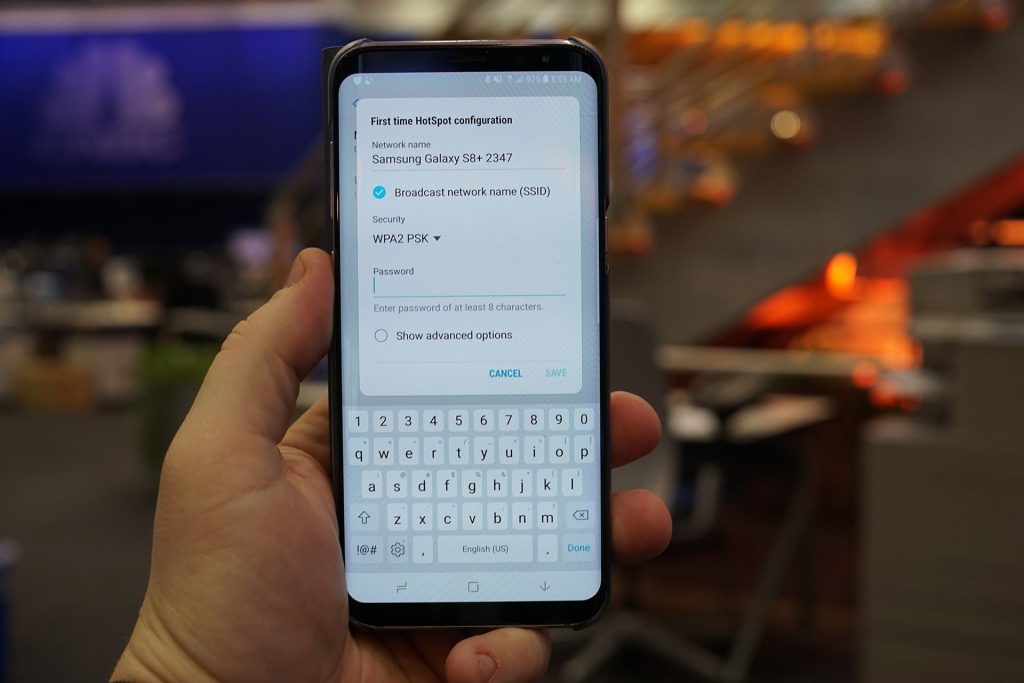
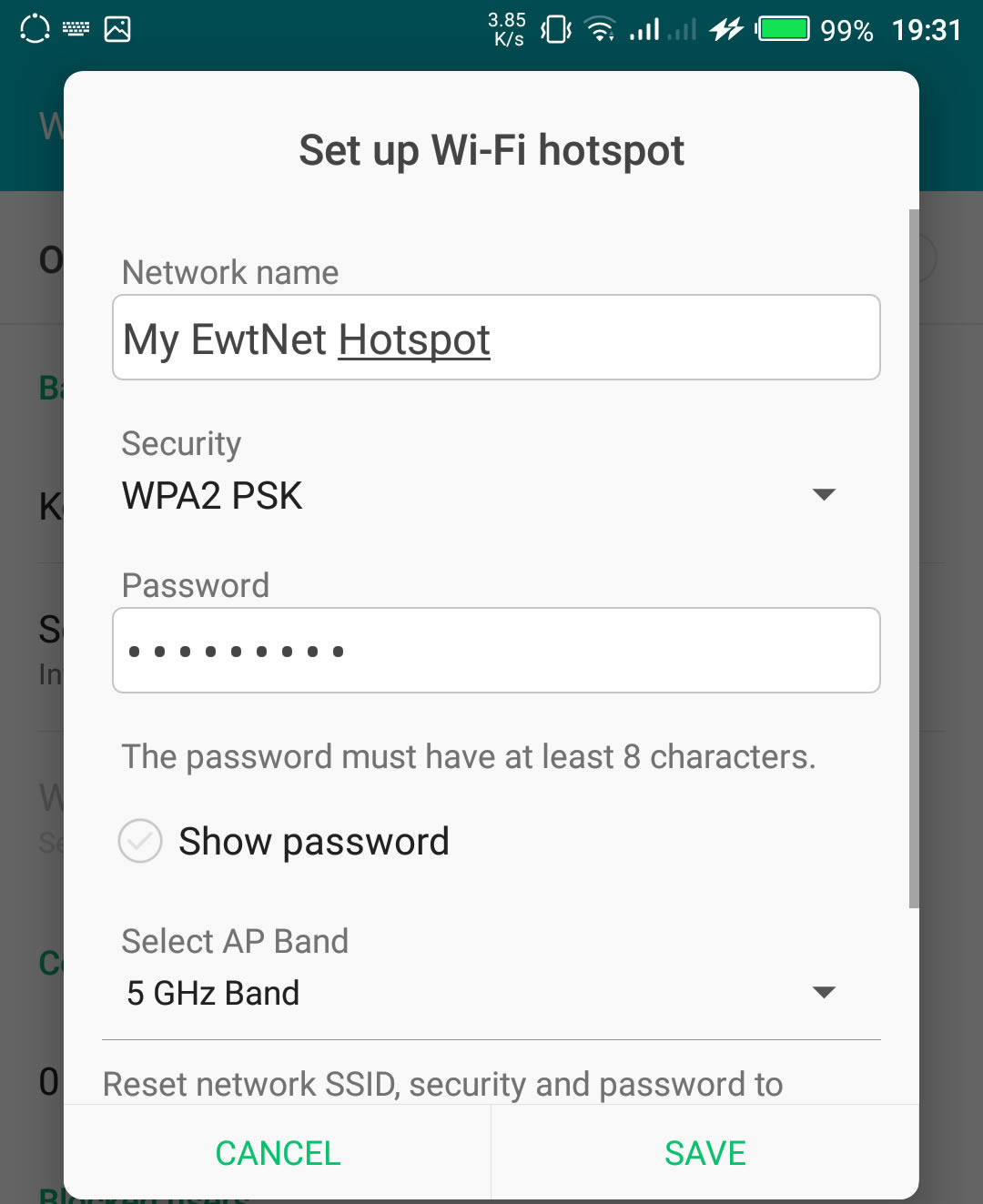
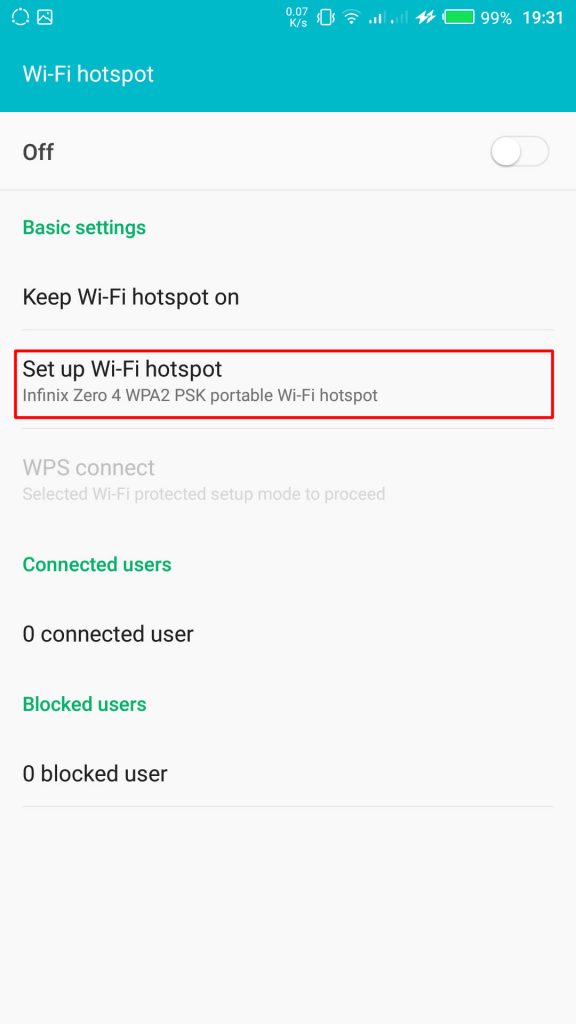
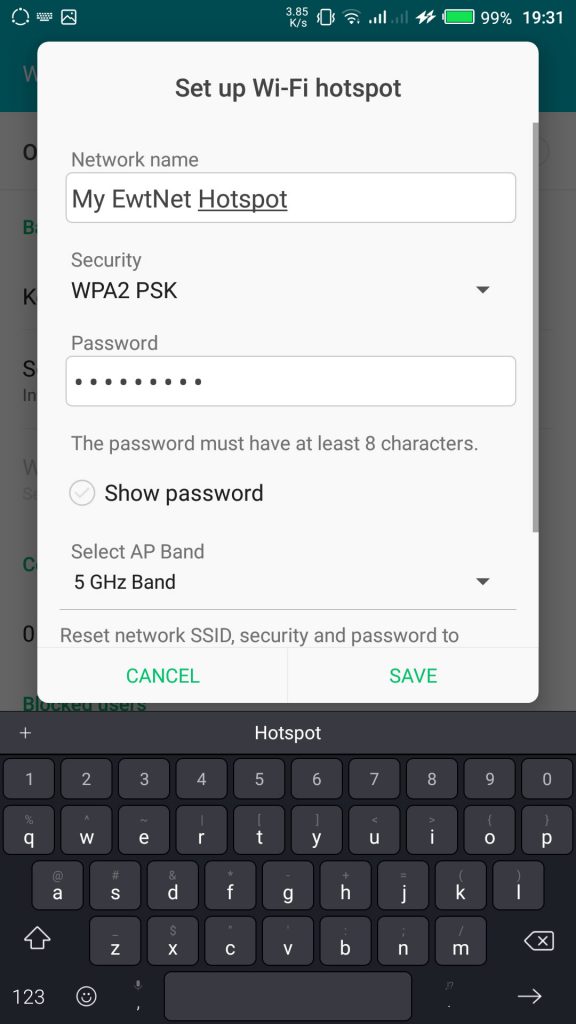
      From the Tethering & portable hotspot screen, tap Wi-Fi hotspot and select Set up Wi-Fi hotspot. Here you can set your WIFI’s SSID and security.
      SSID Wi-Fi Hotspot Setting on Infinix Smartphones

    The SSID or Network Name is the name of your Wi-Fi connection. Change the name to any name of your choice, the default name is usually “AndroidAp”
    You can change the security option, to any of your choice, such as, “Open” which allows any WI-fi enabled device to connect to your smartphone without requesting for a password. While WPA PSK and WPA2 PSK allows you to put your preferred password.

    Using Portable Wi-Fi hotspot on Android Smartphones

    Once you’re done, subscribe to an Internet plan for your smartphone, turn on your mobile data and hotspot. If you are in Qatar, Vodafone offers some of the most flexible data plans in Qatar. Glo Ghana data and Glo Nigeria data are more prominent in Ghana and Nigeria respectively.

    Turn on Wi-Fi Hotspot on Infinix Smartphones

    Your WIFI hotspot is now functional and can be used on basically every Android device that support WiFi connection including, Honor 8X, Infinix Diamond, Tecno Camon 11 Pro, Xiaomi Redmi Go, Tecno phantom and on any PC that has a WiFi adapter.

    Turn on your Infinix WLAN hotspot and your laptop WLAN and search for available networks and connect. That’s all you need to configure your WLAN Hotspot and start using your Infinix smartphone to power your laptops and smartphones WLAN, up to multiple devices simultaneously

    Make sure you are applying this common-sense Wi-Fi tips to protect your devices against Wi-Fi ‘virus’ and other malicious attacks. After you’re done, all you have to do is turn off the hotspot.

    Data plans for PC Users

    If you going to use your mobile data on your PC be ready to re-adjust your monthly data budget. Luckily, network providers in Nigeria and Ghana has improved their data offers in recent years.

    What are the best mobile data plans in Nigeria?

    In the last few years, network providers in Nigeria have undertaken a revolution in upgrading their data plans. Glo has upgraded. MTN has upgraded. And Airtel was last to arrive at the party – all featuring data plans with a bandwidth of 12GB – 48GB at giveaway prices.

    I’m in Ghana, are there affordable data plans?

    Glo Mobile Ghana offers the most affordable data in Ghana. Indeed, the tech giant has launched various revolutionary data bundles, including Glo Unlimited Data 24/7 Pack, for instance, which gives you unlimited data and voice call for a whole month.

    How do I subscribe to Vodafone Qatar internet package?

    Here is a list of Vodafone Qatar internet pack activation and deactivation codes. We have selected all the offers in place and grouped them into daily, weekly and monthly plans.

    This picture walk-through guides you on how you can set up Wi-Fi hotspot on your Android smartphone using infinix example.

    Click on the images to expand and use the arrow keys to browse.

    The same techniques will work on all Android devices. Using your mobile data on PC is obviously going to be more costly than Internet to the home bills, you may consider this data subscription plans to make an informed decision.

    Video Guide on How to Use and Configure Wi-Fi Hotspot on Android Smartphones

    The video demonstration is recorded on Infinix Zero 4 smartphone, but the same procedure is used to configure Wi-Fi hotspot on any Android device.

  • French Twitter Users can now ‘Tweet’ Money to One Another Free

    French Twitter Users can now ‘Tweet’ Money to One Another Free

    French Twitter users will be able to send money to one another with a tweet from later this week—but the payment service isn’t run by Twitter.

    S-Money, a subsidiary of France’s second largest banking group, BPCE, plans to extend its existing mobile payment service to French Twitter users with a payment card, regardless of who they bank with.

    The service will be available this week, a BPCE spokesman said Monday, though he refused to discuss details ahead of a news conference scheduled on Tuesday.

    However, in a statement about the service published early September, Jean-Yves Forel, CEO of Groupe BPCE said that this S-Money initiative can open up a whole new range of payment possibilities on social networks.

    However, a Twitter spokeswoman was quick to emphasize on Monday that this is not an official partnership between Twitter and the banking group. There are currently no plans to launch the service in other countries, as at this time it’s solely a French initiative, she added.

    Free payments via tweets

    As to how the service would work exactly, details are still scarce. French Twitter users will be able to send money with a simple Tweet and free of charge, without having to enter the beneficiary’s bank details, S-Money said on its site.

    S-Money already offers electronic wallet apps for Android and iOS devices. The apps allow users who have linked their bank accounts to the service to send money for free to friends and family who also signed up for the S-Money service.

    With that service, users’ personal banking information is stored on a secure server and never on a phone. All transactions are encrypted and require the entry of a PIN. If a phone is stolen or lost, accounts can be blocked with a phone call.

    S-Money’s Twitter service will be launched at a time banks are struggling to keep up with technology companies who increasingly tap into the online payments market.

    Twitter trying to move into payments

    Twitter itself started testing a “buy’ button for users in the U.S., offering them a way to buy products directly form their timelines. After tapping the button, users will get additional product details and be prompted to enter shipping and payment information. Once that’s entered and confirmed, order information is sent to the merchant for delivery.
    Meanwhile, Facebook is also testing a service which lets U.S. users buy retail items directly from their feeds or from a company page. The social network is also reportedly gearing up to enable mobile payments within its Messenger app.

    Whether the services will take off remains to be seen. One hurdle might be the reluctance of users to share their financial details with Facebook or Twitter out of privacy concerns. As people are already used to sharing their payment details with banks, the banking sector could have advantage as a social media payments provider.

  • Windows 10 Beta Hits 1 Million Users in Two Weeks

    Windows 10 Beta Hits 1 Million Users in Two Weeks

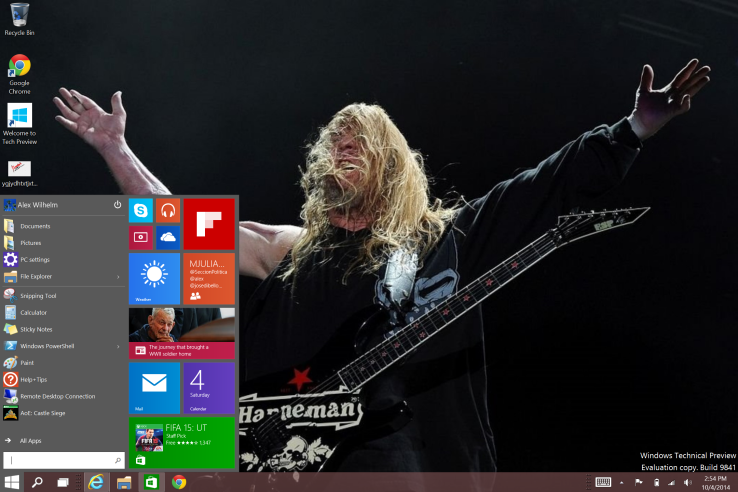
    Microsoft announced this morning that it crossed the 1 million tester mark for the technical preview of its Windows 10 operating system. I had expected a higher number would opt for the new code, given how extensively the media (guilty) covered the rollout of the nascent operating system.

    According to the company, more than 200,000 “pieces of user-initiated feedback” have reached its ears. The breakdown of builds that are run virtually and natively is about one-third and two-thirds, respectively, according to Microsoft.

    Microsoft has a long way to go with Windows 10, but with 1 million current registrants and several beta cycles yet to go, things seem to be off to a decent start. You will have to vet the strength of the million figure yourself.

    I’ve been using Windows 10 as a daily driver at home for a few days now, with a docked Surface Pro 3 hooked up to a 24-inch external screen, and an external mouse and keyboard. It’s a decent operating system in firm need of debugging, and the unshackling of its Metro alter-ego. But all things told, I am roughly as happy with it in desktop mode as I was Windows 7. And like with Windows 7, in Windows 10 I don’t use the Start Menu much. If you haven’t gone hands-on with the code, it’s worth a spin.

    How long until 2 million people are using Windows 10?

    Originally posted on Techcrunch, all rights reserved.

  • Hacked Screenshots Reveals how you can Send Money to a Friend Via Facebook Messenger

    Hacked Screenshots Reveals how you can Send Money to a Friend Via Facebook Messenger

    When Mark Zuckerberg recruited Ex-PayPal president David Marcus to head the affairs of Facebook Messenger three years ago, few understood the motive behind this move, but now it is crystal clear for everyone to see: Facebook is set to allow its users to send and receive money via its standalone Messenger.

    Mark recently hinted on the integration of a payments service into Facebook standalone messenger. Stressing that “The payments piece will be a part of what will help drive the overall success and help people share with each other and interact with businesses.”  However, he urged Wall Street not to get too foamy at the mouth because it may be awhile since “there’s so much groundwork for us to do.”

    He urged analysts and investors to revise their estimates of Facebook’s revenue if they expected this to come quickly. “To the extent that your models or anything reflect that we might be doing that, I strongly encourage you to adjust that, because we’re not going to. We’re going to take the time to do this in the way that is going to be right over multiple years” Zuckerberg concluded.

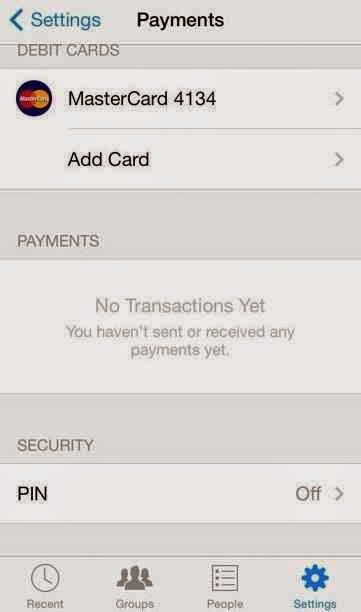
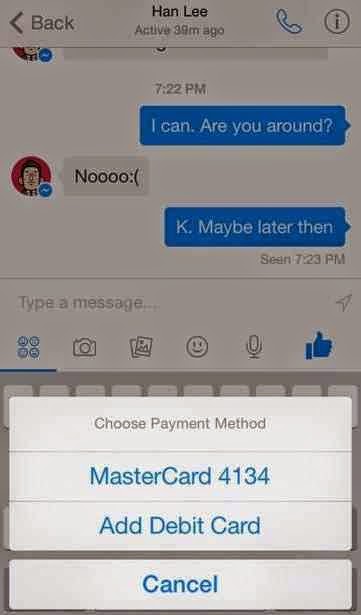
    According to screenshots and video taken using iOS app exploration developer tool Cycript by Stanford computer science student Andrew Aude, all Facebook has to do is simply turn on the feature and users will be able to send money in a message similar to how they can send a photo. Users can add a debit card in Messenger, or use one they already have on file with Facebook. An in-app pincode also exists for added security around payments.

    The presence of payments code in Messenger was first discovered by security researcherJonathan Zdziarski last month. Earlier today, Techcrunch writer Josh Constine reveals his conversation with a young computer scientist [Andrew Aude].

    Aude tells me he used Cycrypt to dig into the Messenger for iOS code on his jailbroken iPhone and turn on the payments feature to nab the screenshots and video. I contacted the company to inquire about Messenger payments. Facebook declined to comment.

    Aude played around the with feature and its code. He tells me you simply hit a button to initiate a payment, enter the amount you want to send, and send it. Facebook keeps the transaction private and doesn’t publish anything about it to the News Feed.


    EwtNet believes that Facebook has the potential to dominate both messaging and payments service globally if the Messenger Payments becomes a success.

    Images by Stanford computer science student Andrew Aude via Techrunch

  • Nigeria Dominate the World Internet Consumers Table on Its 54th Anniversary

    Nigeria Dominate the World Internet Consumers Table on Its 54th Anniversary

    According to statistics on Internet Live Stats Nigeria is dominating 2.30% share of the 2,981,011,134 (two billion nine hundred eighty-one million eleven thousand one hundred thirty-four) population of internet users in the world since January, 2014.

    Around 40% of the world population has an internet connection today. In 1995, it was less than 1%. The number of internet users has increased tenfold from 1999 to 2013. The first billion was reached in 2005. The second billion in 2010. The third billion will be reached by the end of 2014 at this rate.

    Understandably, the world most populated country China leads the chart of countries with the highest number of internet users in 2014. Reaching 29.99% i.e 641,601,070 internet users out of 2,981,011,134 world internet users.

    China is followed, though at a very wide margin by United States with 279,834,232 internet users.Which is 9.58% of the world overall internet users.

    Behind United States is the world second most populated country and the world third most populated internet users. 243,198,922 people access the internet from India which is exactly 8.33% of the total internet users in the world.

    Japan (109,252,912) and Brazil (107,822,831) follows further behind in fourth and fifth place respectively, both having 3.74% and 3.69% population share of the world internet users.

    The sixth and seventh place is occupied by Russia (84,437,793) and Germany (71,727,551) respectively, collecting 2.89%  and 2.46% shares of the total population count.

    Nigeria is posed on eight position in the global internet population ranking table. The African giants with over 178,516,904 human population, seventh most populated country in the world has improved its share of the global internet population by 16% since 2013. Nigeria currently has a total  of 67,101,452 internet users, constituting 2.30% of the total global internet population.
    Nigeria and the Egypt are the only African countries in the top 20 global internet consumers ranking table. The rest of other countries in top 20 include:

    • 9. United Kingdom 57,075,826 (1.95%)
    • 10. France 55,429,382 (1.90%)
    • 11. Mexico 50,923,060 (1.74%)
    • 12. South Korea 45,314,248 (1.55%)
    • 13. Indonesia 42,258,824 (1.45%)
    • 14. Egypt 40,311,562 (1.38%)
    • 15. Viet Nam 39,772,424 (1.36%)
    • 16. Philippines 39,470,845 (1.35%)
    • 17. Italy 36,593,969 (1.25%)
    • 18. Turkey 35,358,888 (1.21%)
    • 19. Spain 35,010,273 (1.20%)
    • 20. Canada 33,000,381 (1.13%)
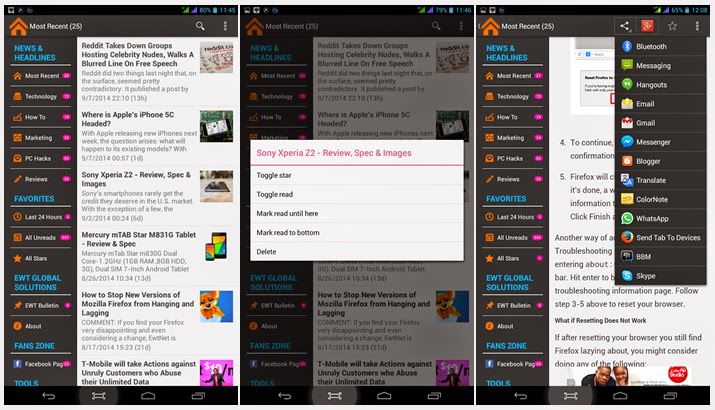
  • EWT GS 1.0 Android App is out – Follow EwtNet Updates Offline

    EWT GS 1.0 Android App is out – Follow EwtNet Updates Offline

    In response to readers feedback and recommendations EWT Global Solutions has released a new application for Android users. 

    Yesterday, EWT Global Solutions announced the release of its new Android app on their official blog.

    Today, we are officially announcing the release of EWT GS 1.0. The app is targeted to syndicate contents from our websites when they are published and make them available to be read offline.

    We understand the need of you to be able to follow our updates on your mobile devices and the high cost of internet or slow network in most countries, hence, the production of this application. This is new with us and we cordially invite you to try it with us.
     The application is a complete upgrade of it’s previous application (0.1 Beta) and can be downloaded from the Google Play Store.

  • Apple Fixes Zapping Cellular Receception on iPhone 6 and 6 Plus devices

    Apple Fixes Zapping Cellular Receception on iPhone 6 and 6 Plus devices

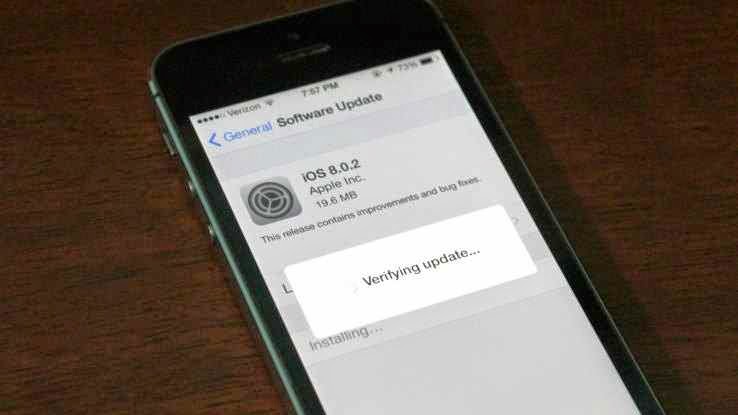
    Apple has moved quickly to release iOS 8.0.2, the update that fixes iOS 8.0.1’s problem of zapping cellular reception on iPhone 6 and 6 Plus devices. It also includes all the fixes listed in iOS 8.0.1 originally, including a fix for the HealthKit bug that held up release of compatible Health apps in iOS 8.

    It also addresses a problem whereby third-party keyboards wouldn’t stick when activated in apps, meaning it would default back to Apple’s stock keyboard. Apple released the following statement alongside the update:

    iOS 8.0.2 is now available for users, it fixes an issue that affected iPhone 6 and iPhone 6 Plus users who downloaded iOS 8.0.1, and includes improvements and bug fixes originally in iOS 8.0.1. We apologize for inconveniencing the iPhone 6 and iPhone 6 Plus users who were impacted by the bug in iOS 8.0.1.

    Apple says that less than 40,000 iPhone and iPhone 6 Plus devices were affected by the bad release, which was up for just over an hour until the company pulled it to investigate.

    To get the update, simply plug your phone in and check for updates in iTunes or navigate to Settings>General and tap Software Update.

  • Spirit Run Android Game Review – Translate to the Spirit Realm

    Spirit Run Android Game Review – Translate to the Spirit Realm

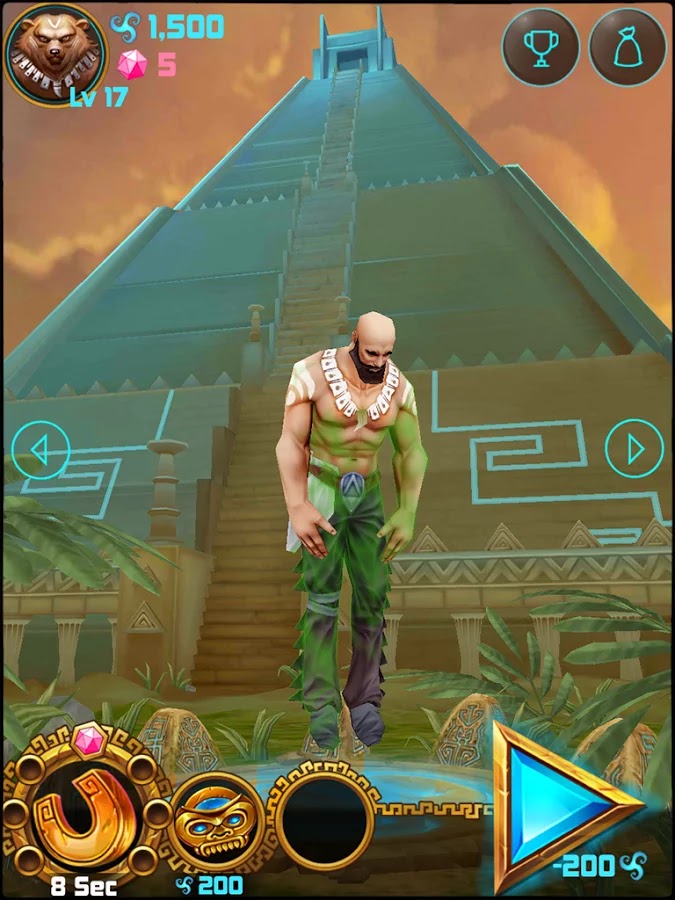
    Temple Run might have let you gone through series of harrows, chased by an angry monstrous monkey and overcoming deadly obstacles. Well, the saying that you can be anything is true, at least on your Android device: Spirit Run Game will let you go through ancient rituals, transform your soul into an animal’s and help your brood defend the Aztec Temple from apocalypse!

    As the quest to protect the Acient Aztec Temple becomes paramount, level-up your Spirit and run in search of soul energy balance. Choose from five characters immensely, each. gifted to transform into Wolf, Fox, Bear, Panther, and Panda respectively.

    Spirit Run Android game was produced by RetroStyle Games. It was first published on the 6th of September and has since being installed by 10,000 – 50,000 Android users. As it goes “The best things in life are free” Spirit Run game might turn out to be one of the best game on your mobile device.

    Content Rating:

    Everyone

    Our Rating: 3.5

    Requires Android:

    2.3 and up

    Game Producer:

    RetroStyle Games Spirit Run is a free Android game with Awesome graphics and well made with a good mix of strategy action and RPG.

    Pros:

    • Free games with NO Ads

    Cons:

    • You may experience a slow start but it gets better

    Download Now

  • Windows 9 Leak Reveals a more Traditional Windows Start Menu

    Windows 9 Leak Reveals a more Traditional Windows Start Menu

    A batch of leaked screenshots from the next version of Windows reveals just how far Microsoft will go to win back desktop users.

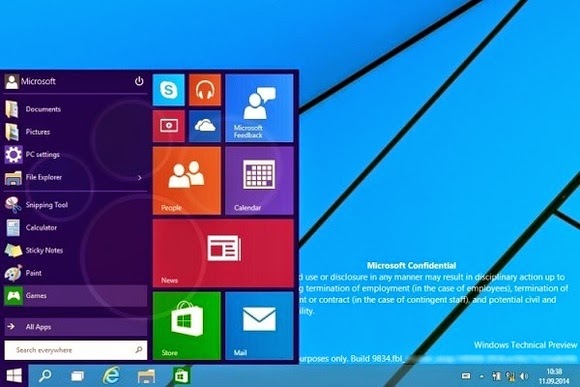
    The update, codenamed Threshold and possibly called Windows 9 or just plain Windows, takes some features from Windows 8 and grafts them onto the classic desktop. While we’ve known for some time that Windows 9 will have a pop-up Start menu and the ability to run modern apps in windowed mode, the new screenshots from Computer Base and WinFuture.de give even greater detail on how things will work.

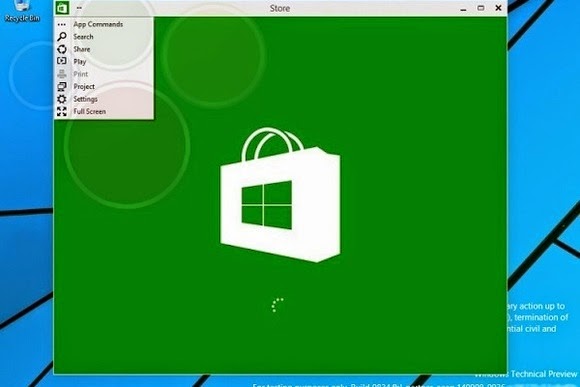
    When running in windowed mode, Windows Store apps will get a button in the top-left corner. Clicking the button brings up a list of functions that previously appeared in the Charms bar, including Search, Share, Play, Project and Settings. This menu lets users switch the app to full screen mode as well.

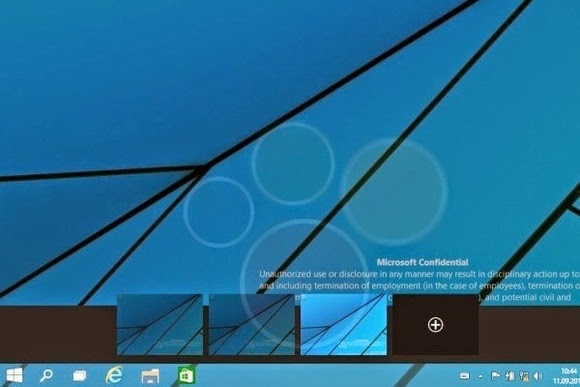
    Microsoft is also adding a few new buttons to the desktop taskbar. A search button sits immediately to the right of the Start button, followed by a button for switching between multiple desktops. The latter feature, possibly called “virtual desktops,” will let users switch between several sets of desktop apps and layouts in nod to Ubuntu Linux’s longstanding “Workspaces.”

    Near the right side of the taskbar, users will find a new notifications button, with a pop-up menu that will presumably show messages from Windows Store apps.

    The screenshots don’t reveal any other major features, but they do give away a few more minor details. Despite rumors that the Charms bar is dead, the screenshots show that users can still bring up Charms by pointing to the upper-right corner, or bring up a recent apps list by pointing to the upper-left corner. Those options and others will be available through Taskbar and Start Menu Properties.

    Of course, all of these details are subject to change as Microsoft hasn’t even released a public beta yet. The leaks likely come from Microsoft partners, who according to Neowin started receiving Windows builds a few weeks ago. A public “Technical Preview” is expected to arrive later this month or early next month.

    [Via The Verge]