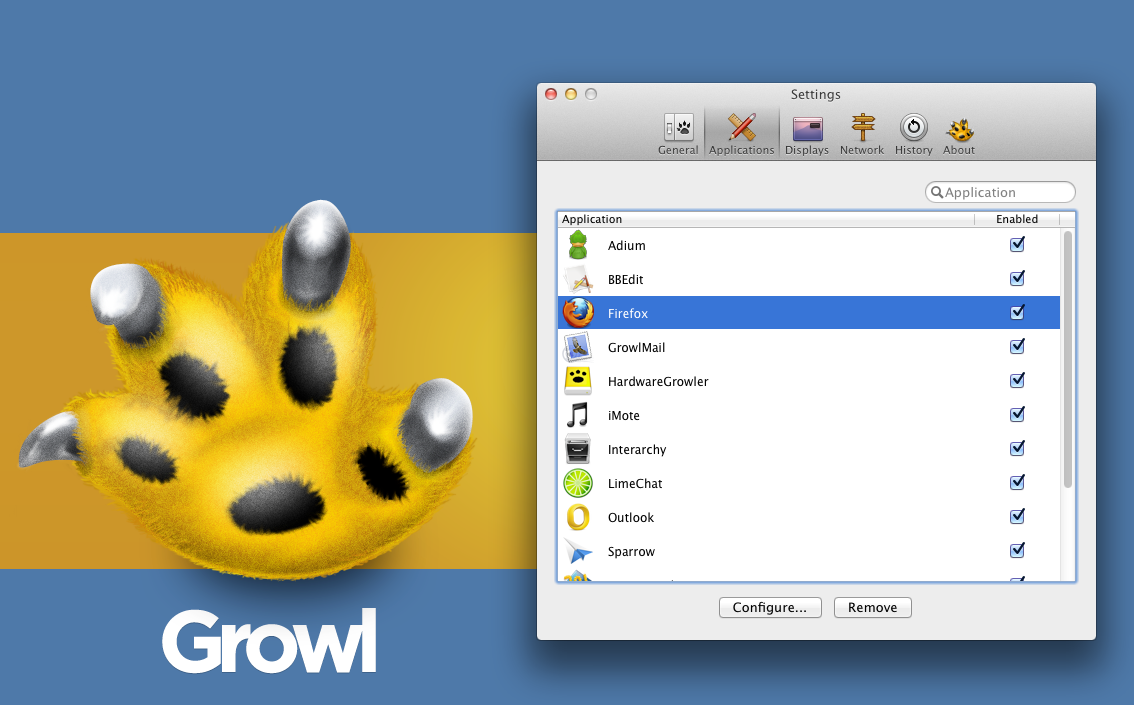
You might install Growl for design purposes or simply by accident. There are numerous applications that provide support to it. There are even some applications that are available along with Growl. It is one of the few applications that many will consider to be usable with OS X only. Growl is perhaps the coolest notification applications for OS X. The application is known to aid many in getting alerts, whether they’re new tweets, software update or new emails. Developers have also considered Growl as a staple application because its API’s are usable by developers for the integration of alerts in their individual applications. Growl is not only OS X’s primary notification system, it is a well thought out design available with different animations and themes. It comes with its own themes preset, which you can obtain after downloading the application from your nearest Mac App Store. You can simply visit the Growl website to get a hold of the desired themes.
There are many styles of themes to opt from, including AirMail Classic, Basics 1.3, Portal Growl Style and more. Growl is a cool application because you can customize the notification type you want to be displayed. If you want to customize it further, you can set styles on the screen. Growl was set to get updated by its developers. It is a 3rd party notification system that features Boxcar and Prowl in addition to an enhancement of display and action displays via visual ones.
This update is a major one because of the support provided to the Notification Center in Mountain Lion. Its functionality and operation is a straightforward one- users can keep on using Growl and consolidating the present visual displays on Apple’s Notification Center. Users can also open Preferences, click on General, and set the OS X notifications to on. By doing so, you will become capable of adding Growl to your apps listed, which is under the System Preferences’ Notifications. It might also be effective to make use of Growl as a major bridge between the Notification Center and the 3rd party apps.
Growl 2.0 also comes with an additional element where you can separately handle the action and visual displays.
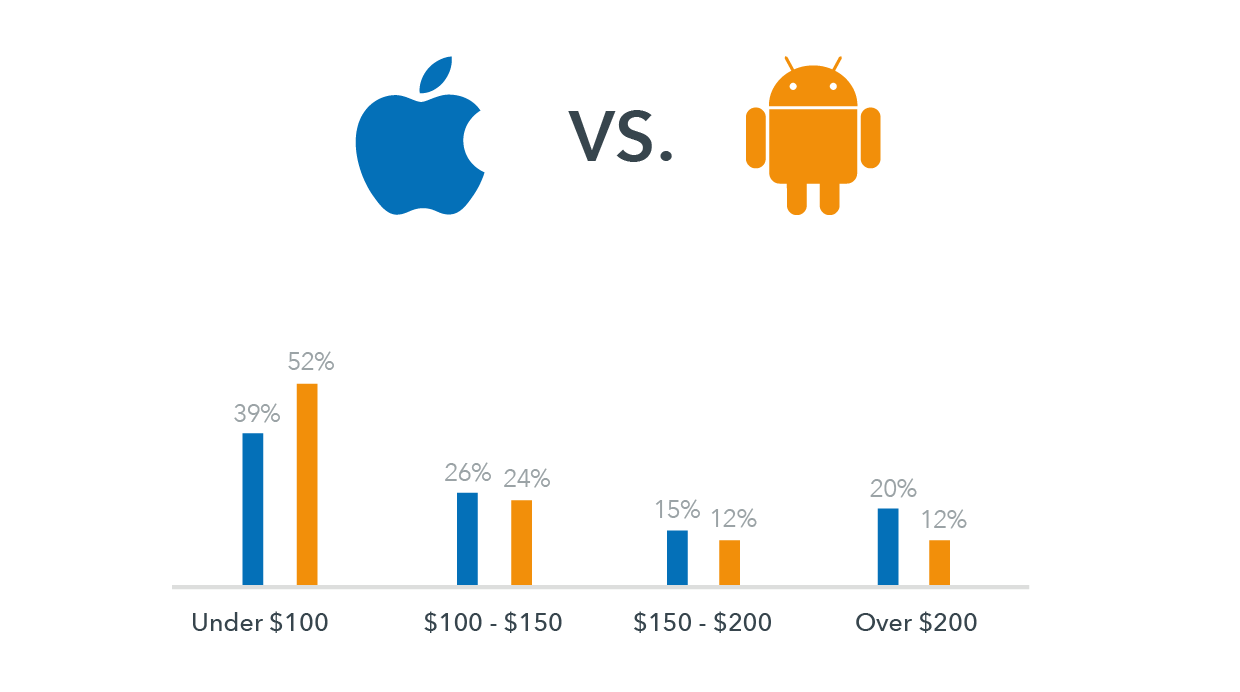
When given a choice between Android and Apple, we start to think and scratch our head. It is difficult to choose between the two since both operating systems offer some of the best and effective smartphone features currently available. As a result, both have a strong and loyal user base. Most of the smartphone programs and apps are compatible on apple and android platforms and users can gain accessibility to vital online projects by using either iOS or Android.
Online businesses and their operations, especially on a mobile platform, demand the use of a smartphone platform, which is effective and capable of meeting requirements as well as being compatible with the nature of business. You need to make use of a platform that best complements and meets your needs because you will be depending on mobile phones for your business appointments, tasks, deals, etc.
So, if you are fretting over the decision of choosing between Android and Apple then take these points into heed first:
Determine the type of apps you make use of most in your business. When accessing online features and programs through mobile phones or other handheld devices, dependency on efficiency is high. Today, you will come across many apps that are made and designed especially for businesses. You can download and install such apps easily. If you are looking for highly innovative apps, an Android platform would be the best option.
Stability of OS is another point to lookout for. Apple is the best option for you if you are looking to use a smartphone on a long-term basis or one that keeps up with your fast paced online business and lifestyle. Products from Apple are designed and crafted to become compatible even amidst changes and upgrades in software. Android phones and mobile devices are not as quick moving.
If you have a business that is highly dependent on merchant services, such as e-commerce or payment transactions, then making use of Apple would be the best option to choose. You will find specific apps that are merchant-related and designed and created for iOS mobile devices that enable users to process different payments through debit or credit cards and make payments without any hassle.
Using smartphones and the latest handheld devices for business purposes are also usable for personal purposes. Apps, like music, entertainment, and gaming are best found under Android.
Let’s get to the bottom line then. If you are looking for a platform strictly to house your business needs, then the platform of Apple overpowers Android. The sole reason behind this revelation is that doing online business is not only about innovation, but also about prolonged stability. The platform of android does offer features for business purposes but one has to be selective about the apps and features from Android. Remember, business which is done within a stabilized mobile framework flourishes more than a business that is not based on such a platform – making Apple the winner, hands down!
In computing the problems can occur at any time and in any part of the computer, and without any doubt we want to fix it as soon as possible. There are two types of problems Hardware and Software. Hardware problems are uncommon because most of the users are using the branded things of good quality but in case you are facing any a hardware problem then it I might take some time. The Software problem is very common in this field which can be solved by either paying for it for free. If you’re unknown to it then you may in trouble and have to pay sometime. Now if you know your friend or any other person how can fix it and can be solved without any pay then here is the one of the best , easy and free software, which needs just an internet connection for show its effect. There are many other software are available but from my personal point of view and uses the best is as follows.
TeamViewer : How To Remote Access Any Computer
TeamViewer is a computer software package for remote control, desktop sharing, and file transfer between computers. Remote Control stands for being a computer to which a user does not have physical access, but which he or she can access or manipulate via some kind of network. It offers the control of the one computer from the other computer without any direct connection, with which you can do anything at the other side. Remote control option comes in many operating systems as default such as Windows Server 2k, 2k3 and the other versions of it. For a common and any operating system TeamViewer is the best. It’s also designed for Windows, Mac OS X, Linux, Ios, Android with Multi-Language.
You can get full access of TeamViewer with just a few clicks and its very easy.
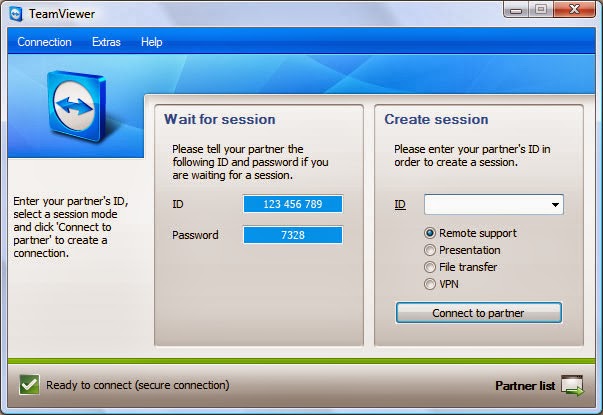
1. Download TeamViewer from here and install it on your system.
2. After installation simple opens it from the Programs List or the for the Desktop Shortcut.
3. It provides a unique ID shown as “YOUR ID” and a Password (In decimal form)
{One more thing about TeamViewer is that it works only when the system have it, which means if you want to use it you have to install it on the other system as well and make it as your computer as a server and other as its client and vice-versa.}
4. Now the Unique ID and Password is also from the same side fill at the “PARTNER ID” right side in the opened window and click “CONNECT THE PARTNER”.
TeamViewer is totally free for the home use or non-commercial use. It provides many advanced options. One notable thing, if you make a restart your system it changes the password for the same client system every time. So when you reconnect with a system keep in mind this thing.
The rise of mobile-payment apps is due in part to the rise of consumer demand for payment options on mobile phones. This is the main reason behind the increase in using mobile payment options worldwide. In the US alone more than 50% have accepted making payments through mobile phones for services and products. Consumers today are more sensitive and aware about the worth of money. They are ready to make investments on energy and time in order to find the right service or product. However, consumers prefer institutions for providing mobile payment means through wallets and apps in order to gain the confidence and trust in mobile payment security.
At least 60% of consumers have accepted that they will become more willing to accept mobile payment apps if certain financial institutions offered them the right resources. Mobile payment apps have increased worldwide because the majority of payment resources are realizing the importance of smartphones and features that are being made. They also understand how consumers are becoming comfortable with the entire process of mobile payments today more than ever before.
With the mass use of tablets and smartphones, the entire world is reaching the phase where everything will become mobile. We are moving away from card based and fixed point transactions and opting for mobile resources. Mobile payments examine and analyze the mobile payment state and how they will match up with the card readers. Credit card companies, traditional banks, card processors and similar institutions are seeing mobile payments as a tough competition and threat.
The majority of brands are switching to the mobile payment mode. For example, Starbucks is switching its debit and credit card processing system to Square. Another recent development is that mobile payments are becoming a part of the huge mobile commerce market and it is bound to explode soon.
Android phone users are engaging and using mobile payment apps and the trend has grown to 8%, a 35% increase from last year. Mobile wallet and payment solutions are at the peak of its development. Consumers are using it to make basic payments, from bill payments and account management to moving money. They are also using their phones to make payments of services and goods of limited value, including the purchasing of movie tickets or getting coffee.
Success and rise in mobile payment apps completely depends on the changing trend in consumer behavior and their shifting reliance and dependence on the use of mobile payment apps and wallets.
Technology plays a very important role in the expansion of a business. Business technology such as social networks, virtual office technology as well as video conferencing helps in removing boundaries at work place that limit business expansion. Technology in business helps in targeting a wider customer base that help an organization grow to higher levels. Therefore, choosing, deploying and managing the information technology which is necessary for business expansion is important. This article provides information on the role of technology in business expansion as explained in the following paragraphs;
Diversification
The use of technology serves the purpose of opening doors to different types of people globally in the work place together with different perspectives to projects. Diversification is an essential function that a business must have to be able to compete in the global market. Through diversification a business will expand in different ways including;
Opening opportunities for the business to expand and operate globally.
Bringing people from different countries and cultures – this offers a different perspective to business projects and environment. It gives a wide variety of diverse, creative as well as unique views that helps in growth and expansion of the business.
A new approach of business gives the institution a competitive edge which is beneficial for growth and increased sales.
Efficiency in Communication
Effective communication is a basic necessity to achieve business expansion. Technology works to improve communication in the workplace. Business expansion is achieved through;
Interactive communication among workers in attending to clients’ needs through phone calls
Workers are able to use electronic mails instantly to reply and sell business products without interrupting the recipient
Improved communication with business partners using multiple channels of communications is an advantage for the business. This is an assurance that a business will expand at the end.
Information Storage
Safety and accessibility of a company’s information is important. The prospects generated and their use for the company needs to be stored safely and should be accessible to people who need it. This information will be used by;
Workers in the office as reference material to sell company’s products
Sales people use this information to teach new and existing clients about the business and its products
Other business executives need to use this information even outside regular business hours
Accessibility of business information is very important when it comes to selling its products. So, technology serves a good purpose to ensure this information is safe for future use. Deploying IT systems plays an important role in expanding companies.
Mobility
The use of technology in a business allows more movement of people. Business partners do not need to meet in one room to discuss essential matters concerning the business. The use of video conferencing has made the operation of business easier in the following ways;
It has enabled businesses all over the world to interact with one another.
Businesses save time, expenses and space
People can set up virtual meetings and distribute data without the need to be in the same room.
With technology businesses can establish a global presence at a fraction of the cost.
Andrea Jayson
Author Biography:
Andrea is a Blogger and Write from UK. She loves to write articles on various categories like Finance, Technology, Travel and Health. As If not she is doing a research work on ukba.
Automatic, the renown owners of WordPress.com have taken a great step to improve blogging on WordPress.com by acquiring Cloudup.
Cloudup is a fast, dead-simple way to share and view files on any platform (Without The Folders). In today’s world of email, social networks, SMS, chat applications and cloud services, there are plenty of ways to share share a file, folder, photo or video. And as intelligent devices and cloud computing infrastructure proliferate, and processing power and capacity improve, we expect file transfer and sharing to be speedy — and simple. Everything is about “real time” and accessibility these days (not that we’re complaining, but thanks to Twitter). Yet, file-sharing still isn’t quite there. Even with all the options — whether it be the Skypes, Facebooks, Google Drives, WeTransfers and YouSendIts of the world or the Dropboxes, etc. — We’ve still got one eye out for a better way. (Here’s xkcd putting a fine point on it.) The file sharing service to end all file sharing services.
Dropbox has gotten the closest, gobbling up a ton of mindshare as a result, but its layout and presentation is more storage service than a simple sharing tool. In other words, you may store your photos there, but it’s probably not where you’ll go if you want to show them off. On the June 21st, 2013, CloudUp became the latest to join a younger group of services that are pushing the conversation forward when it comes to speed and simplicity — and nibbling at the heels of the incumbents.
What’s cool about CloudUp (and distinguishes it from most apps out there) is that it focuses on converting the design of file transfer from one that makes it clear that “THIS PRODUCT IS JUST A UTILITY” to one that’s elegant and minimalist, Jony Ive-style. But the minimalism isn’t there for the sake of itself (sorry hipsters), it’s meant to bring more of the focus to consumption — to make the content the focus, not the app itself.
“Today we’re delighted to announce we’re acquiring Cloudup, a company that’s as fanatical about these core experiences as we are. Cloudup‘s built some fantastic technology that we can’t wait for you to try out.”
Not only will this new service improve the quality of bloggers on WordPress.com, Automatic is set to spread their tentacles accross other services owned by the company. This means that you can as well use this service in your self-hosted wordpress blog (WordPress.org) as long as you are using the jetpack plugin.
Android spy apps allow one to point out the location of target phone with all the details. You can find your lost or stolen android phone by installing one of the blow GPS apps. The difference in tracking lies in the fact that the Android phone is located by making use of the Wi-Fi and other satellite connections, even when GPS has been turned off. Yet again, the price of installation of this package depends on the time period for which the user wants to spy on the other person.
1. Mobistealth
Mobistealth’s spy app offers different packages for its users, ranging from the most basic spying features to the most detailed ones. Be it phone calls and text messages on cell phones or tracking for Android, its spy app has managed to fulfill all the requirements of its customers.
As for the tracking features for the android, mobistealth’s spy app can do this job. The package which is known as the Android spy Lite allows one to know where the person who is being subjected to spying is at. This package uses the GPS system for tracking. It allows the user to know where his or her target person is at any point in time, or where he or she was and for how long.. This package is available for installation at different prices, depending on the period of use. If someone wishes to use this package for the basic tracking details for 3 months, he or she can buy this package for $49.99 USD, meanwhile those who plan on continuing the use for 6 months and 12 months have to pay $69.99 USD and $99.99 USD respectively.
2. Mobile-Spy
This is not all. Mobile-spy has introduced new package with which one can track the location of the person in whose phone the app is downloaded with more efficiency. The package known as the Android spy Advance which comes with a feature which can track the location of the Android without GPS. This is useful when the target people decide to turn off the GPS of their Android phone. It is compatible with almost all of android phones. The price is under $300 USD.
3. Flexispy
Another spy app is Flexispy app which also comes with different affordable packages. The price of Flexispy PRO is different than that of Android Spy Lite because of the difference in the features. One can install to monitor target phone’s activities without letting know target user. All the activities can be viewed on an online which is provides you after downloading this app. The price of Flexi-shield package is $39 (one time) as mentioned on its website.
Recently recognized as the 10th fastest growing company in the IT sector by Inc. Magazine, Arvixe has gradually made its name in the web development world.
Notably, the Arvixe Web Hosting Company has been the most recommended hosts, offering reliable but affordable hosting plan for Oxwall and WordPress hosting. It is therefore no surprise at the number of contacts I receive everyday asking for guides on how to setup their Arvixe hosting account.
Some Unique Features of Arvixe
Arvixe is largely popular with WordPress users partly because it fully adheres to all WordPress hosting system requirements (basically the same story with every other cms out there). Also the compatibility issues with Joomla 3.0 has been fixed as it is now fully compatible with Joomla 3.0!
The prices are quite affordable, here at EWT we have rounded up a few coupon codes that will enable you to purchase cheap hosting services from Arvixe (as low as $0.01 for the first month and 20% discount for every purchase) you may check it out at the Arvixe coupon page.
Less I forget, it is unlimited data transfer, 99% uptime, unlimited disk space, 1 free domain name for life, you know them right? Without wasting much time lets go down to the main business:
Getting Started
The moment you click here should take you to the Arvixe landing page. Kindly follow the steps below to setup your hosting account.
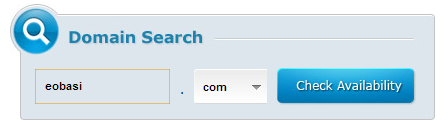
Domain Search: On the top-right hand side of your screen, you will see a box label ‘Domain Search’. This is where you look up domain names. Kindly type a domain name (e.g. www.yourwebsitereg) into the box and select a TLD (e.g. .com, .net, .org etc) from the dropdown just beside the input box. Now click on the ‘Check Availability’ button. Please Note that the same method is applicable for both new domain registration and domain name transfer. The next page contains a list of TLD available for registration in regards to your search. If a domain name is available for registration, a button is placed just under it, you can simply click on this button to register the domain name. A button is used to denote that a TLD is neither available for new registration or for domain transfer.
Domain Transfer: A button is placed below a TLD to signify that the domain name is not available for new registration but can be transferred to the Arvixe hosting account. You can also use this option if you are trying to transfer your domain name from a different domain name provider to Arvixe (Remember that Arvixe allows you to register 1 free domain name for life), so it’s quite a tempting offer for everyone.
Now when you are done by selecting the options that fits your motives, you can proceed to the billing center by clicking on the next button at the top-right of the screen.
Fill the required information on the billing form and click the next button.
Select your hosting plan, eg. Personal Class, Personal Class Pro etc.
From the drop down option choose a your model of payment e.g. 2years, 1year or payment on a monthly basis. Then click on Add to Cart to continue.
The next page that comes up is where you select the services your opting for. You can choose whether you want to register a new domain name, transfer a domain name to Arvixe or simply point your domain name to Arvixe hosting. To do that, simply select the radio button corresponding to what you want to do and fill in your login details. Check the auto renew box if you want your account to be automatically renewed after expiration. Finally, click on next.
Using Coupons: The coupon codes one way or the other minimize the cost of transaction for your hosting account. (Here at EWT we generate lots of coupon codes that offers you up to 20% discount for every purchase you make on Arvixe. You may check out this page for free Arvixe coupon codes). To use Promo/Coupon Code, paste your coupon code in the box at the top-right hand side of the screen and click use Note that to use a coupon code, you need to do this before the above step (before clicking next in the previous step).
Some Problems you are Likely to Encounter while Signing Up
“Good things” they said, “don’t come so easy”, as a young man I don’t think I’d totally agree with that saying but creating an Arvixe account doesn’t come on a silver platter. You are bound to get stuck on the way and that is why I’m writing this step to step guide.
You are a Fraud
If you have just completed the above step and receive a welcome message telling you that your account is a fraud. Well, don’t panic over this, as Arvixe tends to dislodge any registration from some countries outside the US. In this state your account status should be showing ‘Unverified’, all you have to do is to verify your account.
How to Verify your Arvixe Account
In Arvixe, you can verify your account regardless if you have purchased a plan already or not. This to ensures that there is no interruption of service most especially if you have already set up your website after receiving your Hosting Account Information via e-mail.
Arvixe Verification Process
There are two types of verification. The first one is Manual. Manual verification requires a customer to submit a scanned copy of one valid ID and a proof of payment.
Manual Verification For credit card payments, a scanned copy of the front side of the card showing the name and the last four-digits are required. The rest should be masked for security (recommended) If you paid using other payment methods such as PayPal, Skrill, or Google Checkout, you may chat with the billing support to ask the required documents for verification. They can help you verify your account quickly. Alternatively, you can verify your account over the phone. Phone verification is the easiest way to validate an account. The procedure is automated. You just need to provide a working phone number then Arvixe will call it. A unique verification code will be provided at the same time. Key-in the code within the allowed time to complete the verification.
Phone Verification To verify your account through the phone, go to Arvixe Verification page. This link will be provided to you via email after creating a billing account. If the code is correct, the automated voice prompt will confirm the account activation then ends the call immediately. If not, you can initiate phone verification again and a new code will be provided. The same phone number can be used. The code will appear in the top portion of the Arvixe Verification webpage so keep an eye on the page when you received the call. ‘That account is already verified.’ will show once verification is completed. Refresh the page to see the confirmation. Credit:starrguide.com
If you are signing up from Nigeria, just give them a scan copy of your Voter’s Card/National ID/Driving Licence and a scan copy of your Visa card. That should be all.
If you are transfering to Arvixe, the whole process should take less than 48hours to complete. New registrars can proceed to their cpanel (your cpanel details will be mailed to you) and initiate the awesome!
Thanks for reading and Happy Sharing! Remember to contact the arvixe support should you ecounter any problem (those guys are ever ready to help out), if you have any question, contribution or suggestion feel free to use the comment box below, Nice to have you in our blog today 🙂
Trends get a bad blow, mostly since they are frequently associated with fashions. However trends can be significant, particularly those long in the making. If a lot of clever individuals are ready to spend years of their lives and millions of dollars on an idea, there is perhaps something to it.
Currently, we are on the edge of a new digital paradigm, where the abilities of our machinery are beginning to outshine our own.
Computers are deciding which products to store on shelves, carrying out legal detection and even winning game shows. Very soon they will be driving our cars and making medical diagnoses. Here are 5 trends that are driving it all.
#1. No-Touch Interfaces:
We have become accustomed to the notion that computers are machines which we control with our hands. Just as the Generation X became contented with keyboards and mouse, today’s millennial peer group has learned to text at an extremely high speed. Every new restatement of technology has required new abilities to use it competently. That is why the new trend towards no-touch lines is so basically different. From Microsoft’s Kinect to Apples Siri to Google’s Project glass, people are beginning to expect the computers to get used to them instead of the other way round.
#2. Native Content:
Though over the past several years technology has become more indigenous, social and portable, the new digital combat zone will be fought in the sitting room with Netflix, Amazon, Microsoft, Google, Apple and the cable companies all competing to create a leading model for delivering customer entertainment. One developing approach is to develop unique programming so as to attract and uphold a subscriber base.
#3. Massively Online:
In the last decade, enormously multi-player online games for instance World of Warcraft became all the rage. Instead of simply playing against the computer, you could play with thousands of others in real time. It can be extremely interesting, though somewhat disturbing when you realize that the spiteful Philistine you have been prowling around with is in fact a 14 year-old girl. The massively online trend has even entered into politics, with President Obama recently reaching out to average voters through Google Hangouts and twitter.
#4. The Web of Things:
This is perhaps the most universal trend, where almost everything we interact with becomes a quantifiable unit. Our homes, cars and even items on the street will intermingle with our Smartphones and with each other, perfectly. What will drive the trend in the future are two corresponding technologies: Near Field Communication, which lets for reciprocal data communication with close devices and ultra-low power chips that can harvest energy in the environment, which will put quantifiable objects just about everywhere you can think of. Still, as computing stops to be something we do seated at a desk and becomes an ordinary, typical way of relating to our environment, you cannot tell what the effect will be.
5. Consumer Driven Supercomputing:
Everyone knows the frustration of calling a customer service line and having to cope with computerized interface. They work very well, though it takes some determination. There lies the next great challenge of computing. While we used to wait for our desktop computers to process our commands and then waited for what seemed like infinity for web pages to load, we now struggle with ordinary language boundaries that just can’t quite work like we would like them to.
In conclusion, technology companies are becoming more and more consumer-driven, capitalizing on things like native content in order to get us aboard their platform, from which we will sign onto enormously online services to amuse and educate ourselves. The future of technology is, paradoxically, all too human.
Andrea Jayson
Author Biography:
Andrea is a Blogger and Write from UK. She loves to write articles on various categories like Finance, Technology, Travel and Health. As If not she is doing a research work on ukba.
Until now, Apple’s iPhone has only been available in white and black. New reports have declared that the next generation of iPhone is debuting in gold. The iPhone 5S will not be made of complete gold but a rather subtle and sheer champagne color. It will be almost the same tint as the gold iPod mini.
Across the internet, many sites have already published pictures of champagne colored iPhones. In the meanwhile, Ming-Chi Kuo, analyst of KGI Securities, has put all rumors to rest by offering accurate and legit details about the product plans of Apple and also published a note where he claims that the iPhone 5S devices will most definitely be available in gold.
Kuo made forecasts about the new model, which will be available with a new look and enhanced features, like 128GB storage. Apple unveiled the iPhone 5S on September 10th at a media event.
The new iPhone 5S will be inclusive of an A7 system on a chip or SOC, which will be on the basis of 64-Bit ARMv8 architecture of ARM. The 64-bit chips generally offer more memory and is more enhanced than the other software in demand. The A7 will also boost and enhance the performance level of the A6. The iPhone 5S will be built with a rear camera, kept with a 8MP sensor and will also have a large aperture of f/2.0. The camera is said to match the efficiency of HTC One and will be available with dual LED Flash!
Ming-Chi Kuo also claimed that the iPhone will come with a sapphire home button, built with a fingerprint sensor. With rumors of iPhone 5S being made available in different colors, including golden color, as well as green, pink, white and blue, the eagerness is increasing more than ever.
This will be the first time that the tech giant will launch a smartphone in color, aside from black or white. Reports are also citing that Apple further plans to offer many variation as well as cheaper series of the expensive iPhone, in order to expand the market and rake in more customers.
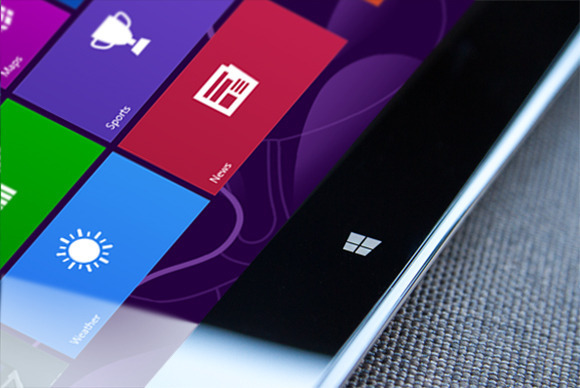
On Tuesday, Microsoft announced that Windows 8.1 has reached its final “Release to manufacturing” stage and has, well, been released to manufacturers for inclusion in the annual blitz of holiday hardware. News of Windows 8.1’s RTM status first broke this weekend. What does this mean for you? Nothing, yet. While manufacturers have their paws on the final version of Windows 8.1 today, the free update won’t appear in the Windows Store until October 17, with boxed discs and third-party hardware appearing on physical store shelves the day after.
Curious computer users do have a way to scratch their Windows 8.1 itch, however. A preview version of Windows 8.1 is still available for download, complete with new apps, new features, numerous new highlights, and yes, even a plethora of new (and killer) hidden secrets. One of those hidden features comes in especially handy for traditional PC lovers: The ability to boot directly to the desktop.
Think hard before you install the Windows 8.1 preview, though. If you opt for the preview available in the Windows Store, your apps—though not your personal data—will be wiped when you install the final build in October. Since that’s just a couple of months away, you’d probably be better off grabbing the ISO files of Windows 8.1 that Microsoft has made available and running it in a virtual machine, instead. Microsoft deserves big props for delivering an RTM version of the Windows 8.1 update just 10 scant months after the official release of Windows 8.1, especially when you considerjust how expansive the update is. Windows 8 was and is far from perfect—and its mixed reception might have even cost Microsoft CEO Steve Ballmer his job—but the company’sshift towards rapid-fire releases is already paying off. Article Source: pcword.com
The biggest news today is probably the introduction of shared photo album in Facebook. But opera has yet another thing to say in the technology world.
Today, Opera Software ASA has released a new version of Opera browser just a few months after they released version 15.
Opera 16 has better performance and improved support for HTML5 than any previous version of the opera browser. This release is also based on Chromium 29.
Opera twitter update on the 23/08/2013
The new release will introduce some interesting features such as:
Feature of Opera 16 Browser
Jump List for Windows: Jump lists are now supported on Windows. Jump lists allow quicker navigation from the task bar, like getting an overview of your Speed Dial.
Support for W3R Geolocation API: The geolocation API lets you share your location with trusted websites. When you visit a location-aware website, like foursquare, the browser will ask you to share your location. If you accept, Opera can tell the website where you are located.
Presentation Mode fo MAC: Browse the web with presentation mode to get a full-screen experience. Quick tip: you can go straight to presentation mode by pressing shift+CMD+F
Form Filler: Save time with the form filler. Simply input your information in the settings and then use to it to auto-fill forms on the web.
In a browser reliability test last week, Mozilla Firefox 23 was flawless. What do you think of the new opera release? You can share your views in the comment section
If you just graduated from a college and still want to see those amazing pictures of your friends taking during your graduation by your friends and relatives. Well, you can do that now without visiting the timeline of your friends.
Yesterday, Facebook rolled out yet another feature, which lets up to 50 users contribute pictures to the same album on users timeline.
Creating a shared photo album on Facebook is quite easy. It only require you to follow the steps below and in a few seconds you will be rocking your Facebook shared album.
Simple Guide to Create your Facebook Shared Album
After you log in to Facebook, click on the “Photos” tab to the far left of the News Feed or at the top of your profile page. You will be taken to your stream of photos, where you will see a “Create Album” tab in the top right-hand corner; click on it
Select the photos that you want to upload from your computer (you can always come back, and upload additional pictures later). As with any other photo album, you’ll be prompted to fill out information about the album you’re creating. Feel free to include as little or as much about the album as you want. In order to use the shared albums feature, you need to click the “Post Photos” button in the lower right-hand corner.
At the top of the next screen, you will have the option to make the album a shared album by clicking on the button in the upper left-hand corner. You will then be able to search for, and add up to 50 of your Facebook friends as “contributors” to the album. This is also where you’ll want to take a moment to explore the album’s privacy settings.
A shared album has three settings: public, friends of contributors and contributors only. You can also decide whether you want to allow contributors to invite others to the album. Deselecting the blue check box below the list of contributors will ensure that the album creator is the only user who is able to invite others to post photos in the album.
If you ever need to go back and make changes to a shared album, you can do that, too. Just open the album, and click on the “Edit” button in the upper right-hand corner. You will then be able to remove or add contributors, change the album title or description, and alter privacy settings.
This feature is still new to Facebook and currently has some limitations. If you intend to use shared photo album on facebook, feel free to express your views and experiences in the comment section. Credits: Mashable.com
Ever wondered what the earth might look like when viewed away from the planet? It is always a great filling to see what the planet we live in looks like. Here is your opportunity to browse through image of the earth take from the space.
A description is attached below each image, feel free to share your views and opinion on the comment section. To enlarge any of this images, simply click on it.
1. Florida Keys
Taken Dec. 5, 2003 by the Moderate Resolution Imaging Spectroradiometer (MODIS) on the Aqua satellite.
2. Reefs in Princess Charlotte Bay
Taken April 20, 2013 by the Operational Land Imager (OLI) on Landsat 8. These formations are part of the Great Barrier Reefs in Australia. This area lies on the east coast of Queensland’s Cape York Peninsula.
3. Fires in Cuba and Florida
Taken Feb. 3, 2003 by the Moderate Resolution Imaging Spectroradiometer (MODIS) on the Aqua satellite. Fires are marked in red.
4. Steam Plume from Gaua Volcano
Taken May 31, 2013 by a member of the International Space Station crew using a Nikon digital camera. Located in the Pacific Ocean, Gaua island is the top of a stratovolcano part of the Vanuatu Archipelago.
5. Korangi, Pakistan
Taken April 20, 2013 by a member of the International Space Station crew using a Nikon digital camera.
6. Little Rock, Ark.
Taken May 24, 2013 by a member of the International Space Station crew using a Nikon digital camera.
7. Intersection of the Danube and the Black Sea
Taken Feb. 5, 2013 by the Advanced Land Imager (ALI) on the Earth Observing-1 (EO-1) satellite.
8. Hurricane Sandy
Taken Oct. 30, 2012 by the Visible Infrared Imaging Radiometer Suite (VIIRS) on the Suomi NPP satellite. The image is rotated, looking south from Canada — north is at the bottom of the image.
9. Istanbul at Night
Taken on Aug. 9, 2012 by a member of the International Space Station crew using a Nikon digital camera.
10. Northern Lights
Taken on Sept. 17, 2011 by a member of the International Space Station crew using a Nikon digital camera.
Ofcours, everyone wants to navigate more fluently on skype while using a computer but not everyone knows it’s “hotkeys”. The use of keyboard shortcuts helps you navigate easily and save time while using the VoIP service.
“It makes you a Ninja” but unfortunately, not everyone knows how to setup this all important keyboard shortcuts. In this tutorial, I’m going to take you on a walk-through on how to setup and personalize your keyboard shortcut for skype.
#1. Enabling Keyboard Shortcut in Skype
These are keyboard shortcuts for when you want to:
Answer a call
Answer a call with video
Ignore a call
End a call
Take a snapshot during video calls
Focus on Skype
Search for people on Skype
Mute your microphone
Toggle mute (Push-to-talk)
Switch view
If you have already enabled keyboard shortcut for your skype skip this part, otherwise:
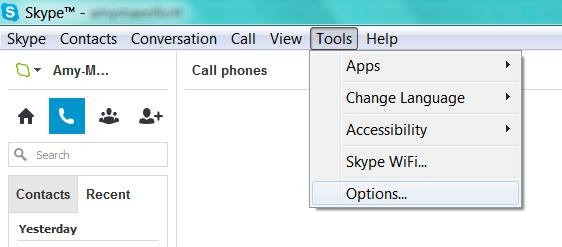
Locate tools on your skype interface
Click on options
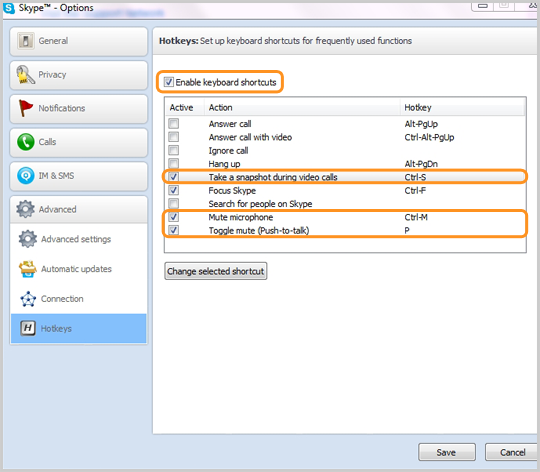
At the bottom of the list, click on the advance tab and
Select hotkeys (is represented with
Check the box next to “Enable keyboard shortcuts.” Do not close the window.
Check the actions you want to enable hotkeys for.
#2. Personalize your Keyboard Shortcuts
In the “hotkey” window you will find a couple of hotkey commands already set up, but you can personalize all the actions with shortcuts of your own preference.
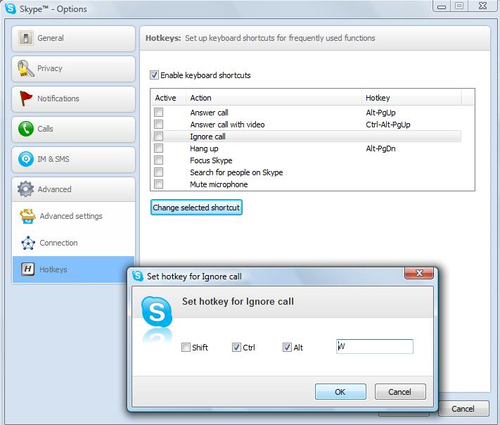
Simply click on the check box next to an action,
Click on Change selected shortcut
Add your own shortcut key sequence into a pop-up window.
The number of shortcuts you want to setup depends on you, Avoid using complex key combination that will be difficult for you to remember, I suggest using hotkey commands that you’re already familiar with, e.g., “Control” + “F” for search. Once you’ve personalized the hotkeys to your taste, click “Save” at the bottom of the window.
In a browser reliability test, the recent versions of Google’s Chrome and Mozilla’s Firefox are measurably less prone to crashes and errors than Microsoft’s Internet Explorer 10, a new analysis by applications testing firm Sauce Labs has found.
If this looks like another stick to beat Microsoft’s browser with, it is worth pointing out that the firm’s study of around 55 million tests run using the Selenium platform found that all browsers showed extremely low levels of errors, in the order of 0.12 percent or lower for the “worst” performer, Apple’s Safari 6.
On the same scale, Opera 12 scored 0.08 percent, IE10 at 0.05 percent, Chrome 27 under 0.02 percent, with Firefox was so low it effectively achieved a remarkable zero, that is to say no errors at all. IE lagged its main rivals but at levels that were already extremely low.
As interesting as the reliability figures was the level of improvement shown by these recent versions, some only months or even weeks old.
Internet Explorer 6 (released in 2001 with XP) and 7 (2007) had previously been the worst performers on 0.3 percent each, behind Firefox on Opera 10 (2009) and Firefox 7 (2011) and IE8 (2009) on just under 0.25 percent. It is remarkable that all of these are still used by small percentages of global browser users, but they are also aging software vulnerable to issues more serious than how often they might crash.
“Half of the browser versions we analyzed had error rates lower than 0.07 percent. That’s pretty low, and suggests that browsers are getting more reliable as more versions come out,” said Luren Nguyen of Sauce Labs.
Despite lagging slightly, IE had also shown major improvement over time.
“Microsoft has really been pushing their new version of Internet Explorer as the most modern and high-performing version of IE. You’ve may have seen their nostalgia-tinged IE 10 commercial. The data we have on browser error rates suggests that their claims may have quite a bit of merit,” she said.
The absolute level of errors in these tests is an imperfect way to measure browser reliability some might argue (can the errors be proved to be the browser’s fault and not the testing suite’s?), but the comparative measurement won’t be coincidence. Errors, which usually result in a crash of some kind, are caused by bugs in the browser code.
Do error rates really matter? Only when they occur, which seems to be rarely these days.Credit: pcword.com
After 13 years of leadership, the Microsoft CEO, Steve Ballmer has called it time to step down as the Chief Executive Officer of Microsoft Cooperation.
“There is never a perfect time for this type of transition, but now is the right time,” Ballmer said in a Microsoft press release. “We have embarked on a new strategy with a new organization and we have an amazing Senior Leadership Team. My original thoughts on timing would have had my retirement happen in the middle of our company’s transformation to a devices and services company. We need a CEO who will be here longer term for this new direction.”
Ballmer, however, has recently refocused Microsoft in order to drag the PC stalwart into the faster-moving mobile age, initiating drastic sea changes such as the device-spanning Windows 8 operating system, a push towards rapid-fire releases rather than 3-year development cycles, “One Microsoft, all the time,” an increased focus on services and the cloud, and the launch of the Surface brand—Microsoft’s first foray into competing with its manufacturing partners.
Any of those could be considered a major shakeup. All of those combined constitute a near-complete reimagining of Microsoft.
Those monumental changes may be the reason for Ballmer’s retirement, according to Patrick Moorhead, the principal analyst at Moor Insights and Strategy and an industry veteran who held senior leadership roles at AMD and Compaq. He finds the 12 month search for a successor suspicious.
“Somebody pissed somebody off,” Moorhead says. “Potentially it was this $900 million write down [for Surface RT tablets]. If I had to bet money, I’d say that that was the straw that broke the camel’s back.”
“I am proud of what we have achieved. We have grown from $7.5 million to nearly $78 billion since I joined Microsoft, and we have grown from employing just over 30 people to almost 100,000. I feel good about playing a role in that success and having committed 100 percent emotionally all the way. We have more than 1 billion users and earn a great profit for our shareholders. We have delivered more profit and cash return to shareholders than virtually any other company in history.”
Now the big question is: Who will be the new CEO? Looking at what Ballmer has archived, Whoever takes over the reins will have some mighty big shoes to fill. Ballmer was Microsoft’s 30th employee and its first business manager, and for all the grief tossed Ballmer’s way in the wake of Windows 8, there’s no denying that the company accomplished some amazing things under his stead.Credits: pcworld.com
Over the recent months, there has been some rumors about google intention to retire google checkout. Finally, google has made an official release confirming that story. Yes! Google will retire checkout On November 20, 2013.
If you are reading this, I know you are not happy about it. So are we and other merchants using the google checkout as a payment processor. Ofcourse, this will also mean that after November 20, 2013 you will no longer be eligible to use the blogger shopping cart powered by google checkout.
If you are a merchant who sell digital goods or perform virtual services, you can migrate to Google Wallet for digital goods before the deadline date. However, merchants selling through Google-hosted marketplaces (e.g. Google Play) will be unaffected by this development.
Date
Product Change
May 20th, 2013
Last day to sign up for Google Checkout
November 20th, 2013
Last day to charge orders
November 21st, 2013
Last day to ship orders
November 27th, 2013
All outstanding orders will be cancelled
December 20th, 2013
Last merchant refunds permitted through Checkout
If you are using the google checkout payment processor for selling physical goods (e.g: running an eCommerce site), you should consider switching to another payment processor.
This is the fourth app being retired by google in 2013, what do you think about it? Do you think google is right to retire Google Checkout? Share this story with your friends and have your say on it!
The introduction of mozilla firefox 23 has seen the option to disable or enable javascript removed from the primary user interface. Alex Limi earlier explained the reason behind this decision, citing user protection as their major reason.
Most sites these days that aren’t just displaying content will fail in interesting& mysterious ways if you don’t have JavaScript enabled. For the general population, Firefox will appear broken.-Alex Limi
A Back Door
Well, the good news is that firefox actually left us a back door: the option was not entirely removed from the browser, it was hidden from the primary user interface as part of an effort to simplify the Firefox options set and to protect users from unintentionally damaging their Firefox browser.
Show me the Way
You can enable or disable your javascript in mozilla firefox by either using the about:config interface or through the use of add-ons.
Using about:config Interface
Enter about:config in your address bar
Click “I’ll be careful, I promise”
In the search bar just at the top of the page, search for “javascript.enabled” (without quotes).
Right click on the result named “javascript.enabled” and click “Toggle”.
JavaScript is now disabled for your browser, to re-enable javascript, simply repeat the above steps.
Using Add-ons
The No-Script add-on will help you manage javascript setting for each page you visit or you can download the QuickJava add-on to quickly (one click for all) enable or disable javascript in your browser.
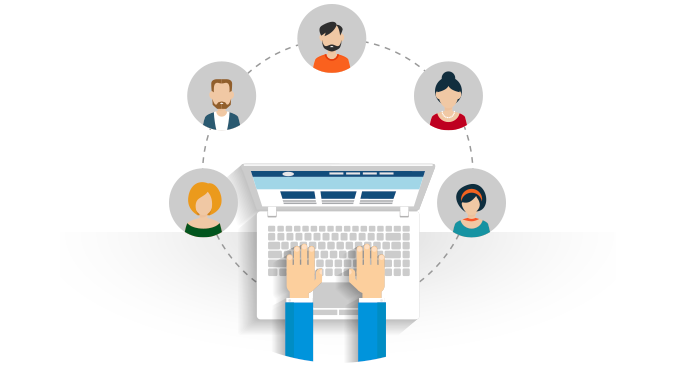
A community software is a web based software that serves as a skeleton which enables you to create a membership site. Where members can interact with each other, share file such as: Music, Photos, Videos etc. Community software enables each member to have a personalized page known as the ‘user profile’ or ‘dashboard’, it also have an interface where users can see and participate in activities by other users.
Why do I need a Community Software?
Before asking this question, I would like you to confirm what you really wanted; if all you want is a blog where you can share tips and talk stories, then consider using a wordpress cms or blogger.com, but if you need a website where people can register and become members who can share and interact with other members of the site, then the best way to achieve that is using a community software. While most of us remain very familiar with the idea of building a community site on wordpress, the essence of using a community software for your website cannot be overlooked. Installing a community software goes beyond the use of a piece plugin as we do in wordpress or embedding a forum script in a webpage, while this method has a lots of limitations, a good community software makes you the master of your community site, granting you the maximum control over your website, ranging from customizing layouts and impeccable administrative options to managing your users accounts.
List of Community Software to Choose from
The recent years has seen the development of various kinds of community based open source software, but we are are going to take a look at the ones we have considered outstanding over the rest.
Do not expect the most fascinating appearance when you visit the oxwall homepage but surely, it is no mistake that they are topping our list. The simplicity of the oxwall homepage probably represent the utter simplicity and unbelievably flexible and easy to use PHP/MySQL nature of the social networking software. Oxwall is used for a wide range of projects starting from family sites and custom social networks to collaboration tools and enterprise community solutions. Whether you are a freelance developer willing to streamline your work for client projects; an individual willing to create a community site; or a brand planning to set up a destination for your customers – Oxwall is for you. The software offers indisputable user experience with full administrative control that made it stand out among it’s competitors.
Features of Oxwall
Photo, Video sharing: This gives members the ability to upload photos and share videos from youtube with other members of the website.
Blogs, forums, wiki: Your members can create their own blog post, start article (like in Wikipedia.com) and discuss in the forum boards. The boards to create and forum layout all depends on you -the admin
Groups, events, friends: Oxwall makes you, your own master, so you can make your members master of themselves. With oxwall community software, your user can follow and add other users as friends, create and manage groups, create and manage their own events.
Comment, tag, rate any kind of content: Like every social networking software, oxwall create an interface called wall, where a member can input text which are later updated as “status”. This “status” can be liked, commented and shared by other members, each member have control on who sees their status and can delete their own “status” if so desired.
Privacy and profile customization: This gives your members maximum control on who and how people see their profile. A member can decide to set his profile public (that is visible to every member of the community) or private (that is visible to only friends or particular group of people), members can as well control what kind of messages they receive from the community to their email box.
Live Chat: If you ever dreamed of having an IM such as the one you have on facebook, then oxwall is just the software for you. Members of the community can chat with their friends within the community (you can disable the friends plugin if you want members to chat with everyone online).
Built-in SEO: The oxwall community software has an in-built search engine optimization features, making it easier for people to find you via search results.
Proven performance: The structure of oxwall software is ultra light and simple to use, “Your site is worthless if users don’t know how to use it.” said the website homepage.
Plugin & Theme Support: This probably what makes oxwall totally exceptional, so as to prevent users from having exactly the same copy of website on the web, the oxwall community software provide uncountable number of themes to choose from and plugins to add “the little extra” to your community website.
Multiple languages available and 100% user area translation support: Oxwall software supports the use of various languages and offering free translation for each language.
For developers: Structured and evident core code. Makes it for developers to develop plugins with all the documentation and examples.
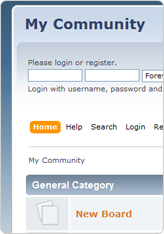
If you are looking for a simple community forum (without social networking facilities) where members can discuss various topics on different boards or category, then the simple machine community software is definitely what you have been looking for. Simple Machines Forum ( SMF in short ) is a free, professional grade software package that allows you to set up your own online community within minutes.
Its powerful custom made template engine puts you in full control of the layout of your message board and with a unique SSI – or Server Side Includes – function you can let your forum and your website interact with each other.
SMF is written in the popular language PHP and uses a MySQL database. It is designed to provide you with all the features you need from a bulletin board while having an absolute minimal impact on the resources of the server. SMF is the next generation of forum software – and best of all it is completely free!
Features of SMF
SMF is a very wide software covering a lots of amazing features, but having the reader’s interest in mind we shall consider a few of them.
Uses PHP, and a database system: MySQL, PostgreSQL or SQLite.
Comprehensive template system.
All actions seamlessly require a session based authorization code.
Administrative actions require the user’s password (and do not rely solely on cookies.)
Major actions are time and IP locked, preventing ‘hammering’.
The number of login attempts from a certain IP can be limited and time locked
Advanced permission and user management.
Supports multiple languages at once.
Open and well-documented source code.
Tracking of new and old unread topics, not just from your last visit.
Designed for optimal performance and scalability.
Multi-media output: XHTML, XML, RSS, WAP
Multi-language support from a large community.
Package manager that automatically installs or uninstalls mods (also known as packages.)
What’s More?
The best place to find support on how to customize your SMF site is the SMF forum, here you meet other community owners who can help you solve any problem you encountered.
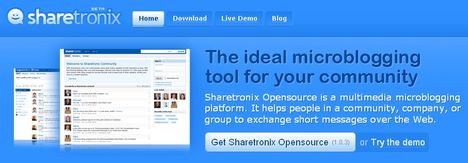
Sharetronix open source based community software is micro blogging software (yes, like twitter.com) that allows members to share any “144 characters” (update status) with other members of the community, the members of the community can connect with other members by following their update, in sharetronix, a member can only send a direct message to another member only if that member is his/her follower.
Features of Sharetronix
User Profiles: Each community member has a custom profile with detailed personal information, plus their network activity, groups, personal tags and more.
Status Updates: Every community member can post unlimited short status updates, ask questions, share media and more. Sharetronix supports link, video, image and file attachments with posts
Real-Time Dashboard: On the platform’s dashboard, users can follow all updates from their network connections in real time. members can also see who’s online, currently trending post tags and more.
Groups: Create unlimited private or open groups to organize your content and make it easier for everybody to follow topics and conversations. Members with similar interests can connect with each other in groups.
Security Settings: The community and personal security settings allows the members to better protect their profiles, posts and personal messages, while the community administrators can increase their communities’ privacy.
Multimedia: Sharetronix takes micro-blogging beyond simple text. You can attach links, pictures, videos and other files to your posts. Multimedia attachments make your network more attractive and more interactive, and therefore more engaging for users.
Business Cards: The Business Card feature allows you to quickly connect with and learn about a member simply by holding the mouse over their username. A user’s Business Card displays their groups, and allows you to follow, private message, or create a public post directed at (@) that user.
Member mentions in status update and comment: Members are suggested when you type @ while you write a status update or a comment in both the post and the comment boxes.
Content Tagging: Tag your messages with hashtags to make them easily searchable. Users can also save their favorite tags to be easily accessed from their personal dashboard at any time
Administration: With the powerful Sharetronix administration panel you can tune your network the way you want it. You can easily manage all your settings, users, groups and content from one place.
SEO Friendly: Don’t bother about advertisement: Sharetronix is SEO optimized and your content will be easily indexed by Google and other search engines. The front-end code is written according to the latest standards
What’s More?
The sharetronix opensource software is free, featuring a lots of themes and plugins to help you build your unique community.




 At least 60% of consumers have accepted that they will become more willing to accept mobile payment apps if certain financial institutions offered them the right resources. Mobile payment apps have increased worldwide because the majority of payment resources are realizing the importance of
 Technology plays a very important role in the expansion of a business. Business technology such as social networks, virtual office technology as well as video conferencing helps in removing boundaries at work place that limit business expansion. Technology in business helps in targeting a wider customer base that help an organization grow to higher levels. Therefore, choosing, deploying and managing the information technology which is necessary for business expansion is important. This article provides information on the role of technology in business expansion as explained in the following paragraphs;







 button is placed just under it, you can simply click on this button to register the domain name. A
  button is used to denote that a TLD is neither available for new registration or for domain transfer.
 button is placed below a TLD to signify that the domain name is not available for new registration but can be transferred to the Arvixe hosting account. You can also use this option if you are trying to transfer your domain name from a different domain name provider to Arvixe (Remember that Arvixe allows you to register 1 free domain name for life), so it’s quite a tempting offer for everyone.
 Note that to use a coupon code, you need to do this before the above step (before clicking next in the previous step).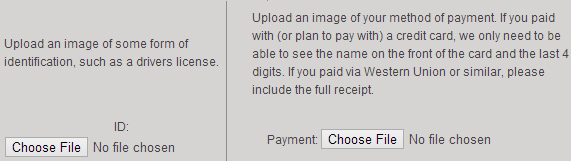


 Currently, we are on the edge of a new digital paradigm, where the abilities of our machinery are beginning to outshine our own.











 As interesting as the reliability figures was the level of improvement shown by these recent versions, some only months or even weeks old.
 Ballmer, however, has recently refocused Microsoft in order to drag the PC stalwart into the faster-moving mobile age, initiating drastic sea changes such as the device-spanning