Tag: SMEs

  • 5 Best Accounting Software for Small Businesses

    5 Best Accounting Software for Small Businesses

    Accounting software automates many of the time-consuming tasks associated with bookkeeping, invoicing, and financial reporting. For small businesses, this means less time spent on administrative tasks and more time focusing on growth. The best accounting software not only simplifies financial management but also provides valuable insights into your business’s financial health.

    Key Features to Look for in Accounting Software

    Key Features to Look for in Accounting Software for small businesses

    Before diving into our top picks, it’s important to understand the key features that small businesses should look for in accounting software:

    1. User-Friendly Interface: A straightforward and intuitive interface is essential for small business owners who may not have a background in accounting.
    2. Invoicing and Billing: Look for software that allows you to create, send, and track invoices with ease.
    3. Expense Tracking: Effective expense management is critical. Choose software that simplifies tracking and categorizing expenses.
    4. Bank Reconciliation: Automatic bank reconciliation helps ensure your accounts are accurate and up-to-date.
    5. Reporting: Comprehensive financial reports are vital for understanding your business’s financial performance.
    6. Scalability: As your business grows, your accounting software should be able to scale with you, offering additional features or integrations as needed.

    Top Accounting Software for Small Businesses in 2024

    Here are the best accounting software for small businesses in 2024, each meeting different needs and budgets:

    1. QuickBooks Online

    QuickBooks is a leader in the accounting software space, with a strong set of features designed specifically for small businesses. Its user-friendly interface, extensive third-party integrations, and scalability make it a top choice for businesses of all sizes.

    Key Features:

    • Invoicing and payment processing
    • Expense tracking and categorization
    • Bank reconciliation
    • Financial reporting and analytics
    • Scalable with advanced features for growing businesses

    Best For: Small businesses looking for a comprehensive solution with room to grow.

    2. Xero

    Xero is another popular software, known for its beautiful interface and strong accounting capabilities. It’s particularly used by businesses that need to manage multi-currency transactions and integrate with a wide range of third-party applications.

    Key Features:

    • Multi-currency support
    • Real-time financial reporting
    • Expense tracking and bank reconciliation
    • Over 800 app integrations
    • Inventory management

    Best For: Small businesses with global operations or those requiring extensive integrations.

    3. FreshBooks

    FreshBooks is ideal for service-based small businesses, freelancers, and contractors. Its emphasis on invoicing and time tracking sets it apart, making it a favorite among users who need to bill clients for hours worked.

    Key Features:

    • Time tracking and project management
    • Customizable invoices
    • Expense tracking
    • Automated payment reminders
    • Easy-to-use mobile app

    Best For: Service-based businesses, freelancers, and contractors.

    4. Wave

    Wave offers a free accounting solution, making it an excellent choice for small businesses on a tight budget. Despite being free, it includes many features found in paid software, such as invoicing, receipt scanning, and bank reconciliation.

    Key Features:

    • Free accounting and invoicing
    • Expense tracking
    • Receipt scanning via mobile app
    • Bank reconciliation
    • Tax filing support

    Best For: Small businesses and startups looking for a cost-effective accounting solution.

    5. Zoho Books

    Zoho Books is part of the Zoho suite of business tools, making it a great choice for small businesses already using Zoho products. It offers a wide range of features, including automated workflows, making it ideal for businesses looking to streamline their processes.

    Key Features:

    • Automated workflows
    • Client and vendor management
    • Multi-currency support
    • Financial reporting
    • Inventory management

    Best For: Small businesses using the Zoho ecosystem or those needing automation.

    Choosing the Right Accounting Software for Your Business

    Selecting the best accounting software for your small business depends on your specific needs, industry, and budget. QuickBooks Online is a great all-rounder, Xero excels for global businesses, FreshBooks is perfect for service providers, Wave offers unbeatable value for money, and Zoho Books is ideal for businesses seeking automation and integration within the Zoho suite.

    FAQs

    1. What is the best accounting software for small businesses in 2024?

    The best accounting software depends on your specific needs, but QuickBooks Online, Xero, FreshBooks, Wave, and Zoho Books are among the top options.

    2. Can I use free accounting software for my small business?

    Yes, Wave offers a free accounting software solution that is suitable for many small businesses, especially startups or those on a tight budget.

    3. How do I choose the right accounting software for my business?

    Consider your business size, industry, budget, and specific needs, such as invoicing, expense tracking, and scalability, when choosing the right software.

    4. Is cloud-based accounting software secure?

    Most cloud-based accounting software uses advanced security measures, such as encryption and two-factor authentication, to protect your data.

    5. Can accounting software help with tax filing?

    Yes, many accounting software solutions offer features that assist with tax filing, including generating reports that align with tax requirements.


  • SEO Best Practices for Small Businesses: Comprehensive Guide

    SEO Best Practices for Small Businesses: Comprehensive Guide

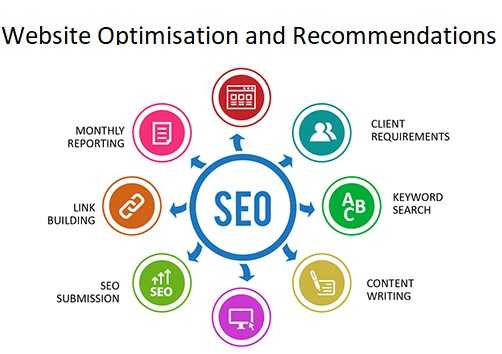
    Unlike large corporations with massive marketing budgets, small businesses must leverage smart, cost-effective strategies to increase visibility and attract customers. Mastering SEO (Search Engine Optimization) is crucial for small businesses aiming to do this.

    SEO involves optimizing your website to rank higher on search engine results pages (SERPs), making it easier for potential customers to find you. With more than 90% of online experiences starting with a search engine, being visible is important.

    Implementing the following effective SEO best practices for small businesses can help your business dominate search engine rankings, drive traffic to your website, and increase revenue.

    Keyword Research

    Start with thorough keyword research to identify the terms your potential customers are using to search for your products or services.

    Use Tools: Utilize keyword research tools like Google Keyword Planner, Ahrefs, or SEMrush to find high-volume, low-competition keywords relevant to your business.

    Long-Tail Keywords: Focus on long-tail keywords—specific, longer phrases that visitors are more likely to use when they’re closer to making a purchase. These are less competitive and can drive highly targeted traffic.

    Analyzing Competitor Keywords

    Identify keywords your competitors are ranking for to find gaps in your strategy. Tools like SpyFu and Moz can help you analyze competitor keywords and refine your own strategy accordingly.

    On-Page SEO

    SEO Best Practices for Small Businesses -  Quality Content and Keyword research

    Quality Content Creation

    On-page SEO involves optimizing individual pages to improve their search engine rankings and content is king in the SEO world. Your content should be:

    • Relevant and Valuable: Provide useful information that addresses the needs and answers the questions of your target audience.
    • Well-written and Engaging: Keep your readers engaged with clear, concise, and well-structured content. Regularly update your blog with informative articles, how-to guides, and industry news. Google rewards websites that provide a great user experience, so focus on writing content that keeps visitors on your site longer.
    • Original: Avoid duplicate content, which can harm your rankings.

    Keyword Optimization

    Incorporate these keywords naturally into your website content, including titles, headings, meta descriptions, and throughout the body text. Avoid keyword stuffing, which can lead to penalties from search engines. Focus on including keywords in:

    • Title Tags and Meta Descriptions: Craft compelling and keyword-rich title tags and meta descriptions that accurately describe your content and entice users to click.
    • Header Tags (H1, H2, H3): Use header tags to structure your content, making it easier for search engines and users to read.
    • URL Structure: Create clean, keyword-rich URLs that are easy for users and search engines to understand.

    Optimizing Images

    Images can enhance user experience but also need to be optimized for SEO:

    • Alt Text: Use descriptive alt text for all images, incorporating relevant keywords.
    • File Names: Name your image files descriptively rather than using generic names like “image1.jpg.”
    • File Size: Compress images to reduce loading times without compromising quality.

    Technical SEO

    SEO Best Practices for Small Businesses - Technical SEO

    Mobile Optimization

    With mobile devices accounting for over half of all web traffic, ensuring your website is mobile-friendly is crucial. Google uses mobile-first indexing, meaning it predominantly uses the mobile version of your site for ranking and indexing. Use responsive design to ensure your site looks and functions well on all devices. Test your website’s mobile-friendliness with Google’s Mobile-Friendly Test tool and make necessary adjustments.

    Page Speed and Performance

    A fast-loading website enhances user experience and improves rankings. Use tools like Google PageSpeed Insights to test your website’s speed and get recommendations for improvement.

    Secure Your Website

    Security is a ranking factor. Ensure your site uses HTTPS instead of HTTP by obtaining an SSL certificate. This not only helps with rankings but also builds trust with your visitors.

    Fix Broken Links

    Regularly check for and fix broken links on your website. Tools like Screaming Frog can help identify 404 errors and other broken links that need attention.

    Local SEO: Capturing Nearby Customers

    SEO Best Practices for Small Businesses - Local SEO: Capturing Nearby Customers
    Local SEO: Capturing Nearby Customers

    For small businesses, local SEO is essential to attract nearby customers.

    Google My Business

    Claim and optimize your Google My Business listing:

    • Complete Your Profile: Fill out all fields, including your business name, address, phone number, and hours of operation.
    • Add Photos: Include high-quality photos of your business, products, and services.
    • Collect Reviews: Encourage satisfied customers to leave positive reviews.

    Local Keywords

    Incorporate local keywords into your content, such as “best pizza in [city]” or “top-rated salon in [neighborhood].” This helps you appear in local searches and attract nearby customers.

    Local Citations

    Ensure your business information is consistent across all online directories and citation sites. Inconsistent information can confuse search engines and hurt your rankings.

    Off-Page SEO: Building Authority

    Off-Page SEO: Building Authority

    Backlinks

    Building high-quality backlinks from reputable sites is vital for SEO. Consider these strategies:

    • Guest Blogging: Write guest posts for industry blogs to gain exposure and backlinks.
    • Content Marketing: Create shareable content, such as infographics or in-depth guides, that others will want to link to.
    • Networking: Build relationships with industry influencers who can link to your site.

    Social Media

    While social media signals don’t directly impact rankings, having an active social media presence can drive traffic to your site, increase brand awareness, and indirectly benefit your SEO efforts.

    Monitoring and Analytics

    Google Analytics

    Use Google Analytics to track your site’s performance. Monitor metrics like organic traffic, bounce rate, and conversion rate to understand how your SEO efforts are paying off.

    Google Search Console

    Google Search Console provides insights into how Google views your site. Use it to monitor your search performance, fix issues, and understand your keyword rankings.

    Regular Audits

    Conduct regular SEO audits to identify and fix issues that could be affecting your rankings. Use tools like Ahrefs, SEMrush, or Moz to perform comprehensive audits.

    SEO is a critical component of a successful digital marketing strategy for small businesses. By implementing these best practices—ranging from keyword research and on-page optimization to local SEO and building backlinks—you can enhance your online presence, attract more customers, and grow your business.