Author: Ebenezer Obasi

  • iPhone App Cardiio Can Tell Your Heart Rate With Nothing But A Video

    iPhone App Cardiio Can Tell Your Heart Rate With Nothing But A Video

    [Credit: Cardiio]

     Ming-Zher Poh, a PhD Student at MIT’s Media Lab, is the creator of what may be the most interesting thing on the iOS App Store today: An app called Cardiio that makes use of the iPhone’s camera and nothing else to produce a estimate of your heart rate.
    The science behind the Cardiio is almost as fascinating as the concept itself. Poh’s algorithm captures a video of the user’s face with the help of a tracking software before distilling it into RGB channels which are, in turn, analyzed to determine a rough BPM based on reflectivity.
    And it’s surprisingly accurate. At least one study has shown that the technology behind Cardiio is accurate to within three beats per minute. You
    might not see it at your doctor’s office, but it could be useful for tracking your heart rate when you exercise.
    Cardiio isn’t Poh’s first attempt at using light to measure heart rate, but it’s probably the most popular. According to Co.Design, even though it’s only been around for a few days, Cardiio is already one of the most highly rated health and fitness apps on iTunes. Arguably, it’s also one of the creepiest–Cardiio will, among other things, attempt to provide you with your estimated life expectancy. Eek.
    [Cardiio via Co.Design]

  • 5 Online Business You Can Start With Little Capital

    5 Online Business You Can Start With Little Capital

    By: Joseph Onyemakonor

    Most times when people hear start a business online, they think you have to be involved in some short of Advance Fee Fraud (popularly known as “yahoo yahoo”) before you can make a good make online but they are 100% wrong. It is absolutely possible to make money online, in fact it is quite similar to any business you own at home or in your local because you have to put in your time and effort to it if you want your business to be successful in the business. Starting a business in Nigeria can be quite demanding, you need capital, land, Labour (depending on what you want to go into)  but online quite different because you will put in Little Capital and start making a good amount of money when it is time to rip, but first you have to make the move by investing. Here are some business to you can start online that is sure to yield income:

    1. Blogging: This is one of the many  ways of making money online. With About N6000 you can start a blog. People will pay you to advertise their product on your blog and you will get to make money online. It can also be a steady source of income. Take a Look at how much the owner of Jaguda, one of Nigeria most popular music blog makes per day. Blogging can be a very lucrative business to go into online. Not because you will make money from it eventually, it gives you the opportunity to put your thoughts in decent lines and reach out to people in need.
    2. Bulk SMS: Bulk SMS is a service that provision customize messages .i.e. you can send message with sender name as NairaTrain. With N10,000 you can start your own block SMS service with a reseller account. Aside the fact that people will buy SMS units from you online, you can also make money with this by sending for Organizations, Schools, Churches, Mosques e.t.c. A popular SMS site that you can get started with is linkosms  their pricings is quite affordable

    –>

    • Marketing:  Marketing online is similar to that offline. It requires a capital less than N2,000 to start up. You will be required to sell information, books, products e.t.c. to a customer and he pays into your bank account directly. You can also sell other people products and get commission for it.
    • Article Writing: If you are a good writer, you can start writing for other bloggers and get paid once your article is reviewed and accepted. This is also another business you can investing full time. They are also sites that hire writers to continuously write for them.
    • Website designing Compay: If you have skills in website designing, you can start a website design company online. The market is wider there and you are liable to more business online. Starting this business requires you to a website only and maybe a few port folio of previous work.

    Once you get started online, business, it can serve as a support to your job offline or you can face it full time. It may take some time before your business gets fully established online but when it does, you will enjoy the benefits.

  • How to Start a Bulk SMS Business/Venture in Your Area

    How to Start a Bulk SMS Business/Venture in Your Area

    By: Joseph Onyemakonor  

    Now a days, the need to communicate and distribution information is very high. People are always looking for ways to share information at a cheaper, more convenient, and faster means. Bulk SMS is a way of sharing information to thousands of people at a time using special customized names as sender id. It is also relatively cheap. While most people keep going online to send this messages to organizations for free, some few has started it as a venture. I will further tell you that one can make a considerable amount of money rendering this service.

    Bulk SMS

    Starting a Bulk SMS business is very cheap and requires you to put a little time and money into it. It requires you to have no special skills what so ever, all you need is internet connection (I will suggest A cyber café ). Now lets get started


    Goto www.googlebulksms.com or www.linkosms.com (They sell at very affordable prices), register with them and locate the pricing page. Depending on the quantity you are starting with, the price of each unit can range from N1 – N1.5. Start by buying 2-3000 units which will cost about N2,500. Payment most times is made either through bank deposit or using your local ATM card.

    Its not buying the SMS that matters, it what you do with it. Next thing you need to do is to spread the word, you can do that by posting simply hand bills. You do not need to goto any press to do this, just type on Microsoft word and print it then make multiply photocopies and post it around.

    In most cases, the people that use this service are Churches, Mosques and Schools. Prepare proposal and send to all of them. You proposal should be very interesting and versatile. Tell them they get to send the SMS with Customized Name of their own organization and it is also at a very affordable price too.

    Submit your proposal to as much organizations as possible and you will get more profit from it.

    When charging them from the service, charge from N4 –N10 per sms. You bought at N1 per SMS. When you send to about 500 people from a particular organization, you make up to N4000.

    Start now and write a proposal and send  out. You will make over N10 -50000 once you get start with this little venture

  • One Time Pop-Up Or Slide-Out Facebook Like Box With Cute Subscription Form.

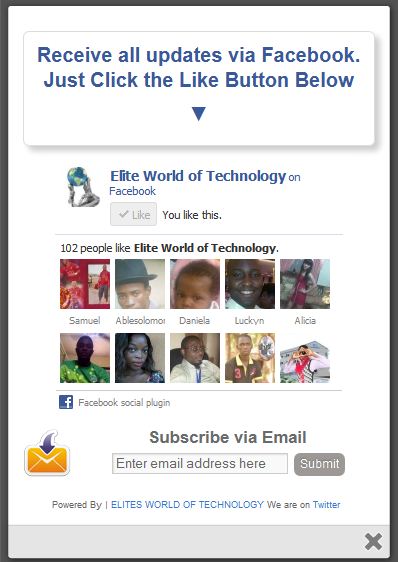
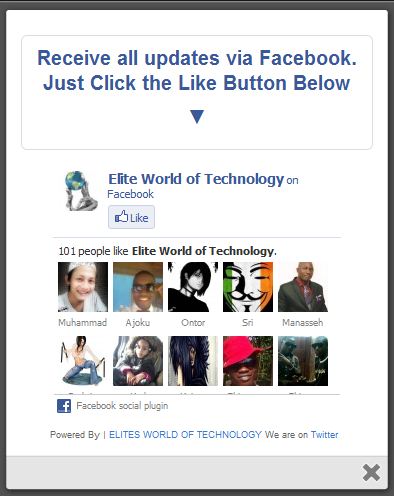
    One Time Pop-Up Or Slide-Out Facebook Like Box With Cute Subscription Form.

    With Subscription Form
    Without Subscription Form

    I got this trick  from an old friend -Helltrick.

    It’s such a fantastic widget to force your site visitors to subscribe to your updates via email, like your facebook page or follow you on twitter.

    Not only do we acquire the services of an amazing facebook like page we have yet another but extremely beautiful and easy to edit subscription form dozed with new CSS effects. This widget will keep pop-up/slide-out neat and clean and will surely attract visitors to subscribe.


    Demo

    To see this widget in action kindly our demo page to see a live preview on how it works.

    HOW TO ADD A ONE TIME POP-UP / SLIDE-OUT FACEBOOK LIKE BOX WITH CUTE SUBSCRIPTION LINK TO YOUR BLOG.


    In Blogspot:

    1. Login to your blogger dashboard
    2. Select Layout from your blog menu
    3. Add a new Javascript/html Gadget.
    4. Copy and paste the following code
    <style>

    /*
    ColorBox Core Style:
    The following CSS is consistent between example themes and should not be altered.
    */
    #colorbox, #cboxOverlay, #cboxWrapper{position:absolute; top:0; left:0; z-index:9999; overflow:hidden;}
    #cboxOverlay{position:fixed; width:100%; height:100%;}
    #cboxMiddleLeft, #cboxBottomLeft{clear:left;}
    #cboxContent{position:relative;}
    #cboxLoadedContent{overflow:auto;}
    #cboxTitle{margin:0;}
    #cboxLoadingOverlay, #cboxLoadingGraphic{position:absolute; top:0; left:0; width:100%;}
    #cboxPrevious, #cboxNext, #cboxClose, #cboxSlideshow{cursor:pointer;}
    .cboxPhoto{float:left; margin:auto; border:0; display:block;}
    .cboxIframe{width:100%; height:100%; display:block; border:0;}
    /*

    User Style:
    Change the following styles to modify the appearance of ColorBox. They are
    ordered & tabbed in a way that represents the nesting of the generated HTML.
    */
    #cboxOverlay{background:#000;opacity:0.5 !important;}
    #colorbox{
    box-shadow:0 0 15px rgba(0,0,0,0.4);
    -moz-box-shadow:0 0 15px rgba(0,0,0,0.4);
    -webkit-box-shadow:0 0 15px rgba(0,0,0,0.4);
    }
    #cboxTopLeft{width:14px; height:14px; background:url(http://1.bp.blogspot.com/-FiJ_Xz7txEg/Txrt0sy1TiI/AAAAAAAAFWk/Llzvkeyy_J8/s1600/controls.png) no-repeat 0 0;}
    #cboxTopCenter{height:14px; background:url(http://1.bp.blogspot.com/-TcJGMnSfOCY/TxrtzzHDLVI/AAAAAAAAFWc/mdndgrisRuA/s1600/border.png) repeat-x top left;}
    #cboxTopRight{width:14px; height:14px; background:url(http://1.bp.blogspot.com/-FiJ_Xz7txEg/Txrt0sy1TiI/AAAAAAAAFWk/Llzvkeyy_J8/s1600/controls.png) no-repeat -36px 0;}
    #cboxBottomLeft{width:14px; height:43px; background:url(http://1.bp.blogspot.com/-FiJ_Xz7txEg/Txrt0sy1TiI/AAAAAAAAFWk/Llzvkeyy_J8/s1600/controls.png) no-repeat 0 -32px;}
    #cboxBottomCenter{height:43px; background:url(http://1.bp.blogspot.com/-TcJGMnSfOCY/TxrtzzHDLVI/AAAAAAAAFWc/mdndgrisRuA/s1600/border.png) repeat-x bottom left;}
    #cboxBottomRight{width:14px; height:43px; background:url(http://1.bp.blogspot.com/-FiJ_Xz7txEg/Txrt0sy1TiI/AAAAAAAAFWk/Llzvkeyy_J8/s1600/controls.png) no-repeat -36px -32px;}
    #cboxMiddleLeft{width:14px; background:url(http://1.bp.blogspot.com/-FiJ_Xz7txEg/Txrt0sy1TiI/AAAAAAAAFWk/Llzvkeyy_J8/s1600/controls.png) repeat-y -175px 0;}
    #cboxMiddleRight{width:14px; background:url(http://1.bp.blogspot.com/-FiJ_Xz7txEg/Txrt0sy1TiI/AAAAAAAAFWk/Llzvkeyy_J8/s1600/controls.png) repeat-y -211px 0;}
    #cboxContent{background:#fff; overflow:visible;}
    #cboxLoadedContent{margin-bottom:5px;}
    #cboxLoadingOverlay{background:url(http://1.bp.blogspot.com/-PPvu-446sn4/Txrt1QsGH1I/AAAAAAAAFWw/_jWYVoR1HX8/s1600/loading-background.png) no-repeat center center;}
    #cboxLoadingGraphic{background:url(http://1.bp.blogspot.com/-31strss_1-E/Txrt1J6NThI/AAAAAAAAFWo/4P12CJPj924/s1600/loading.gif) no-repeat center center;}
    #cboxTitle{position:absolute; bottom:-25px; left:0; text-align:center; width:100%; font-weight:bold; color:#7C7C7C;}
    #cboxCurrent{position:absolute; bottom:-25px; left:58px; font-weight:bold; color:#7C7C7C;}
    #cboxPrevious, #cboxNext, #cboxClose, #cboxSlideshow{position:absolute; bottom:-29px; background:url(http://1.bp.blogspot.com/-FiJ_Xz7txEg/Txrt0sy1TiI/AAAAAAAAFWk/Llzvkeyy_J8/s1600/controls.png) no-repeat 0px 0px; width:23px; height:23px; text-indent:-9999px;}
    #cboxPrevious{left:0px; background-position: -51px -25px;}
    #cboxPrevious.hover{background-position:-51px 0px;}
    #cboxNext{left:27px; background-position:-75px -25px;}
    #cboxNext.hover{background-position:-75px 0px;}
    #cboxClose{right:0; background-position:-100px -25px;}
    #cboxClose.hover{background-position:-100px 0px;}
    .cboxSlideshow_on #cboxSlideshow{background-position:-125px 0px; right:27px;}
    .cboxSlideshow_on #cboxSlideshow.hover{background-position:-150px 0px;}
    .cboxSlideshow_off #cboxSlideshow{background-position:-150px -25px; right:27px;}
    .cboxSlideshow_off #cboxSlideshow.hover{background-position:-125px 0px;}
    /*———————————————————————————–*/
    /* Facebook Likebox popup For Blogger
    /*———————————————————————————–*/
    #subscribe {
    font: 12px/1.2 Arial,Helvetica,san-serif; color:#666;
    }
    #subscribe a,
    #subscribe a:hover,
    #subscribe a:visited {
    text-decoration:none;
    }
    .box-title {
    color: #3B5998;
    font-size: 20px !important;
    font-weight: bold;
    margin: 10px 0;
    border:1px solid #ddd;
    -moz-border-radius:6px;
    -webkit-border-radius:6px;
    border-radius:6px;
    box-shadow: 5px 5px 5px #CCCCCC;
    padding:10px;
    line-height:25px; font-family:arial !important;
    }
    .box-tagline {
    color: #999;
    margin: 0;
    text-align: center;
    }
    #subs-container {
    padding: 35px 0 30px 0;
    position: relative;
    }
    a:link, a:visited {
    border:none;
    }
    .demo {
    display:none;
    }
    </style>

    http://ajax.googleapis.com/ajax/libs/jquery/1.5/jquery.min.js
    http://yourjavascript.com/11215013191/jquery.colorbox-min.js
    <script type=”text/javascript”>
    jQuery(document).ready(function(){
    if (document.cookie.indexOf(‘visited=true’) == -1) {
    var fifteenDays = 1000*60*60*24*30;
    var expires = new Date((new Date()).valueOf() + fifteenDays);
    document.cookie = “visited=true;expires=” + expires.toUTCString();
    $.colorbox({width:”400px”, inline:true, href:”#subscribe”});
    }
    });
    </script>
    <!– This contains the hidden content for inline calls –>

    <div style=’display:none’>
    <div id=’subscribe’ style=’padding:10px; background:#fff;’>
    <h3 class=”box-title”>Receive all updates via Facebook. Just Click the Like Button Below<center><p style=”line-height:3px;” >▼</p></center></h3>
    <center>

    //www.facebook.com/plugins/likebox.php?href=http%3A%2F%2Fwww.facebook.com%2Fspan%20style=

    </center>
    <style>
    .mbt-email{
    background:url(http://4.bp.blogspot.com/_MbejYjGokMM/TSeZHmWJ6oI/AAAAAAAAALE/93ELYyzmi64/s1600/email.png) no-repeat 0px 12px ;
    width:300px;
    padding:10px 0 0 55px;
    float:left;
    font-size:1.4em;
    font-weight:bold;
    margin:0 0 10px 0;
    color:#686B6C;
    }

    .mbt-emailsubmit{
    background:#9B9895;
    cursor:pointer;
    color:#fff;
    border:none;
    padding:3px;
    text-shadow:0 -1px 1px rgba(0,0,0,0.25);
    -moz-border-radius:6px;
    -webkit-border-radius:6px;
    border-radius:6px;
    font:12px sans-serif;
    }
    .mbt-emailsubmit:hover{
    background:#E98313;
    }
    .textarea{
    padding:2px;
    margin:6px 2px 6px 2px;
    background:#f9f9f9;
    border:1px solid #ccc;
    resize:none;
    box-shadow:inset 1px 1px 1px rgba(0,0,0,0.1);
    -moz-box-shadow:inset 1px 1px 1px rgba(0,0,0,0.1);
    -webkit-box-shadow:inset 1px 1px 1px rgba(0,0,0,0.1); font-size:13px;
    width:170px;
    color:#666;}

    </style>

    <div class=”mbt-email”>
    Or Receive Updates via Email
    <form action=”http://feedburner.google.com/fb/a/mailverify?uri=blogspot/XylXo” id=”feedform” method=”post” target=”popupwindow” onsubmit=”window.open(‘http://feedburner.google.com/fb/a/mailverify?uri=blogspot/XylXo‘, ‘popupwindow’, ‘scrollbars=yes,width=550,height=520’);return true”>
    <input gtbfieldid=”3″ class=”textarea” name=”email” onblur=”if (this.value == &quot;&quot;) {this.value = &quot;Enter email address here&quot;;}” onfocus=”if (this.value == &quot;Enter email address here&quot;) {this.value = &quot;&quot;;}” value=”Enter email address here” type=”text” />
    <input type=”hidden” value=”XylXo” name=”uri”/><input type=”hidden” name=”loc” value=”en_US”/>
    <input class=”mbt-emailsubmit” value=”Submit” type=”submit” />
    </form>
    </div>
    <p style=” float:right; margin-right:35px; font-size:9px;” >Powered By | <a style=” font-size:9px; color:#3B78CD; text-decoration:none;” href=”https://ewtnet.com” rel=”nofollow”>EWT</a> Pop-Up Box <a style=” font-size:9px; color:#3B78CD; text-decoration:none;” href=”https://ewtnet.com/2012/08/one-time-pop-up-or-slide-out-facebook.html” rel=”nofollow”>Get This Widget</a></p>
    </div>
    </div>

    Website

    If you need to use this widget on any website platform other than the blogger platform, simple copy the above code to anywhere in the <body></body> section of your website.

    Make The Following Changes :

    Change Green to custom text or leave it as default, Pink with your facebook username, Blue with your RSS feed Title.


    Finally, Save your widget and you are done! Enjoy!
  • 7 Sure Ways to Make Money Online

    7 Sure Ways to Make Money Online

    By: Joseph Onyemakonor 

    How to make money online:There are so many articles on “How to make money online” and over 1000 get rich quick schemes jobs online which has proven useless and abortive in assisting you in earning online. Before I continue, I want you to know that this is not a get-rich-quick scheme and I am going to tell you why it is not. This article does not promise you any sure means, through which you can make money online doing little or no jobs neither is it an investment program that you go into and sit and home. In a nutshell you have to work hard to make money through the methods you will be seeing below.

    In making money online, the first thing to have in mind is that you have to be offering a service before you get paid. The services you may offer can be affiliate marketing, selling your self published e-book or someone else’s,blogging e.t.c.

    1. Blogging: This is one of the most discussed means of making money online. Although most successful bloggers will just tell you to start a blog and start earning, making money online with a blog requires effort, time and hard work to keep your readers loyal. Some of the advantages of owning a blog is that you get to share your thoughts and opinion, build an audience and make cool cash eventually. You should be ready to put in your best if you want to succeed as a blogger. You can’t make money online free

    –> 2. Freelancing: This is another way of making money doing various jobs online for people, organizations and companies. This method of making money is not that popular and most people do not know they can make over $1000 each week if you are skilled and have at least four (4) hours a day to put into freelancing.

    3. Simply Jobs website: Another way of making money online is doing jobs for people in five $5 jobs websites. You can make money with this by selling or reselling e-books, coming up with cool ideas and selling it to people for $5. An example of this kind of website is fiverr. If you can do 5 – 6 jobs a day, you will realize up $30 daily.

    4. Internet Marketing: This is another widely discussed means of making money online. You can sell your services or be an affiliate marketer (Help someone else sell their products and services and get commission on sales). If you are a writer, you can start selling your books online or become an affiliate marketer. If you don’t have any idea or experience in writing, you can go to any freelancing sites and pay a freelancer to write for you. This can serve as a steady source of income for life. You should have in mind that this also is not easy too and requires effort.

    5. Website Flipping: You can start flipping websites today after you are able to build traffic to that site. It requires time and effort. I will recommend this for people with experience in making money online and building website traffic.

    6. Investment programs: You can start today and invest online and watch your money grow. Before you go into this, have in mind that you earn according to what you invest. One of the fastest growing and stable investment program right now is Justbeepaid they will lend you $10 dollars to invest with first, this will enable you understand what the program is about and how quick your money can grow

    7. Articles writing: Everyday, more and more people are joining the blogging community, and they are all looking for new and unique contents to publish. If you are a good writer, you can start writing today. The best place to start is with a freelancing site. You can be paid about $2 per 400 word articles. This requires creativity and experience in SEO. You can learn all about SEO writing on ezine articles courses. You can also start your own articles websites where your write and sell articles.


    Have in mind that making money online is not easy. It is a gradual process, which you have to put your time and effort to. When you become established, yoiu can earn upto $5000 monthly. Its not possible to make money online fast

  • Blogging Tips: Tips on Becoming a Successful Blogger

    Blogging Tips: Tips on Becoming a Successful Blogger

    By: Joseph Onyemakonor

    Tips on Becoming a Successful Blogger: The internet has been one of the widest sources of knowledge and income, and blogging is one of the ways to make some good cash. There are over 10 million blogs and this number increases every day. Blogging is very good and interesting, especially when you are not going into it because of the money you could make. It allows you to share your opinion with the world at large and also reach out to people in need of help and advice. Some people will just rush into blogging without knowing what it involves. You must read this article and know why you shouldn’t start blogging. Here are some facts about blogging you should know and have in mind Tips on becoming a successful blogger

    THE GOOD Tips on Becoming a Successful Blogger

    Blogging has its advantages and is interesting once you get it started fully. Some of the advantages of blogging are

    • You get to share your opinion and ideas and meet people with similar views
    • You can build a steady audience and sell products to them which also serves as a source of income
    • You will make a good amount of money from it through advertising.
    • In some countries, you can win awards of best blog of the year.
    • Blogging is a major investment online.

    Blogging gives you the advantage of extra income to support your earnings and with time it can grow into a steady source of income. I know a blogger who earns $300everyday through advertisement and adsense. Once you have a blog and have successfully build a steady audience you can sell your blog and make over $10,000. Now isn’t that a very good investment?.

    THE BAD

    As good and profitable a blog can be, it has its disadvantages as well. Some of the disadvantages includes;

    • Blogging is highly time demanding and can affect your daily life and routine. Most successful bloggers know the great deal of work they put to get their blog when they first started before they could become freelance bloggers.
    • It requires new and interesting contents constantly: If you want your blog to grow fast, you should never copy and paste content from another site, you have to create new and unique contents. This is very difficult to do and most bloggers hire writers constantly. Now if you do not have the fund or resource to hire a writer then you might find it difficult running a blog
    • Once you start blogging you will spend a long time facing a Screen, this can damage your eye sight and even cause headaches. You have to be ready to face this. I will advice you do not blog if you already have any eye defect.

    THE UGLY

    There is also a very ugly part of blogging. After you must have put much effort into your blog, and also spend time on it, you may not succeed. You may constantly continue to loss money without making any profit. Do not give up on blogging. This should give you an idea on what you are going into if you decide to choose blogging as your way of making money online

  • Why You Must Quit Blogspot Comment System.

    Why You Must Quit Blogspot Comment System.

    Google over the years has brought a lots of amazing  features to improve Blogger platform but they seems to forget about the comment system (is probably one of the worst comment system in existence) or probably they consider it unimportant.

    Like most of you I have always admired the comment system of other blog platforms like wordpress, but has waited (I’m still waiting though!) patiently hoping to see a better comment system one day. (Looks like we are not going to see one in the future either).

    Why You Need To Quit  Your Blogger Comment System??

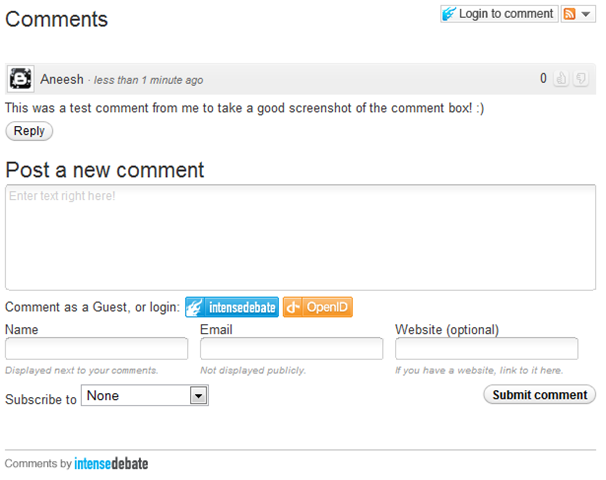
    One of the most effective ways of retaining readers to your blog is by building a little community in your blog, like I mentioned before; Blogger has one of the most crappy comment system in existence; which is the area I think they still need to improve. On my cause of making my blog convenient for you I went for a journey, With a little research (Google Of-course 🙂 ) I managed to grab some Ideas I think I should share with you. My Discoveries!Ouch: This is a very unusual title to give to reason 🙂 but honestly I can’t think of a better title to give to it (you probably should suggest one for me). While I was still using the blogger comment system, I made a very crucial error while posting a long reply on a user comment, that was when I voiced the word “ouch” what do I do? There was no Edit or Preview Option, I had to delete and re-write the entire comment (so bad I guess?). The worst is coming……   No Threading Comments: In other comment system you might have seen a  REPLY  button or link attached immediately after or below each comments; this is known as threads comment. This all important feature enable you and your readers to reply directly under each comment (Not the ‘@’ trash we normally use), Without having to do some advance xml editing.    Now, this is a very important feature for any blog comment system,  our dear default blogger comments system do not allow you to reply directly to a comment, this can lead to confusion and Ioften see bloggers having to use ‘@’ to specify which person the were replying to for example ‘@quoyo’ ‘@gotmelsh’ I can now post a reply and it will be attached to the bottom of each comment.   Enticing Comment Form: The comment form you probably have seen on wordpress comment system allow users to comment as a guest with their Name and URL, This feature entice your readers to comment on your blog post. ‘Would you want to comment on a blog that doesn’t give user the privilege to share there own blog/site?’ ‘Other people probably won’t like to either’ (that’s the devil’s tempting offer you can’t reject’) or if they have a wordpress account they can comment with that profile.But they can also comment with their social network and online profiles like *Twitter *Facebook *Yahoo *OpenId (Did You Know Your Blogger URL is an open Id?).    When you leave a comment you can also add an image or video to your comment instead of adding an image or video URL that will take users out of your blog. Now that’s is a good example of a good comment system.We have ‘that devil’s tempting offer’ but please do not spam us 🙂   Email Options: This is probably the most important feature that blogger comment system lack. ‘Ask me why?’ This is becourse these option allows your readers to choose if they want to receive new comments or replies posted to the posts they have earlier commented on directly to their email whereby helping the user to know when a reply is posted to his reply… What you probably don’t know is that this feature help you a great deal to maintain a good number of returning visitors. please, remember to choose this option while commenting here becourse I would love to see you again.   Ratings: Many of you know that I’m on bloggers, most time what really takes me to bloggers is to check how many people that voted (Rate) for my talks (comment). If there are so many people who does the same thing out there, then you can imagine how many returning visitors who will often come back to your blog to check if anybody voted for them. Our blogger comment system lacks this feature too… “You are beginning to realize how much features you are missing” Hold on I still need to tell you something and please do not forget to tell me something too 🙂 Your comment is very valuable to me.
    Moderate Options:  Most Comment system other than blogger comment system allows you to reply your post comments directly from your dashboard and email. You receive an email when a new comment or reply is posted on your blog post, the same as with Blogger comments however the options to reply to a comment are much more versatile.

    When I’m away from the computer for a few hours if I have received for example fifty comments I can go to my Intensedebate dashboard to manage the comments.From here I can read the comments and see which posts the comments were posted on.I can click on each comment and reply or delete the comments from the dashboard, now i can reply to comments on one page without the need to go to the blog.
    I Have Heard Enough! Give Me Alternative? Well I have that too, I will be lying if I said I did it all my own but I can assure that about 60% of them are actually my on Idea and please, before I share mine with you promise me you would share yours with me, ‘Ok Deal!’ Lets ride on…. I will be providing you with my idea source,. With this lets move on to our next topic.       Top Five Alternatives To Your Blogger Comment System If you want to get rid of default blogger commenting system and get a better commenting interface, then you can opt for any of these commenting systems.

    intensedebate-

    Intense Debate – I don’t know why I mentioned this first, maybe becourse I’m currently using it on this blog, but what ever the reason might be I want to assure that this is one the best comment system in existence ‘don’t know if it is the best, you will tell me???’  Though most bloggers complain that it does not have the option to export your old blogger comments to your Intensedebate data base, this is true as you might have noticed that most of our posts still have that ‘archaic’ blogger blogger comment system. This is due to we choose to install intensedebate only on new post. I will be publishing an article soon on how to add intensedebate comment system on your blogger blog so make sure you subscribe to our update via email, twitter or facebook. (I promise I won’t spam you; I hate spam too).  This is now owned by  Automattic, the makers of WordPress and is totally free!Features:

    • Comment Threading
    • Reply By Email: Respond to and moderate comments with ease via email
    • Commenter Profiles: Special Profiles for commenters so that there is more interaction between people.
    • Moderation/Blacklisting
    • Reputation Points & Comment Voting
    • Twitter: Tweet your comments
    • Widgets: widgets like blog’s comment stats, the most recent comments made on blog, most popular posts and the most recent comment
    • FriendFeed:(Best Feature)When comments are made in the context of a blog on FriendFeed, IntenseDebate will republish them back on the blog.
    • Plugins API:Developers can enhance the comments by plugins like Seesmic video comments, PollDaddy polls, YouTube videos, smileys.
    • Gravatar support.
    • Facebook Connect and Twitter Sign-in: People comment via their facebook and twitter profiles and can further broadcast the content.
    • Commentluv: This is not a new name to wordpress users, just incase you don’t know; this ‘luvly’ feature automatically put the latest post of your readers to their comments. (You can choose to deactivate it)

    IntenseDebate In Action

    intensedebate-commenting-system
    disqus

    DISQUS  -While on my re-search journey, I happen to read some user reply and discover that this is really the bloggers choice ‘– It is the same thing that Mashable.com uses for its comments.’ (I’m not saying is the best; you still have to me which is the best) I once used it on my blog ‘not this one’ but had to remove after I learned about the commentluv (yes, there is no option for commentluv). One Interesting feature of disqus is the option to export old blogger comment to your disqus comment system database: By so doing you will not loose any of comments.Features:

    • Social Media Reactions: (Best Feature) Display mentions and comments about post from other services around the web (e.g. Twitter, FriendFeed, Digg, YouTube).
    • Trackbacks
    • Seesmic Video Comments
    • Pagination
    • Threading
    • Facebook Connect and Twitter Sign-in: People comment via their facebook and twitter profiles and can further broadcast the content.
    • Widgets like Popular posts and top commenter’s widgets.
    • Blacklisting as well as whitelisting people.

    Disqus In Action

    disqus-commenting system

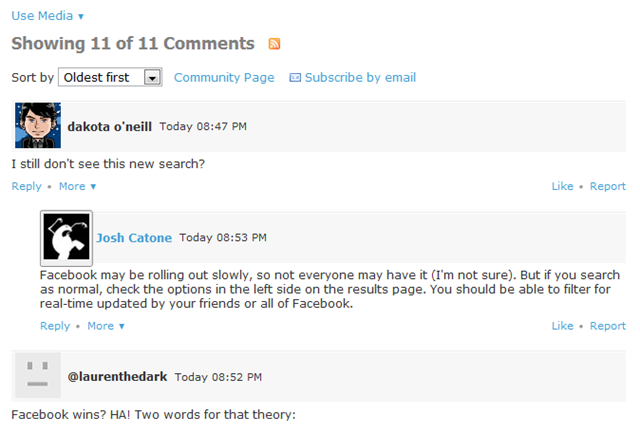
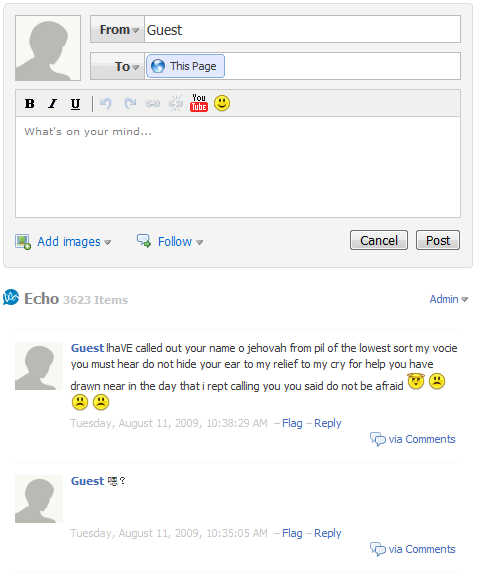
    JS-Kit (Echo) This is also another JavaScript based commenting system.Echo offers both free and paid packages!The free package comes with threaded comments and an interface where the commenter can add videos,images,similes, etc.The commenter can also format his comments using a simple WYSIWYG comment editor. I really don’t know much about this system (and couldn’t quite link to the source page) as I have never tried them before but I do hope that their a some of you out there that do know one or more things it ‘I honestly hope you share your ideas with me; I’m very Interested’ Or you could as well try it and share your experience with us.Features:

    • Spam control with Akismet
    • Banning : Ban a person by the user name or by IP address
    • Gravatar Support
    • TrackBack/PingBack: Trackbacks/Pingbacks can be automatically be included in comments.
    • Comment Ratings and Karma: Users can rate comments.
    • Blogger Comment Sync: (Best Feature) Transparently switch back and forth between native Blogger comment system and JS-Kit Comment system with no loss of comments because comments are always synchronized with Blogger.
    • Emoticons: 16 emoticons are available.
    • Threads: Threading is also available
    • Pagination: Comments can be paged.
    • Commentluv a feature to give love to your commenter is available to only this commenting system
    • Photo as well as video comments.

    JS-KIT (ECHO) IN ACTION

    js-kit-commenting system

    Important: Please make sure to backup your blogger templates before trying any of this system so as to remain on the safer side.

    These are the three most popular commenting systems.They come with threaded commenting with Gravatar based profile images,which can make you commenting system look more professional.I personally prefer Intense Debate over the others.

    Note: These comment forms come with an option to show the comment form on new posts only(means posts with 0 blogger comments)!That means your old comments will stay intact and will use the old blogger comment form.(This is optional.. you can also revert all posts to use the new commenting system.But in that case, you cant display the existing comments easily..)

    These are nothing  but my own lame idea and re-search, I know there hundreds others but it’s your turn to tell me about them (Remember the promise you made to me earlier). ‘to share with me’ 

  • Your Recipe For Long-Term And Targeted Traffic: Generating Traffic To Your Website!

    Your Recipe For Long-Term And Targeted Traffic: Generating Traffic To Your Website!

    Generating traffic to your website can be easy if you know the little secrets about how to drive massive volumes of traffic at no cost.
    This article presents some secret ways through which you can easily boost traffic to your website.

    • Have your own website’s discussion board or forum, and invite people to visit and participate on your forum. This generates traffic to your website and all the posts on your website’s forum will help to improve your search engines position, which will boost traffic to your website. People who visit your forum will also visit your website, hence driving massive amounts of volume to your website.
    • Offer an e-zine on your website and invite people to subscribe to your free e-zine. When people subscribe, they will give in their email address. Every time they read your e-zine, it will remind them to return to your site since you will have your website URL in your e-zine.
    • Invite people to bookmark your website. This is particularly effective if you have high quality content on your website which makes people want to spend more time reading all the useful content on your site. Give away free content to other web masters for them to add on their websites. By allowing your visitors and other webmasters to use your articles on their own web site or in their e-zine, including your resource box, you are effectively advertising your website through their web sites. In addition, allow your visitors to give away your online freebies, and these will include your website URL, thus effectively multiplying your traffic.
    • You can also ask your website visitors to refer your web site to their friend(s) who may benefit from visiting your website. This will increase traffic to your website.
    • Invite your visitors to sign your guest book. When people sign your guestbook they may give you valuable feedback that will help you to improve your web site. This in turn will help you increase traffic to your web site by providing a useful website.
    • Offer an affiliate program. Having hundreds of affiliates advertising your website is an effective way of generating traffic to your website.
    • Give some testimonials or product reviews including your website URL to websites that get high volumes of traffic. By having a testimonial on a website that is visited by thousands of people, you are getting free publicity and free advertising and traffic for your website.

    Use the secret tips outlined above to easily generate high volumes of traffic to your website and boost your online profits.

  • Important Tips For Listing On Ebay That You Should Follow To Succeed In Your Ebay Business

    Important Tips For Listing On Ebay That You Should Follow To Succeed In Your Ebay Business

    The way you list your merchandise on Ebay influences the success you can achieve in your business. Your merchandise listing is like your shop front, and people will decide whether to buy your products or not based on your product listing and description. This article outlines some essential tips that you can use in your listing to make sure that you succeed in selling your merchandise on Ebay.

    • Have your products’ keywords in your product description.
    • The titles of your product listing must grab the readers’ attention.
    • Make your product description as detailed and accurate as possible. Make sure that your product description will help people to know the nature and condition of what you are selling. Put yourself in the shoes of a potential buyer, and in your description, provide as much detail as you would wish to get about the product if you were considering buying it. Don’t lose bids and sales simply because people don’t know what you are selling precisely. If a potential customer asks you a question about the product that you have listed, make sure that you reply them as soon as possible.
    • Add photos or images of your products as this will help the potential customer to see how the product looks like.
    • Make sure that your product is listed in the most accurate category.
    • If the product that you are selling needs to be shipped to the buyer, provide enough information about the shipping, the cost of shipping and the estimated time it will take to ship the product. It is also easier if you sell products that are not heavy and bulky. You must also offer fast or slower delivery options so that people who want to get the products delivered early have an option to get the products on time.
    • If your products need shipping, you must specify your location as this will help the buyer to know that they will need to pay for shipping.
    • Provide several payment options so that your potential customers can use the payment method that suits them best.
    • It is also important that you list your products with low prices. This will encourage many people to bid.

    These tips can help you to list your products effectively so that you get a lot of bids on your Ebay products.Credits:
    Read more http://obasimvilla.com/blog/important-tips-for-listing-on-ebay-that-you-should-follow-to-succeed-in-your-ebay-business/

  • Essential Tips For Generating Traffic To Your Website For Free

    Essential Tips For Generating Traffic To Your Website For Free

    Promoting your website does not need to cost you a lot of money. There are various ways through which you can drive traffic to your website for free.

    If you have no money or if you have a small budget for driving traffic to your website, you can use tips outlined in this articles to generate traffic to your website for free.

    • Exchanging links with other webmasters is a powerful way of generating traffic to your website for free. All you have to do is to identify webmasters with websites that complement your website and exchange website links with them. This means that traffic can be driven to your website through the websites where you have your link.
    • Arrange a joint venture with other webmasters and list owners so that they can advertise your website to their list. This does not cost you anything and all you need to do is to contact some list owners and present your request. By doing this, your website can be advertised to a huge list of people which will drive traffic to your site.
    • Write articles or free reports for other webmasters to publish and put your website address in the author’s resource or biography. If your reports and articles are of good quality, your articles will be published and many readers who will read your article will also visit your website.
    • Include your website address in your business email signature. Anyone you communicate with can potentially be your prospect, so you can therefore be promoting your website every time you send an email.
    • Create RSS feeds for your site and submit the feed URLs to the major RSS feed directories online. This will generate traffic to your website.
    • Have a blog to your site and ping your website on a regular basis when you add new content. When you ping your blog, you make search engines robots index your website, which ultimately drives traffic to your website. It is also very effective to submit your blog address to blog search sites and directories.
    • Include your web address to your forum profile signature. This means that every time you post or respond to questions on the forum, your website URL is seen by all the people in the forum.

    By following these tips, you can generate a steady flow of traffic to your website without spending a lot of money. All you need is to have some time to carry out the steps presented in this article and you will see an increase in traffic to your website.

  • Important Tips For Listing On Ebay That You Should Follow To Succeed In Your Ebay Business

    Important Tips For Listing On Ebay That You Should Follow To Succeed In Your Ebay Business


    This article outlines some essential tips that you can use in your listing to make sure that you succeed in selling your merchandise on Ebay.

    • Have your products’ keywords in your product description.
    • The titles of your product listing must grab the readers’ attention.
    • Make your product description as detailed and accurate as possible. Make sure that your product description will help people to know the nature and condition of what you are selling. Put yourself in the shoes of a potential buyer, and in your description, provide as much detail as you would wish to get about the product if you were considering buying it. Don’t lose bids and sales simply because people don’t know what you are selling precisely. If a potential customer asks you a question about the product that you have listed, make sure that you reply them as soon as possible.
    • Add photos or images of your products as this will help the potential customer to see how the product looks like.
    • Make sure that your product is listed in the most accurate category.
    • If the product that you are selling needs to be shipped to the buyer, provide enough information about the shipping, the cost of shipping and the estimated time it will take to ship the product. It is also easier if you sell products that are not heavy and bulky. You must also offer fast or slower delivery options so that people who want to get the products delivered early have an option to get the products on time.
    • If your products need shipping, you must specify your location as this will help the buyer to know that they will need to pay for shipping.
    • Provide several payment options so that your potential customers can use the payment method that suits them best.
    • It is also important that you list your products with low prices. This will encourage many people to bid.

    These tips can help you to list your products effectively so that you get a lot of bids on your Ebay products.

  • Make Your Ebay Business Easy By Using Dropshippers

    Make Your Ebay Business Easy By Using Dropshippers

    Dropshipping is one of the popular ways through which people are making money without hassles on Ebay.
    By using dropshippers, you can sell a wide range of goods and you also simplify your business, which leaves you with a lot of time to grow your Ebay auction business.
    This articles outlines some of the main reasons why you should use drop shipping to expand your Ebay business.

    • The main advantage of using drop shipping for your Ebay business is that you have the convenience of not worrying about having inventory and also shipping goods to your customers. All that you have to do is to sell your products and when an auction has been completed, you direct the buyer to the drop shipper’s website who will take care of delivery of the purchased products to the customers.
    • Using dropshippers increases your chances of earning large amount of money on the internet because you have a lot of products which you can sell. Once you have decided what you want to sell, you can choose the dropshippers to work with and then start to sell the merchandise you want. By selling a wide range of merchandise, you can increase your sales by selling to many people.
    • Using drop shipping also means that you will be able to start selling merchandise and earn money on the internet quickly. You do not need to spend a lot of money to get started.
    • Using dropshippers in your Ebay business means that you can research on the products for which there is high demand and then select dropshippers that sell these products at the best prices. By selling popular products at good prices from the customer’s perspective, you will be able to sell large volumes of products and make huge profits.
    • If you want to start making money selling merchandise on Ebay, you can use dropshippers to make your business hassle-free. Drop shipping is one of the easiest ways to start making money online because they make it easy for you to start selling merchandise on the internet. Many people who are starting a business selling products on Ebay start by using dropshippers.

    Read more http://wikibloggers.org/make-your-ebay-business-easy-by-using-dropshippers/

  • Tips On How To Prevent The Common Risks Of Buying On Ebay

    Tips On How To Prevent The Common Risks Of Buying On Ebay

    it possible to do as much shopping as you want on the internet. You don’t need to go to a shopping mall to buy products since you can shop on the internet. You can check out many products and compare prices in the comfort of your own home on the internet.
    Shopping on the internet has therefore made buying convenient. However, buying goods on the internet is different from buying in a shop where you can touch the product or even try it on. This articles outlines some of the main risks associated with buying on the internet.

    • The product may not meet your expectations or may be of poor quality. While buying on Ebay, you are relying on the description provided by the seller or any photos of the products that are on the website.  Because you can’t see the product in real life before you pay for it, sometimes when the product is delivered you may discover that it’s not what you expected.
    • There is a risk that the seller is not reliable. While buying on Ebay, you have to believe that the seller is trustworthy; has the product as described on Ebay, and that they will ship it to you after you have paid for it. Although most sellers are reliable, some sellers fail to ship the product to the customer or the product they ship is not exactly what they described on Ebay. Of course you can’t be certain that every seller you will deal with is trustworthy, and you simply have to believe that they will be reliable and that they are trustworthy. Ebay allows sellers to be reviewed, so if you buy on Ebay on a regular basis, you may consider buying from sellers with good feedback.
    •  Some sellers fail to communicate with their customers. It’s possible that after you have paid for something, and if you have questions regarding the product, the seller may not answer your emails.
    • There is a risk that even if the seller ships the product, your product may be lost in transit to you or may be damaged. Although this risk is minimal, it can happen.

    It’s fun and convenient buying on Ebay. You must however be aware of these risks so that you can successfully shop on Ebay. Read more from http://wikibloggers.org/tips-on-how-to-prevent-the-common-risks-of-buying-on-ebay/

  • How to Avoid Facebook and Twitter Disasters

    How to Avoid Facebook and Twitter Disasters

    Who knew your boss could see so much of your Facebook page–including the pics from your wild weekend? Oversharing can lead to underemployment. Take some practical steps to control what others see about you. The power of social networks like Facebook and Twitter comes from their ability to quickly share information about your life with other people. But along with that ability comes the risk of sharing sensitive information with the wrong people, and that risk increases as your network grows well beyond your core circle of friends.
    Using Twitter and Facebook effectively takes more than discretion; you should know how to tweak the settings for these services so that you have full control over who sees what on your Facebook page or on Twitter. In the two stories linked below, and in others to come, we’ll cover both sides of the coin: how to use the tools at your disposal to keep your profiles in check, and how to handle the etiquette side of the equation, as well.

    The garden-variety freshman may not have much to worry about, but it’s a different story if you–as many people are increasingly doing–are using Facebook and Twitter not for updates about your meals, pets, and drinking binges, but for professional purposes. So we’ve outlined here a handful of common disastrous scenarios in which one (or both) of these social networks was misused, as well as the best way to prevent or remedy the problem.
    But in the end you’ll find that the fundamental lesson is invariably the same, and that’s to remember the golden rule of all social networks: Never forget that the whole world is watching.
    Now go on to:

  • Send Email Like a Pro

    Send Email Like a Pro

    Email often straddles a fine line between help and hindrance. It’s an invaluable tool, no doubt about it, but sometimes it can be a stubborn, unwieldy, and intrusive monster—maybe even a security threat.
    So who’s in charge around here—you or your inbox? With the right tools, services, and knowledge you can tame the unruly email beast. It’s time to evolve from email user to email power user, and we’ve got just the six tips you need. Start by learning how to add a snooze button to your inbox, then wrangle Gmail to make it smarter and more cooperative. Keep your inbox free of spam with disposable email addresses, then check to make sure your primary addresses haven’t been compromised by hackers. Finally, become a master of email signatures, and learn how to send giant files that would normally choke a mail server.

    Set Your Email to ‘Snooze’ So It Comes Back Later

    Here’s how to make messages bubble back to the top of your inbox—on your schedule.
    A crowded inbox can be a productivity killer, if for no other reason than that important messages can get pushed out of sight by newer ones. What you need is a kind of “remind me later” button for email, a way to defer selected messages to a later date or time before they drop “below the fold.”
    Outlook and Gmail users should check out Baydin’s Boomerang, which lets you reschedule email with just a few clicks. Or, if you’re not a fan of plug-ins, services like Followup.cc and NudgeMail work with any email system: You just forward a message to a specialized address ([email protected], for example, or [email protected]), and you’re done. The email will reappear in your inbox at the designated time and date. And if you’re still not ready to act on the message, just click one of the embedded “snooze” options and go back to sleep—er, work.
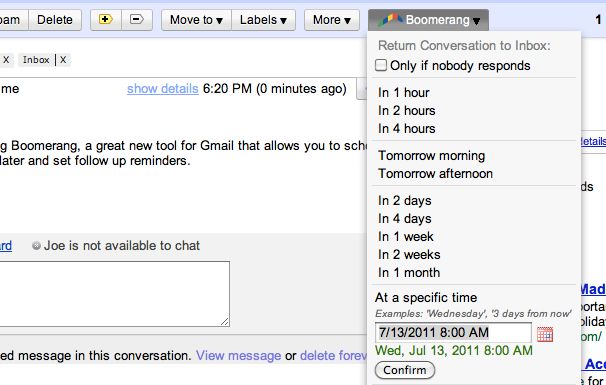
    Boomerang for GMailBoomerang for GMail can help keep important messages you can’t read right away from getting buried by newer mail.
    Both Followup.cc and NudgeMail are free. Boomerang for Outlook costs $30, though you can try it free for 30 days. Boomerang for Gmail offers its Basic plan (ten messages per month) free of charge; you can upgrade to a Personal plan (unlimited messages) for $5 monthly.

    Tame Gmail With Priority Inbox and Dethreaded Conversations

    GMail Priority InboxPriority Inbox is Gmail’s answer to email overload. By evaluating your reading and replying habits, it predicts which messages are most important and “floats” them to the top of your inbox, corraling the less-important stuff for later viewing. (You can tweak the prediction accuracy by clicking a “plus” or “minus” button for any given email.) It’s kind of like having a personal assistant who separates the email wheat from the email chaff.
    To enable Priority Inbox, head to your Gmail settings, click the Inbox tab, and then choose Priority Inbox from the “Inbox type” drop-down menu. Then click Save Changes and return to your inbox.
    Alternatively, while you’re in the settings area, consider turning off one of Gmail’s most controversial features: Conversation View, which groups together messages with the same subject line. The longer a message thread gets, and the more people who participate in it, the harder it becomes to find the newest addition—or to review earlier replies. In other words, these “conversations” can quickly turned into muddled, incomprehensible, frustrating messes.
    To turn off Conversation View—which will make messages appear one after another (as in most traditional email systems)—click over to the General tab, then set Conversation View to off. Click Save Changes when you’re done.

    Protect Your Privacy With Disposable Email Addresses

    You know the routine: There’s some new service, promotion, or online freebie that requires your email address–but you don’t want the inevitable deluge of ads, updates, and other inbox spam. How can you sign up without actually sharing your email address?
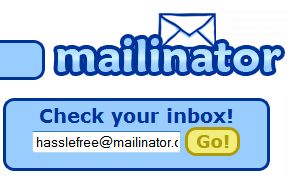
    Mailinator is simple and free to use.What you need is a disposable address, one that won’t negatively impact your inbox. Suppose you’re staring at a registration form and don’t want to use your regular email account. Just make up an address (like “ihatespam”) and tack on @mailinator.com. Then head to the free Mailinatorservice and sign in using the address you just created; you’ll find a Web-accessible inbox you can use to retrieve your promotional code, download link, or whatever. All Mailinator mail gets deleted within a day.
    Mailinator isn’t the only disposable-email game in town. Services like 10 Minute Mail, Humaility, and YopMail offer similarly convenient registration-free addresses. And if you’re a Firefox user, Less Spam, Pleaseintegrates with these services, generating a disposable, reusable email address when you right-click in an email field and choose Insert a temporary mail address. Doesn’t get much easier than that.

    Instantly Paste Your Choice of Email Signatures

    An email signature is a great way to share snippets of contact information: your phone number, Facebook/Twitter addresses, website, and so on. But with most email systems and programs, it’s an all-or-nothing affair: signatures are either “on” or “off,” and you’re limited to just one appended block of text. What if you want to add your signature to some emails but not others? And what if you want to share different contact blurbs with business associates than you do with friends and family?
    The solution: an “autotext” or macro program that quickly and automatically turns abbreviated text into expanded blocks of text.
    For example, you could create a custom signature that you’ll use only with clients and customers, and designate it “bizsig.” Then, when you’re done composing an email, you just type bizsig at the end. Presto: The autotext program instantly inserts your full business signature.
    You could take the same approach for a more generalized signature, designating it “sig1” or the like, then just paste it in as needed. And that’s the beauty of this approach: You apply a signature when you want one and skip it when you don’t.
    A number of programs afford this kind of macro-powered convenience; two of the most popular are AutoHotKey and PhraseExpress. Both are free, but the latter is definitely the more user-friendly of the two. (AutoHotKey requires a bit of scripting.)

    Find Out If Your Email Account Has Been Hacked

    It seems that every day we hear about another email database being compromised by hackers. The “good” news is that these petty thieves often post the stolen databases online. The bad news is, there’s no way to know for sure if your email address has been compromised.
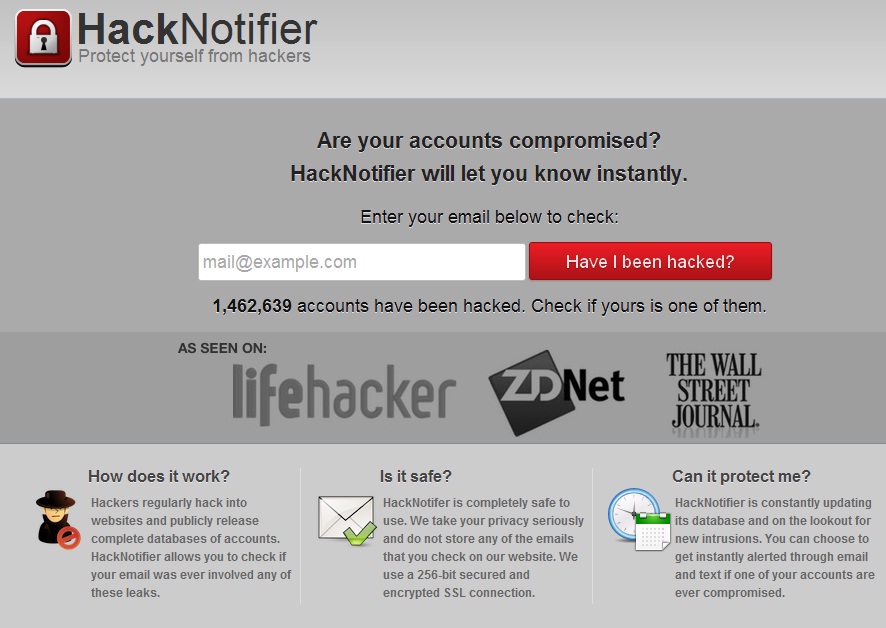
    There is now: HackNotifierchecks your email address against the growing number of publicly available “hacked” email databases. Just type in your address and click Have I been hacked? If the results are negative, you can rest easy–though you should continue to be diligent about using strong passwords and varying them from site to site.
     
    Verify that your e-mail account hasn’t been hacked with HackNotifier.
    If the news is not good, HackNotifier will tell you which accounts were compromised and provide more information about the leaks. The service also offers 24/7 account monitoring for $5 per year ($7 if you want instant notification via text message). What it doesn’t do is offer any instructions on how to safeguard your email security if an account has been hacked. Check out numerous ways of Creating an effective password

    Send Super-Huge File Attachments

    As a general rule, mail servers don’t like large file attachments. While some can accommodate files as large as 25MB, others balk if they exceed just 5MB. In these days of mammoth videos, photo libraries, PDFs, and the like, that doesn’t always cut it.
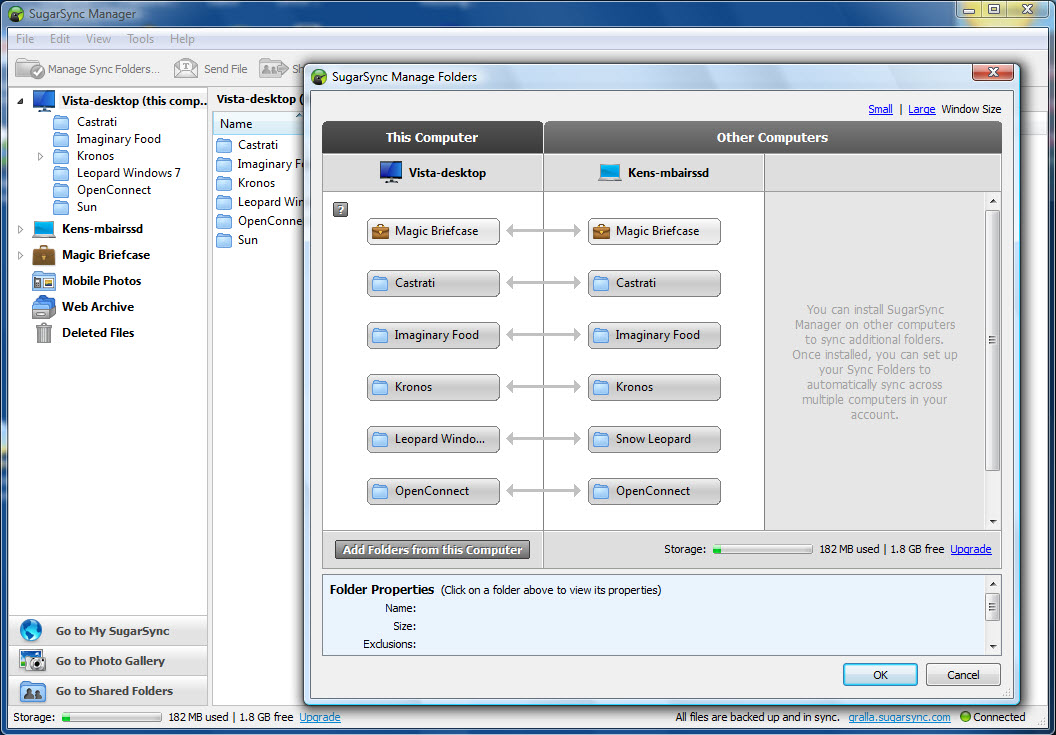
    What you need is a file-sharing service that bypasses your mail server. Countless options are available, including such cloud-storage stalwarts as Dropbox and SugarSync(which give you 2GB and 5GB of free space, respectively). You simply upload your file(s) to a public folder, copy the “share” link, and paste that link into an email. The recipients will be able to download the file(s) via the link, effectively taking mail servers out of the equation.
    SugarSync is a perennial favorite for storing and sharing files online.
    If you’d rather not sign up for yet another service, or you just want a more straightforward way to share your big files, try Ge.tt. In about the time it takes to read this sentence, you can upload a file and get a link to hand out—no registration, software, or plug-ins required. Files remain available for 30 days, or 90 if you elect to sign up for an account (which is free). That account also gives you real-time sharing statistics, something you definitely can’t get from email.
    On the other hand, if you prefer the traditional (some would say easier) email-attachment method, file-sharing service YouSendIt offers a free Microsoft Outlook plug-inthat does an end run around your mail server, while still making big-file sharing as simple as creating an attachment. Note, however, that the maximum file size is 50MB unless you sign up for a Pro account ($10 monthly or $50 per year), which raises the maximum to 2GB.
    With these tools in your arsenal, it won’t be long before you’re sending and sorting email like a pro.


  • Windows 8 Leaked in Final Form

    Windows 8 Leaked in Final Form

    A final copy of Windows 8 leaked to the Internet on Thursday, just a day after Microsoft stamped the new operating system as finished.
    Identified as Windows 8 Enterprise N — the “N” marks it as aimed at European users — on several BitTorrent file-sharing websites, it was unclear yesterday whether the leaked build was legitimate.
    Although some who downloaded the leaked copy asserted it was an invalid build, the consensus early Friday was that it was the real deal.
    “Legitimate. It works. Looks real,” said one commenter on a popular file-sharing site. Numerous downloaders posted screenshots to back up their contention that the leak was the actual Windows 8.
    Others vouched for it as well, including “Canouna,” the nickname used by an administrator of the WinLeaked forum.

    The copy is an English-language version, but according to the file-sharing sites is non-booting, meaning pirates must create installation media. Instructions for generating a DVD- or USB flash drive-based installer were posted on some of the file-sharing websites, and available elsewhere on the Internet.
    Microsoft’s N editions omit Windows Media Player, and are distributed throughout most of Europe as part of the mandate by European Union antitrust regulators after a 2004 decision that concluded Microsoft’s bundling of the player program was anti-competitive.

    Prerelease with Precedent

    Leaks of upcoming Windows releases are not uncommon. In the run-up to Windows 7’s launch three years ago, pirated copies appeared regularly, from the October 2008 leak of an “alpha” version Microsoft meant only for developers to Windows 7 Release Candidate, which went public about two weeks before Microsoft officially launched the preview.
    The company has avoided much of that with Windows 8, although a Chinese edition of the operating system made it to the Internet three days before Microsoft shipped the Release Candidate, the final public preview, in late May.
    Previously, Microsoft has warned users not to install leaked builds, claiming that they can be infected with malware.
    Some customers can obtain a non-pirated copy of Windows 8 as soon as August 15, when the RTM, or “release to manufacturing” milestone — the same code as will be installed on new PCs — reaches the MSDN (Microsoft Developers Network) and TechNet services.
    Enterprises with Software Assurance licensing plans — Software Assurance is essentially an annuity that gives companies the right to run any version of a product — will be able to grab Windows 8 starting August 16, as will members of the Microsoft Partner Network.
    Windows 8 will launch October 26, with two editions in retail — Windows 8 and Windows 8 Pro — and another, the Enterprise edition that leaked yesterday, targeting corporations with volume licensing agreements.
    Credit:
    For more enterprise computing news, visit Computerworld. Story copyright © 2011 Computerworld Inc. All rights reserved.  

  • Don’t Tell the Boss: You Tweet from Work Like a Maniac

    Don’t Tell the Boss: You Tweet from Work Like a Maniac

    A new study by network security firm Palo Alto Networksshows “explosive” growth in the use of social networks in the workplace, with a 300 percent increase in social media activity in the latter half of 2011 compared with the same period of 2010.
    Twitter usage, in particular, showed a dramatic increase in popularity at work, growing by more than 700 percent year over year.
    Employees are flocking to other social sites as well. Since October 2010, bandwidth consumption for social media postings, Facebook apps, and other social plug-ins jumped significantly. When measured as a percentage of total social networking bandwidth, usage rose from 5 percent in October 2010 to 25 percent in December 2011, the study shows.
    Browser-based file sharing is way up as well. File sharing sites appeared on the networks of 92 percent of participating organizations in the survey.

    Security Risk

    The ability of browser-based, file-sharing apps to evade detection means that they often operate undetected on corporate networks, a situation that represents a security risk for businesses, the study says.
    The Palo Alto Networks Application Usage and Risk Report analyzed application traffic from more than 1,600 businesses between April 2011 and November 2011.

  • How to Send Your Boss an Anonymous Email

    How to Send Your Boss an Anonymous Email

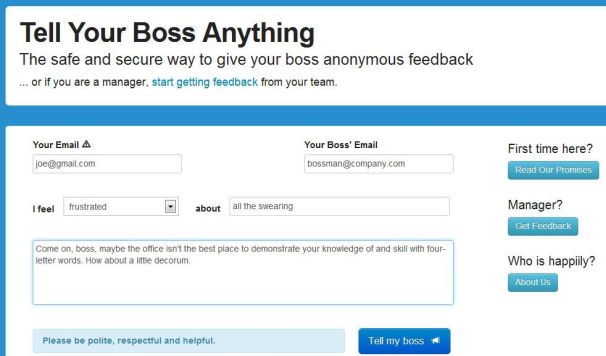
    What’s the best way to communicate with your boss? Open, honest, face-to-face conversation, of course.That would seem to fly in the face of Tell Your Boss Anything, a Web site designed expressly for sending anonymous messages. But it’s not really about giving ol’ Scrooge a piece of your mind; rather, the site appears to have constructive motives.
    To get started, you enter your own “trusted” email address (more on that in a bit), then your boss’ address. Next, you create a subject line by filling in the blanks: “I feel ____ about ____.”
    Within that first blank, you can choose words like happy, frustrated, irritated, confused, and proud. The words that go in the second blank are up to you.
    Then you compose your email. When you click Tell my boss, your message gets delivered anonymously. But here’s the thing: Your boss can reply, and that reply will come to your aforementioned email address — all the while keeping your identity private.

    The site cautions you to be “polite, respectful, and helpful,” and indeed nothing about Tell Your Boss Anything suggests that it’s aimed at telling a person off. The idea is more to express yourself in a way that you might not feel comfortable doing otherwise.

    That could prove valuable if your boss is the type who doesn’t typically welcome open, honest, face-to-face communication. On the flipside, I think most bosses would likely be ticked off by an anonymous email from an employee, even one that was positive. What’s more, there’s always the risk that the boss will somehow “know it was you,” which might land you in hot water.
    The real value here is for bosses themselves, who can use Tell Your Boss Anything to invite anonymous feedback from employees. It’s like a digital version of the suggestion box, a way to let the team know they can communicate with you without fear of reprisal.
    Personally, I have no use for Tell Your Boss Anything, because my bosses are all awesome, and I have no qualms about telling them to their faces. Or, you know, by way of a blog post.
    But what do you think? Would you ever use a service like this, either as a boss or an employee?

  • How Microsoft Surface Stacks Up Against Its Tablet Competition

    How Microsoft Surface Stacks Up Against Its Tablet Competition

    How do the specs for the upcoming Microsoft Surface for Windows RT and Surface for Windows Pro compare with the Apple iPad? Here’s what we know. Surface will change your expectations of what you can do with your tablet. First and foremost, you are no longer buying into a dedicated mobile OS and its corresponding app ecosystem. Instead, you’ll be able to buy one app and use it on both a tablet and a Windows 8 laptop or desktop PC.

    While the Metro face of the two Surfaces will be the same, the hardware flavors are fundamentally different. Surface RT will compete most directly with Apple’s iPad and the current crop of Android tablets, all of which run on power-efficient ARM-based processors. And Surface Pro—though still a tablet—targets Ultrabooks and other ultraportable laptops.
    Click on the chart below for a comparison of the two Surface models with other tablets.

    Surface RT vs. the iPad and Android Tablets

    surface chartTech specs: Surface RT comes with a USB 2.0 port standard (critical for connecting external storage and peripherals), along with a MicroSD card slot and Micro-HDMI video out. Most Android tablets have a MicroSD card slot and a Micro-HDMI port as well, but very few have a full-size USB port. Apple’s iPad famously has no ports, with the sole exception of its proprietary dock connector.

    At the chip level, Nvidia’s Tegra 3 ARM processor powers the Surface RT. Most Android tablets run a version of the Tegra 3, as well, or they use another ARM-based processor. The iPad carries Apple’s own processor, which is also based on the ARM architecture.
    Click for a full-size view of the chart.Storage on the Surface RT is similarly upscale, with a minimum of 32GB. The iPad and most Android tablets start at just 16GB. Among Android tablets, Asus’s Transformer Pad Infinity TF700 and Acer’s Iconia Tab A700 are the two exceptions, with 32GB baseline models.
    Screen and resolution: Microsoft lists the RT’s display as “HD” rather than as “Full HD,” which likely translates into a resolution of just 1366 by 768 pixels. That won’t compete with the iPad’s Retina display, or even with those of Android tablets such as the Transformer Pad Infinity TF700 and the Iconia Tab A700 (both with resolutions of 1920 by 1200 pixels). The Surface RT’s optically bonded display, which eliminates the annoying air gap between the screen and the glass, should help overcome its resolution shortfall. Microsoft does cite its ClearType font-display technology, but we won’t know how much ClearType can compensate for the gap in pixel density until we have the Surface tablet in hand.
    Click for a full-size view of this chart.Physical specs: Microsoft didn’t supply complete numbers, but it did say Surface RT should be about 0.37 inch thick—thinner than many competing tablets and in a dead heat with Apple’s iPad. Current estimates put the Surface RT’s weight at 1.49 pounds, or 0.05 pound heavier than the current iPad. That’s a negligible difference, but the iPad itself got heavier this year, while Android tablets are consistently moving in the other direction, as consumers have come to expect. At 1.49 pounds, the Surface will be about 0.2 pound heavier than the Toshiba Excite 10 or the Asus Transformer Pad Infinity.
    The Surface tablet’s design is unique. It features a comfortably angled bezel created with ergonomics in mind; a balanced arrangement of internal components that make Surface feel lighter; and a built-in kickstand for conveniently using Surface in a variety of scenarios.
    Productivity: In this respect Surface RT is likely to shine. Unlike Apple’s iOS and Google’s Android, Microsoft’s Windows 8 provides the ability to view two apps at a time on one screen, as well as having additional apps multitasking in the background. This flexibility is closer to what users are accustomed to having on a desktop or laptop computer. Plus, Surface RT will include Office Home and Student 2013 RT (with Word, Excel, PowerPoint, and OneNote).

    Surface Pro vs. Ultrabook Laptops and Windows 7 Tablets

    Tech specs: Surface Pro will come with 64GB or 128GB of storage and an Intel Core i5 CPU (Microsoft has not yet re­­vealed the clock speed). By contrast, Ultrabooks have anywhere from 128GB to 320GB of solid-state or hard-drive storage, and feature Intel Core i3, Core i5, or Core i7 CPUs. Microsoft hasn’t disclosed how much memory its Surface Pro will have; Ultrabooks average 4GB of RAM, comparable to what you’d find on an ultraportable or all-purpose laptop. Surface Pro outdoes most Ultrabooks, though, with a Micro­SDXC card slot, a USB 3.0 port, a Mini DisplayPort for video output, and a dual digitizer for digital inking with a stylus.
    An example of a Surface screen; click for a full-size view.Screen and resolution: Preliminary specs simply state that Surface Pro has a “Full HD” 10.6-inch display, which would suggest a display resolution of at least 1920 by 1200 pixels. That minimum spec would put it on a par with the best Android tablets from Asus and Acer, but those displays are half an inch smaller, so they have a higher pixel density. And none of the Android models compares with the 9.7-inch Apple iPad at 2048 by 1536 pixels. Like Surface RT, Surface Pro will also feature Microsoft’s ClearType (standard in Windows 8).
    surface screenPhysical specs: Surface Pro’s overall physical design is the same as Surface RT’s; but this model will be thicker, at 0.53 inch. Nonetheless, Surface Pro looks more stylish and snappy than current Windows 7 slates, and it’s thinner than many Ultrabooks. Surface Pro’s weight is estimated at 1.99 pounds, which is significantly lighter than the average 3- to 4-pound Ultrabook and comparable to current Windows 7 tablets.


    Productivity: Intel’s Core i5 is powerful enough to let you tinker in Photoshop, handle complex spreadsheets, or play games. Surface Pro won’t come with Microsoft’s Office apps, though. Still, with digital inking plus one of Microsoft’s keyboard cover options, Surface Pro could be the ultimate ultraportable. If you can make do with a 10.6-inch display, then you can benefit from Surface’s inherent flexibility.

  • How to Choose a New PC Case

    How to Choose a New PC Case

    We’ll show you how to find, buy, and build in a brand-new PC chassis.

    How To Find A PC Case

    If you aren’t a dedicated PC builder, the last thing you probably think about is your PC case. But there are a number of good reasons for moving to a new chassis: You might need space for more components; you might want more cooling; you might long for some fancy features such as clear side panels or glowing fans and lights; or you might be interested in upgrading your front-panel connectors to support the latest and greatest connection types.
    Whatever your reason for considering a new shell, we’ll walk you through the process of selecting one–and we’ll look at how to move the parts and pieces from your old case into your new case smoothly and efficiently.

    Choose a Suitable Case

    PC cases fall into three broad categories: Budget, Midrange, and High-End. But a relatively inexpensive case isn’t necessarily worse than an expensive one.
    Budget Bonanza

    Upgrade Your PC Case: Budget Case

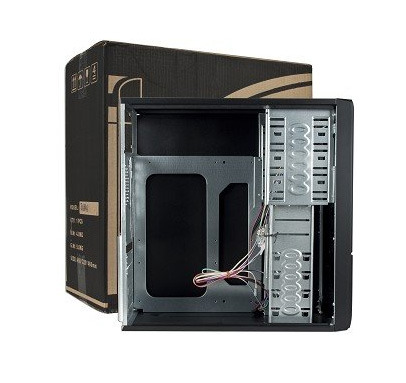
    A typical budget case is inexpensive ($20 to $40), rectangular, and featureless. In other words, it’s a nondescript replacement case with few special features to help you fit more components into your rig, tidy up your cables, or installation your system’s current components easily.
    Budget cases tend to be plain, functional, and utterly ordinary.
    If you want the barest possible enclosure for your PC’s parts, have no interest in expanding your case’s features or available connections beyond what you currently have, or want to spend as little as possible on a new case, you go budget. You’ll get what you pay for with these models in this price range.
    Midrange Medley
    In this category, prices run from $75 to $200, and you’ll find considerable variation in design and construction.
    Midrange cases typically offer handy features such as soundproofing, cable channels for routing wires, and extra connection ports.

    Upgrade Your PC Case: Midrange case

    These cases may have (or lack) a number of features that suit your needs. The most important variable to consider is case dimensions, since you’ll want to know at the outset that your new chassis can hold all of your system’s components without difficulty. Problems may arise if, for example, you have an extralong video card that won’t fit into a case because of its internal layout. If you have multiple cables, liquid cooling tubes, or huge CPU coolers to accommodate, triple-check that your PC parts will fit comfortably within a prospective new case before buying it.
    Also, make sure that your new case can support all of your 3.5-inch and 5.25-inch devices. And don’t buy a three-bay case if your system uses a four-drive RAID array.
    In appraising the raw design of the case, consider whether its accouterments–such as a big door covering the front panel, lighting effects that you can’t turn on and off manually, or a manual cooling bar that falls out of the case whenever you pop off the side panel–contribute more nuisance than neatness.
    Will the case’s overall design be practical six months after you purchase it? If you buy a soundproof case in the winter, will your system be able to handle the hotter interior temperatures that occur during summertime? Keep the big picture in mind, and don’t let eye-catching details lead you astray.
    Here are some other important questions to ask: What kind of connections come built into the case’s front panel (or sides, depending on its design)? Does the case deliver true internal headers for its connections or just pass-through cables? Are the case’s USB ports upside-down? Is the case screwless? Does it come with fans preinstalled? How loud are they when you fire up a system? What other fan configurations could you mount?
    For liquid cooling enthusiasts, what size radiators does the case support? How easily could you mount one externally or internally? Does the case come with motherboard standoffs, or are they built into the motherboard tray? Can you remove the motherboard tray separately from the case? Can you install or tweak the backplane of a CPU cooler without having to remove the entire motherboard? What options does the case provide for managing the system’s cables?
    High-End Heaven

    Upgrade Your PC Case: High-End Case

    Once you break the $200 barrier, you have to deal with manufacturers who sometimes let their imaginations run wild, resulting in PC cases that may be flashier than they are functional. So don’t let an expensive case’s ingenious design blind you to potential shortcomings in its usefulness. A manufacturer may go to great lengths to craft a killer yet functional design for its unique chassis, or it may slap an outlandish design or a few gimmick features on a case that is unpleasant to work with.
    The Lian-Li PC-P80NB is an ATX full-tower case roomy enough to hold every component you could dream of.
    Cases at the high end of the spectrum may come with a ton of cooling, fan controllers, and other switchable features built directly into the chassis. Some may cover every inch of the inside surface with soundproof acoustic foam; others may come with water-cooling loops built into the chassis, like the Logisys CS8009BK. And finally, some cases may be expensive simply because they’re huge: The Lian-Li PC-P80NB, for example, can support 11 PCI devices and 10 hard drives, and comes with six preinstalled fans (five 14-centimeter fans, and one 12-centimeter fan). If that meets your PC building needs, buy it; otherwise, steer clear.
    Next: Transfer your PC’s components to the new case.

    Move Your PC Components From the Old Case to the New One

    The process of transferring components from one case to another is in some ways simpler than the process of selecting the new case. Start with the components that you can easily uninstall, move, and install without affecting any others.
    In a typical system build, I like to start by disconnecting all of the wires and power cables in my existing chassis so that I can get the rat’s nest out of the case before I try to remove individual components. Pull out the SATA cables and the power supply, and disconnect other wires inside the system. Then pop off your system’s side panels, remove your case’s front panel (if applicable), and remove your 5.25-inch optical drives. Depending on the design of your new case, you might be able to load these components into the new shell immediately–one reason I love tool-free case designs. Hard drives come next, and they merit the same treatment.
    Many tool-free cases let you slot your components into place without using screws or removable case fixtures.
    Next, remove your PCI devices, which might consist of a single discrete video card in some instances. Assuming that you aren’t running some fancy water-cooling setup, your old case should be empty of practically everything but the motherboard by now. Unscrew it and gently remove it from the case, gripping it by the edges.
    If your new case doesn’t come with motherboard standoffs, screw them in–and install your motherboard’s I/O shield–before attempting to install the motherboard itself.
    Once the motherboard is in place, I usually attach the system’s PCI devices, especially the video card; however, this approach may make for trickier access to SATA ports or other connectors, depending on the motherboard’s layout. On the other hand, waiting to install the video card can pose a bit of a challenge if the power cables on the power supply barely reach the top connectors on the motherboard.
    Try to route as many cables as possible behind the motherboard, to keep them from cluttering up your case interior and restricting airflow.
    Once all of your components are in place and you’re ready to start connecting cables, try to use your case’s built-in cable management options to maximum advantage. In most systems, the goal is to route as many cables as possible behind the motherboard (mashed up against the right side panel). For this purpose, cases that provide multiple routing holes around the motherboard tray or fasteners (for twist ties/Velcro strips/twine or the like) behind it can be immensely helpful. Minimizing clumps of cables in the middle of your PC will give the system better airflow.
    Next, examine your case layout and verify whether you need to install the power supply at this stage. I recommend waiting until the last possible moment to install your power supply, to avoid having to deal with a bunch of loose power cables. Unfortunately, some cases make it hard to install your power supply after the motherboard is in place, so plan accordingly. Once you’ve installed the power supply and finished connecting all of the system’s cables, you should be finished.
    Transferring components from one case to another isn’t especially difficult, even for computer newbies. For most people, the most time-consuming part of the operation involves cable management–unless you’re migrating a relatively tricky system build (such as one featuring a liquid cooling loop) to a case that may require some creative thinking to achieve the desired results.
    Don’t be afraid of cases. Buy one. Build a system in one. You’ll be amazed at the options that await your consideration–including plenty of builder-friendly features–on today’s market of well-priced, well-designed chassis.