Search results for: “series”

  • Lenovo G505, HP 255 and 5 budget laptops for Nigerian college students—we picked the best

    Lenovo G505, HP 255 and 5 budget laptops for Nigerian college students—we picked the best

    Going to  college in Nigeria could be financially cumbersome towards the end of each semester—especially when it is imperative to get a new laptop and you didn’t manage your finance during the semester.

    Your bank account is nearly tapped out, and you still need to buy text books, handouts and lay in enough ramen noodles to last through the winter.

    Yeah, we’ve all been there. Fortunately, Moore’s Law is still in play, so today’s budget notebook is yesterday’s workhorse. Pretty much any modern laptop can handle the gamut of productivity chores—word processing, number crunching, email, and the like—but all of the machines in this roundup can also tackle media editing and encoding sessions, and deliver respectable entertainment experiences.

    To strike the best balance between performance and affordability, I gathered the top five laptops I could find for ₦60,000 or less. Benchmark busters they’re not, but they aren’t budget busters, either.

    Also Read: Infinix Diamond, Ankara Q2 and 6 ‘Premium’ Affordable Android Phones/Tablets you can buy for ₦9,999+

    Lenovo G505 (₦58,000) — Buy Online

    Working on an environment that demands great sound system? Lenovo G505 offers you the best option. Thanks to its stereo speakers with Dolby® Advanced Audio™ v2, graphics card options up to the speedy AMD Radeon 8570M VRAM, and optical disk drive options up to a Blu-ray Disc™ combo, the G505 offers stunning, stutter-free visuals and immersive sound for a fuller, more satisfying home entertainment experience.
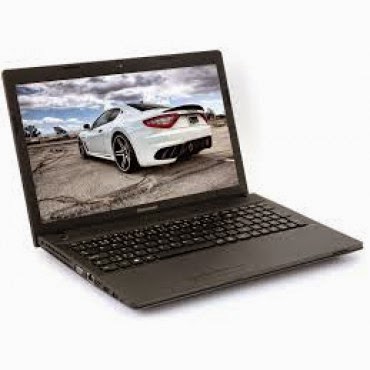
    The AMD E1-2100 APU Processor powered laptop comes with a Windows 8 operating system and a RAM of 2GB. The pre-installed Bitdefender Anti‎‐Virus Plus gives maximum security to the user for 1 year and can be renewed afterward.

    Key Specifications:

    • Windows 8 OS
    • 4GB DDR3 RAM
    • 1TB (1,000GB) Hard Drive
    • AMD E1-2100 APU Processor
    • 15.6-Inch, HD Display
    • Inbuilt Wireless Adapter
    • AMD Radeon Graphics
    • DVD RW Optical Drive

    The actual price for Lenovo G505 is currently ₦86,400 but can be bought online for ₦58,000 (discount rate). See product page for full specification and purchase.

    Dell Inspiron 3541  (₦59,990) — Buy Online

    Dell Inspiron 3541 is a well packaged Windows 8.1 laptop with an AMD E1-6010 Dual Core Processor, Free Dell Sleeve, Microsoft Office 365 Personal, 8GB Flash Drive and 2 years free call service with Skype.
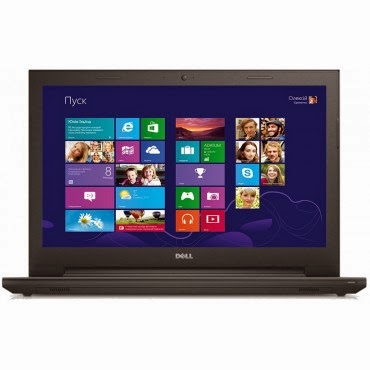
    The device is suitable for gaming and performing high resolution display tasks, boasting of 15.6-Inch (1366×768) HD display unit and AMD R2 dedicated graphics card.

    Key Specifications:

    • Windows 8.1 OS
    • 2GB DDR3 RAM
    • 500GB Hard Drive
    • AMD E1-6010 Dual Core Processor
    • 15.6-Inch (1366×768) HD
    • DVD RW Optical Drive
    • Inbuilt Wireless Adapter

    You can purchase or see complete features and specification of Dell Inspiron 3541 on the product page.

    HP 255 G2 (₦58,600) — Buy Online

    HP 255 is a multi-tasks Windows 8 laptop powered by a 1 GHz, AMD E1-2100 Dual Core Processor and 2 GB RAM, certainly not the fastest PC on this list but the 15.6 Inch, HD display unit will make up for its shortcoming.
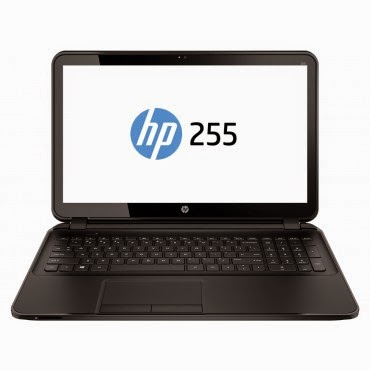
    The laptop has a 500 GB storage space, DVD RW Optical Drive and yes, it has an inbuilt wireless adapter.

    Key Specifications

    • Windows 8.1 OS
    • 2GB RAM
    • 500GB Hard Drive
    • AMD Dual-Core E1-2100 APU with Radeon HD 8210 Graphics (1 GHz, 1 MB cache)
    • 15.6-Inch (1366×768) HD
    • Intel HD Graphics
    • DVD RW Optical Drive
    • Inbuilt Wireless Adapter

    The actual amount for this device is ₦75,000 but can be purchased online for just ₦58,600. See pricing and full specifications.

    Also Read: Sony & Samsung Tablets Dominate the Top 5 Most Expensive Android Tablets in Nigeria

    Acer Aspire E1-510 (₦53,500) — Buy Online
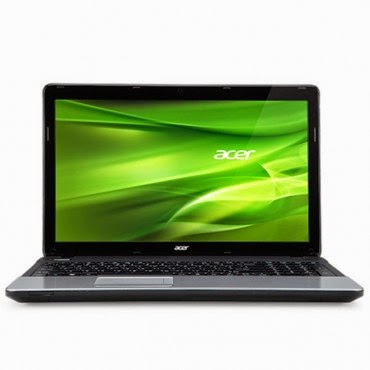
    When it comes to producing quality PCs, Acer is second to no one. Acer Aspire E1-510 carries the same DNA, featuring a durable plastic case and a 4-cell Li-Ion with extended life capacity—if you are in an area where electricity is an issue, you might want to stick with this product.
    The practical yet stylish notebook is loaded with powerful and useful features like multimedia tools and convenient connectivity features‎‎.‎‎ This is a stylish notebook which comes with 15.6 inch, HD LED Backlit display‎‎,‎‎ powered by Intel Pentium processor with Linux OS to provide a faster and user friendly experience‎‎.‎‎ It has Intel HD Graphics that deliver ultimate graphics needed for gaming‎‎,‎‎ 500GB Hard disk drive also provides ample space for storage‎‎,‎‎ HDMI and USB 3.0 ports for faster data transfer.‎‎
    Key Specifications
    • Linux OS (Windows 8.1 & 7 OS Compatible)
    • 4GB DDR3 RAM
    • 500GB Hard Drive
    • Intel Celeron Processor
    • 15.6 Inch, Active Matrix TFT Color LCD
    • 4-cell Li-Ion Battery
    • DVD RW Optical Drive
    • Inbuilt Wireless Adapter
    The researcher friendly laptop is on sale for ₦53,500 online and ₦71,500 in most shops offline. See full product specifications and pricing.

    Acer V5-123 Mini Laptop (₦49,900) — Buy Online
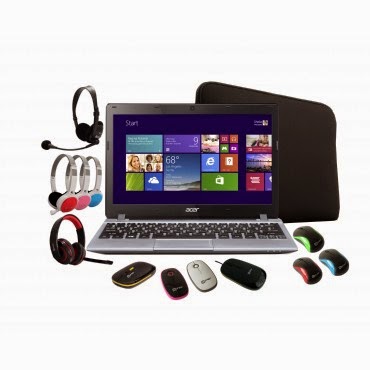
    If you think the products listed above are a little above your budget and you don’t mind sacrificing the option of listening to another Davido’s single, you can bite the bullet and go with an Acer mini laptop without a CD Drive.
    The Aspire V5 Series puts inspiring performance in a thin and light form. A choice of elegant views adds to the charm. Breathe life into your entertainment and enjoy hands-on control with Acer Aspire V5-123. Its built-in speakers sweeten the deal with splendid sound. The laptop features;11.6-Inch WXGA HD, AMD Radeon trade; HD display with 2GB RAM and a 500GB hard drive which provides enough space for you to store your files, data, photos, and music. You can connect to the world wherever you are with your laptop, the WiFi enables you to browse and surf the web, you can also transfer data to other devices via bluetooth. This laptop comes with a free mouse, bag and headset.
    Key Specifications:
    • Windows 8.1 OS
    • 2GB RAM
    • 500GB Hard Drive
    • 11.6-Inch WXGA HD Display
    • Intel HD Graphics
    • Inbuilt WiFi 802.11 bgn Adapter
    Although Acer Aspire V5-123 has no CD Drive, you can still connect a CD Drive via the USB port. Saving over ₦10,000 compared to other products listed above. Purchase or see more about this product on its product page.
  • First Apple Pay ad features George Brett making an Apple Pay purchase.

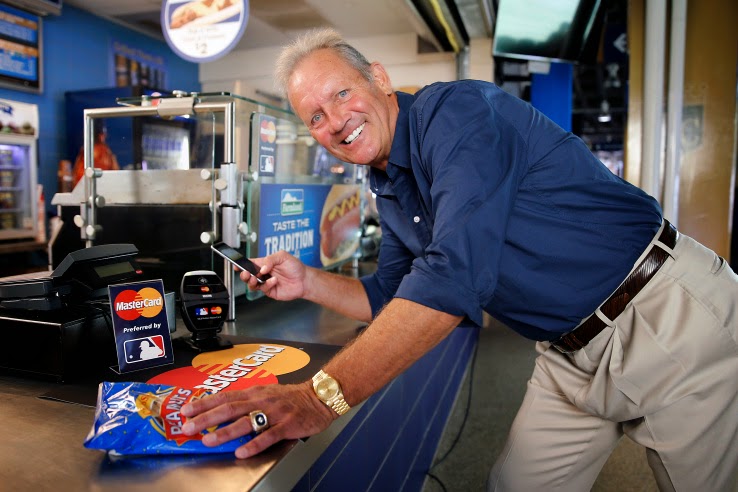
    First Apple Pay ad features George Brett making an Apple Pay purchase.

    Apple’s new payment system is live, and Apple Pay purchase have already garnered more attention than most mobile payment efforts to date. It also have a new ad, which aired yesterday during the opening game of the 2014 World Series, from payment partner MasterCard.

    MasterCard’s ad accompanies its new rollout of contactless payments at food and beverage purchase points in MLB ballparks across the U.S. The program supports a range of NFC-powered mobile payment options, but MasterCard is pushing the Apple Pay angle specifically, touting the fact that it brings Apple Pay to pro sports facilities for the first time, at ballparks in both Kansas City and San Francisco.

    MasterCard says that the Apple Pay system works well in the ballpark setting basically because people want their franks fast. Apple Pay/MLB partnerships don’t end there, however – the company is also offering in-app purchase support for Apple Pay users for single-game tickets once those start going on sale in November, via the MLB.com At the Ballpark app.

    The first ad features MBL Hall of Famer George Brett making an Apple Pay purchase. Remember, this is a MasterCard ad, not an Apple ad, meaning this is yet another sign that payments providers think Apple could be the company to make mobile payments really take off, and are investing resources and backing accordingly.

  • Top 10 Job Openings This Week From Mashable

    Top 10 Job Openings This Week From Mashable

    Are you looking for a new Job or a chance to port to a greener pasture? EwtNet is keeping tabs on various tech companies looking to fill their vacant positions.

    IMAGE: FLICKR, JOSH HALLETT

    If you have been reading EwtNet lately, you will notice a lot of changes in our website layout, especially the new Jobs column at the right sidebar. This is to primarily help you find new job opening in major tech firms.

    We are also keeping eyes on various social media for newly posted job opening by tech companies. Here will be looking at the top ten job ads posted on Mashable this week.

    Position: Manager, Marketing Analytics
    Company: Invaluable
    Location: Boston, Massachusetts

    Invaluable is looking to add a key player to a growing, data-driven marketing team that will help answer complex analytical questions to help shape the marketing acquisition strategy and customer data landscape. The Manager, Marketing Analytics will be instrumental in solving complex marketing business issues using statistical analysis and reporting data across multiple segments and acquisition channels. This position will serve as a pivotal contributor connecting insights from data to other parts of the business.

    Position: Product Manager
    Company: Radius
    Location: San Francisco, California

    Radius is a fast-growing, venture-backed startup in the heart of San Francisco. We’re developing breakthrough technologies that make it easier for all companies – large and small, established and pioneering – to understand and do business with each other. Your job, as a product manager, is to help our team identify the right problems, ask the right questions, and arrive at the right solutions.

    Position: Payments Risk Manager
    Company: Zoosk Inc.
    Location: San Francisco, California

    Zoosk is seeking an experienced payments professional to manage chargeback and refund management and response for our online payments. This role will report to the CFO/COO and is highly cross-functional and will need to develop and manage effective working relationships with external payment providers, as well as Product Management, Engineering, and User Operations.

    Position: Marketing Director
    Company: Honest Buildings
    Location: New York, New York

    Honest Buildings is looking for a self-starter with a strong background in B2B digital marketing to help grow our business. In this role, you will be the business owner – the lead on marketing – responsible for generating qualified leads to drive new business, build awareness, and analyze performance.

    Position: Associate, Email Marketing
    Company: Lincoln Center for the Performing Arts, Inc.
    Location: New York, New York

    Lincoln Center’s Marketing team is looking for an enthusiastic and self-motivated E-mail Marketing Associate. You will make an immediate impact on our marketing efforts by supporting the loyalty marketing team in the planning, production, execution, and reporting of our e-mail marketing campaigns for all performance series, types of memberships, educational programs, and brands at Lincoln Center for the Performing Arts.

    Position: Director of Marketing Optimization
    Company: Innate
    Location: Washington, D.C.

    Established interactive marketing agency is seeking a Director of Marketing Optimization. This position is responsible for implementing growth strategies and achieving revenue targets for a large portfolio of strategic partners in a major multinational brand. This position will maximize revenue through a number of strategic digital initiatives, including analysis reporting, online optimization, digital marketing, website and sales analytics, and content management. The ideal candidate is a highly skilled problem solver and expert communicator who can both dive in to data at a granular level and be able to discuss them with clients in a clear and understandable manner. The Director operates with considerable independence while managing a growing team of analysts and content specialists.

    Position: Publicist
    Company: WebDAM, a Shutterstock company
    Location: San Mateo, California

    WebDAM, a Shutterstock company, is seeking a results-driven and self motivated professional to join our talented Marketing team. By building and maintaining strong media relationships, this individual will be a key player in ensuring that our brand reach continues to grow. We are looking for a candidate who will be instrumental in the development and execution of successful media and public relations strategy.

    Position: Online Media Strategist
    Company: Tenthwave Digital
    Location: New York, New York

    Tenthwave (www.tenthwave.com) is looking for an Online Media Strategist to help support and expand our growing online media team in New York City. The ideal candidate is driven by a passion for technology, search marketing (SEO/SEM), and media buying on social media platforms like Facebook and Twitter. He/she should enjoy working in a creative environment and interacting with team members across various job functions. Candidate must display a high degree of self-motivation with 2-3 years first-hand experience at an interactive agency or in managing the online presence of a large brand.

    Company: Univision Communications Inc.
    Position: Social Media Analyst
    Location: New York, New York

    The Enterprise Social Media team is responsible for accelerating social media efforts across Univisions media properties including Broadcast TV, Cable TV, Interactive (Online, Mobile), Local Television, Radio, and emerging digital platforms. The team is tasked with expanding Univisions social media capabilities and leading the strategy and integration of social in all enterprise priority properties, including daily/weekly news, entertainment, and sports programming, tent-pole award shows, major news events, and other corporate initiatives.

    Position: SEO Specialist
    Company: ThomasNet
    Location: New York, New York

    Join the award winning ThomasNet® Results Powered Marketing (RPM) team! The RPM services team is seeking a results driven and energetic SEO expert to join us. In this fast-paced agency-style role, you will serve as an SEO Analyst and organic traffic generation expert for manufacturing businesses both large and small. Through our partnership with Hubspot®, tracking with Google Analytics and Raven Tools, and your analytical skills, you can achieve all the goals set before you.

    Check out more career opportunities on the EwtNet Job Section.

  • Android 5.0 Lollipop Review: Yet another OS Android Developers will Love

    Android 5.0 Lollipop Review: Yet another OS Android Developers will Love

    Yes, you heard right! Google has decided to put an end to the speculations of a new Android OS and officially pulled the curtain on its new OS version Android 5.0 Lollipop. 

    Two days ago, the company announced the release of a new Android version 5.0 Lollipop on their official blog – An OS designed to “work on all your devices and to be customized for you the way you see fit.”

    Android 5.0 Lollipop featured image. Credit to Google official blogspot
    Android 5.0 Lollipop featured image. Credit to Google official blogspot

    Android has a face only an engineer could love. At least, that’s the reputation it has earned over the past few years. Google’s mobile OS is a hotbed of mobile innovation and new technologies, but its interface doesn’t have the friendly consumer-centric design of iOS or Windows Phone. With Android 5.0 Lollipop, Google aims to overhaul this shortcoming, while baking-in a handful of nifty new features.


    Google stated that “Lollipop is designed to be flexible, to work on all your devices and to be customized for you the way you see fit.” That may be true to some extent but the plastic surgery is incomplete. While iOS7 is easily identifiable by its flat bright colors and lightweight fonts, and Windows Phone carries on with Live Tiles, the Lollipop interface has no single recongnizable trait. Yes, it’s flatter and brighter, but what isn’t these days? Worse, the redesign seems pushed out the door too early. Scratch beneath the surface, and you’ll find built-in apps and menus that haven’t been udpated to the new look. There’s a lot to like in Google’s name-branded OS release, but this sweet treat isn’t quite ready to be unwrapped.

    New Cosmetic Look

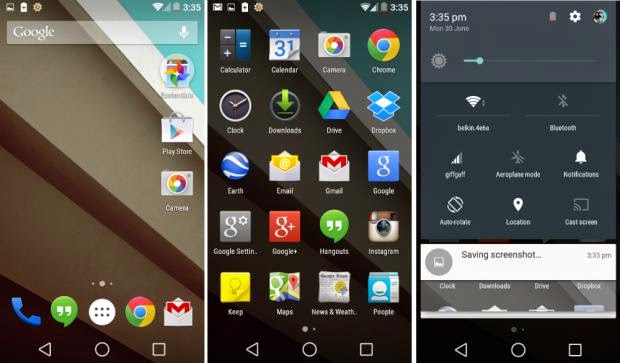
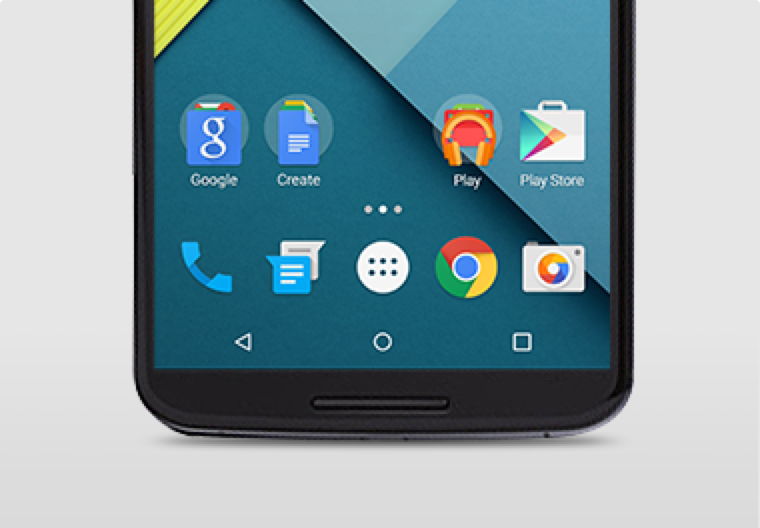
    Android 5.0 Lollipop has a new vibrant look, otherwise called Material Design. Google has finally ditched the traditional look of the Android soft keys at the bottom of the screen and has adopted something rather more stylish.

    New Soft Keys. Image by Knowyourmobile
    New Google Now Launcher. Image by Android

    The “Home” symbol is now a circle, while the multitasking menu is a square. The back button is a reversed arrow that looks like it has been lifted from a 1980’s tape player or VCR unit. It’s quite a drastic change and does take some getting used to, especially if you’ve been using Android since day one.

    The new OS is also bundled with a new launcher. A clean, simple, customizable home screen that comes with the power of Google Now: traffic alerts, weather, and much more, just a swipe away.

    Extensive Battery Life Saver

    Android L brings with it Project Volta, Google’s attempt at giving developers more visibility on what aspects of their apps are draining the most juice. While it’s early days here, the majority of the apps we tested had not been configured to make use of Volta, it’s a solid move by the Big G, as it gives you a more accurate indication of how long your phone is going to last and what apps are sucking up most power.
    Another nice touch is that when you’re charging your phone, you’re told how long it will take for the battery to be fully topped up. While we’ve perhaps not spent enough time with Android Lollipop to get a complete picture, it did seem to give our Nexus 5 more stamina than KitKat.
    Finally, we have Battery Saver mode. How this works is simple, although the service isn’t anything particularly new – plenty of OEMs already build similar features into their hardware. The idea here is to conserve battery life, so when your battery hits a certain percentage, you can set the Battery Saver mode to kick in and throttle the performance of the phone to ensure that juice lasts a little bit longer.

    Newly Improved Notification & Lock Screen

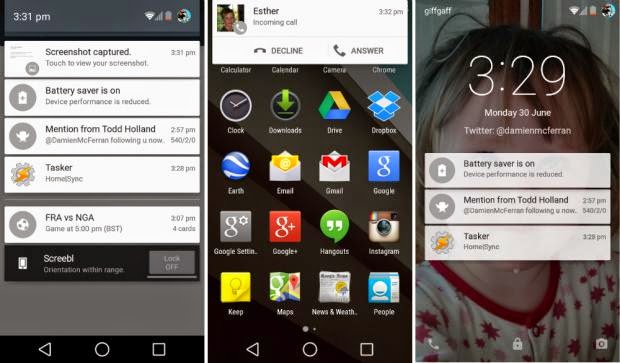
    This is perhaps the biggest area of change in Android Lollipop. Notifications have undergone a complete overhaul, and now look a lot like Google Now’s card-based system. Notifications are displayed directly on the lock screen, and tapping a card allows you to unlock the device and jump straight to that area. You can even expand cards to see more details, such as a list of emails, with the phone still in its locked state (If you don’t like the idea of people being able to snoop on your personal messages then you can enable a feature which locks away the detailed info).
    Newly improved notification and lock screen. image by Knowyourmobile
    It’s a very clever move by Google, and one that brings you even closer to the content you need on your handset. Even if you have a security lock in place, the fact that you can tap the notification you wish to see, unlock the phone and then leap straight into the relevant information makes the whole process seem a lot smoother. You can also swipe away and dismiss notifications without actually unlocking your device.
    When the phone is unlocked, notifications can be displayed by sliding a finger down from the top of the screen. Rather than showing the data in a slide-down panel, as was the case in previous versions of Android, a series of cards flow over the top of your current view, which can be seen behind the cards at all times. This “flowing” cascade of cards is set to be one of Android L’s most striking visual changes. As before though, the slide-down notifications panel has two stages: your finger swipe shows notifications, while a second swipe pulls down the quick settings menu.
    While Google is giving notifications a face-lift, it’s also making them less obtrusive. If your phone is unlocked and you’re involved in another activity, such as browsing emails or playing a game, the call details appear at the top of the display. You can accept or reject the call without having to pause what you’re currently doing. Another welcome addition is the Do Not Disturb function, which you can quickly enable to stop you being bugged by your phone.
    However, Lock-screen widgets have been removed entirely, so if you’re a fan of browsing your emails without unlocking your phone, then you might be disappointed.

    Lollipop is Pretty Good & Tasty

    From its list of features, Lollipop sounds tasty, and Android 5.0 is certainly a step in the right direction. Its interface is bright and inviting and the newly added secondary features like “People” app and a new Dialer application should help make stock Android even more consumer friendly. You also have top-level access to Google+ and Google Now, so there’s no excuse not to take advantage of Google’s most hottest features.
    A lot of popular phones will get upgraded to Lollipop in the next couple months, though Google has recently launched Nexus 6, Nexus 9 and Nexus Player, all powered by Lollipop. Hopefully by the time Lollipop makes its way to your device, Google will have tied up some the loose ends—adopting the new design in all of its core apps and consolidating the myriad of new settings. Or, it can continue to torture us like it did with Kitkat by making only incremental changes to the entire Android package with each release, spacing out core app updates by months.
  • How to Configure Wi-Fi Hotspot on Samsung, Xiaomi, Infinix Smartphones & Android Devices

    How to Configure Wi-Fi Hotspot on Samsung, Xiaomi, Infinix Smartphones & Android Devices

    If you don’t have a home internet access, your best bet is to use your Android smartphone to distribute your cellular Internet connection to your other devices. Using our guidelines provided in video, picture gallery and text format you can learn how to configure Wi-Fi hotspot in an Android smartphone.

    WiFi hotspot enables users with WiFi supported devices to tether internet connection across other devices. Although, there are few security concerns using Wi-Fi but with the right techniques and common-sense you can learn how to configure Wi-Fi hotspot and share internet from your Samsung, Tecno and Infinix smartphone to your PC or other mobile devices.

    Further Reading: How to boost WIFI connections on Your Laptop

    Why Android?

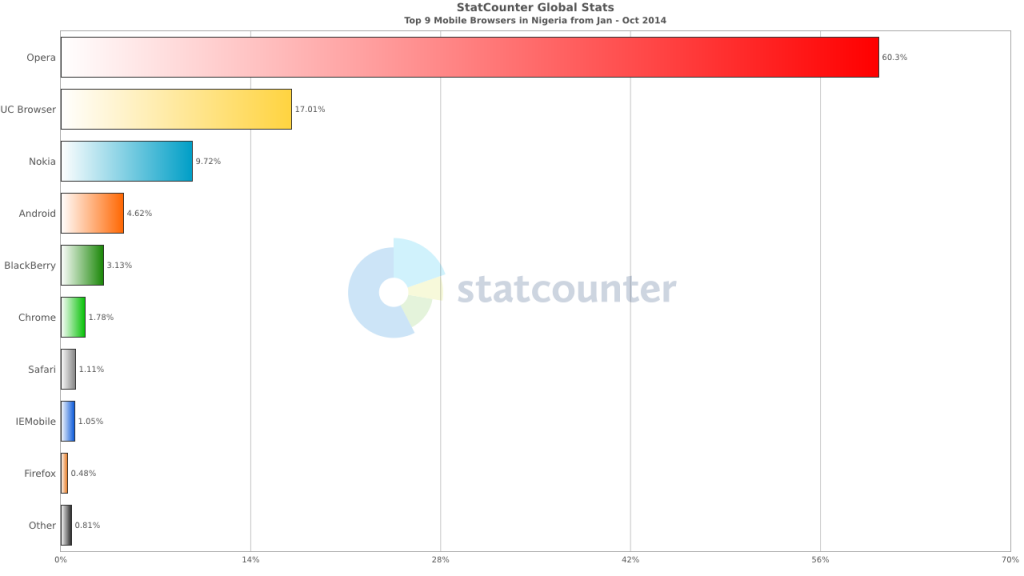
    Browsers Usage in Nigeria
    Top 9 Mobile Browsers in Nigeria (Jan – Oct 2014)

    Smartphone usage statistics from Jan-Oct 2014 shows that Android OS is winning the smartphone war in Nigeria. Infinix, Tecno and Samsung smartphones are at the very top of the food chain in Android smartphone usage among Nigerians.

    How to use and Configure Wi-Fi Hotspot in Samsung, Tecno & Infinix Smartphones

    Since most internet users [in Nigeria] access the internet from the mobile data, it makes sense for Android users to get acquainted with the inbuilt portable hotspot facility that comes pre-installed in most Android devices.

    Further Reading: 6 Premium Android phones or tablets you can purchase for  ₦9,999+ 

    Formats

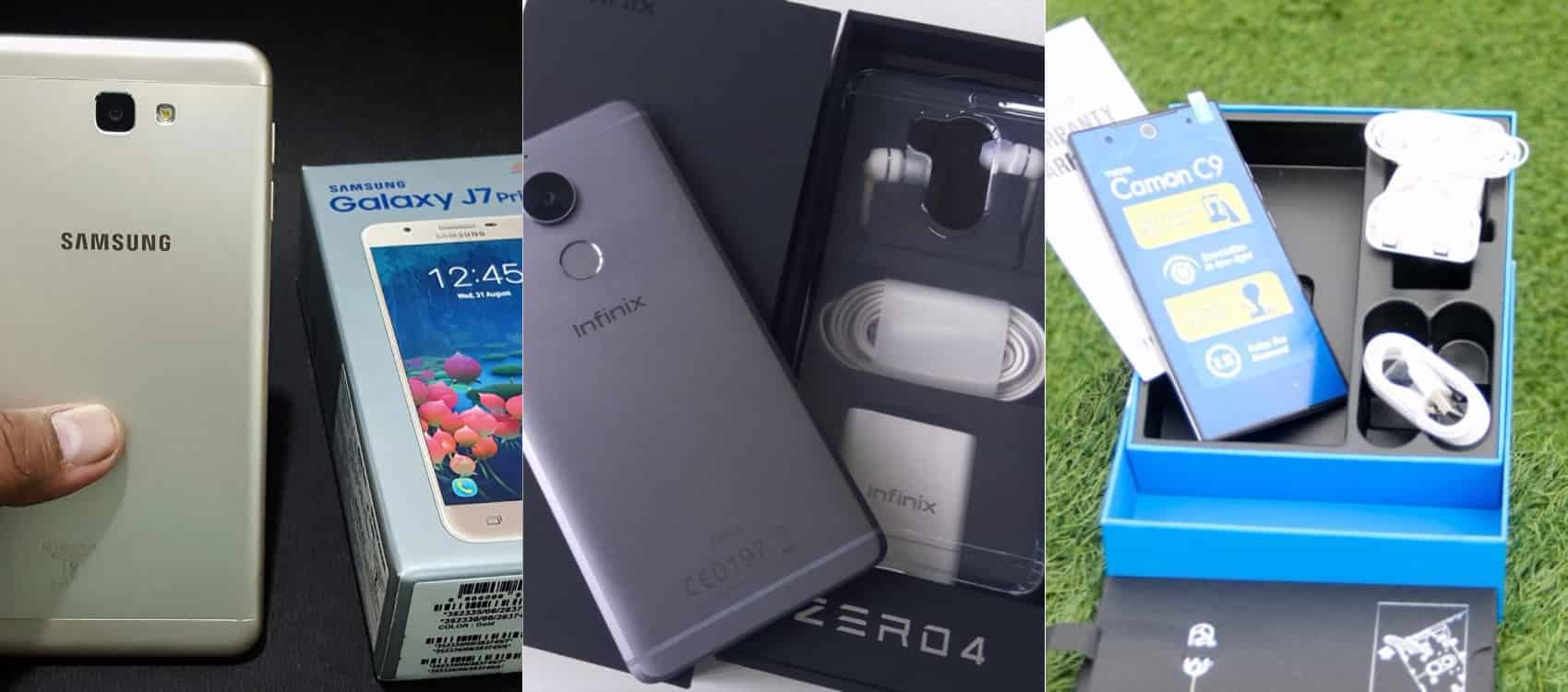
    Be it on Huawei Y6 Prime 2019, Samsung Galaxy S10+, Infinix Zero 5 or any Android smartphone out there, these guide is ready to get you started with portable hotspot on your device.

    Click on any of the formats listed above to access this tutorial in that format.

    How to use and configure Wi-fi on Samsung, Teno, Infinix and other Android smart phone?

    Configure Wi-fi hotspot on Samsung Smartphone
    Configure Wi-Fi hotspot on Samsung Galaxy S8

    Time needed: 2 minutes

    Follow this step to step guide to learn how to configure Wi-Fi Hotspot on your Samsung, Tecno, Infinix and any other Android smartphone.

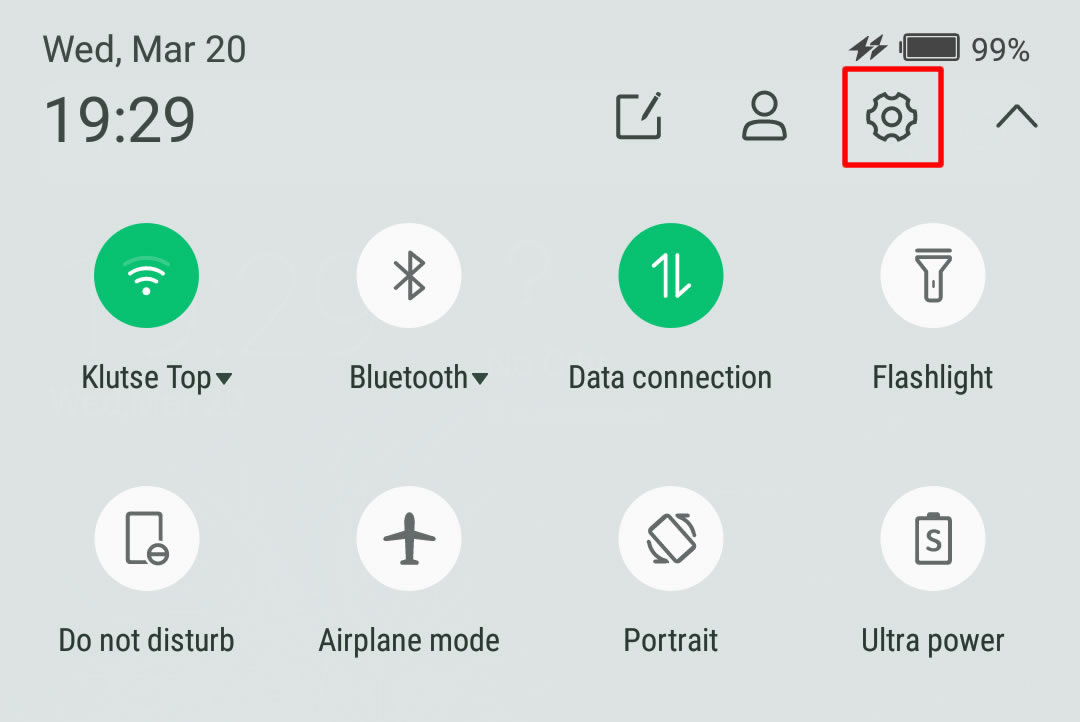
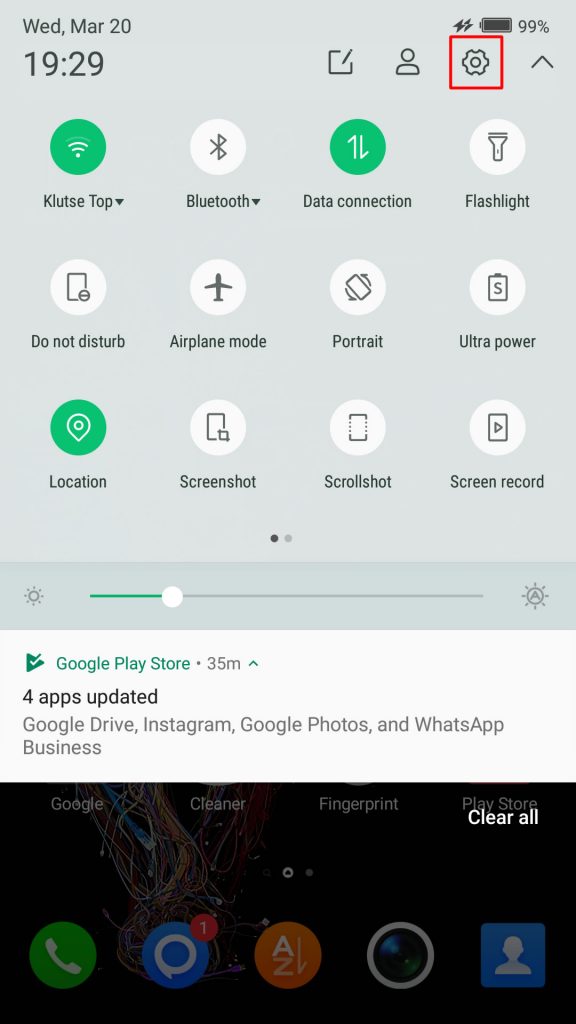
    1. Go to your Android phone’s settings

      From the Home screen, tap the Application screens icon > Find and tap Settings.

      On newer versions of Android, you can simply pull down Android control panel and click on the gear icon.

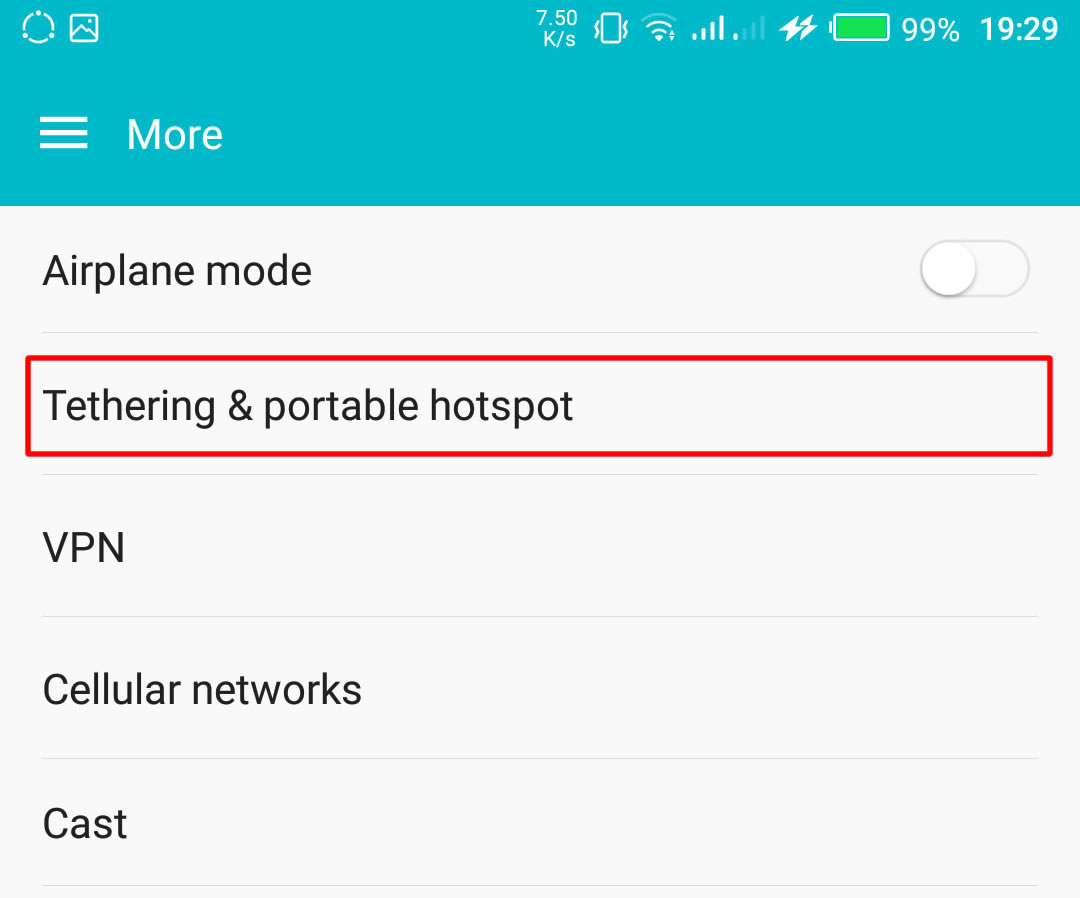
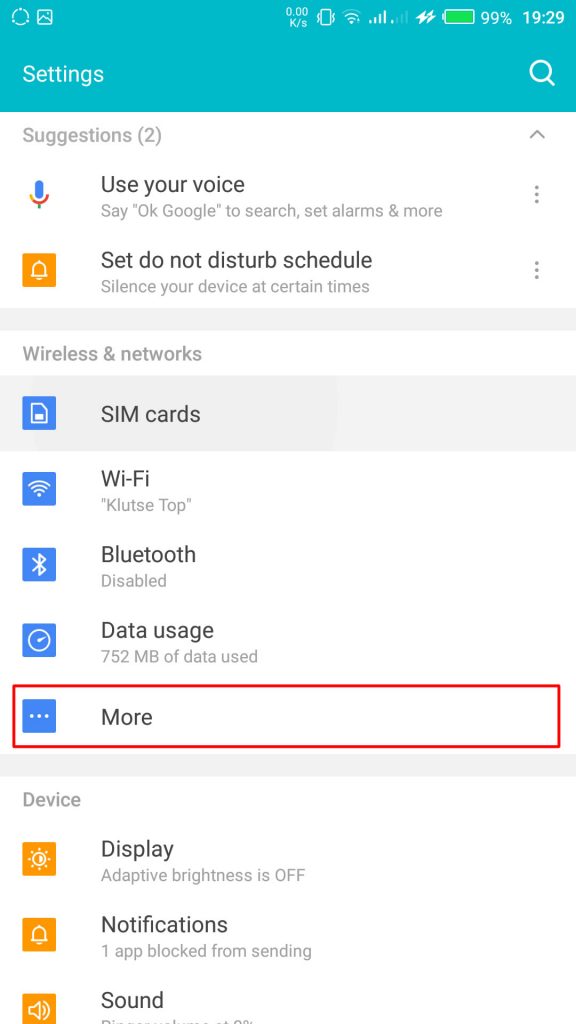
    2. Wireless & networks settings

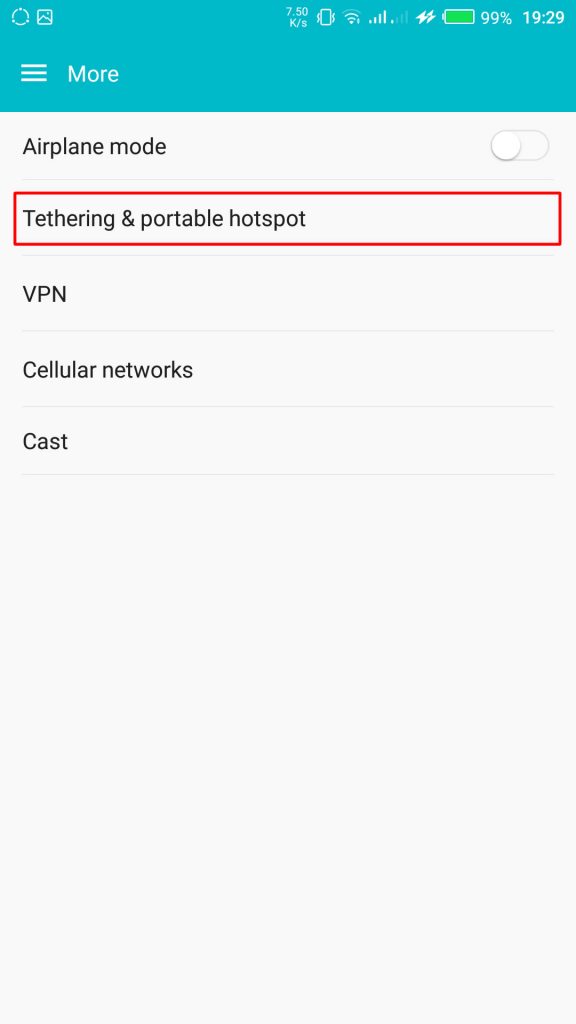
      From your Settings screen, locate Wireless & Networks block and tap Tethering & Portable Hotspot. If you can’t find Tethering & portable hotspot on your settings home screen, tap More > Tethering and portable hotspot.

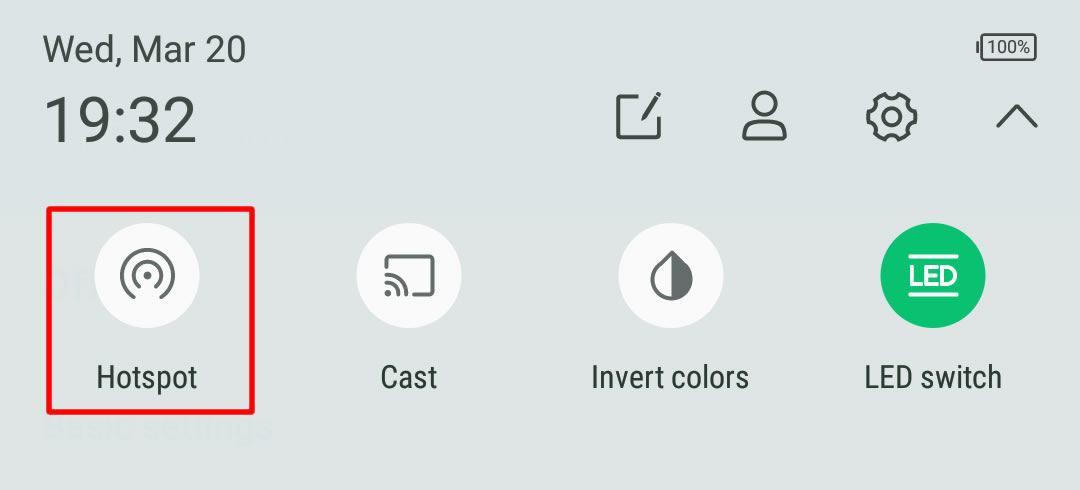
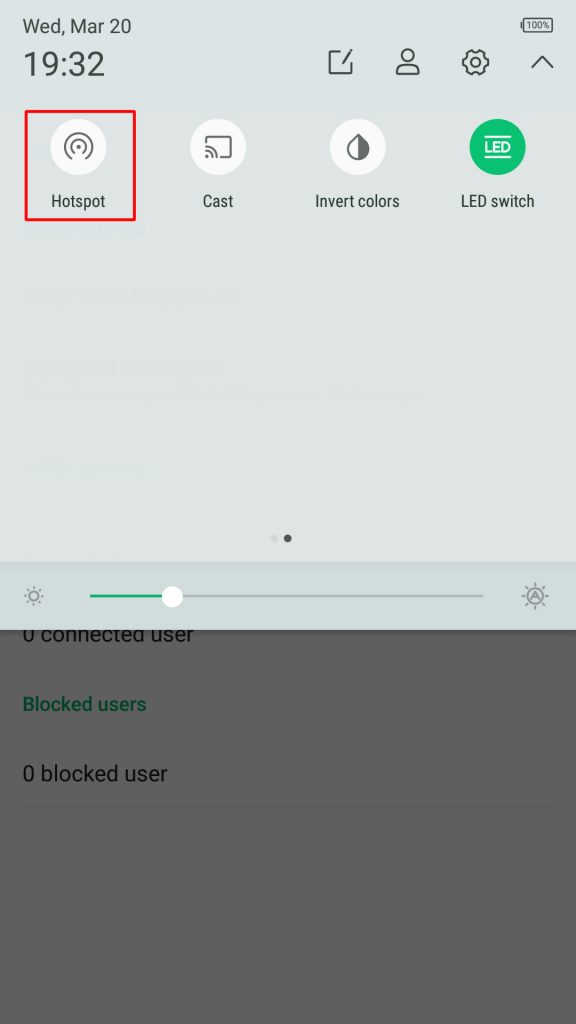
      On some version of Android, you can hold the upper screen of your Infinix smartphone or Tecno smartphone and scroll down. Turn “On” hotspot from the menu. You will see a notification requesting you to touch to configure hotspot, just touch the notification.Wireless & networks settings

    3. Configure Wi-Fi Hotspot

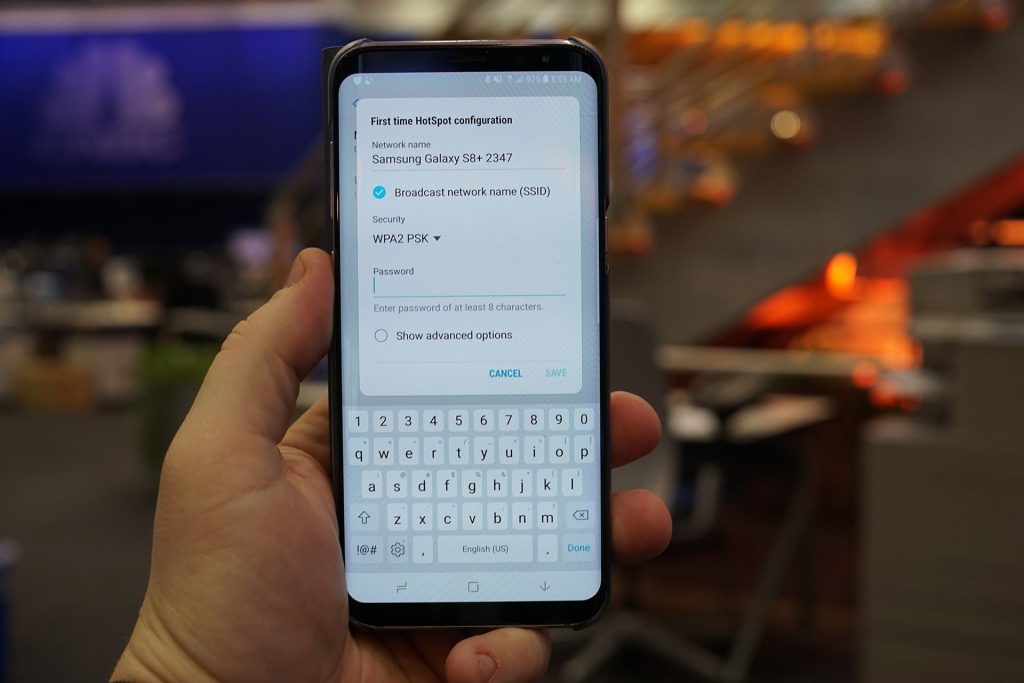
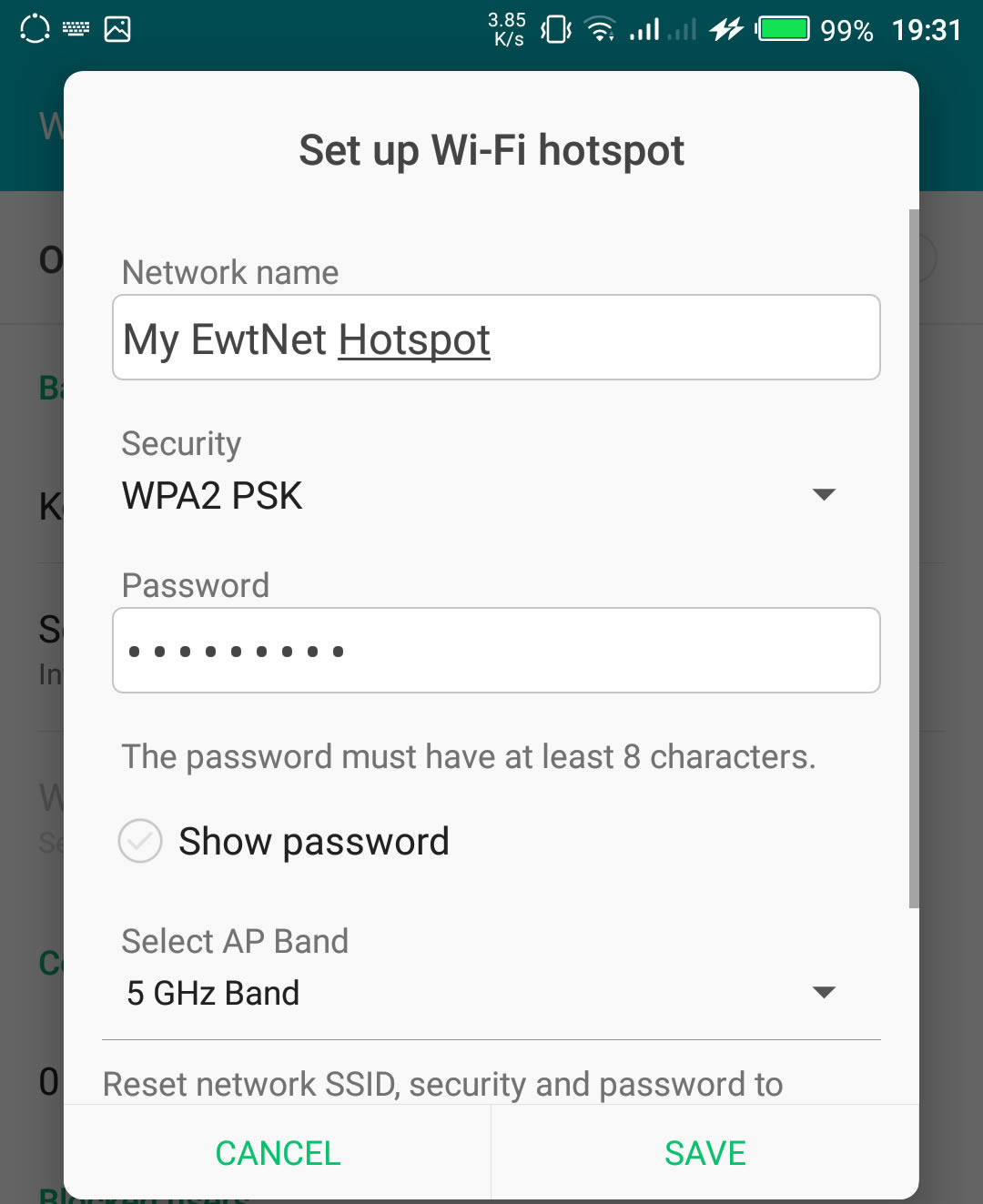
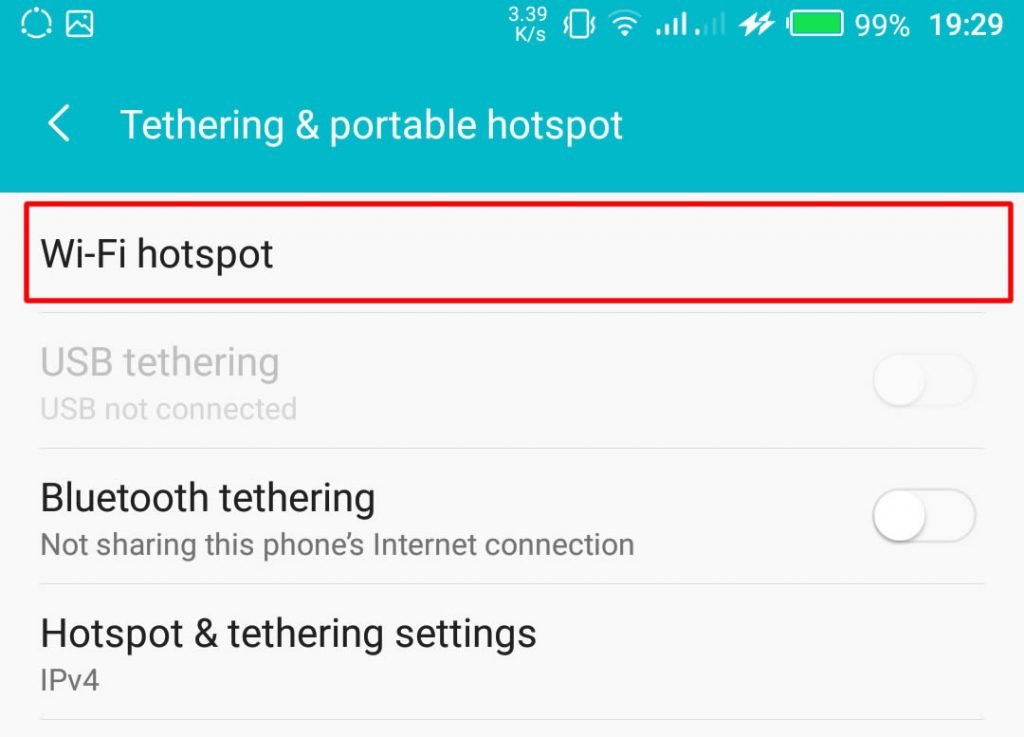
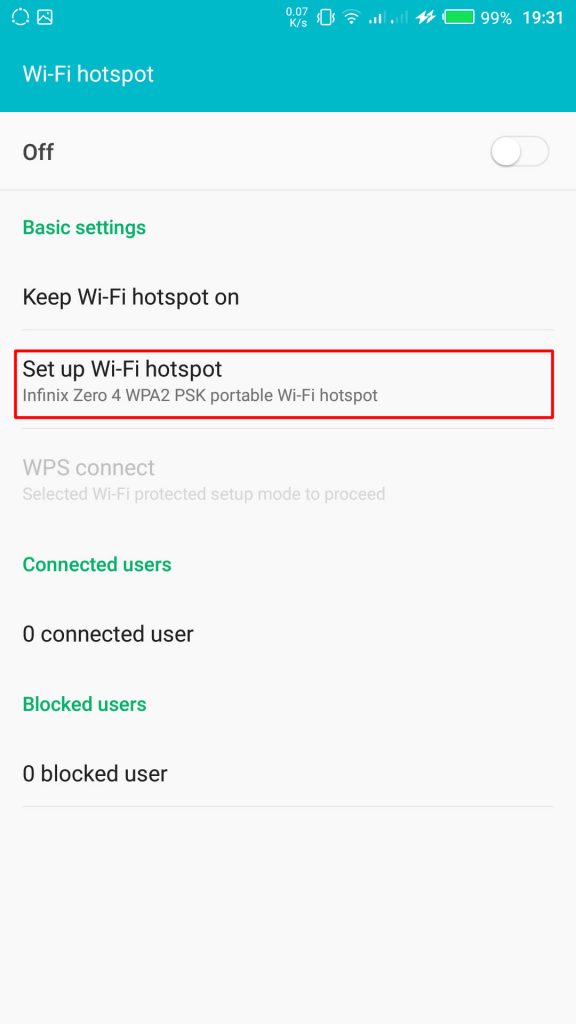
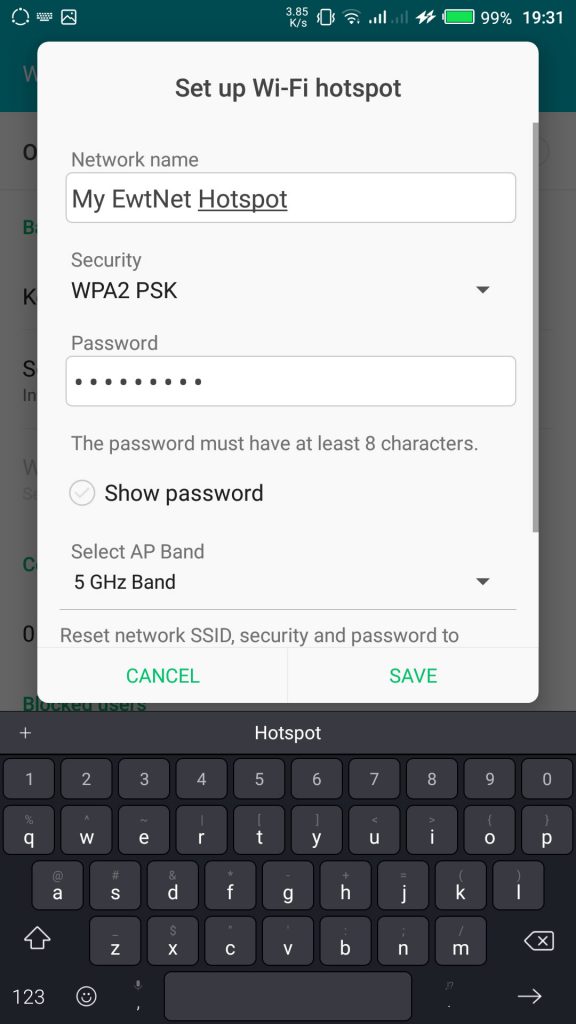
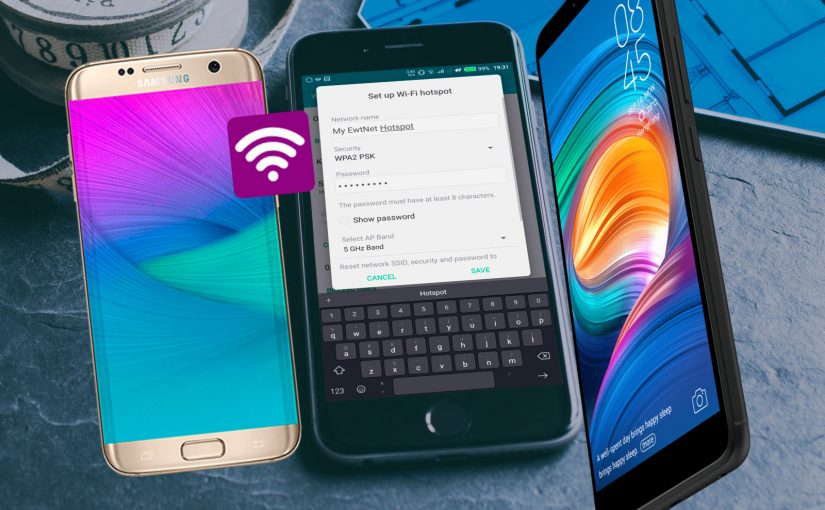
      From the Tethering & portable hotspot screen, tap Wi-Fi hotspot and select Set up Wi-Fi hotspot. Here you can set your WIFI’s SSID and security.
      SSID Wi-Fi Hotspot Setting on Infinix Smartphones

    The SSID or Network Name is the name of your Wi-Fi connection. Change the name to any name of your choice, the default name is usually “AndroidAp”

    You can change the security option, to any of your choice, such as, “Open” which allows any WI-fi enabled device to connect to your smartphone without requesting for a password. While WPA PSK and WPA2 PSK allows you to put your preferred password.

    Using Portable Wi-Fi hotspot on Android Smartphones

    Once you’re done, subscribe to an Internet plan for your smartphone, turn on your mobile data and hotspot. If you are in Qatar, Vodafone offers some of the most flexible data plans in Qatar. Glo Ghana data and Glo Nigeria data are more prominent in Ghana and Nigeria respectively.

    Turn on Wi-Fi Hotspot on Infinix Smartphones

    Your WIFI hotspot is now functional and can be used on basically every Android device that support WiFi connection including, Honor 8X, Infinix Diamond, Tecno Camon 11 Pro, Xiaomi Redmi Go, Tecno phantom and on any PC that has a WiFi adapter.

    Turn on your Infinix WLAN hotspot and your laptop WLAN and search for available networks and connect. That’s all you need to configure your WLAN Hotspot and start using your Infinix smartphone to power your laptops and smartphones WLAN, up to multiple devices simultaneously

    Make sure you are applying this common-sense Wi-Fi tips to protect your devices against Wi-Fi ‘virus’ and other malicious attacks. After you’re done, all you have to do is turn off the hotspot.

    Data plans for PC Users

    If you going to use your mobile data on your PC be ready to re-adjust your monthly data budget. Luckily, network providers in Nigeria and Ghana has improved their data offers in recent years.

    What are the best mobile data plans in Nigeria?

    In the last few years, network providers in Nigeria have undertaken a revolution in upgrading their data plans. Glo has upgraded. MTN has upgraded. And Airtel was last to arrive at the party – all featuring data plans with a bandwidth of 12GB – 48GB at giveaway prices.

    I’m in Ghana, are there affordable data plans?

    Glo Mobile Ghana offers the most affordable data in Ghana. Indeed, the tech giant has launched various revolutionary data bundles, including Glo Unlimited Data 24/7 Pack, for instance, which gives you unlimited data and voice call for a whole month.

    How do I subscribe to Vodafone Qatar internet package?

    Here is a list of Vodafone Qatar internet pack activation and deactivation codes. We have selected all the offers in place and grouped them into daily, weekly and monthly plans.

    This picture walk-through guides you on how you can set up Wi-Fi hotspot on your Android smartphone using infinix example.

    Click on the images to expand and use the arrow keys to browse.

    The same techniques will work on all Android devices. Using your mobile data on PC is obviously going to be more costly than Internet to the home bills, you may consider this data subscription plans to make an informed decision.

    Video Guide on How to Use and Configure Wi-Fi Hotspot on Android Smartphones

    The video demonstration is recorded on Infinix Zero 4 smartphone, but the same procedure is used to configure Wi-Fi hotspot on any Android device.

  • Spirit Run Android Game Review – Translate to the Spirit Realm

    Spirit Run Android Game Review – Translate to the Spirit Realm

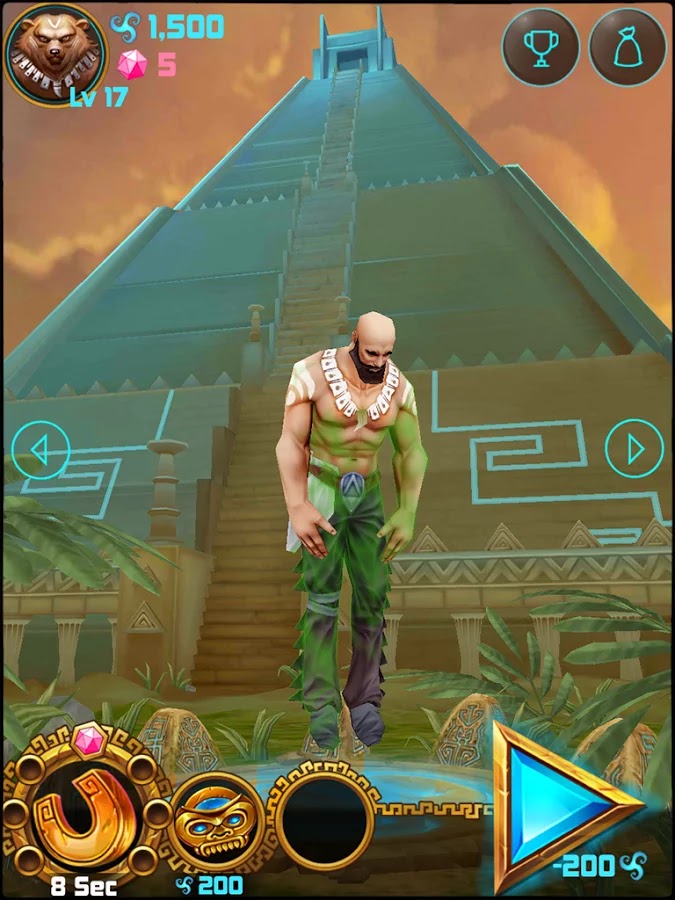
    Temple Run might have let you gone through series of harrows, chased by an angry monstrous monkey and overcoming deadly obstacles. Well, the saying that you can be anything is true, at least on your Android device: Spirit Run Game will let you go through ancient rituals, transform your soul into an animal’s and help your brood defend the Aztec Temple from apocalypse!

    As the quest to protect the Acient Aztec Temple becomes paramount, level-up your Spirit and run in search of soul energy balance. Choose from five characters immensely, each. gifted to transform into Wolf, Fox, Bear, Panther, and Panda respectively.

    Spirit Run Android game was produced by RetroStyle Games. It was first published on the 6th of September and has since being installed by 10,000 – 50,000 Android users. As it goes “The best things in life are free” Spirit Run game might turn out to be one of the best game on your mobile device.

    Content Rating:

    Everyone

    Our Rating: 3.5

    Requires Android:

    2.3 and up

    Game Producer:

    RetroStyle Games Spirit Run is a free Android game with Awesome graphics and well made with a good mix of strategy action and RPG.

    Pros:

    • Free games with NO Ads

    Cons:

    • You may experience a slow start but it gets better

    Download Now

  • Mercury mTAB Star M831G Tablet – Review & Spec

    Mercury mTAB Star M831G Tablet – Review & Spec

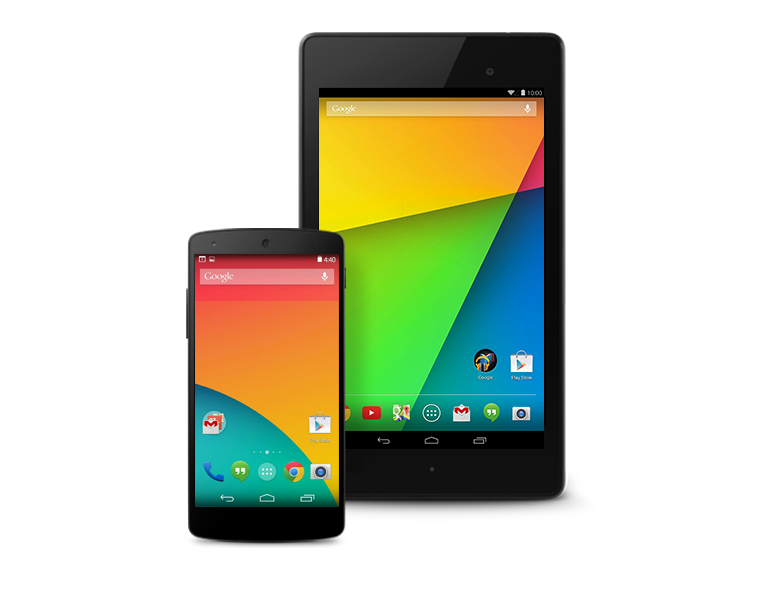
    Mercury mTab Star m830G Dual Core-1.2GHz (1GB RAM ,8GB HDD, 3G), Dual SIM 7-Inch Android Tablet

    COMMENT: Mercury might not be biggest name in the tablet segment but are set to make a statement with their new 7 inches mTAB Star tablet.

    NIGERIA – As the competition within the tablet segment continues to rage, Samsung, Tecno and the big guns manufacturers are lining up new and improved models of their existing stock. Not only are they, in most cases, manufacturing less expensive devices, but others like Kobian, are also loading on the features and trying their hardest to maintain a competitive price structure. Kobian launched their first Mercury Tablet the mTab, back in the tail quarter of 2011. It proved to be just above average, however, in the budget tablet division, while keeping the price under N30, 000 ($185.29). Their latest announcement is of the upgraded version of the same device only now infused with 3G capabilities and dual SIM support.

    The Mercury mTab Star M831G features a 7-inch display with a resolution of 1024×600 pixels. The device is powered by a 1GHz dual core Cortex A9 processor and is based on the MediaTek chipset. It comes with 1GB of RAM and 8GB of internal storage that can be expanded up to 32GB with the help of a microSD card. It runs on Android 4.2.2 Jelly Bean. The tablet is encased in a metal body and weighs 400grams.

    The tablet comes with Dual SIM card support complete with voice & video calling functionality. The tablet is far from being the ideal device for explorers and vacationist as it can only boast of a 2.0-megapixel rear camera with LED flash and a VGA front-facing camera. Connectivity options on the tablet include Wi-Fi, Bluetooth, Micro-USB, HDMI and 3G. While also supporting tethering & hotspot. Other features include a 3.5mm audio jack, built-in speakers, Flash 11 support and SGX531 3D graphics engine. The tablet includes a 3000mAh battery.

    The device will be sold out for around N21, 995 – N25, 000 in most retail stores and less than N21, 000 in online stores such as Jumia.

    Mercury mTab Star key specifications

    • 7-inch display with a resolution of 1024×600 pixels
    • 1.2GHz dual core Cortex A9 processor
    • 1GB RAM
    • 8GB of internal storage, expandable up to 32GB via microSD card
    • 2.0-megapixel rear camera
    • VGA front camera
    • Android 4.2.2 Jelly Bean
    • 3000mAh battery
    • 3G, Wi-Fi, Bluetooth
    • Dual SIM support

    In the Pack & Rooting mTAB Star M831G

    When you open your brand new device pack, you will find the following items:

    • 16 pages user manual
    • A USB data connectivity cable
    • Battery charger
    • USB tablet adapter
    • A pair of cable headset
    The tablet comes with Whatsapp, Temple Run, OfficeSuite & Angry Bird pre-installed. Of course, to ensure master control of your device you might consider rooting it. We have tried the Kingo Rooting software and it works perfectly for this device.
  • Video: New Hexapod Robot Learns to Walk in 2 Minutes

    Video: New Hexapod Robot Learns to Walk in 2 Minutes

    What do you do if you’re a robotic hexapod and one of your legs is broken? Do you give up? Lie down and burst into flames? Cry from tear duct-less eyes? Or, through a process of trial-and-error, do you brush yourself off, hide your broken leg, and learn to walk again?

    You guessed it.

    Researchers Antoine Cully, Jeff Clune and Jean-Baptiste Mouret have trained a hexapod to try different walking configurations through “Intelligent Trial and Error.” The original version of this algorithm kept the robots stumped for about 20 minutes until they figured out how to go in a relatively straight line after suffering damage. The new system lets the robots learn to walk in about two minutes.

    As you see in the video, the robot tries different walking “styles.” First it hops a little, then it brings its damaged leg up high to try to balance itself. All the while it is sensing its position in the room as well as its speed. If the gait it has chosen is suitably straight and fast, it can keep doing it indefinitely until it gets moving again.

    How does it work? Well, in this case the researchers created a database of potential gaits – 13,000 in all – by running a simulated version of the hexapod and rendering the walking styles. Because the robot is fairly simple it could easily classify the problem it was having (broken strut, mashed leg, etc.) and compare it to the database. Then, using a series of tests, it could decide how to move.

    While this isn’t exactly artificial intelligence, the system does save time in the field and, more importantly, allows the robot to carry out its nefarious mission without stopping, an important consideration when the robots finally rise up to take control of our precious bodily fluids.

    For more on what Hexapod Robots are doing to stay indestructible, check out Spectrum and remember to watch the video above again.

    The original copyright to this post belongs to Techcruch. All rights reserved. Image & Video are the properties of Spectrum.

  • Download VLC Player For Windows 8,7,XP

    Download VLC Player For Windows 8,7,XP

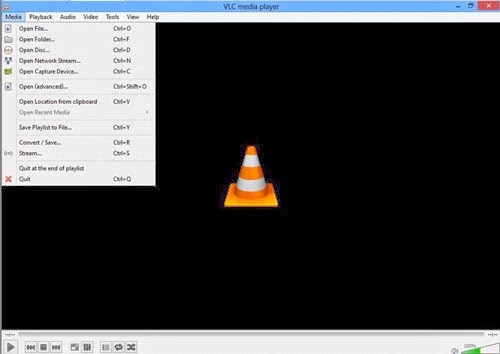
    VLC media player is one of the popular video player out there, it is a open source product which makes it free to download customize the as per your requirements , you could download VLC player for windows,mac,android,IOS devices. VLC media player project has been active from a long time and a series of updates has been pushed to fix error and improve product quality.

    It supports large number of input,video,audio formats, specially which aren’t compatible with windows media players, I tunes. This feature make VLC more adaptable and possibly one of the reason for it being so very popular. VLC also has subtitle feature which can be added or removed as and when you need it. it also offers many customization features with awesome skin and interfaces available. VLC has good input & output streaming options too.


    Some of benefits to Download vlc player

    • Supports multiple input formats
    • Mozilla/Firefox plugin
    • Supports multipe Video formats
    • Supports multipe Audio formats
    • Subtitle/Tag formats
    • A/V outputs
    • A/V filters
    • Choose different interfaces, Skins
    • Active X plugin support
    • Streaming options

    To Download VLC player click on the download button below.

  • Apple Makes Big Improvements In iOS Management Tools For Enterprise And Education

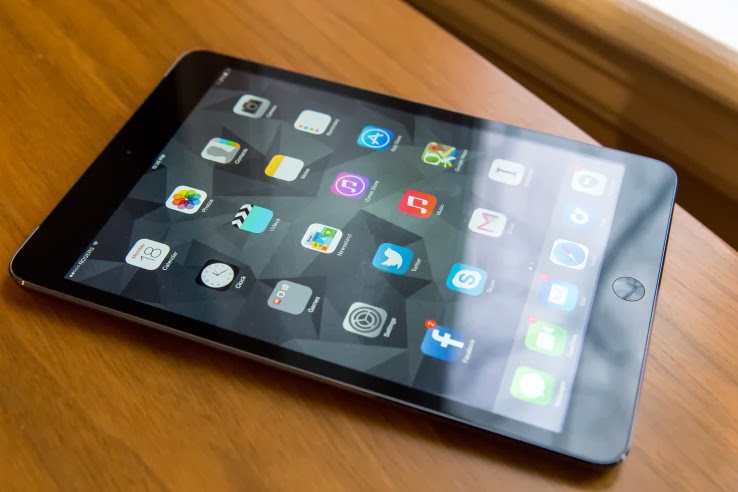
    Apple Makes Big Improvements In iOS Management Tools For Enterprise And Education

    Apple has been busy in the IT department. Today, it released a slew of improvements and alterations to its large-scale deployment tools for education and enterprise customers.

    Some of the tweaks get way out in the weeds of deployment strategies, so they’ll only be really exciting for the actual pros who deal with this stuff. But the big picture is that Apple is looking to make deployments at enormous scales more appealing for the people in charge of purchasing and maintaining iPhones and iPads. This, hopefully, will result in more major purchases by organizations and fewer negative stories about failed management scenarios.

    The changes are outlined in a series of documents Apple posted on its IT deployment page today. These include changes to its Device Enrollment Program, Volume Purchase Program and the Apple ID for Students service. A new iOS deployment technical reference guide and Device Enrollment Program guide have been issued, updating its older versions with new options for device management. A new overview document provides a quick cheat sheet for enterprise folks looking to utilize the tools Apple provides to mass purchase apps and roll out huge numbers of iOS devices at a time. And a new iOS Security Document has been posted that provides in-depth details on how Touch ID and the A7’s Secure Enclave work.

    I’ve had conversations with IT pros and people who roll out large iPad installs in the past and they’ve mentioned that one of the things that has continued to cause Windows devices to hold some appeal is their better remote installation and configuration support. To that end, Apple has made some updates to improve that situation.

    Both the enterprise and education programs now have support for Mobile Device Management hands-free configuration. This ‘zero touch’ setup has been a long-requested feature for many pros, as it eliminates the need to cable up every deployed device and install a profile via Apple’s Configurator utility.

    The zero touch configuration allows an organization to sign up for a profile and order devices directly from Apple that come pre-configured with all of their security and configuration choices. They can then manage them directly without ever having to touch them physically. Additionally, the ability to lock these profiles to the devices means that the end user won’t be able to remove them and do what they want to the devices willy nilly.

    This way, the load is taken off of IT departments in the rollout phase and the user is able to customize and play with the devices without mucking up security profiles. It will also allow IT departments to easily and wirelessly conform users’ own devices to their company security policies with a simple opt-in.

    “The other bit that’s interesting is that DEP-enrollment now allows admins to require and force MDM enrollment on devices they own,” Fraser Speirs, Head of Computing and IT at Cedars School of Excellence in Scotland, pointed out to TechCrunch. “This is huge for schools. The lack of enforceability of MDM enrollment was — by my guess — the central problem in the now-infamous Los Angeles Unified School District ‘hacking’ scandal.”

    Schools in LA had deployed a large amount of iPads, but had to recall them after students were found deleting the enrollment profiles on their devices. This allowed the students to use them to *gasp* browse the web as they pleased and install unapproved apps on their personal units. The anarchy would not stand and the district began reconsidering its rollout — which has since resumed. These kinds of high-profile flubs likely didn’t do anything to help the momentum of Apple’s organizational rollouts. This enforcement should allow customization, while preventing circumvention of IT rules.

    In short, it should make iPads even more attractive to these markets.

    The Volume Purchase Program has also gotten a nice overhaul. It’s now available in all 10 VPP countries for both enterprise and education partners, allowing these organizations to bulk buy applications for installation on bunches of devices at once. These purchases are generally offered with hefty discounts, which makes them more appealing to schools with tight budgets.

    In addition, VPP purchases are now able to be made via purchase orders by enterprise customers, something that was only available to IT pros in the past. Offering PO support to IT departments is going to open up VPP purchases to a huge segment that previously had no way to requisition software from Apple.

    In the educational market specifically, Apple has opened up the ability for students under the age of 13 to obtain their own Apple ID. After a school is enrolled, they can request IDs from Apple, who will then send a communication to the parent, who will then be guided through the registration process. The school is then notified that the student has been given consent.

    Though under-13 IDs were opened up late last year, the new changes open the way for students, specifically, to sign up — in a way that is COPPA-compliant. They require parental consent to sign up, for one. And these Apple IDs are limited in a specific set of ways.

    For instance, a student Apple ID account features limited ad tracking, doesn’t allow them to opt-in to marketing and there is no iCloud email support by default. They also do not require a credit card to sign up and can notify a parent or guardian of any change in the terms of the account. These accounts convert over to a full account with all normal rights and privileges once the student reaches age 13. Apple has provided a new parent guide that details the exact process and allowances of these special Apple IDs and a guide for institutions who will utilize them.

    “I think the overarching story here is that these changes are all about making deployments scale up to genuinely massive numbers,” says Speirs. “School districts are topping out at around 50k units right now — to my knowledge — but there are obviously bigger deployments in other areas of education – and enterprise.”

    For now, we’ve confirmed that the Device Enrollment Program will only affect devices purchased by organizations directly from Apple. This means that schools like Speirs’, who work through retailers, won’t be able to use the program to pre-configure devices — yet. But that will likely be on the way.

    “I do think these are major steps forward for IT organizations,” Carl Howe, Vice President, Research and Data Sciences at Yankee Group, told TechCrunch. “In many organizations, IT spends much of its time being ‘the department of no,’ where they tell employees that they can’t do things for reasons of manageability or security. By making Apple devices more manageable and being transparent with its security, Apple is helping those IT organizations go from being the department of no to ‘the department of yes.’ And given that ease of use boosts security compliance, the fact that this can be done in ways that don’t require the end-user to do anything special (i.e., their device gets provisioned to them fully linked up to their organization, secured, etc.), it should make Apple devices even more popular in businesses than they already are.”

    iOS devices have gained a large amount of popularity in organizations by leveraging the bring your own device trend. If the boss gets a new iPad and loves it, the IT department will have no choice but to support it somehow. But in order to spur growth, and to keep the vaunted ease of use of iPads and iPhones intact, Apple has to continue to refine its offerings for device deployment.

    These changes are an attempt to keep the way that people use an institutional iOS device and a consumer iOS device as close to parity as possible. If you’ve ever jumped through hoops to configure a company-issued laptop or phone, then you know how much of a pain that can be. If you imagine doing that 50,000 times, you can see why these improvements could spur a nice surge of adoption by purchasing departments.

  • Microsoft pleads with customers to ditch Windows XP and Office 2003

    Microsoft pleads with customers to ditch Windows XP and Office 2003

    Microsoft has again painted a grim picture for customers who remain on Windows XP and Office 2003 after it ends support for the old OS and suite in early April, but it’s unclear if the company is succeeding in its campaign to convince holdouts to upgrade.

    In a blog post on Wednesday, Microsoft reiterated that consumers and businesses that stick with the products past the April 8 deadline will face severe security risks and be unable to take advantage of technical advances.

    “Computers currently running Windows XP and Office 2003 won’t stop working on April 9, but over time security and performance will be affected,” reads the post.

    Specifically, Windows XP PCs won’t be able to run many “newer” applications or work with new hardware due to unsupported drivers. Additionally, PCs running the OS will become easy prey to malware, because Microsoft won’t release new security updates and bug fixes for it, nor offer support services and technical content updates. Office 2003, on the other hand, can’t provide modern mobility and cloud capabilities, according to Microsoft.

    Unsurprisingly the solution the company offers is for customers to adopt Windows 8.1 and Office 365, while acknowledging that in most instances PCs running Windows XP lack the hardware specs to run the new OS. “The majority of PCs running Windows XP are not capable of upgrading to Windows 8.1 due to the age of the hardware,” the post reads.

    Windows XP remains quite popular despite its age—it was first released in 2001. According to the latest figures from NetApplications, Windows XP has an almost 30 percent share of the desktop OS market, second only to Windows 7 which has about 47 percent. By contrast, Windows 8, which started shipping in October 2012, and its 8.1 update, released a year later, have a combined share of about 10.6 percent.

    Windows 8 and its update have drawn criticism for their touch-optimized interface and a series of disruptive bugs. Microsoft is promising another update for the spring that will make the OS friendlier for mouse-and-keyboard users, but the impression in the marketplace is that Microsoft has struggled to get Windows 8 right. The most pessimistic critics have likened Windows 8 to the disastrous Windows Vista, released in 2007 and generally panned.

    Office 2003 is also still heavily used. According to the results of a Forrester Research survey released in October, Office 2003 was in use in 28 percent of businesses polled, behind Office 2007 (51 percent) and Office 2010 (85 percent). The latest version of Office—called Office 2013 when sold via traditional perpetual license and Office 365 when sold via an annual subscription—was at the time used in 22 percent of companies polled, and with a slower adoption than Office 2010 at a comparable stage of release, according to Forrester.

  • How Nimbuzz Lost to Whatsapp and BBM in the IM Battle

    How Nimbuzz Lost to Whatsapp and BBM in the IM Battle

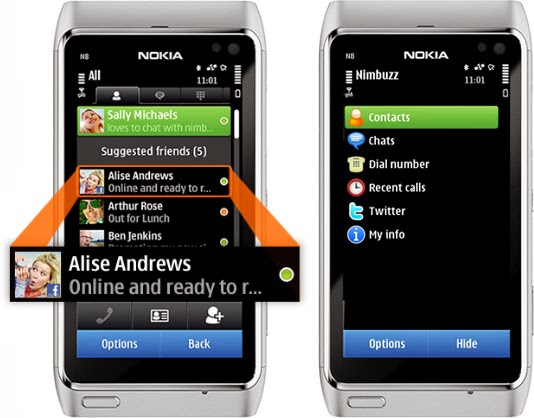
    As a high school boy in 2007, I always use Nimbuzz on my Nokia 8080 Java phone to keep in touch with my classmates. It was quite handy as it was the only reliable way to have a live chat with my friends & contacts on Facebook—yes, back in the days, you have to refresh Facebook mobile for new new messages—and Gtalk, send instant messages to my phonebook contacts and update my twitter status from my mobile phone.

    Nimbuzz
    Nimbuzz was an all-round app that does everything.

    Nimbuzz was an all-round app that does everything. You can connect your accounts on various Instant messengers (IM) such as Gtalk, Yahoo! Messenger, AOL, Skype, Facebook IM and Twitting live updates. In fact, I made my very first VOIP (voice over internet protocol) call on mobile phone with Nimbuzz in 2012—it was a 3G phone, a Nokia Symbian phone, even.

    However, these days, Nimbuzz has been ‘reduced’ to less than a shadow of its former self. At best, it will serve as free mobile application that lets you connect and exchange instant messages with your phonebook contacts within app.

    Nimbuzz, WhatsApp & BBM Battle

    Even in the days of Nokia Sybiam series, Nimbuzz was at its climax, introducing voice call over 3G, file sharing and other exciting features. For an application that got downloaded by over 10 million users on GetJar app store in 2009, Nimbuzz seems to have depreciated from gloss to gross, prompting us to wonder what really happened to place such a glowing candle under the bushel.

    I will tell you what, smartphones happened. Facebook and Twitter now have their own apps for messaging and posting update. BBM and WhatsApp has dominated the mobile IM industry.

    smartphones
    Nimbuzz was displayed in favor of WhatsApp and BBM in the smartphone era.

    The BBM idea was working quite perfectly in 2010/2011. Despite its single platform limitation at the time, people find it very convenient and easy to exchange instant message through a pre-installed app on their BlackBerry device rather than downloading a third party application.

    While Nimbuzz battles with voice call over 3G, Whastsapp will go on to seize an opportunity to explore other platforms that BBM could not cover. With the introduction of file sharing and voice messenger, WhatsApp became the favorite messaging app for Android and iOS users, pulling some users from Blackberry as well.  The application has over 9 million downloads on the Android platform alone and almost a double figure across other platforms.

    The major reason behind the success of Whatsapp was its cross-platform availability and easy to use interface. This feature was not available on Nimbuzz untill recently. On the other hand BBM was integrated into Blackberry, with over 15 Million phones sold out by RIM in 2011, Nimbuzz unsurprisingly, was crushed under the weight of this IM giants.

    What is Nimbuzz doing these days?

    With the fall from grace in the IM industry, Nimbuzz seems to be throwing their weight behind their new Nimbuzz Social. In their own words:

    Nimbuzz Social is the new content destination for you. With Nimbuzz social get local news and content across world, real time.

  • On-Demand Ride-Sharing Startup Lyft Is Raising Another Big Round Of Funding

    On-Demand Ride-Sharing Startup Lyft Is Raising Another Big Round Of Funding

    Lyft is raising yet another big round of funding, according to sources. The company, which is seeking to make ride-sharing mainstream in cities across the U.S. and around the world, is expected to use the new cash to fund expansion into new cities and territories.

    We’ve heard Lyft has pitched a number of venture firms and late-stage institutional investors, but hedge fund Coatue Management seems to be in the lead for the deal. Coatue has recently invested in hot companies like Box, Snapchat, and HotelTonight, and is part of a growing trend of hedge funds making bets on later-stage startups with traction.

    Andreessen Horowitz, which led Lyft’s $60 million Series C round, is also expected to contribute a large chunk of cash. Other investors in Lyft include Founders Fund, Floodgate, Mayfield Fund, K9 Ventures, Ooga Labs, fbFund, and Keith Rabois.

    The company was founded as Zimride back in 2007, but it wasn’t until 2012 — when it shifted from long-range to on-demand ride-sharing — that things began to really take off.

    With the launch of the Lyft mobile application, it broke new ground in enabling passengers to get rides from other people with a car and spare time on their hands. Due to the success of the on-demand platform, the company rebranded as Lyft and sold its legacy Zimride assets to Enterprise Holdings last summer.

    After its initial stint in San Francisco, Lyft began expanding to other cities early last year and now is offering service in 20 markets throughout the U.S. But like Uber, which also offers on-demand rides via mobile app, Lyft has plans to aggressively increase the number of international cities that it operates in beginning this year.

    The additional funding will be vital to getting it on the right track toward that goal, as it bulks up operations both in its San Francisco headquarters and in remote offices around the world.

    In the meantime, Lyft is trying to get more regulators and local officials comfortable with the idea of letting unlicensed drivers give rides to passengers around town. To that end, it recently hired Google X legal director David Estrada as its VP of government relations.

    The company also announced the creation of a peer-to-peer rideshare insurance coalitionthat includes other transportation companies, as well as regulators and insurance providers, to figure out the tricky issue of insurance for its drivers.

    Lyft, Coatue, and Andreessen Horowitz all declined to comment.

    This post was first seen on Techcrunch

  • AMD releases game-changing Mantle support in new Catalyst beta driver

    AMD releases game-changing Mantle support in new Catalyst beta driver

    AMD has released the latest beta driver of its Catalyst software, making its Mantle API a reality for those with supported graphics cards.

    AMD’s Catalyst 14.1 beta driver was expected last week, although a few glitches delayed the release. Over the weekend, AMD published the beta driver to its Web site. Note that you’ll need to uninstall the current driver before installing the beta.

    AMD is positioning Mantle as a low-level API optimized for its own hardware, offering significantly better performance than the generic DirectX API that powers both AMD and Nvidia graphics cards and integrated CPU/GPU chips, known as APUs. (For more, see our earlier deep dive into Mantle technology.)

    So far, just one game, EA’s Battlefield 4, has been optimized for Mantle, although a tech demo of an upcoming game, Star Swarm, has also been released. According to AMD, gamers who load the new beta Catalyst driver should see up to 45% improvement in frame rate running Battlefield 4, and 200% when using the driver and playing the Star Swarm demo. A few other games, including the Thief reboot and Wing Commandercreator Chris Roberts’ Star Citizen, will also support Mantle, the developers have said.

    PCWorld hasn’t had a chance to test Mantle yet, but real-world tests conducted by Anandtech showed gains of up to 30 percent when running Battlefield 4 on an Intel i7 4960x CPU. Naturally, because the Catalyst driver is a beta, future improvements are expected.

    The new driver also includes support for AMD’s “frame pacing” technology, which smooths the handoffs between multiple GPUs working together in a Crossfire alignment to an “even and regular pace,” according to AMD.

    AMD says that the following graphics cards will support the new Catalyst driver, and by extension, Mantle: the AMD Radeon R9 and R7 cards, plus the Radeon HD 8000 and 7000 series, and as well as the A10-7000 and A8-7000 APUs. Don’t expect to see the same dramatic gains in frame rate using the older cards, however, AMD warns—you’ll have to wait for future updates to see those improvements.

  • GoldieBlox’s Super Bowl Ad Is A Counterbalance To Rampant Sexism

    GoldieBlox’s Super Bowl Ad Is A Counterbalance To Rampant Sexism

    https://www.youtube.com/embed/mHXbQ4PeNLI?feature=player_embedded
    On Sunday night, about 110 million people turned on their TVs to watch a series of lavish, expensively produced 30-second skits interspersed with live footage of men throwing a ball around. Fox Sports charged up to $4.5 million for each ad spot this year, with companies like Anheuser-Busch, Chevrolet, and Pepsi coughing the record-breaking figure.
    But one of the most notable ads was created by a 15-person tech startup called GoldieBlox, which makes engineering toys for little girls. The San Francisco-based company announced four days ago that it won Intuit’s Small Business, Big Game challenge, landing one of the year’s most coveted advertising spots.

    (GoldieBlox’s Super Bowl ad also helps distract from its legal battle with the Beastie Boys, who are suing the company for using an unauthorized parody of “Girls.” The Super Bowl ad played a cover of “Cum Feel The Noize” by Slade that was, presumably, licensed and paid for.)

    It’s extremely unusual for such a small company to advertise during the Super Bowl, but what makes GoldieBlox’s spot, which features a hoard of little girls turning their boring pink toys into a rocket and launching it into space, especially interesting is that it serves as an antidote to the outrageous sexism constantly on display in each Super Bowl’s commercials. Of course, it also gives Intuit a chance to boost its image without having to figure out how to make a commercial about tax software interesting.

    The misogyny in Super Bowl is so egregious that advocacy group The Representation Project actually made an app to help viewers send complaints directly to the companies responsible.

    It’s still too early to tell which ads will make this year’s list of the worst offenders, but based on Twitter reactions, SodaStream and Volkswagen are in the running to earn that dubious distinction. Here’s a list of last year’s creepiest spots, including Carl’s Jr’s desperate attempt to make fish sandwiches sexy.

    But the tide may be turning as the gap between male and female Super Bowl viewers narrows each year. For example, GoDaddy.com, one of last year’s top offenders, dramatically changed its tone with this year’s commercial. Hopefully more companies will figure out how to make attention-grabbing ads without resorting to crass stereotypes.

  • How to Unlock Huawei E303, E173 Modems: MTN, Airtel, Etisalat & Glo Included

    How to Unlock Huawei E303, E173 Modems: MTN, Airtel, Etisalat & Glo Included

    The recent series of internet modem dominant in West Africa and South Asia is the Huawei E303 Data Card. The data card has quickly being adopted by network service providers in those countries due to it’s high speed HSDPA/3G internet features.

    Taking a closer look at your brand new data card will reveal that the IMEI is somewhat similar 86************ which contrasts with the 35*********** IMEI found on the older internet modems. This contrast is the major reason why you cannot calculate your unlock code using Universal MasterCode Calculator, old DC-Unlocker or any of the code unlocker you have used in the past.

    In this tutorial I will walk you through the steps on how to unlock any of the recent internet modem, including MTN NG, Airtel NG, Huawei E303 Glo Bolt, Airtel E173 and Etisalat internet modem using DC-Unlocker. Huawei E303 Glo Bolt Internet Modem can be unlocked for free using this method.

    Things you will Need

    To begin the process of your modem unlocking, you will need the following items:
    • A working PC of course, with internet facility.
    • DC-Unlocker Client Version 1.00.1084 or later – Download now.
    • An account on  DC-Unclocker with at  least 4 credits.
    After you have downloaded DC-Unlocker on your computer. You need to buy unlocking credits from their website. However, before purchasing unlocking credits, you need to confirm the number of credits required to unlock each modem.Unlocking E303 data cards should cost you 4 credits, but in the case of other models, you can check here to confirm the amount of credit needed to unlock them.

    Unlocking Huawei E303 Data Cards

    If everything is set, connect your USB Modem with the supported sim card. Allow the dashboard installation.
    • Disconnect to the internet and plug your USB Modem with a different provider SIM.  And insert your modem to the USB port.
    • After some seconds, you should see a popup window requesting for the unlock code. Click the Cancel Button and exit the modem dashboard.
    • Locate and install dc-unlocker_client-1.00.1084.exe on your computer. Next, find the icon on your desktop and run as administrator.
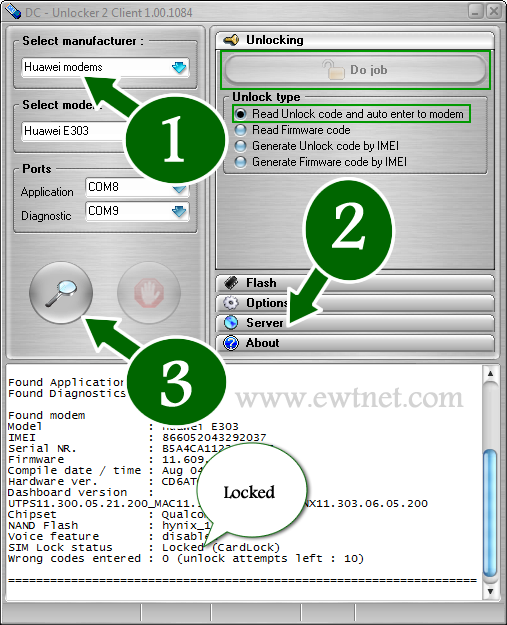
    • Choose what “manufacturer” that your modem is. i.e. Huawei Modems
    • Click the magnifying glass, and it will search for plugged USB modems.
    • Once the modem is detected, Click on Server and enter your account details.
    • Go to Unlocking menu, and click on Do Job.
    • Wait till the unlocker program says that, unlock is successfully done.
    Of course, you can use this method to unlock ZTE modems, all Etisalat, Glo, Airtel and MTN modems, just follow similar steps to the ones above.

    Payment Worries for Nigerians

    The payment processors available in DC-Unlocker’s are currently not supported in Nigeria and most countries. However, the company has dealers in over 50 different countries worldwide. The official dealer in Nigeria is Gurutech and charges N2,500 for DC-Unlocker credits.
    If you have no intention of going through the so many long process involved in modem unlocking, or you cannot afford the N2,500 price tag from the Nigerian dealer. You can sit back and lets do the job for you. Click here for more details.
  • Battlefield 4, FIFA 14 and 6 Co-Op PS4 Games to Watch in 2014

    Battlefield 4, FIFA 14 and 6 Co-Op PS4 Games to Watch in 2014

    Here is something for the gamers. If you need to turn your friends into war enemies, go on adventures or solve ‘head cracking’ puzzles together, the new console games is the answer you seek.

    The latest PlayStation 4 titles, featuring mutiplayer facility and more advance gaming environment boast of answers for any co-op gaming style you prefer. While some of this games are available and ready to be explored, a few of them will only be available at some point in this year, but considering the interesting new mutiplayer features introduced to PS4, I think they’ll be worth the wait.

    Below, we take a look at the top six co-op games to rock with your friends. Note: You can also find some of the games listed below on your old PlayStation or the new Xbox One, but nothing can be compared to the feeling of playing it on PS4.

    6. Lego Marvel Super Heroes

    The world is in imminent danger, and it is counting on you and your friends to save it! You and your friends will have to play alone or together as members of the well-known team to save the world in Lego Marvel Super Heroes. All the superheroes have their unique superpowers, and you’ll need all their strength to go into battle against the most venomous villains of the Marvel universe.

    5. Destiny

    If you are a big believer in destiny, then you will be exited for Destiny console game. Destiny was made by the manufactures of multiplayer greats Halo and Call of Duty. The promotional trailers and gameplay videos display a beautiful world for you and your friends to explore, cherish and protect. It’s part of the new “shared-world shooter” genre which combines the typical fine motor skills of a FPS game with traits that are more common to MMOs. If anyone can make wonders out of this new breed of games, it’s the folks at Bungie.

    This game will be available, starting from Sept. 9th 2014.

    4. Watch Dogs

    Unfortunately, this amazing title from Ubisoft isn’t available yet, but it’s been making some impressive noise  since its initial unveiling. Not only will Watch Dogs allow players the chance to sneak and hack their ways through a fictional downtown Chicago, but the game will also have a multiplayer option integrated into the normal campaign. Your objective is to hack other players with a malicious virus before they catch and kill you. Ubisoft will let you opt out of the multiplayer if you want to focus on the single-player story, but we’re all looking forward to getting our hands on exponentially more underground cyber justice when the game launches. Right now, the release date is set as a hazy spring 2014.

    3. Killzone Shadow Fall

    This series has long been a PlayStation exclusive, and Killzone Shadow Fall has all the great dystopian warfare between the ISA and the Helgast that gamers have come to expect. Warzone matches players through a ringer of several traditional co-op modes (such as Team Deathmatch or Search and Destroy) all in one battle royale. Players can customize their own rules for matches, setting the modes, number of players, classes or weapons allowed, then share those creations with the online community.

    2. FIFA 14

    If the word “football” conjures up images of a black and white ball and rabid European fans, then you’re probably well-versed in the FIFA games. With FIFA 14, soccer is looking better than ever on the new generation of hardware. Players’ movements and behaviors have new realism and a much sharper look that old consoles couldn’t dream of matching. EA received some flak from long-time fans for removing the Tournament feature, but with many available co-op modes remaining, this is still an excellent title for going multiplayer. Create a unique footballer to send through the Pro Clubs circuit and pursue a stellar career in all-player matches. You can also go head-to-head against another gamer in Seasons and Online Friendlies, or team up with friends for two-on-two games.

    1. Battlefield 4

    No game delivers complex, realistic warfare as well as the Battlefield franchise. Battlefield 4 has dynamic, visually stunning maps that require players to display finesse and strategy in order to achieve victory. Technical difficulties plagued the latest release at launch, but that’s due in part to its massive scope. Now that DICE has cleaned up most of the issues, players can enjoy the classic Conquest or Rush battles, or the new Obliteration and Defuse modes. The Xbox One may be getting the expansions and other new content first, but superior graphics capabilities make the PS4 the platform of choice for the console crowd.

    Image Credit: EA Sports, DICE, Bungie, Sony, Lego, Ubisoft | Games Decription By: Mashable

  • Mitchell Frost Explains his Motivation as a Hacker

    Mitchell Frost Explains his Motivation as a Hacker

    IDG NEWS SERVICE – In 2006, Mitchell Frost, then a 19-year-old college student at the University of Akron, used the school’s computer network to control the botnets he had created. Authorities say between August 2006 and March 2007, Frost launched a series of denial of service (DDOS) attacks against several conservative websites, including Billoreilly.com, Anncoulter.com and Rudy Giuliani’s campaign site, Joinrudy2008.com. He is accused of taking down the O’Reilly site five times, as well as disrupting the University of Akron’s network during a DDOS attack Frost allegedly launched on a gaming server hosted by the university.

    Frost’s dorm room at the university was raided in March 2007. What followed, according to Frost, was a long, complicated legal battle that ultimately lead to him spending over two years behind bars and owing thousands of dollars in legal and restitution fees for his crimes. Frost was released from prison in 2012 and is now serving probation.

    Frost took the time to talk to CSO about his experience and delves into the reasons why he did it, his thoughts on the punishment he received and his plans for the future.

    Tell us about your background. How did you become so knowledgeable about computers and when did hacking become something that interested you?

    I started on computers around a young age and I have always had a mind that wants to keep exploring and learning. Hacking didn’t start overnight, it all started by networking really. First I wanted to be able to have music without paying for it, so I joined some chat rooms on IRC (Internet Relay Chat). IRC is not used much, it’s typically used only by smaller groups of hackers and gamers. When I was younger I would spend many hours in a row on the computer, and when I woke up or had free time, just continue on with what I was working on. You build skills and make connections with others and keep moving up until you have background in hacking. Let’s just say I built my way up over the years 2000-2007.

    What inspired you to do the kind of hacking you did in 2006 and 2007 to those conservative websites? What were you hoping to accomplish by hacking those particular sites? How did you choose your targets and why?

    In 2006, I was young and, even at that age, I could see there was a lot of corruption and media propaganda going on in newspapers and on television. At that time, I had a rather large and complicated botnet. With the botnet, I was able to use the compromised computers for almost anything; key strokes, DDOS, servers, passwords, pranks. I had several botnets over the years from a few to thousands and didn’t do a whole lot of DDOS on servers because I had no need to.

    I decided that I had to do something about what I was seeing in the world around me, so I knocked a couple of websites offline at the time thinking it will prevent the hate and conflict and fear mongering from being seen by people.

    When it became clear you were going to face punishment for the attacks, did you think it would mean jail time?

    They raided me in March of 2007 right after spring break. They took some computer stuff and took my roommate’s stuff and had three agencies do the raid (FBI, Secret Service, Homeland Security) all with guns pointed right at my head. They brought me into a room and said “if you help yourself now it will be easier at sentencing.” I didn’t answer any questions. They released me and didn’t say much. I was scared shitless after that. I didn’t know what to do. I remember now going to a class after the raid to take a math test and was shaking so bad.

    About one day later, they expelled me from the school, even though I was not charged with anything yet. I moved back home and then contacted the Federal Public Defenders office in Cleveland and was assigned a lawyer. He said cases like mine take time and to stay out of trouble and he would get back to me.

    I moved back home and got a job working as a carpet-cleaning technician. From 2007 and on, I tried to live a normal life but had that fear that something was coming. I ended up meeting my wife. We fell in love and she got pregnant in December of 2009.

    Around May of 2010, my lawyer said I randomly received a judge and that it didn’t look good because of her previous sentencing history. I was hoping for maybe a small amount of time or probation, considering I did not get arrested at the time of the raid in March 2007 and had not yet. I was living in fear for almost 4 years, not going to friends or out to parties and all that.

    The judge ended up giving me 30 months and tried to place me under arrest right at the sentencing hearing. When she did this, it took the prosecutor and my lawyer to walk up to the bench and say I am not a flight risk with a newborn on the way and I knew about these potential charges for three years, so why couldn’t I self-report? She finally agreed to let me self-report so I can tie up some things with my family before my time.

    There was some debate after your sentencing about whether or not the penalty was too harsh. Do you think it was too extreme?

    Way too extreme. Who was the victim? Yes, a couple of people had their servers down for a small period of time, but the jacked-up estimates of the damages were over inflated. Example: they said it took $10,000 for them to press one button on one switch to get access back to the network. The reasoning for the sentence has to do with amount of money lost, etc. Bill O’Reilly said he needed to spend $300,000 to upgrade his systems. My lawyer did not fight or really look into their claims of money loss.

    I think they should of come to some plea with me within a year of the initial raid so I could of dealt with this problem and moved on with my life. Maybe do 3-4 months in some low-security prison and some intensive probation would have been the same. Now it will end up costing me about 10 years of my life—2006 started it and by the time I’m off probation it will be 2016. All for taking some servers offline. You tell me: is that fair?

    What has this experience taught you?

    The experience is not over yet and is far from. I have learned to keep to myself when I see something unjust or unfair or unbalanced all I can do is stay clear of it and talk to people I know or influence and explain my point of view without any damages, physical or monetary.

    Last year, there was a lot of sadness and discussion around the suicide of Reddit co-founder Aaron Schwartz. As you know, Schwartz was facing a trial after being arrested on allegations of breaching a computer network to download millions of pages of documents kept at MIT. Many feel he was being too harshly prosecuted for the crime and it drove him to suicide. What are your thoughts on that, having faced a sentence yourself?

    I am very familar with Aaron Schwartz. Did you know he chose to take his case to trial because he was not guilty? He was murdered and it was made to look like a suicide. Who would ignore a plea deal with no jail time, wait for trial and then commit suicide? All he did was download some stuff from the MIT library—most of it was like 30 years old. He was prosecuted because of his ties to a grassroots movement for Internet freedom.

    What’s next for you? What are you plans for the future?

    I am rebuilding my life the best I can for having limited resources. I was released Election Day 2012. I was stuck living in a halfway house in the slums of Toledo, Ohio. Then I had to go up the chain of the BOP and the halfway house to get released to home detention. That took about 2.5 months.

    I started probation on March 8, 2013. I work at a small store in a town where my wife’s parents let us live in a rental, so we pay them what we can. I pretty much cannot go to school because I owe so much to U of Akron and I have $50,000 in fines and restitution. They take a percentage of my pay each check to give to Bill O’Reilly. I guess when you’re worth $50 million, why not ruin some guy’s life and future and suck every check he makes?

    I guess my life is not going anywhere until I am off probation. I would like to be a wireless network security consultant, or a real news reporter for the independent media. I will continue to try and make my son and wife’s life the best I can for the position I am in.

  • Google will Pay $3.2B in Cash for Connected Device Company Nest

    Google will Pay $3.2B in Cash for Connected Device Company Nest

    Google is acquiring connected device company Nest for $3.2 billion just after it has acquired Boston Dynamics, creator of Big Dog recently. Google sent out an email to employees noting the acquisition today and later issued a press release.

    In the release, Google noted that Nest has been offering its best-selling thermostat since 2011 and recently began offering the Protect smoke alarm, which networks with its other devices.

    Nest Founders Tony Fadell and Matt Rogers will both join Google. Rogers was one of the first engineers on the iPhone team at Apple.

    “They’re already delivering amazing products you can buy right now–thermostats that save energy and smoke/CO alarms that can help keep your family safe,” said Google CEO Larry Page in a statement. “We are excited to bring great experiences to more homes in more countries and fulfill their dreams!”

    Fadell, who is known as the ‘father of the iPod’, said that they’re ‘thrilled to join Google.’ “With their support, Nest will be even better placed to build simple, thoughtful devices that make life easier at home, and that have a positive impact on the world.”

    Nest will continue on as its ‘own brand identity’ and continue to be led by Fadell. The deal hasn’t closed yet as it has to meet regulatory approval.

    Nest founders Fadell and Rogers also sent an emailed statement to TechCrunch about why Nest chose to go ahead with the acquisition.

    “Google will help us fully realize our vision of the conscious home and allow us to change the world faster than we ever could if we continued to go it alone. We’ve had great momentum, but this is a rocket ship,” Fadell says. “Google has the business resources, global scale and platform reach to accelerate Nest growth across hardware, software and services for the home globally. And our company visions are well aligned – we both believe in letting technology do the hard work behind the scenes so people can get on with the things that matter in life. Google is committed to helping Nest make a difference and together, we can help save more energy and keep people safe in their homes.”

    Fadell says that this decision was not made hastily. He says that at the 2011 TED conference — even before Nest had launched — he and Nest VP of business Erik Charlton had ‘huddled’ together in a corner with Google’s Brin to show him a video and early model of the Nest thermostat.

    He instantly got what we were doing and so did the rest of the Google team when we showed them. In May 2011, Google Ventures led our Series B round of financing, and in 2012, Series C. Time and time again, Googlers have shown themselves to be incredibly like-minded, supportive and as big of dreamers as we are. I know that joining Google will be an easy transition because we’re partnering with a company that gets what we do and who we are at Nest – and wants us to stay that way.

    We’ve been hearing rumors about Nest getting courted with large billion-dollar acquisition offers for months now, but a Google buy is a definite statement. The company has been fairly serious about its connected-device efforts for a while but hasn’t quite been able to get anything to gel. For instance, there have been some abortive attempts at connected devices like Android at Home in the past. But Nest already has a nice start in producing well-designed and connected home devices — something that Google should be able to build off of in the future.

    Peter Nieh, a partner at Nest investor Lightspeed Venture Partners, has a post up about his early days working with Fadell at startup General Magic and what Nest has done since. He also shared a photo of the pair from 1992:

    Nieh says that though he was excited to work with Fadell again when it came time to invest in Nest, “…our excitement went off the charts when we met Matt Rogers, Tony’s co-founder, who was responsible at Apple for iPod software development and one of the first engineers on the original iPhone team. We would have invested had they been looking to start a food truck.”

    We reached out to Nieh for more thoughts, and he told TechCrunch that “Nest is a very special company — it’s a combination of an incredible team led by Tony and Matt, world-changing vision, and world-class execution.

    “The acquisition by Google is just a milestone along the way as they continue their quest to change the world,” he added. “I can’t wait to see how they will continue to bring magic to all those unloved things in our homes.”

    Google has previously been rumored to be investigating ramping up its own smart thermostat efforts, but this would likely supplant that — or the Nest team would take those projects over. Google also has an interesting project called PowerMeter, which monitors power consumption over time which could have some cool applications here.

    The acquisition could also provide a patent boost of some sort for Google. In December,Nest said that it had 100 patents granted, with 200 more on file with the U.S. Patent Office and another 200 ready to file. Nest has been the target of some fairly high-profile patent suits and threats from legacy manufacturers like Honeywell over its thermostat and BRK over its Protect smoke detector. Google will likely offer shelter from further suits with its wide range of patents across a variety of technology arenas.

    As far as how much autonomy Fadell will have to execute on his vision of what Nest can be, it doesn’t make a lot of sense for Google to derail a business that — by most counts — was fairly successful already and had been garnering praise from consumers over design. It could help with infrastructure problems that have caused failed firmware upgrades, which recently prompted complaints.

    There’s also bound to be an immediate and visceral reaction to the access that Google will now have to information about when you’re home, which rooms you’re in and more. Which is why Nest also issued a Q&A about what will happen to users now that Google owns their thermostats and smoke detectors:

    Will Nest continue to support iOS so I can have the Nest app on my iPhone or iPad?

    Yes, absolutely. We’ll continue supporting iOS, Android and modern web browsers so you can check in on your home and control the temperature from wherever you are.

    Will Nest and Google products work with each other?

    Nest’s product line obviously caught the attention of Google and I’m betting that there’s a lot of cool stuff we could do together, but nothing to share today.

    What will happen to the Nest warranties on products?

    No change there – we stand behind our products like we always have.

    Will I still be able to find Nest products at my local retailer?

    You bet. We intend to continue selling through the same partners in the US, Canada and the UK.

    Will Nest customer data be shared with Google?

    Our privacy policy clearly limits the use of customer information to providing and improving Nest’s products and services. We’ve always taken privacy seriously and this will not change.

    That answer is a bit vague, but the concerns over the recent revelations of enormous datagathering efforts on the part of the NSA should definitely cause some to worry. Whether Google chooses to share information voluntarily, it’s still a big target for those looking to hoover up vast swaths of data about its users, and that will only be more likely as time goes on, not less.

    The deal is also set to make the startup’s early investors — Kleiner Perkins Caufield Byers and Shasta Ventures — a lot of money.

    Sourced from Techcrunch

  • TechCrunch: Yahoo Bought Aviate For $80M

    TechCrunch: Yahoo Bought Aviate For $80M

    Earlier this week, Yahoo announced that it had acquired Aviate, a startup providing contextually relevant information on Android homescreens, but it didn’t say anything about the acquisition price. TechCruch has revealed that the deal cost Yahoo a whooping sum of $80 Million.

    Below is the full extract from TechCrunch.

    My source didn’t know any of the details beyond the amount — the mix of cash and stock or how much of the total is tied to an earn out, for example. Regardless, that’s an impressive price for a young startup that raised a $1.8 million Series A (from Highland Capital, Andreessen Horowitz, and others) less than a year ago. (It was also incubated at StartX.)

    When I reached out for this story, spokespeople from both Yahoo and Aviate declined to comment on the terms of the deal.

    Yahoo has on a pretty visible acquisition streak since Marissa Mayer took over as CEO. Last month, for example, it acquired content delivery network provider PeerCDN. During her keynote at the Consumer Electronics Show, Mayer said that Aviate’s technology will allow Yahoo to deliver content in “smarter and more personalized” ways on Android phones.