Tag: android

  • Android Pay Will Get You Back To Your Position As A Developer

    Android Pay Will Get You Back To Your Position As A Developer

    Google’s Sundar Pichai essentially used today’s Mobile World Congress keynote to let the cat out of the bag for a whole host of interesting Google projects, including Android Pay, a new mobile payments framework that will look to succeed where Google Wallet failed. This time, they’ll be mostly leaving the apps themselves to developers, and Android Pay is intended primarily as a developer tool made available via API, rather than a centralized app like Apple Pay, for instance.

    Android Pay sounds like it’ll offer one half of what Apple Pay is on the iPhone, providing users with a way to store their payment information locally, and make it available securely to third-party developer apps via API. Those apps will then determine when and where you can use the payment cards, via store (and perhaps payment provider) specific apps that can be branded however third parties like.

    Google’s system will tokenize card numbers, in the same way that Apple Pay and Samsung Pay do, meaning it generates a one-time payment token for transmission to the receiving terminal for each transaction, rather than just offering the user’s static credit card information. This decreases the risk if the transmission is intercepted, since a one-time token with finite expiry is of no use once it’s already been consumed.

    Like Apple Pay, Google’s Android Pay will use NFC for transmission, and will also support biometric authentication via hardware like the Samsung Galaxy S6’s fingerprint scanner. And while Samsung is clearly hoping to offer its own hardware-specific solution Bimini hfjd, Google’s offering is looking to convince businesses to adopt it by giving them a lot of freedom in how it’s presented and integrated into their brand. Pichai told the MWC crowd today that it’s not meant to compete with Samsung’s offering, however, and is intended primarily to offer up more consumer choice.

    There’s no timeline on a release as of yet, but expect to hear more about the particulars of Android Pay when Google hosts its annual I/O developer conference in May.

  • How to turn your old phone into a basic PC with less than $25

    How to turn your old phone into a basic PC with less than $25

    Your old smartphone has a greater destiny than your junk drawer. Believe it or not, you can turn it into, say, a mini-PC or media streamer. Assuming it packs both USB On The Go support (OTG) and a Mobile High-Definition Link (MHL) compatible port, there’s a ton of additional functionality lurking under that its hood. Heck, you can even use a smartphone with a broken screen for this.

    Without further ado, here’s how to transform your old smartphone into the brains of an Android-powered PC.

    It starts with MHL ports and USB OTG support

    Many smartphones from companies like Google, Samsung, LG, HTC, and Sony—among others—ship with MHL ports and have built-in compatibility for USB OTG as well.

    The MHL port essentially adds HDMI output capabilities (with 1080p and 7.1-channel digital multi-channel audio support) and remote control functionality to the phone’s micro-USB port—the port you most likely use to charge the phone. USB OTG support gives mobile devices the ability to connect to and work with many different USB peripherals, like storage devices and input devices. Combine the two, and a mobile device with MHL and USB OTG support is capable of connecting to a discrete external display and peripherals like a keyboard or mouse.

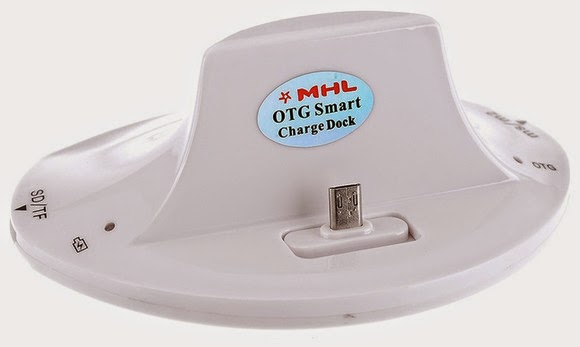
    A multi-function cradle with OTG MHL support is the key to turning your phone into a PC. Here’s the $25 VicTsing OTG MHL to HDMI multi-function cradle we tested.

    You can see where we’re headed here.

    A number of companies have released proprietary “docks” for their mobile devices that leverage both MHL and USB OTG, but they tend to be expensive and work only with one particular device. Some third-party manufacturers have also released near-universal multi-function docks, however, that can be had for only a few bucks.

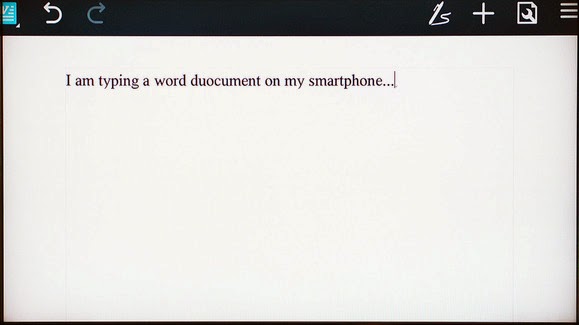
    We purchased a VicTsing OTG MHL to HDMI multi-function cradle for only $25. It works with a wide range of devices and offers dual USB ports, a couple of flash card readers, HDMI and audio output, and a charger. By connecting this simple dock to a display and a keyboard and mouse, it can essentially transform a smartphone into a basic Android-powered PC. Throw some Office-style apps on the phone and you’re ready for some actual productivity.

    Making the connections

    The VicTsing cradle’s port selection.

    Using a dock with USB OTB and MHL support is very simple and straightforward. Though we only tested it with a couple of Samsung phones (a Galaxy Note 3 and Galaxy S4) and an HTC phone (an HTC One X), the process and behavior should be similar with compatible devices.

    MARCO CHIAPPETTA

    The dock has an HDMI output that gets connected to a secondary screen. (A HDMI-to-DVI conversion cable can work if you have a spare monitor laying around). In our tests, both a cheap 1080p monitor and a Toshiba HDTV connected perfectly. The dock also requires power, which comes by way of a standard micro-USB charger; you can connect the included USB cable to a USB port on a TV or monitor, or simply use your phone’s charging cord.

    A keyboard and mouse can simply be plugged into the full-sized USB ports. You could use wireless keyboards and mice as well, as long as they use standard USB HID (human interface device) drivers. Multimedia keys and other custom keys on fancier keyboards won’t work.

    Once the physical connections are made, ensure the display is configured to use the correct input and simply slide the phone onto the dock, inserting the dock’s male connecter into the phone’s MHL/micro-USB port. When the smartphone is fully connected to the dock, its screen will go dark and output will be sent to the secondary display. Boom! Your old smartphone is now essentially an Android PC. It really is that simple!

    On the Samsung smartphones, everything we tried automatically rotated into landscape mode, which made it ideal for multi-media playback or working on office documents.

    Getting around

    Smartphones with USB OTG and MHL support will typically auto-rotate most content into landscape mode when connected to a secondary display.

    Navigating through the various menus on Android can be somewhat clunky when using a keyboard and mouse, but it’s fairly intuitive once you start poking around. Right-clicks act as a back button, while left-clicking behaves like a tap of the touchscreen. Many in-application icons and menus—even the mouse cursor itself—appear oversized on a big screen, but they function as expected.

    We wouldn’t trade an actual PC for a smartphone and USB OTG / MHL dock, but for a relatively small investment (especially if you’ve already got the monitor and input devices on hand) you can easily get some work done on one of these setups.

  • The Launching of Grand Theft Heists for GTA

    The Launching of Grand Theft Heists for GTA

    Grand Theft Auto Online Heists is coming March 10

    The Launching of Grand Theft Heists for GTA Online is scheduled for March 10th. Heists will bring a brand new four-player cooperative gameplay experience to GTA Online, giving players the chance to team up to pull off a string of intense, multi-part raids and robberies across Los Santos and Blaine County. Over the next couple of weeks, we will have more information about the launch of Heists and about other new features that we will release with it.

    Please stay tuned for lots more information in the weeks ahead and for now, check out some new screens showing action from Heists.

    #We are happy to bring Grand Theft to you

  • Turn on Smart Life with the latest Samsung Galaxy S6 – Samsung Galaxy S6 Specs

    Turn on Smart Life with the latest Samsung Galaxy S6 – Samsung Galaxy S6 Specs

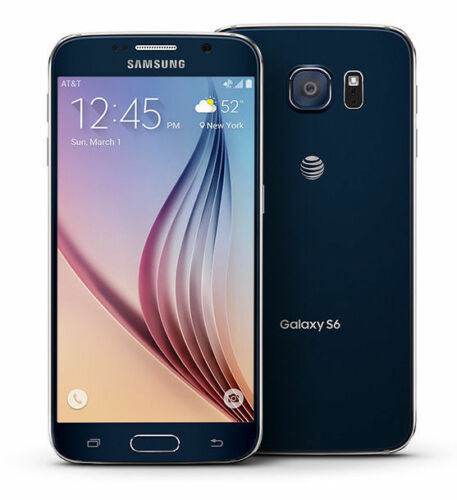
    From the front, the S6 looks a lot like the Note Edge — though this time both sides of the screen feature Samsung’s unique curve. And that dark gray metal backside looks pretty nice and is a huge step above anything that Samsung’s produced to this point. Goodbye, fake leather. We can’t say we’ll miss you. Expect to see an end to all these teases when Samsung officially unveils the Galaxy S6 on March 1st. T-Mobile’s website says there’ll be much more to share on that date.

    Preliminary Specifications

    NETWORK
    Technology: GSM / HSPA / LTE

    LAUNCH
    Announced: Exp. announcement 2015, March 1

    Status
    Exp. release 2015, Q1

    BODY
    Dimensions: 143.3 x 70.8 x 6.9 mm (5.64 x 2.79 x 0.27 in)
    SIM: Nano-SIM
    – Fingerprint sensor (PayPal certified)
    – Samsung Pay (Visa, MasterCard, AMEX certified)
    – IP67 certified – dust and water resistant
    – Water resistant up to 1 meter and 30 minutes

    DISPLAY
    Type: Super AMOLED capacitive touchscreen, 16M colors
    Size: 5.0 inches (~67.9% screen-to-body ratio)
    Resolution: 1440 x 2560 pixels (~587 ppi pixel density)
    Multitouch: Yes
    Protection: Corning Gorilla Glass 4
    – TouchWiz UI

    PLATFORM
    OS: Android OS, v5.0 (Lollipop)
    Chipset: Exynos 7420
    CPU: Quad-core 1.3 GHz Cortex-A53 & Quad-core 1.9 GHz Cortex-A57
    GPU: Mali-T760

    MEMORY
    Card slot: microSD, up to 128 GB
    Internal: 32 GB, 3 GB RAM

    CAMERA
    Primary: 20 MP, 4992 х 3744 pixels, optical image stabilization, phase detection autofocus, LED flash
    Features: Geo-tagging, touch focus, face detection, HDR, panorama
    Video: 2160p@30fps, 1080p@60fps, 720p@120fps, HDR, dual-video rec.
    Secondary: 5 MP, 1080p@30fps, dual video call

    SOUND

    Alert types: Vibration; MP3, WAV ringtones
    Loudspeaker: Yes
    3.5mm jack: Yes

    COMMS

    WLAN: Wi-Fi 802.11 a/b/g/n/ac, dual-band, Wi-Fi Direct, hotspot
    Bluetooth: v4.0, A2DP, LE, apt-X
    GPS: Yes, with A-GPS, GLONASS, Beidou
    NFC: Yes
    Infrared port: Yes
    Radio: No
    USB: microUSB v3.0 (MHL 3 TV-out), USB Host

    FEATURES

    Sensors: Accelerometer, gyro, proximity, compass, barometer, gesture, heart rate
    Messaging: SMS(threaded view), MMS, Email, Push Mail, IM
    Browser: HTML5
    Java: Yes, via Java MIDP emulator
    – Wireless charging (Qi-enabled) – market dependent
    – ANT+ support
    – S-Voice natural language commands and dictation
    – Smart stay, Smart pause, Smart scroll
    – Air gestures
    – Dropbox (50 GB cloud storage)
    – Active noise cancellation with dedicated mic
    – MP4/DivX/XviD/WMV/H.264 player
    – MP3/WAV/WMA/eAAC+/FLAC player
    – Photo/video editor
    – Document viewer

    BATTERY
    Li-Ion battery: Stand-by
    Talk time

    MISC
    Colors: Charcoal Black, Copper Gold, Electric Blue, Shimmery White

  • Video: An iPhone Working With An Android Wear Watch, No Jailbreak Required

    Video: An iPhone Working With An Android Wear Watch, No Jailbreak Required

    Have an iPhone, but want to use an Android Wear watch? Too bad! Google and Apple are focusing their smartwatch efforts on their own platforms for now, with all signs pointing to them avoiding cross-platform friendliness for as long as possible.

    Fortunately, the world has talented modders who can make things right. Here’s a video of the world’s first iPhone-to-Android-Wear connection, no jailbreak required.

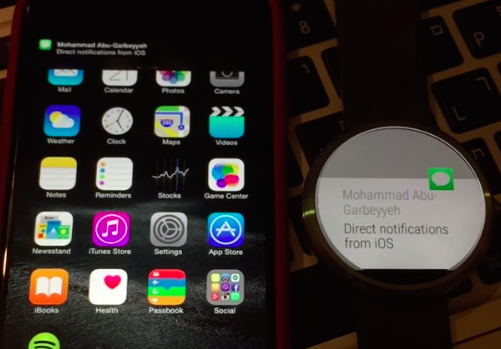
    MohammadAG, the prolific developer behind many an Android mod, has managed to get notifications to send from iOS to a Moto 360.

    The crazy part? Though MohammadAG’s iPhone is jailbroken (note the bouncing message icon on his phone — that’s a jailbreak trick), no jailbreaking is required to make this work.

    Instead, MohammadAG says the mod relies on the same ANCS protocol that the Pebble watch uses, which has been built into the iPhone since the release of iOS 7. A custom APK runs on the watch, listening for notifications. This solution limits iOS-to-Android-Wear compatibility to just basic notification support — but it’s a start, right?

    Alas, MohammadAG has yet to release the watch app to the public, so this is a one-off thing for now.

  • Sony Xperia Z3 – Cons, Pros and Why You Should Own One

    Sony Xperia Z3 – Cons, Pros and Why You Should Own One

    Sony is set to make a difference in our in world today by bringing about the newest smartphone Xperia Z3.

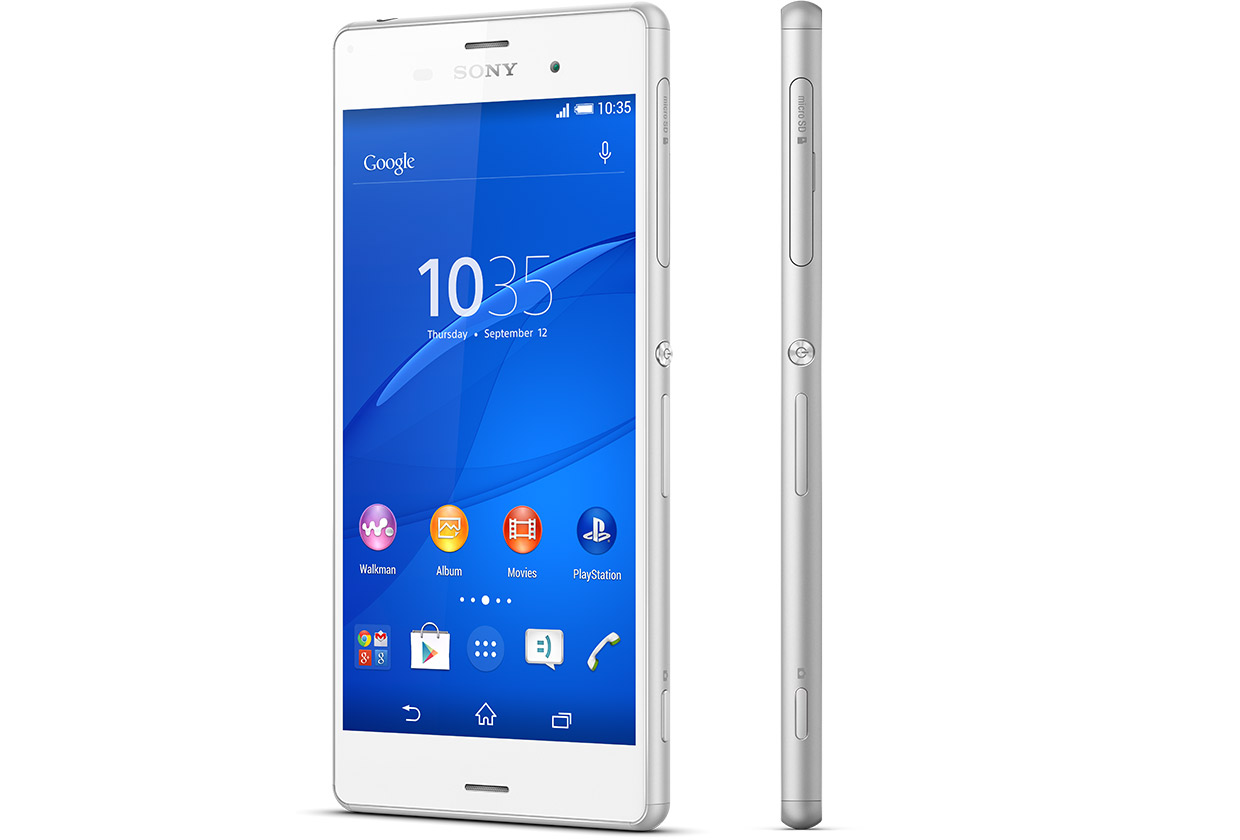
    The high competitions between reputable phone companies had driven Sony into researching and coming up with the latest Sony Xperia Z3, that has the latest premium design and highest waterproof rating capacity. the Xperia Z3 is the premium smartphone that does more by making life more easy and comfortable.

    A premium smartphone

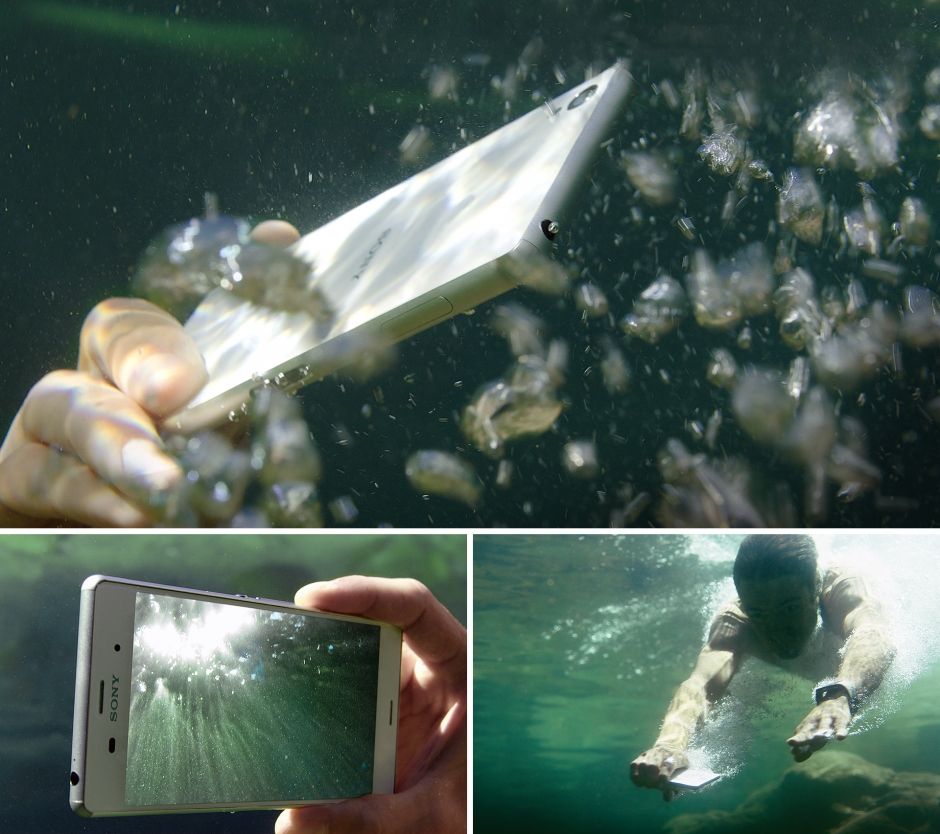
    This phone has been designed to withstand water for over 30 mins. Today you dive into pool on a hot sunny day, running when it’s raining, taking pictures in a downpour or underwater or wipe your phone when an unexpected spill occur, without considering to drop your phone or with the fear that it’s going to get damaged.


     In compliance with IP65 and IP68, the Xperia Z3 is protected against the ingress of dust and is waterproof. Provided that all ports and covers are firmly closed, the phone is (i) dust tight and (ii) protected against low-pressure jets of water from all practicable directions in compliance with IP65; and/or (iii) can be kept under 1.5 m of fresh water for up to 30 minutes in compliance with IP68. 

    Use the Xperia Z3 in the rain or in the pool

    Do you want to make great pictures and videos even better?

    You can unleash your creativity with our widest ever choice of unique Xperia camera apps. It’s our best smartphone camera yet, to make sure your memories are as vibrant as real life.

    PS4 Remote Play

    Xperia Z3 is the only phone with a PS4 game. The Xperia Z3 matches the latest gaming with the best Sony technologies. With a super-bright display and digital noise-cancelling technology, immersing yourself in your game has never been easier.


    Products Highlight


    • GSM / 4G LTE Capable
    • 20.7MP 1/2.3″ Exmor RS Camera Sensor
    • 25mm Sony G Lens + BIONZ Processor
    • 2.5 GHz Quad-Core Snapdragon 801 Chipset


    Additional Features


    • Performance battery life offering up to 2-days of regular usage
    • HighAdreno 330 GPU
    • Display Technology: TRILUMINOS Display for Mobile, Live Color LED, X-Realty for mobile, IPS display
    • Display Construction: Durable tempered glass
    • Sensors: Accelerometer, ambient light sensor, barometer, game rotation vector, geomagnetic rotation vector, gyroscope, magnetometer, step counter, step detector, significant motion detector, proximity
    • Playback/Record Supported Format: 3GPP, MP4, AVI
    • Compatible with the Sony Game Control Mount and wearable tech watches

    Sony Xperia Z3 can be purchased from Amazon or any retail store near you. To see more details or purchase this item, click here.

  • Google Bans User Testimonials in Play Store Apps

    Google Bans User Testimonials in Play Store Apps

    One way of shamelessly making anything you make – especially online – seem like the greatest thing ever is testimonials. Not just in the actual section of a webpage or area dedicated for them, but choosing the best ones to put in the body of text meant to describe your “thing.” Google knows this and seems to think doing so on the Play Store can lead to many of things like unfair advantages, false advertising, etc. So, how do they fix this? By banning the user of testimonials in app descriptions n the Play Store, of course.

    “Please do not include user testimonials in your app description. They tend to be dubious and are frequently utilized to include references to popular search terms and competitor apps in violation of the policies outlined here. Let your users speak for themselves via Play’s comment review system,” reads an update to the “Spam, & Placement in the store” section of Google’s developer guidelines.

    Basically, Google is preventing app developers from inflating their position on the search results and lists of Google Play as to attain a fair advantage for every developer, in addition to other methods one could use such as repetitive use of keywords in an attempt to boost the presence of the app, using completely unrelated keywords to draw unsuspecting people to your application, and many more.

    To help ensure the best experience for Android users, Google Play policies prohibit the publication of spam. Please do not publish unwanted, deceptive, repetitive, or irrelevant content on Google Play. Not only will it lower your app’s rating and cause negative reviews, it can result in your app being suspended or your developer account being terminated,” reads Google’s guidelines.

    Hopefully, this small change to the policy allows more people to get only high quality applications for their device. Believe it or not, there is a lot of scrap-apps (scrapps) on the Google Play store, and most of them are the ones including testimonials in their descriptions.

    Speaking of Play Store apps, did you know about the EWT app? Get all of our post and latest tech news no matter where you’re at! Download it here to your device!

  • Google plans to add Android directly into your vehicle

    Google plans to add Android directly into your vehicle

    The company is working on a new Android version that will power a car’s entertainment and navigation systems, connect it to the Internet, and integrate with the vehicle’s sensors, a Reuters report says.

    Sometime in the not-too-distant future, cars from many automakers could feature a version of Google’s Android operating system built directly into the vehicles.
    If Google’s plans take shape, its operating system will power the car’s entertainment and navigation systems, connect it to the Internet, and integrate with the vehicle’s sensors, camera, fuel gauge and other components.

    That’s according to a report by Reuters Dec. 19 that it said was based on conversations with two unnamed officials with knowledge of the matter. According to Reuters, Google could announce plans for integrating Android directly into cars when it rolls out Android M, the successor to its recently released Android 5.0 Lollipop operating system, sometime next year.
    Google did not confirm or deny the report. In an email, the company merely noted that it does not comment on rumors and speculation.

    But if Google were indeed to integrate Android directly into vehicles someday, that would mark a significant step forward for the company.  At the I/O conference this year, Google announced Android Auto, software that will allow drivers to basically stream most of their smartphone’s functions to the in-car display. Android Auto is expected out next year. It will allow drivers to take advantage of Google Maps, Google Now and other Android applications more easily when driving using simple voice commands and touch commands.

    With the new version of Android that Google is reportedly working on, drivers will no longer be required to connect their phones to the vehicle. Instead, a lot of the same functionality that is currently available on Android smartphones will be accessible directly from the vehicle in a manner that is optimized for in-vehicle use.

    Google’s big challenge though will be to persuade automakers to integrate its technology into their vehicles. Google has said that Android Auto will be available in vehicles from several major domestic and international automakers, including Ford, Chrysler, Honda and Audi.
    However, some automakers may be wary of giving the company too much access to internal components for safety reasons and because of branding concerns, Reuters noted.
    Google will also have to deal with the myriad safety concerns that have been expressed over connected cars recently. Security researchers have already shown how hackers can exploit a connected vehicle’s electronic control unit and take remote control of functions like steering, braking and acceleration.

    The National Highway Traffic Safety Administration highlighted several of those concerns in a report on connected cars earlier this year while advocating the need for intrusion detection, access control and other security technologies in vehicles over the next few years. One of the areas of concerns highlighted in the report has to do with in-vehicle entertainment and navigation systems becoming potential attack vectors in connected cars of the future.

    For safety-conscious automakers to allow any version of Android to be integrated into their vehicles, Google will likely have to first considerably bolster the security of the operating system. Currently, Android is one of the most attacked operating systems in the world, with more malware targeting it than any other mobile operating system.

    via eWeek

  • It’s the Holidays, here are 10 Apps/Movies/Albums on Google play to get to get in the spirit.

    It’s the Holidays, here are 10 Apps/Movies/Albums on Google play to get to get in the spirit.

    SantaDroid-1 (1)
    Hey, are you an Android user? Good, because the end-year Holidays are rounding up on us quick, and you need to snap into the spirit! We live in a amazing age where we can set the mood from the power of a small device, in this case your Android. So, with that out of the way let us make like Santa to our list of 10 Apps/Movies/Albums to get on Google Play to help get you “ho-ho-ho’ing” into the spirit of the season.

    1) Frosty the Snowman: Holiday Collection (Movies)

    Ah, a classic! Fortunate for you this Holiday Seaon, Frosty the Snowman: Holiday Collection is available on the Google Play store. Each episode starts at $9.99 but you can save by getting the entire bundle for $12.99. If you have a Chromecast and you’ll be having a lot of kids around this season, then you should definitely look into this classic set of short-films.

    2)Wish – Shopping made Fun (App)

    You or someone special to you a fashonista? Then you should definitely check out this Android application conveniently named “Wish.” Their slogan; Shopping made Fun. I personally am using this app (yep, that means an app review to come soon), and so far I can definitely recommend it. It’s focus is letting worldwide customers get constant deals stacked on deals on awesome clothes, accessories, and other fashion items that are sold from vendors around the world. Take my word on it, it is cheap. Perfect to make you some quick “ugly sweater” shopping for X-mas.

    3)Christmas Fun (App)

    Step one: get some friends. Step two: put on ugly sweaters. Step three: make hot chocolate. Step four: sit down and pull out this game. Step five: ??? = Merry Memories. This newly found app on the Play store is a Christmas oriented piece of work. Developed by SMARTSTUDY, this app is meant to make your Christmas season more fun with songs and activities. It comes with features like 16 Christmas songs with a sing-a-long feature, little seasonal games, and more all accompanied by amazingly cute graphics and animations.

    4)Mr. Hankey’s Christmas Classics (Music)

    It’s Christmas, and you are wanting some funny sh*t. This album is for you. You will be greeted with a total of 18 songs all across the South Park history of Christmas and Holidays. No doubt that this could help make your office Christmas party less quiet and more fun (no guarantee on how it will effect the status of your job) for everyone!

    5)NOW Today’s Christmas (Music)

    This album is for those looking to move onto new traditional music for the Holidays. This “NOW” album is a good pick up for a great price ($5.99) that focuses on Christmas music from today’s hottest artist.

    6)Betty Crocker Christmas Cookies (Books)

    Mmmm..imagine waking up to the smell of delicious, beautiful cookies on Christmas morning – only to find out that Santa had eaten them. Anyways, this book on Google Play Books is filled with Christmas-oriented cookies recipes. Perfect gift for your mom, or yourself if you love to bake!

    7)Allrecipes Dinner Spinner (Apps)

    Staying on the trend of recipes and cooking (I like to cook in my spare time), next on this list of Holiday Android goods is the Allrecipes (Dinner Spinner) application. Having personal experience with this app, I can definitely recommend it for everyone preparing multiple items for that Christmas dinner, or that New Year’s Eve punch.

    8)Hotwire Hotels & Cars (Apps)

    This app will be best for those travelling around this Holiday Season. Hotwire helps their users get discounts on great hotel rooms and rental cars. No more stressing over the pre-planning stage of your family Holiday travels!

    9)Kids Paint Christmas Cards (Apps)

    Kids Paint Christmas Cards is a neat little app that offers a cutesy painting system that your children will love. You can use the replay mode to re-watch your coloring session, and share created cards to friends on social media. There are 60+ templates, so get to it!

    10)Amazon (Apps)

    And to tie off the list with a fan-favorite: the official amazon app for Android. Download, tap items into your cart, and get those last-minute gifts in quickly and safely.
    There, now you have your Christmas and New Year’s Eve setup from your friends at EWTNet! However, this is just our own personal list of recommendations, if you’re looking for more go and check out Google’s Holiday Prep Kit on Google Play! Happy Holidays from EWTNet.
    BONUS: Love our tech-related news and updates? We also offer tech profiles and job vacancies in the US and Africa. You can get our official Android app here and make your technical Holiday Season better and more informative.
  • Android 5.0 Lollipop Update will be available for some LG G3 phones this week

    Android 5.0 Lollipop Update will be available for some LG G3 phones this week

    Here’s some good news for owners of LG’s G3 smartphone: Your phone will be among the first to get an update to Android 5.0 Lollipop. Assuming you live in Poland, anyway.

    According to the company, it will roll out an update to Lollipop to G3 users in Poland this week, and release the update “[in] other key markets in the near future.” LG didn’t specify what it means by “near future,” however, so it could conceivably take anywhere from a few days to a few months for it to make it onto LG phones here in the US.

    The story behind the story: Fragmentation may not be the fatal flaw that some expected it to be with Android—it’s a non-issue for many people most of the time, and it’s arguably one of Android’s strengths in that it’s resulted in a wide variety of hardware and software options. But updates are one area where fragmentation still becomes an issue. Ironically, enthusiasts who bought Google Nexus devices because of the promise of speedy Android updates are watching third-party phones land Lollipop first.

    The Lollipop waiting game continues

    And so we wait. Despite the limited release of LG’s upcoming Lollipop update, though, there are some signs that we’ll start to see some updates soon. On Friday, Motorola published–then pulled —release notes for its Android Lollipop update for the second-generation Moto X. This seems to suggest that Motorola is close to having an update, but you’ll have to wait at least a little longer.

    But if you’re feeling daring—and have a compatible Nexus device, the Sony Experia Z, or the Samsung Galaxy S3—the folks at XDA Developers have cobbled together a jury-rigged build of Lollipop for you to try. It’s a potentially buggy build, though, and installing unofficial builds can be a challenge, so it isn’t for the faint of heart.

  • Android Horror Games Terrifying to Play with the Lights Off

    Android Horror Games Terrifying to Play with the Lights Off

    Are you an Android horror game addict? Or you just didn’t get enough of Halloween night and still want images that will scare you to death? Be careful of what you wish for, here are 5 most scariest of horror Android games. Don’t be ashamed to curl up in a ball in the corner. These Android horror games will scare the pants off of even hardened gamesters.

    Android horror game

    Real time horror games are something you are not likely to find in any of the Play Store’s top game charts. It’s nothing to be worried about, really: A lot of people would prefer to be chased by a nice looking ‘monster monkey’ in Temple Run than to face the real terror in Android horror games.

    [Further Reading: 3 Smartphone & Tablet Games you Must Play this Week]

    As horror as horror games sounds, most gamers still prefer the suspense, and don’t need swarms of disfigured monsters creeping at them at all times to have fun. Meanwhile, others want exactly that. In that light we have tried to strike the balance between the thrill-seekers and the ones who just want a creepy enough game that is simply incompatible with poorly-lit environments.

    The good thing about this list is that the games are free and risk free: If they scare you hard enough, you might as well uninstall them and try board games.

  • You can now Add Friends by Username in Telegram Messaging App

    You can now Add Friends by Username in Telegram Messaging App

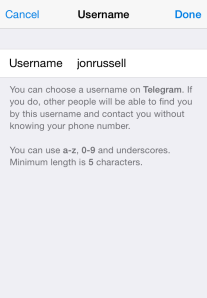
    The Telegram Messaging App, the security-focused messaging app, now lets you add friends without necessarily knowing their phone number (see the step-by-step guide on how to add a username in Telegram). An update to the iOS and Android apps today has introduced the option to register a a username, although all users must still bind their account to a phone number.

    The advantage of a username is that you can share your contact details for Telegram without revealing your phone number, thus safeguarding some level of privacy.

    Usernames must be a minimum of five characters — so you can’t make up for losing out on a one-letter Twitter handle here — and can contain letters, numbers and underscores.

    You are also free to change your alias, so long as the new one is not already taken.

    That’s not quite all from this Telegram update. The company has also taken a leaf out of Snapchat’s book with a new feature that lets users ‘Tap and Hold to View’ photos, video and voice messages that are sent with a self-destructing timer. Prior to this update, Telegram users had to tap on media to load it.

    Importantly, Telegram has now amended said self-destructing timer for media so that it only begins once the content has been opened. That means that photos, videos, etc do not self-destruct before being read.

    Founded by the brothers behind Russian social network VK, Telegram launched in October 2013 with a promise to make mobile messaging more secure. The service gained some serious momentum after Facebook agree to buy WhatsApp, when it clocked 8 million downloads in a matter of days, primarily from users concerned with Facebook’s approach to user data.

    Earlier this year, Telegram revealed that it has 35 million monthly active users, 15 million of whom use it daily. Co-founder Pavel Durov confirmed to TechCrunch that, as of March 2014, more than 18 billion messages were received by users of the service per month.

    Those stats are far smaller than WhatsApp — which has over half a billion monthly users — and others, but they are impressive for such a new entrant in the messaging space.

  • Android 5.0 Lollipop to hit the wild on November 3

    Android 5.0 Lollipop to hit the wild on November 3

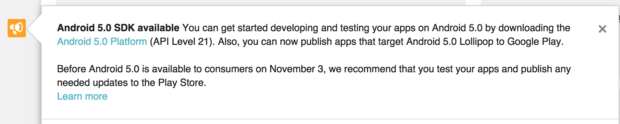
    Google is telling developers to step on it if they want their apps ready for a November 3 release of Android Lollipop.

    It’s the first specific date we’ve heard, which means the newest flavor of Android will start hitting the street in less than two weeks. The Nexus 9 preorders start shipping on that same date as well. Though as is often the case with preorders, they may show up on some people’s doorsteps early.

    Google wants developers to finish tinkering and get their apps ready to go in the Play Store.

    With Lollipop so close, Google is gently nagging programmers in the Google Play Developer Console (pictured) to grab the latest release of Android and get cracking. They can already upload apps and schedule them for release when Lollipop goes live.

    This isn’t a guarantee that your device will get Lollipop on November 3, but at least we know when the rollout will start. Expect Nexus devices to get it first, with others manufacturers planning to follow suit. Manufacturers like HTC have promised some phones (like the One M8 and M7) will get an update within 90 days of the official release—this would be the date to start the clock. Software updates often have to be tested by carriers before they’re released, too.

    Why this matters: It’s one thing to get Android 5.0 Lollipop out the door, it’s quite another to get the rest of the ecosystem ready. Lollipop is a significant rewrite of how Android looks and performs, so it will be rather funky if third-party apps look like they don’t belong.

    Google is nudging developers to update their apps so the transition to Lollipop is a smooth one, which won’t happen if all of a sudden Android owners can’t get their favorite apps to work properly.

  • OnePlus $299 Smartphone Will be on Sale for One Hour on October 27

    OnePlus $299 Smartphone Will be on Sale for One Hour on October 27

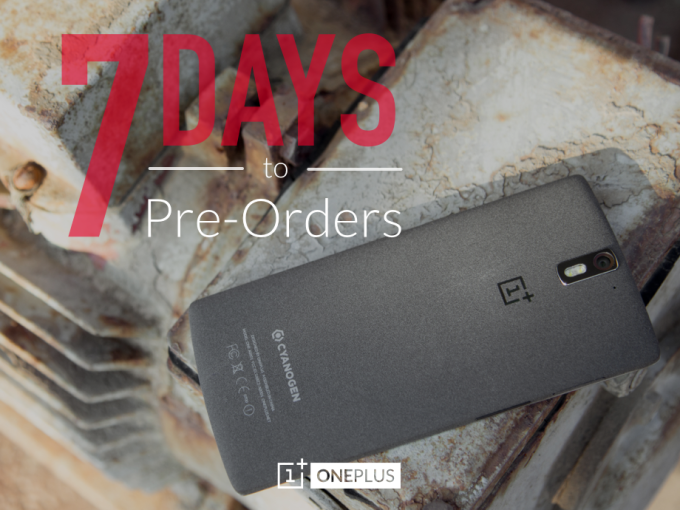
    If you’ve been in the market for OnePlus One, the hugely impressive $299 Android smartphone that is available by invite only — thus far — then your luck is in. The startup has announced that it will make its first smartphone available to all members of the public, but for a one hour window only.

    The impressive device will be available to buy for an hour on October 27, starting from 15:00 GMT — that’s 08:00 PST, or 11:00 EST. The company is allowing would-be customers to pre-order their phone from today, so there’s no need to stand still until then. Those who pre-order now but manage to grab an invite before October 27 can skip the queue and order their device right away, so there’s no danger of being stuck waiting.

    OnePlus says the new public sale window will not replace its invitation system altogether, but — having suffered delays in the past — this step is evidence of greater confidence in its ability to reach larger numbers of people with its devices.

    The company has been preparing itself for its sale hour, and it revealed that it sent out 50,000 invites during the first half of this month. “This was our way of testing our servers to make sure we are well-prepared for dealing with a large volume of orders,” OnePlus said.

    That’s a hugely important point given the issues that other smartphone upstarts have run into from selling large numbers of devices over a short space of time online. Demand for Xiaomi’s devices crashed Flipkart’s website in India back in July, although the Chinese company has generally experienced few issues with its web-only sales model.

    Either way, OnePlus’s one hour window is a far better move than its last major strategy, in which it caused controversy for a sexist contest to sell The One.

  • Android 5.0 Lollipop Review: Yet another OS Android Developers will Love

    Android 5.0 Lollipop Review: Yet another OS Android Developers will Love

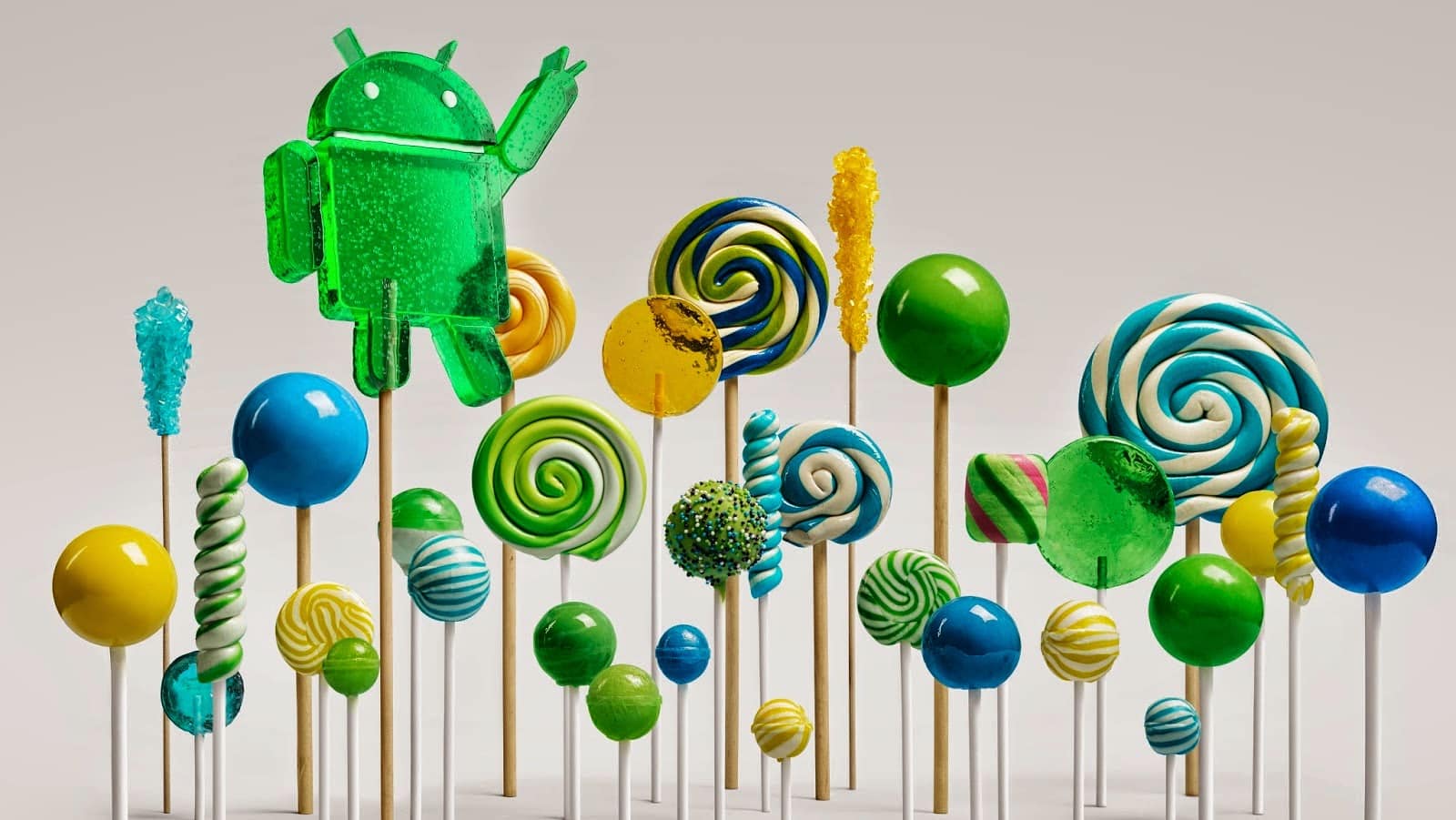
    Yes, you heard right! Google has decided to put an end to the speculations of a new Android OS and officially pulled the curtain on its new OS version Android 5.0 Lollipop. 

    Two days ago, the company announced the release of a new Android version 5.0 Lollipop on their official blog – An OS designed to “work on all your devices and to be customized for you the way you see fit.”

    Android 5.0 Lollipop featured image. Credit to Google official blogspot
    Android 5.0 Lollipop featured image. Credit to Google official blogspot

    Android has a face only an engineer could love. At least, that’s the reputation it has earned over the past few years. Google’s mobile OS is a hotbed of mobile innovation and new technologies, but its interface doesn’t have the friendly consumer-centric design of iOS or Windows Phone. With Android 5.0 Lollipop, Google aims to overhaul this shortcoming, while baking-in a handful of nifty new features.


    Google stated that “Lollipop is designed to be flexible, to work on all your devices and to be customized for you the way you see fit.” That may be true to some extent but the plastic surgery is incomplete. While iOS7 is easily identifiable by its flat bright colors and lightweight fonts, and Windows Phone carries on with Live Tiles, the Lollipop interface has no single recongnizable trait. Yes, it’s flatter and brighter, but what isn’t these days? Worse, the redesign seems pushed out the door too early. Scratch beneath the surface, and you’ll find built-in apps and menus that haven’t been udpated to the new look. There’s a lot to like in Google’s name-branded OS release, but this sweet treat isn’t quite ready to be unwrapped.

    New Cosmetic Look

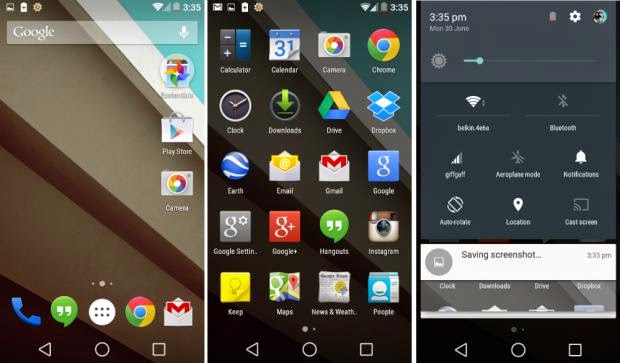
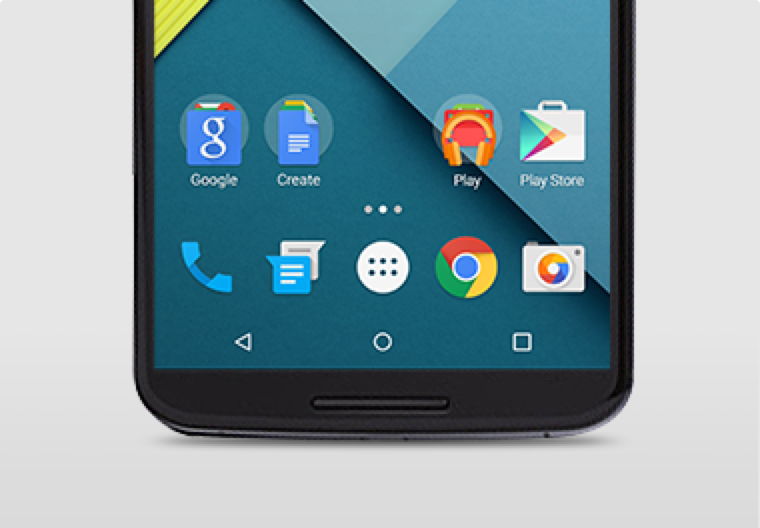
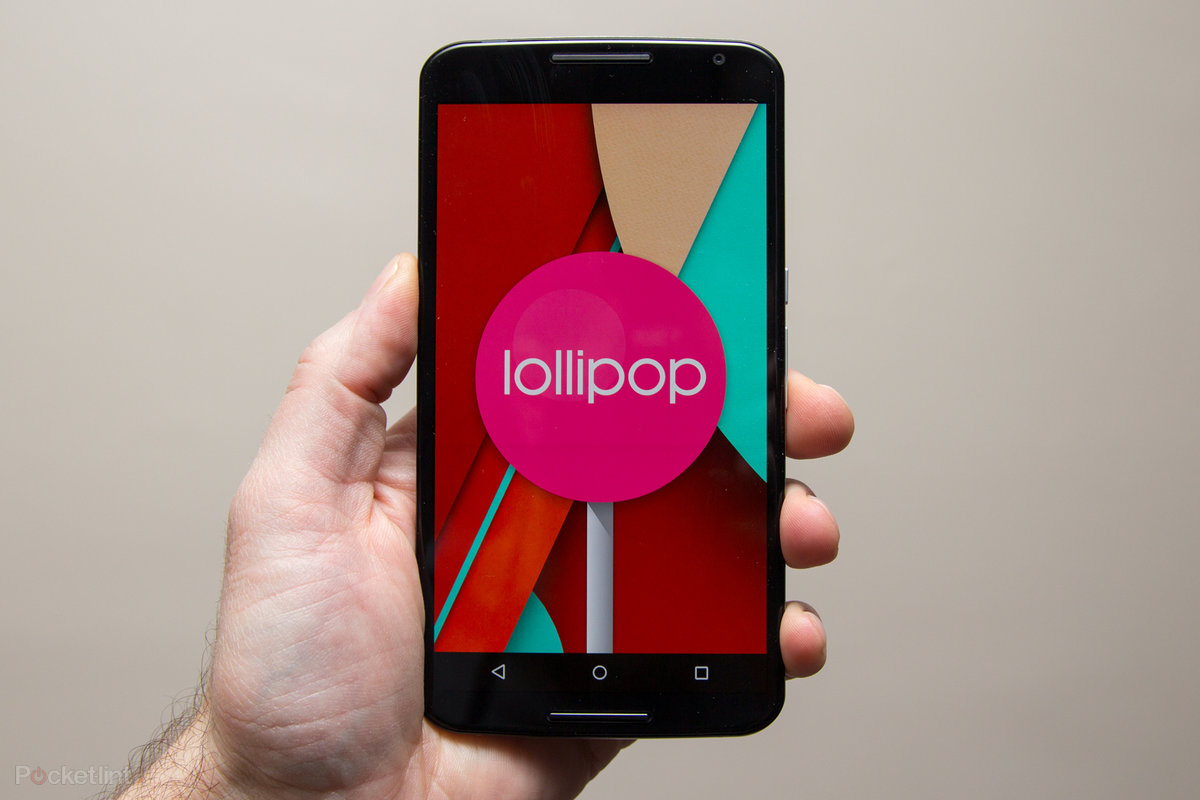
    Android 5.0 Lollipop has a new vibrant look, otherwise called Material Design. Google has finally ditched the traditional look of the Android soft keys at the bottom of the screen and has adopted something rather more stylish.

    New Soft Keys. Image by Knowyourmobile
    New Google Now Launcher. Image by Android

    The “Home” symbol is now a circle, while the multitasking menu is a square. The back button is a reversed arrow that looks like it has been lifted from a 1980’s tape player or VCR unit. It’s quite a drastic change and does take some getting used to, especially if you’ve been using Android since day one.

    The new OS is also bundled with a new launcher. A clean, simple, customizable home screen that comes with the power of Google Now: traffic alerts, weather, and much more, just a swipe away.

    Extensive Battery Life Saver

    Android L brings with it Project Volta, Google’s attempt at giving developers more visibility on what aspects of their apps are draining the most juice. While it’s early days here, the majority of the apps we tested had not been configured to make use of Volta, it’s a solid move by the Big G, as it gives you a more accurate indication of how long your phone is going to last and what apps are sucking up most power.
    Another nice touch is that when you’re charging your phone, you’re told how long it will take for the battery to be fully topped up. While we’ve perhaps not spent enough time with Android Lollipop to get a complete picture, it did seem to give our Nexus 5 more stamina than KitKat.
    Finally, we have Battery Saver mode. How this works is simple, although the service isn’t anything particularly new – plenty of OEMs already build similar features into their hardware. The idea here is to conserve battery life, so when your battery hits a certain percentage, you can set the Battery Saver mode to kick in and throttle the performance of the phone to ensure that juice lasts a little bit longer.

    Newly Improved Notification & Lock Screen

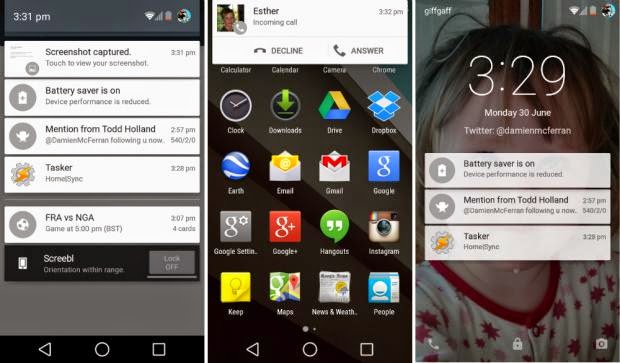
    This is perhaps the biggest area of change in Android Lollipop. Notifications have undergone a complete overhaul, and now look a lot like Google Now’s card-based system. Notifications are displayed directly on the lock screen, and tapping a card allows you to unlock the device and jump straight to that area. You can even expand cards to see more details, such as a list of emails, with the phone still in its locked state (If you don’t like the idea of people being able to snoop on your personal messages then you can enable a feature which locks away the detailed info).
    Newly improved notification and lock screen. image by Knowyourmobile
    It’s a very clever move by Google, and one that brings you even closer to the content you need on your handset. Even if you have a security lock in place, the fact that you can tap the notification you wish to see, unlock the phone and then leap straight into the relevant information makes the whole process seem a lot smoother. You can also swipe away and dismiss notifications without actually unlocking your device.
    When the phone is unlocked, notifications can be displayed by sliding a finger down from the top of the screen. Rather than showing the data in a slide-down panel, as was the case in previous versions of Android, a series of cards flow over the top of your current view, which can be seen behind the cards at all times. This “flowing” cascade of cards is set to be one of Android L’s most striking visual changes. As before though, the slide-down notifications panel has two stages: your finger swipe shows notifications, while a second swipe pulls down the quick settings menu.
    While Google is giving notifications a face-lift, it’s also making them less obtrusive. If your phone is unlocked and you’re involved in another activity, such as browsing emails or playing a game, the call details appear at the top of the display. You can accept or reject the call without having to pause what you’re currently doing. Another welcome addition is the Do Not Disturb function, which you can quickly enable to stop you being bugged by your phone.
    However, Lock-screen widgets have been removed entirely, so if you’re a fan of browsing your emails without unlocking your phone, then you might be disappointed.

    Lollipop is Pretty Good & Tasty

    From its list of features, Lollipop sounds tasty, and Android 5.0 is certainly a step in the right direction. Its interface is bright and inviting and the newly added secondary features like “People” app and a new Dialer application should help make stock Android even more consumer friendly. You also have top-level access to Google+ and Google Now, so there’s no excuse not to take advantage of Google’s most hottest features.
    A lot of popular phones will get upgraded to Lollipop in the next couple months, though Google has recently launched Nexus 6, Nexus 9 and Nexus Player, all powered by Lollipop. Hopefully by the time Lollipop makes its way to your device, Google will have tied up some the loose ends—adopting the new design in all of its core apps and consolidating the myriad of new settings. Or, it can continue to torture us like it did with Kitkat by making only incremental changes to the entire Android package with each release, spacing out core app updates by months.
  • How to Configure Wi-Fi Hotspot on Samsung, Xiaomi, Infinix Smartphones & Android Devices

    How to Configure Wi-Fi Hotspot on Samsung, Xiaomi, Infinix Smartphones & Android Devices

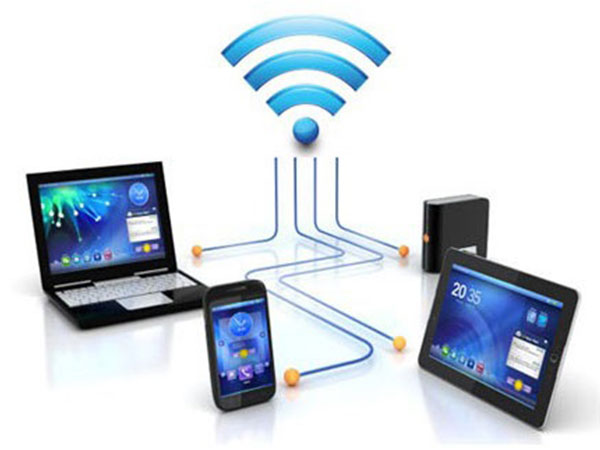
    If you don’t have a home internet access, your best bet is to use your Android smartphone to distribute your cellular Internet connection to your other devices. Using our guidelines provided in video, picture gallery and text format you can learn how to configure Wi-Fi hotspot in an Android smartphone.

    WiFi hotspot enables users with WiFi supported devices to tether internet connection across other devices. Although, there are few security concerns using Wi-Fi but with the right techniques and common-sense you can learn how to configure Wi-Fi hotspot and share internet from your Samsung, Tecno and Infinix smartphone to your PC or other mobile devices.

    Further Reading: How to boost WIFI connections on Your Laptop

    Why Android?

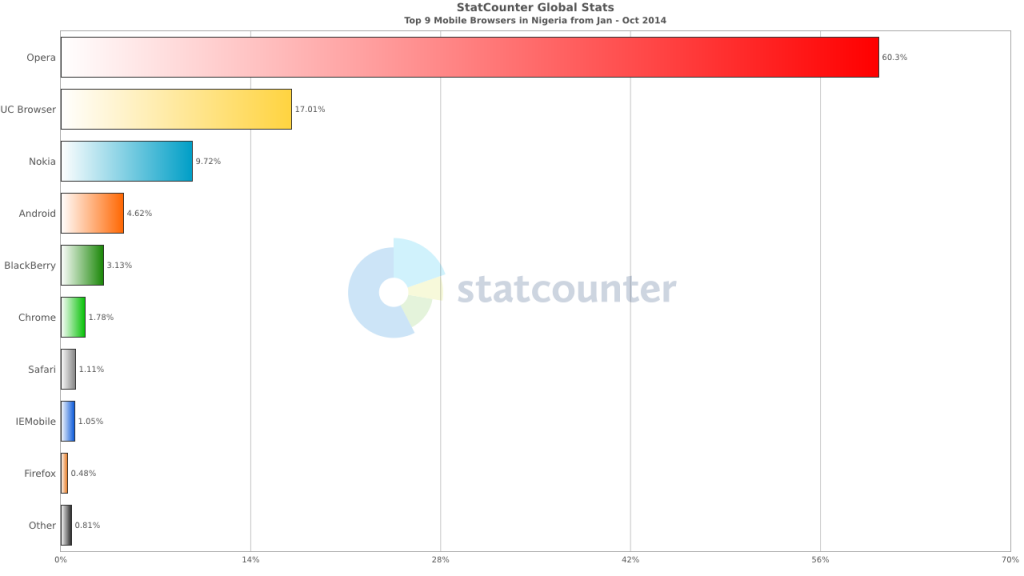
    Browsers Usage in Nigeria
    Top 9 Mobile Browsers in Nigeria (Jan – Oct 2014)

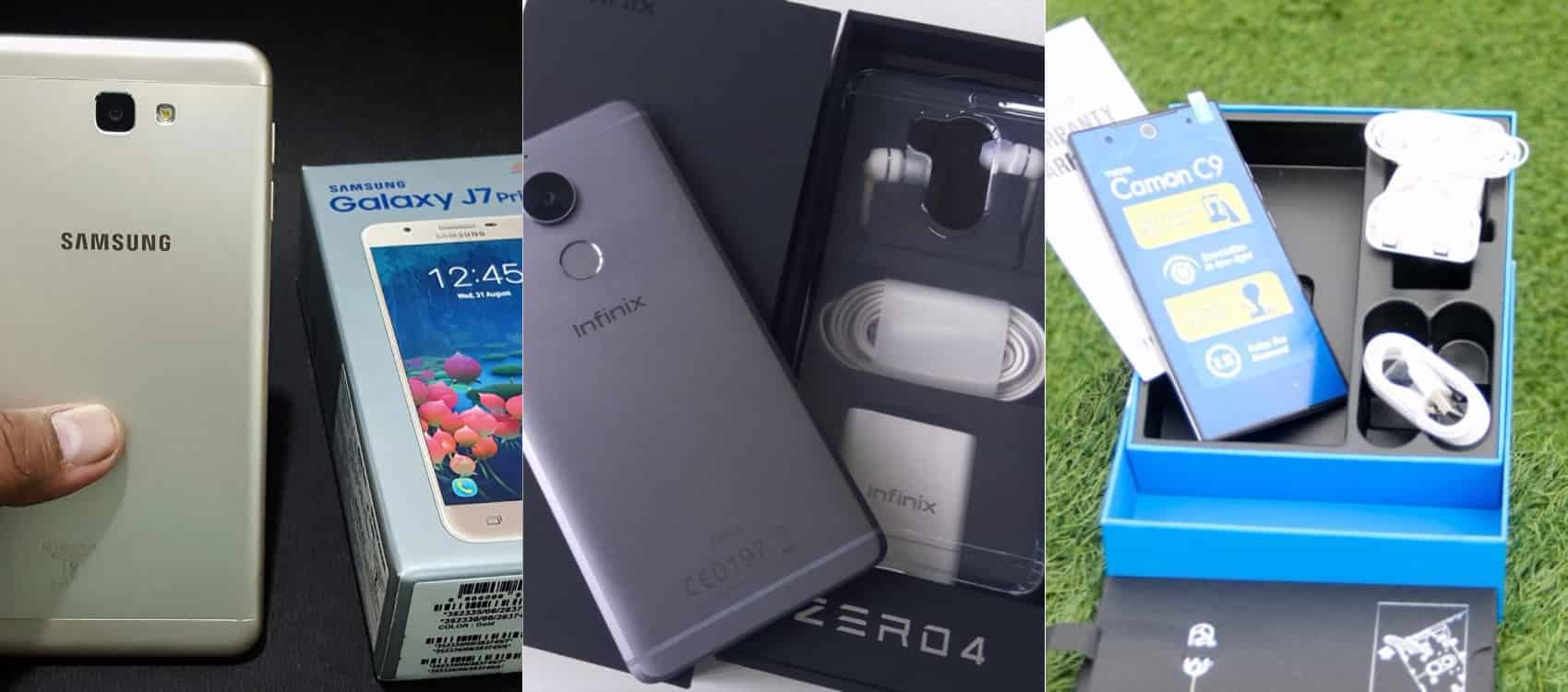
    Smartphone usage statistics from Jan-Oct 2014 shows that Android OS is winning the smartphone war in Nigeria. Infinix, Tecno and Samsung smartphones are at the very top of the food chain in Android smartphone usage among Nigerians.

    How to use and Configure Wi-Fi Hotspot in Samsung, Tecno & Infinix Smartphones

    Since most internet users [in Nigeria] access the internet from the mobile data, it makes sense for Android users to get acquainted with the inbuilt portable hotspot facility that comes pre-installed in most Android devices.

    Further Reading: 6 Premium Android phones or tablets you can purchase for  ₦9,999+ 

    Formats

    Be it on Huawei Y6 Prime 2019, Samsung Galaxy S10+, Infinix Zero 5 or any Android smartphone out there, these guide is ready to get you started with portable hotspot on your device.

    Click on any of the formats listed above to access this tutorial in that format.

    How to use and configure Wi-fi on Samsung, Teno, Infinix and other Android smart phone?

    Configure Wi-fi hotspot on Samsung Smartphone
    Configure Wi-Fi hotspot on Samsung Galaxy S8

    Time needed: 2 minutes

    Follow this step to step guide to learn how to configure Wi-Fi Hotspot on your Samsung, Tecno, Infinix and any other Android smartphone.

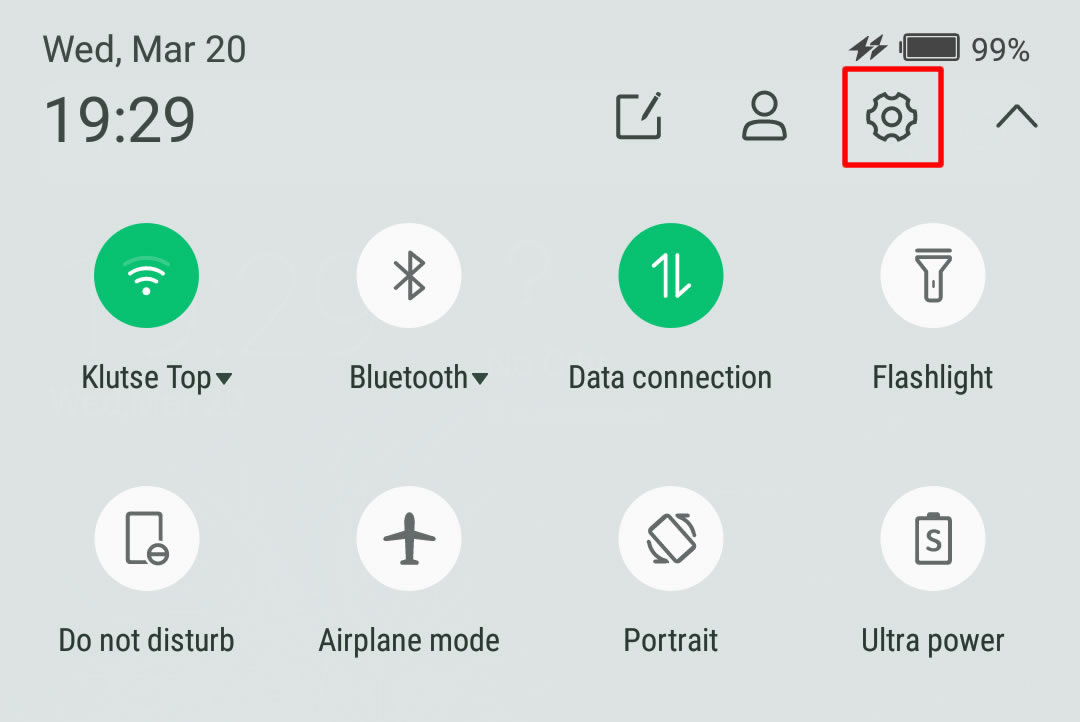
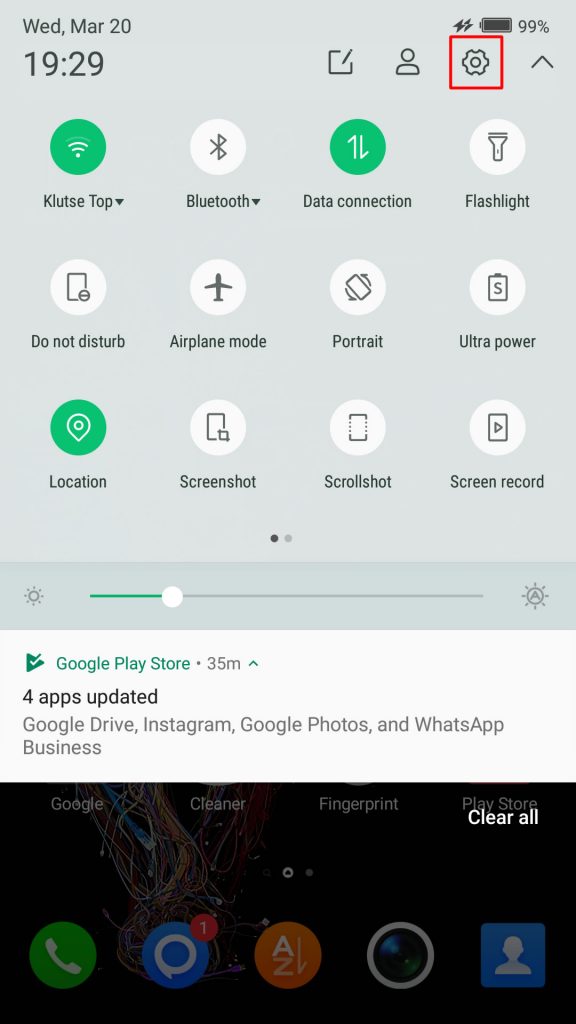
    1. Go to your Android phone’s settings

      From the Home screen, tap the Application screens icon > Find and tap Settings.

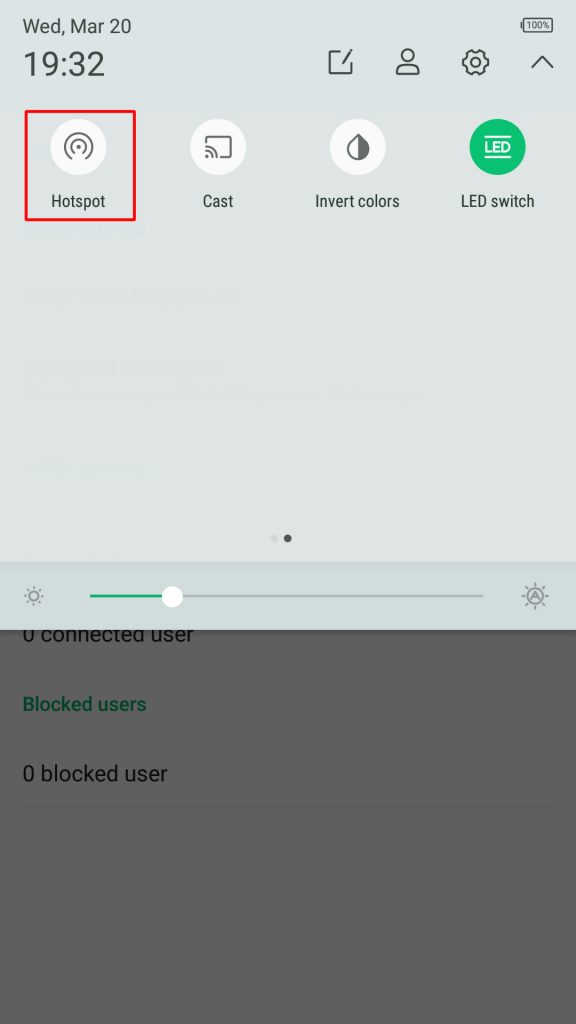
      On newer versions of Android, you can simply pull down Android control panel and click on the gear icon.

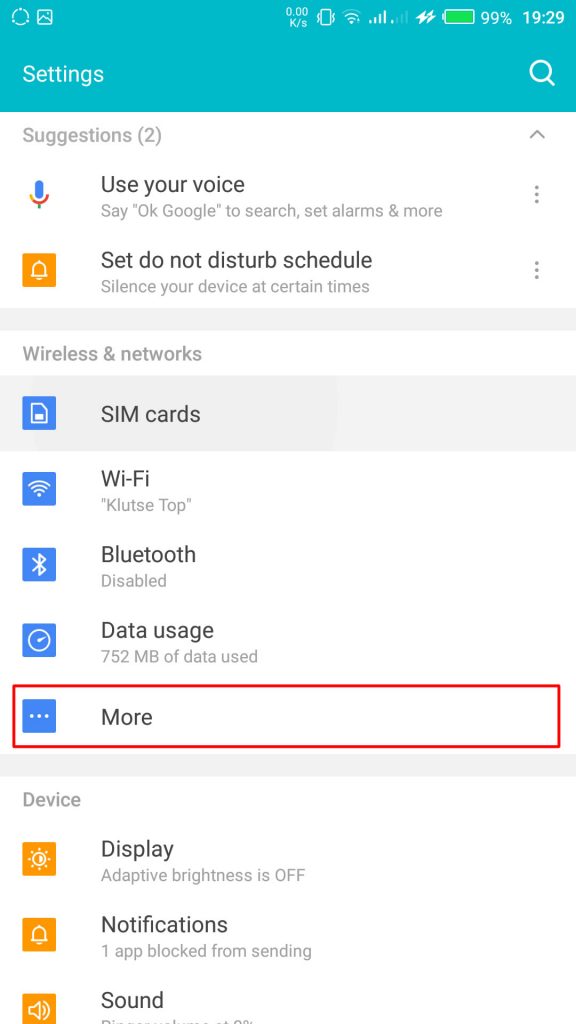
    2. Wireless & networks settings

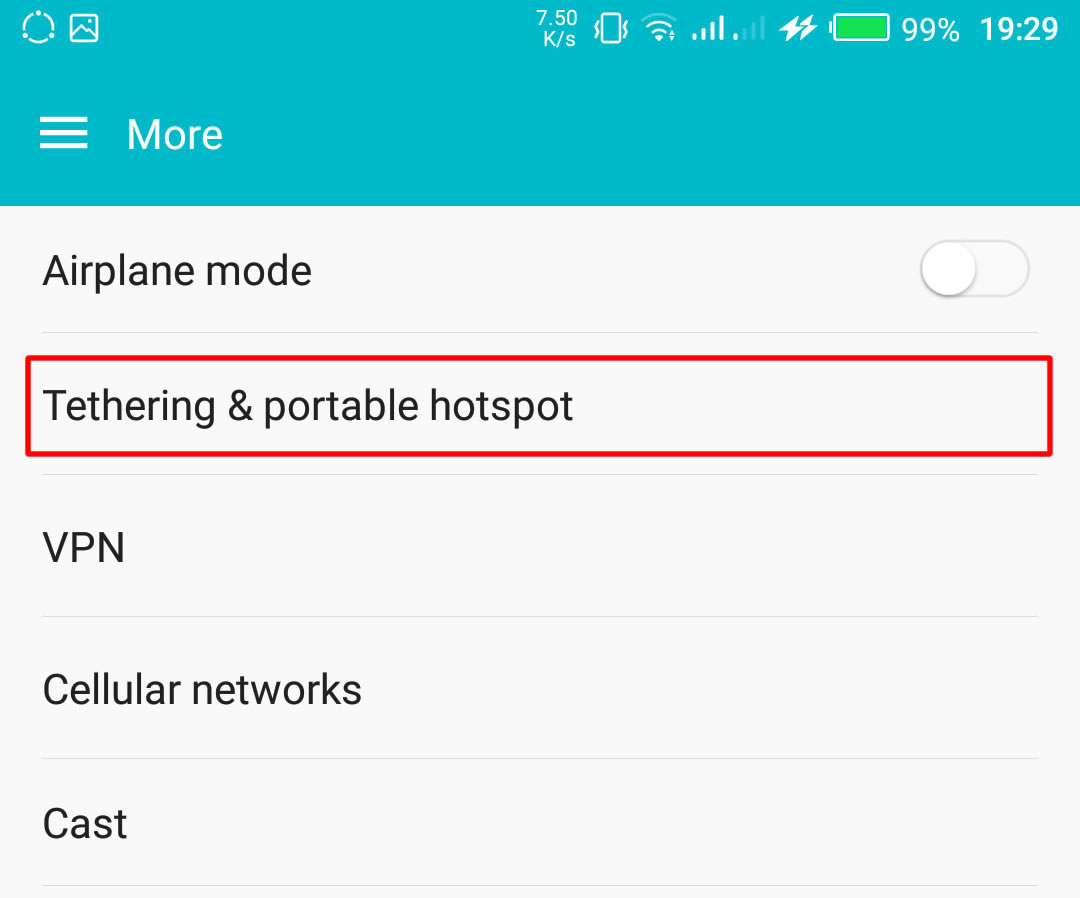
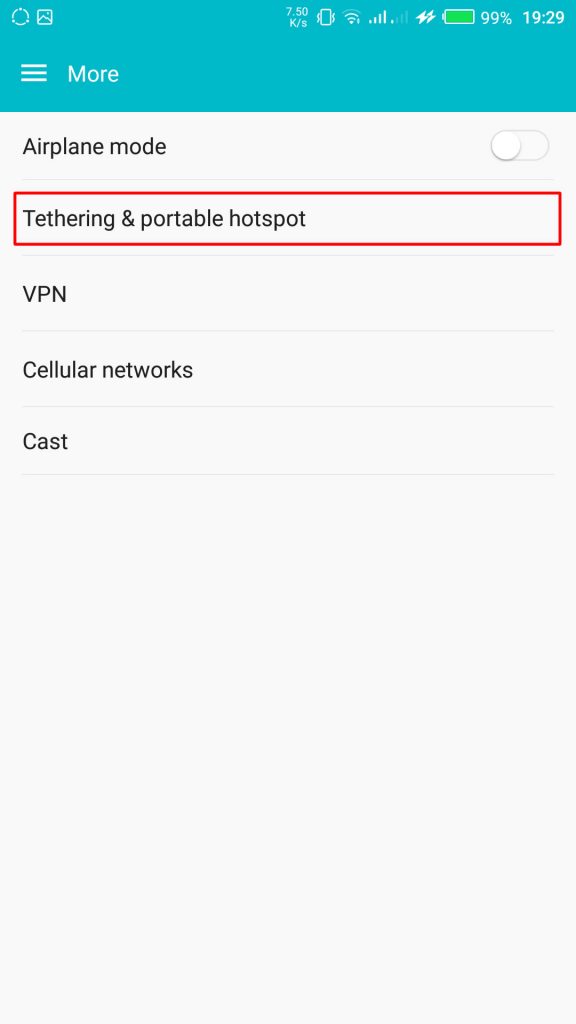
      From your Settings screen, locate Wireless & Networks block and tap Tethering & Portable Hotspot. If you can’t find Tethering & portable hotspot on your settings home screen, tap More > Tethering and portable hotspot.

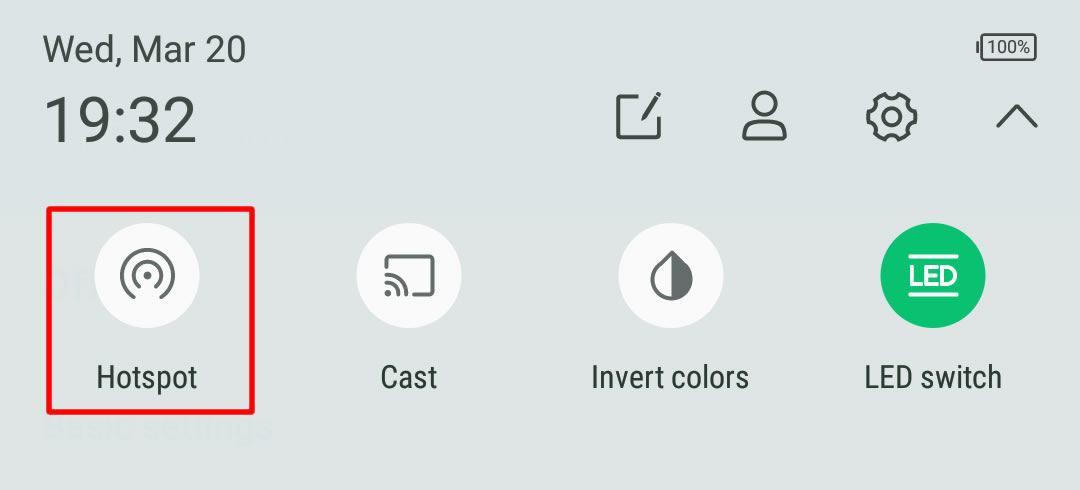
      On some version of Android, you can hold the upper screen of your Infinix smartphone or Tecno smartphone and scroll down. Turn “On” hotspot from the menu. You will see a notification requesting you to touch to configure hotspot, just touch the notification.Wireless & networks settings

    3. Configure Wi-Fi Hotspot

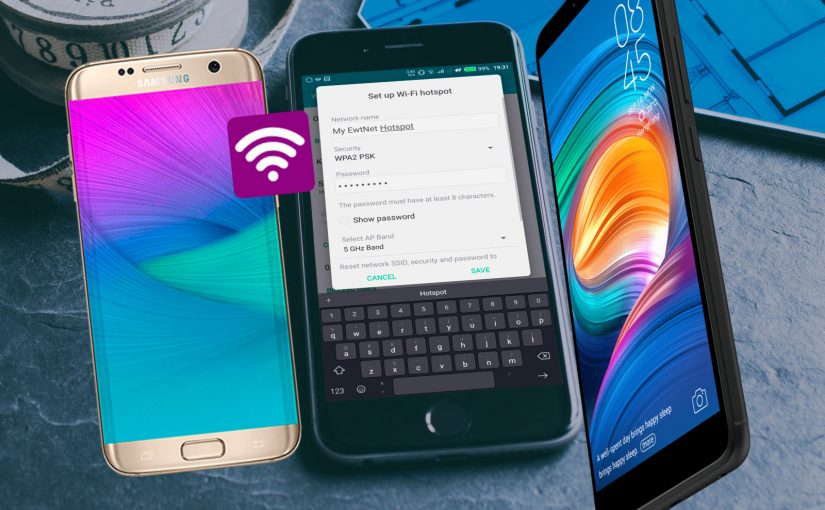
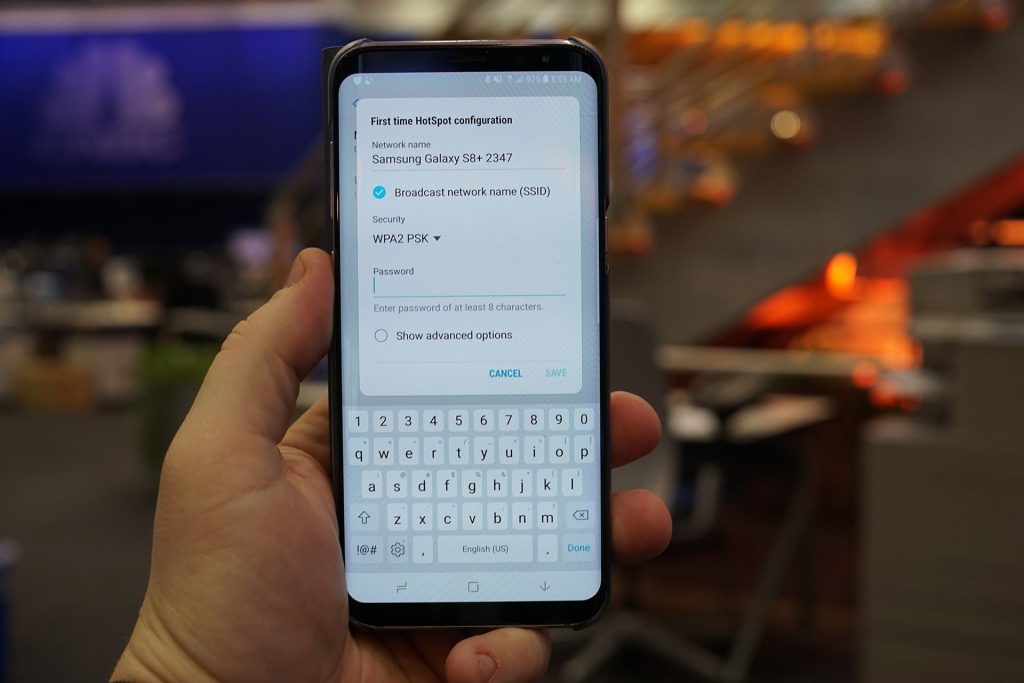
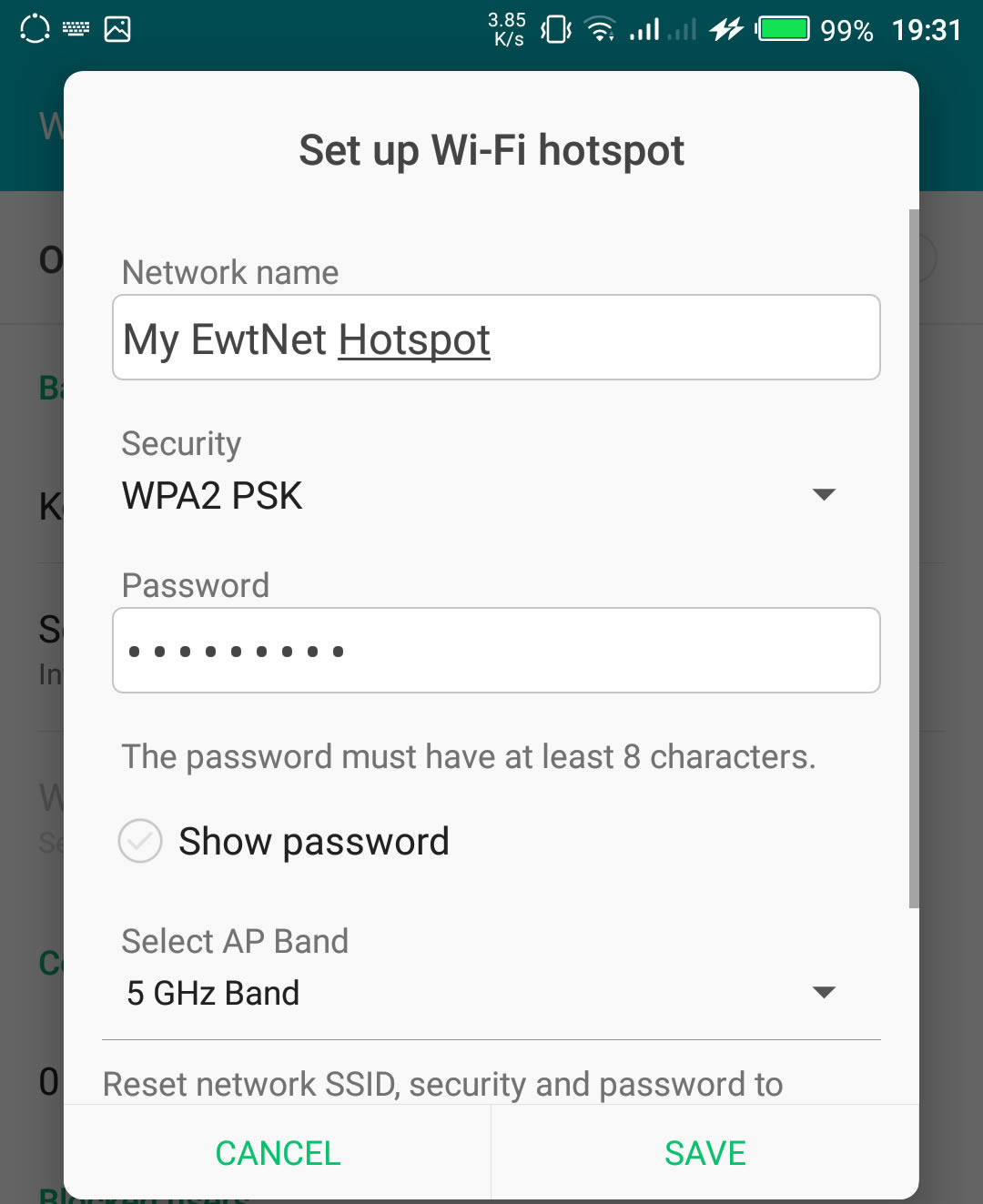
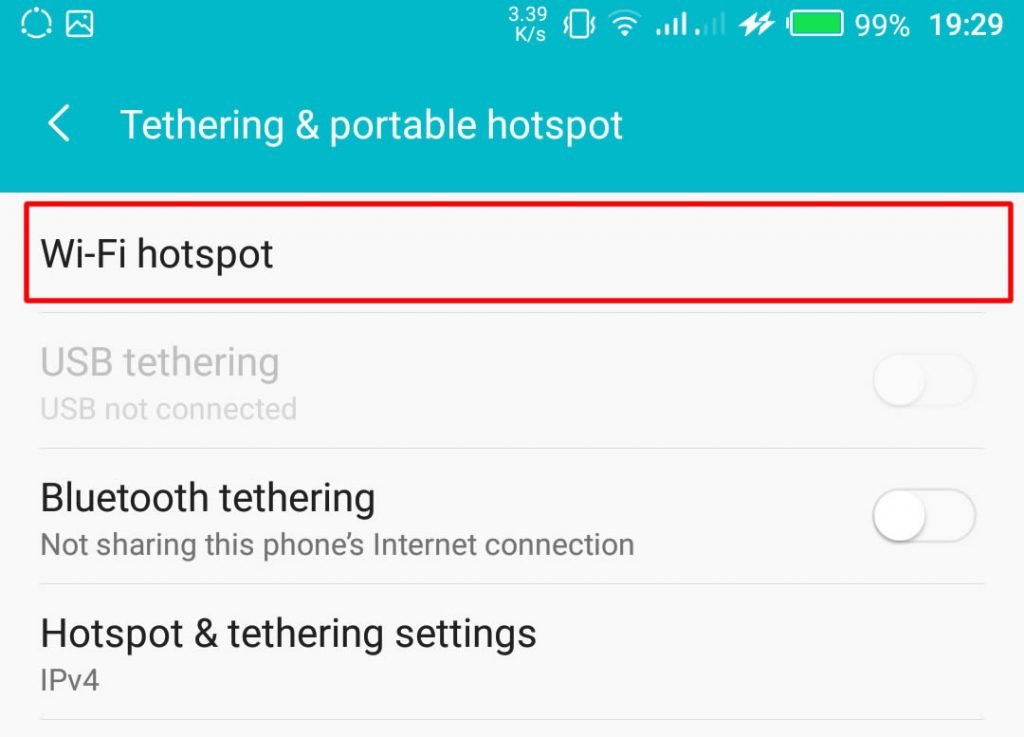
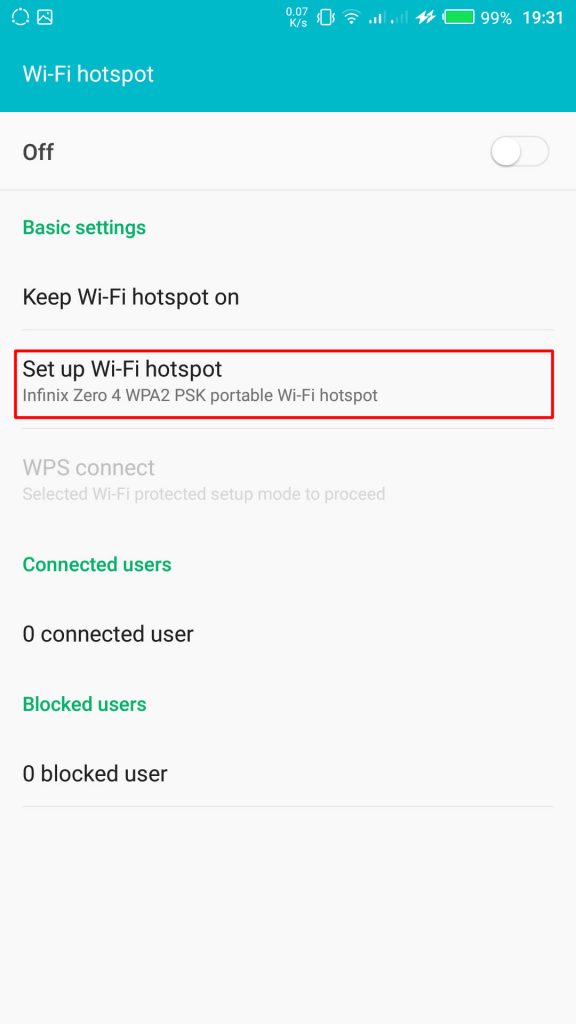
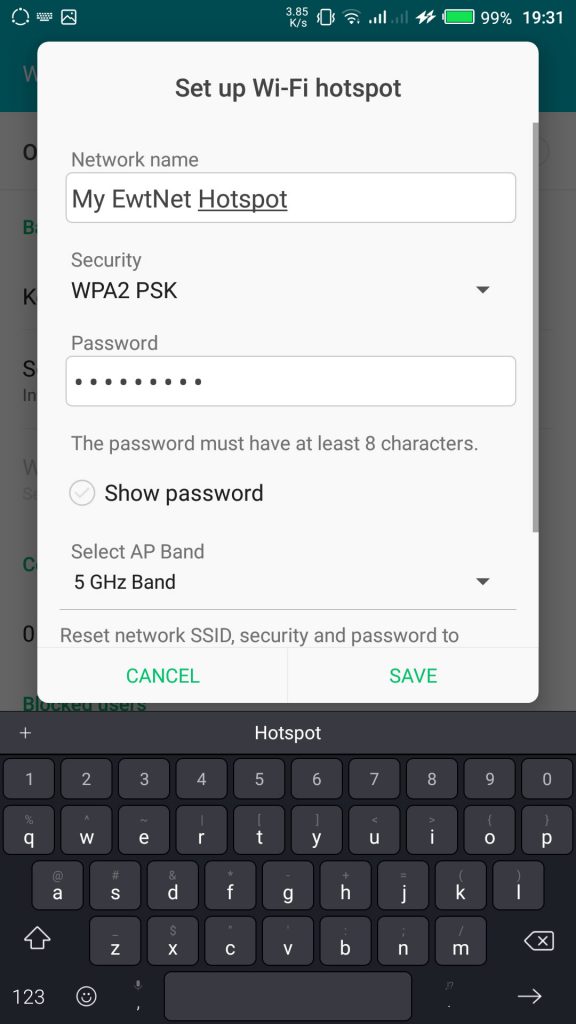
      From the Tethering & portable hotspot screen, tap Wi-Fi hotspot and select Set up Wi-Fi hotspot. Here you can set your WIFI’s SSID and security.
      SSID Wi-Fi Hotspot Setting on Infinix Smartphones

    The SSID or Network Name is the name of your Wi-Fi connection. Change the name to any name of your choice, the default name is usually “AndroidAp”

    You can change the security option, to any of your choice, such as, “Open” which allows any WI-fi enabled device to connect to your smartphone without requesting for a password. While WPA PSK and WPA2 PSK allows you to put your preferred password.

    Using Portable Wi-Fi hotspot on Android Smartphones

    Once you’re done, subscribe to an Internet plan for your smartphone, turn on your mobile data and hotspot. If you are in Qatar, Vodafone offers some of the most flexible data plans in Qatar. Glo Ghana data and Glo Nigeria data are more prominent in Ghana and Nigeria respectively.

    Turn on Wi-Fi Hotspot on Infinix Smartphones

    Your WIFI hotspot is now functional and can be used on basically every Android device that support WiFi connection including, Honor 8X, Infinix Diamond, Tecno Camon 11 Pro, Xiaomi Redmi Go, Tecno phantom and on any PC that has a WiFi adapter.

    Turn on your Infinix WLAN hotspot and your laptop WLAN and search for available networks and connect. That’s all you need to configure your WLAN Hotspot and start using your Infinix smartphone to power your laptops and smartphones WLAN, up to multiple devices simultaneously

    Make sure you are applying this common-sense Wi-Fi tips to protect your devices against Wi-Fi ‘virus’ and other malicious attacks. After you’re done, all you have to do is turn off the hotspot.

    Data plans for PC Users

    If you going to use your mobile data on your PC be ready to re-adjust your monthly data budget. Luckily, network providers in Nigeria and Ghana has improved their data offers in recent years.

    What are the best mobile data plans in Nigeria?

    In the last few years, network providers in Nigeria have undertaken a revolution in upgrading their data plans. Glo has upgraded. MTN has upgraded. And Airtel was last to arrive at the party – all featuring data plans with a bandwidth of 12GB – 48GB at giveaway prices.

    I’m in Ghana, are there affordable data plans?

    Glo Mobile Ghana offers the most affordable data in Ghana. Indeed, the tech giant has launched various revolutionary data bundles, including Glo Unlimited Data 24/7 Pack, for instance, which gives you unlimited data and voice call for a whole month.

    How do I subscribe to Vodafone Qatar internet package?

    Here is a list of Vodafone Qatar internet pack activation and deactivation codes. We have selected all the offers in place and grouped them into daily, weekly and monthly plans.

    This picture walk-through guides you on how you can set up Wi-Fi hotspot on your Android smartphone using infinix example.

    Click on the images to expand and use the arrow keys to browse.

    The same techniques will work on all Android devices. Using your mobile data on PC is obviously going to be more costly than Internet to the home bills, you may consider this data subscription plans to make an informed decision.

    Video Guide on How to Use and Configure Wi-Fi Hotspot on Android Smartphones

    The video demonstration is recorded on Infinix Zero 4 smartphone, but the same procedure is used to configure Wi-Fi hotspot on any Android device.

  • EWT GS 1.0 Android App is out – Follow EwtNet Updates Offline

    EWT GS 1.0 Android App is out – Follow EwtNet Updates Offline

    In response to readers feedback and recommendations EWT Global Solutions has released a new application for Android users. 

    Yesterday, EWT Global Solutions announced the release of its new Android app on their official blog.

    Today, we are officially announcing the release of EWT GS 1.0. The app is targeted to syndicate contents from our websites when they are published and make them available to be read offline.

    We understand the need of you to be able to follow our updates on your mobile devices and the high cost of internet or slow network in most countries, hence, the production of this application. This is new with us and we cordially invite you to try it with us.

     The application is a complete upgrade of it’s previous application (0.1 Beta) and can be downloaded from the Google Play Store.

  • Spirit Run Android Game Review – Translate to the Spirit Realm

    Spirit Run Android Game Review – Translate to the Spirit Realm

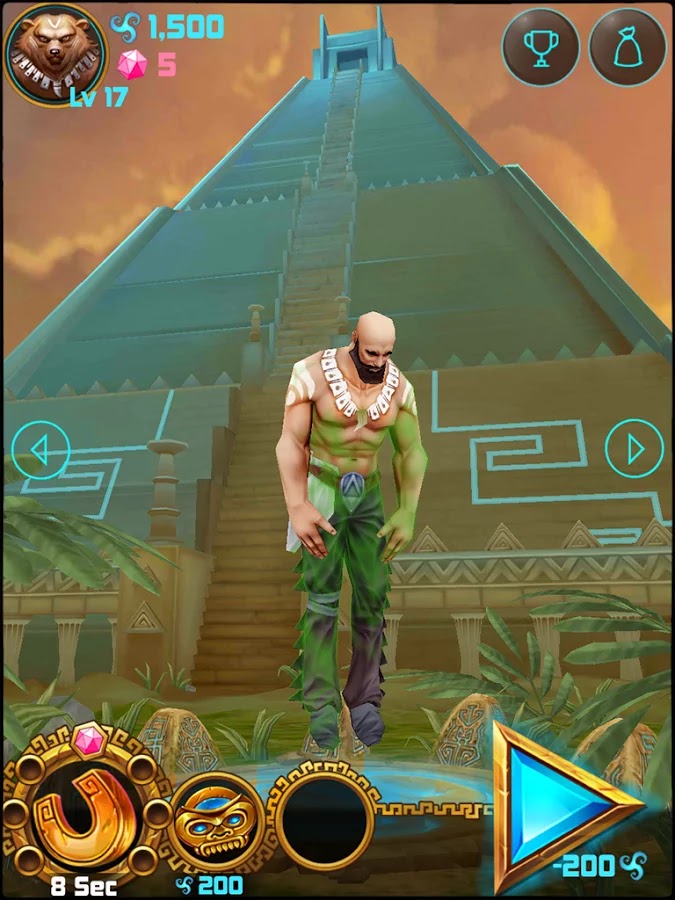
    Temple Run might have let you gone through series of harrows, chased by an angry monstrous monkey and overcoming deadly obstacles. Well, the saying that you can be anything is true, at least on your Android device: Spirit Run Game will let you go through ancient rituals, transform your soul into an animal’s and help your brood defend the Aztec Temple from apocalypse!

    As the quest to protect the Acient Aztec Temple becomes paramount, level-up your Spirit and run in search of soul energy balance. Choose from five characters immensely, each. gifted to transform into Wolf, Fox, Bear, Panther, and Panda respectively.

    Spirit Run Android game was produced by RetroStyle Games. It was first published on the 6th of September and has since being installed by 10,000 – 50,000 Android users. As it goes “The best things in life are free” Spirit Run game might turn out to be one of the best game on your mobile device.

    Content Rating:

    Everyone

    Our Rating: 3.5

    Requires Android:

    2.3 and up

    Game Producer:

    RetroStyle Games Spirit Run is a free Android game with Awesome graphics and well made with a good mix of strategy action and RPG.

    Pros:

    • Free games with NO Ads

    Cons:

    • You may experience a slow start but it gets better

    Download Now

  • How to keep your Android phone’s screen on longer

    How to keep your Android phone’s screen on longer

    If you’ve ever wished that the screen on your Android phone or tablet stayed on longer before going to sleep, you’re not alone. Luckily, this can easily be adjusted in the settings with just a few taps. Not only that, you can prevent your Android device from sleeping while it’s charging, too.

    The term ‘screen timeout’ refers to the time it takes for your smartphone or tablet to go to sleep (the screen turns off) after you’ve stopped interacting with it. The average screen timeout sits around 30 seconds to one minute, depending on your device. For many users, this is acceptable, but there are times that you might wish that your phone didn’t go to sleep so quickly.

    Maybe you’re looking at a recipe on your tablet in the kitchen, your hands are covered in food, and you need to get to the next step. Maybe you’re reading a walkthrough for a video game and just want to glance over to see what to do next without pausing. Here’s how you get your screen to stay on longer.

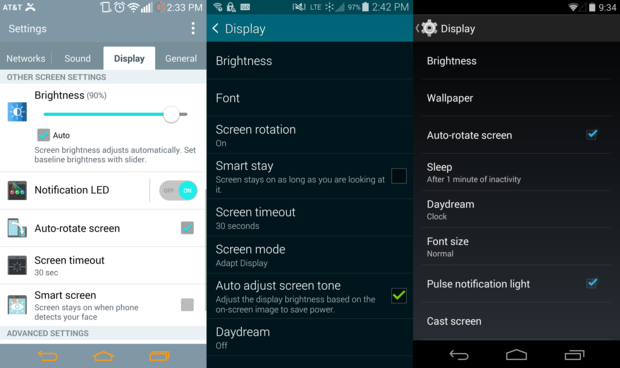
    Depending on your phone, the Display Settings can appear in a tab or window, but will you give the same options.

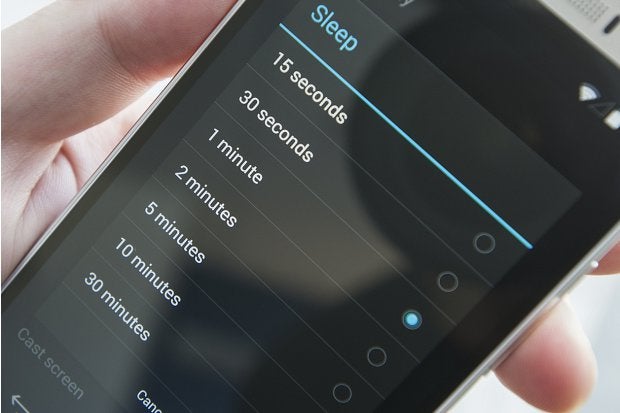
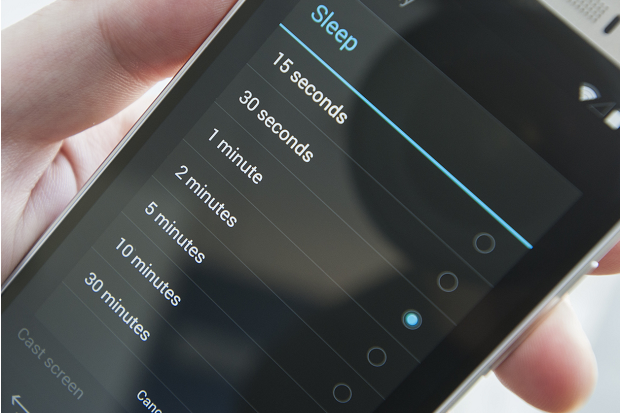
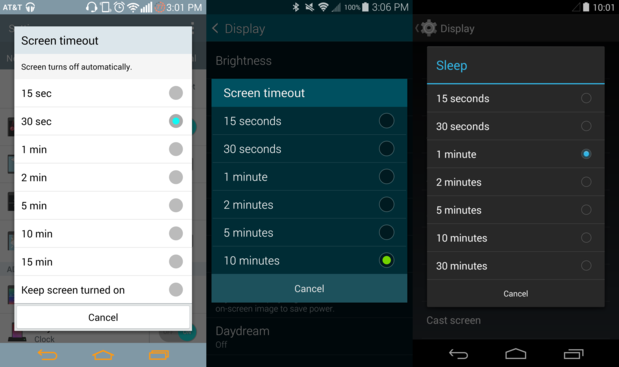
    To get started, go to the Settings > Display. In this menu, you’ll find a Screen timeout or Sleep setting. Tapping this will allow you to change the time it takes your phone to go to sleep.

    Certain phones offer more screen timeout options.

    Select the timeout option that you’d like, and you’re done. Keep in mind that the display is one of the biggest battery hogs on your phone, and a longer screen timeout setting can, and likely will, lead to faster battery drain.
    Make your phone a night owl while charging

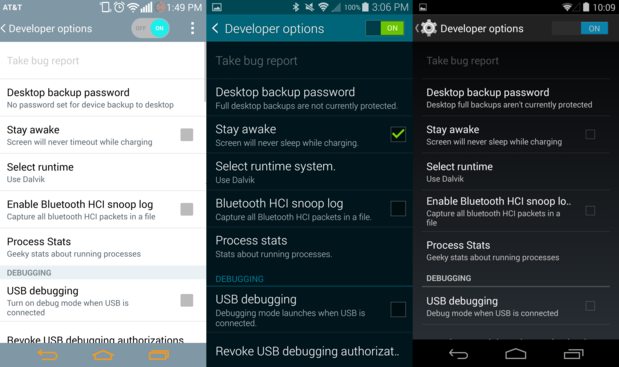
    Daydream not good enough for you? Android gives you the option prevent your phone or tablet from sleeping while it’s charging. First, you need to unlock Developer options.

    If you check the Stay Awake box in Developer options, the screen will never turn off while its charging unless you press the power button.

    Once you have enabled the Developer options, check the Stay awake box to keep your phone from sleeping while you have it plugged in. Of course, pressing the power button will still turn the screen off, just in case you want to get some shut eye at night.

    All rights reserved. Blake Stimac — Staff Writer, Greenbot [Image credit: Greenbot]

  • Sony Xperia Z2 – Review, Spec & Images

    Sony Xperia Z2 – Review, Spec & Images

    Sony’s smartphones rarely get the credit they deserve in the U.S. market. With the exception of a few, the company’s smartphones are usually limited to unlocked and online sales only, which doesn’t help them gain consumer mindshare. It’s unfortunate, as Sony has crafted some impressive phones, and it’s latest flagship, the Xperia Z2, is no different.

    At $700, the AT&T and T-Mobile-only smartphone is going to be a non-starter for some people. Still, the Xperia Z2 is just as good as any other top-tier smartphone today, featuring a solid camera and great design, imbued with Sony’s unique style.

    Sony Xperia Z2 key specifications

    • 5.2-inch display with a resolution of 1080 x 1920 pixels
    • Quad-core 2.3 GHz Krait 400 processor
    • 3GB RAM
    • 16GB of internal storage, expandable up to 128GB via microSD card
    • 20.7 MP rear camera
    • Shatter proof glass
    • Android OS, v4.4.2 (KitKat)
    • Non-removable Li-Ion 3200 mAh battery
    • 2G, 3G, 4G, Wi-Fi, Bluetooth 4.0, Wi-Fi hotspot
    • Micro SIM support

    A solid performer

    Just about every aspect of the Z2’s design has been changed for the better.

    The Xperia Z2 has “flagship” written all over it. Shipping with a 5.2-inch 1080p HD Triluminos display, 2.3GHz quad-core Qualcomm Snapdragon 801 processor, 3GB of RAM, and a 20.7 megapixel camera, it seems as though the smartphone will still be a viable option well into the next year.

    Rounding out the specs, the Z2 comes with the usual suspects: Wi-Fi, aGPS, NFC, Bluetooth 4.0, and a large, 3,200 mAh (embedded) battery to keep you powered up.

    The Z2 has slimmed down compared to it’s older brother, the Z1. Sony managed to throw a larger display in a slightly thinner narrower frame by shrinking down the oversized bezels found on its predecessor. The one area that the Z2 has grown in is height: it’s almost 3mm taller than the Z1.

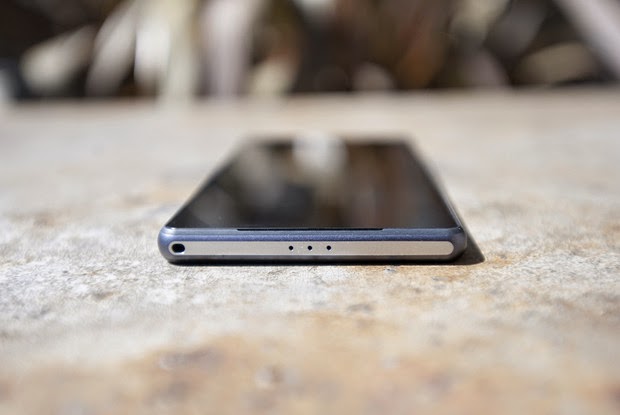
    The layout of the Z2 is basically identical to the Z1. Ports remain in the same place (complete with lanyard holes), though the Z2 has a few tweaks that go a long way. First, the speakers have been moved to the front, which will make watching videos on the Z2 that much better. They don’t produce the same stellar sounds as the HTC One (M8), but it’s still miles better than most smartphone speakers today.

    Sony introduces digital noise cancellation with the Z2, which requires the included MDR-NC31EM headphones. Also available separately for $60 at the Sony Store, the packaged headphones are just another perk you’ll get with the Z2.
    Star of the pool party
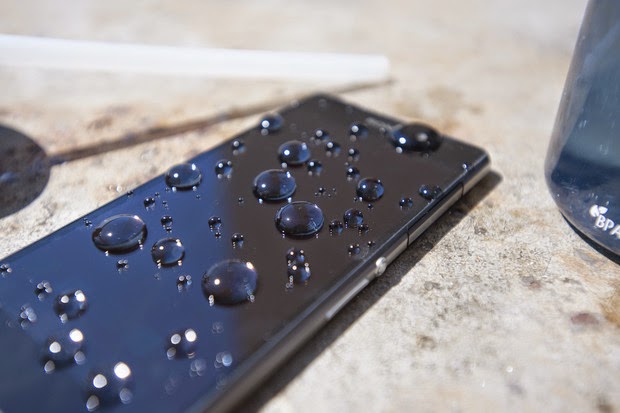
    Thanks to its water resistance, you can be assured that H20 is no match for the Z2.

    Sony was one of the first of the major OEMs to add water and dust protection to its flagship smartphones. The Z2 continues in this tradition with an IP55/58 rating, allowing it to be submerged under 5 feet of water for up to 30 minutes. This is a great trend among manufacturers, and the Z2 is somewhat functional while submerged: you can use the camera underwater, thanks to the dedicated camera button.

    A downside to all of the water resistant powers of the Z2 is that most ports have big flaps covering them to protect from water getting in. It’s a necessary evil, I suppose, but it’s not terribly elegant.
    A significantly improved display over the Z1

    The Z2 ships with Sony’s Triluminos display, but now includes the addition of Live Color LED tech, which vastly improves the vibrancy of colors, viewing angles, and contrast. While not comparable with OLED, the blacks are blacker and colors pop more.

    Sony’s X-Reality imagine processing engine returns to enhance your viewing experience for movies. By analyzing almost every aspect of an image, the engine will fill in missing pixels, sharpen edges, and boost the richness of colors, even with low quality video. For the most part, it does a good job at enhancing video, but it can also, at times, be a bit too intense. If you find that it’s not to your liking, you can always disable the optional feature.
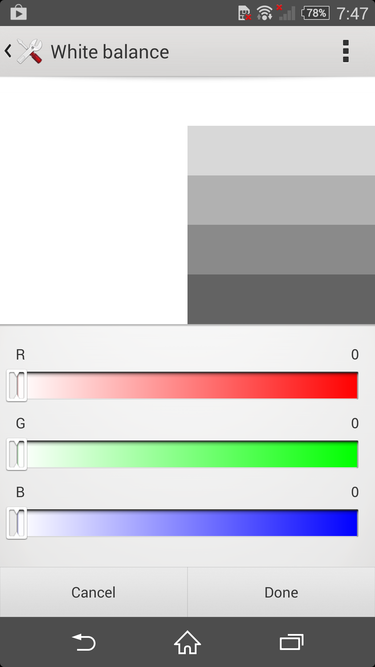
    Whether you’re seeing red or want to cool it down, you can change the white balance settings on the Z2 easily.

    The default white balance of the Z2’s display is spot on in my opinion, but Sony will let you tweak it to your heart’s content in the display settings. So, if you want to give your screen a warmer or cooler look, you can do just that. The display settings also give you the option to enable the Glove Mode and Tap to Wake features, which are self explanatory, and pretty great.
    Omnibalance is still a beautiful design aesthetic
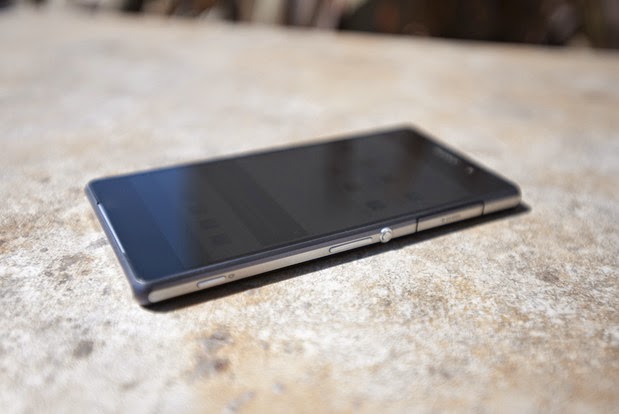
    The Omnibalance design on the Z2 is ultra minimal.

    Despite the larger-than-normal bezels on the Xperia Z and Z1, I’ve always admired Sony’s Omnibalance design approach. The subtle design language may look underwhelming to some, but it strikes a nice harmony between industrial and modern design.

    From the two glass panels on the front and back to the one-piece aluminum frame that holds them together, the Z2 not only looks like premium hardware, it feels great in the hand. While the glass on both sides of the phone are certainly fingerprint magnets, the cold smooth feeling of glass will always best any polycarbonate casing.

    While the glass panels on the Z2 feel nice, they also give off the feeling that the phone is fragile, because, well, glass breaks. The metal frame surrounding the smartphone certainly won’t protect the glass, so you might want to get a case for the Z2 if you don’t want to treat it like an antique.

    Sony managed to shrink the bezels on the Z2, which also allowed them to increase the size of the display without adding too much heft. It’s is still a large phone, though. Just slightly taller and narrower, the Z2 is in line with the size of the LG G3, which comes with a larger, 5.5-inch display.
    The best of Sony is found in its software
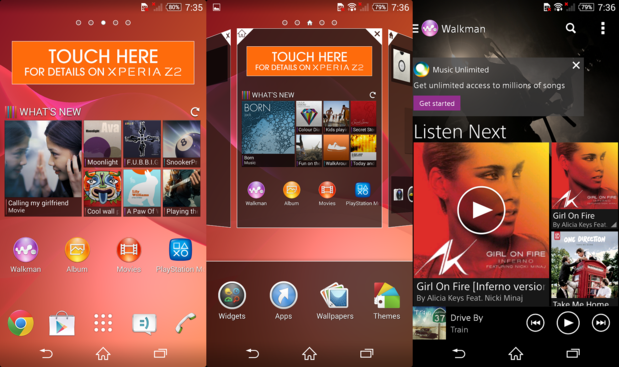
    The software on the Z2 is a nice blend of Sony and Android in an easy to use package

    Sony’s custom user interface for Android is one of my favorites because it’s not overwrought with useless customization. It’s a unique take on the Android operating system that uses some of the design values Google suggests, along with a many of it’s own, which makes for an interesting experience.

    The Z2 ships with a custom user interface that’s wholly Sony, and has an elegance to it that a majority of the other OEM skins lack. It’s quite apparent that some of the UI elements are influenced by the PlayStation, which I enjoy. The default live wallpaper and touch sounds seem to be ripped right from the PlayStation 3.

    Like most OEMs, Sony provides its users with a handful of its own apps, like Albums, Walkman, and Movies. The music and movie apps are tied into Sony’s ‘Unlimited’ services, so you can purchase content right within the apps. Of course, you’ll still have access to everything the Google Play Store has to offer.
    An impressive but inconsistent camera
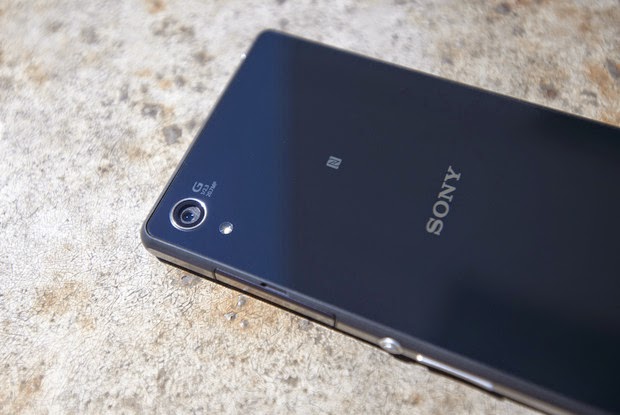
    It’s not perfect, but the 20.7 megapixel camera can produce beautiful shots.

    The 20.7 megapixel camera on the Z2 is almost identical to the shooter found on the T-Mobile Z1S, with one exception. The camera on the Xperia Z2 can record 4K video.

    There are a handful of different modes you can choose from in the camera software. From the useless but fun AR Effect to modes like Timeshift, Vine, and the great Superior Auto mode, you’ll have a good time with all of the Z2’s camera features. However, if you think you can combine these modes with the 20.7 megapixel shooter, you’d be wrong. Unfortunately, most of the nifty modes can only be used when the camera is set to 8 megapixels or lower.

    Even with some great optics in the camera, the photos from the Z2 can look pretty soft at the edges and tend to be grainy. Focusing is also an area that the camera struggled with. Taking a picture of a paper cup a foot away from me, the Z2 either never focused and reset or was completely blurry.

    Like most modern smartphone camera, the Z2 performs very well in good lighting. Compared to the G3, the color representation was more accurate, with LG’s flagship oversaturating the overall image. It performs well in low-light, too, though the softness at the edges and graininess returns.

    Overall, the camera on the Z2 is quite the performer, and can take one of the best shots you’ve seen on a camera one second, then produce an average photo the next.
    All day and all night battery

    Thanks to the massive 3,200 mAh battery powering the Z2, this is a smartphone that should last longer than the competition. In our HD video test, the Z2 squeeze out just over 10 hours of playback while in airplane mode with the display set at 100 lumens. Not only will this give you ample real-world use time, but you’ll also be able to take advantage of Sony’s low battery and Stamina mode to get you through the tough times when you don’t have a charger on hand.
    It’s not too late to love this phone
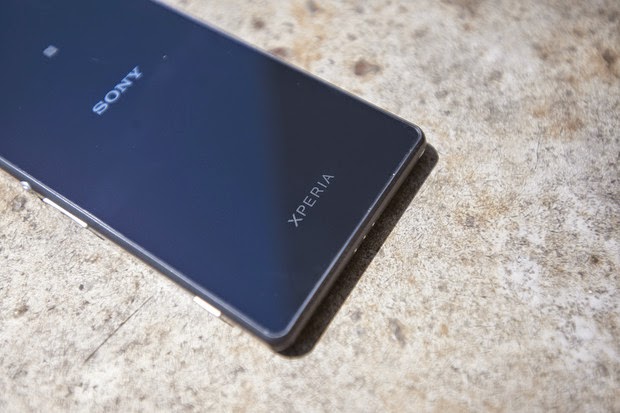
    The glass panels add to the premium design of the Z2.

    I really like this phone. In fact, had I not recently purchased the G3, and the Z2 was available on AT&T, it might be in my pocket. I can live with the big port covers and the sometimes finicky camera, as the whole package is still very appealing. Of course, if it were in the market this second, I’d struggle with buying the Z2 and waiting for the next Xperia flagship, coming this fall.
    There are a few caveats to purchasing a Z2, and they have little to do with the phone itself. With IFA right around the corner, there’s a very good chance that Sony might unveil the Xperia Z3.

    The other elephant in the room is the fact that the Z2 is only available online, unlocked, and unsubsidized, for $700. That’s a hard pill to swallow. Of course, this is how much smartphones actually cost, allowing you to live a real contract-free life, and not some “on-contract” carrier payment plan that locks you in for a couple years.

    Overall, if you like Sony’s style and have the money to burn for an unlocked phone on T-Mobile or AT&T, the Z2 should be on your list to check out.