The best way to start any advertisement campaign probably, is to start with a trial mode that will let you monitor the progress of your site and master the use of the advertisement platform and finally decide whether to continue your advertisement campaign or to look elsewhere. BidVertiser is a ppc online advertisement program that grant their advertisers $20 on sign-up, unlike the Adword program, Bidvertiser credit can be used before you purchase any ads package.
This feature enables you to master how the advertisement platform works, be able to make necessary adjustment to how your ads are served, try various ad types and finally decide whether or whether not to continue with your advertisement campaign.
Why I Recommend Bidvertiser
Is unlike me to recommend advertisement programs to anyone (don’t ask me why). But since I have been a constant user of the Bidvertiser advertisement program for the past 6 months, I think I’m in a more better position than anyone else to have a say on this.
Bidvertiser has a simple user interface which is easier to use and understand compared to the complex advertisement platform of other website I have tried in the past.
Bidvertiser allows you to set your custom bid per click, even as low as $0.1 per click my ads still get clicks (bad market for publishers).
Reliable support: At a point my account was not credited the moment I issued a billing. I didn’t get to panic, just called the support and got the issue fixed within 3 mins. There is also a contact form just in-case you don’t like talking over the phone.
Base on the type of quality support and reliability provided by Bidvertiser and my six months experience as an advertiser, I proudly recommend Bidvertise to anyone with a low budget advertisement campaign, with a high budget advisement campaign but low daily budget and to anyone who is trying to bring a new website to spotlight.
If you think you have a better opinion, you are free to express your opinion on the comment section below.
General Feature of Bidvertiser Advertisement Program
Geographic targeting: Bidvertiser allows you to set your ads to display within a geographic range or location. For instance, since I’m a Nigerian, I can simply set my ads to target only Nigerian visitors (i.e: my ads will only be seen by visitors from Nigeria). Simply choose your geographic targeting and your ads will be shown only to users located anywhere in the country or countries you selected.
PPC: Pay Per Click (ppc) means you will only per for the clicks you receive. You choose how much you are willing to pay for each click in each of the categories you have chosen to display your ads on.
Keyword and category targeting: This means that you can set your ads to display only for some specific keywords and categories related to your website or necessary to your website niche.
Bidvertiser offers advertisers program for website owners who wants to bring their website to the spotlight and publishers program to website owners who wants to monetize their website through advertisement programs. Click here to grab your $20 Free Credit I hope you enjoy this article inasmuch as I enjoyed writing it? Please feel free to share your views and experiences with Bidvertiser advertisement program on the comment section.
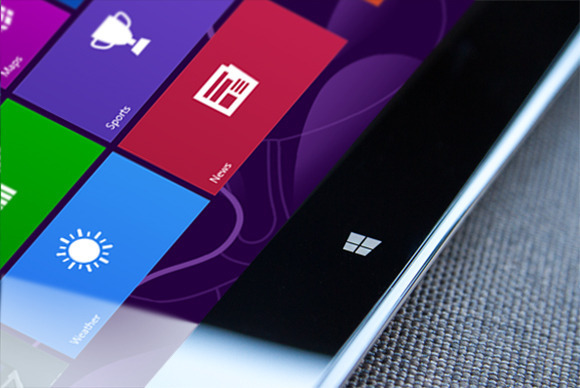
On Tuesday, Microsoft announced that Windows 8.1 has reached its final “Release to manufacturing” stage and has, well, been released to manufacturers for inclusion in the annual blitz of holiday hardware. News of Windows 8.1’s RTM status first broke this weekend. What does this mean for you? Nothing, yet. While manufacturers have their paws on the final version of Windows 8.1 today, the free update won’t appear in the Windows Store until October 17, with boxed discs and third-party hardware appearing on physical store shelves the day after.
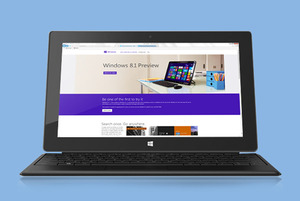
Curious computer users do have a way to scratch their Windows 8.1 itch, however. A preview version of Windows 8.1 is still available for download, complete with new apps, new features, numerous new highlights, and yes, even a plethora of new (and killer) hidden secrets. One of those hidden features comes in especially handy for traditional PC lovers: The ability to boot directly to the desktop.
Think hard before you install the Windows 8.1 preview, though. If you opt for the preview available in the Windows Store, your apps—though not your personal data—will be wiped when you install the final build in October. Since that’s just a couple of months away, you’d probably be better off grabbing the ISO files of Windows 8.1 that Microsoft has made available and running it in a virtual machine, instead. Microsoft deserves big props for delivering an RTM version of the Windows 8.1 update just 10 scant months after the official release of Windows 8.1, especially when you considerjust how expansive the update is. Windows 8 was and is far from perfect—and its mixed reception might have even cost Microsoft CEO Steve Ballmer his job—but the company’sshift towards rapid-fire releases is already paying off. Article Source: pcword.com
The biggest news today is probably the introduction of shared photo album in Facebook. But opera has yet another thing to say in the technology world.
Today, Opera Software ASA has released a new version of Opera browser just a few months after they released version 15.
Opera 16 has better performance and improved support for HTML5 than any previous version of the opera browser. This release is also based on Chromium 29.
Opera twitter update on the 23/08/2013
The new release will introduce some interesting features such as:
Feature of Opera 16 Browser
Jump List for Windows: Jump lists are now supported on Windows. Jump lists allow quicker navigation from the task bar, like getting an overview of your Speed Dial.
Support for W3R Geolocation API: The geolocation API lets you share your location with trusted websites. When you visit a location-aware website, like foursquare, the browser will ask you to share your location. If you accept, Opera can tell the website where you are located.
Presentation Mode fo MAC: Browse the web with presentation mode to get a full-screen experience. Quick tip: you can go straight to presentation mode by pressing shift+CMD+F
Form Filler: Save time with the form filler. Simply input your information in the settings and then use to it to auto-fill forms on the web.
In a browser reliability test last week, Mozilla Firefox 23 was flawless. What do you think of the new opera release? You can share your views in the comment section
If you just graduated from a college and still want to see those amazing pictures of your friends taking during your graduation by your friends and relatives. Well, you can do that now without visiting the timeline of your friends.
Yesterday, Facebook rolled out yet another feature, which lets up to 50 users contribute pictures to the same album on users timeline.
Creating a shared photo album on Facebook is quite easy. It only require you to follow the steps below and in a few seconds you will be rocking your Facebook shared album.
Simple Guide to Create your Facebook Shared Album
After you log in to Facebook, click on the “Photos” tab to the far left of the News Feed or at the top of your profile page. You will be taken to your stream of photos, where you will see a “Create Album” tab in the top right-hand corner; click on it
Select the photos that you want to upload from your computer (you can always come back, and upload additional pictures later). As with any other photo album, you’ll be prompted to fill out information about the album you’re creating. Feel free to include as little or as much about the album as you want. In order to use the shared albums feature, you need to click the “Post Photos” button in the lower right-hand corner.
At the top of the next screen, you will have the option to make the album a shared album by clicking on the button in the upper left-hand corner. You will then be able to search for, and add up to 50 of your Facebook friends as “contributors” to the album. This is also where you’ll want to take a moment to explore the album’s privacy settings.
A shared album has three settings: public, friends of contributors and contributors only. You can also decide whether you want to allow contributors to invite others to the album. Deselecting the blue check box below the list of contributors will ensure that the album creator is the only user who is able to invite others to post photos in the album.
If you ever need to go back and make changes to a shared album, you can do that, too. Just open the album, and click on the “Edit” button in the upper right-hand corner. You will then be able to remove or add contributors, change the album title or description, and alter privacy settings.
This feature is still new to Facebook and currently has some limitations. If you intend to use shared photo album on facebook, feel free to express your views and experiences in the comment section. Credits: Mashable.com
Ever wondered what the earth might look like when viewed away from the planet? It is always a great filling to see what the planet we live in looks like. Here is your opportunity to browse through image of the earth take from the space.
A description is attached below each image, feel free to share your views and opinion on the comment section. To enlarge any of this images, simply click on it.
1. Florida Keys
Taken Dec. 5, 2003 by the Moderate Resolution Imaging Spectroradiometer (MODIS) on the Aqua satellite.
2. Reefs in Princess Charlotte Bay
Taken April 20, 2013 by the Operational Land Imager (OLI) on Landsat 8. These formations are part of the Great Barrier Reefs in Australia. This area lies on the east coast of Queensland’s Cape York Peninsula.
3. Fires in Cuba and Florida
Taken Feb. 3, 2003 by the Moderate Resolution Imaging Spectroradiometer (MODIS) on the Aqua satellite. Fires are marked in red.
4. Steam Plume from Gaua Volcano
Taken May 31, 2013 by a member of the International Space Station crew using a Nikon digital camera. Located in the Pacific Ocean, Gaua island is the top of a stratovolcano part of the Vanuatu Archipelago.
5. Korangi, Pakistan
Taken April 20, 2013 by a member of the International Space Station crew using a Nikon digital camera.
6. Little Rock, Ark.
Taken May 24, 2013 by a member of the International Space Station crew using a Nikon digital camera.
7. Intersection of the Danube and the Black Sea
Taken Feb. 5, 2013 by the Advanced Land Imager (ALI) on the Earth Observing-1 (EO-1) satellite.
8. Hurricane Sandy
Taken Oct. 30, 2012 by the Visible Infrared Imaging Radiometer Suite (VIIRS) on the Suomi NPP satellite. The image is rotated, looking south from Canada — north is at the bottom of the image.
9. Istanbul at Night
Taken on Aug. 9, 2012 by a member of the International Space Station crew using a Nikon digital camera.
10. Northern Lights
Taken on Sept. 17, 2011 by a member of the International Space Station crew using a Nikon digital camera.
Ofcours, everyone wants to navigate more fluently on skype while using a computer but not everyone knows it’s “hotkeys”. The use of keyboard shortcuts helps you navigate easily and save time while using the VoIP service.
“It makes you a Ninja” but unfortunately, not everyone knows how to setup this all important keyboard shortcuts. In this tutorial, I’m going to take you on a walk-through on how to setup and personalize your keyboard shortcut for skype.
#1. Enabling Keyboard Shortcut in Skype
These are keyboard shortcuts for when you want to:
Answer a call
Answer a call with video
Ignore a call
End a call
Take a snapshot during video calls
Focus on Skype
Search for people on Skype
Mute your microphone
Toggle mute (Push-to-talk)
Switch view
If you have already enabled keyboard shortcut for your skype skip this part, otherwise:
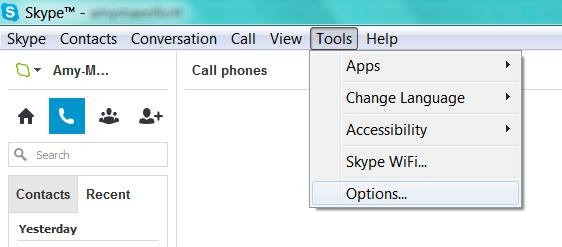
Locate tools on your skype interface
Click on options
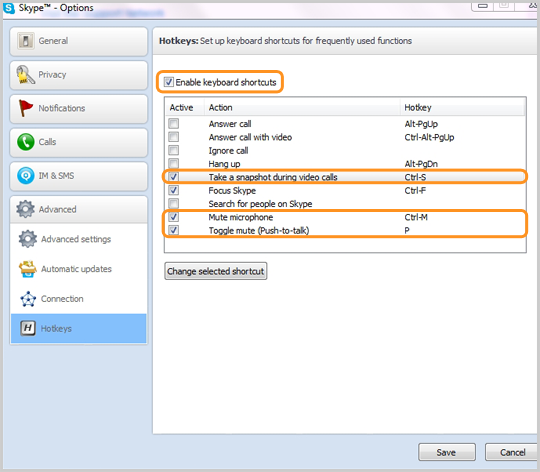
At the bottom of the list, click on the advance tab and
Select hotkeys (is represented with
Check the box next to “Enable keyboard shortcuts.” Do not close the window.
Check the actions you want to enable hotkeys for.
#2. Personalize your Keyboard Shortcuts
In the “hotkey” window you will find a couple of hotkey commands already set up, but you can personalize all the actions with shortcuts of your own preference.
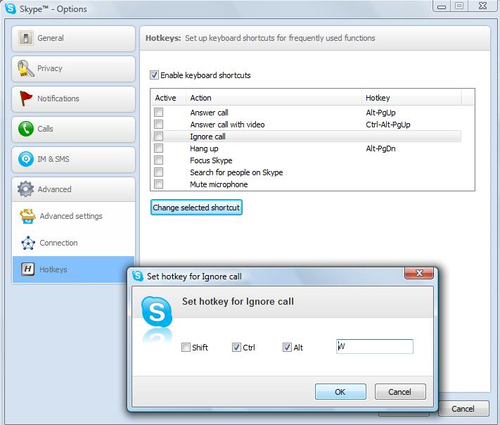
Simply click on the check box next to an action,
Click on Change selected shortcut
Add your own shortcut key sequence into a pop-up window.
The number of shortcuts you want to setup depends on you, Avoid using complex key combination that will be difficult for you to remember, I suggest using hotkey commands that you’re already familiar with, e.g., “Control” + “F” for search. Once you’ve personalized the hotkeys to your taste, click “Save” at the bottom of the window.
In a browser reliability test, the recent versions of Google’s Chrome and Mozilla’s Firefox are measurably less prone to crashes and errors than Microsoft’s Internet Explorer 10, a new analysis by applications testing firm Sauce Labs has found.
If this looks like another stick to beat Microsoft’s browser with, it is worth pointing out that the firm’s study of around 55 million tests run using the Selenium platform found that all browsers showed extremely low levels of errors, in the order of 0.12 percent or lower for the “worst” performer, Apple’s Safari 6.
On the same scale, Opera 12 scored 0.08 percent, IE10 at 0.05 percent, Chrome 27 under 0.02 percent, with Firefox was so low it effectively achieved a remarkable zero, that is to say no errors at all. IE lagged its main rivals but at levels that were already extremely low.
As interesting as the reliability figures was the level of improvement shown by these recent versions, some only months or even weeks old.
Internet Explorer 6 (released in 2001 with XP) and 7 (2007) had previously been the worst performers on 0.3 percent each, behind Firefox on Opera 10 (2009) and Firefox 7 (2011) and IE8 (2009) on just under 0.25 percent. It is remarkable that all of these are still used by small percentages of global browser users, but they are also aging software vulnerable to issues more serious than how often they might crash.
“Half of the browser versions we analyzed had error rates lower than 0.07 percent. That’s pretty low, and suggests that browsers are getting more reliable as more versions come out,” said Luren Nguyen of Sauce Labs.
Despite lagging slightly, IE had also shown major improvement over time.
“Microsoft has really been pushing their new version of Internet Explorer as the most modern and high-performing version of IE. You’ve may have seen their nostalgia-tinged IE 10 commercial. The data we have on browser error rates suggests that their claims may have quite a bit of merit,” she said.
The absolute level of errors in these tests is an imperfect way to measure browser reliability some might argue (can the errors be proved to be the browser’s fault and not the testing suite’s?), but the comparative measurement won’t be coincidence. Errors, which usually result in a crash of some kind, are caused by bugs in the browser code.
Do error rates really matter? Only when they occur, which seems to be rarely these days.Credit: pcword.com
After 13 years of leadership, the Microsoft CEO, Steve Ballmer has called it time to step down as the Chief Executive Officer of Microsoft Cooperation.
“There is never a perfect time for this type of transition, but now is the right time,” Ballmer said in a Microsoft press release. “We have embarked on a new strategy with a new organization and we have an amazing Senior Leadership Team. My original thoughts on timing would have had my retirement happen in the middle of our company’s transformation to a devices and services company. We need a CEO who will be here longer term for this new direction.”
Ballmer, however, has recently refocused Microsoft in order to drag the PC stalwart into the faster-moving mobile age, initiating drastic sea changes such as the device-spanning Windows 8 operating system, a push towards rapid-fire releases rather than 3-year development cycles, “One Microsoft, all the time,” an increased focus on services and the cloud, and the launch of the Surface brand—Microsoft’s first foray into competing with its manufacturing partners.
Any of those could be considered a major shakeup. All of those combined constitute a near-complete reimagining of Microsoft.
Those monumental changes may be the reason for Ballmer’s retirement, according to Patrick Moorhead, the principal analyst at Moor Insights and Strategy and an industry veteran who held senior leadership roles at AMD and Compaq. He finds the 12 month search for a successor suspicious.
“Somebody pissed somebody off,” Moorhead says. “Potentially it was this $900 million write down [for Surface RT tablets]. If I had to bet money, I’d say that that was the straw that broke the camel’s back.”
“I am proud of what we have achieved. We have grown from $7.5 million to nearly $78 billion since I joined Microsoft, and we have grown from employing just over 30 people to almost 100,000. I feel good about playing a role in that success and having committed 100 percent emotionally all the way. We have more than 1 billion users and earn a great profit for our shareholders. We have delivered more profit and cash return to shareholders than virtually any other company in history.”
Now the big question is: Who will be the new CEO? Looking at what Ballmer has archived, Whoever takes over the reins will have some mighty big shoes to fill. Ballmer was Microsoft’s 30th employee and its first business manager, and for all the grief tossed Ballmer’s way in the wake of Windows 8, there’s no denying that the company accomplished some amazing things under his stead.Credits: pcworld.com
Over the recent months, there has been some rumors about google intention to retire google checkout. Finally, google has made an official release confirming that story. Yes! Google will retire checkout On November 20, 2013.
If you are reading this, I know you are not happy about it. So are we and other merchants using the google checkout as a payment processor. Ofcourse, this will also mean that after November 20, 2013 you will no longer be eligible to use the blogger shopping cart powered by google checkout.
If you are a merchant who sell digital goods or perform virtual services, you can migrate to Google Wallet for digital goods before the deadline date. However, merchants selling through Google-hosted marketplaces (e.g. Google Play) will be unaffected by this development.
Date
Product Change
May 20th, 2013
Last day to sign up for Google Checkout
November 20th, 2013
Last day to charge orders
November 21st, 2013
Last day to ship orders
November 27th, 2013
All outstanding orders will be cancelled
December 20th, 2013
Last merchant refunds permitted through Checkout
If you are using the google checkout payment processor for selling physical goods (e.g: running an eCommerce site), you should consider switching to another payment processor.
This is the fourth app being retired by google in 2013, what do you think about it? Do you think google is right to retire Google Checkout? Share this story with your friends and have your say on it!
The introduction of mozilla firefox 23 has seen the option to disable or enable javascript removed from the primary user interface. Alex Limi earlier explained the reason behind this decision, citing user protection as their major reason.
Most sites these days that aren’t just displaying content will fail in interesting& mysterious ways if you don’t have JavaScript enabled. For the general population, Firefox will appear broken.-Alex Limi
A Back Door
Well, the good news is that firefox actually left us a back door: the option was not entirely removed from the browser, it was hidden from the primary user interface as part of an effort to simplify the Firefox options set and to protect users from unintentionally damaging their Firefox browser.
Show me the Way
You can enable or disable your javascript in mozilla firefox by either using the about:config interface or through the use of add-ons.
Using about:config Interface
Enter about:config in your address bar
Click “I’ll be careful, I promise”
In the search bar just at the top of the page, search for “javascript.enabled” (without quotes).
Right click on the result named “javascript.enabled” and click “Toggle”.
JavaScript is now disabled for your browser, to re-enable javascript, simply repeat the above steps.
Using Add-ons
The No-Script add-on will help you manage javascript setting for each page you visit or you can download the QuickJava add-on to quickly (one click for all) enable or disable javascript in your browser.
A community software is a web based software that serves as a skeleton which enables you to create a membership site. Where members can interact with each other, share file such as: Music, Photos, Videos etc. Community software enables each member to have a personalized page known as the ‘user profile’ or ‘dashboard’, it also have an interface where users can see and participate in activities by other users.
Why do I need a Community Software?
Before asking this question, I would like you to confirm what you really wanted; if all you want is a blog where you can share tips and talk stories, then consider using a wordpress cms or blogger.com, but if you need a website where people can register and become members who can share and interact with other members of the site, then the best way to achieve that is using a community software. While most of us remain very familiar with the idea of building a community site on wordpress, the essence of using a community software for your website cannot be overlooked. Installing a community software goes beyond the use of a piece plugin as we do in wordpress or embedding a forum script in a webpage, while this method has a lots of limitations, a good community software makes you the master of your community site, granting you the maximum control over your website, ranging from customizing layouts and impeccable administrative options to managing your users accounts.
List of Community Software to Choose from
The recent years has seen the development of various kinds of community based open source software, but we are are going to take a look at the ones we have considered outstanding over the rest.
Do not expect the most fascinating appearance when you visit the oxwall homepage but surely, it is no mistake that they are topping our list. The simplicity of the oxwall homepage probably represent the utter simplicity and unbelievably flexible and easy to use PHP/MySQL nature of the social networking software. Oxwall is used for a wide range of projects starting from family sites and custom social networks to collaboration tools and enterprise community solutions. Whether you are a freelance developer willing to streamline your work for client projects; an individual willing to create a community site; or a brand planning to set up a destination for your customers – Oxwall is for you. The software offers indisputable user experience with full administrative control that made it stand out among it’s competitors.
Features of Oxwall
Photo, Video sharing: This gives members the ability to upload photos and share videos from youtube with other members of the website.
Blogs, forums, wiki: Your members can create their own blog post, start article (like in Wikipedia.com) and discuss in the forum boards. The boards to create and forum layout all depends on you -the admin
Groups, events, friends: Oxwall makes you, your own master, so you can make your members master of themselves. With oxwall community software, your user can follow and add other users as friends, create and manage groups, create and manage their own events.
Comment, tag, rate any kind of content: Like every social networking software, oxwall create an interface called wall, where a member can input text which are later updated as “status”. This “status” can be liked, commented and shared by other members, each member have control on who sees their status and can delete their own “status” if so desired.
Privacy and profile customization: This gives your members maximum control on who and how people see their profile. A member can decide to set his profile public (that is visible to every member of the community) or private (that is visible to only friends or particular group of people), members can as well control what kind of messages they receive from the community to their email box.
Live Chat: If you ever dreamed of having an IM such as the one you have on facebook, then oxwall is just the software for you. Members of the community can chat with their friends within the community (you can disable the friends plugin if you want members to chat with everyone online).
Built-in SEO: The oxwall community software has an in-built search engine optimization features, making it easier for people to find you via search results.
Proven performance: The structure of oxwall software is ultra light and simple to use, “Your site is worthless if users don’t know how to use it.” said the website homepage.
Plugin & Theme Support: This probably what makes oxwall totally exceptional, so as to prevent users from having exactly the same copy of website on the web, the oxwall community software provide uncountable number of themes to choose from and plugins to add “the little extra” to your community website.
Multiple languages available and 100% user area translation support: Oxwall software supports the use of various languages and offering free translation for each language.
For developers: Structured and evident core code. Makes it for developers to develop plugins with all the documentation and examples.
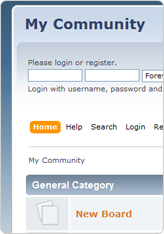
If you are looking for a simple community forum (without social networking facilities) where members can discuss various topics on different boards or category, then the simple machine community software is definitely what you have been looking for. Simple Machines Forum ( SMF in short ) is a free, professional grade software package that allows you to set up your own online community within minutes.
Its powerful custom made template engine puts you in full control of the layout of your message board and with a unique SSI – or Server Side Includes – function you can let your forum and your website interact with each other.
SMF is written in the popular language PHP and uses a MySQL database. It is designed to provide you with all the features you need from a bulletin board while having an absolute minimal impact on the resources of the server. SMF is the next generation of forum software – and best of all it is completely free!
Features of SMF
SMF is a very wide software covering a lots of amazing features, but having the reader’s interest in mind we shall consider a few of them.
Uses PHP, and a database system: MySQL, PostgreSQL or SQLite.
Comprehensive template system.
All actions seamlessly require a session based authorization code.
Administrative actions require the user’s password (and do not rely solely on cookies.)
Major actions are time and IP locked, preventing ‘hammering’.
The number of login attempts from a certain IP can be limited and time locked
Advanced permission and user management.
Supports multiple languages at once.
Open and well-documented source code.
Tracking of new and old unread topics, not just from your last visit.
Designed for optimal performance and scalability.
Multi-media output: XHTML, XML, RSS, WAP
Multi-language support from a large community.
Package manager that automatically installs or uninstalls mods (also known as packages.)
What’s More?
The best place to find support on how to customize your SMF site is the SMF forum, here you meet other community owners who can help you solve any problem you encountered.
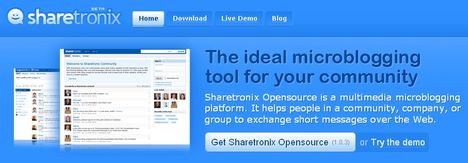
Sharetronix open source based community software is micro blogging software (yes, like twitter.com) that allows members to share any “144 characters” (update status) with other members of the community, the members of the community can connect with other members by following their update, in sharetronix, a member can only send a direct message to another member only if that member is his/her follower.
Features of Sharetronix
User Profiles: Each community member has a custom profile with detailed personal information, plus their network activity, groups, personal tags and more.
Status Updates: Every community member can post unlimited short status updates, ask questions, share media and more. Sharetronix supports link, video, image and file attachments with posts
Real-Time Dashboard: On the platform’s dashboard, users can follow all updates from their network connections in real time. members can also see who’s online, currently trending post tags and more.
Groups: Create unlimited private or open groups to organize your content and make it easier for everybody to follow topics and conversations. Members with similar interests can connect with each other in groups.
Security Settings: The community and personal security settings allows the members to better protect their profiles, posts and personal messages, while the community administrators can increase their communities’ privacy.
Multimedia: Sharetronix takes micro-blogging beyond simple text. You can attach links, pictures, videos and other files to your posts. Multimedia attachments make your network more attractive and more interactive, and therefore more engaging for users.
Business Cards: The Business Card feature allows you to quickly connect with and learn about a member simply by holding the mouse over their username. A user’s Business Card displays their groups, and allows you to follow, private message, or create a public post directed at (@) that user.
Member mentions in status update and comment: Members are suggested when you type @ while you write a status update or a comment in both the post and the comment boxes.
Content Tagging: Tag your messages with hashtags to make them easily searchable. Users can also save their favorite tags to be easily accessed from their personal dashboard at any time
Administration: With the powerful Sharetronix administration panel you can tune your network the way you want it. You can easily manage all your settings, users, groups and content from one place.
SEO Friendly: Don’t bother about advertisement: Sharetronix is SEO optimized and your content will be easily indexed by Google and other search engines. The front-end code is written according to the latest standards
What’s More?
The sharetronix opensource software is free, featuring a lots of themes and plugins to help you build your unique community.
Facebook has been improving over the recent years, from the introduction of Video Recording On Instagram to the amazing Recommendations Bar for Bloggers making facebook the leading social network in this present world. We do not intend to keep our loyal blog readers on the dark, so we try as much as possible to keep our loyal blog readers updated with developments of this magnitude.
Why do I need to Embed Facebook Post to my Blog Post?
First of all, I think that’s a question you need to ask yourself, considering the fact that you issued this search on google :-), but if you are reading this tip because you find it interesting, here are a few answer that was put together by me.
Embedded Posts are a way to put public posts – by a Page or a person on Facebook – into the content of your web site or web page.
The embedded post will show any media attached to it, as well as the number of likes, shares, and comments that the post has. Embedding posts will let people using your web site see the same rich information that is shown on Facebook.com, and they will enable people to follow or like content authors or Pages directly from the embed.
What Platforms are Supported?
Are you really that inquisitive? Well, it’s good news for all, because the facebook embeddable post does work on every platform (All platforms include wordpress, blogger, oxwall, joomla, even your simple html site).
Special note: You need to add the following code to any place in your <body> section
If you are using a site built with either dreamweaver, blogger or oxwall.
Embedding your Facebook Post into your Blog Post!
There are two ways of doing this, but each method depends on where your source post is located on facebook.
Embedding Code from a Facebook Post
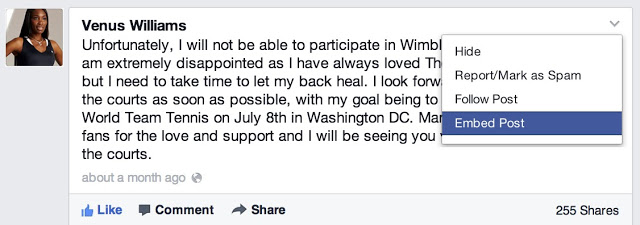
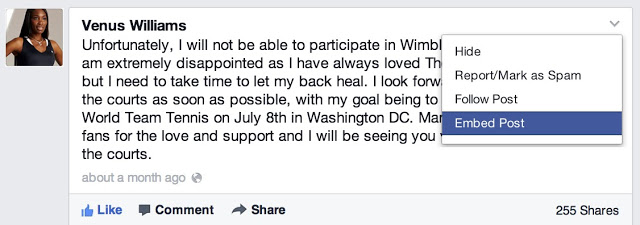
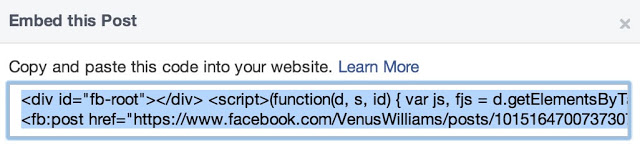
This method is applicable, if you are embedding a post from your profile newsfeed or in the case of embedding photos and items. To embed a post, first check if the post is public by hovering over the audience selector (you’ll see a globe icon). Only public posts from Facebook Pages and profiles can be embedded. If the post is public, click on the icon that appears in the top right corner of the post on Facebook:
Choose ‘Embed Post’ from the drop down menu that appears. You will see a dialog appear with the code to embed your post in it:
Copy and paste this code into your web page in the place where you want it to appear.
Embedding Code from a Facebook Page
Assuming you have a Facebook page and you would like to share a content from your page to your blog readers, here is the way to go: Simply, goto your page and grab the URL of the Facebook post you want to embed. For photos, you can easily get the URL by clicking on them. But for other media, it is a bit complicated, at least for newbies. To get a post’s URL, simply click on its timestam
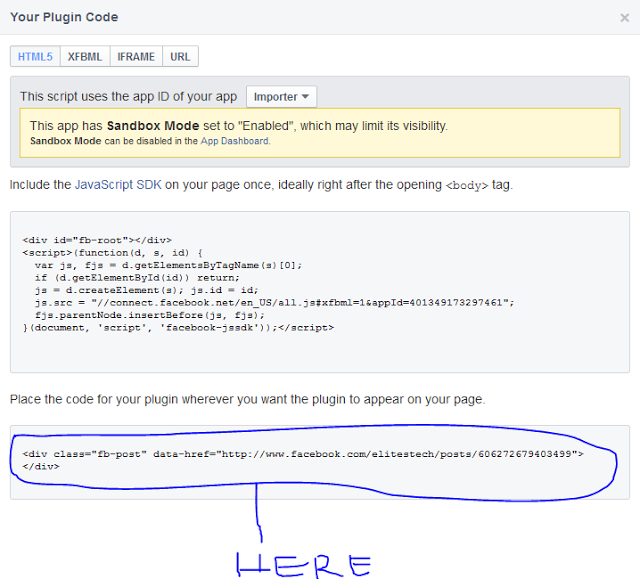
Copy the link on your address bar and go to Facebook Configurator. Paste your URL in the field provided. Once your story loads in the tool, click on Get Code. You will get two codes similiar to the image below
Simply copy the second code and paste it where you want it to appear…..
Looking for Demo? Here is a post I published some months ago, try it out and see how it goes Remember to ask your questions here and also share your testimonies with others with the aid of our comment sections.
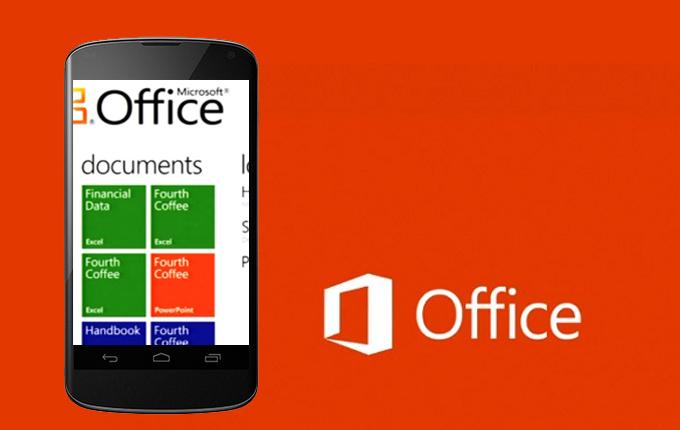
Earlier today Microsoft added Android to the list of mobile operating systems now supported by Office Mobile. But Office Mobile for Android only covers phones, not tablets, limiting its utility. The Android version, Office Mobile for Android, is also arguably the weakest of the bunch, in terms of compatibility with Microsoft Office. Microsoft is still tacitly encouraging users to buy Windows Phones, which come preloaded and activated with Windows Mobile and don’t require an Office 365 subscription to use. The problem is, within the Android world, there are a number of other office solutions that provide very good direct competition to Microsoft’s offering.
Nevertheless, Office Mobile for Android is free and downloadable from the Google Play Store. The only requirement is that your phone must contain Android 4.0 or higher, and you must already have purchased Office 365. In a break with Office Mobile for iPhone, Microsoft doesn’t even offer the option to purchase Office 365 from within the app; instead, users must sign up outside the application itself. And without Office 365, Office Mobile for Android is virtually useless. “The release of this app shows that we’re committed to keep providing additional value for Office 365 subscribers,” said Guy Gilbert, a senior product manager of the Office apps for Microsoft, in a blog post. Qualifying Office 365 plans include Office 365 Home Premium, Office 365 Small Business Premium, Office 365 Midsize Business, Office 365 Enterprise E3 and E4, Office 365 Education A3 and A4, Office 365 ProPlus, and Office 365 University. There are also Office 365 government plans that include Office Mobile. Users can also visit Office.com and sign up for a free 30-day trial, Microsoft said. While Microsoft eventually intends to make Office Mobile for Android available across 33 languages and in 117 markets, it’s only currently available for the United States. That will change over the next few weeks, Microsoft said.
What’s included
Like Office Mobile for iPhone, the Android version comes with mobile versions of Excel, PowerPoint, and Word; Office Mobile for Windows Phone adds OneNote as well. So far, Android users don’t have access to the Outlook Web App app that Microsoft recently released for the iPhone, either.
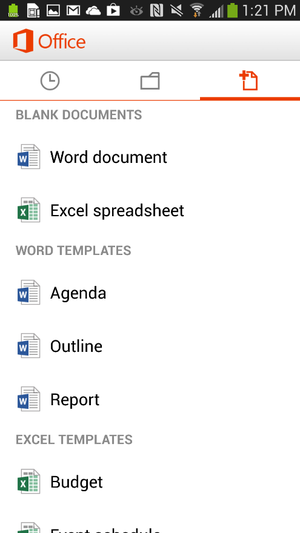
Office for Android users can create documents in Word or Excel.
Users can create new documents, edit those that they’ve already created, and save, load, or edit files saved to Microsoft’s SkyDrive or SkyDrive Pro—which on Tuesday received a few upgrades, as well. But the ability to create files only applies to Word and Excel; for now, you can review your PowerPoint slides and edit them, but not create a presentation from scratch. Users can also open a document via email. Office Mobile includes a couple of handy features designed for the phone; The software knows what documents you’ve recently accessed on your PC, and those are the first options presented when you choose to open a saved file. A feature that Microsoft calls Rapid Resume also works like Amazon’s Kindle, ‘fast-forwarding” you to the portion of the document last viewed on your PC. An “outline view” in Excel and Word allow you to quickly navigate through the document, and both apps allow annotations as well. Within the three supported apps, Microsoft has made efforts to make editing a snap; in Word (shown at top of story), for example, tapping the pencil brings up the most common editing functions. Excel allows you to filter and sort data and create charts, using the local processor to calculate data. Within PowerPoint, users can review slides and edit speaker notes, move and hide slides, and make text edits directly from the phone. Holding the phone in a portrait orientation allows edits to be made and includes a quick navigation bar; a landscape orientation serves as presentation mode.
Office Mobile for Android, displaying an Excel worksheet.
In general, Office Mobile for Android and Office Mobile for iPhone should function quite similarly, with two exceptions: Android users can not sign up for Office 365 within the app itself, and Android users may need to fully qualify documents that are accessed via an on-premise SharePoint server.
Buy Windows Phone—or a Surface
To date, however, Microsoft has been keenly cognizant that productivity apps are the foundation of the Windows platform, and users who purchase a Windows Phone will have these benefits:
Office Mobile will be preinstalled and activated;
users will be able to save documents to the phone itself, as well as SkyDrive or email;
WP users will be able to filter and search for documents;
Users can also easily open documents with permissions attached to them.
Office 365 includes a license of up to five mobile devices—but Windows Phones don’t count against that limit. The biggest annoyance, however, is that—like the iPad—tablets aren’t supported in either Office Mobile for the iPhone or the Android version, either. Those trying to hunt and peck at keys in the back of a jouncing taxi are likely to grit their teeth and muddle through; by doing so, however, Microsoft is tacitly encouraging customers in the direction of a Surface tablet—now at a new low, low, price—or even a full-fledged Windows 8 PC. (“Phablets” like the Samsung Galaxy Note II should still be supported, however.) “If you have an iPad or Android tablet, we recommend using the Office Web Apps, which provide the best Office experience on a tablet,” a spokeswoman for Microsoft said via email. “We have made lots of enhancements to Office Web Apps including a touch experience for tablet users.”
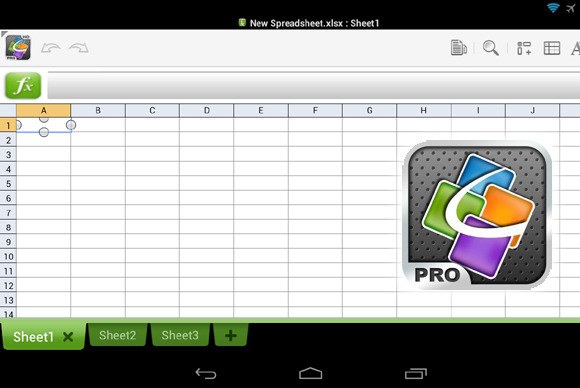
QuickOffice Pro provides one tablet-friendly alternative to Office Mobile for Android.
Microsoft also has native apps for OneNote, Lync, and SharePoint, in addition to supporting Exchange Active Sync for email, calendar and contacts, she said. ”I’m not sure how many people are going to want to do a lot of Office work on a phone,” Michael Silver, an analyst at Gartner, said recently. “A tablet’s going to be a lot more important.”
Alternatives
Of course, there’s no reason that users have to live in the world that Microsoft has created. Plenty of Android office apps allow document creation or editing, both on a phone or tablet: Google Drive, of course, allows for Google’s own documents to be created; and Google’s own QuickOffice, Documents to Go, and OfficeSuite Pro 7 are all arguably as good or better choices than Microsoft’s offerings. In one way, editing or creating an Office document on a mobile phone is counter-intuitive; too many people still append some sort of signature file on a mobile phone to explain away any typos or shorthand. Within a business document, however, typos simply shouldn’t appear. Office Mobile can certainly stand in to enable last-minute changes while on the go, but they shouldn’t be considered as serious tools for document creation. And that’s exactly how Microsoft appears to want it.
Just incase you haven’t check PcWorld today, here is the latest piece of news I pulled out from there.
Intel has shipped its first “open-source PC,” a bare-bones computer aimed at software developers building x86 applications and hobbyists looking to construct their own computer. The PC, called the MinnowBoard (shown above), is basically a motherboard with no casing around it. It was codeveloped by Intel and CircuitCo Electronics, a company that specializes in open-source motherboards, and went on sale this month for $199 from a handful of retailers. It’s the first open-source PC to be offered with an Intel x86 processor, and the board’s schematics and design files are published and can be replicated under a Creative Commons license. Development kits based on x86 processors from Via Technologies are already sold for robotics and other projects, but those boards are not open source.
Intel has also shared server designs through Facebook’s Open Compute Project, but they’re aimed primarily at large companies that design and build servers in-house. The MinnowBoard, which measures 4 inches (10.16 centimeters) by 4 inches, is Intel’s first open-source hardware design for enthusiasts and developers. Other open-source boards are available based on ARM processors or Arduino microcontrollers. The most notable ARM example is the Raspberry Pi,which starts at $25 and has sold in the millions.
Details
The MinnowBoard is more expensive than ARM or Arduino boards and might be less attractive since it uses older hardware, including a 1GHz Intel Atom E640 processor, a 32-bit chip that was released in 2010. However, the MinnowBoard is still cheaper than most PCs and could appeal to developers looking to write and test commercial applications before they’re deployed in servers, embedded devices and other computers. Other hardware in the MinnowBoard includes 1GB of DDR2 memory, an HDMI port, Gigabit ethernet, USB ports, and a micro-SD slot for expandable storage. The board’s open-source UEFI firmware allows for the development of custom secure boot environments. The board comes pre-loaded with the Angstrom Linux distribution and is compatible with Yocto Project, which enables the creation of hardware agnostic Linux-based systems. The MinnowBoard also includes support for Intel’s hyperthreading and VT virtualization technology, which are only available on processors from Intel. Advanced Micro Devices and Via use different technologies to speed data transfer on chips. The MinnowBoard is available at online retailers including Digi-Key, Farnell, Mouser Electronics, and Newark. Intel and CircuitCo have also established a community website for MinnowBoard, which provides the specifications and other details of the PC.
The news is right on there front page, what’s your opinion on this? lets iron this out on the comment section.
Last time I wrote an article on Building A Social Network With WordPress (Part 1) today we are going to look at the top ten plugins you will need for your social network. This plugins combines well with the buddypress plugin to give make your website a user friendly community.
Top 10 Plugins for Your WordPress Social Network
✔ BP Community Activity on Profile
This is similar to the activities log on facebook.com; it plugin shows all the community activity on a user’s profile. It also include a menu titled “All Activity” to user activity.
This plugin automatically login users after creating an account. Unlike the buddypress usual behaviour the Bp Auto Plugin On Activation Plugin redirects users to their profile after registration.
The Custom Admin Bar allows you to customize the admin bar and add your quick links, it also allows you to use a logo on the admin bar. This plugin is generally supported by any wordpress that has an admin bar.
This plugin lets you syndicate external RSS feeds into your site’s BuddyPress activity feed. It enables each BuddyPress user to select as many external RSS feeds as he wants. Those feeds will be aggregated (mixed) into their activity feed automatically, with a title, an excerpt and a link to the original post.
BuddyPress Message Privacy Plugin allow your users to control who can message them. It includes basic features such as: a user can opt to receive messages from everyone, friends only or even specify a custom list of users from whom he want to receive messages. He can also create a custom list for other users who can send him a message, as well as a blacklist of users who will never be able to send him a message.
Just recently buddypress included the development of this feature in their roadmap. While waiting for the official core release buddypress users can still make due of this plugin to export all user data from WordPress and BuddyPress to CSV.
The BuddyPress Simple Google Map plugin uses the static Google map API to add the maps to groups. It also includes a widget to showcase the map in the sidebar.
The worst and the most mysterious attribute that is placed in every human by whoever made it, is probably the lack of satisfaction that is been found in every human being. Let’s take this for example: All you desired to have was a blog to share your ideas; and that is why you chose wordpress, now you have a lots of audience, more blog post, want your audience to be contributing effectively and that’s why you are searching for a social network 🙂 If you found yourself in this condition, do not feel sad because you are not alone. What’s more?“The horn can never be too heavy for the head that must carry it” Normally in a situation like this ideas like moving to a different cms often pop into your head but I can assure you that there will be no need for that. You can actually integrate social network into your wordpress blog.
How does it work? I don’t expect this information to be new to everyone, as a matter of fact if you are coming from a search engine, get ready to burst for excitement for this awesome wordpress plugin. BuddyPress is social networking, the wordPress way. Easily create a fully featured social network inside your wordpress.org powered site. Why BuddyPress? Not like I know another alternative but whether an alternative exits or not buddypress combines pretty well with some cute wordpress plugins to give you a dream social network sooner than you expected. BuddyPress allows users sign-up and creating profiles, posting messages, making connections, creating and interacting in groups, and much more. A social network in a box, BuddyPress lets you easily build a community for your company, school, sports team, or other niche community.
Getting Started with BuddyPress? Starting is breeze, first you need to download and install the buddypress plugin also try the following buddypress compatible plugins:
As the internet users grow by the day in Nigeria, one of the challenges of growing the eCommerce side of it has largely been online payment solution. This is largely due to the start-up cost of integrating payment gateways, which can gulp up to N200, 000. Many businesses in Nigeria cannot afford this sum.
If you are one of the small business owners that can’t afford the costly payment portal integration but would still like to see the benefits of sales and productivity, you need to give VoguePay.com a try. VoguePay provides a convenient way for customers to shop easily on the Internet while also providing the innovative solution that Small businesses in Nigeria can rely on to receive online payment in Nigeria.
If you are a small business owner, you can now receive payments online in Nigeria using VoguePay even if you do not have a website and have your funds transferred to your bank account. VoguePay accepts payment across the major cardholders in Nigeria, namely Verve, VISA, Mastercard, e-transact and interswitch. The company focused on addressing the issues that are relevant to the successes of the small business owner, Infopreneurs and internet marketers in Nigeria who want to use the internet increase their sales to their market audience. For example, imagine clients of your bulk SMS site buying and paying for SMS units online, right there in your portal with their ATM CARD and automatically have their account credited with the exact amount of SMS they paid for real time. Don’t you think this will attract more customers to your portal? Don’t you think it will increase efficiency and productivity?
Well, VoguePay is FREE to use as at the time of publishing this, though you pay 1% commission on every transaction for the total transaction cost. You will also pay 1% of withdrawal amount + ₦50.00 whenever you withdrawal funds to your bank accounts from your VoguePay wallet. Feel free to sign up at www.voguepay.com Now!
Possibly this is the best time in history to start a new Online Home Business because now everyone is moving toward internet for any kind of solution and anyone who have time and internet knowledge can make lot of money by starting various Online Businesses. The best thing about this trend is that anyone can make money by it and here are few business ideas by which these can start a successful online business.
Start an E-Commerce Website: Indeed, it is not a new idea but this type of businesses are growing and now people are buying more things from online stores compare to earlier time so chances are very high that you can make good money by starting an e-commerce website. If you plan wisely you can start this online business without investing lot of fund in it. On your E-Commerce website you can sell products from your local market and to get and deliver these products you can collaborate with local vendors. By this method you will need to pay for an item to local vendors only after having a conform order and with the help of them you can also deliver it without investing lot of time in it. If your local market has any proprietary material then you can sell that product on your E-Commerce website as a unique product and you can generate more money by this.
Help others with knowledge: People always look for more information, suggestion or solution and you can earn money by providing them what they need. Indeed it’s not an easy task and you cannot answer every query but a group of people can easily do it. You can contact few other experts who are from different field and after making a pool of these experts you can create a website where these experts will help those people who need personalized solution. This pool of experts can remain available on forum without any payment for general problems but for personalized solution person must need to pay to expert and you get your commission in it.
Do Freelancing: If you are not comfortable with above two suggestions than you can do freelancing that is known as the best online home business in the world. Freelancing is a different way of working in which you can get the work from people or organization based on your skills and experience and you will get paid after you deliver the requested work. To get work as a freelancer you can take help of many website that provide a platform to freelancer and work as a bridge between freelancer and organization. The best thing about this work is that you can do it as per your timing and your preference. If are good in writing you can do writing, if you are good in designing you can do designing and similarly you can get a work for the field in which you find yourself comfortable. In start you can do it alone and when you get success in it you can hire few employees to assist you in it.
Paul
Author Biography:
Paul is a regular blogger and freelance writer and he write about income support, travel, technology and finance on his blogs. Before working as a freelance writer, author worked as an IT manager for almost ten year and gained technical and financial experience in this job.
The shutting down of libertyreserve by the US government is probably the saddest news any internet marketer would want to hear. Now the question surrounding the whole affaire is why were they shut down? and is there an alternative? I can not give you answer to the first question but the later is what we are going to consider here.
When payment gateway is mentioned, the first thing that comes in mind is paypal but is paypal really enough? In most countries like Nigeria, Lebanon, Ghana etc paypal is completely out of bounds (registration is not available to users from such countries). What is the payment option for a user from such countries? Lets take a look at the the top 3.
Top 3 Option for Online Payment Gateways
Perhaps, the US government is sounding a warning bell to all global payment exchange network, so it is important you consider your options wisely. Why Liberty Reserve was shut down On the 24th of may 2013 Arthur Budovsky Belanchuk was arrested is Spain under charges of financial crimes during worldwide investigation. He is the founder and owner of Liberty Reserve, one of the most popular electronic currencies online
Security expert Bryan Krebs said Liberty Reserve’s features such as using only a name, date of birth and an email address as a means of identification had made it a popular among cybercriminals who wanted to move funds and make payments anonymously.
If you wanted to launder money, you would open an account with Liberty Reserve, providing them with a name, which could be fake, and an e-mail address. The key to the scheme was that you couldn’t then deposit money directly into the account. Instead, you had to work through middlemen, who were called “exchangers.” These were typically unlicensed moneymen in countries like Malaysia, Nigeria, and Vietnam, who bought Liberty Reserves in bulk from Liberty Reserve. You would pay them dollars (or whatever currency) for a certain sum of Liberty Reserves, which they would then deposit into your account. And when you wanted to withdraw money, the process worked in reverse, perhaps with an exchanger in a different country. (Liberty Reserve itself took a one-per-cent fee on transactions, while the exchangers typically charged five per cent or more.) The point of doing it this way was that the Liberty Reserve bank would have no identifying data for you (no record of how or from where you sent the money), since the deposits and withdrawals were all done through the exchangers. This arrangement made money laundering easier, which seems to have been the main function of the network.
Although, many will ague that they have used liberty reserve for only legal transaction but the LR currency is not legal as it does not have any limit of currency that can be produced, Budovsky can choose to produce 1Million LR for himself if he so wish.
Payza, previously known as Alert Pay has improved over the years and gradually placed himself as the direct alternative to paypal. Unlike Liberty Reserve, Payza plays the middle man between your bank and your internet transaction. You fund your account via your credit card and also withdraw your money back to your back account. This is pretty convinient as it allows users to transfer money from one user to the other and uses a very tight verification system..
Payoneer provides their users with a credit card that can be used globally, It is pretty much like your bank account, the verification requires you to provide a government issued identification such a driving licence, passport or national id. You can also send and receive payments from various local eWallets such as WebMoney, Payza etc from any part of the world.
Perfect money like Liberty Reserve uses a currency exchange system, if you are addicted to the Liberty Reserve system of transaction then Perfect Money is just the ideal option for you. Best online sellers and buyers of perfectmoney, paypal, and other ecurrencies which you can trust are myecurrencyexchange.com, wm-center.com, alerexchanger.com and you mention…
Above: Preet Bharara, United States Attorney for the Southern District of New York, describes charges against Liberty Reserve, The New Yorker.
Liberty Reserve, the alternative-payment network and digital currency that federal prosecutors shut down a couple of days ago, was not, as it described itself, the Internet’s “largest payment processor and money transfer system.” (PayPal, obviously, is much bigger.) But Liberty Reserve was, by all accounts, the Internet’s largest payment processor for illicit and criminal transactions. The Justice Department says that since the founding of Liberty Reserve, in 2006, it has handled more than fifty-five million transactions totalling more than six billion dollars, and as of last year it had more than a million users. In effect, Liberty Reserve provided a key piece of the infrastructure for criminal activity on the Web. What makes it so interesting is that it was only able to do so by getting hundreds of thousands of criminals to trust it. Descriptions in reports of the legal action against Liberty Reserve have made its day-to-day business sound enormously confusing. So let’s walk through how it worked. Liberty Reserve functioned like a bank that only took deposits in its own currency (also called the Liberty Reserve). If you wanted to launder money, you would open an account with Liberty Reserve, providing them with a name, which could be fake, and an e-mail address. The key to the scheme was that you couldn’t then deposit money directly into the account. Instead, you had to work through middlemen, who were called “exchangers.” These were typically unlicensed moneymen in countries like Malaysia, Nigeria, and Vietnam, who bought Liberty Reserves in bulk from Liberty Reserve. You would pay them dollars (or whatever currency) for a certain sum of Liberty Reserves, which they would then deposit into your account. And when you wanted to withdraw money, the process worked in reverse, perhaps with an exchanger in a different country. (Liberty Reserve itself took a one-per-cent fee on transactions, while the exchangers typically charged five per cent or more.) The point of doing it this way was that the Liberty Reserve bank would have no identifying data for you (no record of how or from where you sent the money), since the deposits and withdrawals were all done through the exchangers. This arrangement made money laundering easier, which seems to have been the main function of the network. But Liberty Reserves were also used as a digital currency, in the sense that that there were “merchants” who would accept L.R.s as a form of payment for goods and services. (Liberty Reserve actually designed a shopping-cart interface for their Web sites.) These merchants were, at least according to the government, “overwhelmingly criminal in nature,” engaging in transactions in which both the buyer and the seller had an interest in anonymity. They included traffickers in stolen credit-card and social-security numbers, drug dealers, and hackers. If you wanted to pay for someone to hack a company’s data, you could just transfer L.R.s from your bank account to theirs. What Liberty Reserve offered criminals, in other words, was something that had, relatively speaking, the anonymity of cash (since all that identified you was an e-mail address) in the virtual world.
What’s fascinating about all this is that, at least for a while, it worked—drug dealers were willing to trade real drugs and hackers were willing to do real work in exchange for Liberty Reserves. That suggests they were confident that the currency wouldn’t become worthless, and that when they wanted to trade their Liberty Reserves for dollars (or euros), they’d be able to do so with reasonable ease and at a reasonable price. This is a little surprising. It makes sense to accept dollars for your work, because you can be certain you’ll be able to use them to buy stuff tomorrow—the fact that they’re the legal currency of the U.S. is a good guarantee of that. But Liberty Reserves were backed by nothing at all. They were historically pegged to the U.S. dollar—one L.R. equaled one dollar—but there were no legally binding rules that guaranteed that exchange rate (the whole point of the system was that it was outside the law), which means that Liberty Reserve could, in theory, have raised or lowered the rate at will. More important, there were no restrictions that would have prevented Arthur Budovsky (who founded Liberty Reserve) from simply printing as much currency as he wanted and using it to buy illicit goods. (This makes it different from Bitcoin, which has been algorithmically engineered to permanently limit the number of bitcoins in existence.) Had Budovsky done this, it would have radically devalued the wealth that everyone else had in Liberty Reserves. Yet, even knowing that, hundreds of thousands of people, many of whom broke the law for a living, put their faith in the system. The reason they were willing to do so, presumably, was that the long-term value of Liberty Reserve as a business depended on it not screwing over its customers. Like good disciples of Adam Smith, Liberty Reserve’s users relied not on Budovsky’s benevolence but, rather, on his pursuit of his own self-interest. This was a good gamble for a while, but there was an important catch: because Budovsky couldn’t protect Liberty Reserve from the U.S. government, all of those L.R.s are now essentially worthless. Still, Liberty Reserve’s success (short-lived as it was) is a kind of testament, however perverse, to the fact that markets can flourish even when there is no government to supervise them, and no legal way to enforce the rules. When self-interest is well-harnessed, apparently, you get honor even among thieves. Above: Preet Bharara, United States Attorney for the Southern District of New York, describes charges against Liberty Reserve. Photograph by Mike Segar/Reuters. Credit: http://www.newyorker.com/online/blogs/newsdesk/2013/05/why-did-criminals-trust-liberty-reserve.html

 BidVertiser is a ppc online advertisement program that grant their advertisers $20 on sign-up, unlike the Adword program, Bidvertiser credit can be used before you purchase any ads package.









 As interesting as the reliability figures was the level of improvement shown by these recent versions, some only months or even weeks old.
 Ballmer, however, has recently refocused Microsoft in order to drag the PC stalwart into the faster-moving mobile age, initiating drastic sea changes such as the device-spanning










 The PC, called the MinnowBoard (shown above), is basically a motherboard with no casing around it. It was codeveloped by Intel and CircuitCo Electronics, a company that specializes in open-source motherboards, and went on sale this month for $199 from a handful of retailers.