It is difficult to effectively memorize and remember countless passwords needed to log in to several online accounts. Even remembering a single unique password is a remarkable achievement. A good number of people just rely on the reset password option due to difficulty recollecting their passwords. Others opt for easily memorable passwords across all their online accounts. But this is a dangerous move.
Using the same password across multiple accounts is not advisable. Since these weak passwords make it easier for cybercriminals to compromise people’s accounts. It is important to have a unique password for each account, and each of them should be adequately complex to prevent unauthorized access. However, creating and remembering different complicated passwords can be an unfeasible task, which is where a password manager comes in.
A password manager could provide an answer if this is your predicament, and help simplify your login process. Let’s find out what exactly a password locker or vault is and how to easily create one on your own.
What is a Password Manager or Password Vault?
A password manager or password vault is a versatile software tool that helps to securely create, store, and manage passwords across multiple platforms and devices. It employs powerful encryption techniques to safeguard all the stored login credentials. The information is typically organized within a protected database, accessible only through a master password. The online security features of this security tool basically include password generation, automated password management, and improved browsing experience.
There are different types of password managers; cloud-based, desktop, local, etc.
Why are Password Managers Useful?
Using a password manager is beneficial; it does more than enhance online security, it simplifies internet activities. Firstly, there will no longer be a need to remember several complicated passwords, since the password manager stores and manages them for you. Whenever a new online account is created, the password manager can suggest auto-generated, highly secure passwords that are long, alphanumeric, and practically impossible for hackers to guess.
This ensures that your accounts are protected from phishing scams. Password managers add an extra layer of security by recognizing legitimate websites tied to each password. Hence, they can alert the user when they venture to a phishing site, and avert potential cyber theft.
Another advantage of password managers is they save time. Not only do they store user passwords, but they can also autofill login details and other personal information to streamline the entire process for various online accounts. The benefit of cross-platform compatibility of a password vault or manager is the syncing of passwords across different operating systems and web browsers. When you switch between different devices, or alternate between browsers, you can conveniently access your passwords.
While no system is entirely foolproof, password managers have a strong history of safeguarding user information. Although occasional breaches have occurred, there are reputable password managers that employ strong encryption methods to protect user data.
How Does a Password Manager Work?
A password manager is a proactive measure to protect sensitive information. While getting one, try to regularly update the passwords to prevent any security breaches. And stay vigilant about the security of the password locker. Here are a few steps to create a password vault:
To create a password manager or password vault, start by exploring and choosing a reputable password manager. Look for providers that offer advanced security features and are very reliable. There are free password manager options available, consider opting for a paid password manager for better protection against cyber threats.
Once the manager has been decided and the application installed on your devices, set a master password to secure the locker. This master password is for protecting personal information from unauthorized access. Ensure that the master password is a strong combination of words, numbers, symbols, etc. Avoid using common words or easily guessable information. The strength of the master password is important for the general security of your password vault.
With the master password set, users can start adding their passwords to the application and enter the login credentials for their various online accounts.
There’s nothing quite as painful as investing your hard-earned money in a new book, only to find out it is purely underrated. You’ve probably ordered a new book, consumed with the joy and anticipation of diving into it and flipping through its pages. But often find yourself trapped in a world that fails to captivate your imagination. It’s a sinking feeling, we get it. The disappointment that accompanies the realization that you’ve wasted resources and time on a literary letdown. Fortunately, book review sites are great tools to forestall these literary letdowns.
Here are some of the best book review sites we’ve curated for everyone who is wary of purchasing yet another trash book.
Top 10 Book Review Sites 2023
Goodreads
Goodreads is one of the leading online book review sites for book lovers across the globe. To fans of Goodreads, it’s like being a part of a book club or literary community, only in this case, it’s virtual. On Goodreads, book lovers can talk about their favorite reads and drop their reviews on books and ratings. It’s more than just a platform for those craving inspiration for their next exciting read, it’s also where authors connect with their readers. And these readers get to stay in the loop about new releases and exciting book events
Goodreads is filled with numerous reading lists curated by its users. The site has an extensive collection of literature spanning various book categories; romance, mystery, memoirs, fiction, etc. Aside from the opportunity to discover captivating reads, and share thoughts by rating and reviewing books, users can even curate personalized bookshelves of their book collections. What’s even better is that Goodreads provides specific book recommendations based on individual preferences.
Kirkus
Kirkus Reviews is renowned for its exceptional book reviews and discussions and is among the industry leaders. This literary magazine offers more than just critiques. From publishing interviews, articles, and opinions from authors, readers, etc. Its popularity stems from its prestige, scarcity, and unbiased reputation. While a positive review from Kirkus can work wonders for a book, securing one is no easy task. Authors are always on the lookout for favorable reviews. As these reviews indicate that their fans and audiences find the book a success.
Reviews from Kirkus are paid for. And the cost ranges from $400 to $500 for an expedited turnaround of 4-9 weeks. There’s no guarantee of positive reviews. And despite the price tag, a Kirkus review holds weight due to its potential for impactful quotes that can propel a book’s popularity. A starred review is the highest accolade. It is reserved for books of exceptional merit and makes them eligible for the prestigious Kirkus Prize which is around $50,000. Kirkus Reviews serves as a trusted resource for authors, publishers, media outlets, libraries, booksellers, and readers worldwide. With millions of monthly website visitors and an extensive review catalog, Kirkus provide more than recognition, it can be used as a powerful marketing tool.
LibraryThing
LibraryThing is another great online book review site to check out. It claims to be the most extensive book club in the world and provides its users the opportunity to create virtual archives of their private book collections. Almost like having a personal library at one’s fingertips. The user interface is great; with easy search options for book titles or authors, the LibraryThing fetches detailed information like covers and descriptions.
This particular book review platform promotes ties with bookworms through group participation and sharing recommendations. As well as engaging in community book discussions. With over 2 million members, LibraryThing is one of the best review sites with book ratings, and a wealth of information about authors. There’s also a tagging feature in LibraryThing that allows for efficient organization.
Book Riot
Book Riot is more than a website; it’s a hangout for bibliophiles and audiobook lovers. It brings together authors, readers, publishers, and everyone who is passionate about literature. As an independent editorial book site, Book Riot caters to a diverse range of readers and audiobook lovers. Delivering various forms of content, including podcasts, newsletters, and more.
With its massive community and emphasis on inclusivity, Book Riot encourages collaborative book discussions, empowers readers, and amplifies underrepresented voices. From in-depth audiobook reviews and recommendations to a detailed book blog covering various genres, readers can find honest reviews, new releases, and literary insights.
The Book Riot Podcast delves into literary news, highlighting social justice topics and representation. For personalized book recommendations, the Tailored Book Recommendations service acts as a concierge for readers. Additionally, Book Riot’s shop offers a unique selection of book-related products. With its invaluable service and commitment to inclusivity, Book Riot serves as a reliable resource for readers worldwide, offering a wealth of knowledge and promoting a love for literature.
Bookish
Bookish is a fresh book review blog catering to NetGalley members. It gives users an independent perspective on books and the literary lifestyle. It also provides valuable assistance in preparing users for upcoming book discussion meetings. Through an assortment of features such as discussion guides, book quizzes, etc. Not only does Bookish organize book club gatherings, but there is also an extensive supply of good literary and editorial content. This includes author interviews, thought-provoking essays, book reviews and recommendations, exciting reading games, and even opportunities to participate in book giveaways. Bookish is indeed a comprehensive site for book lovers.
Ask anyone, and they will tell you: Africa’s prominent tourist attractions are expansive landscapes, abundant cultural heritage, and wildlife. These have become the major revenue drivers dominating Africa’s economic sector. Almost as if the inclusion of other areas of tourism like blue tourism is an afterthought.
Maritime tourism, one area of tourism that constitute to make the tourist sights in the world’s second-largest continent is crushing under the weight of terrestrial ecosystems, sports, and historical landmarks. The reason is largely due to Africa’s sole focus on a set of firmly established green tourism sights and attractions. This is killing the potential of nature tourism in Africa; and robbing the world of its beautiful, unexplored, and underrated parts. We’ll explore the often overlooked marine tourism, some of the challenges facing it, and ways to improve sustainable tourism in Africa.
What is Blue Tourism?
Put simply, blue tourism refers to coastal or maritime-based tourism. This includes surfing, fishing, snorkeling, whale watching, scuba diving, sailing, boat cruises, and water sports or activities related to beaches or coasts. Some countries in Africa with the best tourist spots for marine recreational activities include but are not limited to:
Best African Beaches/Coastal Areas
Mozambique with its vast coastline and long stretches of white, sandy, sparsely populated beaches is breathtaking.
South Africa’s coastal reserves, the large expanse of sand, beautiful seascape, rare aquatic plant species, and whale sightings.
Zanzibar’s exotic beach destination is teeming with marine animals and wildlife.
Tanzania’s gorgeous, secluded beach destinations are perfect romantic getaways and a chance to swim with whale sharks and watch green turtle hatchlings.
Nigeria’s alluring public and private beaches like Ibeno Beach, Tarkwa Bay, Elegushi, and La Campagne Tropicana Beach offer the best water sports, local cuisines, and souvenirs.
Other serene and fascinating blue tourism spots are São Tomé and Príncipe’s majestic waterfalls. Madagascar’s diving spots. Kenya’s perfect snorkeling and cruising spots.
And Seychelles’ pristine palm-grown beaches, coral reefs, and nature reserves.
Sustainable Tourism Is A Total Game Changer For The Blue Economy
Blue tourism is a powerful economic sector for continents with dramatic coastlines. People travel the world on vacation, business, pleasure, etc, just to experience nautical thrills and recreational activities. Blue tourism drives social and economic development globally by generating income, employment, and investment opportunities.
Statistics reveal that international tourism, particularly coastal tourism took a nosedive when the pandemic struck in 2020. But impressively, international tourism is rebounding strongly in 2023. With double the number of travelers in the first quarter compared to 2022 or pre-pandemic and even a 65% upsurge in International Tourist Travels(ITA) by 2030.
Economically, blue tourism contributes to government revenues through direct income taxes from tourism and employment. As well as contributions from taxes on local goods and services provided to tourists. It equally generates foreign exchange revenues, acting as a great source of income for many countries.
The growth and development of the blue tourism industry have created numerous job opportunities; transportation services, hotel workers, tour agencies, restaurants, and, supply of goods and services. Supporting these coastal developments circulates money back into the community. Conservation efforts are also supported through revenue from taxes and entry fees, to protect and properly manage susceptible marine areas.
Challenges Of Sustainable Tourism in Africa
The activities associated with blue tourism, like yacht or boat cruises, luxury resorts, and marine conservation, have a lot of negative effects on both natural resources and rural communities in Africa. When hordes of tourists flock to quaint coastal destinations, the consequences are far from beneficial.
One very important challenge facing blue tourism is sustainability. It’s evident that the quest to boost blue tourism, if not handled responsibly, can have detrimental impacts and undermine the sustainability of coastal and marine ecosystems.
Altering The Balance Of Marine Ecosystems
The influx of tourists all year round to these coastal areas no doubt generates millions in tourism spending, but in the same vein, it depletes its limited resources. Visitors unwittingly contribute to the mounting pollution by generating excessive waste, carbon emissions, and changes in biodiversity. Additionally, the construction of resorts and marinas directly on or close to the marine environment puts a strain on the already stretched-thin essential resources such as water and aquatic animals needed by the locals.
Blue tourism thrives on the charm of clean, natural marine ecosystems to lure visitors, but it is paradoxically contributing to the depletion of these very ecosystems. In most areas, productive and valuable wetlands are cleared out to create immaculate public beaches that attract tourists daily. It is depressing to witness the destruction of entire natural habitats in the pursuit of appealing coastal landscapes.
This has also led to the disruption of nesting sites for endangered aquatic animals like turtles. And if that wasn’t enough, overconsumption of marine life is compromising the delicate balance of marine ecosystems. It’s a devastating blow to Africa’s magnificent aquatic animals and plants that have taken centuries to develop and the various habitats that support millions of marine life.
In developing African countries, the cultural and economic challenges are far-reaching and can significantly affect local businesses, and the blue tourism industry. One notable impact is the economic leakage in tourism. While striving to meet the desires of tourists, importation of goods, erection of infrastructures, ownership of local businesses, and employment of foreigners disrupts the local production chain.
To solve these issues, it is important to promote sustainable tourism practices that respect local traditions, foster cultural diversity, and ensure fair economic distribution within African communities.
Since its debut 13 years ago, the iPad has consistently held a firm grip on the global tablet market. Often dominating a huge portion of all tablets sold annually. Android tablets from brands like Samsung and HUAWEI have struggled to match iPad’s success. But Apple has always been faster, hauling out products with better functionality and faster OS upgrades. Even Google made an early entry into the tablet market with its Nexus tablet series, but that too ground to a halt.
Now, introducing the Google Pixel Tablet 2023; the latest addition to the Android tablet market, after Google’s long break. This roughly 11-inch screen tablet comes in three refreshing colors: Porcelain, Hazel, and Rose. Priced at $499, the Google Pixel Tablet has a standard tablet design with a 10.95-inch LCD display and bezels that match the color of the tablet. Along with a resolution of 1,600 x 2,560 and a 60Hz refresh rate. While it may not be as impressive as other tablets out there with OLED panels and higher refresh rates, the LCD screen is chosen to avoid screen ghosting issues. Mostly, the display offers good viewing angles, cool colors, and sufficient brightness for outdoor use.
Let’s look at some of the outstanding features of the Google Pixel Tablet; including the most raved-about Dock.
Design
The Google Pixel Tablet has a back made of aluminum with a textured feel and a nano-ceramic coating. It has connectors for attaching it to the dock, which also serves as a charging speaker. Just like the Pixel 5, Google has a fingerprint sensor and volume rocker on the top edge when held in landscape mode. The USB-C connector for charging is on the left side, and there are silicone bumpers on the bottom for protection.
The tablet offers convenient hands-free assistance. By simply saying “Hey Google” users can play music and videos. Or get answers to questions, control smart home devices, manage tasks, and much more. In terms of software updates, the Pixel Tablet has a solid operating system update arrangement: a minimum of 3 years. So that users can have access to Google’s latest features and improvements. Pixel Tablet users will also receive security updates for a minimum of 5 years, to protect the device against potential security threats.
Software and Performance of The Google Pixel Tablet 2023
The tablet has four speakers on both sides that deliver clear audio and stereo sound, but it lacks a headphone jack. It features an 8-megapixel webcam for video calls and a rear camera for basic photography needs. It is said to offer decent performance for most tasks but tends to get warm and has a slightly lower battery life compared to similar tablets. The battery life of the Pixel Tablet is decent. When it is undocked, the device can last up to 12 hours after charge.
The performance of the Pixel Tablet is really impressive, considering how overinflated most of Google’s products are when it comes to performance. The tablet runs on the same powerful Tensor G2 chipset as the Pixel 7 series, along with 8GB of RAM. Google has also made significant improvements in optimizing the tablet for wider screens. They have worked on enhancing the experience of using over 80 popular apps on the Pixel Tablet, such as Twitter, Whatsapp, Instagram, Calculator, Chrome, Netflix, and more.
While Google’s apps(Maps, Gmail, YouTube, Chrome, etc) have been optimized for the tablet, many third-party apps still lack tablet-specific designs. The Pixel Tablet runs on Android 13 OS with a similar interface to Google’s Pixel phone. And from what we know, the tablet is primarily focused on providing users advanced productivity features, which if you pay close attention to, aren’t that avant.
The Famous Google Pixel Tablet Dock
The standout feature of the Pixel Tablet is its speaker dock, which seamlessly transfers audio from the tablet to the dock’s louder speakers. The fact that the Google Pixel Tablet includes this Dock that also charges the tablet makes the device all the more impressive. The tablet can equally be used as a smart display when docked, with voice commands and access to Google Assistant. It supports multiple users and has a kids’ mode too.
As for the Pixel Tablet, the Charging Speaker Dock enhances the tablet’s audio experience, but it basically falls short compared to other dedicated smart speakers. It is more suitable for background music or podcasts at low to medium volumes, but lacks loudness and clarity at higher volumes. The dock beyond our expectations has limited functionality and cannot be used independently when the tablet is not docked. It’s frustrating that the dock lacks any built-in intelligence as well.
Google’s inclusion of the dock with every tablet increases the product’s overall cost. If the speaker dock is a mandatory part of the purchase, it should offer better sound or more features, ideally both.
When the tablet is attached to the dock, it can function as a smart display, showing a screensaver and providing access to Google Home device controls. The dock also serves as a Chromecast target for casting media to the tablet.
Pixel Tablet VS Nest Hub
Sadly, we cannot help but notice the similarities to Google’s Nest Hub and Nest Hub Max. Versatile smart displays that combine a smart speaker with a touchscreen. Powered by the Google Assistant, they offer a wide range of features. You can access news briefings, view weather conditions, control smart home devices, play music and podcasts, watch videos, cast content, use it as a digital picture frame, participate in video chats, create a home intercom system, answer your doorbell, assist in cooking, monitor your sleep, translate languages, control the display with hand gestures, and personalize your experience with voice and face recognition.
What We Think?
The Pixel Tablet is a decent midrange Android tablet that comes with a charging dock for added functionality. Its performance is impressive for its price range, and although the display isn’t technically remarkable, it still looks good. However, Google’s decision to only sell the tablet with the dock seems like a big mistake. Although Google says the Pixel Tablet is not a Nest Hub Max upgrade, it gives off that vibe and even functions similarly in some ways.
A number of people may purchase the device, assuming they’re getting a high-end smart display that can be detached for mobility. Unfortunately, they will be disappointed because the Pixel Tablet is not a substitute for a dedicated smart display, which puts it in an awkward position. Moreover, the audio quality from the Pixel Tablet’s Charging Speaker Dock falls short of what one would expect from an approximately $500 smart home gadget. Google has come up with an intriguing concept with the Pixel Tablet, but its execution is lacking. Most people would prefer the option to buy the tablet alone without the dock. While many people may still desire the dock, it shouldn’t be a requirement for everyone.
Full Specifications
Display: 10.95 inches, 2560 x 1600 pixels
Processor: Google Tensor G2
Weight: 493g
RAM: 8GB
Storage: 128 / 256GB
Camera: 8MP for rear and front
Operating system: Android 13
Camera: 8MP front and rear
Ports and Connectivity: Wi-Fi 6, Bluetooth 5.2, USB-C, UWB
Recently, Reddit has been encountering some issues that have affected it negatively and led to numerous subreddits going offline. Many Redditors might have noticed that the platform is strangely devoid of activity compared to its usual engagement. The reason behind these problems is not entirely apparent, but it seems that a protest is currently underway against Reddit’s recent announcement. Here are a few of the details we know so far about the situation. Along with alternatives to Reddit for those who plan to ditch it permanently.
One of the problems stems from recent changes made to Reddit’s business model. Particularly the announcement about charging companies for accessing its content through an API (Application Programming Interface). How much is Reddit charging for their API? $0.24 per 1000 API calls. And this will amount to $1.00 for each user monthly.
But why is Reddit charging for API?. This decision came after generative AI companies like OpenAI utilized Reddit’s extensive supply of information on their database to train their AI chatbots at no cost. Now, Reddit seeks to monetize the well of information most tech companies have access to on their platform.
8 Sites Like Reddit
Reddit
Currently, among the top 6 most visited websites, Reddit is a hub where you can find discussions and information on virtually any topic imaginable. From the latest news and trends to niche interests like gaming and technology. The good thing about Reddit is the genuine commitment and passion of its users. They care about their respective communities and actively support and defend them. Unlike other platforms where personal profit often takes precedence, Redditors are all about encouraging meaningful discussions on a wide range of topics.
The concern now is that the recent changes to the platform’s business model may jeopardize what has made Reddit this special. Although like the internet, Reddit is not immune to negativity and toxicity. Most people thrive on creating chaos and disrupting discussions by posting provocative or offensive content. Their behavior often leads to harassment and makes the platform less enjoyable for other users.
However, Reddit has succeeded as a platform where users can come together to discuss various topics. A few of the protesting subreddits have returned online, while others haven’t—and the communities still remain dark. The consequences of these recent events are uncertain for Reddit’s future.
If you’ve grown tired of Reddit’s current situation, it’s understandable to start looking for alternatives. Fortunately, there are several other similar sites like Reddit and that’s where our list comes in. We’ve scoured the web to find the sites like Reddit, especially for those who are unable to access their favorite subreddits or are just disappointed with Reddit altogether.
Discord
One of the top alternatives to Reddit is Discord. Many Redditors have found consolation in Discord, especially gamers. Discord is basically used by gamers for in-game communication. It allows friends to chat through voice, video, or text and join servers where game communities, and developers gather to have game discussions. Discord servers have channels for communication, and the video chat feature is a very good alternative to most communication platforms. While gaming is its main focus, Discord also offers features for several other online communities.
To join Discord, there’s an option to either install it on a browser or download the free app. And after joining a server, users can search, accept an invite, or create their own. Users can also customize server notifications and have different aliases for each of the servers.
Digg
Digg is another site that is quite similar to Reddit. Those who rely on Reddit to discover interesting and trending topics all over the net can equally find them on this news platform. Digg works by letting users share links to different websites and discover the latest news and content. While it’s not as focused on discussions as Reddit, it serves as a viable alternative for those who just want a similar platform for information gathering.
Beehaw
Although relatively new and small, Beehaw closely resembles Reddit in terms of its interface and layout. It is another of the best alternatives to Reddit is Beehaw.It lacks some of the on-screen features that Reddit has accumulated over nearly two decades of operation, but it’s still worth using as a replacement. Beehaw is committed to avoiding trolling and spammy posts that can be found on other platforms. Beehaw communities cover a wide range of interests, including science, race, literature, and home goods, ensuring you’ll find something that piques your curiosity.
Bluesky
Bluesky is a great alternative that can replace both Reddit and apps like Twitter in one app. However, it’s not currently open to the public, and users will need an invitation from an existing user or join the waiting list. Bluesky resembles Twitter in its micro-blogging structure. It allows users to post, share, like, and follow other users.
Slashdot
If you’re looking for versatile news alternatives to Reddit, Slashdot is an ideal choice. Slashdot not only focuses on tech news but also offers forums for science and entertainment. Just like Reddit, each post on Slashdot comes with comments and conversations. And allows users to discuss and engage with the news of the day. Also, Slashdot provides a job board for tech jobs, a space for science professionals, and a software download library for all platforms.
Digital marketers can also take advantage of the Slashdot community by advertising their products and services in comment sections during relevant discussions. And by asking questions, conducting polls, hosting live chats, or connecting with an audience that shares a strong passion for technology.
Hacker News
For those who primarily use Reddit to stay updated on technology news and activities, Hacker News is one of the perfect alternatives to Reddit. It has a list of trending information on cybersecurity, hacking, and security insights for professionals. Alongside other intellectual communities where people can teach and learn about all kinds of topics.
9Gag
9Gag is another alternative platform to Reddit where users can have meaningful conversations and share funny content across various categories. Although it may not directly compete with Reddit, 9Gag has indeed become the go-to site for humorous content. Over time, it has developed into a successful online community, filled with different kinds of people with a great sense of humor. Users not only share funny memes but also valuable and thought-provoking content that sparks engaging conversations in the comments.
Quora
Although it’s not new, Quora is one great place to fall back on for fans of Reddit forums. It gained popularity as a hub for intelligent conversations that comes from simple inquiries. On Quora, users can ask questions and receive answers from fellow Quora users who have insights or knowledge on the subjects. Users have the option to continue making these inquiries and have them answered by experts. Or share their own knowledge by providing the answers.
When users select the topics they’re interested in, they’ll receive a stream of related questions and queries. They can choose to answer as many as they’d like. The more users engage by answering questions, the more they build their reputation as an expert within the community. Also, they can follow other experts and have people follow them back. Quora provides more than a lively community where you can have intelligent and meaningful discussions.
The animated masterpiece Spider-Man: Across the Spider-Verse hit the screens on June 2, 2023. Ever since it’s what every Spiderman fan could talk about. Not just because of the exceptionally brilliant imagery, or the whopping $100 million that went into its production. An amazing discovery has led to thousands of people trooping to cinemas to watch this movie.
An incredibly talented fourteen-year-old high school student, Preston Mutanga animated the movie’s trailer in a viral clip on Twitter. A shot-by-shot LEGO version of the Spider-Man: Across the Spider-Verse original trailer. This stunned the film’s writers and producers Phil Lord and Christopher Miller, leading them to personally approach him for a key scene in the movie.
Mutanga, hailing from Toronto, showcased his creativity in early January when he shared the two-minute recreation of the ‘Across the Spider-Verse’ trailer. Using Blender software, he cleverly mimicked Lego bricks and boom, it went wild on Twitterverse. After the trailer was released last year, Mutanga has dedicated himself to perfecting the clip since December 2022. With his remarkable animation skills, it didn’t take long for luck to shine his way.
In an interview with the New York Times, Miller said “We found out that it was a 14-year-old kid who made it. And we were like, This looks incredibly sophisticated for a non-adult, non-professional to have made. It blew us all away, including some of the best animators in the world.”
Spider Man: Across The Spider-verse Animation Is Exceptional Even For A 14-year Old
Preston Mutanga Leggo Animator for Spider-Man: Across the Spider-Verse
Recognizing his gift, Mutanga’s parents, who are physicists, and public health instructors, have always encouraged his artistic pursuits. His father introduced him to the 3D software that caught his interest and tilted their world positively. Ever since discovering Blender, Mutanga has been whetting his animation skills. Learning all he could from YouTube videos for several years. Although at first, they were hesitant when Miller and his team reached out, they eventually allowed his talents to flourish. His father even got him a new computer and the latest graphics card for advanced animation.
Working diligently during his high school spring break and with regular guidance from Miller, Mutanga poured his efforts into animating the LEGO sequence for the movie. The experience proved enlightening for the young animator and he revealed it to the New York Times. “One new thing I learned was definitely the feedback aspect of it, like how much stuff actually gets changed from the beginning to the final product.”
After several weeks of dedicated work, Mutanga’s animation contribution was complete. And his role in the film’s success was equally evident. ‘Spider-Man: Across the Spider-Verse’ has already generated over $208 million worldwide, following in the footsteps of its critically acclaimed predecessor. Mutanga’s incredible talent has also garnered him a significant following on social media. Where he showcases his Lego-style creations inspired by various franchises such as Minions, Moon Knight, and Better Call Saul.
Reflecting on his experience, Mutanga expressed his gratitude for the opportunity to collaborate with the creators of the film that he adored. “I adored the first movie and was so hyped for the second one. So getting to work with the people who actually made this masterpiece was honestly like a dream,” he shared with The New York Times.
The internet has become more and more important for work and entertainment. Search engines becoming the go-to resource for seeking any and every piece of information. However, what most people are not aware of is that the most popular search engines, such as Google, Yahoo, Baidu, etc, only scratch the surface of the depth of what the internet truly has to offer. Including the different layers. Before going further, we’ll begin with a brief explanation of the differences between the many webs on the internet. What exactly is the deep web? Is the dark web safe?.
Difference Between Surface, Deep and Dark Web
Surface Web
Let’s start with the latter. The part of the internet we commonly access is known as the clear or surface web. Where we go to read the daily news, binge on Youtube shorts, and learn new things. This visible layer of the internet can easily be accessed through web browsers like Google Chrome, Safari, Edge, Firefox, etc. Yet, there are other deeper and darker sides of the web that deserves in-depth exploration.
Deep Web
The terms “deep web” and “dark web” are sometimes used interchangeably, but they’re different. Technically speaking, the deep web comprises the second layer of the internet. This part consists of websites and pages that are not indexed by search engines. These hidden corners of the web might include password-protected content, private communities, and personalized resources. Contrary to the sinister activities carried out here, the deep web contains research papers, corporate databases, medical resources, tax, and military information, etc. Visiting the deep web requires specific links as search engines do not catalog these pages.
Dark Web
In contrast, the dark web serves as an abyssal zone, attracting shady entities like malicious hackers who trade stolen government or private information. This is where killers and drug peddlers offer their services such as human trafficking, child pornography, torture, or even hired killings in exchange for cryptocurrencies like Bitcoin. The dark web is primarily associated with criminal activities.
It also acts as a platform connecting political outcasts and individuals seeking freedom. As well as a sanctuary for whistleblowers who wish to submit anonymous tips. The chilling details you may have heard about the dark web through the media are sadly accurate and necessitates special tools to access it.
There is no major server hosting the entire dark web. Instead, it consists of a network of servers and nodes accessible only through onion links. Dark web users must install a Virtual Private Network (VPN) or use a suitable Tor (The Onion Router) browser to ensure high-level security and anonymity. The Tor Browser grants access to websites that are prevalent on the dark web. And the objective is to minimize your online presence, anonymize your online activities, and conceal your geographical location. By doing so, you can protect your privacy and security in unchartered digital worlds where anonymity is key.
Dangers of The Dark Web
What does visiting the dark web require extra precautions?.
Given the covert and lawless nature of the dark web, there is a high risk of experiencing scams while attempting to make illegal purchases. Individuals on the dark web may not always be trustworthy. There are a multitude of commodities and services offered here and despite the anonymity and escrow transactions, tracking is still possible.
Similar to the clear web, websites, and resources on the dark web may have malicious software that will harm your computer or mobile device. And several criminal organizations may gain access to your private details like credit cards and home addresses.
How To Safely Access Dark Web
Here’s how to access the hidden part of the internet through dark web browsers:
Use a VPN for security
Ensure the passwords for activities across all dark web platforms are strong.
Avoid sharing private information such as credit cards on the dark web.
Be cautious of links and only click on websites if they are verified to be safe.
Make sure you use the Tor browser and ensure the websites have .onion domain names.
Avoid visiting dark websites using hotspots with insufficient security as they are susceptible to malicious attacks.
The highly anticipated trailer for “The Witcher” season 3 has finally arrived, with a tantalizing peek into the next chapter of the adored Netflix series. We are just a few weeks away from witnessing Henry Cavill’s return (and final act, unfortunately) as the iconic Geralt of Rivia. As we eagerly count down the days, let’s look at the details we already have.
About The Witcher Season 3
For those who are unfamiliar, The Witcher is a very popular Netflix series set in a fantasy world in the year 1210. It revolves around a ruthless male witch called Geralt of Rivia. He belongs to an elite and feared group of monster hunters called ‘Witchers’. The series is based entirely on the famous book series by Polish author Andrzej Sapkowski, which was also adapted into a highly successful video game franchise. The Witcher season 3 follows Geralt and his enchanting love interest Yennefer of Vengerberg(who is of course a powerful mage). And Princess Ciri, the young girl who holds the key to his destiny. Together, the three of them will navigate sprawling landscapes filled with warring nations, powerful magic users, terrifying monsters, and the possibility of multiple universes.
The cast features popular Superman actor, Henry Cavill, as Geralt. Alongside British-Indian actress, Anya Chalotra as Yennefer and Freya Allen as Ciri. In this captivating new trailer, we witness Geralt’s unwavering determination to shield Ciri from the perils surrounding her. His mission remains resolute, as he confronts not only menacing monsters but also ambitious monarchs, formidable mages, and anyone else who seeks to seize control of Ciri’s extraordinary powers. As the destiny of the Continent hangs in the balance, Geralt’s resolve to protect Ciri grows stronger than ever.
And how can we forget Joey Batey’s charming and humorous portrayal of Jaskier the Bard?. He continuously forces his wit and friendship down Geralt’s throat. Until we finally get to see that underneath all that cold armor of ruthlessness is a soft, endearing man. A knight, if we do say so ourselves. Who is willing to move the rocky crust of mountains and primeval forests to save the ones he loves.
Why Is Henry Cavil Not Returning For The Final Season
The Witcher Season 3
Is Henry Cavill going to be in The Witcher Season 3? Yes, he will but not for subsequent seasons. Why then is Henry Cavill leaving The Witcher franchise?. It seems that the demanding production schedule may be a significant factor. Cavill, as a highly sought-after actor, may have had limited availability to commit to the show for more than three seasons. To carry the mantle of the revered monster hunter in the fourth and fifth seasons, Liam Hemsworth is set to take on the role of Geralt in seasons four and five.
Netflix’s adaptation has masterfully captured the essence of Sapkowski’s books. By painting a vivid portrait of Geralt’s morally complex universe. The show expertly explores themes of destiny, family, and the blurred lines between good and evil. It skillfully intertwines the narratives of Geralt, Yennefer, and Ciri. Alongside other elements and entities to weave a compelling story. One that draws viewers into a world of magic, monsters, and consequential choices.
As for the release date for The Witcher season 3, the season will come in two parts. With Season 3 Volume 1 premiering on June 29, followed by Season 3 Volume 2 on July 27.
The release of this teaser trailer gives fans a glimpse of what’s to come. Stay tuned in the weeks leading up to the June 29 premiere for more exciting content related to The Witcher season 3. If you’re wondering where to watch the full trailer of The Witcher season 3, you can watch it below.
We all have those important websites we frequent regularly on web browsers like Google Chrome for online updates. And we employ different methods to keep track of some of the information on these websites for future reference. Since it’ll be stressful committing all the URLs to memory or scribbling them down each time we visit, the most convenient way to save them is by bookmarking.
By bookmarking these websites, Chrome users can easily access them whenever they want, and these bookmarks can be synchronized across multiple devices. While bookmarking these sites on Chrome is a breeze, importing, and exporting bookmarks from google chrome can present a challenge of its own.
Export Chrome Bookmarks
If you wish to transfer your Chrome bookmarks to another computer or browser, you have the option to export it as an HTML file on a Flash or hard drive. OR you can use third-party Google Chrome extensions (available on Chrome Web Store) to share them. Or even transfer bookmarks using Google Collections on the Google app. Another alternative is to send the HTML file as an attachment to your personal email.
Let’s export your bookmarks from Google Chrome as a HTML file:
Open Chrome and access the browser menu by clicking the icon with three dots in the top-right corner.
Navigate to the Bookmarks section in the pop-up menu.
Open the Bookmark Manager by selecting it from the options that pop up.
In the new tab that opens, locate the icon with dots next to the Bookmarks search bar, below the Chrome address bar.
Click on the icon and choose the Export Bookmarks option.
Click on the icon and select the Export Bookmarks option.
Select a name and location you want to save the bookmarks(flash drive, desktop, etc).
Click Save to finalize the process. The bookmarks are saved as HTML files.
Import Bookmarks From Chrome
After successfully following and completing the above steps to export your bookmarks, the next thing is to import those bookmarks you saved as an HTML file into the browser of your choice. It could be Mozilla Firefox, Safari, Brave, Microsoft Edge, etc.
Below are the steps to import Chrome bookmarks:
Open the Google Chrome browser
Locate the menu icon with three dots at the top-right corner of the Chrome window.
From the menu that appears, go to “Bookmarks” and select “Bookmark Manager.”
In the Bookmark Manager, find the three-dot menu icon located next to the search bar, below the Chrome address bar.
Select the three-dot icon, and a drop-down menu will appear.
From the menu, choose “Import Bookmarks” and your computer’s Open File dialog box will pop open.
In the dialog box, navigate to where you saved the HTML file containing your exported bookmarks.
Select the file and hit “Open.” This will initiate the import process, and all your bookmarks will be imported into Chrome.
Are the latest Nvidiagraphics cards some of their best yet?
Realistic visuals in video games evoke this feeling of immersion and generally enhance the experience for gamers. Any random person will wonder “How do these incredible visuals in video games come about?.” Well, behind the scenes, there’s this remarkable piece of technology called graphics cards that goes to work to deliver those extraordinary visuals. Graphics cards better known as video cards or GPUs (Graphics Processing Units) are gaming hardware components. They’re responsible for rendering lifelike illustrations, generating clean animations, and facilitating real-time simulations.
2 Types Of Graphics Cards
Integrated graphics cards are built into the central processor or CPU of a computer, and shares memory with the CPU. They’re usually cost-effective and suitable for basic tasks. While dedicated graphics cards are detached or standalone graphics cards. They are more expensive, and powerful, and come with their own memory. These types of GPUs perform more graphic-intensive tasks and deliver better performance in gaming. For gaming laptops, a dedicated graphics card is the ideal GPU.
If there were no GPUs in gaming, the visual quality of our favorite video games would be poor. Along with reduced frame rates, slower loading time, and the absence of special effects that unite to make video games immersive. Without the relentless efforts of gaming companies and game developers to leverage modern technology in advancing gaming, these areas would probably have been blindspots.
Game developers are able to create richly detailed worlds, and astounding visual effects that immerse players in mixed realities by taking advantage of the incredible capabilities of graphics cards. With an ever-growing community of passionate gamers all over the world seeking new advancements in game technology; important tweaks to some of the hardware components in the market like graphics cards help improve user experiences.
The Latest Nvidia Graphics Card Release Date
One of the latest Nvidia graphics cards every game geek is currently anticipating its release is the Nvidia GeForce RTX 4060 Ti. It’s already promising to be one of the best graphics cards in the market this year. And for very good reasons. At an affordable price, it already has some very impressive specs and features. As well as performance that appeals to gamers who want a high-performance GPU without breaking the bank.
The Nvidia GeForce RTX 4060 Ti is available in two versions: one with an 8GB and another with 16GB of GDDR6 VRAM. Although the 16GB version is yet to be released, the details for both cards, however, have been made public. We’ll take a look at a complete review of the latest Nvidia graphics cards; Nvidia GeForce RTX 4060 Ti graphics card models. Including price, features, and performance.
The 8GB version of the Nvidia GeForce RTX 4060 Ti is due for release on July 24th, 2023, with a price tag of $399. While the 16GB version is set to be released in same July 2023, but with no specific date disclosed, and will be priced at just $499.
According to fans of Nvidia products, the price tags that Nvidia placed on both versions of the RTX 4060 seem fair and are quite affordable compared to other GPUs from Nvidia. Or even graphics cards from other brands in the market.
One of the key features of the Nvidia GeForce RTX 4060 Ti is its new AD106 GPU, which is smaller than that of its predecessor, the AD104 die. The AD106 GPU has 36 streaming multiprocessors (SMs), 4,608 CUDA cores, and 36 RT cores for ray tracing.
The memory configuration of the Nvidia GeForce RTX 4060 Ti is also impressive. The 8GB version features a clock speed of 2250MHz with a 128-bit memory bus. Which gives an entire 288 GB/s bandwidth. While this may seem lower than some of its predecessors, Nvidia has compensated for the tighter memory by equipping the RTX 4060 Ti with a 32MB L2 cache. This is great because significantly reduces the chance of cache misses and alleviates the load on the memory interface.
Rasterization and Ray Tracing Performance
In terms of raw performance, the RTX 4060 outshines its predecessor, the RTX 3060 Ti, by a significant margin. On average, it delivers an excellent performance boost across various benchmarks, which extends to staggering ray tracing performance. The RTX 3060 Ti and AMD’s RX 7900 XT fall short in comparison. The RTX 4060 offers 25% better performance in rasterization. And double the performance in ray tracing, albeit at a lower price point. While the RTX 4090’s performance is unmatched, it does come with its caveats.
Still, on gaming performance, the RTX 4060 Ti also delivers nice frame rates. Particularly for games like Assassin’s Creed Valhalla, Metro Exodus, and Doom Eternal, at both 1080p and 1440p resolutions respectively. Safe to say it easily outperforms its predecessor, the RTX 2060. And offers more remarkable improvements than the RTX 3060 Ti in most cases.
However, the 8GB VRAM may be a limiting factor for demanding games, especially when ray tracing is enabled. As well as that one disabled TPC (texture processing cluster) which leaves room for advanced AD106 GPU in the future. Drawbacks like these will most likely result in the card struggling to maintain an enjoyable gaming experience for users. But to overcome this limitation, Nvidia plans to release a 16GB version of the RTX 4060 Ti.
Buying Guide for The Best Graphics Cards
A buying guide will help prospective buyers make well-informed decisions when choosing the latest Nvidia graphics cards for gaming. Here are some important things you should know first before purchasing the Nvidia GeForce RTX 4060 Ti.
Graphics card memory amount is very important. At least 6GB to 8GB is recommended for gaming at 1080p and more for higher resolutions. Pay attention to key specifications like clock speed and CUDA cores, memory speed, and bandwidth. As well as efficient cooling features to prevent overheating. These factors directly impact the card’s performance and its ability to handle demanding gaming tasks.
Power connectors are also essential, and most cards require supplemental PCIe connectors. Ensure the card has the necessary ports for your monitors. Also ensure it fits in your case, checking length, height, and thickness. Ray tracing and DLSS are also worthy of consideration. The best ray tracing and DLSS are supported by Nvidia’s RTX series GPUs.
Apple’s highly anticipated Worldwide Developers Conference (WWDC 2023) kicks off today, June 5, 2023. This year’s event promises to be a significant one, where Apple will unveil its list of expected new features for iOS, iPadOS, macOS, watchOS, and tvOS. In addition to software updates, there are strong speculations that Apple will introduce its first augmented reality(AR)/virtual reality(/VR) headset called RealityPro.
What To Expect At WWDC 2023
WWDC 2023
While the Worldwide Developers Conference is primarily focused on software, Apple is likely to discuss updates and enhancements to its mobile operating systems, iOS 17 and iPadOS 17. Health tracking features are expected to receive a significant boost, with the ability to monitor various aspects such as mood and vision changes over time. Apple might also introduce a journaling app that allows users to log their thoughts and activity levels for further analysis. The lock screen is rumored to receive a refresh, featuring widgets tied to the calendar, weather, and other apps when in horizontal mode.
Furthermore, Apple may use this event to demonstrate its progress in the field of artificial intelligence (AI). Reports suggest that the company will introduce an AI-powered digital coaching service aimed at motivating people to improve their exercise, sleep, and eating habits. Additionally, Apple might showcase its accessibility tools for the iPhone and iPad, including a feature that can replicate a user’s voice for phone calls after just 15 minutes of training. Here are some of the iOS updates from Apple at the WWDC 2023.
Apple iOS 17 Features
With the introduction of widgets in iOS 16, Apple allowed users to add useful information to their home screens. Building upon this feature, iOS 17 may bring a new smart-home display mode that activates when the iPhone is locked and placed horizontally. This mode would show notifications, weather conditions, calendar appointments, and more. The display will use colorful text against a dark background for easy readability.
Additionally, Apple has announced upcoming accessibility features for cognitive, vision, and speech accessibility, set to launch later this year. These features aim to improve interaction with physical objects for people with vision disabilities and enhance communication during phone and FaceTime calls.
Other rumored updates for iOS 17 include a journaling app. The ability to sideload apps to comply with European Union regulations, a mood-tracking feature in the Health app, and improvements to location services. There are also speculations about enhancements to Dynamic Island, the pill-shaped cutout on the iPhone 14 Pro and iPhone 14 Pro Max, which may integrate Siri and be less intrusive on the main display.
Apple RealityPro Headsets
Rumors suggest that the new headset, possibly named either Reality One or Reality Pro, will feature an iOS-like interface. Along with an immersive video display, and advanced sensors and cameras. That enables users to control the device through hand gestures, eye movements, and voice commands using Siri. One of the most exciting features is the outward-facing display that can capture eye movements and facial expressions. A revolutionary inclusion that allows observers to interact with the wearer more naturally.
In terms of functionality, the mixed-reality headset is expected to offer a wide range of applications, including gaming, fitness, and meditation. Users will also have access to popular iOS apps like Messages, FaceTime, and Safari.
iPadOS 17
Similar to iOS 17, iPadOS 17 is expected to share many features with its iPhone counterpart. This includes the smart-home display mode, journaling app, and sideloading capabilities. There are also rumors about the Health app and its mood-tracking feature finally making their way to iPad.
The major update for iPadOS 17 seems to revolve around the existing Stage Manager feature, introduced in iPadOS 16. This multitasking feature mimics a desktop computer experience, allowing users to organize, group, resize, and overlap app windows. To improve the experience, Apple may introduce additional capabilities such as webcam support for external monitors. And sleep mode for the iPad display while the external display remains active.
watchOS Upgrade at WWDC 2023
As for watchOS, it is expected to receive a more significant update compared to other upcoming operating systems. It is believed that there will be a renewed focus on widgets and fundamental changes in how the device functions. The updated interface will likely combine iOS 14-style widgets with the old watchOS Glances system. Where users can scroll through various widgets, such as weather, activity tracking, and calendar appointments, without needing to open each app individually.
There is a possibility of widget stacks being introduced in watchOS. To enable users to gather multiple widgets and scroll through them. Alongside all the interface overhauls, Apple might also alter and repurpose the functions of some controls on the Apple Watch.
MacOS 14 and Hardware
In addition to the mixed reality headset, there are expectations of other hardware announcements at the event. One possibility is the launch of a new 15-inch MacBook Air powered by Apple’s M2 processor. With two core options, similar to the previous 13-inch MacBook Air’s 8-core or 10-core CPU. This is geared at providing users with a larger-sized Apple laptop option without having to opt for the higher-end MacBook Pro. Also, there are speculations about the next-generation Mac Studio featuring the M2 Max and a new M2 Ultra chip.
Watch WWDC 2023 keynote
The Worldwide Developers Conference will be live-streamed on Apple’s website and official YouTube channel. Starting at 10:00 a.m. PT/1:00 p.m. ET with a keynote address from Apple’s CEO Tim Cook. Watch out for the latest products, operating systems updates, and many more.
In today’s wearable scape dominated by smartwatches like the Apple Watch, and Samsung Galaxy Watch, fitness trackers remain a reliable option. Particularly for those seeking a trusted device to accurately track fitness metrics without the distractions of constant notifications. Or fitness trackers with more configurable features. We extensively reviewed some of the best fitness trackers and handpicked the ideal options for most people.
While smartwatches have their advantages, fitness bands are better alternatives in a number of ways. Smartwatches may offer exceptional performances, including on-watch apps, alerts, and advanced fitness features. But fitness trackers excel in their primary purpose of tracking physical activity during workouts or exercises. With their compact size, longer battery life, and affordability, fitness trackers remain a good choice for those who prioritize accurate fitness monitoring without the distractions of a smartwatch.
Best Fitness Trackers to Buy in 2023
Fitness trackers have greatly advanced in functionalities over the last few decades. Gaining momentum from mere predictions of inventors like Leonardo da Vinci about devices capable of step tracking to advanced health monitoring in present times. Today, wearable technology has gone over and beyond with the invention of sleek smartwatches for not only tracking steps, but skin temperature, heart rate, calories, and sleep patterns, the options are vast. In 2023, the market is teeming with the best fitness trackers with even cooler tweaks and we’re about to share them all.
Apple Watch Series 8
The Apple Watch Series 8 is the latest offering from Apple, boasting impressive features like watchOS 9 and unique additions such as Crash Detection and temperature sensors for menstrual cycle tracking. It comes with a design that closely resembles its predecessor, the Apple Watch 7, with its curvier chassis and thinner display bezels. The larger screen offers enhanced features like Always-On Display, new watchOS 9 faces, and a QWERTY keyboard for messaging. While these features may not be new to Apple Watch Series 7 users, those upgrading from older models will appreciate the redesigned look and increased usable screen space.
Apple has introduced a skin temperature sensor in the Series 8, which is beneficial for sleep tracking and cycle tracking. The sensor helps monitor deviations in overnight temperature for sleep analysis and can predict ovulation windows based on wrist temperature for users trying to conceive. Additionally, it can provide validation for those with conditions affecting their menstrual cycles. The data is secure and can be shared selectively, such as with a doctor assisting with fertility treatment.
Crash detection is a notable safety feature in the Apple Watch Series 8, made possible by upgraded motion sensors. The watch can detect crashes with improved accuracy and automatically call emergency services and notify emergency contacts.
Another significant upgrade is the low power mode, borrowed from the iPhone, which allows users to disable power-draining features while keeping the watch functional. With low power mode enabled, the battery life of the Apple Watch Series 8 can extend up to 36 hours.
Samsung Galaxy Watch 5
Designed for Samsung phone users, the Samsung Galaxy Watch 5 is a feature-packed smartwatch for fitness tracking. Compared to its predecessor the Galaxy Watch 4, Samsung Galaxy Watch 5 offers a refined design. It offers improved wearable health features, including advanced sleep tracking and body composition analysis. Notable new features include a temperature analysis sensor and comprehensive fitness tracking capabilities. The watch runs on Wear OS powered by Samsung, offering seamless integration with other Samsung devices.
Unlike the Galaxy Watch 4 lineup, the Galaxy Watch 5 does not feature a rotating bezel, which may disappoint some fans. However, the reshaped curvature on the bottom of the watch enhances watch-to-skin contact for improved accuracy on data collected from the biometric sensor. The watch remains water-resistant and boasts a display made of sapphire crystal glass, for increased scratch resistance. The Galaxy Watch 5 comes in four colors and offers interchangeable bands for personalization.
Although battery life could be better, it is an improvement over its predecessor.
Google Pixel Watch
The Google Pixel Watch boasts a simple and minimalistic design, available in a single size of 41mm. While some may desire a larger alternative, the watch fits well. Its face features a rounded design with a 3D glass dome, which somewhat distracts from the thick bezel but leaves a significant portion of the display unused.
The watch predominantly uses a dark mode interface and watch faces with black backgrounds to conceal the bezel. The Pixel Watch comes in matte black, silver, and gold, with interchangeable straps that require a learning curve to replace. The Watch marks Google’s debut in the smartwatch market and is one of the best fitness trackers with a native Fitbit integration. Aside from its stunning domed display and native Fitbit integration, it delivers excellent health-tracking capabilities. Offering users over 40 workout styles, heart rate monitoring, ECGs, and GPS tracking. Fitbit Premium unlocks advanced features such as a Daily Readiness Score and detailed sleep tracking analysis. The Pixel Watch integrates with Google services through Wear OS, providing access to various daily programs and services.
Fitbit Charge 5
The Fitbit Charge 5 emerges as the top choice among fitness trackers, offering a comprehensive set of features. With its built-in GPS that delivers fast and accurate tracking, the Charge 5 excels as a versatile fitness tracker and stands out from smartwatches. Its full-color AMOLED display and slim design make it more stylish than its predecessor, the Charge 4. The device boasts stress-tracking capabilities and future updates will introduce ECG measurements and Daily Readiness Scores. Fitbit Pay support and all-day and all-night battery life further enhance its appeal.
Amazfit GTR 4
The Amazfit GTR 4 is a great alternative to popular smartwatch brands like Apple and Samsung. Despite some limitations in in-app support and notification interaction, it offers a fantastic design, long battery life, and reliable activity tracking.
The GTR 4 features a premium look and feel with a beautiful AMOLED display and always-on functionality. Its hardware is impressive, with a lightweight body and durable build. However, the included rubber band may cause discomfort and requires frequent cleaning.
Running on Zepp OS, the GTR 4 has a simple and functional interface. While lacking extensive app support, it offers useful features and connects seamlessly with both Android and iOS devices. Notably, it supports Alexa and Bluetooth calling.
The watch is excellent for tracking activities and health metrics such as heart rate, sleep, stress levels, and blood oxygen levels. It comes with a 475mAh battery, delivering approximately ten days of usage on a single charge. The absence of daily charging makes it convenient and comparable to higher-end models.
Considering its affordability, attractive design, and essential smartwatch functionalities, the Amazfit GTR 4 is among the best fitness trackers for budget-conscious buyers.
Garmin vívosmart 5
A sleek and modest alternative to dozens of other smartwatches, the Garmin vívosmart 5 showcases Garmin’s expertise in fitness tracking. Garmin has made significant but subtle design improvements to the Vivosmart 5, focusing on usability. The addition of a physical button enhances navigation and activity control, addressing the previous touchscreen issues. The monochrome OLED display is 66% larger than its predecessor, making it easier to read messages and allowing scrolling text to avoid message truncation. The screen shows at least three stats simultaneously.
However, the Vivosmart 5’s display remains somewhat challenging to view, especially while in motion. Compared to other fitness trackers like the Fitbit Charge 5 and Amazfit GTR 4, its black-and-white screen feels outdated. It may not be as beginner-friendly as top Fitbits, requiring some time to understand its functions, but familiarity improves with usage.
The Vivosmart 5 comes in two sizes and offers interchangeable bands, a convenient option using Garmin’s official bands for now. Third-party alternatives may become available. Battery life is around seven days without all-day blood oxygen monitoring, reducing to approximately three days when enabled. However, given that blood oxygen monitoring is most useful for sleep tracking, it can be selectively activated during sleep only.
Fitbit Inspire 3
The Fitbit Inspire 3 closely resembles its predecessor in terms of design, featuring a compact size and rounded edges. It is lightweight and comfortable to wear, almost unnoticeable throughout the day. Notably, the Inspire 3 stands out with its bright and clear AMOLED display, giving it a premium feel without a higher price tag.
The tracker incorporates two haptic buttons for easy navigation, although the small screen may not be ideal for extensive message viewing. It is more suited for those seeking overall health insights without the complexities of a full-fledged smartwatch.
Fitness tracking capabilities include heart rate, steps, calories, Active Zone Minutes, stress, SpO2, and sleep monitoring, all at an affordable price. While the small screen makes it challenging to view live feedback during activities, attaching the tracker to clothing can be a practical workaround. The heart rate accuracy is comparable to more expensive alternatives.
Additional features include reminders, weekly exercise goals, water intake tracking, weight changes, and menstrual cycle tracking. Fitbit excels in sleep tracking, accurately monitoring sleep duration and quality. However, advanced sleep insights and scores are locked behind a premium subscription. The Fitbit Inspire 3 boasts up to 10 days of battery life, providing ample usage without frequent recharging.
Amazfit Band 7
The Amazfit Band 7 has undergone a significant upgrade with improved features such as a more vibrant OLED display, longer battery life of up to 28 days, etc.
The case, constructed from polycarbonate is lightweight and available in black or beige. And it is customizable with wristbands in green, blue, pink, or orange colors. Health and fitness tracking capabilities include step counting, heart rate monitoring, stress level assessment, blood oxygen saturation measurement, and sleep tracking.
The watch can be set up and customized using the Zepp app, which allows users to personalize vibrations, watch faces, and configure notifications. It also supports third-party app integration and features Amazon Alexa as a voice assistant. In addition to providing lightweight comfort, the Amazfit Band 7 is also dust and water-resistant. One of the best fitness trackers in 2023.
Oura Ring Gen 3
Meanwhile, those seeking a discreet and minimalist option will find the Oura Ring Gen 3 an appealing preference as a fitness tracker. The Oura Ring Generation 3 is a discreet piece of jewelry that seamlessly blends with other silver rings, concealing its advanced features until closer inspection. With its titanium loop, one can easily reveal the underside sensors, which include heart rate, respiratory rate, and body temperature sensors housed within three inner ridges. The ring is designed to be worn on the index finger with the slightly-flattened edge facing up for accurate readings.
In terms of activity tracking, the Oura Ring Generation 3 is not intended to display metrics during workouts. Instead, it can track calorie burn, steps, walking equivalency, and hourly movement through the Oura app. It assesses workout intensity based on heart rate and elevated activity minutes, incorporating data from Apple Health or Google Fit. The app also allows retroactive exercise logging and can estimate completed workouts.
For sleep monitoring, the Oura Ring provides valuable insights such as total time spent lying down, hours of sleep, resting heart rate, sleep efficiency, and a daily sleep score.
The Oura Ring offers an advanced and accurate sleep-tracking experience compared to devices like the Apple Watch. It even provides a Rest Mode feature that can automatically activate if irregular body temperature is detected. The battery life of the Oura Ring Generation 3 is estimated to last up to a week.
Withings Move
For those in need of a fitness tracker with a more standard yet fashionable design, the Withings Move is an ideal choice. The analog watch incorporates style with basic fitness tracking features such as step, calorie, distance, and sleep monitoring. It also includes other features such as connected GPS, auto-recognition for over 30 workouts, and water resistance. The Withings Move boasts an impressive battery life of up to 18 months, thanks to its button-cell battery. This eliminates the need to frequently juice it up.
John Wick Chapter 4 movie!. Well, excuse me while I pick my jaw up off the floor. Because that ending was so unexpected that it had everyone gasping in shock!. Again, seriously, give Keanu Reeves his deserved flowers(or shall we say bullets?).
Ever since the first installment of the John Wick franchise in 2014, the series has captured the hearts of millions of action movie fans worldwide. As Keanu Reeves’ stellar performances have been met with widespread laudation. All through the series, John an ex-underground assassin with a formidable reputation moves around seeking vengeance against those who have wronged him. Purposefully executing his revenge on his enemies with lethal expertise and surgical precision.
In case you were wondering “Why the John Wick franchise is so popular,” this is the reason. His determined quest for vengeance. With his stoic demeanor and murderous glares, he exudes an aura of mysteriousness, reminiscent of a modern-day tortured book hero. John’s approach to gunfights or hand-to-hand combats is a meticulous dance of violence. He has nailed the character of John Wick in each of the series so perfectly that “The Matrix” which was his blockbuster hit, doesn’t even get as much attention.
About John Wick Chapter 4 Movie
IMDb
Director Chad Stahelski, alongside writers Shay Hatten and Michael Finch, has crafted a film that is riddled with both the high stakes of the previous chapters and pulse-pounding action. After a long wait(2 years to be precise), it’s clear that the wait was worth it.
The first scene opens with John Wick (Keanu Reeves) hammering bloodied fists at a makeshift padded punching post. The movie wastes no time, plunging us into the action. As John finds himself once again on the run from the powerful High Table. And travels around the world, fighting off assassins to regain his freedom from the High Table. In the underworld, the High Table stands as a council of twelve crime lords, governing the most formidable criminal organizations. Its authority is unrivaled and evokes both fear and respect, extending even to formidable figures like Winston Scott(Ian McShane).
Bill Skarsgård’s portrayal of the villainous Marquis de Gramont hellbent on executing John added depth and intensity to the film. The Marquis de Gramont is a ferocious tyrant. He assumes a higher position at the High Table after John kills the Elder, who lives in the Moroccan desert. Meanwhile, enter Donnie Yen(Caine), one of Hong Kong’s top action leads. He plays a blind assassin and brings a thrilling dynamic to the story. Laurence Fishburne’s appearance as Wick’s trusted ally and Shamier Anderson’s performance as a tracker sent to kill John further enhance the entire movie. But we bet you didn’t know that popular British actor Scott Adkins played Killa Harkan. The shady head of the German unit of the saga’s High Table.
What We Think about The Fourth John Wick Movie
Despite his hardened exterior, John Wick also possesses a vulnerability that lingers just beneath the surface. Pull back the layers and glimpses of his humanity shine through, especially in his relationship with his late wife and his dog. Moments that serve as reminders that beneath the deadly façade lies a man burdened by grief, yearning for connection, and a chance at redemption.
Admittedly, we’ve all been hooked, regardless of the gore. And the plot twist in this last installment is why we’re writing you this review. We did not see John Wick’s death coming. And up till when the end credits rolled, we kept an eye out for him to jump out of the grave like some un-dead zombie. Imagine our disappointments.
Aside from Keanu Reeves owning the character John Wick, what sets this film apart is its attention to detail and inventive use of surroundings. From a crowded nightclub to the bustling streets of Paris, the action unfolds in a chaotic setting that adds a distinctive visual flair. The world continues to move around John, with oblivious bystanders creating a mesmerizing contrast to the chaos and violence. This deliberate choice by the director adds an extra layer of excitement to the already thrilling actions.
Keanu Reeves once again delivers a captivating performance as John Wick, embodying the character’s unwavering determination and emotional exhaustion. With minimal dialogue, Reeves lets his physicality and presence speak volumes. While the film could benefit from slightly tighter pacing in certain moments, this minor flaw doesn’t detract from the overall storyline.
Will John Wick 4 be the last?
According to the directors, the sole purpose of creating this film was to bring about Wick’s fateful ending. Although fans might not like that John Wick Chapter 4 movie is the last installment. Right from the beginning, the decision was made that this would mark the fourth and final chapter of John Wick’s journey.
Yesterday, Apple unveiled iOS 16.5, the latest update to its operating system, laden with a host of enhancements and new features. Though not as groundbreaking as iOS 16 or previous OS updates, iOS 16.5 introduces significant improvements. Including the incorporation of a dedicated sports tab in Apple News.
Alongside the Sports tab, iOS 16.5 also includes a Pride Celebration Lock Screen wallpaper, bug fixes, and important security updates for Apple’s other devices. Which specifically includes iPadOS 16.5, macOS Ventura 16.4, and watchOS 9.5. Let’s delve into the full details of Apple’s latest reveal.
Sports Tab in Apple News
One of the standout features of iOS 16.5 is the introduction of the Sports tab in Apple News. This new tab caters to sports fans and offers a convenient way to access stories, scores, and other sports-related information. Apple iOS users can personalize their news section by selecting their favorite teams and leagues so that they can receive news specifically tailored to their preferences. Clicking on sports score and schedule cards within the app now takes users straight to pages filled with games as well as more detailed match info. This keeps sports fans up to date with all the sport deets they crave within a single app.
iOS 16.5 Pride Celebration Lock Screen
Credit:Apple
Apple introduces a vibrant Pride Celebration Lock Screen to honor the LGBTQ+ community, ensuring the update is not just about functionality but also about inclusivity and self-expression. Apple users with iOS 16.5 devices can customize their devices with the Pride Celebration wallpaper, which can adjust to Light and Dark Mode themes and captivating animations.
Bug Fixes and Security Enhancements
New Apple Bug Fixes
Addressing user feedback and aiming for a seamless user experience, Apple’s iOS 16.5 includes several bug fixes in key areas. The “Spotlight” search feature also benefits from an issue resolution that restores its responsiveness. Users no longer have to worry about unresponsive Spotlight interfering with their search activities. Additionally, Podcasts in “CarPlay” now load content reliably for a smooth listening experience especially while on the go.
Another important fix tackles the problem where “Screen Time” settings may reset or fail to synchronize across multiple devices. Resolving this issue guarantees consistent usage tracking and control.
Apple also prioritized user security by incorporating crucial security fixes in iOS 16.5. The update addresses a series of vulnerabilities, including three security flaws that were actively exploited. The bug pertaining to WebKit has been diligently rectified to prevent unauthorized access, disclosure of sensitive information, or arbitrary code execution. By staying ahead of potential threats, the company reinforces its commitment to user privacy and data protection.
OpenAI, the popular artificial intelligence research lab, has made an extremely pivotal move by introducing its official mobile app, bringing its famous AI chatbot, ChatGPT, to mobile devices. The launch of the ChatGPT app comes after the App Store was flooded with uncertified and unreliable AI chatbot services. This highly-anticipated app will be free to use, devoid of advertisements, and for the time being, cater to only users in the United States. As OpenAI is making plans to expand to other countries around the globe in the near future.
About OpenAI’s New Mobile App
cnet.com
Similar to its desktop counterpart, the ChatGPT app allows users to engage with an AI chatbot. From asking questions, seeking guidance, and motivation, to conducting research, and much more, all without the need for conventional internet search engines such as Google. This release comes at a time when users are increasingly dissatisfied with Apple’s own voice assistant, Siri, and Apple’s overall lack of progress in the AI domain.
Consequently, the ChatGPT app could potentially attract a significant user base, positioning itself as the go-to mobile assistant. Again, this launch might also have repercussions for Google, as it currently benefits from being the default search engine on Apple’s iPhone through Safari.
One noteworthy feature of the new mobile version of ChatGPT is its ability to synchronize search history across iOS devices. This means that the app will be aware of users’ previous searches made through the web interface, providing a seamless experience. Additionally, the ChatGPT app integrates Whisper, OpenAI’s open-source speech recognition system, allowing users to input queries through voice commands.
OpenAI emphasizes that their ChatGPT Plus subscribers will have the privilege of accessing all the capabilities of GPT-4 through the new ChatGPT app. These subscribers will also enjoy early access to new features and faster response times, expressly offering them a premium experience. ChatGPT Plus, which was launched in February this year, is available for a monthly subscription fee of $20.
Countries with Access to the App
As earlier stated, OpenAI revealed that the launch of the ChatGPT app will begin in the United States and gradually expand to other countries in the coming weeks. OpenAI has recently shared an exciting update via Twitter, announcing the expanded availability of the official ChatGPT mobile app in multiple countries.
Initially, the app was exclusively accessible on iOS devices within the United States. However, OpenAI has broadened its reach, making it possible for individuals residing in various regions to now download the app from the App Store.
The list of countries where the ChatGPT app is presently available includes:
Albania
Croatia
France
Germany
Ireland
Jamaica
New Zealand
Nicaragua
Nigeria
South Korea
The United Kingdom
The United States
It is important to note that, for the time being, the app remains exclusive to iOS users. Moreover, OpenAI has teased the development of an Android version of the app. They’re focused on the possibility of users on different platforms having access to the powerful AI chatbot soon.
What We Think About The ChatGPT App
ChatGPT is a leading example of generative AI and has enough potential to revolutionize various industries and sectors. From internet search engines to email programs, content creation, e-commerce, and so much more.
OpenAI’s commitment to democratizing AI and transforming research into practical applications that empower people is evident in the launch of the ChatGPT app for iOS. By providing users with a mobile version of their flagship technology, efficiency has been boosted across various niches.
While these chatbots have their many flaws, considering they learn from extensive amounts of internet data without distinguishing fact from fiction, their current role is to complement human workers rather than replace them entirely. (Continue reading about AI replacing jobs). OpenAI’s introduction of the ChatGPT app marks another step forward in its mission to make research tools accessible, user-friendly, and credible.
ChatGPT App Download
Users can download the ChatGPT app from the App Store. Android users can look forward to its arrival on their devices in the near future. OpenAI isn’t the only company dishing out applications on the AI streets. Grammarly’s recent announcement of incorporating a generative AI tool for writing called GrammarlyGo was well received. As well as Duolingo’s rollout of a new subscription tier called Duolingo Max.
FAQs
Is there an app for ChatGPT?
Yes, OpenAI now has an app for iOS and Android
Is ChatGPT available on iPhone?
Yes, it is available on the iOS App Store
Is ChatGPT available for free?
The app is free
How to download ChatGPT for free?
Visit the app store to download it
How much will ChatGPT cost?
The app is free but ChatGPT plus subscription is $20 monthly
Over the past few decades, gaming laptops have witnessed wickedly cool advancements. These substantial tweaks surpass previous models in several ways. From memory, and power to larger displays, portability, graphics cards, performance, etc. For one, the power and efficiency of some of the latest gaming laptops have significantly improved with the integration of the latest generation Intel and AMD processors. Upgrading to PCIe Gen 5.0 data storage has equally improved speed and performance by far. There are lots of other advanced features and specifications that we’ll be delving into shortly.
7 Gaming Laptops to Buy in 2023
Here are 7 of our best picks for the best gaming laptops of 2023. Based entirely on upgrades to displays, storage, processors, etc. Including budget-friendly gaming laptops. It is important to note that most of these gaming laptops run on Microsoft Windows 11 Operating System.
ASUS ROG Zephyrus G15
Asus
At the pinnacle of gaming laptops, the ASUS ROG Zephyrus G15 reigns supreme. Featuring an AMD Ryzen 7 processor and an NVIDIA GeForce RTX 30 series graphics card, this laptop packs a punch in a compact 15-inch form factor. With extraordinary battery life and a unique Quad HD display. Anyone who uses Asus products can testify to the portability of Asus laptops. Their phones are equally some of the best budget smartphones in the market.
Ports: 1 x HDMI, 3.2 Gen 2 USB Type-C, 3 x USB Type-A 3.2 Gen 2, 1 x MicroSD, 1 x RJ45 Ethernet, 1 x 3.5mm combo jack, 1 x lock
Connectivity: Wifi 6, Bluetooth
Camera: None
Weight: 4.19lbs (1.9kg)
Size (W x D x H): 13.97 x 9.59 x 0.78 ins (355 x 243.5 x 19.9 mm)
Battery: 90 WHr with fast charge
Alienware m18
Dell Alienware m18
When it comes to gaming laptops, very few can match the extraordinary capabilities of the 18-inch Alienware m18 gaming beast from Dell. Another powerful gaming laptop on this list of best gaming laptops in 2023. The m18 boasts some very remarkable features such as an 18-inch display with two resolution options: 2,560×1,600 pixels with a 165Hz refresh rate. And 1,920×1,200 pixels with a flaming 480Hz refresh rate. The laptop is equally equipped with an Intel Core i9-13980HX CPU, Nvidia GeForce RTX 4090 graphics card, 32GB of RAM, and a 1TB solid-state drive.
In terms of performance, the Alienware m18 delivers impressive results. You can play games at full graphics settings and resolutions with high frame rates. Although the Alienware m18 offers excellent performance and a stunning display, it does, however, have some drawbacks. One is that the color options are considered less vibrant compared to those of the previous generation.
Another major drawback is that the fans can become loud during intense gaming sessions. Lastly, the laptop weighs around 8.7 pounds, which if you ask us, is bulky and not ideal for portability.
Full Specifications:
CPU: Intel Core i9-13980HX
GPU: Nvidia GeForce RTX 4090
Display: 18-inch QHD+ (2560 x 1600) 165Hz
RAM: 32 GB
Storage: 1TB SSD
Ports: 1x USB 3.2 Type-C Gen 2, 2x USB 3.2 Type-A Gen 1, 2x Thunderbolt 4, 1x HDMI 2.1, 1x mini-DisplayPort, 3.5mm headphone jack, 2.5 GbE, SD slot.
Dimensions: 16.1 x 12.6 x 1.05 inches
Weight: 8.5 – 8.9 pounds
Camera: 1080p
Battery: 97 WHr
Razer Blade 14
Razer
The Razer Blade 14 is a compact and lightweight gaming laptop that offers impressive gaming performance at both 1080p and 1440p resolutions, with a vibrant 165Hz display and a good selection of physical ports.
The keyboard may feel cramped due to its small size, but not to worry, it makes up with other fantastic features. Its battery life is quite decent, and the design is durable. The only downside is the steep price.
Although due to its price, it may not be for everyone, if you can afford it, the Razer Blade 14 is one of the best options among some of the portable gaming laptops to buy this 2023.
Full Specifications:
CPU: AMD Ryzen 6900HX
Graphics: Nvidia GeForce RTX 3070 Ti
RAM: 16GB DDR5-4800
Screen: 14-inch 2560×1440, 165Hz
Storage: 1TB PCIe Gen4 SSD
Ports: 2x USB-A 3.2 Gen 2, 2x USB-C 3.2 Gen 2, 1x HDMI 2.1, combi audio jack
Connectivity: Wi-Fi 6E, Bluetooth 5.3
Camera: 1080p IR webcam
Weight: 1.78 kg
Size: 1.7 x 32.0 x 22.0 cm
MSI GF63 Thin
MSI
The MSI GF63 Thin is one of the exceptional budget gaming laptops with impressive features sold at $615. It is powered by an 11th Gen Intel Core i7 processor and Nvidia GeForce RTX 3050 – 3050 Ti graphics. This is one of those gaming laptops that deliver when it comes to functionality regardless of its low-end hardware components and its affordable price.
Although this model still has a few of the previous model’s features, such as the 11th-gen Intel Core i7 CPU and PCIe 3.0 SSD, the developers foresaw the need for the inclusion of an Nvidia RTX 3000 GPU to further enhance the laptop’s capabilities.
As obvious as it is that it may not match the capabilities of several high-end laptops out there, the GF63 Thin can also hold its own down in ways other gaming laptops within this price range cannot. Its 15.6-inch FHD display with a 144Hz refresh rate further complements and makes it a suitable choice for gaming.
Full Specifications:
CPU: Intel Core i7-11800H
Graphics: Nvidia GeForce RTX 3050 Ti
RAM: 8GB DDR4-3200
Screen: 15.6-inch 1920×1080 IPS-level, 144Hz
Storage: 512GB PCIe Gen3 SSD
Ports: 3x USB-A 3.2 Gen 2, 1x USB-C 3.2 Gen 2, 1x HDMI 2.1, RJ-45 Ethernet, 3.5mm mic in, 3.5mm headphone out
Connectivity: Wi-Fi 6, Bluetooth 5.2
Camera: 720p webcam
Weight: 1.86 kg
Size: 2.2 x 35.9 x 25.4 cm
Corsair Voyager a1600
Corsair
The Corsair Voyager a1600 is a high-end gaming laptop that impresses with its faultless aluminum build, Cherry MX mechanical keyboard, and unique streaming-focused touch macro bar.
The 16-inch, 16:10 aspect ratio screen with a 2,560-by-1,600-pixel resolution delivers detailed visuals and features like a 240Hz refresh rate and AMD FreeSync Premium enhances the gaming experience.
The macro bar with 10 touch buttons and a customizable display is a standout feature. The Voyager a1600 also boasts other cool features. Such as a high-quality webcam, a fingerprint reader, Dolby Atmos-tuned speakers, a notably large and precise touchpad, Thunderbolt 4 ports, Wi-Fi 6E, and Bluetooth.
However, its performance falls short compared to competitors like some Acer and Lenovo products, which offer better Intel and Nvidia hardware at a lower price.
Nevertheless, it reflects Corsair’s elegant and modern design and the laptop’s aluminum chassis reveals excellent craftsmanship. Indeed one of the excellent gaming laptops in the market in 2023.
Full Specifications:
Display: 16-inch 2,560 x 1,600 display
CPU: 3.2GHz AMD Ryzen 7 6800HS CPU
Memory: 32GB DDR5 4,800MHz RAM
Graphics: 12GB AMD Radeon RX 6800M Graphics
Storage: 2TB PCIe NVMe SSD
Operating system: Microsoft Windows 11 Pro
Weight: 5.3 pounds (2.4kg)
Lenovo Legion Pro 7i
Lenovo
The Lenovo Legion Pro 7i Gen 8 is the ideal gaming laptop if you want efficiency and power. It’s not one of their next-generation rollable concept laptops but it’s extraordinary. The Legion Pro 7i features a colorful and brilliant 240Hz display, a full HD webcam, a keyboard with RGB lighting, various ports, and additional cool features. As well as nice upgrades to the previous Lenovo Legion 6 and 7 models.
The Legion Pro 7i is powered by an Intel Core i9-13900HX processor and an Nvidia GeForce RTX 4080 mobile graphics chip, that provide outstanding gaming performance. It also supports multiple 4K monitors.
Now, let’s talk about the downsides. The Lenovo Legion Pro 7i is on the expensive side, so it might not fit everyone’s budget. It also has a relatively short battery life, lasting only about two and a half hours which sucks we know. Then to top it off, it’s very heavy, hence it’s not the most portable option.
But hey, if you’re all about performance and don’t mind sacrificing aesthetics, this laptop is definitely worth it.
Full Specifications:
CPU: Intel Core i9-11980HK
Graphics: Nvidia GeForce RTX 3080
Memory: 32GB DDR4-3200
Storage: 1TB NVMe M.2 SSD
Display: 16-inch, 16:10, 2560 x 1600, 165Hz, IPS
Ports: 2x Thunderbolt 4, 1x USB 3.2 Gen 1 Type-C, 3x USB 3.2 Gen 1 Type-A, 1x RJ-45 Ethernet, 1x HDMI 2.1, 1x 3.5mm Headphone/Mic Combo Jack
Camera: 720p
Battery: 800Wh
Weight: 5.5 pounds (2.49 kg)
Acer Nitro 5
Acer
The Acer Nitro 5 is another reliable gaming laptop in the market that offers good performance at an affordable price of $899. It features a large 15.6-inch 144Hz display, a 12th gen Intel Core i5 processor, and an Nvidia GeForce RTX 3050 Ti GPU. One limitation is weight. Compared to some other gaming laptops out there, the bulkiness of the Nitro 5 makes it less portable,
But that can be overlooked since it offers decent mid-range performance and customizable RGB backlighting. It is a suitable choice for budget-conscious gamers who are willing to compromise on some features.
Here are the full specifications:
Display: 15.6-inch FHD (1,920 x 1,080 pixels) 144Hz
If you’re an online shopper, chances are you’ve heard of Amazon Prime Day. No, not Black Friday. Not Cyber Monday, not even close. One of Amazon’s biggest shopping events of the year, offering exclusive deals and discounts on millions of products to Amazon Prime members across the globe. Every year, Amazon shoppers eagerly anticipate when the big day will arrive, hoping to snag fantastic deals on every item, from electronics to beauty and tech products, etc.
Amazon Prime Day made its first debut on July 15, 2015, to commemorate Amazon’s 20th anniversary. The inaugural Prime Day event was an unparalleled success that surpassed all expectations—even Amazon’s. Amazon reported record-breaking numbers in terms of sales, with over 34.4 million items sold on the 24-hour shopping extravaganza.
Subsequent Prime Day events gradually turned into a 48-hour sales spree. By extending the span of the event, Amazon simply wanted to build a sense of urgency and excitement among its customers. There’s nothing more fun than shopping your favorite items on slash sales And because access was strictly through Amazon’s Prime membership, the exclusivity generated significant buzz and publicity.
Since then, shoppers have come to expect this from the now two-day event. The significant Prime membership surge tells us all we need to know—the deals are irresistible. Slated for Wednesday, July 12 to Thursday, July 13, 2023, here are some of the best deals on Amazon Prime Day.
Anticipate these Best Amazon Prime Day Deals
Based on the sales turnout of last summer, we can predict what the best Amazon Prime Day deals for 2023 would be. We expect serious discounts on high-end electronics, tech gear, and home goods like TVs, gaming accessories, wireless headphones, computers, smart alarms, smart coffee makers, etc. Here are some of the deals we are expecting to see this year from Amazon:
2021 Apple TV 4K
iRobot Roomba i7+ Robot Vacuum
Sony WH-1000XM4
Blink Mini 1080p Security Camera
Blink Outdoor 1080p Security Camera
Ring Video Doorbell
Amazon Wi-Fi Smart Thermostat
Ring Alarm 8-Piece Kit w/ Ring Video Doorbell + Echo Show 8
Beats Fit Pro
Apple Watch Series 7
Apple Watch Series 8
Apple AirPods Pro Wireless Earbuds
Apple AirTag
Apple Pencil
Apple iPad 10.2″ 64GB Wi-Fi Retina Tablet
Apple iPad Mini 64GB Wi-Fi Tablet
Apple MacBook Air M1
Apple Mac Mini M2
Apple MacBook Pro M1 Pro 14″ 1TB SSD Laptop
Eero Pro 6 mesh Wifi router
Ring Indoor Cam Wireless Security Camera
Amazon Fire TV 65″ Omni QLED series 4K UHD smart TV
Samsung 55-Inch Frame Series Smart TV
Amazon Prime membership for Prime Day 2023
To start, it’s crucial to ensure that you possess an active Amazon Prime membership. Prioritize confirming your membership status before anything else. You have the option to enroll in a 30-day complimentary trial period. Following that, the membership will require a monthly fee of $14.99 or an annual fee of $139. Apart from the perk of no-cost two-day shipping, being a Prime member grants you access to ad-free music streaming on Prime Video, unlimited photo storage, and unrestricted reading materials. Keep in mind that numerous exceptional deals are offered on Prime Day, exclusively accessible to Prime members.
During Prime Day, Amazon frequently provides Prime members with exclusive promotions and coupons. For instance, you might discover good discounts on services such as Amazon Music Unlimited and Audible Premium. Typically, these promotions are showcased on Amazon’s Prime Day homepage, either through their app or on their website.
Getting Ready to Shop
To stay informed about sales and deals, you have the option to subscribe to notifications. It can be a bit challenging, so if you find it hard to skim through Amazon’s website or app on Prime Day, just sign up for notifications. And you’ll get notified by Amazon of all specific products of interest immediately after the prices drop. This feature proves particularly valuable when it comes to time-limited deals. Also, you can choose to receive notifications based on your Amazon search history and recently viewed items. To set up these deal alerts, simply visit the Amazon Prime Day page online or access it through the Amazon app once it becomes active.
Another avenue for receiving alerts is utilizing Amazon’s Alexa. Alexa can inform you up to 24 hours ahead of a deal becoming available for an item on your wishlist, in your shopping cart, or saved for later. You can equally ask Alexa to remind you when the deals go live and permit Alexa to place orders on your behalf. And this will be done swiftly using your account’s default payment and delivery details. Amazon highlights that this feature is particularly advantageous during Prime Day due to the constant influx of new mouthwatering deals.
For more Amazon products and services, check out the movies on Amazon Prime Video to stream this weekend. Or if you’re up to reading your favorite books, discover the Amazon Kindle models that suit your budget.
Have you ever encountered a problem where your Windows PC won’t boot or crashes repeatedly?. This kind of situation can be extremely exasperating, especially if you’re in the middle of very important tasks. Fortunately, Windows 10 and 11 come with a built-in feature called “Safe Mode” that can help you troubleshoot or fix these sorts of issues. Here in this article, we’re going to cover the Safe Mode for Windows 10/11 PC booting options that put some computing magic right at your fingertips.
What does Safe Mode do on a Computer?
Typically, when a PC is powered up, it loads numerous drivers that enable the computer’s operating system to interact with various hardware devices and software applications. But when a computer is booted up in Safe Mode, only a few essential drivers that the computer needs to operate are loaded. They include the mouse drivers, keyboard drivers, and display drivers.
Device drivers or drivers as they are commonly referred to are software programs that allow the operating system to properly interact with the hardware components. Such as printers, motherboards, graphics cards, network adapters, ports, sound cards, and other external peripherals connected to the computer. Without device drivers, the operating system may not be able to adequately run these devices.
Safe mode is a substitute way to fire up your laptop by utilizing just the necessary programs for running it. Booting into Safe Mode in Windows 10/11 is necessary when your notice that your PC’s OS constantly fails to start up or crashes and you can’t seem to identify the underlying cause. There may be a number of different reasons why this is happening. Such as viruses or malware, corrupt files, or other unidentified issues. What Safe Mode does on your computer is to enable you to recognize and rectify the issue.
How to Boot Your PC in Safe Mode for Windows 10/11
Starting a Windows PC in Safe Mode disables all unnecessary programs and drivers which might reduce some features and functionalities. Such as reduced graphics performance, the computer running slowly, or the absence of security features. A few applications may not function properly, with the computer screen resolution appearing different than usual.
Booting your PC in Safe Mode for Windows 10/11 can be accomplished through three different methods, each of which is contingent on the computer’s existing condition. They are all relatively straightforward; via Settings, Sign-in screen, or through a Blank Screen. Although accessing Safe Mode through the blank screen is the most challenging and is normally required for PCs that have encountered very serious issues and need to be restarted numerous times.
Here are the 3 ways to start your PC in Safe Mode in Windows 10/11:
Start Safe Mode via Settings
Navigate to the Start button and select Settings
Select System, then Recovery
Click on ‘Advanced Startup’
A prompt will appear ‘We will reboot your device, so save your work’
Select the Restart Now option
After the reboot, select the ‘Choose an option prompt
Click on Troubleshoot then select Advanced options
Once a screen with options pops up, select Startup Settings then hit the Restart button.
How to Start Safe Mode via Sign-in Screen
Locate the ‘Start’ Menu
Click on the Power button at the bottom right of the menu
Press and hold down the ‘Shift’ key
While holding down the Shift key, hit the Restart button
And wait for the computer to reboot.
Once it restarts, select the ‘Choose an option prompt
Click on Troubleshoot then select Advanced options
Once a screen with options pops up, select Startup Settings then hit the Restart button.
Safe Mode for Windows 10/11 via Blank Screen
Press and hold down the power button for 10 seconds to turn off your PC.
Press the power button to restart.
Once Windows has started, repeat the previous steps twice (press and hold for 10 secs to turn on, then restart again).
After turning off and restarting the computer for the third time, the computer will restart into Automatic Repair.
Select Advanced options for winRE(Windows Recovery Environment).
Then select the ‘Choose an option prompt
Click on Troubleshoot then select Advanced options
Once a screen with options pops up, select Startup Settings then hit the Restart button.
There you go, how to boot into safe mode in Windows 10/11 whenever your PC is having startup glitches, or constantly crashing.
We’ve reviewed books and e-libraries for several years now, and at this point, it’s not an exaggeration to declare that Amazon Kindle has revolutionized the art of reading our favorite romance books, business magazines, comics, graphic novels, etc. If you craved to consume a mountain of literature before the advent of e-readers like the Kindle ebook, you had to haul an enormous pile of physical books around, which frankly was strenuous.
Amazon’s Kindle eBook Readers, on the other hand, are portable, convenient, and comfortable enough that even a 7-year-old now knows how to use them. Depending on the model, Kindle ebook readers can store thousands of digital books. Because they’re lightweight and compact, it’s so easy for people to carry around a vast library of reading materials without bemoaning the bulk of physical books.
Books have been around for centuries and have evolved in terms of their format, but the basic concept has remained the same—a collection of pages penned to share knowledge, inspire curiosity, and promote learning. People would typically buy or borrow books from bookstores, libraries, etc but today, the narrative has changed.
Let’s review some of Amazon’s Kindle ebook reader models and several features that make them an excellent option for avid readers.
What Models of Kindle eBook Readers are there?
Types of Kindle eBook Reader Models to Buy in 2023
One of the prime features of Kindles is that Kindle devices are designed with an e-ink (electronic ink) display technology to replicate printed text on paper. Kindles are used on the go and support different file types, including PDFs, DOC, DOCX, EPUB, etc.
Amazon’s Kindle models share similarities, but with increasing prices, they offer incremental upgrades and slight distinctions. There are 5 major Kindle ebook reader models from Amazon in 2023.
The standard or regular Amazon Kindle
Kindle Paperwhite Signature Edition
The Kindle Paperwhite
Kindle Scribe
Kindle Oasis
The standard or regular Amazon Kindle
The regular Amazon e-reader simply called the Amazon Kindle is the most affordable and lightweight of all the Kindle ebook reader models. It has a six-inch screen with a 300 PPI display and 16GB storage. The front light uses four LEDs and weighs only 5.56 ounces. Its resolution is 1072 x 1448 with a lower pixel density than other models. It also has a smaller battery and 512MB of RAM.
The latest version of it costs $119.99 and offers improved battery life and a USB-C charging cable. However, it has fewer features than the advanced Paperwhite, Oasis, and Scribe models.
Kindle Paperwhite
The Kindle Paperwhite is Amazon’s waterproof best-selling e-reader device and a very impressive upgrade from the regular Kindle. It features a 6.8-inch screen with a 1448 x 1072 resolution and 300 PPI pixel density. It has a better front light than the standard Amazon Kindle with warmer tones and 17 LEDs. As well as longer battery life and USB-C charging ports. Because the fifth-generation Paperwhite is partially waterproof with an IPX8 rating, it allows the device to survive being submerged in water for up to 60 minutes.
However, it is more expensive than the standard Kindle at $169.99.
Kindle Paperwhite Signature Edition
The Kindle Paperwhite Signature Edition is a premium version of the regular Kindle Paperwhite that offers additional features such as 32GB storage, wireless charging, and automatic brightness adjustment. It has the exact dimensions, front light, battery, storage, and e-ink display as the standard Paperwhite Kindle.
The automatic brightness adjustment can help save battery life, and the increased storage may be worth it for those who need more space for their books. And wireless charging is also a convenient feature for users who prefer a cable-free charging experience. it is more expensive, than the Paperwhite version and costs $ 189.99.
Kindle Scribe
The Kindle Scribe is the most recent and premium addition to Amazon’s Kindle e-reader lineup. It boasts an enormous 10.2-inch touch screen with 330 PPI pixel density and 35 LEDs that offers an improved and enjoyable reading experience. It comes in three different storage sizes: 16GB, 32GB, and 64GB respectively. The Scribe also comes with a touchscreen stylus for note-taking and document editing in various formats such as DOC, PDF, and TXT.
One drawback however, is that it is the heaviest and largest Kindle and comes with the highest price tag, starting at $339 for the 16GB and going as high as $419.99 for the 64GB version.
Kindle Oasis
Of all the Kindle ebook reader models, the Kindle Oasis is the most expensive model (sold for $299.99) but also the most feature-packed. It has a 7-inch screen with a 300 PPI display, 8GB or 32GB storage, and 25-LED brightness. It has an aluminum finish instead of a plastic one, to give it a comfortable luxury feel.
The Kindle Oasis equally has a high resolution and the best front light among all the Kindles, with warmer tones. However, its battery life is shorter than Paperwhite’s, which lasts up to six weeks under optimal reading conditions. Despite being more expensive, the Kindle Oasis is well-designed, has great features, and is perfect for avid readers who want the best e-reader experience.
Does Kindle have a kids version?
There’s also an Amazon Kindle ebook reader for kids. The Amazon Kindle Kids edition and the Amazon Kindle Paperwhite Kids. The Amazon Kindle Kids edition is a model designed specifically for kids, featuring a 6-inch screen, 8GB storage, 167 PPI display, and 4-LED brightness. It offers all the features of the regular Kindle but with multiple color schemes and an included cover.
The main selling point is the built-in one-year subscription to Amazon Kids+, providing access to thousands of children’s books at no extra cost and a parental dashboard to manage their library. It also comes with a two-year worry-free guarantee and includes software called “tools for readers” intended to improve reading abilities. However, it has a smaller battery, fewer LEDs, and a lower-quality display than regular Kindle models. The Kindle Kids edition costs $119.99 on Amazon.
Whereas, the Amazon Kindle Paperwhite Kids offers the same features as the regular Kindle Paperwhite but with some kid-friendly features. It comes with a cover, multiple color schemes, a two-year extended guarantee, and a built-in one-year subscription to Amazon Kids+. The only downside is that it is $50 more expensive than the regular Kindle Kids.
For more products from Amazon, discover the best movies on Amazon Prime in 2023.
At the start of 2022, we got wind of a high-tech ultrabook that was dubbed the “best alternative to some high-end PCs like Macbook Air M2” because of its unbelievable weightlessness. The Zenbook S 13 OLED from Asus. Approximately one year later, the good people at Asus analyzed the Asus ZenBook S 13 OLED, and apparently uncovered what we all knew but were reluctant to verbalize — the lightweight 2022 model can be made even lighter.
Now, the Zenbook S 13 OLED is not just compared side by side with Apple’s MacBook Air, it’s competing for space at the top of the global PC market. Already one of the lightest laptops in the world, the sleek 13.3-inch OLED ultrabook sports mighty impressive features such as a 13th-generation Intel i7 processor, replacing its 2022 model’s AMD processor. It has also been redesigned with several other cool features that we’ll be delving into in this article.
Asus ZenBook S 13 OLED Review (ZenBook S 13 Series)
Compared to its predecessor, the Asus Zenbook S 13 Ultrabook is slimmer and lighter. Although the weight is slightly more than what we see on the spec sheet. And the display specifications remain unchanged. With a 13.3-inch OLED touchscreen with a refresh rate of 60 Hz and a resolution of 2,880 x 1,800 pixels. The panel has a new ID, and the image quality remains excellent with no opalescent effect.
Asus has equally introduced a new design and material for the case of their 2023 Zenbook S 13 model. Featuring an ErgoLift mechanism that rotates the panel up to meet the display, improving typing comfort for users. The sleek and elegant Zenbook S 13 case comes in two color options: Ponder Blue and Basalt Grey. The lid is made of aluminum and is coated with a layer of plasma ceramic material. This improves resistance to wear and corrosion, and the surface texture also conceals fingerprints perfectly.
Additionally, Asus has equipped the Zenbook S 13 with a fast PCIe 4.0 SSD from Samsung, providing a storage capacity of 1 TB. The battery capacity is slightly lower than that of the old model, with a battery life of almost 14 hours. The laptop has two USB-C ports. A USB-A port, and a full-size HDMI port, which is more suitable for everyday use. The laptop uses the AZ211 WLAN module from Intel, which supports the most current Wi-Fi 6E WLAN standard and Bluetooth 5.2. The Ultrabook feels premium and is very perfect for creative users.
Let’s breeze through the full specifications of the Asus Zenbook S 13 OLED.
Asus ZenBook S 13 OLED UX5304 Full Specs
Processor – Intel Core i7-1355U 10 x 1.2 – 5 GHz, 44 W PL2 / Short Burst, 17 W PL1 / Sustained, Raptor Lake-U






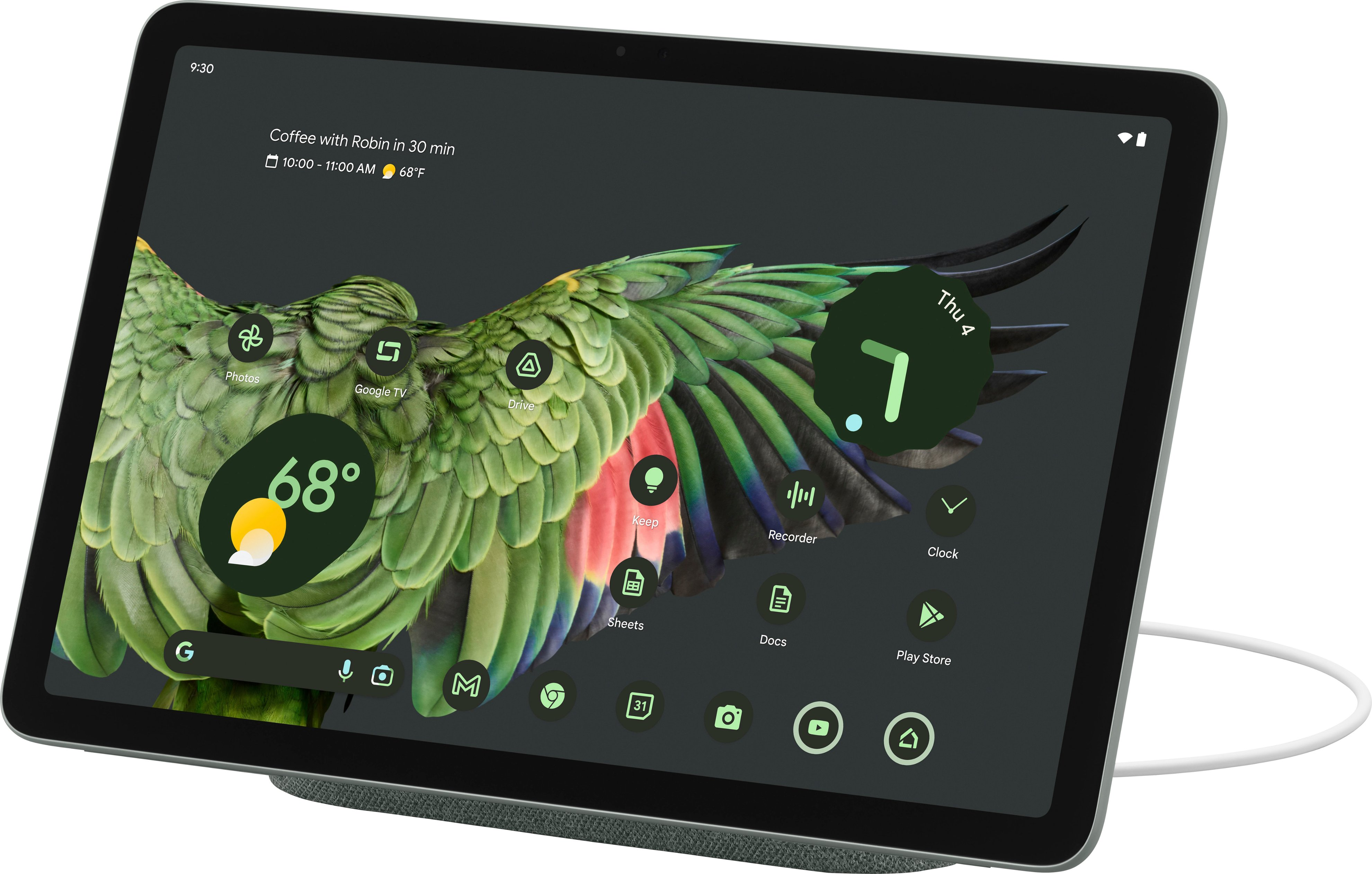
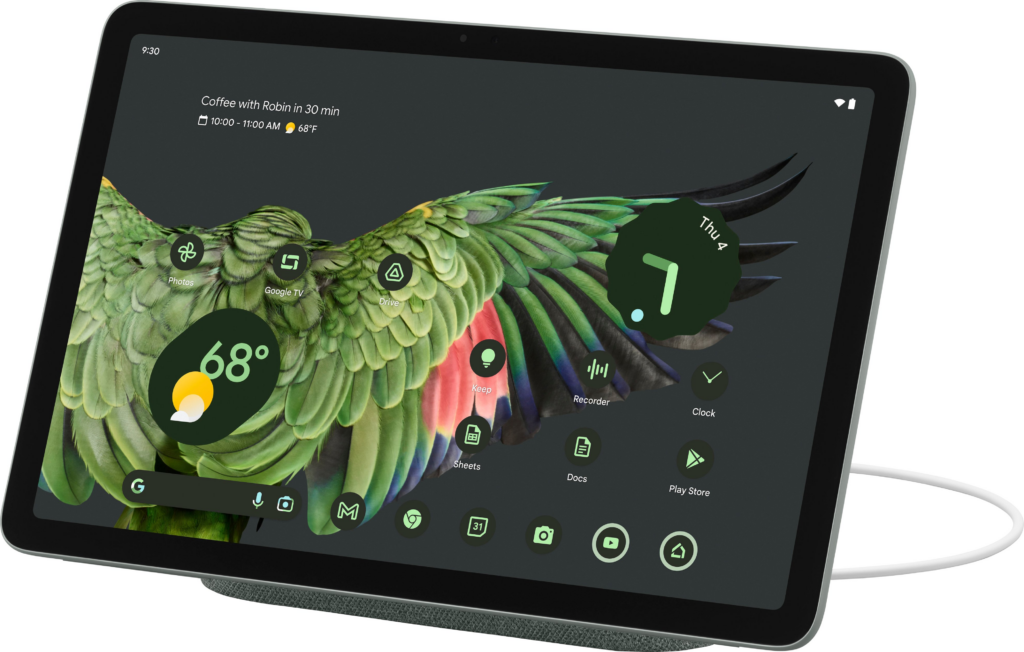










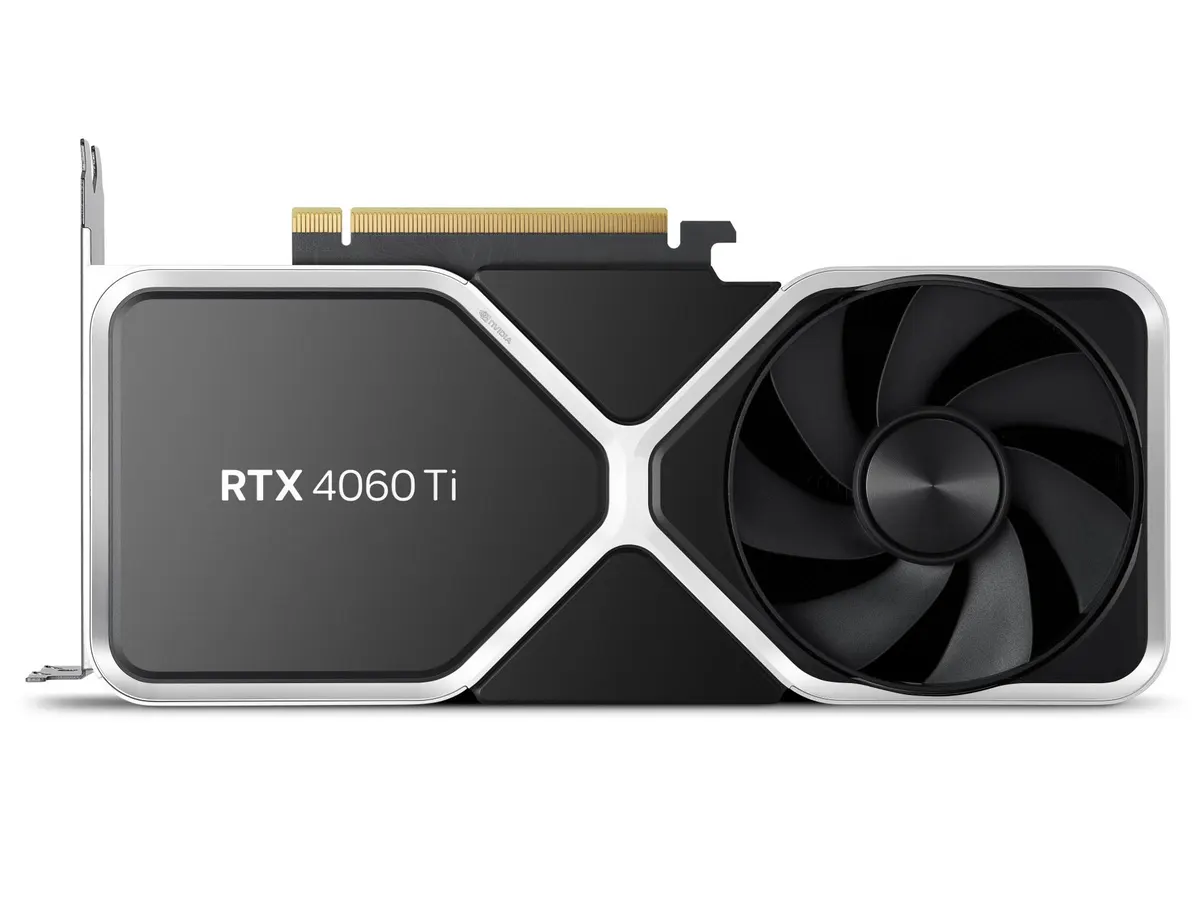
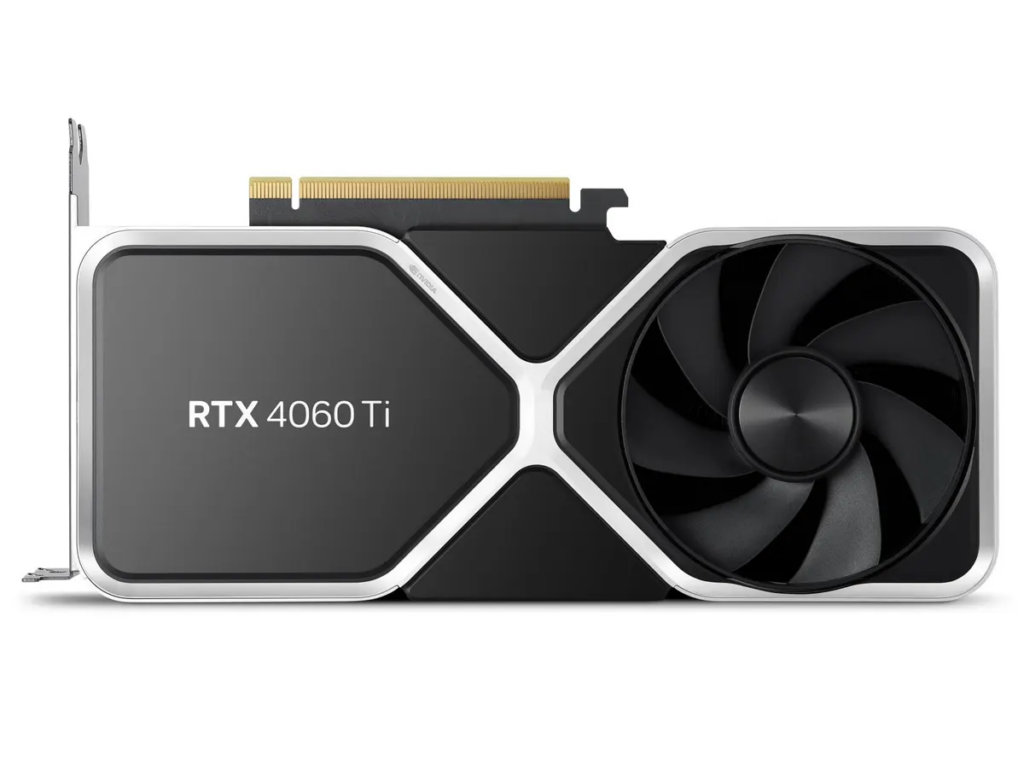


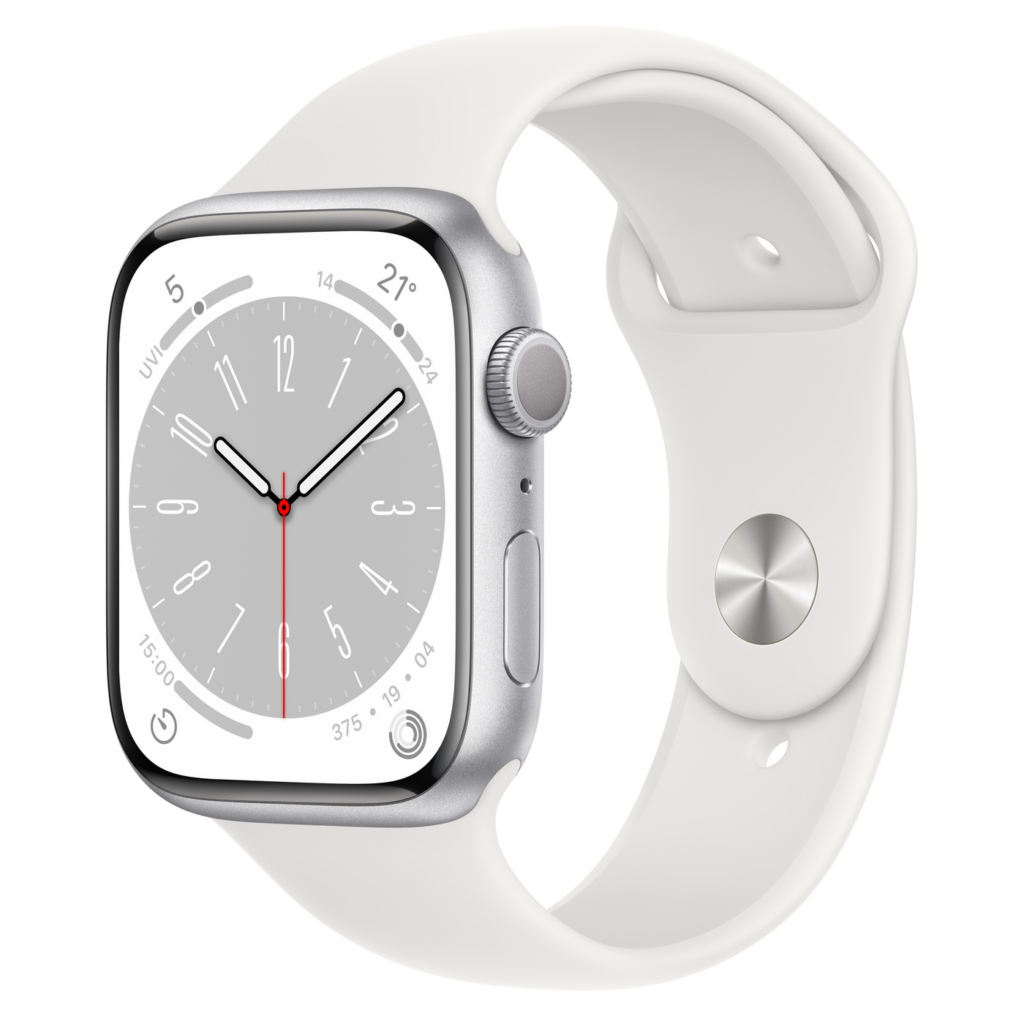



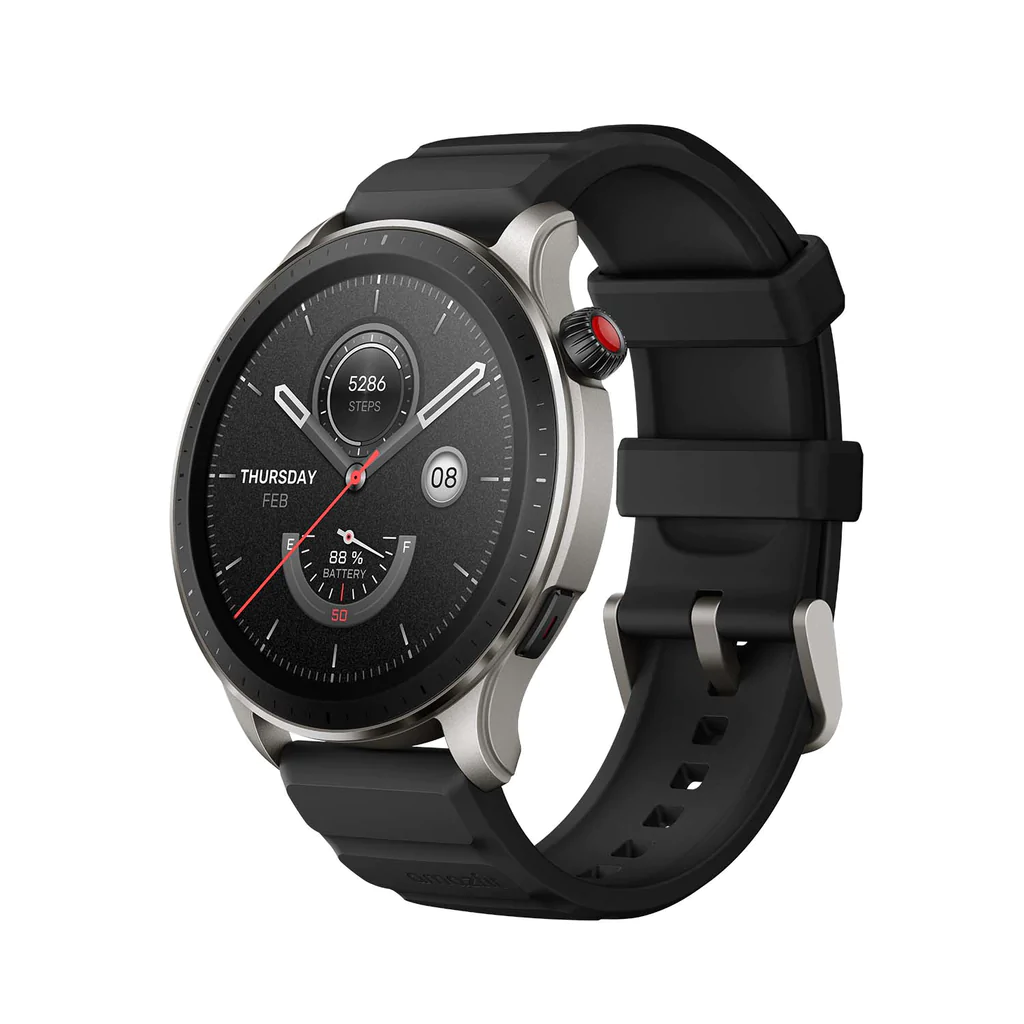




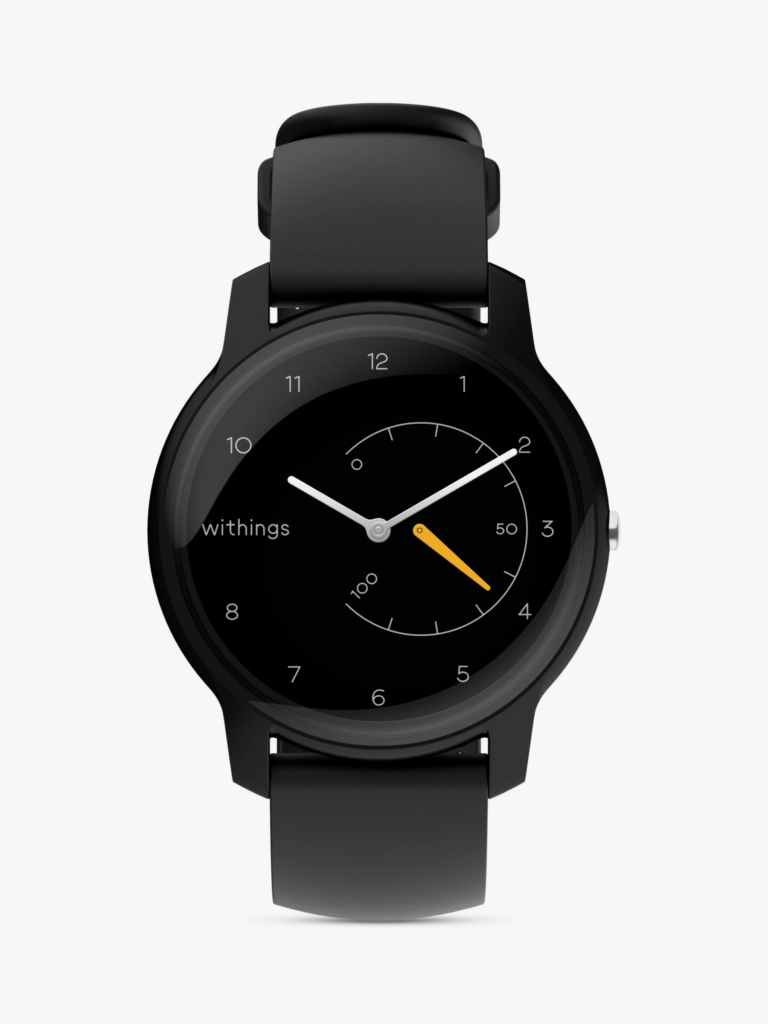





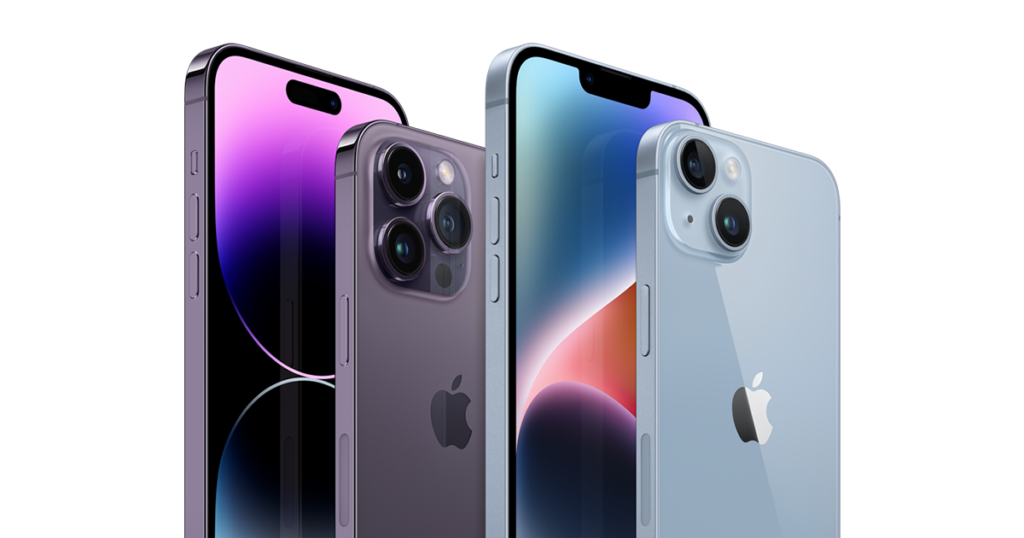













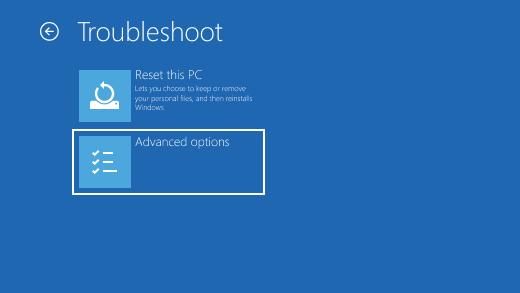





You must be logged in to post a comment.