Author: Blessing Ernest

  • Chromebooks to Buy in 2023

    Chromebooks to Buy in 2023

    A Chromebook, powered by ChromeOS—Google’s specialized operating system—is quite different from the conventional Windows or MacOS laptops. While they share the same physical appearance, laptops are much more powerful and perform better than Chromebooks. Chromebooks often feature fragile hardware attributable to cloud-based services instead of locally installed software.

    This translates to lower-powered processors, diminished RAM, and reduced local storage compared to laptops. Notably, select high-end Chromebooks outperform typical laptop specifications. The distinction boils down to the operating system’s access to software and services, with laptops favoring locally installed applications and Chromebooks relying on web-based applications.

    How to download Chrome on Mac. Chromebooks can perform common laptop functions with ease. Tasks like browsing, social media, video streaming, video chat, productivity apps, and basic editing of videos or photos are well within its capabilities. However, for niche tasks, laptops have a better edge over Chromebooks. Ideal for students, office workers, and those operating predominantly online, Chromebooks are best suited for users who don’t need resource-heavy apps.


    While Chromebooks ideally require internet connectivity for their full functionality, select tasks are achievable offline. Given their reliance on cloud-based services, lacking a connection may impede access to vital files and software. It’s crucial to note that Chromebooks require consistent internet access, as their optimal performance relies on an active connection.

    Additionally, using a Chromebook necessitates a Google account, as it facilitates the synchronization of all settings and application data with your Google account.

    Lenovo Flex 5i Chromebooks (13″)

    For those seeking an economical Chromebook, the options are abundant. The Lenovo Flex 5i Chromebook despite its unassuming design and budget-friendly price, surprises with its impressive versatility. The 13-inch 2-in-1 Chromebook outperforms the most budget-friendly systems.

    In terms of specifications and features, the Lenovo Chromebook Flex 5 13ITL5 shares similarities with the most basic model found on Lenovo’s own web store but upgrades the processor to an Intel Pentium Gold dual-core, with two cores, four threads, and a maximum clock speed of 3.5GHz.

    The CPU is an Intel Pentium Gold 7505 clocked at 2GHz, complemented by 4GB of DDR4 memory. Graphics are handled by Intel UHD. The device has a 13.3-inch 1080p IPS touchscreen, offers 32GB of eMMC storage, and features a 720p webcam. Connectivity includes 2x USB-C with DisplayPort, 1x USB-A, and a 3.5mm audio jack. It supports Wi-Fi 6 and Bluetooth 5 but lacks biometric features. The battery capacity is 51 watt-hours, and the device measures 0.67 x 8.43 x 12.2 inches, weighing in at 2.97 pounds.

    Moving on to design and build quality, the Lenovo Chromebook Flex 5 has appealing aesthetics. Thanks to the metal display lid and textured plastic on the lower half, it’s a bit sturdy. The display lid, especially, is impressively rigid for a budget laptop. Given its 2-in-1 design, you can rotate the display 360 degrees to convert the laptop into a tablet.

    The speakers are positioned upward along each side of the keyboard and are far better than many budget laptops with clear sound with a hint of bass. In contrast, the webcam and microphone leave room for improvement. One drawback of many 2-in-1 Chromebooks, including the Flex 5, is the placement of power and volume buttons on the right side.

    Acer Chromebook Spin 714 (2023)

    Acer’s latest Chromebook Spin 714 sets a high standard with 13th Gen Intel Core CPUs, a refined 2K webcam, and its enduringly adaptable build. While it’s on the pricier side(between $500 to $700), it’s a choice that involves very few compromises. Featuring a 14-inch touchscreen with FHD+ resolution, it has a durable and versatile convertible design.

    Building upon the success of the Spin 713, the new Spin 714 model maintains a familiar blueprint while introducing amazing enhancements. It comes with improved speakers and upgraded internals, affording it commendable speed and Wi-Fi 6E capabilities. However, it falls short in terms of display quality and battery longevity compared to its predecessor.

    This model features a 12th-generation Intel Core i5-1235U CPU, 8GB of LPDDR4 RAM, and a 256GB SSD. In terms of design, the Spin 714 maintains a consistent aesthetic with its predecessors. Measuring 12.3 x 8.8 x 0.7 inches and weighing just over 3 pounds. One of the changes in the Spin 714 is the display, which has a 1920 x 1200 resolution IPS panel and a 16:10 aspect ratio.

    The speakers have been equally improved and are currently located above the keyboard for more consistent audio output. The keyboard, touchpad, and included stylus contribute to making the Chromebook special. Battery life is commendable, with the 3-cell battery providing over 10 hours of usage.

    HP Dragonfly Pro Chromebook

    HP Dragonfly Pro Chromebook is a high-powered Intel laptop designed for the modern era of hybrid work and leisure. This Chromebook is one of the most ambitious models to date. It comes in dimensions of 12.4 x 8.7 x 0.7 inches and weighs 3.33 pounds. The 14-inch LCD display impressively offers 1,200 nits brightness.

    Under the hood, it runs on a 12th Gen Intel Core i5-1235U processor, with 256GB storage and 16GB RAM (LPDDR5). The battery promises up to 11.5 hours of usage. Additionally, it features an 8MP user-facing camera, and connectivity options include 4x Thunderbolt 4 USB-C ports, Wi-Fi 6E, Bluetooth 5.3, with 5G support slated for the summer. The Dragonfly Pro Chromebook is available in Ceramic White and Sparkling Black.

    Also, this model introduces several standout features. Firstly, it showcases an RGB keyboard with a haptic trackpad, providing a unique typing experience. The backlighting options, including Rainbow and wallpaper mode, offer a personalized touch. The laptop also boasts a remarkable 14-inch touchscreen display with up to 1,200 nits brightness, ideal for outdoor usage. The 8MP user-facing camera, co-engineered with Google, offers impressive video quality.

    Despite these strengths, areas for improvement include battery life, fan noise, and weight. Enhancements in these aspects, along with the addition of an HDMI port or USB-A, could elevate the Dragonfly Pro Chromebook’s rating. Regardless of the drawbacks its stunning display and overall performance make it a compelling option.

    Asus Chromebook CM34 Flip

    The Asus Chromebook CM34 Flip is a recent release, featuring AMD’s Ryzen 7000 mobile CPUs for excellent performance and long battery life. With a convertible build and a 14-inch touch display with FHD+ resolution, it offers a versatile computing experience. Despite lacking Thunderbolt due to the AMD platform, it remains a strong contender.

    The CM34 Flip impresses with its AMD hardware, touch-enabled display with slim bezels, 360-degree hinge, and remarkable battery life. Equipped with an AMD Ryzen 3 7320C CPU, AMD Radeon graphics, 16GB RAM, and a 128GB PCIe SSD, this laptop is tailored for everyday use.

    The keyboard, with 1.4mm travel, is commendable, offering a backlit full-sized layout. The touchpad is a standout, registering taps and swipes flawlessly. The 16:10 aspect ratio display with ultra-slim bezels provides ample screen space, although it’s highly reflective outdoors. The Harman Kardon-certified speakers deliver clear, punchy sound and the 1080p webcam enhances video calls, a boon for remote work.

    In terms of connectivity, the Flip offers a diverse range of ports, eliminating the need for adapters. Performance-wise, it’s powered by AMD’s Chromebook-specific CPU, handling multitasking adeptly, though it’s not the most potent option. The battery life of the CM34 Flip is an astounding 19 hours on a single charge.

    FAQs About Chromebooks

    What does a Chromebook do?

    Tasks like browsing, social media, video streaming, video chat, productivity apps, and basic editing of videos or photos are well within its capabilities

    What is the difference between a Laptop and a Chromebook?

    While they share the same physical appearance, laptops are much more powerful and perform better than Chromebooks. Chromebooks often feature fragile hardware attributable to cloud-based services instead of locally installed software.

    Which is better for students laptop or Chromebook?

    Ideal for students, office workers, and those operating predominantly online, Chromebooks are best suited for users who don’t need resource-heavy apps.

  • How to Download Chrome on Mac

    How to Download Chrome on Mac

    Why do people download Chrome on Mac? Why do people prefer Google Chrome over Safari?. And why do people download Chrome, to begin with? The answer is simple; Chrome is faster than Safari—Apple’s web browser.

    Today, web browsing has become indispensable, whether for shopping, streaming, or reading. However, choosing the right browser for your Mac might not be as simple as you imagined. In terms of user interface, Chrome offers a clean design, fast data syncing, and a vast library of extensions.

    While Safari, Apple’s native browser, offers an excellent browsing experience, it may not always meet the diverse needs of users, particularly when it comes to extensions and cross-platform functionality. As a result, many users opt to download Chrome on Mac rather than use Apple’s Safari browser.

    Steps to Download Chrome on Mac

    Since Chrome doesn’t come pre-installed on a Mac, a manual installation is in order.

    • Launch Safari by clicking on its icon in the Dock (a blue compass with a red needle).
    • Visit the Google Chrome page in your browser and initiate the download by clicking “Download Chrome.”
    • If the download doesn’t commence, locate and click “Download Chrome” in the upper-right corner.
    • Once the download completes, you’ll find the file in your Mac’s download folder. Click on the Downloads icon, then double-click on googlechrome.dmg. A Downloads icon will also appear at the top-right corner of the Safari window, click on it to access the downloaded file. This action opens up a disk image.
    • Drag and drop the Google Chrome icon into your Applications folder.
    • To open Google Chrome, either select the icon from Launchpad or type “Chrome” into Spotlight (Command + Space).
    • When launching Chrome for the first time, a security prompt will appear, indicating that it was downloaded from the internet. Click “Open” to proceed to sign in to your Google account. Opt to make Chrome your default browser and you’re good to go.

    Check out our previous article on how to install Google Chrome on Ubuntu in 2023.

  • How to Unlock iPhone Without Passcode

    How to Unlock iPhone Without Passcode

    Unlocking your iPhone is usually a breeze with a passcode, Face ID, or Touch ID. Yet, there are situations where you might find yourself locked out. Either because of a forgotten passcode, a disabled iPhone, or a second-hand-bought phone with a lock. Getting locked out of your phone can be incredibly frustrating. There are easy ways to regain access and we’ll show you how to unlock iPhone without passcode or computer.

    There are various misconceptions about unlocking an iPhone without a passcode, but using a Calculator or Camera isn’t one of them.

    How to Unlock iPhone Without Passcode Using a Computer

    One of the ways to unlock iPhone without passcode is by using a computer and entering Recovery Mode. This way, you can restore your iPhone and set up a new passcode, Touch ID, and even Face ID. But first, you must have a compatible Mac or Windows computer(Windows 10 or a later version) and ensure iTunes is installed. You’ll equally need the original cable that came with your iPhone or a compatible alternative to connect it to the computer.

    If your iPhone is currently connected to the computer, unplug it. Next, power down your iPhone. Depending on the model, press and hold both the side button and the volume down button until the power off slider appears. Connect your iPhone to your Mac or Windows PC while simultaneously holding the button. Continue holding the button until the recovery mode screen appears on your iPhone, then release.

    Locate your iPhone either in the Finder or iTunes on the connected computer. A prompt will appear with the option to Restore or Update, choose Restore. Immediately you do this, the computer will download the necessary software for your iPhone and initiate the recovery process. The download will take up to 15 minutes and after the process is complete, your device will restart and display a setup screen. Then disconnect the iPhone from the computer and set it up.

    Unlock iPhone Using iCloud

    If you find yourself in a situation where you need to access your iPhone without its passcode, consider using iCloud as an alternative solution to unlock it. It’s important to note that this method will completely wipe everything off your iPhone. Navigate to iCloud.com, sign in using your Apple ID credentials, and locate the “Find iPhone” option. Always ensure that the “Find My” feature is activated before following the next step.

    Within the list of devices linked to your iCloud account, select the corresponding model of your iPhone. Then initiate the process by clicking on the “Erase iPhone” option.

    How to Unlock iPhone without Password or Computer

    Unlocking an iPhone without a passcode becomes necessary when using a computer isn’t feasible. One option is to utilize the Erase iPhone feature, available for iPhones running version 15.2 or later. Just like we mentioned above for iCloud, this feature wipes the data from your iPhone to grant you access.

    Enter the passcodes you remember until you’re locked out of the iPhone. If the Erase iPhone button hasn’t yet appeared, persist with entering more passcodes. Once it appears, input your Apple ID password to confirm the erasure. Alternatively, Siri can be used to unlock your iPhone without the need for a computer or password. However, this method mostly works for older iOS versions like 8 to 10.

    Start by asking Siri about the current time. Following this, add a new clock and long-press the clock text. Opt to share the text to messages. Then use this action to navigate to the new contact screen and add a new photo to the contact before making your way to the photo library. You can now return to the home screen.

    For those who have pre-set Voice Control, it can serve as a way to unlock your iPhone without a passcode. Start by navigating to Settings, then Accessibility, and Voice Control. Enable Voice Control and select Customize Commands to establish a personalized command. This custom command should mirror your lock screen passcode.

    iOS 17 Passcode Reset

    Should you find yourself unable to input your new passcode for any reason, iOS 17 introduces a handy feature known as Passcode Reset that allows users to use their previous passcode for a period of 72 hours.

    If you’ve installed the iOS 17 Beta on your iPhone after five unsuccessful attempts at entering the correct passcode simply tap on “Forgot Passcode.” Then select “Enter Previous Passcode” to input your old passcode, and proceed to set up a new one. With these steps completed, you have successfully reset your iPhone passcode and regained access to your device.

  • Best Home Security Systems 2023

    Best Home Security Systems 2023

    Security systems serve as powerful deterrents to burglars. Opportunistic criminals steer clear of homes likely to draw attention. When they spot security cameras, the risk of identification and capture by law enforcement rises. Aside from the immediate safety, a security system offers peace of mind even when you’re away. It provides an extra layer of protection, promptly alerting you or the authorities to any suspicious activity. All the Home Security Systems on our list have been designed to provide excellent protection against burglars.

    Choosing the right home security system isn’t a simple task. We’ve gone through this process many times; it involves extensive research, equipment selection, placement decisions, and choosing a monitoring plan.

    While some systems may be objectively better, there’s no one-size-fits-all solution. The ideal security system depends on your preferred living situation, security requirements, and home layout. Fortunately, we’ve invested countless hours researching; we’ve compiled a list of the top home security systems for 2023 to help you narrow down your options.

    Top Home Security Systems to Buy

    Wyze

    Wyze offers high-quality, affordable monitoring services, specializing in low-cost home security systems. Their indoor and outdoor cameras are reliable and user-friendly. Since 2017, Wyze has provided a variety of smart devices like leak and climate sensors. There are no contracts, and a free starter kit is available to those on the annual plan. While their security cameras are sold separately, they offer video cloud storage and a 10-hour battery backup. However, app access is somewhat limited, plus there’s no cellular backup. Additionally, it doesn’t integrate with all smart home devices or support voice compatibility with Apple HomeKit, Alexa, Google Assistant, or IFTTT.

    Vivint

    Vivint Home Security is a high-end, professionally installed home security system with smart home and alarm tech. While it’s the top surveillance choice for many, the cost may deter some. It doesn’t require any contracts, but it’s expensive.

    SimpliSafe


    Most people prefer the SimpliSafe home security system for their offers cost-effectiveness, but there are other amazing perks of using this home security system. Such as easy installation, no binding contracts, customization, and dependable protection. SimpliSafe offers a range of add-ons like cameras, glass break detectors, panic buttons, and environmental sensors for comprehensive security.

    ADT Home Security System

    Unlike some of the security systems out there, ADT’s home security plans’ cost is dependent on equipment type, monitoring availability, and installation fees. The company ensures professional installation, customizable packages, a six-month refund guarantee, 24/7 monitoring, and up to $500 theft protection.

    The ADT plans range from $40 to $60 monthly, varying with equipment and monitoring services. All packages include a digital control panel, door and window alarms, motion detector, etc. Additional smart devices are available to alert homeowners of intrusions, smoke, or gas leaks. ADT has 12 monitoring centers and offers immediate response to emergencies.

    Ring

    Ring offers a variety of home security equipment, from doorbells to motion-activated cameras. Their monitoring plans vary too. From single-camera self-monitoring to full-service professional monitoring, all with recording and replay features. Monthly plans start at $3.99 for Basic, $10 for Plus, and $20 for Pro, and Ring’s no-contract policy allows easy plan changes.

    They also offer different compatible add-ons and extra products, along with video storage options. Ring integrates well with smart devices like Amazon products. They also have a mobile app that enables playback, alerts, and device activation.

  • Amazon Echo Show 8: Users will be Charged for Digital Photo Frame

    Amazon Echo Show 8: Users will be Charged for Digital Photo Frame

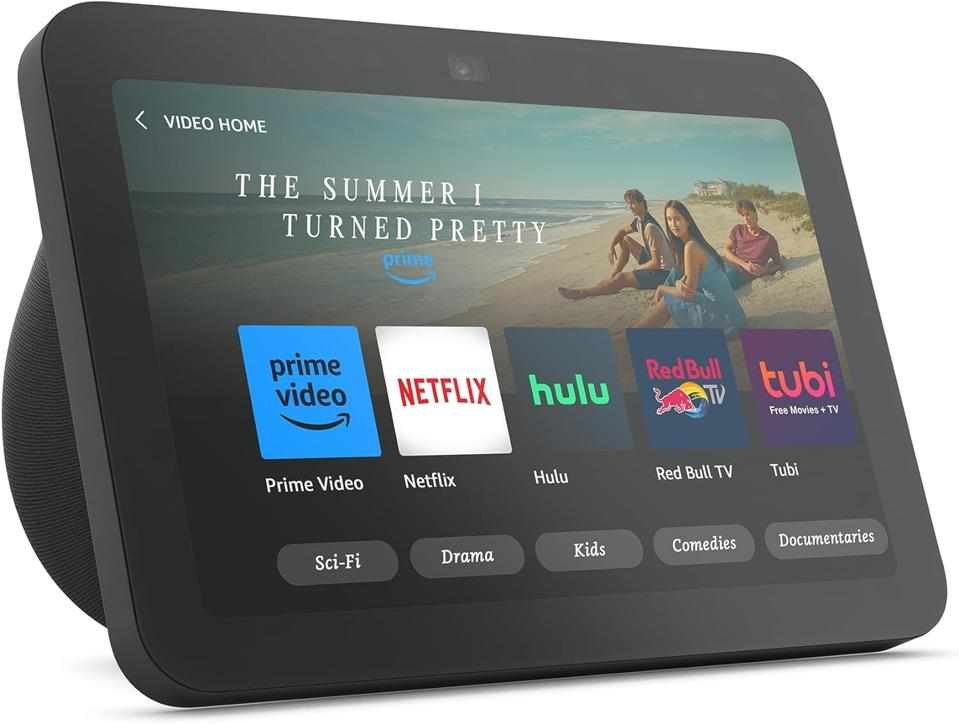
    Over the years, Amazon has introduced a range of smart speakers and Alexa-enabled devices. Among the top favorite Alexa devices is the Amazon Echo Show 8. For those unfamiliar with Alexa products, the Echo Show series includes smart displays integrated with Alexa’s capabilities. Despite being Amazon’s second smallest smart display, the Echo Show 8 boasts an impressive eight-inch touchscreen, and unlike the Echo Show 10 and 15, it is compact and very portable.

    What is the Amazon Echo Show 8 used for?

    The Echo Show 8 has quite a lot of uses; from live streaming videos to playing music, checking weather updates, connecting to home security cameras and other smart home devices, and even making video calls. The third generation of the Echo Show 8 which is yet to hit the market (possibly late October 2023) will be sold for $150. A slight increase from its predecessor—the Amazon Echo Show 8(2021 version), which was initially sold for $129.99.

    Amazon Echo Show 8 Subscription

    Amazon is introducing a new feature for its Echo Show 8. However, this added functionality comes at an extra cost. The Echo Show 8 Photos Edition, unveiled at the recent fall hardware event, carries a $10 premium over the standard model.

    This premium allows you to set your photos as the “primary home screen content.” Priced at $159.99, the Show 8 Photos Edition boasts all the same features as the third-gen Echo Show 8. The additional $10 grants you a complimentary six-month subscription to Amazon’s latest service, PhotosPlus, enabling the enhanced photo mode. PhotosPlus introduces Photo Mode, which prioritizes personal memories and images shared by your loved ones on the Echo Show 8 Photos Edition’s home screen.

    The New Echo Show 8 Features (third generation)

    It also boasts a 30-second slideshow rotation for a more impactful display around your home, along with 25 GB of storage for photos and videos from Amazon Photos. Prime members receive unlimited photo storage and an additional 5 GB for videos. Despite sharing the same hardware, the standard Show 8 does not support the new Photo Mode, which is exclusive to the Echo Show 8 Photos Edition.

    A persistent critique of Echo Show devices has been the absence of a dedicated photo frame feature, especially in comparison to Google’s Nest Hub devices, which excel in this regard. Currently, activating photo frame mode on Echo Show displays lasts only three hours before reverting to a rotating display often featuring ads and promotions, unless you navigate menus to disable it. The third-gen Echo Show 8 is available in two variants: standard and Photos Edition.

    Subscription

    Photo Mode revolutionizes the display on existing Show screens, ensuring photos take center stage indefinitely, Ramirez assures. The user interface foregrounds your photos, while information like weather and time recedes into the background.

    Subscribing to a digital photo frame service isn’t a novel concept; certain frames require payment for uploads or offer supplementary features at a cost. For instance, the Skylight Calendar offers a digital calendar with an optional $39 annual fee for a photo frame feature. They also provide a Skylight Frame with no upload fee but offer additional features like cloud backup and albums for $39 per year.

    Beyond the initial six months, maintaining Photo Mode requires a monthly fee of $1.99. Although cancellation is an option at any time, discontinuing the subscription reverts your Echo Show 8 Photos Edition to its standard configuration.

    Likewise, the popular Aura Frame comes without a fee and is $10 cheaper than Amazon’s new photo-centric Show. However, it lacks other smart display features such as Alexa voice assistance, smart home controls, and streaming capabilities.

  • Microsoft Copilot: Features, Availability, Pricing

    Microsoft Copilot: Features, Availability, Pricing

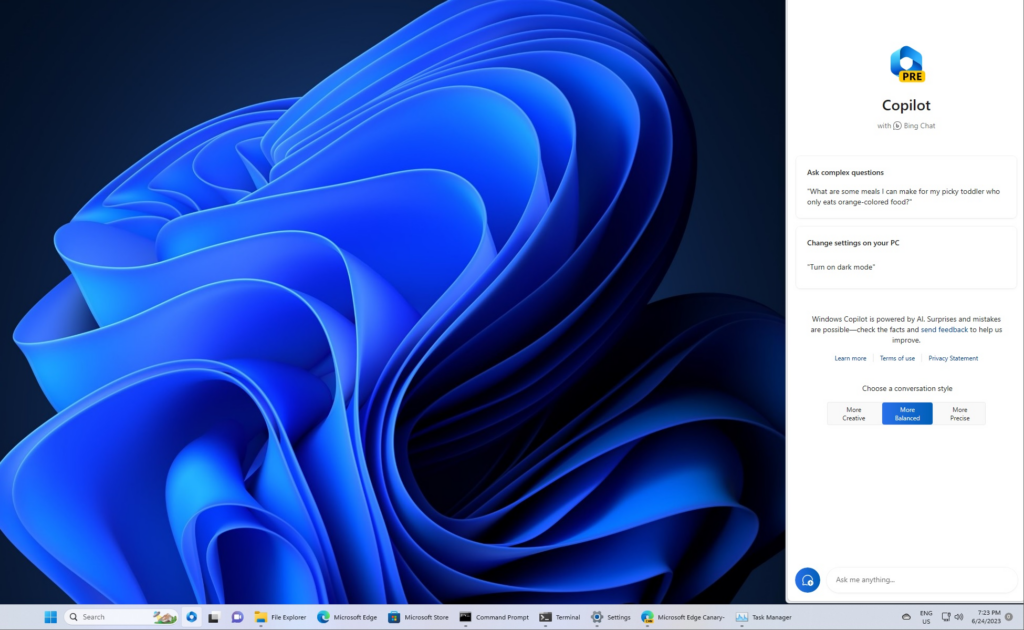
    Microsoft, the multinational technology company bridging the interaction between humans and technology has consolidated this with the introduction of Microsoft Copilot, an AI assistant. Microsoft claims Copilot is capable of assimilating insights from the web. Including data, and PC activities, all the while protecting user privacy and security. Integrated into Windows 11, Microsoft 365, Edge, and Bing, the first rollout of the AI assistant will be accessible as an application with a free update to Windows 11.

    This launch is on the sidelines of some amazing new products designed to amplify productivity and creativity. As well as help people and businesses realize their full potential. Bing and Edge are transforming; introducing the latest DALL.E 3 model from OpenAI to provide customized responses based on user search history and an AI-driven shopping experience. In addition to the product updates, Microsoft announced the launch of new Surface devices.

    Windows 11 Update 2023

    Microsoft Copilot AI Features Windows 11 update
    Windows 11 Update Credit: Windows Latest

    Updated on September 26 with over 150 new features, the new Windows 11 update brings the capabilities of Microsoft AI Copilot. Including File Explorer, widgets boards, paint, backup, etc. Paint has also received an upgrade with AI-driven features such as background removal and layers. Along with a preview of Cocreator. Another feature that benefits from Microsoft’s AI enhancements is Photos. Additions like Background Blur, and improved search capabilities to make locating photos stored in OneDrive a breeze.

    The Windows Snipping Tool now offers expanded content capture options, allowing for specific text extraction from images and providing tools for sensitive information redaction. Sound capturing via audio and microphone support has also been integrated, simplifying the creation of compelling videos and content.

    Clipchamp now boasts an auto-compose functionality, suggesting scenes, edits, and narratives based on your images and footage. In addition to empowering users to create professional-quality videos for sharing. Notepad now automatically saves your session state, allowing for seamless transitions without interruptions, ensuring you pick up right where you left off.

    The new Outlook for Windows offers simplified account management, merging several accounts in one app. Intelligent tools assist in crafting clear, concise emails, and help to easily attach important documents and photos from OneDrive. A modernized File Explorer interface for enhanced accessibility and a new Gallery feature for quick access to photo collections. Additionally, New text authoring experiences, voice access, and natural voices in Narrator are among the upgrades making Windows 11 the most accessible version yet. With Windows Backup, it’s very easy to move files, and applications to a new Windows 11 PC.

    Microsoft Copilot AI Features

    Microsoft Copilot AI Features
    Microsoft Copilot AI Features Credit: searchenginejournal

    Bing and Edge

    Bing and Edge now present features powered by the latest AI language models for a more advanced user experience. There are personalized answers from chat history that provide specific results based on preferences. Shopping via Bing or Edge not only feature customized buying guides, but also summarized reviews, and price match. Making it easier than ever to find what you’re looking for online.

    To improve image generation with greater detail and accuracy, the text-to-image AI model DALL.E 3 has been integrated into Bing Image Creator. Content Credentials for cryptographic markers to AI-generated images have also been added. With Bing Chat Enterprise receiving updates that extend to the Microsoft Edge mobile app.

    Microsoft Designer App

    Designer, the latest addition to our Microsoft 365 consumer apps, leverages AI to facilitate the creation of visually stunning content. Microsoft Designer is a design application that allows users to craft an amazing collection of visuals. From graphics, illustrations, and various other creative elements. This includes features powered by OpenAI’s Dall.E 3. Enabling tasks like generative to expand, fill, as well as erase for a more dynamic visual experience. Designer’s integration into Microsoft 365 Copilot for consumers, starting with Word, augments your document’s visuals with contextual suggestions. This creative tool revolutionizes content creation, providing immediate visual drafts with minimal prompts.

    Latest Surface Devices

    Microsoft also unveiled the latest Surface laptops to deliver exceptional AI experiences across Microsoft products and third-party platforms. It includes a Surface Pro 9 that comes with 5G and Windows Studio Effects. A Surface Laptop Go 3; the lightest and most portable Surface Laptop yet, featuring a responsive touchscreen display. The Surface Go 4 with unparalleled portability in a 2-in-1 form factor. And the 50″ Surface Hub 3 with innovative features like Portrait mode, Smart Rotation, and Smart AV. Opening up new dimensions for co-creation.

    FAQs

    What is Microsoft Copilot?

    Microsoft Copilot is Microsoft’s AI companion integrated into Microsoft 365, Windows 11, Edge, and Bing to streamline operations across them. With Copilot, users gain access to AI-powered assistance across various facets of their workflows within these applications.

    Is Microsoft Copilot Free?

    Starting November 1, enterprise customers can access Microsoft 365 Copilot at a rate of $30 per user per month. Although, the cost of Microsoft Copilot hinges on the application into which it is integrated.

    What is Microsoft 365 Chat?

    Microsoft 365 Chat is a chat interface with access to user data across various Microsoft work applications. This grants it the capability to respond to queries and assist with tasks. It can keep you up-to-date on meetings, locate documents, and provide answers based on the content within your documents, meetings, chats, and more.

    Is Microsoft Copilot Available Now?

    As of September 26, Microsoft Copilot is accessible on Windows 11.

    Can I use Copilot in Windows 10?

    Copilot can be used on Windows 10

  • Elon Musk says all Twitter X Users will Pay a Monthly Subscription Fee

    Elon Musk says all Twitter X Users will Pay a Monthly Subscription Fee

    Elon Musk has proposed a potential shift in the business model of X, formerly known as Twitter. A Move that will potentially sound the death knell of one of the world’s most-used platforms.

    During a live-streamed discussion with Israeli Prime Minister Benjamin Netanyahu, Musk hinted at the implementation of a nominal monthly fee for utilizing the X platform. He emphasized that this alteration was imperative in addressing the prevalent issue of bots on the network.

    Why Musk is Charging Every User for X

    Musk elucidated, “It’s the only way I can think of to combat vast armies of bots. Because a bot costs a fraction of a penny. Call it a tenth of a penny. But even if it has to pay a few dollars or something, the effective cost of bots is very high.” Going further to state that bot creators would need to set up new payment methods for each subsequent bot. Adding an additional deterrent. While Musk refrained from specifying the exact subscription fee, he characterized it as a modest sum.

    In the course of the conversation, Elon Musk divulged updated statistics for X. Disclosing a user base of 550 million individuals who collectively generate between 100 to 200 million posts daily. It is however unclear if these numbers include automated accounts. Both legitimate and spammy bots.

    These metrics, however, do not permit a direct comparison with Twitter’s user base prior to Musk’s stewardship. Twitter employed a specific metric known as the “average monetizable daily active user” (mDAU). This older metric suggested users potentially monetizable through ad views, with Q1 2022 figures showing 229 million mDAUs. Musk refrained from providing additional details regarding the proposed charges or the timeline for their implementation.

    The broader discussion between Musk and Netanyahu centered on artificial intelligence technology. And its regulatory framework, with a brief foray into the issue of hate speech on the X platform. Musk asserted his stance against antisemitism and any form of content that fuels animosity and discord. However, Musk recently engaged in a dispute involving the threat of a defamation lawsuit against the Anti-Defamation League. Which had accused both Elon Musk and X of exhibiting antisemitic tendencies.

    Elon Musk Should Rethink His X Monetization Strategies

    Following the acquisition of Twitter in October 2022, Elon Musk wasted no time in enacting a series of substantial alterations. The first order of business was the renaming of the platform as “X.” Shortly thereafter, in March, Musk did away with the traditional blue verification badges, bringing in the Twitter Blue subscription program.

    Since last year, the company has been encouraging users to subscribe to its premium service X Premium. Which is priced at $8 per month or $84 annually. This subscription offers a range of features including post editing. There’s reduced ad exposure, enhanced search and conversation rankings, extended post lengths, and more.

    These sweeping changes form the basis of Musk’s overarching plan to steer the platform toward profitability. In a candid admission in July, he acknowledged the financial hurdles facing the company. “We’re still negative cash flow, due to a 50% drop in advertising revenue plus a heavy debt load. Need to reach positive cash flow before we have the luxury of anything else.

    Afterward, the Starlink CEO launched an initiative to extend the creator monetization program. Now, a share of the advertising revenue generated from ads displayed in response to creators’ posts is allocated to eligible individuals. The company has affirmed that this measure is part of its broader endeavor to empower users to better monetize their presence on the platform.

    Eligibility extends to subscribers of Twitter Blue, as well as verified organizations. Creators with over 5 million monthly tweet impressions for the past three months are included. Together with those who successfully pass the human review for Creator Monetization Standards.

    Twitter X Memorabilia Auction

    Elon Musk recently announced an online auction of X(Twitter)-related memorabilia. At a price point of $25, which is to be held next month. This move, while strategically directed at fighting bots, introduces a paywall that impinges on the platform’s original purpose of serving as an open space for all.

    Nevertheless, this strategy is in line with Musk’s vision of generating revenue directly from the user base. It’s undeniable that the introduction of a paywall will have reverberations across social media. Users disinclined to pay for platform access may move to other X alternative apps/competitors.

  • iPhone 15 Price, Specs, Release Date Plus more

    iPhone 15 Price, Specs, Release Date Plus more

    Apple’s latest product release at the Apple Event 2023 officially launched the all-new iPhone 15, and the iPhone 15 Plus which comes with expansive displays that mirror the dimensions of the iPhone 14 series. The iPhone 15 Pro and iPhone 15 Pro Max models, valued at $999 and $1,199, respectively, introduce an innovative action button instead of the conventional Apple mute switch.

    This multifaceted button is a significant departure and replacement and can be used for several functions. Unlike its physical counterpart, this button relies on haptic feedback, enabling a range of device functions. By default, the action button toggles between ring and silent modes, emulating the function of the mute switch. Despite the absence of a tactile toggle, distinct haptic feedback cues users into the active setting. This innovation empowers users to customize the action button, granting quick access to various functions.

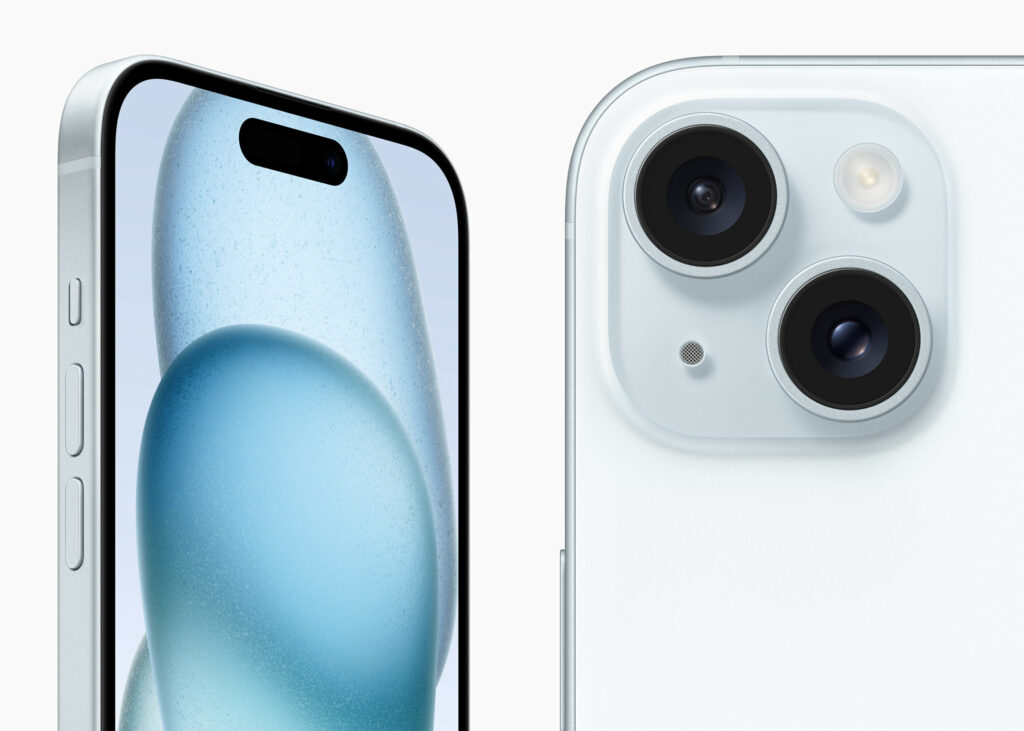
    iPhone 15 and iPhone 15 Plus Credit: Apple
    iPhone 15 and iPhone 15 Plus Credit: Apple

    Aside from silencing or unmuting, the button can also activate iOS 17 shortcuts, launch the flashlight, open the camera, record voice memos, provide translations, and activate accessibility features like Magnifier. Apple also assures that the Dynamic Island will offer visual cues, complementing the haptic feedback for seamless operation. The lingering question is whether the action button can be configured for multiple actions through different tap combinations, such as a single tap for the flashlight and a double tap for the camera.

    Apple also emphasizes sustainability with the revelation that the batteries of the iPhone 15 and iPhone 15 Plus, are constructed entirely from recycled cobalt. While Apple has not officially disclosed the highly anticipated iPhone 15 release date, there are speculations that availability will be starting September 15, followed by the official retail launch on September 22.

    Design, USB-C, and Other Features

    iPhone 15 and iPhone 15 Plus Credit: Apple
    iPhone 15 and iPhone 15 Plus Credit: Apple

    The iPhone 15 Pro maintains last year’s screen sizes; a 6.1-inch display for the standard model and a 6.7-inch display for the Pro Max. However, Apple has achieved a sleeker look by slimming down the borders, resulting in a slightly smaller form compared to the iPhone 14 counterparts. The obvious upgrade is Apple’s transition from stainless steel to Grade 5 titanium. This switch improves strength and durability while reducing weightiness. Grade 5 titanium has superior resistance to corrosion and greater tensile strength compared to pure titanium. Apple equally opted for titanium over stainless steel for the sidebars in these shiny new premium models.

    All models now sport an impressive 48-megapixel primary camera. The flagship Pro Max is made with a remarkable 5X optical zoom and 3X telephoto capability. With the Pro series, users gain the ability to capture “spatial” or three-dimensional videos which is very much ideal for compatibility with Apple’s forthcoming Vision Pro headset. In terms of improving safety features, the latest iPhones with Emergency SOS Satellite connectivity can now summon roadside assistance, a service initially launched in partnership with the American Automobile Association in the United States.

    In compliance with European legislation, Apple shifted gears by adopting the USB-C charging standard, replacing the longstanding Lightning port for the new iPhones and AirPods Pro. Also, this alteration is claimed to simplify the process for professionals who want to transfer video content directly from their iPhones to their hard drives. Under the hood, the 15 and 15 Plus, priced from $799 and $899, are driven by the A16 Bionic chip, while the Pro iterations are built with the powerhouse A17 Pro Chip.

    iPhone 15 Specifications

    • Prices – The 128GB is sold for $799, 256GB is priced at $899, and 512GB goes for $1,099.
    • Display size – 6.1 inches
    • Refresh rate – 60Hz
    • CPU – A16 Bionic
    • Storage – 128GB
    • Rear cameras – 48MP main, 12MP ultrawide
    • Front camera – 12MP
    • Charging port – USB-C
    • Battery life – 24 hours
    • Colors – Pink, yellow, blue, black, green

    The iPhone 15 Plus Specifications

    • Prices – The 128GB is sold for $899, 256GB is priced at $999, and 512GB goes for $1,199.
    • Display size – 6.7 inches
    • Refresh rate – 60Hz
    • CPU – A16 Bionic Chip
    • Storage – 128GB
    • Rear cameras – 48MP main, 12MP ultrawide
    • Front camera – 12MP
    • Charging port – USB-C
    • Battery life – 24 hours
    • Colors – Pink, yellow, blue, black, green

    All-new iPhone 15 Pro

    iPhone 15 Pro Max Specs
    iPhone 15 Pro and iPhone 15 Pro Max Credit: Apple
    • Prices – The 128GB is sold for $999, 256GB is priced at $1,099, and 1TB goes for $1,499.
    • Display – 6.1 inches
    • Refresh rate – 120Hz
    • CPU – A17 Processor
    • Storage – 128GB, 256GB, 512GB, 1TB
    • Rear cameras 48MP main, 12MP ultrawide, 12MP telephoto w/ 3x zoom
    • Front camera – 12MP
    • Battery – 4,852 mAh
    • Charging Port – USB-C
    • Size- 5.77 x 2.78 x 0.32 inches
    • Weight – 6.60 ounces
    • Colors – Black, Blue Green, Yellow, Pink

    New iPhone 15 Pro Max Specs

    • Prices – The 256GB is sold for $1,199, 512GB is priced at $1,399, and 1TB goes for $1,599.
    • Display – 6.7-inch OLED
    • Refresh rate – 120Hz adaptive
    • CPU – A17 Pro
    • Storage – 256GB, 512GB, 1TB
    • Rear cameras 48MP main, 12MP ultrawide, 12MP telephoto w/ 5x zoom
    • Front camera – 12MP
    • Battery – 4,852 mAh
    • Charging Port – USB-C
    • Size- 6.29 x 3.02 x 0.32 inches
    • Weight – 7.8 ounces
    • Colors – Black, white, blue, gray
  • How to Install Chrome on Ubuntu in 2023

    How to Install Chrome on Ubuntu in 2023

    Google Chrome is one of the world’s most widely used and trusted web browsers. Of course, it was developed by one of the world’s most reputable technology companies known for its strong focus on security. However, there’s still a need to be cautious when installing software from unofficial or untrusted sources, as they may not be as secure. The same also applies to Ubuntu. We’ll find out how to install Chrome on Ubuntu.

    Introduced in 2004 by the Computer software company, Canonical, Ubuntu is a free open-source, user-friendly Linux-based OS for computers or virtual private servers. It is well suited for cloud computing, servers, desktops, and IoT devices. Ubuntu’s popularity has roots in quite a number of innovative features. One of which is its clean GNOME interface designed for improved system navigation. Ubuntu has high security with checks, AppArmor, and security practices. The OS also runs smoothly on low-end devices, requiring minimal RAM. Unlike closed-source alternatives such as macOS and Windows, Ubuntu is completely free and customizable.

    How to Install Chrome on Ubuntu

    Ubuntu’s default web browser is Firefox. With each new version of Ubuntu, you’ll find the most up-to-date version of Firefox pre-installed. But, if you prefer using Google Chrome on Ubuntu software OS or any other Ubuntu device, there are two installation options. You can opt for a manual download using the default Firefox browser. Alternatively, you can use the Ubuntu Terminal for a not-so-seamless installation process.

    Installing Chrome on Ubuntu via Web Browser

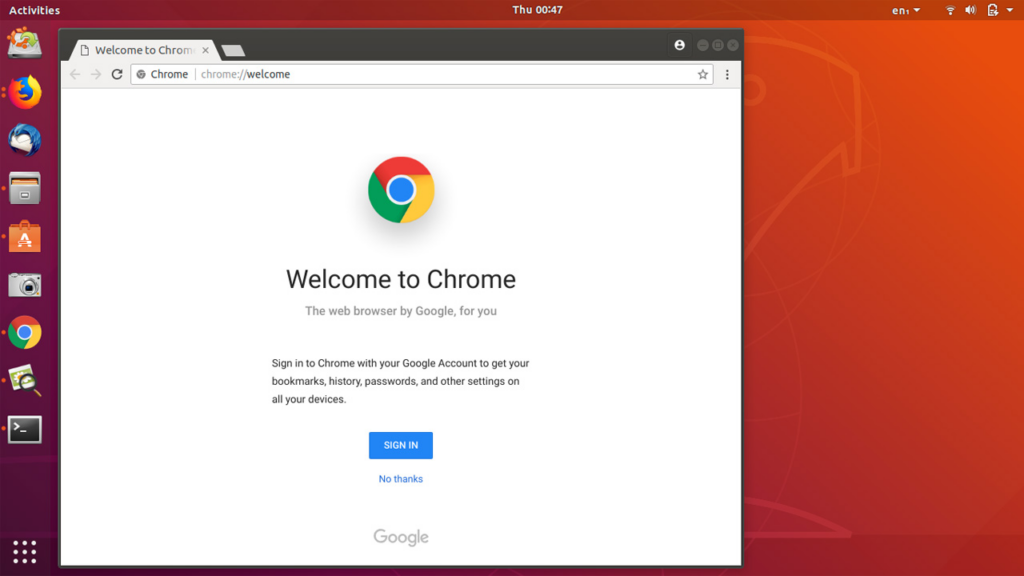
    How to Install Chrome on Ubuntu in 2023
    How to Install Chrome on Ubuntu in 2023
    • Launch the default Firefox web browser in Ubuntu
    • Go to the official Chrome download page
    • Locate the Download Chrome button and click on it to download the installation file
    • Select the version of Chrome for Ubuntu which is the first option (64 bit .deb for Debian/Ubuntu)
    • Click on Accept and Install
    • Once downloaded, open the file and double-click to initiate the installation process. Or right-click the file and select Open With Software Center
    • Click on the green Install button to install Google Chrome for Ubuntu
    • Enter a password for authentication.
    • Start Chrome and click on settings in the top-right corner of the screen
    • In Settings, scroll down and click on Default Applications
    • Select Google Chrome as the default web browser

    Install Chrome on Ubuntu via the Terminal

    • Open the Ubuntu Terminal with a keyboard shortcut Ctrl+Alt+T
    • Run the Sudo apt update command to update the package lists to the latest version
    • Download the latest version of the Google Chrome package using the wget command. (wget https://dl.google.com/linux/direct/google-chrome-stable_current_amd64.deb)
    • Once the Chrome package is downloaded, install it using the command: sudo dpkg -i google-chrome-stable_current_amd64.deb
    • Start Chrome and click on settings in the top-right corner of the screen
    • In Settings, scroll down and click on Default Applications
    • Select Google Chrome as the default web browser
  • iPhone 15, New Apple Products to Expect at Apple Event 2023

    iPhone 15, New Apple Products to Expect at Apple Event 2023

    As we near September 12, Apple lovers worldwide eagerly anticipate the unveiling of the next iPhone 15 and Apple Watch. What is Apple’s release in September 2023? The online rumor mills have been speculating about the launch at the Apple event in 2023. Some suggest a typical round of annual upgrades, while others hint at a potentially upgraded, extremely large model, the Ultra. We’ll delve into all we can expect from this year’s upcoming Apple event. But first, what was released at the Apple event in 2022?

    At the Apple Event 2022, the new iPhone 14 and iPhone 14 Plus devices were unveiled. Along with rebuilt AirPods Pro, three all-new lineups of Apple Watches, and cool updates to the Apple Fitness+, there was the WWDC event in June of the same year where Apple introduced iOS 1 as well as the new MacBook Air, 13-inch MacBook Pro, iPadOS 16, macOS Ventura, and watchOS 9. Then the March event heralded the unveiling of Mac Studio and Studio Display, the new iPad Air, the new iPhone SE, and iPhone 13 and iPhone 13 Pro.

    At WWDC 2023, Apple unveiled; the Apple Vision Pro, the 15-inch MacBook Air, Mac Studio and Mac Pro, the M2 Ultra chip, and new updates to iOS 17, iPadOS 17, macOS Sonoma, watchOS 10, tvOS 17, and AirPods.

    Apple Event 2023 – iPhone 15 Lineup

    Apple Event 2023: iPhone 15, New Apple Products to Expect
    Apple Event 2023: iPhone 15, New Apple Products to Expect

    The focal point of this year’s unveiling will undoubtedly be the iPhone 15 series. Much like its predecessor, the iPhone 14 series, the iPhone 15 series is predicted to comprise four models—iPhone 15, 15 Plus, 15 Pro, and 15 Pro Max. The iPhone 15 (6.1-inch), iPhone 15 Plus (6.7-inch), iPhone 15 Pro (6.1-inch), and iPhone 15 Pro Max (6.7-inch), respectively. We don’t have all the details of the iPhone 15 features, but we do know that the iPhone 15 design will be the coolest thing ever.

    According to some rumors from the tech community and various sources privy to Apple’s product launches, we anticipate all four phones to feature the Dynamic Island, an enhanced 5G modem, and a USB-C port.

    The Dynamic Island, currently integrated into the iPhone 14 Pro and Pro Max, is an interactive notification system. For the entire iPhone 15 series, this hardware will transition from display notches to the Dynamic Island cutout introduced with the 14 Pro series. Apple ingeniously incorporated display pixels and software harmonization to develop Dynamic Island.

    On iPhone 14 Pro models, Dynamic Island offers a gamut of functions, from low battery notifications to validating Apple Pay transactions. From unlocking the Apple Watch to displaying connected AirPods and their battery status,. And even providing privacy alerts when the camera or microphone is in operation.

    Revamped 5G Modem/Universal USB-C Standard

    While Apple is diligently working on its proprietary 5G chip, it seems the development is still in the pipeline. The iPhone 15 models are slated to come with the Qualcomm Snapdragon X70 chip. Which promises augmented speeds, extended coverage, superior signal quality, and heightened energy efficiency. This is an amazing upgrade from the preceding X65 chip present in iPhone 14 models.

    Qualcomm’s announcement of the X75 chip earlier this year, though promising, will take effect before the year ends. Which is slightly lagging behind the iPhone 15’s development timeline. Hence, the speculation that Apple will still use the earlier X70 chips.

    The most substantial transformation across all four models will be the departure from the Lightning connector. Likely influenced by EU regulations favoring USB-C, the iPhone 15 series is set to feature a USB-C port. This transition could impact the global market, heralding a new era of USB-C-compatible accessories.

    The iPhone 15 Pro and 15 Pro Max are poised for a significant overhaul. They will bid farewell to stainless steel, adopting titanium frames for a lighter feel. These models are slated to house the groundbreaking A17 chip, boasting a minuscule 3-nanometer processor. We’re also to expect thinner display bezels. Solid-state volume and power buttons may redefine the Pro models’ tactile experience, distinguishing them from the standard 15 and 15 Plus.

    While there’s been talk of an iPhone 15 Pro Max rebranding to Ultra, it’s wise to take this with a pinch of skepticism. Rumors suggest the potential addition of an action button, similar to the Apple Watch Ultra. Only time will reveal the truth.

    New Chips and OS for the Apple Watch

    The September event will introduce the Apple Watch Series 9, accompanied by an innovative Ultra variant. Foremost among the new updates is the incorporation of faster chips, which Apple claims will upgrade the performance of their new watches. Additionally, we’re to expect a palette of new color options for the watch casing.

    Apple is equally set to publicly unveil watchOS 10, the latest addition to the Apple Watch operating system. Notable features include a widget interface that dynamically displays the most frequently accessed information based on the time of day. Also, the updated OS incorporates novel functionalities for health and fitness tracking.

    Wanderlust: What time is the Apple event in 2023?

    The Wonderlust Apple event’s timing varies depending on location. For those in California, all the action begins at 10 a.m. Those in India will have a late night, with a 10:30 p.m. start. London will witness the event at 6 p.m., while New Yorkers can catch it at 1 p.m. Across many parts of Europe, the event commences at 7 p.m. South Korean and Japanese viewers can join by 2 a.m. In Melbourne, Australia, the event kicks off at 3 a.m., and for those in South Africa, 7 p.m. The venue of the Apple event is Apple’s headquarters, Apple Park, in Cupertino, California.

  • Vodafone and Amazon to Accelerate 4G/5G Connectivity in Europe and Africa

    Vodafone and Amazon to Accelerate 4G/5G Connectivity in Europe and Africa

    Vodafone and Amazon announced today their plans to extend their 4G/5G networks across Europe and Africa. Through Project Kuiper’s low Earth orbit (LEO) satellite constellation. Kuiper Systems LLC, or Project Kuiper for short is an Amazon subsidiary that was created back in 2019 with the mission of launching an expansive satellite internet network. A network delivers lightning-fast broadband internet access with minimal latency.

    This strategic collaboration between the renowned British telco and Washington-based Satellite Internet access company will see the complete participation of both companies in beta testing Project Kuiper’s innovative services, slated to commence in 2024. The objective is clear—leverage Project Kuiper’s high-bandwidth, low-latency satellite network to deliver affordable 4G/5G connectivity to regions that have historically remained disconnected from the internet. Project Kuiper will establish vital connections, linking far-flung cellular antennas to the core telecom networks of Vodafone and Vodacom. Effectively circumventing the time and expense typically associated with deploying fibre-based or fixed wireless links to the core networks.

    However, the collaboration Vodafone and Amazon doesn’t stop at expanding network reach. Amazon, the driving force behind Project Kuiper, envisions partnering with Vodafone to roll out high-speed broadband services to unserved and underserved communities on a global scale, not just in Africa. Both corporations are actively pursuing the possibilities of custom enterprise solutions, that meet the connectivity needs of businesses worldwide. These solutions encompass a range of offerings. From strong and reliable backup services for unforeseen events to expanding internet connectivity to rural infrastructure.

    Speaking on the Partnership

    Chief Executive of Vodafone Group Margherita Della Valle, expressed the overarching mission of the partnership between Vodafone and Amazon. “Vodafone’s work with Project Kuiper will provide mobile connectivity to many of the estimated 40% of the global population without internet access. Supporting remote communities, their schools and businesses, the emergency services, and disaster relief. These connections will be complemented further through our own work on direct-to-smartphone satellite services.”

    Meanwhile, Dave Limp, Amazon’s Senior Vice President for Devices and Services, affirmed that the project’s grand vision was to improve access to the internet, especially to those in remote areas. “Amazon is building Project Kuiper to provide fast, affordable broadband to tens of millions of customers in unserved and underserved communities. And our flexible network means we can connect places that have traditionally been difficult to reach.”

    He further mentioned that “Teaming with a leading international service provider like Vodafone allows us to make a bigger impact faster in closing the digital divide in Europe and Africa. Together we’ll explore how we can help our customers get the most value from expanded connectivity. Particularly in areas like residential broadband, agriculture, education, healthcare, transportation, and financial services.”

    The CEO of Vodacom Group Shameel Joosub, reinforced the commitment to bridging the connectivity gap in Africa. “At Vodacom, our purpose is to connect for a better future. And we work every day to bring more people in Africa online.” “Collaborating with Project Kuiper gives us an exciting new path to scale our efforts. Using Amazon’s satellite constellation to quickly reach more customers across the African continent.”

    The implementation of these innovative plans is contingent on the deployment of Amazon’s production satellites. Amazon plans to commence testing two prototype satellites in the coming months, with full-scale production satellite deployment expected in 2024. The timeline is set for beta testing of Project Kuiper services with select customers by the end of 2024.

    Vodafone’s Contributions Extends Beyond Internet Connectivity

    Vodafone and Amazon to Accelerate 4G/5G Connectivity in Europe and Africa
    Vodafone and Amazon to Accelerate 4G/5G Connectivity in Europe and Africa Image Credit: Reuters

    Vodafone, through its various initiatives and platforms, is actively engaged in addressing several United Nations Sustainable Development Goals (SDGs). The healthcare sector is on the precipice of transformation through technology. The convergence of digital tools and rapid connectivity promises to revolutionize healthcare access and patient care in remarkable ways. However, several nations still face pressing challenges in delivering good healthcare to the masses. Sub-Saharan Africa, in particular, bears the brunt of this crisis, driven by frail health systems and limited access to emergency care and transportation.

    Vodafone and UN Sustainable Development Goals

    In more ways than one, Vodafone provides support to healthcare providers across the globe with digital tools and better access to data to deliver better care. Vodafone provided connectivity to emergency hospitals across Europe and in Spain, the company was able to connect 500 wireless IoT alarms to the hospital beds of the largest hospital in Madrid. While in South Africa, their subsidiary Mezzanine, provided a PPE stock visibility solution to 350 hospitals for monitoring over 3,000 facilities across the country.

    In response, to the maternity crisis, Vodafone introduced m-mama. An emergency referral service that connects pregnant women with emergency transport in locales where getting conventional ambulances isn’t feasible. This transformative solution is not confined to a single nation. It has single-handedly reduced maternal mortality by as much as 38% in certain regions of Tanzania. Vodafone has extended m-mama’s reach to Lesotho. And is on the brink of launching in Kenya, thanks to a dynamic partnership with USAID. With anticipated launches in other sub-Saharan African nations.

    In the pursuit of other Sustainable Development Goals, Vodafone and Safaricom launched M-PESA, the flagship mobile money service in 2007. And also lends its support to addressing the eradication of hunger. With eVuna, a lifeline for small-scale farmers to access credit, and connect to potential buyers. Vodafone also has a Connected Education platform in Africa that empowers both students and teachers with resources.

    Are Vodafone and Vodacom the Same?

    Established in the year 1985, Vodafone is a prominent British mobile network operator, with a reach that extends far beyond the United Kingdom. The telecommunications giant has a huge presence in many countries across every continent. In terms of access and in areas where digital technology, especially internet connectivity is being utilized there has been quite a tremendous impact.

    From its homeland in the United Kingdom to the far reaches of Albania, Australia and Czech Republic, to Germany. And Spain, Greece, Hungary, Iceland, Ireland, Italy, the Netherlands, New Zealand, Portugal, Romania, Turkey, Qatar, and Ukraine. Vodafone remains an integral part of expanding the coverage of mobile technology globally.

    On the other hand, Vodacom is a prominent South African mobile operator. While its roots may have originated in South Africa, Vodacom has expanded to several other African nations. Presently, Vodacom actively operates in South Africa, Kenya, Ghana, Egypt, Tanzania, the Democratic Republic of Congo, Zambia, etc.

    In 1994, through a collaboration between Telkom and Vodafone, South Africa initiated its mobile telecommunications services with the inception of Vodacom. Although it wasn’t until 2008 that Telkom made the strategic decision to cede its ownership of Vodacom to Vodafone.

  • Meghan Markle and Prince Harry Sparks ‘Trouble in Paradise Rumors’

    Meghan Markle and Prince Harry Sparks ‘Trouble in Paradise Rumors’

    Royal tensions hit an all-time high, (though not as high as Queen Elizabeth III’s passing) as Prince William and Prince Harry‘s wives, Kate Middleton and Meghan Markle, add fuel to the blazing inferno. Even before Megxit, a term that the British press use to make reference to Prince Harry and Meghan Markle’s decision to quit the royal family, the two duchesses had their fair share of disagreements.

    In a video from a Christmas church service in 2018 that is making rounds across media platforms, we see Prince William doing his best to avoid eye contact and conversation with Meghan. Suggesting that something was amiss, perhaps a longstanding issue between them.

    Speculations about the drama involving Princess Charlotte’s bridesmaid dress still linger. With conflicting stories about who was left in tears. TikTok users had a field day with the video, sharing their hilarious and pointed comments about the awkward display. The royals might be masters of decorum, but even they can’t mask their true feelings on social media.

    Prince Harry and Meghan Markle took the bold step to ditch their royal duties and venture into the unpredictable world of media frenzy. But now it seems the consequences of their decision have come back to strike.

    Meghan Markle finds herself entangled in a legal battle with her own sister over defamation claims, adding more strain to her already complicated life. Meanwhile, Prince Harry willingly gave up his royal perks but is now second-guessing his decision, feeling a bit of “buyer’s remorse.”

    Bottom Line

    The constant public backlash from their media tour and the failure of their business ventures have worn them down. The ongoing public disputes with their family have not only left the couple utterly exhausted but isolated them further. As there are more rumors and speculations that the duo have sold their mansion in Montecito.

    Now, they are considering a trial separation in hopes of salvaging their relationship, which has been turbulent due to never-ending family drama. Their lives have been a rollercoaster of ups and downs, and hopefully, some much-needed downtime might help them to gain perspective on the marriage and repair their bond.

  • How To Restart an iPhone in 2023

    How To Restart an iPhone in 2023

    Often, if you encounter any technical glitches or issues with any of your devices, one of the go-to and sometimes, effective solution is to reboot. Mobile devices like iPhones lack a direct restart mode compared to their Android counterparts, but we’ve gotten around to simplifying the process of restarting an iPhone for our readers. The piece offers guidance on how to successfully restart an iPhone in the event of any difficulties.

    Restart an iPhone X, XR, XS, XSMAX, 11, 12, 13, 14

    • The first thing to do when restarting an iPhone 14 down to iPhone X, press and hold the Down Volume and Side buttons at the same time. The upper Volume button is functional, but using one can mistakenly take a screenshot.
    • As you press and hold, the power off slider will appear. Release your hold on the Down Volume and side buttons. Then move the slider after releasing the buttons.
    • Once this is done, wait for about 30 seconds for the iPhone to go off. Then press and hold the same side and volume buttons to restart the iPhone.

    iPhone 5, 6, 7, 8, or SE(1st, 2nd, and 3rd Generation)

    How To Restart an iPhone in 2023
    • To restart an iPhone of the above models and generations, first press and hold the Sleep/Wake button. This is the button that turns off the phone and for the iPhone 6 series and later models, the button is on the upper right side. But for the previous iPhone models before the 6 series, the sleep/wake button is on top of the phone.
    • Depending on the model, once the power off slider appears on the screen, release your hold on the Sleep/Wake button. Then move the slider after releasing the buttons
    • Once this is done, wait for about 30 seconds for the iPhone to go off. Then press and hold the same sleep and wake buttons to power the iPhone.
  • Flutterwave Rolls Out a New Payment Service

    Flutterwave Rolls Out a New Payment Service

    Barely a month after revealing a pact between Microsoft to streamline payment services across Africa, Flutterwave has expeditiously rolled out a brand new product. Alongside a new partnership deal on the heels of the product reveal.

    Over the years, Africans have encountered numerous obstacles preventing prompt and efficient disbursement of their funds to financial institutions abroad. Flutterwave’s vision is to enable Africans to create multinational businesses that accept payments from anywhere in Africa and beyond.

    In line with this, a new payment product called Tuition was introduced. It conveniently allows African users to pay just about any fee to educational institutions. Both within Africa and outside using their local currencies.

    The technology company announced that Tuition’s primary goal is to address the payment challenges faced by students, parents, guardians, and sponsors. Whether they are studying abroad or in their home countries, this innovative service will facilitate seamless and hassle-free payment transactions

    Currently available in Nigeria for UK school fee payments, Tuition will soon be rolled out to other African countries in the coming months. Additionally, Flutterwave has plans to expand access to the product. By adding more schools in Africa, the UK, US, Canada, France, and Germany. Flutterwave’s sight is fixed on delivering a comprehensive solution to fee payment around the world.

    The CEO of Flutterwave Olugbenga Agboola, expressed his excitement for the launch of Tuition.

    “We are excited to launch Tuition to support the dreams of African students across all levels who want to study anywhere without worrying about how to meet the deadline for their school fees payment. With Tuition, we are providing a safer, reliable, and affordable means for African students to pursue their dreams and seamlessly get financial support from parents, guardians, and sponsors.”

    Olugbenga Agboola, CEO of Flutterwave

    Stella Elele, the Product Manager of Tuition at Flutterwave, also commented on the product launch. “We are always looking for new ways to make payment challenges in Africa hassle-free, and we are confident that Tuition will be a game changer for parents who want to support their children’s education. We are excited to offer this solution to parents in Nigeria, with plans to eventually roll out the service to other African countries. We want to provide the best possible service and support for our customers.”

    Stella Elele, Product Manager

    Flutterwave Partners with IATA to Simplify Payments for Airlines in Africa

    Flutterwave Rolls Out a New Payment Service

    With the launch of Tuition underway, Flutterwave continues to demonstrate its commitment to driving innovation. And empowering Africans to pursue their careers, grow their businesses, travel the world, and have fun without unnecessary financial burdens. The convenience, security, and reliability of each new payment product/service hold great promise for the future of commerce in Africa and beyond.

    To sweeten the pot of payment transactions, especially in sub-Saharan Africa, Flutterwave teamed up with the International Air Transport Association (IATA) to improve travel experiences by a mile. Leveraging IATA’s Payment management platform, Flutterwave will ensure airlines worldwide process payments from customers seamlessly. Through various payment methods, including cards, wire transfers, mobile money, and other payment options. As Africa’s aviation sector continues to expand, this collaboration will pave the way for improved airline experiences across the continent.

    Global Payment Possibilities and IATA’s Commitment to Innovation

    The IATA’s primary purpose is to enable airlines to accept local payments from various markets through all distribution channels. With approximately 290 international airlines under IATA’s umbrella, this collaboration simultaneously grants them access to expand their operations in Africa. And efficiently manage bookings, as well as local and international payments.

    This integration favors travel agencies; there are more than enough payment options available whenever clients make reservations for airline tickets. Instead of dealing with complex connections to various payment service providers in Africa, just one global connection with steady regulation of payment methods will do the trick.

    The strategic collaboration between Flutterwave and IATA represents a significant landmark that will help boost airline payments in Africa. Leveraging Flutterwave’s efficient and reliable payment infrastructure and IATA’s drive to promote and simplify aviation activities, airlines worldwide will surely provide decent payment services to their customers.

  • Mission: Impossible 7 Review/ Previous Mission Impossible Movies

    Mission: Impossible 7 Review/ Previous Mission Impossible Movies

    When it comes to heart-pounding action and jaw-dropping stunts, nobody does it better than Tom Cruise. But you see movies where the stakes are so high you’re left wondering why the lead character is walking a tightrope with no safety net? That’s where he finds purpose. The Mission: Impossible 7 movie officially known as Mission: Impossible – Dead Reckoning Part One is a brilliant masterpiece. Over twenty years ago we were blessed with a character named Ethan Hunt, and countless crazy scenes, stunts, plots, I-see-what-you-did-theres, and billions of dollars in profits, we can comfortably say that this is one of the best movies ever shot.

    The seventh installment in the Mission: Impossible franchise hit the screens on July 12, 2023. We’re writing you this review complete with a few spoilers two days after it premiered in cinemas worldwide, but who’s counting?. Your mission, should you choose to accept it, is to read this review and then go watch Ethan Hunt save the world as usual.

    Mission: Impossible – Dead Reckoning Part One Cast

    In the first part of Mission: Impossible 7, the main cast includes Tom Cruise, who will once again portray the character of Ethan Hunt. Alongside Cruise, we also see the return of Ving Rhames as Luther Stickell, Henry Czerny as Eugene Kittridge, and the witty Simon Pegg as Benji Dunn. Rebecca Ferguson starred as Ilsa Faust, Vanessa Kirby as Alanna Mitsopolis, and Frederick Schmidt as Zola Mitsopolis. All of these actors reprised their previous roles from the other movies. Although there are new supporting casts like Hayley Atwell who was cast as a character named Grace.

    The Plot

    Mission: Impossible 7 Review/ Previous Mission Impossible Movies

    In 1996, when Tom Cruise accepted the script for his role as Ethan Hunt, little did he know that he was going to breathe new life into a special character and perhaps set the premise for one of the greatest action movies of all time. 

    In the Mission: Impossible movies Cruise portrays this gritty and resourceful member of a fictional spy organization known as the Impossible Missions Force (IMF). Throughout the series till now, Cruise effortlessly embodied the daring and brilliant character of Hunt, which we believe is a remarkable achievement considering the lengthy duration of his portrayal.

    Mission: Impossible 7 unfolds with an opening reminiscent of the 1990 American submarine spy thriller film “The Hunt for Red October.” We follow an artificially intelligent villain called the Entity, which is housed on a Russian submarine. This AI poses a grave threat to the world, as well as an opportunity for high-level people who seek to covet it.

    Then enter Ethan Hunt (Tom Cruise), who knows more than enough about the stakes involved in bringing such technology to heel. He is assigned the mission to locate an old colleague named Ilsa (Rebecca Ferguson). Ethan Hunt and his team attempt to obtain the key to access the Entity’s source and shut it down from Ilsa. However, this pursuit of a potentially priceless yet extremely dangerous object involves a skilled thief named Grace (Atwell) and a villainous character (Esai Morales) who has connections with Ethan’s recruitment into the IMF. 

    Christopher McQuarrie successfully crafts Mission: Impossible – Dead Reckoning Part One as an enjoyable film from beginning to end. The stunt performance behind the awe-inspiring action scenes deserves special awards this year.

    Mission: Impossible 7 Spoilers

    The movie contains several scenes and dialogue that shaped the storyline and set the premise for the sequel. If there’s no cliffhanger, is that even a Tom Cruise movie?. One of the major revelations is the connection between Ethan’s past and the main antagonist Gabriel, who has ties to Ethan’s pre-IMF life. Gabriel killed someone named Maria, whom Ethan cared for. Leading to Ethan seeking revenge and eventually joining the Impossible Mission Force.

    Another shocking twist is the death of Ilsa Faust, a major character in the franchise. Gabriel kills Ilsa as a means of serving the Entity, leaving Ethan devastated and seeking retribution. Hayley Atwell’s character, Grace, becomes the host for the key to the Entity and experiences remorse over Ilsa’s death. She ultimately decides to join the IMF, setting up her role in the sequel. The film also reveals that the US government was responsible for the creation of the Entity. The Director of National Intelligence played a role in placing the early version of the Entity on the submarine. But as we expected, it grew out of control and turned against its creators.

    Ethan successfully retrieves the key to access the Entity’s source. And of course(deep eye roll), it is revealed that the Entity wanted him to find its location. This leads to a betrayal by Gabriel’s associate, Paris, who discloses the location of the Entity aboard the submerged submarine. Mission: Impossible – Dead Reckoning Part One is filled with twists and character connections. Along with major plot developments that lay the groundwork for the highly anticipated sequel, Mission: Impossible – Dead Reckoning Part Two. We just hope the cliffhanger in the subsequent installments will not be a sucker punch like the one that hit us in the face from John Wick 4.

    How to Watch Mission: Impossible Movies in Order

    This is a list of all the movies in the Mission: Impossible franchise according to their release dates.

    1. Mission: Impossible (1996)
    2. Mission: Impossible 2 (2000)
    3. Mission: Impossible III (2006)
    4. Mission: Impossible – Ghost Protocol (2011)
    5. Mission: Impossible – Rogue Nation (2015)
    6. Mission: Impossible – Fallout (2018)
    7. Mission: Impossible – Dead Reckoning Part One (2023

  • Test The Speed of A Website With These 5 Tools

    Test The Speed of A Website With These 5 Tools

    Slow-loading websites can be incredibly frustrating for users. A website that takes an eternity to load in a fast-paced digital era like the one we’re in can prompt users to abandon such sites and search for alternatives that provide the desired information faster. Users expect seamless browsing experiences and instant access to information. It is essential for website owners to understand the impact of slow website speeds and take measures to optimize their site’s performance. To address this, we’ll look at 5 tools to test the speed of a website.

    Before then, what causes websites to load slowly?. There are a number of reasons a site won’t load at lightning speed. First, the number and size of media files on the website can contribute to slow speeds. Second, the presence of numerous plugins can also slow down a website since these plugins recover data from external sites.

    Also, an excessive number of ads on a website can lengthen loading times and frustrate users. Using lighter plugins, limiting the number of ads, and optimizing computer programs and media file sizes can help improve website speed. Using caching techniques and a reliable web host can equally improve website performance.

    5 tools to test the speed of a website

    5 tools to test the speed of a website

    Google PageSpeed Insights

    PageSpeed Insights is Google’s brainchild and a free versatile tool for testing the speed of a website. This tool can generate tests for both desktop and mobile versions of any website. To test the speed of a website, Google PageSpeed Insights assesses the website against Google’s core web vitals. Analyzing the time taken by the site to load each page.

    This tool offers suggestions for improving the website’s overall performance, and the suggested changes can be made on the spot. It further provides a detailed understanding of page load and its impact on user experience. Considering that even the slightest delay when a website is loading can affect visitor retention.

    GTMetrix Tool For Testing the Speed of A Website

    GTMetrix is a popular and user-friendly online speed test tool, particularly suited for novice website owners. It effectively breaks down performance analysis while keeping things simple. After completing the test, users usually acquire two primary assessments. One is the performance; which is a combination of Google’s Lighthouse score and GTMetrix’s checks. The second assessment is the layout; which evaluates the optimization progress of the site’s pages.

    The tool offers additional features such as an illustrated outline displaying page load for each core web vital. An assessment to optimize web pages and charts that display loading times for each page component. Once site owners login, they have access to a free account that can perform multiple tests across different web browsers, geographic locations, and connections.

    SpeedCurve

    Another great tool for testing the speed of a website is SpeedCurve. A real-time web monitoring solutions that a whole slew of top organizations and brands like BBC, Shopify, Zillow, Casper, and Expedia make use of. Some of the standout features of SpeedCurve include but are not limited to site performance monitoring.

    Website owners assess and measure the experiences of their visitors and SpeedCurve’s advanced debugging features can spot the littlest issues plaguing websites. Then site owners are provided with practical suggestions to fix these technical or SEO problems that will help to improve their site speed.

    Among the other capabilities of the SpeedCurve tool is the tracking of Google’s Core Web Vitals based on field data. As well as other metrics like A/B tests, conversion rates, and cart sizes. Once a poor report from the analysis is received, there are recommendations to help improve the visibility on search engine results pages.

    UpTrends

    An all-in-one site performance tracking tool that is not limited to geographic locations. Which is a huge challenge when choosing the right website speed monitoring tool. UpTrends uses features like RUM and Synthetics to identify and demystify underlying technical glitches and errors slowing websites down. This is instrumental in tracking down site elements that contribute to the slow site speed.

    The tool is developed with features that are capable of monitoring user experience metrics in web applications. It can monitor real browsers against Core Web Vitals, test API calls, and alert users through various online channels against potential issues.

    Dotcom Monitor

    What makes an ideal website performance testing tool is the ability to give accurate real-time reports on sites, provide suggestions for improvement, and a user-friendly interface. All of which DotCom is equipped with for effectual performance monitoring and site visibility.

    As the name “Dotcom” implies, Dotcom Monitor is focused on driving massive traffic and visibility to websites. By improving the performance, usage, and uptime of websites and applications, along with erasing susceptibility to glitches and errors. it equally allows for integration of third-party software such as Slack, Zapier, Microsoft Azure, etc.

  • Threads: Meta Unveils It’s Joining The Fray With Twitter

    Threads: Meta Unveils It’s Joining The Fray With Twitter

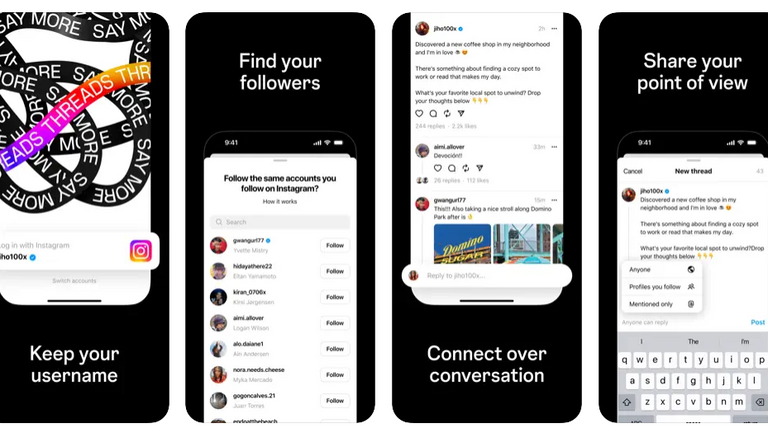
    Meta, the parent company of Instagram, the same organization that owns Facebook, is gearing up to launch its new app called Threads, which is set to rival Twitter. The app, available for pre-order on the Apple App Store, will be linked to Instagram. Ahead of its official launch, Threads seeks to provide a space for text-based conversations and community discussions. Threads will allow users to follow and connect with their favorite creators and engage with others who share similar interests. The app’s interface resembles Twitter, offering features such as reposting, liking, and the ability to control who can reply to posts.

    Screenshots of Threads reveal a dashboard that bears a striking resemblance to Twitter, intensifying the rivalry between Meta’s CEO Mark Zuckerberg, and Twitter’s owner Elon Musk. Meta’s entry into the market comes at a time when users are seeking alternatives to Twitter. Particularly after Elon Musk took over the platform and implemented significant changes that made it more challenging to access.

    Instagram Threads, Bluesky, Truth Social, and Other Competitors

    In one of their ongoing battles, Zuckerberg and Musk even agreed to a physical fight recently. Although the seriousness of their intentions remains uncertain. Musk took another swipe at Zuckerberg, sarcastically praising the sanity of Twitter in response to a tweet about the Instagram Threads. This exchange comes as Twitter announced that its popular user dashboard, TweetDeck, will be placed behind a paywall in 30 days. As part of Musk’s efforts to promote Twitter Blue, the platform’s subscription service. Musk has also limited the number of tweets users can see, citing data scraping concerns.

    Meta’s Threads, on the other hand, is expected to offer free access with no restrictions on post visibility. Meta is joining other platforms like BlueSky and Mastodon in the competition to replace Twitter. While Musk has received praise for his commitment to free speech, he has also alienated some users. Zuckerberg hopes to attract dissatisfied Twitter users and create a genuine alternative. In recent years, apps like Donald Trump’s Truth Social and Mastodon have emerged as Twitter-like platforms. Bluesky and Mastodon experienced increased traffic following Musk’s tweet restrictions. However, Threads has the potential to be the most formidable competitor Twitter has faced thus far.

    Meta executives revealed during a company meeting that Instagram Threads would integrate with ActivityPub. The decentralized social media protocol used by Mastodon. This announcement sparked speculation about a potential showdown between Mark Zuckerberg and Elon Musk. An in-house executive expressed the desire for a platform that is sanely run.

    The launch of Instagram Threads, Meta’s Twitter competitor, is expected on July 6th. According to listings on the App Store and Google Play Store.

  • How Much is Photoshop? [Adobe Pricing Breakdown 2024]

    How Much is Photoshop? [Adobe Pricing Breakdown 2024]

    If you’re considering using Adobe Photoshop, you might be wondering: How much is Photoshop? Adobe offers multiple subscription plans tailored for different users, including photographers, graphic designers, and creative professionals. The pricing varies based on the plan you choose, with options ranging from $9.99 to $52.99 per month. In this guide, we’ll break down each subscription plan, pricing, features, and the best value options to help you make an informed decision.

    Adobe Photoshop Subscription Plans & Costs

    Adobe Photoshop is available through three main subscription models:

    1. Standalone Plan – For those who only need Photoshop.
    2. Photography Plan – Ideal for photographers needing Photoshop and Lightroom.
    3. Creative Cloud All Apps – Best for professionals who need access to multiple Adobe applications.

    Below is a detailed breakdown of each plan, including pricing and features.

    1. Standalone Plan

    Perfect for graphic designers and digital artists who only require Photoshop.

    Plan TypeCostFeatures Included
    Monthly$31.49 per monthPhotoshop CC, Adobe Express, 100GB Cloud Storage
    Annual (Paid Monthly)$20.99 per month ($251.88/year)Photoshop CC, Adobe Express, 100GB Cloud Storage
    Annual (Prepaid)$239.88 per yearPhotoshop CC, Adobe Express, 100GB Cloud Storage

    2. Photography Plan

    Best suited for photographers and editors who need both Photoshop and Lightroom.

    Plan TypeStorageCostFeatures Included
    Photography Plan (20GB)20GB$9.99 per monthPhotoshop CC, Lightroom CC, Lightroom Classic, Photoshop Express
    Photography Plan (1TB)1TB$19.99 per monthPhotoshop CC, Lightroom CC, Lightroom Classic, Photoshop Express

    3. Creative Cloud All Apps Plan

    Ideal for professionals needing multiple Adobe tools like Illustrator, Premiere Pro, and After Effects.

    Plan TypeCostFeatures Included
    Monthly$79.49 per monthAccess to 20+ Adobe Apps, 100GB Cloud Storage, Adobe Fonts
    Annual (Paid Monthly)$52.99 per month ($645.88/year)Access to 20+ Adobe Apps, 100GB Cloud Storage, Adobe Fonts
    Annual (Prepaid)$599.88 per yearAccess to 20+ Adobe Apps, 100GB Cloud Storage, Adobe Fonts

    Which Plan is Right for You?

    Choosing the right subscription depends on your needs and budget. Here’s a quick guide:

    • Choose the Standalone Plan if you only need Photoshop for graphic design or digital art.
    • Choose the Photography Plan if you are a photographer and need both Photoshop and Lightroom.
    • Choose the Creative Cloud All Apps Plan if you are a professional designer, video editor, or content creator who needs multiple Adobe applications.

    Additional Considerations Before Buying

    Before subscribing, here are some important things to keep in mind:

    🔹 Free Trial – Adobe offers a 7-day free trial. Try it before committing.
    🔹 Student Discounts – Adobe provides up to 60% discount for students and teachers.
    🔹 Cancellation Policy – Some plans require an annual commitment, and early cancellation may involve fees.
    🔹 Occasional Discounts – Adobe sometimes offers limited-time discounts, so keep an eye on their website.


    So, how much does it cost? The answer depends on your needs. With plans starting at $9.99/month, Adobe offers flexible options for photographers, designers, and creative professionals.

    Before purchasing, consider your workflow, budget, and whether you need additional tools beyond Photoshop. If unsure, start with a free trial to explore its features.

    Want the best deal? Check Adobe’s official website for current promotions and discounts. Happy designing!


    FAQs About Photoshop Pricing

    1. Can I buy It permanently?
    No, Adobe only offers via subscription—there is no one-time purchase option.

    2. Is there a free version?
    Adobe provides a 7-day free trial, but there is no permanent free version.

    3. Does Adobe offer discounts for students?
    Yes! Students and teachers can get Adobe Creative Cloud for around $19.99 per month, which includes PS and other apps.

    4. Can I switch between Adobe plans?
    Yes, but if you switch before your billing cycle ends, there may be additional charges.

    When choosing between these subscription plans, it is best to consider what use they’ll be serving. Together with the budget. Before making a purchase, getting acquainted with Adobe’s policies, cancellation terms, and fees is one important tip. This is because different subscription types have varying cancellation policies. It’s equally good to try out Photoshop’s free trial before committing to a subscription.

  • Flutterwave and Microsoft Collaborates To Streamline Payments

    Flutterwave and Microsoft Collaborates To Streamline Payments

    Flutterwave, one of Africa’s leading fintech corporations entered into a progressive partnership with technology giant Microsoft. A five-year agreement aimed to reconstruct payment services across the countries in the second-largest continent and beyond. By leveraging Microsoft Azure’s products, Flutterwave will create a new payment infrastructure that facilitates seamless and secure transactions for Africans and international companies, including Uber, Netflix, and Microsoft.

    The collaboration between Flutterwave and Microsoft is a significant milestone for both parties. According to Mike Gaal, the General Manager of Microsoft Corporation, this partnership aligns with Microsoft Azure’s support for Flutterwave’s core operations. Gaal equally emphasizes Microsoft’s mission to empower individuals and organizations worldwide; noting that working with Flutterwave is a step closer to realizing that mission in Africa.

    Olugbenga Agboola, CEO of Flutterwave, expresses gratitude for Microsoft’s support. And recognizes the critical role that Microsoft Azure plays in managing high-volume payment processing. Agboola highlights the strength, credibility, and scalability of Azure; indicating that the collaboration with Microsoft is the logical next step for Flutterwave.

    Gurbhej Dhillon, Flutterwave’s Chief Technology Officer, also hinted at the developer leverage provided by Microsoft’s platform. This would also empower Flutterwave to improve its client services and grow its platform effectively. Looking ahead, Dhillon is excited about the possibilities of building with Azure OpenAI Service.

    The partnership announcement by Flutterwave highlights the company’s dedication to delivering consistently high-quality services to its customers. Microsoft is transitioning key products such as Flutterwave for Business, Send by Flutterwave, Flutterwave Store, and Flutterwave for Fintech Platform onto Azure’s cloud platform.

    How The Flutterwave and Microsoft Partnership is Beneficial

    Flutterwave can maximize some of the services and capabilities offered by Azure to enhance its payment services. With its secure and reliable cloud infrastructure, Azure provides virtual machines and container services. This includes Azure Kubernetes Service for deploying and managing backend services, databases, and APIs. Azure’s auto-scaling capabilities ensure that resources are dynamically allocated based on demand. This would enable Flutterwave to handle high transaction volumes during busy times efficiently.

    Various data storage options, including Azure Blob Storage and Azure Cosmos DB, are available for storing transaction records and accessing data with low latency. Azure prioritizes security and compliance; it provides encryption, access management, and network security features. So as to protect sensitive customer data and ensure adherence to industry regulations like PCI DSS.

    The platform’s analytics and machine learning services, such as Azure Machine Learning, Azure Data Lake Analytics, and Azure Databricks, enable valuable insights. In addition to predictive modeling for fraud detection and customer behavior analysis. Integration with external systems and third-party services is also made seamless through Azure Logic Apps, Azure Service Bus, and Azure API Management.

    Disaster recovery and business continuity are ensured. Through Azure’s global presence and built-in features like Azure Site Recovery for replication and failover. Microsoft Azure equally provides specialized services like Azure Payment HSM for secure key management. As well as Azure Bot Service for creating payment-related chatbots, and Azure Cognitive Services for fraud detection and risk assessment.

  • Business Intelligence Tools For Scaling With Success

    Business Intelligence Tools For Scaling With Success

    It’s no hidden fact that venturing into a business requires some standout features to excel. The era of social media is chock-full of influencers promoting brands and businesses across several media outlets. One would wonder why there are so many brands vying to succeed, with a good number of them failing. Understanding trends using data will help scale their business and improve customer satisfaction; this is where business intelligence tools come to play.

    What are Business Intelligence Tools?

    What are Business Intelligence Tools?

    Business intelligence tools, or BI tools for short, help businesses to identify and understand trends and gain valuable insights from information. By analyzing data, organizations can make well-informed decisions. BI tools are instrumental in identifying patterns within the vast amounts of data a business or organization generates and accumulates over time.

    Now, the real challenge is determining the right business intelligence tools. Since there is a multitude of options available, it can be difficult to find the one that best suits the business. And being able to assess whether a particular tool aligns with the goals of the brand is key. Discover our list of 5 Business Intelligence tools that can scale your business and give you a competitive advantage in your industry.

    Zoho Analytics

    Understanding the data derived from patterns can be quite a challenge, especially for those without a strong technical background. But Zoho Analytics simplifies this process with its user-friendly interface. Users can create cool reports and dashboards using an extensive range of charts and tables. In a nutshell, Zoho Analytics takes complex sets of data and transforms them into easily understandable information.

    Zoho Analytics brings a whole new level of capability to small businesses. Helping organizations effortlessly make well-informed decisions based on data. A great feature of this business intelligence tool is Zia, Zoho’s AI-powered assistant. When people are unsure about the inquiries to make regarding business data or insights, Zia is there to help. Zia collects all the necessary data and provides the user with a comprehensive response. Drawing from past data to forecast future trends. The focus is to show these businesses how to leverage consumer data to predict future purchasing patterns and preferences.

    Netsuite

    Managing business operations when it comes to implementing data effectively is a significant hurdle for most businesses. Netsuite appears to be one of the business intelligence tools streamlining processes in this regard. It presents a comprehensive solution, consolidating all your operational needs into a single software package. Netsuite caters to every aspect of the business; from enterprise resource planning, sales forecasting, and lead generation, to customer relationship management.

    Operating on the cloud, Netsuite is accessible and seamlessly merges with an existing electronic framework to provide a suitable platform to streamline operations and management. Netsuite also helps to efficiently oversee business financial performance. Users can track expenses during operations as Netsuite’s ERP features ensures transparency and precise monitoring.

    One of the most remarkable features of this business intelligence tool is its ability to scale alongside the business. Netsuite readily adapts to new strategies, users, etc, and ensures that the software remains a reliable asset regardless of the size and complexity of your data. With Netsuite, users can confidently navigate the challenges of data management, knowing that they have a strong business intelligence solution that evolves with their growing needs.

    Datapine Business Intelligence Tools

    Datapine is an exceptional data visualization solution for businesses seeking to convert raw data into practical insight. Through this top-notch business intelligence software, organizations can simplify the analysis process; effortlessly examine and share the knowledge acquired from their data, even without advanced digital proficiency.

    Datapine’s user-friendly interface helps to create dashboards and reports, and present data in a manner that is easily comprehensible. Although Datapine caters to people without technical skills, its flexibility allows users to deeply analyze their data, whether they employ the expertise of professional data analysts, or choose to uncover valuable insights independently.

    Oracle

    Oracle BI is another good business intelligence tool and software designed to help businesses make smarter decisions. With Oracle BI, users gain access to a long list of features; cool and interactive dashboards that provide a visual representation of data. It also identifies trends and patterns in data and alerts users to likely opportunities or risks. And if there are specific questions or the need to explore data more flexibly, Oracle BI has got you covered with its ad hoc capabilities.

    Another of the best things about Oracle BI is that it can handle huge amounts of data. Whether it’s collecting or analyzing data from Oracle databases or other sources. There is also a data archiving feature that helps users manage and store their data. It also supports versioning, so users can keep track of changes and easily revert to previous versions if need be.

    Tableau

    By harnessing the capabilities of Tableau, businesses can effortlessly merge data across various systems to create suitable business operations. It does this strategically to ensure no piece of information slips through the cracks. Tableau’s strength lies in its extensive harmonization of data from diverse sources. Their data analytics capabilities help users to access current information so that data visualizations and reports accurately echo recent trends.

    The user-friendly design of this business intelligence tool empowers users of all (including little to no) technical backgrounds to process and transform data into refined illustrations and presentations; charts, reports, dashboards, etc. Tableau comes with several tutorials and aids, for users to gradually learn about the features. To make accurate and constructive decisions in today’s competitive markets.

    Qlik BI Tools

    Qlik Sense is a great BI tool for in-depth reporting and data analysis. This business intelligence software can connect with various data sources, including customer choice surveys or observing market trends. With Qlik, businesses have the necessary information at their disposal.

    One of the standout features of Qlik business intelligence tools is that the user interface is optimized for touchscreen. To simplify the collection of data in the absence of a specified method, Qlik unifies the required information. This spares users the stress of jumping between platforms. Qlik equally works to edit data visualizations, revealing the interconnectedness of different data units. Similar to Tableau and Netsuite, Qlik Sense is ideal for scaling businesses with success.

    Yellowfin

    Yellowfin BI provides a comprehensive solution for integrating business intelligence capabilities. within an all-encompassing analytics platform. This powerful tool combines data visualization, artificial intelligence, etc, to unlock valuable insights. By leveraging its built-in filtering options, users can effortlessly navigate through vast volumes of data to swiftly extract meaningful information.

    What sets Yellowfin BI apart is that it is easily accessible; users can access dashboards from multiple platforms—be it mobile or web-based. Another great feature of Yellowfin is its ability to elevate dashboards and visualizations. Thanks to its user-friendly environment, users can easily transform data into captivating and insightful visual representations.

    Domo

    Domo, an innovative cloud-based business intelligence platform, empowers businesses and organizations of all sizes to analyze data from various sources. This flexibility allows teams to collaborate effectively, and analyze data from anywhere, at any time. Whether you run a small company or a big international corporation, Domo offers visibility. And revolutionizes the way businesses make data-driven decisions.

    By leveraging this powerful technology, Domo enables businesses to go beyond simple data analysis and gain predictive insights into their operations. One of Domo’s standout features is its advanced predictive analysis capabilities, powered by Mr. Roboto, their cutting-edge AI machine. Domo equips businesses with the tools they need to stay ahead; including cash balances and computing returns on investment (ROI).

    While Domo offers solutions to businesses seeking a comprehensive and powerful business intelligence platform, it’s important to understand that there’s a learning curve when initially getting started with the platform. Once users become familiar with its features and interface, the prospects of driving growth and success in business are limitless.