A tech journalist learned a tough lesson recently. But using two-factor log-ons help guard your Google, Facebook, and Twitter accounts from being hijacked. If you haven’t read about Wired reporter Mat Honan’s ordeal at the hands of malicious hackers, take some time and read it now. (I’ll wait.) His story about how a passel of juvenile hackers managed to get into his Apple account and wipe all the data off his iPhone, iPad, and Mac— as well as hijack his Google, Twitter, and Amazon accounts – should be required reading for anyone who uses those services, and especially those of us who’ve blithely linked our social media accounts together using the same e-mail address. Honan didn’t do anything to tick those hackers off. He was targeted simply because they coveted his @mat Twitter handle. Which means that the same thing could happen to you or me just as easily, and we wouldn’t know we’d been jobbed until far too late. One thing Honan notes with regret is his failure to turn on two-factor authentication for his Gmail account. If he’d done that, anyone who tried to access his e-mail would have also had to enter a six-digit PIN, which is randomly generated and sent via text message to his phone. So your first order of business for today: Setting up two-factor authentication for Google. To do that, you’ll need to go into your Gmail Settings (it’s the icon that looks like a little gear in the upper right corner of your inbox). From there:
Select Settings, then Accounts and Import.
Under Change account settings select “Other Google Account settings”.
That will take you to a Web page for your Accounts. Select Security from the left-hand menu. You may be prompted for your password again.
Under “2-step verification” you’ll see “Status: OFF.” Click the Edit button next to that. That will take you to a Web page wizard that will walk you through the process of having a six-digit verification code sent to you via text or a robo-call.
Enter the code into the appropriate box, and you’re all set – for that device, anyway. Admittedly, this is not as easy as simply using a password. You’ll have to do this for every device and every application that uses your Gmail logon, and every device and application doesn’t work exactly the same way. For example, I was able to log on to Gmail using a PIN on my desktop, laptop, and iPad, but not my Android tablet or Windows smartphone. For those, I had to set up separate one-time-use “subtokens” that look something like this: fztz dgpm oxfi uthb. You’ll need to go back to the Accounts Security page and select the Edit button next to “Authorizing Applications and sites” to set up disposable passwords for each device and app. You can also use this tool to manage your list of trusted devices and applications, and revoke access to them at any time. So that covers Google. What about Facebook? Here, too, you can beef up your security settings with two-factor authentication. This will prompt you to enter a similar SMS code whenever you log onto Facebook from a new device. The drill is remarkably similar:
Go to your Facebook Account Settings page (found under the down arrow next to the Home tab).
Select Security from the menu on the left.
Under “Login Approvals” click edit and put a check in the box that appears (see below). You may have to adjust your browser settings to accommodate the cookie that Facebook wants to deposit.
In the dialog box that appears, click “Set up now.” You may be prompted again for your Facebook password and to add your mobile phone number if you haven’t provided one already.
Click Continue. If you’ve done this correctly you should receive a six-character PIN. Enter that and the name of your device into the dialog boxes that appear.
Earlier this year, the Internet was abuzz with what appeared to be a version of Microsoft Word running on the iPad. Today, we’re no closer to seeing Word as a native iPad app than we were when it was spotted briefly in the wild six months ago. That doesn’t mean that you can’t edit or create Word documents on an iPad. There are a number of offerings that bring the Microsoft Office experience to the iPad, such as DataViz’s Docs to Go or Quickoffice, as well as services such as CloudOn, Nivio Online Desktop and InstallFree Nexus. You can even use Microsoft’s web apps to edit Word documents in a pinch, if you have Google’s web browser, Chrome, installed on your iPad. Of the various alternatives available to Word lovers, InstallFree Nexus is an intriguing one, even though it seems to be ill named. Its use of “Nexus” is bound to get the app confused with Google-backed hardware of the same name. Moreover, there’s nothing to “install” — the service runs entirely from the cloud — and there’s nothing “free” for subscribers who want to use Microsoft Office apps from the service over the long haul. Joining the service is fast and easy. During the registration process you provide an e-mail address, create a password and associate a cloud storage service with your account. Storage services supported by InstallFree Nexus include Dropbox, Skydrive, Google drive and Box.com. Once logged in to InstallFree Nexus, you can swiftly import files from your cloud storage service then work on them in any Microsoft Office program. When you’re finished, you can save your file to your cloud storage and return to it from any device that can run a browser, including the iPad’s version of Safari. On the iPad, gestures can be used to work within Word or other applications. A three-finger tap, for instance, displays a virtual keyboard in Word with a traditional QWERTY layout, including numbers and symbols in the top row, and embedded function keys, F1-F12. Apple’s Bluetooth keyboard can also be used with Word in InstallFree Nexus. However, it does require that the virtual keyboard be shut off from the settings menu. A problem Word users will immediately find with using the word processor on the iPad is that most of the icons on the ribbon bar are too tiny to be very useful. And with the ribbon bar and keyboard displayed on the screen, very little text space is left on the tablet’s screen. As a service, InstallFree Nexus doesn’t seem ready for prime time either. Word crashed occasionally. Sometimes the site freezes. My link to Dropbox was dropped and I couldn’t access my files from within Word. And the performance within Word was sluggish. All of which added up to not a very pleasant experience. Currently, InstallFree Nexus is offering a free 60-day trial of its service that includes use of Office 2010 apps. After that, those apps are offered on a subscription basis: $4.99 a month/$49.99 a year for students; $19.99 a month/$199.99 a year for non-students. In addition to offering cloud access to Microsoft programs, InstallFree Nexus offers free access to the LibreOffice suite.
Now a days, the need to communicate and distribution information is very high. People are always looking for ways to share information at a cheaper, more convenient, and faster means. Bulk SMS is a way of sharing information to thousands of people at a time using special customized names as sender id. It is also relatively cheap. While most people keep going online to send this messages to organizations for free, some few has started it as a venture. I will further tell you that one can make a considerable amount of money rendering this service.
Starting a Bulk SMS business is very cheap and requires you to put a little time and money into it. It requires you to have no special skills what so ever, all you need is internet connection (I will suggest A cyber café ). Now lets get started
Goto www.googlebulksms.com or www.linkosms.com (They sell at very affordable prices), register with them and locate the pricing page. Depending on the quantity you are starting with, the price of each unit can range from N1 – N1.5. Start by buying 2-3000 units which will cost about N2,500. Payment most times is made either through bank deposit or using your local ATM card.
Its not buying the SMS that matters, it what you do with it. Next thing you need to do is to spread the word, you can do that by posting simply hand bills. You do not need to goto any press to do this, just type on Microsoft word and print it then make multiply photocopies and post it around.
In most cases, the people that use this service are Churches, Mosques and Schools. Prepare proposal and send to all of them. You proposal should be very interesting and versatile. Tell them they get to send the SMS with Customized Name of their own organization and it is also at a very affordable price too.
Submit your proposal to as much organizations as possible and you will get more profit from it.
When charging them from the service, charge from N4 –N10 per sms. You bought at N1 per SMS. When you send to about 500 people from a particular organization, you make up to N4000.
Start now and write a proposal and send out. You will make over N10 -50000 once you get start with this little venture
It’s such a fantastic widget to force your site visitors to subscribe to your updates via email, like your facebook page or follow you on twitter.
Not only do we acquire the services of an amazing facebook like page we have yet another but extremely beautiful and easy to edit subscription form dozed with new CSS effects. This widget will keep pop-up/slide-out neat and clean and will surely attract visitors to subscribe.
Demo
To see this widget in action kindly our demo page to see a live preview on how it works.
HOW TO ADD A ONE TIME POP-UP / SLIDE-OUT FACEBOOK LIKE BOX WITH CUTE SUBSCRIPTION LINK TO YOUR BLOG.
http://ajax.googleapis.com/ajax/libs/jquery/1.5/jquery.min.js http://yourjavascript.com/11215013191/jquery.colorbox-min.js
<script type=”text/javascript”>
jQuery(document).ready(function(){
if (document.cookie.indexOf(‘visited=true’) == -1) {
var fifteenDays = 1000*60*60*24*30;
var expires = new Date((new Date()).valueOf() + fifteenDays);
document.cookie = “visited=true;expires=” + expires.toUTCString();
$.colorbox({width:”400px”, inline:true, href:”#subscribe”});
}
});
</script>
<!– This contains the hidden content for inline calls –>
<div style=’display:none’>
<div id=’subscribe’ style=’padding:10px; background:#fff;’>
<h3 class=”box-title”>Receive all updates via Facebook. Just Click the Like Button Below<center><p style=”line-height:3px;” >▼</p></center></h3>
<center>
If you need to use this widget on any website platform other than the blogger platform, simple copy the above code to anywhere in the <body></body> section of your website.
Make The Following Changes :
Change Green to custom text or leave it as default, Pink with your facebook username, Blue with your RSS feed Title.
Finally, Save your widget and you are done! Enjoy!
Google over the years has brought a lots of amazing features to improve Blogger platform but they seems to forget about the comment system (is probably one of the worst comment system in existence) or probably they consider it unimportant.
Like most of you I have always admired the comment system of other blog platforms like wordpress, but has waited (I’m still waiting though!) patiently hoping to see a better comment system one day. (Looks like we are not going to see one in the future either).
Why You Need To Quit Your Blogger Comment System??
One of the most effective ways of retaining readers to your blog is by building a little community in your blog, like I mentioned before; Blogger has one of the most crappy comment system in existence; which is the area I think they still need to improve. On my cause of making my blog convenient for you I went for a journey, With a little research (Google Of-course 🙂 ) I managed to grab some Ideas I think I should share with you. My Discoveries!Ouch: This is a very unusual title to give to reason 🙂 but honestly I can’t think of a better title to give to it (you probably should suggest one for me). While I was still using the blogger comment system, I made a very crucial error while posting a long reply on a user comment, that was when I voiced the word “ouch” what do I do? There was no Edit or Preview Option, I had to delete and re-write the entire comment (so bad I guess?). The worst is coming…… No Threading Comments: In other comment system you might have seen a REPLY button or link attached immediately after or below each comments; this is known as threads comment. This all important feature enable you and your readers to reply directly under each comment (Not the ‘@’ trash we normally use), Without having to do some advance xml editing. Now, this is a very important feature for any blog comment system, our dear default blogger comments system do not allow you to reply directly to a comment, this can lead to confusion and Ioften see bloggers having to use ‘@’ to specify which person the were replying to for example ‘@quoyo’ ‘@gotmelsh’ I can now post a reply and it will be attached to the bottom of each comment. Enticing Comment Form: The comment form you probably have seen on wordpress comment system allow users to comment as a guest with their Name and URL, This feature entice your readers to comment on your blog post. ‘Would you want to comment on a blog that doesn’t give user the privilege to share there own blog/site?’ ‘Other people probably won’t like to either’ (that’s the devil’s tempting offer you can’t reject’) or if they have a wordpress account they can comment with that profile.But they can also comment with their social network and online profiles like *Twitter *Facebook *Yahoo *OpenId (Did You Know Your Blogger URL is an open Id?). When you leave a comment you can also add an image or video to your comment instead of adding an image or video URL that will take users out of your blog. Now that’s is a good example of a good comment system.We have ‘that devil’s tempting offer’ but please do not spam us 🙂 Email Options: This is probably the most important feature that blogger comment system lack. ‘Ask me why?’ This is becourse these option allows your readers to choose if they want to receive new comments or replies posted to the posts they have earlier commented on directly to their email whereby helping the user to know when a reply is posted to his reply… What you probably don’t know is that this feature help you a great deal to maintain a good number of returning visitors. please, remember to choose this option while commenting here becourse I would love to see you again. Ratings: Many of you know that I’m on bloggers, most time what really takes me to bloggers is to check how many people that voted (Rate) for my talks (comment). If there are so many people who does the same thing out there, then you can imagine how many returning visitors who will often come back to your blog to check if anybody voted for them. Our blogger comment system lacks this feature too… “You are beginning to realize how much features you are missing” Hold on I still need to tell you something and please do not forget to tell me something too 🙂 Your comment is very valuable to me. Moderate Options: Most Comment system other than blogger comment system allows you to reply your post comments directly from your dashboard and email. You receive an email when a new comment or reply is posted on your blog post, the same as with Blogger comments however the options to reply to a comment are much more versatile.
When I’m away from the computer for a few hours if I have received for example fifty comments I can go to my Intensedebate dashboard to manage the comments.From here I can read the comments and see which posts the comments were posted on.I can click on each comment and reply or delete the comments from the dashboard, now i can reply to comments on one page without the need to go to the blog. I Have Heard Enough! Give Me Alternative? Well I have that too, I will be lying if I said I did it all my own but I can assure that about 60% of them are actually my on Idea and please, before I share mine with you promise me you would share yours with me, ‘Ok Deal!’ Lets ride on…. I will be providing you with my idea source,. With this lets move on to our next topic. Top Five Alternatives To Your Blogger Comment System If you want to get rid of default blogger commenting system and get a better commenting interface, then you can opt for any of these commenting systems.
Intense Debate – I don’t know why I mentioned this first, maybe becourse I’m currently using it on this blog, but what ever the reason might be I want to assure that this is one the best comment system in existence ‘don’t know if it is the best, you will tell me???’ Though most bloggers complain that it does not have the option to export your old blogger comments to your Intensedebate data base, this is true as you might have noticed that most of our posts still have that ‘archaic’ blogger blogger comment system. This is due to we choose to install intensedebate only on new post. I will be publishing an article soon on how to add intensedebate comment system on your blogger blog so make sure you subscribe to our update via email, twitter or facebook. (I promise I won’t spam you; I hate spam too). This is now owned by Automattic, the makers of WordPress and is totally free!Features:
Comment Threading
Reply By Email: Respond to and moderate comments with ease via email
Commenter Profiles: Special Profiles for commenters so that there is more interaction between people.
Moderation/Blacklisting
Reputation Points & Comment Voting
Twitter: Tweet your comments
Widgets: widgets like blog’s comment stats, the most recent comments made on blog, most popular posts and the most recent comment
FriendFeed:(Best Feature)When comments are made in the context of a blog on FriendFeed, IntenseDebate will republish them back on the blog.
Plugins API:Developers can enhance the comments by plugins like Seesmic video comments, PollDaddy polls, YouTube videos, smileys.
Gravatar support.
Facebook Connect and Twitter Sign-in: People comment via their facebook and twitter profiles and can further broadcast the content.
Commentluv: This is not a new name to wordpress users, just incase you don’t know; this ‘luvly’ feature automatically put the latest post of your readers to their comments. (You can choose to deactivate it)
IntenseDebate In Action
DISQUS -While on my re-search journey, I happen to read some user reply and discover that this is really the bloggers choice ‘– It is the same thing that Mashable.com uses for its comments.’(I’m not saying is the best; you still have to me which is the best) I once used it on my blog ‘not this one’ but had to remove after I learned about the commentluv (yes, there is no option for commentluv). One Interesting feature of disqus is the option to export old blogger comment to your disqus comment system database: By so doing you will not loose any of comments.Features:
Social Media Reactions: (Best Feature) Display mentions and comments about post from other services around the web (e.g. Twitter, FriendFeed, Digg, YouTube).
Trackbacks
Seesmic Video Comments
Pagination
Threading
Facebook Connect and Twitter Sign-in: People comment via their facebook and twitter profiles and can further broadcast the content.
Widgets like Popular posts and top commenter’s widgets.
Blacklisting as well as whitelisting people.
Disqus In Action
JS-Kit(Echo) This is also another JavaScript based commenting system.Echo offers both free and paid packages!The free package comes with threaded comments and an interface where the commenter can add videos,images,similes, etc.The commenter can also format his comments using a simple WYSIWYG comment editor. I really don’t know much about this system (and couldn’t quite link to the source page) as I have never tried them before but I do hope that their a some of you out there that do know one or more things it ‘I honestly hope you share your ideas with me; I’m very Interested’ Or you could as well try it and share your experience with us.Features:
Spam control with Akismet
Banning : Ban a person by the user name or by IP address
Gravatar Support
TrackBack/PingBack: Trackbacks/Pingbacks can be automatically be included in comments.
Comment Ratings and Karma: Users can rate comments.
Blogger Comment Sync: (Best Feature) Transparently switch back and forth between native Blogger comment system and JS-Kit Comment system with no loss of comments because comments are always synchronized with Blogger.
Emoticons: 16 emoticons are available.
Threads: Threading is also available
Pagination: Comments can be paged.
Commentluv a feature to give love to your commenter is available to only this commenting system
Photo as well as video comments.
JS-KIT (ECHO) IN ACTION
Important: Please make sure to backup your blogger templates before trying any of this system so as to remain on the safer side.
These are the three most popular commenting systems.They come with threaded commenting with Gravatar based profile images,which can make you commenting system look more professional.I personally prefer Intense Debate over the others.
Note: These comment forms come with an option to show the comment form on new posts only(means posts with 0 blogger comments)!That means your old comments will stay intact and will use the old blogger comment form.(This is optional.. you can also revert all posts to use the new commenting system.But in that case, you cant display the existing comments easily..)
These are nothing but my own lame idea and re-search, I know there hundreds others but it’s your turn to tell me about them (Remember the promise you made to me earlier). ‘to share with me’
The way you list your merchandise on Ebay influences the success you can achieve in your business. Your merchandise listing is like your shop front, and people will decide whether to buy your products or not based on your product listing and description. This article outlines some essential tips that you can use in your listing to make sure that you succeed in selling your merchandise on Ebay.
Have your products’ keywords in your product description.
The titles of your product listing must grab the readers’ attention.
Make your product description as detailed and accurate as possible. Make sure that your product description will help people to know the nature and condition of what you are selling. Put yourself in the shoes of a potential buyer, and in your description, provide as much detail as you would wish to get about the product if you were considering buying it. Don’t lose bids and sales simply because people don’t know what you are selling precisely. If a potential customer asks you a question about the product that you have listed, make sure that you reply them as soon as possible.
Add photos or images of your products as this will help the potential customer to see how the product looks like.
Make sure that your product is listed in the most accurate category.
If the product that you are selling needs to be shipped to the buyer, provide enough information about the shipping, the cost of shipping and the estimated time it will take to ship the product. It is also easier if you sell products that are not heavy and bulky. You must also offer fast or slower delivery options so that people who want to get the products delivered early have an option to get the products on time.
If your products need shipping, you must specify your location as this will help the buyer to know that they will need to pay for shipping.
Provide several payment options so that your potential customers can use the payment method that suits them best.
It is also important that you list your products with low prices. This will encourage many people to bid.
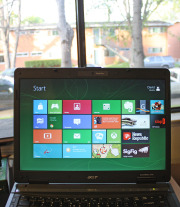
How do the specs for the upcoming Microsoft Surface for Windows RT and Surface for Windows Pro compare with the Apple iPad? Here’s what we know. Surface will change your expectations of what you can do with your tablet. First and foremost, you are no longer buying into a dedicated mobile OS and its corresponding app ecosystem. Instead, you’ll be able to buy one app and use it on both a tablet and a Windows 8 laptop or desktop PC. While the Metro face of the two Surfaces will be the same, the hardware flavors are fundamentally different. Surface RT will compete most directly with Apple’s iPad and the current crop of Android tablets, all of which run on power-efficient ARM-based processors. And Surface Pro—though still a tablet—targets Ultrabooks and other ultraportable laptops. Click on the chart below for a comparison of the two Surface models with other tablets.
Surface RT vs. the iPad and Android Tablets
Tech specs: Surface RT comes with a USB 2.0 port standard (critical for connecting external storage and peripherals), along with a MicroSD card slot and Micro-HDMI video out. Most Android tablets have a MicroSD card slot and a Micro-HDMI port as well, but very few have a full-size USB port. Apple’s iPad famously has no ports, with the sole exception of its proprietary dock connector. At the chip level, Nvidia’s Tegra 3 ARM processor powers the Surface RT. Most Android tablets run a version of the Tegra 3, as well, or they use another ARM-based processor. The iPad carries Apple’s own processor, which is also based on the ARM architecture. Click for a full-size view of the chart.Storage on the Surface RT is similarly upscale, with a minimum of 32GB. The iPad and most Android tablets start at just 16GB. Among Android tablets, Asus’s Transformer Pad Infinity TF700 and Acer’s Iconia Tab A700 are the two exceptions, with 32GB baseline models. Screen and resolution: Microsoft lists the RT’s display as “HD” rather than as “Full HD,” which likely translates into a resolution of just 1366 by 768 pixels. That won’t compete with the iPad’s Retina display, or even with those of Android tablets such as the Transformer Pad Infinity TF700 and the Iconia Tab A700 (both with resolutions of 1920 by 1200 pixels). The Surface RT’s optically bonded display, which eliminates the annoying air gap between the screen and the glass, should help overcome its resolution shortfall. Microsoft does cite its ClearType font-display technology, but we won’t know how much ClearType can compensate for the gap in pixel density until we have the Surface tablet in hand. Click for a full-size view of this chart.Physical specs: Microsoft didn’t supply complete numbers, but it did say Surface RT should be about 0.37 inch thick—thinner than many competing tablets and in a dead heat with Apple’s iPad. Current estimates put the Surface RT’s weight at 1.49 pounds, or 0.05 pound heavier than the current iPad. That’s a negligible difference, but the iPad itself got heavier this year, while Android tablets are consistently moving in the other direction, as consumers have come to expect. At 1.49 pounds, the Surface will be about 0.2 pound heavier than the Toshiba Excite 10 or the Asus Transformer Pad Infinity. The Surface tablet’s design is unique. It features a comfortably angled bezel created with ergonomics in mind; a balanced arrangement of internal components that make Surface feel lighter; and a built-in kickstand for conveniently using Surface in a variety of scenarios. Productivity: In this respect Surface RT is likely to shine. Unlike Apple’s iOS and Google’s Android, Microsoft’s Windows 8 provides the ability to view two apps at a time on one screen, as well as having additional apps multitasking in the background. This flexibility is closer to what users are accustomed to having on a desktop or laptop computer. Plus, Surface RT will include Office Home and Student 2013 RT (with Word, Excel, PowerPoint, and OneNote).
Surface Pro vs. Ultrabook Laptops and Windows 7 Tablets
Tech specs: Surface Pro will come with 64GB or 128GB of storage and an Intel Core i5 CPU (Microsoft has not yet revealed the clock speed). By contrast, Ultrabooks have anywhere from 128GB to 320GB of solid-state or hard-drive storage, and feature Intel Core i3, Core i5, or Core i7 CPUs. Microsoft hasn’t disclosed how much memory its Surface Pro will have; Ultrabooks average 4GB of RAM, comparable to what you’d find on an ultraportable or all-purpose laptop. Surface Pro outdoes most Ultrabooks, though, with a MicroSDXC card slot, a USB 3.0 port, a Mini DisplayPort for video output, and a dual digitizer for digital inking with a stylus. An example of a Surface screen; click for a full-size view.Screen and resolution: Preliminary specs simply state that Surface Pro has a “Full HD” 10.6-inch display, which would suggest a display resolution of at least 1920 by 1200 pixels. That minimum spec would put it on a par with the best Android tablets from Asus and Acer, but those displays are half an inch smaller, so they have a higher pixel density. And none of the Android models compares with the 9.7-inch Apple iPad at 2048 by 1536 pixels. Like Surface RT, Surface Pro will also feature Microsoft’s ClearType (standard in Windows 8). Physical specs: Surface Pro’s overall physical design is the same as Surface RT’s; but this model will be thicker, at 0.53 inch. Nonetheless, Surface Pro looks more stylish and snappy than current Windows 7 slates, and it’s thinner than many Ultrabooks. Surface Pro’s weight is estimated at 1.99 pounds, which is significantly lighter than the average 3- to 4-pound Ultrabook and comparable to current Windows 7 tablets. Productivity: Intel’s Core i5 is powerful enough to let you tinker in Photoshop, handle complex spreadsheets, or play games. Surface Pro won’t come with Microsoft’s Office apps, though. Still, with digital inking plus one of Microsoft’s keyboard cover options, Surface Pro could be the ultimate ultraportable. If you can make do with a 10.6-inch display, then you can benefit from Surface’s inherent flexibility.
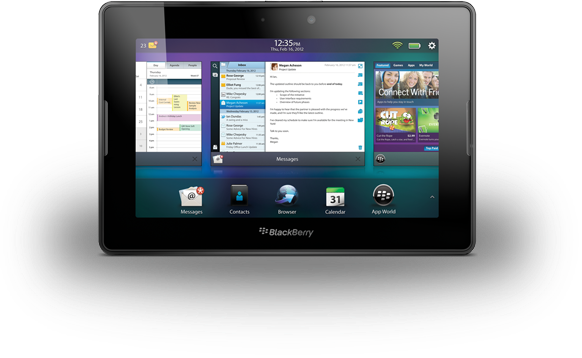
Is this new PlayBook RIM’s last hurrah in the tablet competition? A new 4G BlackBerry PlayBook will go on sale next week, a year after Research In Motion introduced its first tablet. The updated 7-inch PlayBook will include 4G connectivity and 32GB of storage, but RIM has yet to name a price or a U.S. availability date. The first in line to get their hands on the new PlayBook will be Canadians from August 9, via carriers Bell, Rogers, and Telus. “In the coming months” RIM also expects cellular-data enabled versions of the PlayBook to reach the U.S., Europe, and other countries. But even with the Canadian availability date coming up so quickly, RIM still hasn’t said how much the new PlayBook would cost. If there’s no 4G LTE connectivity available in your area or carrier, RIM says the 4G LTE BlackBerry PlayBook tablet can automatically adjust to connect on a HSPA+ network. Otherwise, there’s very little changed hardware-wise between the original PlayBook and the 4G model. The tablet still has a 7-inch 1024-pixel by 600-pixel resolution display, dual HD video cameras, HDMI capability, and stereo speakers. The processor is bumped up to 1.5GHz from 1GHz in the Wi-Fi-only model, there’s still 1GB of RAM on board, and you only get one storage option: 32GB.
One Last Chance?
RIM’s 4G BlackBerry PlayBook TabletThe 4G LTE BlackBerry PlayBook tablet could be the make or break device for RIM. Due to key software omissions at launch, such as the lack of a native email client, the PlayBook suffered from lackluster sales. In fact, RIM had to take a $485 million hit last year because it was sitting on a huge inventory of unsold tablets. The arrival of much cheaper 7-inch tablets from the likes of Amazon did not help either, as they undercut the PlayBook by up to $300 (Amazon’s Kindle Fire is $199 while the PlayBook launched at $500, and then began to be heavily discounted). There’s still hope for Research In Motion though. After several delays, the anticipated BlackBerry PlayBook OS 2.0 will ship with the new tablet. All the features you would expect are now there, including email, calendar, contacts, and video chat. But given the lack of any substantial improvements to the tablet (for example the $200 Google Nexus 7 has a higher-resolution display), adding 4G connectivity to the PlayBook might still be too little, too late for RIM.
Ignoring Facebook’s privacy options can trip up users in a number of ways. Avoiding Facebook and Twitter Disasters
Take some practical steps to control what others see about you on Facebook and Twitter.Ignoring Facebook’s privacy options–some of them fairly new and not well known–can trip up the social-networking site’s users in a number of ways. Here are some that everyone who has a Facebook account should be aware of.
Oversharing With the Boss
The disaster:Ann played hooky from work, calling in sick, and spent the day sunbathing, updating her Facebook status on her laptop all the while. The next day, her boss confronted her with the evidence that she wasn’t really ill, causing severe embarrassment and a reprimand (plus a day of docked pay). The solution: In this day and age, professional and personal lives often become intertwined, and Facebook can be ground zero for this. You might momentarily forget that you have “friended” your boss, and that he has the same access to your ramblings on Facebook as do your real-life drinking buddies. But you can change that. Using Facebook’s Lists settings might have made the most sense for Ann. Lists, one of the newer features of Facebook, allow you to organize people into groups and then assign each group different levels of access to your information on Facebook.
‘Limited Profile’ is a default group for less-wanted contacts, but you’ll see need to specify what rights those who are in it should have.Lists let you set who can see what on your profile. For example, if you’ve added someone as a friend but aren’t sure about them, you can relegate them to a list that you name “Limited Profile,” which will limit how much of your profile that person may view and interact with. You can also create lists for work, school, special projects, or anything else, but by default the lists don’t change how your profile displays. To work with Lists, click the Friends button (top bar) and +Create in the left column under Lists-or just put people on any list by using the ‘Add to list’ drop-down menu next to their name. Next, you need to specify how much of your information on Facebook members of each list can see. To do this, visit the Privacy Settings page (hover over ‘Settings’ in the top right of the screen, and click Privacy Settings inside the box that pops up; or go to www.facebook.com/privacy), then select Profile. Here, select Customize…from the drop-down menu next to whichever section you’d like, and type the name of the list in the box under ‘Except These People’. For Ann, dropping her workmates into a “work” list and dialing down that group’s access to the bare minimum would have saved her a lot of trouble. Specifically, she should change the ‘Status and Links’ setting so as to exclude the Limited Profile list. (Note, however, that updates to your profile from third-party applications are generally not blocked by these privacy settings.) UPDATE (4PM 6/24): With Facebook’s just-announced status publisher upgrade (now in beta), you will (or will soon) see an option (a gray lock with a dropdown menu) letting you control who sees these updates on an individual basis. For broad posts, “Everyone” will let the whole world (including Google and other off-Facebook locations) see the update. For more sensitive posts you can change the setting to “Friends” – or use fine-grained control through “Custom,” restricting the post to be visible only to certain friend lists.
He Knows Where You Live
The disaster:Getting far away from ex-boyfriend Bob wasn’t the main reason Mary moved to Pittsburgh, but it was one of the main benefits. So when Bob showed up at her new job, she was naturally disturbed. How did he find out where she was, she asked. “It was on your Facebook profile,” he replied. The solution: All users have extremely fine-grained control over what gets on their Facebook page, but few take full advantage of these features. The entry to all Facebook privacy settings is on this page. But thoroughly exploring all four of its subpages can take hours. (In this article, we’ll point you to some of the most important settings.)The controls are found in the Privacy Settings page under ‘Profile’, reachable as outlined above. Here you’ll find a list of ten items on your profile that you can turn on or off, each to a different group of Facebook users. ‘Profile’ lets you choose whether to block people from seeing anything beyond the most basic information (name and network) on your profile page, while ‘Basic Info’ allows viewing of gender, birthday, relationship status, and the like. ‘Personal Info’ opens the door a little wider-to your “about me” section, interests and favorites, and so on; ‘Status and Links’ controls who can see your latest status update. Most of the categories are self-explanatory (just click the question-mark icon if you need help) and can get pretty detailed. But this is also an advantage: If, like Mary, you don’t want to advertise where you work, you can turn off that detail here. Also, click Save Changes at the bottom of any Facebook settings screen, or your settings will not be updated. What should you change these settings to, then? Facebook offers numerous choices for each category: Everyone, My Networks and Friends, Friends of Friends, Only Friends, and Customize. Everyone is self-explanatory; My Networks and Friends is less inclusive, limiting profile viewing to anyone you’re friends with or with whom you share a network; Friends of Friends essentially gives you two degrees of openness instead of one; and Only Friends is exactly how it sounds. The Profile settings under Privacy allow you to control which Facebook users can see your profile and which ones cannot.The Customize option gives you complete command over your network settings: You can limit viewing of your profile to certain networks and, in some cases, subsets of that network. Current students, for example, can prohibit faculty or other undergrads from viewing their profile. How much to lock things down is up to you. In Mary’s case, making her Profile visible to ‘Only Friends’ would have prevented an unpleasant surprise visit.
The Stalker Problem
The disaster:Jessica is worried about the creepy messages and Wall posts being left by some guy she doesn’t know but whose friend request she accepted. She doesn’t want to delete her account, but she does wish to get rid of the stranger and set her profile to be discovered only by those people she allows. Illustration by Mick Wiggins The solution:First, Jessica should add the possible stalker to a Limited Profile list, as outlined earlier. If you have a hostile stalker, you can remove and/or block them: Go to the person’s profile page and then click the Remove from Friends option at the bottom of the left column. If the person persists in friend requests, you can block the stalker altogether by going to the Privacy page and typing their name in the search box in the ‘Block People’ region. Standard Facebook-style search results will pop up; just click Block Person next to their name, and they won’t find you in a search, or view any part of your profile. For a stronger level of privacy and security, you can temporarily “go dark” by making your profile virtually invisible. Go to the Privacy settings page and click Search. Set the Search Visibility drop-down selection to Only Friends. This tells Facebook not to show your profile in public searches on the site. The Search Result Content section lets you choose whether to show photos or lists of friends and links. If you don’t want to be contacted at all, remove the check marks by both options. You can also use the Public Search Listing option to allow or prevent your profile from appearing in major search engine results such as those of Google.
Amazon has big plans for its coming onslaught of tablets to compete with Apple’s iPad and Google’s Nexus 7. Reuters reports Staples US Retail president, Demos Parneros as saying there are five or six upcoming tablets, among them a a 10-inch model. That 10-inch model would clearly be positioned against iPad, as well as a plethora of Android tablets. Rumors about a bigger Kindle Firehave been circulating for some time, but since Staples sells the Kindle Fire, this 10-inch model is a bit more believable now.
Amazon’s first-generation Kindle Fire.According to previous reports from BGR, the 10-inch Kindle Fire will be feature-packed with a quad-core processor, front-facing camera, microUSB port, and possibly an HDMI-out port. The new tablet will apparently be a major step up from the current Kindle Fire in terms of appearance and design.
Other Upcoming Kindle Fires
The original Kindle Fire tablet which Amazon debuted in September last year is due for a refresh any day now (rumors point to the end of July), so we could count the 7-inch Kindle Fire 2 as one of those other many tablets Amazon has planned. It’s not clear if the five to six tablets Pareneros mentioned are actually really two tablet models (a 7-inch and a 10-inch) with different storage options or even display resolutions—or if another Kindle Fire size is coming too. The Kindle Fire has a 1024 by 600 pixel resolution, but NPD DisplaySearch recently told CNet about an additional 7-inch model with 1280 by 800 pixels resolution—on par with the flying-off-the-shelvesGoogle Nexus 7. That high-resolution display will help make the Kindle better suited for reading. NPD DisplaySearch analyst Richard Shim also noted he expects an 8.9-inch Kindle Fire 2 with a 1920 by 1200 pixels full-HD display. It might not be the iPad’s (2048 by 1536 pixels) retina display, but the bump in pixels would certainly make the Kindle Fire more competitive. Digitimes alsoreported an 8.9-inch Kindle Fire is coming. Whatever this bunch of Kindle Fire tablets turn out to be, tablet wars will be in full swing before the holidays.
Apple and Samsung have been locked in unceasing patent battles over their offerings, and now some people are accusing Samsung of even ripping off the design of Apple’s retail stores. But Apple doesn’t own the corner on using an open floor design and it certainly didn’t invent the idea of minimalism. And any retail store that sells phones and gadgets is going to have tables for playing with them. Microsoft stores do. Samsung recently opened its first North American retail store in Burnaby’s Metropolis at Metrotown, Vancouver, British Columbia and it can’t be denied that it does resemble an Apple Store with its open floor space, demo tables, and blue-shirted staff. But is Samsung intentionally copying Apple Store design?
Image compilation from Apple/Vancouver, B.C. SunImage from BetaNews.com Apple uses wood tables and Samsung has gone with white. Big deal? Not really. From what I’m seeing, Samsung’s store looks similar to countless exhibits you’d see at CES. As for the blue shirts that both Apple Store and Samsung Store employees wear, it’s worth remembering that Samsung’s company color is blue. This is hardly the first time Apple and Samsung have tangled. The former managed to get the latter’s Galaxy Nexus smartphone and Galaxy Tab 10.1 pulled from store shelves recently. A graphic from BetaNews’ Joe Wilcox is a great summation of the attitude many people have regarding Apple’s incessant insistence that other companies, Samsung in particular, are ripping it off. What’s your impression? Does it look to you as if Samsung intentionally cloned the Apple Store in its new retail location?
This week’s roundup of iOS apps is full of old favorites: Cookie Monster gets an app of his own, the creator of Angry Birds returns with Amazing Alex, and the popular Tiny Wings gets an update.
Already this week we told you about a new magazine-reading app called Next Issue, the new TED Books app, a new cloud storage service from Neat, and an updated offering from Stay.com–and we also brought you a roundup of the best comic-reading apps, just in time for Comic-Con.
Here are other new and updated apps that caught our eye this week.
Amazing Alex: The creators of Angry Birds have unveiled a new game that features neither rage nor avians. Amazing Alex is a $1 game for iPhone that features a “whiz kid”–one who comes up with Rube Goldberg-style chain reactions to do chores like cleaning his room. As Alex, you get to devise just how those creations will work, and share your most successful ideas with friends. There are 35 “interactive objects” to build with, and more than 100 levels to challenge players. Users can also download and play levels created by other players. None of those levels, however, involve destroying pigs.
Corel Cinco for Painter: This isn’t a standalone app, but artists and graphic designers may find it useful nonetheless: Corel Cinco for Painter is a free iPad app that makes your tablet into a companion tool for users of the desktop Corel Painter 12 program. The app lets users drag and drop buttons onto the screen–for sketching, accessing a color wheel, and other activities–to let users complete projects efficiently. The button placement can be customized according to your hand size and finger placement. Corel promises the app will make it easier to create an uninterrupted workflow by spending less time in Corel Painter clicking on icons and hot keys.
Google+Google+/Twitter: It was a big week for social networking services on iOS. Google+updated its free iOSapp with full iPad support, the addition of the new Events feature, the ability to attach photos to posts, as well as the option to start and join Hangouts. Twitter’s free app, meanwhile, offers a range of updates: Avatars are now tappable, so that user profiles can be viewed more easily, and users can now set up notifications that let you know when particular people have tweeted. There are other improvements and changes, including a new Twitter bird, as well as an enhanced ability to see media posted to the service’s partner websites.
The Great Cookie Thief: COOKIES!!!!! Omnomnomnomnom! The folks who gave the world The Monster at the End of This Book have returned, shifting their sights from Grover to the Cookie Monster. The Great Cookie Thief, a $1 offering for iPhone and iPad, looks at first glance to encourage both obesity and larceny–but of course, there’s more going on here. Unlike its predecessor, The Great Cookie Thief is less narrative-driven and more focused on activities: Users can make wanted posters in their efforts to track down the thief, just one of a number of tools designed to help children build their visual identification and observation skills. There are also tips for parents on how to help their kids use the app. But no, the app does not include Cookie Monster’s “Call Me Maybe” parody video.
Spacecraft 3D: We’ll admit to worrying that NASA might be getting better at producing awesome multimedia than it is at putting astronauts into space. Luckily, that multimedia is really cool. Have you seen the Seven Minutes of Terror video about the latest Mars probe? Now there’s Spacecraft 3D, a free app for iPhone and iPad from the Jet Propulsion Laboratory, which gives users an up-close-and-personal look at the variety of satellites being used by NASA to explore the solar system and beyond. The app lets users see how the probes move, as well as get a look at the engineering feats used to construct them. Spaceflight is cool.
Tiny Wings. Image from iTunes.Tiny Wings: Macworld’s Phil Michaels called an earlier version of this $1 iPhone game “sneakily challenging and frighteningly addictive.” Now developer Andreas Illiger has updated Tiny Wings to version 2.0, adding a new Flight School game mode in which you compete against AI opponents, as well as 15 levels of gameplay, and upgraded graphics for Retina display. There’s also now iCloud support, allowing users to sync the game with its iPad version. (Said iPad version also includes a local split-screen multiplayer mode.) The fundamentals of gameplay remain familiar, however: The birds have (natch) tiny wings, and use hills and momentum to give them flight throughout the game. Fly, little birds, fly!
Could things really be this bad? From the embarrassing hack of a conversation between the FBI and Scotland Yard to a plethora of data breaches, security snafus have ruled the first half of 2012. Here’s a look at some of the worst snafus month-by-month.
The year started off with the FBI raiding the cloud file-sharing and storage Megaupload site, based in Hong Kong and founded by 38-year-old New Zealand resident Kim Dotcom, on content piracy charges to the tune of $175 million. And that action, supported by the U.S industries which hailed it as bringing down a big fish that was devouring their intellectual property, has triggered a year’s worth of lawsuits and retributions from all even remotely involved. It turned confrontational when outraged users of Megaupload were invited by hactivist group Anonymous to attack law enforcement and industry websites supporting the raid by downloading do-it-yourself denial-of-service software such as Slowloris. But by March it was apparent some of this DoS advice came from hackers who were merely tricking users into downloading Trojan software, such as Zeus, from infected links. Another twist: A New Zealand judge in March ruled an order granted to law enforcement allowing them to seize luxury cars and other personal effects of Dotcom is invalid mainly because the local police commissioner applied for the wrong type of seizure order that was requested by the U.S. That ruling mean Dotcom has a chance to get back some of his enormous bling, like his Rolls-Royce and pink Cadillac, seized during his arrest at his mansion outside Auckland. But of course, attorneys for the U.S. are arguing otherwise,. Dotcom, free on bail but subject to electronic monitoring, is expected to undergo extradition proceedings in August. Other January Snafus: ” Online retailer Zappos disclosed hackers had likely broken into its network and stolen information on Zappos.com customers, including name, address, billing and shipping address, phone number and the last four digits of credit-card numbers and cryptographically scrambled passwords stored in hash form. Zappos informed customers all passwords were expired and customers should create a new one. ” Researchers from Seculert discovered what they say is a botnet command-and-control serverholding 45,000 login credentials Facebook users exploited by a pervasive worm, Ramnit, infectingWindows and designed to infect computers and steal social networking usernames and passwords. ” Source code used in older Symantec enterprise security products, Symantec Endpoint Protection 11.0 and Symantec AntiVirus 10.2, as well as older versions of pcAnywhere and Norton Internet Security, was exposed online by hackers calling themselves Lords of Dharmaraja with a leader named Yama Tough in Mumbai. The gang claimed to obtain the code from a third-party associated with the Indian military. Symantec, acknowledging the authenticity of the source code, also said the security firm had been subject to the hackers vainly trying to extract an extortion payment of about $50,000 in exchange for not posting the stolen code. Symantec engaged in a cat-and-mouse game to catch them, with help from law enforcement — but so far without apparent success. Symantec said it isn’t certain where the hackers obtained the stolen cache of source code, and the security incident did prompt Symantec to devise security patches it advised some customers using older software to apply, with additional outreach to customers around the incident related to the stolen source code. FebruaryRight in the midst of a conference call the FBI was having with its agents and law-enforcement officials overseas at Scotland Yard, cybercriminals hacked their way into the phone conversation, recorded it and posted it online. The conversation was about hackers facing charges in the U.K. The group Anonymous took credit for the intercepted call. The FBI said it appeared likely the cybercriminals may have hacked into a law-enforcement official’s email to get the information for the conference call dial-in. Other February Snafus: ” Brazilian banks were targets for distributed denial-of-service attacks, with massive assaults against HSBC Brazil, Banco da Brasil, Itau Unibanco Multiplo SA and Banco Bradesco SA. Hactivists took credit for the DDoS spree. ” Whistleblowing website Cryptome.org, dedicated to exposing confidential information, was compromised by an intruder that loaded an attack code that tried to launch drive-by exploits at visitors to the site. ” The University of Florida had to notify 719 individuals that their Social Security numbers were improperly stored on a state website operated by the Bureau of Unclaimed Property for more than six years. ” Verizon had to acknowledge the Verizon 4G LTE network was knocked offline again just two months after its last serous outage. The outage on Feb. 22 lasted from about 10 a.m. to 1:20 p.m. ” Microsoft’s Azure cloud infrastructure and development service experienced a serious worldwide outage on Feb. 29. Microsoft later blamed the outage on a “Leap Year Bug” that was triggered in a key server housing a certificate that had expired on midnight on Feb. 28, and a time-calculation control hadn’t taken into account the extra day in the month of February this year. ” Taiwan-based Apple supplier Foxconn was hacked by a hacker group calling itself Swagg Security, apparently in protest related to media reports about poor working conditions at the electronics manufacturer’s factories in China. The hackers posted usernames and passwords that they said would allow attackers to place fraudulent orders under other companies’ names, including Microsoft, Apple, IBM, Intel and Dell. ” The FBI arrested a computer programmer in New York and charged him with stealing proprietary software code from the Federal Reserve Bank of New York (FRBNY). The software is known as the Government-Wide Accounting and Reporting Program (GWA), which handles all kinds of U.S. government financial transactions, and it cost over $9 million to develop. The accused thief, Bo Zhang, a contract employee at FRBNY, used the GWA code in a private business he ran to train individuals in computer programming. Zhang, a Chinese citizen in the U.S. on a work visa since 2000, is also known as “Bryan Zhang,” and in a plea agreement in April he pled guilty to theft of government property, admitting he’d copied the code onto an external hard drive and then transferred the GWA program to a home computer, knowing that was wrong. March At least 228,000 Social Security numbers were exposed in a March 30 breach involving a Medicaid server at the Utah Department of Health, according to officials from the Utah Department of Technology Services and Utah Department of Health, which theorized that attacks from Eastern Europe bypassed security controls because of configuration errors. In May, Utah CIO Steven Fletcher resigned because of it. Other March snafus: ” The Vatican found its websites and internal email servers subject to a weeklong attack after the Anonymous collective said it was felt justified in this by the fact that the Vatican Radio System has powerful transmitters in the countryside outside Rome that allegedly constituted a health risk, including supposedly “leukemia and cancer,” to people living in the vicinity. Another justification given were claims the Vatican allegedly helped the Nazis, destroyed books of historic value and that the clergy sexually molested children. ” Hackers in the LulzSec group associated with the broader Anonymous movement found the tables turned when they were arrested by the FBI and European law-enforcement agencies — and it was LulzSec leader Hector Xavier Monsegur, alias “Sabu,” who turned in his friends as part of a deal to work as a stooge for the FBI after being arrested in New York City last year. ” By the end of March, LulzSec claimed to be “reborn” and took credit for hacking a dating website for military personnel, MilitarySingles.com, leaking more than 160,000 account details from its database. ” Dutch police arrested a 17-year-old suspected of compromising the account data on hundreds of servers belonging to telecommunications operator KPN. The teenager, arrested in the Dutch town of Barendrecht, “made a confession,” according to Dutch authorities. In the wake of the hacking spree, KPN said it would appoint a chief security officer and set up a permanent control center to monitor its systems. ” A flaw was discovered in Barclays contactless bank cards that could allow customers’ data to be stolen and used fraudulently with them knowing about it, according to an investigation by ViaForensics in conjunction with Channel 4 News. But Barclays dismissed the claims as inaccurate. ” Security firms knew there was trouble when Kaspersky Lab identified code-signed Trojan malware dubbed Mediyes that had been signed with a digital certificate owned by Swiss firm Compavi AG and issued by Symantec. Symantec said it found out that the digital certificate’s private key held by Compavi had indeed been stolen; whether by an insider or an outside attacker wasn’t known. ” A security firm based in Slovakia, ESET, asserted a website operated by the country of Georgia has been used as part of a botnet to conduct cyber-espionage against that country’s residents. But ESET researchers admitted they aren’t sure whether the Win32/Georbot they have been monitoring is being directly operated by the Georgian government or by cyber-spies through a compromised Georgian agency. AprilThe Federal Communication Commission fined Google $25,000, asserting the search-engine giant impeded an investigation into how Google collected data while taking photos for its Street View mapping feature. The FCC maintained in a report that Google “deliberately impeded and delayed” the investigation for months by not responding to requests for information and documents. But the FCC also said it won’t take action against Google over its data collection because it still has questions it wants answered. The FCC had subpoenaed an unnamed Google engineer — now known to be Marius Milner — but he had apparently declined to testify, invoking his Fifth Amendment rights against incriminating himself. Other April snafus: ” Hactivist group Anonymous brought down the websites of trade groups U.S. Telecom Association and TechAmerica, apparently for their support of the cybersecurity bill proposed by Rep. Mike Rogers that would allow the private companies and the government to share any information “directly pertaining to a vulnerability of, or threat to” a computer network. Privacy advocates, including the ACLU and Center for Democracy and technology, contend the bills shreds privacy protections. ” A U.S. grand jury charged two residents of China with 46 criminal counts, including infringing software copyrights and illegally exporting technology to China, for allegedly operating a website that sold pirated software used in engineering, manufacturing, space exploration, aerospace simulation and design, and other fields, with a commercial value of other $100 million. Xiang Li, 35, was earlier arrested by agents from the U.S. Immigration and Customs Enforcement’s Homeland Security Investigations in Saipan, Northern Mariana Islands. Chun Yan Li remains at large. Both face charges in the U.S. District Court for the District of Delaware. ” A 31-year-old Russian national living in New York, Petr Murmylyuk, was charged with hacking into accounts at Fidelity, Scottrade, E*Trade and Schwab in a complex scheme that involved making unauthorized trades that profited the gang he recruited to open bank accounts to receive the illegal proceeds. The brokerage firms said they lost $1 million because of Murmylyuk’s fraud. ” VMware’s ESX source code was stolen and posted online, but VMware said the code, amounting to a single file from sometime around 2003 or 2004, doesn’t mean any increased risk to VMware customers. Security firm Kaspersky said it believes the code was stolen from a Chinese company called China Electronics Import & Export Corporation during a March breach. ” A terminal at New Jersey’s Newark Liberty International Airport was shut down for more than an hour on April 27 after officials discovered that a baby hadn’t been properly screened. The baby in question had been handed back and forth between the parents after a metal detector went off sounding an alarm with the mother holding the baby. The father had already gone through the screening, and the parents and baby left the checkpoint to head to the gate. But Transportation Security Administration officials decided to “err on the side of caution” to shut down the terminal and go locate the baby to make sure it went through screening. Some passengers that had already boarded flights said they had to evacuate it and go through security screening again. Speaking of the TSA, one of the agency’s critics, security expert Bruce Schneier, who is involved in a lawsuit with the agency to get them to stop the TSA’s full-body scanner program, had been invited to testify before Congress about the TSA but the House Committee on Oversight and Government Report then “uninvited” Schneier last March after the TSA formally complained about him, obviously preferring not to be challenged directly by him right in front of Congress. ” Automotive manufacturer Nissan admitted a data breach involving employee user account credentials had occurred, and that it had to spend some time cleaning its network of the malware apparently responsible for that before disclosing the breach. ” The hacker who stole Facebook’s source code, Glenn Mangham of York, England, offered an explanation of why he did it, saying, “I was working under the premise it is sometimes better to seek forgiveness than to ask permission.” He said he did little to hide his actions and that even if he got caught, Facebook would let him off the hook. But that didn’t happen, and Mangham was sentenced to eight months in prison in February, though the sentence was reduced to four months by an appeals court in April. He said he only had the source code for three weeks, but never had any intention of selling it to anyone who might exploit it for scams, for example. Mangham even made the grandiose claim that his basic good intentions saved Facebook from “potential annihilation.” ” Payments processing services company Global Payments acknowledged a data breach of up to 1.5 million card numbers had been stolen in a data breach, and in June also said it was investigating whether a server containing merchant applicants’ information had also been breached. Global Payments said its PCI compliance status had been revoked by some of the card brands because of the breach and it was working to regain it. MayHackers claimed to have breached the systems of the Belgian credit provider Elantis and threatened to publish confidential customer information if the bank did not make an extortion payment of $197,000. Elantis confirmed the data breach but said the bank will not give in to extortion threats. Meanwhile, Anonymous claimed it hacked a U.S. Department of Justice website server tied to the U.S. Bureau of Justice Statistics and claimed to release 1.7GB of stolen data from it, with the statement, “We are releasing it to end the corruption that exists, and truly make those who are being oppressed free.” The data was offered on The Pirate Bay. And then Yahoo accidentally leaked the private key that was used to digitally sign its new Axis extension for Google Chrome. Axis is a new search and browsing tool from Yahoo. Security blogger Nik Cubrilovic discovered the package included the private crypto key used by Yahoo to sign the extension, noting it offered a malicious attacker the ability “to create a forged extension that Chrome will authenticate as being from Yahoo.” Yahoo was forced to release a new version of its Axis extension for Google Chrome after that. June The University of Nebraska in Lincoln acknowledged a data breach that exposed information of more than 654,000 files of personal information on students and employees, plus parents and university alumni. The information was stolen from the Nebraska Student Information Systems database; a student is the suspected culprit. Other June snafus: ” Hacker gang Swagger Security strikes again, this time breaching the networks of Warner Bros. and China Telecom, releasing documents and publishing login credentials. The group said it notified China Telecom of the hack by planting a message in the company’s network. “Fortunately for them, we did not destroy their infrastructure and rendered [stet] millions of customers without communications,” Swagger Security, also known as SwaggSec, said in a note. ” About 6.5 million cryptographic hashes of LinkedIn user passwords were stolen and posted online, a breach LinkedIn acknowledged though it didn’t discuss specific numbers, which may be much less due to duplicates. LinkedIn invalidated the passwords of impacted users and the company said emails will be sent to users whose passwords were compromised, though it warned about updating passwords via links sent in email. ” Right after the LinkedIn fiasco, dating site eHarmony also confirmed a breach of 1.5 million passwords that were hashed. ” The Federal Trade Commission announced that data broker Spokeo will pay $800,000 to settle FTC charges it sold personal information it gathered from social media and other Internet-based sites to employers and job recruiters without taking steps to protect consumers required under the Fair Credit Reporting Act. ” The New York Times article asserting that the cyber-weapon Stuxnet is a creation of the U.S. with Israel, and was launched in a covert action authorized directly by President Barack Obama against an Iranian facility suspected of developing a nuclear weapon, has stirred up a firestorm of controversy in Washington about leaked information. Now that another cyber-weapon for espionage, Flame, has been discovered and linked directly with Stuxnet, there’s more concern, with the United Nations division International Telecommunication Union warning countries that Flame is dangerous, and some saying the U.S. is losing the moral high ground as its secret cyberwar efforts become known. Ellen Messmer is senior editor at Network World, an IDG publication and website, where she covers news and technology trends related to information security. For more information about enterprise networking, go to NetworkWorld. Story copyright 2011 Network World Inc. All rights reserved.
Yahoo says it has fixed the flaw that allowed hackers to steal more than 450,000 passwords from one of its many services.
The company also provided more information about whose passwords had been pilfered. “We have…now fixed this vulnerability, deployed additional security measures for affected Yahoo! users, enhanced our underlying security controls and are in the process of notifying affected users,” the company announced in a post to its blog early Friday. Yahoo has offered no specific information about the attack, how it was carried out or even when. Itconfirmed the attack Thursday. The hacker group D33Ds Company took responsibility for the breach, saying it had exploited a basic SQL injection vulnerability in a Yahoo service to steal the usernames and passwords associated with 453,000 accounts. The group published the passwords and e-mail addresses on the Web.
Hack Affects Associated Content Accounts
Yahoo also confirmed that the stolen account credentials belonged to registered users of its Yahoo Contributor Network, which was previously known as Associated Content. Yahoo Contributor Network is a platform that generates high-volume, low-cost content by letting writers photographers, and others share their work with Yahoo members and earn money based on the traffic their content generates. Users who contribute to the network are required to sign in using a Yahoo, Google or Facebook ID.
Associated Content, which was founded in 2005, was bought by Yahoo for just over $100 million in May 2010. Yahoo renamed the service in late 2011, when it also launched Yahoo Voices, a portal where users access content posted by the Yahoo Contributor Network. According to Yahoo, only people who registered as providers with Associated Content before the 2010 acquisition were affected by the password theft. “[The] compromised file was a standalone file that was not used to grant access to Yahoo! systems and services,” Yahoo maintained. Just under a third of the stolen passwords were linked to accounts registered to a yahoo.com e-mail address, security company Rapid7 said Thursday. Significant chunks of the file, however, were composed of Gmail (23.6 percent of all accounts) and Hotmail (12.2 percent) addresses. All users with older Associated Content accounts, no matter the e-mail address used, should immediately change the passwords for those e-mail accounts as well as any identical or similar passwords used to secure other online services or websites, security experts have said. Rapid7 security researcher Marcus Carey said Thursday that the file published by D33Ds included 123 government e-mail accounts — ones ending with “.gov” — and 235 military-related addresses (ending with “.mil”). Among the government e-mail accounts, Carey found several associated with the FBI, the Transportation Security Administration (TSA) and the Department of Homeland Security (DHS).
Security Experts Blast Yahoo
Security experts have been scathing in their criticism of Yahoo, in large part because the passwords were stored in plain-text, making the hackers’ job of exploiting the stolen accounts a breeze. Mark Bower, a data protection expert and executive at Voltage Security, said, “It’s utter negligence to store passwords in the clear.” Rob Rachwald, director of security strategy at Imperva, also took Yahoo to the woodshed. “To add insult to injury, the passwords were stored in clear text and not hashed (encoded),” Rachwald wrote in a blog post. “One would think the recent LinkedIn breach would have encouraged change, but no. Rather, this episode will only inspire hackers worldwide.” The LinkedIn breach Rachwald referenced came to light last month, and involved approximately 6.5 million encrypted passwords belonging to members of the networking service. In its Friday blog, Yahoo again apologized to users affected by the password theft.
The world is changing rapidly, don’t let your pains-taking articles go without credits. What am about to introduce to you are mostly used by cooperate news websites like ehow and the likes. This widget is a free service provided by tynt, it automatically add a credit (attribution) links to any text that is copied from your blog or website, it works on blogger, wordpress and websites.
Why is important to use the tynt widget? If you added the floating Social or social media button we earlier discussed in our forum then I suppose many people will be bookmarking or sharing your post using this button. Now when someone shares your article via email our any of the sharing options it automatically add your link at the bottom of the post. Like me, you might be wondering how you can acquire the services of this great widget in your blogger blog, wordpress blog or website. No need to hurry, listen and let me brief you on what you really need to know about this widget.
Important: If you are running a tutorial blog and share a lot of codes, it is potentially recommended that you do not add this to your blog as it will automatically and some texts to the code you are sharing.
Install Tynt on your site
Here we go, follow the simple steps below to install this feature on your blogger blog, wordpress blog and website.
Submit your Email and in the Domain field submit your website address without adding http:// and the back slash (/) at the end of URL. Your link should look as follows:
e.g: If you are using a sub-domain your link should like this: eobasi.blogspot.com If you are using a full domain then your link should look like this: www.ewtnet.com
3. Accept the privacy agreement and hit Submit
4. Now you will be provided with a code. Do not copy it and first Click the customize Script button just below that code
5. Then click the customize attribution button on next page
6. You can now customize what text to display and what to hide. If you wish you can only display the read more link and disable Attribution and social profile links by keeping their fields empty.
Submit your twitter and Facebook usernames if you would like to show them below copied text.
You can also decide whether to display the article URL or Page Title or both. Set URL to canonical. Set placement to “below the copied text” for better chances of being ignored by the copier.
See the screenshot below for settings:
7. Click Save and then press Done
8. Copy the code and go to your Blog (blogger or WordPress). Inside your template search for the closing head tag
</head>
Paste the tynt script just above this tag.
Tip: Blogger users may go to Template > Edit HTML > Proceed and then search the tag.
Tip: Wordpress users will find the head tag by going to Appearance > Editor > header.php
10. Save your template and you are all done!
Visit your blog and copy a snippet of any text you like and then paste it anywhere to see the attribution links working just fine.
Track Reader Engagement
By going to your Homepage at tynt account, you will see 4 options to track the text being copied.
SEO:
Keywords: This is where you will see which keywords are copied the most
Content
Social
You play around with these options to take maximum benefit out of this free tool.
Adsense is one of the most trusted way of making money online but after handing series of suspension to publishers it becomes potentially unreliable to use adsense.
Don’t get me wrong: Many people started blogging for the sole reason of earning money and after they put in so many hardwork to setup a decent blog they still found their adsense disapproved or suspended.
Now that doesn’t sound good at all, that was why I came up with this tutorial on how to make adsense your 12th choice for making money online.
Here Are The Lists Of The Top 11 Alternative to Adsense
Clicksor:Clicksor offers contextual ads based on your site content. You’re paid 60% of what advertisers. They provides in-text ads, text banners, image banners and even popup-unders.The payment process is via paypal, check or bank wire. The minimum payout is $50 if your payment process is via bank wire and paypal or $100 if your payment process is check.
Chitika: If you wish to run a different ad platform on your blog alongside Google Adsense, you should consider choosing Chitika. It complies with Adsense policies and they offer great contextual ads based on users’ search query and this gives you a high CPM. The minimum payout is $10 and it’s either by check or Paypal.
Luminate: This is very different from others and it’s ideal for you if you use lots of images on your blog. It notes the keywords that have been tagged with your image and displays relevant ads.The minimum payout is $10 which can either be through PayPal or Standard Cheque.
Bidvertiser:Bidvertiser works a bit differently from others. It allows publishers to sell ad space directly to advertisers and also delivers text and image add. They also offer a mouth-watering payout of $10 via paypal or check.
Adbrite: Adbrite is a trusted name in contextual advertising and it’s been said to be a major alternative to Google Adsense. The default payout is $100 but you can set it to any amount above $5. payment is by check and paypal
Addynamo:Ad Dynamo offers pay per click advertising worldwide for both web and mobile. Ad Dynamo was actually where I had my first experience on PPC and is very cool and you sometimes get $0.50 per click. The payout is only $20 and you can get your money through paypal or check. The one problem you may encounter withthem is the way they advertise their program on your blog when they’ve got no ads to serve and it takes a very long time before real ads start showing on your blog.
Adstract:Adstract is a global video-based advertising network that specializes in video ads, video distribution and monetization. Is particularly similar to adsense (But they don’t get your account suspended) But has a quicker payment system. They pay through check ($100 minimum payout), wire transfer ($300 minimum payout) and payoneer ($100 minimum payout).
Buysellads: Buysellads is an online advertising platform that brings publishers and advertisers together directly and this advertising platform allows advertisers to choose which website to display ads on based on the site content and advertisers budget. Lots of bloggers with good traffic are earning big with them but they charge 25% of your earning for the service they offer. You can withdraw through Paypal, cheque or bank wire transfer and the minimum payout is 50$.
Infolinks: Infolinks offers in-text ads and and it’s the best in this aspect. The in-text ad is unobtrusive and you can as well use it along with Google Adsense. Minimum payment is 50$ for Paypal and debit cards and 300$ for bank wire transfer.
Kontera: Just like Infolinks, Kontera offers in-text advertising and it won’t take up any space on your blog. It turns keywords to ads and you can use it along with any other contextual advertising platform you use. You get paid by Paypal or cheque and the minimum payout is 50$.
Yahoo! The Yahoo! Bing Network Contextual Ads program enables web publishers to easily and effectively earn advertising revenue. Publishers can now use the Media.net self-serve platform to create and customize ad units that display relevant text ads consisting of sponsored links and ad topics from the Yahoo! Bing Network. They only accept publishers per invitation and the payment method is paypal and check.
Google Adsense:Now adsense is what might have disapproved or suspended your account quite a number of times. Do you still want to continue it or try other alternatives? Share your views below.
Google AdSense & Blogger: An introduction
If you’ve been thinking about monetizing your blog and are unfamiliar with how Google AdSense works, here are the three things you need to know:
1. AdSense is built into Blogger: You can easily sign up and start showing ads on your blog, without having to leave Blogger, by clicking on the “Earnings” tab in your dashboard. After completing the AdSense application, the next step is to designate where you want the ads to appear on your blog. Once your application is approved, we’ll start serving ads and you’ll start making money. And unlike many other blogging platforms, Blogger doesn’t take a cut of your revenue.
2. AdSense serves relevant ads on your blogs: AdSense works by matching text and image ads to your blog based on your content and the types of users that visit your site. For example, if you write about running, your readers may see ads next to your post about running shoes and equipment. Ads are created and paid for by advertisers who want to promote their products.
3. Great content is key: Posting high quality content is the best way to maximize your returns with AdSense. It’s important to take a little extra time defining your topic, creating a post that is engaging and matters to your readers. The more interesting and appealing your content is, the more likely your readers will be to click on the ads on your blog. http://www.youtube.com/embed/32VknlEnYgc?feature=player_embedded This short video will also give you a quick overview of AdSense and how it works with Blogger:
Stay tuned to the Blogger Buzz blog for more tips and tricks about monetization in the coming weeks. If you are already a google adsense user I recommend you read How To Avoid Getting Your Adsense Account Terminated
Important Notice: Tweet this article with the bookmark social media share below to stand a chance to win an ipad or start making money with your twitter account (it works only with your twitter account and the more articles you tweet the more you stand a chance to win an Ipad)
Building an amazing desktop computer is easy, but even after you stuff your new system with the latest hardware, hook up your cabling, and make room for your giant monitor, you’re not quite done. Make it easy on the eyes with this handy guide.
Building a desktop computer that’s amazing is easy, if a little time-consuming. But even after you’ve stuffed your new system with all the latest hardware, hooked up your cabling, and cleaned off your desk for a giant monitor, you’re not quite done. Your new desktop masterpiece is going to do you little good if you can use it for only a few hours each day. And you have the failure of your own biology to thank for that: Humans were made to be hunters, gatherers, and thinkers, not desk jockeys. Spend too much time in front of your screen, and you’re going to wreck your eyes—and no, we’re not just channeling our worried mothers. Computer Vision Syndrome (CVS) is a real condition with real symptoms that you’ve likely already noticed at some point in your tech-centric life: bloodshot peepers staring at you in the mirror after a long day of gaming; the tired, dry feelings that you attempt to relieve by rubbing your eyes; or perhaps a bit of burning, itching, or increased sensitivity to light. There are plenty of ways to keep your eyes from rioting every time you fire up your favorite Web browser. Most of them are super-easy to set up and require more time than money, although fancier (and pricier) solutions can give you a beautiful desktop setup and happier eyeballs all at once. In any case, your eyes will forever thank you for your investment.
Basic Lighting
While you might think that you’re looking at a crisper, more pleasing picture in a dim or otherwise darker environment, you’re just forcing your eyes to work that much harder to process extreme differences in contrast. And a similar situation happens when you set up your screen in a location that creates a ton of glare: not only does your picture look horrible, but all that light mucks up the quality of your picture and forces your eyes to do a lot more refocusing to achieve better clarity. So if you’re sitting at a computer under fluorescent lights and you aren’t at work, just stop: This kind of overhead lighting is one of the harshest environments for your eyes to deal with.
The best setup? Plain ol’ natural light, best deployed in the form of a window angled perpendicular to your computer screen. You might be tempted to slap your monitor or laptop in front of a huge window to enjoy some scenery while you work, but the brightness of your exterior view could stress your eyes out. You could always use blinds or curtains to limit the amount of light coming in when it’s especially bothersome, but that kind of defeats the point of the view, doesn’t it? When placing your screen perpendicular to your natural light source, you want to make sure that you’re balancing ambience with glare reduction: Angle your display so that extra light isn’t bouncing off your screen. And take some time to play around with your PC setup; a few minutes now will save you countless hours of agony later. Again, blinds or curtains can be an eye-saving device if the sun is really giving you trouble during certain hours of the day. You’ll want to supplement this natural light (or lack thereof, as the day turns to evening) with artificial lighting. And overhead lighting—even incandescent—still isn’t the best option due to its potential for glare. But you shouldn’t go to the other extreme, either. Resist the urge to purchase the classic “spotlight” desk lamp and slap its narrow cone of light somewhere on your desktop. Remember, you’re also trying to avoid sharp differences in contrast. You don’t need that much light around a monitor or laptop screen, and what you pick needs only to supply indirect light in a general area around your desk and display. A small lamp on a desk that creates a pleasant diffusion of light behind your display and prevents glare is great; a full-sized floor lamp can also work wonders, provided it physically fits into your particular desk setup. As for bulbs, consider those of the natural light (and low wattage) variety: If you need more brightness, switch to higher wattages or add another light source.
Advanced Lighting
If you’re looking for a setup that looks a little bit cooler than a tiny lamp on your desk—or if your particular desktop setup has no room for any bulkier lighting equipment—you might want to consider trying out some bias lighting. You’ve probably seen the concept before, likely on a Philips HDTV with ambient lighting (or as Philips brands it, “Ambilight”). The gist is simple: LED lights attached to the rear of your monitor blast the background with colored light (desktop systems only—unless you really want to silly up your laptop), helping to reduce glare in dimly lit environments, to make your picture appear sharper, and to transform your boring ol’ monitor into a glowing beacon of cool. As Sound and Vision’s Timothy Seppala describes the benefits of bias lighting, in an interview with Ars Technica, “It works because it provides enough ambient light in the viewing area that your pupils don’t have to dilate as far. This makes for less eyestrain when a flashbang gets thrown your way or a bolt of lightning streams across the screen.” Tim actually wrote a great guide to getting the most out of your HDTV for PCWorld that includes some tips on lighting your home theater for optimal movie watching, and you should definitely check it out if you’re a serious PC enthusiast seeking to optimize your display. When it comes to PC building, though, the problem with bias lighting is that few devices and software combinations exist that will allow you to achieve the perfect setup: ambient lighting that changes to match the colors appearing on your screen. We’ve had a lot of luck with Mad Catz’s Cyborg Gaming Lights. They’re a bit pricy at $100, but you get two little lighting modules that contain three LEDs (red, green, and blue) for creating any color you’re looking at. You just need to plug the lights into two of your system’s free USB ports (after plugging the lights’ power adapter into the wall), stash them behind your monitor, angle the lights up toward the wall, and fire up a software utility. You can then pick the color that you want to live behind your screen or set your lights to slowly rotate through a series of colors. You can also have the lights dynamically switch their appearance based on whatever happens to be on your screen—be it a game, a movie, or a picture. If you’re looking for a more inexpensive way to build bias lighting into your desktop monitor, you can always pick up Antec’s Halo 6 LED Bias Lighting Kit. For a mere $13, you can slap a strip of six white LEDs to the rear of your display. These lights—or a similar style that you can pick up at your local IKEA (Ledberg or Dioder)—aren’t going to modulate to fit whatever’s on your screen. But at least you’ll be able to reap the benefits of bias lighting without breaking your bank account. A bias lighting strip that you would attach to the rear of your display.
Beyond Lighting
Other tricks you can employ to reduce the harmful effects of extended computer use on your eyeballs include installing little apps to remind yourself to take a much-needed eye break. Chrome users can grab the extension Gimme a Break! and Firefox fans can hit up the simple Auto Timer extension to schedule some rest time for tired eyeballs. For every 20 minutes you spend staring at a screen, you need only to focus your eyes on something else for 20 seconds—that’s not so hard, is it? The software fun doesn’t end there. Odds are good that you’re running your display at fairly high brightness and contrast levels, as monitors are sometimes shipped with factory-default settings that use inordinate amounts of brightness to convince you that the picture is awesome. Not good. You’ll want to fire up the Lagom LCD monitor test pages and use their instructions to set your monitor’s settings to their correct levels. Why blast your eyes with excessively bright light if you don’t have to? Your monitor’s color temperature can also adversely affect your eyes after prolonged periods of staring. An app like F.Lux (click on the Download link at the top of the site) will automatically adjust your monitor’s temperature to match the time: Cooler lighting during the day, mimicking the temperature of common daylight, and warmer lighting in the evening, when “you probably shouldn’t be looking at the sun,” says F.Lux. Finally, you can also opt for a pair of geektastic computer glasses to help you handle your display temperature situation and reduce screen glare—we’re speaking specifically of Gunnar Optiks’ line of Advanced Computer Eyeware (the company’s term, not ours). Gunnar Optiks claims that its glasses also help increase the moisture within your eyes—a function commonly performed by blinking, which one tends to do much less when focusing on a computer screen. We can’t say whether Gunnar’s glasses turn eyeballs into swimming pools, but we did tend to notice less eye fatigue (and didn’t seem to have the same headaches as before) after a few marathon computing sessions when equipped with its glasses. Their yellow tint does take some getting used to, however!
Important Notice: Tweet this article with the bookmark social media share below to stand a chance to win an ipad or start making money with your twitter account (it works only with your twitter account and the more articles you tweet the more you stand a chance to win an Ipad)
Having a high page rank is a good way of marketing your blog or website to advertisers.
Here I’m going to showcase to you some of the links that will help you increase your page rank.
But before I continue I would like to introduce you to a website you can check your website or blog page rank they also give suggestions on what you need to do to increase your website grade.
Websitegrader provides you with a complete website analysis, ranging from a full SEO analysis to the a complete details of your website social media activities. With Websitegrader, you can compare your website with another website or blog and also receive updates regarding your website via email. Features:
Mozilla’s new Firefox 13 browser may have just barely landed on users’ PCs, but already forward-looking fans can check out the beta version of Firefox 14–and the Aurora version of Firefox 15, too. Most notable in Firefox 14 are new security features that “make it easier for users to control their Web experience,” according to the official announcement late last week on the Mozilla blog. Several new features in the upcoming version of this popular free and open source browser are designed to make life better for users, in fact. The final version isn’t expected until July, but here’s a rundown of some key improvements you can expect.
1. HTTPS by Default
In the new Firefox 14 beta, HTTPS is enabled by default for Google searches to help protect users “from network infrastructure that may gather data, modify or censor search results,” Mozilla explained. This feature also stops third-party sites from gathering search data when you click on items on a search results page. “We look forward to supporting additional search engines as they enable SSL searches,” Mozilla wrote.
For sites with an EV certificate, Firefox 14 displays a green lock icon and the site owner’s name (Click image to enlarge.)2. A New ‘Red Flag’
Also included in the latest Firefox beta is a new way to display the verified identity of a website in the browser’s Awesome Bar, or URL field. Specifically, a globe icon positioned next to the domain indicates a site not using SSL encryption, while sites with SSL encryption include a lock icon and show “https.” Sites that have an Extended Validation (EV) certificate, meanwhile, are indicated by a green lock icon and include the name of the site owner. Sites with mixed http and https content show a gray triangle icon as a warning. Bottom line: a quick visual guide to the security level of the site you’re visiting, making “spoofing” of secure sites much more difficult.
3. More Control Over Plug-ins
The upcoming Firefox 14 lets users control how plug-ins like Flash and Quicktime play through a new feature that can add a “play” button to all plug-in content; users can then simply click “play” to begin viewing immediately. “Future releases will include more specific customizations and a robust interface; for now, you can experiment with the feature by selecting plugins.click_to_play to ‘true’ in about:config,” Mozilla explained.
4. Better Lion Support
For Mac users, Firefox 14 now offers native full-screen support of OS X Lion 10.7, providing “a richer and more immersive browsing experience,” as Mozilla puts it.
5. URL Auto-Complete
Last but not least, Firefox 14’s Awesome Bar now auto-completes URL domains as you type them, potentially making the process quicker than ever. There are also a few key new features for developers in the Firefox 14 beta, including a pointer lock API and pseudo class lock. And what of Firefox 15? The Aurora version of that software is now available as well. The most notable new addition there is native PDF support–a feature Google’s competing Chrome browser has had for some time. Neither of these new browser releases is designed for production purposes, of course, but if you’re interested in checking them out, they’re both available as free downloads for Windows, Linux, and Mac. Firefox 14 beta can be found in Mozilla’s beta channel; the early Firefox 15 is on the Aurora page.
Important Notice: Tweet this article with the bookmark social media share below to stand a chance to win an ipad or start making money with your twitter account (it works only with your twitter account and the more articles you tweet the more you stand a chance to win an Ipad)
Between its use of SPDY by default and speed gains through Mozilla’s “Project Snappy,” Firefox 13 has been generating excitement for some time already. Now, the final version of the software is here at last.
Mozilla on Tuesday launched this latest version of its popular free and open source browser, which comes packed with numerous significant new features that promise to make life better for users in myriad ways. If you already use Firefox, this new update will likely be on its way to you automatically through Mozilla’s now nearly silent update process, which debuted in the Windows version of Firefox 12. If you’ve been using something else to browse the Web, though, this would be a great time to give Firefox a fresh look. The video below offers an overview of what’s new, but here are a few key reasons why Firefox 13 is well worth checking out. 1. Speed Though SPDY has been included in Mozilla’s browser since Firefox 11, Firefox 13 marks the first time it’s been enabled by default. Designed as a successor to HTTP, SPDY reduces the amount of time it takes for websites to load, so “you will notice faster page load times on sites that support SPDY networking, like Google and Twitter,” according to today’s official announcement on the Mozilla blog. 2. Security SPDY also delivers a boost in security to Firefox 13 thanks to the fact that it encrypts all communication with SSL so as to make browsing more secure. 3. A New Home Those of us who have been using Firefox for some time will notice a freshly redesigned home page in version 13. Now included, for example, are icons at the bottom of the page that provide easy access to bookmarks, history, settings, add-ons, downloads, and sync preferences via one-click shortcuts. http://www.youtube.com/embed/HRp4a_24cp8?feature=player_embedded 4. A New Tab Experience Firefox 13 also offers a better experience when you open a new tab, similar in many ways to how Google’s Chrome browser does it. Specifically, you’ll see thumbnails of your most recently and frequently visited sites. The software also lets you customize the New Tab page by adding or removing thumbnails based on the pages you visit most. 5. More Speed I wrote last month about Mozilla’s “Project Snappy,” and several key improvements from that effort combine to give Firefox 13 yet more speed. For example, when restoring a browsing session, Firefox first loads the tab you are currently viewing, then it loads background tabs on demand when you click them. “It’s an improvement that makes Firefox start faster and use less memory,” Mozilla explains. Also resulting from Project Snappy are an improved mechanism for reducing Firefox’s memory usage, a faster “first paint” when the browser is launched, and several other improvements. 6. It Speaks Your Language Last but not least, Firefox 13 adds support for the Khmer language, making the browser accessible to an additional 15 million users around the globe. Firefox is now available in more than 85 languages. Want to see the full release notes for Firefox 13? They’re available on the Mozilla site. Want to give the software a try? It’s a free download for Windows, Linux, or Mac.
Important Notice: Tweet this article with the bookmark social media share below to stand a chance to win an ipad or start making money with your twitter account (it works only with your twitter account and the more articles you tweet the more you stand a chance to win an Ipad)





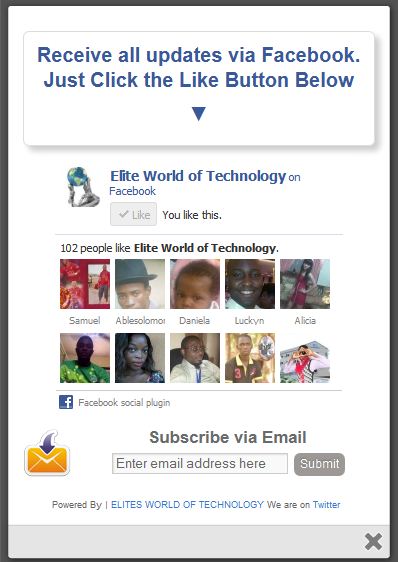


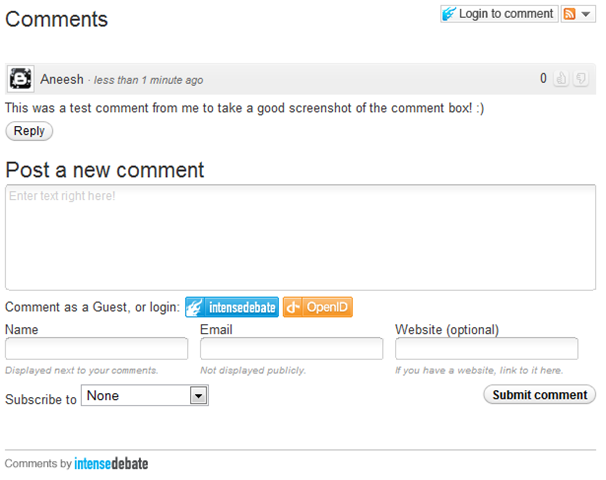

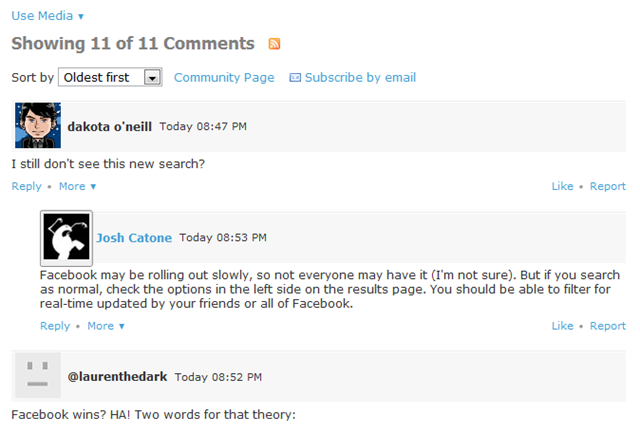
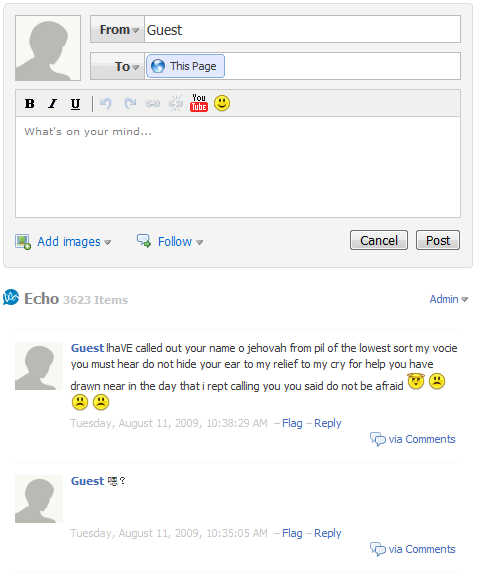
 Surface will change your expectations of what you can do with your tablet. First and foremost, you are no longer buying into a dedicated mobile OS and its corresponding app ecosystem. Instead, you’ll be able to buy one app and use it on both a tablet and a Windows 8 laptop or desktop PC.
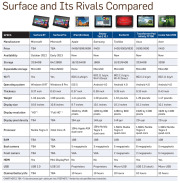 Tech specs: Surface RT comes with a USB 2.0 port standard (critical for connecting external storage and peripherals), along with a MicroSD card slot and Micro-HDMI video out. Most Android tablets have a MicroSD card slot and a Micro-HDMI port as well, but very few have a full-size USB port. Apple’s iPad famously has no ports, with the sole exception of its proprietary dock connector.
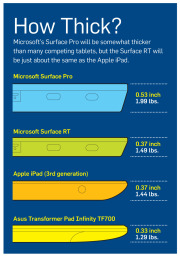 Click for a full-size view of this chart.Physical specs: Microsoft didn’t supply complete numbers, but it did say Surface RT should be about 0.37 inch thick—thinner than many competing tablets and in a dead heat with Apple’s iPad. Current estimates put the Surface RT’s weight at 1.49 pounds, or 0.05 pound heavier than the current iPad. That’s a negligible difference, but the iPad itself got heavier this year, while Android tablets are consistently moving in the other direction, as consumers have come to expect. At 1.49 pounds, the Surface will be about 0.2 pound heavier than the Toshiba Excite 10 or the Asus Transformer Pad Infinity.
 Physical specs: Surface Pro’s overall physical design is the same as Surface RT’s; but this model will be thicker, at 0.53 inch. Nonetheless, Surface Pro looks more stylish and snappy than current Windows 7 slates, and it’s thinner than many Ultrabooks. Surface Pro’s weight is estimated at 1.99 pounds, which is significantly lighter than the average 3- to 4-pound Ultrabook and comparable to current Windows 7 tablets.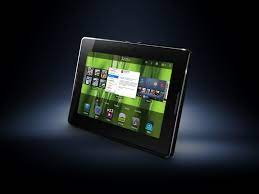

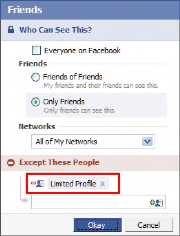

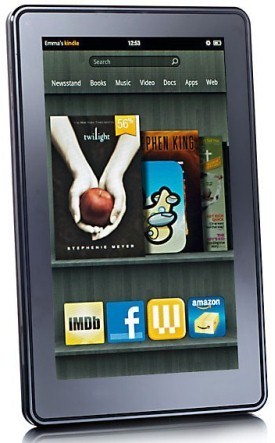 Amazon Readying Mulitple New Kindle
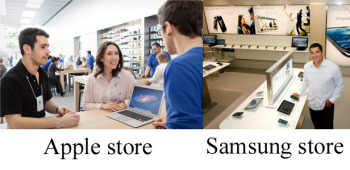 Image compilation from Apple/Vancouver, B.C. Sun
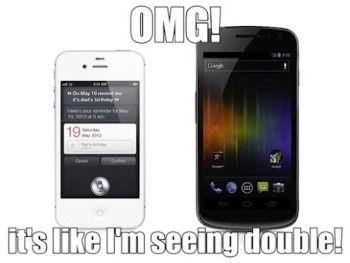 Image from BetaNews.com Apple uses wood tables and Samsung has gone with white. Big deal? Not really. From what I’m seeing, Samsung’s store looks similar to countless exhibits you’d see at CES. As for the blue shirts that both Apple Store and Samsung Store employees wear, it’s worth remembering that Samsung’s company color is blue. This is hardly the first time Apple and Samsung have tangled. The former managed to get the latter’s Galaxy Nexus smartphone and Galaxy Tab 10.1 pulled from store shelves recently. A graphic from



 ” Online retailer Zappos disclosed hackers had likely broken into its network and stolen information on Zappos.com customers, including name, address, billing and shipping address, phone number and the last four digits of credit-card numbers and cryptographically scrambled passwords stored in hash form. Zappos informed customers all passwords were expired and customers should create a new one. ” Researchers from Seculert discovered what they say is a botnet command-and-control
  Right in the midst of a conference call the FBI was having with its agents and law-enforcement officials overseas at Scotland Yard, cybercriminals hacked their way into the phone conversation, recorded it and posted it online. The conversation was about hackers facing charges in the U.K. The group Anonymous took credit for the intercepted call. The FBI said it appeared likely the cybercriminals may have hacked into a law-enforcement official’s email to get the information for the conference call dial-in. Other February Snafus: ” Brazilian banks were targets for distributed denial-of-service attacks, with massive assaults against HSBC Brazil, Banco da Brasil, Itau Unibanco Multiplo SA and Banco Bradesco SA. Hactivists took credit for the DDoS spree. ” Whistleblowing website Cryptome.org, dedicated to exposing confidential information, was compromised by an intruder that loaded an attack code that tried to launch drive-by exploits at visitors to the site. ” The University of Florida had to notify 719 individuals that their Social Security numbers were improperly stored on a state website operated by the Bureau of Unclaimed Property for more than six years. ” Verizon had to acknowledge the Verizon 4G LTE network was knocked offline again just two months after its last serous outage. The outage on Feb. 22 lasted from about 10 a.m. to 1:20 p.m. ” Microsoft’s Azure cloud infrastructure and development service experienced a serious worldwide outage on Feb. 29. Microsoft later blamed the outage on a “Leap Year Bug” that was triggered in a key server housing a certificate that had expired on midnight on Feb. 28, and a time-calculation control hadn’t taken into account the extra day in the month of February this year. ” Taiwan-based Apple supplier Foxconn was hacked by a hacker group calling itself Swagg Security, apparently in protest related to media reports about poor working conditions at the electronics manufacturer’s factories in China. The hackers posted usernames and passwords that they said would allow attackers to place fraudulent orders under other companies’ names, including Microsoft, Apple, IBM, Intel and Dell. ” The FBI arrested a computer programmer in New York and charged him with stealing proprietary software code from the Federal Reserve Bank of New York (FRBNY). The software is known as the Government-Wide Accounting and Reporting Program (GWA), which handles all kinds of U.S. government financial transactions, and it cost over $9 million to develop. The accused thief, Bo Zhang, a contract employee at FRBNY, used the GWA code in a private business he ran to train individuals in computer programming. Zhang, a Chinese citizen in the U.S. on a work visa since 2000, is also known as “Bryan Zhang,” and in a plea agreement in April he pled guilty to theft of government property, admitting he’d copied the code onto an external hard drive and then transferred the GWA program to a home computer, knowing that was wrong. March At least 228,000 Social Security numbers were exposed in a
  ” Hackers in the LulzSec group associated with the broader Anonymous movement found the tables turned when they were arrested by the FBI and European law-enforcement agencies — and it was LulzSec leader Hector Xavier Monsegur, alias “Sabu,” who turned in his friends as part of a deal to work as a stooge for the FBI after being arrested in New York City last year. ” By the end of March, LulzSec claimed to be “reborn” and took credit for hacking a dating website for military personnel, MilitarySingles.com, leaking more than 160,000 account details from its database. ” Dutch police arrested a 17-year-old suspected of compromising the account data on hundreds of servers belonging to telecommunications operator KPN. The teenager, arrested in the Dutch town of Barendrecht, “made a confession,” according to Dutch authorities. In the wake of the hacking spree, KPN said it would appoint a chief security officer and set up a permanent control center to monitor its systems. ” A flaw was discovered in Barclays contactless bank cards that could allow customers’ data to be stolen and used fraudulently with them knowing about it, according to an investigation by ViaForensics in conjunction with Channel 4 News. But Barclays dismissed the claims as inaccurate. ” Security firms knew there was trouble when Kaspersky Lab identified code-signed Trojan malware dubbed Mediyes that had been signed with a digital certificate owned by Swiss firm Compavi AG and issued by Symantec. Symantec said it found out that the digital certificate’s private key held by Compavi had indeed been stolen; whether by an insider or an outside attacker wasn’t known. ” A security firm based in Slovakia, ESET, asserted a website operated by the country of Georgia has been used as part of a botnet to conduct cyber-espionage against that country’s residents. But ESET researchers admitted they aren’t sure whether the Win32/Georbot they have been monitoring is being directly operated by the Georgian government or by cyber-spies through a compromised Georgian agency. April
 The Federal Communication Commission fined Google $25,000, asserting the search-engine giant impeded an investigation into how Google collected data while taking photos for its Street View mapping feature. The FCC maintained in a report that Google “deliberately impeded and delayed” the investigation for months by not responding to requests for information and documents. But the FCC also said it won’t take action against Google over its data collection because it still has questions it wants answered. The FCC had subpoenaed an unnamed Google engineer — now known to be Marius Milner — but he had apparently declined to testify, invoking his Fifth Amendment rights against incriminating himself. Other April snafus: ” Hactivist group Anonymous brought down the websites of trade groups U.S. Telecom Association and TechAmerica, apparently for their support of the cybersecurity bill proposed by Rep. Mike Rogers that would allow the private companies and the government to share any information “directly pertaining to a vulnerability of, or threat to” a computer network. Privacy advocates, including the ACLU and Center for Democracy and technology, contend the bills shreds privacy protections. ” A U.S. grand jury charged two residents of China with 46 criminal counts, including infringing software copyrights and illegally exporting technology to China, for allegedly operating a website that sold pirated software used in engineering, manufacturing, space exploration, aerospace simulation and design, and other fields, with a commercial value of other $100 million. Xiang Li, 35, was earlier arrested by agents from the U.S. Immigration and Customs Enforcement’s Homeland Security Investigations in Saipan, Northern Mariana Islands. Chun Yan Li remains at large. Both face charges in the U.S. District Court for the District of Delaware. ” A 31-year-old Russian national living in New York, Petr Murmylyuk, was charged with hacking into accounts at Fidelity, Scottrade, E*Trade and Schwab in a complex scheme that involved making unauthorized trades that profited the gang he recruited to open bank accounts to receive the illegal proceeds. The brokerage firms said they lost $1 million because of Murmylyuk’s fraud. ” VMware’s ESX source code was stolen and posted online, but VMware said the code, amounting to a single file from sometime around 2003 or 2004, doesn’t mean any increased risk to VMware customers. Security firm Kaspersky said it believes the code was stolen from a Chinese company called China Electronics Import & Export Corporation during a March breach. ” A terminal at New Jersey’s Newark Liberty International Airport was shut down for more than an hour on April 27 after officials discovered that a baby hadn’t been properly screened. The baby in question had been handed back and forth between the parents after a metal detector went off sounding an alarm with the mother holding the baby. The father had already gone through the screening, and the parents and baby left the checkpoint to head to the gate. But Transportation Security Administration officials decided to “err on the side of caution” to shut down the terminal and go locate the baby to make sure it went through screening. Some passengers that had already boarded flights said they had to evacuate it and go through security screening again. Speaking of the TSA, one of the agency’s critics, security expert Bruce Schneier, who is involved in a lawsuit with the agency to get them to stop the TSA’s full-body scanner program, had been invited to testify before Congress about the TSA but the House Committee on Oversight and Government Report then “uninvited” Schneier last March after the TSA formally complained about him, obviously preferring not to be challenged directly by him right in front of Congress. ” Automotive manufacturer Nissan admitted a data breach involving employee user account credentials had occurred, and that it had to spend some time cleaning its network of the malware apparently responsible for that before disclosing the breach. ” The hacker who stole Facebook’s source code, Glenn Mangham of York, England, offered an explanation of why he did it, saying, “I was working under the premise it is sometimes better to seek forgiveness than to ask permission.” He said he did little to hide his actions and that even if he got caught, Facebook would let him off the hook. But that didn’t happen, and Mangham was sentenced to eight months in prison in February, though the sentence was reduced to four months by an appeals court in April. He said he only had the source code for three weeks, but never had any intention of selling it to anyone who might exploit it for scams, for example. Mangham even made the grandiose claim that his basic good intentions saved Facebook from “potential annihilation.” ” Payments processing services company Global Payments acknowledged a data breach of up to 1.5 million card numbers had been stolen in a data breach, and in June also said it was investigating whether a server containing merchant applicants’ information had also been breached. Global Payments said its PCI compliance status had been revoked by some of the card brands because of the breach and it was working to regain it. May
 Hackers claimed to have breached the systems of the Belgian credit provider Elantis and threatened to publish confidential customer information if the bank did not make an extortion payment of $197,000. Elantis confirmed the data breach but said the bank will not give in to extortion threats. Meanwhile, Anonymous claimed it hacked a U.S. Department of Justice website server tied to the U.S. Bureau of Justice Statistics and claimed to release 1.7GB of stolen data from it, with the statement, “We are releasing it to end the corruption that exists, and truly make those who are being oppressed free.” The data was offered on The Pirate Bay. And then Yahoo accidentally leaked the private key that was used to digitally sign its new Axis extension for Google Chrome. Axis is a new search and browsing tool from Yahoo. Security blogger Nik Cubrilovic discovered the package included the private crypto key used by Yahoo to sign the extension, noting it offered a malicious attacker the ability “to create a forged extension that Chrome will authenticate as being from Yahoo.” Yahoo was forced to release a new version of its Axis extension for Google Chrome after that. June The University of Nebraska in Lincoln acknowledged a data breach that exposed information of more than 654,000 files of personal information on students and employees, plus parents and university alumni. The information was stolen from the Nebraska Student Information Systems database; a student is the suspected culprit. Other June snafus: ” Hacker gang Swagger Security strikes again, this time breaching the networks of Warner Bros. and China Telecom, releasing documents and publishing login credentials. The group said it notified China Telecom of the hack by planting a message in the company’s network. “Fortunately for them, we did not destroy their infrastructure and rendered [stet] millions of customers without communications,” Swagger Security, also known as SwaggSec, said in a note. ” About 6.5 million cryptographic hashes of LinkedIn user passwords were stolen and posted online, a breach LinkedIn acknowledged though it didn’t discuss specific numbers, which may be much less due to duplicates. LinkedIn invalidated the passwords of impacted users and the company said emails will be sent to users whose passwords were compromised, though it warned about updating passwords via links sent in email.
  ” Right after the LinkedIn fiasco, dating site eHarmony also confirmed a breach of 1.5 million passwords that were hashed. ” The Federal Trade Commission announced that data broker Spokeo will pay $800,000 to settle FTC charges it sold personal information it gathered from social media and other Internet-based sites to employers and job recruiters without taking steps to protect consumers required under the Fair Credit Reporting Act. ” The New York Times article asserting that the cyber-weapon Stuxnet is a creation of the U.S. with Israel, and was launched in a covert action authorized directly by President Barack Obama against an Iranian facility suspected of developing a nuclear weapon, has stirred up a firestorm of controversy in Washington about leaked information. Now that another cyber-weapon for espionage, Flame, has been discovered and linked directly with Stuxnet, there’s more concern, with the United Nations division International Telecommunication Union warning countries that Flame is dangerous, and some saying the U.S. is losing the moral high ground as its secret cyberwar efforts become known. Ellen Messmer is senior editor at Network World, an IDG publication and website, where she covers news and technology trends related to information security. For more information about enterprise networking, go to
 The company also provided more information about whose passwords had been pilfered. “We have…now fixed this vulnerability, deployed additional security measures for affected Yahoo! users, enhanced our underlying security controls and are in the process of notifying affected users,” the company announced in a post to its



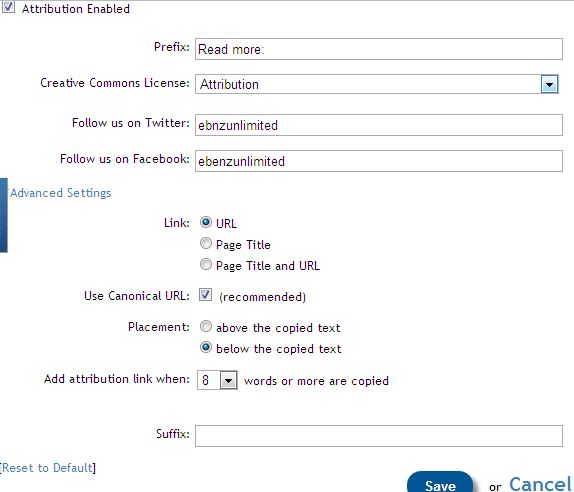
 Adsense is one of the most trusted way of making money online but after handing series of suspension to publishers it becomes potentially unreliable to use adsense.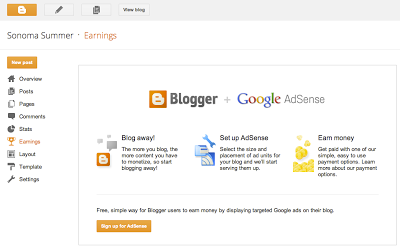








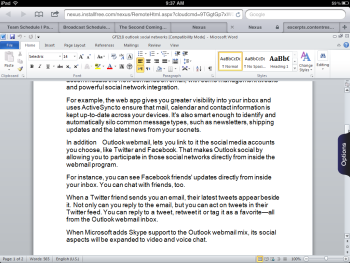
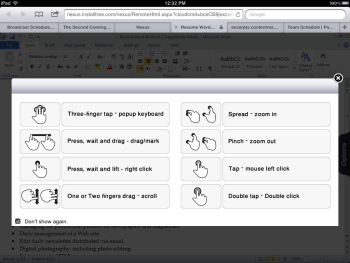
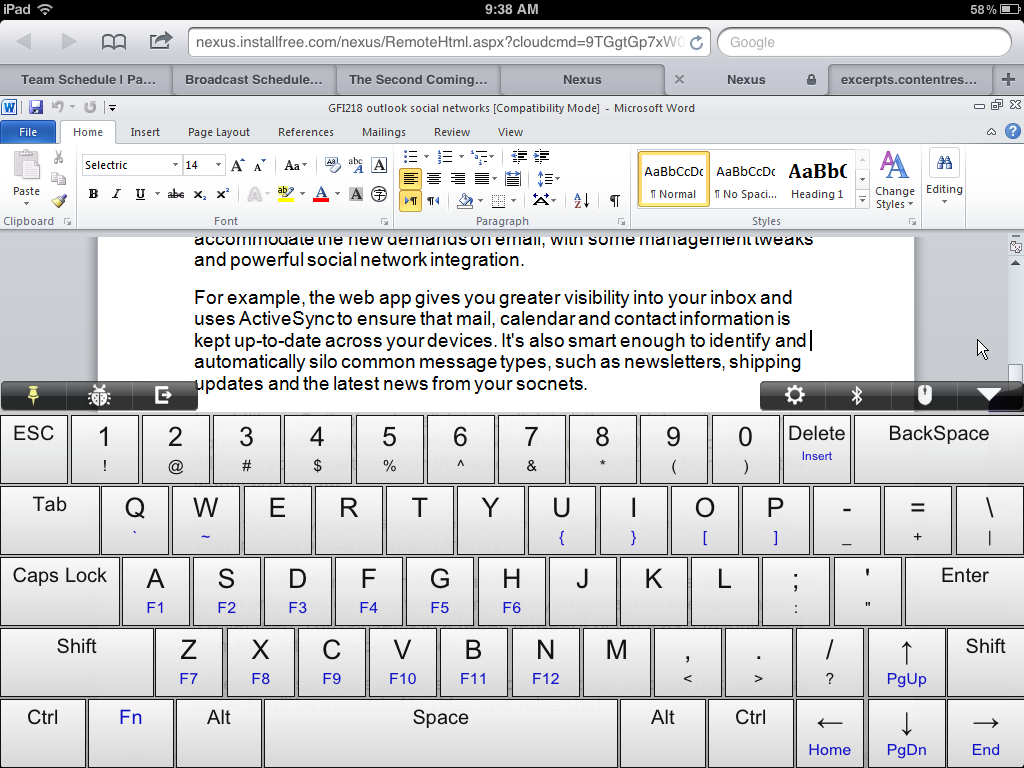
)
)
)
)
)