In a browser reliability test, the recent versions of Google’s Chrome and Mozilla’s Firefox are measurably less prone to crashes and errors than Microsoft’s Internet Explorer 10, a new analysis by applications testing firm Sauce Labs has found.
If this looks like another stick to beat Microsoft’s browser with, it is worth pointing out that the firm’s study of around 55 million tests run using the Selenium platform found that all browsers showed extremely low levels of errors, in the order of 0.12 percent or lower for the “worst” performer, Apple’s Safari 6.
On the same scale, Opera 12 scored 0.08 percent, IE10 at 0.05 percent, Chrome 27 under 0.02 percent, with Firefox was so low it effectively achieved a remarkable zero, that is to say no errors at all. IE lagged its main rivals but at levels that were already extremely low.
As interesting as the reliability figures was the level of improvement shown by these recent versions, some only months or even weeks old.
Internet Explorer 6 (released in 2001 with XP) and 7 (2007) had previously been the worst performers on 0.3 percent each, behind Firefox on Opera 10 (2009) and Firefox 7 (2011) and IE8 (2009) on just under 0.25 percent. It is remarkable that all of these are still used by small percentages of global browser users, but they are also aging software vulnerable to issues more serious than how often they might crash.
“Half of the browser versions we analyzed had error rates lower than 0.07 percent. That’s pretty low, and suggests that browsers are getting more reliable as more versions come out,” said Luren Nguyen of Sauce Labs.
Despite lagging slightly, IE had also shown major improvement over time.
“Microsoft has really been pushing their new version of Internet Explorer as the most modern and high-performing version of IE. You’ve may have seen their nostalgia-tinged IE 10 commercial. The data we have on browser error rates suggests that their claims may have quite a bit of merit,” she said.
The absolute level of errors in these tests is an imperfect way to measure browser reliability some might argue (can the errors be proved to be the browser’s fault and not the testing suite’s?), but the comparative measurement won’t be coincidence. Errors, which usually result in a crash of some kind, are caused by bugs in the browser code.
Do error rates really matter? Only when they occur, which seems to be rarely these days.Credit: pcword.com
A community software is a web based software that serves as a skeleton which enables you to create a membership site. Where members can interact with each other, share file such as: Music, Photos, Videos etc. Community software enables each member to have a personalized page known as the ‘user profile’ or ‘dashboard’, it also have an interface where users can see and participate in activities by other users.
Why do I need a Community Software?
Before asking this question, I would like you to confirm what you really wanted; if all you want is a blog where you can share tips and talk stories, then consider using a wordpress cms or blogger.com, but if you need a website where people can register and become members who can share and interact with other members of the site, then the best way to achieve that is using a community software. While most of us remain very familiar with the idea of building a community site on wordpress, the essence of using a community software for your website cannot be overlooked. Installing a community software goes beyond the use of a piece plugin as we do in wordpress or embedding a forum script in a webpage, while this method has a lots of limitations, a good community software makes you the master of your community site, granting you the maximum control over your website, ranging from customizing layouts and impeccable administrative options to managing your users accounts.
List of Community Software to Choose from
The recent years has seen the development of various kinds of community based open source software, but we are are going to take a look at the ones we have considered outstanding over the rest.
Do not expect the most fascinating appearance when you visit the oxwall homepage but surely, it is no mistake that they are topping our list. The simplicity of the oxwall homepage probably represent the utter simplicity and unbelievably flexible and easy to use PHP/MySQL nature of the social networking software. Oxwall is used for a wide range of projects starting from family sites and custom social networks to collaboration tools and enterprise community solutions. Whether you are a freelance developer willing to streamline your work for client projects; an individual willing to create a community site; or a brand planning to set up a destination for your customers – Oxwall is for you. The software offers indisputable user experience with full administrative control that made it stand out among it’s competitors.
Features of Oxwall
Photo, Video sharing: This gives members the ability to upload photos and share videos from youtube with other members of the website.
Blogs, forums, wiki: Your members can create their own blog post, start article (like in Wikipedia.com) and discuss in the forum boards. The boards to create and forum layout all depends on you -the admin
Groups, events, friends: Oxwall makes you, your own master, so you can make your members master of themselves. With oxwall community software, your user can follow and add other users as friends, create and manage groups, create and manage their own events.
Comment, tag, rate any kind of content: Like every social networking software, oxwall create an interface called wall, where a member can input text which are later updated as “status”. This “status” can be liked, commented and shared by other members, each member have control on who sees their status and can delete their own “status” if so desired.
Privacy and profile customization: This gives your members maximum control on who and how people see their profile. A member can decide to set his profile public (that is visible to every member of the community) or private (that is visible to only friends or particular group of people), members can as well control what kind of messages they receive from the community to their email box.
Live Chat: If you ever dreamed of having an IM such as the one you have on facebook, then oxwall is just the software for you. Members of the community can chat with their friends within the community (you can disable the friends plugin if you want members to chat with everyone online).
Built-in SEO: The oxwall community software has an in-built search engine optimization features, making it easier for people to find you via search results.
Proven performance: The structure of oxwall software is ultra light and simple to use, “Your site is worthless if users don’t know how to use it.” said the website homepage.
Plugin & Theme Support: This probably what makes oxwall totally exceptional, so as to prevent users from having exactly the same copy of website on the web, the oxwall community software provide uncountable number of themes to choose from and plugins to add “the little extra” to your community website.
Multiple languages available and 100% user area translation support: Oxwall software supports the use of various languages and offering free translation for each language.
For developers: Structured and evident core code. Makes it for developers to develop plugins with all the documentation and examples.
If you are looking for a simple community forum (without social networking facilities) where members can discuss various topics on different boards or category, then the simple machine community software is definitely what you have been looking for. Simple Machines Forum ( SMF in short ) is a free, professional grade software package that allows you to set up your own online community within minutes.
Its powerful custom made template engine puts you in full control of the layout of your message board and with a unique SSI – or Server Side Includes – function you can let your forum and your website interact with each other.
SMF is written in the popular language PHP and uses a MySQL database. It is designed to provide you with all the features you need from a bulletin board while having an absolute minimal impact on the resources of the server. SMF is the next generation of forum software – and best of all it is completely free!
Features of SMF
SMF is a very wide software covering a lots of amazing features, but having the reader’s interest in mind we shall consider a few of them.
Uses PHP, and a database system: MySQL, PostgreSQL or SQLite.
Comprehensive template system.
All actions seamlessly require a session based authorization code.
Administrative actions require the user’s password (and do not rely solely on cookies.)
Major actions are time and IP locked, preventing ‘hammering’.
The number of login attempts from a certain IP can be limited and time locked
Advanced permission and user management.
Supports multiple languages at once.
Open and well-documented source code.
Tracking of new and old unread topics, not just from your last visit.
Designed for optimal performance and scalability.
Multi-media output: XHTML, XML, RSS, WAP
Multi-language support from a large community.
Package manager that automatically installs or uninstalls mods (also known as packages.)
What’s More?
The best place to find support on how to customize your SMF site is the SMF forum, here you meet other community owners who can help you solve any problem you encountered.
Sharetronix open source based community software is micro blogging software (yes, like twitter.com) that allows members to share any “144 characters” (update status) with other members of the community, the members of the community can connect with other members by following their update, in sharetronix, a member can only send a direct message to another member only if that member is his/her follower.
Features of Sharetronix
User Profiles: Each community member has a custom profile with detailed personal information, plus their network activity, groups, personal tags and more.
Status Updates: Every community member can post unlimited short status updates, ask questions, share media and more. Sharetronix supports link, video, image and file attachments with posts
Real-Time Dashboard: On the platform’s dashboard, users can follow all updates from their network connections in real time. members can also see who’s online, currently trending post tags and more.
Groups: Create unlimited private or open groups to organize your content and make it easier for everybody to follow topics and conversations. Members with similar interests can connect with each other in groups.
Security Settings: The community and personal security settings allows the members to better protect their profiles, posts and personal messages, while the community administrators can increase their communities’ privacy.
Multimedia: Sharetronix takes micro-blogging beyond simple text. You can attach links, pictures, videos and other files to your posts. Multimedia attachments make your network more attractive and more interactive, and therefore more engaging for users.
Business Cards: The Business Card feature allows you to quickly connect with and learn about a member simply by holding the mouse over their username. A user’s Business Card displays their groups, and allows you to follow, private message, or create a public post directed at (@) that user.
Member mentions in status update and comment: Members are suggested when you type @ while you write a status update or a comment in both the post and the comment boxes.
Content Tagging: Tag your messages with hashtags to make them easily searchable. Users can also save their favorite tags to be easily accessed from their personal dashboard at any time
Administration: With the powerful Sharetronix administration panel you can tune your network the way you want it. You can easily manage all your settings, users, groups and content from one place.
SEO Friendly: Don’t bother about advertisement: Sharetronix is SEO optimized and your content will be easily indexed by Google and other search engines. The front-end code is written according to the latest standards
What’s More?
The sharetronix opensource software is free, featuring a lots of themes and plugins to help you build your unique community.
Facebook has been improving over the recent years, from the introduction of Video Recording On Instagram to the amazing Recommendations Bar for Bloggers making facebook the leading social network in this present world. We do not intend to keep our loyal blog readers on the dark, so we try as much as possible to keep our loyal blog readers updated with developments of this magnitude.
Why do I need to Embed Facebook Post to my Blog Post?
First of all, I think that’s a question you need to ask yourself, considering the fact that you issued this search on google :-), but if you are reading this tip because you find it interesting, here are a few answer that was put together by me.
Embedded Posts are a way to put public posts – by a Page or a person on Facebook – into the content of your web site or web page.
The embedded post will show any media attached to it, as well as the number of likes, shares, and comments that the post has. Embedding posts will let people using your web site see the same rich information that is shown on Facebook.com, and they will enable people to follow or like content authors or Pages directly from the embed.
What Platforms are Supported?
Are you really that inquisitive? Well, it’s good news for all, because the facebook embeddable post does work on every platform (All platforms include wordpress, blogger, oxwall, joomla, even your simple html site).
Special note: You need to add the following code to any place in your <body> section
If you are using a site built with either dreamweaver, blogger or oxwall.
Embedding your Facebook Post into your Blog Post!
There are two ways of doing this, but each method depends on where your source post is located on facebook.
Embedding Code from a Facebook Post
This method is applicable, if you are embedding a post from your profile newsfeed or in the case of embedding photos and items. To embed a post, first check if the post is public by hovering over the audience selector (you’ll see a globe icon). Only public posts from Facebook Pages and profiles can be embedded. If the post is public, click on the icon that appears in the top right corner of the post on Facebook:
Choose ‘Embed Post’ from the drop down menu that appears. You will see a dialog appear with the code to embed your post in it:
Copy and paste this code into your web page in the place where you want it to appear.
Embedding Code from a Facebook Page
Assuming you have a Facebook page and you would like to share a content from your page to your blog readers, here is the way to go: Simply, goto your page and grab the URL of the Facebook post you want to embed. For photos, you can easily get the URL by clicking on them. But for other media, it is a bit complicated, at least for newbies. To get a post’s URL, simply click on its timestam
Copy the link on your address bar and go to Facebook Configurator. Paste your URL in the field provided. Once your story loads in the tool, click on Get Code. You will get two codes similiar to the image below
Simply copy the second code and paste it where you want it to appear…..
Looking for Demo? Here is a post I published some months ago, try it out and see how it goes Remember to ask your questions here and also share your testimonies with others with the aid of our comment sections.
Earlier today Microsoft added Android to the list of mobile operating systems now supported by Office Mobile. But Office Mobile for Android only covers phones, not tablets, limiting its utility. The Android version, Office Mobile for Android, is also arguably the weakest of the bunch, in terms of compatibility with Microsoft Office. Microsoft is still tacitly encouraging users to buy Windows Phones, which come preloaded and activated with Windows Mobile and don’t require an Office 365 subscription to use. The problem is, within the Android world, there are a number of other office solutions that provide very good direct competition to Microsoft’s offering.
Nevertheless, Office Mobile for Android is free and downloadable from the Google Play Store. The only requirement is that your phone must contain Android 4.0 or higher, and you must already have purchased Office 365. In a break with Office Mobile for iPhone, Microsoft doesn’t even offer the option to purchase Office 365 from within the app; instead, users must sign up outside the application itself. And without Office 365, Office Mobile for Android is virtually useless. “The release of this app shows that we’re committed to keep providing additional value for Office 365 subscribers,” said Guy Gilbert, a senior product manager of the Office apps for Microsoft, in a blog post. Qualifying Office 365 plans include Office 365 Home Premium, Office 365 Small Business Premium, Office 365 Midsize Business, Office 365 Enterprise E3 and E4, Office 365 Education A3 and A4, Office 365 ProPlus, and Office 365 University. There are also Office 365 government plans that include Office Mobile. Users can also visit Office.com and sign up for a free 30-day trial, Microsoft said. While Microsoft eventually intends to make Office Mobile for Android available across 33 languages and in 117 markets, it’s only currently available for the United States. That will change over the next few weeks, Microsoft said.
What’s included
Like Office Mobile for iPhone, the Android version comes with mobile versions of Excel, PowerPoint, and Word; Office Mobile for Windows Phone adds OneNote as well. So far, Android users don’t have access to the Outlook Web App app that Microsoft recently released for the iPhone, either.
Office for Android users can create documents in Word or Excel.
Users can create new documents, edit those that they’ve already created, and save, load, or edit files saved to Microsoft’s SkyDrive or SkyDrive Pro—which on Tuesday received a few upgrades, as well. But the ability to create files only applies to Word and Excel; for now, you can review your PowerPoint slides and edit them, but not create a presentation from scratch. Users can also open a document via email. Office Mobile includes a couple of handy features designed for the phone; The software knows what documents you’ve recently accessed on your PC, and those are the first options presented when you choose to open a saved file. A feature that Microsoft calls Rapid Resume also works like Amazon’s Kindle, ‘fast-forwarding” you to the portion of the document last viewed on your PC. An “outline view” in Excel and Word allow you to quickly navigate through the document, and both apps allow annotations as well. Within the three supported apps, Microsoft has made efforts to make editing a snap; in Word (shown at top of story), for example, tapping the pencil brings up the most common editing functions. Excel allows you to filter and sort data and create charts, using the local processor to calculate data. Within PowerPoint, users can review slides and edit speaker notes, move and hide slides, and make text edits directly from the phone. Holding the phone in a portrait orientation allows edits to be made and includes a quick navigation bar; a landscape orientation serves as presentation mode.
Office Mobile for Android, displaying an Excel worksheet.
In general, Office Mobile for Android and Office Mobile for iPhone should function quite similarly, with two exceptions: Android users can not sign up for Office 365 within the app itself, and Android users may need to fully qualify documents that are accessed via an on-premise SharePoint server.
Buy Windows Phone—or a Surface
To date, however, Microsoft has been keenly cognizant that productivity apps are the foundation of the Windows platform, and users who purchase a Windows Phone will have these benefits:
Office Mobile will be preinstalled and activated;
users will be able to save documents to the phone itself, as well as SkyDrive or email;
WP users will be able to filter and search for documents;
Users can also easily open documents with permissions attached to them.
Office 365 includes a license of up to five mobile devices—but Windows Phones don’t count against that limit. The biggest annoyance, however, is that—like the iPad—tablets aren’t supported in either Office Mobile for the iPhone or the Android version, either. Those trying to hunt and peck at keys in the back of a jouncing taxi are likely to grit their teeth and muddle through; by doing so, however, Microsoft is tacitly encouraging customers in the direction of a Surface tablet—now at a new low, low, price—or even a full-fledged Windows 8 PC. (“Phablets” like the Samsung Galaxy Note II should still be supported, however.) “If you have an iPad or Android tablet, we recommend using the Office Web Apps, which provide the best Office experience on a tablet,” a spokeswoman for Microsoft said via email. “We have made lots of enhancements to Office Web Apps including a touch experience for tablet users.”
QuickOffice Pro provides one tablet-friendly alternative to Office Mobile for Android.
Microsoft also has native apps for OneNote, Lync, and SharePoint, in addition to supporting Exchange Active Sync for email, calendar and contacts, she said. ”I’m not sure how many people are going to want to do a lot of Office work on a phone,” Michael Silver, an analyst at Gartner, said recently. “A tablet’s going to be a lot more important.”
Alternatives
Of course, there’s no reason that users have to live in the world that Microsoft has created. Plenty of Android office apps allow document creation or editing, both on a phone or tablet: Google Drive, of course, allows for Google’s own documents to be created; and Google’s own QuickOffice, Documents to Go, and OfficeSuite Pro 7 are all arguably as good or better choices than Microsoft’s offerings. In one way, editing or creating an Office document on a mobile phone is counter-intuitive; too many people still append some sort of signature file on a mobile phone to explain away any typos or shorthand. Within a business document, however, typos simply shouldn’t appear. Office Mobile can certainly stand in to enable last-minute changes while on the go, but they shouldn’t be considered as serious tools for document creation. And that’s exactly how Microsoft appears to want it.
Last time I wrote an article on Building A Social Network With WordPress (Part 1) today we are going to look at the top ten plugins you will need for your social network. This plugins combines well with the buddypress plugin to give make your website a user friendly community.
Top 10 Plugins for Your WordPress Social Network
✔ BP Community Activity on Profile
This is similar to the activities log on facebook.com; it plugin shows all the community activity on a user’s profile. It also include a menu titled “All Activity” to user activity.
This plugin automatically login users after creating an account. Unlike the buddypress usual behaviour the Bp Auto Plugin On Activation Plugin redirects users to their profile after registration.
The Custom Admin Bar allows you to customize the admin bar and add your quick links, it also allows you to use a logo on the admin bar. This plugin is generally supported by any wordpress that has an admin bar.
This plugin lets you syndicate external RSS feeds into your site’s BuddyPress activity feed. It enables each BuddyPress user to select as many external RSS feeds as he wants. Those feeds will be aggregated (mixed) into their activity feed automatically, with a title, an excerpt and a link to the original post.
BuddyPress Message Privacy Plugin allow your users to control who can message them. It includes basic features such as: a user can opt to receive messages from everyone, friends only or even specify a custom list of users from whom he want to receive messages. He can also create a custom list for other users who can send him a message, as well as a blacklist of users who will never be able to send him a message.
Just recently buddypress included the development of this feature in their roadmap. While waiting for the official core release buddypress users can still make due of this plugin to export all user data from WordPress and BuddyPress to CSV.
The BuddyPress Simple Google Map plugin uses the static Google map API to add the maps to groups. It also includes a widget to showcase the map in the sidebar.
As the internet users grow by the day in Nigeria, one of the challenges of growing the eCommerce side of it has largely been online payment solution. This is largely due to the start-up cost of integrating payment gateways, which can gulp up to N200, 000. Many businesses in Nigeria cannot afford this sum.
If you are one of the small business owners that can’t afford the costly payment portal integration but would still like to see the benefits of sales and productivity, you need to give VoguePay.com a try. VoguePay provides a convenient way for customers to shop easily on the Internet while also providing the innovative solution that Small businesses in Nigeria can rely on to receive online payment in Nigeria.
If you are a small business owner, you can now receive payments online in Nigeria using VoguePay even if you do not have a website and have your funds transferred to your bank account. VoguePay accepts payment across the major cardholders in Nigeria, namely Verve, VISA, Mastercard, e-transact and interswitch. The company focused on addressing the issues that are relevant to the successes of the small business owner, Infopreneurs and internet marketers in Nigeria who want to use the internet increase their sales to their market audience. For example, imagine clients of your bulk SMS site buying and paying for SMS units online, right there in your portal with their ATM CARD and automatically have their account credited with the exact amount of SMS they paid for real time. Don’t you think this will attract more customers to your portal? Don’t you think it will increase efficiency and productivity?
Well, VoguePay is FREE to use as at the time of publishing this, though you pay 1% commission on every transaction for the total transaction cost. You will also pay 1% of withdrawal amount + ₦50.00 whenever you withdrawal funds to your bank accounts from your VoguePay wallet. Feel free to sign up at www.voguepay.com Now!
Have you ever wondered why you get a lots of traffics in your subdomain (i.e yourwebsite.domain.com) but very little to show off in alexa and google page rank?
Have you ever considered why you rank so high on google but lack potential advertisers?
You need a top level domain name i.e. www.yourwebsite.com. Lets take blogger for example, if you run your sub-domain on the blogger platform, you face the risk of getting a very low alexa rank as each country has a different TLD for your site (e.g. yoursite.blogspot.in -Indian Visitors, yoursite.blogspot.co.uk -Uk Visitor, yoursite.blogspot.de -Visitors from Germany etc) this in turn discourage potential advertiser from advertising on your blog.
One thing that makes people, who desire to start a blog, hesitate is the set up of a custom domain. Even people who have a free blog don’t immediately desire to move to a custom domain, because it all seems like a lot of work, and too complicated at that.
Many are unsure as to where they should acquire a domain from, and are scared they ll profit scammed online. We have compiled this little lead to help such people overcome their hesitation, and take the enormous step that will essentially influence the growth of their blog/business/website. For this purpose, we walk you through Domain setup from NameCheap.
What is NameCheap?
Namecheap is the closest rival to Namesilo and a leading ICANN accredited domain name registrar and web hosting company that was founded in 2000. Today, Namecheap has over 800,000 clients and over 3 million domains under its management.
Namecheap offers some of the most affordable domain names in the industry, in addition to full-featured web hosting packages, secure SSL certificates, WhoisGuard domain name privacy, provided by WhoisGuard pursuant to its Services Agreement with Namecheap, and so much more.
Grab Your Domain Name!
Tograb your domain name for as low as $0.98 **Click Here
Click on GENERATE CODE.
Create Your Account
Copy and paste your coupon code in a notepad
Choose your domain name
Scroll down to where you see add to cart and click
Now paste the coupon code you copied earlier and paste it inside the coupon box.
Click apply.
Enter your profile details and click save and continue.
Click next step on the sidebar.
Just scroll down and click save and continue.
Choose your payment method e.g. paypal, visa etc.
Enjoy and thank me later.
**Additional $0.18 ICANN fee will be charged for .com and .net domains. Coupon valid for new customers only.
** You get a one-year WhoisGuard subscription ($2.88 value) absolutely free with every domain name registration. Due to registry restrictions, WhoisGuard cannot be used with .asia, .bz, .ca, .cn, .co.uk, .de, .eu, .in, .me.uk, .nu, .org.uk, .us, and .ws domains. However, you can use your free subscription on any other domain with Namecheap that supports this service. Please note that WhoisGuard subscription expiry is based on your purchase date and not on the date you activate it.
*** You can get one year OX Personal Email ($2.99 value) for free with every registered domain.
Reader Feedback & Questions
Was this post helpful to you? Do give your feedback in the comments section below. And remember: please keep your comments relevant, and avoid spamming and/or promoting your own blog/business. Thank you 🙂
Financial malware authors are trying to evade new online banking security systems by returning to more traditional phishing-like credential stealing techniques, according to researchers from security firm Trusteer. Most financial Trojan programs used by cybercriminals today are capable of tampering in real time with online banking sessions initiated by victims on their computers. This includes the ability to execute fraudulent transactions in the background and hide them from the user by modifying the account balance and transaction history display in their browser. As a result, banks have started deploying systems to monitor how customers interact with their websites and detect anomalies that might indicate malware activity. However, it seems that some malware creators are returning to more traditional techniques that involve stealing credentials and using them from a different computer in order to avoid being detected.
Familiar Trojans, new technique
Trusteer researchers have recently detected changes in the Tinba and Tilon financial Trojan programs designed to prevent victims from accessing the real online banking websites and replace their log-in pages with rogue versions.
“When the customer accesses the bank’s website, the malware presents a completely fake web page that looks like the bank login page,” Trusteer’s chief technology officer Amit Klein said Thursday in a blog post. “Once the customer enters their login credentials into the fake page the malware presents an error message claiming that the online banking service is currently unavailable. In the meantime, the malware sends the stolen login credentials to the fraudster who then uses a completely different machine to log into the bank as the customer and executes fraudulent transactions.” If the bank uses multi-factor authentication that requires one-time passwords (OTPs), the malware asks for this information on the fake page as well. This type of credential theft is similar to traditional phishing attacks, but it is harder to detect because the URL in the browser’s address bar is that of the real website and not a fake one. “It’s not as sophisticated as injecting transactions into web banking sessions in real time, but it accomplishes its goal of evading detection,” Klein said. This “full page replacement” feature is present in Tinba version 2, which Trusteer researchers have recently discovered and analyzed. The malware comes with support for Google Chrome and attempts to limit its network traffic by storing images loaded on the fake page locally.
Already in use
According to the Trusteer researchers, Tinba v2 is already used in attacks targeting major financial institutions and consumer Web services. “Banks have always faced two attack vectors in the online channel,” Klein said. “The first is credentials theft. There are various ways to execute this type of attack including malware, pharming and phishing. The second attack vector is session hijacking which is achieved through malware. These two vectors require two different solutions.” Banks should make sure that they have protection in place against both attack types, otherwise cybercriminals will quickly adapt their techniques, Klein said. “You can’t put a lock on your door and leave the window open.”
Are you a bookworm, review geek or simple given the gift of words? Does writing come easy for you? If you are such a person, you can earn extra cash online doing what you love – writing articles for top paying websites.
If you have tried and failed with blogging using pay per click services like Google AdSense, Adstract, Bidvertiser and other Adsense alternatives in the past, writing on established website may be your best bet on making money through articles online. Is quite simple all you need to do is to read on and start cashing your money.
Below is the top 20 websites that will pay you for submitting articles, writing product review or promoting advertisers link in your blog.
In their first two years, Topic Writers are paid by the article. In subsequent years if the Topic Site grows, About.com also pays Topic Writers for page views above and beyond the minimum pay per article. Compensation is limited only by page views – while the guaranteed per article minimums are offered as a safety net, there is no cap on what a successful Topic Writer can earn.
Just launched your new website?Take advantage and make your presence known to the world! Bing Ads offers USD25 worth of free advertising coupon code for 2013 with the intention to attract more customers around the world (especially from Google AdWords). The offer is currently valid for UK, Canada, India, France and US. Click on the below sign up links to get your coupon today.
An essential ingredient in frugal living is spending less money. However, there is only so much you can cut from your budget before you can’t cut anymore — or you feel so restricted that it becomes difficult to maintain your situation. If you are looking to improve your cash flow, you can look for ways to add a little more income to your budget.
Increasing your income doesn’t mean that you have to go out and find a part-time job, though. There are things you can do from home to make a little extra money. You may have to spend some time getting things started, but after a while, you might find that you can create a steady income from the comfort of your home.
Freelancing on Fiverr and Upwork
One of the most popular things you can do is freelance. You can freelance if you know how to write, if you are knowledgeable about graphic design, or if you know how to program. Technology has made it possible for you to provide your services to people all over the world. Many of my own clients have never even met me in person. Improving your marketable skills will be even more important now that you are taking in clients, and you need to be careful of scams and people who don’t pay you in a timely manner, but with a little perseverance, you can earn some money as a freelancer.
Professional Blogging
Another way to make a little extra money is to start your own web site. Think of something that you are passionate about, or that you are knowledgeable about. You can start a blog or web site quickly and fairly inexpensively. Post information that others find useful, and consider tweaking content to focus on certain keywords. You can even look for good information from other sites, and curate it in a way that attracts visitors. Content curation and creation are expected to really take off, and you can be involved.
Monetizing your Blog
Monetize your web site/blog with AdSense, as well as affiliate programs. Once you have an established following such as a site like MoneyNing.com, you can even begin offering advertising packages.
If you know a lot about something, you can offer your services as a consultant. You can do PR and image consulting, or you can provide help as a SEO consultant or social media guru. It doesn’t even have to be online.
Business Consultancy
You can base a consulting business for communications, teamwork, survey design, green living or some other subject of interest out of your home. You may have to travel sometimes, though, so that can get difficult because of the time and money involved in doing so.
Luckily for you, we have a ton of travel coupons to help you save a bit at least on the financial side of things.
Oh yeah folks wanna rank high in alexa to attract advitizers isn’t it? If that’s what you really want then read on to discover how to lower your alexa rank 1. Claiming your Blog and Installing Alexa Toolbar Claiming your blog from Alexa is the first thing you need to do. To claim your blog – you need to copy the code they will provide for you and paste it in your blog’s HTML. After doing this – Alexa can now certify you as the owner of the blog. Installing the Alexa toolbar will help Alexa monitor visits to your site and reduce your ranking by the number of visitors who visit your blog with Alexa toolbar installed on their web browsers. This is what Alexa have to say about how they rank sites worldwide – “The traffic rank is based on three months of aggregated historical traffic data from millions of Alexa Toolbar users and data obtained from other, diverse traffic data sources, and is a combined measure of page views and users (reach)” So basically, by just installing the Alexa toolbar – you’ll be getting ranking credit anytime you visit your blog or anytime Alexa toolbar-enabled visitors pay your blog a visit. Doing this will help Alexa to easily track your blog and update it traffic stat and rank data simultaneously. 2. Guestpost Frequently Writing guestpost is one strategic way to drastically reduce your Alexa ranking. Alexa firmly looks at the number of backlinks that are linking back to your blog and how authentic they are. The more backlinks you have linking back to your blog will automatically determine how popular your blog is and how highly placed it is on search engines. So, the more quality backlinks you garner to your site – the more your Alexa ranking will reduce. Guestposting is the ultimate and easiest way to build quality backlinks to your blog. The more frequent you guestpost on top niche blogs – the more free backlinks you get back to your blog, and the more people start coming to your blog –the more interactive and alive it becomes, which in turn will reduce your Alexa ranking. 3. Write Content Regularly Frequent update of any blog will make it more interactive. Sine you’re guestposting regularly now, people will start coming to your site from your guestposts on those blogs you guestposted for. Which is why you need to have fresh content at all times; because – visitors tends to drop off any blog that is hardly updated with fresh content from their list of blogs –to-visit. The more updated your blog is, the better traffic and quality backlinks you garner to your blog from search engines. And since the traffic we’re talking about here is ‘human visitors’, it will increase firstly: Your blogs’ traffic – when they keep coming to read your blogs’ frequently-updated content and secondly it will increase: Backlinks- When they share your unique posts with friends and on different social platforms, making your blogs’ Alexa rank to lower than drastically.
4. Share on Social Media platforms
The sub-heading has said it all. Sharing your blog posts on social platforms like Facebook, Twitter, Pinterest, StumbleUpon, LinkedIn and Google+ will increase your traffic, especially when your post goes viral on any of the social platforms just listed. Blog post going viral will increase your backlinks and bring a lot of people to your blog – making your Alexa rank to lower down. 5. Comment on Other Blogs Blog commenting is a wonderful backlinking strategy you can use to reduce your Alexa ranking to it lowest form. Commenting on top blogs will bring traffic from that blog to yours and backlinks as well. What you’ll do is – look for high ranking blogs in your niche (like 20 of them) and devote your time commenting on them. Unique comments are what you should always drop at the respective blogs. Don’t go dropping “Hi”, “I love step 2” or “Good post! – keep it up”; – drop something that makes sense, something that will warrant people to click and come to your blog; something very informative and that corresponds with the post title you’re commenting on at that particular time. Finding dofollow blogs to comment on is a plus one for your blog; since, instead of just contributing your informative comments on the dofollow blog – They will also publish your blog’s recent post along side your comment. Doing blog commenting frequently will help decrease your Alexa rank for good. 6. Increase your Traffic The more traffic you generate for your blog; the more your Alexa ranking will reduce. Traffic is the most important thing Alexa uses in determining how to rank any specific site. Keeping your traffic at an increasing frequency will drop your blog ranking significantly; while leaving your traffic to drop will increase your blog ranking drastically. Copied from 3ptechies
A smart TV is only as smart as the person controlling it. So if the person in control is a hacker, the owner could have a problem. Researchers at security consultancy ReVuln say some smart TVs are vulnerable to hacking. It is another example of what experts say is the ever-expanding attack surface of devices that traditionally never faced the Internet, but are now “smart.” The researchers at the Malta-based company said they found a vulnerability in a number of smart TVs made by Samsung Electronics that gave them root access to the TV and any attached USB drives. They posted a video titled “The TV is Watching You,” which appears on a number of security vendor websites, including Kasperky Lab’s Threatpost. While there is no voiceover, the video shows the researchers accessing the TV settings and channel lists, SecureStorage accounts, widgets and their configurations, the history of USB movies, the ID, firmware, whole partitions and any attached USB drives. They were also able to retrieve the drive image, mount it locally and check for information like usernames, passwords, financial documents, or any other type of material on USB drives. Luigi Auriemma of ReVuln told the IDG News Service that hackers could even use the integrated webcam and microphone to watch the victim. And he said the vulnerability is not confined to the single model that ReVuln tested.
What is affected
“The vulnerability affects multiple models and generations of the devices produced by this vendor, so not just a specific model as tested in our lab at ReVuln,” the report said. Samsung did not respond to a request for comment, but ReVuln emailed a statement saying there is no firmware update yet, “as the details regarding this vulnerability have not been shared with the vendor.” The statement added that ReVuln has only tested Samsung, but said: “We think that other brands of TV may be affected by similar issues.” James Arlen, senior security consultant with Leviathan Security Group and a hacking expert, said the TV is just one example of the “Internet of Things” and other non-computer resources in homes that amount to “a huge new attack surface.” “I recently counted the number of IP addresses in my house and came up with all kinds of new things that require Internet access – not just the computers, game systems, tablets and music players, but also the bathroom scale, the thermostat and more,” he said. “Televisions are one of many, but also the most likely to have lots of interconnection possibilities.” He said the problem is not new, noting that, “printers got smarter and became a threat,” and that the number of smart devices continues to expand. Dan Frye, general manager of services at MAD Security, agrees. “A common way to get into enterprise networks is through printers attached to the corporate network. A TV on the corporate net is really the same thing,” he said. “In essence, you’ve got a computer inside some device, whether it be a printer, a TV, a toaster, the Coke machine, etc., and that computer is just as vulnerable to attacks as a normal computer would be.” “Any new piece of technology that connects to the Internet is a probable attack surface,” said Matt Johansen, WhiteHat Security threat research manager. “Look at the recent research by Barnaby Jack about insulin pumps and pacemakers.” “Who would have thought these devices would ever be susceptible to hackers?” Johansen said. “But if a hacker gets their hands on any device long enough, they’ll figure out a way to break it. It was hotel door locks, slot machines in the past and it will be the smart toasters and refrigerators in the future.” Gary McGraw, CTO of Cigital, said most people don’t think of their TV or other household devices as computers, but they are. “Your TV is just a computer with a monitor,” he said. “And it knows a lot about you—what you’ve watched, whether you were home at the time.” There is some disagreement over how much of a priority security is for devices that have only recently begun to face the Internet. “Focus on delivering the product to market means that the ‘Ship It’ award is more important than ‘Is it Hackable?’” Arlen said. Frye agrees that security standards for such devices are “immature.” But he said vulnerabilities are found “everywhere, all the time, in products that certainly take security into account. Microsoft, Google, and Apple are all great examples.” McGraw said while the vulnerability discovered by ReVuln is real, he doesn’t think Samsung is necessarily lax on security. “They make the most popular Android phone out there,” he said. “So they are in the [security] wars.” To deal with the ongoing threats, both consumers and enterprises need to “control your exit path,” Arlen said. “Most consumers are unaware of what traffic passes in or out of their primary systems, so they’re going to be even more unaware of the traffic to and from devices that are ‘furniture’ rather than computers.” “More manufacturers across lots of industries need to employ or engage with the “hacker-ish” community to solve the problems prior to the shipping of the product,” he added. Frye said that once products are released, manufacturers need to treat them like computers, and “have a way for people to report vulnerabilities and a way for patches to be deployed out to their consumers.”
Samsung’s bug bounty
Samsung has begun treating smart devices like computers. “Samsung has actually taken a step in a great direction with a TV bug bounty program for researchers to submit bugs to receive a reward ($1,000), which has been useful for the likes of Google, Facebook, Mozilla, and even PayPal,” Johansen said. However, every computing device is potentially vulnerable, and with “The Internet of Everything” there will be more of them all the time. “This problem will only get worse as we integrate more things into our home networks,” Frye said. “It’s the TV now, but smart devices, smart meters for our power, the toaster, thermostat—they’re all at risk in the same way.”
In the year 2012, we have seen a great revolutionary trend in the smartphones. With the release of Samsung Galaxy S III, Galaxy Note II, computing and connectivity has been taken to a new level. Apple’s iPhone 5 has generated a phenomenal buzz with its latest features, gaining popularity among the several. “How would the next generation smartphones be?” this was the first thought that has entered my mind when I see the features. For all those questions here is a sneak peek into the next generation android phone features: Larger Display Screen : In the year 2013, we are likely to see phones with a larger display. The screen size might be increased to provide a better viewing experience. You can see high definition pictures on your mobile phone. The colours would be more brilliant and vibrant providing us with life like picture quality. You might expect better size and display with the increase in the colour pixels. Faster OS : Although most phones haven’t updated android 4.1 OS, Google has already started working on its new version. It is all set to launch the new android 4.2 Key Lime Pie in the year 2013. The operating system is believed to be faster and better than the current existing one. Better Designs: Android phones in the coming generations may view a great change in their body designs. The body might pass through various changes to bring out that best design which could ‘wow’ the crowds. It might be sleeker, thinner which weighs less. Processors: With the present processors speeding up our work and cut shorting the time taken to upload or open a web page. Presently there are various processors are used such as 1.4 GHz ARM Cortex A9, 1.2 GHz Exynos, 1.5 GHz Scorpion, 1.2 GHz dual-core TI OMAP and many others. But the grapevine is buzzing with talks that they might increase the speed or might continue with the existing ones Camera: This feature is one among the waited features. Currently smartphones come with 8 megapixels, 5 megapixel for the rear camera and 1.3 megapixels for the front but there are talks that this could be increased to 13 megapixels for the rear and 3 megapixels for the front to provide better clarity and to produce complete HD quality pictures. Memory Storage: This is another check out feature. The current memory provided by android phones is 16GB/34GB/64GB with 1GB ram but the future phones might come with 16GB, 32GB, 64GB and 128GB variant might be included and might also have 3GB ram. This provides you with a large storage area where all your files can be easily stored without much problem. With all these great features, the phone might be heavy on the pockets so in case you want to buy them and lack finances opt payday loans. The above-mentioned are a few features that might be enhanced. Technology is updated regularly.
Maria Benson
Author Biography:
This guest post was written by Maria Benson, who loves to write articles on various topics like finance, health, technology. Previously she has done research on ppi claims currently she is focusing on technology related articles.
Introduction: Just four days before Google started updating website page ranks, I launched my social network to mark my 19th birthday and to create an atmosphere for you guys to reach out to people even more easily.
What to expect:
The Nairatrain Social Network comes with a lot of amazing features that favors webmasters & bloggers, programmers, internet marketers and the masses at large. Some of these amazing and rare features will include but not limited to the following:
An advance discussion board: This feature will be widely applauded for the atmosphere it creates for users. It is more or less a platform for users to share their views on the following related subjects. SubjectsDescriptionEducation/Carrier In these board, all educational, carrier and health matters will be discussed. Internet/Webmaster Discuss blogging tutorials, Internet tip, news and update, webmaster tools and seo tips in this board. Entertainment Looking for someone/something to put a smile on your face? here is the board for you.
These are the few major boards, others may include Love/Romance/Tradition, Joke, Scam Alert, Politics etc.
Live Chat: We cannot talk about Nairatrain.com without throwing lights on it’s amazing live text and video chat feature just like the one you use on facebook.. Here is a preview of the chat web application.
Pages: The issue of creating pages in social networks should not be over emphasized, however this is not just another custom page in a social network, Nairatrain.com gives you full access towards customizing your page to your test and provides you with nice tools for your page.
Blog: The blogging feature of Nairatrain.com is an important feature that should not be over looked by blog owners and users who share interest in blogging.
Media: Upload and share your favorite photos and videos, View and rate your friends photos.
Friend Finder: Find your friend from high school, college, universities, place of work etc. either with their username, real name, phone numbers, location, date of birth or their interest on Nairatrain.com.
Links: Share your favorite links on Nairatrain.com.
Your Privacy: Nairatrain respect your privacy as we have included in our privacy policy, however the concept of protecting your privacy totally depends on you, as Nairatrain.com has provided the necessary options to control who sees your profile info.
Less than a day after Mozilla released Firefox version 16 to the public, the browser had to be pulled from the Web over security concerns.
“Mozilla is aware of a security vulnerability in the current release version of Firefox,” Michael Coates, Mozilla’s director of security assurance, explained in a blog. “We are actively working on a fix and plan to ship updates [Thursday]. Firefox version 15 is unaffected.” According to Coates, the vulnerability could allow a malicious website to capture a person’s Web history, which could be subsequently used for mischief.
“At this time we have no indication that this vulnerability is currently being exploited in the wild,” Coates wrote. Coates did not note when Mozilla became aware of the new vulnerability, or how it was discovered. Notes from a Mozilla meeting yesterday, however, show that the company was aware of it by 11 a.m. PT Wednesday, when it told developers that a “chemspill” — Mozilla’s term for an emergency update — was necessary. In a precautionary move, download versions of Firefox 16 have been removed from Mozilla’s installer page. Mozilla expects an updated version of Firefox that addresses the security vulnerability to be available Thursday. While Mozilla has taken down Firefox 16 from its website, the security-challenged version of the browser is still available on the Internet. For example, Yahoo is flogging Firefox 16 at its website and through ads in Google search results. If you have Firefox 16 on your computer, it will automatically be updated with the new version when it’s available. If you’re feeling squeamish about having Firefox 16 on your machine, Mozilla recommends that you downgrade your Firefox version to the 15.0.1 release of the software. While the version of Firefox 16 released Tuesday missed one vulnerability, it addressed a number of others including memory corruption and memory safety hazards, a buffer overflow bug and a spoofing and script-injection flaw. Update: Mozilla released Firefox 16.0.1 on Thursday, which fixes these security flaws. Read the report on this new version of Firefox.
Here are the best pieces of computing facts & advice we’ve ever heard. Useful information never goes out of style.
While the computer technologies seem so ordinary and familiar there are still some facts about them which may surprise you. The internet was born 40 years ago, in a lab at the University of California, Los Angeles. Today it wraps the entire planet and features in the daily routine of more than 1.5 billion people. Of course, it’s easy to take the internet for granted and forget that it’s very much a work in progress. So what forces are shaping it, how big has it grown, and will it ever evolve a mind of its own? Here’s a collection of facts you probably didn’t know about the computers and the internet. Check them out.
TAKE A BREAK…… Technology never stops moving foward. Hardware gets faster, and operating systems gain new features and (we hope) finesse. This is natural computing law.But just because computers are one big exercise in evolutionary progress, that doesn’t mean certain computing maxims ever go out of style. Take, for example, the nuggets of wisdom in the following list. All of these things are as true today as they were 2, 5, and in some cases even 10 or 20 years ago. Below, we give you the best pieces of computing advice we’ve ever heard. Have we left anything out? Share your suggestions in the comments section of this article.
1) When in doubt, punch out
If something isnt working on your PC, dont wring your hands and yell at the screen. Just restart the system. That simple act alone will fix many of the problems you may be experiencing. When your PC restarts, it clears out all the temporary files in the RAM and relaunches the operating system. This wipes away any files that may have been giving your PC fitsand the operating system starts fresh and unfettered by whatever was affecting it. If you want to do these things without restarting, click Start, then Run, and type %temp% into the command line.
2) Expect your battery to let you down
It’s simply Murphy’s Law: Your laptop or tablet will poop out the moment you need it most. That is life. Always bring your power cables with you on the road, and if possible invest in backup and secondary battery options.
3) Crowdsource your troubleshooting
Chances are, the help resources at your device manufacturers website wont address your exact headache, but if you type an error message or problem you’re having into Google, you’ll inevitably find helpful information from poor souls who have encountered the very same issue.
4) Back everything up
Never get caught with just one copy of anything that you want to keep. Always back up your data, and then back up your backups. Consider backing up both to an external drive and to a cloud storage service. Its a good idea to keep separate system and data partitions to back up your data partition daily, and back up your system partition (Windows as well as your installed programs) at least quarterly.
5) Remember that thumb drives are your friends
Its very easy to lose track of the recovery discs that come with a new PC, so keep a USB drive with recovery software on it in case something goes wrong. Store it away in a safe, easy-to-remember place. And in that same safe place, keep both electronic and print copies of all your software keys.
6) Look to last years model for a better value
Tech manufacturers always charge a premium for the latest and greatest hardware and typically you don’t really need the world’s fastest processor, graphics card, or I/O technology. So do yourself a favor and consider buying hardware that was best-in-class during a previous manufacturing cycle. It will likely be heavily marked down, but still wholly capable and packed with performance.
7) Skip the extended warranty
Don’t be a sap. Extended warranties are designed to prey on your fear that the hardware you just purchased is already on its death bed. From a return-on-investment perspective, extended warranties almost never pay offexcept for the companies that sell them.
8) Read the manual
You might be surprised at what you can learn by reading user manuals. Its natural to just jump right in and begin doing the things you expect a device or application to do, but I’ve found that by reading the manual I can learn about features and functions I didn’t know existed. Reading the manual can increase the benefit you derive from your device, and make you feel a whole lot better about buying it.
9) Consider the total cost of ownership
This maxim mostly applies to purchases of printers and subsidized phones. If you intend to do a lot of printing, pay close attention to the cost and efficiency of consumables, namely the ink or toner. And if you’re investing in a new smartphone plan, consider what you’ll be paying month to month…to month…to month…
10) Resist the urge to impulse-shop
A tech geek is never more dangerous than when perusing the aisles of a brick-and-mortar hardware store. If you absolutely must purchase a new toy in person, make sure to do your research beforehand. Don’t be swayed by the razzle-dazzle of salespeople, and arm yourself with deep product knowledge before you enter a store. Also, always ask the retailer to match lower Internet pricing, if you can find it. (You’ll want to bring your smartphone with you.)
11) Keyboard shortcuts: Use them, love them, live them
You can work far faster (and look way cooler) by mastering keyboard shortcuts for the programs, services, and operating systems you use every day. To learn these shortcuts, check out our Forum’s numerous articles containing keyboard shortcuts for every major OS and many popular applications. Get started with Windows 7 shortcuts.
12) Build your own
In many cases, building your own PC can be a less expensive proposition than buying a prefab systemand even when it isn’t cheaper, building your own ensures that you get the precise configuration that fits your needs (this is especially true for gaming PCs).
13) Keep your software up-to-date
The message windows reminding you to update your software can get annoying, but its a good idea to stop what youre doing and click the ‘Update now’ button. You’ll get the all the functionality the software has to offer, and you’ll also obtain vital security patches that can protect your system from software crashes and data loss.
14) Use an ergonomic keyboard and mouse tray
You might not realize how much time you spend at your desk. Hours can fly by when you re in the zone, and those hours of typing and mousing add up. Carpal-tunnel syndrome and other repetitive-stress injuries are a real risk for the information workers of today, and they can cost you dearly in pain and missed work. A small investment in adjustable, ergonomic keyboard and mouse trays, coupled with some research on correct positioning, can save you a lot of trouble.
15) Encrypt sensitive stuff
Encrypt any file you wouldn’t want to share with a thief, including email. My program of choice: TrueCrypt. But don’t bother to encrypt the entire drive. Just create a TrueCrypt volume and keep your sensitive files there.
16) Label your power bricks
Every time you buy a new device, you wind up with a new power adapter. They collect under desks, behind PCs, and in boxes in the closet. It’s almost as if they’re breeding. Its easy to lose track of which one goes to which device, and its possible to harm your gear by using the wrong power cable. So the first thing you should do after buying new gear is to label the power brick, permanently pairing it with the right device.
17) Hide those cables
The tangled mess of cables and wires under your desk will only get worse and worseand you wont realize how much it bugs you until you finally clean it all up. You can bundle groups of wires by running them through toilet paper tubes, or binding them with pipe cleaners or small bands of velcro, and then use binder clips to tie the bundled wires to the underside of your desk, or any place where theyre out of sight.
18) Stay wired when you want to connect
Wired ethernet will always be faster and more reliable than wireless networking. If you regularly do something (for work or play) on your home computer that relies on a constant Web connection, you may be better off using a wired internet connection. Wired connections are capable of far faster data speeds and are simply not subject to the many factors that can disrupt a wireless connection.
19) Put your router in the middle
Position your wireless router as close as you can to the center of your home. This action can help ensure that all the wireless devices in your home are within range of the access point. Youll also find that the signals coming from your router are more likely to reach their destination if the antenna is elevated off the floor a few feet.
20) Stop thieves
People store gigabytes of vital information on their portable devices, yet they rarely think about protecting their devices from theft. One of the best things you can do is to install a GPS-enabled antitheft program on your laptop, tablet, or phone. If your device goes missing, the software will lock the OS, report the device’s location to you via GPS, and in some cases even capture and send some photos of the thief.
21) Investigate crashes
If your PC seems to crash frequently, the Windows Reliability Monitor (Control Panel > System and Security > Action Center > Reliability Monitor) can help isolate the cause. The utility keeps track of all hardware and software crashes and warnings, organising them by date. By clicking on one, you can see the full details of what happened.
22) For gamers: Update your drivers
Confirm whether you have the latest drivers for your PC’s graphics and sound hardware. Game developers create their titles using the latest features and functionality in graphics cards. If youre using older drivers, your graphics card might not be up to the task of rendering the game properly on screen.
23) Take a screenshot
Save a screenshot (or snap a photo and save it to Evernote) of every weird problem or crash you see. Having an image can help immensely if the problem becomes chronic and you need assistance in fixing it.
24) Use two-factor authentication
Two-factor authentication simply means that logging in to a given service requires two separate forms of authentication: something you know (such as a password) and something you own, typically your smartphone. For example, you can enable two-factor authentication for your Gmail account. Doing so will require you to have your smartphone nearby every time you try to log in to your account so that the service can send you a unique alphanumeric code via SMS, but the arrangement makes it much more difficult for hackers to break into your account.
25) Change your router’s default SSID
The easiest thing you can do to improve the security of your wireless network is to change both the login and the password for your router to unique alphanumeric phrases that only you know. Since finding the default login and password for almost every router on the market is child’s play online, leaving your router at the defaults allows anyone to gain access to the wireless network in your home or small business.
26) Shun ‘Free Public Wi-Fi’
The ‘Free Public Wi-Fi’ network you might see listed on your Windows PC when you’re in various public places is the result of an old Windows XP bug that causes the OS to set up an ad hoc data-sharing network for connected PCs if it can’t connect to a trusted wireless network automatically. Connecting to this type of device-to-device ad hoc network rarely poses any immediate danger, but it won’t get you onto the Web, either. And malicious users could spy on the connection and steal valuable information from you.
27) Say no to cookies
Enable the Do Not Track feature on your browser. This feature will send a message to the websites you visit that it is not okay for them to install cookies in your browser that will record your movements around the Web. Unless you want that to happen, of course.
28) The best tip of all: Take a break
Every so often, take an electronic sabbatical. Go 24 hours without looking at a screen. It’s good for your eyes, and it reduces the chance of burnout. It also reminds you of how powerful personal computers of all shapes and sizes have become and that thought alone might make everyone a little more tolerant and patient when problems arise.
Here are the best pieces of computing facts & advice we’ve ever heard. Useful information never goes out of style.
While the computer technologies seem so ordinary and familiar there are still some facts about them which may surprise you. The internet was born 40 years ago, in a lab at the University of California, Los Angeles. Today it wraps the entire planet and features in the daily routine of more than 1.5 billion people. Of course, it’s easy to take the internet for granted and forget that it’s very much a work in progress. So what forces are shaping it, how big has it grown, and will it ever evolve a mind of its own? Here’s a collection of facts you probably didn’t know about the computers and the internet. Check them out.
TAKE A BREAK…… Technology never stops moving foward. Hardware gets faster, and operating systems gain new features and (we hope) finesse. This is natural computing law.But just because computers are one big exercise in evolutionary progress, that doesn’t mean certain computing maxims ever go out of style. Take, for example, the nuggets of wisdom in the following list. All of these things are as true today as they were 2, 5, and in some cases even 10 or 20 years ago. Below, we give you the best pieces of computing advice we’ve ever heard. Have we left anything out? Share your suggestions in the comments section of this article.
1) When in doubt, punch out
If something isnt working on your PC, dont wring your hands and yell at the screen. Just restart the system. That simple act alone will fix many of the problems you may be experiencing. When your PC restarts, it clears out all the temporary files in the RAM and relaunches the operating system. This wipes away any files that may have been giving your PC fitsand the operating system starts fresh and unfettered by whatever was affecting it. If you want to do these things without restarting, click Start, then Run, and type %temp% into the command line.
2) Expect your battery to let you down
It’s simply Murphy’s Law: Your laptop or tablet will poop out the moment you need it most. That is life. Always bring your power cables with you on the road, and if possible invest in backup and secondary battery options.
3) Crowdsource your troubleshooting
Chances are, the help resources at your device manufacturers website wont address your exact headache, but if you type an error message or problem you’re having into Google, you’ll inevitably find helpful information from poor souls who have encountered the very same issue.
4) Back everything up
Never get caught with just one copy of anything that you want to keep. Always back up your data, and then back up your backups. Consider backing up both to an external drive and to a cloud storage service. Its a good idea to keep separate system and data partitions to back up your data partition daily, and back up your system partition (Windows as well as your installed programs) at least quarterly.
5) Remember that thumb drives are your friends
Its very easy to lose track of the recovery discs that come with a new PC, so keep a USB drive with recovery software on it in case something goes wrong. Store it away in a safe, easy-to-remember place. And in that same safe place, keep both electronic and print copies of all your software keys.
6) Look to last years model for a better value
Tech manufacturers always charge a premium for the latest and greatest hardware and typically you don’t really need the world’s fastest processor, graphics card, or I/O technology. So do yourself a favor and consider buying hardware that was best-in-class during a previous manufacturing cycle. It will likely be heavily marked down, but still wholly capable and packed with performance.
7) Skip the extended warranty
Don’t be a sap. Extended warranties are designed to prey on your fear that the hardware you just purchased is already on its death bed. From a return-on-investment perspective, extended warranties almost never pay offexcept for the companies that sell them.
8) Read the manual
You might be surprised at what you can learn by reading user manuals. Its natural to just jump right in and begin doing the things you expect a device or application to do, but I’ve found that by reading the manual I can learn about features and functions I didn’t know existed. Reading the manual can increase the benefit you derive from your device, and make you feel a whole lot better about buying it.
9) Consider the total cost of ownership
This maxim mostly applies to purchases of printers and subsidized phones. If you intend to do a lot of printing, pay close attention to the cost and efficiency of consumables, namely the ink or toner. And if you’re investing in a new smartphone plan, consider what you’ll be paying month to month…to month…to month…
10) Resist the urge to impulse-shop
A tech geek is never more dangerous than when perusing the aisles of a brick-and-mortar hardware store. If you absolutely must purchase a new toy in person, make sure to do your research beforehand. Don’t be swayed by the razzle-dazzle of salespeople, and arm yourself with deep product knowledge before you enter a store. Also, always ask the retailer to match lower Internet pricing, if you can find it. (You’ll want to bring your smartphone with you.)
11) Keyboard shortcuts: Use them, love them, live them
You can work far faster (and look way cooler) by mastering keyboard shortcuts for the programs, services, and operating systems you use every day. To learn these shortcuts, check out our Forum’s numerous articles containing keyboard shortcuts for every major OS and many popular applications. Get started with Windows 7 shortcuts.
12) Build your own
In many cases, building your own PC can be a less expensive proposition than buying a prefab systemand even when it isn’t cheaper, building your own ensures that you get the precise configuration that fits your needs (this is especially true for gaming PCs).
13) Keep your software up-to-date
The message windows reminding you to update your software can get annoying, but its a good idea to stop what youre doing and click the ‘Update now’ button. You’ll get the all the functionality the software has to offer, and you’ll also obtain vital security patches that can protect your system from software crashes and data loss.
14) Use an ergonomic keyboard and mouse tray
You might not realize how much time you spend at your desk. Hours can fly by when you re in the zone, and those hours of typing and mousing add up. Carpal-tunnel syndrome and other repetitive-stress injuries are a real risk for the information workers of today, and they can cost you dearly in pain and missed work. A small investment in adjustable, ergonomic keyboard and mouse trays, coupled with some research on correct positioning, can save you a lot of trouble.
15) Encrypt sensitive stuff
Encrypt any file you wouldn’t want to share with a thief, including email. My program of choice: TrueCrypt. But don’t bother to encrypt the entire drive. Just create a TrueCrypt volume and keep your sensitive files there.
16) Label your power bricks
Every time you buy a new device, you wind up with a new power adapter. They collect under desks, behind PCs, and in boxes in the closet. It’s almost as if they’re breeding. Its easy to lose track of which one goes to which device, and its possible to harm your gear by using the wrong power cable. So the first thing you should do after buying new gear is to label the power brick, permanently pairing it with the right device.
17) Hide those cables
The tangled mess of cables and wires under your desk will only get worse and worseand you wont realize how much it bugs you until you finally clean it all up. You can bundle groups of wires by running them through toilet paper tubes, or binding them with pipe cleaners or small bands of velcro, and then use binder clips to tie the bundled wires to the underside of your desk, or any place where theyre out of sight.
18) Stay wired when you want to connect
Wired ethernet will always be faster and more reliable than wireless networking. If you regularly do something (for work or play) on your home computer that relies on a constant Web connection, you may be better off using a wired internet connection. Wired connections are capable of far faster data speeds and are simply not subject to the many factors that can disrupt a wireless connection.
19) Put your router in the middle
Position your wireless router as close as you can to the center of your home. This action can help ensure that all the wireless devices in your home are within range of the access point. Youll also find that the signals coming from your router are more likely to reach their destination if the antenna is elevated off the floor a few feet.
20) Stop thieves
People store gigabytes of vital information on their portable devices, yet they rarely think about protecting their devices from theft. One of the best things you can do is to install a GPS-enabled antitheft program on your laptop, tablet, or phone. If your device goes missing, the software will lock the OS, report the device’s location to you via GPS, and in some cases even capture and send some photos of the thief.
21) Investigate crashes
If your PC seems to crash frequently, the Windows Reliability Monitor (Control Panel > System and Security > Action Center > Reliability Monitor) can help isolate the cause. The utility keeps track of all hardware and software crashes and warnings, organising them by date. By clicking on one, you can see the full details of what happened.
22) For gamers: Update your drivers
Confirm whether you have the latest drivers for your PC’s graphics and sound hardware. Game developers create their titles using the latest features and functionality in graphics cards. If youre using older drivers, your graphics card might not be up to the task of rendering the game properly on screen.
23) Take a screenshot
Save a screenshot (or snap a photo and save it to Evernote) of every weird problem or crash you see. Having an image can help immensely if the problem becomes chronic and you need assistance in fixing it.
24) Use two-factor authentication
Two-factor authentication simply means that logging in to a given service requires two separate forms of authentication: something you know (such as a password) and something you own, typically your smartphone. For example, you can enable two-factor authentication for your Gmail account. Doing so will require you to have your smartphone nearby every time you try to log in to your account so that the service can send you a unique alphanumeric code via SMS, but the arrangement makes it much more difficult for hackers to break into your account.
25) Change your router’s default SSID
The easiest thing you can do to improve the security of your wireless network is to change both the login and the password for your router to unique alphanumeric phrases that only you know. Since finding the default login and password for almost every router on the market is child’s play online, leaving your router at the defaults allows anyone to gain access to the wireless network in your home or small business.
26) Shun ‘Free Public Wi-Fi’
The ‘Free Public Wi-Fi’ network you might see listed on your Windows PC when you’re in various public places is the result of an old Windows XP bug that causes the OS to set up an ad hoc data-sharing network for connected PCs if it can’t connect to a trusted wireless network automatically. Connecting to this type of device-to-device ad hoc network rarely poses any immediate danger, but it won’t get you onto the Web, either. And malicious users could spy on the connection and steal valuable information from you.
27) Say no to cookies
Enable the Do Not Track feature on your browser. This feature will send a message to the websites you visit that it is not okay for them to install cookies in your browser that will record your movements around the Web. Unless you want that to happen, of course.
28) The best tip of all: Take a break
Every so often, take an electronic sabbatical. Go 24 hours without looking at a screen. It’s good for your eyes, and it reduces the chance of burnout. It also reminds you of how powerful personal computers of all shapes and sizes have become and that thought alone might make everyone a little more tolerant and patient when problems arise.
Outdated software is the weak spot of Android phones, according to a security firm’s recent study that finds more than half of the Android-powered devices checked have unpatched vulnerabilities, putting their users at risk of mobile malware. Duo Security, a Michigan-based company whose investors include Google, gathered data from more than 20,000 Android devices around the world that loaded its free app, X-Ray, released two months ago. Unlike traditional mobile antivirus software that scans for known malware, X-Ray scans Android devices to see whether they have unpatched vulnerabilities that may put them at risk.
The firm found that more than half of Android devices worldwide have unpatched vulnerabilities that could be exploited by rogue apps. The X-Ray FAQ explains that a number of such vulnerabilities have been discovered in the core Android platform, affecting nearly all Android devices. Even more are found in manufacturer-specific extensions that may affect a smaller subset of Android users. “Yes, it’s a scary number, but it exemplifies how important expedient patching is to mobile security and how poorly the industry (carriers, device manufacturers, etc.) has performed thus far,” says Jon Oberheide, CTO at Duo Security, in the company’s blog posting about its research. “We feel this is actually a fairly conservative estimate based on our preliminary results, the current set of vulnerabilities detected by X-Ray, and the current distribution of Android versions globally.” Oberheide was recently named one of Forbes’ “30 under 30” for his Android security research.
Carriers are very conservative in rolling out patches to fix vulnerabilities in the Android platform, users’ mobile devices often remain vulnerable for months and even years,” Oberheide adds. Apple releases software patches for its iOS software regularly and users have immediate access to any updates, but the nature of Android means that carriers and device manufactures hold the key when it comes to updating phones. Sometimes Android updates are not rolled out to all phones in order to entice users to buy newer devices. If you’re one of those people running an older version of Android, make sure to take extra precaution when installing apps or browsing the Web on your device. Never install apps from sources you don’t trust, and take some time to grab a mobile security app like Lookout, TrustGo, or Norton Mobile Security. While you may not be able to close the holes in the OS itself, you can at least prevent apps that use these exploits from getting onto your device. More than 500 million Android devices are activated, according to Google’s own stats, and the majority of them (57 percent) run on Gingerbread (2.3.X), a version introduced in late 2010, while only 1.2 percent run on the latest Jelly Bean (4.1) update. Just under 20 percent of Android devices run older versions of Android, dating back to 2009. Post Credit: techhive.com
It is rare to find a new PC that doesn’t come with additional bells and whistles in addition to the operating system itself. The “bloatware” that PC vendors add on often includes useful tools like third-party security software. It seems, though, that some PCs also come with something more insidious—pre-installed malware. Microsoft researchers investigating counterfeit software in China were stunned to find that brand new systems being booted for the first time ever were already compromised with botnet malware right out of the box. Microsoft has filed a computer fraud suit against a Web domain registered to a Chinese businessman. The suit alleges that the Nitol malware on the new PCs points the compromised systems to 3322.org. Microsoft believes the site is a major hub of malware and malicious online activity. Microsoft claims that site in question hosts Nitol, as well as 500 other types of malware. A Washington Post report states that it’s the largest single repository of malicious software ever encountered by Microsoft.
Most users—particularly most users of the Microsoft Windows operating systems—are aware of the many online threats. They’ve been conditioned to install antimalware and other security software, and update it frequently to ensure it can detect and block the latest, emerging threats. It’s a problem, though, if the PC is already compromised with malware before the antimalware software is even installed or enabled. Part of the concern lies in how the pre-installed malware works, or how deeply embedded it is. Most malware can still be identified and removed by security software after the fact. However, malware threats that are planted at the kernel level of the operating system, or in the PC BIOS operate at a level that is too deep, and can avoid detection by most antimalware tools. Malicious software is big business, and the criminals running the business are often quite clever and innovative when it comes to finding new ways to spread it. Planting malware in PCs, smartphones, or tablets before they’re even purchased and unboxed is certainly one way to go about it. What can you do then to defend against these threats? For starters, buy your PC, tablet, or smartphone hardware from established, respected vendors. If you buy an HP, Dell, Acer, Sony, or other such brand name PC the odds of it being compromised with pre-installed malware out of the box are pretty low. If you buy an Apple iPad, Google Nexus 7, or Amazon Kindle Fire you will most likely get a device free of malware infections. But, if you go bargain shopping online and buy a PC or knock-off tablet from a shady, unknown site the risk is higher. Regardless, don’t assume that just because your PC or mobile device is brand new that it must be safe and free from malware. And, you might not want to trust the pre-installed security software, either, since you can’t verify that it’s legitimate and free from malware itself. Make sure you install a reliable cross-device security tool to detect and identify malware that may already be present.
Universal MasterCode Tool is a free software that can be used to calculate unlock codes for ZTE, NEC, LGk110, Nokia, Huawei and VK phones and USB modems. It’s one the tools required to unlock stubborn E303 Glo Bolt modems. Needless to say, the software can be used to unlock other USB modems including MTN, Etisalat, Airtel and Glo Modems. It has a very light, portable and user friendly interface. Even the biggest computer novice can use it.
Universal Master Code Calculator to Unlock my Phone and Modems
The try-to-success rate of the Universal Master Code Calculator app used for Unlocking several models of Phone and Modems is amazing for an app of this size.
It answered the question of how to unlock my phone for us back in the days and so, should be a reliable tool for unlocking a wide range of modem and mobile internet devices.

 As interesting as the reliability figures was the level of improvement shown by these recent versions, some only months or even weeks old.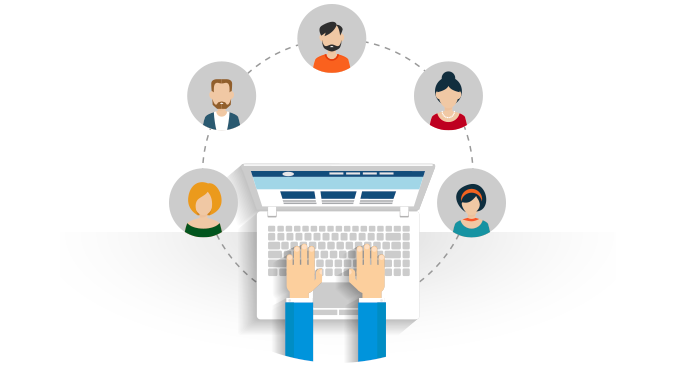


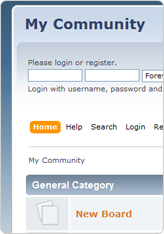




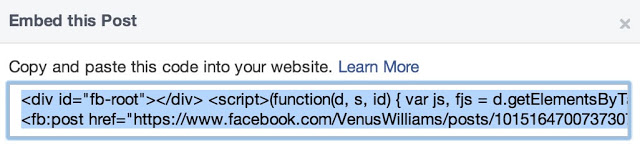


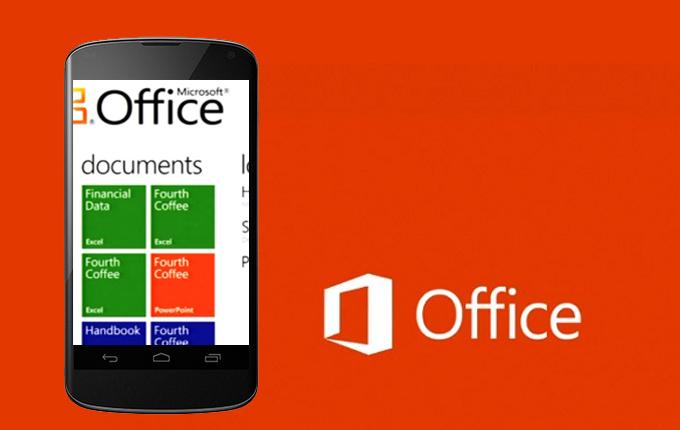

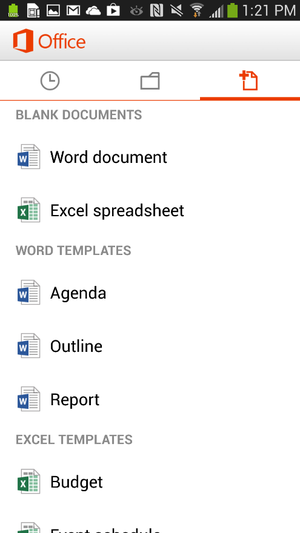

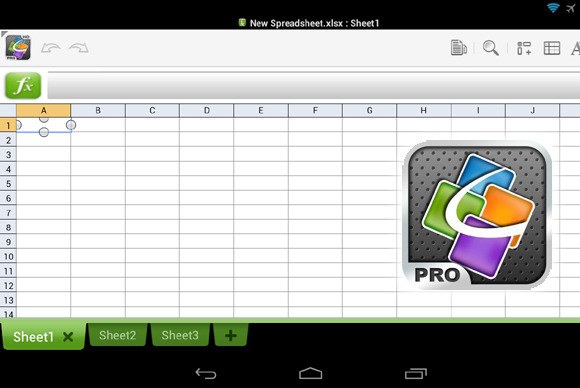







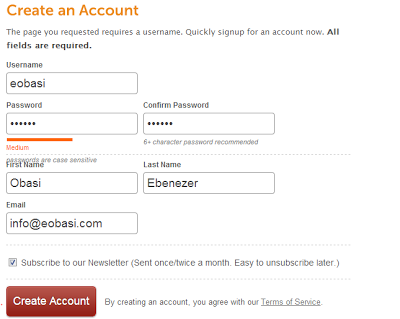
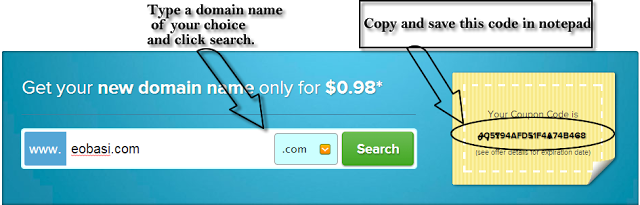

 Most financial Trojan programs used by cybercriminals today are capable of tampering in real time with online banking sessions initiated by victims on their computers. This includes the ability to execute fraudulent transactions in the background and hide them from the user by modifying the account balance and transaction history display in their browser. As a result, banks have started deploying systems to monitor how customers interact with their websites and detect anomalies that might indicate malware activity. However, it seems that some malware creators are returning to more traditional techniques that involve stealing credentials and using them from a different computer in order to avoid being detected.





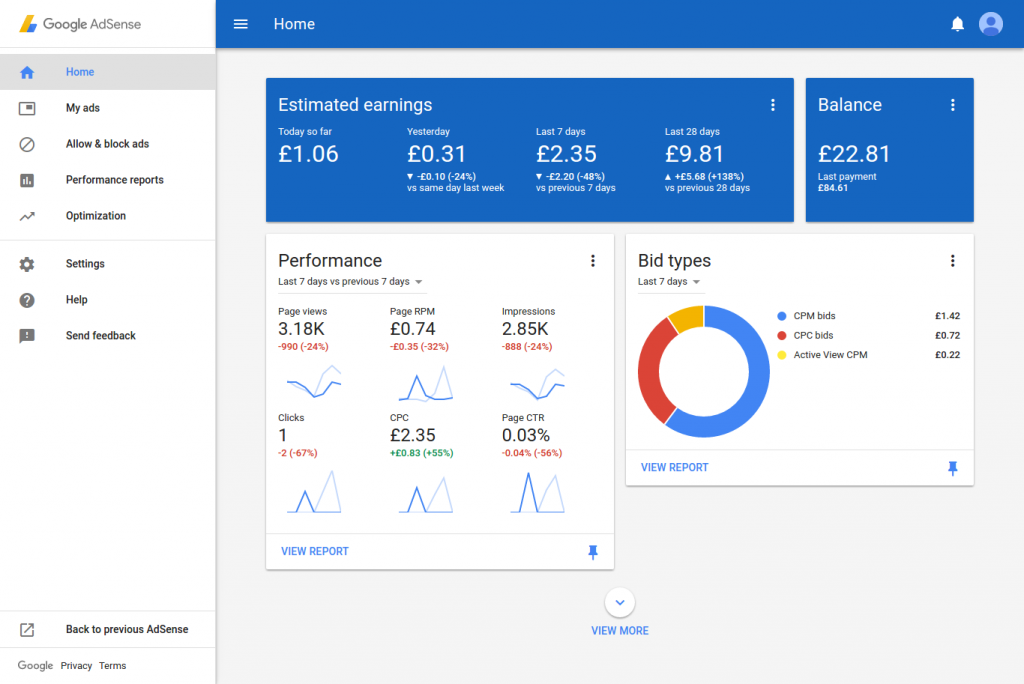







 Introduction: Just four days before Google started updating website page ranks, I launched my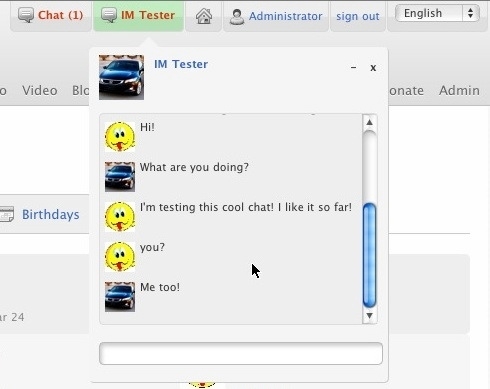






 Outdated software is the weak spot of Android phones, according to a security firm’s
  The firm found that more than half of Android devices worldwide have unpatched vulnerabilities that could be exploited by rogue apps. The
  Apple releases software patches for its iOS software regularly and users have immediate access to any updates, but the nature of Android means that carriers and device manufactures hold the key when it comes to updating phones. Sometimes Android updates are not rolled out to all phones in order to entice users to buy newer devices.
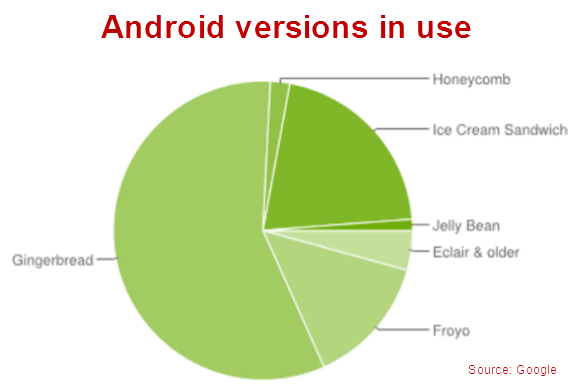 Post Credit: techhive.com








You must be logged in to post a comment.