Search results for: “google ”

  • Google Acquires Boston Dynamics, Creator Of Big Dog

    Google Acquires Boston Dynamics, Creator Of Big Dog

    Google yesterday, announced that they’ve acquired Boston Dynamics. Now, if you remember Boston Dynamics: they are the creators of quad- and bi-pedal robots like Big Dog and PETMAN. This is Google’s eighth robotics acquisition.

    The company, however did not disclose the details of the sale.

    The announcement appeared in the New York Times where Boston Dynamics CEO Marc Raibert said they would honor their DARPA military contracts although Google will not officially be a military contractor.

    The company, founded in 1992, has been working on standalone, gas-powered robots for the past decade. The robots are self-righting and very resilient. Robots like Big Dog can throw cinder blocks, handle rocky terrain, and run at 16 mph.

    The man behind the acquisition, Andy Rubin, stepped down as head of Googe’s Android business in march after turning a little-known mobile OS into a juggernaut. “His last big bet, Android, started off as a crazy idea that ended up putting a supercomputer in hundreds of millions of pockets,” wrote Larry Page on his Google+ page. “It is still very early days for this, but I can’t wait to see the progress.”

  • Discover Google’s Ridiculous Plan to Force you into Joining Google+

    Discover Google’s Ridiculous Plan to Force you into Joining Google+

    For those of you who felt you can run forever from Google+, well, I have got some bad news for you: Google is going to blackmail you.  

    After investing so much in Google+, Google thinks it’s the right time for you to get rid of Facebook, delete your Tumblr page and stop complaining. I’m sorry, if you think you really have an option: This hilarious video has revealed Google’s new strategy to force you into joining Google+.
    http://www.collegehumor.com/e/6942530
    It’s incredible and equally awkward to imagine the impact this could have on your life. How well do you enjoy people keeping tracks on your searches – Like your employer knowing that you looked up “How to implicate my boss?” twice, before reporting to duty 1 hour earlier than usual?

    Like a popular adage goes “You can’t beat them? Join them”, you really don’t have an option. To remain on the safer side, you need to bite the bullet, and sign up. 

  • Google Quietly Updates Gmail for Android to Suite your Holiday Travels

    Google Quietly Updates Gmail for Android to Suite your Holiday Travels

    It’s always kind of a drag when your mobile email client doesn’t do all the things that your desktop client can. Google seems to be catching on to this, since the company rolled out a new update to Gmail for Android today with a few new features that have been previously reserved for its web users.

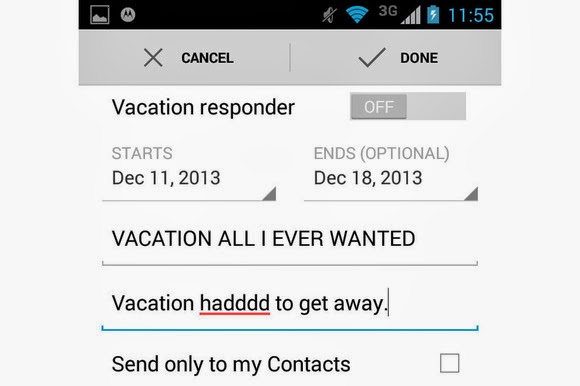
    Gmail 4.7 now lets you set up an away message with the Vacation Responder. Just as in the web client, you can set a start and end date for when the service should send out an automatic message that you’re out enjoying yourself. When you’re done having fun, you can easily toggle the messages on and off from within the app.

    Google also added the ability to send attachments from the mobile client, such as documents, PDFs, and .zip files.

    For those of you with Android 4.4. KitKat, the new Gmail includes native support for cloud printing. Devices with low memory will also notice a performance improvement within the app, which Google notes is a change made on behalf of Project Svelte.

    The Gmail update should be rolling out to an Android device near you, or you can try to grab it from the Google Play store.

  • Google’s Santa Tracker Returns with Chromecast-ready Android App

    Google’s Santa Tracker Returns with Chromecast-ready Android App

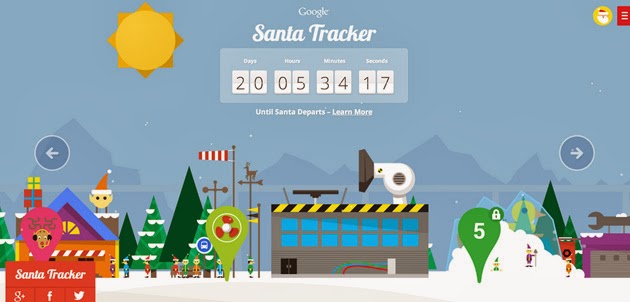
    After spending the last 11+ months maxin’ and relaxin’, Santa and his elves are back in full swing. Yes! Santa Tracker is here again and better than ever!


    Following Microsoft’s NORAD touch-friendly Santa Claus web tracker, Google is set to shower it’s Christmas blessings: The search giant’s latest Santa Tracker centers on an updated Android app (launching mid-December) with Chromecast TV streaming support — you’ll soon get to follow St. Nick from the comfort of your living room.
    If you’d prefer to keep tabs on him from the web, the company is promising both daily game and scene updates as well as a refreshed Chromecast-ready web extension to help you see how things are progressing. Just like last year, you can head to the Christmas Village website to keep an eye on how things are going up north.

    “To join in the flurry of preparations for Christmas Eve, visit the Village every day through December 24. You’ll have the chance to join the elves as they catapult presents and race with reindeer—and you’ll be able to send holiday wishes to friends and family from Santa himself. The elves make a little more progress each day, so be sure to stop by the Village to see the latest.” https://www.youtube.com/embed/0qrFL0mn3Uk

    There are tons of fun things to do to pass the time; an Android app is expected to roll out any day now.

  • New: Save your Message Attachments on Google Drive via your Gmail Interface

    New: Save your Message Attachments on Google Drive via your Gmail Interface

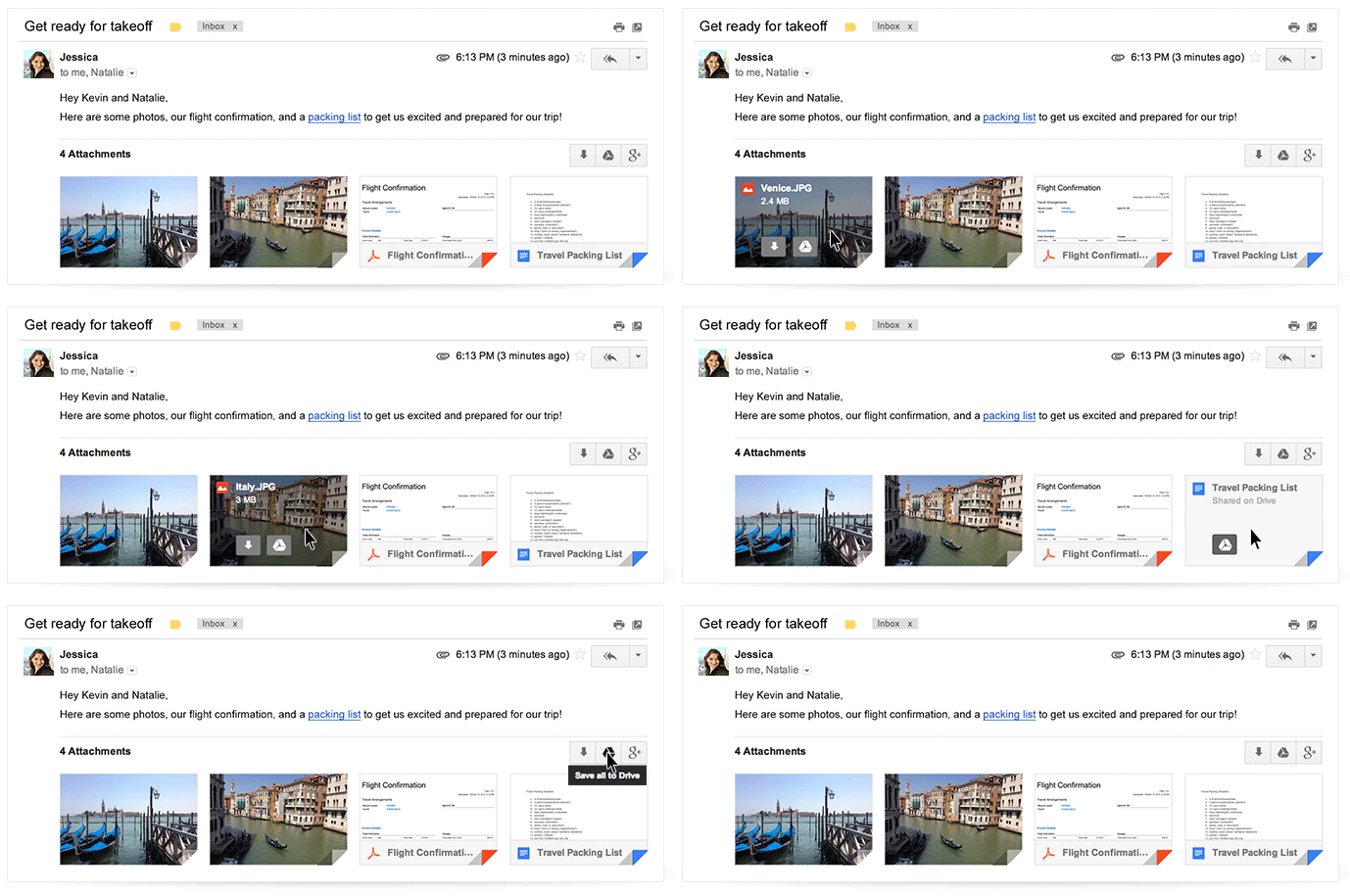
    Today, Google officially announced the release of a new update for Gmail users. The new update is set to allow users to view and save attachments to Google Drive directly from their mailbox.

    For those of you who are yet to use  Google Drive: It is a product that grants Google account owners free cloud service, that allows you to store upto 5GB data(s) in your free Google account and unlimited data for premium Google accounts.

    According to a statement by Scott Johnston in the Google official blog ” The next time you open an email with attachments, you’ll see new previews of the files at the bottom of the email, from photos and videos to spreadsheets and PDFs.”
    image
    With the new Gmail interface, you can now access your email attachments from any device such as your mobile phone and tablets and save them in your Google Drive, hence, making them accessible via any other device, anywhere, anytime.

    The new Gmail also let you navigate through multiple attachments right through your inbox and of-course read and even search for a particular phrase.

    How to Save your Attachments to Google Drive

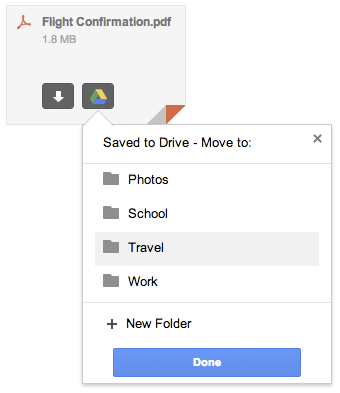
    To save your attachments:

    • Hover on the attachment preview
    • Click on the Google Drive icon that appears when you hover on the attachment.
    • Choose or create a folder for your attachment and click done
    image

    If you wish to save the attachment directly to your device, simply click the arrow icon (See image above).

    “This new attachment experience is available on desktop and will be rolling out over the next week. If you’re one of the more than 120 million active Drive users, you know that saving your files to Drive lets you get to them from any computer, phone or tablet. And if you aren’t taking advantage of Drive just yet, give it a try with your next Gmail attachment.” Scott added.

  • Say Hello to Google Helpouts

    Say Hello to Google Helpouts

    It’s been a long time coming, we have always known that somewhere at the middle, Google is just going to introduce a freelancing site. And yes! Google, yesterday officially announced their latest product called “Helpouts” .


    Helpout according to Emily Wood, is the new way people can get help from anywhere at anytime from real people at their own convenience.

    He wrote on Google official blog: “Help might be a quick answer to a problem you’re having right now, like how to fix your garage door, or how to remove a computer virus; or it might be guidance completing a project, like building a deck. It might be learning a new skill, like how to speak conversational French or how to draw cartoons; or it might be general advice on how to improve your fitness or your writing (I could use this right now).”
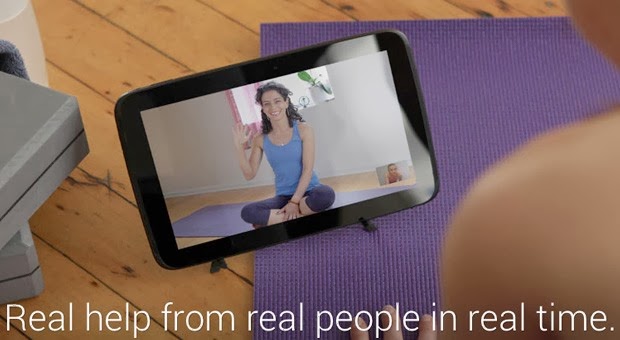
    Google Helpouts, is believed to be another freelancing site to find professionals with adequate qualifications to help you out with any problem you are having at the moment. “With Helpouts, you can choose who you get help from based on their qualifications, their availability, their price, their ratings and reviews. You can connect instantly or book in advance. You can get help from individuals or from brands you already know and trust, like Sephora, One Medical, Weight Watchers, Redbeacon (a Home Depot company), and Rosetta Stone. Once you’re in a Helpout, you can do more than just talk—you can share your computer screen, collaboratively edit a presentation, or record your Helpout. And if the experience doesn’t meet your expectations, we offer a full money back guarantee.” Emily Wood added.

    You can watch the video above, to see how Google Helpouts works.

    It’s been a long time coming, we have always known that somewhere at the middle, Google is just going to introduce a freelancing site. And yes! Google, yesterday officially announced their latest product called “Helpouts” .


    Helpout according to Emily Wood, is the new way people can get help from anywhere at anytime from real people at their own convenience.

    He wrote on Google official blog: “Help might be a quick answer to a problem you’re having right now, like how to fix your garage door, or how to remove a computer virus; or it might be guidance completing a project, like building a deck. It might be learning a new skill, like how to speak conversational French or how to draw cartoons; or it might be general advice on how to improve your fitness or your writing (I could use this right now).”

    Google Helpouts, is believed to be another freelancing site to find professionals with adequate qualifications to help you out with any problem you are having at the moment. “With Helpouts, you can choose who you get help from based on their qualifications, their availability, their price, their ratings and reviews. You can connect instantly or book in advance. You can get help from individuals or from brands you already know and trust, like Sephora, One Medical, Weight Watchers, Redbeacon (a Home Depot company), and Rosetta Stone. Once you’re in a Helpout, you can do more than just talk—you can share your computer screen, collaboratively edit a presentation, or record your Helpout. And if the experience doesn’t meet your expectations, we offer a full money back guarantee.” Emily Wood added.

    You can watch the video above, to see how Google Helpouts works.

    It’s been a long time coming, we have always known that somewhere at the middle, Google is just going to introduce a freelancing site. And yes! Google, yesterday officially announced their latest product called “Helpouts” .


    Helpout according to Emily Wood, is the new way people can get help from anywhere at anytime from real people at their own convenience.

    He wrote on Google official blog: “Help might be a quick answer to a problem you’re having right now, like how to fix your garage door, or how to remove a computer virus; or it might be guidance completing a project, like building a deck. It might be learning a new skill, like how to speak conversational French or how to draw cartoons; or it might be general advice on how to improve your fitness or your writing (I could use this right now).”

    Google Helpouts, is believed to be another freelancing site to find professionals with adequate qualifications to help you out with any problem you are having at the moment. “With Helpouts, you can choose who you get help from based on their qualifications, their availability, their price, their ratings and reviews. You can connect instantly or book in advance. You can get help from individuals or from brands you already know and trust, like Sephora, One Medical, Weight Watchers, Redbeacon (a Home Depot company), and Rosetta Stone. Once you’re in a Helpout, you can do more than just talk—you can share your computer screen, collaboratively edit a presentation, or record your Helpout. And if the experience doesn’t meet your expectations, we offer a full money back guarantee.” Emily Wood added.

    You can watch the video above, to see how Google Helpouts works.

    It’s been a long time coming, we have always known that somewhere at the middle, Google is just going to introduce a freelancing site. And yes! Google, yesterday officially announced their latest product called “Helpouts” .


    Helpout according to Emily Wood, is the new way people can get help from anywhere at anytime from real people at their own convenience.

    He wrote on Google official blog: “Help might be a quick answer to a problem you’re having right now, like how to fix your garage door, or how to remove a computer virus; or it might be guidance completing a project, like building a deck. It might be learning a new skill, like how to speak conversational French or how to draw cartoons; or it might be general advice on how to improve your fitness or your writing (I could use this right now).”

    Google Helpouts, is believed to be another freelancing site to find professionals with adequate qualifications to help you out with any problem you are having at the moment. “With Helpouts, you can choose who you get help from based on their qualifications, their availability, their price, their ratings and reviews. You can connect instantly or book in advance. You can get help from individuals or from brands you already know and trust, like Sephora, One Medical, Weight Watchers, Redbeacon (a Home Depot company), and Rosetta Stone. Once you’re in a Helpout, you can do more than just talk—you can share your computer screen, collaboratively edit a presentation, or record your Helpout. And if the experience doesn’t meet your expectations, we offer a full money back guarantee.” Emily Wood added.

    You can watch the video above, to see how Google Helpouts works.

    It’s been a long time coming, we have always known that somewhere at the middle, Google is just going to introduce a freelancing site. And yes! Google, yesterday officially announced their latest product called “Helpouts” .


    Helpout according to Emily Wood, is the new way people can get help from anywhere at anytime from real people at their own convenience.

    He wrote on Google official blog: “Help might be a quick answer to a problem you’re having right now, like how to fix your garage door, or how to remove a computer virus; or it might be guidance completing a project, like building a deck. It might be learning a new skill, like how to speak conversational French or how to draw cartoons; or it might be general advice on how to improve your fitness or your writing (I could use this right now).”

    Google Helpouts, is believed to be another freelancing site to find professionals with adequate qualifications to help you out with any problem you are having at the moment. “With Helpouts, you can choose who you get help from based on their qualifications, their availability, their price, their ratings and reviews. You can connect instantly or book in advance. You can get help from individuals or from brands you already know and trust, like Sephora, One Medical, Weight Watchers, Redbeacon (a Home Depot company), and Rosetta Stone. Once you’re in a Helpout, you can do more than just talk—you can share your computer screen, collaboratively edit a presentation, or record your Helpout. And if the experience doesn’t meet your expectations, we offer a full money back guarantee.” Emily Wood added.

    You can watch the video above, to see how Google Helpouts works.

    It’s been a long time coming, we have always known that somewhere at the middle, Google is just going to introduce a freelancing site. And yes! Google, yesterday officially announced their latest product called “Helpouts” .


    Helpout according to Emily Wood, is the new way people can get help from anywhere at anytime from real people at their own convenience.

    He wrote on Google official blog: “Help might be a quick answer to a problem you’re having right now, like how to fix your garage door, or how to remove a computer virus; or it might be guidance completing a project, like building a deck. It might be learning a new skill, like how to speak conversational French or how to draw cartoons; or it might be general advice on how to improve your fitness or your writing (I could use this right now).”

    Google Helpouts, is believed to be another freelancing site to find professionals with adequate qualifications to help you out with any problem you are having at the moment. “With Helpouts, you can choose who you get help from based on their qualifications, their availability, their price, their ratings and reviews. You can connect instantly or book in advance. You can get help from individuals or from brands you already know and trust, like Sephora, One Medical, Weight Watchers, Redbeacon (a Home Depot company), and Rosetta Stone. Once you’re in a Helpout, you can do more than just talk—you can share your computer screen, collaboratively edit a presentation, or record your Helpout. And if the experience doesn’t meet your expectations, we offer a full money back guarantee.” Emily Wood added.

    You can watch the video above, to see how Google Helpouts works.
    It’s been a long time coming, we have always known that somewhere at the middle, Google is just going to introduce a freelancing site. And yes! Google, yesterday officially announced their latest product called “Helpouts” .


    Helpout according to Emily Wood, is the new way people can get help from anywhere at anytime from real people at their own convenience.

    He wrote on Google official blog: “Help might be a quick answer to a problem you’re having right now, like how to fix your garage door, or how to remove a computer virus; or it might be guidance completing a project, like building a deck. It might be learning a new skill, like how to speak conversational French or how to draw cartoons; or it might be general advice on how to improve your fitness or your writing (I could use this right now).”

    Google Helpouts, is believed to be another freelancing site to find professionals with adequate qualifications to help you out with any problem you are having at the moment. “With Helpouts, you can choose who you get help from based on their qualifications, their availability, their price, their ratings and reviews. You can connect instantly or book in advance. You can get help from individuals or from brands you already know and trust, like Sephora, One Medical, Weight Watchers, Redbeacon (a Home Depot company), and Rosetta Stone. Once you’re in a Helpout, you can do more than just talk—you can share your computer screen, collaboratively edit a presentation, or record your Helpout. And if the experience doesn’t meet your expectations, we offer a full money back guarantee.” Emily Wood added.

    You can watch the video above, to see how Google Helpouts works.
    It’s been a long time coming, we have always known that somewhere at the middle, Google is just going to introduce a freelancing site. And yes! Google, yesterday officially announced their latest product called “Helpouts” .


    Helpout according to Emily Wood, is the new way people can get help from anywhere at anytime from real people at their own convenience.

    He wrote on Google official blog: “Help might be a quick answer to a problem you’re having right now, like how to fix your garage door, or how to remove a computer virus; or it might be guidance completing a project, like building a deck. It might be learning a new skill, like how to speak conversational French or how to draw cartoons; or it might be general advice on how to improve your fitness or your writing (I could use this right now).”

    Google Helpouts, is believed to be another freelancing site to find professionals with adequate qualifications to help you out with any problem you are having at the moment. “With Helpouts, you can choose who you get help from based on their qualifications, their availability, their price, their ratings and reviews. You can connect instantly or book in advance. You can get help from individuals or from brands you already know and trust, like Sephora, One Medical, Weight Watchers, Redbeacon (a Home Depot company), and Rosetta Stone. Once you’re in a Helpout, you can do more than just talk—you can share your computer screen, collaboratively edit a presentation, or record your Helpout. And if the experience doesn’t meet your expectations, we offer a full money back guarantee.” Emily Wood added.

    You can watch the video above, to see how Google Helpouts works.
    It’s been a long time coming, we have always known that somewhere at the middle, Google is just going to introduce a freelancing site. And yes! Google, yesterday officially announced their latest product called “Helpouts” .


    Helpout according to Emily Wood, is the new way people can get help from anywhere at anytime from real people at their own convenience.

    He wrote on Google official blog: “Help might be a quick answer to a problem you’re having right now, like how to fix your garage door, or how to remove a computer virus; or it might be guidance completing a project, like building a deck. It might be learning a new skill, like how to speak conversational French or how to draw cartoons; or it might be general advice on how to improve your fitness or your writing (I could use this right now).”

    Google Helpouts, is believed to be another freelancing site to find professionals with adequate qualifications to help you out with any problem you are having at the moment. “With Helpouts, you can choose who you get help from based on their qualifications, their availability, their price, their ratings and reviews. You can connect instantly or book in advance. You can get help from individuals or from brands you already know and trust, like Sephora, One Medical, Weight Watchers, Redbeacon (a Home Depot company), and Rosetta Stone. Once you’re in a Helpout, you can do more than just talk—you can share your computer screen, collaboratively edit a presentation, or record your Helpout. And if the experience doesn’t meet your expectations, we offer a full money back guarantee.” Emily Wood added.

    You can watch the video above, to see how Google Helpouts works.

  • Apple & Microsoft-Backed Rockstar Consortium Battles Google and Samsung Over 7 Nortel Patents

    Apple & Microsoft-Backed Rockstar Consortium Battles Google and Samsung Over 7 Nortel Patents

    Well, at the moment, it does look like a ‘never ending’ war between this two parties. “The Rockstar consortium is an organization backed by Apple, Microsoft, BlackBerry, Ericsson and Sony. It purchased patents off of the defunct telecommunications company Nortel in 2011, in a bidding war with Google.

    Now, the consortium has filed suit against Google, ASUSTek, HTC, Huawei, LG, Pantech and ZTE over those patents. The suit was filed in a U.S. District Court of Eastern Texas today.

    “Google placed an initial bid of $900,000,000 for the patents-in-suit and the rest of the Nortel portfolio. Google subsequently increased its bid multiple times, ultimately bidding as high as $4.4 billion,” the filing states. “That price was insufficient to win the auction, as a group led by the current shareholders of Rockstar purchased the portfolio for $4.5 billion. Despite losing in its attempt to acquire the patents-in-suit at auction, Google has infringed and continues to infringe the patents-in-suit.”

    Google famously bid some not-so-random numbers before the end, including ‘pi’. The suit also involves a licensee of the ‘Associative Search Engine’ 6,098,065 patent, NetStar, Inc.

    The other patents are US 7,236,969, 7,469,245, 7,672,970, 7,895,178, 7,895,183 and 7,933,883. They’re mostly fairly dry stuff related to database searches, relevance in advertising presentation and data sorting, but exactly the kind of stuff that makes Google’s special sauce work. We can’t speak to the strength of the patents, but they certainly appear to be relevant.” said techcrunch on their website, “Google lost out in a heated bidding war against Rockstar and went on to acquire Motorola, a move that many attributed to a patent grab, but that was also about hardware in a lot of ways.

    Notably, HTC has a cross-licensing agreement with Apple on some patents, but apparently not these. News of the suit was first reported by Reuters today.”

  • Google App Indexing Can Improve your Search Results -Tech Crunch

    Google App Indexing Can Improve your Search Results -Tech Crunch

    A report ot techcrunch has explained how Google’s Search Results Can Deep-Link To Your Android Apps. Read the details below:


    “It should be clear by now that there’s much more at play in Android 4.4 KitKat than some early reports alluded to, and one of the more interesting (to me, anyway) tidbits managed to escape the early leak treatment.

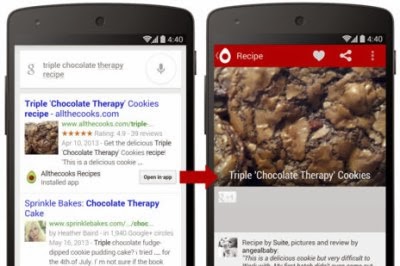
    Tucked away toward the tail-end of Google’s Nexus 5/KitKat presentation was a mention of a feature called App Indexing that should get companies (and the Android app developers that work for them) a little worked up. That’s because Google has developed a way to deep-link to the contents of an app from within a user’s Google search results with a feature it calls App Indexing.

    Tucked away toward the tail-end of Google’s Nexus 5/KitKat presentation was a mention of a feature called App Indexing that should get companies (and the Android app developers that work for them) a little worked up. That’s because Google has developed a way to deep-link to the contents of an app from within a user’s Google search results with a feature it calls App Indexing.

    Here’s how it works. Say you’re using the Google Search app to dig up some dirt on that Ender’s Game movie that doesn’t look very good. If you happen to have the IMDb app installed on your device while you search, you’ll be treated to an info card in that results stream that includes an “Open in app” button. Give it a quick tap and the IMDb app will spring to life and immediately direct you to its Ender’s Game listing.

    Naturally, the feature isn’t just limited to showing off movie details — so far the full list of supporters includes Allthecooks, AllTrails, Beautylish, Etsy, Expedia, Flixster, Healthtap, IMDb, Moviefone, Newegg (yes!), OpenTable, and Trulia.

    The way Google sees it, the move is all about providing these companies with a choice. If they think their mobile interfaces are enough to keep users engaged, they can simple go about their business. But if they already have an Android app (or are in the process of building one) that can do a better job of engaging with its users, a little extra work to implement those deep links may be well worth it.

    It’s not hard to look at this as a move to bolster Android app development, either. There’s little doubting that Android is a global force — which may be only compounded by the fact that Android 4.4 KitKat may drive device sales in developing markets by bringing a more advanced feature set to cheap hardware — and in many cases the Google Search app is going along for the ride. That means that with any luck, huge swaths of the global Android community will be searching for stuff using the Google search app and seeing those deep-linked “Open in app” buttons when they’ve got the right apps installed. Tell me that’s not a compelling reason for a company to develop an Android app if they haven’t already.

    Despite the buy-in from all those app partners, it’ll be some time before users like me will actually start getting those results in the wild. Google is testing the feature with those previously listed partners, but the updated cards that will display that information won’t actually roll out until some time in November.”

    A report ot techcrunch has explained how Google’s Search Results Can Deep-Link To Your Android Apps. Read the details below:


    “It should be clear by now that there’s much more at play in Android 4.4 KitKat than some early reports alluded to, and one of the more interesting (to me, anyway) tidbits managed to escape the early leak treatment.

    Tucked away toward the tail-end of Google’s Nexus 5/KitKat presentation was a mention of a feature called App Indexing that should get companies (and the Android app developers that work for them) a little worked up. That’s because Google has developed a way to deep-link to the contents of an app from within a user’s Google search results with a feature it calls App Indexing.

    Tucked away toward the tail-end of Google’s Nexus 5/KitKat presentation was a mention of a feature called App Indexing that should get companies (and the Android app developers that work for them) a little worked up. That’s because Google has developed a way to deep-link to the contents of an app from within a user’s Google search results with a feature it calls App Indexing.

    Here’s how it works. Say you’re using the Google Search app to dig up some dirt on that Ender’s Game movie that doesn’t look very good. If you happen to have the IMDb app installed on your device while you search, you’ll be treated to an info card in that results stream that includes an “Open in app” button. Give it a quick tap and the IMDb app will spring to life and immediately direct you to its Ender’s Game listing.

    Naturally, the feature isn’t just limited to showing off movie details — so far the full list of supporters includes Allthecooks, AllTrails, Beautylish, Etsy, Expedia, Flixster, Healthtap, IMDb, Moviefone, Newegg (yes!), OpenTable, and Trulia.

    The way Google sees it, the move is all about providing these companies with a choice. If they think their mobile interfaces are enough to keep users engaged, they can simple go about their business. But if they already have an Android app (or are in the process of building one) that can do a better job of engaging with its users, a little extra work to implement those deep links may be well worth it.

    It’s not hard to look at this as a move to bolster Android app development, either. There’s little doubting that Android is a global force — which may be only compounded by the fact that Android 4.4 KitKat may drive device sales in developing markets by bringing a more advanced feature set to cheap hardware — and in many cases the Google Search app is going along for the ride. That means that with any luck, huge swaths of the global Android community will be searching for stuff using the Google search app and seeing those deep-linked “Open in app” buttons when they’ve got the right apps installed. Tell me that’s not a compelling reason for a company to develop an Android app if they haven’t already.

    Despite the buy-in from all those app partners, it’ll be some time before users like me will actually start getting those results in the wild. Google is testing the feature with those previously listed partners, but the updated cards that will display that information won’t actually roll out until some time in November.”

    A report ot techcrunch has explained how Google’s Search Results Can Deep-Link To Your Android Apps. Read the details below:


    “It should be clear by now that there’s much more at play in Android 4.4 KitKat than some early reports alluded to, and one of the more interesting (to me, anyway) tidbits managed to escape the early leak treatment.

    Tucked away toward the tail-end of Google’s Nexus 5/KitKat presentation was a mention of a feature called App Indexing that should get companies (and the Android app developers that work for them) a little worked up. That’s because Google has developed a way to deep-link to the contents of an app from within a user’s Google search results with a feature it calls App Indexing.

    Tucked away toward the tail-end of Google’s Nexus 5/KitKat presentation was a mention of a feature called App Indexing that should get companies (and the Android app developers that work for them) a little worked up. That’s because Google has developed a way to deep-link to the contents of an app from within a user’s Google search results with a feature it calls App Indexing.

    Here’s how it works. Say you’re using the Google Search app to dig up some dirt on that Ender’s Game movie that doesn’t look very good. If you happen to have the IMDb app installed on your device while you search, you’ll be treated to an info card in that results stream that includes an “Open in app” button. Give it a quick tap and the IMDb app will spring to life and immediately direct you to its Ender’s Game listing.

    Naturally, the feature isn’t just limited to showing off movie details — so far the full list of supporters includes Allthecooks, AllTrails, Beautylish, Etsy, Expedia, Flixster, Healthtap, IMDb, Moviefone, Newegg (yes!), OpenTable, and Trulia.

    The way Google sees it, the move is all about providing these companies with a choice. If they think their mobile interfaces are enough to keep users engaged, they can simple go about their business. But if they already have an Android app (or are in the process of building one) that can do a better job of engaging with its users, a little extra work to implement those deep links may be well worth it.

    It’s not hard to look at this as a move to bolster Android app development, either. There’s little doubting that Android is a global force — which may be only compounded by the fact that Android 4.4 KitKat may drive device sales in developing markets by bringing a more advanced feature set to cheap hardware — and in many cases the Google Search app is going along for the ride. That means that with any luck, huge swaths of the global Android community will be searching for stuff using the Google search app and seeing those deep-linked “Open in app” buttons when they’ve got the right apps installed. Tell me that’s not a compelling reason for a company to develop an Android app if they haven’t already.

    Despite the buy-in from all those app partners, it’ll be some time before users like me will actually start getting those results in the wild. Google is testing the feature with those previously listed partners, but the updated cards that will display that information won’t actually roll out until some time in November.”

  • Native MySQL Connection Using Google Cloud SQL

    Native MySQL Connection Using Google Cloud SQL

    The article published about hosting your files on google drive prompted a mix reaction between webmasters and app developers, a few of the readers hinted at the lack of MySQL support in Google cloud server.

    A report on tech crunch has confirmed that Google Cloud SQL now supports native MySQL connections, a move that is intended to make it easier to integrate third-party applications. With the support, native MySQL apps can be plugged into Cloud SQL, allowing the customer to leave system administration and management for Google.

    Through MySQL Wire Protocol, the standard connection protocol for MySQL databases, Google maintains that CloudSQL allows for low latency connections for applications running on Google Compute Engine and Google App Engine. Customers can use popular tools such as MySQL Workbench, Toad and the MySQL command-line tool to manage Cloud SQL instances. It also supports standard drivers, such as Connector/J, Connector/ODBC, and Connector/NET.

    The native connectivity also means that data can be replicated with control over managing and deploying cloud databases. For example, Google notes in its post that data can be replicated between Cloud SQL and on-premise databases — including Oracle, SQL Server, and DB2.

    The support demonstrates how connectors like MySQL Wire Protocol will help create transparency between cloud services and any on-premise application. It’s a service that should attract those looking for the level of managed services that Google provides.

    Google is starting to offer features that Amazon Web Services (AWS) has had for a few years. While Google launched the core of its CloudSQL service in June, AWS launched its MySQL service in 2009 and in 2012 began offering support for Oracle Database.

    Then there is the pricing. According to the InfoQ blog, AWS RDS is “cheaper than corresponding Google Cloud SQL pay-per-hour options, but one needs to consider other costs such as data storage and transfer fees, etc.”

    The article published about hosting your files on google drive prompted a mix reaction between webmasters and app developers, a few of the readers hinted at the lack of MySQL support in Google cloud server.

    A report on tech crunch has confirmed that Google Cloud SQL now supports native MySQL connections, a move that is intended to make it easier to integrate third-party applications. With the support, native MySQL apps can be plugged into Cloud SQL, allowing the customer to leave system administration and management for Google.

    Through MySQL Wire Protocol, the standard connection protocol for MySQL databases, Google maintains that CloudSQL allows for low latency connections for applications running on Google Compute Engine and Google App Engine. Customers can use popular tools such as MySQL Workbench, Toad and the MySQL command-line tool to manage Cloud SQL instances. It also supports standard drivers, such as Connector/J, Connector/ODBC, and Connector/NET.

    The native connectivity also means that data can be replicated with control over managing and deploying cloud databases. For example, Google notes in its post that data can be replicated between Cloud SQL and on-premise databases — including Oracle, SQL Server, and DB2.

    The support demonstrates how connectors like MySQL Wire Protocol will help create transparency between cloud services and any on-premise application. It’s a service that should attract those looking for the level of managed services that Google provides.

    Google is starting to offer features that Amazon Web Services (AWS) has had for a few years. While Google launched the core of its CloudSQL service in June, AWS launched its MySQL service in 2009 and in 2012 began offering support for Oracle Database.

    Then there is the pricing. According to the InfoQ blog, AWS RDS is “cheaper than corresponding Google Cloud SQL pay-per-hour options, but one needs to consider other costs such as data storage and transfer fees, etc.”

    The article published about hosting your files on google drive prompted a mix reaction between webmasters and app developers, a few of the readers hinted at the lack of MySQL support in Google cloud server.


    A report on tech crunch has confirmed that Google Cloud SQL now supports native MySQL connections, a move that is intended to make it easier to integrate third-party applications. With the support, native MySQL apps can be plugged into Cloud SQL, allowing the customer to leave system administration and management for Google.

    Through MySQL Wire Protocol, the standard connection protocol for MySQL databases, Google maintains that CloudSQL allows for low latency connections for applications running on Google Compute Engine and Google App Engine. Customers can use popular tools such as MySQL Workbench, Toad and the MySQL command-line tool to manage Cloud SQL instances. It also supports standard drivers, such as Connector/J, Connector/ODBC, and Connector/NET.

    The native connectivity also means that data can be replicated with control over managing and deploying cloud databases. For example, Google notes in its post that data can be replicated between Cloud SQL and on-premise databases — including Oracle, SQL Server, and DB2.

    The support demonstrates how connectors like MySQL Wire Protocol will help create transparency between cloud services and any on-premise application. It’s a service that should attract those looking for the level of managed services that Google provides.

    Google is starting to offer features that Amazon Web Services (AWS) has had for a few years. While Google launched the core of its CloudSQL service in June, AWS launched its MySQL service in 2009 and in 2012 began offering support for Oracle Database.

    Then there is the pricing. According to the InfoQ blog, AWS RDS is “cheaper than corresponding Google Cloud SQL pay-per-hour options, but one needs to consider other costs such as data storage and transfer fees, etc.”

  • How to Make the Most of Google Maps

    How to Make the Most of Google Maps

    Everyone knows that Google Maps is the ruler when it comes to mapping services (Nokia map lies just somewhere by the side). There is no doubt about that whatsoever. You can use it in your mobile phone as an app or in a browser. Although Google Maps is loaded with tons of effective features, few of these useful features are widely veiled.  
    Here are some tips and tricks on how to make the most of Google Maps:

    1. View live traffic. It is a feature in which Google Maps displays live traffic feed on maps. This enables users to go by the current rate of traffic and plan their routes accordingly. In order to view live traffic, simply click on the ‘Satellite’ icon and then on the ‘Traffic’ option. This particular feature is operational through mobile apps.
    2. Google Now. This is yet another feature of Google Maps. Its integration enables the Google Maps Sync to function in a more enhanced manner than before. Searching for directions enables the feature to predict the desired location based on your web history. If Google is aware of your work or home locations, it will calculate and display the route and estimated time it will take to reach home or work.
    3. Route change. If Google Maps suggested routes are not according to your liking or convenience, you can click a point (it can be any point) present on the map and then drag it to some other place. By doing so, you can change your route.
    4. Mode of transit. Directions, whether for walking or driving, are available from whatever your current location. You can also access directions if traveling by bicycle or public transit. Whatever the case, Google Maps will provide you with three different routes. Varied directions help in selecting the best and most convenient route for you, whatever you’re preferred mode of transit.
    5. Routes with numerous destinations. If you want to stop on multiple destinations, you can make use of the ‘Add Destination’ feature. Through this link, you can add each of your desired destinations to your list. Google will then provide you with the most efficient and convenient route.
    6. Make maps for yourself. If there are vital locations available with you, you can create and make customized maps for yourself only. Visit Google Maps and go to ‘My Places’. Right under it, you will find the link ‘Create Map’.
    7. Locating places of interest. Try out the Tourist Path. Through this feature, you can get a display of historical sites, parks and restaurants on a customized Google Maps view.

    Using Google Maps is simply easy. All you need to do is fiddle with its many features and work with them until you get the desired results!

  • Google to Retire Google Checkout

    Google to Retire Google Checkout

    Over the recent months, there has been some rumors about google intention to retire google checkout. Finally, google has made an official release confirming that story. Yes! Google will retire checkout On November 20, 2013.

    If you are reading this, I know you are not happy about it. So are we and other merchants using the google checkout as a payment processor. Ofcourse, this will also mean that after November 20, 2013 you will no longer be eligible to use the blogger shopping cart powered by google checkout.

    If you are a merchant who sell digital goods or perform virtual services, you can migrate to  Google Wallet for digital goods before the deadline date. However, merchants selling through Google-hosted marketplaces (e.g. Google Play) will be unaffected by this development.

    DateProduct Change
    May 20th, 2013Last day to sign up for Google Checkout
    November 20th, 2013Last day to charge orders
    November 21st, 2013Last day to ship orders
    November 27th, 2013All outstanding orders will be cancelled
    December 20th, 2013Last merchant refunds permitted through Checkout

    If you are using the google checkout payment processor for selling physical goods (e.g: running an eCommerce site), you should consider switching to another payment processor.

    This is the fourth app being retired by google in 2013, what do you think about it? Do you think google is right to retire Google Checkout? Share this story with your friends and have your say on it!

  • Google search dominance may not last in mobile age

    Google search dominance may not last in mobile age

    For more than a decade, Google has become synonymous with search. Despite Microsoft’s well-funded efforts to get users to “Bing It,” people are still “googling” with wild abandon. However, there are some signs that the company’s dominance may not extend into the mobile age.
    According to a New York Times report, traditional web searches declined 3 percent in the second half of last year after rising for years, while searches on topical (“verticle”) search engines rose 8 percent over the same period.
    It’s not that people aren’t hungry for content. They are. But people are starting to alter their habits to search through curated content.
    Web users have learned that—as good as Google is at what it does—it is often and easier to go directly to a cloistered, curated segment of the Web to find what you want.

    Savy users know to search for items they want to purchase on Amazon or Target; or go straight to IMDB for information on that actress who was in that one thing from back in the day; or to Wikipedia to look up information on that far away country mentioned on the news.
    Google is an unnecessary and easily avoidable middleman standing between you and a trusted information source.
    This change in search behavior becomes more palpable in the mobile, app-centric era. Users are far more likely to search for weather information, news, or mapping information directly through relevant apps rather than googling first.
    This altering of the search landscape would explain Google’s moves in recent years to purchase content providers such as Zagat’s and Frommer’s (for food and travel respectively). Google wants to remain the default entry into the Internet and provide everything quickly and in as few steps as possible. Google is an unnecessary and easily avoidable middleman standing between you and a trusted information source.

    This one-stop-shopping strategy may prove wise as the mobile space moves into hands-free search via native apps like Siri and S-Voice or into strange new voice-activated devices like Google Glass. In these situations, a single entry into the Web may prove easier than accessing specific curated app gateways.
    For now, Google remains the dominant gatekeeper to rest of the Web. However, as Facebook pushes their new super app, we may be catching a glimpse of the future battlelines for mobile ubiquity.

  • New! Increase your audience with the Google+ followers gadget

    New! Increase your audience with the Google+ followers gadget


    Dear Readers, this might be my last post of the year 2012, I wish you all a MERRY XMAS and GLORIOUS NEW YEARthis year I want to make sure that you cross over to the new year on the high.
    Google+ Gadget: Introduction:Connecting your blog to Google+ is a great way to attract new readers, as well as build lasting relationships with your followers. For example, you can easily share your posts in the Google+ stream, as well as enable blog visitors to recommend your stuff in a single click. Today we’re excited to offer another Google+ perk: the followers gadget.

    The Google+ followers gadget highlights your total Google+ audience (both its size and some friendly faces), and offers visitors the chance to follow you

    on Google+. As a result, you can grow your
    readership across the web, and reach them either in the Google+ stream, or through your blog.

    Adding the google plus gadget in your blog

    1. Login to your blogger account  
    1. Goto LAYOUT
    1. Add new gadgets
    1. Select  Google+ followers gadget
    1. Click done!
  • You can now Mention people in your posts with Google+

    You can now Mention people in your posts with Google+

    With Blogger and Google+ improving each day as google hit bloggers with a stupendous means of communicating with their readers easily just after blogger introducing the new blogger mobile app.

    +Malte Ubl a software Engineer wrote on blogger buzz 5 days ago

    “Blogs are a great way to spark a conversation, and today we’re giving you a new way to grab someone’s attention: Google+ mentions in Blogger. Now you can add a link to a Google+ profile or page when you want to mention someone in a post. If you then share your post from Blogger to Google+, we make it easier to notify your mentions by including them in the sharebox. To mention someone, just type “+” before their name while you’re using the Blogger post editor.


    The profile or page will show up as a link in your published post. Hovering over will show a card with more info and an ‘Add to circles’ button. Clicking the link takes you straight to the Google+ profile or page.”

    So, whether you want to credit a co-author (thanks +Gregory Fair!), ask a question, or just kick off a dialogue, connect your blog to Google+ and try mentioning someone in your next post!

  • Google Adds Site-Filtering Feature to Search  Google Search: Block Sites

    Google Adds Site-Filtering Feature to Search Google Search: Block Sites

    Google Search: Block Sites

    Ever wish you could keep certain sites from showing up in your Google search results? Thanks to a new feature being rolled out right now, you can. Google announced the debut of a site-blocking search tool via its official company blog on Thursday. The tool is simple to use: When you click on a site in a Google search and then go back to Google — presumably because you weren’t satisfied with what you found — you’ll see a new option on the results page to block the site from future searches. All you have to do is click it, and the site will never show up for you again.
    Your search site-blocking preferences are saved in your Google account, so you’ll have to be logged in for the feature to work.

    Google Search Results: Block Sites
    And don’t worry: Your search-blocking changes aren’t set in stone. Anytime a site is omitted from a search because of your blocking, Google will display a small message letting you know something’s been removed. You’ll have an option to unmask the hidden results, if you’re so inclined. You can also manage your virtual blacklist via your Google search settings.
    The Google search-blocking feature will become available to everyone over the next few days. As of now, it’ll function only in English and only for users on Chrome 9 or higher, Internet Explorer 8 or higher, and Firefox 3.5 or higher.

    Google Search Filtering: The Bigger Picture

    If this whole thing has you feeling a sense of déjà vu, don’t worry: You aren’t losing your mind. Google announced a similar search-filtering feature about a month ago in the form of an extension for the Chrome browser. The extension did almost the same exact thing as this new feature, except for the fact that it worked on the browser-level instead of on Google’s own servers.
    It’s all part of Google’s steady efforts to combat the presence of search spam — a fancy term for low-quality entries that show up in search results. Google has increasingly come under fire for search spam in recent weeks, with some bloggers and pundits saying the company’s level of search-result junk is spiraling out of control. The concerns revolve largely around so-called “content farms,” or sites that generate lots of pages with little real value. Many of these sites monitor popular search queries and create pages for the sole purpose of attracting traffic, even though they have no original or relevant content to offer.
    Google also recently adjusted its search algorithm to try to keep those sites from cluttering up results. The change, announced in late February, is designed to reduce rankings for low-quality sites and give higher rankings to sites with more original and in-depth material.

  • Hands on with Google Handwrite, Google’s new search feature

    Hands on with Google Handwrite, Google’s new search feature

    Newton fans, rejoice: If you like writing your queries on a screen rather than typing them on a virtual keyboard, Google’s new project, Handwrite, should awe and delight.

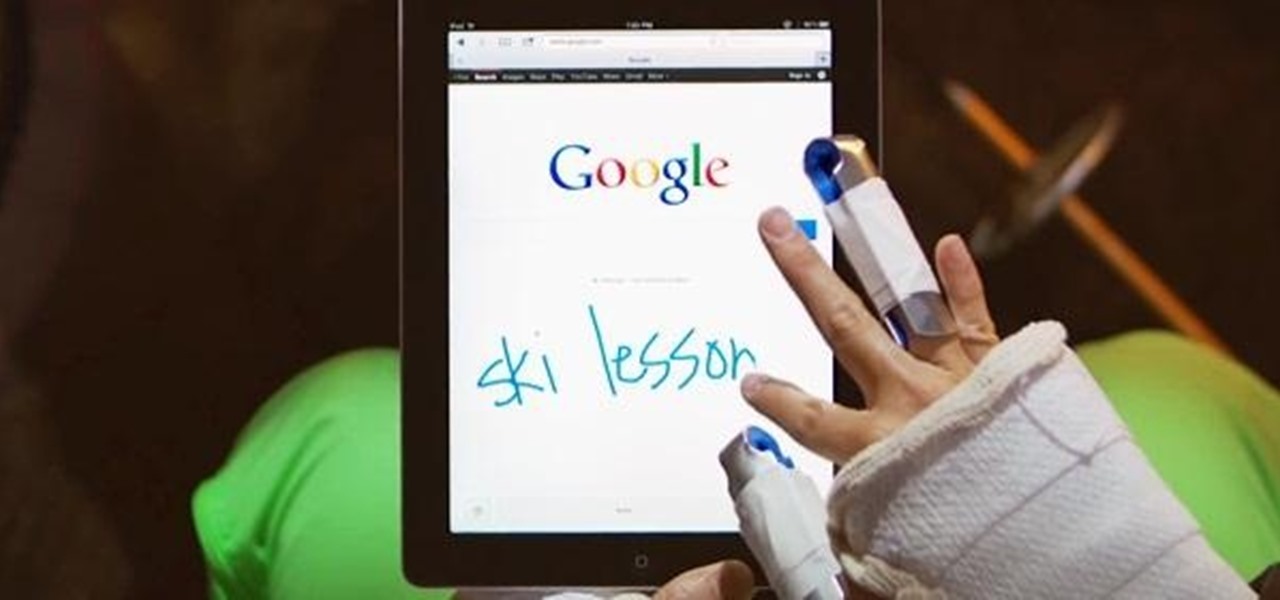
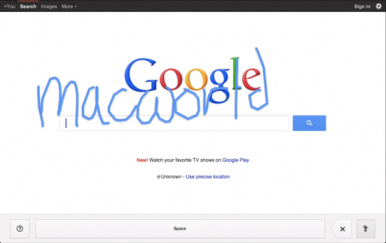
    Announced on Google’s blog Thursday morning, the company’s new beta project aims to make it easier to search, no matter where you are or what you’re doing. Handwrite allows you to block print or handwrite letters, words, and punctuation on the screen, where it will be instantly analyzed and converted into a search term.
    The feature is pretty simple to turn on: On an iPhone, scroll down to the Settings link on Google.com (on an iPad, click Search Settings from the Gear icon), enable Handwrite mode, then return to Google.com. Tap the new button in the lower right corner—it resembles a cursive lower-case g—to turn Handwrite on, and just start scribbling.

    On an iPhone or iPod touch, I found Handwrite a little finicky due to the small screen. (See my hands-on video, below.) The service will intelligently try to guess at your letters and words, though, so if you only write “dowag” before you run out of room, you can continue with “er” and it will put the letters together to make “dowager”—and suggest you might be looking for the Dowager Countess from Downton Abbey, at that.http://www.youtube.com/embed/iwZOhhul0YU?feature=player_embedded
    On an iPad, using Handwrite is a dream, especially if you use a stylus. There’s no worry of real estate crunch, and you have much more freedom in forming your letters.
    Unfortunately, I found that Google’s recognition engine was much poorer at analyzing cursive lettering than it was at block printing. I’m not sure whether that has to do with my own messy style of cursive or the engine itself, but I often found it dropping letters (it didn’t know what to do with a lower-case s or r) or misunderstanding words entirely. Luckily, Google’s search engine is good enough to more or less pick up the slack (turning “teasures” to “treasures,” for example), but it’s still a little annoying.
    For a beta feature, though, Handwrite is great fun, and something I could actually see myself using pretty often. My handwriting’s slow—but not as slow as my virtual keyboard touch-typing.
    Post Credit:
    For more Macintosh computing news, visit Macworld. Story copyright © 2011 Mac Publishing LLC. All rights reserved.

  • Google+ Hangouts Host Olympic Athletes

    Google+ Hangouts Host Olympic Athletes

    Google’s Hangout feature is once again giving Google+ users a chance to get closer to the stars, this time with a Olympic twist. The New York Times-sponsored series started on Wednesday with basketball stars Carmelo Anthony of the New York Knicks, and Chris Paul of the Los Angeles Clippers. Both are members of the 2012 USA Basketball team. The hangouts will run through next Tuesday.

    Google Hangouts have been a favorite stop of politicians, celebrities, and friends.President Obama used the feature to connect with voters back in January, and musical artists the Black Eyed Peas participated in a hangout last October to chat with fans shortly before they took the stage at a concert in New York City. But with the Olympics coming up in short order, it makes sense for these hangouts to feature some of America’s top athletes, doesn’t it? That said, the list of athletes participating is heavy in the marathoner department, with three runners. Friday’s chat featured Shalane Flanagan, a long distance runner planning to participate in the Olympic Marathon. Monday’s Olympic Games Hangout will also feature another runner, male marathoner Ryan Hall, who is expected to contend for a medal in London. His Google Plus hangout begins at 2 p.m. ET. Hall will be followed by brothers Bob Bryan and Mike Bryan, the second ranked men’s doubles team in the world and widely expected to earn a medal in the Olympic tennis tournament. Their chat occurs at 5 p.m. ET Monday.

    The Hangout series ends on Tuesday at 6 p.m. ET, with yet another marathoner, Kara Goucher. All chats occur from The New York Times’Google+ page. If you would like to ask a question, either comment on the post announcing the Hangout or post the question to your own Google+ wall with the hashtag #London2012Hangout. Those with the best questions will get the chance to ask them live of the athletes during the event, the paper says.  

  • Earn Real Money Online with Google Adsense

    Earn Real Money Online with Google Adsense

    Adsense is considered as one of the most powerful tool in a website publisher’s arsenal. It enables a person to monetize their sites easily. If used properly, it can generate a very large and healthy income for them.

    However if you are not using them rightly and just maximizing the income you squeeze from it, you are actually leaving a lot of money on the table. Something all people hate doing.

    Start Earning with Google Adsense

    How you can start earning money with Adsense can be done easily and quickly. You will be amazed at the results you will be getting in such a short period of time. Start by writing some quality content articles which are also keyword incorporated. There are a lot of people given the gift of being good with words. Writing comes easy for them. Why not make it work in such a way that you will be earning some extra cash in the process.

    New Google AdSense Interface (Year: 2016)

    There are actually three steps to put into mind before you begin writing your ads and having an effective Adsense.

    1. Keyword search

      Find some popular subjects, keywords or phrase. Select the ones which you think has more people clicking through. This is actually a keyword selector and suggestion tool that some sites are offering to those who are just their Adsense business.

    2. Writing articles

      Start writing original content with keywords from the topics that you have achieved in your search. Take note that search engines are taking pride in the quality of their articles and what you will be writing should keep up with their demands.

    3. Quality content site

      Build a quality content site incorporated with Adsense ads that is targeting the subject and keywords of your articles and websites. This is where all that you’ve done initially will go to and this is also where they will prove their worth to you.

    The proper positioning of your ads should be done with care. Try to position your ads where surfers are most likely to click on them. According to research, the one place that surfers look first when they visit a certain site is the top left. The reason behind this is not known. Maybe it is because some of the most useful search engine results are at the top of all other rankings. So visitors tend to look in that same place when browsing through other sites.

    Techniques to Maximize your Adsense Earning

    Some of those who are just starting at this business may think they are doing pretty well already and thinking that their clickthrough rates and CPM figures are quite healthy. However, there are more techniques and styles to generate more clicks to double your earnings. By knowing these techniques and working them to your advantage, you will realize that you will be getting three times more than other people who have been previously doing what they are doing.

    Finally, Adsense has some excellent tracking statistics that allows webmasters and publishers to track their results across a number of site on a site by site, page by page, or any other basis you wanted.

    You should be aware of this capability and make the most of it because it is one powerful tool that will help you find out which ads are performing best. This way, you can fine tune your Adsense ads and focus more on the ones being visited the most rather than those who are being ignored.

    Another thing you should know. Banners and skyscrapers are dead. Ask the experts. So better forget about banners and skyscrapers. Surfers universally ignore these kinds of ad formats. The reason behind this is that they are recognized as an advert and advert are rarely of any interest that’s why people ignore them.

    To really start making money with Adsense, you should have a definite focus on what you wanted to achieve and how you will go about achieving them. As with any other kind of business ventures, time is needed coupled with patience.

    Do not just ignore your site and your Adsense once you have finished accomplishing them. Spare some time, even an hour, making adjustments to the Adsense ads on your sites to quickly trigger your Adsense income. Give it a try and you would not regret having gotten into Adsense in the first place.

  • Five Alternatives to Your iGoogle Home Page

    Five Alternatives to Your iGoogle Home Page

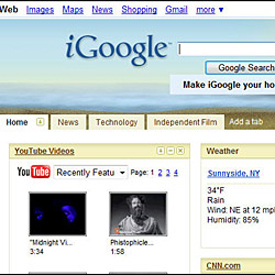
     Google to dismiss igoogle? Get a new homepage!
    For as long as I can remember, iGoogle has been my home page. I’ve used it for everything from monitoring my favorite blogs and news sites to tracking the number of days since I last added salt to my water softener.
    So it came as something of a shock to read that iGoogle is going away on November 1, 2013. That’s only 16 months from now, barely enough time to vet a replacement.
    I kid, I kid — that’s more than enough time. The question is, where should you hang your home-page hat? What should be the first thing that appears when you open your browser? I’ve got five suggestions:

    MSN or Yahoo
    Like to scan news headlines? Then you can’t go wrong with MSN or Yahoo, which bring you the latest stories followed by sections like sports, entertainment, local news, and money.
    You don’t need an account with either service to take advantage of their portals, though signing up for one nets you an extra email address and, in the case of Yahoo, some customization options for your home page (including what content appears and where).

    yahoo & msn

    Personally, I think Yahoo is the better of the two pages, but you’ll definitely want to browse both to see which one suits you best.

    NetVibes
    This old-school Web portal has reinvented itself as a Web-analytics tool for businesses, but it still offers a consumer-friendly custom dashboard where you can monitor all the media that’s important to you: news, email, tweets, tasks, status updates, and so on.
    Where NetVibes excels is in letting you pick the “apps” (i.e. widgets) you want to include, then organizing them to your liking. For example, you can choose the number of columns you want for your dashboard and how you want them arranged.
    There’s also a Reader mode that’s great if you add a lot of RSS feeds. All told, NetVibes probably comes closest to replacing the look and feel of iGoogle.


    All My Faves

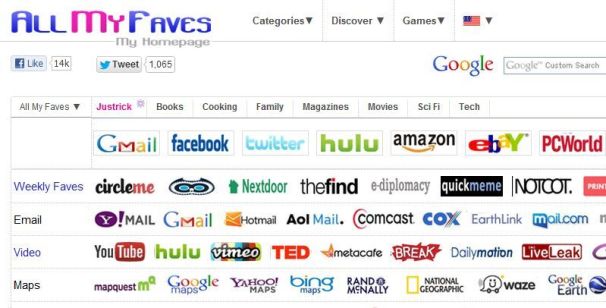
    All my Faves

    If your browser favorites list hooked up with StumbleUpon, the result would look a lot like All My Faves.
    The site is essentially a massive collection of other sites, all represented by thumbnail icons of their logos. It’s a little overwhelming at first, but there’s an interesting portal beneath all the noise.
    Indeed, once you sign up for an account, you get to create your own batch of “faves” you can use to quickly jump to your favorite pages. You also get to choose up to seven areas of interest (cooking, movies, tech, etc.) that AMF will use to generate batches of sites you might like.
    After you finish the setup, you’ll see a much less intimidating tabbed display of your favorites and your areas of interest. And thanks to the AMF bookmarklet, it’s a simple matter to add sites to your start page.
    I’m not sure All My Faves is really my cup of tea, but if you want a favorites-oriented home page with lots of personalization options, this service is worth a look.

    Protopage
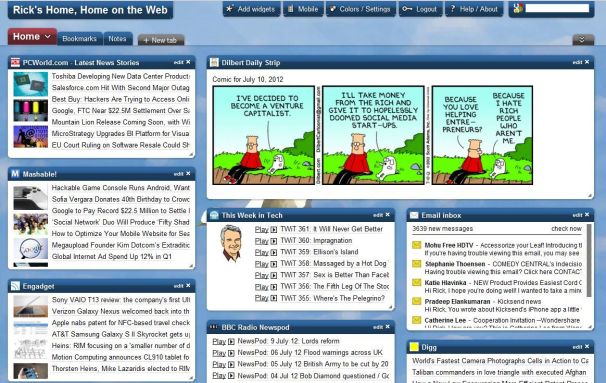
    A little bit NetVibes, a little bit iGoogle, Protopage offers a simple, attractive, customizable home page you can stock with news, comics, Twitter feeds, email, podcasts, and more.
    The site starts you out with a wide assortment of popular widgets, everything from Dilbert to Engadget to PC World. You can drag and drop these to create just the layout you want, while clicking Add Widgets lets you choose from a huge selection of additional tools and content.
    Protopage really reminds me of the portals of old. If you’re already mourning iGoogle, this should help ease the pain.
    Nothing
    Nothing? If you’re not a news junkie and don’t tend to look at RSS feeds and the like, you might just prefer to leave your browser without a traditional home page.
    To that end, all the major browsers now have the option of starting you with a “blank” tab, one that doesn’t open a particular page but does show thumbnails of your most visited/most popular sites.
    You can also automatically open multiple sites in multiple tabs, which is helpful if you like to start each browsing session with, say, ELITES WORLD OF TECHNOLOGY, Facebook, and a favorite blog. Just open the tabs you want to reappear, then venture into the settings and choose “use current” for your home page. (The latest versions of Chrome, Firefox, and Internet Explorer all let you load multiple pages at startup.)
    Your Pick?
    Those are, of course, just five options out of many. If you’ve found another portal, home-page, or browser-startup option you like better, tell me about it in the comments.

  • Tabletop Forge, Tabletop Gaming Tools for Google Hangouts

    Tabletop Forge, Tabletop Gaming Tools for Google Hangouts

    We sometimes like to shine a spotlight on deserving Kickstarter games but this week’s project is a little different. Instead of a game played on technology it’s a game played with technology, and it promises to make the online lives of tabletop gamers infinitely easier.
    Anyone that’s ever tried to run a game of Dungeons and Dragons or another tabletop roleplaying game online knows that trying to take your game to the Internet add an extra layer of complexity on top of an already complicated game. In addition to keeping track of all of the dice rolls, map positions and NPC information you normally need, you also have to figure out some way of selectively informing the other players of all the pertinent information without the convenience of them sitting right next to you to see it.


    However, the team at Tabletop Forge thinks they’ve found a solution. By adding some robust tabletop gaming tools to the Google+ Hangouts feature, the team believes they’ve found an ideal way to help tabletop gamers play online. Tabletop Forge adds great RP specific features to the group videoconferencing features of hangouts that allow you to use virtual dice rolling, battle maps for laying out combat quickly and easily online, and even a macro system so you can edit any commands the team might not have thought of into Tabletop Forge.
    The core Tabletop Forge system is already in working order, but the team is running a Kickstarter to get some professional art assets into the Forge so that gamers can quickly and easily pick out maps and monsters that are right for their campaign and get started playing faster.
    The team has already easily surpassed their initial $5000 goal and are in the home stretch to meet a final $38,000 stretch goal that will add even more features and maps to the Tabletop Forge arsenal. If you’re interested, head on over to their Kickstarter Page and take a look at their donation options.

    Important Notice: Tweet this article with the bookmark social media share below to stand a chance to win an ipad or start making money with your twitter account (it works only with your twitter account and the more articles you tweet the more you stand a chance to win an Ipad)