Computerworld – Sergey Brin, CEO and co-founder of Google, wears Google Glasses during a product demonstration at the Google I/O 2012 conference last month. (Image: Stephen Lam / Reuters)When one talks of computers today, he or she could be referring to a laptop, a desktop or maybe even a smartphone. However, if Google’s latest plan stays on track, the definition of a computer could broaden significantly. At its Google I/O developers conference in San Francisco, the company threw a lot of effort behind the unveiling of a prototype of its so-called Google Glass computerized eyeglasses. The Android-powered eyeglasses are equipped with a processor, memory, camera, GPS sensors and a display screen. Google co-founder and CEO Sergey Brin said the Google Glass development effort is all about “doing brand new risky technological things that are really about making science fiction real.” In that world of science fiction, he said, computers won’t always look like what we now expect from the term. The next generation of computers won’t necessarily sit on one’s desk or lap or in one’s hand. The devices may not have a have a monitor and/or keyboard. Someday – probably in the near future – computers will be worn, whether incorporated into glasses, or in a piece of jewelry such as a bracelet or something else, analysts say. “Google Glass changes the way we will look at computers,” said Patrick Moorhead, an analyst at Moor Insights & Strategy. “It isn’t just research, it’s a workable prototype.” “Glass serves to stretch the technology ecosystem to even greater lengths, Moorhead said. “I believe that in five years we will see many different form factors and brands of wearable computers. We will have computers embedded in our glasses of course, but also in our jewelry and watches.” Moorhead noted that the U.S. military, especially the Special Forces units, already use wearable computers to for communications and GPS tasks. That technology hasn’t yet reached consumer or business users, he added. Google’s research efforts could hasten the mainstream use of the technologies. “As we see real devices in use that we previously saw only in movies and books, it will expand the possibilities even further,” said Moorhead. “We can go beyond the glasses and visualize computers in our jewelry, in our watches and even inside our bodies.” Charles King, an analyst at Pund-IT, said such new computing form factors are an extension of the current mobile trend, taking GPS-enabled smartphones, growing compute power and multiple new communications capabilities to the next level. “It’s the ever smaller and ever more powerful mobile technologies,” he added. “It’s about the things we used to see and think about in relation to sci-fi novels or Star Trek. The idea of highly mobile and highly powerful computers is extremely intriguing.” King said he expects there will be great demand for what he calls “mobile computing lifestyle choices” in a few years. “It would not surprise me if we see a lot of this in, say, five years,” he noted. “As the technology becomes more sophisticated and cheaper, it becomes something everybody can afford.” “Some years ago, a smartphone like the Blackberry was considered something that only business professionals needed. It doesn’t seem farfetched to think we could see Google Glass widely adopted in five years,” King added. Rob Enderle, an analyst with the Enderle Group, pointed out that Google Glass or other wearable computers could be very useful in many workplaces — not just the next big thing to help users look cool or geeky. “They could be used regularly for things like taking inventory in warehouses, and for tasks on factory floors and other places where folks need to use computers and their hands at the same time,” Enderle said. At the Google I/O conference, the company said it is offering prototype versions of Google Glass, dubbed the Google Glass Explorer Edition, to developers for $1,500. Brin said he expects the glasses to be generally available in 2014 — at a lower price. “If the developer community can come up with interesting solutions, the sky’s the limit,” said King. Enderle said that wearable computers could be a big step toward a new generation of compute form factors that can be embedded inside the human body. Putting aside visions of Star Trek’s Borg initiative, Moorhead and Enderle agreed that wearable computers are a bridge to the first such computer implants. “It’s an interim step toward imbedding computers into people and creating some kind of biomechanical interface that bypasses the eyes,” Enderle said, adding that he believes that computer generation is some 25 to 50 years away.
“The change we are working toward … is one of the big changes we will see in computing this century. It will redefine personal computing by the time it has fully matured,” he added.
Sharon Gaudin
Author Biography:
Sharon Gaudin covers the Internet and Web 2.0, emerging technologies, and desktop and laptop chips for Computerworld. Follow Sharon on Twitter at @sgaudin, or subscribe to Sharon’s RSS feed . Her e-mail address is [email protected].
This is an article by Sharon Gaudin, Computerworld and felt I should share it with you so we can all put our views together. A year after Google+ was launched, it seems Google is saying it’s not really a social network after all. Now this might be confusing to the 150 million people who actively use Google+ every month. They catch up with colleagues and friends on Google+ Circles. They chat with family members in Google+ Hangouts. They post photos. They watch videos. So aren’t those the things you do on a social network? Google has other thoughts on this. According to a report from Mashable, Vic Gundotra, Google’s senior vice president of social business, and Bradley Horowitz, Google+’s vice president of product, said Google+ may be social, but it’s more than that. Instead of a social network, Google+ is an upgrade to all Google products. “Google+ is just an upgrade to Google,” Gundotra told Mashable. “People have a hard time understanding that. I think they like to compare us with other social competitors, and they see us through that lens instead of really seeing what’s happening: Google is taking its amazing products, and by bringing them together, they just become more awesome.” Google declined to comment. The company has been saying since last fall that Google+ will be woven into all of its products. Speaking on an earnings call last October, Google co-founder and CEO Larry Page said he wants to “transform the overall Google experience” with Google+. “This means baking identity and sharing into all of our products so that we build a real relationship with our users,” Page added. “Sharing on the Web will be like sharing in real life across all your stuff.” And that’s what Google started to do. Soon after Page made that statement, Google began integrating Google+ with Google Apps, the company’s cloud-based office suite. While Google+ is expected to be used across Google’s product portfolio, does that mean it’s still not a social network? No, not at all, according to Dan Olds, an analyst at Gabriel Consulting Group. “This is a great example of moving the goal posts while the football is in the air,” Olds said. “Google didn’t do much to scotch these comparisons when Google+ was being rolled out, but now, a year later, Google+ suddenly isn’t like Facebook at all? It’s major-league and masterful spin, but I don’t think it holds water.” He added that just because Google+ is being integrated across product lines, that doesn’t change what it is at its core. “It’s still a social network at heart,” said Olds. “Google+ is still a service that gives users a chance to share and connect with others, and that’s what social networks do. If you take the social networking out of Google+, then it’s just a console, right?” However, Brian Blau, an analyst at Gartner, pointed out that Google has never come out and said that it’s focused on competing with Facebook. “I think the sentiment over the statement is correct,” he added. “They may not be competing over a social network as a pillar of a business, but certainly they are competing for consumer mindshare on technologies like search, location and mobile.” And Blau also noted that Google is smart to make all of its products more social because that will bring in more information and, in turn, more money for Google. “Maybe what you are seeing is a change in definition of what it means to be a social network,” said Blau. “The direction you are seeing with Google is the natural direction for how social will be integrated into consumer technology, and enterprise too. It will be a feature versus a stand-alone product.” However, Patrick Moorhead, an analyst with Moor Insights & Strategy, said he’s not buying that Google doesn’t think Google+ is a social network. “This talk is nothing more than clever product repositioning,” he said. “Gundotra realizes now they cannot compete head-to-head with Facebook or Twitter, so he is attempting to change the playing field and lower expectations for everyone…. Google+ is a social network so long as it is a meeting place where users share their experiences, likes [and] dislikes, and others respond as if it’s a virtual conversation.” Sharon Gaudin covers the Internet and Web 2.0, emerging technologies, and desktop and laptop chips for Computerworld. Follow Sharon on Twitter at @sgaudin and on Google+, or subscribe to Sharon’s RSS feed. Her email address is [email protected]. See more by Sharon Gaudin on Computerworld.com. Read more about web 2.0 and web apps in Computerworld’s Web 2.0 and Web Apps Topic Center.
I got this information from one of our contributor’s site this morning and felt i should share this with you, my readers. A few days back google announced a short online certificate course ‘Power Searching With Google’ this program is aimed at helping all Google users learn about the powerful advanced tools which Google provides to help the world find just the right information when the stakes are high.
The certificate, according to Google will be emailed upon successful passing of the online course by participants. Mobile phones according to Google will not be used for the classes.
Course Details
Power Searching with Google is a free online, community-based course showcasing search techniques and how to use them to solve real, everyday problems. It features:
Six 50-minute classes.
Interactive activities to practice new skills.
Opportunities to connect with others using Google Groups, Google+, and Hangouts on Air.
Upon passing the post-course assessment, a printable Certificate of Completion will be emailed to you.
Ready to get started?
Registration is open from June 26, 2012 to July 16, 2012. We recommend that you register before the first class is released on July 10, 2012!
New classes will become available Tuesday, Wednesday, and Thursday starting on July 10, 2012 and ending on July 19, 2012.
Course-related activities will end on July 23, 2012.
To register now for “Power Searching with Google Free Online Certificate Course” follow this link Power Searching with Google Free Online Certificate Course After registration, remember to sign into your email to confirm that Google has sent you a confirmation of your registration and course dates with activities.
Adobe announced Thursday that it would not provide a version of Flash for Android 4.1, dubbed Jelly Bean, or any updates thereafter. Google introduced version 4.1 this week at its I/O conference in San Francisco. The OS will be available in July. The Flash Player has never posed much of a security risk, because hackers have not used it as a pathway to Android. “There hasn’t been a piece of malware using the Flash Player technology as a vector,” Tim Armstrong, malware researcher for Kaspersky Lab, said. Adobe’s decision to wind down Flash on Android is not surprising. The company said in November that it would switch to Adobe AIR as the cross-platform runtime environment for mobile applications. Adobe believes AIR is the better option as Web developers move to HTML5, the latest version of the markup language used for presenting content on the Web. The company will continue to develop the Flash Player for PCs. Whether the technologies replacing the Flash Player will pose a greater security risk is not yet known, Armstrong said. “We can’t say yet whether these technologies could be leveraged for malicious purposes,” he said. In general, dropping Flash with Jelly Bean is not expected to have much of an impact on Android users, because almost 90 percent are running versions 2.1 to 2.3.7. By the time they upgrade to version 4.1, Flash alternatives are expected to be firmly in place. Adobe has also decided to limit access of the Flash Player on Google Play, the official Android app store. Beginning Aug. 15, only Android phones already running Flash will be able to get newer versions in the store. “Devices that do not have Flash Player already installed are increasingly likely to be incompatible with Flash Player and will no longer be able to install if from the Google Play Store,” the company said in its blog. Adobe’s latest announcement only involves Android, because Apple doesn’t use Flash in the iPhone or iPad. In 2010, Apple Chief Executive Steve Jobs, who died in October of complications from cancer, bashed Flash as too slow and a battery hog, arguing that HTML5 would become the better platform for showing video and other multimedia content. Adobe initially fought back, but later realized development trends for mobile apps were against Flash.
A version of Chrome for iOS also was announced during the second day keynote for the company’s Google I/O conference.
Google kicked off the second day of its I/O conference by announcing offline text editing for Google Docs, and a version of its Drive storage service for Apple’s iOS. The search giant also announced a
version of its Chrome Web browser for iOS, and demonstrated it running on Apple’s iPad and iPhone.The offline text editing is available now in Google Docs, and Google is working on offline editing for its spreadsheet and presentation applications, the company said in its day-two keynote at the conference. The updates mean Google Docs users will be able to edit documents on a plane, for example, and then synch the changes to the cloud when they reconnect at the other end. The offline capabilities will step up the competition between Google and Microsoft. Google emphasized that Docs is a viable product for the enterprise as well as consumers: Five million businesses are using its cloud applications, it said. A Google Drive app for the iPhone, iPad and iPod Touch will be available from the App store later Thursday, Google said. It’s also developing a version for its own Chrome OS.
Chrome OS Improvements
In Chrome, Google Drive operates as the local file system, said Clay Bavor, director of product management for Google Drive. He showed how a user can search through a folder of scanned receipts and find a particular receipt using a keyword search. The receipts are stored as image files, but the Drive application uses optical character recognition to index the text in the receipts.
It can also index images. Bavor showed how a user can store their photos from a vacation in Egypt in Google Drive, for instance, and then search for “pyramid” and locate photos with pyramids in them, even though the photos are not tagged with the word “pyramid.”
New Ways to Collaborate
Google also showed how Google Docs and Google Drive can work together to allow “real-time collaboration.” It showed how three users can edit a text document simultaneously from three different devices, and have the changes all appear on each of the three screens.
Referring to users’ increasing tendency to use multiple devices, Sundar Pichai, Google’s senior vice president of Chrome and apps, said, “It’s not just at home: It’s the same person who leaves home and shows up at work, and they demand the same experience.”
The company also announced an on-demand computing service called the Google Compute Engine, which will compete with Amazon Web Services’ EC2 offering.
The Nexus Q has some pretty neat media streaming features, but is way too expensive–and the preview release is just plain buggy.
I finally got hold of one of the new Android 4.1 (Jelly Bean) smartphones capable of running the Nexus Q app you need to operate the preview release of the new Google media streamer–and a PC World colleague armed with a second Jelly Bean handset came by to help me test the device’s social networking features. The verdict: While it has some nice features–it’s cool to see a light show when you stream music to an HDTV– the Nexus Q is at this point too buggy. We were unable to implement guest access despite trying for two hours, and even the primary controlling phone sometimes lost network connectivity. Initial setup on the first phone went fairly smoothly. I had already hooked up the Nexus Q to my HDTV and to my home network using an ethernet cable connecting to a powerline switch, so when I downloaded and installed the free Nexus Q app from the Google Play store, it immediately found the device and established a link by having me log in to my Google account. Because the Android app can control multiple Q’s on the same network–much like the Sonos system–you have to give each one a name; the app proposes several common household rooms (e.g. kitchen, living room, media center) in a menu that also has a custom entry option. The app by default sets My Home as the name for your Nexus Q collection–the term it uses to denote your entire Nexus Q network (each Q appears as an entry in the collection). But you can change this name in the settings.
Sound and Light Show
After that, when I went to Play Music and tapped a streaming media icon on the top of the screen, I was presented with the option of streaming to my phone or the Nexus name I’d just created. Because I was hooked up to an HDTV, when I played music, Nexus Q created pretty dancing visuals on the screen–and the LEDs on the edges of the Q’s dome also pulsed in color and in time to the music. You can change the look of the light show by choosing one of half a dozen themes (e.g. warm, cold, blue), make it brighter or dimmer, or eliminate it completely from the settings menu in the Q app. You can add songs to the Q’s queue (pun unavoidable) or play them immediately by tapping on options in a menu that appears when you tap a track listing. You can fiddle with the queue, moving or deleting tracks, by tapping an option in Play Music. To play YouTube videos, you go through much the same routine after tapping the Android’s YouTube app. You are already signed in to your Google account, so accessing favorites and new videos on channels you’ve subscribed to is a breeze. Quality was good, at least while the Nexus Q was connected to the network using the ethernet cable and powerline switch. I didn’t download any movies or TV shows to check out how well the device works with the Google Play movie and TV app.
Guest Access Proves Elusive
So far, so good, but it was all downhill from there. I’m not sure what the issues are, but my colleague Mike was never able to put his Google Play music in the queue–and when we disconnected the ethernet cable to try connecting the Q via Wi-Fi, things really went south. Here’s how it’s supposed to work. In the Nexus Q app, I made sure a setting authorizing guest access was set to On, then tapped a link that created an e-mail message inviting Mike (using his Google account address) to play his music on my network. Mike got the message, which instructed him to download and install the Nexus Q app on his Android 4.1 phone. He then ran the app, which searches for existing Nexus Q devices. Once you find a Q that has granted you access, you can go to Play Music to add tracks to the queue via a pop-up menu and a streaming media icon, the same way I could from my phone. But the Nexus Q never showed up as a streaming device on Mike’s phone. He also got repeated messages saying the My Home collection and/or the Q itself was unavailable.
And while we were doing the testing, my own ability to stream music was intermittently impaired. A troubleshooting guide suggested connecting the Q to the network via its built-in Wi-Fi, so I disconnected the ethernet cable and rebooted the Q to start from scratch. But while I was able to restore its factory settings, setting up my 802.11n Wi-Fi network as the Q’s connection proved difficult. I rebooted several times and reinstalled the app a couple of times before the Q mysteriously began streaming the same music it had effortlessly played with the ethernet connection. Even after that, the app intermittently would show the Q as being unavailable one minute and available the next. I live next to several high-rise apartment buildings in downtown San Francisco, and my guess is that the difficulties I encountered relate to 2.4GHz network overcrowding. You also need a router that can handle Wi-Fi multicasting so that the Q can connect to your router while other devices can connect to the Q; Google’s documentation already shows several incompatible routers. Mine wasn’t among them, but I suspect that it was too difficult for the network to sustain the multiple Wi-Fi connections required. I’ll repeat what I said in my earlier post: Google should have included 5GHz 802.11n support. Still, Mike and I were at a loss to explain why he couldn’t play any of his music on the Q–even when my collection and the Q both showed up as available, the Play Music app never displayed the Q as a streaming destination. Hopefully Google will work on these issues before it begins selling the Nexus Q to the general public. But even if you’re an Android fan willing to spend the $299 on a device with fairly limited functionality (it could at least have supported streaming media from other local network devices), I wouldn’t recommend the Q to anyone who is planning on Wi-Fi only connections in a city or a neighborhood with lots of Wi-Fi networks in range. That’s just asking for trouble.
Inside Google Docs’ spreadsheet component, you’ll find gadgets that endow the app with powers thatTurn text into a QR code.even Excel users will envy. Included are tools for creating animated pie charts, producing QR codes, generating organizational charts, and more. You can also plot data in color by country on a map, and you can publish a map with your office location marked on it. All of these tricks are easy to pull off–I’ll show you how.
1. Make Your Own QR Codes
QR codes are ubiquitous these days. They’re a great way to share contact details, URLs, product information, and other brief amounts of text. To create a QR code in a Google Docs spreadsheet, first type the text for the code into one or more adjacent cells in a column of the spreadsheet. Choose Insert > Gadget >All,locate the QR Code gadget, and click Add to spreadsheet. When the Gadget Settings dialog box appears, drag over the cells containing the text for the code, click OK, and then clickApply & Close. The generated QR code will display in the gadget dialog box. You can drag the gadget dialog box–as you can all gadget dialog boxes–and place it anywhere on the spreadsheet. To see the options for working with any gadget, click the down arrow in the top corner of the gadget dialog box. The options for the QR Code gadget include using ‘Publish Gadget’ to obtain some code that you can use on your website to display the QR code. You can also use Print Screen on the code and then insert it into a document or other publication.
2. Make Your Own Custom Google Map
The Map gadget uses content from Google Maps to display the addresses you have entered as markers on the map.Pictures convey more information than words do, and a map offers the easiest way to show people where your office and other places of interest are located. The Map gadget lets you create a custom Google Map with pointers to the places you want to highlight, and it’s simple to use. To begin, type a list of addresses, one per row down a single column. If you want a tooltip to appear over the map location when someone hovers over the marker, type the text for this item in the cell to the right of the address. For example, to produce a map of local farmers’ markets, type each address in one cell and the name of the farmers’ market in the adjoining cell to the right. Choose Insert > Gadget >Maps, and click Add to Spreadsheet. Now select the range of cells containing your address and tooltip data, and then enter a title for the map in the Title box. If your data includes tooltips, select the Last Column as Tooltips checkbox, and then click theZoom Using Mouse Wheel checkbox. From the ‘Map type’ list, select the type of map–Normal is a good choice–and then click Apply & Close. The gadget dialog box will now show a map with the addresses plotted on it. As with the other gadgets, you can publish the Map gadget for use on your website to show your business locations or places of interest to your customers.
3. Create Quick and Easy Organization Charts
Organization charts are handy for describing how your business is set up, but they also work well for diagramming website designs and displaying any other data in a hierarchical arrangement. The Organization Chart gadget can create a hierarchical chart showing the design for your website or the management structure of your business.
4. Produce an Interactive Table
At its simplest, the Table gadget lets you filter data to see a subset of it.The Google Table gadget allows you to analyze data by creating a table that supports filtering, grouping, and even totaling. Insert the gadget by choosingInsert > Gadget > Tables > Add to spreadsheet. Select the range containing your data, including the heading row, and click OK. Click in the Title box and type a title for your tables. Select the checkboxes for Show Filters and Enable Grouping, and then click Apply & Close.To group the data by the contents of column A, for example, click the Define groupings and calculations link, select that column’s heading, and click the arrow to add it to ‘Group by Box’. Click Next, and select a column to calculate. To sum Profit, for instance, set the Profit entry to Total. You can apply calculations to multiple columns, if you desire, or to none at all if you just want to group the data.You’ll see a table appear in the gadget dialog box, with the headings over each column. Use the filter box at the top of each column to filter that column of data. Click OK, and the gadget will show you the grouped data, with any calculations appearing in the row above the appropriate group. You can collapse and expand the groups as necessary to see the values in the table.
5. Create a Gantt Chart From Project Data
The Gantt Chart gadget illustrates the tasks in a project and the time allotted for each of them.You can use a Gantt chart to display projects involving tasks that must be performed over time. To make this type of chart, you need three columns of data (with an optional fourth column). In the first column, place a list of the individual tasks in the overall project–the steps needed to create and publish an email newsletter, for example. In the second column, place the start date for each task; in the third column, insert the end date for the task. If you wish, you can add a fourth column containing the percentage completed for that task. To produce the Gantt chart, chooseInsert > Gadget > Charts. Locate the Gantt chart and click Add to spreadsheet. Select the data for the tasks, the start and end dates, and the completed percentage, and click OK. Set the Name column to the column containing the task names. Set the Start column, Finish column, and % Complete column to the column letters containing that data (typically columns B, C, and D), and click Apply & Close. The Gantt chart will present the tasks to be completed, their start and end dates, and the progress made toward their completion to date.
6. Plot Data as Colors on a Map
The Heatmap gadget shows relative values as colors on a map.You can plot data related to states or countries on a heat map, with small values indicated by light colors and larger values rendered in darker and more saturated colors. To plot the data correctly, you must use ISO country codes (or, for U.S. states, the usual two-letter state codes). Place the data to plot in the cell to the right of each relevant state or country. Choose Insert > Gadget > Map > Heatmap, and then click Add to spreadsheet. Select the data–including the locations and the data to plot, but not the column headings–and click OK. Type a title for the heatmap in the Title box, select the map type from the Region box (click USA to plot data on a United States map), and click Apply & Close. The map will appear with the regions colored appropriately for the value of the data associated with each.
7. Create an Animated Pie Chart
Drag on a pie slice in the animated pie chart to offset it from the chart itself.Interactive charts are more interesting to look at than static graphs. You can create animated pie charts in a Google spreadsheet using a gadget. For this chart, you need only the categories and one set of data, because pie charts can plot only a single data series. Insert the gadget by choosing Insert > Gadget > Charts. Locate the FusionCharts Pie & Donut Widget, and click Add to spreadsheet. Click in the Range box, select the data to plot–omitting the column headings–and click OK. Now select the chart type, such as Pie 3D. Type a caption and subcaption for the chart to inform the viewer as to the information the chart is intended to convey. Enable the Animate checkbox, and, if you prefer, enable Values On and Labels On to show both labels and values for each pie slice. If you enable Tooltips, the mouse pointer will show a tooltip if the user hovers the mouse over a given slice. Select Format Number and set Decimals to No Decimal so that numbers will be constrained in size. Enabling Shorten Values will ensure that the chart presents large values legibly. Click Apply & Close. When the chart appears, you can drag on a pie slice to explode it from the chart. Right-click the chart and click Enable Rotation so that you can then rotate the chart with your mouse. Gadgets such as these add a range of extra functions to Google spreadsheets, allowing you to do new things with your data and display it in ways that can help your business.
The first step in producing an organization chart is to create the data on which it will be based. In one column, type each employee’s name, or whatever other text should appear in each box in the chart. In each adjoining cell to the right, type the corresponding manager’s name, or whatever information you wish to display in the box at the next higher level in the chart. Don’t put any top-level information–such as the highest manager’s name or a website’s home page–in the first column, because they have nothing above them in the hierarchy. If you want two lines of text in a box, type one line and press Alt-Enter to start a second line. Confirm that the spelling of each name or box label is identical wherever you use it, or the chart won’t render correctly. If necessary, copy the contents of a cell rather than retyping it to make sure that each entry that should be identical–such as “home” in the example illustrated here–remains so. Now choose Insert > Gadget > Diagrams > Organization Chart, and click Add to spreadsheet. Select the cells in the two columns containing the data, and click OK. Type a title in the Title box, and click Apply & Close. The organization chart will appear in your spreadsheet.
Google+ is the most recent player in the social networking field. When it first came, we reckoned it was just another attempt by Google to counter Facebook’s increasing dominance, and that it will fail like other projects from Google in the past such as Google Buzz, Orkut etc. But now, it seems that it is obviously here to stay. Google+ is a lot more than just a social networking website. The +1 button isn’t just another Like button, as you will see later in this post. Google+ is a site where you can show your interests, have connections, and build an identity. It’s a friend of webmasters, who can achieve a lot more by using this simple social site. In a way, Google is trying to provide a coherent experience to the users by introducing all their products such as Google Search, GMail, Google News, etc. And Google+ could be the glue that holds everything together to provide an uninterrupted and ‘seamless Google experience’ to the users. In this post, we will talk about how important Google+ is, and why should you use the +1 button, and how it all helps webmasters. Starting out with Google Plus First of all, you need to have a presence on Google+ for it to be of any use to you. Read our post on how to join Google+. A public profile on Google Plus is very important. You can also create a separate Google+ page or your blog or brand, just like a Facebook Page. Google+ then gives you many features. Here is a video by Google’s Developer Programs Tech Lead, Maile Ohye, who summarizes the concepts explained in this post.
Intimacy; Create Circles, follow people, and Hang out! Google introduced this great feature of Circles. Circles can come in real handy if you want to do targeted marketing. You can share your updates with any of your circles, and the people in the remaining circles won’t get those updates. This way, you can only share your personal updates with your family circle, and brand related updates to its respective circle. Also, you can set up more circles and target a specific audience, such as only men, or only women etc.
At Google+, you can follow anyone, just like Twitter. It doesn’t need confirmation. So if you would like to get updates from your favorite brand, you can simply follow them. On the other hand, if you don’t want someone to follow you, you can simply block them out!
Another great feature that inspired change in Facebook is the Hangouts feature. With this, up to ten people can start a conference video call and talk to each other. Google+ Interaction Google+ Interaction allows you to edit any of your posts at any time, kinda like a blog post. You can also edit your comments. Unlike a blog post, however, which is always pushed down as new posts arrive, your posts on Google+ will remain on the top depending on their popularity and the comments on them. The +1 Button The +1 Button is more than just a Like button you normally find on Facebook. With it, you can build your reputation. It helps you to publicly recommend and share content you find useful. Unlike the Like button on Facebook which is limited to Facebook itself, the +1 information for a content is available throughout the web on search results, ads and sites. Hence, it isn’t just confined to Google+, but it extends over to all Google products. Also, you can track and manage all your +1s, so that you can revoke them at any time if you don’t like them anymore.
The advantage of the +1 button is, you can +1 a post directly from search results. And if any of the people you know have +1’d a post, you will see it right below the search results. That way, if you +1 something, you’re indirectly recommending it to your followers.
With the +1 button, you can also get great metrics from Google Analytics and Google Webmaster Tools. The +1s data on your Webmaster Tools will help you better understand your audience by seeing what gender or age group +1’d your posts the most etc. You can also see the +1s for particular pages on your website, and the +1s that were gives for certain pages from other sites on the web.All this shows how you are building your reputation. +1 Search Integration We already talked about how you can +1 a search result right from the SERPs. But there is one thing you need to know. While searching for your results, Google takes your +1 history into account. For example, if I search for ‘earning methods’ and +1 our sister blog smartearningmethods.com, the next time I search for ‘earning methods’, SmartEarningMethods will come up in the top spots. Also, if any of my friends has +1’d another blog, that will come up too. Hence, getting +1s on your posts could prove very useful to you, since Google returns tailored results for each individual.
In search results, Google might also show who the author of a content is. This is where a profile comes in useful. If you have a profile linked to that content, Google might shows that as well, which increases your chances of getting followers.
Google+ can project your brand far beyond your own reach. Users who +1 your content are actually recommending your content to their own followers, who in turn might +1 the content, and so on. Hence, a network builds up with your content at its center. Facebook also has a somewhat similar feature, but the reason Google+ is ahead in this area is, Facebook’s shares are limited to Facebook only, where as the +1 button shows up on search results and is accessible throughout the web.
That was some basic information about Google+ and the +1 button you need to know. Google+ indeed is a a great new opportunity for you to grow your brand’s reach.
There is a great little instant messaging utility, Pidgin that helps to find who has blocked you in Google Talk. If you not sure how to configure Pidgin with Google Talk, I advice you to first visit this page. Ok, now when you are aware of how to configure Pidgin to work with Google Talk, I’ll guide how to make smart use of Pidgin to identify who has blocked you on Google Talk. It’s very simple. Just follow the steps:-
1- Log in to your Gmail account on Pidgin. 2- Go to “Buddies” -> “Show Offline Buddies“. (A person who has blocked you must be showing offline to you. So you need to make all offline friends visible) 3- Now all your contacts are visible to you. Pick any one of those.
4- Right Click on your chosen contact name and select “Get Info“.
It will show you the brief information of your contact. Now, if any of your contact has blocked you on Google Talk, you will not be able to see his/her profile. 6- Select a contact who you think may have blocked you. Again, Right Click on his/her name and select “Get Info“. You will not see anything. Not even the contact’s name.
This goes to show that this particular contact has blocked you on Google Talk and don’t want to talk to you and so it appears to be offline always. Hope, you like this article. This is the only way I could able to find out to determine who has blocked you on Google Talk. What’s your comment on this?
It’s 2025. An era of overwhelming DMs, “seen” zones, and social media pressure. And then there’s Vibebo — the one app that actually understands anonymous messaging, not just as a feature, but as a feeling.
After using it across both Android and iOS, here’s the honest truth: Vibebo just gets it.
It’s Not Just Anonymous — It’s Designed to Feel Safe
From the moment you log in, Vibebo looks and feels intentional. The onboarding is smooth. No fluff. The interface feels like it was built to reduce social pressure, not add to it.
The “Playground” tab becomes your hub — where you receive anonymous messages and get to reply, publicly or privately. But what really stands out is the level of control it gives you. You can:
Hide specific words
Block specific users (yes, even anonymous ones)
Pause your profile link anytime
And toggle Advanced Message Filtering if you’re not in the mood for chaos.
It’s like having a personal bouncer for your inbox.
Channels Are the Game-Changer
While most anonymous messaging apps are focused on individual clout, Vibebo introduces a completely new social layer: Channels.
Whether you are:
Class Reps collecting feedback
Clubs or Orgs handling suggestions
Work Teams encouraging honest input
Influencers or Creators managing fan messages
Channels let groups receive anonymous messages. That’s big. It opens the door for big or small teams to collect messages and feedback anonymously — all in one place.
As a channel owner, you get full control over message moderation. Others in your team can view the responses, but no one can delete what they didn’t start. Pure transparency. Pure vibes.
Smart, But Still Fun
Vibebo is anonymous, but it doesn’t feel cold or impersonal. There’s a touch of play in everything:
The colourful QR posters with lines like “What’s ONE thing you’ve always wanted to ask me?”
The ability to reply with a tap
The quirky usernames in “Recent Views” like JumpyJellyfish or TwinklingStarfish
It’s a mix of deep honesty and Gen Z energy. You feel seen — even when you’re unseen.
Sharing Is Effortless
Sharing your Vibebo is smoother than ever. Just tap “Share Profile,” copy the link or grab the QR code. It’s designed for real-world use — from classrooms to campus events, team-building sessions, or friend circles.
One post. One link. Endless messages.
Vibebo Feels Like the First App That Cares
Let’s be honest. Most anonymous apps end up becoming chaos. But Vibebo’s layered design — with advanced safety controls, invite-only channels, real-time views, and an actual message review experience — makes you feel safe and curious at the same time.
Microsoft has confirmed it will be shutting down Skype, the once-dominant internet-based phone and video service, in May.
In an announcement on X, the company assured users they would soon be able to access Microsoft Teams’ free tier using their Skype login credentials.
Skype’s closure comes 14 years after Microsoft acquired the platform for $8.5 billion in cash—its largest-ever purchase at the time. Since then, the tech giant has integrated Skype into various products, including Office and the now-defunct Windows Phone.
“Skype shaped modern communications and created countless meaningful moments, and we honor being part of its journey,” said Jeff Teper, Microsoft’s president of collaborative apps and platforms, in a blog post.
He added, “We’re excited about the new opportunities that Teams brings and remain committed to helping you stay connected in new and meaningful ways.”
A Changing Communications Landscape
Once the go-to platform for online calls, Skype’s influence has waned in recent years, despite a brief resurgence during the pandemic. The rise of competing services—including Zoom, Google Meet, and Cisco Webex—has further pushed Skype into the background. Meanwhile, Apple’s FaceTime and Meta’s WhatsApp have cemented their places as key players in the video calling space.
At the same time, Microsoft has been shifting its focus to Teams, which offers many of Skype’s features along with additional business-oriented tools.
A Legacy of Innovation
Skype launched in 2003 in Estonia and quickly attracted users as a free alternative to costly international phone calls. The service’s rapid growth led eBay to acquire it for $2.6 billion in 2005. However, the partnership was short-lived, and eBay sold a majority stake in Skype to an investor group for $1.9 billion in 2009.
Microsoft’s 2011 acquisition marked a significant investment in the future of digital communication. However, the company has struggled to maintain Skype’s relevance in an increasingly crowded market. With Microsoft now prioritizing Teams, Skype’s shutdown marks the end of an era for a platform that once revolutionized the way people connected across the globe.
A key highlight of the iPhone 16e is Apple’s in-house designed cellular modem, making it the first iPhone to feature an Apple-built modem.
iPhone 16e vs iPhone SE: A Shift in Apple’s Budget Strategy
The introduction of the iPhone 16e signifies a shift away from the iPhone SE, Apple’s previous budget iPhone line that debuted in 2016 and last saw an update in 2022.
According to Consumer Intelligence Research Partners, the iPhone SE accounted for just 5% of U.S. iPhone sales as of December 2024, prompting Apple to rethink its budget strategy.
Unlike the SE, the iPhone 16e offers a more modern design, bringing it closer to Apple’s current lineup with a 6.1-inch display, Face ID, and a 48MP camera.
iPhone 16e Features & Specs
The iPhone 16e shares many similarities with the standard iPhone 16, but at a lower price point.
Key Features of the iPhone 16e:
6.1-inch display (same as iPhone 16)
Face ID authentication
48MP camera (lacks a second camera for wide shots)
Powered by the same processor as the iPhone 16 lineup
While it lacks the Camera Control button and a secondary wide-angle camera, it retains many premium features. Which makes it an attractive option for budget-conscious buyers.
Generative AI tools for creating emojis and images
Notification summaries for better organization
Object removal in photos
ChatGPT integration with Siri
This move signals Apple’s intent to make AI a core feature of its future products, as it competes with Google and Samsung, both of which have aggressively integrated AI into their devices.
The Future of AI in Smartphones
Since the launch of ChatGPT in late 2022, AI has become a central focus for tech giants like Microsoft, Google, and Samsung. While Apple has long used AI in the background for tasks like photo processing, it has only recently begun rolling out consumer-facing AI features.
By introducing Apple Intelligence on the iPhone 16e, Apple aims to broaden AI accessibility, potentially driving wider adoption of its AI tools. However, with iPhone revenue missing Wall Street expectations in early 2025, it remains to be seen whether AI features will be enough to boost iPhone sales.
2025 has been full of exciting news for mobile gamers. With the recent smartphone updates, developers are working overtime to create better mobile game experiences that can take on PC and console games. Whether you’re a casual player looking for some entertainment or a professional gamer searching for something new and challenging, you’re at the right place.
These are the best mobile games to play in 2025, and the best part? These games are all compatible with Android and iOS devices.
Top 10 Mobile Games of 2025
So here’s our list of the top 10 mobile games in 2025.
1. Genshin Impact
If you haven’t tried Genshin Impact yet, you’re missing out on a huge chunk of fun!
Genshin Impact is a free-action RPG where you can explore a big open world, fight enemies, and follow exciting stories. This game gets its inspiration from The Legend of Zelda: Breath of the Wild. What sets this game apart from the others is its regular updates that add new areas, characters, and events. With cool visuals and tons of content, Genshin Impact is perfect for anyone who loves adventure games with some depth and amazing visuals—and the best part? It’s completely free to play!
2. Honkai Star Rail
Honkai Star Rail, also made by the creators of Genshin Impact, is a turn-based RPG that has created its own niche in gaming. This game is set in a sci-fi world; it features a colorful cast of characters, exciting stories, and different planets to explore. The battles mix strategy with cool animations, making it fun for both experienced RPG fans and beginners. With a big focus on storytelling and adventure, the game keeps getting better and better.
3. Forge of Empires
For fans of strategy games, Forge of Empires is a classic game and is still popular in 2025 after all this time. The game allows you to build and grow your own city, going through history from ancient times to the future. It’s a fun and educational game, with a mix of city-building and tactical battles. If you love history or strategy games, this one’s a must-try!
4. Jetpack Joyride
Jetpack Joyride being one of the best mobile games in 2025 isn’t a surprise and proves that simple games can be incredibly fun. You play as Barry Steakfried, a quirky hero using a jetpack to dodge a bunch of obstacles in this endless runner. Even though it’s been around for a while, its frequent updates keep it exciting with new power-ups, challenges, and themes. It’s perfect for quick, lighthearted fun when you have a few minutes to spare.
5. Slay the Spire
Slay the Spire is a top 10 strategy game that mixes deck-building with roguelike features. You climb a mysterious tower, fighting enemies and making important choices along the way. What makes it so fun is that each playthrough is different, and your decisions impact the game. Now available on mobile, it lets you enjoy its deep, strategic gameplay wherever you are.
6. Hero Wars
Hero Wars is often misunderstood due to its misleading ads, but the actual game is a gem for RPG fans. You gather and train a team of heroes to conquer dungeons and defeat powerful bosses. The game’s progression system keeps you hooked and rewards you as you collect better gear and unlock new characters. It’s easy to get lost in, with a mix of casual gameplay and deeper RPG elements that appeal to a wide range of players.
7. Reigns
Reigns combines humor and strategy in a way few games do. You swipe cards to make decisions as a ruler in a medieval kingdom, and every choice leads to surprising (and often funny) results. With its quirky story and entertaining graphics, it’s a great choice for players who enjoy fun, story-driven games.
8. Monument Valley Series.
The Monument Valley series is a beautiful mix of art and puzzles. Known for its simple visuals and tricky challenges, it’s as much about the experience as the gameplay. With amazing designs and soothing music, it offers a relaxing break from everyday stress. The sequel improves on the original with tougher levels and a touching story.
9. Paper Trail
Paper Trail is an indie game that mixes creative puzzles with a touching story. You move paper-like environments to solve challenges and reveal the plot. Its fresh gameplay and calming visuals make it a great choice for those who enjoy creative and meaningful games.
10. The Elder Scrolls: Castles
Fans of the Elder Scrolls series will love this mobile adaptation. The Elder Scrolls: Castles mixes city-building with RPG elements, allowing you to manage a kingdom while exploring its rich story. It’s a great mix of strategy and adventure, perfect for players who like games with both depth and easy-to-learn gameplay.
Mobile gaming in 2025 proves that mobile phones can deliver experiences as good as the traditional gaming platforms. These games show you the best of what the industry has to offer, from breathtaking visuals and exciting narratives to addictive games. Whether you’re in the mood for strategic battles, relaxing puzzles, or crazy adventures, these are the best mobile games in 2025 that will keep you entertained for hours.
The future of mobile gaming looks brighter than ever, so grab your device and start exploring these incredible games today.
Frequently Asked Questions About the Best Mobile Games of 2025
1. What are the best mobile games in 2025?
Answer: The best mobile games of 2025 include:
Genshin Impact
Honkai Star Rail
Forge of Empires
Slay the Spire
Monument Valley Series
2. Are these games free to play?
Answer: Some of the mentioned games are free, but others provide you with optional in-game purchases or premium versions.
Some free-to-play games include Genshin Impact, Honkai Star Rail, and Hero Wars.
Premium or subscription-based games like Slay the Spire might require a one-time payment or service access.
3. What type of game is best for casual players?
Answer: If you’re looking for light, quick games:
Jetpack Joyride is perfect for you.
Reigns offers a simple card-swiping mechanic with humorous outcomes.
Monument Valley provides a relaxing puzzle experience.
4. Can I play these games offline?
Answer: Some games, like Slay the Spire and Monument Valley, offer offline modes. However, others like Genshin Impact and Honkai Star Rail require an internet connection for gameplay.
The Nigerian startup space has witnessed tremendous growth in the last decade, transitioning from relative obscurity to becoming a force to reckon with, not just in Africa but across the globe.
The Nigerian government has not failed to notice this growth trajectory and its impact on the Nigerian economy. In 2022, the National Assembly passed the Nigerian Startup Act, which was eventually signed into law by former President Buhari.
Beyond the passage of the Startup Act, the federal government is also providing the necessary support, despite the harsh business environment, to allow these startups to scale.
Despite a series of economic challenges in Nigeria since 2014, including two recessions, the COVID-19 pandemic, issues in the foreign exchange market, and others, the tech ecosystem has weathered these storms. In the process, it has birthed up to four (4) unicorns—the latest being Moniepoint. However, some have seen their valuations decline in recent years.
Nigerian startups received the largest share of the international funding pie for Africa in the years prior to 2023. Of the $2.9 billion raised by startups in Africa in 2023, Nigerian startups secured $410 million, with Kenya taking the biggest slice of the pie, followed by Egypt and South Africa.
However, in the past five years, from 2019 to 2023, Nigerian startups captured the largest share of funding raised by African startups, accounting for 29% of the total $15 billion in investments.
The startup ecosystem in Nigeria is dominated by e-commerce, fintech, and edtech startups, leveraging the country’s burgeoning youth population and the large number of unbanked individuals in Nigeria.
Retail giant Konga and the fintech startup Paystack rank together as the ninth most valuable startups in Nigeria, with a market valuation of $200 million each. Paystack was sold to Stripe in 2020 for a whopping $200 million, which remains its current valuation.
Konga was founded in 2012 as a Nigerian e-commerce firm that provides direct online retail and also serves as a third-party marketplace. Amid a dire situation in 2017 and severe cost-cutting measures, including significant downsizing, the company was sold to Zinox Technologies in 2018 for an undisclosed amount.
08. Paga
This mobile payment platform was established by Tayo Oviosu in 2009 but eventually launched to the public in 2011. It offers a range of services, including money transfers, bill payments, retail payments, data and airtime top-ups, as well as banking services.
It is reportedly valued at $300 million, with investors including Global Innovation Fund, Goodwell Investments, Unreasonable Capital, and others. Since its founding, it has raised up to $35 million in funding.
07. Jumia
Africa’s first startup to achieve unicorn status and list on the New York Stock Exchange now ranks seventh among the most valuable startups in Nigeria. The e-commerce giant has, in recent times, seen its valuation nosedive to $450 million as it struggles to achieve profitability and revenue growth amidst operational challenges.
So far, the startup has raised up to $750 million in funding since its establishment in 2012.
06. Kuda
Dubbed “Africa’s bank for the free” for its near-zero fees and charges, Kuda is the sixth most valuable startup in Nigeria, with a market valuation of $500 million. Founded in 2018, the company has raised around $90 million in funding from investors, with the latest funding round occurring in August 2021, where it raised $55 million led by Valar Ventures, Target Global, and other angel investors.
This fintech startup offers financial services specifically to drivers, focusing on helping them acquire vehicles through a revenue-based financing model. The startup is barely four years old, having been established in 2020.
Since its inception, Moove has raised a total of $447.2 million in funding from up to 33 investors, including SpeedInvest, Left Lane Capital, Tekton Ventures, Class 5 Global, and others. These funding rounds include debt financing and private equity.
Moove operates in Nigeria, South Africa, and several other African countries. Its latest funding round occurred in February 2024, when it raised $10 million in debt financing from India’s Stride Ventures.
Following its latest funding raise, Moove’s valuation rose to $750 million, making it one of the most valuable startups in Nigeria.
04. Moniepoint (formerly TeamApt)
The latest entrant into the unicorn rank boasts a market valuation of over $1 billion.
Its recent status came after raising $110 million in its latest Series C funding round, led by Development Partners International’s African Development Partners III (ADP III) fund. Other investors included Google’s Africa Investment Fund, Verod Capital, and Lightrock.
03. Andela
The second of Iyin Aboyeji’s unicorns, Andela is the third most valuable startup in Nigeria, with a market valuation of $1.5 billion.
Andela helps companies build remote teams quickly and cost-effectively and rose to prominence during the pandemic when the demand for remote workers surged.
Since its establishment in 2014, the company has raised up to $340 million in funding, with the latest being a $200 million Series E funding round in 2021 led by SoftBank Vision Fund 2, Whale Rock, Generation Investment Management, the Chan Zuckerberg Initiative, and Spark Capital.
02. Opay
The second most valuable startup in Nigeria transitioned from a mobility firm to a fintech and has recorded tremendous success since the shift.
The company is valued at a staggering $2.7 billion and has so far received $540 million in funding across several rounds.
Opay facilitates money transfers and various types of payments. Its prominence peaked during the cash scarcity in Nigeria in early 2023, when demand for online payments soared, and traditional banks’ digital banking infrastructure became overwhelmed.
The most valuable startup in Nigeria is a fintech company that helps businesses and banks process seamless and secure payments to clients and customers worldwide.
The company is currently valued at over $3 billion and has floated plans to list on the New York Stock Exchange (NYSE).
Its backers include Y Combinator Continuity Fund, Greycroft, Greenvisor Capital, Omidyar Network, and Glynn Capital, which collectively have invested over $445 million in the startup.
The role of a Social Media Manager is important for businesses aiming to thrive. Corporate enterprises, celebrities, influential personalities, and high-growth startups have all realized how social media management can boost brand presence, convert leads to sales, and build relationships.
Understanding the Role of a Social Media Manager
According to a report by Statista, social media ad spending is projected to reach $358 billion by 2027, indicating the critical role social media plays in modern business marketing strategies. As businesses prioritize digital presence, skilled Social Media Managers are in demand across all industries.
A Social Media Manager is responsible for the planning, development, and execution of social media strategies across platforms such as Facebook, Instagram, Twitter, LinkedIn, TikTok, and more.
This role is not only about content creation. As digital marketing becomes more data-driven, the Social Media Manager role has transformed from simply posting content to a strategic field.
A Social Media Manager is also responsible for analyzing metrics, engaging with followers, and building community.
How Much Does a Social Media Manager Earn?
The salary of a Social Media Manager varies depending on location, experience, industry, and the size of the organization. According to the latest reports, in the U.S, Social Media Managers earn an average salary of $56,000 to $72,000 per year. However, compensation can rise for professionals with advanced skills, and, or those managing social media for large brands or high-profile clients.
Many companies, especially larger organizations, offer bonuses, stock options, and other perks such as flexible work hours, remote work opportunities, and healthcare benefits, which significantly increase the total compensation package for a Social Media Manager.
How to Become a Freelance Social Media Manager
Many Social Media Managers opt to work as freelancers or consultants. Rates for freelance Social Media Managers typically range between $25 and $100 per hour, depending on experience, specialization, and project scope. For instance, a freelancer managing social media for a small business may charge less than someone managing digital strategies for a Fortune 500 company or a celebrity brand.
According to Upwork, a popular freelancing platform, top-tier freelancers in social media management can earn up to $120 per hour, especially if they bring additional expertise in areas like SEO, content strategy, or paid advertising.
Skills Needed to Become a Social Media Manager
Strategic Planning Successful Social Media Managers are adept at crafting comprehensive social media strategies that align with broader business goals. This requires understanding market trends, audience segmentation, and platform algorithms.
Content Creation & Curation With over 4.9 billion social media users globally, the ability to create engaging, relevant content is important. From written posts to video storytelling, content needs to resonate with target audiences.
Data Analysis & Reporting Social media is driven by data, from tracking engagement metrics to monitoring ROI. Proficiency in platforms like Google Analytics, Hootsuite Insights, and native tools such as Facebook Insights is essential.
As HubSpot reports, a lot of marketers say they use data to drive their social media campaigns, showing the importance of this skill.
Community Management & Customer Service Managing a brand’s reputation online involves nurturing relationships with followers, responding to comments, and ensuring customer satisfaction. Social media is often the first point of contact for customers, requiring a combination of empathy and professionalism.
SEO & Digital Marketing Knowledge While SEO may seem separate from social media, search engines index public posts from platforms like Twitter, LinkedIn, and YouTube. Optimizing social content using SEO best practices—such as keyword integration, hashtags, and backlinks—can boost visibility.
Backlinko has shown that posts with relevant keywords tend to have a higher chance of appearing on search engine results pages (SERPs).
How to Become a Social Media Manager Professionally
Breaking into social media management without prior experience may seem daunting, but it’s entirely achievable. Here’s a step-by-step guide to becoming a Social Media Manager with no experience.
1. Build a Solid Foundation in Digital Marketing
Social media management is closely tied to broader digital marketing strategies. Learning digital marketing fundamentals, including SEO, email marketing, and paid social advertising, will give you a competitive edge.
A comprehensive digital marketing course can be beneficial here. According to a report by LinkedIn, top digital marketers possess at least some background in formal education in digital marketing.
2. Master Platform-Specific Skills
Different social media platforms cater to different audiences. For instance, LinkedIn is more professional and B2B-focused, while Instagram and TikTok cater to younger, B2C audiences.
Social Media Managers must understand the nuances of each platform. This involves knowing the best content formats, posting schedules, and engagement tactics.
Key Insights:
Facebook remains the largest social platform with over 2.9 billion monthly active users. Knowing its advertising model and algorithm updates is crucial.
Instagram’s Reels and YouTube’s Shorts are growing asvideo content becomes increasingly important, with video marketing predicted to represent 82% of all online traffic by 2025.
3. Develop Your Personal Brand
To showcase your expertise, build your personal brand on platforms such as LinkedIn and Twitter.
Regularly share valuable insights, participate in industry discussions, and connect with professionals in your field. This will position you as a thought leader in social media management.
4. Gain Experience and Build a Portfolio
Start by managing the social media accounts of smaller brands or personal projects. Document your work, including engagement statistics,follower growth, and successful campaigns. A well-rounded portfolio with proven results is key when applying for more prestigious roles.
5. Stay Updated on Trends & Tools
Social media is an ever-evolving landscape. Staying current on trends, new platforms, and tools like Buffer, Hootsuite, Sprout Social, and Canva is essential.
Following top digital marketing blogs such as Neil Patel’s blog or the HubSpot Marketing Blog can provide valuable insights into emerging strategies.
6. Network and Collaborate
Building a strong network of industry peers, influencers, and marketers can lead to valuable opportunities. Attend conferences, webinars, and workshops, both in-person and online. Collaborating with other marketers on projects can also expand your experience and visibility.
Tips on How to Become a Social Media Manager With No Experience
The first step is to familiarize yourself with social media platforms. Use your own social media profiles or create mock accounts to experiment with different content formats, posting strategies, and engagement tactics.
Understanding what type of content works best on each platform is important. Each platform has unique features, algorithms, and audience demographics.
Stay updated by reading blogs, watching tutorials, and subscribing to newsletters from sources like Hootsuite, Buffer, and Sprout Social.
Analyze what successful brands in your target industry are doing on social media. Observe their strategies for audience engagement, content types, and tone of voice.
Take free online courses on the fundamentals of social media management, digital marketing, and content strategy. Many of these courses provide certifications that you can add to your resume.
Choose a topic you are passionate about or have some expertise in, whether it’s fitness, personal finance, fashion, or tech. Share valuable content within that niche to attract an audience.
Develop a consistent posting schedule that aligns with your audience’s preferences. Use tools like Hootsuite or Buffer to schedule your posts.
Respond to comments, participate in discussions, and collaborate with others in your niche to grow your online presence organically.
One of the best ways to build a portfolio without experience is by offering your services for free or interning with small businesses, startups, non-profits, or local organizations.
After gaining some initial experience, either through internships or free services, you can start offering your skills as a freelancer. Platforms like Upwork, Fiverr, and Freelancer are great for connecting with clients in need of social media management.
Trends in Social Media Management
1. AI-Driven Social Media Tools
Artificial Intelligence (AI) is revolutionizing how we manage social media. AI-powered tools for scheduling posts, creating content, and analyzing data help optimize social media strategies.
ChatGPT and Jasper.ai are examples of AI-driven content tools that can generate high-quality copy for social media posts.
2. Increased Focus on Video and Interactive Content
With 85% of internet users in the U.S. watching online video content monthly, the demand for video-focused content managers is high. Interactive features, such as polls and live streaming, are also growing in popularity, enhancing user engagement.
3. Social Commerce Growth
Social media platforms are evolving into shopping destinations. As per Statista, global social commerce sales are projected to reach $1.3 trillion by 2025. Social Media Managers will need to understand this shift and create strategies that integrate e-commerce functionalities seamlessly.
4. Data Privacy and Compliance
In light of growing privacy concerns and regulations such as the General Data Protection Regulation (GDPR) and California Consumer Privacy Act (CCPA), Social Media Managers must be knowledgeable about compliance. Ensuring that social media campaigns respect user privacy is essential for legal protection and maintaining customer trust.
Becoming a Social Media Manager is more than just understanding social media platforms—it requires strategic thinking, content creativity, data analytics, and a deep understanding of digital marketing. Mastering these key areas can help you establish yourself as a successful Social Media Manager even without a degree.
The tech industry continues to be a driving force in the global economy, with demand for the highest paying tech jobs and skilled professionals skyrocketing as large corporations increasingly rely on technology to boost businesses.
Technology is evolving, but so do the opportunities. There is an array of opportunities for skilled professionals in the technology industry. If you’re looking for places where you can build a technology career, there are tons of sectors to pursue a career in tech. Some of the best places to build a tech career include startups, financial services, healthcare, education, government, retail, manufacturing, entertainment, energy, consulting, telecommunications, and non-profits.
40Top Highest Paying Tech Jobs & Careers 2024
1. Applications Architect
Responsibilities: Design the architecture of software applications, ensuring alignment with business requirements and technology standards.
Degrees/Skills: Bachelor’s in Computer Science or Engineering; extensive experience in application development; expertise in design patterns.
Salary: $150,000 – $200,000 per year.
2. Application Analyst
Responsibilities: Analyze and support applications, manage application performance, and troubleshoot issues.
Degrees/Skills: Bachelor’s in Computer Science or a related field; knowledge of application support and management; strong analytical skills.
Salary: $100,000 – $130,000 per year.
3. Application Developer
Responsibilities: Develop and maintain software applications, write code, and test functionality.
Degrees/Skills: Bachelor’s in Computer Science or a related field; proficiency in programming languages like Java, Python, or C#.
Salary: $100,000 – $130,000 per year.
4. Artificial Intelligence (AI) Engineer
Responsibilities: Develop AI models and systems, implement machine learning algorithms, and work on artificial intelligence solutions.
Degrees/Skills: Master’s or PhD in Computer Science; proficiency in machine learning frameworks like Python, TensorFlow, or PyTorch; strong analytical and problem-solving skills.
Salary: $150,000 – $200,000 per year.
5. Big Data Engineer
Responsibilities: Design and maintain large-scale data processing systems, working with big data technologies like Hadoop and Spark.
Degrees/Skills: Bachelor’s in Computer Science or a related field; expertise in big data frameworks and tools; strong programming skills.
Salary: $140,000 – $180,000 per year.
6. Blockchain Engineer
Responsibilities: Develop and implement blockchain-based solutions, including smart contracts and decentralized applications.
Degrees/Skills: Bachelor’s in Computer Science or a related field; knowledge of blockchain platforms like Ethereum; skills in cryptography and distributed ledger technology.
Salary: $140,000 – $180,000 per year.
7. Business Intelligence Analyst
Responsibilities: Analyze business data, generate insights and reports, and support strategic decision-making.
Degrees/Skills: Bachelor’s in Business Intelligence, Data Science, or a related field; expertise in Business Intelligence tools like Power BI or Tableau; strong analytical skills.
Salary: $110,000 – $140,000 per year.
8. Business Intelligence Developer
Responsibilities: Develop and manage BI solutions, design data models, and create reports.
Degrees/Skills: Bachelor’s in Computer Science, Data Science, or a related field; expertise in BI tools and SQL; strong analytical skills.
Salary: $120,000 – $150,000 per year.
9. Cloud Architect
Responsibilities: Design and manage cloud infrastructure, implement cloud solutions and ensure scalability and security.
Degrees/Skills: Bachelor’s in Computer Science or IT; certifications such as AWS Certified Solutions Architect or Microsoft Azure Architect; experience with cloud platforms.
Salary: $150,000 – $200,000 per year.
10. Cloud Engineer
Responsibilities: Implement and manage cloud services, and ensure cloud infrastructure is efficient and scalable.
Degrees/Skills: Bachelor’s in Computer Science or IT; certifications like AWS Certified Solutions Architect; experience with cloud platforms.
Salary: $120,000 – $150,000 per year.
11. Computer Programmer
Responsibilities: Write and test code for software applications, debug and troubleshoot programming issues.
Degrees/Skills: Bachelor’s in Computer Science or a related field; proficiency in programming languages; problem-solving skills.
Salary: $80,000 – $110,000 per year.
12. Computer Systems Analyst
Responsibilities: Analyze and improve computer systems, gather requirements, and work on system upgrades.
Degrees/Skills: Bachelor’s in Computer Science or a related field; experience with system analysis and design; strong analytical skills.
Salary: $90,000 – $120,000 per year.
13. Cyber Security Engineer
Responsibilities: Develop and implement security measures to protect systems from cyber threats, and conduct security assessments.
Degrees/Skills: Bachelor’s in Cybersecurity or a related field; certifications like CISSP or CEH; skills in network security and incident response.
Salary: $120,000 – $150,000 per year.
14. Data Architect
Responsibilities: Design and manage data systems and structures, ensuring data quality and accessibility.
Degrees/Skills: Bachelor’s in Computer Science or a related field; experience with data modeling and architecture; skills in SQL and data warehousing.
Salary: $130,000 – $170,000 per year.
15. Data Security Analyst
Responsibilities: Analyze and implement measures to protect data; monitor systems for security breaches and respond to incidents.
Degrees/Skills: Bachelor’s in Cybersecurity or a related field; certifications like CEH or CompTIA Security+; skills in network security and risk management.
Salary: $110,000 – $140,000 per year.
16. Data Scientist
Responsibilities: Analyze complex data sets to provide actionable insights, build predictive models, and use statistical methods.
Degrees/Skills: Master’s or PhD in Data Science, Statistics, or a related field; proficiency in data analysis tools like R or Python; strong analytical skills.
Salary: $130,000 – $170,000 per year.
17. Data Warehouse Architect
Responsibilities: Design and manage data warehouse systems, and ensure data integration and availability for analysis.
Degrees/Skills: Bachelor’s in Computer Science or a related field; experience with data warehousing technologies, data modeling, data management and data analysis; strong analytical skills.
Salary: $130,000 – $170,000 per year.
18. Database Manager
Responsibilities: Oversee database system design, implementation, and maintenance; ensure data integrity and security.
Degrees/Skills: Bachelor’s in Computer Science or Information Technology; expertise in database management systems (DBMS) such as SQL Server or Oracle; strong analytical skills.
Salary: $130,000 – $170,000 per year.
19. DevOps Manager
Responsibilities: Oversee DevOps practices, manage deployment pipelines, and coordinate between development and operations teams.
Degrees/Skills: Bachelor’s in Computer Science or IT; experience in DevOps methodologies; strong management skills.
Salary: $140,000 – $180,000 per year.
20. DevOps Engineer
Responsibilities: Bridge the gap between development and operations, automate processes, and ensure efficient software delivery.
Degrees/Skills: Bachelor’s in Computer Science or a related field; experience with CI/CD tools, scripting, and cloud platforms.
Salary: $130,000 – $170,000 per year.
21. Digital Marketing Manager
Responsibilities: Develop and execute digital marketing strategies, manage online campaigns, and analyze performance metrics.
Degrees/Skills: Bachelor’s in Marketing, Business, or a related field; experience with digital marketing tools; strong analytical and strategic skills.
Salary: $100,000 – $140,000 per year.
22. Enterprise Architect
Responsibilities: Design and manage the overall IT architecture of an organization, ensuring alignment with business goals.
Degrees/Skills: Bachelor’s in Computer Science or a related field; extensive experience in enterprise architecture; skills in strategic planning.
Salary: $150,000 – $200,000 per year.
23. Front-End Developer
Responsibilities: Build and maintain the user interface of web applications, ensuring responsiveness and usability across devices.
Degrees/Skills: Bachelor’s in Computer Science or a related field; expertise in HTML, CSS, JavaScript, and front-end frameworks like React or Angular.
Salary: $100,000 – $130,000 per year.
23. Full-Stack Developer
Responsibilities: Develop both front-end and back-end components of web applications, ensuring seamless integration and functionality.
Degrees/Skills: Bachelor’s in Computer Science or a related field; proficiency in full-stack technologies such as Node.js, Express, and various front-end frameworks.
Salary: $120,000 – $160,000 per year.
24. Hardware Design Engineer
Responsibilities: Design and develop hardware components and systems, conduct tests, and improve hardware functionality.
Degrees/Skills: Bachelor’s in Electrical Engineering or a related field; experience with hardware design and testing; proficiency in CAD tools.
Degrees/Skills: Bachelor’s in Cybersecurity, Information Systems, or a related field; certifications like CISSP or CISM; deep knowledge of security technologies.
Salary: $150,000 – $190,000 per year.
26. Information Technology Manager
Responsibilities: Oversee IT operations, manage technology infrastructure, and lead IT teams.
Degrees/Skills: Bachelor’s in IT Management, Computer Science, or a related field; strong leadership and organizational skills; experience in IT management.
Salary: $130,000 – $170,000 per year.
27. Internet of Things (IoT) Solutions Architect
Responsibilities: Design IoT solutions, integrate IoT devices with systems and manage data from connected devices.
Degrees/Skills: Bachelor’s in Computer Science, Engineering, or a related field; knowledge of IoT protocols and platforms; skills in system integration.
Salary: $150,000 – $190,000 per year.
28. IT Security Specialist
Responsibilities: Implement and manage security measures for IT systems, monitor for security breaches, and respond to incidents.
Degrees/Skills: Bachelor’s in Cybersecurity or a related field; certifications like CompTIA Security+; experience with security tools and practices.
Salary: $110,000 – $140,000 per year.
29. IT Systems Security Manager
Responsibilities: Manage security for IT systems, develop security policies, and oversee security operations.
Degrees/Skills: Bachelor’s in IT Security, Cybersecurity, or a related field; certifications like CISSP; experience in security management.
Salary: $140,000 – $180,000 per year.
30. Mobile Applications Developer
Responsibilities: Design, develop, and maintain applications for mobile devices on platforms like iOS and Android.
Degrees/Skills: Bachelor’s in Computer Science or a related field; proficiency in Swift, Kotlin, or Java; experience with mobile app development tools and frameworks.
Salary: $120,000 – $150,000 per year.
31. Network and Computer Systems Administrator
Responsibilities: Manage and support network and computer systems, and ensure system performance and security.
Degrees/Skills: Bachelor’s in Computer Science or a related field; experience with network administration; certifications like CompTIA Network+.
Salary: $80,000 – $110,000 per year.
32. Network Security Engineer
Responsibilities: Protect network infrastructure from security threats, configure firewalls, and conduct security assessments.
Degrees/Skills: Bachelor’s in Computer Science Network Security, Cybersecurity, or a related field; certifications like CCNP Security or CISSP; skills in IT networking and programming.
Salary: $120,000 – $150,000 per year.
33. Product Manager
Responsibilities: Lead product development from conception to launch, define product vision, and coordinate with cross-functional teams.
Degrees/Skills: Bachelor’s in Business, Computer Science, or a related field; strong project management and communication skills; experience with product lifecycle management.
Salary: $140,000 – $180,000 per year.
34. Site Reliability Engineer
Responsibilities: Ensure the reliability and performance of software systems, automate operations tasks, and improve system resilience.
Degrees/Skills: Bachelor’s in Computer Science or a related field; expertise in system administration, automation, and monitoring tools.
Salary: $130,000 – $170,000 per year.
35. Software Architect
Responsibilities: Design and oversee the software architecture of complex systems, ensuring alignment with business goals and technical standards.
Degrees/Skills: Master’s in Computer Science or Software Engineering; extensive experience in software development; expertise in web applications, design, and web services.
Salary: $160,000 – $210,000 per year.
36. Software Engineering Manager
Responsibilities: Oversee software development teams, manage projects, and ensure the delivery of high-quality software products.
Degrees/Skills: Bachelor’s or Master’s in Computer Science or Engineering; strong leadership and project management skills; expertise in software development methodologies.
Salary: $160,000 – $210,000 per year.
37. Software Test Engineer
Responsibilities: Develop and execute test plans, identify bugs, and ensure software quality.
Degrees/Skills: Bachelor’s in Computer Science or a related field; experience with testing tools and methodologies; strong attention to detail.
Salary: $100,000 – $130,000 per year.
38. Solutions Engineer
Responsibilities: Provide technical solutions to clients, support sales teams, and tailor solutions to customer needs.
Degrees/Skills: Bachelor’s in Computer Science or a related field; strong technical and communication skills; experience in pre-sales support.
Salary: $110,000 – $140,000 per year.
39. User Experience Designer
Responsibilities: Design intuitive and engaging user experiences, conduct user research, and iterate on designs.
Degrees/Skills: Bachelor’s in UX Design, HCI, or a related field; proficiency in design tools; strong understanding of user behavior.
Salary: $110,000 – $140,000 per year.
40. User Interface Designer
Responsibilities: Design user interfaces for web and mobile applications, ensuring usability and visual appeal.
Degrees/Skills: Bachelor’s in Graphic Design, HCI, or a related field; proficiency in design tools like Sketch, Figma, or Adobe; understanding of UX principles.
Salary: $90,000 – $120,000 per year.
How to Get Highest Paying Tech Jobs in 2024
Getting a top-paying tech job in 2024 might seem like a big challenge, but breaking it down into simple steps can make it easier to understand and achieve. Here’s how you can do it:
STEP #1. Learn the Right Skills
Coding: Start by learning popular programming languages like Python, JavaScript, or Java. These are the basics and thats where years of experience comes in.
Stay Curious: Explore areas like data science, AI, cloud computing, and cybersecurity. These fields are hot right now and pay well.
Hands-On Practice: Work on small projects or build apps to apply what you learn. It’s the best way to get better.
STEP #2. Stay Updated
Follow Tech News: Keep up with what’s happening in tech by reading blogs or watching YouTube channels.
Attend Events: Join webinars or local tech meetups to learn from others and make connections.
STEP #3. Get Certified
Consider getting certifications in areas like cloud computing or cybersecurity. They show you have specific skills and can help you stand out.
STEP #4. Build a Portfolio
Show Your Work: Create a GitHub account and upload your projects. This becomes your online resume that potential employers can check out.
Be Active Online: Share your projects on LinkedIn or a personal website. The more people see your work, the better.
STEP #5. Gain Experience
Start Small: Look for internships or freelance gigs to get some real-world experience too.
Join a Startup: Startups can be a great place to learn quickly and take on more responsibilities.
STEP #6. Network with People
Join Communities: Be part of online tech communities where you can ask questions, share ideas, and connect with others.
Meet People: Attend local tech events or meetups to make connections that could lead to job opportunities.
STEP #7. Focus Your Job Search
High-Paying Fields: Aim for roles in fast-growing areas like AI, cybersecurity, or cloud computing.
Big Companies: While big names like Google or Amazon are great, don’t forget about smaller companies or startups, which can also offer high-paying roles.
STEP #8. Prepare for Interviews
Practice: Use coding challenge websites like LeetCode to get ready for technical interviews.
System Design: For advanced roles, be prepared to discuss how you would design and build complex systems.
STEP #9. Consider Location
Tech Hubs: Cities like San Francisco or Austin are known for highest paying tech jobs, but remote work is also an option, giving you more flexibility.
By focusing on learning, building experience, and making connections, you’ll set yourself up for one of the highest paying tech jobs in 2024. Stay curious, keep practicing, and don’t be afraid to put yourself out there!
Capturing stunning aerial images of properties has never been easier. Drones, with their ability to soar high and capture expansive views, have become an essential tool in real estate photography. These unmanned aerial devices combine advanced technology with high-altitude photography, transforming how real estate properties are marketed.
Here are nine essential tips to help you maximise your real estate drone photography journey:
1. Choose the Right Drone for Real Estate
With a multitude of drones available, selecting the best one for real estate photography requires consideration:
Integrated vs. Custom Cameras:Drones with built-in cameras may offer convenience but can have lower resolution. Drones that allow you to attach your own camera, such as a GoPro, might provide superior image quality and flexibility.
Skill Level: Beginners should opt for lightweight, durable drones that are easy to handle and affordable. These models generally have fewer features but are perfect for getting started.
Drone Capabilities: Determine whether you need a drone for indoor or outdoor use, night-time shooting capabilities, or extended range. Choose a drone that aligns with your specific needs.
2. Read the Drone’s Instruction Manual
While it may not be the most exciting task, reading the instruction manual is necessary. It contains important information about your drone’s functions, helping you avoid common pitfalls and allowing you to focus on capturing impressive property shots.
3. Get Familiar with Drone Features
Drones come with a variety of features to enhance your real estate photography:
Smart Mode: Ideal for beginners, this mode stabilises the drone in challenging conditions, ensuring smoother and more professional-looking footage.
Tracking: Use the “follow-me” option to capture dynamic shots of the property or surroundings by keeping the drone focused on a moving subject.
Geofence: This feature restricts the drone’s flight area, helping you stay within safe and legal boundaries.
4. Understand Local Regulations
Drone regulations vary by location. In the USA, for example, UAVs weighing between 0.55 and 55 lbs require FAA registration. Make sure to research and comply with local laws regarding where you can fly your drone to avoid fines and legal issues.
5. Prepare a Pre-Flight Checklist
Before taking off, ensure you’ve covered these checks:
Flight Zone: Verify whether you are flying in a private or public area.
Weather Conditions: Check that the weather is suitable for flying.
Surroundings: Be aware of obstacles and ensure the area is safe for flying.
Battery Life: Ensure all batteries are fully charged.
Camera Settings: Adjust the drone’s camera settings to suit the property’s lighting and composition.
Drone Components: Inspect propellers, motors, and controls for proper function.
6. Drone Training
To avoid accidents, practice flying your drone in a spacious area. This will help you get accustomed to the controls and reduce the risk of damaging your equipment.
7. Master Real Estate Photography Techniques
To capture compelling real estate images, follow these photography principles:
Apply Basics: Use techniques like the rule of thirds and leading lines to enhance your shots.
Look for Patterns: Seek out interesting patterns and symmetry from above to highlight property features.
Keep Compositions Simple: Focus on clean, uncluttered shots that showcase the property effectively.
Utilise Light: Shoot during times of day that create attractive lighting and shadows.
Most companies, with their complex workflows, remote teams, and innovative projects, need strong tools to keep everything on track. Whether you are leading a small startup or managing projects in a large enterprise, here’s a comprehensive look at the best project management tools you should consider in 2024.
Before we begin, it’s important to note that choosing the right project management tool depends on your team’s specific needs, the complexity of your projects, and your budget. Jira and Trello are excellent for software development teams, while Asana and Monday.com offer versatile solutions for various project types. ClickUp provides an all-in-one solution with extensive features, and Basecamp offers simplicity and ease of use. Smartsheet stands out for teams that prefer a spreadsheet-like interface with advanced capabilities.
Developed by Atlassian, Jira is a favorite among software development teams. It is great for tracking issues, bugs, and tasks, making it an essential tool for Agile methodologies.
Key Features:
Customizable Workflows: Tailor workflows to fit the needs of your team.
Scrum and Kanban Boards: Visualize and manage work in real time.
Advanced Reporting: Gain insights with real-time reporting and dashboards.
Integration: Seamlessly integrates with other Atlassian products like Confluence, Bitbucket, and more.
Best For: Software development teams looking for a powerful issue and project tracking tool.
Also an Atlassian product, Trello is known for its simplicity and visual approach to project management. Its card and board system makes it easy to organize tasks and collaborate with team members.
Key Features:
Boards, Lists, and Cards: Organize tasks and projects visually.
Power-Ups: Enhance functionality with Slack, Google Drive, and more integrations.
Automation: Use Butler to automate repetitive tasks.
Collaboration: Real-time collaboration features for team interaction.
Best For: Small to medium-sized teams looking for a simple and intuitive project management tool.
Asana is a versatile project management tool that supports various project types and team sizes. It’s particularly strong in task management and team collaboration.
Key Features:
Task Management: Create and assign tasks, set deadlines, and track progress.
Timeline View: Visualize project timelines and dependencies.
Workload Management: Balance team workload with real-time insights.
Integration: Connects with Slack, Microsoft Teams, and other tools.
Best For: Teams of all sizes looking for a comprehensive task and project management solution.
Pros:
Easy to use with a clean interface
Strong task management capabilities
Versatile for different types of projects
Cons:
Some advanced features are only available in the premium version
Monday.com is known for its flexibility and customizability, making it suitable for various industries and team needs. It provides a visual and intuitive way to manage projects and workflows.
Key Features:
Customizable Workflows: Design workflows that fit your team’s processes.
Visual Dashboards: Get an overview of project status and team performance.
Automation: Automate routine tasks to save time.
Integrations: Connect with tools like Slack, Zoom, and Google Workspace.
Best For: Teams that need a highly customizable and visual project management solution.
ClickUp aims to be an all-in-one project management solution, offering a wide range of features to manage tasks, documents, goals, and more. It’s highly customizable and supports multiple views.
Key Features:
Task Management: Manage tasks with lists, boards, and calendars.
Time Tracking: Built-in time tracking and time estimates.
Goals and OKRs: Set and track goals to ensure alignment with business objectives.
Integrations: Connect with tools like Slack, Zapier, and Google Drive.
Best For: Teams looking for a comprehensive, all-in-one project management solution.
Pros:
Extensive features and customization options
Competitive Pricing
Suitable for various project types
Cons:
Steeper learning curve due to feature-rich environment
Basecamp is designed to simplify project management and team collaboration. It offers an all-in-one toolkit for managing projects, communicating with teams, and sharing files.
Key Features:
Message Boards: Centralized place for team discussions.
To-Do Lists: Simple task management with due dates and assignments.
Schedules: Calendar view for project timelines.
Docs & Files: Organize project documents and files.
Best For: Teams looking for a straightforward and user-friendly project management tool.
Smartsheet combines the familiar interface of spreadsheets with advanced project management features. It’s ideal for teams that prefer working in a grid-like environment.
Key Features:
Grid, Card, Gantt, and Calendar Views: Multiple ways to visualize projects.
Automations: Automate workflows and repetitive tasks.
Reports and Dashboards: Gain insights with customizable reports.
Integrations: Connects with tools like Microsoft Office, Google Workspace, and more.
Best For: Teams that prefer a spreadsheet-like interface with advanced project management capabilities.
To ensure the safety of your Android smartphones or tablets, it’s crucial to keep its software updated to the latest version. Each new Android release enhances security, and monthly security updates address newly discovered vulnerabilities.
However, these updates and upgrades won’t always be immediately available and most manufacturers need additional time to adapt and test these updates to avoid compatibility issues with their devices and software.
The waiting period for these updates can range from a few weeks to several months, and many Android phones stop receiving OS upgrades after two years, and some never get monthly security updates. This is where Android antivirus apps become essential.
Choosing the Best Android Antivirus Apps
Key features to look for in Android antivirus apps include anti-theft mechanisms, app advisors to help you choose safe apps, Wi-Fi security scanners, and app locks requiring passcodes for specific apps.
The primary function of any antivirus is to protect your device from malware. Look for an antivirus that offers real-time protection and scans apps and files for malicious content. It should be able to detect and eliminate various types of malware, including viruses, spyware, ransomware, and phishing attempts.
Cyber threats are constantly evolving, and so should your antivirus software. Choose an antivirus that provides regular updates to its virus database and app itself. This ensures that your device is protected against the latest threats and vulnerabilities.
Android antivirus apps come in three pricing models: free, paid, and freemium.
Freemium apps offer a basic set of features for free, with the option to upgrade to a premium version for full functionality. These free antivirus software for Android mobile phone versions often come with ads.
Paid apps provide comprehensive protection and typically cost between $15 and $30 annually. Some also offer super-premium tiers with additional services like VPNs or identity theft protection.
The Best Antivirus for Android Phones
The best Android antivirus apps not only protect against malicious apps and malware but also offer features that help prevent fraud and identity theft. These apps include privacy and anti-theft features, with some offering additional security tools like VPNs or password managers. Norton, Bitdefender, and Kaspersky are some of the best antivirus for Android phones.
Here are the top-rated Android antivirus apps:
Bitdefender Mobile Security – comes with top-notch malware protection, minimal system impact, and useful features like app lock and Wi-Fi scanner.
Norton Mobile Security – offers flawless malware detection and an intuitive design with the unique App Advisor feature.
Avast Mobile Security – when it comes to performance, Avast antivirus provides good malware protection with minimal system overhead and additional anti-theft features.
Lookout Security & Antivirus – for identity protection, Lookout offers a clean interface and identity protection features. Although its malware protection is less certain.
McAfee Mobile Security – gives you decent malware protection and useful free features but lacks some previously included functions.
Google Play Protect – is the best free antivirus, pre-installed on most Android devices but with limited features and subpar malware protection.
Ready for the next big thing from Nintendo? The wildly popular Nintendo Switch successor might be closer than we think. While we’re still awaiting an official announcement, Nintendo’s president Shuntaro Furukawa hinted that an announcement about Nintendo Switch 2 is expected this year.
Although some were expecting a reveal in June, sources like Nikkei report that the Nintendo Switch 2 launch has been pushed to March 2025. This delay is reported to ensure a strong launch lineup and avoid stock shortages just like what happened with the PS5 Slim.
Features We’d Love to See
Improved Joy-Cons: Enhanced ergonomics, less stick drift, and analog triggers.
Battery Life: A bigger battery for longer play sessions, handy for travel.
Nintendo has a history of either building on the strengths of its existing consoles or innovating in completely new ways. Given this, we’re anticipating that the next console will be an upgraded version of the Switch, though it could come with a new name.
We’re hoping for enhanced power, an OLED display standard, and 4K output to match up with the best TVs on the market. Nintendo plans to produce enough consoles to meet demand. Rumors suggest an 8-inch screen and backward compatibility with existing games and Joy-Con controllers.
Specs and Hardware
We’re expecting the Switch 2 to feature an Nvidia system-on-a-chip, possibly a custom chipset to maximize performance. While AMD advancements make it a contender, Nvidia seems to be the likely choice. Despite earlier rumors about a Samsung 5-nanometer chip, it’s more probable that an Nvidia chip will power the new console.
A leaked spec sheet suggests an eight-core Cortex-A78AE processor, 10 streaming multiprocessors, 8GB of RAM, and 64GB of eMMC storage—an upgrade, but not on par with PS5 or Xbox Series X.
There’s also speculation about a co-processor chip in the dock to boost power and video output when connected to a 4K TV. Onboard storage could jump to 512GB, a significant upgrade from the current Switch models.
Display Technology
We’re hoping for an OLED panel, possibly with a 120Hz refresh rate, though rumors indicate that Sharp might be developing an LCD for the Switch 2 to cut production costs. Mobapad, a third-party controller maker, claims the Switch 2 will sport an 8-inch, 1080p display.
Games and Backward Compatibility
A new Mario game and a Mario Kart title, rumored to be the most expensive game Nintendo has ever produced, are expected for the Switch 2. Final Fantasy 7 Remake might showcase the new console’s power. Additionally, a Bayonetta Trilogy with enhanced visuals is rumored to be in the works.
However, there’s some concern about backward compatibility. While some rumors suggest older games and Joy-Cons will work with the Switch 2, others are less optimistic. We’re hoping Nintendo ensures backward compatibility, as it’s a significant feature for many gamers.







 In Chrome, Google Drive operates as the local file system, said Clay Bavor, director of product management for Google Drive. He showed how a user can search through a folder of scanned receipts and find a particular receipt using a keyword search. The receipts are stored as image files, but the Drive application uses optical character recognition to index the text in the receipts.
 Google also showed how Google Docs and Google Drive can work together to allow “real-time collaboration.” It showed how three users can edit a text document simultaneously from three different devices, and have the changes all appear on each of the three screens.
 You can add songs to the Q’s queue (pun unavoidable) or play them immediately by tapping on options in a menu that appears when you tap a track listing. You can fiddle with the queue, moving or deleting tracks, by tapping an option in Play Music. To play YouTube videos, you go through much the same routine after tapping the Android’s YouTube app. You are already signed in to your Google account, so accessing favorites and new videos on channels you’ve subscribed to is a breeze. Quality was good, at least while the Nexus Q was connected to the network using the ethernet cable and powerline switch. I didn’t download any movies or TV shows to check out how well the device works with the Google Play movie and TV app.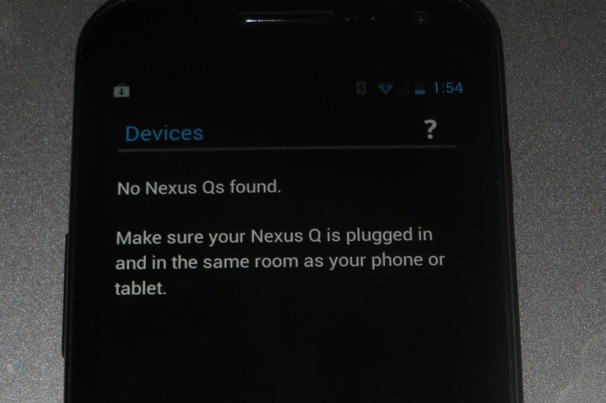
 Hopefully Google will work on these issues before it begins selling the Nexus Q to the general public. But even if you’re an Android fan willing to spend the $299 on a device with fairly limited functionality (it could at least have supported streaming media from other local network devices), I wouldn’t recommend the Q to anyone who is planning on Wi-Fi only connections in a city or a neighborhood with lots of Wi-Fi networks in range. That’s just asking for trouble.
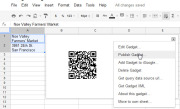
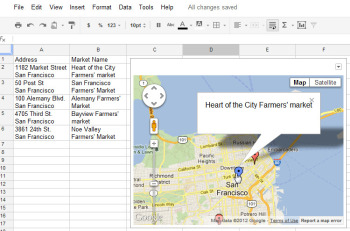 The Map gadget uses content from Google Maps to display the addresses you have entered as markers on the map.Pictures convey more information than words do, and a map offers the easiest way to show people where your office and other places of interest are located. The Map gadget lets you create a custom Google Map with pointers to the places you want to highlight, and it’s simple to use. To begin, type a list of addresses, one per row down a single column. If you want a tooltip to appear over the map location when someone hovers over the marker, type the text for this item in the cell to the right of the address. For example, to produce a map of local farmers’ markets, type each address in one cell and the name of the farmers’ market in the adjoining cell to the right. Choose Insert > Gadget >Maps, and click Add to Spreadsheet. Now select the range of cells containing your address and tooltip data, and then enter a title for the map in the Title box. If your data includes tooltips, select the Last Column as Tooltips checkbox, and then click theZoom Using Mouse Wheel checkbox. From the ‘Map type’ list, select the type of map–Normal is a good choice–and then click Apply & Close. The gadget dialog box will now show a map with the addresses plotted on it. As with the other gadgets, you can publish the Map gadget for use on your website to show your business locations or places of interest to your customers.
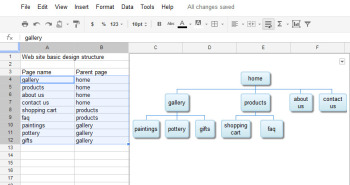 The Organization Chart gadget can create a hierarchical chart showing the design for your website or the management structure of your business.
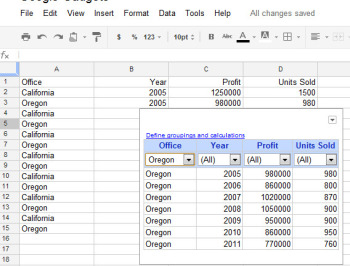 At its simplest, the Table gadget lets you filter data to see a subset of it.The Google Table gadget allows you to analyze data by creating a table that supports filtering, grouping, and even totaling. Insert the gadget by choosingInsert > Gadget > Tables > Add to spreadsheet. Select the range containing your data, including the heading row, and click OK. Click in the Title box and type a title for your tables. Select the checkboxes for Show Filters and Enable Grouping, and then click Apply & Close.To group the data by the contents of column A, for example, click the Define groupings and calculations link, select that column’s heading, and click the arrow to add it to ‘Group by Box’. Click Next, and select a column to calculate. To sum Profit, for instance, set the Profit entry to Total. You can apply calculations to multiple columns, if you desire, or to none at all if you just want to group the data.You’ll see a table appear in the gadget dialog box, with the headings over each column. Use the filter box at the top of each column to filter that column of data. Click OK, and the gadget will show you the grouped data, with any calculations appearing in the row above the appropriate group. You can collapse and expand the groups as necessary to see the values in the table.
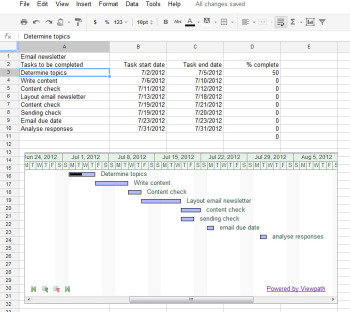 The Gantt Chart gadget illustrates the tasks in a project and the time allotted for each of them.You can use a Gantt chart to display projects involving tasks that must be performed over time. To make this type of chart, you need three columns of data (with an optional fourth column). In the first column, place a list of the individual tasks in the overall project–the steps needed to create and publish an email newsletter, for example. In the second column, place the start date for each task; in the third column, insert the end date for the task. If you wish, you can add a fourth column containing the percentage completed for that task. To produce the Gantt chart, chooseInsert > Gadget > Charts. Locate the Gantt chart and click Add to spreadsheet. Select the data for the tasks, the start and end dates, and the completed percentage, and click OK. Set the Name column to the column containing the task names. Set the Start column, Finish column, and % Complete column to the column letters containing that data (typically columns B, C, and D), and click Apply & Close. The Gantt chart will present the tasks to be completed, their start and end dates, and the progress made toward their completion to date.
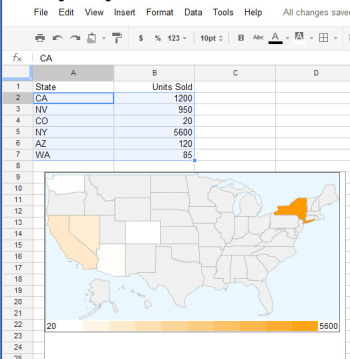 The Heatmap gadget shows relative values as colors on a map.You can plot data related to states or countries on a heat map, with small values indicated by light colors and larger values rendered in darker and more saturated colors. To plot the data correctly, you must use ISO country codes (or, for U.S. states, the usual two-letter state codes). Place the data to plot in the cell to the right of each relevant state or country. Choose Insert > Gadget > Map > Heatmap, and then click Add to spreadsheet. Select the data–including the locations and the data to plot, but not the column headings–and click OK. Type a title for the heatmap in the Title box, select the map type from the Region box (click USA to plot data on a United States map), and click Apply & Close. The map will appear with the regions colored appropriately for the value of the data associated with each.
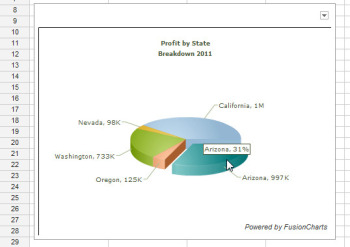 Drag on a pie slice in the animated pie chart to offset it from the chart itself.Interactive charts are more interesting to look at than static graphs. You can create animated pie charts in a Google spreadsheet using a gadget. For this chart, you need only the categories and one set of data, because pie charts can plot only a single data series. Insert the gadget by choosing Insert > Gadget > Charts. Locate the FusionCharts Pie & Donut Widget, and click Add to spreadsheet. Click in the Range box, select the data to plot–omitting the column headings–and click OK. Now select the chart type, such as Pie 3D. Type a caption and subcaption for the chart to inform the viewer as to the information the chart is intended to convey. Enable the Animate checkbox, and, if you prefer, enable Values On and Labels On to show both labels and values for each pie slice. If you enable Tooltips, the mouse pointer will show a tooltip if the user hovers the mouse over a given slice. Select Format Number and set Decimals to No Decimal so that numbers will be constrained in size. Enabling Shorten Values will ensure that the chart presents large values legibly. Click Apply & Close. When the chart appears, you can drag on a pie slice to explode it from the chart. Right-click the chart and click Enable Rotation so that you can then rotate the chart with your mouse. Gadgets such as these add a range of extra functions to Google spreadsheets, allowing you to do new things with your data and display it in ways that can help your business.

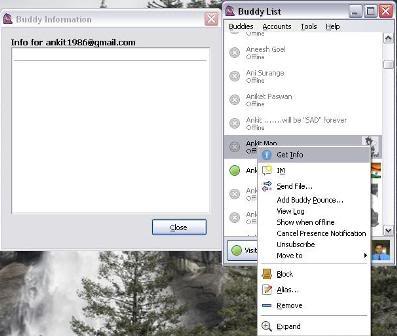


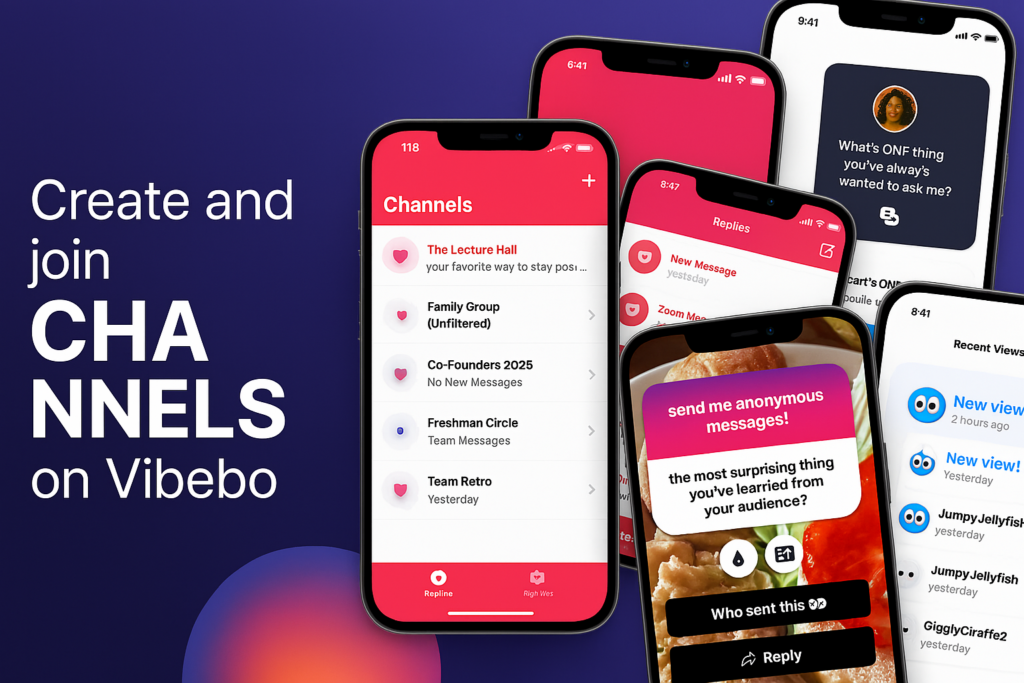
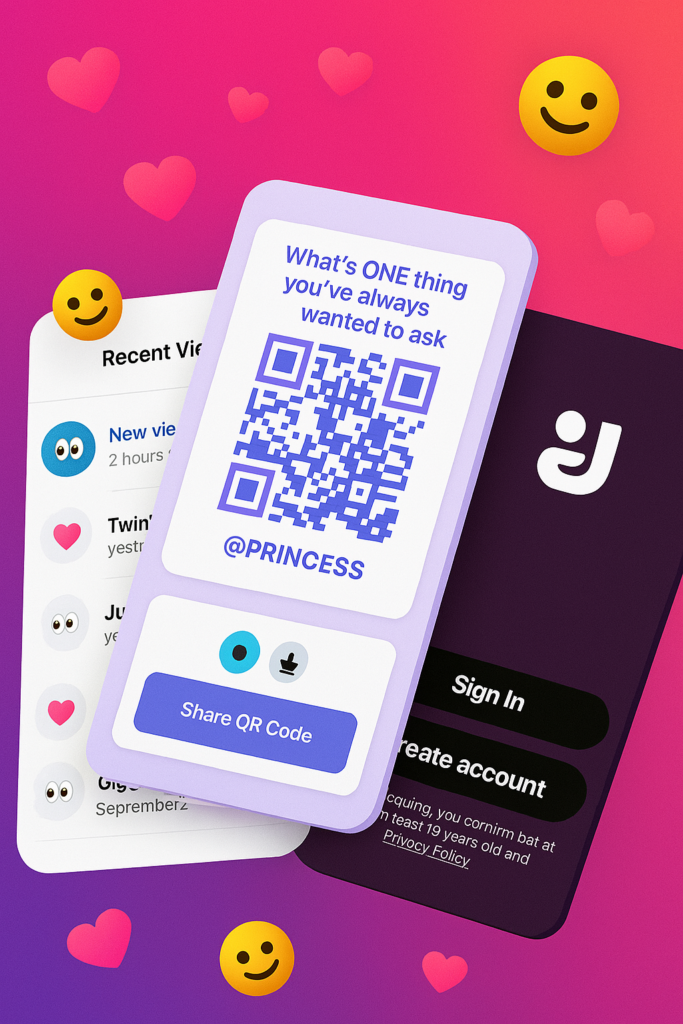
















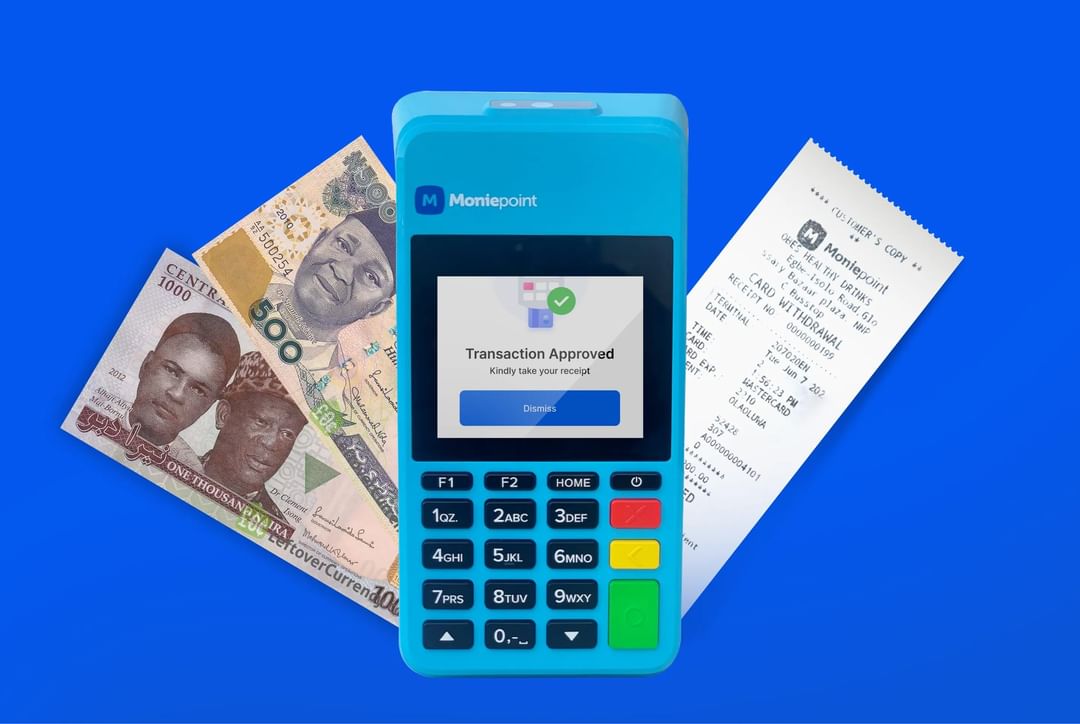






















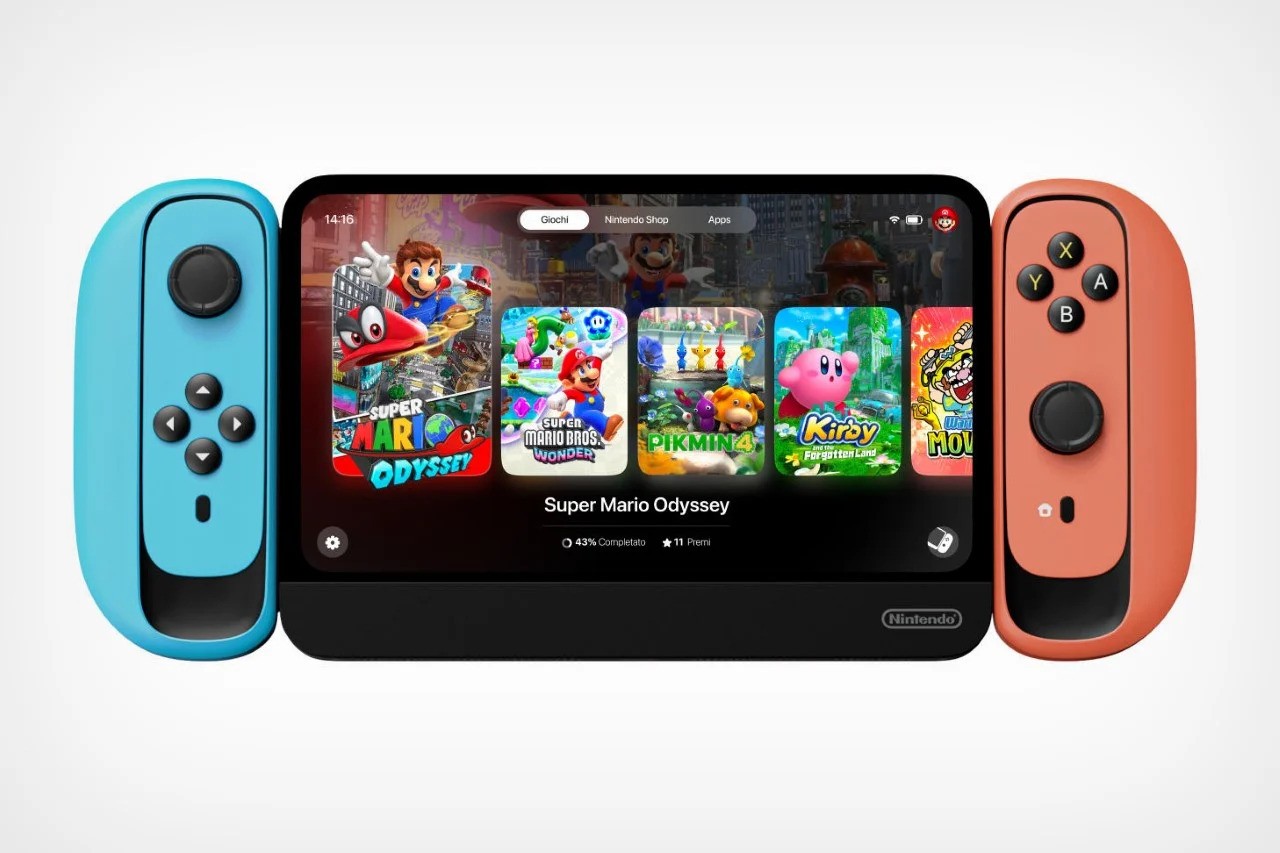






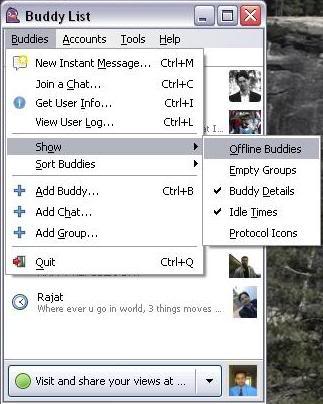



You must be logged in to post a comment.