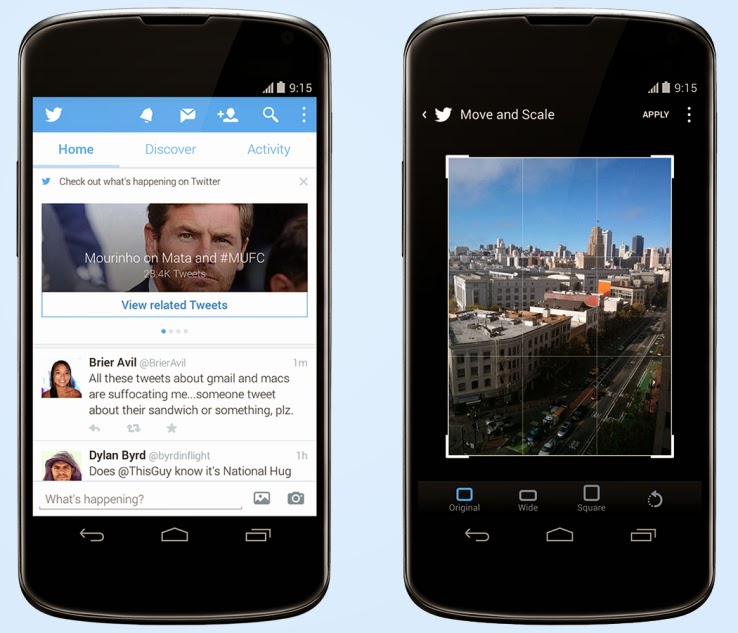
A post on Techcrunch has reported that Twitter has just released an update to its Android client (coming soon to iOS) that brings new photo editing tools to the service, which are likely meant to make it easier to share photos direct and keep people out of competitive apps like Instagram. The second change adds a significant element of event discovery and real-time trend monitoring to user timelines. The event surfacing is the more interesting element, since it marks a considerable attempt by Twitter to meddle with the straightforward chronological nature of that part of its service (besides promoted content). In case a user doesn’t have any new tweets to load when you manually update it, it now brings up recommended posts from people you don’t follow, as well as trending topics and suggestions about new people to follow. In the U.S. only, it surfaces event updates for things unfolding on TV, in sports and on the news.
Each content update features a link to click through for more tweets centered on that conversation. It’s an extension of some of the other work Twitter has been doing around surfacing events and breaking news, including the Eventparrot experiment and a feature that was tested back in August to highlight nearby events via proximity-based alerts.
A couple of things to flag about this change: It only happens when there’s no other new content for a user to view, and when they express a desire for more content, which is very clever; and it represents a way for Twitter to secure its place as the source of live, real-time information about things unfolding on the ground, a reputation that Facebook clearly covets.
Others are already capitalizing on Twitter’s ability to identify and follow events as they unfold, including Banjo, but Twitter adding this as a native feature in its mobile clients could change the nature of the service at a basic level. Should it roll out globally, and expand its scope, mobile users could be using Twitter a lot more for things like local discovery than they had been previously.
Every one of us are connected through some On-line medium in this ERA Advanced Internet world. The introduction of smartphones, mobile computing, advance internet facilities such as Google Glass, internet browsers, etc., has made it incredibly easy and efficient to communicate with one another when it all boils down to social networking.
With every positive technology comes a negative view of that specific technology: Almost all of us are worried about one particular thing called online privacy when it comes to social networking. As a matter of fact, there has been a lot of negative witnesses on this type of issues, with Facebook being the latest suspect.
Recently, Facebookintroduced trending topics to its website, with Twitter and Google+ pushing more and more sophisticated technologies to keep up with people’s expectation, we still see some loopholes like users profiles being viewed without one’s knowledge and all that!
Imagine, if there is a technology which can pretty much reduce the risk of being revealed online about our conversation overall? Thinking as how possible it is. Yes! It is possible and more specifically, it is going to be welcomed by Many social media giants in the near future. Below, we take a look at some technology that will be integrated with social networking in the nearest future.
Temporary Social Messages
The next step of Social Media is about the technology called temporary social messages. It is obvious that the name of the technology itself will explain the benefit of it. As an Individual, we will be worried about our online conversations over various social media online. The worry about “not completely privatized” will always make us insecure. The benefit of temporarily messages will reduce the insecurity to a minimum level, but then there are hurdles like sexting, response from industry role models like Facebook and Twitter will make a huge difference to welcome such technology completely. As we mentioned above, the hurdles like Sexting is one of major Challenges to overcome for the complete adoption of this technology. As there may not be a proof to show up if and when the sexting cases happen through Social Media through Temporary Social Media. Nonetheless, this innovation will surely open up a wide arm in other Areas which will be welcomed by certain industries and make the use of it to the utmost level. Imagine, Industries like Banks and healthcare make the use of this innovation! The process level of policies, and basic formalities will be taken care in the speedy way.
Consequently, Common will be beneficial with the help of this technology and the Quick processes of the Industries. Not just that, Due to its nature of Temporary/ limited existing, this innovation will keep up the confidential things of Industries “secure and private”.
One such Model has already been used by one of the companies called SkyBees to communicate as it has customers all around the world. They maintain a Temporary Database server to carry this service.
At the end of the day, it is also Significant to check as How well this innovation could guarantee the Temporary nature of the messages/conversations technically.
It may look a simple technology, but then the benefits out of this for an Individual and Industries are Limitless and very much appreciative.
This post was made possible, courtesy to Basheer Ahmed, senior editor, MSys Technologies.
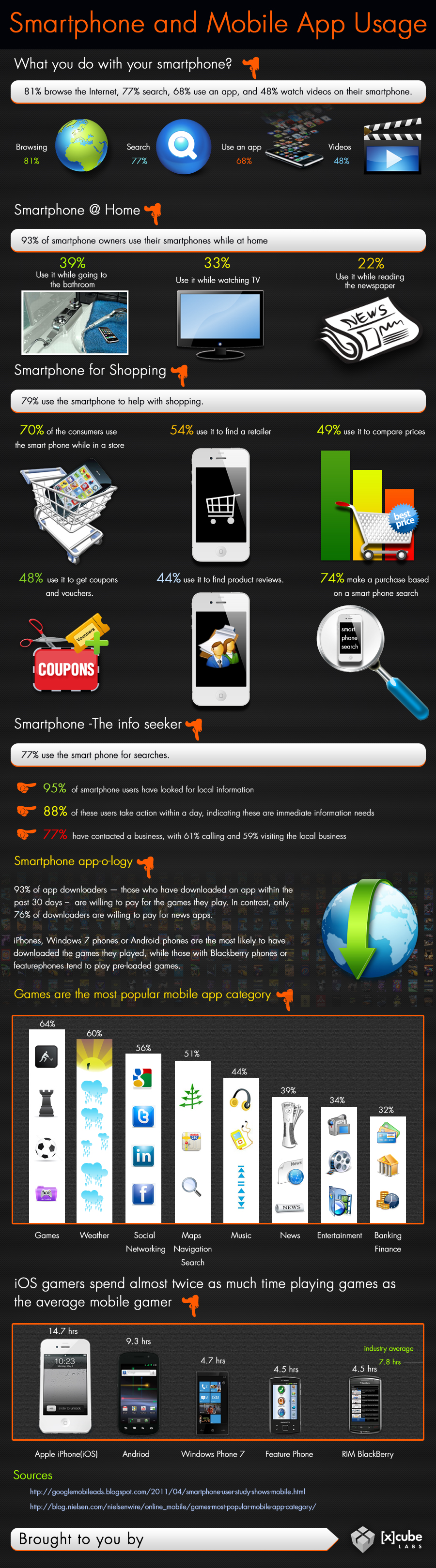
The modern generation is very reliant on technology and computing to perform daily activities. This is to be expected as there is a sense of urgency associated with our present dispensation. However, smartphones usage is not dominated by business, finance, health or other categories you might expect. The leading category is the gaming category. Every now and then, someone has their face buried in their smartphone, no doubt, playing some of the most terrifying Android horror games in darkness. Indeed, smart devices are made, so we can become dull.
Smartphones And Mobile App Usage – Infographic
Smart phones has come to stay, the use of applications are evolving, companies can choose to adapt or suffer the fate of Nimbuzz. Just how far can mobile computing go? The answer will depend on what you make of it.
What really makes these devices functional and so useful is the fact that several apps can be downloaded on them. These mobile apps are available through different app stores depending on the operating system of your mobile computer.
Some examples of these apps stores are Apple store, Google Play Store, Windows marketplace etc. Below is an infographics by Xcubelabs that will show us, how people use their smartphone on daily basis.
Smartphone And Mobile App Usage Infographic [Image credit: Xcubeslabs ]
Embed this Infographic on your site
<a href="https://ewtnet.com/technology/infographics-smart-phone" title="Smartphone And Mobile App Usage - Infographic"<img src="https://ewtnet.com/wp-content/uploads/2019/02/smartphone-and-Mobile-app-usage.jpg" alt="Smartphone And Mobile App Usage Infographic" title="Smartphone And Mobile App Usage - Infographic" width="100%" height="auto" /></a><br /><a href="https://ewtnet.com/technology/infographics-smart-phone">Smartphone And Mobile App Usage - Infographic</a><br>
Smartphones play a lot of roles in your day-to-day life affair. I think most people simply prefer to relax to play a couple of games at the end of a hectic day. So going back to my initial question; I think smartphones has indeed made us smarter.
Feel free to argue, though. The comment section is open to everyone.
So far, a number of Android internet browsers and file managers has been developed. While some of them are completely ads-free, easy-to-use and fast, quite a number of them contain detracting advertisement banners, data consuming and extremely slow when opening internet pages.
Recently, we listed five applications that will help you monitor your data usage on your Android smartphone. While monitoring your data usage it is also necessary you consider the speed of your internet browsers as this will affect your bandwidth usage. In this post we are listing 10 Android internet browsers and file managers that will sky rocket your surfing experience.
Base on popularity measure and our analyst experience; topping our list is, Dolphin Browser: It is the fastest Android browser out there which has had a total downloads of 1,090,050 so far.
Another very famous and popular browser which is suitable for the Android operating system is the Opera Mini Browser. It has been developed by Opera Software USA and has had a total of 938,098 downloads till date. The third fastest browser on this list of the fastest browsers for Android Smartphones is Astro file manager/browser which has been developed by Metago and has 358,155 downloads to its credit.
Chrome browser is yet another very fast browser for Android browser which is followed by Firefox browser developed by Mozilla. UC Browser for Android is also one of the fastest Android browsers out there and is developed by USWeb inc.
Maxthon Android web browser developed by Maxthon LTD is a very fast browser for Android and next in the line is Boat browser which is developed by Boat browser.
Ninesky browser is another browser for Android which is one of the fastest and this is followed by Baidu browser which has been developed by Baidu Inc
The saga of 2013 has long been kept in check. Earlier before now, we considered 20 PC games that rocked in 2013, various WordPress plugins and the themes we loved in 2013. Generally we, had an amazing year in 2013 and a good start to a new year but before the month finally round up, I’m going to take a final look at the constituent of the amazing year we had. 2013 saw the arrival of GTA V, the single most expensive video game in the history of gaming, competing neck to neck with only the highest budget film till date, the Pirates of the Caribbean 3.
The GTA franchisee has held records of being the highest budget games twice in the last 5 years holding the first and second positions with GTA V in 2013 and GTA IV in 2008 respectively.Yet, as the highest grossing game ever, GTA IV falls in the fourth position grossing in $1.35 billion with the scales being tipped over by World of Warcraft, grossing in a whopping $10 billion in sales
Below is a detailed infographics by Graphs.net that will show us which of this games made the list.
The best way to start a new week is starting with fun. Not to worry, we do not intend to scare you with Android horror games—but it’s okay if horror is fun to you—what we are interested in are three most relaxing games you must rock this week on your Android or iOS devices.
If you happen to find your favourite game in this list, you are in luck. If not, it’s time to try other games and see what you have been missing. The games in our list here today is available for both iOS and Android devices and adaptable to any screen size.
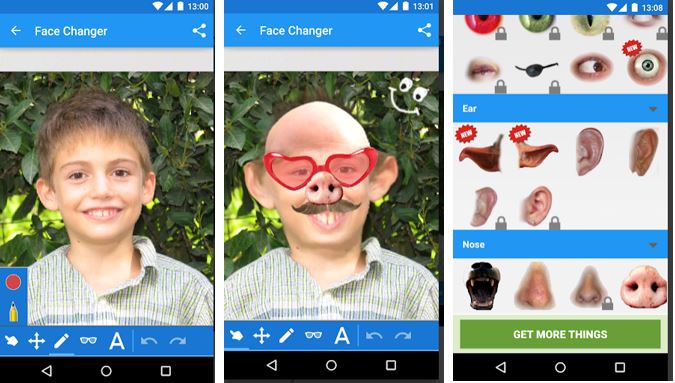
Recently, a friend tagged me in picture where he was brutally injured. “What happened?” was my first question as I wondered what might have inflicted such injury and bruises on him. The answer didn’t wait for too long: He honestly told me it was a costume he made with Face Changer on his Android device.
It doesn’t matter whether you forgot to apply the necessary make-ups before taking a photo, this app will help you apply make-ups or add items you never had to your photos.
Publisher Description
CNET: If you are searching for a great time killer and funny photo app, this one is for you. This app promises many laughs as you twist and edit your friends’ faces. Face changer lets you easily change faces in photos. Use it to change your face, friends or change face in any image you find on the internet. It’s easy to create funny pictures and caricatures, and easy to share them.
File Info
– Release Date: October 24, 2013 – Size: 6 MB – Version: 5.8 – App Requirement: Android 2.2 and up – Age Rating: 13+
For information on how to use Android Face Changer on PC or Mac click here, otherwise, click on the download button below to initiate your download.DOWNLOAD ANDROID FACE CHANGER
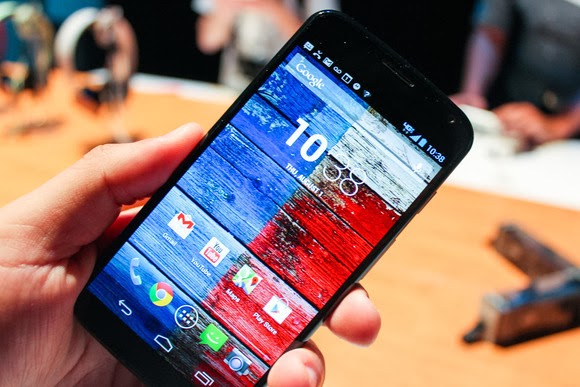
IDG News Service – One of the nicer features of Motorola’s Moto X (shown above) and recent Droid phones is the ability to have text messages read aloud while driving, but responding to those messages has been tricky until now.
A new update to Motorola’s Assist app makes those responses much easier. Users can now reply directly to incoming text messages by voice, instead of having to initiate a completely new voice command by saying “Okay Google Now.”
Assist is a major feature of Motorola’s newer phones that automatically does things based on your situation. For example, it switches to hands-free communications while driving, silences calls while you’re in meetings, and only allows important calls at night.
Motorola says it has improved driving detection over Bluetooth in the latest update, and also added a way to launch your favorite music app once you’re on the road. (The app could already start playing your most recent track when connected to car audio through the headphone jack or Bluetooth.)
Although the Moto X received critical acclaim for its clever software and customizable finish, Motorola has reportedly been disappointed by weak sales, and has slashed prices on both unlocked and carrier models. Starting next month, Motorola will start selling its flagship phone in Europe, but without the Moto Maker customizations available to U.S. customers.
Even if the Moto X remains a sales dud, it makes sense for Motorola to keep investing in the software. CEO Dennis Woodside has spoken of the “long-term mindset” at parent company Google, so Motorola will likely build upon Assist and other software features for future handsets.
IDG News Service – The way you identify yourself on Twitter can now be used by marketers in their decisions to place ads in your feed, under a new expansion of the site’s advertising program.
Twitter said Tuesday that it would add some new capabilities to its “tailored-audiences” program that will let marketers target their ads to specific users based on their email address or information in their Twitter bios. The program, if enough advertisers take advantage of it, could help the social network raise revenue at a time when the pressure is on for the now-public company to turn a profit. Part of the idea is to help advertisers better reach people on Twitter who are already loyal customers. If, say, you’re a membership cardholder for a fashion retailer, the new tools are designed to let that retailer better reach you on Twitter.
Under the new program, the retailer can share scrambled email addresses of its members with Twitter, and then Twitter would match that information to the accounts of those people, assuming they operate accounts on Twitter under those addresses.
A tweet from that advertiser might then appear in the person’s feed, Twitter said in its announcement.
Anonymizer scrambling
Scrambling is a process used by Twitter and its advertising partners to anonymize people’s account information so their identities are not revealed. Twitter uses a behind-the-scenes software program that automatically matches people’s email addresses and user IDs that are scrambled in this way. The process is meant to keep Twitter in the dark on whom exactly is being targeted this way.
The technology fits in with an ad-analysis program Twitter unveiled last year, designed to look at how users’ activity on the site might affect in-store sales.
Twitter’s tailored audiences program was originally announced as a way to let marketers deliver ads to people based on their browsing activity outside of Twitter—a concept that is already rampant across the Internet. Google and Facebook have operated their own re-targeting programs for some time now.
Tuesday’s expansion shows Twitter is looking to give marketers even more ways to target individual people on its site.
The new advertising program also makes use of people’s Twitter usernames and basic bio information. The idea here is to help marketers promote themselves to people who aren’t yet loyal customers, but who might be receptive to their ads.
The retailer might be able to use public information on Twitter like a user’s bio, follower count, verified status, or past tweets, “to identify the specific accounts on Twitter which are the most appropriate potential customers,” wrote Kelton Lynn, product manager for revenue at Twitter, in a blog.
Twitter has partnered with a number of ad technology companies like Datalogix, Epsilon, and Liveramp to make all the targeting work.
If Twitter users do not want to be targeted by advertisers in this way, they can adjust their privacy settings to turn off the matching, the company said. In users’ privacy settings, there is an option to “Tailor ads based on information shared by ads partners.” If people uncheck that, Twitter will not match people’s accounts to information from ad partners, the company said.
As +Brian Gardner rightly said “the social media makes you look better, and that’s the problem”: We all like to appear slicker than we actually are, just to get a few likes and comments on Facebook.
Whether you are using Facebook as a business entity (page) or as an individual you can backdate your new status update, schedule an update (scheduling updates is only available to page admins) or even change the date of your already posted items.
Maybe you just remembered a photo you were suppose to post three years ago or something you were suppose to say yesterday, don’t worry, you can still go back to the past – at least on Facebook.
Scheduling Posts on Facebook Pages
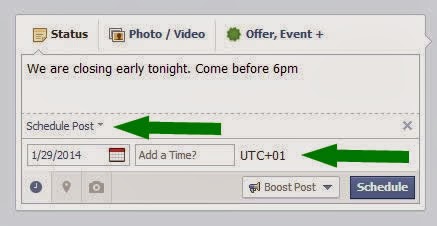
If you need to make a statement at a time you won’t be available on your Facebook page, scheduling your status update may come handy. The system allows you to post a status update and schedule it to be publish at a given time.
You can prepare a post and schedule it to appear later by adding a date and time in the future before you post it. You can schedule a post up to 6 months in advance in 10-minute intervals.
From your Page’s sharing tool:
Choose the type of post you want to add to your Page
Clickin the lower left of the sharing tool
Choose the date and time you want the post to appear
Click Schedule
If you choose a date in the past, the post will appear immediately at the appropriate place on your Page’s Timeline. All times correspond to the current time zone you’re in.
Note: Scheduling post is currently available to only Facebook page admins.
Backdating Timeline Post
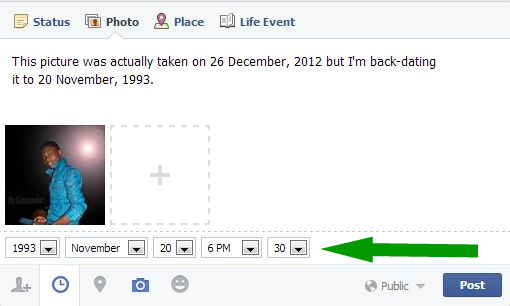
You can backdate your videos, photos, status and just about everything you own on Facebook. Simple goto to your Facebook sharing tool:
Choose the type of post you want to add to your Timeline
Clickin the lower left of the sharing tool
Choose the date and time you want the post to appear
Click Post
To backdate an existing photo:
Click on the photo you want to backdate.
From the right-hand panel, click Edit.
Choose the date and time you want the post to appear.
You may use your Mac for serious work, but sometimes it’s a good thing to add a touch of whimsy to it. Here are four quick tips for customizing OS X and making it a bit more fun to use.
Check them out below…
1. Try the iTunes Artwork screensaver
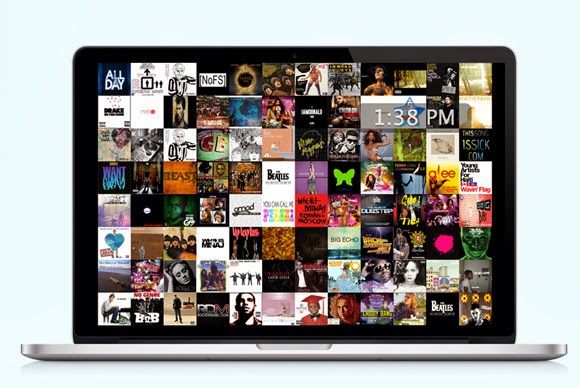
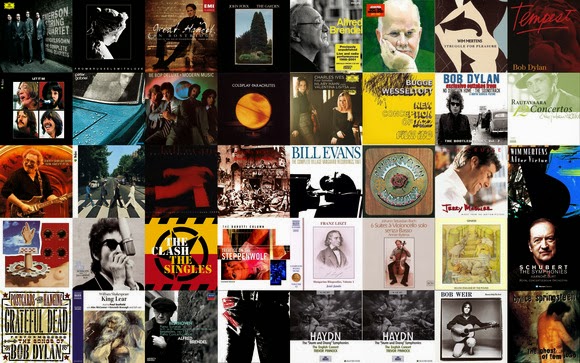
When you’re not working, by default your Mac’s screen turns black with a subtle, shifting white Apple icon and a bit of text, usually your username. But you need not settle for that. To pick something different, go to Apple menu > System Preferences, select Desktop & Screen Saver, and then click the Screen Saver tab. You’ll find a lot of fun options to explore here, such as “Word of the Day.” If you’re a music fan, though, try the iTunes Artwork screensaver, which displays a collage of random album covers from your iTunes library.
Scroll down the list of options in the left-hand column. When you see iTunes Artwork, click to select it, and then click Screen Saver Options. Here you’ll see the option to choose the number of album-cover rows as well as the “delay” in seconds. By default the delay is set to 2 seconds, meaning that every 2 seconds one of the album covers will flip to expose a new cover.
Click the Preview section of the preference pane to see the screensaver in action. You’ll notice that the different albums change at random, one at a time. As a bonus, if you spot an album you want to play, you can hover your cursor over its artwork and click to start the music.
The iTunes Artwork screensaver fills your Mac’s display with the covers of your albums. Even better, you can just click an album to get the music started.
2. Change your wallpaper…all day long
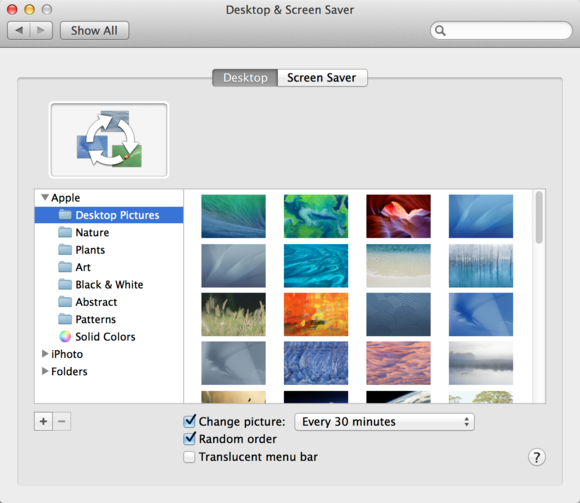
You probably know that you can change your Mac’s wallpaper—that is, the image or color on your Desktop. To do so, first open System Preferences (from the Apple menu or the Dock) and click Desktop & Screen Saver. Click the Desktop tab, and then you can choose an image from a number of folders, or from your iPhoto albums.
But there’s one setting that will make your Desktop a lot more interesting: At the bottom of the window, check Change Picture, and choose a frequency such as every 5 seconds, every day, or when waking from sleep. To make the image unpredictable, also select the Random Order option. Now you’ll never know which photo will come up, and your Desktop will be a source of surprise.
Bring unpredictability to your Mac by making the Desktop wallpaper change throughout the day.
3. Mix it up with emoji in file and folder names
Emoji are small graphics that work like fonts. You might see these little faces, animals, and other images pop up in text messages or tweets. But you may not realize that you can use them in your file and folder names too.
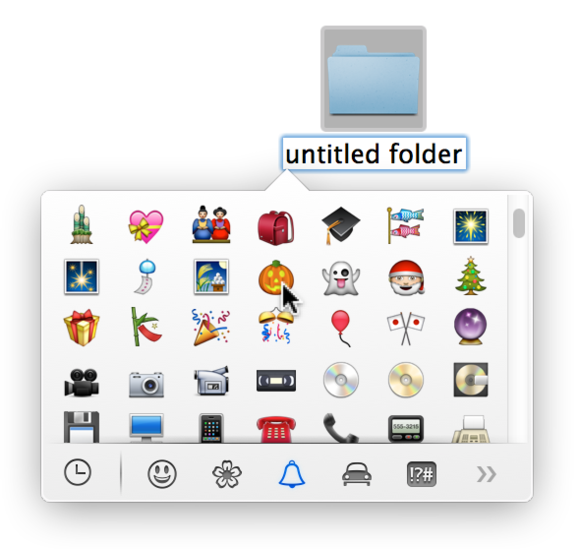
To change an item’s name and add an emoji character, select a file or folder in the Finder, and then press Return or Enter. This action will highlight the item’s name. Next, choose Edit > Special Characters, or press Command-Control-Space. You’ll see a pop-up palette; click any of the icons at the bottom. The clock icon shows characters you’ve recently used; the others sort special characters—including emoji—by category.
Make file and folder names more fun (and perhaps more memorable) by adding emoji. You can also use these small graphics in texts, email, and documents.
Browse through people (smiley faces and more), nature (including cute little animals and flowers), objects (such as food items and sports balls), places (buildings, vehicles, road signs), and symbols (for instance, from the zodiac), to find one you like. Click an emoji to add it to a file or folder name. You can type normal letters before or after the graphic. Emoji will make your file and folder names stand out, and they certainly won’t be drab.
4. Spice up folders with custom icons
Are you tired of all those boring blue folders in the Finder? Change them.
Want to have a folder with a picture of your pet, your child, or your favorite outdoor scene? Easy peasy.
Many sites offer free sets of icons that you can use to dress up your folders, like this one from IconArchive.
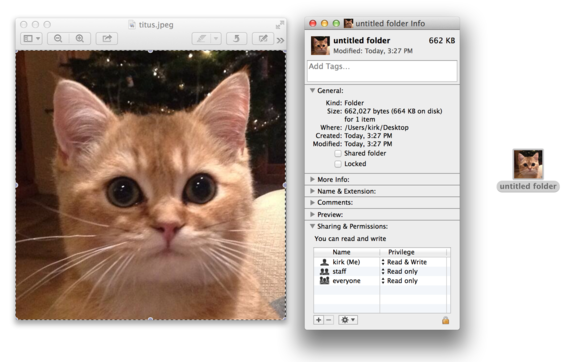
You can use almost any graphic—a photo of your child, a pet, album art from your favorite band—as a folder icon. If you want, you can even search Google for nice pictures to use, but keep in mind that they shouldn’t be too large, or they won’t be easily recognizable as icons. Better yet, download art specifically made to serve as folder icons, for instance from InterfaceLift or IconArchive.
Double-click a picture to open it in Preview, or open it in your favorite image editor. If you want to crop it, drag the crosshair cursor over the picture, and then choose Tools > Crop, or press Command-K. You might want to crop the picture to a square so that it will look more balanced as an icon. To do so, press the Shift key while dragging the crosshair cursor.
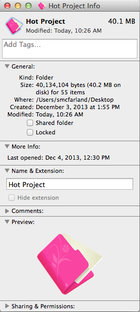
Next, press Command-A to select the picture, and then press Command-C to copy it. In the Finder, look for the folder that you want to sport the icon. Select it and press Command-I to display its Info window. Click the small blue folder icon at the Info window’s top-left corner. Press Command-V to paste your picture over the standard folder icon, and then close the Info window. The folder will now appear with its fancy new icon.
TechHive – Mobile developers hoping to cash in on a blockbuster app have bad news from researcher Gartner: More competition and higher demands from users will make it even more difficult for developers to make money from smartphone and tablet applications.
The Google Play app store and Apple’s iTunes store both have over one million apps. That adds up to too many choices for users, and makes it harder for developers to get noticed or make money from their applications.
Average apps stats
Today about 90 percent of paid applications are downloaded fewer than 500 times per day and make less than $1250 a day, according to Gartner. This is only going to get worse, thanks to greater competition. In addition, applications will have to become more sophisticated to keep up with user demands, so operations, development, testing, deployment and support will become more expensive, it said.
This means by 2018 only one in ten thousand consumer apps will be considered a financial success by their developers, according to the market research company.
Developers need to prepare for this scenario and should set realistic expectations. If the goal is to make money directly from the sale of the app, developers need to thoroughly assess the concept, the costs, and the opportunity, because the likelihood of success is minute, Gartner said.
The share of free apps is also predicted to rise from 91 percent last year to 94.5 percent in 2017. In the same period, the total number of downloads is expected to grow from 102.1 billion to 268.7 billion.
The growing number of available applications is also changing the way users find apps. Consumers can’t sort through these large numbers and instead depend on suggestions from recommendation engines, friends, social networking or advertising to discover mobile applications, according to Gartner.
Gartner does however believe that the number of paid downloads will continue to grow, even though they are a smaller percentage of the total, and will reach 14.8 billion by 2017, compared to 9.2 billion last year.
And there’s always the possibility of the exception: a student in a basement developing a one-of-a-kind application that becomes wildly successful, Gartner said.
LAS VEGAS—Forget search. The future of Yahoo is content. Yahoo’s loss to Google in the search engine wars was already quite evident before the 2014 International CES, but CEO Marissa Mayer revealed a new focus for the company during her Tuesday keynote at the tech trade show. “A comment theme is us simplifying our business,” Mayer said at the show. “Fundamentally when you look at Yahoo it’s about four core areas: search, communications, digital magazines, and video. These are four things people do as part of their daily habits.”
Mayer made a slew of announcements about new Yahoo products tied those core areas. In the process, she answered a few questions like: Why on earth did the company hire TV anchor Katie Couric and former New York Times technology columnist David Pogue?
Marissa Mayer, right, greets Katie Couric onstage at CES 2014.
Riding the content wave
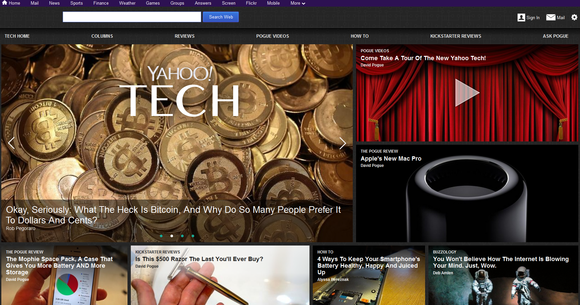
Couric is anchoring interviews and original content for Yahoo’s mobile apps, while Pogue will lead the Yahoo Tech digital magazine, one of the first magazines Yahoo will launch this year. The company also trotted out Nick D’Aloisio, the teenage CEO that made headlines when Yahoo last year acquired Summly, his summarization technology. Summly is now baked into another new app that Mayer unveiled at CES, Yahoo News Digest.
Mayer presents to the audience at CES 2014.
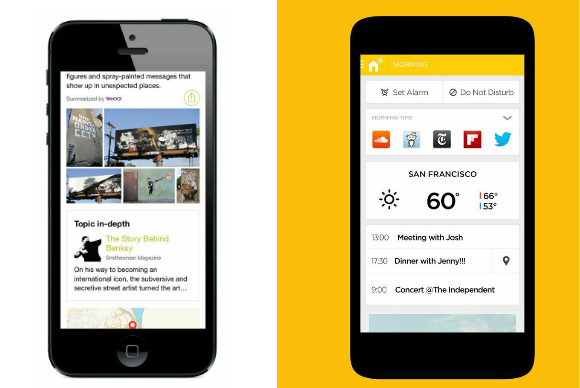
News Digest delivers two daily news summaries of current events to users, one in the morning and another at night, and pulls content from all over the Web—tweets, photos, infographics, maps, and so on—to make the stories more visually appealing.
D’Aloisio said the app is the best of both the tech and journalism worlds, because “the stories are algorithmically produced but editorially curated.”
News Digest isn’t a unique concept. Apps like Circa have been trying in recent years to solve readers’ thirst for extremely short, but incredibly high-quality content. But Yahoo’s news efforts needed a shot in the arm: News Digest is its attempt to stay relevant in the world of bite-sized information.
Yahoo’s new digital magazines feature some heavy talent, like David Pogue, formerly of the New York Times and now editor of the new Yahoo Tech, which is shown above.
While 140-character news is on the rise, readers are also thirsting for visually rich long-form stories, which is where Yahoo’s new digital magazines aim to compete. Mayer hired big-name journalists like Pogue for Yahoo Tech, which launched Tuesday along with Yahoo Food. As with News Digest, the concept of a niche digital mag is nothing revolutionary, but it offers Yahoo a chance to ride the wave of popularity of apps like Flipboard.
Pogue posed Yahoo Tech as a tech site for “normal people” who don’t live in San Francisco or New York, hoping to garner mainstream users who don’t follow tech blogs (or Yahoo’s struggles to stay hip).
All about ads
Yahoo’s digital magazines, like the rest of its products, are free, but that’s OK: Yahoo has a whole new advertising plan. The magazines will incorporate native ads, the company has a new ad manager and ad exchange for businesses, and ads on Tumblr are about to get more sophisticated.
Tumblr CEO David Karp joined Mayer to talk about how Yahoo’s ad tech will power the micro-blogging site’s ads, and boasted about the reach of sponsored posts on Tumblr (which are re-blogged an average of 10,000 times). What does that mean for users? You guessed it: highly targeted ads, and a lot more of them.
News Yahoo apps like News Digest (left) and Aviate reflect a company in flux.
Yahoo says search is still a core part of its business, and Mayer kicked off her keynote announcing the acquisition of Aviate, which will use your phone’s location and your daily routine to surface the apps you use most.
“We believe home screens should be smarter and more personalized,” Mayer said. “Imagine that your phone could deliver the right experience to you at the right time instead of you having to search for it.” A good example would be a fitness app that pops up when you’re at the gym.
That’s not exactly active search. But let’s be honest: The company under Mayer is well on its way to becoming a content and advertising company. Ads have always key to Yahoo’s business, but if the company can marry advertising and original content in a way that doesn’t anger readers, it could become more than just the site you glance at for stocks and sports before making your way to other parts of the Internet.
This wrangle has been a real bone of contention in the past few years and will continue to rage inasmuch as newer generations are born and newer technologies are being introduced. However, while battling with this puzzle, EWT staff has listed some basic factors to aid you make a viable decision when choosing your first programming course.
Before we dismantle our enumeration it is exigent and imperative to note some of the common programming languages you are likely to choose from.
Some Common Programming Languages
Perl
Java
C++
C#
Python
Ruby
Eiffel
PHP
JavaScript
ABAP
Objective-C
Ajax
Clipper
Harbour
Gambas
ABL
OZ
Delphi
Now lets take a look at those crucial factors that will affect your decision while choosing your first programming language.
Career
Of course, this is the very first thing that should come into your mind. You need to consider which language will be the most valuable throughout a career or rather, which programming language will be feasible over a long-term career.
You need to consider your main field of specialization, which of the programming languages will aid you in that field and finally how much time do you have at your disposal.
Conceptual Foundation and Easy Transition
As a beginner the syntax of programming may appear a bit strange; some of the concepts may seem a hard nut to crack but a fastidious observation and implementation of that concept may lead to better understanding of similar concepts.
One of the easiest method of mastering various programming languages is by starting from the ones that allows you to transit gradually to another language. Languages such as Java, C# and C++ are the basics of programming. Mastering any of this three will enlighten your brain and lay a fundamental foundation for learning other programming skills. Starting with more advance languages such as Object-C, Ruby or Python which has a more crooked and complicated syntax structure will be a hectic experience when reverting to the basic ones.
Monetization and Marketability
Of course, after completing your programming course you might want to take a vacation in a luxurious environment, dry your toes and flaunt some cash. That is probably the easiest part of learning programming if you made the right choice. Ask me what I think: You want to work at Google? Best go Python. You want to work in the enterprise space, learn Java or C#. You want to build websites? Probably go PHP or Ruby. Pledged your soul to Apple? Just dive into Objective-C. Anything other this; you are out of employment.
For those Americans who are seriously considering going into coding I recommend you start with Java, gradually progress to C# then anything can follow. Intending web programmers can start with JavaScript, PHP and Ajax. W3schools offers free web base course on the major web programming languages including JavaScript and PHP. Moreover, several programming eBooks can as well be downloaded free or paid online: A little Google search will change everything.
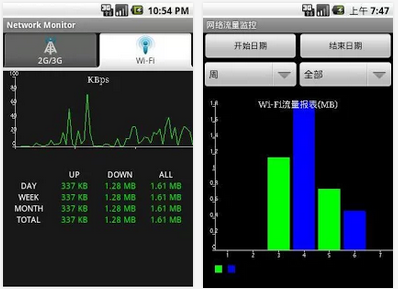
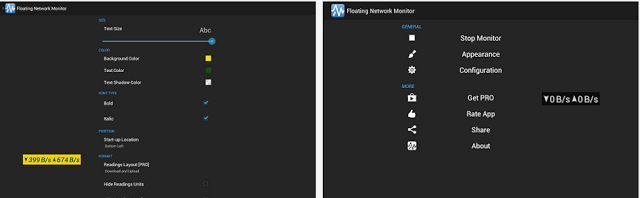
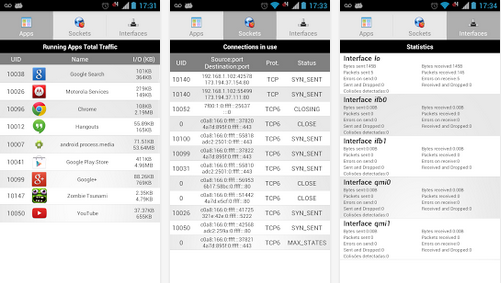
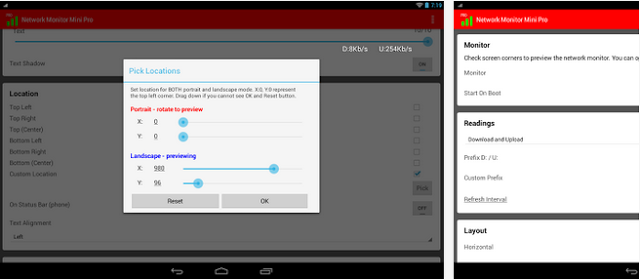
We all love to see live statistics; how much bandwidth was spent on upload and download, how much data was spent on each page you visit but unfortunately Android prefers to keep such information to itself.
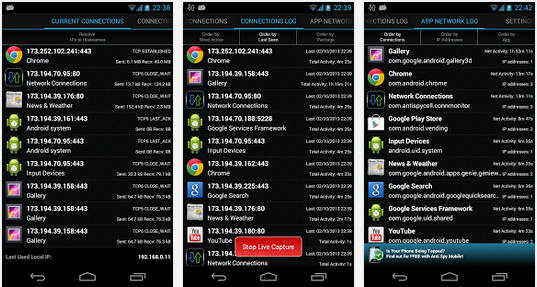
Do you want to catch all the applications that is killing your bandwidth? In this list, we are going to look at some android apps that will help you monitor your network connection statistics on screen and find out exactly what app consume more bandwidth.
If you’re looking for more content for your 4K TV, you’ll soon have somewhere new to turn: YouTube. The Google-owned company will demonstrate 4K video next week at the International CES show as it moves forward with offering next-generation video.
YouTube will serve up 4K (a.k.a. Ultra HD or UHD) in a new format called VP9, a royalty-free codec that will also reportedly offer a better experience with Google Hangouts, according to GigaOm. VP9 consumes considerably less data than other, commercial codecs (such as H.265), YouTube said, letting the service stream higher-quality streams with less bandwidth.
However, hardware must support the format before consumers can view the streams. Google is reportedly working on that, too; it will demo streamed 4K content on TVs from LG, Panasonic and Sony. Several other partners, including Samsung, ARM and Intel, have signed up to build hardware that supports VP9.
This isn’t the first time YouTube has experimented with 4K. The service first ventured into supporting the format, which is typically 3,840 x 2,160 or 4x the pixel resolution of full HD, in 2010. Though the 4K streams appeared to work for Mashable’s Christina Warren when she watched them over a 50Mbps connection, she couldn’t verify the clarity since 4K monitors were a rarity four years ago.
That has changed, with several manufacturers offering 4K TVs and displays — some at impressively low prices. The challenge now is bringing true 4K content to consumers. YouTube is addressing this along with the likes of Netflix, which tested offering 4K videos, and Sony, which offers a 4K download service to owners of its 4K TVs.
As 2013 travels down the history book EWT analysts take a look at the top 45 most downloaded WordPress plugins in the past 12 months.
Plugins are the fundamental ingredients that constitute a flowering website – If you are running your website on a WordPress self hosted platform you will understand what I mean by that term. Whether you are managing a cooperate/business or personal/commercial blog, we all help ourselves with one plugin or the other.
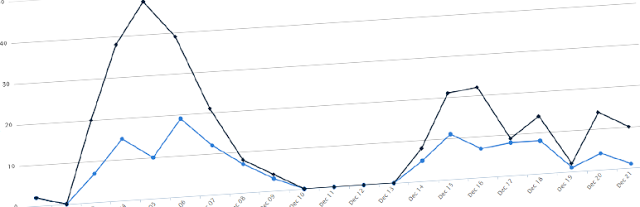
Statistics has shown that more plugins was added to the WordPress data base in 2013 than in the preceding years. Likewise, more bloggers and webmasters (esp. in Africa & Asia) uses the WordPress self hosted platform making it the most popular CMS across the globe.
The stats are quite incredible. Aren’t they? “What plugins did they use?” remains a question we need to tackle in the following section.
A social sharing service provided by AddToAny that adds social sharing functionality to your website.
43. UpdraftPlus – WordPress Backup and Restoration —Download
This Plugin helps you perform a complete backup or restoration of your self hosted WordPress site into a cloud service such as: Dropbox, Amazon S3, Google Drive, Rackspace, FTP, SFTP, email, DreamObjects, etc.
Convert your self hosted WordPress site into an e-Commerce site with this free plugin. Customers can buy products, services and digital downloads from your website.
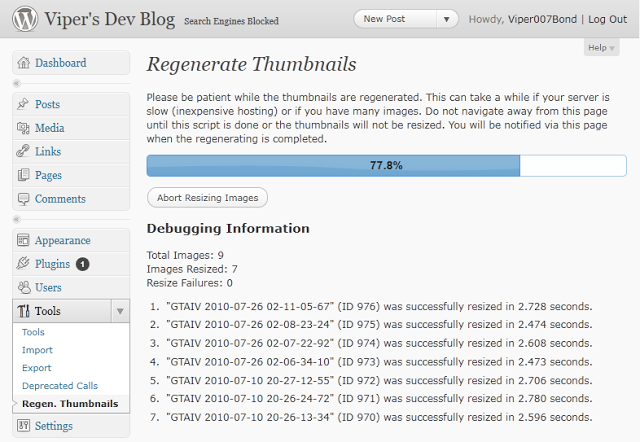
Regenerate Thumbnails allows you to regenerate the thumbnails for your image attachments. This is very handy if you’ve changed any of your thumbnail dimensions (via Settings -> Media) after previously uploading images or have changed to a theme with different featured post image dimensions.
This plugin themes the WordPress login, registration and forgot password pages according to your current theme. It creates a page to use in place of wp-login.php, using a page template from your theme. Also includes a widget for sidebar login.
This plugin allows administrators to globally disable comments on any post type (posts, pages, attachments, etc.) so that these settings cannot be overridden for individual posts. It also removes all comment-related fields from edit and quick-edit screens. On multisite installations, it can be used to disable comments on the entire network.
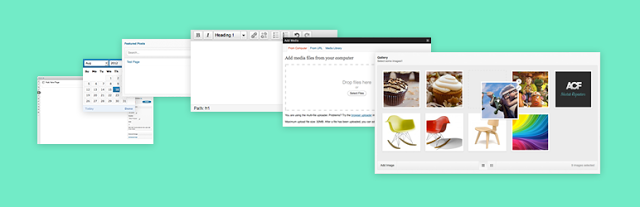
Just stay where you are, you can have it all – BuddyPress adds a social networking functionality to WordPress site. Users can create profiles, post messages, make connection, create and interact in groups. In the part 1 and part 2 of ‘How to Create a Social Network with WordPress’ we covered the basics of setting up this plugin.
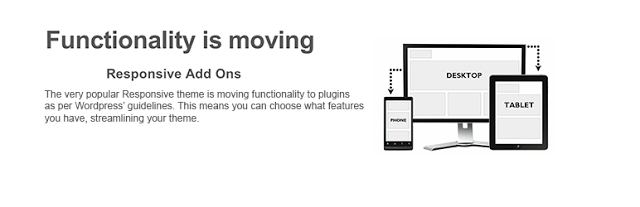
In compliance with the recent WordPress theme guidelines, this plugin ensures that themes functionality is limited to design, layout and structure and that anything that falls outside of this is developed as a plugin.
32. ShareThis: Share Buttons and Social Analytics —Download
Adds the ShareThis share buttons to your website. Also allows you to monitor how often people share your contents.
31. Yet Another Related Posts Plugin (YARPP) —Download
Yet Another Related Posts Plugin (YARPP) displays pages, posts, and custom post types related to the current entry, introducing your readers to other relevant content on your site.
Easily create and add forms to WordPress. Fields are easy to add, remove, and re-order. The contact form will let the user send emails to a site’s admin, and also send a meeting request to talk over phone or video.
This plugin generates locational breadcrumb trails for your WordPress powered blog or website. These breadcrumb trails are highly customizable to suit the needs of just about any website running WordPress.
24. Quick Cache (Speed Without Compromise) —Download
Speed your website loading with this easy-to-use cache plugin.
This plugin generates static html files from your dynamic WordPress blog. After a html file is generated your webserver will serve that file instead of processing the comparatively heavier and more expensive WordPress PHP scripts.
Want to create a mobile site on WordPress? Here is your chance. WPtouch Mobile is a free plugin that helps you setup a mobile site on WordPress with 1,2,3 touches.
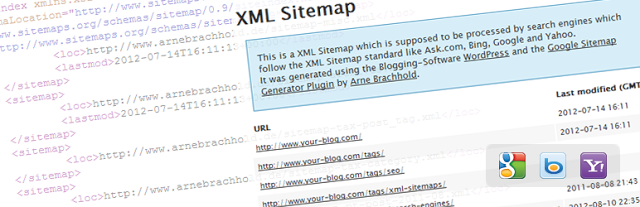
This plugin will generate a special XML sitemap which will help search engines such as Google, Bing, Yandex, etc crawl your site faster and more effectively.
Supercharge your WordPress site with powerful features such as: Email subscription, CSS editor, Hovercard popups, etc previously only available to WordPress.com users.
No SEO knowledge is required – All in One SEO Pack is a WordPress SEO plugin to automatically optimize your WordPress blog for Search Engines such as Google. Even as a total novice, you can use custom titles, custom url, advanced canonical URLs, fine tune page navigational Links on your blog posts. This plugin also helps you avoid duplicate articles submitted to you as a guest post.
Let your customers, clients or readers contact you from your WordPress site. Contact Form 7 is an Ajax contact form with easy to use interface. Can easily be embedded into any page.
Sitting at the top of our list is ‘WordPress SEO by Yoast’ plugin. This plugin helps you improve your WordPress SEO: Write better content and have a fully optimized WordPress site. Though the functions are a bit similar to that of All in One SEO Pack, the premium supports offers more.
It’s 2014, and you know what that means—time to get off the couch that you’ve been glued to for the past week and start eating food with an expiration date.
I’m certainly sure that one of your new year’s resolutions as always is to lose weight, avoid junks and live a healthy life. Statistics has shown that only less than 27% of US residents manage to keep up to this resolutions past six months. According to a Bodybuilding.com survey, two-thirds of adults in the U.S. have made a resolution to get fit, and a whopping 73 percent of those people gave up before they reached their goal. Though the odds may be against you, but you can succeed—with the help of your smartphone.
In a bid to help you stay healthy in 2014 we have shortlisted five smartphone nutrition apps that will help you track progress, even when it seems like nothing is happening; and they motivate you to keep going with incentives such as achievements and friendly social competition. Whether you want to eat healthier, lose weight, or just learn about nutrition, these five apps will help you stay on track.
Food nutrition labels can be difficult to decipher, but it’s important to know what you’re putting in your body. That’s where Fooducate, a free app for Android and iOS, comes in. Fooducate—yes, that’s a mash-up of “food” and “educate”—is a food look-up service that helps you find and understand nutrition information in real life.
You can look up foods on Fooducate by product name or barcode number (the app has a convenient, built-in barcode scanner) and find the food’s nutrition info and Fooducate “grade.” The grade is based on a variety of factors, including the sugar, salt, and saturated fat content; whether it’s a good source of vitamins, minerals, or other essential nutrients; and whether it contains preservatives or artificial ingredients. Although it’s a bit simplistic, the grade is an easy way for busy people to quickly assess the nutritional value of the food.
Fooducate also has a health tracker for logging food, water, exercise, notes, and weight; daily health and nutrition tips; and the ability to set weight goals. If you want more functionality, such as carb-control, nutrient-tracking, and information about which foods are genetically modified, Fooducate also has a Pro version for $15 per year.
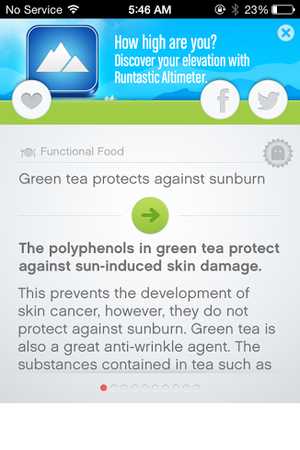
Test your knowledge and learn some new facts with Nutrition Quiz, a free iOS app by fitness app developer Runtastic. Nutrition Quiz offers short quizzes about health, fitness, and nutrition. Each quiz consists of 10 general questions (Fact or myth: Women’s noses can smell better?) chosen randomly from a database of over 600. The questions fall into eight categories, ranging from Functional Foods to Sugar & Spices. Quizzes are scored on timing and accuracy, and if you sign into your Runtastic account you can compare your score against friends and other users. After each question, the app offers an explanation of the correct answer. You can favorite any facts that you find interesting, and share them on Facebook or Twitter. The app’s browse feature lets you look through the question/fact bank at your leisure. The first 64 questions across three categories are free, but you’ll need to unlock the $2 Pro version of the app to access the rest of the database.
Starting a diet is easy; staying on a diet is another story. Free for Android and iOS, My Diet Coach can help you stay motivated and on track with its personal cheerleader approach to dieting. My Diet Coach is more about keeping you motivated than worrying about the nitty-gritty details of your actual diet and exercise plan. The app lets you set up automated text reminders to help keep you on track, such as “take my healthy snacks with me before I leave for work,” or “don’t eat five chocolate bars before bed.” The app also has a section for adding motivational photos (of yourself or of anything that inspires you to lose weight), a tips section for combating emotional eating and diet slip-ups, and daily challenges (such as drinking eight glasses of water) to help you stay healthy. This app is a little cheesy, but don’t knock the power of little nudges throughout the day. My Diet Coach’s reminders will make you think twice about eating that extra cookie, and will help you remember to stop at the health food store on the way home from work. The free version of My Diet Coach has all the motivational tools, but if you want more functionality—such as the ability to log and track food and exercise—you can upgrade to the Pro version of the app for $4.
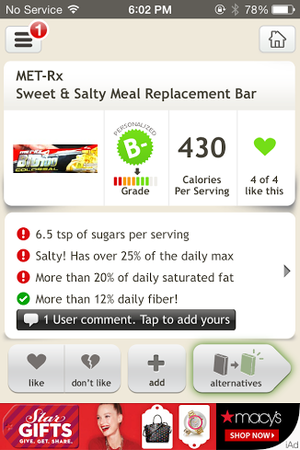
Fooducate is a useful app if you need a quick snapshot of a food’s general nutritional value, but ShopWell takes food look-up one step further. ShopWell is a free app that rates foods based on your personal profile, taking into account lifestyle choices, dietary needs, and allergies. ShopWell asks you to first fill out a comprehensive nutrition profile, including which nutrients, minerals, and vitamins are important in your diet, as well as which nutritional pitfalls (such as artificial sweeteners or refined grains) you want to avoid. The app also asks which foods you’re allergic to or cannot otherwise tolerate. Then, the app takes this information and rates foods based on your information. ShopWell gives each food a score from 1 to 100 (100 is the highest), and tells you whether the food is a strong match, a medium match, or a weak match for your profile. You can click on the score to find out why the food is a strong/medium/weak match—for example, Bridgford Beef Jerky is a weak match for me because it has lots of added sugar. ShopWell also shows nutrition information and ingredients for each food, as well as suggestions that are similar but “better” for you based on your ShopWell profile. ShopWell is an excellent app for tracking specific aspects of your diet, such as nutrients or sugar intake, which is great for diabetics. The app lacks a built-in calorie-counter, but it does have some nifty extra features such as lists (add favorite foods to lists for future reference), popular foods (find foods that are popular with people who have similar profiles to yours), and missions and achievements to keep you motivated.
If you’re not sure where to start with your diet plan, Nutrino is the app for you. This free iOS app is like a personal nutritionist in your pocket. Nutrino is a food recommendation app that creates a custom, personalized daily menu for you based on your profile, preferences, and goals. Like ShopWell, Nutrino needs some personal information to create your custom meal plan. The initial profile setup includes answering basic questions (gender, age, height, weight, general activity level) and setting goals such as target weight and diet intensity. Nutrino also asks how large you like each meal to be, how you like to prepare each meal, and whether you have any special restrictions, such as gluten-free or vegetarian. Taking into account your profile, preferences, and nutritional goals, Nutrino creates a daily meal plan for you. The meal plans includes nutritional information, recipes, and a grocery list with all the necessary ingredients. If you don’t like a dish Nutrino has picked for you, just tap it and tap Change Dish to find a similarly healthy replacement . Swipe up to scroll through your meal plan, and swipe down to see a summary of your day, including protein, carb, fiber, and fat intake, as well as daily calories. Swipe to the left to see future days’ plans. In one sense, Nutrino is more difficult to use than other diet apps, since its success banks on your ability to follow its meal plan to a T. On the other hand, if you’re willing to put in the legwork and you want an app that will do everything for you (including counting calories), Nutrino is worth a look.
Alas! We are at the the brink of 2013. In the spirit of the holiday season, some messages you sent to your business associates, co-workers, family or friends might have gone unnoticed. Don’t you think it’s time you give your employer a nudge and remind him of the new contract deal this new year? This Gmail script makes it easy to find the emails you’ve sent to someone who could use a little nudging or reminder.
The Gmail -No Response script, written by Jonathan Kim, combs through your emails that are between 5 and 14 days old where you were the last person to respond. It labels those emails “No Response” so you can easily check if any of those require a polite followup email. E.g., “Hi Joe, Just checking in to see what you think about this. Let me know if you have any questions.” (Note to PR folk: Not “Did you get my email??” times ten.) To use the script, paste Kim’s code into a new Google Script and set it to run on a daily schedule. (I love these cron job-like scripts for Gmail.) You can add the “No Response” label to your inbox section for top-of-mind prompting. One of the few reasons you might want to use this instead of, say, a service like Boomerang, is the labels are applied to email threads you’ve already sent. It pretty much just works automatically. Yes, you have to still check the No Response label, but short of getting a personal assistant to handle your email for you and follow up on all the loose threads, this is as good as it gets for now.
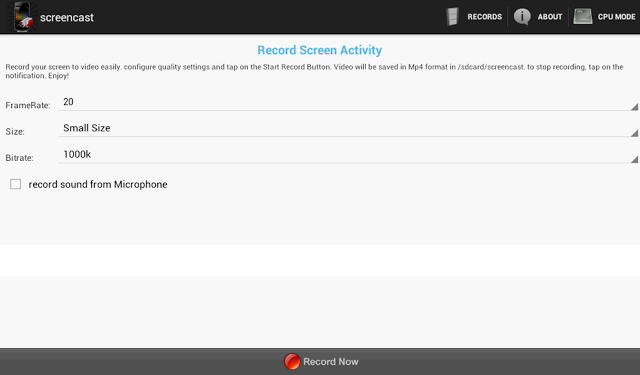
This application works with rooted Android phones only. It helps you record your screen into high quality videos. Recorded videos will be saved as MP4 on your device or SD card – you in turn, will be able to mail this video to a friend or share it on YouTube and social media.
The Screencast Pro is available to be downloaded free at the Google Play Store. However, if for reasons you would love to have a ‘raw’ copy of the application or you wish to use this Android app on PC or Mac, simply hit the download button just beneath this section.
Publisher’s Description
** Rooted phones only ** Screencast is a free screen recorder application. Record your screen into high quality video. Videos are saved as MP4 on your sdcard. Very usefull to create presentation or tutorials.
This application may works on some unrooted phones. Please tell us if it works for you. and if it doesn’t, please tell us too to help us improve this app.
If your phone is rooted and the app doesn’t work, please send us a message with your phone characteristics including processor information, thanks. This application doesn’t support all Tegra 2/3 based devices. Keywords: screenshot, screencast, video recorder, screen recorder, camtasia, screenrecorder
**This app uses FFMPEG application for the encoding process
















 in the lower left of the sharing tool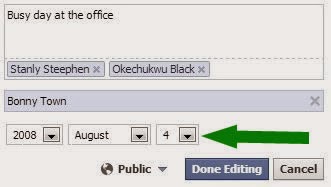










































 Starting a diet is easy; staying on a diet is another story. Free for Android and iOS, My Diet Coach can help you stay motivated and on track with its personal cheerleader approach to dieting. My Diet Coach is more about keeping you motivated than worrying about the nitty-gritty details of your actual diet and exercise plan. The app lets you set up automated text reminders to help keep you on track, such as “take my healthy snacks with me before I leave for work,” or “don’t eat five chocolate bars before bed.” The app also has a section for adding motivational photos (of yourself or of anything that inspires you to lose weight), a tips section for combating emotional eating and diet slip-ups, and daily challenges (such as drinking eight glasses of water) to help you stay healthy. This app is a little cheesy, but don’t knock the power of little nudges throughout the day. My Diet Coach’s reminders will make you think twice about eating that extra cookie, and will help you remember to stop at the health food store on the way home from work. The free version of My Diet Coach has all the motivational tools, but if you want more functionality—such as the ability to log and track food and exercise—you can upgrade to the Pro version of the app for $4.
 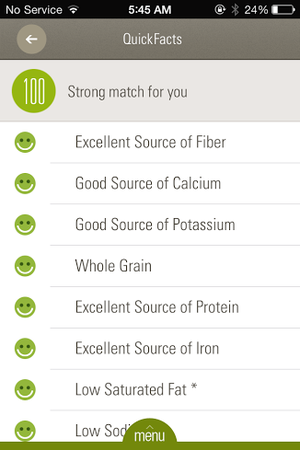 Fooducate is a useful app if you need a quick snapshot of a food’s general nutritional value, but ShopWell takes food look-up one step further. ShopWell is a free app that rates foods based on your personal profile, taking into account lifestyle choices, dietary needs, and allergies. ShopWell asks you to first fill out a comprehensive nutrition profile, including which nutrients, minerals, and vitamins are important in your diet, as well as which nutritional pitfalls (such as artificial sweeteners or refined grains) you want to avoid. The app also asks which foods you’re allergic to or cannot otherwise tolerate. Then, the app takes this information and rates foods based on your information. ShopWell gives each food a score from 1 to 100 (100 is the highest), and tells you whether the food is a strong match, a medium match, or a weak match for your profile. You can click on the score to find out why the food is a strong/medium/weak match—for example, Bridgford Beef Jerky is a weak match for me because it has lots of added sugar. ShopWell also shows nutrition information and ingredients for each food, as well as suggestions that are similar but “better” for you based on your ShopWell profile. ShopWell is an excellent app for tracking specific aspects of your diet, such as nutrients or sugar intake, which is great for diabetics. The app lacks a built-in calorie-counter, but it does have some nifty extra features such as lists (add favorite foods to lists for future reference), popular foods (find foods that are popular with people who have similar profiles to yours), and missions and achievements to keep you motivated.
 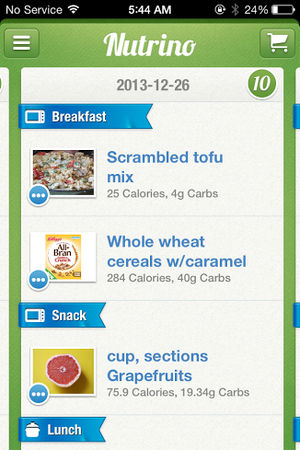 If you’re not sure where to start with your diet plan, Nutrino is the app for you. This free iOS app is like a personal nutritionist in your pocket. Nutrino is a food recommendation app that creates a custom, personalized daily menu for you based on your profile, preferences, and goals. Like ShopWell, Nutrino needs some personal information to create your custom meal plan. The initial profile setup includes answering basic questions (gender, age, height, weight, general activity level) and setting goals such as target weight and diet intensity. Nutrino also asks how large you like each meal to be, how you like to prepare each meal, and whether you have any special restrictions, such as gluten-free or vegetarian. Taking into account your profile, preferences, and nutritional goals, Nutrino creates a daily meal plan for you. The meal plans includes nutritional information, recipes, and a grocery list with all the necessary ingredients. If you don’t like a dish Nutrino has picked for you, just tap it and tap Change Dish to find a similarly healthy replacement . Swipe up to scroll through your meal plan, and swipe down to see a summary of your day, including protein, carb, fiber, and fat intake, as well as daily calories. Swipe to the left to see future days’ plans. In one sense, Nutrino is more difficult to use than other diet apps, since its success banks on your ability to follow its meal plan to a T. On the other hand, if you’re willing to put in the legwork and you want an app that will do everything for you (including counting calories), Nutrino is worth a look.

You must be logged in to post a comment.