Tag: App

  • Why App Developers Won’t Cash on Smartphone Apps

    Why App Developers Won’t Cash on Smartphone Apps

    TechHive – Mobile developers hoping to cash in on a blockbuster app have bad news from researcher Gartner: More competition and higher demands from users will make it even more difficult for developers to make money from smartphone and tablet applications.

    The Google Play app store and Apple’s iTunes store both have over one million apps. That adds up to too many choices for users, and makes it harder for developers to get noticed or make money from their applications.

    Average apps stats

    Today about 90 percent of paid applications are downloaded fewer than 500 times per day and make less than $1250 a day, according to Gartner. This is only going to get worse, thanks to greater competition. In addition, applications will have to become more sophisticated to keep up with user demands, so operations, development, testing, deployment and support will become more expensive, it said.

    This means by 2018 only one in ten thousand consumer apps will be considered a financial success by their developers, according to the market research company.

    Developers need to prepare for this scenario and should set realistic expectations. If the goal is to make money directly from the sale of the app, developers need to thoroughly assess the concept, the costs, and the opportunity, because the likelihood of success is minute, Gartner said.

    The share of free apps is also predicted to rise from 91 percent last year to 94.5 percent in 2017. In the same period, the total number of downloads is expected to grow from 102.1 billion to 268.7 billion.

    The growing number of available applications is also changing the way users find apps. Consumers can’t sort through these large numbers and instead depend on suggestions from recommendation engines, friends, social networking or advertising to discover mobile applications, according to Gartner.

    Gartner does however believe that the number of paid downloads will continue to grow, even though they are a smaller percentage of the total, and will reach 14.8 billion by 2017, compared to 9.2 billion last year.

    And there’s always the possibility of the exception: a student in a basement developing a one-of-a-kind application that becomes wildly successful, Gartner said.
  • Tadaa SLR review: Free iPhone app facilitates your focus after the fact

    Tadaa SLR review: Free iPhone app facilitates your focus after the fact

    Your iPhone is remarkable in many ways, but its camera will simply never capture photos with a deliciously shallow depth of field like your DSLR. And unless Apple finds a way to cram a much, much larger sensor into the phone, that will always be the case. You can simulate that luxuriant, shallow depth of field effect through software, though. Tadaa SLR does just that.

    Actually, Tadaa doesn’t simply let you artificially tweak the depth of field; it lets you change the focus point of the photo. And it does that after you’ve taken the image, not unlike what you can do with the innovative Lytro camera.

    You start Tadaa in camera mode; compose and take your shot. If you want to start with an existing photo, you can alternately choose one from your camera roll. There are a few widgets: Display a line of thirds grid, switch between a square or wide shot, and turn the flash on and off. Tadaa even gives you access to both the front and rear cameras.

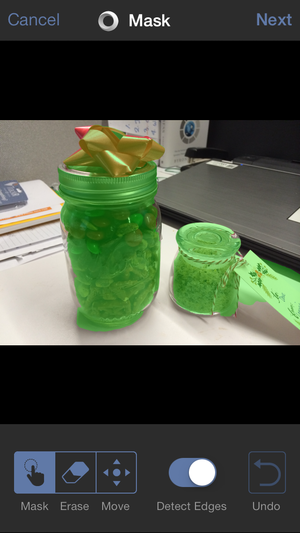
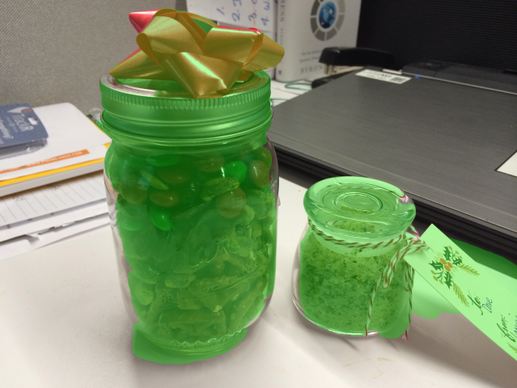
    After taking the shot, you paint a mask over whatever object you want to be in sharp focus. Tadaa has pretty smart edge detection, so you can just dab with your finger and the app selects the whole subject for you. If that’s not working—and I did run into some subjects that Tadaa refused to select in their entirety—you can turn off edge detection and do the painting manually. In general, though, the trick is to slightly overpaint your subject so that Tadaa can find the edges.

    Paint a mask over the parts of the
    image you want to be in focus. 

    After that, a slider lets you choose the aperture, which translates into the intensity of the depth of field effect. You can vary the effect from nothing, which gives you the deep depth of field the iPhone shoots automatically, to a very blurry background like you’d get from setting a DSLR to f/2.

    And here’s where Tadaa distinguishes itself from other blur apps like AfterFocus, for example. You can tap anywhere in the image to adjust the focus. Tap the background, for example, and it snaps into focus, simultaneously blurring the foreground objects that you’ve previously masked. This is a fun feature that lets you explore what a photo would look like if you shot the scene several times, varying the focus in each. Unlike the Lytro, though, you eventually need to make a choice and save the image—you can’t continue to interactively change the focus after saving.

    Tadaa even can give you a bokeh effect.

    Another unique tool in Tadaa’s bag of tricks: You can add and tweak bokeh. Bokeh can be a difficult concept to wrap your head around; it’s the visual quality of the out-of-focus areas of a photo, and it often manifests itself as glowing blurs around reflective elements in the background. Using a pair of sliders—highlights and gloss—you can dial in an excellent simulation of bokeh, and get just the amount that you want. If you have every looked longingly at examples of bokeh in DSLR photography, you’ll love fiddling with the bokeh in Tadaa; it delivers an effect that is essentially impossible to achieve with an iPhone in the usual way.

    Completed photos are automatically saved to your camera roll, and you can optionally upload it to Twitter or Facebook from within the app. Tadaa SLR is one of several apps that let you simulate shallow depth of field in an iPhone photo, but it does so in an elegant and flexible way.