This is a simple but an amazing css gadget that changes you visitors default cursor to your custom cursor when they visit your website. The custom cursor gadget equally works on every platform including the blogger platform.
Does this slow my website load time? This gadget has a very little or no impact as regards to how your website load (in the case of load time)
How do I install this gadget on my blog? To install this gadget just follow the simple tutorials below.
Blogger
To ad this widget your blogger site, simply
Login to your blogger account.
Click on layout.
Add a new Html/Javascript Gadget.
Copy and paste the following code into you Gadget:
Adding to a website
To add this widget to a website or any other platform, simply paste the above code anywhere within the <head></head> section.
The world is changing rapidly, don’t let your pains-taking articles go without credits. What am about to introduce to you are mostly used by cooperate news websites like ehow and the likes. This widget is a free service provided by tynt, it automatically add a credit (attribution) links to any text that is copied from your blog or website, it works on blogger, wordpress and websites.
Why is important to use the tynt widget? If you added the floating Social or social media button we earlier discussed in our forum then I suppose many people will be bookmarking or sharing your post using this button. Now when someone shares your article via email our any of the sharing options it automatically add your link at the bottom of the post. Like me, you might be wondering how you can acquire the services of this great widget in your blogger blog, wordpress blog or website. No need to hurry, listen and let me brief you on what you really need to know about this widget.
Important: If you are running a tutorial blog and share a lot of codes, it is potentially recommended that you do not add this to your blog as it will automatically and some texts to the code you are sharing.
Install Tynt on your site
Here we go, follow the simple steps below to install this feature on your blogger blog, wordpress blog and website.
Submit your Email and in the Domain field submit your website address without adding http:// and the back slash (/) at the end of URL. Your link should look as follows:
e.g: If you are using a sub-domain your link should like this: eobasi.blogspot.com If you are using a full domain then your link should look like this: www.ewtnet.com
3. Accept the privacy agreement and hit Submit
4. Now you will be provided with a code. Do not copy it and first Click the customize Script button just below that code
5. Then click the customize attribution button on next page
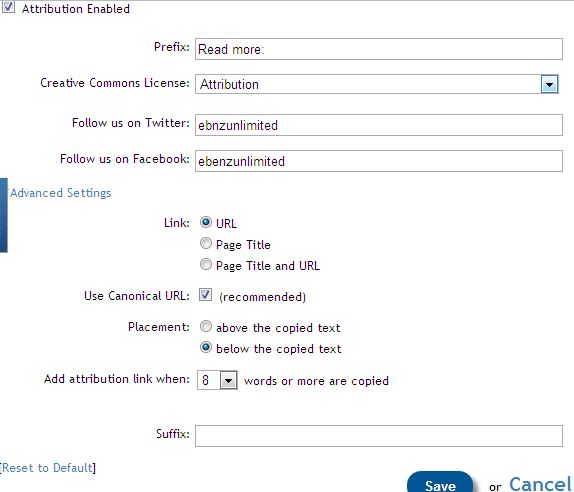
6. You can now customize what text to display and what to hide. If you wish you can only display the read more link and disable Attribution and social profile links by keeping their fields empty.
Submit your twitter and Facebook usernames if you would like to show them below copied text.
You can also decide whether to display the article URL or Page Title or both. Set URL to canonical. Set placement to “below the copied text” for better chances of being ignored by the copier.
See the screenshot below for settings:
7. Click Save and then press Done
8. Copy the code and go to your Blog (blogger or WordPress). Inside your template search for the closing head tag
</head>
Paste the tynt script just above this tag.
Tip: Blogger users may go to Template > Edit HTML > Proceed and then search the tag.
Tip: Wordpress users will find the head tag by going to Appearance > Editor > header.php
10. Save your template and you are all done!
Visit your blog and copy a snippet of any text you like and then paste it anywhere to see the attribution links working just fine.
Track Reader Engagement
By going to your Homepage at tynt account, you will see 4 options to track the text being copied.
SEO:
Keywords: This is where you will see which keywords are copied the most
Content
Social
You play around with these options to take maximum benefit out of this free tool.
Blogging is very effective in attracting large volumes of traffic. However, if you really want to drive huge volumes of traffic to your blog, you will need to do more than just blogging. This article outlines the top seven secrets for driving traffic to your blog.
Create high quality content that is rich with your keywords and phrases. This brings two main benefits. First, high quality and useful content will keep your website’s visitors interested and they will visit your blog on a regular basis and will buy the products you sell on your website. Second, fresh content with your key words will improve your search engine ranking which brings traffic to your blog and website.
Optimizing your titles for search engines is also an effective way of driving traffic to your website. You will need to optimize your blogs titles and use all the keywords or phrases which people use while looking for information on the internet. This will make your website visible on search engines, and your website will also rank high for all your keywords, driving traffic to your website.
Use email marketing with your blog. This is an effective way of bringing readers back to your blog as well as to create a list. Having your own list is important because you can sell your products and services to your list. By using an auto responder, you can send emails to your list about updates to your blog, hence driving traffic to your blog.
Social book marking is yet another powerful way to drive traffic to your blog. If you rank high on some of the most popular social book marking sites, you can drive large volumes of traffic to your website.
RSS feed for blog traffic. RSS feed is another way you can use to keep people coming back to your blog because after people subscribe to read your RSS feed, they will get updates continuously. This means that you will be bringing readers back to your blog every time you make a new blog post.
You can use some of your blog posts and covert them into articles. All you have to do is to add more content to your blog posts if necessary, add a catchy article heading and convert it into an article. Writing and submitting articles is one of the most excellent strategies for traffic generation.
These six strategies can significantly increase the volume of traffic to your website and blog.