Tag: firefox

  • Top 40 Firefox Extensions or Add-ons

    Top 40 Firefox Extensions or Add-ons

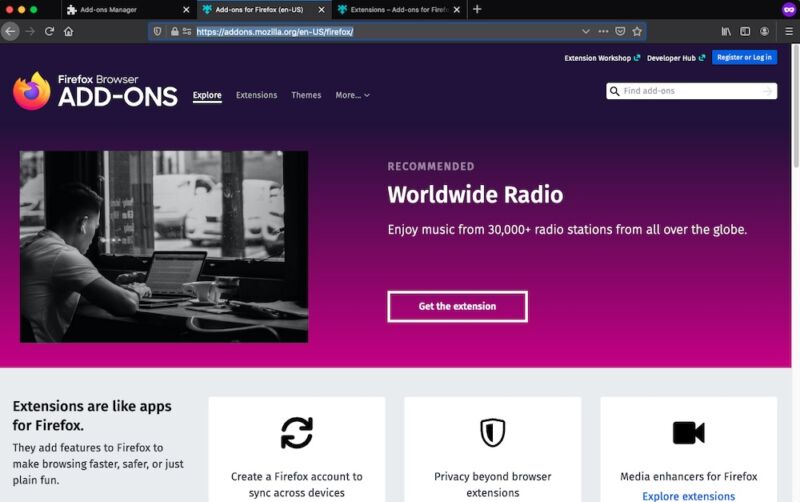
    40 Firefox Extensions: Firefox is one of the best browsers at this time which is being used by thousands of peopleheir default browser. one of the great perks of Firefox is that there are tons of extensions present that enhance the user experience. These extensions are either used for time saving, quick browsing, and for best user experience. Basically Firefox extensions are small add-ons that add new functionality to Mozilla, which makes it more popular among the users. Today on internet roughly 30% of the users are using Firefox Extensions, which is next to IE. There are a lot of extensions present on the internet but here i am going to show the best collection of Firefox extension which on my experience, are very handy to use it in our daily surfing.

    Video Download Helper Firefox Extension

    The Download Helper gives you an easy way to download and convert Web videos from hundreds of YouTube-like sites. This works also for audio and picture galleries.
    Download

    No Script

    The best security you can get in a web browser. Allow active content to run only from sites you trust, and protect yourself against XSS and Clickjacking attacks.
    Download

    Adblock Plus

    Annoyed by adverts? Troubled by tracking? Bothered by banners? Install Adblock Plus now to regain control of the internet and change the way that you view the web.
    Download

    FlashGot

    Download all the links, movies and audio clips of a page at the maximum speed with a single click, using the most popular, lightweight and reliable external download managers.
    Download

    Greasemonkey Firefox Extensions

    Customize the way a web page displays or behaves, by using small bits of JavaScript.
    Download

    Personas Plus

    Free, easy-to-install “skins” for Firefox Extensions. Choose from over 180,000 cool designs, including art from Harry Potter and Bob Marley. Join over 8 million people from around the world who are asking themselves: “What Will My Browser Wear Today?”
    Download

    FoxTab

    3D in your browser! FoxTab brings innovative 3D functionality to your Firefox.
    Download

    Easy You Tube Video Downloader Firefox Extensions

    Easiest You tube video downloader ever, single click non-intrusive direct download buttons for FLV, 3GP, MP3, MP4, 720p HD and 1080p Full-HD qualities.
    Download

    Download Statusbar Firefox Extensions

    View and manage downloads from a tidy status bar without the download window getting in the way of your web browsing.
    Download

    I’m Translator

    Online Translator performs real-time translation for Albanian, Arabic, Bulgarian, Catalan, Chinese (Simp.), Chinese (trad.), Croatian, Czech, Danish, Dutch, English, Estonian, Filipino, Finnish, French, Galician, German, Greek, Hebrew, Hindi, Hungarian, Indonesian, Italian, Japanese, Korean, Latvian, Lithuanian, Maltese, Norwegian, Polish, Portuguese, Romanian, Russian, Serbian, Slovak, Slovenian, Spanish, Swedish, Thai, Turkish, Ukrainian, Vietnamese languages and their combinations.
    Download

    Web of Trust – Safe Browsing Tool

    Firefox Extensions: Web of Trust is the leading website reputation rating tool and one of Mozilla’s most popular add-ons. Our safe surfing tool uses an intuitive traffic-light style rating system to help you see which websites are trusted when you search, surf and shop online.
    Download

    Stylish

    User styles are themes for web sites. User styles empower your browsing experience by letting you customize web sites. Take out irrelevant content, change colors, or completely redesign the entire site. You can even use user styles as themes on the interface of Firefox, Thunderbird, and SeaMonkey themselves.
    Download

    Xmarks Sync

    Xmarks is the #1 bookmarking add-on. It takes only a moment to get up and running with Xmarks. After you install the add-on, click on the notification to set up Xmarks and start backing up and synchronizing your bookmarks. Install Xmarks on each computer you use, and it seamlessly integrates with your web browser and keeps your bookmarks safely backed up and in sync
    Download

    Ant Video Downloader and Player

    With the Ant.com Video Downloader, you can download video from Youtube or any other streaming site. Rare are the sites you will not be able to download from. We have integrated a flash video player too, so that you can play your files immediately.
    Download

    Web Developer

    The Web Developer extension adds various web developer tools to a browser.
    Download

    Speed Dial

    With Speed Dial, you can easily access your most used websites. To show the Speed Dial tab, use the Speed Dial button (which can be added to the toolbar), or enter “chrome://speeddial/content” in your location bar.
    Download

    Firefox Sync

    Free browser add-on that lets you stay in sync with your Firefox. Access your history, passwords, bookmarks and even open tabs across all your devices.
    Download

    Foxy Proxy Standard

    Foxy Proxy is an advanced proxy management tool that completely replaces Firefox’s limited proxying capabilities. It offers more features than Switch Proxy, Proxy Button, Quick Proxy, xyz proxy, Proxy Tex, Tor Button, etc.
    Download

    Fire FTP

    Fire FTP is a free, secure, cross-platform FTP/SFTP client for Mozilla Firefox which provides easy and intuitive access to FTP/SFTP servers
    Download

    Tab Mix Plus

    Tab Mix Plus enhances Firefox’s tab browsing capabilities. It includes such features as duplicating tabs, controlling tab focus, tab clicking options, undo closed tabs and windows, plus much more. It also includes a full-featured session manager with crash recovery that can save and restore combination of opened tabs and windows.
    Download

    Fastest Fox – Browse Faster

    Save time by speeding up repetitive tasks. Get faster, parallelized downloads, see definitions, auto-load the next page, improve searching, and more. Fastest Fox will dramatically enhance your productivity!
    Download

    Flash Video Downloader (You Tube Downloader)

    Flash Video Downloader helps you to download flash video (.flv) from You Tube, Daily motion, Break.com and other 200+ video sharing websites in one click. You can download, mp4 (iPod), avi and other media formats. Flash games download available.
    Download

    Cooliris

    The Cooliris 3D Wall — The fastest and most stunning way to browse photos and videos from the Web or your desktop. Effortlessly scroll an infinite “3D Wall” of content from Facebook, Google, YouTube, Flickr, and more. Even watch TV shows & movies.
    Download

    AddThis

    With one click, AddThis enables you to instantly share and bookmark web pages, blogs, news, photos, videos, and any other content to the most popular destinations. And it’s free!
    Download

    Screengrab

    Firefox Extensions: Screengrab! saves webpages as images, It will capture what you can see in the window—the entire page, just a selection, a particular frame, basically it saves webpages as images – either to a file or to the clipboard. It captures Flash too!
    Download

    Cool Previews

    Browse faster — Preview links and images without leaving your current page or tab. Just mouse over any link, and a separate preview window appears to show you the content. (TIP: Mouse over subsequent links while the preview window is still open!)
    Download

    iacros for Firefox

    i Mros was designed to automate the most repetitious tasks on the web. If there’s an activity you have to do repeatedly, just record it in i Macros. The next time you need to do it, the entire macro will run at the click of a button! With i Macros, you can quickly and easily fill out web forms, remember passwords, create a web mail notifier, download information from other sites, scrape the Web (get data from multiple sites), and more
    Download

    PDF Download

    Use PDF Download to do whatever you like with PDF files on the Web. Regain control and eliminate browser problems, view PDFs directly in Firefox as HTML, and use the all-new Web-to-PDF toolbar to save and share Web pages as high-quality PDF files.
    Download

    Element Hiding Helper for Adblock Plus

    You simply select the element you want to hide and then choose which attributes of this element should be taken into account when hiding it in the future. The element hiding rule is generated and added automatically.
    Download

    YouTube to MP3

    Adds links to convert and download Youtube, MyVideo, Clipfish, Sevenload, Dailymotion, MySpace videos as MP3 files. This addon uses the free service of Video2mp3.net.
    Download

    Similar Web

    The easiest way to find the best websites on the Internet! As you browse the internet, find the most interesting related sites on the web by similarity and category and get the latest articles and buzz on every website you visit.
    Download

    Stumble Upon

    Stumble Upon helps you discover great websites that match your interests. Simply click the Stumble button and see the best websites. There are over 500 topics to choose from, and, the more you use it, the better your recommendations become!
    Download

    Forecast fox Weather

    Get international weather forecasts from AccuWeather.com and display them in any toolbar or status bar with this highly customizable and unobtrusive extension.
    Download

    Bit Defender Quick Scan

    The quickest way to find out if your computer is infected! BitDefender QuickScan is a very fast antivirus scanner, able to determine in a matter of seconds (up to 1-2 minutes on first-time scans) if a system is infected with malware.
    Download

    Read It Later

    Save pages to read later with just one click. When you have time, access your reading list from any computer or phone, even without an internet connection
    Download

    Addon Fox

    Automatically install the best Firefox addons! Includes over one hundred hand-picked addons from the following categories: Customization, Downloads, Fun, Languages, Media, Programming, Security, Privacy, Social, and Visual. Easily choose which addons you want and get them installed all at once.
    Download

    Google Shortcuts

    Display all Google services as buttons or as a space-saving dropdown menu next to your address bar. Reach services like Gmail, Google reader, Google maps, Google calendar, and many more in a single click from your browser
    Download

    Image Zoom

    Easily zoom in, zoom out, fit image to screen or set custom zoom on individual images within a web page. All this can be done by using the context menu or a combination of mouse buttons and scroll wheel. Handy to see the finer details of smaller pics or to make very large pics fit within your screen.
    Download

    1-Click You Tube Video Download

    You Tube download in a single click.
    Download You Tube videos in FLV, 3GP and MP4 (both High Definition and iPod compatible High-Quality).
    The simplest You Tube Video Downloader for all You Tube Flash sites, period.
    Download

    Fire Download

    The Fire Download extension for Firefox and Wyzo lets you manage and accelerate your web downloads up to 10x faster! With Fire Download, download acceleration is seamlessly displayed within the downloads window. Try the ultimate download accelerator!
    Download

  • Firefox OS, Microsoft IE and 5 top Technologies that Died in 2015

    Firefox OS, Microsoft IE and 5 top Technologies that Died in 2015

    Like 2016, 2015 started with a lot of promises and big time resolution for technology companies, but unfortunately, not all those technologies made it through the year.

    A large number of services/technologies either died, discontinued or gradually faded away in 2015. For every success recorded in 2015, there was a complementing failure. There is no shame in it, after all, the market is a battlefield. Some technology will fall to a better competition, others will simply fail to replicate the first spark there product generated or just not good enough in the modern trend. However, before we welcome what 2016 have in stock for us, let’s pause to remember five notable products and services whose death in 2015 will forever remain in our memory.

    Replaceable batteries (c. 1954-2015)
    Replaceable batteries (c. 1954-2015)

    Replaceable batteries (c. 1954-2015)

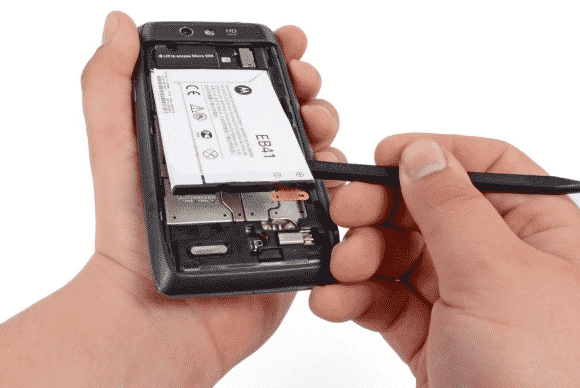
    The 61 long years of replaceable batteries finally came to an unexpected end in 2015 – well, in a way. If you used Samsung smartphone in 2013 then you are no stranger to short battery life, but then, you can at least carry 3 backup batteries in your pack… Not anymore!

    The movement was first started when Apple decided that it could reduce the weight of devices by sealing non-removable batteries in their systems. Introducing the non-removable battery technology with the original iPhone and the first MacBook Air, and it has since stuck with this plan.

    Today, no Apple products feature replaceable batteries, and neither does much of anything else. This year even the Samsung Galaxy Note line, long known for replaceable batteries, ditched them too. Today, the LG G4 is the only mainstream smartphone left that has one. We’re calling it dead except in niche or corporate products as of this year.

    Windows RT (2012-2015)
    Windows RT (2012-2015)

    Windows RT (2012-2015)

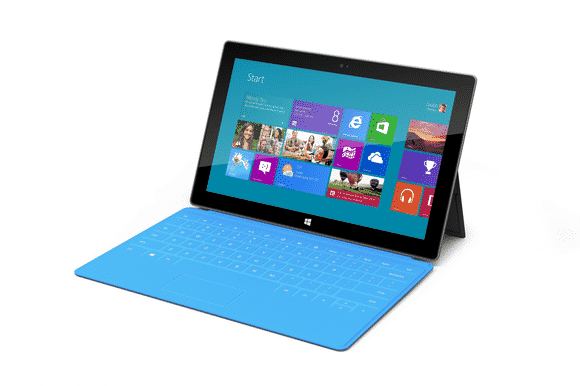
    Microsoft had only 3 years to surrender their failed attempt to create a cheap lite version of disastrous Windows 8. This “lite” version of Windows 8 was created for lower-power, cheaper tablets that couldn’t run the full-fledged OS.

    RT-powered Windows tablets met with immediate disdain due to performance problems, a lack of software, and compatibility issues. Development on the OS ended in 2013, and when the Surface 2 was discontinued in February, Windows RT breathed its last. All Windows RT support formally ends in January 2018.

    Mozilla Firefox OS for Smartphone (2013 - 2015)
    Mozilla Firefox OS for Smartphone (2013 – 2015)

    Mozilla Firefox OS for Smartphone (2013 – 2015)

    In February 2013, Mozilla founded an initiative that let you have an open, web-based framework that anyone could work with, instead of closed platforms and apps – Firefox OS.

    Firefox OS proved the flexibility of the Web, scaling from low-end smartphones all the way up to HD TVs. However, the OS couldn’t stand the competition from other tech giants or “weren’t able to offer the best user experience possible” as the owners claimed and hence the death of this initiative.

    Even if Mozilla has maintained that they are still willing to “experiment” with the software on smart devices — they just won’t be the kind of devices that make phone calls.

    Amazon Fire Phone (2014-2015)
    Amazon Fire Phone (2014-2015)

    Amazon Fire Phone (2014-2015)

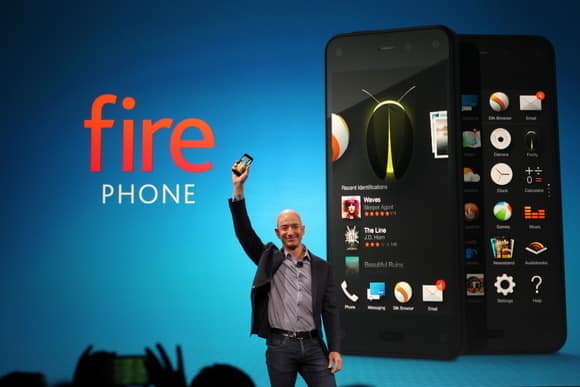
    After upending publishing, retail, and cloud services, Amazon took on the cell phone industry in 2014 with its first-ever smartphone.

    It will probably be its last.

    The idea wasn’t particularly bad in concept: The Fire Phone was ambitious, designed to integrate with the retailer’s various offerings and make it easier to take advantage of the many services available to Amazon Prime members, along with more standard Android features. But for a phone focused on media consumption, the Fire Phone was undercooked and complicated, and its unique features just didn’t work well enough. Massive discounts began within months, and Amazon pulled the plug barely a year after launch.

    Internet Explorer (1995-2015)
    Internet Explorer (1995-2015)

    Internet Explorer (1995-2015)

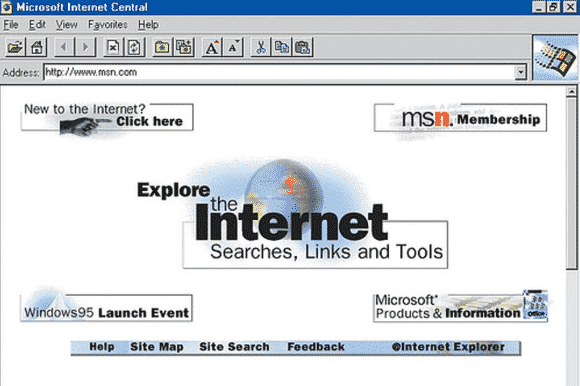
    The death of Microsoft Internet Explorer will probably be celebrated as the death of a tyrant by some PC users. Can it be that we’ve suffered for a full 20 years with good ol’ “Internet Exploder?” Designed as a competitor to Netscape—Netscape!—back in 1995, IE once boasted market share of over 90 percent, and as recently as 2009 still had a share of over 60 percent.

    The dramatic rise of Chrome and, to a lesser extent, Safari killed IE, but the death blow has been delivered by Microsoft itself. While some of its code is still buried inside the guts of Windows 10, IE is effectively no more, replaced by Microsoft Edge—which was developed entirely separately from IE—as the default Windows browser. Microsoft has already announced restricted support plans for IE and will sunset it along with older versions of Windows.

    Next on life support: Firefox.

  • Mozilla Ends Marketing & Further Development of Firefox OS for Smartphone

    Mozilla Ends Marketing & Further Development of Firefox OS for Smartphone

    The buzz is real! Mozilla is putting an end to the development of Firefox OS for smartphone. 

    Following rumours and tweets in the social media, Techcrunch has published a post that confirms that Firefox OS will no longer be developed for smartphones. This unwillingness of Mozilla to continue their quest for mobile phone democracy which let you have an open, web-based framework that anyone could work with, instead of closed platforms and apps was triggered due to the team’s inability to deliver “best user experience possible”, the statement reads.

    “We are proud of the benefits Firefox OS added to the Web platform and will continue to experiment with the user experience across connected devices. We will build everything we do as a genuine open source project, focused on user experience first and build tools to enable the ecosystem to grow.

    Firefox OS proved the flexibility of the Web, scaling from low-end smartphones all the way up to HD TVs. However, we weren’t able to offer the best user experience possible and so we will stop offering Firefox OS smartphones through carrier channels.

    We’ll share more on our work and new experiments across connected devices soon.”

    Although the mobile OS was massively use in some part of Africa and South America, mostly because of its price, the brand was unable to maintain their stand in the smartphone market with other cheaper alternatives emerging from every corners of the world.

    However, Mozilla has maintained that they are still willing to “experiment” with the software on smart devices — they just won’t be the kind of devices that make phone calls.


  • How to Stop New Versions of Mozilla Firefox from Hanging and Lagging

    How to Stop New Versions of Mozilla Firefox from Hanging and Lagging

    COMMENT: If you find your Firefox very disappointing and even considering a change, EwtNet is offering you something that might keep you longer on the Mozilla internet browser.

    Is your Firefox lagging, hanging or extremely slow to start?

    Are you currently thinking of quitting Firefox for good? Here is something that might help you change your mind.

    Statistics by W3school shows that Mozilla Firefox has only an average of 28.2% overall desktop users in 2013 while Google Chrome in the same year had an overall average of 52.6% desktop users. Comparing the browsers stats in 2010 Mozilla Firefox comes up with an upper hand with 46.4% of overall desktop users, while Google Chrome can only boast of 15.9%. Meaning that Firefox has lost 18.2 of it’s users to Google Chrome and other browsers since 2010.

    If you are the next Mozilla faithful who is planning to Jump ship due to the slow response of your browser, resetting Firefox might change everything.

    The reset feature fixes many issues by restoring Firefox to its factory default state while saving your essential information like bookmarks and open tabs. All of your Firefox settings and personal information are stored in a profile folder. The reset feature works by creating a new profile folder for you while saving your important data.

    Resetting Firefox will remove your Extensions and themes, website-specific preferences, search engines, download history, DOM storage, security settings, download actions, plugin settings, toolbar customizations, user styles and social features.

    How to Reset Firefox to It’s Default State

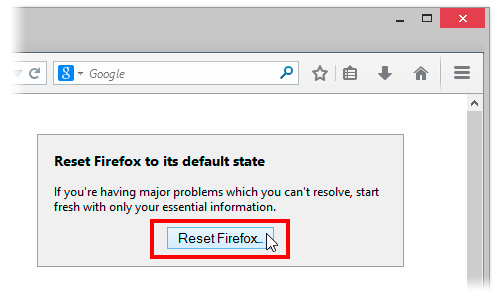
    Resetting Firefox can be done through the Troubleshooting information page.

    1. Click the menu button New Fx Menu and then click help Help-29 .
    2. From the Help menu choose Troubleshooting Information.
    3. Click the Reset Firefox button in the upper-right corner of the Troubleshooting Information page.Reset 29 Lin
    4. To continue, click Reset Firefox in the confirmation window that opens.
    5. Firefox will close and be reset. When it’s done, a window will list the information that was imported. Click Finish and Firefox will open.

    Another way of accessing the Troubleshooting Information page  is by entering about:support in your address bar. Hit enter to bring up the troubleshooting information page. Follow step 3-5 above to reset your browser.

    What if Resetting Does Not Work

    If after resetting your browser you still find Firefox lazying about, you might consider doing any of the following:

    • Start Firefox in safe mode to see if there are any changes.
    • Disable all plugins and extensions  one-by-one to see if any took up a lot of memory usage. Firefox memory usage sometimes can reach over 400 Mb
    • If your browser often lag while watching YouTube videos, try installing a freeware program called Firemin which apparently stops memory leaks when used to launch Firefox.
    If none of this worked, the ultimate solution is to wipe Firefox clean from your computer and installing a fresh copy of the application.

    Note: It is essential to print these steps or view them in another browser.

    1. Download the latest Desktop version of Firefox from http://www.mozilla.org and save the setup file to your computer.
    2. After the download finishes, close all Firefox windows (click Exit from the Firefox or File menu).
    3. Delete the Firefox installation folder, which is located in one of these locations, by default:

    Windows:

     
    C:Program FilesMozilla Firefox 
    C:Program Files (x86)Mozilla Firefox

    Mac:

    Delete Firefox from the Applications folder.

    Linux:

    If you installed Firefox with the distro-based package manager, you should use the same way to uninstall it – see

    Install Firefox on Linux

    . If you downloaded and installed the binary package from the

    Firefox download page

    , simply remove the folder firefox in your home directory.
    1. Now, go ahead and reinstall Firefox:
    2. – Double-click the downloaded installation file and go through the steps of the installation wizard.

    – Once the wizard is finished, choose to directly open Firefox after clicking the Finish button

    If you have a lot of Bookmarks you wish to preserve, there is nothing to fear. You can Export Firefox bookmarks to an HTML file to back up or transfer bookmarks and restore them whenever you want to.

  • Mozilla Firefox 23 Proved Flawless as IE Woes Continue

    Mozilla Firefox 23 Proved Flawless as IE Woes Continue

    In  a browser reliability test, the recent versions of Google’s Chrome and Mozilla’s Firefox are measurably less prone to crashes and errors than Microsoft’s Internet Explorer 10, a new analysis by applications testing firm Sauce Labs has found.

    If this looks like another stick to beat Microsoft’s browser with, it is worth pointing out that the firm’s study of around 55 million tests run using the Selenium platform found that all browsers showed extremely low levels of errors, in the order of 0.12 percent or lower for the “worst” performer, Apple’s Safari 6.

    On the same scale, Opera 12 scored 0.08 percent, IE10 at 0.05 percent, Chrome 27 under 0.02 percent, with Firefox was so low it effectively achieved a remarkable zero, that is to say no errors at all. IE lagged its main rivals but at levels that were already extremely low.

    As interesting as the reliability figures was the level of improvement shown by these recent versions, some only months or even weeks old.



    Internet Explorer 6 (released in 2001 with XP) and 7 (2007) had previously been the worst performers on 0.3 percent each, behind Firefox on Opera 10 (2009) and Firefox 7 (2011) and IE8 (2009) on just under 0.25 percent. It is remarkable that all of these are still used by small percentages of global browser users, but they are also aging software vulnerable to issues more serious than how often they might crash.

    “Half of the browser versions we analyzed had error rates lower than 0.07 percent. That’s pretty low, and suggests that browsers are getting more reliable as more versions come out,” said Luren Nguyen of Sauce Labs.

    Despite lagging slightly, IE had also shown major improvement over time.

    “Microsoft has really been pushing their new version of Internet Explorer as the most modern and high-performing version of IE. You’ve may have seen their nostalgia-tinged IE 10 commercial. The data we have on browser error rates suggests that their claims may have quite a bit of merit,” she said.

    The absolute level of errors in these tests is an imperfect way to measure browser reliability some might argue (can the errors be proved to be the browser’s fault and not the testing suite’s?), but the comparative measurement won’t be coincidence. Errors, which usually result in a crash of some kind, are caused by bugs in the browser code.

    Do error rates really matter? Only when they occur, which seems to be rarely these days.Credit: pcword.com

  • How to Enable/Disable JavaScript in Mozilla Firefox

    How to Enable/Disable JavaScript in Mozilla Firefox

    The introduction of mozilla firefox 23 has seen the option to disable or enable javascript removed from the primary user interface. Alex Limi earlier explained the reason behind this decision, citing user protection as their major reason.

    Most sites these days that aren’t just displaying content will fail in interesting& mysterious ways if you don’t have JavaScript enabled. For the general population, Firefox will appear broken.-Alex Limi

    A Back Door


    Well, the good news is that firefox actually left us a
    back door: the option was not entirely removed from the browser, it was hidden from the primary user interface as part of an effort to simplify the Firefox options set and to protect users from unintentionally damaging their Firefox browser.

    Show me the Way

    You can enable or disable your javascript in mozilla firefox by either using the about:config interface or through the use of add-ons.

    Using about:config Interface

    • Enter about:config in your address bar
    • Click “I’ll be careful, I promise”
    • In the search bar just at the top of the page, search for “javascript.enabled” (without quotes).
    • Right click on the result named “javascript.enabled” and click “Toggle”. 

    JavaScript is now disabled for your browser, to re-enable javascript, simply repeat the above steps.

    Using Add-ons

    The No-Script add-on will help you manage javascript setting for each page you visit or you can download the QuickJava add-on to quickly (one click for all) enable or disable javascript in your browser.

  • Mozilla released Firefox 16.0.1

    Mozilla released Firefox 16.0.1

    Mozilla released Firefox 16.0.1 on Thursday in order to fix a publicly disclosed vulnerability and three other security flaws identified after the release of Firefox 16.

    Mozilla pulled down Firefox 16 from its website on Wednesday, one day after its release, because of a vulnerability that potentially allowed malicious Web pages to read the URLs of other websites accessed by visiting users. Such behavior should normally be prohibited by the browser’s security mechanisms.
    The issue was publicly disclosed by security researcher Gareth Heyes on Wednesday. Heyes published proof-of-concept code that, when loaded from an arbitrary Web page, could determine the user name of a user logged into Twitter.
    Mozilla determined that the issue found by Heyes only affects Firefox 16.0 and addressed it in Firefox 16.0.1.
    However, the new version of Firefox also fixes a separate vulnerability discovered by a Mozilla security researcher that can result in a similar behavior. In Firefox 15 and earlier versions this second security issue can also potentially lead to arbitrary code execution.
    In addition, Firefox 16.0.1 fixes two memory corruption bugs in the browser engine that can result in crashes and can potentially be exploited to execute arbitrary code. One of these bugs only affects the Android version of Firefox when running inside custom Android firmware like CyanogenMod.
    Thunderbird 16.0.1 and SeaMonkey 2.13.1 were also released on Thursday in order to address the same vulnerabilities that were patched in the desktop version of Firefox.

  • Mozilla pulls new Firefox version over security concerns

    Mozilla pulls new Firefox version over security concerns

    Less than a day after Mozilla released Firefox version 16 to the public, the browser had to be pulled from the Web over security concerns.

    hacker

    “Mozilla is aware of a security vulnerability in the current release version of Firefox,” Michael Coates, Mozilla’s director of security assurance, explained in a blog. “We are actively working on a fix and plan to ship updates [Thursday]. Firefox version 15 is unaffected.”
    According to Coates, the vulnerability could allow a malicious website to capture a person’s Web history, which could be subsequently used for mischief.

    “At this time we have no indication that this vulnerability is currently being exploited in the wild,” Coates wrote.
    Coates did not note when Mozilla became aware of the new vulnerability, or how it was discovered. Notes from a Mozilla meeting yesterday, however, show that the company was aware of it by 11 a.m. PT Wednesday, when it told developers that a “chemspill” — Mozilla’s term for an emergency update — was necessary.

    In a precautionary move, download versions of Firefox 16 have been removed from Mozilla’s installer page. Mozilla expects an updated version of Firefox that addresses the security vulnerability to be available Thursday.
    While Mozilla has taken down Firefox 16 from its website, the security-challenged version of the browser is still available on the Internet. For example, Yahoo is flogging Firefox 16 at its website and through ads in Google search results.
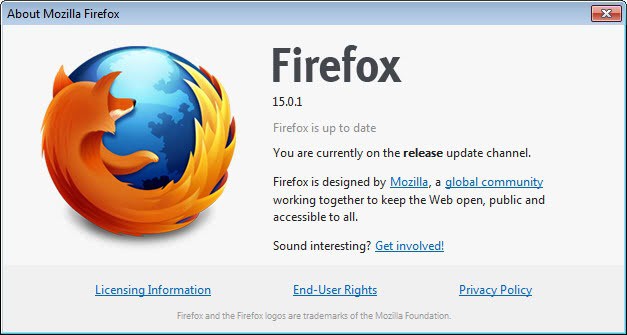
    If you have Firefox 16 on your computer, it will automatically be updated with the new version when it’s available. If you’re feeling squeamish about having Firefox 16 on your machine, Mozilla recommends that you downgrade your Firefox version to the 15.0.1 release of the software.
    While the version of Firefox 16 released Tuesday missed one vulnerability, it addressed a number of others including memory corruption and memory safety hazards, a buffer overflow bug and a spoofing and script-injection flaw.
    Update: Mozilla released Firefox 16.0.1 on Thursday, which fixes these security flaws. Read the report on this new version of Firefox.

  • Firefox 16 arrives with a raft of critical fixes

    Firefox 16 arrives with a raft of critical fixes

    Shortly after Firefox regained its No. 2 position in the browser arena, Mozilla on Tuesday unleashed the next version of its popular open source browser complete with fixes for numerous critical vulnerabilities

    Holes associated with a full 14 security advisories were closed in the new Firefox 16, in fact, 11 of them rated “critical.”
    Also notable about Firefox 16 are features including a new developer toolbar, early Web app support, preliminary VoiceOver support in the Mac OS X version, and a new Reader Mode in the Android version.
    ‘A growing set of novel features’
    Among the vulnerabilities fixed by Firefox 16 are memory corruption and memory safety hazards, a buffer overflow bug, and a spoofing and script-injection flaw.
    Most were also corrected in Thunderbird 16 and SeaMonkey 2.13, both of which were released on Tuesday as well, in addition to being backported to the business-oriented Extended Support Release (ESR) versions of Firefox and Thunderbird.

    With initial support for Web apps in the desktop Windows, Mac, and Linux versions of Firefox 16, meanwhile, developers can now begin building self-contained versions of their websites that are installed by the user, can run offline, and “don’t always require the chrome of a browser window,” Mozilla explains. Web apps also “have access to a growing set of novel features, such as synchronizing across all of a user’s devices,” it adds.

    Eventually, Web apps will be distributed through the forthcoming Mozilla Marketplace.
    ‘Removes all the clutter’
    Mac users will find that preliminary support for the VoiceOver screen reader is now turned on by default in Firefox 16, while new features in the Android version include a Safari-like Reader Mode that “removes all the clutter from Web pages and shows you only what you want to read in a minimalist UI,” as Firefox Mobile developer Lucas Rocha explained in a blog post this summer.
    Also new on the Android side are the ability to use a “Share” menu item to send tabs to other devices through the “Firefox Sync” option and a feature designed to ensure that malicious “tel: URLs” crafted to wipe the phone can no longer be opened.
    Ready to give the latest and greatest Firefox a try for yourself? It’s now available as a free download in desktop and mobile versions on the Mozilla site.

  • Firefox 15.0.1 Fixes Bug That Exposed Websites Visited in Private Browsing Mode

    Firefox 15.0.1 Fixes Bug That Exposed Websites Visited in Private Browsing Mode

    Mozilla released Firefox 15.0.1 on Thursday in order to fix a bug that potentially exposed the websites visited by users while in “Private Browsing” mode. The goal of the “Private Browsing” mode is to enable Firefox users to surf the Web without leaving any traces of the visited websites behind.
    According to a support article on Mozilla’s website, while running in Private Browsing mode the browser shouldn’t save visited pages, form and search bar entries, passwords, download entries, cookies, or temporary Internet files, which are collectively known as cached Web content.
    The cached Web content consists of images, script files and other resources downloaded automatically by the browser from visited websites. These files are saved and loaded directly from the disk when a Web page is revisited in order to decrease the page’s overall loading time.
    The bug addressed in Firefox 15.0.1 caused temporary Internet files to be saved inside the browser’s disk cache instead of its memory cache when browsing in private mode. Unlike the disk cache, the memory cache is automatically cleared when the browsing session is terminated.
    Because temporary files are saved inside the cache together with their original URLs, they can expose what websites users visited while the browser was running in Private Browsing mode.
    According to a discussion on Mozilla’s Firefox bug tracker, the bug was introduced in Firefox 15.0, but was also present in development builds of Firefox 16, 17 and 18.
    Users should be aware that when upgrading from Firefox 15.0 to Firefox 15.0.1, the temporary files already stored in the browser’s disk cache are not automatically removed.
    While in Private Browsing mode, Firefox 15.0.1 will no longer create temporary files on the disk, but the files already created because of the Firefox 15.0 bug will persist until manually removed.
    Instructions on how to clear the entire Internet cache in Firefox are described in a support article on Mozilla’s website.
    Users who want to review their disk cache entries can type about:cache in the browser’s address bar and click on the “List Cache Entries” link from “Disk cache device” section.

  • Firefox 15 Beta Tackles Memory Leaks

    Firefox 15 Beta Tackles Memory Leaks

    Mozilla has released a beta version of the next version of its Firefox browser with better memory management and significant speed improvements. “Firefox 15 prevents most memory leaks caused by add-ons, including Firebug,” Nicholas Nethercote writes in a Mozilla blog. Firebug is a Firefox add-on for debugging web pages. “For many users with add-ons installed, this will significantly reduce Firefox’s memory consumption, without requiring upgrades to those add-ons,” he adds. “For those users, Firefox 15 is likely to be faster (sometimes drastically so) and less likely to crash, especially if they have multiple add-ons installed and/or keep Firefox running for a long time between restarts.” Nethercote explains that add-on memory leaks are caused by “zombie compartments,” where information from web pages is stored and remains after you close a page or depart from it. Firefox 15 cleans out those compartments, a move that its developers weren’t entirely sure would work. Much criticism has been leveled at Firefox since its inception over its piggish memory practices, but in recent months it has made great strides in its memory management. Last November, for instance, it put SpiderMonkey, the Javascript engine used by the browser, on a diet. And in May, it announced its campaign to plug memory leaks in add-ons.


    In addition to better memory management, Firefox 15 also supports theOpus audio format. The format, which can be played directly in Firefox 15, offers better compression formats like MP3, Ogg, or AAC; is good for both music and speech; can dynamically adjust bitrate, audio bandwidth and coding delay; and supports both interactive and prerecorded applications. “We think Opus is an incredible new format for web audio,” Timothy Terriberry writes in a Mozilla blog. “We’re working hard to convince other browsers to adopt it, to break the logjam over a common

    format.” The “prime time” version of Firefox 15 is scheduled for avaiability August 28.  

  • The Arrival Of Firefox 14 Beta with an Extra Shot of Security

    The Arrival Of Firefox 14 Beta with an Extra Shot of Security

    Mozilla’s new Firefox 13 browser may have just barely landed on users’ PCs, but already forward-looking fans can check out the beta version of Firefox 14–and the Aurora version of Firefox 15, too.
    Most notable in Firefox 14 are new security features that “make it easier for users to control their Web experience,” according to the official announcement late last week on the Mozilla blog.
    Several new features in the upcoming version of this popular free and open source browser are designed to make life better for users, in fact. The final version isn’t expected until July, but here’s a rundown of some key improvements you can expect.

    1. HTTPS by Default

    In the new Firefox 14 beta, HTTPS is enabled by default for Google searches to help protect users “from network infrastructure that may gather data, modify or censor search results,” Mozilla explained. This feature also stops third-party sites from gathering search data when you click on items on a search results page. “We look forward to supporting additional search engines as they enable SSL searches,” Mozilla wrote.

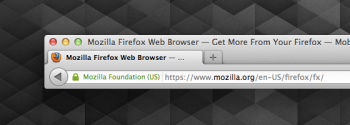
    For sites with an EV certificate, Firefox 14 displays a green lock icon and the site owner’s name (Click image to enlarge.)2. A New ‘Red Flag’

    Also included in the latest Firefox beta is a new way to display the verified identity of a website in the browser’s Awesome Bar, or URL field. Specifically, a globe icon positioned next to the domain indicates a site not using SSL encryption, while sites with SSL encryption include a lock icon and show “https.” Sites that have an Extended Validation (EV) certificate, meanwhile, are indicated by a green lock icon and include the name of the site owner. Sites with mixed http and https content show a gray triangle icon as a warning. Bottom line: a quick visual guide to the security level of the site you’re visiting, making “spoofing” of secure sites much more difficult.

    3. More Control Over Plug-ins

    The upcoming Firefox 14 lets users control how plug-ins like Flash and Quicktime play through a new feature that can add a “play” button to all plug-in content; users can then simply click “play” to begin viewing immediately. “Future releases will include more specific customizations and a robust interface; for now, you can experiment with the feature by selecting plugins.click_to_play to ‘true’ in about:config,” Mozilla explained.

    4. Better Lion Support

    For Mac users, Firefox 14 now offers native full-screen support of OS X Lion 10.7, providing “a richer and more immersive browsing experience,” as Mozilla puts it.

    5. URL Auto-Complete

    Last but not least, Firefox 14’s Awesome Bar now auto-completes URL domains as you type them, potentially making the process quicker than ever.
    There are also a few key new features for developers in the Firefox 14 beta, including a pointer lock API and pseudo class lock.
    And what of Firefox 15? The Aurora version of that software is now available as well. The most notable new addition there is native PDF support–a feature Google’s competing Chrome browser has had for some time.
    Neither of these new browser releases is designed for production purposes, of course, but if you’re interested in checking them out, they’re both available as free downloads for Windows, Linux, and Mac. Firefox 14 beta can be found in Mozilla’s beta channel; the early Firefox 15 is on the Aurora page.

    Important Notice: Tweet this article with the bookmark social media share below to stand a chance to win an ipad or start making money with your twitter account (it works only with your twitter account and the more articles you tweet the more you stand a chance to win an Ipad)

  • Reasons to Download Firefox 13

    Reasons to Download Firefox 13

    Between its use of SPDY by default and speed gains through Mozilla’s “Project Snappy,” Firefox 13 has been generating excitement for some time already. Now, the final version of the software is here at last.

    Mozilla on Tuesday launched this latest version of its popular free and open source browser, which comes packed with numerous significant new features that promise to make life better for users in myriad ways.
    If you already use Firefox, this new update will likely be on its way to you automatically through Mozilla’s now nearly silent update process, which debuted in the Windows version of Firefox 12.

    If you’ve been using something else to browse the Web, though, this would be a great time to give Firefox a fresh look. The video below offers an overview of what’s new, but here are a few key reasons why Firefox 13 is well worth checking out.
    1. Speed
    Though SPDY has been included in Mozilla’s browser since Firefox 11, Firefox 13 marks the first time it’s been enabled by default. Designed as a successor to HTTP, SPDY reduces the amount of time it takes for websites to load, so “you will notice faster page load times on sites that support SPDY networking, like Google and Twitter,” according to today’s official announcement on the Mozilla blog.
    2. Security
    SPDY also delivers a boost in security to Firefox 13 thanks to the fact that it encrypts all communication with SSL so as to make browsing more secure.
    3. A New Home
    Those of us who have been using Firefox for some time will notice a freshly redesigned home page in version 13. Now included, for example, are icons at the bottom of the page that provide easy access to bookmarks, history, settings, add-ons, downloads, and sync preferences via one-click shortcuts.
    http://www.youtube.com/embed/HRp4a_24cp8?feature=player_embedded
    4. A New Tab Experience
    Firefox 13 also offers a better experience when you open a new tab, similar in many ways to how Google’s Chrome browser does it. Specifically, you’ll see thumbnails of your most recently and frequently visited sites. The software also lets you customize the New Tab page by adding or removing thumbnails based on the pages you visit most.
    5. More Speed
    I wrote last month about Mozilla’s “Project Snappy,” and several key improvements from that effort combine to give Firefox 13 yet more speed. For example, when restoring a browsing session, Firefox first loads the tab you are currently viewing, then it loads background tabs on demand when you click them. “It’s an improvement that makes Firefox start faster and use less memory,” Mozilla explains.
    Also resulting from Project Snappy are an improved mechanism for reducing Firefox’s memory usage, a faster “first paint” when the browser is launched, and several other improvements.
    6. It Speaks Your Language
    Last but not least, Firefox 13 adds support for the Khmer language, making the browser accessible to an additional 15 million users around the globe. Firefox is now available in more than 85 languages.
    Want to see the full release notes for Firefox 13? They’re available on the Mozilla site. Want to give the software a try? It’s a free download for Windows, Linux, or Mac.

    Important Notice: Tweet this article with the bookmark social media share below to stand a chance to win an ipad or start making money with your twitter account (it works only with your twitter account and the more articles you tweet the more you stand a chance to win an Ipad)

  • How to configure Firefox address bar with Search Engines

    How to configure Firefox address bar with Search Engines

    Your Firefox address bar can not only be used for opening websites but also for searching as well. Yes, you can configure the Firefox address bar with various search engines like Google, Yahoo, Microsoft’s Live, and Wikipedia etc.
    By default, whenever you type anything in address bar and hit enter or press the GO button, Firefox checks whether the entered string is valid address or not. If it’s a valid address Firefox tries to load corresponding site for you. Now, if the entered string is an invalid URL, it will be submitted to Google Search and search results are returned.

    What if you want to change the Default search engine? Of course, Google is everybody’s first choice search but having said that it depends on person to person. Or, if you have Google Toolbar (that provides inbuilt google search box) installed then you may want to configure the address bar with some other Search Engine.
    The following steps will guide you how to configure your Firefox address bar with Search Engines of your choice.
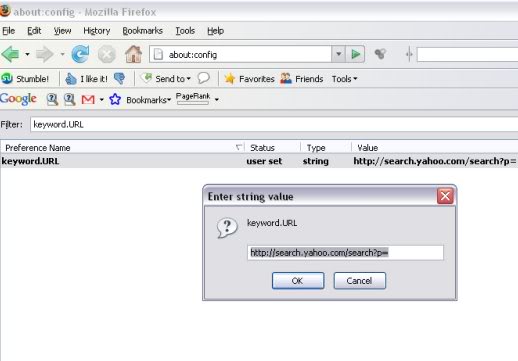
    1- Open Mozilla Firefox and type in the address bar about:config.
    2- Next type keyword.URL in the Filter box which is appeared after the first step is completed successfully. As you type the above text, the long list will be trimmed down to one line. (You will see only 1 entry (keyword.URL) under the Preference Name section)
    3- Now right click that single entry and select modify. A box will appear. Refer the image given below.
    4- Choose your Search Engine type and accordingly enter the string value of various Search Engines given below.
    5- There is no 5th step.
    Enjoy!!!

    List of Various Search Engines is as follows:-
    (Copy any of the below strings and paste it into the box that appear in STEP 3 above)
    Default Google Search

    http://www.google.co.in/search?btnG=Google+Search&q=

    Google Search with I’m Feeling Lucky

    http://www.google.co.in/search?btnI=I%27m+Feeling+Lucky&q=

    Yahoo search

    http://search.yahoo.com/search?p=

    Microsoft’s Live Search

    http://search.live.com/results.aspx?q=

    Wikipedia
    http://en.wikipedia.org/wiki/Special:Search?fulltext=Search&search=