Out of over 500 million Twitter users, only 30% can boast of knowing their way around Twitter main website without clicking. Though the new Twitter interface is pretty much like the old one, using keyboard shortcuts could prove useful when you want to perform a quick task.
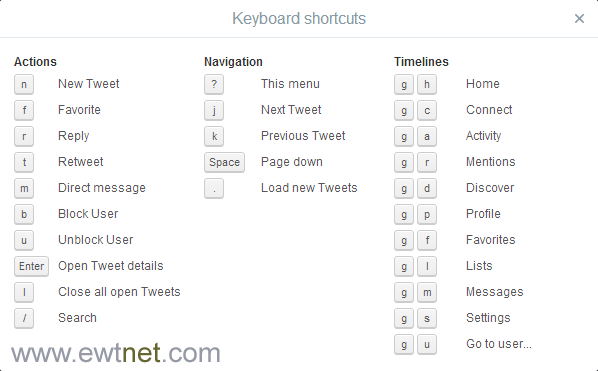
If you use the main Twitter website, we can help you out with some seriously useful keyboard shortcuts. Whether it’s navigational tricks or keyboard actions, these handy shortcuts will save you tons of time.
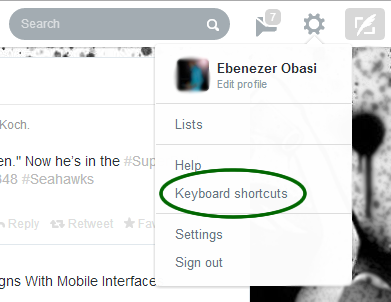
To view the complete list of keyboard shortcuts from your Twitter account at any time. Click on the Gear Icon on the menu bar and select Keyboard shortcuts.
Ofcours, everyone wants to navigate more fluently on skype while using a computer but not everyone knows it’s “hotkeys”. The use of keyboard shortcuts helps you navigate easily and save time while using the VoIP service.
“It makes you a Ninja” but unfortunately, not everyone knows how to setup this all important keyboard shortcuts. In this tutorial, I’m going to take you on a walk-through on how to setup and personalize your keyboard shortcut for skype.
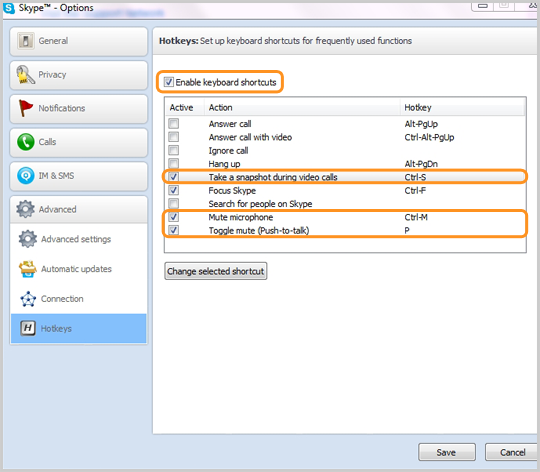
#1. Enabling Keyboard Shortcut in Skype
These are keyboard shortcuts for when you want to:
Answer a call
Answer a call with video
Ignore a call
End a call
Take a snapshot during video calls
Focus on Skype
Search for people on Skype
Mute your microphone
Toggle mute (Push-to-talk)
Switch view
If you have already enabled keyboard shortcut for your skype skip this part, otherwise:
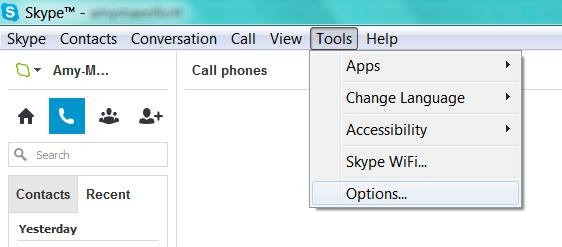
Locate tools on your skype interface
Click on options
At the bottom of the list, click on the advance tab and
Select hotkeys (is represented with
Check the box next to “Enable keyboard shortcuts.” Do not close the window.
Check the actions you want to enable hotkeys for.
#2. Personalize your Keyboard Shortcuts
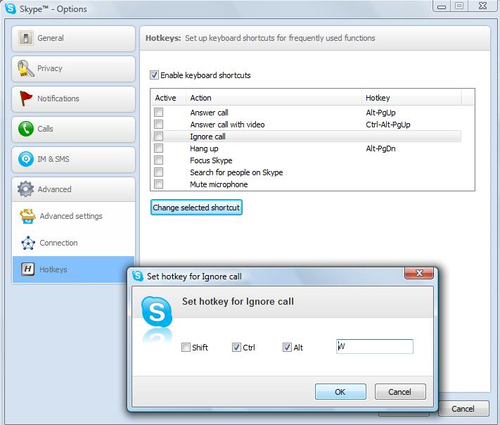
In the “hotkey” window you will find a couple of hotkey commands already set up, but you can personalize all the actions with shortcuts of your own preference.
Simply click on the check box next to an action,
Click on Change selected shortcut
Add your own shortcut key sequence into a pop-up window.
The number of shortcuts you want to setup depends on you, Avoid using complex key combination that will be difficult for you to remember, I suggest using hotkey commands that you’re already familiar with, e.g., “Control” + “F” for search. Once you’ve personalized the hotkeys to your taste, click “Save” at the bottom of the window.