Tag: malware

  • Best Antivirus for Android: What to Look Out For

    Best Antivirus for Android: What to Look Out For

    The importance of an antivirus app for your Android phone cannot be overstated. The Android platform, being the most widely used mobile operating system globally, attracts some serious malware and cyber threats. An antivirus app acts as a crucial defense mechanism, providing comprehensive protection against various forms of malicious software that can compromise your personal data, financial information, and overall device functionality.

    To ensure the safety of your Android smartphones or tablets, it’s crucial to keep its software updated to the latest version. Each new Android release enhances security, and monthly security updates address newly discovered vulnerabilities.

    However, these updates and upgrades won’t always be immediately available and most manufacturers need additional time to adapt and test these updates to avoid compatibility issues with their devices and software.

    The waiting period for these updates can range from a few weeks to several months, and many Android phones stop receiving OS upgrades after two years, and some never get monthly security updates. This is where Android antivirus apps become essential.

    Choosing the Best Android Antivirus Apps

    Choosing the Best Android Antivirus Apps

    Key features to look for in Android antivirus apps include anti-theft mechanisms, app advisors to help you choose safe apps, Wi-Fi security scanners, and app locks requiring passcodes for specific apps.

    The primary function of any antivirus is to protect your device from malware. Look for an antivirus that offers real-time protection and scans apps and files for malicious content. It should be able to detect and eliminate various types of malware, including viruses, spyware, ransomware, and phishing attempts.

    Cyber threats are constantly evolving, and so should your antivirus software. Choose an antivirus that provides regular updates to its virus database and app itself. This ensures that your device is protected against the latest threats and vulnerabilities.

    Android antivirus apps come in three pricing models: free, paid, and freemium.

    • Freemium apps offer a basic set of features for free, with the option to upgrade to a premium version for full functionality. These free antivirus software for Android mobile phone versions often come with ads.
    • Paid apps provide comprehensive protection and typically cost between $15 and $30 annually. Some also offer super-premium tiers with additional services like VPNs or identity theft protection.

    The Best Antivirus for Android Phones

    The Best Antivirus for Android Phones

    The best Android antivirus apps not only protect against malicious apps and malware but also offer features that help prevent fraud and identity theft. These apps include privacy and anti-theft features, with some offering additional security tools like VPNs or password managers. Norton, Bitdefender, and Kaspersky are some of the best antivirus for Android phones.

    Here are the top-rated Android antivirus apps:

    1. Bitdefender Mobile Security – comes with top-notch malware protection, minimal system impact, and useful features like app lock and Wi-Fi scanner.
    2. Norton Mobile Security – offers flawless malware detection and an intuitive design with the unique App Advisor feature.
    3. Avast Mobile Security – when it comes to performance, Avast antivirus provides good malware protection with minimal system overhead and additional anti-theft features.
    4. Lookout Security & Antivirus – for identity protection, Lookout offers a clean interface and identity protection features. Although its malware protection is less certain.
    5. McAfee Mobile Security – gives you decent malware protection and useful free features but lacks some previously included functions.
    6. Google Play Protect – is the best free antivirus, pre-installed on most Android devices but with limited features and subpar malware protection.

    Check out the full review on Best Free Antivirus Application for Android Devices

  • Half of all Android devices vulnerable to malware due to outdated software

    Half of all Android devices vulnerable to malware due to outdated software

    android malware Outdated software is the weak spot of Android phones, according to a security firm’s recent study that finds more than half of the Android-powered devices checked have unpatched vulnerabilities, putting their users at risk of mobile malware.

    Duo Security, a Michigan-based company whose investors include Google, gathered data from more than 20,000 Android devices around the world that loaded its free app, X-Ray, released two months ago. Unlike traditional mobile antivirus software that scans for known malware, X-Ray scans Android devices to see whether they have unpatched vulnerabilities that may put them at risk.

    The firm found that more than half of Android devices worldwide have unpatched vulnerabilities that could be exploited by rogue apps. The X-Ray FAQ explains that a number of such vulnerabilities have been discovered in the core Android platform, affecting nearly all Android devices. Even more are found in manufacturer-specific extensions that may affect a smaller subset of Android users.

    “Yes, it’s a scary number, but it exemplifies how important expedient patching is to mobile security and how poorly the industry (carriers, device manufacturers, etc.) has performed thus far,” says Jon Oberheide, CTO at Duo Security, in the company’s blog posting about its research. “We feel this is actually a fairly conservative estimate based on our preliminary results, the current set of vulnerabilities detected by X-Ray, and the current distribution of Android versions globally.” Oberheide was recently named one of Forbes’ “30 under 30” for his Android security research.

    Carriers are very conservative in rolling out patches to fix vulnerabilities in the Android platform, users’ mobile devices often remain vulnerable for months and even years,” Oberheide adds.
    android malwareApple releases software patches for its iOS software regularly and users have immediate access to any updates, but the nature of Android means that carriers and device manufactures hold the key when it comes to updating phones. Sometimes Android updates are not rolled out to all phones in order to entice users to buy newer devices.
    If you’re one of those people running an older version of Android, make sure to take extra precaution when installing apps or browsing the Web on your device. Never install apps from sources you don’t trust, and take some time to grab a mobile security app like Lookout, TrustGo, or Norton Mobile Security. While you may not be able to close the holes in the OS itself, you can at least prevent apps that use these exploits from getting onto your device.
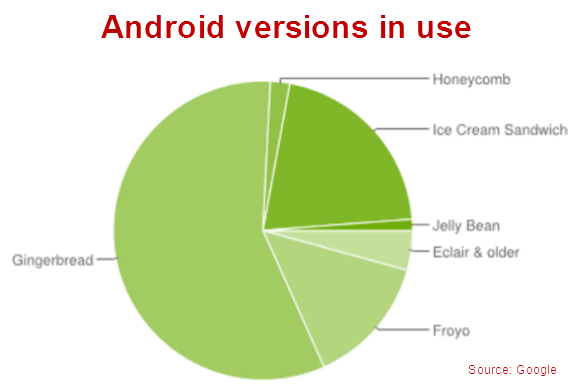
    More than 500 million Android devices are activated, according to Google’s own stats, and the majority of them (57 percent) run on Gingerbread (2.3.X), a version introduced in late 2010, while only 1.2 percent run on the latest Jelly Bean (4.1) update. Just under 20 percent of Android devices run older versions of Android, dating back to 2009.
    android versionsPost Credit: techhive.com

  • Your PC may come with malware pre-installed

    Your PC may come with malware pre-installed


    It is rare to find a new PC that doesn’t come with additional bells and whistles in addition to the operating system itself. The “bloatware” that PC vendors add on often includes useful tools like third-party security software. It seems, though, that some PCs also come with something more insidious—pre-installed malware. Microsoft researchers investigating counterfeit software in China were stunned to find that brand new systems being booted for the first time ever were already compromised with botnet malware right out of the box. Microsoft has filed a computer fraud suit against a Web domain registered to a Chinese businessman.
    The suit alleges that the Nitol malware on the new PCs points the compromised systems to 3322.org. Microsoft believes the site is a major hub of malware and malicious online activity. Microsoft claims that site in question hosts Nitol, as well as 500 other types of malware. A Washington Post report states that it’s the largest single repository of malicious software ever encountered by Microsoft.

    Most users—particularly most users of the Microsoft Windows operating systems—are aware of the many online threats. They’ve been conditioned to install antimalware and other security software, and update it frequently to ensure it can detect and block the latest, emerging threats. It’s a problem, though, if the PC is already compromised with malware before the antimalware software is even installed or enabled. Part of the concern lies in how the pre-installed malware works, or how deeply embedded it is. Most malware can still be identified and removed by security software after the fact. However, malware threats that are planted at the kernel level of the operating system, or in the PC BIOS operate at a level that is too deep, and can avoid detection by most antimalware tools.
    Malicious software is big business, and the criminals running the business are often quite clever and innovative when it comes to finding new ways to spread it. Planting malware in PCs, smartphones, or tablets before they’re even purchased and unboxed is certainly one way to go about it.
    What can you do then to defend against these threats? For starters, buy your PC, tablet, or smartphone hardware from established, respected vendors. If you buy an HP, Dell, Acer, Sony, or other such brand name PC the odds of it being compromised with pre-installed malware out of the box are pretty low. If you buy an Apple iPad, Google Nexus 7, or Amazon Kindle Fire you will most likely get a device free of malware infections. But, if you go bargain shopping online and buy a PC or knock-off tablet from a shady, unknown site the risk is higher.
    Regardless, don’t assume that just because your PC or mobile device is brand new that it must be safe and free from malware. And, you might not want to trust the pre-installed security software, either, since you can’t verify that it’s legitimate and free from malware itself. Make sure you install a reliable cross-device security tool to detect and identify malware that may already be present.