Tag: Mobile Apps

  • Instagram now bigger than Twitter with 300 Million Users

    Instagram now bigger than Twitter with 300 Million Users

    Instagram has reached over 300 million active users, a tremendous milestone for the company. Across the abundance of users, there are roughly about 70 million photos shared each day, accompanied by 2.5 billion “likes.”

    Since March, the active user count for Instagram has grown over 100 million. Quite fast and quite good indeed. This also makes Instagram now more popular than Twitter; only amassing to 284 million active users a month, it’s market cap being around $23 million. Why this detail? Because Instagram was acquired by Facebook back in April 2012 for only $1 billion.

    More than 70% of Instagram’s users are outside of the U.S., and across the network the users have shared over 30 billion photos.

    “We’re seeing a lot of people coming in the fashion world, a lot of people coming in, in the youthful teens world, and a lot of people internationally as well,” 

    CEO Kevin Systrom said in an interview with CNBC. Can Instagram keep up with this change of pace? “That’s the big challenge for me and my team going forward,” he said. One way Mr. Systrom aims to do so is to make it easier than ever for people to find new content they would love and more and more people to follow to keep updated with said-content. “There are photos pouring in from everywhere in the world. If you’re interested in really eclectic topics, I guarantee you there are accounts that are related to that. So we need to make sure to connect you with the content that matters most to you.

    There is more to the announcements by Instagram than just the 300 million user marker. To help combat spam on their app, they are rolling out a verification badge to be displayed on the profiles of celebrities, athletes, brands and other user types, to help ensure the majority of users know they’re connecting with the real person behind the account. Instagram also said it was planning to remove all “spammy” accounts from the service to improve the app for everyone.

    The removal of spam is required whilst Instagram ramps up in popularity and usage. Mr. Systrom said that Instagram doesn’t aim to compete with tech companies in their advertising platform (which is another major reason for the removal of the spam), but to compete against print and television ads – something you don’t really hear in the comparison of online ad competitors.

    We are selling brand advertising that shifts perceptions, for instance like Chobani,” said Systrom.

    Chobani did a really wonderful yogurt campaign on Instagram to shift perceptions away from the fact that they were just yogurt. And they had a 7 point incremental lift on shifting that perception through a brand advertisement on Instagram. That’s the type of thing you typically see in a magazine or on TV. If you look at those markets, they are very, very large. And I think that’s what we’re going after. So you can see where we’re headed.

    Though Instagram has outnumbered Twitter in active users, they still have a long while to catch up to the company in revenue terms; which was $365 million in the last quarter. “I think it’s hard to compare Twitter and Instagram,” he said. “Twitter has a more mature business. They’re public. We’ve just started monetizing. We have a lot to prove before we’re, you know, worth many billions of dollars,

    When asked if he felt like he wasted billions on the Facebook acquisition, Kevin Systrom denied, saying he doesn’t think of it that way, and that he has Facebook to thank for the intense growth of the company.

    sources:
    CNBC
    Google News
    blog.theadvocate.com (image)

    What do you think of the good news Instagram has released? Leave a comment below.
  • You can now Add Friends by Username in Telegram Messaging App

    You can now Add Friends by Username in Telegram Messaging App

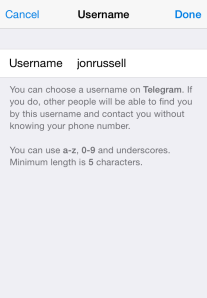
    The Telegram Messaging App, the security-focused messaging app, now lets you add friends without necessarily knowing their phone number (see the step-by-step guide on how to add a username in Telegram). An update to the iOS and Android apps today has introduced the option to register a a username, although all users must still bind their account to a phone number.

    The advantage of a username is that you can share your contact details for Telegram without revealing your phone number, thus safeguarding some level of privacy.

    Usernames must be a minimum of five characters — so you can’t make up for losing out on a one-letter Twitter handle here — and can contain letters, numbers and underscores.

    You are also free to change your alias, so long as the new one is not already taken.

    That’s not quite all from this Telegram update. The company has also taken a leaf out of Snapchat’s book with a new feature that lets users ‘Tap and Hold to View’ photos, video and voice messages that are sent with a self-destructing timer. Prior to this update, Telegram users had to tap on media to load it.

    Importantly, Telegram has now amended said self-destructing timer for media so that it only begins once the content has been opened. That means that photos, videos, etc do not self-destruct before being read.

    Founded by the brothers behind Russian social network VK, Telegram launched in October 2013 with a promise to make mobile messaging more secure. The service gained some serious momentum after Facebook agree to buy WhatsApp, when it clocked 8 million downloads in a matter of days, primarily from users concerned with Facebook’s approach to user data.

    Earlier this year, Telegram revealed that it has 35 million monthly active users, 15 million of whom use it daily. Co-founder Pavel Durov confirmed to TechCrunch that, as of March 2014, more than 18 billion messages were received by users of the service per month.

    Those stats are far smaller than WhatsApp — which has over half a billion monthly users — and others, but they are impressive for such a new entrant in the messaging space.

  • Roughly 1000 Transactions Made with Apple Pay Were Logged Twice in Customer Accounts

    Roughly 1000 Transactions Made with Apple Pay Were Logged Twice in Customer Accounts

    Roughly 1000 transactions were made with Apple. Some Bank of America customers have been double-charged for purchases made with Apple Pay, the payment system Apple launched on Monday.

    Roughly 1,000 transactions made with Apple Pay were logged twice in customer accounts, said Tara Burke, a spokeswoman with Bank of America, which is one of the largest U.S. banks and was an Apple Pay launch partner.

    “We apologize for the inconvenience and are correcting the problem,” said Burke.

    The duplicate transactions should be removed by the end of Wednesday.

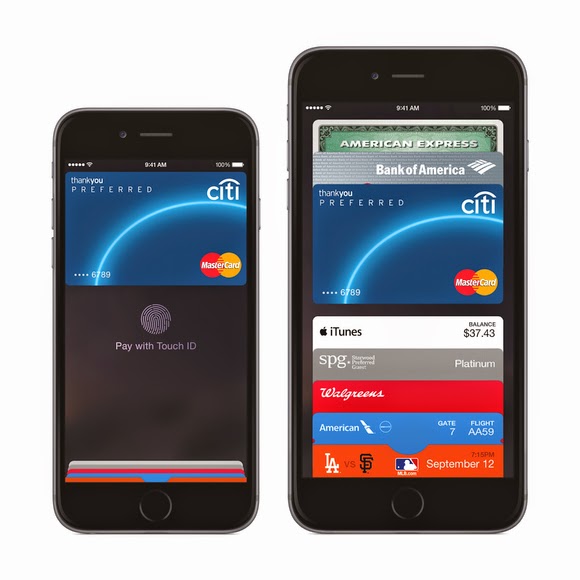
    Apple Pay utilizes a secure chip inside Apple’s new iPhone 6 that enables the phone to emulate an NFC (near field communications) payment card. When the Apple Pay app is loaded with a customer’s credit or debit card, payments can be made at NFC terminals by bringing the phone close to the terminal.

    Roughly 1000 Transactions. The system is being positioned as easier and more secure than current payment cards because the card number is not passed to the retailer’s terminal. Instead, a substitute number called a token is offered to the merchant, which sends it on to the card issuer for approval.

    The token can only be used once, so if it’s stolen it should prove useless to cyberattackers. It’s tied to the actual card number deeper in the financial services network, further away from the retailer terminals that have been the target of so much hacking recently.

    Apple Pay is compatible with existing NFC payment terminals, which can be found in around 200,000 shops and taxis across the U.S.

    Originally posted on PC World

  • Launcher 8 for Android Review: Turn your Android into Windows 8

    Launcher 8 for Android Review: Turn your Android into Windows 8

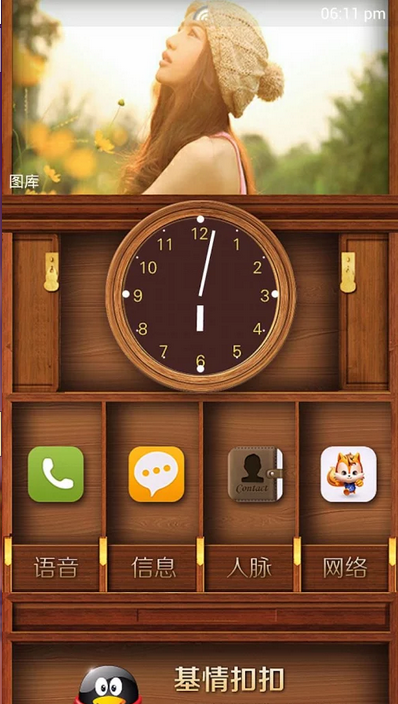
    Launcher 8 (fake wp8) is a Android application that turns your boring, dull Android home UI into a fluid, mock-up UI of that of a Windows 8 phone! Developed by the QiHang Team, this application has been downloaded over 5 million+ times, and really turns your Android into something else! Now, I (Jake) of EWT will go into detail of my review and thoughts of the app!  

    Installation

    The installation process is very easy, smooth, and simple. Just download from the Google Play Store, install, and press your home button and set Launcher 8 as your main action for “Home.” Wa-la! There’s no hacking, modding, or rooting needed to install this application.   Installation is very simple, great work there.  

    New UI & Logics

    The app’s added new ui and logics is very helpful and astonishing! After installation, you instantly have the power of an Android phone with the look and options of a Windows phone. There are many themes users have made that you can effortlessly download and install, or you can customize yourself!   You can add/edit/remove tiles, re-size, and even use special “widget” tiles that are included in the app. You can bind your installed applications to tiles, change individual tile background colors, names, and more. This application truly gives you control over everything! It also is programmed to work with certain apps, such as SMS, Phone, and Facebook – showing the number of new notifications, missed calls, and new SMS messages. It’s very convenient! The app also has a setting for a customizable lockscreen, which completely overrides the default Android lock screen – you can add custom backgrounds, change the layout, etc to it and add a password. The only problem with the lockscreen in this app is if you had a lock screen set up on the default Android UI before this installation, applications like “Camera” and such will not work correctly, and pressing your Home button will try and take you to the original Android lock screen rather than the Launcher 8 lock screen.    You can, however, fix this by simply going to System Settings -> Security -> Passwords and turning off any locks, pins, etc. You can set your lockscreen pin for Launcher 8 in the Launcher 8 settings.  

    Effect on Battery

    One of the main, if not the only, downside to this application is the power consumption. You’ll be loosing more and more phone battery life every 2 to 3 minutes even if you’re in idle mode. However, the QiHang team brags that their Pro version is more power efficient. This application really does take a toll on your battery life, my Android has been on the charger more then often since the install.   

    Final Thoughts

    I believe this is a great Android application for those who want the power of Android/Google products but the look and feel of a Windows product. It has great potential, and I believe it would be even more widely popular if the free version was less battery-consuming. It could use some literary work (the grammar for settings are poor), and some of the ads are a bit mis-placed and annoying, but all around it’s pretty amazing and I’m sure to never uninstall it!  

    Final Rating

    Price When Rated:

    $2.58Free

    Our Rating: 4.5

    Requires Android:

    2.0 and up

    Content Rating:

    Low Maturity This is a great app, and does everything that it says in it’s description. However, there is room for improvement and the battery drainage is what really kills it from being 5 stars.

    Pros:

    • Complete customization; Easy to customize to your liking
    • Downloadable themes; For those living in the fast lane
    • Beautiful and fluid; Includes smart widgets and is beautiful with live tiles
    • Free with minimal ads, and many options and settings to configure

    Cons:

    • Drains the battery of your device VERY fastly
    • Lockscreen issues occur if you have the default Android lockscreen already set up
    • Can be a bit laggy once you first boot up your Android

    Download So, what are you waiting for? Go download Launcher 8 now, you won’t regret it!

  • Smartphones Infographic: How smart has it made you?

    Smartphones Infographic: How smart has it made you?

    Half a century ago people are quite content with wearing analogue watches, playing cards and penning down notes. Post offices and analogue cameras, was doing great as well. Today people pay $335 to put a computer around their wrist. Board and ‘card’ games has long been replaced by more advance console video games, penning down and sending mails are now done on smartphones and even more strangely, people, now wear computers in place of glasses.

    smartphones
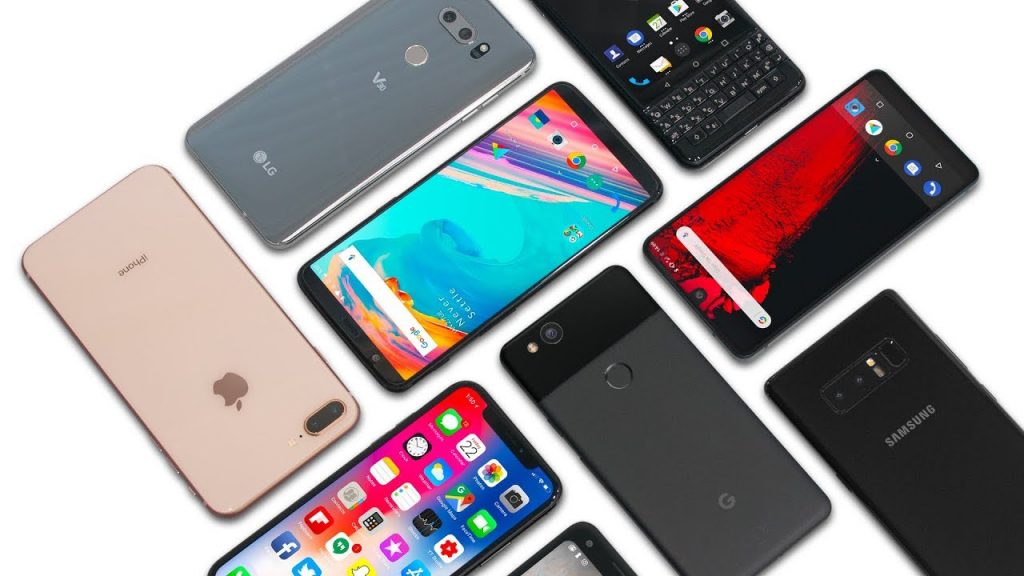
    Smartphones now comes in all shapes and sizes.

    The modern generation is very reliant on technology and computing to perform daily activities. This is to be expected as there is a sense of urgency associated with our present dispensation. However, smartphones usage is not dominated by business, finance, health or other categories you might expect. The leading category is the gaming category. Every now and then, someone has their face buried in their smartphone, no doubt, playing some of the most terrifying Android horror games in darkness. Indeed, smart devices are made, so we can become dull.

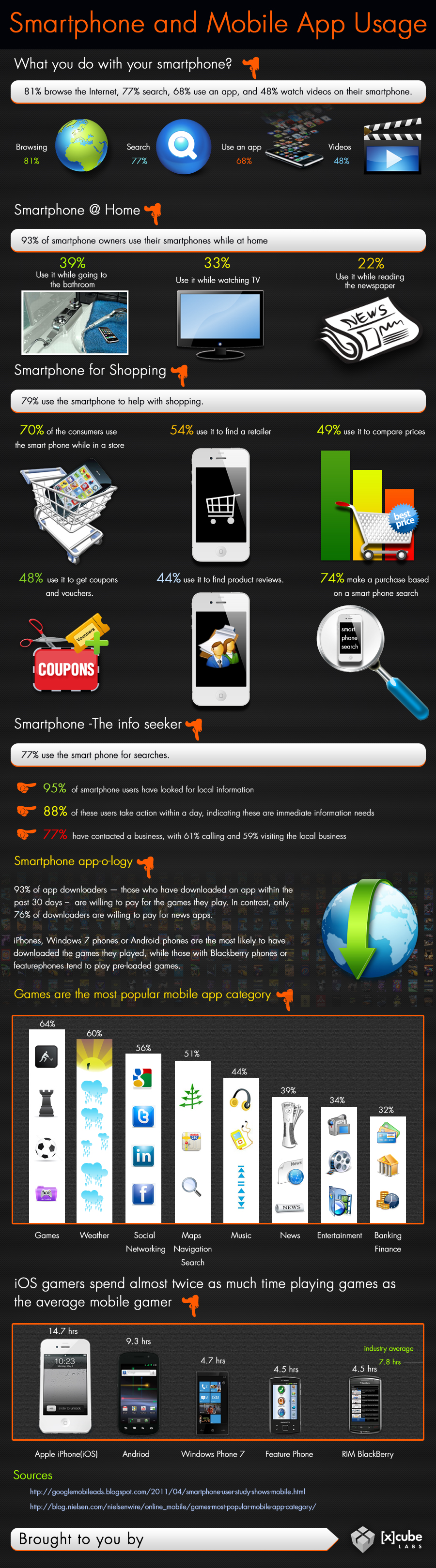
    Smartphones And Mobile App Usage – Infographic

    Smart phones has come to stay, the use of applications are evolving, companies can choose to adapt or suffer the fate of Nimbuzz. Just how far can mobile computing go? The answer will depend on what you make of it.

    [Further Reading: 6 Must Have Android Apps for Science Students]

    What really makes these devices functional and so useful is the fact that several apps can be downloaded on them. These mobile apps are available through different app stores depending on the operating system of your mobile computer.

    Some examples of these apps stores are Apple store, Google Play Store, Windows marketplace etc.  Below is an infographics by Xcubelabs that will show us, how people use their smartphone on daily basis.

    Smartphone And Mobile App Usage Infographic
    Smartphone And Mobile App Usage Infographic [Image credit: Xcubeslabs ]

    Embed this Infographic on your site

    <a href="https://ewtnet.com/technology/infographics-smart-phone" title="Smartphone And Mobile App Usage - Infographic"<img src="https://ewtnet.com/wp-content/uploads/2019/02/smartphone-and-Mobile-app-usage.jpg" alt="Smartphone And Mobile App Usage Infographic" title="Smartphone And Mobile App Usage - Infographic" width="100%" height="auto" /></a><br /><a href="https://ewtnet.com/technology/infographics-smart-phone">Smartphone And Mobile App Usage - Infographic</a><br>

    Smartphones play a lot of roles in your day-to-day life affair. I think most people simply prefer to relax to play a couple of games at the end of a hectic day. So going back to my initial question; I think smartphones has indeed made us smarter.

    Feel free to argue, though. The comment section is open to everyone.