Yesterday, I was all set to pay my home Reliance phone bill online over the internet, when suddenly an awful thought crossed my mind. IS THIS RELIANCE WEBSITE REALLY SECURE? I WILL CERTAINLY NOT GO BY THE COMPANY BRAND NAME. HOW DO I VERIFY IT?
Then after an hour research, I gain knowledge of how to recognize and avoid fraudulent websites. I am going to summarize that right here right now.
1.) What is Fraudulent website?
Fake websites are an Internet problem that attempt to take advantage of unsuspecting users. They are websites that fraudulently impersonate or imitate the website of a legitimate company or financial institution. Whether you are searching for bank information or researching a paper, remember that the Internet is not regulated and that the website you are looking at may be fraudulent.
The most common type of fraudulent website is the ‘Spoof’ website. The spoof website is often designed to look the like a legitimate website of a real institution (such as a bank). It will use the same graphics, composition and layout, and sometimes even the same URL in the text.
Spoof websites are designed to fool the user into disclosing their personal information willingly. Before disclosing any personal information, you should attempt to verify that it is not a spoofed website.
2.) How to recognise fraudulent “spoof” websites?
When trying to spot a fraudulent website, look for the following:
- A real-world presence like an address, phone number and email contact.
- By right-clicking a hyperlink and selecting ‘properties’ you can verify the link’s true destination.
- Check for spelling and grammatical errors, and statements that are against common sense.
- Be wary of sites that ask for personal details in full where they usually request fewer details ought to be sufficient.
3.) To check the security certificate
Always verify the security certificate issued to a site before submitting any personal information. Before you submit any personal information, ensure that you are indeed on the website you intend to be on.
In Internet Explorer, you can do this by checking the yellow lock icon (PADLOCK) on the status bar.
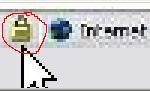

In Firefox, you can do this by checking the yellow lock icon (PADLOCK) on the address bar.

(This PADLOCK icon signifies that the website uses encryption to help protect any sensitive personal information- credit card number, Social Security number, payment details, passwords- that you enter)
If the lock is closed, then the site uses encryption.
Also, make sure that the Address bar shows “https://” at the beginning of the address URL and includes the website “domain name” in the address.
- Double-click on the lock icon that should appear on the bottom right corner of your browser window.
- Check the certificate to see that the name after Issued to: matches the website you are visiting.
- If there is no lock icon, it means the webpage is not secure.
- If the name does not match the issued to on the security certificate, then you may be on a spoofed site. You should proceed with caution.
4.) Use an online link checker
You can check whether a website is fraudulent or not is by using an online URL checker. One checker is called LinkScanner.
- Go to LinkScanner Online
- Enter the suspicious URL in box
- Click the Scan button
LinkScanner will then report whether the site contains malware or not.
5.) Use a phishing filter
Another tool that can help with recognizing fraudulent websites is with a phishing filter, which is designed to warn or block you from potentially harmful websites.
It’s available in Windows Internet Explorer 7 for Windows XP Service Pack 2 (SP2), and Windows Vista.
Firefox 2 or later also contains a built-in Phishing Protection feature that warns you of suspected Web forgeries, and offers to take you directly to a search page so you can find the real Web site you were looking for.
You can test the Phishing Protection feature by browsing to this test site.
Hope, these informations are helpful enough to prevent any one from getting trapped by these Fraudulent Websites. Next time you enter any secured zone, make sure it protects your privacy by following the above mentioned methods and steps.
What security measures you take when you fall upon a suspicious webpage?