Microsoft has again painted a grim picture for customers who remain on Windows XP and Office 2003 after it ends support for the old OS and suite in early April, but it’s unclear if the company is succeeding in its campaign to convince holdouts to upgrade.
In a blog post on Wednesday, Microsoft reiterated that consumers and businesses that stick with the products past the April 8 deadline will face severe security risks and be unable to take advantage of technical advances. “Computers currently running Windows XP and Office 2003 won’t stop working on April 9, but over time security and performance will be affected,” reads the post.
Specifically, Windows XP PCs won’t be able to run many “newer” applications or work with new hardware due to unsupported drivers. Additionally, PCs running the OS will become easy prey to malware, because Microsoft won’t release new security updates and bug fixes for it, nor offer support services and technical content updates. Office 2003, on the other hand, can’t provide modern mobility and cloud capabilities, according to Microsoft.
Unsurprisingly the solution the company offers is for customers to adopt Windows 8.1 and Office 365, while acknowledging that in most instances PCs running Windows XP lack the hardware specs to run the new OS. “The majority of PCs running Windows XP are not capable of upgrading to Windows 8.1 due to the age of the hardware,” the post reads.
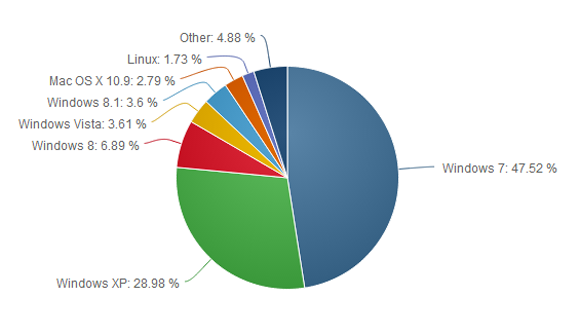
Windows XP remains quite popular despite its age—it was first released in 2001. According to the latest figures from NetApplications, Windows XP has an almost 30 percent share of the desktop OS market, second only to Windows 7 which has about 47 percent. By contrast, Windows 8, which started shipping in October 2012, and its 8.1 update, released a year later, have a combined share of about 10.6 percent.
Windows 8 and its update have drawn criticism for their touch-optimized interface and a series of disruptive bugs. Microsoft is promising another update for the spring that will make the OS friendlier for mouse-and-keyboard users, but the impression in the marketplace is that Microsoft has struggled to get Windows 8 right. The most pessimistic critics have likened Windows 8 to the disastrous Windows Vista, released in 2007 and generally panned.
Office 2003 is also still heavily used. According to the results of a Forrester Research survey released in October, Office 2003 was in use in 28 percent of businesses polled, behind Office 2007 (51 percent) and Office 2010 (85 percent). The latest version of Office—called Office 2013 when sold via traditional perpetual license and Office 365 when sold via an annual subscription—was at the time used in 22 percent of companies polled, and with a slower adoption than Office 2010 at a comparable stage of release, according to Forrester.
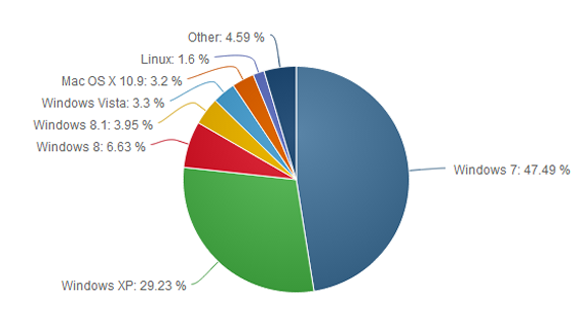
Microsoft is almost ready to put Windows XP out to pasture, but the popular operating system refuses to die. The latest worldwide numbers from Net Applications show Windows XP market share actually grew by 0.25 percentage points in January, compared to the month previous.
This is the first time Windows XP has gained in market share based on Net Applications’ freely available data, which reaches back to 2009.
We’ve dropped a line to Net Applications to see if the company has any explanation about why Windows XP might have bounced back in January, and we’ll update this story accordingly.
With the deadline for Windows XP’s end of life looming in April, it’s tempting to see the old system’s apparent resurgence as an embarrassment for Microsoft as Windows 8 stumbles in the market place. But could there be another, less sinister reason for the bounce?
In December 2013, the browser usage numbers from Net Applications showed Windows XP with a 28.98 market share. But check out the next pie chart…
The surge may not be real
First, if you look at the top of Net Applications’ report for January 2014 it says, “This report contains preview data that has NOT been reviewed by Quality Assurance.” So there’s that.Also, StatCounter, a a competing metrics service, registered a 0.64 percent decline for Windows XP during the same time. So who should we believe?
Perhaps neither. There are problems with how Net Applications and StatCounter measure market share. Both companies rely on browser hits to determine OS popularity, so the companies are really counting the number of Windows XP, Vista, 7, 8, and 8.1 computers that go online during a given month.
That method may be generally accurate since today’s PCs (including Windows XP machines) are essentially web browsing machines. But when you’re looking at modest gains for a particular flavor of Windows, relying on browser data may not be perfectly trustworthy.
One month later, Windows XP shows a modest surge, possibly explained by people digging out old machines from closets to work on them before the XPocalypse.
But what if it’s true?
Assuming Net Applications is spot on, it’s also easy to see why a bunch of Windows XP machines might suddenly go online. As I wrote above, Windows XP’s end of life is just around the corner on April 8. When that happens, Microsoft will cease delivering security patches for the system.
So enterprises and small businesses may be yanking old Windows XP machines out of closets, warehouses, and backrooms as they take stock of company hardware and any data stored on antiquated computers.
Factor in curious home users wondering if they can upgrade their machine to Windows 8 or install a Linux variant on their aging hardware, and it’s easy to see where the modest uptick came from.
That’s all speculation mind you, but it makes a certain amount of sense.
The XP problem
Nevertheless, it’s undeniable that Windows XP still has a massive install base, second only to Windows 7. It’s likely there will still be a huge user base for Windows XP later in 2014, and tech companies are preparing to support the system in a limited fashion after April.
To help out Windows XP users who refuse to quit, Google will support Chrome for Windows XP until April 2015. And Microsoft says Windows XP’s anti-malware engine will continue to get updates until July 14, 2015. But security software can only detect malware attacks, and won’t permanently fix any critical flaws after April 8—and there will be flaws in Windows XP, bet on it.
If you do plan on sticking with the aging OS, we’ve just published a primer on what you should do to remain as safe as possible with Windows XP. But if you’re able to quit the system, you should do so very soon.
Is longer a secret, it’s been over a decade since Windows XP came into being. It’s true, time has changed; newer technologies has been introduced, even the guys up there are already getting tired of it. Yet, I want to stick with Window XP.
What you are asking for is quite a difficult one. Microsoft has already decided to end it’s support for the OS come April, 2014 and to continue using it, will open your PC to various security vulnerability. Psst! Listen to my brief advice and implement it with caution. I really understand why you might not be able to give up your Windows XP. Your business may depend on a specialized application that won’t run on Windows 7 or 8. Or you may not be able to afford a new PC and your old one isn’t powerful enough for an upgrade. Perhaps you’re just stubborn.
Reluctantly, I’m going to advise you on protecting a Windows XP computer after Microsoft’s updates stop. But I give this advice with a warning: This is not perfect protection. You’ll be better off giving up on XP.If you absolutely can’t or won’t give up XP, consider disconnecting that particular PC from the Internet. Use it the old-fashioned way: as a truly personal computer with no connection to the outside world. Then buy another PC or a tablet for email and browsing.
If that isn’t practical, follow these suggestions to make your XP computer more secure:
Get a full security suite: A simple antivirus program won’t be enough. Buy a heavy-duty suite with a two-way firewall and exploit protection in addition to antivirus. I like Kaspersky Internet Security, but there are several solid security suites, as we found in our recent roundup.
Get a second opinion: Now that you have a powerful security suite, don’t trust it. Augment your regular antivirus program with Malwarebytes Anti-Malware Free. Run it once a week to scan for malware that your suite may have missed.
Use Firefox or Chrome: An out-of-date browser is an open door for malware, and any version of Internet Explorer that runs on XP is very out of date indeed. But the latest versions of Firefox and Chrome can still run on your machine.
Protect your browser: Scripts are a dangerous malware delivery system, and the right browser add-ins can block them. And yes, you can tell the add-ins to make exceptions and allow scripts from sites that you trust. If you use Firefox, install NoScript Security Suite. For Chrome, go with NotScripts.
And remember that eventually, the security suites and browsers will stop supporting XP, as well. This can’t go on forever.
You really, really need to dump Windows XP. No, really. Windows XP was great, and many users still love the operating system, but…it’s more than a decade old. At the rate technology evolves, that makes Windows XP a near-relic. Although it may still appear to work fine, the mantra of “if it ain’t broke, don’t fix it” doesn’t really apply to Windows XP. It’s broken in many ways, and when Microsoft officially stops supporting it next April, it really will be broken.
You don’t even need to upgrade to Windows 8. Windows 7 would be fine. Whether you or a stubborn holdout you know still needs convincing, these three reasons should do the trick.
1. Productivity
From a 10,000-foot view, Windows XP seems productive enough. It runs the applications you need it to run. It checks email. It surfs the Web. When you take a closer look, though, the newer versions of Windows have features that help you work more efficiently.
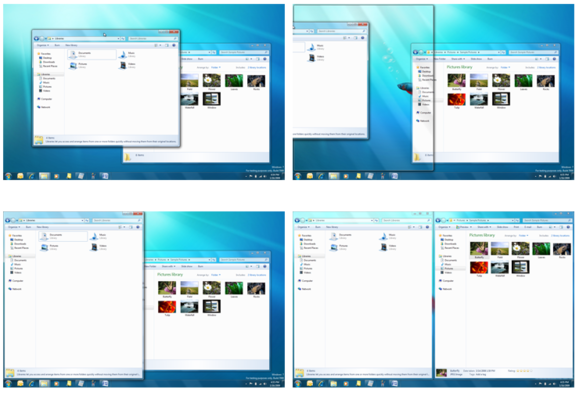
The Aero Snap feature makes moving and organizing windows simple by letting you just drag them to the edge of the display.
Aero Snap, which appeared in Windows 7, makes maximizing, minimizing, and organizing windows as simple as dragging them to the edge of the display. You can drag up to maximize, drag down to minimize, and drag to the left or right to snap the window to the respective half of the display. When you first start using Aero Snap, it seems like a novelty with little real value, but it quickly becomes second nature. After using Aero Snap for awhile, you’ll discover that it streamlines your work, and you’ll regret all the time you spent dragging windows here and there in XP.
Windows 8 has another feature that can save you even more time. File History is similar to the Time Machine function in Mac OS X. It scans your files every hour and stores copies of the incremental changes over time. If you accidentally overwrite a crucial presentation, or you decide to scrap your changes and want to go back to the way things were a few hours ago, it’s easy to restore a file from any point in the history.
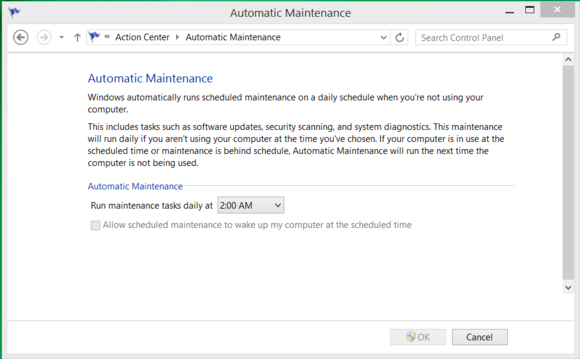
Another timesaver in Windows 8 is Automatic Maintenance. Managing the little things that keep your PC tuned and optimized—like defragmenting your storage, antimalware scans, updating the operating system, and performing diagnostic tests—can be tedious. Automatic Maintenance takes care of all of those things for you while you sleep.
Windows 8 can automate many tasks to keep your system updated and optimized.
Once you get used to the features in Windows 7 or Windows 8, you’ll wonder how you got by without them for so long.
2. New technology
Using an operating system that’s more than a decade old can also paint you into a corner when it comes to the peripherals and devices you can use with it. As new technologies are developed, they’re generally engineered with the latest operating systems in mind, and unlikely to be supported on Windows XP.
USB 3.0 is a prime example. Most USB 3.0 devices will still work—in a technical sense—with Windows XP because they’re backward-compatible. However, they will fall back to USB 2.0 compatibility and transfer data at about one-tenth of the potential speed of USB 3.0. Also note that even USB 3.0 is getting long in the tooth and will eventually be replaced by even faster technologies that Windows XP will not be able to take advantage of.
Whether you’re looking at wireless printers, Bluetooth keyboards, or 4K monitors, it will be challenging if not impossible to find drivers and support to make new technologies work with Windows XP.
3. Security
This is the big one. Windows XP is inherently more risky even now, and when Microsoft stops supporting the venerable OS next April, your PC will be virtually defenseless.
Just last week, Microsoft released a security advisory warning users about a zero-day vulnerability in Windows XP. The flaw is reportedly being actively exploited in the wild, but it doesn’t affect the newer versions of Windows.
Security experts believe that cybercriminals may already be hoarding Windows XP flaws, waiting hungrily for the expiration of Microsoft support. At that point, there will be no more Patch Tuesday security bulletins, and no patches or updates from Microsoft to address critical security concerns in Windows XP. It will be open season.
Tim Rains, director of Trustworthy Computing for Microsoft, has warned Windows XP users of another potential concern. Attackers often wait for a vendor to release a patch and then reverse-engineer it to discover the flaw and craft an exploit to take advantage of it. Once Microsoft support for Windows XP expires, malware developers will reverse-engineer Microsoft’s Windows 7 and Windows 8 patches and then verify whether those same flaws exist in Windows XP. In many cases, they will—and there will be no patch available to protect Windows XP.
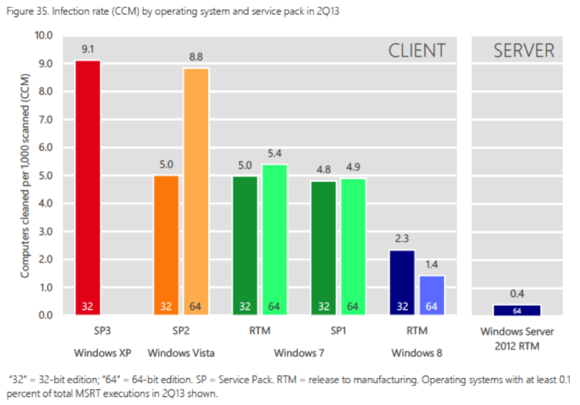
Volume 15 of the Microsoft Security Intelligence Report found that Windows XP systems were infected at more than six times the rate of those running 64-bit Windows 8.
The most recent Security Intelligence Report from Microsoft shows that when exposed to a similar volume of potential threats, Windows XP SP3 has a malware infection rate nearly double that of Windows 7, and a whopping 650 percent greater than 64-bit Windows 8. Windows XP systems are more likely to be compromised than ones running newer versions of Windows, the effects of the compromise are typically more insidious, and eradicating the threat and resolving a malware incident takes longer. It was great fun, but…
Windows XP was an awesome operating system. It was arguably the single best version in the history of the operating system. Windows 7 is a worthy successor to the Windows XP legacy, though, and Windows 8.1 is a tremendous operating system as well. Also, by clinging to Windows XP, you’re missing out on new features and technologies that could help you work more efficiently and simplify your life. Even if that doesn’t sway you, though, the reality is that Windows XP is going to be a security nightmare when support ends, and continuing to use it will be impractical—if not impossible.