Tag: telegram

  • How to Add Username in Telegram Messaging App

    How to Add Username in Telegram Messaging App

    Like Twitter, Facebook (and now, Telegram), the use of usernames makes it easier to find and locate users on the website. However, finding or adding users by username isn’t something very common among mobile messaging apps. WhatsApp allows you to add a username or moreorless, a nickname but people can neither find nor add you with this username – something privacy lovers will appreciate.

    Telegram on it’s own right is taking a different path. Since last year the company made it possible for you to add friends by username – without necessarily knowing their phone numbers – on their mobile app.

    The advantage of a username is that you can share your contact details for Telegram without revealing your phone number, thus safeguarding some level of privacy. A lot of users has been asking us how to add a username to the app. So, here is a step to step guide:

    Add Username on Telegram

    make username on telegram 1
    Tap the menu button on your Android screen.
    make username on telegram 2
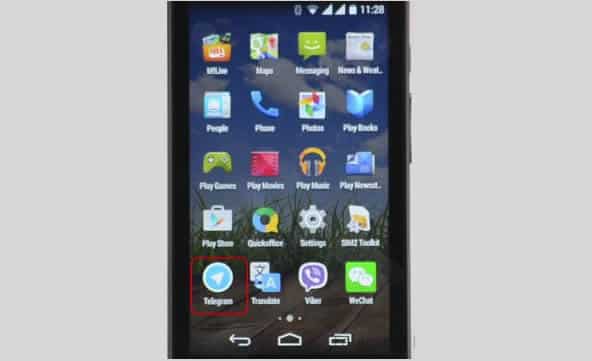
    Launch Telegram application.

    Tap the Apps button on your Android screen. Locate and launch the Telegram application.
    make username on telegram 3
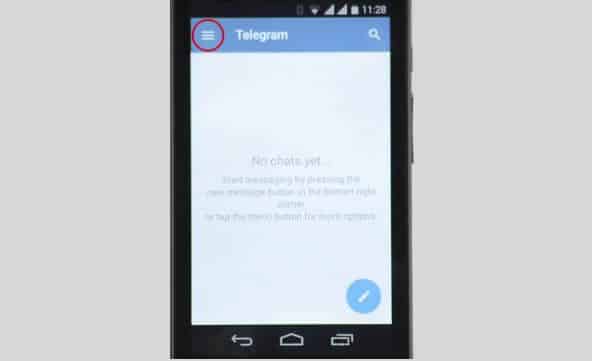
    Tap the menu icon on Telegram
    make username on telegram 4
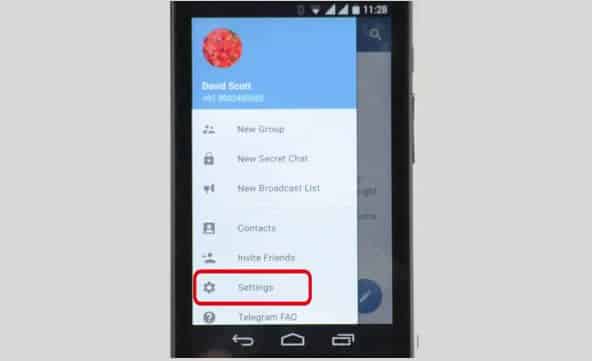
    Navigate to Settings

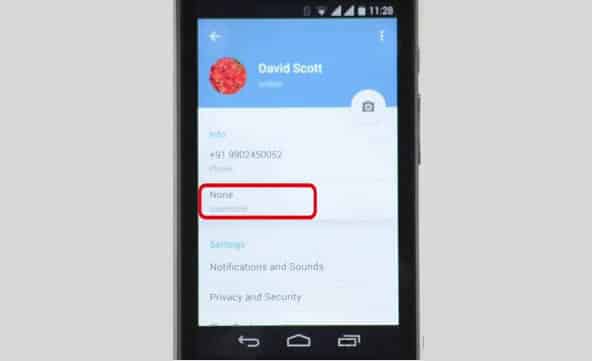
    On the Telegram app tap the menu icon (represented with three horizontal lines) and open Settings. Among other options on settings, you will find Username which is set to ‘None‘ by default.
    make username on telegram 5
    Username is set to ‘None’ by default.
    make username on telegram 6
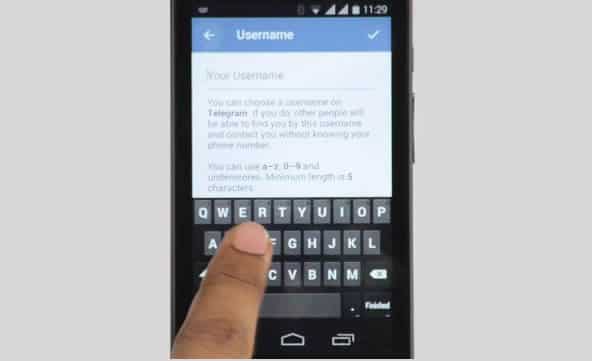
    Tap on Username.

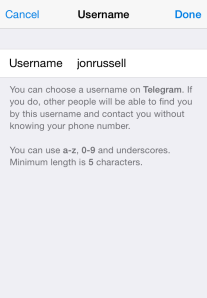
    Tapping on the Username option will open a page where you can enter or modify your username. Simply enter your desired username on the text input box.

    Usernames must be a minimum of five characters — so you can’t make up for losing out on a one-letter Twitter handle here — and can contain letters, numbers and underscores.
    make username on telegram 7
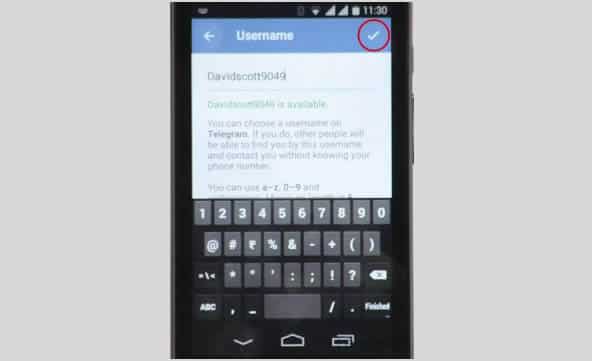
    Save your username.

    Save your new username by tapping ‘Good’ sign at the top-right side of your screen.

    You are also free to change your alias, so long as the new one is not already taken.

  • You can now Add Friends by Username in Telegram Messaging App

    You can now Add Friends by Username in Telegram Messaging App

    The Telegram Messaging App, the security-focused messaging app, now lets you add friends without necessarily knowing their phone number (see the step-by-step guide on how to add a username in Telegram). An update to the iOS and Android apps today has introduced the option to register a a username, although all users must still bind their account to a phone number.

    The advantage of a username is that you can share your contact details for Telegram without revealing your phone number, thus safeguarding some level of privacy.

    Usernames must be a minimum of five characters — so you can’t make up for losing out on a one-letter Twitter handle here — and can contain letters, numbers and underscores.

    You are also free to change your alias, so long as the new one is not already taken.

    That’s not quite all from this Telegram update. The company has also taken a leaf out of Snapchat’s book with a new feature that lets users ‘Tap and Hold to View’ photos, video and voice messages that are sent with a self-destructing timer. Prior to this update, Telegram users had to tap on media to load it.

    Importantly, Telegram has now amended said self-destructing timer for media so that it only begins once the content has been opened. That means that photos, videos, etc do not self-destruct before being read.

    Founded by the brothers behind Russian social network VK, Telegram launched in October 2013 with a promise to make mobile messaging more secure. The service gained some serious momentum after Facebook agree to buy WhatsApp, when it clocked 8 million downloads in a matter of days, primarily from users concerned with Facebook’s approach to user data.

    Earlier this year, Telegram revealed that it has 35 million monthly active users, 15 million of whom use it daily. Co-founder Pavel Durov confirmed to TechCrunch that, as of March 2014, more than 18 billion messages were received by users of the service per month.

    Those stats are far smaller than WhatsApp — which has over half a billion monthly users — and others, but they are impressive for such a new entrant in the messaging space.