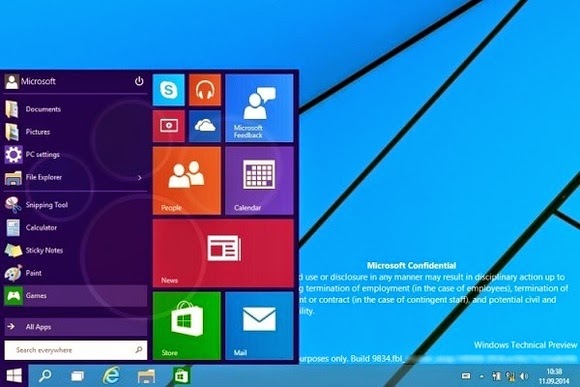
The update, codenamed Threshold and possibly called Windows 9 or just plain Windows, takes some features from Windows 8 and grafts them onto the classic desktop. While we’ve known for some time that Windows 9 will have a pop-up Start menu and the ability to run modern apps in windowed mode, the new screenshots from Computer Base and WinFuture.de give even greater detail on how things will work.
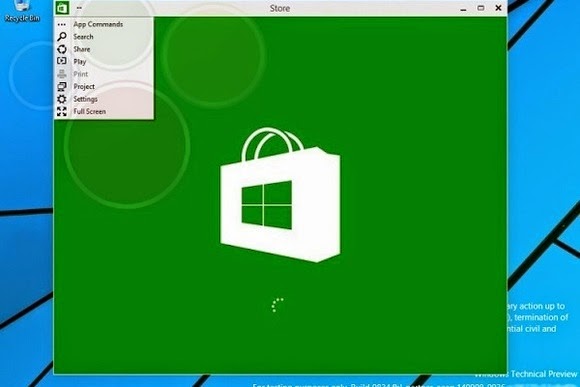
When running in windowed mode, Windows Store apps will get a button in the top-left corner. Clicking the button brings up a list of functions that previously appeared in the Charms bar, including Search, Share, Play, Project and Settings. This menu lets users switch the app to full screen mode as well.
Microsoft is also adding a few new buttons to the desktop taskbar. A search button sits immediately to the right of the Start button, followed by a button for switching between multiple desktops. The latter feature, possibly called “virtual desktops,” will let users switch between several sets of desktop apps and layouts in nod to Ubuntu Linux’s longstanding “Workspaces.”
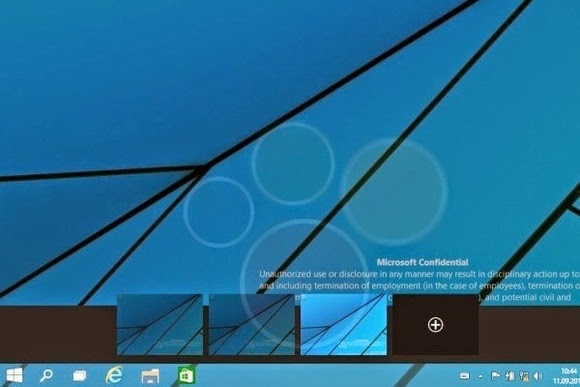
Near the right side of the taskbar, users will find a new notifications button, with a pop-up menu that will presumably show messages from Windows Store apps.
The screenshots don’t reveal any other major features, but they do give away a few more minor details. Despite rumors that the Charms bar is dead, the screenshots show that users can still bring up Charms by pointing to the upper-right corner, or bring up a recent apps list by pointing to the upper-left corner. Those options and others will be available through Taskbar and Start Menu Properties.
Of course, all of these details are subject to change as Microsoft hasn’t even released a public beta yet. The leaks likely come from Microsoft partners, who according to Neowin started receiving Windows builds a few weeks ago. A public “Technical Preview” is expected to arrive later this month or early next month.
[Via The Verge]